#discord-bots
1 messages · Page 922 of 1
 cold sonnet
 marble rampart
im back with the milk
cold sonnet
hello
marble rampart
cold sonnet
or if message.author == bot.user
i used this once
cold sonnet
it does make sense in certain situations
marble rampart
yeah i know
to see if user is same user
or if you want one user only messages in a server
 honest shoal
ohh, then py if message.author == _bot.user: continue await _ctx.send(message.content)
marble rampart
yep
marble rampart
ho
honest shoal
cold sonnet
continue if the guy is the bot
bot.user
marble rampart
lmao
honest shoal
🗿
cold sonnet
honest shoal
bot.user
the bot
honest shoal
bot.user is not bot?
its users of the bot
cold sonnet
bot.user is the literal account of your bot
 maiden fable
Lmao
honest shoal
honest shoal
ohh, then ```py
if message.author == _bot.user:
continue
await _ctx.send(...
this still worked
marble rampart
bot = your bot
message.author = mybe you bot or someone else
means:
 if message.author == _bot.user:
   # do stuff that you do if the one who snet the message is bot
 else:
  # do stuff that you do if the one who snet the message is not the bot
 await _ctx.send(message.content)
!d discord.Client.user
 unkempt canyonBOT
property user```
Represents the connected client. `None` if not logged in.just stop
 south jetty
line 155, in add
    if ctx.channel.category.name!="Open Tickets":
AttributeError: 'Ticket_Bot' object has no attribute 'channel'```what discord version you have?
cold sonnet
why is ctx a Ticket_Bot object
marble rampart
yeah why
 hoary cargo
yeah why
maiden fable
Please stop
marble rampart
what
hoary cargo
 hunter, you should stop heading in random convos and tell people to stop
south jetty
cold sonnet
why is ctx a Ticket_Bot object
    @commands.command()
    @commands.has_role("Middleman")
    async def add(ctx, member: discord.Member):
        if ctx.channel.category.name!="Open Tickets":
            return

        embed = discord.Embed(
            description=f"{member.mention} was added to the ticket {ctx.channel.mention}",
            color=0x13df13
            )

        await ctx.message.delete()
        await ctx.channel.set_permissions(member, view_channel=True)
await ctx.send(embed=embed)```Lol
south jetty
cold sonnet
self
oh I tried it before still didn't work
hoary cargo
south jetty
```py
@commands.command()
@commands.has_role("Middleman")
async def ...
 remember, inside a class self is holy and 100% required
cold sonnet
south jetty
oh I tried it before still didn't work
class methods have to have self
south jetty
hoary cargo
<:MR_uncanny_10:944645054469922908> remember, inside a class **self** is holy a...
yes I know
 hoary cargo
 wtf
wtf
marble rampart
replace async def add(ctx, member: discord.Member): with async def add(self,ctx, member: discord.Member):
iw will work
cold sonnet
pass self to the definition, not when calling it
marble rampart
it*
south jetty
i tried that already
marble rampart
wtf
cold sonnet
and it doesn't even seem like a class method
marble rampart
show me the error
cold sonnet
since you didn't type Music.node_connect() or smth
marble rampart
bruh
 junior verge
How is this possible?

import discord
from discord.ext import commands

class Whois(commands.Cog):

    def __init__(self, client):
        self.client = client

        @commands.command(aliases=['userinfo'])
        async def whois(self, ctx, member: discord.Member = None):
            member = ctx.auhor if not member else member
            roles = [role for role in member.roles]

            embed = discord.Embed(colour=member.color, timestamp=ctx.message.created_at)

            embed.set_author(name=f"User Info - {member}")
            embed.set_thumbnail(url=member.avatar_url)
            embed.set_footer(text=f"Requested by {ctx.author}", icon_url=ctx.author.avatar_url)

            embed.add_field(name="ID:", value=member.id)
            embed.add_field(name="Guild name:", value=member.display_name)

            embed.add_field(name="Created at:", value=member.created_at.strftime("%a, %#d %B %Y, %I:%M %p UTC"))
            embed.add_field(name="Joined at:", value=member.joined_at.strftime("%a, %#d %B %Y, %I:%M %p UTC"))

            embed.add_field(name=f"Roles ({len(roles)})", value=" ".join([role.mention for role in roles]))
            embed.add_field(name="Top role:", value=member.top_role.mention)

            embed.add_field(name="Daxbot", value=member.client)

            await ctx.send(embed=embed)


def setup(client):
    client.add_cog(Whois(client))
im going to get milk again
 slate swan
junior verge
How is this possible?
slate swan
junior verge
How is this possible?
you probably never loaded the cog
marble rampart
not c ya
junior verge
slate swan
you probably never loaded the cog
I 100% did
I got all my other cogs just working
I swear it's because of aliases
wait fuck me
I know why
slate swan
why
junior verge
I had 1 tab too much
cold sonnet
oh
slate swan
junior verge
```py
import discord
from discord.ext import commands
class Whois(commands.Cog)...
you could just do member = ctx.auhor if not member else member typo their and you can just do member = member or ctx.author
junior verge
slate swan
you could just do member = ctx.**auhor** if not member else member typo their an...
Ah okay ty
cold sonnet
junior verge
Pretty sure the tab was the case
if it was in the init, yes
I don't see shit on the phone
junior verge
cold sonnet
if it was in the init, yes
Yes
slate swan
no its bound to and instance if you pass self
cold sonnet
self
slate swan
so its in the cog and it becomes a method of the class
 vale sierra
import discord
from discord.ext import commands, tasks
from discord import Intents
from music import Music

import random
import aiofiles
import asyncio
bot.add_cog(Maboulax(bot))
bot.add_cog(Music(bot))

bot.load_extension("cogs.fun")
bot.load_extension("cogs.misc")
bot.load_extension("cogs.moderation")
bot.load_extension("cogs.ai")
bot.load_extension("cogs.owner")
bot.load_extension("cogs.reddit")
bot.load_extension("cogs.info")
bot.load_extension("cogs.ticket")
class Music(commands.Cog):
def __init__(self, bot):
self.bot = bot
self.song_queue = {}
asyncio.run(self.setup())
async def setup(self):
await self.bot.wait_until_ready()
for guild in self.bot.guilds:
self.song_queue[guild.id] = []
``` hello i have this error when i try to make a cog. can someone help me please ? thanks slate swan
if the method needs self yes
cold sonnet
vale sierra
```python
import discord
from discord.ext import commands, tasks
from discord im...
where for
slate swan
vale sierra
```python
import discord
from discord.ext import commands, tasks
from discord im...
show your file dir
and you can use a for loop for all of your cogs
add self!
cold sonnet
ToS
vale sierra
slate swan
and you can use a for loop for all of your cogs
i know but i want to fix this error first
slate swan
slate swan
show your file dir
^
cold sonnet
god both break ToS
vale sierra
slate swan
show your file dir
 slate swan

 desert badger
  voice_client = voice_guild.voice_client     # Update the voice_client in case it changed
RuntimeWarning: Enable tracemalloc to get the object allocation traceback
Ignoring exception in on_ready
Traceback (most recent call last):
  File "C:\Users\Niclas\AppData\Local\Programs\Python\Python39\lib\site-packages\disnake\client.py", line 531, in _run_event
    await coro(*args, **kwargs)
  File "C:\Users\Niclas\Desktop\Other\Python\NcZ Discord Bots\NcZ Music\main.py", line 67, in on_ready
    playing_song = voice_client.is_playing()    # Get is we are playing music
AttributeError: 'NoneType' object has no attribute 'is_playing'``` what does this mean / how do i fix thisdo from cogs.music import Music
slate swan
desert badger
```C:\Users\Niclas\Desktop\Other\Python\NcZ Discord Bots\NcZ Music\main.py:66: R...
voice_client is None
cold sonnet
desert badger
```C:\Users\Niclas\Desktop\Other\Python\NcZ Discord Bots\NcZ Music\main.py:66: R...
wait you're doing this on_ready
desert badger
cold sonnet
wait you're doing this on_ready
yes
slate swan
bro
cold sonnet
async def node_connect(self)
slate swan
you do know that wasnt for you right

and bro
in the parameters
async def node_connect(self):
RuntimeError: Task <Task pending name='Task-1' coro=<Music.setup() running at C:\Users\User\bot.discordmaboulax\cogs\music.py:20> cb=[_run_until_complete_cb() at C:\Users\User\AppData\Local\Programs\Python\Python38\lib\asyncio\base_events.py:180]> got Future <Future pending> attached to a different loop
 cold sonnet
wtf
slate swan
vale sierra
`RuntimeError: Task <Task pending name='Task-1' coro=<Music.setup() running at C...
why are you importing this for exactly?

bro what
vale sierra
slate swan
why are you importing this for exactly?
? the cogs ? the cog gets added before the bot is ready, this means that the bot has 'no guilds' temporarily, then none get added to the queue.
for a queue code
cold sonnet
indents

I really think learning a bit more python before this ToS breaking action would help
slate swan
vale sierra
? the cogs ? the cog gets added before the bot is ready, this means that the bot...
just use wait_until_ready ig
cold sonnet
all of them
slate swan
yes
cold sonnet
yes
vale sierra
slate swan
just use wait_until_ready ig
class Music(commands.Cog):
    def __init__(self, bot):
        self.bot = bot
        self.song_queue = {}

        asyncio.run(self.setup())

    async def setup(self):
        await self.bot.wait_until_ready()
        for guild in self.bot.guilds:
            self.song_queue[guild.id] = []
bro we dont know your reason
cold sonnet
!ytdl
unkempt canyonBOT
Per Python Discord's Rule 5, we are unable to assist with questions related to youtube-dl, pytube, or other YouTube video downloaders, as their usage violates YouTube's Terms of Service.
For reference, this usage is covered by the following clauses in YouTube's TOS, as of 2021-03-17:
The following restrictions apply to your use of the Service. You are not allowed to:

1. access, reproduce, download, distribute, transmit, broadcast, display, sell, license, alter, modify or otherwise use any part of the Service or any Content except: (a) as specifically permitted by the Service;  (b) with prior written permission from YouTube and, if applicable, the respective rights holders; or (c) as permitted by applicable law;

3. access the Service using any automated means (such as robots, botnets or scrapers) except: (a) in the case of public search engines, in accordance with YouTube’s robots.txt file; (b) with YouTube’s prior written permission; or (c) as permitted by applicable law;

9. use the Service to view or listen to Content other than for personal, non-commercial use (for example, you may not publicly screen videos or stream music from the Service)
wavelink is one of these
slate swan
vale sierra
```python
class Music(commands.Cog):
def __init__(self, bot):
self.b...
ig im not sure
vale sierra
slate swan
ig im not sure
just what is ig ?
slate swan
vale sierra
just what is ig ?
i guess
vale sierra
slate swan
i guess
ok thx
cold sonnet
put your stuff in the cog
they're all outside of it
you do that with indents
your cog is over once a line after it is one tab before it
however the f I should formulate this sentence
!indents
unkempt canyonBOT
Indentation
Indentation is leading whitespace (spaces and tabs) at the beginning of a line of code. In the case of Python, they are used to determine the grouping of statements.
Spaces should be preferred over tabs. To be clear, this is in reference to the character itself, not the keys on a keyboard. Your editor/IDE should be configured to insert spaces when the TAB key is pressed. The amount of spaces should be a multiple of 4, except optionally in the case of continuation lines.
Example
def foo():
    bar = 'baz'  # indented one level
    if bar == 'baz':
        print('ham')  # indented two levels
    return bar  # indented one level
The first line is not indented. The next two lines are indented to be inside of the function definition. They will only run when the function is called. The fourth line is indented to be inside the if statement, and will only run if the if statement evaluates to True. The fifth and last line is like the 2nd and 3rd and will always run when the function is called. It effectively closes the if statement above as no more lines can be inside the if statement below that line.
Indentation is used after:
1. Compound statements (eg. if, while, for, try, with, def, class, and their counterparts)
2. Continuation lines
More Info
1. Indentation style guide
2. Tabs or Spaces?
3. Official docs on indentation
cold sonnet
I'll never stop
slate swan
i think im just gonna go these cogs are giving me a stroke
slate swan
!ot
unkempt canyonBOT
Off-topic channel: #ot2-never-nester’s-nightmare
Please read our off-topic etiquette before participating in conversations.
cold sonnet
that's why I'm having a stroke
slate swan

cold sonnet
🙁
 manic wing
how tf am i supposed to be original when discord.py has all the good ideas
vale sierra
Error : Future <Future pending> attached to a different loop
 @commands.command()
    async def queue(self, ctx):
        if len(self.song_queue[ctx.guild.id]) == 0:
            return await ctx.send("Il n'y a actuellement aucun son dans la file d'attente.")

        embed = discord.Embed(title="File d'attente", description="", colour=0x9E21C2)
        i = 1
        for url in self.song_queue[ctx.guild.id]:
            embed.description += f"{i}) {url}\n"

            i += 1

        embed.set_footer(text="Merci de m'utiliser !")
        await ctx.send(embed=embed)
``` someone can help me pls ?does anyone have a better way on parsing a datetime obj
from datetime import datetime
b = datetime.utcnow()
a = datetime(int(b.strftime("%Y")), int(b.strftime("%m")), int(b.strftime("%d")), int(b.strftime("%H")))
d = [c for c in str(a)]
e = input("time\n")

if len(e) == 2:
    if (d[12]+d[13]) > 24:
        ...
    list(e)
    del d[12]
    del d[13]
    d.insert(12, e[0])
    d.insert(13, e[1])

elif len(e) == 1:
    if (d[12] + e) > 24:
        ...
    del d[12]
    d.insert(12, e)

else:
    ...

print(d)
i need it for a reminder command and its giving me strokes(btw this is a example)
slate swan
slate swan
does anyone have a better way on parsing a datetime obj
```py
from datetime imp...
im just trying to set a datetime obj in my db
manic wing
slate swan
does anyone have a better way on parsing a datetime obj
```py
from datetime imp...
a) what are you actually trying to do?
b) probably not so discord bot related
slate swan
manic wing
a) what are you actually trying to do?
b) probably not so discord bot related
just waiting for user input and im just waiting for an hour which im checking that it doesnt pass a day and im just gonna add to it and put it in my db and with a task just check the str of the datetime obj
vale sierra
class Music(commands.Cog):
def __init__(self, bot):
self.bot = bot
self.song_queue = {}
asyncio.run(self.setup())
async def setup(self):
await self.bot.wait_until_ready()
for guild in self.bot.guilds:
self.song_queue[guild.id] = []
#
@commands.command()
async def queue(self, ctx):
if len(self.song_queue[ctx.guild.id]) == 0:
return await ctx.send("Il n'y a actuellement aucun son dans la file d'attente.")
embed = discord.Embed(title="File d'attente", description="", colour=0x9E21C2)
i = 1
for url in self.song_queue[ctx.guild.id]:
embed.description += f"{i}) {url}\n"
i += 1
embed.set_footer(text="Merci de m'utiliser !")
await ctx.send(embed=embed)
``` have this massive error with this code : `RuntimeError: Task <Task pending name='Task-1' coro=<Music.setup() running at C:\Users\User\bot.discordmaboulax\cogs\music.py:20> cb=[_run_until_complete_cb() at C:\Users\User\AppData\Local\Programs\Python\Python38\lib\asyncio\base_events.py:180]> got Future <Future pending> attached to a different loop ` can someone help me please ? manic wing
slate swan
just waiting for user input and im just waiting for an hour which im checking th...
manic wing
slate swan
just waiting for user input and im just waiting for an hour which im checking th...
use datetime.isoformat which can be stored as an str
and you can use fromisoformat
desert badger
can anyone help me ? im trying to make a 24/7 music function and my bot just plays music for abt 30 seconds, doesnt respond anymore, leaves vc and joins after 30 seconds and plays next song
    voice_channel = client.get_channel(951871268548923465)
    voice_guild = voice_channel.guild
    voice_client = voice_guild.voice_client
    if voice_client == None:
        voice_client = await voice_channel.connect()

    music_update_channel = voice_guild.get_channel(955532581456187442)
    if music_update_channel==None:
        print("Channel not found! Exiting")
        return

    while True:
        song_list = os.listdir("./music_downloads")
        playing_song = voice_client.is_playing()

        if playing_song:
            time.sleep(1)
        else:
            if not voice_client: return
            chosen_song = random.choice(song_list)

            song_name = chosen_song.replace(".mp3", "")
            em = disnake.Embed(
                color = disnake.Color.purple()
            )
            if chosen_song.startswith("uppbeat"):
                _song_name = song_name.replace("uppbeat", "")
                em.description = f"**Now playing: {_song_name}**"
                em.set_footer(text = "Downloaded from Uppbeat")
                pass

            source = disnake.FFmpegPCMAudio(f"./music_downloads/{chosen_song}")
            time.sleep(3)
            voice_client.play(source)
            await music_update_channel.send(embed = em)
            print(f"{Fore.BLUE}{dt_string}{Fore.RESET} Now playing: {Fore.MAGENTA}{_song_name}")
why exactly? better explanation
user: 2h
# and the bot just adds 2 hours from the now obj which i want to check if the time passes a day
this will require 3 things
slate swan
manic wing
this will require 3 things
which are
desert badger
desert badger
```py
voice_channel = client.get_channel(951871268548923465)
voice_gu...
Traceback (most recent call last):
  File "C:\Users\Niclas\AppData\Local\Programs\Python\Python39\lib\site-packages\disnake\client.py", line 531, in _run_event
    await coro(*args, **kwargs)
  File "C:\Users\Niclas\Desktop\Other\Python\NcZ Discord Bots\NcZ Music\main.py", line 86, in on_ready
    voice_client.play(source)
  File "C:\Users\Niclas\AppData\Local\Programs\Python\Python39\lib\site-packages\disnake\voice_client.py", line 602, in play
    raise ClientException("Not connected to voice.")
disnake.errors.ClientException: Not connected to voice.``` when it leaves it just spits out this rq1) an instance of datetime.datetime.utcnow() instance which is the start time
2) datetime.datetime.timedelta to add to the start time instance to give the end time
3) datetime.datetime.isoformat() to store in the db and then use fromisoformat cls to check for the time being equal to the current time
junior verge
import discord
from discord.ext import commands

class Role(commands.Cog):

    def __init__(self, client):
        self.client = client

    @commands.command()
    @commands.has_permissions(manage_roles=True)
    async def role(self, ctx, member: discord.Member = None, *, role: discord.Role):
        if role.position > ctx.author.top_role.position:
            await ctx.send("You don't have permission.")
        if member == None:
            await ctx.send("Please mention a user")
        if role in member.roles:
            await member.remove_roles(role)
            await ctx.send(f"Succesfully removed {role} from {member.mention}.")
        else:
            await member.add_roles(role)
            await ctx.send(f"Succesfully given {role} to {member.mention}.")

def setup(client):
    client.add_cog(Role(client))
``` Why when I do like ``.role``, it doesn't send me `Please mention a user`alright thxs
manic wing
w h a t
slate swan
ic thx
junior verge
junior verge
```py
import discord
from discord.ext import commands
class Role(commands.Cog):...
Please
slate swan

manic wing
!e ```py
import datetime
start_time = datetime.datetime.utcnow()
finish_time = start_time + datetime.timedelta(hours=2)
iso_string = finish_time.isoformat() # to store in db | use the datetime.datetime.fromisoformat cls to return it to datetime.datetime object
print(f"{start_time = } {finish_time = } {iso_string = } {type(iso_string)}", sep="\n")```
unkempt canyonBOT
@manic wing :white_check_mark: Your eval job has completed with return code 0.
start_time = datetime.datetime(2022, 3, 21, 20, 21, 23, 997096) finish_time = datetime.datetime(2022, 3, 21, 22, 21, 23, 997096) iso_string = '2022-03-21T22:21:23.997096' <class 'str'>
just being presentable : )
slate swan

junior verge
junior verge
```py
import discord
from discord.ext import commands
class Role(commands.Cog):...
Got a idea please
manic wing
!e ```py
import datetime
start_time = datetime.datetime.utcnow()
finish_time = start_time + datetime.timedelta(hours=2)
iso_string = finish_time.isoformat() # to store in db | use the datetime.datetime.fromisoformat cls to return it to datetime.datetime object
datetime_from_iso = datetime.datetime.fromisoformat(iso_string)
print(f"{start_time = }\n{finish_time = }\n{iso_string = } {type(iso_string)}\n{datetime_from_iso = }")```
unkempt canyonBOT
@manic wing :white_check_mark: Your eval job has completed with return code 0.
001 | start_time = datetime.datetime(2022, 3, 21, 20, 23, 33, 860310)
002 | finish_time = datetime.datetime(2022, 3, 21, 22, 23, 33, 860310)
003 | iso_string = '2022-03-21T22:23:33.860310' <class 'str'>
004 | datetime_from_iso = datetime.datetime(2022, 3, 21, 22, 23, 33, 860310)
bows
slate swan
manic wing
!e ```py
import datetime
start_time = datetime.datetime.utcnow()
finish_time = ...

slate swan
say
slate swan
 river hollow
```for user in list(ctx.guild.members):
print(user)``` i have this in my...
river hollow
```for user in list(ctx.guild.members):
print(user)``` i have this in my...
why are you making a list a list?
river hollow
river hollow
```for user in list(ctx.guild.members):
print(user)``` i have this in my...
and i want that it prints all user but it only prints the name of the discord bot
slate swan
!d discord.Guild.members
unkempt canyonBOT
property members```
A list of members that belong to this guild. final iron
river hollow
and i want that it prints all user but it only prints the name of the discord bo...
final iron
river hollow
and i want that it prints all user but it only prints the name of the discord bo...
!intents
unkempt canyonBOT
Using intents in discord.py
Intents are a feature of Discord that tells the gateway exactly which events to send your bot. By default, discord.py has all intents enabled, except for the Members and Presences intents, which are needed for events such as on_member and to get members' statuses.
To enable one of these intents, you need to first go to the Discord developer portal, then to the bot page of your bot's application. Scroll down to the Privileged Gateway Intents section, then enable the intents that you need.
Next, in your bot you need to set the intents you want to connect with in the bot's constructor using the intents keyword argument, like this:
from discord import Intents
from discord.ext import commands

intents = Intents.default()
intents.members = True

bot = commands.Bot(command_prefix="!", intents=intents)
For more info about using intents, see the discord.py docs on intents, and for general information about them, see the Discord developer documentation on intents.
slate swan
im slow
river hollow
what are yall doing
final iron
@slate swan 😆
slate swan

river hollow

slate swan
river hollow
what are yall doing
my child is showing you the way
river hollow
slate swan
my child is showing you the way<:AG_ChikaStunned:739453334045589504>
ahaha
final iron
slate swan
my child is showing you the way<:AG_ChikaStunned:739453334045589504>
I am not your child 🗿
slate swan
final iron
I am not your child 🗿
you are 
final iron
Proof?
 slate swan
final iron
Proof?
slate swan
final iron
Proof?
i cant send your birth certificate
final iron
river hollow
pls help
I did
slate swan
river hollow
pls help
we already answered your question?
river hollow
final iron
I did
where
river hollow
slate swan
we already answered your question?
where
slate swan
final iron
!intents
slate swan
read the embed.
 slim ibex
!intents
unkempt canyonBOT
Using intents in discord.py
Intents are a feature of Discord that tells the gateway exactly which events to send your bot. By default, discord.py has all intents enabled, except for the Members and Presences intents, which are needed for events such as on_member and to get members' statuses.
To enable one of these intents, you need to first go to the Discord developer portal, then to the bot page of your bot's application. Scroll down to the Privileged Gateway Intents section, then enable the intents that you need.
Next, in your bot you need to set the intents you want to connect with in the bot's constructor using the intents keyword argument, like this:
from discord import Intents
from discord.ext import commands

intents = Intents.default()
intents.members = True

bot = commands.Bot(command_prefix="!", intents=intents)
For more info about using intents, see the discord.py docs on intents, and for general information about them, see the Discord developer documentation on intents.
river hollow
i cant find the Privileged Gateway Intents
slate swan
slim ibex
!intents
binds are you 50?
slate swan
river hollow
i cant find the Privileged Gateway Intents
its in ddcos
river hollow
Discord Developer Portal
Integrate your service with Discord — whether it's a bot or a game or whatever your wildest imagination can come up with.
slate swan
its in the bot tab
river hollow
i tought i have to enable
final iron
 slate swan
thank you son
river hollow
ahh
slate swan

 knotty basin
My bot isn't processing commands but the Slash ones are working perfectly, i don't have a on_message() event
slate swan
knotty basin
My bot isn't processing commands but the Slash ones are working perfectly, i don...
is it in a cog?
knotty basin
Commands or Slash commands ?
slate swan
commands
knotty basin
not all of them but ye
slate swan
show the ones that are responding
knotty basin
none of them
slate swan
then whats the problem
knotty basin
the problem is they aren't responding 
slate swan
sorry i ment not responding and show your code
slate swan
ok pls show your code
knotty basin
Dude there's like 120 files of code sorry but the bot was working perfectly fine yesterday so i'm not sure its coming from the code
slate swan
why would you have 120 files
 slate swan
do you have anything that can maybe block your code?
knotty basin
something might have broke when I started using logger lib
knotty basin
slate swan
do you have anything that can maybe block your code?
I don't think so
slate swan
@bot.command()
async def пред(ctx, member: discord.Member = None, *, reason = None):
    print(45)
    cursor.execute("""CREATE TABLE IF NOT EXISTS warning(guild BIGINT, userid BIGINT, warn INT, count INT, reasons VARCHAR);""")
    base.commit()
    print(1)

    if member is None:
        await ctx.send("Выберите участника")
        return

    if reason is None:
       cursor.execute('INSERT INTO warning(guild, userid, warn, count, reasons) VALUES(%s, %s, %s, %s, %s)', (ctx.guild.id,ctx.author.id,1,1,'Отсутствует'))
       base.commit()
       print(2222)
       cursor.execute('UPDATE warning SET warn = warn + 1 WHERE userid = %s AND guild = %s', (member.id, ctx.guild.id))
       base.commit()
       await ctx.send(f"**{member}** Выдал предупреждение {ctx.author.name} , причина ``Отсутствует``.")
    else:
       cursor.execute('INSERT INTO warning(guild, userid, warn, count, reasons) VALUES(%s, %s, %s, %s, %s)', (ctx.guild.id,ctx.author.id,1,1,reason))
       base.commit()
       cursor.execute('UPDATE warning SET warn = warn + 1 WHERE userid = %s AND guild = %s', (member.id, ctx.guild.id))
       base.commit()
        await ctx.send(f"**{member}** Выдал предупреждение {ctx.author.name} , причина {reason}.")
Nothing output excepting 45 and 1, why?
is member none?
🤔
 gaunt ice
hm
 tidal hawk
HM
slate swan
slate swan
```py
@bot.command()
async def пред(ctx, member: discord.Member = None, *, reaso...
?
 velvet tinsel
hm
slate swan
How can I make it say like "You have been warned by Administrator x" or "You have been warned by Moderator x"?
 final iron
slate swan
How can I make it say like "You have been warned by Administrator x" or "You hav...
unkempt canyonBOT
final iron
slate swan
How can I make it say like "You have been warned by Administrator x" or "You hav...
unkempt canyonBOT
property name```
Equivalent to [`User.name`](https://discordpy.readthedocs.io/en/master/api.html#discord.User.name "discord.User.name")This?
slate swan
No like if he has an role named Administrator it says by Administrator Test and if he has an Moderator role it says by Moderator Test
 sick birch
slate swan
How can I make it say like "You have been warned by Administrator x" or "You hav...
sick birch
slate swan
How can I make it say like "You have been warned by Administrator x" or "You hav...
You can just say
f"You have been warned by {administrator} in {guild}"
Using f strings will automatically str() it
and the string representation of user and guild objects are their names
slate swan
and now how to automatically ban that user if he has over 4 warns? because I dont really know how to do that
final iron
When you're fetching the warns from the database see if they have over 4
sick birch
slate swan
and now how to automatically ban that user if he has over 4 warns? because I don...
When you issue the warn, check if they have 4 or more warns, then ban. If they don't, just add
final iron
!e
warns = 5
if warns > 4:
    print("a")
@final iron :white_check_mark: Your eval job has completed with return code 0.
a
@command_decorator
def warn(user):
  warns = get_warns_from_db()
  if len(warns) >= 4:
    user.ban()
  else:
    add warn to database
just psuedocode
final iron
Making them work for it eh
sick birch
You know it
 dull terrace
I did some math based on my current speed getting stuff done, it'll take a week of 12 hour days to get bot done
😔
sick birch
Let's be real but nobody is going to work for 12 hours a day for a week at 100% efficiency
Don't be put down because good bots can take months to finish
dull terrace
That's w/ breaks, oh I know. This isn't my first. This one is taking about 2x as much work as the other one and I can't release it until it's 90% done
State of working with zero feedback for idk how long already
Went back in message history and looks like I first thought of the bot on 12th jan
Around 1.8k lines of code so far
sick birch
dull terrace
Around 1.8k lines of code so far
That's awesome! Looks like you're making steady progress
dull terrace
yuppp slowly getting there, just want it be done now though
did 12 hours today on it
the sprite drawing is what keeps really slowing me down, i'm not an artist but i've had to do 74 of them so far
another 10 sprites or so and i should be completely done on that front
 tame nymph
do discord message snowflakes repeat outside of the same guild
 sick birch
tame nymph
do discord message snowflakes repeat outside of the same guild
sick birch
tame nymph
do discord message snowflakes repeat outside of the same guild
They're unique throughout discord
and the way they're generated they can never be the same
Since they're dependant on things that will never be the same (like time)
final iron
Yup
That's why it's possible to get a rough estimate of how old someones account is just by looking at the ID
 sick birch
well not rough you can get it exactly
you can work backwards from the ID to get the epoch time
final iron
Yeah but just looking at it
tame nymph
what if 10^22 messages are created in the same millisecond
sick birch
oh you mean like the first number?
final iron
The first couple
sick birch
432643355634171905 my id, created around april of 2018 is that what you mean?
sick birch
343944376055103488 is 3 so it couldn't have been much before that
this channel was made august of '17
looks like each increment in the first number is about a year then
final iron
Close enough for a rough estimate
 pliant gulch
!e ```py
print((343944376055103488 >> 22) + 1420070400000)
@pliant gulch :white_check_mark: Your eval job has completed with return code 0.
1502073129429
why the bitshift?
pliant gulch
!e ```py
import datetime; print(datetime.datetime.fromtimestamp(1502073129429))
@pliant gulch :x: Your eval job has completed with return code 1.
001 | Traceback (most recent call last):
002 |   File "<string>", line 1, in <module>
003 | ValueError: year 49568 is out of range
Ok I def did something wrong here
sick birch
crazy
pliant gulch
Ohh
sick birch
49568
sick birch
ah
final iron
How do yall remember what shifting the bit does?
sick birch
still don't get why the bitshift
sick birch
final iron
How do yall remember what shifting the bit does?
wdym what it does? just move it left or right
pliant gulch
!e ```py
import datetime
timestamp = ((343944376055103488 << 22) + 1420070400000) / 1000
print(datetime.datetime.fromtimestamp(timestamp))
😔
sick birch
you shifted right again
pliant gulch
bro
unkempt canyonBOT
@pliant gulch :x: Your eval job has completed with return code 1.
001 | Traceback (most recent call last):
002 |   File "<string>", line 4, in <module>
003 | OverflowError: timestamp out of range for platform time_t
bruh
sick birch
oh
pliant gulch
!e ```py
import datetime
timestamp = ((343944376055103488 << 22) + 1420070400000) / 1000
print(datetime.datetime.fromtimestamp(timestamp))
@pliant gulch :x: Your eval job has completed with return code 1.
001 | Traceback (most recent call last):
002 |   File "<string>", line 4, in <module>
003 | OverflowError: timestamp out of range for platform time_t
nevermind?!
sick birch
you know i think it is shift right
sick birch
this channel
!e
import datetime

timestamp = ((343944376055103488 >> 22) + 1420070400000) / 1000
print(datetime.datetime.fromtimestamp(timestamp))
@sick birch :white_check_mark: Your eval job has completed with return code 0.
2017-08-07 02:32:09.429000
aha
sick birch
i knew it was right
pliant gulch
Memory bad
 clever fable
lemme check my id
final iron
sick birch
wdym what it does? just move it left or right
Like Andy is shifting the bit by 22, not some other number. How does he know to shift it by 22?
unkempt canyonBOT
@clever fable :warning: Your eval job has completed with return code 0.
[No output]
damn my keyboard
!e import datetime
timestamp = ((815582099712770088>> 22) + 1420070400000) / 1000
print(datetime.datetime.fromtimestamp(timestamp))
unkempt canyonBOT
@clever fable :white_check_mark: Your eval job has completed with return code 0.
2021-02-28 13:52:05.354000
yea that do be looking correct
sick birch
final iron
Like Andy is shifting the bit by 22, not some other number. How does he know to ...
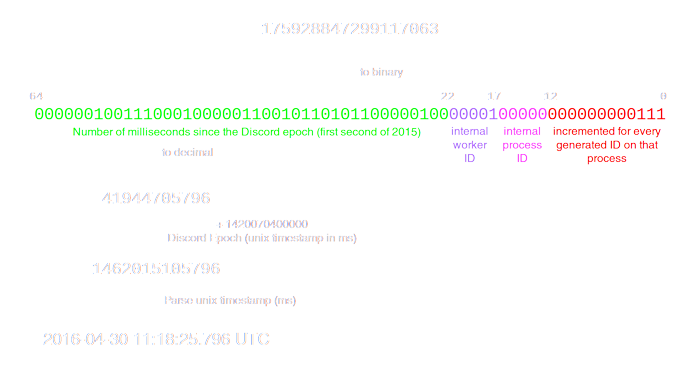
The timestamp is from the 64th bit to the 22nd bit
we wanna shift that entire thing to the right 22 so the only thing left is the timestamp part
imagine just shifting the green bit to the right until the purple pink and red bits are gone
sick birch
right to get the unix timestamp
pliant gulch
Yea, then divide by 1000, converting ms into s
Actually I don't even think you need that for datetime
Not sure, can't remember
sick birch
well you did that without and it didn't work
pliant gulch
I remember a way of doing it with only epoch miliseconds
But I guess I remembered wrong
 serene mantle
Hey guys
i need some help

i need to run a file in first and second folders
both called main.py
run.py should intiate those two files
i tried from first import main1
and it returns
from bot.bot import bot, selfBot, config
ModuleNotFoundError: No module named 'bot'``` buoyant igloo
serene mantle
```
from bot.bot import bot, selfBot, config
ModuleNotFoundError: No module ...
buoyant igloo
serene mantle
```
from bot.bot import bot, selfBot, config
ModuleNotFoundError: No module ...
bro bot ain’t a goddamn module
serene mantle

bot is a folder that holds modules
running just main1 inside this actually works
buoyant igloo
Idk how to read computer I never had one
serene mantle
what
 daring olive
buoyant igloo
bro bot ain’t a goddamn module
daring olive
buoyant igloo
bro bot ain’t a goddamn module
can you be more helpful please? if not, please refrain
final iron
daring olive
oh. is this a selfbot/userbot?
selfBot would imply that
pliant gulch
buoyant igloo
It’s it’s a folder u need the sys module
Not to help or anything, but how is the sys module relevant
serene mantle
thats not discord related
self bot is web scraping information from fb
hence self bot
pliant gulch
Facebook doesn't allows scrapers anyways
daring olive
fb likely disallows scraping
daring olive
negative. and it's not to be mean or punitive. it's just our rules
serene mantle
The act of scraping social media is legal; however, it is not legal to scrape private content without permission and sell it to a third party without user's consent for a profit, in violation of a User Terms of Agreement.
I'm scraping personal profiles
therefore its allowed.
final iron
Is this from Facebook's terms of service?
serene mantle
daring olive
"in violation of a user terms of agreement" is the relevant part, so Facebook's terms. not the law
serene mantle
if you scrape a third party that is.
 hollow quarry
The Facebook terms of service clearly disallow automated data access.
You may not access or collect data from our Products using automated means (without our prior permission) or attempt to access data you do not have permission to access.
https://www.facebook.com/terms.php
pliant gulch
- You will not engage in Automated Data Collection without Facebook's express written permission. 😳
final iron
🗿
buoyant igloo
🗿
serene mantle
alr bruh
daring olive
sorry
 worldly bane
\🗿

 boreal ravine
Stop chaining
 supple thorn
boreal ravine
Stop chaining
supple thorn
boreal ravine
Stop chaining
🗿
slate swan
🗿
 spring flax
when in subclass bot
class Bot(commands.Bot):
    def __init__(self):
        super().__init__(
            command_prefix=commands.when_mentioned_or('='),
            intents=disnake.Intents.all(),
            case_insensitive=True,
            owner_ids=[751814647346102303],
            help_command=None,
            test_guilds=[897292885056176240],
            sync_permissions=True,
            activity=disnake.Activity(type=disnake.ActivityType.playing, name="DM To Contact Staff")
        )


    async def get_context(self, message, *, cls=CustomContext):
        return await super().get_context(message, cls=cls)

        self.db = self.loop.run_until_complete(aiosqlite.connect("discord_bot_db.db"))
        self.launch_time = datetime.datetime.utcnow()
        self.last_result = None
how do I access those variables at the bottom, like self.db?
i have bot = Bot()
Are my indents wrong or something? I used in my main file bot.var
pliant gulch
spring flax
Are my indents wrong or something? I used in my main file `bot.var`
The indents are wrong, they never get assigned
!e ```py
def foo() -> None:
return "foo"
print("bar")
foo()
@pliant gulch :warning: Your eval job has completed with return code 0.
[No output]
Notice how it doesn't print bar?
pliant gulch
You can just override start on your bot's subclass
It get's called internally via Bot.run(token)
There you can connect to your database without needing run_until_complete
spring flax
Wait but that has something to do with this?
spring flax
run_until_complete is bad?
pliant gulch
It's called for processing commands when a message is received
So you won't actually have Bot.db until a message is sent at least once
pliant gulch
spring flax
run_until_complete is bad?
In this case, maybe? Discord.py already handles the event loop being use for asynchronous IO
spring flax
Can you give an reference of overriding start and connecting to db?
pliant gulch
I cba to right a whole example code right now, so. You only really need to know that the function takes 2 args, token and reconnect. Thus the function signature would be py async def start(self, token: str, *, reconnect: bool = False) , you'd then just do all your database connection in the function, then call await super().start(token, reconnect)
 sullen pewter
global _start
_start:

    mov eax, 1234567890
    mov ebx, 5
    add eax, ebx

    ; Convert EAX to ASCII and store it onto the stack
    sub esp, 16
    mov ecx, 10
    mov ebx, 16
    .L1:
    xor edx, edx
    div ecx
    or dl, 0x30
    sub ebx, 1
    mov [esp+ebx], dl
    test eax, eax
    jnz .L1

    mov eax, 4
    lea ecx, [esp+ebx]
    mov edx, 16
    sub edx, ebx
    mov ebx, 1
    int 0x80

    add esp, 16

    mov eax, 1
    xor ebx, ebx
    int 0x80             ```
what is thiswhat is that
pliant gulch
This is assembly code
sullen pewter
pliant gulch
This is assembly code
Ty
sullen pewter
pliant gulch
This is assembly code
But what does it do
sick birch
that's harder to say
sullen pewter
Does it Convert EAX to ASCII and store it onto the stack
sick birch
one of the reasons people don't write in assembly
from the comment yeah we can assume so
it's not immediately obvious what it's doing
sick birch
Probably function declarations
 bright palm
sullen pewter
But what does it do
bright palm
sullen pewter
But what does it do
Looks like it adds two numbers then prints the result
sullen pewter
Thats what the whole code does?
bright palm
Yeah
sullen pewter
Ty
 hasty raptor
Can anyone recommend some good documentation for discord.py 2.0
 frozen elk
how to copy emot id
unkempt canyonBOT
7.6. The return statement
return_stmt ::=  "return" [expression_list]
``` [`return`](https://docs.python.org/3/reference/simple_stmts.html#return) may only occur syntactically nested in a function definition, not within a nested class definition.

If an expression list is present, it is evaluated, else `None` is substituted.

[`return`](https://docs.python.org/3/reference/simple_stmts.html#return) leaves the current function call with the expression list (or `None`) as return value...
Similar names: pdbcommand.return, pyside2.return
 slate swan
it returns a string
slate swan
slate swan
it returns a string
Print?
slate swan
slate swan
..
!e
def f() -> str:
    return "functions value is a string"
f()
print(f())
@slate swan :white_check_mark: Your eval job has completed with return code 0.
functions value is a string
 glossy ruin
is discord py coming back
slate swan
slate swan
!e
```py
def f() -> str:
return "functions value is a string"
f()
print(f())...
Okay
Now i understand
Its like a var
 slate swan
!e
```py
def f() -> str:
return "functions value is a string"
f()
print(f())...
slate swan
slate swan
!e
```py
def f() -> str:
return "functions value is a string"
f()
print(f())...
@slate swan here the funtions value is a string so its like doing
f = "functions value is a string" its just the value of the function which you can return the function to stop the function and/or return values
Ok
slate swan
slate swan
Ok
!pep484 | here you can learn more about typehints and return annotations and overall annotations
unkempt canyonBOT
PEP 8 is the official style guide for Python. It includes comprehensive guidelines for code formatting, variable naming, and making your code easy to read. Professional Python developers are usually required to follow the guidelines, and will often use code-linters like flake8 to verify that the code they're writing complies with the style guide.
More information:
• PEP 8 document
• Our PEP 8 song! :notes:
slate swan

why did it return pep8 im not sure but you already know the number
I started scroling lol

boreal ravine
glossy ruin
so, i dont need to study discord js
you don't "study" a library

 glossy ruin
boreal ravine
you don't "study" a library
glossy ruin
boreal ravine
you don't "study" a library
actually i mean javascript
 boreal ravine
sullen pewter
Is this correct?
boreal ravine
sullen pewter
Is this correct?
yes
sullen pewter
Ok, ty
unkempt canyonBOT
discord.on_voice_state_update(member, before, after)```
Called when a [`Member`](https://discordpy.readthedocs.io/en/master/api.html#discord.Member "discord.Member") changes their [`VoiceState`](https://discordpy.readthedocs.io/en/master/api.html#discord.VoiceState "discord.VoiceState").
The following, but not limited to, examples illustrate when this event is called... untold oriole
hey guys, what do you think is a proper way to check for spam messages?
unkempt canyonBOT
Cooldowns in discord.py
Cooldowns can be used in discord.py to rate-limit. In this example, we're using it in an on_message.
from discord.ext import commands

message_cooldown = commands.CooldownMapping.from_cooldown(1.0, 60.0, commands.BucketType.user)

@bot.event
async def on_message(message):
    bucket = message_cooldown.get_bucket(message)
    retry_after = bucket.update_rate_limit()
    if retry_after:
        await message.channel.send(f"Slow down! Try again in {retry_after} seconds.")
    else:
        await message.channel.send("Not ratelimited!")
from_cooldown takes the amount of update_rate_limit()s needed to trigger the cooldown, the time in which the cooldown is triggered, and a BucketType.
maiden fable
@untold oriole there
untold oriole
maiden fable
<@221022114793127947> there
Is there documentation for it?
maiden fable
No
untold oriole
maiden fable
No
So if a user were to spam something, would this detect the spam ?
untold oriole
maiden fable
No
maiden fable
untold oriole
ow actually it does https://discordpy.readthedocs.io/en/stable/ext/commands/api....
this is the decorator
sullen pewter
How to make a cmd using quote api
Idk how to make api commands
I need it to send a inspirational quote
untold oriole
maiden fable
this is the decorator
I see
 final wagon
 vale wing
sullen pewter
Is this correct?
vale wing
sullen pewter
Is this correct?
No, this is outdated
sullen pewter
Ok
vale wing
In this part, I’ll show you the basics of how to create a super simple bot and get it connected to Discord.
vale wing
sullen pewter
How to make a cmd using quote api
Use aiohttp to make API requests
The most simple example would be
async with aiohttp.ClientSession() as session:
    r = await session.get("url endpoint")
    data = await r.json()```

Sometimes you need an authorization, then just add a corresponding header as said in API reference of your service

```py
async with aiohttp.ClientSession(headers={"Authorization": "Bearer 12345"}) as session:
    ...
Highly recommended to store API keys safely, eg. .env file
maiden fable
Bruh globals suck 😔
 vale wing
Just don't host on heroku
maiden fable
@commands.command
vale wing
sullen pewter
I said use aiohttp not requests
sullen pewter
Ok
vale wing
calling a module wtf

 vale wing
sullen pewter
Like this?
vale wing
sullen pewter
Like this?
Um yeah but import it
sullen pewter
Ok
vale wing
sullen pewter
This is correct as well doesn't really matter how you do it, but the less indents the cleaner code imo
slate swan
hello
i have a issue here
i have coded a bot
that sends a message during each intervals
but it doesn't seem to work.
code:
import discord as dc
from discord.ext import commands

bot = commands.Bot(command_prefix='>')
token = os.environ['bot_token']

async def my_background_task():
  channel = dc.Object(id=#channelid)
  while True:
    await channel.send("TEST")
    await asyncio.sleep(5)

@bot.event
async def on_ready():
    print(f"Logged in as -\n {bot.user.id}\n{bot.user.name}")
    my_background_task()

bot.run(token)
 dusky pine
it's because of the #
sullen pewter
vale wing
This is correct as well doesn't really matter how you do it, but the less indent...
Do I have to add anything else for it to respond to a command !quote
vale wing
slate swan
hello
i have a issue here
i have coded a bot
that sends a message during each in...
You need to await the async func
dusky pine
vale wing
You need to await the async func
no, that would make it wait
vale wing
And um don't do background loops like this
slate swan
lol
vale wing
!d discord.ext.tasks.loop
unkempt canyonBOT
discord.ext.tasks.loop(*, seconds=..., minutes=..., hours=..., time=..., count=None, reconnect=True)```
A decorator that schedules a task in the background for you with optional reconnect logic. The decorator returns a [`Loop`](https://discordpy.readthedocs.io/en/master/ext/tasks/index.html#discord.ext.tasks.Loop "discord.ext.tasks.Loop").because once you use await, it will wait for the function to finish
slate swan
dusky pine
because once you use await, it will wait for the function to finish
but it is a loop lol
dusky pine
and the function here is a never ending loop
vale wing
unkempt canyon
Just use this
vale wing
Click the link in docs it shows proper examples
slate swan
unkempt canyon
oki
unkempt canyonBOT
get_channel(id, /)```
Returns a channel or thread with the given ID.

Changed in version 2.0: `id` parameter is now positional-only.lol but it still workjs
vale wing
Bad way
slate swan
e
vale wing
First, it is inconvenient for you, as it is not typehinted to proper class and you will not receive code autocompletion suggestions; second is it might cause issues with different functions
sullen pewter
Why it isnt responding to a command !quote
@client.command()
async def quote(ctx):
    async with aiohttp.ClientSession() as cs:
        async with cs.get("https://zenquotes.io/api/random") as r:
quotes = await r.json()```And third pretty sure it does not work
vale wing
sullen pewter
Why it isnt responding to a command !quote
```
@client.command()
async def quote...
How is client defined
 glacial echo
what replaced client.listen() when using interaction instead of command
slate swan
sullen pewter
Why it isnt responding to a command !quote
```
@client.command()
async def quote...
import the module?
sullen pewter
I imported alr
 glacial echo
i changed form commands.Bot to interactions.Client
slate swan
bcuz i saw the attachment u sent it seeme so
vale wing
Um
slate swan
sullen pewter
I imported alr
i'd rather use request
vale wing
Wth is that
vale wing
slate swan
i'd rather use request
Don't
glacial echo
sullen pewter
I imported alr
intents = discord.Intents().all()
slate swan
e
vale wing
It is non async in async app
vale wing
glacial echo
intents = discord.Intents().all()
discord.Intents.all()
It is a classmethod
slate swan
vale wing
Don't
the do's and don'ts
glacial echo
vale wing
`discord.Intents.all()`
i sent what i have in my code 
sullen pewter
Isnt request for python 2?
sullen pewter
sullen pewter
Would this work then?
slate swan
uh no.
 formal basin
This sends the wrong image
 slate swan
prolly
slate swan
formal basin
This sends the wrong image
huh?
formal basin
 slate swan
wdym sent the wrong image
formal basin
That’s the image
slate swan
ok?
 slate swan
formal basin
https://fortool.fr/cm/assets/shop/en.png
slate swan
formal basin
https://fortool.fr/cm/assets/shop/en.png
from this to that
formal basin
I did
slate swan
....
sullen pewter
vale wing
How is `client` defined
 slate swan
sullen pewter
slate swan
sullen pewter
!quote?
formal basin
But the bot won’t send this https://fortool.fr/cm/assets/shop/en.png
slate swan
lol wth
sullen pewter
slate swan
!quote?
Yes the command doesn't work
slate swan
formal basin
But the bot won’t send this https://fortool.fr/cm/assets/shop/en.png
what?!?!?
formal basin
Only sends the old one
slate swan
sullen pewter
Yes the command doesn't work
so. you just the quote command to work?
formal basin
How do I fix it
sullen pewter
slate swan
so. you just the quote command to work?
Yes
slate swan
it not discord problem it is the fortool.fr website problem
sullen pewter
slate swan
so. you just the quote command to work?
I need it to take the quote and display it in the chat
slate swan
sullen pewter
Yes
uhm i made a qoute command once with requests
sullen pewter
Will this work?
 slate swan
sullen pewter
Will this work?
slate swan
sullen pewter
Will this work?
thats a lot ofindent u have there
sullen pewter
I used requests
slate swan
does it work tho?
sullen pewter
I havent tested it yet
slate swan
bruv. test it....
RuntimeWarning: coroutine 'my_background_task' was never awaited
my_background_task()
RuntimeWarning: Enable tracemalloc to get the object allocation traceback
hmmmmm....
 tacit storm
sullen pewter
I used requests
tacit storm
sullen pewter
I used requests
dont use requests.
requests is very blocking with async.
using aiohttp which is auto installed with dpy
sullen pewter
How then
slate swan
tacit storm
dont use requests.
requests is very blocking with async.
using aiohttp which...
ye
slate swan
sullen pewter
How then
....
glacial echo
glacial echo
what replaced client.listen() when using interaction instead of command
anyone?
sullen pewter
tacit storm
dont use requests.
requests is very blocking with async.
using aiohttp which...
I used aiohttp it didn't work
tacit storm
sullen pewter
I used aiohttp it didn't work
maybe you were using it wrong
slate swan
it shouldve work tho
sullen pewter
tacit storm
maybe you were using it wrong
 tacit storm
do not use requests with async apps.
sullen pewter
The command !quote doesn't work
slate swan
tacit storm
do not use requests with async apps.
lol the past me did that xD
sullen pewter
How
sullen pewter
Nice
slate swan
bot.loop.create_task(daily_facts(ctx))
NameError: name 'ctx' is not defined
whats that and how to overcome it?
async def daily_facts(ctx):
  channel = dc.get_channel(id=955712066952511519)
  while True:
    await channel.send("hey hey")
    await asyncio.sleep(10)
bot.loop.create_task(daily_facts(ctx))
;p

Stack Overflow
I am experimenting with making my own little discord bot that can get information from Twitch, but I'm stumped on how to make the bot loop and check for a condition.
I want the bot to loop a secti...
maiden fable
slate swan
bot.loop.create_task(daily_facts(ctx))
NameError: name 'ctx' is not defined
!d discord.ext.tasks.loop
unkempt canyonBOT
discord.ext.tasks.loop(*, seconds=..., minutes=..., hours=..., time=..., count=None, reconnect=True)```
A decorator that schedules a task in the background for you with optional reconnect logic. The decorator returns a [`Loop`](https://discordpy.readthedocs.io/en/master/ext/tasks/index.html#discord.ext.tasks.Loop "discord.ext.tasks.Loop"). dense swallow
sullen pewter
The command !quote doesn't work
dense swallow
sullen pewter
The command !quote doesn't work
maybe it's the problem with the API.. I tried it some time ago and I had this problem where it wouldn't work.. someone else can give it a try
glacial echo
Could not prepare the client: ‘Intents’ object has no attribute ‘GUILD_PRESENCES’
what does this even mean?
all intents are enable in portal and in code
ok cool but uh it doesn’t tell me how to fix it
?
maiden fable
glacial echo
Could not prepare the client: ‘Intents’ object has no attribute ‘GUILD_PRESENCES...
!d discord.Intents.presences
unkempt canyonBOT
Whether guild presence related events are enabled.
This corresponds to the following events:
This also corresponds to the following attributes and classes in terms of cache...
glacial echo
‘Intents’ object is not callable
maiden fable
Code
glacial echo
Pastebin
Pastebin.com is the number one paste tool since 2002. Pastebin is a website where you can store text online for a set period of time.
 tired agate
@bot.command()
async def join(ctx):
    channel = ctx.message.author.voice.channel
    voice = get(client.voice_clients, guild=ctx.guild)
    if voice and voice.is_connected():
        await voice.move_to(channel)
    else:
        voice = await channel.connect()
While executing , i get this error:
discord.ext.commands.errors.CommandInvokeError: Command raised an exception: AttributeError: module 'discord.client' has no attribute 'voice_clients'
!pypi aiohttp no, you would use aiohttp. Also, it’s spelt response
unkempt canyonBOT

Async http client/server framework (asyncio)
vale wing
tired agate
```py
@bot.command()
async def join(ctx):
channel = ctx.message.author.voice...
I guess you can use ctx.voice_client or smth but it has some weird stuff in 2.0
!d discord.ext.commands.Context.voice_client
unkempt canyonBOT
property voice_client```
A shortcut to [`Guild.voice_client`](https://discordpy.readthedocs.io/en/master/api.html#discord.Guild.voice_client "discord.Guild.voice_client"), if applicable.thanks !
maiden fable
glacial echo
https://pastebin.com/XE6gZBWQ
Why not do intents=discord.Intents.presences
glacial echo
see, im not even using presences
maiden fable
Then
glacial echo
i need message.content
maiden fable
Oh
glacial echo
using the specific intent name still breaks with the same error
maiden fable
No need rn since that isn't implemented until April 30
glacial echo
idk discord.py broke without it requested
i suppose thy updated early
but then again this is i think a different api?
or maybe not but idk
manic wing
you need a classmethod to return the intents value
you cant just assign nothing to nothing
tired agate
@bot.command()
async def play(ctx, url):
    YDL_OPTIONS = {'format': 'bestaudio', 'noplaylist': 'True'}
    FFMPEG_OPTIONS = {
        'before_options': '-reconnect 1 -reconnect_streamed 1 -reconnect_delay_max 5', 'options': '-vn'}
    voice = get(bot.voice_clients, guild=ctx.guild)

    if not voice.is_playing():
        with youtube_dl(YDL_OPTIONS) as ydl:
            info = ydl.extract_info(url, download=False)
        URL = info['url']
        voice.play(FFmpegPCMAudio(URL, **FFMPEG_OPTIONS))
        voice.is_playing()
        await ctx.send('Bot is playing')
    else:
        await ctx.send("Bot is already playing")
        return
I get this error:
 with youtube_dl(YDL_OPTIONS) as ydl:
TypeError: 'module' object is not callable
 tawdry perch
tired agate
```py
@bot.command()
async def play(ctx, url):
YDL_OPTIONS = {'format': 'bes...
tawdry perch
tired agate
```py
@bot.command()
async def play(ctx, url):
YDL_OPTIONS = {'format': 'bes...
!ytdl
unkempt canyonBOT
Per Python Discord's Rule 5, we are unable to assist with questions related to youtube-dl, pytube, or other YouTube video downloaders, as their usage violates YouTube's Terms of Service.
For reference, this usage is covered by the following clauses in YouTube's TOS, as of 2021-03-17:
The following restrictions apply to your use of the Service. You are not allowed to:

1. access, reproduce, download, distribute, transmit, broadcast, display, sell, license, alter, modify or otherwise use any part of the Service or any Content except: (a) as specifically permitted by the Service;  (b) with prior written permission from YouTube and, if applicable, the respective rights holders; or (c) as permitted by applicable law;

3. access the Service using any automated means (such as robots, botnets or scrapers) except: (a) in the case of public search engines, in accordance with YouTube’s robots.txt file; (b) with YouTube’s prior written permission; or (c) as permitted by applicable law;

9. use the Service to view or listen to Content other than for personal, non-commercial use (for example, you may not publicly screen videos or stream music from the Service)
we can't help on that @tired agate
tired agate
unkempt canyon
oooh ty anyway
 delicate hornet
how to encrypt data in python
tawdry perch
delicate hornet
how to encrypt data in python
can you be more specific and also I think you are in wrong channel
vale wing
delicate hornet
how to encrypt data in python
!pypi cryptography good module
unkempt canyonBOT
cryptography is a package which provides cryptographic recipes and primitives to Python developers.
delicate hornet
tawdry perch
can you be more specific and also I think you are in wrong channel
it was or is in the dev portal
vale wing
And yeah #cybersecurity
delicate hornet
vale wing
!pypi cryptography good module
without an external lybary
 tardy plume
@tasks.loop(seconds=60)
async def avail():
	users = open("text.txt", "r")
	file = users.read()
	id = open("channel.txt", "r")
	channel = id.read()

	channel = bot.get_channel(channel)

	embed = discord.Embed(
	title="Name",
	description="--------------------",
	color=discord.Color.green(),
    timestamp=datetime.utcnow()
	)
	embed.add_field(name="Available", value=file)
	msg = await channel.send(embed=embed, delete_after=59.5)
	await msg.edit(embed=embed)

i have my id on channel.txt
maiden fable
IDs are int
 rose birch
hi folks, I'm a bit stuck. I have tasks asyncio.create_task(foo()) that are created with !commands by the bot. I want to be able to save the state such that I do not have to re-input the same !commands again.
my initial idea is to dump all tasks into json with asyncio.all_tasks() then on load, load it in and run them.
issue is, I can't dump it into json because the items in the asyncio.all_tasks() set is a coroutine object and I get errors thrown everywhere. is there a better way to do this?
specifically I get this as an error when doing list(asyncio.all_tasks())
RuntimeWarning: coroutine 'Command.__call__' was never awaited
  ret = await coro(*args, **kwargs)
RuntimeWarning: Enable tracemalloc to get the object allocation traceback
Don't
!d discord.ext.tasks.loop use this
unkempt canyonBOT
discord.ext.tasks.loop(*, seconds=..., minutes=..., hours=..., time=..., count=None, reconnect=True)```
A decorator that schedules a task in the background for you with optional reconnect logic. The decorator returns a [`Loop`](https://discordpy.readthedocs.io/en/master/ext/tasks/index.html#discord.ext.tasks.Loop "discord.ext.tasks.Loop"). placid skiff
Yo how to get the loop object of the bot?
i need it to use it as the loop of asyncpg
 steel kayak
hi all, does anyone have a high level overview of what the solution will be for this issue: I'm trying to allow users of my website to input their discord handles on my website, and I can then send out automated DMs to these users. However, the challenge is that these users are not in any of the same communities/servers as me - essentially, I want to send automated DMs to unknown people, just on the basis that they have input their Discord handles on my webpage
 azure scroll
ret = await coro(*args, **kwargs)
File "D:\NoteBoy\musicsys.py", line 27, in play
await voiceChannels.connect()
AttributeError: 'NoneType' object has no attribute 'connect'```

Code:
```python
    async def play(self, ctx, url : str, channelIndex : int):
        vc = col.find_one({"_id":ctx.guild.id})

        voiceChannels = discord.utils.get(ctx.guild.voice_channels, name = vc["voiceChannels"][channelIndex])
        if (voiceChannels is None):
            await ctx.send("There is no vc set")
        voice = discord.utils.get(self.client.voice_clients, guild = ctx.guild)
        await voiceChannels.connect()
idt that's possible
placid skiff
steel kayak
hi all, does anyone have a high level overview of what the solution will be for ...
the bot can't send message to users which it can't see. The users that the bot can see are the users that has a server shared with it
slate swan
azure scroll
```python
ret = await coro(*args, **kwargs)
File "D:\NoteBoy\musicsys.py", line...
if voiceChannels is None:
return await ctx.send
azure scroll
oh ok
steel kayak
placid skiff
the bot can't send message to users which it can't see. The users that the bot c...
I see, thank you 👍 Just thinking then, as I occasionally receive scam messages on my DMs - are these scammers not using bots as well? Or these scammers have to be in the same servers as I am in first to be able to DM me
velvet tinsel
steel kayak
hi all, does anyone have a high level overview of what the solution will be for ...
Can the bot be able to access them?
slate swan
placid skiff
i need it to use it as the loop of asyncpg
mongo to pg? 
velvet tinsel
Or are they not in the same guild as the bot
velvet tinsel
slate swan
mongo to pg? <:dog3:531224245812854784>
doge kek 👀👀
slate swan
velvet tinsel
doge kek 👀👀

placid skiff
slate swan
mongo to pg? <:dog3:531224245812854784>
Mh my mind isn't trained to use json so .-.
velvet tinsel
slate swan
<:dogekek:787581752951832576>
I got banned from r/cc so no more dogekek for me 😭💀
slate swan
steel kayak
I see, thank you 👍 Just thinking then, as I occasionally receive scam messages ...
They have mutuals servers + your dms open so thats why they can dm u :>
maiden fable
placid skiff
Yo how to get the loop object of the bot?
!d asyncio.get_event_loop exists
unkempt canyonBOT
asyncio.get_event_loop()```
Get the current event loop.

If there is no current event loop set in the current OS thread, the OS thread is main, and [`set_event_loop()`](https://docs.python.org/3/library/asyncio-eventloop.html#asyncio.set_event_loop "asyncio.set_event_loop") has not yet been called, asyncio will create a new event loop and set it as the current one.

Because this function has rather complex behavior (especially when custom event loop policies are in use), using the [`get_running_loop()`](https://docs.python.org/3/library/asyncio-eventloop.html#asyncio.get_running_loop "asyncio.get_running_loop") function is preferred to [`get_event_loop()`](https://docs.python.org/3/library/asyncio-eventloop.html#asyncio.get_event_loop "asyncio.get_event_loop") in coroutines and callbacks.

Consider also using the [`asyncio.run()`](https://docs.python.org/3/library/asyncio-task.html#asyncio.run "asyncio.run") function instead of using lower level functions to manually create and close an event loop.

Deprecated since version 3.10: Deprecation warning is emitted if there is no running event loop. In future Python releases, this function will be an alias of [`get_running_loop()`](https://docs.python.org/3/library/asyncio-eventloop.html#asyncio.get_running_loop "asyncio.get_running_loop").!d asyncio.get_running_loop if u r using Python 3.10
unkempt canyonBOT
asyncio.get_running_loop()```
Return the running event loop in the current OS thread.

If there is no running event loop a [`RuntimeError`](https://docs.python.org/3/library/exceptions.html#RuntimeError "RuntimeError") is raised. This function can only be called from a coroutine or a callback.

New in version 3.7.nvm i find something on github using subclassing which does exactly what i want to do
maiden fable
Cool
placid skiff
now i will see if it works xD
maiden fable
Haha
maiden fable
 green bluff
python and js
green bluff
python and js
Only Python
 slate swan
maiden fable
Only Python
slate swan
maiden fable
Only Python
!ot morning Hunter 
placid skiff
I'm hating asyncpg docs
it doesn't tells you which error raises if something fail :_:
slate swan
placid skiff
it doesn't tells you which error raises if something fail :_:
external docs or smth?
placid skiff
async def execute(self, query: str, *args, timeout: float=None) -> str:
        """Execute an SQL command (or commands).

        Pool performs this operation using one of its connections.  Other than
        that, it behaves identically to
        :meth:`Connection.execute() <asyncpg.connection.Connection.execute>`.

        .. versionadded:: 0.10.0
        """
        async with self.acquire() as con:
            return await con.execute(query, *args, timeout=timeout)
``` it doesn't raise anything, i need to create table how in the hell i'm supposed to know when it doesn't do that because the table doesn't exist lolasyncpg 😔 idk maybe refer to the synchronized postgres docs and check if the errors raised are similar
unkempt canyonBOT
Hey @misty minnow!
You either uploaded a .txt file or entered a message that was too long. Please use our paste bin instead.
slate swan
well
placid skiff
it returns a string, could it be the result of the query?
rose birch
maiden fable
!d discord.ext.tasks.loop use this
mind whipping up a small excerpt on how to implement this?
not sure how to approach it from docs alone
 misty minnow
`import discord
from discord.ext import commands
import youtube_dl
import os
client = commands.Bot(command_prefix="$")
@client.command()
async def play(ctx, url : str):
song_there = os.path.isfile("song.mp3")
try:
if song_there:
os.remove("song.mp3")
except PermissionError:
await ctx.send("Wait for the current playing music to end or use the 'stop' command")
return
voiceChannel = discord.utils.get(ctx.guild.voice_channels, name='General')
await voiceChannel.connect()
voice = discord.utils.get(client.voice_clients, guild=ctx.guild)

ydl_opts = {
    'format': 'bestaudio/best',
    'postprocessors': [{
        'key': 'FFmpegExtractAudio',
        'preferredcodec': 'mp3',
        'preferredquality': '192',
    }],
}
with youtube_dl.YoutubeDL(ydl_opts) as ydl:
    ydl.download([url])
for file in os.listdir("./"):
    if file.endswith(".mp3"):
        os.rename(file, "song.mp3")
voice.play(discord.FFmpegPCMAudio("song.mp3"))
@client.command()
async def leave(ctx):
voice = discord.utils.get(client.voice_clients, guild=ctx.guild)
if voice.is_connected():
await voice.disconnect()
else:
await ctx.send("The bot is not connected to a voice channel.")
@client.command()
async def pause(ctx):
voice = discord.utils.get(client.voice_clients, guild=ctx.guild)
if voice.is_playing():
voice.pause()
else:
await ctx.send("Currently no audio is playing.")
@client.command()
async def resume(ctx):
voice = discord.utils.get(client.voice_clients, guild=ctx.guild)
if voice.is_paused():
voice.resume()
else:
await ctx.send("The audio is not paused.")
@client.command()
async def stop(ctx):
voice = discord.utils.get(client.voice_clients, guild=ctx.guild)
voice.stop()`
With this code, my music bot is not connecting to voice channels and nor playing nothing
slate swan
misty minnow
`import discord
from discord.ext import commands
import youtube_dl
import os
cl...
!ytdl cant help
unkempt canyonBOT
Per Python Discord's Rule 5, we are unable to assist with questions related to youtube-dl, pytube, or other YouTube video downloaders, as their usage violates YouTube's Terms of Service.
For reference, this usage is covered by the following clauses in YouTube's TOS, as of 2021-03-17:
The following restrictions apply to your use of the Service. You are not allowed to:

1. access, reproduce, download, distribute, transmit, broadcast, display, sell, license, alter, modify or otherwise use any part of the Service or any Content except: (a) as specifically permitted by the Service;  (b) with prior written permission from YouTube and, if applicable, the respective rights holders; or (c) as permitted by applicable law;

3. access the Service using any automated means (such as robots, botnets or scrapers) except: (a) in the case of public search engines, in accordance with YouTube’s robots.txt file; (b) with YouTube’s prior written permission; or (c) as permitted by applicable law;

9. use the Service to view or listen to Content other than for personal, non-commercial use (for example, you may not publicly screen videos or stream music from the Service)
Very cool
 misty minnow
slate swan
!ytdl cant help
misty minnow
slate swan
!ytdl cant help
I need to remove youtube_dl?
slate swan
misty minnow
I need to remove youtube_dl?
uh ytdl isnt really friendly with youtube's TOS
slate swan
placid skiff
Very cool
you do know that this is NOT the correct channel
misty minnow
slate swan
uh ytdl isnt really friendly with youtube's TOS
What do you recommend to play media?
On the bot?
slate swan
misty minnow
What do you recommend to play media?
nothing  unless you are playing copyright-free media from your local device
slate swan
placid skiff
btw i find my way
doesnt make any sense 
 alpine furnace
misty minnow
What do you recommend to play media?
alpine furnace
misty minnow
What do you recommend to play media?
Anything which can fetch media or a link to media works 🤷♂️ is there anything specific?
velvet tinsel
slate swan
<:sadcat:917733831560290304>
Ok
slate swan
velvet tinsel
Ok
yes
velvet tinsel
I love money
slate swan
💰
i have a dict like
disct= {'abc':['a','s','f','e','w','q']}
how do i make an embed to print dict values?
slate swan
velvet tinsel
I love money
whats that? 
slate swan
slate swan
i have a dict like
`disct= {'abc':['a','s','f','e','w','q']}`
how do i make an ...
invalid syntax
velvet tinsel
slate swan
whats that? <:catstare:943895079091843112>
Money is money 💴
slate swan
fixed
slate swan
slate swan
fixed
!e
print({
  abc:[a, b, c]})
still invalid 😔
unkempt canyonBOT
@slate swan :x: Your eval job has completed with return code 1.
001 | Traceback (most recent call last):
002 |   File "<string>", line 2, in <module>
003 | NameError: name 'abc' is not defined. Did you mean: 'abs'?
Something which random kids can’t get so they claim to love free open source software to cope
And put random shit on GitHub everydayt
slate swan
alpine furnace
And put random shit on GitHub everydayt
relatable
slate swan
alpine furnace
Something which random kids can’t get so they claim to love free open source sof...
relatable
!edisct = {abc : [a, s, f, e, w, q]} print(disct)
lmao sad
oooh
lol
thats invalid anyways
slate swan
slate swan
i have a dict like
`disct= {'abc':['a','s','f','e','w','q']}`
how do i make an ...
@slate swan better?
slate swan
slate swan
<@456226577798135808> better?
good
embed = discord.Embed(description=[disct['abc']]) '''will return the list corresponding to the key "abc" in the dict "disct"
'''
thats basic python though 😔
that's not what i wanted 😭
slate swan
slate swan
that's not what i wanted 😭
well, thats what YOU asked for
ok
my vsc lagged
slate swan
slate swan
its fine now
tidal hawk
Ashely is rude 😢
slate swan
tidal hawk
Ashely is rude 😢
who's that?
tidal hawk
Your mom
supple thorn
Ashely made a child and named it Ashley just to fix the spelling
slate swan
slate swan
my vsc lagged
 ikr vsc be acting up sometimes
slate swan
tidal hawk
Your mom
!rule
unkempt canyonBOT
The rules and guidelines that apply to this community can be found on our rules page. We expect all members of the community to have read and understood these.
tidal hawk
Sorry Sparky 😣
slate swan
supple thorn
Ashely made a child and named it Ashley just to fix the spelling
you do know that isnt funny
slate swan
slate swan
<:kawaii:700810406784008283>

supple thorn
slate swan
you do know that isnt funny
Did that actually happen
slate swan
slate swan
<:kawaii:700810406784008283>

slate swan
supple thorn
Did that actually happen
still not funny
tidal hawk
I laughed
 junior verge
 slate swan
heroku
supple thorn
slate swan
still not funny
Why
junior verge
Can't a command listener have a description?
 slate swan
junior verge
Can't a command listener have a description?
slate swan
junior verge
Can't a command listener have a description?
no
junior verge
oh
junior verge
thought so sorry
final iron
!d discord.ext.commands.Cog.listener
unkempt canyonBOT
classmethod listener(name=...)```
A decorator that marks a function as a listener.

This is the cog equivalent of [`Bot.listen()`](https://discordpy.readthedocs.io/en/master/ext/commands/api.html#discord.ext.commands.Bot.listen "discord.ext.commands.Bot.listen").Just because I thought that sorry
slate swan

wow nice idea i got
!hardlook 955788568394080266
it will look at the msg
and?
if it get deleted it will mention me in dm
!mute @slate swan
Sparky#3940 was muted 
slate swan
slate swan
!mute <@456226577798135808>
epic mute fail
noob bot not working
hehe im unmuted
tidal hawk
Hey! Don't offend the bot!
 slate swan
if it get deleted it will mention me in dm
slate swan
slate swan
if it get deleted it will mention me in dm
imagine getting 10k dms every hour  ||if your bot is in many servers||
just a single msg per server
and it will dm the owner not me
😎

slate swan
slate swan
just a single msg per server
per member (with perms) would be better
btw is it allowed to dm owners?(owner of the servers)
slate swan
slate swan
<:GWcmeisterPeepoShrug:403295315685539852> per member (with perms) would be bett...
mod/admin command
nvmd
slate swan
slate swan
btw is it allowed to dm owners?(owner of the servers)
why isnt it? they are a user as every other
nvm am weird
slate swan
slate swan
why isnt it? they are a user as every other
Basically, dming ppl might get ur bot deleted
!d discord.Member.send
unkempt canyonBOT
await send(content=None, *, tts=False, embed=None, embeds=None, file=None, files=None, stickers=None, delete_after=None, nonce=None, allowed_mentions=None, reference=None, ...)```
This function is a [*coroutine*](https://docs.python.org/3/library/asyncio-task.html#coroutine).

Sends a message to the destination with the content given.

The content must be a type that can convert to a string through `str(content)`. If the content is set to `None` (the default), then the `embed` parameter must be provided.

To upload a single file, the `file` parameter should be used with a single [`File`](https://discordpy.readthedocs.io/en/master/api.html#discord.File "discord.File") object. To upload multiple files, the `files` parameter should be used with a [`list`](https://docs.python.org/3/library/stdtypes.html#list "(in Python v3.10)") of [`File`](https://discordpy.readthedocs.io/en/master/api.html#discord.File "discord.File") objects. **Specifying both parameters will lead to an exception**.

To upload a single embed, the `embed` parameter should be used with a single [`Embed`](https://discordpy.readthedocs.io/en/master/api.html#discord.Embed "discord.Embed") object. To upload multiple embeds, the `embeds` parameter should be used with a [`list`](https://docs.python.org/3/library/stdtypes.html#list "(in Python v3.10)") of [`Embed`](https://discordpy.readthedocs.io/en/master/api.html#discord.Embed "discord.Embed") objects. **Specifying both parameters will lead to an exception**.why the hell i have intents attribute "member" is read_only intents attribute "member" doesn't exists?
slate swan
bot will auto check the dm is possible or not when setting up
slate swan
slate swan
nvm am weird
Its member not owner
slate swan
slate swan
Basically, dming ppl might get ur bot deleted
well, no?
slate swan
slate swan
Its member not owner<a:LOL:869672006013046794>
jsjajaja


 slate swan
what how
junior verge
slate swan
u dont have any help command
junior verge
How am I getting the error
slate swan
lemee check
slate swan
slate swan
what?
slate swan
slate swan
what?
simple chat bot
placid skiff
why pycharm is saying to me that intents attributes are read only? D_D
slate swan
.
slate swan
slate swan

slate swan
junior verge
Uhm how?
when you construct your bot with Bot
bot = commands.Bot(command_prefix = ..., intents=....., help_command=None)
add the help_command kwarg and set it to None
junior verge
slate swan
add the help_command kwarg and set it to None
I am pretty sure I did
slate swan
btw is there like py libraries/api's for AI chat?
working fine
nice chatbot, but this is ot
dc chat bot 😎
slate swan
junior verge
I am pretty sure I did
well, try restarting and make sure your cog is loaded
nvmd
slate swan
slate swan
nvmd
 left crater
slate swan
btw is there like py libraries/api's for AI chat?<:ia_think_thonk:81568073106954...
left crater
slate swan
btw is there like py libraries/api's for AI chat?<:ia_think_thonk:81568073106954...
 slate swan
left crater
https://pypi.org/project/randomstuff.py/
slate swan
left crater
https://pypi.org/project/randomstuff.py/
🫡🫡
junior verge
slate swan
well, try restarting and make sure your cog is loaded
lemme try
slate swan
slate swan
btw is there like py libraries/api's for AI chat?<:ia_think_thonk:81568073106954...


Some Random Api is a place where you can find a lot of random apis from games, sites, even animal facts!
junior verge
@slate swan
 slate swan
nice
junior verge
I am confused
slate swan
 wait
wait
junior verge
Other cogs are working though
slate swan
slate swan
https://some-random-api.ml/endpoints
Ight ty 
slate swan
slate swan
https://some-random-api.ml/endpoints

slate swan
junior verge
<@456226577798135808>
try adding a simple command that just says, hello hi whatever in the same cog and check if thats working
junior verge
slate swan
try adding a simple command that just says, hello hi whatever in the same cog an...
okay
slate swan
slate swan
<:lemon_angrysad:817323592693841961>
what
slate swan
slate swan
<:lemon_angrysad:817323592693841961>
I hate the "key" thingy

lol
use tensorflow then
and make your own 50k line chatbot
💀💀💀thats alot
..
tensorflow
junior verge
slate swan
try adding a simple command that just says, hello hi whatever in the same cog an...
Just like that ```py
@commands.command()
async def test(self, ctx):
await ctx.send("Hey")
how many discord accounts you got? 
slate swan
junior verge
Just like that ```py
@commands.command()
async def test(self, ctx):
...
yes, just make sure of the indents
function name help?
slate swan
slate swan
how many discord accounts you got? <:catstare:908676241761132544>
Why lmao
slate swan
slate swan
function name help?
......
slate swan
slate swan
Why lmao
just tell
junior verge
slate swan
yes, just make sure of the indents
discord just shows it weird

 slate swan
junior verge
If so, where?
slate swan
junior verge
If so, where?
send an ss of your help funv
slate swan
junior verge
discord just shows it weird
It looks fine to me

where is hunter nowerdays
junior verge
slate swan
send an ss of your help funv
mean that?
 slate swan
i have like uhm 5? (For testing)
slate swan
slate swan
i have like uhm 5? (For testing)
you can get 5 different chatbot keys  and use them and never get ratelimited
slate swan
slate swan
you can get 5 different chatbot keys <:creepy:898628307015303309> and use them a...

Genius
slate swan
junior verge
mean that?
well... I...the function
junior verge
 slate swan
<:kek:823906883588325416> I've been doing that with APIs a lot which dont rateli...
slate swan
slate swan
<:kek:823906883588325416> I've been doing that with APIs a lot which dont rateli...
imagine making a chat bot
slate swan
junior verge
.....welp @slate swan helppp 😩

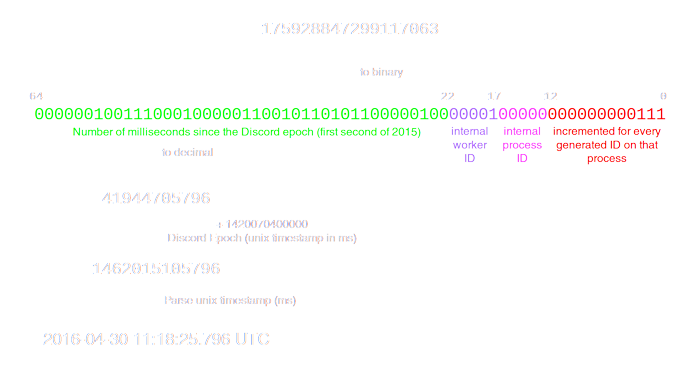
 slate swan
🥲
junior verge
If I just dont get what you want..
slate swan
slate swan
.....welp <@456226577798135808> helppp 😩
 the fact is im dumb so
junior verge
So can anyone help me trying to fix it?
slate swan
in ur bot var put help_command = None
junior verge
I have
slate swan
junior verge
Sorry if Im just not understanding
no no xD, I just cant find the issue 
nothing to do with you dw
slate swan
slate swan
in ur bot var put help_command = None
That works like client.remove_command("help") right?
junior verge
slate swan
no no xD, I just cant find the issue <:kek:823906883588325416>
nothing to do wi...
oh okay
slate swan
slate swan
I want it so i can flirt with it 🫠
I mean, I'm free
junior verge
slate swan
That works like `client.remove_command("help")` right?
had that first
slate swan
slate swan
~~I mean 😏 we might get banned 💀~~
dms uwu or #763957300507181077
slate swan
slate swan
~~dms uwu or <#763957300507181077>~~
bet
junior verge
so no one can find the issue
slate swan
!ot
unkempt canyonBOT
Off-topic channel: #ot2-never-nester’s-nightmare
Please read our off-topic etiquette before participating in conversations.
slate swan
slate swan
~~bet~~
sure
slate swan
junior verge
so no one can find the issue
no
junior verge

slate swan
slate swan
~~dms uwu or <#763957300507181077>~~
Wait hell na i hate that chat💀
goto ot!!!
slate swan
junior verge
so no one can find the issue
dpy had a stroke 😔
share your githib repo if you have one
which you probably wont 
junior verge
slate swan
share your githib repo if you have one
its private :/
slate swan
junior verge
its private :/
well well nvm, did that test cmd work?
goto replit and talk there