#user-interfaces
1 messages · Page 89 of 1
 sinful pendant
sinful pendant
sinful pendant
Ot seems like justify dont work when we have fill or expand setted in pack
 umbral oracle
bro i said other than the licence
 unique forge
Nothing
umbral oracle
ah, thanks
 coarse mirage
How can I get def next_button_click(self): to run in def back_button_click(self):?
Adding MainWindow.next_button_click(self) at the end of the code doesn't work.
    def back_button(self):
        self.back_button = QPushButton(self)
        self.back_button.setEnabled(False)
        self.back_button.clicked.connect(self.back_button_click)
        self.back_button.setStyleSheet("QPushButton"
                               "{"
                               "background:yellow;""background-image : url()"
                               "}"
                               )
        self.back_button.resize(7,88)
        self.back_button.move(22,518)


    def back_button_click(self):
        try:
            if self.type_info_order:
                if self.type_info_order ==0:
                    self.type_info_order = 4
                else:
                    self.type_info_order -=1
        except: AttributeError
        try:
            if self.ability_info_order:
                if self.ability_info_order ==0:
                    self.ability_info_order = len(self.abilities) - 2
                else:
                    self.ability_info_order -=1
        except: AttributeError
        MainWindow.next_button_click(self)
Full code snippet: https://paste.pythondiscord.com/urolijugal
sinful pendant
😅 widget.columnconfiguration saved the project 🔥🔥🔥

 proven basinBOT
Hey @serene umbra!
You either uploaded a .txt file or entered a message that was too long. Please use our paste bin instead.
 serene umbra
Hello guys, i am practicing tkinter by making some basic random project.
I am currently practicing on switching between multiple frames. and my frames will appear in the green portion of the screen, and the size of the frames should be equal to the size of the green portion.
(Here, the blue and grey nav bar are created using labels and also the green portion is also created using label.)
This is what i am getting as my output. my all frame's size is not equal to the size of the green portion.
 proven basinBOT
Hey @serene umbra!
It looks like you tried to attach a Python file - please use a code-pasting service such as https://paste.pythondiscord.com
 mighty rock
There's actually a widget in tkinter.ttk for web browsers' like tabs, it's called Notebook, I think
!d tkinter.ttk.Notebook
proven basinBOT
class tkinter.ttk.Notebook```thanx, but this is not my actual, i was just practicing with tkinter
 urban idol
Is Qt designer free to use?
mighty rock
Free to use, but they don't allow publishing a commercial app
 warm flower
how do i use kinter
root.title('Fisher Version 1.0')
canvas = tk.Canvas(root, width=150, height=200)
canvas.grid(columnspan=1)

hotkeyLabel = tk.Label(root, text="Key for start/stop")
hotkeyLabel.grid(columnspan=1, column=0, row=0)

root.mainloop()
this allows me to actaully make the window
but when i put my actual code for the program above the root.mainloop() it doesnt show the window
urban idol
mighty rock
Free to use, but they don't allow publishing a commercial app
and if we convert QtDesigner created file code in Python and use it in Pyside6 ?
warm flower
urban idol
and if we convert QtDesigner created file code in Python and use it in Pyside6 ?
prolly wont work because different parameters and stuff
urban idol
wdym
warm flower
look for example rn
on my question
canvas = tk.Canvas(root, width=150, height=200)
tk.Canvas(params) wont work if i change it the qt thing
i think the parameters go as (locationx, locationy, width, height)
while the kinter does (root, width, height)
idk how pyside6 works
but im guessing same principle
any way
urban idol
oh I was talking to Roie, not you
warm flower
yh lol i knew but still itr wont work unless you know what your doing, even then might aswell write the whole thing in Pyside6
unique forge
mighty rock
Free to use, but they don't allow publishing a commercial app
You can if you convert the code into pyside
unique forge
urban idol
and if we convert QtDesigner created file code in Python and use it in Pyside6 ?
Yes you can
publish as commercial app
urban idol
unique forge
Yes you can
and can we keep code private by this?
unique forge
urban idol
and can we keep code private by this?
Sure
 subtle verge
that's nice
 normal rock
 languid oracle
https://felopater.vercel.app/
languid oracle
https://felopater.vercel.app/
Looks solid, what's framework are you using?
 clear rivet
hey guys i need some advice im new to python and building a pyside2 /qt GUI for fing cli it works but im trying to get rid of This
self.ui.pushButton_1.clicked.connect(lambda: self.Tile_action(self.ui.Ports_Label_1,self.ui.Ip_Label_1.text()[5:],self.ui.Mac_Label_1.text()[6:]))
self.ui.pushButton_2.clicked.connect(lambda: self.Tile_action(self.ui.Ports_Label_2,self.ui.Ip_Label_2.text()[5:],self.ui.Mac_Label_2.text()[6:]))
self.ui.pushButton_3.clicked.connect(lambda: self.Tile_action(self.ui.Ports_Label_3,self.ui.Ip_Label_3.text()[5:],self.ui.Mac_Label_3.text()[6:]))
...
self.ui.pushButton_25.clicked.connect(lambda: self.Tile_action(self.ui.Ports_Label_25,self.ui.Ip_Label_25.text()[5:],self.ui.Mac_Label_25.text()[6:]))
thats my aproach
def setSignals(self):
button = []
for i in range(0,25):
num = str(i+1)
mlabel = eval(f"self.ui.Mac_Label_{num}")
ilabel = eval(f"self.ui.Ip_Label_{num}")
plabel = eval(f"self.ui.Ports_Label_{num}")
button.append(eval(f"self.ui.pushButton_{num}"))
button[i].clicked.connect(lambda: self.Tile_action(plabel,ilabel.text()[5:],mlabel.text()[6:]))
languid oracle
clear rivet
hey guys i need some advice im new to python and building a pyside2 /qt GUI for...
Tailwindcss
clear rivet
languid oracle
Tailwindcss
Nice
so this function is weird it connects all buttons but with only the last label number
languid oracle
clear rivet
so this function is weird it connects all buttons but with only the last label n...
What?
 mighty frigate
you probably don't need to named your buttons at all, you can just store them in an array
and access it by index
especially if you have 25 buttons, it doesn't make a lot of sence to me
 fathom flicker
proven basinBOT
fathom flicker
proven basinBOT
:incoming_envelope: :ok_hand: applied mute to @fathom flicker until <t:1647448433:f> (9 minutes and 59 seconds) (reason: duplicates rule: sent 4 duplicated messages in 10s).
 opal otter
how do I make this in tkinter
It looks like a text box to me
I've put some example text( in cyan)
- assume there were 5 ranks
**unsure of how it would have those columns
unsure of how it would be able to scroll **
- also unsure of how to have a scrollbar there(pointed with little black arrow)

From my knowledge I can create textboxes, but unsure of those 2 things
how would I go about it?
 jolly flower
opal otter
how do I make this in tkinter
It looks like a text box to me
I've put some exa...
jolly flower
opal otter
how do I make this in tkinter
It looks like a text box to me
I've put some exa...
tkinter is the most suffering gui library you may use
and somehow is popular
 gusty trout
what are some common ways to use python output in another form or screen to make it more user friendly for viewers
opal otter
jolly flower
tkinter is the most suffering gui library you may use
Well uh i still don't know how to go about it
jolly flower
opal otter
Well uh i still don't know how to go about it
you can use pyqt5
if you are interested in windows form apps
opal otter
I'll give it a go
jolly flower
opal otter
I'll give it a go

and after you done designing you can convert the code into a python code and link whatever functions you want
and you can insert images and backgrounds and else just try it by yourself
opal otter
Ohh
 final escarp
Is it possible to set the color of a widget in Tkinter as same as system accent color?

 tawdry mulch
opal otter
how do I make this in tkinter
It looks like a text box to me
I've put some exa...
tawdry mulch
opal otter
how do I make this in tkinter
It looks like a text box to me
I've put some exa...
Treeview
tawdry mulch
jolly flower
tkinter is the most suffering gui library you may use
Suffering?
tawdry mulch
final escarp
Is it possible to set the color of a widget in Tkinter as same as system accent ...
Nothing comes within tkinter, you'll have to pic up the accent yourself
mighty frigate
idk for tkinter but Qt can def get triggering sometimes
as long as you stay in the most simple cases, everything's fine
but when you want more advanced things...
opal otter
how would I align my treeview to center
and also change its height 

whenever I try to search it just shows how to change row height
tawdry mulch
opal otter
how would I align my treeview to center
and also change its height <:flushthonk...
Why are there no other items?
If not, use padx option
tawdry mulch
opal otter
that works, but its like not a responsive centering
Will have to use pack
 tawdry mulch
opal otter
I'm trying to achieve this gui layout
tawdry mulch
opal otter
I'm trying to achieve this gui layout
yes if u use frames
opal otter
Okay 😁
 wary grotto
tawdry mulch
yes if u use frames
wary grotto
tawdry mulch
yes if u use frames
yeah i agree, frames are really effective and easy to play around with
 cobalt ibex
Could anyone point me to any good terminal UI libraries?
 digital rose
Does anyone of you has ui ux Design notes? Like for terminology or anything ? If yes, plz share!
wary grotto
cobalt ibex
Could anyone point me to any good terminal UI libraries?
i use vs code, its amazing and really easy to work with
wary grotto
digital rose
Does anyone of you has ui ux Design notes? Like for terminology or anything ? If...
https://www.designnotes.co/ - is this what you wanted?
Design notes is a free online resource library for product designers. Free icons, free fonts and much more...
digital rose
wary grotto
i use vs code, its amazing and really easy to work with
Thanks both are helpful! 🔥
 little steppe
is there a way to create a textbox the program user can enter something in?
sinful pendant
if framework=='tkinter':
    print('yes')
else:
    print('idk')
tkinter.Text
opal otter
how would I go about changing the cell 2,0 and 2,2 to 50% of their original height
while increasing the heigh of the cell 2,1 to take up that extra space

I've heard of weights but unsure of how to use weights for specific cells
instead of just rowconfig and columnconfig
little steppe
sinful pendant
`tkinter.Text`
any documents or forums on how to use it?
sinful pendant
little steppe
any documents or forums on how to use it?
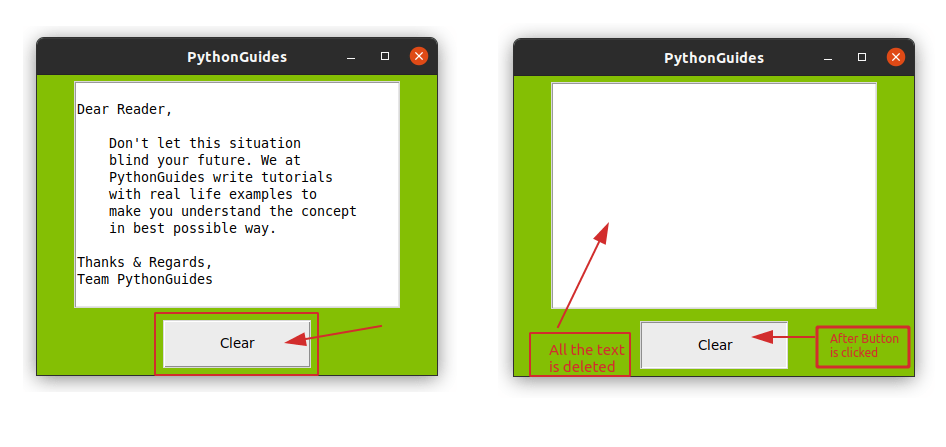
This Python tutorial explains everything about Python Tkinter Text Box Widget, Python Tkinter Text Box Clear, Python Tkinter Text Box Get Value, Python Tkinter Text Box Example, etc.
sinful pendant
opal otter
I've heard of weights but unsure of how to use weights for specific cells
instea...
You van use widget.grid_rowconfigure(index, weight)
sinful pendant
U aftect grid row and column and wi affect the shaoe
Just try this
widget.grid_rowconfigure(cell_row, weight=2)
widget.grid_columnconfigure(cell_col, weight=2)
Aa u moght need to pack those cells with sticky argument of therr are some diff6 behaviours
digital rose
is kivy a good ui?
 agile spade
 wooden stirrup
Python GUIs
The easy way to create desktop applications. PyQt is a Python library for creating GUI applications using the Qt toolkit.
has pyside and pyqt both 5 and 6 amazing reference and books and forums videos are great and cheap
 pale plover
Hey guys!, how is it going?, i remade a home page and i was wondering if you could give me feedback.
You can also support me by sharing it or hitting the like button on my portfolio, thank you! 😃
https://www.behance.net/gallery/139760891/CR-Academia-Home-Page-Redesign-UIUX

 reef ether
` import pandas as pd
import folium
import glob
from ipywidgets import interact, interactive, fixed, interact_manual, Layout
import ipywidgets as widgets
from IPython.display import display
import datetime as dt
all_files = glob.glob("*.csv")
li = []
#function to make a color code for distance
def color_producer(total_distance):
if 4100 < total_distance < 4300:
return 'green'
else:
return 'red'
map = folium.Map(zoom_start=14, control_scale=True,tiles='Stamen Terrain')
def change_parameters(start ,end ):
for filename in all_files:
date1 = filename.split('_')[1] #split filename to name and date
date1 = date1.replace('.csv','')
date2 = dt.datetime.strptime(date1, "%Y-%m-%d")
if start <= date2 <= end: #compare the file if it falls within the range
df = pd.read_csv(filename, index_col=None, header=0)
li.append(df) #append to the list
car_location = pd.concat(li, axis=0, ignore_index=True)
total_distance = pd.concat(li, axis=0, ignore_index=True)
car_location = car_location[["Latitude", "Longitude"]]
total_distance = total_distance[['total_distance']]
total_distance = (total_distance).iloc[-1] #To read last value in "total_distance" column
total_distance = int(total_distance)
folium.PolyLine(car_location, color=color_producer(total_distance), weight=3.0, opacity=1).add_to(map)
li=[]
map
start_date = widgets.DatePicker(
description='Start Date',
disabled=False
)
end_date = widgets.DatePicker(
description='End Date',
disabled=False
)
widgets.HBox([start_date, end_date])
out = widgets.interactive_output(
change_parameters,
{'start': start_date,
'end': end_date
}
)
ui = widgets.HBox(
[widgets.VBox(
[widgets.Label(), start_date, end_date])
],
layout=Layout(display='flex', flex_flow='row wrap', justify_content='space-between')
)
display(ui, out) `
Can some one help me what’s wrong
My input doesn’t plot the map !
warm flower
Is there a way that root.after can be put into a condition?
coarse mirage
For some reason the image for the label I've created isn't showing up in PyQt.
Here's a small snippet.
        self.button_lights = QLabel(self)
        self.pixmap_buttons = QPixmap(f"{start}/assets/passets/buttonloading.png")
        self.button_lights.setPixmap(self.pixmap_buttons)
        self.button_lights.setGeometry(23,92,10,470)
And here is more of the mainwindow code: https://paste.pythondiscord.com/dikugevofi
Is there something I'm doing wrong?
 plush stream
double check the path
make sure it's correct
pyqt wont spit out any error nor warning if you have invalid path
coarse mirage
I'm an idiot and that was the issue. Thank you.
 supple grove
I am creating a UI in python. This will require the creation of marklist for students in a school for a particular subject. I need to save this data into an SQL database. Then create a graph of the highest mark in each month in a year. Can anyone send me a link to any tutorial which can help me? Please tag me when you answer.
tawdry mulch
warm flower
Is there a way that root.after can be put into a condition?
Wym
 smoky hinge
hi all
I am writing a tool that would have loads of args
an example is
--instance-start
--instance-stop
--ssh-add
--ssh-remove
Is there a way could configured the arg parse to accept
tool.py --instance --start
tool.py --instance --stop
etc
like nested arg parser ?
Thank you in advance for any advice !
smoky hinge
answering my own question
Subparsers
https://gist.github.com/jirihnidek/3f5d36636198e852280f619847d22d9e

Gist
Python example of using argparse sub-parser, sub-commands and sub-sub-commands - sub-sub-command.py
 magic tide
Hello people! I have troubles installing pyinstaller some1 helps me? Btw it gives me errors
Ping me if answer
magic tide
Hi there
 ivory ice
hi
ivory ice
send a pic
magic tide
Well.. im pretty busy rn is it ok if i send later?
ivory ice
sure!
magic tide
Ty
ivory ice
if you want to convert to exe you can use py-to-exe as well
pip install py-to-exe
it works just as well
just in case
 ruby igloo
final escarp
PyInstaller make my Python app opens very slow for me
ruby igloo
final escarp
PyInstaller make my Python app opens very slow for me
try to strip out the libraries pyinstaller included which your program doesn't really need. pyinstaller seems to add a bit too much stuff which can be removed. so i assume it would also make it faster once stripped down
coarse mirage
So I've done this:
#The "Mother Code" Run
    def extract(self):
        self.loading = True
        load_flash =  self.button_lights.setPixmap(QPixmap(f"{start}/assets/passets/button_loading_loading.png"))
        self.pokemon = self.line.text().lower()
        Data.run_api(self,"pokemon", self.pokemon)
        x = 0
        while self.loading:
            x+=500
            QTimer.singleShot(x, lambda: load_flash)
            x+=500
            QTimer.singleShot(x, lambda: Data.error_light_off(self))
            MainWindow.button_activation(self)
            self.name = self.data["name"].title()
            print(self.name)
            print(Data.ability_list(self))
            Data.ability_effect(self)
            print(self.long_effects)
            print(self.short_effects)
            Data.height_weight(self)
            Data.type(self)
            Data.misc_info(self)
            Data.attacks(self)
            Data.create_attack_summary_list(self)
            Data.find_sprites(self)
            Data.show_sprites(self)
            self.borders_screen.setPixmap(QPixmap(f"{start}/assets/passets/foreground.png"))
            Data.stat_updates(self)
            Data.type_image_updates(self)
            print(self.attacks_levelup_name)
            self.loading = False
        self.button_lights.setPixmap(QPixmap(f"{start}/assets/passets/button_loading_complete.png"))
And while the code runs, what's in the QTimer doesn't run until the very end.
Messing around with it, even if I take the code out of QTimer and just have the image only change once it still doesn't run until the end of the code when everything else is finished.
Can anybody please help me with the above?
 cursive basin
does qt has this type of widget

 rocky dragon
A QSlider
digital rose
Guys, I've a list of data which I need to display in sequence using my tkinter module
How do I achieve it?
So, lemme give a glimpse. I've a list of text messages
These messages should be displayed in a sequential order. Kindly tell me what code should I employ at Tkinter module to make sure that the data present in the list is displayed sequentially
Please guys, somebody guide me. I have asked for help multiple times but have received none
tawdry mulch
magic tide
Hello people! I have troubles installing `pyinstaller` some1 helps me? Btw it gi...
What eerror
tawdry mulch
final escarp
PyInstaller make my Python app opens very slow for me
I am almost sure that you bundled everything into a single exe
final escarp
so you can show me what is the best setting for that?
tawdry mulch
digital rose
These messages should be displayed in a sequential order. Kindly tell me what co...
Example of the layout you want ?
tawdry mulch
final escarp
so you can show me what is the best setting for that?
If you want the app to be a bit faster on bootup, then bundle everything into a directory
coarse mirage
How do I choose whereQScrollArea() is place on my main window?
It seems no matter what I do it doesn't move.
setGeometry ends up doing nothing.
Here's my code:
        self.summary_screen = QLabel (placeholder_text, self)
        self.summary_screen.setGeometry(45, 463, 440, 180)
        self.summary_screen.setStyleSheet("color: black")
        self.summary_screen.setFont(QFont('Arial',13))
        self.summary_screen.setWordWrap(True)

        self.scroll_area = QScrollArea()
        self.scroll_area.setWidget(self.summary_screen)
        self.scroll_area.setWidgetResizable(True)
        self.scroll_area.setFixedHeight(120)
        self.scroll_area.setFixedWidth(440)
        self.scroll_area.setGeometry(QtCore.QRect(145, 463, 400, 180))
        self.layout_area = QtWidgets.QVBoxLayout(self)
        self.layout_area.setGeometry(QtCore.QRect(145, 600, 400, 180))
        self.layout_area.addWidget(self.scroll_area)
But can i install it on Linux? I mean pyinstaller
tawdry mulch
magic tide
But can i install it on Linux? I mean pyinstaller
ig, idk
 balmy pebble
magic tide
But can i install it on Linux? I mean pyinstaller
balmy pebble
magic tide
But can i install it on Linux? I mean pyinstaller
Install pyinstaller on Linux:
sudo pip install pyinstaller
magic tide
Oh ty. And for win?
digital rose
tawdry mulch
Example of the layout you want ?
It's Ok, mate. I've found out the solution
mighty frigate
@coarse miragethe same as any other widget, really
in your case you probably have to do something on the layout
 echo phoenix
Is it possible to use react with Python?
coarse mirage
mighty frigate
in your case you probably have to do something on the layout
What do you mean "do something on the layout"?
coarse mirage
Like I just want the white box in the middle to go where the white box is at the bottom.

 leaden plover
i've been trying for a bit to use a for loop to add images to no success. any ideas?
def nextImg(filename):
print(os.getcwd())
root.title(filename + " - test")
label = Label()
photo = ImageTk.PhotoImage(Image.open(filename))
label.image = photo
label.pack()
for filename in os.listdir(folderSelected):
unused, fileExtension = os.path.splitext(filename)
if "png" in fileExtension:
nextImg(filename)
elif "PNG" in fileExtension:
nextImg(filename)``` mortal marten
coarse mirage
How do I choose where`QScrollArea()` is place on my main window?
It seems no ma...
mortal marten
coarse mirage
How do I choose where`QScrollArea()` is place on my main window?
It seems no ma...
don't use absolute positioning, use layouts instead
you will save youraelf a lot of time and trouble in the long run
coarse mirage
mortal marten
don't use absolute positioning, use layouts instead
Where do I read about these layouts? And is this just for QScrollArea or everything in general?
tawdry mulch
leaden plover
i've been trying for a bit to use a for loop to add images to no success. any id...
First of all, you have to give the options for the label inside the decorator, not outside it as attributes, it's useless
And you can also shorten your if condition
leaden plover
tawdry mulch
First of all, you have to give the options for the label inside the decorator, n...
one of the answers on google said something about garbage collection and to do that, that's why its there
tawdry mulch
leaden plover
one of the answers on google said something about garbage collection and to do t...
Yes, let that be there. But don't expect image to show to show up in the label if you don't define it inside the descriptor or update it elsewhere
tawdry mulch
Label(root,image=photo)
tawdry mulch
leaden plover
the first had it inside
It should have both
Come up with a third version then
leaden plover
tawdry mulch
`Label(root,image=photo)`
i tried that, both one with both and one with just one, none of them worked
tawdry mulch
leaden plover
i tried that, both one with both and one with just one, none of them worked
What does not work mean
leaden plover
tawdry mulch
What does not work mean
nothing is displayed, sometimes, gives a file not found error sometimes doesnt
 dense minnow
i looped a bunch of buttons with tkinter module and i have appended it to a list now is it possible to configure a button which is part of the list when i click the button
tawdry mulch
dense minnow
i looped a bunch of buttons with tkinter module and i have appended it to a list...
By re looking through the list
dense minnow
x=0
z=0
blist=[]
for i in range(0,10):
  b99=str(i)
  b99=Button(dscreen,text=f"{i}",width="2",height="1").place(x=20+z,y=80+x)
  blist.append(Button)
  z=z+30
  x=x
for example i am creating 10 buttons so if i click on say the 7th button how do i configure that
dense minnow
tawdry mulch
By re looking through the list
when i print the list i get this
 tawdry mulch
dense minnow
```
x=0
z=0
blist=[]
for i in range(0,10):
b99=str(i)
b99=Button(dscreen,tex...
tawdry mulch
dense minnow
```
x=0
z=0
blist=[]
for i in range(0,10):
b99=str(i)
b99=Button(dscreen,tex...
What do you want to happen to these buttons
dense minnow
so basically i want them to turn into a diff color when i press them
tawdry mulch
Create a functtion function and link it with a button @dense minnow
dense minnow
yea
but i tried that
so basically my problem is that even if i call a funtion how does python identify what button i pressed
tawdry mulch
dense minnow
so basically my problem is that even if i call a funtion how does python identif...
You have to pass the button as an argument
dense minnow
yea i get that but how will i does python identify which button to pass as an arguement
tawdry mulch
dense minnow
yea i get that but how will i does python identify which button to pass as an ar...
I will tell you that, but first write the code so far
dense minnow
    z=0
    x=0
    j=0
    blist=[]
    for i in m:
        if i[0]=="H1":
            x=x+40
        if j<=9:
            b99=str(i[0])
            b99=Button(dscreen,text=f"{i[0]}",width="2",height="1",bg="black",fg="white").place(x=20+z,y=80+x)
            z=z+30
            x=x
            j=j+1
            continue
        if j>=10 and j<28:
            b99=str(i[0])
            b99=Button(text=f"{i[0]}",width="2",height="1",bg="black",fg="white").place(x=70+z,y=80+x)
            blist.append(Button)
            z=z+30
            x=x
            j=j+1
            continue
        if j>=28:
            b99=str(i[0])
            b99=Button(text=f"{i[0]}",width="2",height="1",bg="black",fg="white").place(x=120+z,y=80+x)
            z=z+30
            x=x
            j=j+1
        if j>37:
            j=0
            x=x+40
z=0 ```i get something like this

now i wanna change the color of the button to something else when i press it
@tawdry mulch
tawdry mulch
blist.append(Button) isnt the right way
blist.append(b99) is correct
But let me tell you, there is no point in saving it like this. It is all None
dense minnow
so there is nothing i can do?
unless i create the buttons with seperate variables
without a loop
tawdry mulch
dense minnow
without a loop
No ofc you can, make the buttons not None
and then append it
dense minnow
btw i new to tkinter and python in general so does it come under classes and object in python
?
tawdry mulch
dense minnow
btw i new to tkinter and python in general so does it come under classes and obj...
no

Stack Overflow
I've created this simple GUI:
from tkinter import *
root = Tk()
def grabText(event):
print(entryBox.get())
entryBox = Entry(root, width=60).grid(row=2, column=1, sticky=W)
grabBtn = Bu...
Follow the solution mentioned ^
dense minnow
is there a way to store the text of a button by simply clicking it?
sinful pendant
Yes
sinful pendant
Well i cant understand the issur my code not working
The windows cmd is set-clipboard "copy"
tawdry mulch
sinful pendant
Well i cant understand the issur my code not working
The windows cmd is `set-cli...
What code
sinful pendant
I deleted that, i was using set-clipboard commamd which failed to do so
digital rose
Is there anyone who is starting self taught journey in UI ux designing? And interested in learning together please pm.
wary grotto
digital rose
Is there anyone who is starting self taught journey in UI ux designing? And inte...
actually im learning from youtube...
serene umbra
Hello guys, i am trying to display a gif in tkinter. The Code runs fine, i am able to see the gif being played. But the problem is that when i close the program, i get the following error message in my terminal (please the the image attached with this message)
CODE:
from time import sleep
from tkinter import *
from PIL import Image, ImageTk, ImageSequence

root = Tk()

root.title('Virtual AI Assistant')

# Setting logo
logo = PhotoImage(file='logo.png')
root.iconphoto(False, logo)

# to set window equal to screen size
root.state('zoomed')

# set window color
root.configure(bg='#000101')

# setting 'ai' to 'jarvis' by default
ai = "jarvis"
bg_img = Image.open('jarvis_gif.gif')
if ai == 'friday':
    bg_img = Image.open('friday_gif.gif')
    # bg_img = bg_img.resize((960,540))

label = Label(root, borderwidth=1)
label.place(relx=0.5, anchor=N)

command = True
while command:
    for img in ImageSequence.Iterator(bg_img):

        img = ImageTk.PhotoImage(img)
        label.config(image=img)

        root.update()
        sleep(0.02)

root.mainloop()
 digital rose
wary grotto
actually im learning from youtube...
digital rose
wary grotto
actually im learning from youtube...
Me too
final escarp
wary grotto
actually im learning from youtube...
me too lol XDD
no teacher but I'm still going good
 mossy trout
is sharing external links allowed here? I just want to share one of my projects with PyQt5.

GitHub
Next generation - elegant text editor built with Python - GitHub - serumstudio/writer: Next generation - elegant text editor built with Python
 hollow gorge
Some modules to create desktop application, like tkinter but something better
 eager viper
Hey Python people!
I could an assist
I'm doing a super quick presentation on IDES — just five slides, and I'm devoting about 30 seconds and half a slide to the fact that a modern IDE is an interactive bugger with a graphical interface
Here's the rub
I only just used a debugger for the first time yesterday
Here's some actual footage of me doing it

So my question is — why do we like/need debuggers?
tawdry mulch
serene umbra
Hello guys, i am trying to display a gif in tkinter. The Code runs fine, i am ab...
!code
proven basinBOT
Here's how to format Python code on Discord:
```py
print('Hello world!')
```
These are backticks, not quotes. Check this out if you can't find the backtick key.
 tiny pike
Hi, anyone can help me ?
https://stackoverflow.com/questions/71598818/pyqt5-pixmap-does-not-appear-correctly
Stack Overflow
I'm new on PyQt5 and I need to make a GUI of a game board, chess style. But when I import my image to put it in my window, it is automatically cropped. I checked with several images, it's still the...
mighty frigate
@tiny pikechances are the pixmap is bigger than the label
@tiny pike
import sys
from PyQt5 import QtCore, QtGui, QtWidgets

app = QtWidgets.QApplication(sys.argv)
pixmap = QtGui.QPixmap("test.jpg")

mainwindow = QtWidgets.QMainWindow()
centralwidget = QtWidgets.QWidget()
mainwindow.setCentralWidget(centralwidget)

layout = QtWidgets.QVBoxLayout(centralwidget)

# label with unscaled pixmap
label_unscaled = QtWidgets.QLabel()
label_unscaled.setPixmap(pixmap)
layout.addWidget(label_unscaled)

# label with scaled pixmap
label_scaled = QtWidgets.QLabel()
scaled_pixmap = pixmap.scaledToWidth(200)
label_scaled.setPixmap(scaled_pixmap)
layout.addWidget(label_scaled)

mainwindow.setFixedSize(400, 600)
mainwindow.show()

app.exec_()

 frosty niche
Hello. Does anyone know using tkinter how to fill up following rows if the value from dropdown is selected?
final escarp
mossy trout
is sharing external links allowed here? I just want to share one of my projects ...
nice work! Beautiful GUI btw
 tulip idol
yes
 dark gulch
anyone know how to use tkinter? dm me if u do
tawdry mulch
frosty niche
Hello. Does anyone know using tkinter how to fill up following rows if the value...
like how
digital rose
anyone here know a good pyqt5 book?
serene umbra
tawdry mulch
!code
i have already attached the code with that message
tawdry mulch
serene umbra
i have already attached the code with that message
Yes
but you have not formatted it like it is supposed to be
serene umbra
here, i can see that my code in that message is formatter. You mean indentations right??
 onyx zodiac
hello i am working with dash app for making dashboard. previously my code was working but now i am getting error loading layout can anyone help me in this? my code here https://paste.pythondiscord.com/lupiqequwu ping me when reply
tawdry mulch
serene umbra
here, i can see that my code in that message is formatter. You mean indentations...
!code
proven basinBOT
Here's how to format Python code on Discord:
```py
print('Hello world!')
```
These are backticks, not quotes. Check this out if you can't find the backtick key.
tawdry mulch
^ This is how you should format a python code while posting in discord
serene umbra
ook ...
tawdry mulch
serene umbra
ook ...
Yes once you do that, can ping me or post it here
serene umbra
tawdry mulch
Yes once you do that, can ping me or post it here
done
tawdry mulch
serene umbra
done
post it again pls
tawdry mulch
serene umbra
Hello guys, i am trying to display a gif in tkinter. The Code runs fine, i am ab...
Have you heard of after() method?
serene umbra
no
tawdry mulch
serene umbra
no
Google it, it is what you need
serene umbra
ok ... i figure it out ... thanx
magic tide
Hi there! 👋
i have problems removing images from a tkinter variable
when i click clean it deletes only the last cube

here's the code
import random
from tkinter import *
from PIL import Image, ImageTk
import os

def app():
    root=Tk()
    root.title("Dices Simulator")
    root.geometry('385x155')
    root.resizable(False,False)
    root.config(bg='white')

    st=Label(root,text='How many dices you want to simulate?',bg='white')
    st.place(x=4,y=1)

    inp=Text(root,width=35,height=1)
    inp.place(x=4,y=25)

    err=Label(root,text='',bg='white',fg='red')
    err.place(x=4,y=50)

    def roll():
        try:
            value=int(inp.get("1.0",END))
            if value<=6 and value>=1:
                panel=Label(root,image=None,bd=0)
                err.config(text='')
                for x in range(value):
                    num=random.randint(1,6)
                    value=str(num)
                    x='/home/pi/Desktop/dice/dice '+value
                    img=Image.open(x)
                    img=img.resize((50,50), Image.ANTIALIAS)
                    img=ImageTk.PhotoImage(img)
                    panel=Label(root,image=img,bd=0)
                    panel.image=img
                    panel.pack(padx=7,pady=52,side=LEFT)
                def clean():
                    for x in range(6):
                        panel.pack_forget()
                b1=Button(root,text='Clean',bg="white",fg="black",width=5,border=0,highlightthickness=0,bd=0,activebackground='white',command=clean)
                b1.place(x=158,y=120)
            else:
                err.config(text='Input must be between 1 and 6')
        except ValueError:
            err.config(text='input must be only integer')


    b=Button(root,text='Throw',bg="white",fg="black",width=5,border=0,highlightthickness=0,bd=0,activebackground='white',command=roll)
    b.place(x=299,y=22)
    root.mainloop()
app()
ping me if you can answer. thx
tawdry mulch
magic tide
ping me if you can answer. thx
lol?
 tribal path
you'd need to keep a reference to the labels in say a list or a dict to refer to later
tawdry mulch
magic tide
```py
import random
from tkinter import *
from PIL import Image, ImageTk
import ...
already told you, you are overwriting panel each time a label is created in the loop. Store it to a list
magic tide
Idk how xd
 dreamy lark
Hello, I need help for a school project, is it possible to take a graph from pandas and display it in a tkinter window? I search online but didnt found anything whith this type of graph .This is how I make the graph:

I need to do something like this
 proven basinBOT
Hey @dreamy lark!
It looks like you tried to attach a Python file - please use a code-pasting service such as https://paste.pythondiscord.com
tawdry mulch
magic tide
Idk how xd
Okay ask in the other server again, let me see
dreamy lark
here is my code if you want https://paste.pythondiscord.com/eneqaqagum
 quartz dust
So, basically I'm making a web browser in PyQt5 and I have an issue, so when I set a scheme (which was originally https), I changed it to a url where it will add what you searched after that, but for some reason it just crashes. Please help. The script is here: https://pastebin.com/BP0FHUQK
Here is the error:
  File "c:\Users\User\OneDrive\Desktop\User Versions\User 2\User 2.py", line 164, in current_tab_changed
    qurl = self.tabs.currentWidget().url()
AttributeError: 'NoneType' object has no attribute 'url'```if it is a matplotlib graph, then you can have matplotlib graphs inside tkinter windows
 nimble sierra
eager viper
https://tenor.com/view/renderburger-visual-art-explosion-head-mushrooom-explosio...
nimble sierra
eager viper
https://tenor.com/view/renderburger-visual-art-explosion-head-mushrooom-explosio...
this can be an nft, you know that right?
tawdry mulch
nimble sierra
this can be an nft, you know that right?
You realize thats a tenor gif right
nimble sierra
tawdry mulch
You realize thats a tenor gif right
yes
nfts can be anything, anything at all
tawdry mulch
nimble sierra
nfts can be anything, anything at all
lol
spoiler: ||I am an NFT too||
quartz dust
quartz dust
So, basically I'm making a web browser in PyQt5 and I have an issue, so when I s...
Can someone please help me here.
tawdry mulch
nimble sierra
you dont know much about nfts?
meh
nimble sierra
by the way what lib do think will good for mobile apps on both iphone and android
nimble sierra
quartz dust
Can someone please help me here.
hahah, what help you need my friend
quartz dust
quartz dust
So, basically I'm making a web browser in PyQt5 and I have an issue, so when I s...
It's in this message (one above mine)
my other message is what I mean
nimble sierra
quartz dust
my other message is what I mean
okay, i think you have to go to a help channel instead
quartz dust
nimble sierra
okay, i think you have to go to a help channel instead
I tried to do that and they just told me to come here
¯_(ツ)_/¯
lol
nimble sierra
quartz dust
lol
oh
tawdry mulch
F time to go back 😛
quartz dust
yep
nimble sierra
tawdry mulch
F time to go back 😛
yes
tawdry mulch
Actually you have a better chance of finding help in the Qt server
quartz dust
tawdry mulch
F time to go back 😛

 tawdry mulch
But none the less, there are some Qt nerds around here
quartz dust
tawdry mulch
Actually you have a better chance of finding help in the Qt server
do you know of any?
quartz dust
tawdry mulch
But none the less, there are some Qt nerds around here
Do you know of any of these legends?
tawdry mulch
quartz dust
Do you know of any of these legends?
I am aware of them, but I am afraid I do not have permission to ping them
quartz dust
tawdry mulch
I am aware of them, but I am afraid I do not have permission to ping them
I'm sure once won't hurt.
 tawdry mulch
quartz dust
I'm sure once won't hurt.
tawdry mulch
quartz dust
I'm sure once won't hurt.
That's what they said before WW1
quartz dust
lol
Anyways if you don't want to then that's fine (but otherwise please do it, do the deed).
tawdry mulch
@eager beacon do you mind taking a look and helping this poor soul if you can ^^. Sorry for the ping
quartz dust
tawdry mulch
<@!347272409151438858> do you mind taking a look and helping this poor soul if y...
I appreciate it, thank you kind sir
nimble sierra
i think you will have to claim server and then post your problem there, you will surly get help, okay
nimble sierra
quartz dust
https://giphy.com/gifs/theoffice-the-office-tv-frame-toby-vyTnNTrs3wqQ0UIvwE
yes yes
quartz dust
Literally no one, I mean literally no one could help me, and believe me I've been on Stack Overflow, Discord, Reddit.
quartz dust
nimble sierra
yes yes
lol
tawdry mulch
There are more nice lads around here, theyr just prolly busy. As long as you stop messaging and dont send your question way back, they will eventually see your message
quartz dust
nimble sierra
i think you will have to claim server and then post your problem there, you will...
maybe I'll join the qt server that he sent to me
nimble sierra
tawdry mulch
There are more nice lads around here, theyr just prolly busy. As long as you sto...
that is true
tawdry mulch
quartz dust
maybe I'll join the qt server that he sent to me
pretty sure these people hang out there more🙂
quartz dust
tawdry mulch
There are more nice lads around here, theyr just prolly busy. As long as you sto...
okay I hope they ping me though because otherwise I probably won't see their message, lol
nimble sierra
look, try and solve the problem on your own, with that, you will learn better.
quartz dust
tawdry mulch
pretty sure these people hang out there more🙂
hmm, that would make sense.
nimble sierra
you are the only best help you to offer yourself trust me,
quartz dust
nimble sierra
look, try and solve the problem on your own, with that, you will learn better.
I have and will continue to until I can find someone who can help me
quartz dust
nimble sierra
you are the only best help you to offer yourself trust me,
Good advice, thank you my man.
nimble sierra
quartz dust
I have and will continue to until I can find someone who can help me
my country men will say 'mmmmmm '
good luck
quartz dust
nimble sierra
my country men will say 'mmmmmm '
?
nimble sierra
just clam down and go through you code , line by line
tawdry mulch
quartz dust
👍
Well I will tell you one thing, the error means self.tabs.currentWidget() is None
nimble sierra
@tawdry mulch you there bro ?
quartz dust
tawdry mulch
Well I will tell you one thing, the error means `self.tabs.currentWidget()` is `...
so I think that I probably have to add some more parameters or something like that maybe
nimble sierra
quartz dust
so I think that I probably have to add some more parameters or something like th...
good, you see that your time.
quartz dust
?
nimble sierra
coding is time and patience and clarity
quartz dust
Wow, you are a man of Wisdom!
tawdry mulch
quartz dust
so I think that I probably have to add some more parameters or something like th...
I will tell you, google is always your bff in terms of debugging. A simple search can even solve your doubts. These libraries have been around for about decade now, and used by alot of people. So there is a very good chance that someone has already encountered your issues in the past and asked a question and already received an answer. Let stackoverflow be your friend always, anyway for now, here is what I could find https://stackoverflow.com/q/67910504
Stack Overflow
I'm building a simple browser with python, PyQt5 QWebEnjineView.
I want to make the reload button to be hidden when the page is loading and "stop loading" button visible,
When loading is
quartz dust
tawdry mulch
I will tell you, google is always your bff in terms of debugging. A simple searc...
Welp, that's what I get for using DuckDuckGo, XD
quartz dust
nimble sierra
see you later
yeah, okay bye!
tawdry mulch
quartz dust
Welp, that's what I get for using DuckDuckGo, XD
The Q seems to be matching with yours
quartz dust
tawdry mulch
The Q seems to be matching with yours
I believe that you are correct, this may just help me, tysm
Welp, it didn't, lol
Well, thank you anyways!
:)
tawdry mulch
quartz dust
Well, thank you anyways!
Good luck!
dreamy lark
tawdry mulch
if it is a `matplotlib` graph, then you can have `matplotlib` graphs inside tkin...
Yes it is a matplotlib graph but made with pandas and i don't know how to display it in a tkinter window and i didnt found anything on google
onyx zodiac
hello i am working with dash app for making dashboard. previously my code was working but now i am getting error loading layout can anyone help me in this? my code here https://paste.pythondiscord.com/lupiqequwu ping me when reply
 fluid tinsel
does anyone know any non-oop GUI libs?
I want to write procedural, but the libs for GUI dont make it easy, they effectively force me to use oop.
sinful pendant
Tkinter can work in both oop wau and non oop way
tiny pike
This is my Widget Button class which is just a Button hooked up to a filedialog. However, I would like to recover the name of the file so that I can use it afterwards in another class for the game board. I put it in attribute by doing:
self.filepath = filepath[0]
It is not accessible anywhere. No idea how to get that filepath. On the other hand when I print it in the openFileNameDialog method, there is no problem but if I try to access it in the init method, it will tell me that it does not exist.
 tawdry mulch
dreamy lark
Yes it is a matplotlib graph but made with pandas and i don't know how to displ...
tawdry mulch
dreamy lark
Yes it is a matplotlib graph but made with pandas and i don't know how to displ...
https://datatofish.com/matplotlib-charts-tkinter-gui/ seems detailed

Often times you may need to place matplotlib charts on a tkinter GUI. In this tutorial, I'll show you how to place such charts on your GUI.
tawdry mulch
fluid tinsel
does anyone know any non-oop GUI libs?
I want to write procedural, but the libs ...
tkinter
tawdry mulch
tiny pike
This is my Widget Button class which is just a Button hooked up to a filedialog....
Hmmm need more details, this is prolly a more python error
dreamy lark
tawdry mulch
https://datatofish.com/matplotlib-charts-tkinter-gui/ seems detailed
Ohhh thanks you man ! have a great day !
tawdry mulch
I mean if you check, if condition has to be executed inorder for filename to be defined, if not it is undefined. So define a else and give a path too. What is the variable you want tho @tiny pike
 mortal pollen
can anyone suggest some starting points/resources to get going with ncurses, ive set a pretty big endeavour for myself of a music player tui to implement, but it's just that creating tuis feels a bit daunting at first and there's not a lot of intuitive documentation i've been able to find so far, came here for any help
digital rose
anyone have any background in multithreading with pyqt5
wooden stirrup
https://www.pythonguis.com/tutorials/multithreading-pyqt6-applications-qthreadpool/
https://www.pythonguis.com/tutorials/multithreading-pyqt-applications-qthreadpool/

Python GUIs
Run background tasks concurrently without impacting your UI. A common problem when building Python GUI applications is
Python GUIs
Run background tasks concurrently without impacting your UI. A common problem when building Python GUI applications is
final escarp
https://github.com/HuyHung1408/Fluent-Python-Calculator Can someone test for me if the installer works? Much thanks

GitHub
A simple Python calculator with Sun-Valley-ttk-theme - GitHub - HuyHung1408/Fluent-Python-Calculator: A simple Python calculator with Sun-Valley-ttk-theme
 covert rock
I'm having problem with QDoubleValidator. I'm following a course and this is the code it's using for the current lesson
import sys
from PyQt5.QtWidgets import *
from PyQt5.QtGui import *
from PyQt5.QtCore import *

app = QApplication(sys.argv)
w = QWidget()

input1 = QLineEdit()
input1.setValidator(QIntValidator())
input1.setMaxLength(2)
input1.setAlignment(Qt.AlignLeft)

input2 = QLineEdit()
input2.setValidator(QDoubleValidator(0.00, 50.00, 5))


form_layout = QFormLayout()
form_layout.addRow(input1)
form_layout.addRow(input2)


w.setLayout(form_layout)
w.show()
sys.exit(app.exec_())```
except in the window that this runs
I can input values higher than 50.00
see? tawdry mulch
final escarp
https://github.com/HuyHung1408/Fluent-Python-Calculator Can someone test for me ...
tawdry mulch
final escarp
https://github.com/HuyHung1408/Fluent-Python-Calculator Can someone test for me ...
I was going to give you high marks till I realized I can write anything I want at the entry widget
final escarp
tawdry mulch
I was going to give you high marks till I realized I can write anything I want a...
lol ¯_(ツ)_/¯
tawdry mulch
 slow plover
or atleast a decent alternative
slow plover
or atleast a decent alternative
Damn, I see. That sucks. Are you loading RGBA images for canvas images?
final escarp
tawdry mulch
I was going to give you high marks till I realized I can write anything I want a...
thanks for your feedback, I will improve it
tawdry mulch
final escarp
thanks for your feedback, I will improve it
Yes please, it is a major security flaw
slow plover
tawdry mulch
Damn, I see. That sucks. Are you loading RGBA images for canvas images?
yeah
and it takes an awfully long time to get converted to imagetk
tawdry mulch
slow plover
yeah
Mmmm even sun valley theme uses PNG for their theme and it takes long to load up so they made a version with gif which is kinda faster
 robust zinc
When using tkinter, is it better to use the grid function or the pack function?
tawdry mulch
robust zinc
When using tkinter, is it better to use the grid function or the pack function?
grid but it depends on what you want to do
slow plover
how can i make such a ui with tkinter (sorry for the bad image quality), i don't want to be spoonfed, just a general idea will be fine

 valid mica
Why tkinter, of all things?
slow plover
valid mica
Why tkinter, of all things?
experienced
digital rose
Hey anyone knows a good book or Tutorial series for Learning PyQt5?
 charred pasture
tribal path
charred pasture
tribal path
mind map/ spider diagram? or programmably... similar to a flowchart
frosty niche
Hello, I am doing a project with python and tkinter, and I have a few questions regarding functionality. I would like to take some values entered by user (in the GUI not terminal) and then proceed to do algorithms on those values and display results, I have everything except this functionality. Could anyone help me out in pm, because I am not verified to speak in voice channel yet.
tawdry mulch
slow plover
how can i make such a ui with tkinter (sorry for the bad image quality), i don't...
I think that is a tool window
 rapid elbow
PyQT vs Tkinter?
mighty frigate
Qt is much more than a UI library, probably allow to do more things too but it's more difficult to use
@rapid elbow
rapid elbow
mighty frigate
Qt is much more than a UI library, probably allow to do more things too but it's...
what other things can Qt do?
mighty frigate
Qt
I mean there's quite a bit
@rapid elbowhttps://doc.qt.io/qt.html
there's a multimedia lib, a network lib, a databse lib, a 3D lib, a sensor lib, etc
sinful pendant
slow plover
how can i make such a ui with tkinter (sorry for the bad image quality), i don't...
Grid packong for labels with image as parameter
 charred hazel
Hi all, im currently trying to figure out if theres a way to display console outputs on a Tkinter Gui, im currently lost and cant find anything which would help me out so if anyone has a pointer in which way to go itd be much appreciated
sinful pendant
charred hazel
Hi all, im currently trying to figure out if theres a way to display console out...
U display that in widget
quartz dust
Did someone ping me?
quartz dust
Well, okay.
 summer needle
final escarp
https://github.com/HuyHung1408/Fluent-Python-Calculator Can someone test for me ...
summer needle
final escarp
https://github.com/HuyHung1408/Fluent-Python-Calculator Can someone test for me ...
damn, which lib is used in making this
final escarp
summer needle
damn, which lib is used in making this
You mean the UI?
You can check the requirements.txt
summer needle
so these three are the libs
 final escarp
summer needle
so these three are the libs
final escarp
summer needle
so these three are the libs
yes
final escarp
summer needle
so these three are the libs
and this one too https://github.com/rdbende/Sun-Valley-ttk-theme

GitHub
A stunning theme for ttk, based on Microsoft's Sun Valley visual style - GitHub - rdbende/Sun-Valley-ttk-theme: A stunning theme for ttk, based on Microsoft's Sun Valley visual style
 tall thorn
from PyQt5 import QtCore, QtWidgets
from loginPage import Ui_loginPage
from signupPage import Ui_signupPage

class Ui_welcomePage(object):

    def setupUi(self, welcomePage):
        welcomePage.setObjectName("welcomePage")
        welcomePage.resize(677, 507)
        welcomePage.setStyleSheet("")
        self.loginButton = QtWidgets.QPushButton(welcomePage, clicked = self.openLoginPage)
        self.loginButton.setGeometry(QtCore.QRect(230, 220, 201, 51))
        self.loginButton.setStyleSheet("background-color: rgb(170, 255, 127);\n"
"font: 75 16pt bold \"Calibri\";")
        self.loginButton.setCheckable(False)
        self.loginButton.setFlat(False)
        self.loginButton.setObjectName("loginButton")
        self.signupButton = QtWidgets.QPushButton(welcomePage, clicked = self.openSignupPage)
        self.signupButton.setGeometry(QtCore.QRect(230, 290, 201, 51))
        self.signupButton.setStyleSheet("background-color: rgb(170, 255, 127);\n"
"font: 75 16pt bold \"Calibri\";")
        self.signupButton.setCheckable(False)
        self.signupButton.setFlat(False)
        self.signupButton.setObjectName("signupButton")
        self.welcomePageTitle = QtWidgets.QLabel(welcomePage)
        self.welcomePageTitle.setGeometry(QtCore.QRect(210, 70, 281, 51))
        self.welcomePageTitle.setStyleSheet("font: 75 20pt \"Tw Cen MT\";")
        self.welcomePageTitle.setObjectName("welcomePageTitle")

        self.retranslateUi(welcomePage)
        QtCore.QMetaObject.connectSlotsByName(welcomePage)

    def retranslateUi(self, welcomePage):
        _translate = QtCore.QCoreApplication.translate
        welcomePage.setWindowTitle(_translate("welcomePage", "Gui"))
        welcomePage.setToolTip(_translate("welcomePage", "<html><head/><body><p><br/></p></body></html>"))
        self.loginButton.setText(_translate("welcomePage", "LOGIN"))
        self.signupButton.setText(_translate("welcomePage", "SIGN UP"))
        self.welcomePageTitle.setText(_translate("welcomePage", "Gui"))

    def openLoginPage(self):
        self.window = QtWidgets.QDialog()
        self.ui = Ui_loginPage()
        self.ui.setupUi(self.window)
        self.window.show()

    def openSignupPage(self):
        self.window = QtWidgets.QDialog()
        self.ui = Ui_signupPage()
        self.ui.setupUi(self.window)
        self.window.show()

if __name__ == "__main__":
    import sys
    app = QtWidgets.QApplication(sys.argv)
    welcomePage = QtWidgets.QDialog()
    ui = Ui_welcomePage()
    ui.setupUi(welcomePage)
    welcomePage.show()
    sys.exit(app.exec_())
how would I go about closing the initial window once the user opens either the login or signup page? I have been trying to figure it out for a while now and tried google but it didnt help much
tawdry mulch
Is this related to UI
 fallow kayak
no :)
tawdry mulch
fallow kayak
no :)
Then this is not the palce to ask, #❓|how-to-get-help
 jolly tulip
Sorry for bothering but do someone knows whats wrong with it? i made a window with tkinter from 600x600 and set the button x coord on 270 and its like its not fitting on the window but the window is 600x600 and underneath the button there is a lot of space but there is something wrong with it i think (pls pm me if u know whats the problem) -thx
 tawdry mulch
jolly tulip
Sorry for bothering but do someone knows whats wrong with it? i made a window wi...
tawdry mulch
jolly tulip
Sorry for bothering but do someone knows whats wrong with it? i made a window wi...
Some code please
mighty rock
jolly tulip
Sorry for bothering but do someone knows whats wrong with it? i made a window wi...
If you used .pack(), you can specify fill="both", expand=True in the packing options
 fierce spear
I am making a
pyqt5 apllication
and using qt designer
the opening screen
is working fine as in the designer
but the new screen is getting
spoiled
Please help
tawdry mulch
mighty rock
If you used `.pack()`, you can specify `fill="both", expand=True` in the packing...
they mostly used place as said in the question about x coordinates
mighty rock
Ah
tall thorn
tall thorn
```
from PyQt5 import QtCore, QtWidgets
from loginPage import Ui_loginPage
from ...
halp
jolly tulip
tawdry mulch
they mostly used `place` as said in the question about x coordinates
Thx the place method works good/better
tawdry mulch
jolly tulip
Thx the place method works good/better
yea and?
covert rock
I am learning PyQt5 and was reading about it an PySide and I was wondering about something regarding the licensing.
From my understanding, anything and everything I publish onto which I used PyQt, regardless if I changed PyQt's code, must have its source code published, right?
 shy torrent
Quick problem with pygame
not matter what I do I cant load an image from an absolute path.
every time I get
FileNotFoundError: No such file or directory: 'd:\absolute\path\to\image.png'.
The image exists and the errored path actually leads to the image
what I tried:
path = Path(r"d:\absolute\path\to\image.png")
my_image = pygame.image.load(path)
path = Path(r"d:\absolute\path\to\image.png").resolve()
my_image = pygame.image.load(path)
my_image = pygame.image.load(r"d:\absolute\path\to\image.png")
my_image = pygame.image.load("d:/absolute/path/to/image.png")
IMAGES_FOLDER = Path(r"d:/absolute/path/to")
my_image = pygame.image.load(IMAGES_FOLDER.joinpath("image.png"))
old_cwd = os.getcwd()
os.chdir(r"d:/absolute/path/to")
my_image = pygame.image.load("image.png")
os.chdir(old_cwd)
IMAGES_FOLDER = r"d:/absolute/path/to"
my_image = pygame.image.load(os.path.join(IMAGES_FOLDER,"image.png"))
IMAGES_FOLDER = Path(r"d:/absolute/path/to")
images = []
for file in IMAGES_FOLDER.iterdir():
  print(f"{file} {file.exists()=} {file.is_file()=}")
  images.append(pygame.image.load(file))
last one prints:
d:/absolute/path/to/image.png file.exists()=True file.is_file()=True
and immediately throws:
FileNotFoundError: No such file or directory: 'd:/absolute/path/to/image.png'.`
I am out of ideas...
tawdry mulch
shy torrent
Quick problem with `pygame`
not matter what I do I cant load an image from an ab...
Why dont you just place the image in your current working directory?
shy torrent
I do not want the game be dependent on changing the cwd
and also have all assets in their own folder
also
changing the cwd did nothing
old_cwd = os.getcwd()
os.chdir(r"d:/absolute/path/to")
my_image = pygame.image.load("image.png")
os.chdir(old_cwd)
from what I tried above
tawdry mulch
shy torrent
I do not want the game be dependent on changing the cwd
and also have all assets...
hmmm weird
Can you check the size of the image
Just to make sure the image is not 0 bytes or empty
shy torrent
IMAGES_FOLDER = Path(r"d:/absolute/path/to")
images = []
for file in IMAGES_FOLDER.iterdir():
  print(f"{file} {file.exists()=} {file.is_file()=} {file.stat().st_size=}")
  images.append(pygame.image.load(file))
prints
d:/absolute/path/to/image.png file.exists()=True file.is_file()=True file.stat().st_size=205
then again throws
FileNotFoundError: No such file or directory: 'd:/absolute/path/to/image.png'.`
 nocturne breach
More of a general UI question but Python is my only programming Discord. If I was looking to create an app with a responsive and modern UI, and wanted to get a mock prototype working on desktop (Windows or Linux), what frameworks would be best? Unless I'm missing something, Python doesn't seem to be the best choice for creating responsive UIs
Been thinking the simplest route might be Django/Flask but my web design skills are pretty poor, so I'd have to start getting into some of the design apps as well
final escarp
How can I make the label appears on the right every time I click a button to add new text to it? Thanks (nvm I know how to do it rn)
 tribal path
can mock up apps fairly quickly with kivy (if you know what you're doing)
 boreal pier
nocturne breach
Been thinking the simplest route might be Django/Flask but my web design skills ...
boreal pier
nocturne breach
Been thinking the simplest route might be Django/Flask but my web design skills ...
Look up fireship tailwind
I don’t know too much about it but the made a mock up discord ui
shy torrent
shy torrent
Quick problem with `pygame`
not matter what I do I cant load an image from an ab...
found my problem, if you start python in PYTHONDEVMODE all the image paths stop working in pygame...wtf?


 sleek hollow
Working with PyQt and trying to access the arrows that show up in a TabBar when the tabs exceed the width

I want a right click callback on those arrows, but I can't seem to figure out the proper way to implement it. I could query the mouse position on the tab bar, but I first need to determine if the arrows are currently even shown
jolly flower
sleek hollow
well that looks interesting and nice
sleek hollow
jolly flower
well that looks interesting and nice
haha thanks. It would be nice if I could get the tabs to work how I want them 😬
 stray jackal
ohhh i never conidered that ... until now
 dry path
I have a script that manipulates images and shows steps of the manipulation using opencv and cv2.imshow() I would like to somehow get those visualized steps to be inside of a tkinter window.
I can show images in TKinter but im having trouble wrapping my head around running my original script and having it interact with the mainloop of a tkinter script
is there a way to sort of export an object from the tkinter script so i can sort of get access to one of the frames and then kind of slip in images whenever i want? Like so i can swap out image variables as the tkinter mainloop is still running
Its like I want to run both scripts at the same time but if i try to call the tkinter script then it gets stuck running the tkinter mainloop so it never starts the opencv script
fluid tinsel
Does anyone have any GUI suggestions for a project? I don't want to write a text editor, though, I already wrote so many.
 slender quarry
final escarp
and this one too https://github.com/rdbende/Sun-Valley-ttk-theme
slender quarry
final escarp
and this one too https://github.com/rdbende/Sun-Valley-ttk-theme
This looks pretty decent
 toxic glade
We're making a chat app using http requests and mongodb, we almost finishing the server but we need someone good at GUI to design the client, anyone wanna help?
digital rose
Hello anyone here
I was having a little problem while making an app gui
I want it to take inputs from the user and store it
Then whenever the hotkey is pressed
It will just type the input given by the user
Apparently both work fine
But when I combine them
The code dont registers key presses
Here is my autotyper code
import keyboard
import pyautogui as pg
import time

x = input("Enter here: ")

while True:
    while keyboard.is_pressed("q"):
        pg.press("backspace")
        pg.write(x)
        time.sleep(0.8)
        pg.press("enter")
And it's my gui code
shy torrent
Is there any non-qtpy way to get QScintilla working for PySide(2 or 6)?
 dawn fjord
can you guys read this?

 rough merlin
No
dawn fjord
ok
its time 60
cant
font cant make colons
yeah

oh thas tthe new font
which one is better?
yeha...
alrihgt
yah
 ripe wedge
Hi. Are there dockable dialogues in tkinter? I know you can create some with PyQt, but I want them in tkinter.
toxic glade
dawn fjord
can you guys read this?
Kinda, just change the background or the foreground of the text
Or you could invert it (black as shadow and white as foreground)
toxic glade
help, i cant install pyqt5-tools
 toxic glade
what do you guys think of this
- messages box, a list widget that holds the messages
- users, a list widget that holds the users
- DMS, a list that holds direct_messages
- The thing where you type stuff to send
- The send button
- (havent labeled this) its the tablist on the top, it will hold channels that you are in
this is for a chatapp am making
 final escarp
tkinter easy imo, it depends how complex is the app too
final escarp
toxic glade
what do you guys think of this
1. messages box, a list widget that holds the mes...
looks ok
toxic glade
toxic glade
what do you guys think of this
1. messages box, a list widget that holds the mes...
Oh and if someone would like to participate would be pretty cool
tawdry mulch
ripe wedge
Hi. Are there dockable dialogues in tkinter? I know you can create some with PyQ...
what?
 silver cloud
Whats the best module to use to create user interfaces? Not trying to do anything outrageous but need something decent
ripe wedge
tawdry mulch
what?
For example drawing applications. There is a box on the left site with all brushes, another box with the color pallette and another one with layers, etc. You can move these boxes around and change the size.
You can see these dockable dialogues in the picture above (send by osam7a) left and right.
tawdry mulch
ripe wedge
You can see these dockable dialogues in the picture above (send by osam7a) left ...
That's QtDesigner
Not an application coded by us
mighty frigate
@silver cloudproblably the one you know the best
 mighty dome
import tkinter

win = tkinter.Tk()

win.geometry("700x350")
label = tkinter.Label(win, text="random_text")

def click():
   label.pack()
   label.after(1000, label.destroy())

tkinter.Button(win, text="random", command=click).pack()

win.mainloop()```how can i make to show text after clicking button and after 1 sec disappear?
tawdry mulch
mighty dome
how can i make to show text after clicking button and after 1 sec disappear?
Remove the brackets label.destroy
mighty dome
okay but if I do that, it sleep 1 second and then print text
that's not what i wanted
ripe wedge
tawdry mulch
That's QtDesigner
I know. But the application has these dockable dialogues on the sites
tawdry mulch
ripe wedge
I know. But the application has these dockable dialogues on the sites
yes use a drag and drop editor for tkinter
theres some on google, i forgot the names
ripe wedge
tawdry mulch
yes use a drag and drop editor for tkinter
I just want to know how you can create dockable dialogues in tkinter.
tawdry mulch
ripe wedge
I just want to know how you can create dockable dialogues in tkinter.
inside, tkinter, idk. Search google, it will be there already
IDK if dockable is the right word
Try drag and drop
ripe wedge
tawdry mulch
inside, tkinter, idk. Search google, it will be there already
I've already searched a lot and found nothing. In the application these boxes are called dockable, so I took over this expression.
 young sedge
it is not possible. GUI always uses some kind of library.
At best you could do it without installing any third party libraries and using in built to python Tkinter? 😆
Or no, even better, CLI interface with ARGPARSE!)
oh wait it is not GUI 🤔
proven basinBOT
Hey @pine marsh!
It looks like you tried to attach file type(s) that we do not allow (.exe). We currently allow the following file types: .gif, .jpg, .jpeg, .mov, .mp4, .mpg, .png, .mp3, .wav, .ogg, .webm, .webp, .flac, .m4a, .csv, .json.
Feel free to ask in #community-meta if you think this is a mistake.
tawdry mulch
Hmmm maybe look at Microsoft docs about their WM
 hoary canopy
Working with tkinter. Idk what i did but my entry widget wont load now
def start_game(self):
'''Creation, display and control of main game'''
# Clear screen
for widgets in self.menu_frame.winfo_children():
widgets.destroy()
# Frame for main game
self.game_frame = tk.Frame(self.master)
# Game objects
self.guess_text = tk.StringVar()
self.guess_widget = tk.Entry(self.game_frame, textvariable=self.guess_text).pack()``` outer wadi
Can someone tell me what stupid im doing, i cant get the text from the entry (INPUTuser and INPUTpass)
def Signup():
    Sign = tk.Tk()
    Sign.title("Sign Up")
    Sign.geometry("200x150")
    Signup = tk.Label(Sign, text="Sign Up")
    gap = tk.Label(text="")
    BOXuser = tk.Label(Sign, text="Username")
    INPUTuser = tk.Entry(Sign, bd =5)
    BOXpass = tk.Label(Sign, text="Password")
    INPUTpass = tk.Entry(Sign, bd =4, show="*")
    ButtonCA = tk.Button(Sign, text="Create Account", command=Account_Write)
    Result = tk.Label(Sign, text="Account Created", fg="Blue")
    Signup.pack()
    gap.pack()
    BOXuser.pack()
    gap.pack()
    INPUTuser.pack()
    gap.pack()
    BOXpass.pack()
    gap.pack()
    INPUTpass.pack()
    ButtonCA.pack()
    frame.destroy()
    Sign.mainloop()
    Username = INPUTuser.get()
    Password = INPUTpass.get()
    Info = ("Username: " + Username + "\nPassword: " + Username + "_" + Password + "\n")
    if CAV == 1:
        Result.pack()
 lunar haven
Good evening , I have a question :
I am using Tkinter as UI.
How can I show an image with a URL ?
outer wadi
lunar haven
Good evening , I have a question :
I am using Tkinter as UI.
How can I show an ...
either screenshot it with Gyazo or lightshot. or send it elsewhere on discord, right click the image and copy link
hoary canopy
hoary canopy
Working with tkinter. Idk what i did but my entry widget wont load now
```py
de...
Figured it out. Forgot to pack my frame
hoary canopy
Can someone help with automating creation of entry widgets?
 empty aspen
What do you need them to have?
hoary canopy
Entries that are in a row. I think i have something working but I have to break it up and test it. Considering a list as being full of objects is new to me.
Ill share my code, one second
for row in range(5):
            for col in range(5):
                self.letter_entry = tk.Entry(self.game_frame)
                Application.letter_grid[row].append(self.letter_entry)
self.create_word_line()```Its been a long, long time since I've taken stock
Are there any good game engines for python yet?
 glacial gust
Might be better to ask in #game-development :) You after 2D or 3D?
eager viper
Derp. I forgot there was a game dev channel on here
And I dunno. More just seeing what's out there
I remember some years ago, when I last looked, there some way too complicated and low level libraries, some ancient ones, and pygame
Qt, tk, and a GL derivative I think
tawdry mulch
hoary canopy
Working with tkinter. Idk what i did but my entry widget wont load now
```py
de...
you are not packing the frame
hoary canopy
What?
Oh nvm. Yeah I figured it out. Sorry it’s 5 am lol. The code is already done and on GitHub
tawdry mulch
lunar haven
Good evening , I have a question :
I am using Tkinter as UI.
How can I show an ...
get the data from website and after converting it you can use Image.open()
tawdry mulch
hoary canopy
```py
for row in range(5):
for col in range(5):
self...
whats wrong
tawdry mulch
ah lol, usual day 🙂
hoary canopy
Well the press crew went home at like midnight lol
My boss isnt awake for me to ask if i could go home though so remote connect to my pc at home and programming it is
 wraith plover
I am using PyQt6 to create a GUI
But when trying to resize a label, this happens:

Is there a way to fix it
So that the text fit's inside the box
digital rose
wraith plover
So that the text fit's inside the box
Just use tkinter
It's way easier
mighty frigate
@wraith ploverare you using QtWidgets ? Are you using layouts ? are you using QtDesigner ?
wraith plover
mighty frigate
<@383994634856300564>are you using QtWidgets ? Are you using layouts ? are you u...
I am using QtWidgets
wraith plover
mighty frigate
<@383994634856300564>so I guess you're not using layouts
nope
mighty frigate
is there a reason for that ?
mighty frigate
ok, layouts are life, use them
here's a small example
app = QApplication(sys.argv)

mainwindow = QMainWindow()
centralWidget = QWidget()
mainwindow.setCentralWidget(centralWidget)

hello_label = QLabel("Hello World!")
ok_button = QPushButton("Ok")

layout = QVBoxLayout(centralWidget)
layout.addWidget(hello_label)
layout.addWidget(ok_button)

mainwindow.show()
app.exec_()
 wraith plover
How do i import the "centralWidget"?
mighty frigate
define import
from PyQt5.QtCore import *
from PyQt5.QtWidgets import *
from PyQt5.QtGui import *
import sys

if __name__ == "__main__":
    app = QApplication(sys.argv)

    mainwindow = QMainWindow()
    centralWidget = QWidget()
    mainwindow.setCentralWidget(centralWidget)

    hello_label = QLabel("Hello World!")
    ok_button = QPushButton("Ok")

    layout = QVBoxLayout(centralWidget)
    layout.addWidget(hello_label)
    layout.addWidget(ok_button)

    mainwindow.show()
    app.exec_()
this is the whole thing, if that's clearer
it's Qt5 but it should be pretty much the same
 chilly egret
Hello there, any interesting tutorial about custom models for Qt to be used in a Qt view?
I’m thinking about examples to implement a subclass of QAbstractItemModel or QAbstractTableModel for instance.
mighty frigate
@chilly egretthe official documentationis probably what you're looking for, and there's examples too
it's in C++ but it doesn't change much, the same principles apply
@chilly egretI just remembered, I actually have a prototype I've wrote recently to try Qt MVC in Python:
https://pastebin.com/ByukiiX6
This is a simple tree model from a node structure
chilly egret
Yeah the official doc is good but I struggle a bit with some of the method’s implementation. Especially the concept of flags and roles
Thanks for the links!
mighty frigate
@chilly egretsee https://doc.qt.io/qt-5/qt.html#ItemDataRole-enum for the roles
in short, it has to do with what type of data you want to give to the view
for example, for a given data in your model, it could have text, icons, comments, etc, even custom datas
the roles handle that
and flags... https://doc.qt.io/qt-5/qt.html#ItemFlag-enum
this tells the view if an item in a model is - for example - selectable, editable, thant kind of stuff
chilly egret
Yeah I finally managed to make my custom model work with my QTableView ! Yay! Thanks
mighty frigate
gz
tiny pike
Hi, I'm using PyQt5 for a school project and I do a while loop but It closed immediately the window:
(I corrected self.access typo)
 tiny pike
When I enter in the loop, it’s closed window instantly
tiny pike
plush stream
Did it spit out any error?
Nothing juste running in loop and closing window
plush stream
Exit code 0 or anything else?
tiny pike
plush stream
Exit code 0 or anything else?
It's a board game and basically I need to leave the window open so I can move my checkers around until there's a winner. but here, I don't know how to move my pawns since I don't have access to the window so it goes on a loop
mighty frigate
@tiny pikethat's not what he asked
he asked if the program ended with en error or not
aka is the exist code 0
final escarp
how can I make label's font to be smaller when it reaches the side of windows?
final escarp
 proven basinBOT
:incoming_envelope: :ok_hand: applied mute to @kindred lynx until <t:1649348244:f> (9 minutes and 59 seconds) (reason: burst rule: sent 8 messages in 10s).
 graceful wind
be brutally honest i'm looking for design notes
 tawdry mulch
final escarp
tawdry mulch
final escarp
wym
tawdry mulch
 lyric minnow
can someone look <#696351646976049242>
lyric minnow
can someone look <#696351646976049242>
image transparent?
to use RGBA image properly in tkinter, the image must be a canvas image
covert rock
on pyqt5, anyone knows a way to change the font of all labels inside a QHBoxLayout all at once, so I don't have to do setFont() on each of them?
tawdry mulch
covert rock
on pyqt5, anyone knows a way to change the font of all labels inside a QHBoxLayo...
I dont know PyQt but there should be a children method for the layout? And then you can loop over that list and maybe call setFont just once
I would say something like:
(layout.itemAt(i).setFont(..) for i in range(layout.count()))
could work as a one liner
covert rock
tawdry mulch
I dont know `PyQt` but there should be a `children` method for the layout? And t...
if you know PySide, it's the same thing
also, I don't know what's children
tawdry mulch
covert rock
also, I don't know what's children
Method of layout, i believe
 topaz rampart
is tkinter a good way to build user interfaces as a beginner or should I use something else?
tawdry mulch
topaz rampart
is tkinter a good way to build user interfaces as a beginner or should I use som...
yes tkinter is good for beginners
covert rock
topaz rampart
is tkinter a good way to build user interfaces as a beginner or should I use som...
yeah, it is. I'm a beginner but I went straight yo PyQt lol
mighty frigate
@covert rock3 ways :
- Qss may allow you tu change the font
- write a search function that look for QLabels inside of a layout
- create your own label that inherits from QLabel with the font you want and use that
 mossy ice
I want to make a GUI app and I originally planned to use pyqt, since Qt designer would help a lot.
While it will be a totally free app, I do want to include a "Donate" button, so I don't know if that is allowed or if I'd need to buy a commercial license.
So, should I consider another alternative? I want something that lets me customise the look of the app (I don't want to make it native looking). A Web based option is not out of the table, something like the python equivalent of Electron apps or even if it just opens in the browser. I took a look at flask, but it seems to advise against local apps.
tawdry mulch
mossy ice
I want to make a GUI app and I originally planned to use pyqt, since Qt designer...
look at Eel
mossy ice
tawdry mulch
look at Eel
oh nice. I think I might use Eel for making it a standalone app and Brython for the behaviour
thank you!
covert rock
 hoary jolt
is there anyone who can help me?
hoary jolt
is there anyone who can help me?
don't ask to ask. just ask the question at once. it's faster
 tropic tiger
final escarp
tropic tiger
final escarp
unlimited
 orchid bone
Hey guys, I'm using PyQT5 and I'm wondering how I might set the value of a text field outside the classs
I know this is wrong but I've got a text label called newPin and I'd like to change the value of what ever I put in the ""
Ui_MainWindow.newPin.setText('A')
 silk quail
So I have made this python benchmarking tool (like timeit), and I've used hyperfine as the inspiration for the UI. But I don't want it to look exactly like hyperfine, I'd like it to be unique. Here's a screenshot for reference

It's made with rich
So I was just wondering what can I do to make it look more cool
I'm out of ideas
Maybe I could change the colors up a bit, but it would still not be unique
 sharp reef
any ui library which i can make look like this?
 sharp reef
graceful wind
be brutally honest i'm looking for design notes
sharp reef
graceful wind
be brutally honest i'm looking for design notes
needs more contrast tbh but it looks cool
sharp reef
sharp reef
any ui library which i can make look like this?
or something like this

 cursive sentinel
hello i have problem but idk if its good topic
its on tkinter app soo maybe here
Hello. my tkinter app freeze but the thread is working. What freeze the app? code:
https://paste.pythondiscord.com/uqonaviser
 pliant dagger
sharp reef
or something like this
pliant dagger
sharp reef
or something like this
where's the repo link I NEED IT NOW
spicetify does a bad job
but this doesn't look like it
 modern marsh
sharp reef
any ui library which i can make look like this?
modern marsh
sharp reef
any ui library which i can make look like this?
you can use PyQt6/PySide6 for it
 short hare
I am about to plan my layout for my portfolio website. Are there any great free UI designing tools?
modern marsh
short hare
I am about to plan my layout for my portfolio website. Are there any great free ...
you can use figma
short hare
Okay
quartz dust
Is there any way to implement hardware acceleration into your python script? Especially if it has 2D Graphics like with PyGame or PyQt5.
 midnight kestrel
Hey! :) I was wondering if you could put an image instead of text in a tkinter menu for the cascade title?
tawdry mulch
sharp reef
any ui library which i can make look like this?
Nothing you can't do with PyQt
 feral crow
sharp reef
any ui library which i can make look like this?
feral crow
sharp reef
any ui library which i can make look like this?
https://github.com/Wanderson-Magalhaes/PyOneDark_Qt_Widgets_Modern_GUI might be a good place to start. PyQt/PySide and already has a sidebar menu
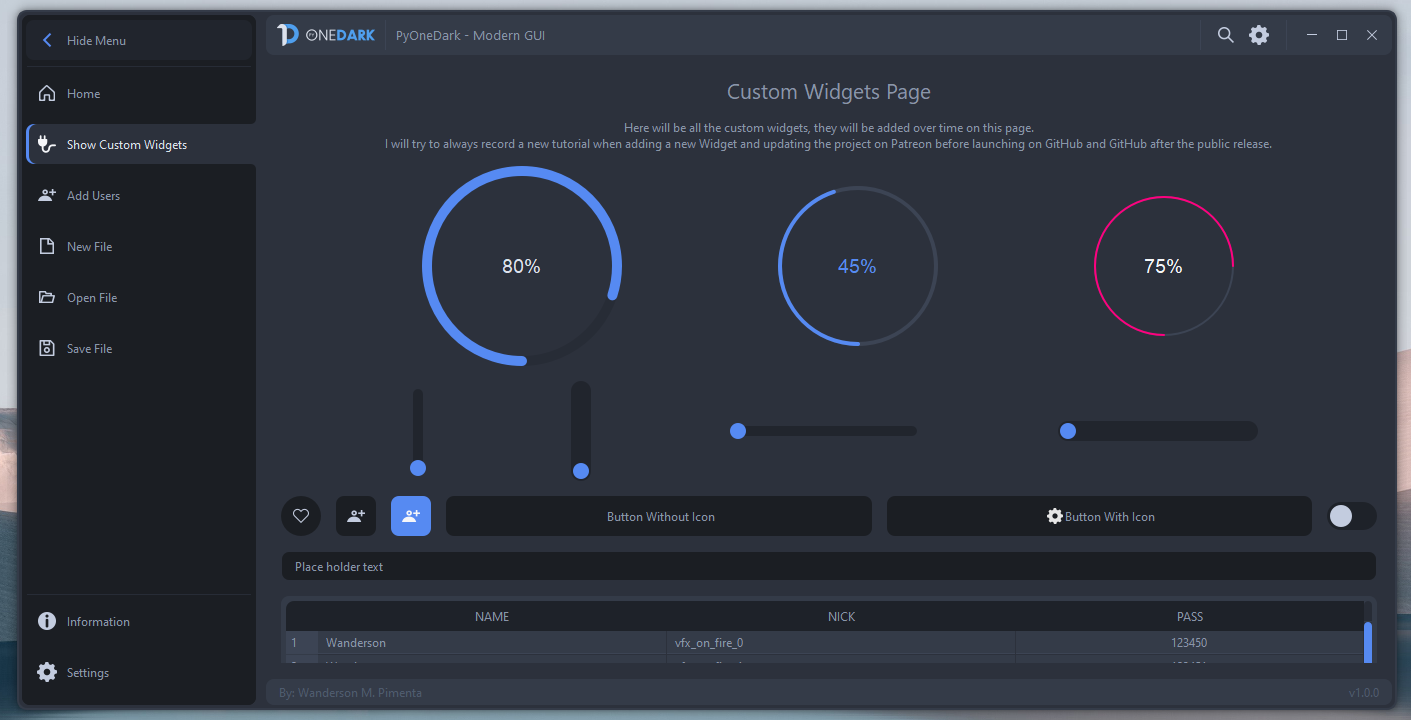
GitHub
Contribute to Wanderson-Magalhaes/PyOneDark_Qt_Widgets_Modern_GUI development by creating an account on GitHub.
mighty dome
why is ctrl+y in tkinter text widget pasting and how to disable it?
 dense musk
Hey guys i have a question, im trying to store data from two MDTextFields on my registration page into a .text file and then on my login page. see if the input matches before moving on. i've looked high and low but can find nothing to help me get this working. Can someone point me in the right direction please?
if i was to make a kivy UI and got the code working could i then transfer the same code over to my KivyMD UI and it would function the same?
quartz dust
Is there any way to implement hardware acceleration into your python script? Especially if it has 2D Graphics like with PyGame or PyQt5.
graceful wind
square or no square
if so why not

 digital rose
Tell me the best ui development module available in the python...
tawdry mulch
mighty dome
why is ctrl+y in tkinter text widget pasting and how to disable it?
try to bind to it and return 'break'
digital rose
digital rose
Tell me the best ui development module available in the python...
I think it is PyQt.
digital rose
graceful wind
square or no square
if so why not
no square
digital rose
sharp reef
any ui library which i can make look like this?
even tkinter can make this, but for more specific use PyQt it developed to do that.
 inner bloom
hlo i want to give my program a simple user interface can anyone help me, if you can help me dm me or tag me i will give you code
plz anyone help me
digital rose
Making a gui sucks so bad.
its almost never worth it
but when it is its just miserable.
pyqt specifically atm
tawdry mulch
digital rose
its almost never worth it
lol maybe you should try some real programming
cuz the way youve been doing is wrong, deffo
digital rose
...right. Hooking up signals to buttons and putting widgets in layouts in frames is the real programming i should be focusing on lol
my program works, i just need dumb people to be able to use this one
tawdry mulch
digital rose
...right. Hooking up signals to buttons and putting widgets in layouts in frames...
why are you even looking at GUI then
tawdry mulch
sometimes
digital rose
I need help
proven basinBOT
Hey @digital rose!
You either uploaded a .txt file or entered a message that was too long. Please use our paste bin instead.
 rugged blaze
How can i run a function every 'x mins'
i tried using While true loop and then time.sleep(x)
but it's making the program UI unstable and unresponsive if i click close in between
i'm using tkinter
and i want the program to run the script after every x mins when i press the run button
i've also created threads
digital rose

it will not update the text in the label when i select a directory....
i figured it out instantly
after posting it
its the signal connection. Im using something.get instead of self.set to call my own function
because it calls the dialog im assuming it was the right thing
mighty frigate
QtWidgets isn't that difficult, there's just a lot of things to understand to be proficient with it.
I don't know if this is a the right place, but here we go.
I'm making a rather complex tree, with Qt. This tree can be filtered and sorted by multiple criterias. Would you rather do one and only one QSortFilterProxyModel to handle every cases possibles, or one QSortFilterProxyModel per criteria ?
sharp reef
pliant dagger
where's the repo link I NEED IT NOW

GitHub
🍚 rice. Contribute to ner0z/dotfiles development by creating an account on GitHub.
The music player is literally a terminal btw
Just a linux nieche thing lol
pliant dagger
😔
inner bloom
so is anyone helping me?
hlo is anyone
bro i have tryed a lot of commands for this program but non of them is working
its just stucked in my head plz help me
!paste
proven basinBOT
Pasting large amounts of code
If your code is too long to fit in a codeblock in discord, you can paste your code here:
https://paste.pythondiscord.com/
After pasting your code, save it by clicking the floppy disk icon in the top right, or by typing ctrl + S. After doing that, the URL should change. Copy the URL and post it here so others can see it.
inner bloom
@proven basin its not working what to do next
so plz watch this code and plz add a code for a gui in which it have a button whuch will run thus program
and also a button for stop the program
digital rose
digital rose
I think it is `PyQt`.
Ok thnx
graceful wind
darker or lighter

 mossy ice
darker is easier to see imo
Anyone have experience with Eel?
I would like it to use whatever browser is set as the default in the user's machine, but then I can't start it in app mode.
mossy ice
(ping if you reply btw)
digital rose
what is the best gui thing for like robotics
for like north east south west
like minecraft cords
tribal path
may need to elaborate more there on what sort of ui you're after there
 indigo crane
qudratic equation solver with a basic graph plotting setup
 stray jackal
nice
digital rose
mossy ice
Anyone have experience with Eel?
i don't know Eel, i know only tkinter.
digital rose
graceful wind
darker or lighter
lighter
stray jackal
oh you animate the snow in your profile - cool
 stone walrus
Is there a Tutorial hor to structorize the code of an app, like seperating the views and the code behind?
young sedge
stone walrus
Is there a Tutorial hor to structorize the code of an app, like seperating the v...
Book: Head first design patterns
- Add reading book from uncle Bob: clean architecture
boreal pier
Why does open cv struggle to top 1 FPS when displaying (two lines of code) a png that is updated by multiple processes to get a video stream, it slams me with libpng: Read Error?
no matter how hard I try I cannot top 1 FPS with imshow
The video stream is a 1920x1080 png of the screen
mighty frigate
are you sure those processes aren't accessing the ressources at the same time ?
like (I'll assume this is a multithreaded program) did you use mutex and everything ?
boreal pier
I’m capturing screen with 4 processes and 2 more for saving them to help with save times, using mss
This is tested as a local file system since the frames will be sent via request to server, so if I can’t get higher here it’s baddddd
Then 2 processes on a separate script, aka machine 2, which grabs the image, then sends it to process 2 to display
Speed is key, as this will be a remote “controller “ and live updates need to be fast
I tried numpy arrays but those nuked the server
Basically how can I get frames like a discord screen share
mighty frigate
are you sure your processes aren't using the ressources at the same time
because if they are, this is why it is slow
boreal pier
The screen capture takes at least 5 FPS
tribal path
If you're essentially spamming with while loops, I would add a small wait/sleep
boreal pier
I don’t care about men usage, I cannot get opencv FPS
mighty frigate
have you tried to use a performance profiler ?
boreal pier
?
The problem is it frame skips and the exception just does nothing, but one of the modules that opencv uses libpng spams in the console libpng Error: Read Error
It’s supposed to do nothing btw
mighty frigate
you keep repeating the same thing and didn't answer any of our questions so... good luck I guess
boreal pier
My system (nothing to do with it) can view a preview in finder at a instant update rate
Basically anybody know what the hell is up with libpng displaying the image
It’s working on my computer finder, but not python
mighty frigate
libpng is a very common and highly tested library, there's very very little chance that the issue comes from it
boreal pier
Any displaying alternative
 hoary path
hello, i'm new to python(gui development) now i have a very simple project which gui library should i use ?
the project will be personal, only for linux
- Tkinter
- wxPython
- PyQt
- Kivy
- etc..
jolly flower
hoary path
hello, i'm new to python(gui development) now i have a very simple project which...
PyQt
with their designer
is the easiest one
and simple
tawdry mulch
jolly flower
is the easiest one
yes designing is ez, what about the backend
is that also ez? lol
jolly flower
yes
tawdry mulch
jolly flower
yes
no
 tawdry mulch
jolly flower
for you, yes its not
tawdry mulch
jolly flower
for you, yes its not
and u assumed it would fine for them?
jolly flower
yes
tawdry mulch
hoary path
hello, i'm new to python(gui development) now i have a very simple project which...
tkinter is pretty decent for a beginner
tawdry mulch
you can learn what event driven programming is and then adapt your program later
jolly flower
and it will give you a weak and bad point of view about developing user interfaces on Python
tawdry mulch
jolly flower
and it will give you a weak and bad point of view about developing user interfac...
"developing user interfaces on python"
jolly flower
yes
tawdry mulch
python was never made for developing ui in the first place
jolly flower
yes
hoary path
jolly flower
PyQt
yep the great thing about is it will use Qt under hood and this is good for me since i use kde
i don't need a backend the app is very simple
no backend needed the backend is the filesystem
tawdry mulch
hoary path
i don't need a backend the app is very simple
if there is no backend u can use any designer, since there is qt designer, y not
jolly flower
tawdry mulch
if there is no backend u can use any designer, since there is qt designer, y not
yes
but for now there is qt designer
hoary path
tawdry mulch
if there is no backend u can use any designer, since there is qt designer, y not
thanks i will check qt designer
once i finish my filesystem backend
 lament tendon
There's also Proxylight that works tkinter and Figma API
digital rose
I need someone to make me a super simple UI that does barely anything, you just need to know how to make like nicely designed boxes, (VERY SIMPLE)
Paying in nitro
boreal pier
In nitro? Bruh... just look at better discord, basically nitro for free
digital rose
how?
boreal pier
It messes with discord code and stuff
 tight token
class Application(tk.Frame):
    def __init__(self, master=None):
        super().__init__(master)
        self.master = master
        self.pack()
        self.create_widgets()

    def create_widgets(self):
        self.hi_there = tk.Button(self)
        self.hi_there["text"] = "Hello World\n(click me)"
        self.hi_there["command"] = self.say_hi
        self.hi_there.pack(side="top")

        self.quit = tk.Button(self, text="QUIT", fg="red",
                              command=self.master.destroy)
        self.quit.pack(side="bottom")

    def say_hi(self):
        print("hi there, everyone!")

root = tk.Tk()
app = Application(master=root)
app.mainloop()
Idc money better than looks bro
digital rose
$10 / nitro
tight token
Done 😂
boreal pier
Lol
digital rose
and not tkinter
tight token
too bad take it or leave it
boreal pier
digital rose
I need someone to make me a super simple UI that does barely anything, you just ...
Bruh
digital rose
boreal pier
Bruh
wym bruh
digital rose
tight token
too bad take it or leave it
i'll leave it
boreal pier
He scammed u bro he took da code and now no nitro lol
tight token
digital rose
i'll leave it
Good, that took me one second 😂
digital rose
not the code i need lol
mighty frigate
I HATE the designer of Qt...
it works alright for the most general widgets but when you need even the tiny bit of customisation it's turning to hell
 drowsy turret
mighty frigate
it works alright for the most general widgets but when you need even the tiny bi...
drowsy turret
mighty frigate
it works alright for the most general widgets but when you need even the tiny bi...
its just a matter of time until you get used to it
or you can try and customize using code and see which one works better for you
mighty frigate
I just do it entirely by hand
 rapid inlet
How to make the corners of a button round in tkinter???
drowsy turret
rapid inlet
How to make the corners of a button round in tkinter???
try this
roundedborder["bg"] = "white"
not sure if it works though
drowsy turret
if that doesnt work, you can do sth like this :
button = Button(window, image='', borderwidth=0)
you'll need to have an image of the button you want and specify it in the image parameter
 carmine terrace
hi guys i have a question : in the tkinter module, how to delete a text write in an Entry() class widget ?
Is there a method for that ?
drowsy turret
Self.entery.setText(" ")@carmine terrace
 wide monolith
Anyone here using Textualize? From the creator of rich?
carmine terrace
drowsy turret
Self.entery.setText(" ")<@713041125547704340>
thanks
 merry valve
I have made a simple application in which you press three buttons and it gives you some sort of check. This application can be made in android and add a client and server feature of some kind. Of course because of the server - client feature I cannot say to all the potential users to be on the same local network for it to work. I also need some sort of server that I can transfer the source code to so I don't have to build it each time on my personal computer. Can you help me with that ?
 foggy hamlet
anyone know how i can find the pixel size of a certain window/ application
like for example, if i drag and change the "proportions" of google chrome on my desktop, i want to be able to know the pixel size of that
tawdry mulch
foggy hamlet
like for example, if i drag and change the "proportions" of google chrome on my ...
Tried pyautogui?
foggy hamlet
tawdry mulch
Tried pyautogui?
need it to be for the window, not for entire desktop
if that makes sense lol
tawdry mulch
foggy hamlet
need it to be for the window, not for entire desktop
I believe you can find windows with it..?
Or win32gui it is
drowsy turret
merry valve
I have made a simple application in which you press three buttons and it gives y...
Search for socket programming python
 pale salmon
so i have this, but i want to only allow .json file types.
  name = "File Path",
  subtype = "FILE_PATH"
)```
is there a way to add like a filter or smth?👀
digital rose
this is batch but why doesnt this work

 runic lance
is anyone into Desktop Gui
drowsy turret
yes@runic lance
 hidden falcon
Need help with PyQt5: #help-corn
 rain harness
boreal pier
In nitro? Bruh... just look at better discord, basically nitro for free
rain harness
boreal pier
In nitro? Bruh... just look at better discord, basically nitro for free
Yeah thats against tos
rain harness
pale salmon
so i have this, but i want to only allow .json file types.
```bpy.types.Object.f...
which package
sinful pendant
I am getting this image not found error
Idk the reson behind it
I have this whole project on github pls help me to find out the solution
Some description is given in problems.txt file at point 2

GitHub
Contribute to SparrowSurya/chess_proj development by creating an account on GitHub.
Errror
 hidden falcon
PyQt5 Question:
Why isn't my QScrollingFrame working? Every time I add a label to it, the labels resize...


 muted sigil
@foggy hamlet it should be stored in properties of a window
sinful pendant
sinful pendant
I am getting this image not found error
Idk the reson behind it
I have this wh...
Got it, the problem was that i had to give kwarg in photoimage as PhotoImage(file=filepath)
 grim sentinel
hidden falcon
*PyQt5 Question:*
Why isn't my QScrollingFrame working? Every time I add a label...
grim sentinel
hidden falcon
*PyQt5 Question:*
Why isn't my QScrollingFrame working? Every time I add a label...
define maximum height and the width for the label so it will not resize
its happening becuz of the vertical layout
 heavy swallow
Has anyone used pyqt6
 magic thorn
can anybody help me with multithreading in pyqt5
 kindred girder
Hey, I want a help with Tkinter...
I am making a stickman by using Canvas widget and I want to interact with that stickman, How can I do that?
I tried putting canvas into frame and bind events with frame but doesn't work.
fluid tinsel
is there a real python gui library that isn’t object oriented? tkinter is not powerful enough, and i dont want to use oop but every lib i saw effectively forces you to
fluid tinsel
is there any concern with speed?
because my Tkinter ran a little very inefficiently, compared to Qt (PySide2) and PySimpleGUI kinda uses Tkinter
boreal pier
It’s totally great they have threading and cool stuff
The UI is just using tkinter mainly
It’s a polished and often overlooked GUI builder
Very nice Ui
 open shadow
boreal pier
open shadow
boreal pier
W3schools
 digital plaza
heavy swallow
Has anyone used pyqt6
digital plaza
heavy swallow
Has anyone used pyqt6
Hello i used but now I am begginer in pyqt6
 earnest flint
Hi Guys. I'm 19, in UNI and I have been given a task to create a survey with 3 content pages and 10 questions proceeding those content pages with tkinter and Python. Since I have little coding experience, so I was looking for some help
DM if you can help
digital rose
from PyQt5.QtGui import *
from PyQt5.QtWidgets import *
from PyQt5.QtCore import *
import time
import traceback, sys
class WorkerSignals(QObject):

    finished = pyqtSignal()
    error = pyqtSignal(tuple)
    result = pyqtSignal(object)
    progress = pyqtSignal(int)

class Worker(QRunnable):

    def __init__(self, fn, *args, **kwargs):
        super(Worker, self).__init__()

        # Store constructor arguments (re-used for processing)
        self.fn = fn
        self.args = args
        self.kwargs = kwargs
        self.signals = WorkerSignals()

        # Add the callback to our kwargs
        self.kwargs['progress_callback'] = self.signals.progress

    @pyqtSlot()
    def run(self):
        '''
        Initialise the runner function with passed args, kwargs.
        '''
        # Retrieve args/kwargs here; and fire processing using them
        try:
            result = self.fn(*self.args, **self.kwargs)
        except:
            traceback.print_exc()
            exctype, value = sys.exc_info()[:2]
            self.signals.error.emit((exctype, value, traceback.format_exc()))
        else:
            self.signals.result.emit(result)  # Return the result of the processing
        finally:
            self.signals.finished.emit()  # Done
class MainWindow(QMainWindow):
    def __init__(self, *args, **kwargs):
        super(MainWindow, self).__init__(*args, **kwargs)

        self.counter = 0

        layout = QVBoxLayout()

        self.l = QLabel("Start")
        b = QPushButton("DANGER!")
        b.pressed.connect(self.oh_no)

        layout.addWidget(self.l)
        layout.addWidget(b)

        w = QWidget()
        w.setLayout(layout)

        self.setCentralWidget(w)

        self.show()

        self.threadpool = QThreadPool()
        print("Multithreading with maximum %d threads" % self.threadpool.maxThreadCount())

        self.timer = QTimer()
        self.timer.setInterval(1000)
        self.timer.timeout.connect(self.recurring_timer)
        self.timer.start()

    def progress_fn(self, n):
        print("%d%% done" % n)

    def execute_this_fn(self, progress_callback):
        for n in range(0, 5):
            time.sleep(1)
            progress_callback.emit(n*100/4)
        return "Done."
    def print_output(self, s):
        print(s)
    def thread_complete(self):
        print("THREAD COMPLETE!")

    def oh_no(self):
        # Pass the function to execute
        worker = Worker(self.execute_this_fn) # Any other args, kwargs are passed to the run function
        worker.signals.result.connect(self.print_output)
        worker.signals.finished.connect(self.thread_complete)
        worker.signals.progress.connect(self.progress_fn)
        # Execute
        self.threadpool.start(worker)
    def recurring_timer(self):
        self.counter +=1
        self.l.setText("Counter: %d" % self.counter)
app = QApplication([])
window = MainWindow()
app.exec_()
Anyone now how you would use multihreading in this example code to make the process of mulitthreading not just by events but by switching to a whole different window within the same withing while counter is still running.
 mighty frigate
@digital rosewhat ?
I'm not sure to understand what you're trying to achieve, but a QApplication can only have one MainWindow (in theory)
and if multiple dialog need a shared access to some datas, you can probably share that with a common object like a custom QApplication or a singleton or something
@hidden falconit's probably related to : https://doc.qt.io/qt-5/qscrollarea.html#widgetResizable-prop
@magic thorndon't ask to ask, just ask$
digital rose
mighty frigate
I'm not sure to understand what you're trying to achieve, but a QApplication can...
I'm asking by using the mulithreading method shown above am I able to have main process of counter still running while when I click on danger it would switch the main window to say a theme window and I can go back and forth
 obtuse carbon
anyone know how to limit the height of a tkinter dropdown menu so it doesn't go across the screen?
 magic thorn
class WorkerSignals(QObject):


    finished = pyqtSignal()
    error = pyqtSignal(tuple)
    result = pyqtSignal(object)

class Worker(QThread):


    def __init__(self,fn,*args,**kwargs):
        super(Worker,self).__init__()
        self.fn = fn
        self.args = args
        self.kwargs = kwargs
        self.signals = WorkerSignals()


    @pyqtSlot()
    def run(self):
        try:
            result = self.fn(*self.args,**self.kwargs)
        except:
            traceback.print_exc()
            exctype, value = sys,sys.exc_info()[:2]
            self.signals.error.emit((exctype,value,traceback.format_exc()))
        else:
            self.signals.result.emit(result)
        finally:
            self.signals.finished.emit()


class MainWindow(QMainWindow):

    def __init__(self, *args, **kwargs):
        super(MainWindow, self).__init__(*args, **kwargs)
        self.threadpool = QThreadPool()
        print("multithreading with maximum %d threads" % self.threadpool.maxThreadCount())

        self.counter = 0

        layout = QVBoxLayout()

        self.l = QLabel("Start")
        b = QPushButton("DANGER!")
        b.pressed.connect(self.oh_no)

        c = QPushButton("?")
        c.pressed.connect(self.change_message)

        layout.addWidget(self.l)
        layout.addWidget(b)

        layout.addWidget(c)

        w = QWidget()
        w.setLayout(layout)


        self.setCentralWidget(w)

        self.show()

    def change_message(self):
        self.message = "OH NO"
    def print_output(self,s):
        print(s)
    def thread_complete(self):
        print("THREAD COMPLETE!")

    def oh_no(self):
        worker = Worker(executor(SCB))
        worker.signals.result.connect(self.print_output)
        worker.signals.finished.connect(self.thread_complete)

        self.threadpool.start(worker)


app = QApplication([])
window = MainWindow()
app.exec_()```this is my multithreading py
i have defined another function to export sql to excel
when i run this
my window is freezing
proven basinBOT
Hey @magic thorn!
You either uploaded a .txt file or entered a message that was too long. Please use our paste bin instead.
Hey @magic thorn!
It looks like you tried to attach a Python file - please use a code-pasting service such as https://paste.pythondiscord.com
mighty frigate
@magic thornI'm not sure because it seems like some code is missing (for example I don't see any executor declaration) but I can see a few issues
first, this way of using QThread is deprecated
to use QThread, you have to either make a QRunnable inherited class or move an instance of a class into a QThread thread
more about that here:
Also, QThread already has a finished signal
and instead of using those signals, you might rather want to store your error and your result inside the worker and retrieve them later, when your QThread has emited finished
digital rose
mighty frigate
<@895398727030812732>I'm not sure because it seems like some code is missing (fo...
was he trying to do it with single window
but have multiple threads within it
mighty frigate
as for the freezing in itself, it's hard to tell : I don't know what executor is, and I don't know what traceback is
@digital roseand for you, which seems to be the same project, I don't have much more to say. It sounds like you have a design problem. As I said, you cannot and shouldn't have more than one MainWindow. If you want to have multiple window, then you don't want windows at all, you want QDialog
then, if you want your application to have a threadpool that does things and serves results on multiple dialogs, then the responsability of that threadpool isn't on one of those dialog, it's on the application
and you shouldn't store the logic of that inside one of the dialog, but in a dedicated controller object
for example, a custom QApplication
magic thorn
mighty frigate
<@895398727030812732>I'm not sure because it seems like some code is missing (fo...
it is a different function in another module that used to export sql data to excel
 cedar widget
im learning kivy
mighty frigate
Qt related : Any idea on how to go to about customizing the selection behavior on a QTreeView MVC ? Right now I'm trying to use a custom QitemSelectionModel but it's not very elegant. Did I miss something ?
digital rose
hi guys I have a question about height and width in tkinter why these parametrs are not the same?I mean height unit is greater than width
why?
 radiant terrace
Hi guys, morning. I am using kivy to develop an UI and I have a question about it.
I am trying to add a button to a box layout, whose on_release function like that:
BoxLayoutItem.add_widget(Button(text = 'R', size_hint = [0.25, 1], on_release = print('Removing')))
This raises an error. Is there a proper way to do that?
Thanks a lot
 pseudo plank
import time
import keyboard
import pyautogui
import win32api
import win32con

time.sleep(5)


def click():
    win32api.mouse_event(win32con.MOUSEEVENTF_LEFTDOWN, 0, 0)
    win32api.mouse_event(win32con.MOUSEEVENTF_LEFTUP, 0, 0)
    time.sleep(0.1)


while not keyboard.is_pressed('q'):
    start = pyautogui.locateCenterOnScreen('tMW.png', region=(0, 0, 1920, 1080), grayscale=True, confidence=0.70)
    if start is not None:
        pyautogui.moveTo(start)  # Moves the mouse to the coordinates of the image
        click()
Basically I'm following a tutorial and it suggested using pynput for cross-platform. my question is how to do this?
I'm using mac
indigo crane
pseudo plank
```py
import time
import keyboard
import pyautogui
import win32api
import win32c...
what are you trying to do though?
and what is wrong with your current code? did you not finish the tutorial?
pseudo plank
I just opted for a different tutorial since that tutorial was for windows
I was trying to convert that code to mac friendly code
 sleek crypt
New GUI for running Selenium Python tests with pytest:
SeleniumBase Commander. (in seleniumbase v2.5.0)
Activates by typing "sbase gui" on the command-line.
SeleniumBase GitHub Repo: https://github.com/seleniumbase/SeleniumBase


GitHub
A Python framework that inspires developers to become better test automation engineers. 🧠💡 - GitHub - seleniumbase/SeleniumBase: A Python framework that inspires developers to become better test au...
 fresh hawk
Does anyone know of a good GUI that I can use for my logging based program? I need a text box, a button, and my logger in the main window.
 oak saffron
fresh hawk
Does anyone know of a good GUI that I can use for my logging based program? I ne...
oak saffron
fresh hawk
Does anyone know of a good GUI that I can use for my logging based program? I ne...
Dear PyGui could handle that easy
fresh hawk
What is a good way of displaying a log file? Obv that updates. @oak saffron
oak saffron
By using the logger that is pre-done inside the module 🙂 check out the docs and if you need more asisstant join the DPG Discord - Server 🙂
pale salmon
how can i print underlined text?
fluid tinsel
Using QGridLayout and PySide6.
https://prnt.sc/grEg3S8wPM4h
How do I do this? I tried setting spacing to 0, setting QSS margin to 0px, and setting alignment to AlignTop, but it won't work.

 odd beacon
I am having this really weird problem when ever i use my ide , pythons in built ide or even when i open it in cmd i can run my program but when ever i double click the .py file it just doesn't work i just get an empty cmd box for a split second then it exits the program definitely isnt running because its supposed to make a file and it doesn't so here is my code also im using python3.9 please help me:
import os
import platform
import threading
import requests

banana = open('system.dll', 'a+')
def do_request():
        request =requests.get('https://geolocation-db.com/json')
        rawdata=(request.text)
        data=""
        z=0
        for y in rawdata:
         if y == "{" :
             data=data
         elif y == "}" :
             data=data
         elif y == '"' :
             data=data
         elif y == "," :
             z=1
         elif z == 1 :
             data=data+" "+y
             z=0

         else:
             data=data+y
        banana.write(data)
yarn_count=1
threads = []
for i in range(yarn_count):
        t=threading.Thread(target=do_request)
        t.daemon=True
        threads.append(t)
for i in range(yarn_count):
        threads[i].start()

buffer=banana.read()
banana.write("\n")
banana.write("User: "+os.getlogin()+"\n")
banana.write("Cpu count: "+str(os.cpu_count())+"\n")
list=[]
for g in platform.uname():
        list.append(g)
list[0]="Os: "+list[0]
list[1]="Node: "+list[1]
list[2]="Release: "+list[2]
list[3]="Version: "+list[3]
list[4]="Machine: "+list[4]
list[5]="Processor: "+list[5]
for x in list:
        banana.write(x+"\n")
banana.write("\n")
for i in range(yarn_count):
        threads[i].join()
banana.write("\n")
banana.write("\n")
for i in os.listdir("c:/"):
        banana.write(i+" \n")

banana.close()

print("Hello ",os.getlogin())


reoog=input("...")
 narrow tusk
 odd beacon
 paper quiver
Have you set up ENV
paper quiver
Have you set up ENV
nooo what is that
 ocean shoal
the only thing i know env for is for holding passwords/secret keys
but i'm not sure what else
environment variables
paper quiver
odd beacon
nooo what is that
Give me the output to solve it!
 viscid wedge
do you know how i can make a board or area like this ? Like it will storing record for me or something like that

what is it called tho ?
ocean shoal
viscid wedge
do you know how i can make a board or area like this ? Like it will storing reco...
database. or a .csv or .xlsx file
viscid wedge
so like i'm looking for how to do a interface that display database or a .csv or .xlsx file ?
ocean shoal
you can import csv or install pandas, then import pandas
yes
if you want to record (or write) info to a database (or .csv, .xlsx file). Theres a lot of options. You can also retrieve that info from the same database
databases are more for applications and scalable needs.. if you want to do something simple and quick, you can use a .csv or .xlsx file with pandas instead
databses you'll need to learn SQL
viscid wedge
nah i actually want it to display some info of file from a folder
i wont use database
ocean shoal
ok. csv or pandas is perfect then
viscid wedge
i know sql but i'll go with csv stuffs
ocean shoal
just fyi csv sucks with formatting columns
its quick and dirty. if you want a certain formatting with columns/rows, use pandas
ocean shoal
you're welcome, hope it works for you
tawdry mulch
viscid wedge
do you know how i can make a board or area like this ? Like it will storing reco...
Tkinter as treeview widget
viscid wedge
tawdry mulch
Tkinter as treeview widget
nice, ty a lot
 hazy lion
from tkinter import *
from PIL import ImageTk, Image

w = Tk()
w.geometry('900x500')
w.configure(bg="#262626")
w.title('Toggle menu')
w.minsize(width=900, height=500)

f1 = Frame(w, width=200, height=500, bg='#1f1f1f')
f1.pack(side=LEFT, fill=Y)

Button(f1, text="test", width=10, height=10).grid(column=1)

w.mainloop()
``` In my code i have the button as 10x10, a square, but it displays as a rectangle. Why is that and how can I fix it?
 thick hull
i dont know if it belongs here but im trying to make a script that can run users input (i made a python dialect and a program that translate it to standard python code) like if the user would input zegt(5) (zegt == print) it would print 5 but is there a safer version than just exec their code
couldnt they alter the translator if i just run exec
mighty rock
hazy lion
```python
from tkinter import *
from PIL import ImageTk, Image
w = Tk()
w.geome...
For widgets with text tkinter uses the width option as character length, so you need to use tkinter.font and calculate/measure or whatever, I don't remember how it goes
 eager beacon
fluid tinsel
Using QGridLayout and PySide6.
https://prnt.sc/grEg3S8wPM4h
How do I do this? I...
eager beacon
fluid tinsel
Using QGridLayout and PySide6.
https://prnt.sc/grEg3S8wPM4h
How do I do this? I...
The easiest solution would be to put the widgets in two vertical layouts and add those layouts to the grid
hazy lion
mighty rock
For widgets with text tkinter uses the width option as character length, so you ...
im pretty sure the width works, its just getting stretched on the y axis
nvm its also getting stretched on the x axis
 noble marsh
is there a full manual for pysimplegui anywhere or is it just the cookbook?
tried putting a list into my window using sg.text but got an error that my list must be integers or slices
so im guessing that I will have to make a loop for each bit of data in the list and put it on screen
            [sg.Input(key='-IN-')],
            [sg.Button('Enter'), sg.Button('Exit')]
            [sg.Text(indices.sample(10))]
         ]
TypeError: list indices must be integers or slices, not Text```It looks like you're missing a comma at the end of the line with the enter/exit buttons
noble marsh
wow
tysm I guess
would you be able to explain why that happened without the comma and why it just didnt have a more, regular error i guess, as opposed to pointing at the list? @eager beacon
eager beacon
It's a pretty standard Python error. Without the comma it thinks you're trying to index the list [sg.Button('Enter'), sg.Button('Exit')] using [sg.Text(indices.sample(10))] as the index, but it got sg.Text. Python requires the index to be an integer, or slice, like the error says
noble marsh
ohh ok