#user-interfaces
1 messages · Page 52 of 1
 west briar
 silk basin
Is there anyway to make PyQT5 look a bit more modern?
Here's my program now, but it looks like a classic windows xp program
 spark furnace
is it possible to add a qlabel or qpushbutton in a qmenu, trying to make a popup window which is not a popup window, just a menu which is "linked" to the main window, if that makes sense
 eager beacon
@silk basin https://github.com/gmarull/qtmodern
GitHub
PyQt/PySide Widgets Modern User Interface. Contribute to gmarull/qtmodern development by creating an account on GitHub.
 indigo needle
can someone help me convert python script to exe file
 plush stream
@indigo needle use pyinstaller
plush stream
What's the problem?
 orchid yoke
use iexpress if you want
 lyric nebula
whats oid?
eager beacon
context?
lyric nebula
umm i was doing a tkinter tutorial
so the tut teacher was making a database app, and used oid
eager beacon
for a column name?
lyric nebula
hmm not sure
eager beacon
probably just short hand for object id
 misty moon
hey everyone, here im currently making a spam bot for one of my friends and it spams the bee movie, everytime i try to run it i get this error any clue why? FileNotFoundError: [Errno 2] No such file or directory: 'bee'
im using pycharm btw
eager beacon
from sqlite docs
The rowid of a rowid table can be accessed (or changed) by reading or writing to any of the "rowid" or "oid" or "_rowid_" columns
lyric nebula
oooh i get it thanks!
misty moon
import pyautogui, time
time.sleep(5)
f = open("bee", 'r')
for word in f:
pyautogui.typewrite(word)
pyautogui.press("enter")
this is the full code lol if anyone could help me it would be very appreciated
and its line 3 that is getting the error
eager beacon
the file doesn't exist. the r flag only opens files
misty moon
i have a bee movie text file called bee so shouldnt it open it?
eager beacon
is it called bee.txt? if it's only named bee, then its not in the same directory as your script
misty moon
so i need to rename the bee text file bee.txt and then change it to bee.txt in the actual code as well?
eager beacon
Its probably already named bee.txt but only showing bee. Sometimes an OS will hide file extensions
either name will work so along as you're trying to read the actual file name
 bronze basin
or just provide the full path to it?
and store it in a var
and then open that var as path name then 'r'
orchid yoke
How do I make it so that it registers the characters in another application? I'm using tkinter + pyautogui to type characters, When I press a button, It presses but it doesn't register it to a word processing program like ms word or notepad.
The windows key works fine
plush stream
Hey, how do i display an image with qlabel? (If that possible)
orchid yoke
How do I make it so that it registers the characters in another application? I'm using tkinter + pyautogui to type characters, When I press a button, It presses but it doesn't register it to a word processing program like ms word or notepad.
@orchid yoke ?
lyric nebula
is there a way to add a background image to the window?
also you should be able to add widgets on it
orchid yoke
eager beacon
it doesn't work because your keyboard is stealing focus from the notepad
bronze basin
@orchid yoke maybe try a delay after pressing the button
like a 5 sec or 10 sec delay
then click the button
then click on notepad
then it should work
cause if you press it immediately what chris said above is happening
lyric nebula
guys how do i add a bg image?
orchid yoke
Thanks @eager beacon and @bronze basin
But is it possible for it to stay on the notepad without it stealing focus?
eager beacon
I'm not sure how tkinter handles focus, you'd have to read the docs, but it's pretty easy to see that there is no blinking cursor in notepad.
orchid yoke
Thanks
bronze basin
@orchid yoke maybe if you dont want to click on notepad manually every time, you could get the coordinates of the notepad window and make pyautogui click on it with the specific coordinates and then with the delay it should be fully automated with the typing and clicking
orchid yoke
That works perfectly @bronze basin , but can I get the coordinates of the position of the mouse where I last moved?
bronze basin
@orchid yoke check this software
should help with what i said
Tiny Mouse Loc Tool
or search up mouse coordinates finder tool
eager beacon
you would have to update the x value every time you typed a letter and the y value on every new line
I think figuring out the focus would be an easier solution
bronze basin
Its what i would use when working with PyAutoGUI
to get the coordinates easily
@eager beacon true
orchid yoke
I've just had an idea where If an application is running and asking input, that is where I want to place the cursor to be...
Only problem is that I don't know how to make python detect running applications in the background
bronze basin
you would have to store the input as coordinates
and then use them
and i myself dont know how to do the second task
eager beacon
im not sure how complex tkinter can get but i'd imagine you'd need to use a windows specific library to accomplish what you're trying to do
orchid yoke
like win32api?
eager beacon
that is, if you cant figure out how not to grab focus when you click your app
bronze basin
that does sound a bit complex
eager beacon
something like that, I've never used it
does this not work?
butNoFocus = Tkinter.Button(root, text ="Button no focus", takefocus = 0)
there are posts on stackoverflow explaining how to do it for a frame also
eager beacon
when applying it to what?
your main window is likely going to need it or whatever the equivalent is
orchid yoke
I'm looking at pynput keyboard and reading some docs if it's possible to do that
 cursive parcel
i know guyz [ @plush stream @bronze basin ] u have seen this , but i m posting for others here xD!
guyz its total pyqt
 plucky wedge
nice nic3
eager beacon
is it one of the QGradient presets?
orchid yoke
I'm brainstorming
eager beacon
have you tried what I suggested with your main window yet?
Toplevel.__init__(self, takefocus=0)
cursive parcel
is it one of the QGradient presets?
@eager beacon nope
actually background is just for UI show , it is not in real application but , i can apply by changing transparent background like
-> self.setStyleSheet('QLinearGradient ') kinda thing
eager beacon
ahh cool, you should check out the QGradient presets, they copied most of the ones up on webgradients.com
you apply it with a paintEvent instead of a stylesheet though
orchid yoke
have you tried what I suggested with your main window yet?
@eager beacon I haven't tried it yet
Do I put it in my class button?
eager beacon
Put it on your main window where you use __init__
i mean WindowName.__init__ not def __init__
eager beacon
what is type is your mainWindow?
eager beacon
Does it work with Frame?
orchid yoke
Im testing it
orchid yoke
It doesn't work
orchid yoke
Nothing happens when takefocus = False
 rugged ingot


when i click search students it opens new window and i need to enter student id ..when i enter it that particular student information will be seen in the treeview
[21:19]
but for me it does not display it
im using tkinter plz help
cursive parcel
lol @rugged ingot , it seems correct to me !, i m not sure , maybe someone else can u help u xD
 cunning sedge
i want to display a exe file in a pyqt window, https://stackoverflow.com/questions/41474647/run-a-foreign-exe-inside-a-python-gui-pyqt has a solution but it requires the target app to be opened first, is there a way to display the app in a window without opening it first?

Stack Overflow
I want to run an exe (for example calc.exe or cmd.exe) inside a python gui (python 2.7 | Windows | PyQt).
Have anybody an idea how can i do this?
(something like that : https://www.youtube.com/wat...
rugged ingot
@cursive parcel https://canary.discordapp.com/channels/267624335836053506/696432394974265374/756163190663938221 thi is the code ..i am not able to find the issue
 charred coral
What's the best user interface library I can learn to make a program that would allow me to create a timetable for my classes and then notify me (with a special looking notification) when it's time for that class.
Basically something that can notify and also allow for tables and text input
I've only worked with tkinter before this, I wouldn't mind learning one that's more complex and versatile though
bronze basin
PyQt
charred coral
I did some searching into PyQt and I noticed that most of the search results when I typed notification involved pop-up windows and not notifications like the kind you would see if you received a message or something on zoom
charred coral
Hmm one sec I'll get an image
Something like this on the bottom right corner of the screen popping up with some text
And not something like this
Or are they essentially the same thing in PyQt?
bronze basin
you can just customize the window and make it appear like that??
its basically the same thing
charred coral
Ahh.. okay so that's good to know thanks
bronze basin
Np
charred coral
I'll look into PyQt, do you have any personal recommendations to learn it?
Like any YouTube series or blog or something?
bronze basin
charred coral
Thanks 
bronze basin
no problemo
also there should be many good tutorials lying around
but that website should be more than enough to learn the basics and stuff
charred coral
Thanks for the help, much appreciated
bronze basin
👍
spark furnace
is it possible to add a qlabel or qpushbutton in a qmenu, trying to make a popup window which is not a popup window, just a menu which is "linked" to the main window, if that makes sense.
bronze basin
trying to make a popup window but not a popup window?
bronze basin
just make that certain frame/widget invisible or hide it and when a specific condition is triggered show it
so not a popup window
but like a popup window
spark furnace
Have u by any chance tried Microsoft teams? When you click on your profile picture an menu pops out, I want something lile that
Like*
spark furnace
But doesn't that take space
I want widgets to be in that same position already
Or maybe I can put them above each other
bronze basin
i see what you mean
spark furnace
Like stacked
bronze basin
yeah u can try that or you can make a new window but disguise it by removing the menu/tool bars and sutff so that it looks like a popup
spark furnace
Hm, yeah, could work. Though I do think that qmenu would be the best option but is it possible to add buttons and labels in a qmenu object and also open it only when a button is clicked?
If it's not ill go with what u suggested
bronze basin
@spark furnace not exactly labels but you can have buttons with text on them like basically labels
and yes you can open something when a button is clicked and its mostly a dialog or new window
but you can set it to trigger some other actions as well
take a look at this for better understanding :https://www.tutorialspoint.com/pyqt/qmenubar_qmenu_qaction_widgets.htm
QMenuBar, QMenu & QAction Widgets - A horizontal QMenuBar just below the title bar of a QMainWindow object is reserved for displaying QMenu objects.
bronze basin
No probs 👍
spark furnace
What is the method for opening a qmenu when a qpushbutton /qtoolbutton is pressed
rugged ingot
when i click search students it opens new window and i need to enter student id ..when i enter it that particular student information will be seen in the treeview
[21:19]
but for me it does not display it
[21:21]
im using tkinter plz help
bronze basin
@spark furnace addAction() its in the article
spark furnace
Thanks


 inner nest
maybe its relative to your geometry management, you are using place and pack in the same time ?? @rugged ingot
 trim ibex
this is unrelated but you're assigning the return value of pack to your class instance instead of the widgets
rugged ingot
@inner nest if I use grid it may work?
 finite eagle
lyric nebula
finite eagle
lyric nebula
i made a weather app so sometimes the result label is shorter than the last result, so the part which it was not overlapping is showing
how do i fix that?
orchid yoke
Does it work with Frame?
This is the closest thing that I found when researching about whether or not if it's possible to move the insertion point to another application.
orchid yoke
If you guys know any module/package that can detect a text box requiring input or asking for input, Please ping me...
inner nest
@lyric nebula what is your UI library ? In tkinter you can interact on Label with the "width" and "wraplength" parameters
lyric nebula
umm i fixed the problem 😅
inner nest
how ?
lyric nebula
well
i was placing the widgets again after every condition(for color), so instead i just configured them every time and they just got updated instead of getting created every time
but i have one more doubt, i am trying to put an image on a button but it is saying image does not exist, even tho it does..why?
cursive parcel
If you guys know any module/package that can detect a text box requiring input or asking for input, Please ping me...
@orchid yoke u mean something like when we enter password and entry widget detects it , u mean something like that?
guyz , i want to use padding in widgets placed in mainframe , how can i do that !!
i m using QGRID LAYOUT in mainframe , plz help!
widgets have so much space left from y and x axis , i want to pad it correctly
 hot wasp
from tkinter import *

def raise_frame(frame):
    frame.tkraise()

root = Tk()


def frame4():
    f4 = Frame(root).place(relwidth=1, relheight=1)
    root.title("Frame - 4")
    Label(f4, text='FRAME 4').pack()
    Button(f4, text='Goto to frame 1', command=lambda:frame1()).pack()
    #f4.tkraise()

def frame3():
    f3 = Frame(root).place(relwidth=1, relheight=1)
    root.title("Frame - 3")
    Label(f3, text='FRAME 3').pack()
    Button(f3, text='Go to frame 4', command=lambda:frame4()).pack()
    #f3.tkraise()

def frame2():
    f2 = Frame(root).place(relwidth=1, relheight=1)
    root.title("Frame - 2")
    Label(f2, text='FRAME 2').pack()
    Button(f2, text='Go to frame 3', command=lambda:frame3()).pack()
    #f2.tkraise()

def frame1():
    f1 = Frame(root).place(relwidth=1, relheight=1)
    root.title("Frame - 1")
    Button(f1, text='Go to frame 2', command=lambda:frame2()).pack()
    Label(f1, text='FRAME 1').pack()
    #f1.tkraise()

frame1()
root.mainloop()```i have created 4 frames within seperate functions and i want to call the functions to access a particular frame.
but in this, after one cycle i.e from frame 1 to frame 4, the frames are moving further down.
eager beacon
@cursive parcel Not sure whats going on with the right/bottom of your window but for the other 2 you can use layout.setContentsMargins(0,0,0,0) and it should take the widgets right to the edge of the window
orchid yoke
@orchid yoke u mean something like when we enter password and entry widget detects it , u mean something like that?
@cursive parcel Yes exactly
but not inside of python
eager beacon
looks like you might used QtCreator to design the window and forgotten to set a layout on the centralWidget
orchid yoke
Can I configure a modify a group of buttons associated with a class in tkinter? I really don't want to type all of the buttons that I made each time.
eager beacon
not sure what that is but couldn't you use a loop to create and then place the buttons?
orchid yoke
Can you configure every button inside a frame?
eager beacon
if you can access the buttons within the frame i don't see why not
I'm probably the wrong person to ask as I've never used tkinter
hot wasp
@inner nest oh yes, but i want the frames inside the functions. Do you have any idea?😅
cursive parcel
@cursive parcel Not sure whats going on with the right/bottom of your window but for the other 2 you can use
layout.setContentsMargins(0,0,0,0)and it should take the widgets right to the edge of the window
@eager beacon i think we use it in Qhbox and vbox not for gridlayout
eager beacon
are you saying there are empty invisible widgets on the bottom and right?
not sure if I understand what you mean
cursive parcel
no ,
1- there r no invisible widgets
2- i guess setContentMargin is used allowed in hbox or vbox layout only not in grid layout [according to me]
eager beacon
a new layout comes with default margins of (12,12,12,12)
so if you haven't set them manually they will be set to 12
cursive parcel
@eager beacon thnx bro , actually i ignored setContents Margins initially , but it worked fine now! thnx
eager beacon
awesome
 fluid tinsel
I’m looking for a good and easy library for UI. I’ve tried Tkinter, not really good at all, PyQt5, it’s easy, good, but has an LGPL license which better not to use, PySide2, it was easy, good, and has a GPL license, but isn’t supported on Python 3.8. What library should I use, it will also be great if there are any that support html, and css, without js and rather Python, but my main goal’s to find any easy good one, other than what I’ve tried.
eager beacon
this looks neat and has an MIT license

GitHub
DearPyGui: A GPU Accelerated Python GUI Framework. Contribute to hoffstadt/DearPyGui development by creating an account on GitHub.
inner nest
You can make pretty ui with kivy and kivymd(library for material design patterns). But if you find a solution with CSS and HTML, il interesting too (likee ElectronJS).
fluid tinsel
well I tried using Pyjs desktop (pyjamas lib) but I couldn’t find docs on it. I’ll try seeing that dearpygui lib as well, I’m not sure about Kivy since my last experience it was quite hard.
inner nest
@hot wasp why don't use different window instead of frame ? I didnt fully understand what are you trying to do ^^ you are wanting to hide all frames except one ?
I wanted to use kivy for my current project. I thought it was the same widget system as tk 😩
fluid tinsel
the DearPygui seemed to be easy and good, however importing it was extremely glitchy, and even the examples didn’t necessarily work, I got this huge error when I just tried to import kivy, it stretched out for a few hundred, if not thousands of lines further than the one shown in the image. I wouldn’t expect it to do anything since it’s just the import, but it still did that.
inner nest

GitHub
Hi i update my python version to 3.8.0 and when i try to install kivy i get the following error "also the error happened when i try to install it on pycharm" : C:\Users\Hussam&...
Kivy not support python 3.8 yet apparently
or SystemExit: error: Microsoft Visual C++ 14.0 is required
fluid tinsel
oh it doesn’t work with 3.8, well not gonna be able to use it.
I was intending to use for writing a syntax highlighter, if that gives any more detail.
 static cove
You can look in the pins of this channel for instructions for how to install kivy for 3.8
fluid tinsel
no
cursive parcel
Then
static cove
That github issue linked also has those instructions.
fluid tinsel
only html, css and py, also i’m going to try that 3.8 kivy one
it would probably transpile or something like that but yes, that
cursive parcel
I know about electron js and eel which can help u make apps with html css and js and python
Yeah
Js provides interface between html css and system
@fluid tinsel pyqt has Qss like css
inner nest
he doesn't want because of the license
cursive parcel
then i must ask how complex ui @fluid tinsel wants
fluid tinsel
yeah it was good, just had a weird license, huge code, and alignment was very painful.
cursive parcel
wont tkinter help u
[i deleted image as i posted it before xD]
fluid tinsel
tkinter’s UI is very bad
cursive parcel
dont uderestimate w8
though u cant get most features out of tkinter but u cant say it bad
i was making this ui inspired from MAC APP STORE dark mode
this is a TKINTER ui
problem is that people are not using best colors and simple geometry to make tkinter UI cooler
fluid tinsel
yeah but well the ttkthemes stuff was extremelt annoying
cursive parcel
i dont know about ttk themes , would u like to tell me
fluid tinsel
they’re themes for tkinter to make it a bit better looking, but they do get extremely annoying
cursive parcel
so why dont u customize ur theme according to u ?
fluid tinsel
looks still bad.
cursive parcel
customizing ui its on u , choose a good color pallete , make a good prototype and get on it ! i wont say much LOL
cursive parcel
guyz i wanna place these 3 frames [1 - purplish , 2 - purple bordered , 3 - black-greyish] from center how can i do that ,
i dont want that these frames are placed from left as u can see
i m using qgridlayout
also setContentMargins doesnt work on it
what to do!!!!
orchid yoke
Dang there is a QT Designer
fluid tinsel
I’m looking for an easy, good library for UI. I tried PyQt5 (LGPL), so can’t fully use, PySide2 (not supported on 3.8), tkinter (plain bad), and Kivy was too hard.
Which libraries can I use?
eager beacon
Are you planning on marketing the app?
fluid tinsel
not really planning to market I was going to just put ads for download.
also for tkinter making it look good is very hard so idk about that.
eager beacon
Why do you need python3.8 support?
fluid tinsel
cuz that’s the version of Python I have, and know how to use.
The only styling options I’ve found in tkinter are color and background.
eager beacon
they only big differences are the walrus operator, which has limited use cases, the addition of positional only parameters and some fstring tweaks
pretty much anything above 3.4 would be exactly the same in 99% of cases
fluid tinsel
well that’d require me to uninstall and reinstall and I don’t really wanna do that, also I was going to write an app that has more than one layout
eager beacon
you can have multiple installations of python at once
and then you could use pyside
and when they upgrade you could go back to 3.8 if you consider it necessary
because pyside and pyqt are the two best options you have
everything else falls waay short
fluid tinsel
would GPL allow me to put ads before download?
eager beacon
as long as you have the app somewhere on github and aren't directly selling the app I don't think it matters
I don't think you need to advertise on your site that the app is free on github without clicking through the ads
fluid tinsel
also another problem is QT, although I can manage it, things like alignment get extremely annoying
eager beacon
you just need some practice with the layouts
@faint siren in this case, i'd say yes
its not like its a downgrade to 2.7 or something
like i said, there are about 3-4 new features, none of which are likely to be used
fluid tinsel
i could try using absolute positioning for aligning things I can’t figure out but that’d be just as annoying
eager beacon
learn how to use a grid layout and positioning will be a cake walk
its rows and columns, its pretty basic
fluid tinsel
well I did have a grid layout app but it couldn’t display a window, even though I had sys exit and window show, and setlayout
eager beacon
just ask in here if you have quick questions like that.
I'm almost 100% sure it was something simple that got overlooked
fluid tinsel
I did ask for that one and didn’t get a response so I asked in the python channel for QT server, and didn’t get one there either, but it’s still hard, also considering most of my UI wouldn’t be a grid and I’d need to use multiple at once, which always breaks.
eager beacon
There is a QT server?
fluid tinsel
yes
eager beacon
link?
eager beacon
and setGeometry, and setPosition, etc
what happens when you want to resize your window?
orchid yoke
.geometry() tkinter
fluid tinsel
i haven’t much an idea of how geometry works and that set geometry function is extremely weird even though I looked at it’s syntax several times
orchid yoke
it's just camel case
fluid tinsel
there is a geometry function yes but that’s not really the problem
the problem with pyside is that I can’t figure out how 2 layouts can be put in 1, and aligning anything is a huge pain, and coordinates are just as hard.
eager beacon
layout.addChildLayout
or layout.addWidget(widget) widget.setLayout(AnotherLayout) widget.layout().addWidget(button)
if you stick with Qt for a bit everything makes sense
fluid tinsel
I added a QVBoxLayout into a QHBoxLayout and it aligned the QV to the QH
QV
QH
rather than
QV
QH
I'd be willing to bet you didn't do what you think you did
but I'd need to see the code to see what you mean
fluid tinsel
just had a normal QV layout and used addLayout function, but let me go find it, it was in PyQt5 not pyside2 though but they’re written basically the same
eager beacon
If you have a Vbox layout, and you put it into an hbox layout
then the next thing you add to the hbox is going to be placed horizontally from the first item
if you want vertical, place items into the vertical layout and they will be stacked top to bottom
eager beacon
empty
fluid tinsel
hastebin deleted it let me try to find again
i can’t find it at all, but it had a QVBoxLayout being added onto a QHBoxLayout
eager beacon
if thats all it was then you shouldn't have noticed anything going left to right or up and down since the Vbox would just be sitting in the center of the Hbox
fluid tinsel
it sat to the left.
eager beacon
then you must have added it to the layout that contained the Hbox and that layout must have been an HBox as well
fluid tinsel
was a QV added to a QH, I think it tried to lay the layout with the widgets
eager beacon
Read the question and then look at my response
HBox will ALWAYS add items horizontaly
fluid tinsel
yeah i gotta go rn but I’ll look at that.
fluid tinsel
well I’ll try tkinter for now, but did I need to have my QH inside of QV?
eager beacon
if you wanted a vertical layout, yes
the outer layout will determine the orientation
orchid yoke
Is it bad practice to make the same project all over again in a different framework? Say for example you made an GUI application using tkinter, would it be bad practice if you were to recreate your gui application in another framework like PyQt5? This applies to other languages as well...
eager beacon
not at all
I'd say its helpful because in the future you'll have an idea for a project and be able to know that tkinter will work just fine or that you definitely need feature x and y from Qt to complete the project
orchid yoke
Thanks, I've never thought of something like that that way
eager beacon
The same goes for languages. Python is great and you can make pretty much anything with it but for some things there are definitely better choices
orchid yoke
eager beacon
it's true
cursive parcel
lol
eager beacon
not to say it can't do somethings better than most other language
orchid yoke
How do I return a button at it's original state like for example, You configured a button to change its commands, How do I return it back to it's original state?
I really don't want to type it out manually for every button just to configure a command
 glacial gust
What UI toolkit are you using?
@orchid yoke The toolkit likely has some method to list off all the properties. You could loop over the default states, record the original values, then when you want to reset apply those back.
orchid yoke
@orchid yoke The toolkit likely has some method to list off all the properties. You could loop over the default states, record the original values, then when you want to reset apply those back.
@glacial gust Tkinter
glacial gust
Similar to dicts, you can call keys() on a widget to get a list of all the properties.
fluid tinsel
oh, I wasn’t using Tkinter for it’s low resolution, apparently, I can fix that using window.tk.call('tk', 'scaling', 2.0), so not going to use Pyside.
orchid yoke
Do you guys have an idea on why it has a delay?
bronze basin
delay for what?
orchid yoke
The button delays when the program speaks
like the button becomes inactive (or pressed) for at least a second
spark furnace
this is my window how can I make the labels be at the right
and even sometimes at the left
(pyqt5)
label.setAlignment only applies to the label text
figured it out
orchid yoke
How do I make a tkinter window interactive even if the window is not clicked by a mouse?
 opal geyser
this is my window how can I make the labels be at the right
@spark furnace just go to designer and drag it to right or left
spark furnace
eh no then they wont be resizable
anyways I found a solution
.addWidget() took another argument, alignment
thanks for the help tho
opal geyser
The button delays when the program speaks
@orchid yoke use threads for that as the program runs the function for the voice thisng and the typing is char display is delayed due to program waiting for the sound to complete
.addWidget()took another argument,alignment
@spark furnace oh nice one BTW
thanks for the help tho
@spark furnace yeh no problemo
 gloomy heron
does anyone here know how to use pyqt5/pyside? I would like to have a trigger person that I can ask questions to. ping me if you have anything to say
indigo needle
anyone here familiar with tkinter
 slow plover
how to make a scrollable frame within a notebook in tkinter?
 stray aurora
ok nobody wants to answer
@slow plover it's Saturday or Sunday. Most people have lives, kids, jobs, friends....
Keep your panties on. We're not all sitting on discord 24/7 to answer your every question. Do some research and wait patiently for an answer.
 next dagger
I'm using PyQt5 and I'm trying to add a signal to a widget through exec(), although, when I click the widget in the GUI it crashes the program
cursive parcel
@next dagger I didn't understood ur problem very well , but I guess u r talking about
Sys.exit(app.exec_())
The last line of pyqt code
next dagger
Im trying to do widget.clicked.connect(), but using using exec() as i am dynamically creating widgets
next dagger
I get NameError: name 'exec_' is not defined
cursive parcel
Would u like to share the code
next dagger
Sure, give me a sec
i = 1 exec('self.btn_'+str(i)+'.clicked.connect(lambda: self.onPress('+str(i)+'))')
cursive parcel
What is that 1 exec , why is there a space between
next dagger
? I'm not sure what you're talking about
cursive parcel
Sorry bro I think I can't help u , maybe someone else can
🤔
Alright
 pliant forum
how would i round the corners?
why is this corner have this in there?
wait i know nvm
 hushed maple
Hi. I'd like to make a quiz with a interactive graphical user interface, but I have no experience making UIs with Python and I don't know where to start.
Which library/libraries would you recommend I use?
Any other tips would be welcome too
 remote fractal
Hi. I'd like to make a quiz with a interactive graphical user interface, but I have no experience making UIs with Python and I don't know where to start.
Which library/libraries would you recommend I use?
Any other tips would be welcome too
@hushed maple I think tkinter could be a good option for you!
eager beacon
something like https://github.com/ObaraEmmanuel/Formation might make it easier

GitHub
Tools for building gorgeous graphical user interfaces in python - ObaraEmmanuel/Formation
cursive parcel
hey guyz , i need help when i click inst button it shows that error(see cmd)
why is this giving such an error
inner nest
In the pyqt Doc, they dont use parenthesis to call the event : https://wiki.qt.io/Qt_for_Python_Tutorial_ClickableButton
cursive parcel
Oh heck!! Initially when I did everything went right , but next time when I edited I added parenthesis ! So I was confused !
Btw thnx man @inner nest
plush stream
How does it looks? Spent some times working on icons, opinions would be appreciated
cursive parcel
looks cool !!, noice added dark mode and light mode
seems nice
i think u can make ui design more cooler tho
out of everything i liked setting[right below and left below button] the most lol truly i dont know why lol
@plush stream
 finite vector
Asked a question in help-vanadium and was directed here- I'm trying to set up a frame based off of some example code from a previous help, but I don't fully understand proper code structure yet and can't get past a specific error no matter what I try. Is it okay if I post the code snippet here?
lyric nebula
i learnt tkinter basics but its a bit limited, are there any other good gui's?
 whole dagger
I personally find Pyqt5 very nice to work with. Cross platform and has many different widgets.
But there are many others as well, such as kiwy or wxwidgets. Just try them all and see which one you like the most.
remote fractal
Guys how could i get a break line of text in tkinter?
pliant forum
what do ya'll think of my DSKY
 hollow pewter
is it possible to detect mouse movements outside of the main window? (PyQt5)
I am trying to make a small widget/window follow the cursor
whole dagger
If you're using windows then I'd just use the win32 api, if not there definitely exist some other libraries to get you the mouse cursor position.
hollow pewter
I know I can do it with win32 and other libraries
but I really don't want to make this program os-dependent
anyway, I asked if I can do it using qt
I guess I can create a large transparent window
hmm it doesn't work either
bronze basin
@hollow pewter you can just create a full screen window and make it invisible and hide it but this would not be as efficient i guess so.....
 jaunty sandal
You may have a workaround by using a qtimer and retrieveing the point position from a QCursor
eager beacon
@pliant forum You should use QLCDNumber on the lcd portion
 ocean hull
Looking for a way to get a subscription based website that allows subscribers to connect to a database in order to look at data that we would be making/providing. Is there any web frameworks or things I should look into?
 ancient python
Hello, I have a TKinter interface that is in ("-topmost", 1), this interface is hiding a part of the screen that I want to hide.
I want to get the image of the hided screen part with
self.root.attributes('-alpha', 0)
image = ImageGrab.grab(bbox=(fetch_position_right, fetch_position_down, fetch_position_right + fetch_width, fetch_position_down + fetch_height))
self.root.attributes('-alpha', 1)
As my interface is on top of this part, I need to hide it before, but the user see the interface blinking. I would like to do this without the user noticing. Can someone help me pls ?
fluid tinsel
I’ve got a problem with adding a ‘Save’ button to my tkinter app, I do have a save as button, but when I try to store the path to the saved as file, it returns expected str, not IOTextWrapper, so I tried replacing that to get the actual path, and with os.path.realpath it gave me IsADirectoryError, and after I removed os.path.realpath, it returns nothing. How can I fix this issue?
Lines: 78, 87
it’s using tkinter’s filedialog.
https://paste.pythondiscord.com/coyelusomu.py
 inland notch
import glob

FowardFrames = glob.glob("Assets/TheNightOfFrames/Foward/*.png")
index = 0


def walkfoward(event):
    global index
    global label
    tempimg = tk.PhotoImage(file=FowardFrames[index])
    label.config(image=tempimg)

Game = tk.Tk()
Game.state("zoomed")
Game.geometry("1080x1920")
Game.configure(bg="Black")
tempimg = tk.PhotoImage(file=FowardFrames[0])
label = tk.Label(image=tempimg)
label.pack()
Game.bind("<w>", walkfoward)
Game.mainloop()
this just makes the screen go white when I press w
inland notch
I fixed it but it's also really slow
inland notch
opal geyser
is here anyone super with PyQt5??
pls
my question is simple that I want to show a pyqt window from another script
like
someone logins into my form and If he is an authenticated user so the login window will close and I want to open another window which he can use as an authenticated user
so how do I do that?
can anybody pls help🙏
I'm new in this😐
pls ping me if you know about this
orchid yoke
I know I can do it with win32 and other libraries
@hollow pewter sorry for random ping but how would you do it with win32 api
 modern marsh
Hi. I'd like to make a quiz with a interactive graphical user interface, but I have no experience making UIs with Python and I don't know where to start.
Which library/libraries would you recommend I use?
Any other tips would be welcome too
@hushed maple use pyqt5
tkinter is a bit old
and has some problems
opal geyser
is here anyone super with PyQt5??
@opal geyser anyone??
modern marsh
@inland notch hey
can you tell me more about keybinds?
I am having a bit of trouble with them
modern marsh
what exactly do i put inside the function?
for example, my input is the enter key
and i did the bind.<return> etc
what should be in the function
inland notch
depends on what you want to do lmao
modern marsh
hmm
i have a tkinter window
that i want to destroy
thats all
can you give the syntax for that
inland notch
    root.destroy

root.bind("<return>", destroy)
np
bronze basin
@opal geyser did you get your answer?
opal geyser
no😐
bronze basin
ok so whats your problem your problem is passing data between windows?
opal geyser
well let me tell
so I have made this login form
that when an user logs in and clicks the submit button I want to close that login form window and show another MainWindow that has something in it
bronze basin
thats pretty easy to do
but my question is you have to pass data between the two windows right?
bronze basin
ok so let me help you
basically you can do some basic checks
like whether the password field is empty or not(assuming this is what your doing but doesnt matter)
then if that condition passes do self.close() for your login window
bronze basin
now since you want to open your main window
you gotta store your class in a variable assuming the main window file is in another file
so do smth like
self.main = MainWindow()
self.main.show()
so that way if the condition passes
you close your login screen
you open your main window
and if you want to pass data between both windows
just use the self.main and call a function
within the mainwindow
opal geyser
oh so I have to import my another window
bronze basin
yes
bronze basin
np
make sure you import all the classes and whatever you want to
or just import everything from that file if you wish
opal geyser
sure
ancient python
Hello, I have a TKinter interface that is in ("-topmost", 1), this interface is hiding a part of the screen that I want to hide.
I want to get the image of the hided screen part with
self.root.attributes('-alpha', 0)
image = ImageGrab.grab(bbox=(fetch_position_right, fetch_position_down, fetch_position_right + fetch_width, fetch_position_down + fetch_height))
self.root.attributes('-alpha', 1)
As my interface is on top of this part, I need to hide it before, but the user see the interface blinking. I would like to do this without the user noticing. Can someone help me pls ?
inland notch
How do I make this not run like ass?
https://hatebin.com/ictyblhjfe
glacial gust
@inland notch One big thing is that you're recreating the PhotoImage every time. That means that Tk has to go to the hard drive, read the image, decode it, and then swap out the widget.
Instead, first move the Game = Tk() call to the start. This needs to be the first Tkinter function you call since it sets it all up. Then switch your variables to store the PhotoImage objects.
inland notch
So switch my "FowardFramesMoving" and such to photoimage arrays? what would that look like?
glacial gust
The same as how you have tempimg.
inland notch
but how do I make them arrays?
glacial gust
They don't need to be arrays?
indigo needle
Looking for tkinter-devs for upcming project
cursive parcel
hmm
indigo needle
@cursive parcel u interested
cursive parcel
@indigo needle sorry buddy , but i got some school work . so sorry!
 final flicker
can Kivy do android widgets?
inland notch
@glacial gust like this?
 proven basinBOT
Hey @digital rose!
It looks like you tried to attach file type(s) that we do not allow (.exe). We currently allow the following file types: .3gp, .3g2, .avi, .bmp, .gif, .h264, .jpg, .jpeg, .mkv, .mov, .mp4, .mpeg, .mpg, .png, .tiff, .wmv, .svg, .psd, .ai, .aep, .xcf, .mp3, .wav, .ogg, .webm, .webp, .flac, .afdesign, .m4a.
Feel free to ask in #community-meta if you think this is a mistake.
Hey @digital rose!
It looks like you tried to attach a Python file - please use a code-pasting service such as https://paste.pythondiscord.com
inland notch
lmao oof
remote fractal
Someone knows how can i change my background image when i invoque a function with tkinter??
trim ibex
in pyqt5 i have a QListWidget, and I'm adding a custom widget (a label) to the list using .setItemWidget(). it adds it to the list but i can't seem to select it. it doesn't have any visual indication of being selected and it doesn't fire a connected itemClicked(). anyone know how to fix this?
trim ibex
another thing, if anyone knows how to remove the alternating white pixels from the scrollbar groove in a QListWidget https://i.imgur.com/rJo8vnq.png
 trim ibex
ok i figured that one out it was ```css
QScrollBar::sub-page, QScrollBar::add-page {
background:#303046;
}
@hollow pewter you can just create a full screen window and make it invisible and hide it but this would not be as efficient i guess so.....
@bronze basin it won't work since transparent windows can't detect mouse events
@hollow pewter sorry for random ping but how would you do it with win32 api
@orchid yoke I believe it has a function which tells u whether or not the mosue button is clicked
I don't really know but it is possible for sure
eager beacon
@hollow pewter How did you make the window transparent?
eager beacon
from PyQt5.QtWidgets import *
import sys
class MouseTrackingInvisibleWidget(QWidget):
    def __init__(self):
        super(MouseTrackingInvisibleWidget, self).__init__()
        self.setWindowFlag(Qt.FramelessWindowHint)
        self.setAttribute(Qt.WA_NoSystemBackground)
        self.setAttribute(Qt.WA_MouseTracking)
        self.setWindowOpacity(0.0040)

    def mousePressEvent(self,event):
        print(event.pos())

    def mouseMoveEvent(self,event):
        print(event.pos())
if __name__ == "__main__":
    app = QApplication(sys.argv)
    window = MouseTrackingInvisibleWidget()
    window.setFixedSize(700,700)
    window.setLayout(QGridLayout())
    window.show()
    window.raise_()
    app.exec_()
@hollow pewter
cursive parcel
@hollow pewter pyqt app CAN be transparent together with mouse events![i have done it]
but only probelm occurs with transparent windows when we use Pixmap! widget
 kindred temple
Hi user-interface channel!
I'm having issues with Pyinstaller in python 3.8, when building my windowed pyside2 interface, perhaps there are extra steps when creating windowed pyside2 projects? (other than -w or --windowed).
It builds, but get an error when executing:
ModuleNotFoundError: No module named 'myOtherScript'
to build i use:
pyinstaller --additional-hooks-dir=. path/to/myscript.py
I have also tried to add hiddenimports=[ myOtherScript], to .spec in path/to/myscript.spec
myscript.py and myOtherScript.py are in the same directory.
is there something i am missing here, in order to include MyOtherScript as a module in the build?
I have been trying to read up Pyinstaller docs, which suggest "--additional-hooks-dir=." and "hiddenimports=[]"
plz halp
cursive parcel
guyz i m having difficulty in connecting these three QCheckBoxes
till now i m able to perform
"server is on"
"server is off"
"client1 is on"
"client1 is off"
"client2 is on"
"client2 is off"
but still i m unable to perform function like when server is on Only THEN start client 1 or client 2 ~ how can i do that
i tried something like
server_val = 0 |a variable|
if server checkbox ticked then value becomes 1 and is detected by client 1 checkbox function! something like but t doesnt work
Any idea guyz PLZ hELP!
eager beacon
post the relevant code
cursive parcel
    def server_check(self, checked):

        if checked:
            print('SERVER is ON')

        else:
            print('SERVER is OFF')

    def client_1_check(self, checked):

        if checked:
            print('CLIENT 1 is ON')

        else:
            print('CLIENT 1 is OFF')

    def client_2_check(self, checked):

        if checked:
            print('CLIENT 2 is ON')
        else:
            print('CLIENT 2 is OFF')
so why not just have one method for all the check boxes and say
if server_check.isChecked():
    if c1.isChecked():
        client1.start()
    if c2.isChecked():
        client2.start()
else:
    print(f'The server must be started to run {self.sender().objectName()}'
in the else statement you could start a timer checking to see if the server has started and if so start the client who tried to start it previously
having a variable would work too
cursive parcel
i think i got it but i m not sure if it will work
eager beacon
in server_check make a variable called self.server_started and change the state when a check occurs and in the client checkbox methods just check self.server_started
inner nest
@kindred temple what your project directory/imports looks like ? If the hook file are at the same level as the script, the command could be simply:
pyinstaller --additional-hooks-dir=. myscript.py
kindred temple
@kindred temple what your project directory/imports looks like ? If the hook file are at the same level as the script, the command could be simply:
pyinstaller --additional-hooks-dir=. myscript.py
@inner nest
Thanks for the response
inside my MyScript.py i have :
import MyOtherScript
etc.
MyScript
MyOtherScript
are in same dir.
i hope this answers your question
inner nest
you can verify if you have hidden imports with --debug=imports parameters in your command
 safe vapor
Has anyone had an issue with Tkinter where 2 Entry boxes somehow link text if created with the same text by default ?
self.fname = Entry(root, text="Test")
self.fname.pack()
self.sname = Entry(root, text="Test")
self.sname.pack()
So if i type in the self.fname entry box it types in both boxes simultaneously.
e.g: http://prntscr.com/um4n8b
http://prntscr.com/um4ndg
I only typed in the First Name box
but when the default text is different there is no issue: http://prntscr.com/um4njo

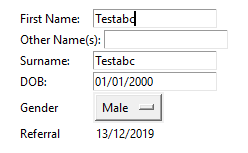
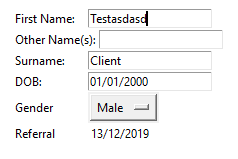 eager beacon
sounds like Tkinter
safe vapor
a bug you think? I have re-written the code like 8 times and it comes the the same result every time. i have even tried using string variables but same issue with a lot more processing work.
static cove
@safe vapor Is that your actual code for that piece?
safe vapor
essentially ... yes. due to NDA i cant post the full code so:
def build_profile(self, cid):
...
#data = pandas.dataframe.query("cid==%s"%cid).iloc[0]
self.fnameL = Label(fname, text=data["fname"], bg="white", anchor="w")
self.fnameL.pack(side=LEFT, fill=X) ##fname
self.fnameE = Entry(fname, text=data["fname"], bg="white")
oname = self.tku.cFrame(basicInfo, side=TOP, fill=X)
Label(oname, text="Other Name(s):", anchor="w", bg="white").pack(side=LEFT, fill=X)
self.onameL = Label(oname, text=data["oname"], bg="white", anchor="w")
self.onameL.pack(side=LEFT, fill=X) ##oname
self.onameE = Entry(oname, text=data["oname"], bg="white")
sname = self.tku.cFrame(basicInfo, side=TOP, fill=X)
Label(sname, text="Surname:", anchor="w", width=10, bg="white").pack(side=LEFT, fill=X)
self.snameL = Label(sname, text=data["sname"], bg="white", anchor="w")
self.snameL.pack(side=LEFT, fill=X) ##sname
self.snameE = Entry(sname, text=data["sname"], bg="white")
...

def switch_edit(self, event, state, ctype):
  if state == 1:
      self.fnameL.pack_forget()
      self.onameL.pack_forget()
      self.snameL.pack_forget()
      self.fnameE.pack(side=LEFT)
      self.onameE.pack(side=LEFT)
      self.snameE.pack(side=LEFT)
  elif state == 2:
    #oposite of state == 1.
so the profile is built with lables showing the data, when the edit button is pressed it switches the lables to Entries.
static cove
and just to make sure I'm understanding, the issue is that when it switches over to Entry and there's a default value, typing in one entry box will make that same text appear in the other?
 amber roost
i think i know what's happening
safe vapor
kinda yea.
if fname = "Test" amd sname = "Test"
fname entry = "TestTest" and sname entry = "TestTest"
typing in 1 box will input into both boxes.
amber roost
tkinter supports shortening argument names when there are no conflicts, so text is interpreted as a shorthand for textvariable
You then create a new textvariable for both entries that actually has the name of data["sname"], which updates both of the widgets whenever it is changed by typing in one of them
this produces the same behavior, while changing Test to Test_ does not
Inserting text into an entry at creation is not possible; however you can call e0.insert(0, data["sname"]) immediatedly after you create the entry
safe vapor
you know i have been looking for a solution for this for about 6 months (its an uncommon issue but an annoying one).
i set a text variable to each entry and it seems to fix the issue. and didnt even cause bugs. Thanks.
fntv = StringVar(fname)
self.fnameE = Entry(fname, text=data["fname"], bg="white", textvariable=fntv)
i will look about changing it to remove text=data['fname'] as i dont think its actually needed in my code as its set elsewhere but i will need to find where it is being set 🙂
amber roost
now you've given tkinter two values for the same argument
safe vapor
yup. but its overwrighting the text so its not causing the issue. im looking to see where i set it to see if it wont cause issues if i remove it.
amber roost
if anyone else has to work on that code, it's gonna be a pain for them to figure out that effectively one of the args is now useless
safe vapor
yup removed text=data... and its still working fine.
i just wanted to make sure there were no unforseen bugs (my code is over 10k lines and im a solo dev so finding stuff can be hard from pure WOT syndrome 🙂 )
amber roost
yeah alright, just tested myself the arg that is supplied last is what actually gets accepted
safe vapor
Thanks for your help. really appreciate it 🙂
amber roost
no problem
trim ibex
in pyqt5 i have a QListWidget, and I'm adding a custom widget (a label) to the list using .setItemWidget(). it adds it to the list but i can't seem to select it. it doesn't have any visual indication of being selected and it doesn't fire a connected itemClicked(). anyone know how to fix this?
trim ibex
my project is complicated, lemmie see if i can make a minimal example
eager beacon
that would be helpful
trim ibex
oh, it's working. well it's something in my specific code then, i think i can nail this down now
trim ibex
ok i got it so it selects it, but it doesn't style as if it's selected. i can work around that if i can't figure it cause i can manually add a class so the style sheet picks it up
it was something to do with how i hooked in mouse events with a base class i'm using
it was breaking the selecting but only for those
eager beacon
you could set an attribute on the widget of Qt.WA_StyledBackground
cursive parcel
guyj plj tellj me how to makej hecjagon in pyqt!?
[yes i m obsessed with j]
lol
QPainter and Qpoint seems kinda hard to me , would anyone like to explain it!
plucky wedge
Has anyone had an issue with Tkinter where 2 Entry boxes somehow link text if created with the same text by default ?
self.fname = Entry(root, text="Test")
self.fname.pack()
self.sname = Entry(root, text="Test")
self.sname.pack()
So if i type in the self.fname entry box it types in both boxes simultaneously.
@safe vapor
u mean u want it to be self.sname = Entry(root, textvariable=v1)
v1.set("Test")
?
static cove
Square789 helped resolve the issue and you can read through the above messages to see what the issue was and the solution
cursive parcel
@static cove ok
bronze basin
@cursive parcel hexangon what? you just want like a frame image just add that as an image
cursive parcel
no i want to make a hexagon shape in pyqt
bronze basin
for?
bronze basin
i am genuinely confused why not add it as an image label?
cursive parcel
ya , but Qpainter points are more customizable
bronze basin
hmmm i see
cursive parcel
and i can tweak acoordingly as i want later on
 split stratus
help please
 pliant prawn
pls use https://hastebin.com/
cursive parcel
help please
@split stratus tell the prob man! , do u want us to check the code
 formal prism
anyone familiar with curses?
well im trying to work with that but hte bad thing is that when i call initscr it makes a window that covers everything like it runs the clear command
but i don't want that, what should i do?
anyone?
formal prism
ok thanks for None
 lost dragon
from tkinter import *
from random import *
import os
from GameValues import *
dirPATH = os.getcwd()

root = Tk()
app = Frame(root)
root.title("Values")
root.geometry("350x200")

class GUI:

    class Level_one:
        def monster_enc(self, monsterF=monster_Flower_Momin):
            self.monsterF = monsterF
            Label(app, text="You have encountered a monster").grid()

lvl1 = GUI.Level_one()
lvl1.monster_enc()
app.grid()
root.mainloop()
for some reason whenever i run this code, it prompts me for an "input" (> in the console window when i type enter it opens the window)
https://cdn.discordapp.com/attachments/303906556754395136/758349042035064912/unknown.png
 formal prism
can you share GameValues?
lost dragon
one sec
proven basinBOT
Hey @lost dragon!
Uh-oh! It looks like your message got zapped by our spam filter. We currently don't allow .txt attachments, so here are some tips to help you travel safely:
• If you attempted to send a message longer than 2000 characters, try shortening your message to fit within the character limit or use a pasting service (see below)
• If you tried to show someone your code, you can use codeblocks
(run !code-blocks in #bot-commands for more information) or use a pasting service like:
lost dragon
formal prism
np
 grave cloud
lost dragon
grave cloud
lost dragon
LOLL
 lusty swallow
Hallo. Stopping by to get some help with how to simply independently control multiple menus at a time with curses. For example, switching between 2 menus and controlling each one independently. Not having much luck on my own.
I have some sample code I drew up real quick for what I know how to do, I put it in pastebin cause it's a bit of a chonker ~70 lines -> https://pastebin.com/uTtwq7sf
Pastebin
Pastebin.com is the number one paste tool since 2002. Pastebin is a website where you can store text online for a set period of time.
With the setup I have I can control multiple menus at the same time but I'm just not really sure how to go about "isolating" each menu
lost dragon
from tkinter import *
from random import *
import os
from GameValues import *
dirPATH = os.getcwd()

root = Tk()
app = Frame(root)
root.title("Values")
root.geometry("350x200")

class GUI:

    class Level_one:
        def monster_enc(self, monsterF=monster_Flower_Momin):
            self.monsterF = monsterF
            testimg = PhotoImage(file='one_momin.png')
            #monsterImage = PhotoImage(file=f"{dirPATH}\{monster_Flower_Momin['File_Name']}")
            Label(app, text="You have encountered a monster").grid()
            Label(app, image = testimg).grid()

lvl1 = GUI.Level_one()
lvl1.monster_enc()
app.grid()
root.mainloop()
Line 20 isn't loading anything
 safe moon
has anyone here worked with pyqtgraph at all? I am trying to create a strip chart and have not been able to figure out how to clear off old data from the plot
 digital rose
can somebody convert this code in an exe file (it requires pynput):
from tkinter import *
root = Tk()
root.title('red dragon auto-typer')
root.geometry("400x600")
def hello():
from pynput.keyboard import Key, Controller
import time
time.sleep(5)
keyboard = Controller()
for a in range(int(myBox.get())):
    keyboard.type(myBox1.get())
    keyboard.press(Key.enter)
    keyboard.release(Key.enter)
    try:
        time.sleep(int(myBox2.get()))
    except ValueError:
        time.sleep(float(myBox2.get()))
myLabel = Label(root, text="How many times do you want to spam?")
myLabel.pack()
myBox = Entry(root, width=30)
myBox.pack()
myLabel1 = Label(root, text="What do you want to spam?")
myLabel1.pack()
myBox1 = Entry(root, width=30)
myBox1.pack()
myLabel2 = Label(root, text="What's the delay(seconds)?")
myLabel2.pack()
myBox2 = Entry(root, width=30)
myBox2.pack()
myButton = Button(root, text="START THE SPAMMING", command=hello)
myButton.pack()
root.mainloop()
orchid yoke
you could use pyinstaller or iexpress.exe
silk basin
Anyone have any idea how I would go about connecting a QPushButton to visually change the value of a QSlider?
I have it working that both the -,+, and slider can control the zoom in and out but I want them all to be linked.
So that way when I click the + the slider will visually increment
and vise versa
eager beacon
button.clicked.connect(self.increment_slider)

def increment_slider(self):
    current_value = self.slider.value()
    increment_value = 10
    self.slider.set_value(current_value + increment_value)
if you wanted to use the same method you could set an objectName for each button and in the method create a conditional that either incremented or decremented the slider based on self.sender().objectName()
orchid yoke
Anyone have any idea how I would go about connecting a QPushButton to visually change the value of a QSlider?
I have it working that both the -,+, and slider can control the zoom in and out but I want them all to be linked.
@silk basin You could both link the same command through the button and change the value of qslider
I don't know how I would code it since I don't know PyQt5
silk basin
Thanks boys will give both methods a shot!
lost dragon
https://paste.pythondiscord.com/golufekuvo.py
How would i add color behind the picture?
https://cdn.discordapp.com/attachments/696348847248769074/758565157617270784/unknown.png

 frosty anchor
HELLO
 oak portal
Huh
 summer knoll
hey guys, im new to tkinter and im trying to use its bear bones example, when i run the example:
import Tkinter
import tkMessageBox

top = Tkinter.Tk()

def helloCallBack():
   tkMessageBox.showinfo( "Hello Python", "Hello World")

B = Tkinter.Button(top, text ="Hello", command = helloCallBack)

B.pack()
top.mainloop()
``` i get the error
import Tkinter
ModuleNotFoundError: No module named 'Tkinter'
so then i tried in my command prompt:
pip install tkinter
``` and i get
'pip' is not recognized as an internal or external command,
operable program or batch file.
i did factory reset my pc yesterday and re installed vs code and python 3.8.5
whole dagger
Tkinter should come in python, though in python3 you use tkinter and not Tkinter
So, import tkinter as tk or simply import tkinter should work
whole dagger
No problem
lusty swallow
Still having some problems with curses here but have made some progress with it. Still having the same problem of isolating control between two windows. This doesnt seem to work and I'm hitting a dead end
Idea was you would initially be controlling on one window until you hit "t" or whatever character you want to switch control over to the other window, where you could then scroll around on that one without affecting the original
 queen heron
how do i made a program that when im in a game and i press a key it does somthing? with keybindings?
digital rose

If i replace line 221 with "listbox.pack(fill=BOTH,side=LEFT)"
you can see how it still overrides of rest of the element
this is using tkinter
how do I stop it from overlapping
but keep its shape
so like seperate the listbox + rest of gui
plush stream
How do i show tooltip by clicking button in pyqt?
inland notch
@inland notch One big thing is that you're recreating the
PhotoImageevery time. That means that Tk has to go to the hard drive, read the image, decode it, and then swap out the widget.Instead, first move the
Game = Tk()call to the start. This needs to be the first Tkinter function you call since it sets it all up. Then switch your variables to store thePhotoImageobjects.
@glacial gust I still need help
do I use a for loop and go through each file in glob.glob()?
and append the file?
into an array?
FowardFramesMoving = [tk.PhotoImage(file=FowardFramesMoving[i]) for i in range(300)] Like this? It doesn't run
digital rose
@thin ore
I tried ur methord
Of aligning it to different collums
But that didn't work
And I upload code to that site
 thin ore
@digital rose It doesn’t work since you are using different geometry managers for tho same widget.
Eg. line 166-168 or 178-179 you are using grid and place for the same widget. The general rule is to use only one geometry manager for a given widget and to use the same geometry manager for all widgets in the same frame.
digital rose
how can i use a variable i created in a function in another function?
 next vigil
from tkinter import *
from random import randint
import cv2
import time
Ereignisverarbeitung
def startCamera():
camera = cv2.VideoCapture(0)
return_value, image = camera.read()
cv2.imwrite('opencv.png', image)    # Saving the picture as opencv.png
del(camera)
return showPicture
def showPicture():
image = PhotoImage(file="opencv.png")
picture.config(image= image) # Specify the picture as opencv.png
Erzeugung des Fensters
tkFenster = Tk()
tkFenster.title('openCVCamera')
tkFenster.geometry('1920x1080')
Buttons
startCamera = Button(master=tkFenster, text="Start Camera!", bg="#898989", font=("Aharoni", 100), command=startCamera)
startCamera.place(x=100,y=200, width=1720, height=250)
Labels
pic = PhotoImage(file="empty.png") # My standard picture
picture = Label(master=tkFenster, image= pic)
picture.place(x=100, y=400, width = 1720, height= 500)
Aktivierung des Fensters
tkFenster.mainloop()
Hi,
i started programming with tkinter today and i've got a question. This program shall take a picture with my webcam and respecify it as the new picture, but it won't add the new picture...
Can anybody help me?
digital rose
wtf this isnt biginner this is expert
next vigil
@digital rose How did you marked your code as code in the chat?
digital rose
when?
next vigil
oh sorry nevermind that was somebody else
cursive parcel
how can i use a variable i created in a function in another function?
@digital rose
class # define a class here
variable = 0
 def myfunction(self):
        self.variable = 1 # updated the value in a function
basically using self.{variable name} helps u
'use variables in various functions in a particular class'
@cursive parcel yeah but like how do i use the self.variable you defined as 1 in another function?
digital rose
class A:
def temperature(self):
temperature_tab = Tk()
how do i use the temperature_tab in another function?
 indigo marsh
I'm working on a mobile app for which I have a web target hosted here: https://inhabit.sasid.me/#/ (use mobile viewport emulation). Looking for any feedback regarding the UI and UX. Mostly interested in anything that will make details like colors, contrast, theming, animations, etc better.
A new Flutter project.
 kind apex
hey i have a question is web-based GUI's Good as Tkinter or Qt based GUI's ?
like apps made with flask-django/electron JS
orchid yoke
how can i use a variable i created in a function in another function?
@digital rose try using global variables
fluid tinsel
In tkinter, is there a way to completely fix the resolution on windows?
cursive parcel
like apps made with flask-django/electron JS
@kind apex i dont know about flask / django but electron JS is mostpowerful and and in terms of UI it can offer extremeness , simply i mean using html css u can creating super cool UI styles but problem only occurs when u package the app [its size becomes very large]
` i hope it helps
In tkinter, is there a way to completely fix the resolution on windows?
@fluid tinsel what do u mean by fix
if u mean that ur app should cover whole window completely [maximized] then u can do something like
SIMPLY
1-detect the user's system resolution
2-store it as variable
3-use those variables in geometry of ur app (geometry(width, height)) # u can also set width/2 or( height/2+30)
something like that
how can i save the entry inputs to a text or jason file
@digital rose there is a GET method which allows to get and store data from entry and then u may pass it to JSON
fluid tinsel
not that, it’s just everything has bad resolution, it looks like 32 bit.
cursive parcel
u mean bad looking UI? like retro style u mean?
if that then u use nice color palette , and creative ui structures , that will hellp u for sure
also here's a quick tip --> set all widgets 'bd = 0' that sets borders to no border and then u can make kinda MATERIAL designs | i bet u can create a cool looking web browser with it ^_^
lol @digital rose
fluid tinsel
not as in the colors those are fine. let me see if I have an example image.
cursive parcel
ok
fluid tinsel

the text and everything is low quality.
everywhere else it has a much higher resolution
bronze basin
@kind apex electron is better in terms of customization and stuff
as html,css and js are more well, customizable
and more powerful
like apps like vscode
cursive parcel
@bronze basin i think u pinged other person
bronze basin
what r u using?
fluid tinsel
tkinter
cursive parcel
that looks much worse than normal though?
@fluid tinsel i cant figure out where is the low quality
bronze basin
well its tkinter isnt it? unless there is something else affecting this
fluid tinsel
everywhere
bronze basin
are the icons your using high quality?
 fluid tinsel
the size is too big, like tkinter was made for a different operating system or something
bronze basin
you using a custom windows theme or something?
fluid tinsel
though I’m pretty sure it uses tcl, and no.
fluid tinsel
it doesn’t anything with sizes in my code.
https://pastebin.com/6ew39y4D
only the window size, which does nothing even when I remove it.
on the X window system (on repl.it) everything works perfectly, when I run on windows it just goes low quality
since it runs perfectly on X i’m not sure if it’s my code or something to do with tkinter/tcl
digital rose
in tkinter, how can i change where the window open, for example, when i run the program, i want it to appear in the right side of my screen?
plush stream
@digital rose root.config('+100+200')
It's just an example, you can fill it with any int value you want
digital rose
Root is supposed to be the variable thats stores the Tk()
indigo marsh
@digital rose oh thanks. I just fixed it. I'm assuming you're referring to the continue button when you select google drive as the option.
digital rose
yes
 brittle hull
Hi everybody, hope you could help me. I have to build an interface to display real-time data (obtained from a websocket connection), what do you think is the best solution? I have some experience with Tkinter, and I have no problem with trying new tools/libraries (somewhere I read about streamlit, or maybe PyQT/PySide/any other)
I am currently displaying the data in Excel via xlwings
safe moon
Pyqtgraph is a pretty easy option to use. I currently use it to display a sliding two minute window of incoming sensor data
brittle hull
Thanks Will, I will look into it
static cove
@brittle hull I tried tkinter w/matplotlib and found it to not be fast enough and blit too much of a pain to configure. Pyqt5 + pyqtgraph were fantastic for me and exactly what I needed
brittle hull
Great @static cove , I been reading and learning about PyQt5 (and Qt Designer) since my last message. I will search more about pyqtgraph. Thanks a lot!
fluid tinsel
Hello, I’m writing a syntax highlighter using tkinter, but it returns this error:
_tkinter.TclError: bitmap "#FF4500" not defined. I’m applying this onto a foreground in a tag, but it returns that error.
https://paste.gg/p/anonymous/df01f1dac5d945b1bf9f2c62ebdcc557
(color dictionary)
https://paste.gg/p/anonymous/67025a4e62814232ba9b86a21194aa8d
(main app)
proven basinBOT
Hey @digital rose!
It looks like you tried to attach file type(s) that we do not allow (.exe). We currently allow the following file types: .3gp, .3g2, .avi, .bmp, .gif, .h264, .jpg, .jpeg, .mkv, .mov, .mp4, .mpeg, .mpg, .png, .tiff, .wmv, .svg, .psd, .ai, .aep, .xcf, .mp3, .wav, .ogg, .webm, .webp, .flac, .afdesign, .m4a.
Feel free to ask in #community-meta if you think this is a mistake.
 sharp glade
Who knows how to make kivy working I am getting ValueError when I import it?
 terse roost
in tkinter, how can i change where the window open, for example, when i run the program, i want it to appear in the right side of my screen?
@digital rose you can use the following syntax:
root.geometry("500x400+left_position+top_position")
@digital rose you can use the following syntax:
root.geometry("500x400+left_position+top_position")
@terse roost for example :
from tkinter import *

root = Tk()

root.geometry("500x400+600+300")

root.mainloop()
thanks
terse roost
@digital rose be careful ! Do not put space:
root.geometry("500x400+600+200")
what?
 near arch
can someone help me with tkinter
from tkinter import filedialog
import tkinter
root = tkinter.Tk()
root.geometry("300x150")
X = root.winfo_x()
Y = root.winfo_y()
path = {}
def choosedir():
    path=filedialog.askdirectory()
    pathname.insert(0,path)
pseason = tkinter.Spinbox(root,from_=1.0,to=100,increment=1.0,width=0)
pseason.grid(row=1,column=1,ipadx=0)
label=tkinter.Label(root, text='Season')
label.grid(row=1,column=0,ipady=10, ipadx=0, padx=0,pady=10)

pathname = tkinter.Entry(root, bd =2)
pathname.grid(row=0,column=0,padx=0,ipadx=37)

browseButton = tkinter.Button(root, text='Browse', command=choosedir)
browseButton.place(x=200,y=0)
browseButton.width=500
root.mainloop()
for somereason the code does not work
static cove
@near arch what part isn't working?
digital rose
ok so i wanted to change the text from a label so i put the text in a variable but when i run the code: https://hasteb.in/ilalemem.rb it prints dddd which indecates the program is working but i set the variable to change, but it doesnt. How can i fix it?
near arch
@maiden osprey
look i can only put text there
no where else
also from that check button why when i print i get ".!checkbutton" instand of 1 or 0
and checked and uncheck all i get is .!checkbutton
 maiden osprey
hmm, use the align property maybe, of the text box?
hmmm... I don't know why the .!checkbutton happens? Can I see the line of code?
also you might as well use some other method of logging.
near arch
@maiden osprey
from tkinter import filedialog
import tkinter
from tkinter import IntVar
root = tkinter.Tk()
root.geometry("400x200")
root.resizable(False,False)
X = root.winfo_x()
Y = root.winfo_y()
path = 0
def choosedir():
    path=filedialog.askdirectory()
    pathname.insert(0,path)
def Run():
    print(CDLog)
pseason = tkinter.Spinbox(root,from_=1.0,to=100,increment=1.0,width=5)
pseason.place(x=70,y=28)
label=tkinter.Label(root, text='Season:')
label.place(x=20,y=28)
c_v1=IntVar()
CDLog = tkinter.Checkbutton(root, text=('Save Log File'), variable=c_v1, onvalue=1, offvalue=0)
CDLog.select()
CDLog.place(x=140, y=28)
pathname = tkinter.Entry(root, bd =2,width=55)
pathname.place(x=5,y=4)
logbox =tkinter.Entry(root, width=63)
logbox.place(x=6,y=55,height=138)
RunButton = tkinter.Button(root, text='Run', command=Run)
RunButton.place(x=280,y=28,width=60)
browseButton = tkinter.Button(root, text='Browse', command=choosedir)
browseButton.place(x=345,y=0)
browseButton.width=500
root.mainloop()
that's my code
and same with checkbox
maiden osprey
first off, the checkbox defaults for the logging mechanism is already 0 and 1
I am still trying to debug
maiden osprey
ok
near arch
ok i think i found a way
to get the vaule for checkbutton is to make a var call anything u want = tkinter.IntVar()
then inside the checkbutton code u need to add variable=thevarunamed
then do thevarunamed.get()
that's what i found out
maiden osprey
@near arch you defined the return value in the statement:
CDLog = tkinter.Checkbutton(root, text=('Save Log File'), variable=c_v1, onvalue=1, offvalue=0)
so yeah, I think you should refer to the variable c_v1 to get the desired on and off values.
near arch
ye
maiden osprey
probably like
on_or_off = c_v1.get()
near arch
also do u know how to fix the text box?
near arch
yes
maiden osprey
why don't u use Text?
maiden osprey
T = Text(root, bg, fg, bd, height, width, font, ..)
I did that before
used to work
try that
maiden osprey
inset?
near arch
insert
near arch
i tired logbox.insert(0, 'test')
near arch
for the text box
maiden osprey
what are you trying to do?
maiden osprey
like some default text in the box?
near arch
noo like sometimes i need to put some text in it
like when i press one of the button it will insert a text in it
near arch
yeah sry all the confusion
near arch
oof
maiden osprey
maiden osprey
Looks like Text does not have a property so you can change the text in it tho
@broken spire you were typing something?
near arch
still i needed the box to use all the room
maiden osprey
there is a wraplength property for the Entry widget, use that @near arch
maiden osprey
Like: entry_box = Entry(root, width=30, wraplength=30)
@broken spire @near arch next time use the #help-pineapple section
near arch
ok
maiden osprey
yeah, ping me there
near arch
how do i use the wraplength? with entry?
maiden osprey
@near arch sorry, was eating, just add wraplength into the Entry() like shown above
I think it should work
near arch
ok thx
inner nest
Why don't you just use a label and a stringvar to show/update a text when you click on a button. @near arch
You can also use a text canvas
near arch
oh
digital rose
ok so i wanted to change the text from a label so i put the text in a variable but when i run the code: https://hasteb.in/ilalemem.rb it prints dddd which indecates the program is working but i set the variable to change, but it doesnt. How can i fix it?
inner nest
@digital rose line 18 : just call variable = StringVar(), you don't need to enter a parameter, here you inserted a ref to your tkinter window
line 20 : you can set the optionmenu like that : listeOptions = ('train', 'avion', 'bateau')
v = StringVar()
v.set(listeOptions[0])
om = OptionMenu(root, v, *listeOptions)
finally you can get the actual selected value of the optionmenu with a get() method
also change your labels text parameter to textvariable param
digital rose
also change your labels text parameter to textvariable param
@inner nest whats the difference?
inner nest
text param take a string and textvariable take a value control by a StringVar() or IntVar()
you can then use/access the value in your entire code
inner nest
it works fine apparently 🙂 you can make get_answer() shorter i think
digital rose
@inner nest how?
digital rose
hey guys, who using kivy?
so
who know this error?
'''[INFO ] [Logger ] Record log in /home/flanict/.kivy/logs/kivy_20-09-28_3.txt
[INFO ] [Kivy ] v1.11.1
[INFO ] [Kivy ] Installed at "/usr/local/lib/python3.7/site-packages/kivy/init.py"
[INFO ] [Python ] v3.7.0 (default, Sep 27 2020, 22:43:21)
[GCC 9.3.0]
[INFO ] [Python ] Interpreter at "/usr/local/bin/python3.7"
[INFO ] [KivyMD ] v0.104.1
[INFO ] [Factory ] 184 symbols loaded
[INFO ] [Image ] Providers: img_tex, img_dds, img_sdl2, img_pil, img_gif (img_ffpyplayer ignored)
[INFO ] [Window ] Provider: sdl2(['window_egl_rpi'] ignored)
[INFO ] [GL ] Using the "OpenGL" graphics system
[INFO ] [GL ] Backend used <sdl2>
[INFO ] [GL ] OpenGL version <b'4.6 (Compatibility Profile) Mesa 20.0.8'>
[INFO ] [GL ] OpenGL vendor <b'Intel'>
[INFO ] [GL ] OpenGL renderer <b'Mesa Intel(R) HD Graphics 505 (APL 3)'>
[INFO ] [GL ] OpenGL parsed version: 4, 6
[INFO ] [GL ] Shading version <b'4.60'>
[INFO ] [GL ] Texture max size <16384>
[INFO ] [GL ] Texture max units <32>
[INFO ] [Window ] auto add sdl2 input provider
[INFO ] [Window ] virtual keyboard not allowed, single mode, not docked
[INFO ] [Text ] Provider: sdl2
[INFO ] [GL ] NPOT texture support is available
Traceback (most recent call last):
File "main.pyw", line 140, in <module>
CalculatorApp().run()
File "/usr/local/lib/python3.7/site-packages/kivy/app.py", line 829, in run
root = self.build()
File "main.pyw", line 133, in build
caller=self.root.ids.toolbar,
AttributeError: 'NoneType' object has no attribute 'ids'
'''
 tribal path
Seem to be trying to access root before its created
digital rose
i have 1 question
how i can it repair
it crashed in kivy module file
so
i cant it repair
P.S. i reinstalled kivy 4 times
 subtle otter
caller=self.root.ids.toolbar, AttributeError: 'NoneType' object has no attribute 'ids'
root is None
what does the class look like
ping me whe u reply
digital rose
@subtle otter details in personal message
subtle otter
You can get more help asking here
digital rose
no one talking here
 rocky dragon
Surely there's more than in a dm
subtle otter
open up a help channel @digital rose
Someone who is more adept in kivy will be able to help
 tame violet
Hi all 😄 I could use some advice on a GUI I have made with Tkinter.
I am happy to post the code and it may be reused and/or modified.
pymysql.err.ProgrammingError: (1064, "You have an error in your SQL syntax; check the manual that corresponds to your MySQL server version for the right syntax to use near 'where roll_no='116 Whoop USA DO\n\r\n\n'' at line 1")
proven basinBOT
Hey @tame violet!
Uh-oh! It looks like your message got zapped by our spam filter. We currently don't allow .txt attachments, so here are some tips to help you travel safely:
• If you attempted to send a message longer than 2000 characters, try shortening your message to fit within the character limit or use a pasting service (see below)
• If you tried to show someone your code, you can use codeblocks
(run !code-blocks in #bot-commands for more information) or use a pasting service like:
Hey @tame violet!
It looks like you tried to attach a Python file - please use a code-pasting service such as https://paste.pythondiscord.com
tame violet
It uses Mysql as the database. MySql has a database called 'stm'
table called 'students'
Like so.^*
When I click on an entry in the application
The data in is called from the database to the left hand side where entries are managed.
The "update" button is SQL syntax
And returns the error -> """pymysql.err.ProgrammingError: (1064, "You have an error in your SQL syntax; check the manual that corresponds to your MySQL server version for the right syntax to use near 'where roll_no='116 Whoop USA DO\n\r\n\n'' at line 1")"""
'where roll_no=' -> is equal to a change in the address box at the bottom left hand side
I have tried 5+ hours of syntax changes I thought should resolve the issue and they all lead me back in circles. Original issue -- [Solution implemented] --> New prob -- [Solution implemented] --> new fix -- [Solution implemented] --> back to original issue... Then I watch a movie and eat junk food while sulking about the issue. ;/
 frank ore
About PyQt: Can programs written with current version of PyQt be deployed on Android? This SO https://stackoverflow.com/questions/18436340/pyqt-on-android says it can but I want to be extra sure before taking the plunge
Edit: I might be offline, pings are welcomed
 brave meteor
hey anyone up?
how can we show time,os function on the tkinter window?
when i tried to collab them , every sec the window of tkinter is opening and then i have destroy that window and only then a window with 1 sec added to the previous one come up
what the hell should i do?
inner nest
you can use a label and a variable to print time

GeeksforGeeks
A Computer Science portal for geeks. It contains well written, well thought and well explained computer science and programming articles, quizzes and practice/competitive programming/company interview Questions.
or update_idletasks to update time label
brave meteor
ok @inner nest tysm
 maiden dragon
I have a pyinstaller being used to compile an executable but for some reason the .exe will run on all the computers we tested it on but not the virtual machine. It isn't an issue with the virtual machine as a version of it opened earlier but right now i can't get it to open
!paste
proven basinBOT
Pasting large amounts of code
If your code is too long to fit in a codeblock in discord, you can paste your code here:
https://paste.pydis.com/
After pasting your code, save it by clicking the floppy disk icon in the top right, or by typing ctrl + S. After doing that, the URL should change. Copy the URL and post it here so others can see it.
maiden dragon
3 hours only to get it working after simply rebooting the virtual machine 🤦♂️
safe moon
Is there an efficient way to go through all the buttons on a GUI and set the background color for each one using pyqt5?
safe moon
for widget in self.centralwidget.children():
            if isinstance(widget,QPushButton):
                if widget.objectName() == "btnMirror1":
                    widget.setStyleSheet("background-color: green")
                else:
widget.setStyleSheet("background-color: lightgray")```in case anyone else has the same question I did
 lethal coyote
beginner question. would you recommend tkinter for the following idea? if not then what, and also how would you recommend i word this in a not idiot way for better research?
the idea is a desktop application kinda like a virtual keyboard but with custom keys. maybe with a layout resembling a numpad.
the feature i'm asking about, tho, is: having 4 "buttons" at top that when you hold click or press on any of them, the board of keys below change to alternate keys. i want to be able to press a top button, hold, drag cursor to a key, then release to activate that alternate key. and upon releasing, have the board return to default.
tame violet
Hey boss, I would recommend Tkinter.
lethal coyote
@tame violet ok. cool. any idea if there's function/method i can search for regarding the hold, drag, release thing?
tame violet
what python version are you using?
lethal coyote
3.8
tame violet
Python.org says you should use: wxPython
In addition to an extensive set of widgets, wxPython provides classes for online documentation and context sensitive help, printing, HTML viewing, low-level device context drawing, drag and drop, system clipboard access, an XML-based resource format and more, including an ever growing library of user-contributed modules.
"Drag and Drop"
lethal coyote
oooh. cool. thank you. will def look into
silk basin
Anyone have any ideas on how to implement a color grid within a combobox in PyQt5? Just like in word how you click the ComboBox a color grid comes up to change the color of the font
There are libraries out there that do some variation, some involve a pop out box, color wheel, ect. I don't need that. I need like an actual drop down with a grid
 indigo heron
i'd like to build an user-interface using electronjs, but i preffer writing my "main script" in python. Is there way to run python scripts in electron as main?
I dunno if i should ask this here, so. im sorry if not
inner nest
I am sharing you a quick video about connecting backend python and electronJS front on a little weather app. I have never do this but I hope it can help you.

Learn to make a modern looking, cross platform desktop apps using ElectronJS with Python.
Use electronJS as a front end for your Python apps.
NodeJS: https://nodejs.org/en/
ElectronJS: https://electronjs.org
python-shell: https://www.npmjs.com/package/python-shell
Code: htt...
fluid tinsel
I’m trying to find a module for GUI. I’ve tried using tkinter, PyQt5, Kivy, wxPython, PyGObject, and PyGTK.
What libraries/modules would be good (and not too hard) for a program that doesn’t have just one view? I’m using Python 3.8, and I’m on windows.
inner nest
what do you mean by "one view" ?
fluid tinsel
as in there’s no such thing as completely changing all layout.
bronze basin
Go Pyqt5
fluid tinsel
too complicated, and it’s license is LGPL.
fluid tinsel
not supported on my python version
 final junco
fluid tinsel
final junco
fluid tinsel
yes but it’s resolution is very bad
fluid tinsel
I found a GUI builder for tkinter (Pygubu), but that problem of resolution still lies.
cursive parcel
@fluid tinsel then i think there's only one way , go and make ur own Py Gui module LOL
fluid tinsel
would if I knew how to
fluid tinsel
It’s not supported on > 3.8
fluid tinsel
fails from 3.8 → 3.8.5+
fluid tinsel
cannot import it in 3.8+
fluid tinsel
3.8.2 result
bronze basin
upgrade pyside 2? with pip maybe
fluid tinsel
wdym?
bronze basin
try with python 3.8.3
fluid tinsel
let me try installing it like how kivy isn’t with pip install
searched all over there was nothing about it
I also just saw that tkinter can only have one thread apparently so that’s now completely off
static cove
You can use threads with tkinter, it just takes effort if you want info to communicate between those two threads.
 rose kettle


 fluid tinsel
I’ve just searched for a long time, I found Flexx (https://github.com/flexxui/flexx), it seems to be easy and I can export it to not only a desktop app, but a web app too, thanks.
@! EviLKinG !#6799
PyQt5 is generally better, but it has a different license, and is a slight bit harder than tkinter.
 north torrent
Is there a pay by which I can auto run a python script at start up in windows
digital rose
So i tried hardcoding a chatbot with if statement sand put it all inside a function but it just skipps over the other if statements inside the main one and chooses else
I have checked everything but i can figure out whats wrong with it
plush stream
How do i register single click as a double click in pyqt? Say i clicked a button once, but pyqt sent the same signal twice, anybody know how to do that?
bronze basin
why would you want to do that in the first place tho?