#user-interfaces
1 messages · Page 48 of 1
 north quail
https://stackoverflow.com/a/8190025
One way to fix the flickering is to enable double buffering in the top container for your widget. Normally this is done by calling self.SetDoubleBuffered(True) within the initialiser, for example within Panel container for your StaticText class.
this seems more to the point
 hoary forum
 frosty wren
I'm a real beginner and i am following a tutorial. I want to change my favicon with the help op Tkinter.
This is the problem i keep getting.
I don't know what i keep doing wrong i tried different things like: change / into \ and putting a r in front of the Url.
but none of these things worked. I just keep saying "not defined".
 maiden dragon
@hoary forum a chemical distillation column
 amber roost
@frosty wren your bitmap seems to be broken somehow, this stackoverflow question has an answer: https://stackoverflow.com/questions/29973246/using-tkinter-command-iconbitmap-to-set-window-icon

Stack Overflow
I have a program with Tkinter window and I want to set an icon for the window. I coded this:okno.iconbitmap(os.path.dirname(os.path.abspath(file))+"/icon.png") but it writes:
Traceback (most r...
 south orbit
whats the difference between pyqt and tkinter, what are each ones pros and cons?
 coarse sequoia
my mind is:
tkinter
con: old look and feel, not quite complete (for instance no builtin text editor, poor event system, few default collection of menus, icons etc), not very CPU efficient
pro: lightweight, very simple and quite intuitive API, native in most of the python distributions
pyqt5
con: heavy library (huge compilation and binary size), quite complex API, not very 'pythonic' (it doesn't follow the usual python convention and architecture designs, plus its meant to be used in c++ which has a far less powerfull syntax than python)
pro: very complete library, very nice look and feel, highly CPU efficient
personnally I prefer Qt, I think it is better to get a fast and nice software ... at codt of programmer pain 😅
*cost
frosty wren
@coarse sequoia thanks for the explanation. I think i will switch to Qt. 👍
coarse sequoia
at your service ;)
then just few tips to use it:
- there is 2 Qt wrapper: PyQt5 and PySide2
pyqt seems to be the most recent one, pyside is still used by some softwares. both are quite similar - there is always a terrible choice to make: CamelCase or snake_case (I mean for the classes you will create)
snake case is the python standard and is my choice, but it may hurt to have code mixing both when using Qt that is using CamelCase :-/ - remember that most of the Qt concepts exists only for c++ constraints, so a good use of pytho concepts with Qt is always looking weird or didcouraged by the Qt community, but can still be a very way for pythoneers ;)
 static cove
PySide2 is now officially supported and developed and has documentation for how to use pyqt/pyside2. It used to be that Pyside2 lagged behind Pyqt, but they're pretty well even and up-to-date. I use PySide2 docs for a general "this is how you actually implement/use this particular class/signal/slot/property". You'll still have to rely on the Qt C++ documentation most of the time though.
 sudden coral
If you have a basic grasp of reading C++ then honestly don't bother with the Python docs, just use the C++ docs.
The C++ docs have a nicer style. They also have hyperlinks to the types.
And of course, they're more complete. The Python docs sometimes have gaps or even parts that still have C++ example code.
Here's a good comparison of pyside2 and pyqt5 https://wiki.qt.io/Qt_for_Python_Missing_Bindings
 steep cliff
how to add text in QLineEdit when a push button is pressed?
static cove
Are you using the QPushButton signal at all?
steep cliff
sorry whats QPushButton signal?
static cove
Are you familiar with the PyQt Signals and Slots method?
steep cliff
nope
static cove
So pyqt/pyside2 has a really nice event system, called signals and slots.
Give me 1 minute to grab some documentation and examples
steep cliff
ok
static cove
So interface elements, like a button, can have certain signals attached to them. For example, let's look at a generic AbstractButton that all Qt buttons are built off of: https://doc.qt.io/qt-5/qabstractbutton.html
They have 4 signals we can listen to: clicked, pressed, released, toggled
When a user interacts with the button it can trigger one of those signals in Qt. Slots then receive that signal and can do something. That something can either be a pre-defined slot or a custom python function.
If we look specifically at the QPushButton https://doc.qt.io/qt-5/qpushbutton.html, we can see a ready-made slot is showMenu().
This is what example code would like for a button press:
def say_hello_func():
    print("Hello!")

say_hello_btn = QPushButton("Say Hello!")
say_hello_btn.clicked.connect(say_hello_func) #This is how we listen to specific signals and connected them to specific slots
So for your example, I would connect a function to a that button that would update the specific QLineEdit that you'd like updated.
steep cliff
can i add something to that define a variable string
      print(v)
self.push_button.clicked.connect(ok('text'))```i made something like this
    def add_Text(self, v):
        text_Text = self.text.text()
        print(text_Text)
self.text.setText(str(text_Text) + v)```You can. I typically use lambdas for this, although I think you could maybe use partials as well.
def ok(self, v):
    print(v)

self.push_button_clicked.connect(lambda: self.ok('new text!'))
TypeError: argument 1 has unexpected type 'QPushButton'```what?
``` fixed it like this but it doesnt work ornate sequoia
Hi, not quite asking for help but i was wondering which GUI framework to use. I've used PySimpleGUI but it's been very laggy and didn't support folder selection i was planning on switching to something more robust.
I'm not making a game, just a convenient GUI for a program and was wondering what my options were before committing to it. Wxpython is apparently quite difficult to get into. Pyqt seemed like the most interesting option and is what'll be going for I think.
steep cliff
pyqt5 is not that hard you have a designer for it so you don't have to type for ui
u only need to setup commands for buttons or else
and I think pyqt5 is cross platform but not sure
steep cliff
idk about that
static cove
PySide is another binding of the Qt framework, like Pyqt. They're effectively the same right now, but there are differences in licensing
You're connecting a button... to itself?
steep cliff
oh
thats the problem
def is called same as the button
thanks
idk how i didnt see that
 rocky dragon
signals are handled a bit differently in pyside2, then small design differences
ornate sequoia
which one would you recommend ? i don't have much experience in gui
like some stuff in c++ using qt but that's about it
rocky dragon
I've used pyqt myself because I started with it and had some fairly specific problems with pyside
It doesn't really matter unless you have a problem with GPL or bump into something wrong with either of them in your use case
ornate sequoia
thank you ! I'll get to reading the doc and installing it then !
 boreal rain
Is there a commonly recommended library for doing command line interfaces? I need the ability for users to enter info, select one item from a shown list, and select multiple items from a presented list.
 neon bay
 bright trout
Nope
At least I don't.
But I mean it is effecient to used the pay version if you are serious about developing with it.
rocky dragon
You only need it for closed source commercial, which I doubt many Devs from here would benefit from
 azure stag
oh ok so you get the same features regardless, just need to pay a fee if it isn't open-sourced?
 thick kiln
why is tkinter so painful to use
thick kiln
ok
ornate sequoia
Not quite sure how I could link a table in memory to a table from Pyside so that any change to the table in memory appears on screen. Is QTimer the way to do it or do people use something else ?
static cove
Do you mean like a pandas dataframe table or something else?
How do you expect the table in memory to get updated?
ornate sequoia
I'm monitoring multiple thread's progress and updating the table accordingly, so the table is changing without any user input
it's just an array of custom datastructures
static cove
The way I handle it (I poll data, update a dataframe, then update the display table), is I send a signal from the data pull thread when I get new data for the table. This signal slots into a "update_table_data()" function. I need mine to run everytime I get new data, not just once per second.
(once per second is either too slow or too frequent depending on the device I'm polling)
 radiant socket
Hello I need to know how to do something in Pyqt5. I am running a loop and in each iteration I'm creating new label widgets and assigning different text to them. But since all the labels are of the same name, whenever I setText() all the widgets change rather than just the one created in the new loop
static cove
You'd need a way of being able to differentiate the labels from each other. What are you trying to do that has you creating labels in a loop?
radiant socket
Basically I'm creating a small Ui where users can add and rate movies. Whenever they add a movie, it gets added into MySQL. I need a way to display all the movies in a MainWindow, so I've set it up that there is a loop within setup_Ui where all the information about each movie is accessed from MySQL in each iteration and is printed onto labels
So I need to create new labels and then change their text to whatever is taken from MySQL in that iteration
static cove
Well, you still need a way to reference the labels separately from each other, since you're setting the text of the labels after initialization of the label.
My solution to this was having a list/dictionary containing the labels and associated data, so I could keep appending Qt Objects and then displaying specific slices/the whole list.
radiant socket
How would you dynamically create labels with different names?
static cove
So they wouldn't get different variable names, I would just add them to a list and reference them via the list. (I usually use a dictionary, technically).
radiant socket
Oh yeah I think I get it
static cove
For instance, say I have a custom QLabel class that has special styling, I'll call it TitleDataQLabel. It's functionally exactly the same as QLabel but it's just styled a bit differently.
#Assume this is all part of my main window
def create_new_movie(movie_title, *args, **kwargs):
  label_obj = TitleDataQLabel(movie_title)
  return label_obj

movie_titles = []
#User adds a new movie, and this triggers the "create_new_movie()" function
movie_titles.append(create_new_movie("Pacific Rim"))

movie_titles[0].setText("Pacific Rim 2")
So you can see a quick example of how this might work. I usually use dictionaries, because I store the object data as values, with the id/title/whatever as the key so it's easier to reference it.
ornate sequoia
@static cove i'm actually having a hard time doing it :/, first time i'm using pyside2
class A(QObject):
  table = []
  table_modified = Signal()
  def called():
    updates table
    table_modified.emit()

  def run():

class MainWindow(QMainWindow, Ui_MainWindow):
  self.table = QtWidgets.QTableWidget()
  a.table_modified.connect(update_table)

  def update_table(self):

a = A()
thread = Thread(target=a.run)
mainWindow = MainWindow()
Are you using any of the provided Qt thread objects/functions? Or are you using a basic python thread?
static cove
I recommend using Qts. They're thread safe and once you have it set-up it's pretty easy to use and adapt.
Depending on what you want to do, you can do either:
- QThreadPool + QRunnable (with a side of QObject for the signals)
- Use a basic QThread and use the moveToThread() function
I use the first option, but that's mostly because I like spawning off threads easily and not worrying about managing the clean-up and deletion and I don't really care about stopping it once it starts from the thread reference.
But if you want to do the second option, here's a good SO for the basic set-up of it: https://stackoverflow.com/questions/6783194/background-thread-with-qthread-in-pyqt
ornate sequoia
I only have one thread anyway so that I don't freeze the main loop
yeah I'm reading the doc on QThread right now
ornate sequoia
Not sure what I'm doing wrong there but the main thread is freezing
class Obj(QObject):
  def run(self):
    while True:
      ...

class MainWindow(QMainWindow, Ui_MainWindow):
    def __init__(self):
        QMainWindow.__init__(self)

        obj = Obj()
        thread = QThread()
        obj.moveToThread(thread)
        thread.started.connect(obj.run)
        thread.start()
You should add the decorator @pyqtSlot() on top of the def run(self) function so it can slot properly.
ornate sequoia
uh, how do I import that ? it's not from PySide2.QtCore import Slot ?
static cove
(I'm also still looking at this and seeing if I can spot what's wonky)
from PySide2.QtCore import pyqtSlot
oh wait, hold on
That shoooould work
ornate sequoia
don't have that :/
but yeah i tried what was in the SO answer (using the Slot decorator though) but didn't work either
static cove
Oh, it should just be the regular Slot() then. Sorry, was looking at the wrong docs x_x.
@QtCore.Slot()
ornate sequoia
yup, did just that but it didn't solve it :/
  @Slot()
  def run(self):
    while True:
Give me a bit. I need to finish sending some work emails and then I can set-up a quick venv with PySide2 to test this and see if I can help figure it out.
ornate sequoia
yeah no pb ! thank you for your time (ping me btw)
(I'm gonna use threading.Thread for now)
bright trout
Here its is inside teh function
    newtop = Toplevel()
    lbl_img = ImageTk.PhotoImage(Image.open("images/smooth.jpg"))
    lbltop = Label(newtop, image = lbl_img)
    lbltop.pack()
    print("Working...")
    name0 = name2.get()
    password0 = password2.get()

    list_of_files = os.listdir()
    if name0 in list_of_files:
        file1 = open(name0, "r")
        verify = file1.read().splitlines()
        if password0 in verify:
            messagebox.showinfo("Login Succeeded.", "Loged in successfully!")
        else:
            messagebox.showerror("Login Failure", "Login failed, please check that all Username and Password is written correctly.")
    else:
        print("User not recognised!")
        top.destroy()
newtop.destroy()```why wont my background img appear?
newtop = Toplevel() my_img6 = ImageTk.PhotoImage(Image.open("images/smooth.jpg")) lbltop = Label(newtop, image = my_img6).pack()
I am using TKinter btw
bright trout
nvm i fixed it
bright trout
Is it possible for me to add a hyper link to a button in tkinter?
static cove
@bright trout Glad you got it fixed.
Do you mean when a button is pressed it opens a specific webpage in a browser?
static cove
@ornate sequoia Testing with PySide2 and comparing to my own code. Two things!
-
You call:
QMainWindow.__init__(self), it should probably be:super(MainWindow, self).__init__(*args, **kwargs)
That way your MainWindow class actually inherits the QMainWindow class and any of its parents. Otherwise things don't quite work as expected. -
I think the way you're currently holding your threads is being lost to the garbage collector. It's probably because without the self it's not being held in the active instance and gets eaten, but I'm a bit too tired to go hunting through python OOP docs to verift that's for sure the case. When I changed all thread references to:
self.thread = QThread()
obj.moveToThread(self.thread)
self.thread.started.connect(obj.run)
self.thread.start()
it was much happier and was behaving since the thread is now held by the instance as long as the instance has a reference.
I'll be working most of the day tomorrow at my desk, so feel free to ping me if this isn't quite clear~
 versed sigil
is there a way to integrate satellite maps to kivy with like a mapbox api? or would i have to make an html file for the map and plug it into kivy?
ornate sequoia
@static cove
1/ ohhh, that s right
2/ sorry about that, I m aware of garbage collection and was holding references to the thread and the object like you did (but thought it was easier to read without the added complexity but it definitely wasn t being garbage collected)
 little stone
Hello, how can I repeat a function at every ms with root.after in tkinter without lagging the application?
 real ice
hey, whats the difference between kivymd and kivy? is it alright if i import stuff from both of them in the same python file? are there any advantages to using one over the other?
 tribal path
MD contains themed widgets, they should play well together... Just the MD ones likely more fixed in structure as they're trying to work off a predefined style guide as they're attempting to emulate native android widgets
real ice
Oh okay thats cool. Thank you!
ornate sequoia
Getting this error after trying to package a pyside2 application using pyinstaller. Application works inside of pycharm though.
Installation:
pyinstaller : pip install pyinstaller
pyside2 : conda install -c conda-forge pyside2
Tried :
depends.exe did not give me useful insight : circular dependency ?!
pip install pyside2 didn't help
full reinstall
set QT_DEBUG_PLUGINS=1 Not giving me any more info
Info:
qt plugin path is correct
maiden dragon
is anyone here familliar with double buffering
ornate sequoia
no pb 😅 (haven't found a fix yet though)
maiden dragon
not familliar with that error sorry
though pyinstaller has been a headache for me too
bright trout
Hm...
PyQt5?
maiden dragon
no wxpython
ornate sequoia
doesn't wx double buffer automatically ?
 glass dagger
Hi :/
 sage geode
What would be the best gui library for a graphics application? I was going to use tkinter but now I’m not sure...
ornate sequoia
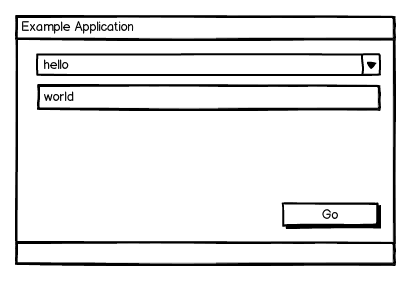
An overview of the most common, stable GUI toolkits used with Python development. Demonstrated by the classic introductory program, "Hello World".
sage geode
Okay cool, I think I might just use tkinter for now. This is only a prototype tbh, I plan on switching to c/c++ for full builds
Thanks for information and links 😊
ornate sequoia
well then go for qt if you plan on switching to c++ (like really, qt is all c++, so you'll have not much pb migrating)
sage geode
You make a point 🤔 however I didn’t build my application around a gui so I assumed swapping out libraries during the switch wouldn’t be too much of a problem
ornate sequoia
I guess ;), you can always change it up
sage geode
Damn, this always happens 😅 I look too much into different libraries and can never decide 
I think I’ll go with Qt even if I’m not super familia with it. Thanks
ornate sequoia
qt designer is great, what you see is what you get
sage geode
Oh cool is it like drag and drop
ornate sequoia
- you don't have to look up all the properties manually
it's convenient, you don't have to do much to get a working ui to complement your app
ornate sequoia
https://discordapp.com/channels/267624335836053506/338993628049571840/734064489812590672
Fixed it !!! for reference :
I copied Anaconda3\envs\envname\Library\plugins\platforms
to
dist\appname\platforms (created a new folder)
real ice
hey, how do i set a background image in kivy?
 hushed mist
@digital rose Hello everyone I really need serious help
real ice
how can i use multiple transitions in the same app (kivy - screenmanager). will i have to make a second screenmanager and somehow add that to the main screenmanager?
tribal path
Just change the transition prior to changing screens, for background you could set source of a rectangle instruction of the main widgets canvas
 fierce patrol
ay I have a simple code with thread but it gives me this error: QObject: Cannot create children for a parent that is in a different thread.
    def setupUi():
        #ui stuffs here
        button.connect( action_start)

    def action():
        #action stuffs here

     def action_start():
        t1 = Thread(target=action)
t1.start()```basically code ^^
idk what to do
real ice
how do i package a kivy app for android? i get a # Check configuration tokens Unknown command/target android error when i try deploying it on buildozer, and after some research it says buildozer doesnt support windows?!
do i have to follow some other method to deploy to android?
tribal path
You can't build for Android on windows. You'll need Linux in some form
real ice
oof thanks that clears a lot up. i set up a vm with linux? any particular distro?
 mossy epoch
new to linux?
mossy epoch
if you are new,I would suggest mint or pop os or ubuntu or manjaro
real ice
oh okay. the documentation for the package im trying to use says ubuntu so i'll go with that then
mossy epoch
So I've been having this issue with my pyqt5 code where the app just closes with the exit code -1073740791 (0xC0000409) whenever I click any button.Any fixes for that?
tribal path
WSL works fine if you're on win10 and don't mind setting that up. Otherwise yea ubuntu
 digital rose
any PyQt community here?
I need to know if anyone succeeded to use PyQt app on andorid
tribal path
Personally only ran some on android through pydroid3. However there is pyqtdeploy if you want to compile (as long as we're talking Qt5 here, 4 iirc isn't supported)
digital rose
I know it
but I found no useful resource to explain it
even a small POC example is not found
tribal path
 rugged swallow
ay I have a simple code with thread but it gives me this error: QObject: Cannot create children for a parent that is in a different thread.
@.T#8376
It looks like you try to create some QObject in "def action()" which I don't see and try to set its parent to the object that is already created on main thread or some another. Qt does not allow this. You can only connect objects using signal-slot connection.
 thin wolf
What would be the best way to implement a google cal style calendar in python?
Specifically I'd like a calendar with big textboxes for the days, where you can enter text and it will stay there
thin wolf
this discord is less active than I initially realised
real ice
haha most of us dont know the answers so we stay quiet i guess and wait for someone who does know
You could use pyqt5 @thin wolf , the designer app that comes with it makes your life so much easier
thin wolf
@real ice thanks, I will try that. I didn't mean to have a go, just thought it was funny my comment from ages ago was still the most recent
real ice
👌 happens a lot lmao
mossy epoch
So anyone got the time to explain me why any time I click a push button in my pyqt5 program it just quits the program?
 karmic shoal
@mossy epoch What does your code look like? Is the button connected to anything? Do you get any error output?
mossy epoch
The button is connected to functions and it exits with no errors
karmic shoal
What does your code look like?
mossy epoch
I'm currently in classes my code is in another pc,would you mind waiting for 30 min 🥺
karmic shoal
you can send your code here any time, if I'm not around someone else will get around to looking at it
if the code is long, use the link here
!paste
 proven basinBOT
Pasting large amounts of code
If your code is too long to fit in a codeblock in discord, you can paste your code here:
https://paste.pydis.com/
After pasting your code, save it by clicking the floppy disk icon in the top right, or by typing ctrl + S. After doing that, the URL should change. Copy the URL and post it here so others can see it.
real ice
i have a bunch of toggle buttons in a box layout, and when i click another (normal) button, i want to get the text out of all the toggle buttons whose state is 'down'. Any ideas? [kivy] (ping me with response please)
mossy epoch
here's my code
So anyone got the time to explain me why any time I click a push button in my pyqt5 program it just quits the program?
Process finished with exit code -1073740791 (0xC0000409)
it exits with this code
real ice
heyo, how can i remove the background of a button and give it an outline instead? (in kivy)
hushed mist
howdy everyone how can I convert my tkinter app i created to a .exe file?
real ice
pyinstaller probably
hushed mist
@real ice I already tried it with pyinstaller I'm trying with cx_freeze
If anyone can convert my .py file to tkinter it'd be great
 stable frost
With the end goal of making an android app, should i learn tkinter for now and wait until I know more about programming to learn AndroidStudio or should i start learning pyqt5 or kivy?
rocky dragon
Overall, learning a native android language would be most suited. if you want to make a cross platform or just android python app then I'd go straight for kivy as it differs a lot from tkinter. But first making sure to be familiar with for example OOP which most GUI frameworks are built upon
stable frost
yep, kivy was the option i was looking up to the most, but i have to spend a lot of time to really understand classes and stuff, thx
real ice
[using kivy] how can i add a label which shows the current value of a slider?
 buoyant cove
Hi, I'm trying to make my app run the splash screen for 5 seconds, close, then open the next screen, this is the code I have so far for opening/closing the windows. I keep having an issue, where (and I'm not 100% sure but it looks like this is happening) the splash screen opens, doesn't wait and just moves straight onto the next screen instantly, can anyone help me with this?
mossy epoch
So I've been getting this exit code(0xC0000409) and app just quits.I was wondering if this code is because of windows or my code.
static cove
@mossy epoch It happens when you push any QPushButton or a specific one? Looking at your code now all these are under the class Ui_Functions, I assume?
static cove
Do you create an instance of Ui_Functions that you call/use? It's a bit odd to me that you're doing Ui_Functions.add_data for the signal/slot connect instead of self.add_data
Also, what is self.centralwidget?
mossy epoch
even using self for connect gives the same exit code
also I'm not sure what self.centralwidget is since I just did the gui in QtDesigner
It is given as a QWidget
static cove
Widgets are part of some GUI frameworks, it depends on what framework and library you use though
static cove
PyQt is just a python binding for the C++ Qt library
 odd wigeon
That is the module for this GUI stuff?
static cove
The one that I'm currently looking at and trying to help with, yes.
odd wigeon
Soo it is basically a C++ integration for python?
Damn
Even better
'cause I modded GUI with C++
So I am glad there is an integrated version for python
This makes my life so easy
static cove
@mossy epoch Do you get any print statements before it crashes? Are you running this in an IDE or from terminal/command line?
static cove
Here's the pypi for it: https://pypi.org/project/PyQt5/
You may also want to check out PySide2
They're mostly the same with a licensing difference
odd wigeon
What is the license difference?
static cove
pyqt5: Commercial or GPL
PySide2: LGPL
mossy epoch
so what do I do :(
static cove
So, you might want to try (temporarily) overriding Pyqt's exception handler. Take a look at the second half of the SO answer: https://stackoverflow.com/questions/43039048/pyqt5-fails-with-cryptic-message I can't quite recreate your set-up to test what's going on, unfortunately =/ So maybe this might narrow down where the issue is occurring
mossy epoch
kk thanks for helping
static cove
But if you aren't getting any print statements to console, and it's crashing when you click the PushButton, it's most likely an issue with add_data since that'll be called first.
 silver maple
I have a gui made with tkinter:
for y in range(8):
    # so rows in the grid expand the same
    self.frame.rowconfigure(y, weight=1)
    self.frame.columnconfigure(y, weight=1)
    for x in range(8):
        self.board[y][x] = tk.Canvas(
            self.frame,
            background=GameBoard.light_square_color,
            highlightthickness=0
            )
        if (x + y) % 2:
            self.board[y][x].configure(background=GameBoard.light_color)
            self.board[y][x].bind("<Configure>", self._configure_square)
            self.board[y][x].bind("<Enter>", self._enter)
            self.board[y][x].bind("<Leave>", self._leave)
            self.board[y][x].bind("<ButtonRelease-1>", self._clicked)
        #self.board[y][x].grid(row=y, column=x, sticky=tk.N+tk.E+tk.S+tk.W)
        self.board[y][x].place(
            relx=GameBoard.square_size*x,
            rely=GameBoard.square_size*y,
            relwidth=GameBoard.square_size,
            relheight=GameBoard.square_size,
            anchor=tk.NW
            )
It makes a grid
self.end = tk.Frame(self.frame, background="black")
self.end.place(relx=0.5, rely=0.5, width=100, height=100, anchor=tk.CENTER)
I want this frame to be placed over the grid when the game is over, but it ruins the initial grid
It looks like this
But when the frame is put on top it looks like this
amber roost
well i'm guessing the problem is that you got a bunch of canvases, those tend to behave strangely, but it seems this issue lies withing Tk itself
Maybe try to not create 64 canvases and replace them by simpler frames somehow, but I can't tell for sure whether at the end of all the rewriting you would have to do for that it would actually fix the problem.
silver maple
I use canvases so I can redraw the image everytime I resize the window
Would that still work if I use a frame
I didn't see an image option in tkinter.Frame
static cove
@buoyant cove So QTimer is going to wait 5 seconds and then run the window.close, but it's not going to block other functions from executing while it waits. So that's why the other window still shows up.
You probably want to also put the other window showing up in a 5 second singleShot timer.
silver maple
Oh, wait, nevermind, the issue was not with the place, I was mesing something up somewhere else
I'm so dumb
south orbit
I wanted to install kivy
and following the tutorial on their official site I created a venv
I've installed all the required dependencies
but when it came to installing kivy itself
pasted it into separete messages because it was toobig
static cove
If you're using python 3.8, check the pin in this channel for instructions on how to install it properly
south orbit
thanks very much
ill delete these messages now as theyre kinda spammy
what are some decent tutorials for kivy other than this http://inclem.net/2019/12/19/kivy/getting_started_with_kivy/
tribal path
The 2.0.x version is on pypi now too I believe. So you can ==2.0.0rc3 as well
 tame timber
Pipenv vs. Virtualenv vs. Conda?
I'm about to start a project in PyCharm and I have these three options, I'm already familiar with Conda as I use it for my data science projects but I have never come across the other two. Which is better and why? I'm using to build a Tkinter application BTW.
 pearl totem
Virtualenv is the default essentially. I'd go for that
tame timber
any tkinter experts here?
I added a background image for an app I am building
Now I want to draw a transparent rectangle on top of it
Where the user will be able to make some text input
just like netflix login page
like this
this what I have right now:
The code I have used so far:
root = Tk(className=r" Movie and TV Shows Recommendation System")  # creates a window in which we work our gui
root.geometry('800x600')

bg_image = PhotoImage(file = r'D:\CS Projects\Movie-Recommendation-Systems-GUI\bg_image.png')
bg_label = Label(root,image=bg_image)
bg_label.place(x=0, y=0, relwidth=1, relheight=1)


root.mainloop()```I want to draw a transparent rectangle on top of this (similar to the netflix login page above)
and inside of it I want to add other UI elements
how should I go about this?
static cove
tkinter and transparency, especially messing with alpha values, don't really jive. You can maybe have an image that you then use Pillow to mess with for transparency?
 digital kindle
does anyone have experience with the respeaker, respeakerd platform? Specifically the seeed respeaker core V2.0?
 glad breach
hello
anyone here who has experience with kivy whom i can dm for help?
pls ping me if ys
 glad marsh
hey which channel can support me with latex?
karmic shoal
@glad marsh Any of the three offtopic channels work
tame timber
How to make the 'Entry' textbox bigger in Tkinter?
static cove
You can mess with the internal padding (ipady, ipadx), or you can set a font that has a larger font size.
 hollow pewter
I am using PyQt5 with python 3.7 and I am trying to make a shortcut that will toggle hide / show of the app
the problem is that when the program is hidden it no longer catches keys.
I have tried https://pypi.org/project/PyGlobalShortcut/ but it doesn't seems to work with python 3.7
is there any other option?

 thorn beacon
guys using tkinter hoa do i install and how do i use it to create an app with buttons and edit boxes and such thx
static cove
@hollow pewter I don't think most apps support global hotkeys when the app isn't in focus, even talking outside of python. You're looking at more OS/Global hotkeys.
@thorn beacon What system/os are you on?
hollow pewter
That's the only way of doing it?
I was searching for hourse and found nothing
I guess I would have to implement it
thorn beacon
@thorn beacon What system/os are you on?
@static cove windows 10 and im using vs code as my ide
hollow pewter
I'm am trying to make an app like lightshot
static cove
No other app I use would support hotkeys if it doesn't have it focused. The times when I wanted that, I used autohotkey
hollow pewter
Which runs at background all the time and when you click prntscrn it jumps out
static cove
@thorn beacon tkinter is part of the standard library that ships with python, so need to install anything. You just need to import it in your program. You should probably check out a tutorial to get used to the basics. I know freeCodeCamp has a youtube tutorial you can follow, there's also this one from RealPython https://realpython.com/python-gui-tkinter/
thorn beacon
dankie ( thx )
static cove
@hollow pewter You'll want to specifically search for a python solution to global hot key registration then. It's less of a GUI framework question
south orbit
pynput.keyboard supports global hotkey registration
from pynput import keyboard

def keyPress(key):
    try:
        print('{0} pressed'.format(key.char))
    except :
        print('key {0} pressed'.format(key))

with keyboard.Listener(
        on_press=keyPress) as kb:
    kb.join()
Translation with Qt works when I am running from console but not when I run from PyCharm.
Any Idea why?
 wary prism
pyQt5: How to refer to a specific widget? (In my case, I want to refer to the QWidget "color_preview" and change its StyleSheet to "background-color: #000;")
hollow pewter
self.color_preview..setStyleSheet(...)
wary prism
I tried this
AttributeError: 'App' object has no attribute 'color_preview'
from PyQt5 import QtWidgets
import sys
import hex_editor_design

class App(QtWidgets.QMainWindow, hex_editor_design.Ui_MainWindow):
    def __init__(self):
        super().__init__()
        self.setupUi(self)

        self.color_preview.setStyleSheet('background-color: #000;')

app = QtWidgets.QApplication(sys.argv)
window = App()
window.show()
app.exec_()
I need to see hex_editor_design
wary prism
hollow pewter
the hex_editor_design.py file
proven basinBOT
Hey @wary prism!
It looks like you tried to attach a Python file - please use a code-pasting service such as https://paste.pythondiscord.com
wary prism
hollow pewter
there is not color_preview in there
wary prism
oh, i forgot save, sorry, it works
 opal hearth
Hello,
I'm trying to code a log widget in PyQt5 using a QPlainTextEdit, but when I append text to it by emitting a text signal from a separate thread, it keeps slowing down 😕
Appending from a QTimer - inherent code:
def __init__(self):
  #...
  self.num = 0
  self.text = ''
  self.timer = QTimer()
  self.timer.timeout.connect(self.dummyText)

def buttonClick(self):
  self.timer.start(1)

def dummyText(self):
  self.num += 1
  self.text = f'> part {self.num} 0x{bytes.hex(os.urandom(20))}'
  self.ui.logCommand.appendPlainText(self.text)
Appending by emitting signals from a QThread
 astral kraken
this is the only place i would think to ask so here it goes
im newish to python and JS and im writing a program for my twitch channel that when someone reedems channel points and writes a msg It will play on stream in the form of TTS
what my question is how/where would i get the msg they wrote to run it through my program
 tame blaze
yo could i get help with tkinter?
static cove
@tame blaze If you post what your question is, we can help you better.
@astral kraken Well you want to start with the twitch API and use python (or your preferred language) to interact with it. I know you can listen for the topic of a channel points redemption https://dev.twitch.tv/docs/pubsub#topics. You can hopefully then use a TTS module of some sort to play that message back on the receiving code end. I haven't done much with the twitch API though.
 past locust
yes sure @tame blaze i can help u with tk 🙂
tame blaze
Sorry just got tested positive
past locust
?
 late arrow
Hello all
past locust
Hello
mossy epoch
any one wanna join Code/Help and help me?
versed sigil
why can i not import PyQt5?
import json
from PyQt5 import QtCore, QtWidgets, QtWebEngineWidgets, QtWebChannel, QtNetwork
import pandas
import folium
What error is it giving you?@versed sigil
static cove
Are you using a venv of some sort? Have you installed it?
static cove
That sounds like a pylint error and not an actual import error. Pylint has been pretty unreliable for me in terms of actually catching imports. I usually change it to flake8
static cove
That sounds like your python interpreter doesn't have PyQt5 installed. What IDE are you using and how did you install Pyqt?
versed sigil
vs code, and installed pyqt with conda
static cove
In the VS Code terminal can you do "pip freeze"?
Also, in the bottom left corner, what interpreter is selected?
versed sigil
python 3.7.6 64 bit ('base' : conda)
that's my interpreter
and i did "pip freeze" (it seems like everything i need is there)
static cove
@versed sigil aaah, since you're using conda then the command is conda list to check what packages are installed
versed sigil
oop-
and did it
seems like i do have the package
you know what
i'm gonna teach myself html/css (know some js) and make my dashboard
static cove
If the package is listed in the VS Code terminal using that same interpreter it should work.
versed sigil
YESS
YESS
finally
finally
it worked
now just gotta copy paste the html stuff i have so far!
tysmtysm kutie!!
 slate marlin
hey so im new to Tkinter and i had a doubt
how do i put a border around a tkinter window?
bright trout
I am new to Qt and Idk why this is not running:
import sys

class Window(QMainWindow):
    def __init__(self):
        super().__init__()

        self.titel = "My Qt Main Window :]"
        self.top = 100
        self.left = 100
        self.width=400
        self.height=300
        self.InitWindow()

    def InitWindow(self):
        self.setWindowTitle(self.titel)
        self.setGeometry(self.top, self.left, self.width, self.height)

        self.show()


App = QApplication(sys.argv)
window = Window()
sys.exit(App.exec())```Its running but not showing an output.
north quail
@bright trout what kind of output are you expecting?
i ran that code and got this window
is that not the intended result?
north quail
which editor are you using?
 untold pecan
someone HELP
https://stackoverflow.com/questions/63078490/qt-creator-for-python-is-extremely-slow-while-editing
Stack Overflow
I just installed Qt Creator for PyQt5 in python and while i'm editing and i make any "not recommended" edit like adding a little too much blank spaces after a function, it gives a warning...
ik its more of a qt-creator question but it still has smth to do with python
and someone here might use it
static cove
@slate marlin When you say put a border around a window, what are you looking for results wise? Is your Window a Frame or something else?
slate marlin
like i want a frame/border that encloses this whole calculator
static cove
Are all of those buttons and things placed inside a Frame by chance or placed directly on a Tk() instance?
slate marlin
i have a grid for them if thats what you are asking
(im new to tkinter so sorry if i sound ignorant)
 split ferry
I assume you have placed all your buttons on a frame (which is 'grided' over main window if I may say). Create a new frame and use relief="" (tk.SUNKEN, tk.RAISED and so forth) while calling the frame method.
The commands are self explanatory. All you have to do is attach this frame to your master window and place everything over this frame.
slate marlin
ah ok thanks
split ferry
Be sure to include border width too, else the borders won't be visible.
digital rose
like i want a frame/border that encloses this whole calculator
Where did you write your code? Wing IDE?
proven basinBOT
Hey @tame timber!
Uh-oh! It looks like your message got zapped by our spam filter. We currently don't allow .txt attachments, so here are some tips to help you travel safely:
• If you attempted to send a message longer than 2000 characters, try shortening your message to fit within the character limit or use a pasting service (see below)
• If you tried to show someone your code, you can use codeblocks
(run !code-blocks in #bot-commands for more information) or use a pasting service like:
 static sparrow
is it possible to generate buttons within the inside of a for loop in tkinter? i've been tinkering with this code snippet for about half a week and buttons don't seem to show up at all
        for file in files:
            button = Button(
                self,
                text=file,
                foreground="black",
                height=SQUARE,
                width=int((BACK - (MARGIN * 2)) / 2),
                command=self.__return_board(file),
            )
            button.pack(side=BOTTOM)
i'm not sure what i'm doing wrong
 sturdy maple
split ferry
sturdy maple
split ferry
@static sparrow I suggest you to try and use grid command instead of pack and change the row and column number as per your needs, while iterating through the for loop. Also, if I'm not wrong, you should have a master frame on which you need to attach your buttons. I usually define an argument called master=my_frame within the button method, which helps in displaying my button on top of my_frame.
digital rose
How to use pyqt5? ping me
 silk frost
Is there a way to make tkinter look better?
static cove
@static sparrow It's hard to say why it isn't working without knowing what self is exactly and how you're structing your tkinter code.
what is self in this case? A Frame class? Something else? a Tk() instance?
@digital rose What questions do you have with pyqt5?
digital rose
How to get started with it?
static cove
@silk frost There are ways to style tkinter, but nothing easy straight out of the box. Here's a few articles about the styling that's available with Tk, ttk, and tkinter. ttk within tkinter is probably the best bet?
https://docs.python.org/3/library/tkinter.ttk.html#ttk-styling
https://tkdocs.com/tutorial/styles.html
https://effbot.org/tkinterbook/tkinter-widget-styling.htm
@digital rose I thought this was a pretty good intro to pyqt5: https://www.learnpyqt.com/courses/start/
digital rose
Oh thx a lot
digital rose
@static cove
static cove
Is that for Qt Designer?
digital rose
Yeah
static cove
I would try doing a re-install, I haven't encountered that issue
digital rose
Reinstalling pyqt-tools or python?
Im reinstalling pyqt5-tools
but my wifi speed is killing me lol😓😓100kbps
static cove
I don't use pyqt5-tools, I just used the standalone Qt Designer program. Even then, most of my layouts are generated dynamically, so I don't use Qt Designer a lot
static cove
It's a program that has functionality for a drag n' drop type GUI designer. You can follow the steps here to download the open source version: https://www.qt.io/download
digital rose
Does it generate the python code or the direct application?
static cove
It'll generate the GUI structure which you can import, but you still have to code the functionality and might have to do some fine tuning.
digital rose
Smth has to be done abt my wifi speed or im doomed
It'll generate the GUI structure which you can import, but you still have to code the functionality and might have to do some fine tuning.
@static cove U mean like kivy templates in pyqt version?
static cove
Mmmm, I'm not sure. Kivy is still on my "to learn" list, so I don't know a lot about it
digital rose
I also dont know much abt kivy i just know little like the kivy.builder which loads the template from a kivy file
 kind kraken
see https://doc.qt.io/qtforpython/tutorials/basictutorial/uifiles.html for details on how to use a ui file in python
digital rose
Noo i reinstalled pyqt tools but still the designer isnt wrking
digital rose
class window1:
    def __init__(self,master):
        self.form = tk.Tk()
        self.form.title('o.o')
        self.form.geometry('500x280')
        self.tab_control = ttk.Notebook(self.form)
        self.tab1 = ttk.Frame(self.tab_control)
        self.tab2 = ttk.Frame(self.tab_control)
        self.tab_control.add(self.tab1,text='Work')
        self.tab_control.add(self.tab2, text='please')
        self.tab_control.pack(expand=1, fill='both')


    def run(self):
        self.form.mainloop()
if __name__ == '__main__':
    root = tk.Tk()
    app = login_form(root)
    app.run()
any ideas why this opens a random window alongside it?
static cove
What's using the class window1?
Also, you generally shouldn't create more than once instance of Tk(). Having more than one creates... odd errors and side effects
digital rose
nothing, when the form is opened it opens a window with it, and how would you suggest i declare the form in that case?
tribal path
Try a Toplevel instead
 craggy wind
hey guys. In the far future I might need to make an gui that's more or less so: a blank slate, you click somewhere and a text box is created, you write down the text, the text is interpreted somehow and then it changes. probably to text or text+images depending on what you do
what u type*
this doesn't sound doable in tkinter but idk
should I try?
with tkinter? or something else? recommendations?
 quasi crystal
@craggy wind Depending on the performances required, Tkinter might be able to support that. This sounds like you would like to have a Canvas where you will add some Text and/or images to it.
north quail
@craggy wind I'd go with Qt for this personally. QGraphicsView sounds perfect for such an application. But there might be licensing issues if you plan on releasing this software commercially.
silk frost
@silk frost There are ways to style tkinter, but nothing easy straight out of the box. Here's a few articles about the styling that's available with Tk, ttk, and tkinter. ttk within tkinter is probably the best bet?
https://docs.python.org/3/library/tkinter.ttk.html#ttk-styling
https://tkdocs.com/tutorial/styles.html
https://effbot.org/tkinterbook/tkinter-widget-styling.htm
@static cove @flat herald here this might help, sorry for the ping kutiekatj9
 flat herald
Thanks
silk frost
Np
craggy wind
thanks Dan and abjad. I don't plan on commercial use so maybe I could try Qt. I'm gonna make an attempt with tkinter first tho
 gray iris
How do I user a varible in Qlabel for pyqt5. I keep getting error:
TypeError: translate(str, str, disambiguation: str = None, n: int = -1): argument 2 has unexpected type 'QLabel'
What do you mean use a variable in QLabel? What are you hoping this QLabel will do?
gray iris
Nevermind, I was able to solve the issue. Thanks anyways!
silver maple
I made an ai for checkers and my gui is made in tkinter. The minimax algorithm takes some time, so whenever it is called the window freezes for a few seconds. Is there any way to avoid that. I tried calling the ai move with root.after(0, ai_move), but it still freezes. I thought about threading, but I recall reading that tkinter is not thread safe, although I am not quite sure what that means.
gray iris
How do i communicate bewteen two windows using signals and slots in pyqt5?
static cove
Are they two independent windows or are they connected in some way? (i.e. one windows opens the other one)
gray iris
one window opens another
The parent window opens the child window. Before the child window closes, It needs to send information to the parent window.
static cove
What I typically end up with is something like:
When you __init__ the child window, you can pass a reference of the parent so: self.parent = parent. It's been useful to me to have that reference available.
Then your signal/slot can be: self.widget_thing.signal.connect(self.send_to_parent)
def send_to_parent(self):
    self.parent.other_widget_that_needs_info = info
Ill try it out and let u know
do I have to create a signal with this:
signal = QtCore.pyqtSignal(str)
also more importantly how can I pass in the parent to the child
an example would be great, if you can
 swift frigate
I don't know what to do anymore. All I want is a scrollable grid that resizes with the window in tkinter. It's painful.
Learned the only way to achieve that is to put my stuff in a Frame in Canvas in a Frame and the scrollbar works on the Canvas.
I'm just missing one thing, resizing all that with the window.
silver maple
If you want something to fill the window you can use the pack geometry manager. widget.place(fill=tk.BOTH, expand=1)
swift frigate
I read I shouldn't mix pack and grid..?
silver maple
I believe mixing geometry managers is only a problem within the same parent widget.
 robust willow
i need help
this code dosent work
its the last def
its a diffrent color its telling me something isnt right
bright trout
I am making ChatBot, I don't know how to implement AI… What should I do? I don't even have data... (Sorry for being dumb.)
bright trout
aa
 fossil crypt
this is like trying to build a rocket when all you know is basic trigonometry
i advise you look into the topic first, and learn what you actually need to know to make one
digital rose
can i make a list of boxes or something like that?
i want to make something like real chat
not just Name: Text
like in discord style:
{some picture} Name:
Text
{attachments if applicable}
ok
 obtuse thistle
kivy has a few layouts you could accomplish this with
cleanest might be some recycleview on a custom widget that carries avatar, name, and message of a user
 earnest light
Hi, tried to get the path of the selected item in list directory made in tkinter, but unable to get the full path of selected item
Tried this
item_iid = tree.selection()[0]
parent_iid = tree.parent(item_iid)
node = tree.item(parent_iid)['text']
print(node)
but printing only the upstream folder name, how can we get the full path of the folder selected in the list directory
obtuse thistle
i don't know anything about pyqt
digital rose
ok
 worldly nest
i need tkinter help
 warm igloo
PyQt5
Whenever I add a QQuickWidget to my QMainWindow, it all of a sudden starts lagging when I attempt to resize the window, I even deleted and destroyed the widget but it still lagged
view.show()

def func():
    nonlocal view
    view.close()
    view.hide()
    view.destroy(False, False)
    view.deleteLater()
    del view

thread = Timer(1.5, func)
thread.start()
I literally tried everything, but the window still lags when resized.
To sum it up:
- I have a nice GUI. When I resize, it's very smooth.
- I then trigger an event that will place a QQuickWidget somewhere in the QMainWindow and the animation will take place.
- After the animation is complete, the QQuickWidget is hidden, and then deleted.
- All of a sudden, when I resize, it's all laggy.
static cove
@robust willow My guess is you didn't entirely close something on the line before, but I can't see the full line so I don't know
static cove
@gray iris Sorry for the delay, but this is effectively how my classes are set-up with a link between the parent and child. You can do the links slightly different depending on where the slot function belongs. I've found the reference to the child/parent very useful for having a Main Window and a Settings window, where depending on what the users change for the settings it affects variables that I store in the Main Window class.
class HomeWindow(QMainWindow):
    def __init__(self, *args, **kwargs):
        self.info_from_child = QLabel()
        self.info_to_store = ''
        # Insert other stuff you need to get this to behave
        self.child_window = ChildWindow(parent=self)

    def update_label(self, *args, **kwargs):
        self.info_from_child.setText("Child triggered this to update")

class ChildWindow(QMainWindow):
    def __init__(self, parent, *args, **kwargs):
        self.parent = parent
        # Insert other stuff you need to get this to behave
        self.btn_for_parent = QPushButton("Trigger Parent Function")
        self.btn_for_parent.clicked.connect(self.parent.update_label)
        self.btn_for_parent.clicked.connect(self.update_parent_info)

    def update_parent_info(self, *args, **kwargs):
        self.parent.info_to_store = 'new text'
@robust willow My guess is you didn't entirely close something on the line before, but I can't see the full line so I don't know
@static cove i figured that out thanks
 drifting pecan
Hey guys, I'm using PyQt5 QMediaPlayer to play a video. I am trying to have a "Step Forward" button that will forward the video one frame by calling mediaPlayer.setPosition(currentPosition + 1) but when I do this it shows a previous frame first before moving forward (showing the keyframe probably?). Anyone have any idea how I can properly move the position of the video one frame forward without this weird behaviour?
craggy wind
is there a way to run tkinter apps on a thread while in interactive mode? for debug purposes I like to be able to check stuff with the app running, but tkinter complains.
craggy wind
  File "...\lib\threading.py", line 932, in _bootstrap_inner
    self.run()
  File "....\lib\threading.py", line 870, in run
>     self._target(*self._args, **self._kwargs)
>   File "...\lib\tkinter\__init__.py", line 1420, in mainloop
>     self.tk.mainloop(n)
> RuntimeError: Calling Tcl from different apartment ```strangely after tthis message the app still runs
app = App(root,title='Some App') #this class cointains all the stuff i put in

thread=threading.Thread(target = root.mainloop)
thread.start()
thats my code
should i be concerned about this? the app seems to work anyway
static cove
Tkinter is fairly unpredictable when you put the mainloop() call on a different thread. On some systems it'll just crash and it's difficult to know ahead of time which systems and why. In general, tkinter is not thread safe and fairly picky about implementation of threads.
But Tk() is generally single threaded. If you want it to run on multiple threads, you're supposed to also initialize it in those other threads. You're initializing it in one and then running it in another, which doesn't jive with some of tkinter's internals.
@craggy wind ^
untold pecan
I am new to python and i just started using PyQt and now have been using Qt Designer and it saves the user interface file as .ui, to convert from .ui to .py, The guy in the tutorial always typed a command in cmd, is there a easier way, or should i make a c++ project?
untold pecan
bruh this chat is dead
anyway, i made the program which automatically converts the UI file and keeps the PY file up-to-date, here's the link if anyone wants it: https://github.com/The-Computer-Genius/Auto-UI-to-PY-Converter/

GitHub
UI To Py Converter Automatically detects changes made to the UI file and keeps the Py file up to date - The-Computer-Genius/Auto-UI-to-PY-Converter
tribal path
I don't know qt well but how would this differ to just .loadUi ing the file
warm igloo
Does anyone know how to do this with PyQt5? When you hover over a treeview item, it's background is transparent.
and yes i used PyQt5's pixeltool.exe to capture my cursor lmao
 dense wind
Your solution is ShareX; an amazing screen-capture software that supports screen recording as gif.
As for you pyqt thing... 🕺
dense wind
Yeah i know. That's why I mentioned it. It's used frequently to record small areas. Ignore me if you're uninterested.
Having messed with other gui stuff, I've not seen one that actually makes the background transparent. They just turn it a darker color while you hover or select the element.
 full comet
Hey all, I just want my program to have a welcome text screen. When the user presses the button, the text should change depending on the button pressed. The problem is, the text shows on top of any previous label printed before that. Is there a way to clear within the function? I thought if I declared a variable outside the function it's global? I tried doing set text to be a bunch of white space, but that didn't help at all.
from PyQt5 import QtWidgets, QtCore, QtGui, QtWebEngine
from PyQt5.QtWidgets import QApplication, QMainWindow
from PyQt5.QtCore import *
from PyQt5.QtGui import *
from PyQt5.QtWidgets import *
import sys
import webbrowser


def window():

    app = QApplication(sys.argv)
    win = QMainWindow()
    win.setGeometry(200, 200, 774 , 555)
    win.setWindowTitle("Test Buttons")

    #Text Box

    infoBox = QtWidgets.QTextBrowser(win)
    infoBox.setGeometry(QtCore.QRect(150, 40, 601, 451))
    responseSuccess = QtWidgets.QLabel(infoBox)
    responseSuccess.setText("Welcome Text here!")
    responseSuccess.show()

    def buttonOne():
        responseSuccess = QtWidgets.QLabel(infoBox)
        responseSuccess.clear()
        responseSuccess.setText("Button 1 Text goes here")
        responseSuccess.show()
    def buttonTwo():
        responseSuccess = QtWidgets.QLabel(infoBox)
        responseSuccess.clear()
        responseSuccess.setText("Button 2 Text is Here BLAH BLAH")
        responseSuccess.show()

    #GroupBox Widget

    testBox1 = QtWidgets.QGroupBox(win)
    testBox1.setGeometry(QtCore.QRect(20,20,111,148))
    testBox1.setTitle("Test Box 1")

    testBox2 = QtWidgets.QGroupBox(win)
    testBox2.setGeometry(QtCore.QRect(20,187,111,148))
    testBox2.setTitle("Test Box 2")

    firstButton = QtWidgets.QPushButton(testBox1)
    firstButton.setGeometry(QtCore.QRect(0, 50, 113, 32))
    firstButton.setText("Button1")
    firstButton.clicked.connect(buttonOne)

    secondButton = QtWidgets.QPushButton(testBox2)
    secondButton.setGeometry(QtCore.QRect(0, 20, 113, 32))
    secondButton.setText("Button2")
    secondButton.clicked.connect(buttonTwo)

    win.show()
    sys.exit(app.exec_())

window()
 barren cypress
you need to declare the variable as a global if im thinking correctly @full comet
proven basinBOT
Hey @patent shadow!
Uh-oh! It looks like your message got zapped by our spam filter. We currently don't allow .txt attachments, so here are some tips to help you travel safely:
• If you attempted to send a message longer than 2000 characters, try shortening your message to fit within the character limit or use a pasting service (see below)
• If you tried to show someone your code, you can use codeblocks
(run !code-blocks in #bot-commands for more information) or use a pasting service like:
full comet
I tried declaring responseSuccess as a global, still didn't work 😦
full comet
 dull swallow
So im trying to make a drag and drop block like software (like scratch) but its python. Im using the PyQt5 module, and im following this tutorial: https://www.youtube.com/watch?v=H29ACjL4ptM, and im trying to make one side of the software be loops, functions, etc, and the other the workspace. Above is what it currently looks like. But my issue is that i can drag items into the left (which is where the blocks are supposed to go) heres my code:

In this PyQt5 video i want to show you How To Make Drag And Drop Application, we are going to create a practical example of Drag and Drop Application in PyQt5.
So drag and drop provides a simple visual mechanism which users can use to transfer information between and within ...
from PyQt5.QtGui import QIcon
import sys


class Window(QWidget):
    def __init__(self):
        super().__init__()

        self.myListWidget1 = QListWidget()
        self.myListWidget2 = QListWidget()
        self.myListWidget2.setViewMode(QListWidget.IconMode)
        self.myListWidget1.setAcceptDrops(True)
        self.myListWidget1.setDragEnabled(True)
        self.myListWidget2.setAcceptDrops(True)
        self.myListWidget2.setDragEnabled(True)
        self.setGeometry(300, 350, 500, 300)
        self.myLayout = QHBoxLayout()
        self.myLayout.addWidget(self.myListWidget1)
        self.myLayout.addWidget(self.myListWidget2)

        l1 = QListWidgetItem(QIcon('BlockPNGs\WhileTrue.png'), "WhileTrue")
        l2 = QListWidgetItem(QIcon('csharp.png'), "C# ")
        l3 = QListWidgetItem(QIcon('java.png'), "Java")
        l4 = QListWidgetItem(QIcon('pythonicon.png'), "Python")

        self.myListWidget1.insertItem(1, l1)
        self.myListWidget1.insertItem(2, l2)
        self.myListWidget1.insertItem(3, l3)
        self.myListWidget1.insertItem(4, l4)

        QListWidgetItem(QIcon('html.png'), "HTML", self.
                        myListWidget2)
        QListWidgetItem(QIcon('css.png'), "CSS", self.
                        myListWidget2)
        QListWidgetItem(QIcon('javascript.png'), "Javascript", self.
                        myListWidget2)

        self.setWindowTitle('Software');
        self.setLayout(self.myLayout)

        self.show()


App = QApplication(sys.argv)
window = Window()
sys.exit(App.exec())
Ignore the images about html, css and stuff. Thats just default from the tutorial
 hollow quartz
I'm trying to use Kivy for UI and I'm just playing around with it.
So far, I've followed the "make a pong game" tutorial and the game worked fine. But I wanted to expand a bit and see if I could add the pong game widget to a parent window and run its update method from the parent windows update method. But I keep getting errors about null exceptions (essentially, it's the "NoneType object has no...") and so was curious as to if someone could help me.
This is my main.py file:
https://hastebin.com/owequfopiq.py
This is pong.py with the Pong widget:
https://hastebin.com/gilivoqaku.rb
For good measure, here is the pong,kv file:
https://hastebin.com/hofejiruvi.m
The last traceback:
 Traceback (most recent call last):
   File "E:\Documents\VisualStudioCode\py-os\main.py", line 32, in <module>
     OSApp().run()
   File "E:\Documents\VisualStudioCode\py-os\kivy_venv\lib\site-packages\kivy\app.py", line 829, in run
     root = self.build()
   File "E:\Documents\VisualStudioCode\py-os\main.py", line 25, in build
     pong_game.serve_ball()
   File "E:\Documents\VisualStudioCode\py-os\pong.py", line 39, in serve_ball
     self.ball.center = self.center
 AttributeError: 'NoneType' object has no attribute 'center'
 void bear
     self.ball.center = self.center
 AttributeError: 'NoneType' object has no attribute 'center'
what do these two lines of the error tell you
@hollow quartz
hollow quartz
I know what they tell me, but I don't see how it makes sense.
In the pong example the only difference is that the pong App builds itself
Here it's just a different App that builds itself, before attempting to add a widget
For reference: https://kivy.org/doc/stable/tutorials/pong.html
I took this out:
class PongApp(App):
    def build(self):
        game = PongGame()
        game.serve_ball()
        Clock.schedule_interval(game.update, 1.0 / 60.0)
        return game


if __name__ == '__main__':
    PongApp().run()
And instead now have a parent App that tries to add the PongGame as a child widget
static cove
Hmmmm... it's really weird that I have to define the data type for PyQt signal/slot functions for a signal emit. I get that's it's support for overloading support and it's c++ library binding, but definitely feels weird.
digital rose
can anyone actually make an enjoyable gui interface that looks nice in python?
anyone familiar w tkinter?
static cove
@digital rose You can, but it'll require effort. Same with any sort of website or what have you.
@digital rose A bunch of people are, if you post what you're struggling with people can help
digital rose
recent_actions_window = Listbox(root, width = 25)
scrollbar = Scrollbar(recent_actions_window, orient = VERTICAL)
recent_actions_window.config(yscrollcommand = scrollbar.set)
scrollbar.config(command = recent_actions_window.yview)
recent_actions_window.grid(row = 0, column = 1, rowspan = 7, sticky=N+E+S+W)
scrollbar.pack(side = RIGHT, fill = Y)


for action in recent_actions:
    recent_actions_window.insert(END, action)
So I'm trying to make the left half of the screen have words and the right half of the screen be a frame/listbox where it displays a wall of text that u can scroll within but rn only the scrollbar is on the right w/o the frame/listbox displaying properly. Btw, i tried to make the width of the frame/listbox 25. @static cove can u help pls?
static cove
I can help, I just need ~20 minutes to finish up this work project
digital rose
ok, alright thx
static cove
@digital rose What's packed on the left of root? Just labels or something else?
@digital rose Well, either way.
You can't pack something into a Listbox. It isn't designed to hold and display something like a scroll bar.
What you want to do is .pack() the Listbox and the Scrollbar into a Frame. Then you'll .grid() the Frame into your root to display properly.
Let me know if that isn't clear and I can provide some code as an illustration.
@dull swallow So you're trying to only allow a user to drag things from the left box to the right but NOT allow the user to drag from right to left?
static cove
@full comet You want to use nonlocal responseSuccess not global.
You also don't need the constant clear() and show() you can just do
nonlocal responseSuccess
responseSuccess.setText('your text here')
Global was trying to pull outside of your window definition. Nonlocal is telling it to look just on scope out which is what you want
@dull swallow Not allowing right -> left should be as simple as removing the self.myListWidget1.setAcceptDrops(True), right?
I'm not really sure what you mean by having the element lock onto each other
@warm igloo Sorry this is a few days late, do you still need help with this?
digital rose
@static cove ya can u provide some example code. and ya the label stuff is just text (each line is a row)
static cove
@digital rose This is how I would put a listbox with a scrollbar inside a frame on the right side, with a Label on the row above it.
import tkinter as tk
root = tk.Tk()
listbox_items = ['1','2','3','4','5','6','7','8','9','10']

title = Label(root, text="Select an item from the list below")
listbox_holder = tk.Frame(root)

#Now we're going to set-up the listbox and the scrollbar
recent_actions_box = tk.Listbox(listbox_holder)
scrollybar = tk.Scrollbar(listbox_holder, orient=tk.VERTICAL)
recent_actions_box.config(yscrollcommand=scrollybar.set)
scrollybar.config(command=recent_actions_box.yview)
#Let's pack them into our frame
scrollybar.pack(side=tk.RIGHT, fill=tk.Y)
recent_actions_box.pack()

#Now let's get our main window squared away
title.grid(row=0,column=0)
listbox_holder.grid(row=1, column=0)

for item in listbox_items:
    recent_actions_box.insert(tk.END, item)

root.mainloop()
I pack them into a Frame and then put the frame inside root. Frame can hold multiple objects like a Listbox and a Scrollbar. A Listbox isn't made to display more than itself, which is why you can't pack a Scrollbar into it.
digital rose
@static cove omg tysm. tweaked it a bit and it works perfectly! I spent so many hours on the internet but all of the solutions used .pack instead of .grid and since this is my first project using tkinter I'm a beginner. anyways, thanks again
static cove
Glad I could help!
digital rose
@static cove wait what should i change to make expand the window rowspan?
or like just the listbox/frame
 mild mural
how could i make a tkinter button do one thing the first time you press it, and something else the second time
mild mural
also, why doesnt this work? ```py
if invalidLabel.winfo_ismapped() == 1:
invalidLabel.pack_forget()
how do i centre elements in the middle of a window using .grid()? sorry im very new to both python and tkinter
mild mural
well, you wouldn't wanna use .grid()
you would want to use .place()
to get it in the exact center, you would do .place(relx=0.5,rely=0.5,anchor=tkinter.CENTER)
wait no
digital rose
i was going to use .pack()
mild mural
so heres the thing
digital rose
but i wanted to put some labels right next to some entry boxes, whcih i dont know how to do with .pack()
mild mural
.pack() just packs it into the first available spot. .grid() puts it into a grid relative to the other ones. .place() puts it into anywhere on the window relative to the window size, or just the window
mild mural
👍
digital rose
but when using .place() how do i have elements next to each other but the whole bunch in the centre at the same time?
because when i use .place() itself it stacks on top of each other
warm igloo
@static cove yeah I do still need help but I don't think there's an actual solution for it since with the QQuickWidget it can cause performance issues as documented. Instead I will try to use a QQuickView and see what I can do from there.
 brittle fractal
Hi everyone, anyone for a tkinter gui project? (If you have an idea we can do that, or if u don't we can discuss a nice idea).. I learnt tkinter and i'm keen to get my hands on it by doing an open-source collab on a project..(not for any types of earnings..only for expanding our knowledge and making a nice project with python..,) anyone interested can dm me @brittle fractal
I haven't decided no of ppl for the project tho..we can see how many we get
full comet
@static cove it says ```
File "/Users/akphung/Desktop/ResetProject/test2.py", line 54
nonlocal responseText
^
SyntaxError: no binding for nonlocal 'responseText' found
[Finished in 0.0s with exit code 1]
[cmd: ['/usr/local/bin/python3', '-u', '/Users/akphung/Desktop/ResetProject/test2.py']]
[dir: /Users/akphung/Desktop/ResetProject]
[path: /opt/local/bin:/opt/local/sbin:/Library/Frameworks/Python.framework/Versions/3.7/bin:/usr/local/bin:/usr/bin:/bin:/usr/sbin:/sbin]```
 upbeat salmon
my code doesn't see the .kv file why can that be?
hollow pewter
I have 2 languages on my keyboard. how do I make keyboard shortcuts (QAction, QT5) to work when I am on both languages? without specifying all languages possible?
Is it even possible?
upbeat salmon
alt + shift ?
hollow pewter
I don't want to force the user to be on English while using my program
is there a place where I can convert from English QWERTY to another keyboard setups with different languages?
 spark furnace
how can I bind an on exit event to a function in pyqt5 ?
static cove
@full comet I don't see a responseText variable in your code?
full comet
@static cove I’m an idiot responseText is response Success.
digital rose
same
 opal garden
"can you help me with my code?"
"yeah sure what are you doing"
"so basically im making this application using tkin-
 jaunty shale
hello guys, this is my code but does not work. Why?
import kivy
from kivy.app import App
from kivy.uix.floatlayout import FloatLayout
class clsApp(App):
def build(self):
return FloatLayout()
if name == "main":
clsApp().run()
 west nimbus
Hello everyone! Do any of you know where i could find docs for pyqt5 which don't suck :D?
digital rose
why do i get error on window.setStyle() TypeError: setStyle(self, QStyle): argument 1 has unexpected type 'str'? using pyqt5
@west nimbus , try this. https://www.riverbankcomputing.com/static/Docs/PyQt5/
hey can someone help me
ok
channel is so dead
digital rose
i made a new window using a button and i want to put stuff in the new window but whenever i try to write a new label inside the window it never appears
tkinter btw
 next bluff
is tkinter that stressful?
 urban garden
Hello Guys. I have a problem with Inputs in Tkinter. This is my Code and my Error:
Hello Guys. I have a problem with Inputs in Tkinter. This is my Code and my Error:
I solved a part. But i still have a problem. Now there are no more errors but now nothing happens.
west nimbus
@digital rose Thanks!
 modern marsh
@digital rose i may be able to help
digital rose
noob question but can i have a def function inside a def function?
digital rose
ah ok
digital rose
ok so i made a nested function inside a def function and im trying to call it using command on a button, but the button just doesnt appear and it messes up all my justifications that i did using grid
but when i remove the command everything goes back to normal and the new button i made is there but it have no functionality obviously
 def ariClick(Frame):
        ariWindow = Toplevel()
        clrButton = Button(ariWindow, text="Clear", command=ariWindow.clear) #The button itself where it probably messes up
        clrButton.grid(row=5, column=2, pady=10)
        def clear():
            print("This is working")
this is what i have
with the clear button functioning properly
it looks like this but
its suppose to be like this
maiden dragon
I have a very strange wxPython issue where i set a TextCtrl to read only but when i move my curser over it it reverts back to its original state where its writable has anyone ever experienced that
 meager bear
Which is the best library for making CLI apps in Python, which works on Windows? (ie. like "curses" in C but more Pythonic)
 tawny terrace
there is curses in python @meager bear
does anyone know how you can make a transparent background and add non-transparent widgets
maiden dragon
@tawny terrace in wxpython i use this
def OnEraseBackground(self, evt):
        """
        Add a picture to the background
        """
        dc = evt.GetDC()
        if not dc:
            dc = wx.ClientDC(self)
            rect = self.GetUpdateRegion().GetBox()
            dc.SetClippingRect(rect)
        dc.Clear()
        column =(resource_path(r"Imagefiles\col.png"))
        bmp = wx.Bitmap(column)
        dc.DrawBitmap(bmp, 0, 50, True)

        try:
            dc.DrawBitmap(bmp, 0, 50, True)
        except Exception:
            return
can you please send the easiest example of how to use this function? @maiden dragon
like a basic app
maiden dragon
think so i got it from like a 2004 blog let me try and google it
here is what they use
def OnEraseBackground(self, evt):
    """
    Add a picture to the background
    """
    # yanked from ColourDB.py
    dc = evt.GetDC()

    if not dc:
        dc = wx.ClientDC(self)
        rect = self.GetUpdateRegion().GetBox()
        dc.SetClippingRect(rect)
    dc.Clear()
    bmp = wx.Bitmap("butterfly.jpg")
    dc.DrawBitmap(bmp, 0, 0)
i recomend reading the blog post
meager bear
there is curses in python @meager bear
@tawny terrace I know this but it doesn't seem to work on Windows and it's a bit C-ish for my taste
 vast tiger
PySide2 keeps returning this
It has never done this before
Wait, it works when running the Python file directly, but not in VSCode?
 junior quiver
what would be the best way to make a small ipad kiosk? it only needs to have a total of 3 pages and like 2 popup confirmations. would kivy or pyqt be my way to go or what someone else recommended a web gui or should i look else where?
maiden dragon
@static cove sorry for pinging you but cant seem to find a good answer anywhere and you had some wxpython experience maybe you have seen this before.
i have a TextCtrl that I am creating then at some point recreating except its that its now read only, the strange part is that it apears to work but whenever you mouse over it. It reverts back to being writable
modern marsh
wxpython>tkinter ?
modern marsh
@digital rose try defining the clear() at the top
proven basinBOT
Pasting large amounts of code
If your code is too long to fit in a codeblock in discord, you can paste your code here:
https://paste.pydis.com/
After pasting your code, save it by clicking the floppy disk icon in the top right, or by typing ctrl + S. After doing that, the URL should change. Copy the URL and post it here so others can see it.
 modest basalt
Is there any way I could execute a linux command when the user clicks a button using pyqt5
I have tried to do so, but the command runs automatically without pushing the button
from PyQt5.QtWidgets import QApplication, QMainWindow, QPushButton
import subprocess

class TestOS(QMainWindow):

    def __init__(self):

        super().__init__()
        self.initUI()

    def initUI(self):

        btn = QPushButton('Test OS Command', self)
        btn.clicked.connect(subprocess.call("alacritty"))
        btn.resize(btn.sizeHint())
        btn.move(150, 150)

        self.setGeometry(300, 300, 300, 300)
        self.setWindowTitle('Test OS Command')
        self.show()

def main():

    app = QApplication(sys.argv)
    test = TestOS()
    sys.exit(app.exec_())

if __name__ == '__main__':
    main()
change this btn.clicked.connect(subprocess.call("alacritty"))
to this
btn.clicked.connect(lambda: subprocess.call("alacritty"))
before btn.clicked.connect is executed, any expressions in the arguments are evaluated first. so subprocess.call is called immediately as part of this evaluation.
on the other hand, lambda: subprocess.call("alacritty") is evaluated to a function. like all functions, whats inside is only executed when it's called.
which is what the signal will do when it's emitted. it'll call whichever functions are connected to it.
@modest basalt
 novel cloud
hi i gotta quick question on my userinterface color shceme.
can someone pls give me some suggestion on it ?
it wont take more than 2 mins
modest basalt
@north quail Thanks a lot man.. That worked
novel cloud
no 1s free?
novel cloud
with ?
digital rose
how can i fix error with setting style for pyqt5 gui:
TypeError: setStyle(self, QStyle): argument 1 has unexpected type 'str'?
modern marsh
@novel cloud what GUI are you using?
novel cloud
it on javascript for the front end
im kinda is dilemma wether to go for light theme or dark theme for my project
modern marsh
oh i dont know that sorry
modern marsh
i like dark themes personally if that is what you are asking?
modern marsh
ok
modern marsh
so this is the dark one?
novel cloud
yea
novel cloud
if i go for the light one i was thinking of going to change only the grid background color
to white and for the row and col border of the grid to light blue something like that
modern marsh
im on the lowest brightness settings on my monitor
4k btw
and they are just visible
if i amp up the brightness
it is fully visible
novel cloud
i think its good like that then if u r not having hard time with the color
sweet thnx bud
modern marsh
ye no problem
novel cloud
👍
modern marsh
you know anything about tkinter?
novel cloud
no but im going to work on my text project on tkinter
modern marsh
ok
novel cloud
😄
modern marsh
hi
novel cloud
?
 tribal wren
hey everyone, so i have been using tkinter for a long time now, it seems to me kinda limited, i wonder if there is an alternative that is more recent and has more functionalities
modern marsh
ikr its kinda buggy
novel cloud
@round stag ye i saw it in utube and wanted to create my own for learning purpose on my own. i was like if he can do it i can do it too 😄
 round stag
You’re definitely doing a great job on design for the UI - it looks really clean
 mighty atlas
what would be the best ui option for python? i was thinking of making a flask or django backend and making a qt webview, just a rough idea, i would prefer to use html, css & js
south orbit
how do i use qtextedit.toplaintext() ?
doing
content = self.textEdit.toPlainText
print(str(content))
prints <built-in method toPlainText of QTextEdit object at 0x0000019C0F5481F0>
oh wait it should be toPlainText()
i missed the parantheses
south orbit
how do i make a horizontal layout resize when the window resizes?
and how do i make folders and files appear in a QListView similarly to how they appear in this picture
modern marsh
hi
modern marsh
!paste
proven basinBOT
Pasting large amounts of code
If your code is too long to fit in a codeblock in discord, you can paste your code here:
https://paste.pydis.com/
After pasting your code, save it by clicking the floppy disk icon in the top right, or by typing ctrl + S. After doing that, the URL should change. Copy the URL and post it here so others can see it.
 white rune
yeah, whats the problem?
modern marsh
so,
there is an entry that takes in values
eret
and stores it in vret
defined at 152
white rune
yeah, what do the error say?
modern marsh
then, a button moves it to retfromdb function at line 104
there i retrieve the string from vret in finret
so the problem is
i am getting a default value for the variable
that is=0
but my input is like 1 or 5 or so
why does this happen?
white rune
the textvariable, vret is defined ones as IntVar() right?
white rune
because vret is only a textvarible and eRet contains all the input
modern marsh
ok
white rune
do eRet.get()
modern marsh
will try now wait a bit
white rune
sure
white rune
yeah, think that would work
modern marsh
ok wait a bit
white rune
either that or define it at the beginning of the script
modern marsh
omg
it worked
thanks a lot
wtf
i tried with others on this server for like 3 hrs
i cant thank you enough
bruh
 glass skiff
How do I make the background of a screen transparent?
 mystic anvil
hello
anyone here can help me with PyQt5?
        self.obj = pokeBot()
        self.thread = QThread()
        self.obj.poke_battle.connect(self.editText)
        self.obj.caught.connect(self.clickedStopBtn)
        self.obj.moveToThread(self.thread)
        self.thread.started.connect(self.obj.launch)
        self.button_start.clicked.connect(self.obj.auto_move)
how can i run self.obj.auto_move directly without it being connected to a button?
if i do self.obj.auto_move() my interface freezes
Solved it
added @pyqtSlot() decorator to the auto_move() function
then used QMetaObject.invokeMethod(self.obj,'auto_move',Qt.QueuedConnection) to call it
static cove
@north quail If you're passing in arguments to a function that's connected via a slot, you need to use lambda to not have it execute immediately
static cove
@maiden dragon Sorry for the delay, but I've never experienced wxPython not respecting the readonly on a TextCtrl. wxPython docs are returning a 404 for me right now, so I can't double check the docs. Do you have any mouse events that might be impacting it?
north quail
@static cove was that tag intended for me?
static cove
Gah, apologies. Computer lagged a bit and I misclicked
north quail
ah no worries 😄
glass skiff
How do I run a function every day?
maiden dragon
@static cove it got resolved but thank you it was related to how events were being dynamically bound
I think the mousing over was a visual glitch and not a true event it was never changed to begin with
static cove
Aaaah, that makes sense. Glad you got it resolved though!
maiden dragon
Reluctantly contacted the grad students I am working under and he saw the issue pretty quick 😂
glass skiff
I'm trying to run a function every day to update the text for the GUI I'm working on
maiden dragon
Like you want it to run once per day
glass skiff
Yes
I have a function that updates every second, maybe I could check if its 0:00 AM
then update the date
maiden dragon
why not hold two dates in an array and then check if the new values equal to the old value and if they're different change the text
maiden dragon
👍
I think python has like a get date built in so that you don't have the time attached to it
glass skiff
The image isn't full screened
self.setStyleSheet(f"background-image: url({data['background-url']}); background-repeat: no-repeat;")
This is the code I've set for the image, but the image won't fill the entire screen
novel cloud
self.setStyleSheet(f"background-image: url({data['background-url']}) center fixed no-repeat; background-size:cover;")
@glass skiff try this bud
glass skiff
Thank you! I’ll try it once I get on my computer.
novel cloud
👍
glass skiff
Nice username by the way
novel cloud
its just band name i like lol
glass skiff
@novel cloud
Didn't seem to work :/
I'll just let it repeat
Thanks for helping though
self.setStyleSheet(f"background: url({data['background-url']}) center fixed no-repeat; "
f"background-size:cover;")
This worked though
Don't know how to remove the black borders, but it's working for now
Found a fix
Only issue is that the text also has the backgroud
Found a fix
Done
digital rose
i want the input of my entry boxes to be int() when i record them with .get(), how do i do that?
do i have to use some sort of Boolean
modern marsh
@digital rose use a=tk.IntVar()
modern marsh
yes, textvariable=a
digital rose
do you know how i can do like a error message if the user inputs string value
digital rose
that will be helpful, thanks
modern marsh
for this
the output is
so whatever u put in try clause is tried by intepreter
digital rose
ahh
modern marsh
and if it finds an error, it moves to the except clause
digital rose
ok i got it working
but how can i have a pop-up error message?
like these ones
that tells you you can only input integer values
modern marsh
make a tkinter window in the exception clause
@digital rose
btw if u need my help, ping me
cuz i will be doing something else
digital rose
ok
modern marsh
and may not be able to respond in time
junior quiver
what would be the best way to make a small ipad kiosk? it only needs to have a total of 3 pages and like 2 popup confirmations. would kivy or pyqt be my way to go or what someone else recommended a web gui or should i look else where?
digital rose
tkinter is the best option to create a fast gui in python?
modern marsh
it has simple syntax,yes
digital rose
and btw u know any good references to learn tkinter or qt designer?
urban garden
Please help me with my user input. I see the Entry() field in my gui, i can write in it but whatever i write into it nothing happen. I don't get the Input in my variable. (There are also no errors it just do nothing at all). Thanks
modern marsh
aaah classic error
ok i do not understand the self things cuz i have not learnt em yet
but i could have helped you if you had written it in a simpler form(inefficient)
static cove
@urban garden You probably want to use a lambda for that command since you're passing in an argument.
so: command= lambda:self.button_action(entry)
If you don't have the lambda and you pass in an argument it executes immediately
(Also you probably don't want to use the keyword input since that is a python keyword)
And, why the a=1 when entry.get() == ""?
urban garden
@static cove Thanks. I'll test that. Sry that i used "input" i'm new in python (i know the basics). The a=1 is to avoid an error. I can't leave an if query empty or? But i could do if input != "": . I think thats a better solution isn't it?
And how you do get these words in the dark background? Do you mark them as a spoiler?
static cove
If you'd like to not do anything under an if statement you can do:
if user_input == "":
    pass  #pass does nothing, it chills out
else:
    print(user_input)
But yeah, the better way to do what you want to do is check if it isn't empty, and if it isn't then you can print it so:
if user_input != '':
    print(user_input)
To get the black background I do this: `my code here`
(Those are backticks, not apostrophes)
!codeblock you can also do a codeblock for larger statements
proven basinBOT
Discord has support for Markdown, which allows you to post code with full syntax highlighting. Please use these whenever you paste code, as this helps improve the legibility and makes it easier for us to help you.
To do this, use the following method:
```python
print('Hello world!')
```
Note:
• These are backticks, not quotes. Backticks can usually be found on the tilde key.
• You can also use py as the language instead of python
• The language must be on the first line next to the backticks with no space between them
This will result in the following:
print('Hello world!')
@urban garden ^ See above
urban garden
Thanks for the information
static cove
@digital rose For interactive graphs I really like pyqtgraphs. I've found it best for easy interactivity and live plotting data.
junior quiver
        orientation: 'vertical'
        padding: 15
        MDLabel:
            text: "Wassi's"
            halign: "center"
            yalign: "center"
            font_style: "H2"
        MDLabel:
            text: "Dry Aged Meat"
            font_style: "H5"
how do i make this stack one on top of another with the first one being centered? https://gyazo.com/ddc28a37e2d47b5c9f4de265b648efa9

(i know its completely wrong currently just trying to give the idea of what im trying to do)
 fresh mica
Hi! I used a .ui to create .py file using pyqt5 and have made lot of changes to code.
Now I want to again make design changes in qt designer retaining my code
Is it possible?
digital rose
@digital rose For interactive graphs I really like pyqtgraphs. I've found it best for easy interactivity and live plotting data.
@static cove Thanks a lot! 😄
glass skiff
Gif's don't show up at all, I've tried multiple people's code but none of them work. I also tried loading MP4 files using other people's code but that didn't work either.
from PyQt5.QtCore import QByteArray
from PyQt5.QtGui import QMovie
from PyQt5.QtWidgets import QWidget, QLabel, QSizePolicy, QVBoxLayout, QApplication
from PyQt5 import QtCore


class ImagePlayer(QWidget):
    def __init__(self, filename, title, parent=None):
        QWidget.__init__(self, parent)

        # Load the file into a QMovie
        self.movie = QMovie(filename, QByteArray(), self)

        size = self.movie.scaledSize()
        self.setGeometry(200, 200, size.width(), size.height())
        self.setWindowTitle(title)

        self.movie_screen = QLabel()
        # Make label fit the gif
        self.movie_screen.setSizePolicy(QSizePolicy.Expanding, QSizePolicy.Expanding)
        self.movie_screen.setAlignment(QtCore.Qt.AlignCenter)

        # Create the layout
        main_layout = QVBoxLayout()
        main_layout.addWidget(self.movie_screen)

        self.setLayout(main_layout)

        # Add the QMovie object to the label
        self.movie.setCacheMode(QMovie.CacheAll)
        self.movie.setSpeed(100)
        self.movie_screen.setMovie(self.movie)
        self.movie.start()


if __name__ == "__main__":
    import sys
    gif = "giphy.gif"
    app = QApplication(sys.argv)
    player = ImagePlayer(gif, "was")
    player.show()
    sys.exit(app.exec_())
@digital rose would you if this preferable to say matplotlib?
 keen laurel
How to hide PyQt5 window to taskbar (picture) when window is closed (With X button)?
And then show it back when icon is clicked
digital rose
@digital rose would you if this preferable to say matplotlib?
@maiden dragon what?
 spare ice
So using/styling Python with Flask/Django... it’s about templates/css like boostrap?,
BUT... with a framework like Kivy, it’s styling by “objects”?
maiden dragon
@digital rose sorry i was really sleepy. "Would you say that it is preferable to matplotlib"
static cove
I think the tag was probably meant for me since I recommended it.
I ran into a fair amount of issues with having matplotlib be speedy enough (blit was a pain to deal with) and the overall interactivity (zooming in and out as the data updates) left me wanting.
I very much enoy pyqtgraphs because it's designed with interactivity as the forefront and it has a lot of cool features and presets. It's not quite as robust as matplotlib and the documentation isn't as great, but it's been a breeze switching over to it.
If you need specific and specialized matplotlib graphs (i.e. quiver and the like), it'll be a bit tougher to move to pyqtgraph, but for the basics + also histograms it's great.
@maiden dragon ^
They have an examples file you can run where you can look at the bulk of what it does, which is honestly a bit more useful than most of their documenation
maiden dragon
@static cove i need line plots that update in realtime
ill look into pyqtgraphs though i already have a matplotlib class. it is incredibly slow to update but i can't be sure if matplotlib is where the bottleneck is or not
static cove
I use pyqtgraphs in conjunction with with PyQt5. I use the PyQt threads class to pull and process data, then I pass that data through a signal/slot to update the graph. I can update the graph as fast as I can have the data pulled and processed. The graph stays snappy and interactive.
My bottleneck now is just querying my devices for data and doing some processing to get the data in a good format. The actual graph update takes no time at all.
maiden dragon
PyQt5 is a gui module right?
my whole GUI is built with wxPython so maybe wolud have some conflicts anyways
also as a quick side note for Kat or anyone else really, I have a bunch of a events tired to a menu bar but when i click one item on the menu it also runs a different one. far as i can tell they are entirely unrelated
 sterile vapor
whats a good gui framework for desktop development?
static cove
@maiden dragon Yeah. I very much like PyQt. But I'm not sure if pyqtgraphs will play nicely with wxPython. You can try? Otherwise you'll probably have to stick with matplotlib and take a look at where the bottleneck is.
As for the menu bar and events thing, what's the code look like?
glass skiff
How to hide
PyQt5window to taskbar (picture) when window is closed (With X button)?
@keen laurel Are you talking about PySTray?
Documentation here: https://pystray.readthedocs.io/en/latest/
An example: (Haven't tested it, but it should work)
        from pystray import MenuItem as item
        import pystray
        from PIL import Image
        image = Image.open('Path to icon')
        menu = pystray.Menu(pystray.MenuItem("text", action=lambda: onClickFunction(), default=True, visible=False))
        self.icon = pystray.Icon("Name", image, "Title", menu)
The default=True means that if you were to click on the icon, it would run the default Menu Item
the visible=False means that if you were to right click on the icon, it won't show the Menu Item
@keen laurel
maiden dragon
@static cove kind of done working on it for today mind if i ping you with it tomorrow?
modern marsh
Can anyone tell me the best GUI for python
One that doesnt have a lot of bugs and has a lot of features and easy to use
karmic shoal
there's no objective best, three popular ones are WxPython, PySide2, Kivy
pick your poison
 unreal delta
I heard kivy is the most supported and multi-platform, is that right?
karmic shoal
I'm not sure what you mean by most supported, but you can write Kivy code for Android and IOS while you cannot using WxPython and PySide2
WxPython is a wrapper around WxWidgets, and PySide2 is a wrapper around Qt
both are cross-platform desktop gui frameworks
 untold harbor
are ya coding son
karmic shoal
!ban 728810496408551485 spam
proven basinBOT
:incoming_envelope: :ok_hand: applied ban to @untold harbor permanently.
 latent compass
which lib sshould i use?
latent compass
:/
 bronze wharf
@latent compass it depends what you are trying to do
bronze wharf
I am making a messaging application and I now need a background thread to query the server, which I have, the problem is when it does need to update the textbox with the new text (as if a message was sent), I get an error saying, "QObject: Cannot create children for a parent that is in a different thread.". I am using python 3 and PyQt5, if someone thinks they can help I can send more code or the whole error
I understand why it's throwing an error, but I can't think of way to fix it*
static cove
How is your code for the initializing and handling the thread handled?
I have dealt with threads and pyqt5 a LOT the past month @_@
bronze wharf
ah good
let me grab the code
UpdateMessagesThread = threading.Thread(target=self.UpdateCurrentChatBoxThread)
        UpdateMessagesThread.daemon = True
        UpdateMessagesThread.start()
ignore the indentation
self.UpdateCurrentChatBoxThread is a function, just named poorly
    def UpdateCurrentChatBoxThread(self):
        while run:
            chat = UpdateCurrentChatBox()
            if chat != False and type(chat) == list:
                self.ChatTextBox.setPlainText('\n'.join(chat))
                self.ChatTextBox.moveCursor(QtGui.QTextCursor.End)
            time.sleep(.02)
that's the function
@static cove
static cove
Why not use pyqt's built in thread classes? Do you need a feature it doesn't provide? (PyQts thread classes are ensure thread safety)
bronze wharf
I... don't know how they work
xD
When I tried to use it I was having large troubles with just getting the thread started, so I decided to use something I knew
static cove
Ha, that's fair. Give me ~1 hour to get some travel stuff sorted out and then I can try to explain the primary two ways of using PyQt threads. They're great and make signal/slots super easy
bronze wharf
yea, I'm watching a tut on yt, but I have work very soon so maybe later
static cove
I'll post it here so you can view later. I've been wanting to make a write up for it for myself for future projects anyway
bronze wharf
make sure to tag me so I can find it later please
 thick pulsar
Hello fellow python coders. I have recently took up programming as a hobby and need a little help with the integration of pyqt5 and .py files
Here is what I was able to accomplish so far:
- create my layout via pyqt designer and save as a .ui file "UI_mainGUI.ui"
- convert the .ui file into a .py file, now I have a "UI_mainGUI.py"
now here comes my question - i want to make a "mainGUI.py" that will be the main function center for my GUI
here is some relevant code that might help
UI_mainGUI.py
class Ui_MainWindow(object):
    def setupUi(self, MainWindow):
        #layout code is here
    def retranslateUi(self, MainWindow):
        #more layout code

#and this is outside the class in order to view the gui:
if __name__ == "__main__":
    import sys
    app = QtWidgets.QApplication(sys.argv)
    MainWindow = QtWidgets.QMainWindow()
    ui = Ui_MainWindow()
    ui.setupUi(MainWindow)
    MainWindow.show()
    sys.exit(app.exec_())
if this is the wrong channel to ask, pls lmk
karmic shoal
@thick pulsar I've answered this question a couple of times before, here's the links to them:
https://discordapp.com/channels/267624335836053506/696354453724594176/723107498965467148
https://discordapp.com/channels/267624335836053506/587375753306570782/725694894529708042
Let me know if you need an explanation
karmic shoal
do read the surrounding messages, they help too
bronze wharf
I used a QThread but I still get the same error... I need to go to work now...
maiden dragon
@static cove you asked about this last night.
https://paste.pythondiscord.com/eyivubonum.py
this is the code, a very strange thing is happening with the menu bar the event for onhelp is being called when it sohludnt be
when i click the Start Simulation button which should call the onStartButton method (which it does fine by the way)
it also calls onHelp which baffles me i have no clue but my help dialog pops up whenever i do this
( i mean if anyone else sees anything that pops out at them I'd still love to hear it 😂 )
bronze wharf
You don't appear to have any threading or loops, have you tried using a debugger like in pycham or VS code?
@maiden dragon
maiden dragon
i use VS code but i dont know exactly how to work the debugger
also i didnt paste like all 800 lines of code in the file just what seemed relevant
i could paste more if need be
bronze wharf
Yeah I didn't see the method that you were talking about
bronze wharf
The on-start button method
maiden dragon
 #Start simulation
    def onStartButton(self, event):
        if not self.runflag:
            self.statusbar.SetStatusText("Starting Simulation...")
            try:
                self.thread = threading.Thread(target=self.onUpdate)
                self.thread.setDaemon(True)
                self.thread.start()
            except Exception:
                self.onUpdate()
        if self.runflag:
            print("Simulation is already running")
But from that code it looks like it calls on help from my mobile phone so I don't have proper coloring and that doesn't help
maiden dragon
i dont think it colored it right for me either
bronze wharf
elf.Bind( wx.EVT_MENU, self.onHelp, id = self.OpManItem.GetId() )
Line like 54
Does that not bind it to the onHelp function
maiden dragon
it does but that EVT should only run when i click the OpManItem not the Start SimItem
bronze wharf
I see
maiden dragon
if all of them ran every time i would say the binding is wrong but its weird that it is just this one