#user-interfaces
1 messages · Page 44 of 1
 obtuse thistle
 alpine blaze
was that for me?
i mean, sure there are more efficient ways to do this and i should probably dispense of kv here to have more generic code
alpine blaze
oh right, they had a question
obtuse thistle
is this the normal way to keep things separate?
i had to dig a bit to find CanvasBase
alpine blaze
but they are using pygame, not kivy so i'm not sure that solution is applicable (it's been quite some time i didn'd draw anything with pygame though)
alpine blaze
🙂
and yeah, using instruction groups is a good lightweight way of managing "layers" of instructions.
obtuse thistle
also the Edge and Node classes contain several instructions with a specific group name so i can remove them individually easily
alpine blaze
i don't use this feature often, but it's true that it fills some use cases that the InstructionGroup doesn't, when the instructions are interleaved with others, 🙂
obtuse thistle
it's weird how many kivy features i managed to use just for drawing a bunch of circles and lines
alpine blaze
well, they are nice circles and lines 🙂
obtuse thistle
🙂
 latent mortar
How would it apply in PyGame?
latent mortar
@alpine blaze i can make it animated right?
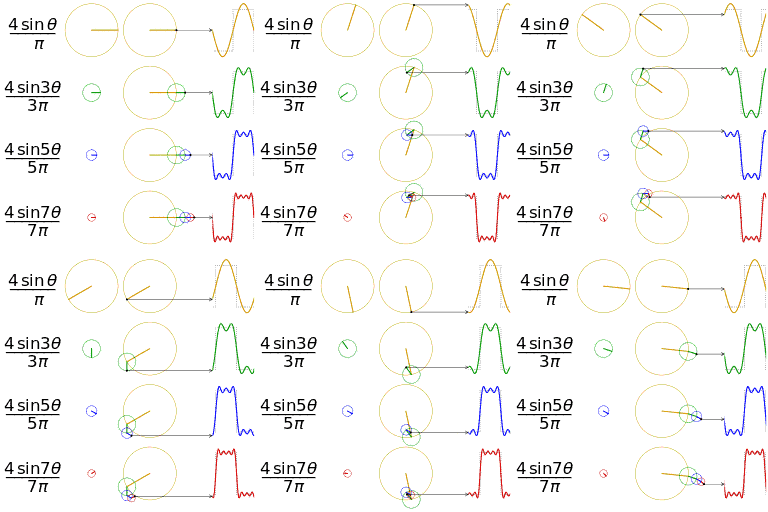
https://upload.wikimedia.org/wikipedia/commons/1/1a/Fourier_series_square_wave_circles_animation.gif

I can make something like this in Kivy canvas?
right?
 lime zenith
Hi is there anyone who is good with Pyqt?
alpine blaze
@latent mortar yes, the code i pasted is animated
i didn't put the internal lines, but it's easy enough to add
lime zenith
If anyone can help me with a PYQT , QTimer widget , you would be saving a life.
 gaunt portal
just ask the question
lime zenith
So I need to create a Gui that displays the system time and also the time in tokyo , but my textbook is useless and only has an example of how to display the system time and not any other specific time. What do I add to my code to get the LCD number widget to display the time 7 hours ahead of the current system clock? Btw I'm forced to use PYQT4 for this module.
 sudden coral
@lime zenith Can you use datetime? It comes with Python.
Or do you need to use Qt for the time stuff too?
lime zenith
@sudden coral no unfortunately I cannot use datetime. I can only use the QLCDNumber & QTime methods
sudden coral
Ah that's unfortunate
I'm not familiar with QTime
Have you seen the docs? Is there anything about timezones or using offsets?
lime zenith
I did not look at the docs yet , I will have a look 🙂
latent mortar
Okay so anyone know how to scroll in PyGame?
like i wanna scroll up and down in PyGame
scrolling the screen ofc
Should i switch to Kivy?
alpine blaze
i'm biased (as a long time contributor to kivy), but i think yes
updated a bit my stuff, but maybe i should research how to make it produce the correct graphs, as it seems i'm not smart enough to guess it
oh right now i can read the animation you pasted, and i guess i have some code to change 😄
 true crag
A kivy related question:
has anyone implemented or saw an example of a note taking like-app where you can create a list of text items for example that you can then move/swap using mouse/touch (drag and drop approach)?
I'd assume, at least looking at the basic_data example of recycleview it can be used there
but perhaps someone has/saw an implemented solution I could look at
alpine blaze

oh you mean more like an ordered list
yeah, recycleview example is certainly a good start, though drag and drop in a RV could prove funnier than you'd expect, definitely possible, but a bit fun, you must make sure you allow having a placeholder item so you can create an instance of the widget to hover the RV, while having an empty placeholder under it, moving around in the RV (placing it will be a bit tricky, as you need to get the item's positions from the RV internal state) and then handling the drop
to replace the placeholder with the info from the intitial item you moved around
true crag
yeah I thought that I need to create somekind of scatter object that will be actually dragged around
@alpine blaze I also saw this https://github.com/kivy-garden/drag_n_drop

GitHub
Flower that can drag and drop widgets between Kivy layouts - kivy-garden/drag_n_drop
could be another way...
(placing it will be a bit tricky, as you need to get the item's positions from the RV internal state) and then handling the drop
to replace the placeholder with the info from the intitial item you moved around
yeah I imagine, as I have to move up down the whole portion of list
alpine blaze
yes, i didn't try it, and we actually have a DragBehaviour in the kivy codebase now, though i didn't try it either, i find it easy enough to create the drag and drop stuff i need in my apps
true crag
like from scratch you mean? using touch events?
my doubts about flower were that it might lack some feature or customization if I will want so different behavior that I might end up creating it anway
alpine blaze
yeah
 sudden swan
are there good GUI's for python?
alpine blaze
yes
PyQT/PySide are often recommended if you want to do a desktop app that integrates well with the OS look and feel, Kivy if you want more design freedom and if you want to have your app run on android/ios.
(as well as desktop)
other common options are tkinter (but the api is not really great, and the look and feel on linux is bad, dunno how it is on windows, didn't try in a long time), wxwidget is also a pretty important one, though it seems to be less popular in recent years, and there is pygi to do gnome apps, and other more minor options.
sudden swan
thanks!
 limpid lantern
I'm a bit new to making UI's, how can I set a max width to columns in tkinter? Rn the columns get wider if there is a long sentence
 quick bough
guys
i think i have a basic grasp on python and i want to make an app for my phone. how does one get going with this
also is this the right channel?
 fallen oxide
https://kivy.org/ is your best bet, I'd say

Open source Python framework for rapid development of applications
that make use of innovative user interfaces, such as multi-touch apps.
I assume you're running Android?
quick bough
yes
quick bough
lol you just answered me on the other channel. i feel like such a dummy dum dum
fallen oxide
:>
fallen oxide
You're using python 3.8
fallen oxide
Kivy doesn't have a production wheel for 3.8 yet
There is a beta one but I can't remember where it is
Or you can wait, or downgrade to 3.7
fallen oxide
You might be better off waiting for someone that actually uses Kivy here
They'd have a better idea where to get the wheel from
alpine blaze
pip install --extra-index-url https://kivy.org/downloads/simple --pre kivy i think
quick bough
successfully installed
alpine blaze
yep, i got new powers, beware! I might stumble and fire them unwillingly!
fallen oxide
Were you a helper before? I don't recall
alpine blaze
yep
quick bough
thnx uwu
fallen oxide
Explains why I couldn't find you in the user list haha
quick bough
when i try to import
alpine blaze

quick bough
the module doesnt exist
alpine blaze
then you didn't install it for the python you are trying to use it in
are you using a virtualenv?
alpine blaze
ok, where is your module not found error?
alpine blaze
ok, didn't use that in years, ugh, can you make sure the python it runs is the one you used pip from?
quick bough
yes i installed matplotlib earlier and it gave me the same error so now both my pathon and shell are on same version
alpine blaze
type import sys; sys.executable in the idle shell
alpine blaze
ok, and can you type pip --version in your cmd where you ran pip earlier?
quick bough
alpine blaze
hm, weird, maybe try to restart the idle shell
alpine blaze
do pip list and check if kivy is in it
quick bough
i was going to uninstall the link you sent
alpine blaze
maybe pip list|grep kivy would work, not sure anymore if grep is available in it
alpine blaze
ok, it's not, try to run the pip install --extra-index-url… command of earlier and copy the result
quick bough
pip install --extra-index-url https://kivy.org/downloads/simple --pre kivy this?
Looking in indexes: https://pypi.org/simple, https://kivy.org/downloads/simple
Collecting kivy
  Using cached Kivy-2.0.0rc1-cp38-cp38-win32.whl (3.9 MB)
Collecting pygments
  Using cached Pygments-2.6.1-py3-none-any.whl (914 kB)
Processing c:\users\iraun\appdata\local\pip\cache\wheels\d2\72\1a\9ddd17f00755707937caa350616965fb3330a6270425f397e6\kivy_garden-0.1.4-py3-none-any.whl
Collecting docutils
  Using cached docutils-0.16-py2.py3-none-any.whl (548 kB)
Collecting requests
  Using cached requests-2.23.0-py2.py3-none-any.whl (58 kB)
Collecting urllib3!=1.25.0,!=1.25.1,<1.26,>=1.21.1
  Using cached urllib3-1.25.8-py2.py3-none-any.whl (125 kB)
Collecting certifi>=2017.4.17
  Using cached certifi-2019.11.28-py2.py3-none-any.whl (156 kB)
Collecting idna<3,>=2.5
  Using cached idna-2.9-py2.py3-none-any.whl (58 kB)
Collecting chardet<4,>=3.0.2
  Using cached chardet-3.0.4-py2.py3-none-any.whl (133 kB)
Installing collected packages: pygments, urllib3, certifi, idna, chardet, requests, Kivy-Garden, docutils, kivy
Successfully installed Kivy-Garden-0.1.4 certifi-2019.11.28 chardet-3.0.4 docutils-0.16 idna-2.9 kivy-2.0.0rc1 pygments-2.6.1 requests-2.23.0 urllib3-1.25.8
@alpine blaze
quick bough
it shows up now
alpine blaze
it didn't say it uninstalled a previously installed version though, so i think it didn't work the first time
no idea why though
ok, great 🙂
latent mortar
@alpine blaze Oh you a mod now Congrats?
limpid lantern
How can I change the text of label of the UI when running a script that's in another class? I'm new to using a UI so don't really have a clue, have tried multiple solutions but keep getting errors
alpine blaze
@limpid lantern you want to get a reference to the widget you want to change the text of, think about python variables, they don't exist in a vacuum, there is always a context (namespace) that has access to them, and these are also accessible as variables, so you usually just want to understand what contains your reference, and how to get access to that. I don't know which UI framework you use, the specific tools to do that can depend on that, (in kivy, you usually use id to give name to things, and you can chain them to get a widget inside a widget inside a widget, provided they each have a an id in their parent rule, and you have access to some widget that is a possible root of the chain), i realize the answer is a bit abstract, but the specific are going to depend a lot on your particular situation.
 hazy cosmos
hey i need help with tkinter.
im new to this gui and im trying to build somekind of homepage.
i did lightblue root and set it width 1000 and height 500.
when i just run it, that works nicely and i see it in the right color and size:)
but when i add this 2 lines
title = Label(root, text="Welcome to", fg="black", bg="#ADD8E6", font="Verdana 40 bold") #fill it with idea
title.pack()```
it make it look like the exact same width and height as textwhat i get with LABEL
what im trying to get:
 lucid wraith
Normally, the parent widget (root) resized to fit its components. You can prevent this by setting a minimum size (root.minsize(1000,500) )
lucid wraith
@hazy cosmos see if that helps
hazy cosmos
works well,tnx!
gaunt portal
Hey, back at it again with a PyQt5 question, what is an easy, but flexible way to customize an App containing some QLabel, QLineEdit and a QTableView widget?
I found something about qml on the qt official docs, but I can't really figure out how to implement this using my custom made .ui files
@rocky dragon sorry for pinging, but you literally knew how to solve all my last questions, any idea on this?
 rocky dragon
qtquick/qml isn't really compatible with QtWidgets
@gaunt portal What kind of customization do you want?
if you want to go with qml you're better off with kivy, the kv language is very similiar but looks more like python instead of js
gaunt portal
Ok, so my app currently looks like this
It's a GUI for a sqlite database
There are main widgets (books, students and borrows), stacked in a QStackedLayout, a QTableView in each of them and some dialogs
Each has a separate .ui file
All I want now is to make this not look so ugly, because the functionality is there
And I stumbled over this video https://www.youtube.com/watch?v=hJKVb7WpQ_c, and qml looked pretty nice, but I'm not sure how to implement it in my case

This screencast shows how to create the UI of a simple home automation application using the new Qt Quick 2 Controls. Blog: http://blog.qt.io/?p=44771
@rocky dragon I'm really open to other suggestions, but they do need to be PyQt compatible (I can't really use kivy, because it doen't run on the machine that I need this app to run on)
rocky dragon
the styles look alright imo, you could change the app style or the individual widget styles if you want to change it
for a cleaner look restrict the size of the warious widgets on the top
gaunt portal
Any hint in how i can do that?
rocky dragon
you can set the max width
qtquick is more suited to mobile apps etc. while not being very complatible (if at all) with the normal c++ qt modules
gaunt portal
Interesting
Uhm, what about the table, how should I style it
Because half the screen is not being used
rocky dragon
you can set stretch on headers which will affect the columns
rocky dragon
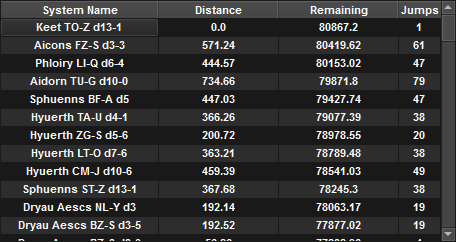
table is something I used in my app so as an example: https://i.imgur.com/l1Gjqeq.png
The first and last columns are set to be fixed with the width adjusted according to the items manually on insert and edit events and the ones in the middle are set to stretch
 gaunt portal
- mindlesly searching the docs *
rocky dragon
setSectionResizeMode on the header item
hazy cosmos
hey im desinging right now screens for my new app idea, the idea is routine creator but with good twist.
my question is how i make that desing screen into working code?
what framework should i use?
alpine blaze
I'm partial to kivy, but there are a few options, depending on your needs
 stable cobalt
Is there any way to make tkinter widgets scale and position dynamic and responsive as the size of the window changes?
 ornate tree
Hello, i'm using imgui and I cannot get any output when running the first piece of code that is shown here (https://pyimgui.readthedocs.io/en/latest/guide/first-steps.html)
ornate tree
Hello?
 sullen thunder
Would anyone here be able to help with a Matplotlib?
sullen thunder
@proper glade you would think that but I had previously posted in help3 and was ignored. Also since then i have solved the issue.
Thank you though.
Brute trial and error for the win.
 floral meteor
obtuse thistle
floral meteor
obtuse thistle
error: Microsoft Visual C++ 14.0 is required. Get it with "Build Tools for Visual Studio": https://visualstudio.microsoft.com/downloads/
install visual c++
rocky dragon
Or get 3.7/the kivy Dec version
 compact flame
Which gui has a good amount of customisation and is easy to learn?
 weary glade
I’d say tkinter, it might be a little hard to grasp but eventually you can make really good apps with it
That is in my opinion though
Ummmmm ok
 thorny spruce
tkinter is a bit limited in the customization options
Its fine if you want to just play around
But if you want a more sophisticated gui framework there's Kivy and PyQt/pyside2
compact flame
mm, I have played around with Tkinter
 spark furnace
Hello. I am having some issues with Tkinter.
here is a picture of before and after adding a label to a tkinter window. You can clearly see that it suddenly appears to be a gap between the entry and the button, why is that? Here are some pictures:
https://cdn.discordapp.com/attachments/688507327523193078/695248401855545445/unknown.png
https://cdn.discordapp.com/attachments/688507327523193078/695248094626971698/unknown.png
Label code```python
label1 = Label(self.window, text="HI", padx=50, pady=50, bg='red')
label1.grid(row=0, column=3, sticky=S+E, columnspan=1)Button + entry code: ```python #entry self.inp = Entry(self.window, text="None") self.inp.grid(row=6, column=0, sticky=W+E) #button inp_button = Button(self.window, text="", padx=10, pady=10, command=self.__processData) inp_button.grid(row=0, column=0, sticky=W+E+N, rowspan=1, columnspan=1)

 alpine blaze
@floral meteor if you don't want to mess with installing VisualStudio (and i would certainly understand), you should either use python3.7 (us suggested by salt) or install the preview packages from the dev version if you want to use 3.8, you can do so using pip install --pre --extra-index-url https://kivy.org/download/simple kivy.
@weary glade i'm actually curious, if you have examples of good apps done with tkinter, i wonder how they look.
(it's certainly not the first that comes to mind in either "good amount of customization" or "easy to learn", it certainly is for "easiest to install" or "easiest to find millions of begginer questions and seldom good documentation")
 karmic rock
hello, wanted to ask a question,
I need to send input into a chrome window (webdriver) thats out of focus or minimalized, can I do that? The selenium send_keys isnt working with some letters on that specific site for some reason so I need a workaround
gaunt portal
Hey, I'm trying to set the column headers for a QAbstractTableModel, in PyQt5
This is the code I use:
        self.model = TableModel(data, self.columns)
        for idx, column in enumerate(self.columns):
            ok = self.model.setHeaderData(idx, Qt.Horizontal, column, Qt.DisplayRole)
            print(idx, column, ok)
self.table.setModel(self.model)```And this is what I get 0 borrow_id False 1 date False 2 student_id False 3 book_id False 4 status False
The "False" means that the column data didn't get updated, and I'm not sure why this happens
Any help?
 wind current
is it possible to download kivy for python 3.9.0a5?
 desert sapphire
No
alpine blaze
well, unless you are willing to build it yourself, but that's a bit more involved, especially on windows
 sour tree
hey so beginner here im trying to make a gui with but im not sure what to use tkinter, turtle or pygame. any recommendations plz 😦
alpine blaze
@sour tree i wouldn't recommend using turtle to make a gui, and neither pygame, it's not really strong on that side, tkinter is a bit better than both of these options, but you really want to add kivy and pyside2 to the options you want to look into, they are both much better options.
sour tree
@alpine blaze thanks for your suggestions i just listed those ones because they were the only ones i knew 🙂
 proud grove
Hey my dudes, is there anyone here that’s good at making tkinter ui’s look relatively nice?
I’ve written one up for a project, and while it’s functional, it looks like absolute dog shit
Was wondering if tomorrow someone might have time to help me go over it with them and make some improvements to how it looks?
thorny spruce
tkinter isn't the greatest for style. The best they have to offer is the tkinter.ttk package which has some nicer looking widgets
proud grove
root = tk.Tk()
root.title("Manage Identities")
root.mainloop()
window = tk.Tk()
window.title("Manage Identities")
window.mainloop()
`
Hey guys, so say I have these two tkinter frames, root and window
Would someone be able to help me place a button in both that would allow me to switch between them?
Im pretty confused as to how I would go about i
 unique girder
helloooo'
im a beginner coder
i wanted to make like a math thing
like an equation solver
so i did a bit of research and i found that i can do the solving and everything
but displaying and input is a problem
so with Sympy you can do a bunch of indefinite calculus and everything which is great,
they said use latex
to display but
when i use latex, i get like a garbled string
how do i change that into a proper latex display
and also, how do i input latex
llike if i wanted a gui so people could enter their equations easier
if you have any tips for me, please do ping me
 digital rose
WPF
 still badger
Pycharm can't find my interpreter...
although I stated that it's literally in my folder
it's looking for the wrong interpiter
 ebon cairn
@still badger go to project settings and configure the interpreter you want to use
 blissful dawn
I decided to start learning more about PyQt and Qt Designer. I was trying to learn how to store data using QSettings but having some issues when using code from the Qt Designer. Basically I want to be able to save LineEdit and Checkbox states after the program is closed so that when they open next it will restore the previous state. Ive made a quick little program in Qt Designer that has 2 Line Edits and 1 checkbox. Could anyone help show me how to save/restore these using QSettings or point me maybe to some examples somewhere where they used Qt Designer.
Small Sample: https://paste.pythondiscord.com/oponaciqer.py
Ive looked on github and stackoverflow for previous posts and answers without much luck. I found this but was having problems getting it to work with Qt Designer code. Im trying to learn how to save and restore to this sample program above so I can learn how to add to my other program ive been working on past few weeks.
https://stackoverflow.com/questions/49837565/how-to-save-text-in-qlineedits-in-pyqt-even-if-the-widget-gets-closed
Thanks for your time.
gaunt portal
@blissful dawn So each time you want to create/acces/update your QSetting, you just create a QSettings instance, do what you want with it, then delete it, using the python del keyword
Something like this:
self.settings.setValue("windows_db_path", db_path)
del self.settings```the db_path variable is stored in the windows_db_path key, similar to a python dict
to get a value:
db_path = self.settings.value("windows_db_path")
del self.settings```I want to get a little pop-up informative message in pyqt, but not like the QMessageBox dialog, rather something that will say "updated" and then dissapear. Any ideas?
 proper glade
is there really a need to explicitly delete the QSettings instance?
also i think the organization name argument comes before the project name
@blissful dawn
I found this but was having problems getting it to work with Qt Designer code.
what problems specifically?
 clear nexus
window.title("Velkommen til Vindtunnel GUI")


def arduino():

    ser=serial.Serial('com6',9600)

    while 1:
        arudinoData=ser.readline()


button1 = Button(text= "click", command = arduino)
button1.pack()
Is the a way to get the arduino serial to write into a textbox in tkinter?
 sage merlin
Well I don't know how an arduino work, but your button need a frame within he can be put
"button1 = Button(Tk, text..."
clear nexus
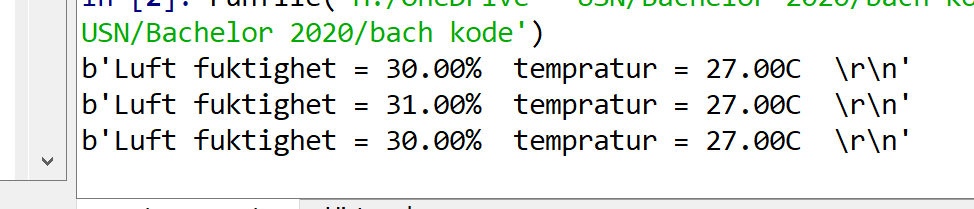
i get the values in the console of arduino
ive imported tikinter from tkinter import *
so ive had no issue with that
sage merlin
Did you try it ? What does it look ?
 sage merlin
Ok, so the Label is facultative
Anyway I don't think your code will work
Because of syntax error
While 1 means the code will always run
You should make something like
for Line in ser.readline():
  arudinoData = Line
ah okay
sage merlin
But there might be another problem
Does putting a variable in "arudinoData" show the line in the console ?
clear nexus
 sage merlin
It's ok if it works, nevermind
clear nexus
yeah i just want it into a textbox than the console
sage merlin
What do you mean by textbox ?
clear nexus
sorry, i guess i dont really need a textbox for that, but just getting the value in the GUI
sage merlin
Yes, you can use the tkinter.Label function
Don't forget to .pack() the object
As you made for the Button
clear nexus
thanks for the help ill try it
sage merlin
You're welcome
 thorny lichen
Can anyone help explain the proper usage and explanation for PyQt5 clicked() vs clicked(bool)? I think I may have an understanding of it's use, but not how to implement it
gaunt portal
Are you sure you really need the clicked signal, though?
the pressed() signal is rather more used
 copper sapphire
Does anyone know why the app, dark-themed with qss, looks correct on Linux, but on Windows displays white parts ie. the whole central_widget is white, but in the qss file it's set to a dark color?
rocky dragon
are you using the os style?
 median lantern
Is kivy capable of showing overlays, kind of like messenger chat bubbles?
alpine blaze
in android? i'm not sure it's possible, and it's certainly not trivial
i mean, inside its own app, sure, no problem, but overlay over other apps, i don't know, i'm pretty sure nobody did it yet.
maybe it would be possible to code something in python-for-android to return a new surface to draw in, and to run a new app as an activity inside it, it would allow you to do that, but i don't know how much work that would be.
@median lantern
median lantern
I see, I may look into it later.
clear nexus
SizeAr = math.pi * (RadVar.get()**2)
showval.insert(tk.END, SizeAr + '\n' )
return SizeAr```
so im trying to insert, and i want a new line for everytime i click the button. But since its a varible any one know what to do?
showval.insert(tk.END, SizeAr + '\n' ) gives the error because its not a string tribal path
draw-over-apps would be the permission to look at at least, also dont know how much work it would be or if theres examples
 uneven field
How much python experience do you need to work with kivy?
obtuse thistle
you should be fairly comfortable with oop
uneven field
oh thanks
gaunt portal
I kinda learned oop while building my first app with pyqt, so I guess it depends on your learning style
 wary birch
Yes, I have to agree. Just started learning pyqt5 and I had never used a class in python before
Guys I have one question. I am interested in designing some simple applets for some visual demos of physical phenomena, for example place a whole plate vibrating at a certain frequency. But as I go to 3D graphics matplotlib seriously damages the performance of the app when animating it, what other options would I have?
I am looking for something to embed in a pyqt5 GUI
I looked into Vispy, but it seems to be in development both for a higher level coding for those without any knowledge of OpenGL
Would learning PyOpenGL solve this problem? What do you use to animate huge sets of data?
 rain rock
Hi i need help with importing PyQt5
from PyQt5 import QtWidgets
from PyQt5.QtWidgets import QApplication, QMainWindow
import sys
So far I have this and I get import errors. I installed them through pip
rocky dragon
What are the exact errors? ModuleNotFound?
rain rock
ImportError: cannot import name 'QtWidgets' from 'PyQt5'
 lunar kernel
How to build a model for image recognition?
rocky dragon
does doing just import PyQt5 work?
rain rock
Hold on I think found the solution
pyqt5-tools apparently doesn't support the latest version of PyQt5 so im installing the older version
Yeah it works now
sage merlin
@clear nexus I think you should do str(SizaAr)+'\n' if there is a TyperError. Moreover, if you are using Tkinter, you may need to do a showval.pack()
 wispy grotto
Why?
it's saying it doesn't exist. How can I reference a class in the same package but different module? I can reference it just find from different packages
categories = undefined variable
but I'm using it just fine in different packages
I've imported it
😫
😦
sudden coral
There are 2 things wrong
First, you used a lowercase c, but the class is named with an upper case c
Second, you need an instance of the class to be able to call the get_categories function
wispy grotto
okay
how do i finish the second part?
def get_items(self):
        Order.get_items(self)
        return self.items
like that?
sudden coral
I don't really know what you're trying to do but that doesn't look right either
It's important you understand the difference between a class and and instance of a class.
If you don't then brush up with some resources
Realpython is a good place to learn
wispy grotto
how can I call this class without needing to write "self" in the calling method?
I have no idea how that shit is supposed to work
this is what I have
I'm literally begging for help because my professor refuses to help and just told the entire class to google it
because the term is online now and she decided to travel to Germany
in the middle of the term
she hasn't answered emails for three days
and this is due tomorrow
soooo I'm fucked
wispy grotto
😫
wispy grotto
I wish American professors weren't shit
proper glade
this does not seem like a user interface problem
 violet marten
Anyone using PyQt here? Is it even a good topic for this chan?
alpine blaze
it's the proper place to ask about it here, yes
digital rose
Hi can y’all show me ur UI
alpine blaze
you can see videos of a bunch of stuff i did at a previous company using kivy here https://vimeo.com/user24838472

Vimeo
Tangible Display - Your Phygital Partner ! When physical meets Digital... Since 2011 we build expertise around Phygital! We founded Tangible Display to push the…
digital rose
I got a question. What is the best way in adding a license gui display where they have to click agree before using the GUI application and they only have to click agree once
<tag me>
 eager nymph
@alpine blaze those links don't load ( for me )
 proven basinBOT
Hey @eager nymph!
It looks like you tried to attach file type(s) that we do not allow (.txt). We currently allow the following file types: .3gp, .3g2, .avi, .bmp, .gif, .h264, .jpg, .jpeg, .m4v, .mkv, .mov, .mp4, .mpeg, .mpg, .png, .tiff, .wmv, .svg, .psd, .ai, .aep, .xcf, .mp3, .wav, .ogg, .md.
Feel free to ask in #community-meta if you think this is a mistake.
eager nymph
alpine blaze
uh
vimeo seems to work for me
https://vimeo.com/257492885 (for example)

Une application didactique sur les équilibres énergétiques afin de sensibiliser le grand public au système électrique actuel et…
clear nexus
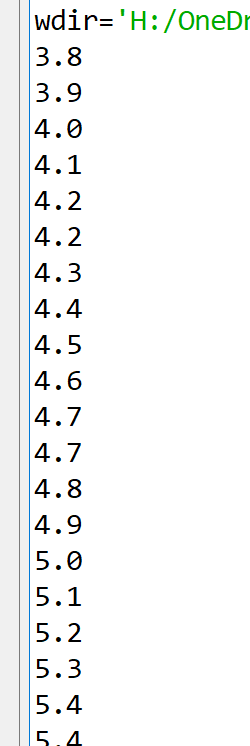
is there a way to use insert to creat a row from a np.array? i want values to show in one row like this https://i.imgur.com/S6xyYys.png i get this by using print(*calc.flatten(), sep='\n') but i tried dragbox.insert(tk.END,*calc.flatten(), sep='\n')i didnt work
 clear nexus
thanks 🙂
 uneven hound
Guys, how do I make a GUI?
lucid wraith
Import tkinter
uneven hound
tkinter?
lucid wraith
Check out the documentation for the python standard module tkinter.
That is a good place to start
uneven hound
Ok
lucid wraith
More useful documentation is at https://tkdocs.com/tutorial/index.html
uneven hound
Ok, thanks!
 honest bluff
hi , how can i remove python shell in tkinter , i just need the gui and wanna remove python black shell
tribal path
pythonw
honest bluff
@tribal path i run it with pythonw and changed the extension to pyw but nothing will open , whats the problem
when i open the py file with pythonw is ok but when i chnage it to .pyw the program won't run
honest bluff
i use tkinter and threading
when i run my program and it connects to server a second window will apear and in some fuctions idk why but i cant change somethings
i get this error
Exception in thread Thread-2:
Traceback (most recent call last):
  File "E:\python\lib\threading.py", line 932, in _bootstrap_inner
    self.run()
  File "E:\python\lib\threading.py", line 870, in run
    self._target(*self._args, **self._kwargs)
  File "I:/filedownloads/my codes/python/mypy/AminGram/test_client.py", line 199, in update_text_display
    self.chat_room_text_box.config(state="normal")
  File "E:\python\lib\tkinter\__init__.py", line 1637, in configure
    return self._configure('configure', cnf, kw)
  File "E:\python\lib\tkinter\__init__.py", line 1627, in _configure
    self.tk.call(_flatten((self._w, cmd)) + self._options(cnf))
RuntimeError: main thread is not in main loop
i can't change this self.chat_room_text_box.config(state="normal")
wind current
How can I know if the kivy is exiting or not?
 sharp plover
Would App.on_stop work? @wind current
 stable gate
 hollow pewter
I am getting crazy from pyqt designer
My windows language is hebrow
so somewhy they decided to flip the whole thing up
so everything is from right to left
and they gave no option to change that
 strong zenith
@hollow pewter I think that's because it's automatically inheriting the locale from the system and so conforming to that. You might want to google "pyqt locale setting" and see if that gives you any useful info
hollow pewter
As far as I found, there is no way to change that
rocky dragon
!d PySide2.QtCore.PySide2.QtCore.QLocale.setDefault
proven basinBOT
static PySide2.QtCore.QLocale.setDefault(locale)```
 Parameters **locale** – [`QLocale`](#PySide2.QtCore.QLocale "PySide2.QtCore.QLocale")

Sets the global default locale to `locale` . These values are used when a [`QLocale`](#PySide2.QtCore.QLocale "PySide2.QtCore.QLocale") object is constructed with no arguments. If this function is not called, the system’s locale is used.

Warning

In a multithreaded application, the default locale should be set at application startup, before any non-GUI threads are created.

See also

[`system()`](#PySide2.QtCore.PySide2.QtCore.QLocale.system "PySide2.QtCore.PySide2.QtCore.QLocale.system") [`c()`](#PySide2.QtCore.PySide2.QtCore.QLocale.c "PySide2.QtCore.PySide2.QtCore.QLocale.c")should be the same in pyqt
hollow pewter
Im not talking about the api
Im talking about the designer
kindof a gui to make a gui
This thing
The main menu is at the top right corner instead of top left
the resource browser is flipped
rocky dragon
I guess you could delete the translation files
hollow pewter
Nothing is Hebrew anyway
Everything is English
look
btw any1 knows why when Im adding an icon the button text is pushed to the right?
when Im changing layout direction to "RightToLeft" it doesn't push it
I did just what the other guy in the tutorial did
 finite eagle
I am having truble bruh
haha
I have a GTK bin subclass
but when it's child (a Gtk.Box) updates, it doesn't change.
It works when it is a label changing text though.
proven basinBOT
Hey @finite eagle!
It looks like you tried to attach file type(s) that we do not allow (.txt). We currently allow the following file types: .3gp, .3g2, .avi, .bmp, .gif, .h264, .jpg, .jpeg, .m4v, .mkv, .mov, .mp4, .mpeg, .mpg, .png, .tiff, .wmv, .svg, .psd, .ai, .aep, .xcf, .mp3, .wav, .ogg, .md.
Feel free to ask in #community-meta if you think this is a mistake.
 upper fiber
okay so i have a program, when the user enters something into the box it search for it, if it exists it will get all the ID's with the same value, i want to display the whole column of the ID when the button next is pressed
Rn i have this
    def search(self,reg,location,serious,problem,hidden):
        fixed = "No"
        db = sqlite3.connect("Pro.db")
        curs = db.cursor()
        curs.execute('''SELECT Number_Plate FROM Vehicles WHERE Number_Plate=?''',(reg.get(),))
        result = curs.fetchone()
        if result:
            hidden.config(text="\n")
            curs.execute('''SELECT ID FROM Faults WHERE Number_Plate=? AND Fixed=?''',(reg.get(),fixed))
            hmm = curs.fetchall()
            print(hmm[3][0])
            button = tk.Button(self, text="Next",command=nxext())
            button.grid(row = 8)
        else:
            hidden.config(text="Vehicle Doesn't \n Exist")
idk what to do next
or like how to do it properly
 buoyant tendon
Hello! I'm working with ffmpeg as part of a Python video generator in order to add music to a video generated by opencv2. This music loops to fit the length of the video, however I would like to have different music every time it loops. What would be the best way to go about this? Is there a way with ffmpeg to choose a random input file from a folder during loops or would I have to use Python to run a new instance of ffmpeg for every iteration of the music at a time calculated by Python based on the length of the audio file, none of which I know how to do. Thanks in advance!
Oh and here's my current code system("ffmpeg -i video.mp4 -stream_loop -1 -i images\\"+choice(listdir("music"))+" -codec copy -shortest -map 0:v:0 -map 1:a:0 -y final.mp4")
 rugged sinew
it might be possible, although I don't know how, but one very clear path to success would be to just concatenate the random music files into a single file with the right duration ahead of time and then do what you're currently doing.
it might be as easy as just opening a new file for write binary, reading as many random audio files as you think you need as binary, and just writing them all to the new file. then you can make your video with this new temp file and then delete it.
@buoyant tendon
if ffmpeg already handles cases where the audio track is longer than the video track gracefully you don't even need to worry about duration, so long as the file is long enough.
buoyant tendon
Only problem there is that it wouldn't be random if it's already made haha
rugged sinew
@buoyant tendon no no, you misunderstand. you randomly select n audio files and create one concatenated one every time your code runs.
then you delete the temp file and do it again next time.
it's just a few lines of Python, essentially.
buoyant tendon
Hm I'll see if I can figure out how to do that
rugged sinew
although if you're gonna just open them as binary and concatenate, they have to be exactly the same format, and even then it's not guaranteed to work. worst case you might need a tool to do that too.
buoyant tendon
The problem is getting the duration of the video and splitting that duration between the audio files (all of which are different lengths)
rugged sinew
yeah but what happens if the audio is too long - will it stop when the video ends or will it run with no visuals until the audio ends?
buoyant tendon
It's not like I can just iterate through the length of the video (which even that alone I don't know how to do) divided by the length of the audio clip adding an audio clip each time, since it needs to cut off when the video ends (since it would never divide exactly) and the clips are different lengths
rugged sinew
if the former is true, just intentionally make it too long.
buoyant tendon
The audio is always less than 4 minutes and the video is always more than 10 minutes
rugged sinew
yes. but so what I'm asking is - if you feed it a 12 minute audio file, will it then run for 12 minutes with two minutes of blank, or stop when the video ends?
because if the latter happens, you can ignore the whole duration thing and just make sure your audio is always longer.
buoyant tendon
Oh right, no
I'm using the -shortest tag to make the audio cut off when the video ends since the audio is always smaller
rugged sinew
right, excellent. so then all you need to do is build a single audio file that is longer than the video duration.
and if you wanna get fancy, maybe find some way to fade it out in the end.
buoyant tendon
Yes, but how do I know that it's longer? I don't know how to get the video duration, the audio duration or how to compare them
rugged sinew
that's probably a question I don't have enough information to answer. is there any kind of limit to how long the video will be?
concatenating files is cheap. I suppose you could just make it reaaally long, like several hours, and it would always be longer. or whatever really long constitutes for this project.
buoyant tendon
If it's using random audio clips of different lengths, I can't just aim to get a length that is longer than the video since they're random, but anyways the video can be any size depending on user input, meaning if this is what you're meaning then the audio would theoretically need to be infinitely long
rugged sinew
right okay.
yeah that's a problem.
then you do probably need a smarter solution than this.
knowing something about durations sounds like a good next step.
I guess I would spend some time trying to solve that.
buoyant tendon
I know that the video is most likely never going to be longer than 30 minutes even, but it just seems logical to make sure that no matter what, it will still do what is expected unless you go over the 64bit integer limit or something haha
rugged sinew
anyway I just wanted to contribute the little bit of outside the box thinking, where if ffmpeg does not provide the means to solve this, it's probably solvable by just crafting the right audio file with Python and using the same ffmpeg command.
though it does sound like you need to do some research on how to figure out durations.
buoyant tendon
I have a plan for making it generate hundreds of these videos one after another and I might decide the best way to do this is to do them all in one file then cut them meaning the video would end up hundreds of hours long, and obviously making an audio file hundreds of hours long when only 20 minutes might be needed makes little sense
Oh, I should add that preferably (but this isn't needed), instead of it doing random audio, it would choose the exact set of audio files to match the length of the video closest
rugged sinew
I don't know if that sounds wise. if you want hundreds of videos within a reasonable time, you may want some form of asyncronousness involved, especially if you're making tons of ffmpeg invocations
buoyant tendon
Yes, it's just theoretical, likely not what I'm actually going to do 😛
rugged sinew
but finding a close match sounds entirely doable if you know the durations.
buoyant tendon
I don't even know how to find the closest match using pure integers without just iterating through all the possibilities which could end up taking a while
rugged sinew
https://github.com/bastibe/SoundFile this looks like it can do it for audio, at least.

GitHub
SoundFile is an audio library based on libsndfile, CFFI, and NumPy - bastibe/SoundFile
#algos-and-data-structs might be able to help find a very clever and optimized way to solve that problem, @buoyant tendon
I personally would probably just iterate, but yeah that approach might not scale well.
if these audio files were not user provided, you could simply hard code their durations in your program
that would be a lot cheaper.
buoyant tendon
Alright 😂 👍 I'll push the idea of finding the closest match because if I'm going to end up doing a ton of stuff anyways, might aswell go that extra step. Seemed like such a simple problem haha
Sadly, they're user provided
rugged sinew
there might still be a simple ffmpeg flag, that app has a ten million page manual and I don't know it that well.
buoyant tendon
Doesn't need to match, but I'd prefer to find the closest match
It's very very unlikely that an exact match would ever be possible
obtuse thistle
In computer science, the subset sum problem is an important decision problem in complexity theory and cryptography. There are several equivalent formulations of the problem. One of them is: given a set (or multiset) of integers, is there a non-empty subset whose sum is zero? ...
obtuse thistle
i haven't tackled this one with python yet, i may try to later
buoyant tendon
A quick look at that makes it look like that is for finding an exact match
obtuse thistle
that's correct, but you can imagine variations for get within some bounds, the important bit is:
The problem is NP-complete, meaning roughly that while it is easy to confirm whether a proposed solution is valid, it may inherently be prohibitively difficult to determine in the first place whether any solution exists.
buoyant tendon
It's discussing returning a boolean for whether a match to 0 from the given set can be made, whereas I'm looking to find the closest match
obtuse thistle
which means this is a hard problem in general
buoyant tendon
Dang. This is the sort of random stuff I thought might be somewhere in the standard library 😶
obtuse thistle
you probably have some other requirements though, like you'd like to use each audio file roughly the same number of times
since subset sum would be happy to use a single audio file n times if that fit the duration exactly
though is is probably off-topic for here, we can continue in #algos-and-data-structs if you want
buoyant tendon
Alrigt
finite eagle
I have a GTK bin subclass
but when it's child (a Gtk.Box) updates, it doesn't change.
It works when it is a label changing text though.
https://hatebin.com/fdprlkdogw
PyGObject with Gtk
 tiny mural
I'm using tkinter to create a button to start my face recognition python script. I can't get it to launch the script though. I'm using ubuntu and keep getting permission denied. Any help is greatly appreciated and i can link my tkinter script if needed.
tiny mural
It says -rw-r--r--
How can i fix that and make it permanent
Thats for the file im trying to open. My gui script is -rwxr-xr-x
@atomic bluff
 atomic bluff
You need execute permissions. Do a chmod 700 on the file name and try again
alpine blaze
chmod +x filename to add execution rghts
digital rose
Hello I need help.I am working with desktop app in pyqt5. Have several issues - wrong function counting EEG signals per 1 sec-need count all signals and selected. Also have trouble making CRUD automatic commenting in graph and need to implement app state save like workspace, save workspace and load it later
tiny mural
i keep getting permission denied still. Maybe im doing it wrong
i tried both ways "chmod +x /home/project/GUI.py" and "chmod 700 /home/project/GUI.py"
i may have done the wrong file im trying again sorry
ok i did the right file this time but its not running the script as intended
my cursor turns into the change width and height and whenever i click i get a "import -im6.q16: not authorized 'face_recognition' @opal jewelr/constitute.c/WriteImage/1037
the face recognition changes to all the libraries i have imported every time i click
atomic bluff
Do you have the script pasted to a repo? I’d be happy to take as look
tiny mural
no let me figure out how to do that really quick
i have my script on a jetson nano and my discord on my desktop

let me know if you need to see the other script im trying to run also
finite eagle
I have a GTK bin subclass
but when it's child (a Gtk.Box) updates, it doesn't change.
It works when it is a label changing text though.
https://hatebin.com/fdprlkdogw
PyGObject with Gtk
atomic bluff
Checking
atomic bluff
Are you using python2 or python3?
tiny mural
python 3
tiny mural
same problem still occurs
 dull mountain
hey there,
does anyone know of any good guides, books or courses to learn pyqt5 from?
atomic bluff
@tiny mural a few options to consider
To confirm, is that the full path to your script? Os.system(script name) should be working
tiny mural
yes sir thats the full path but everytime i click the button it doesnt run the script.
it gives me a width and height adjusting cursor and i have to spam click the kill terminal button to get out of it
then everytime i click i get an import message in the terminal window
i really appreciate you helping me i hope we can figure this out
 flat herald
hello
in pyQT
it seems to me addToolBar does not exits
exist*
can someone help ?
rocky dragon
What are you calling it on?
flat herald
it is a method
        self.toolbar = QtWidgets.QToolBar(self)
        self.toolbar.addAction('Exit')
between those 2 lines
i should make it like this
self.addToolBar()
but it doesnt work
flat herald
can you explain how ?
rocky dragon
in a layout for example
flat herald
ohh
there is the Exist
i see it xD
but srsly toolbar is not highlighted/has a different color than layout
how can i change color ?
of the toolbar
@rocky dragon
rocky dragon
Depends on the styling I guess
Sorry bit busy now and haven't worked with qt for a while
flat herald
ok np
flat herald
hey guys
question about pyQT and pyside
addToolBar does not exist for me
also there is no exitAction for Addaction
anyone can help me set up a toolbar ?
finite eagle
I have a GTK bin subclass
but when it's child (a Gtk.Box) updates, it doesn't change.
It works when it is a label changing text though.
https://hatebin.com/fdprlkdogw
PyGObject with Gtk
finite eagle
I have a GTK bin subclass
but when it's child (a Gtk.Box) updates, it doesn't change.
It works when it is a label changing text though.
https://hatebin.com/fdprlkdogw
PyGObject with Gtk
buoyant tendon
Hello! I am using Pygame in a unique way where I have 2 surfaces- the display surface and a 'framegen' surface. The display surface is obviously the one that displays to the screen and collects user input. The framegen surface uses the userinput to generate frames compiled into a video using OpenCV2. Now, it has worked fine while I've had the frames generate with the Pygame window still on the screen, however I've had to make the program more efficient so that it's faster, cleaner and doesn't kill my CPU. I've done this by closing the Pygame display once the required userinput is collected . However, while trying to generate the frames after the Pygame display has been closed, it uses my class 'LineOfText' for making font sprites on the framegen surface however, while LineOfText works just fine when the Pygame window is open, it errors saying that 'LineOfText object is not subscriptable' (which is definitely is). Any ideas why this might be?
Just to clarify: Originally I did just try pygame.quit() and it gave a different error saying that 'Font handler not initialized'. I fixed this by changing it to pygame.display.quit() meaning that the font handler is still running which is when I get this error. I presume, therefore, that it is something to do with pygame.sprite.Sprite() not working when there is no Pygame window, but I honestly don't know.
Let me know if you need to take a look at any part of my code. Thanks so much in advance!
 dusty imp
Hi! What are the particularly performant python frontend frameworks? I'm looking to build a UI for a mock factory process automation UI and looking at various frontend frameworks. I'm new to python frontend development and was looking for something that can be cross-platform
 wispy oar
How can I dynamically remove rows of a QTableWidget in PyQt5? Also, is there a way to 'refresh' a window, resetting the UI to the original?
wispy oar
For example, I have this UI:
In the table, I want to reduce the number of rows if the user configures less than ten floors
 hybrid phoenix
hi everyone
got a quick question
does anybody use the GUI library wxPython on mac?
I'm getting this error "This program needs access to the screen. Please run with a
Framework build of python, and only when you are logged in
on the main display of your Mac."
i'm on high sierra, running wxpython on a virtual environment and using python 3.7
 barren elm
hey guys im having some problem with kivy and buildozer when compiling to android
there is a lot of text
proven basinBOT
Hey @barren elm!
It looks like you tried to attach file type(s) that we do not allow (.txt). We currently allow the following file types: .3gp, .3g2, .avi, .bmp, .gif, .h264, .jpg, .jpeg, .m4v, .mkv, .mov, .mp4, .mpeg, .mpg, .png, .tiff, .wmv, .svg, .psd, .ai, .aep, .xcf, .mp3, .wav, .ogg, .md.
Feel free to ask in #community-meta if you think this is a mistake.
alpine blaze
please re-run it with log_level = 2 in the buildozer.spec
hm, or just try to run /root/.buildozer/android/platform/android-sdk/tools/bin/sdkmanager tools platform-tools manualy and see if you get an error
(why are you running as the root user btw? it's actively discouraged to do so)
(also you have both pyenv and anaconda in your path, i don't know if that could cause issues, but maybe)
barren elm
its working
i put jdk 1.8 on it
there was one error
[WARNING]: lld not found, linking without it. Consider installing lld if linker errors occur.
but it compiled fine
not all i got to do is test it on my hpne
phone*
barren elm
i got too excited and thought i could make ios apps with my linux machine
 brisk monolith
Hello, what's the best source for learning PyQt5?
dusty imp
wait what? There's QT for python?
brisk monolith
yeah
PyQt5 library and PySide2
Both are pretty much the same, very few differences
 oblique field
@brisk monolith You might want to take a look at this website : https://www.learnpyqt.com/

Learn PyQt
The hands-on guide to building PyQt5 apps. Rapid GUI development with Python.
brisk monolith
It's paid
 dull swallow
how would I make a python script that draws colored pixels on the screen>?
sharp plover
One quick and dirty way could be to use the turtle module or tkinter, which turtle runs on.
Turtle/tkinter has some on_mouse_down type stuff that you could use if you wanted to make a sort of el cheapo ms paint.
@dull swallow What are you looking to do?
dull swallow
im just trying to learn how to make some ui stuff thats like overlayed
sharp plover
Okay. Solids are easy enough, I suppose. Alpha blending for transparencies can be a little more fiddly.
hybrid phoenix
anybody use pyqt5 on mac?
if so is it difficult to install the tools for mac?
I have the pip module but I'm having trouble installing the tools
 ornate furnace
if anyone can make a recoil script come my dms i pay
digital rose
Hello guys im new to Python and i got assigned in a group in my software engineering class and my role is to code the buttons in the GUI. so if a user presses create account, the user will make it change the page shown on screen, but I would be telling the server what information is sent
like when a person clicks complete, you can give them an error or tell them that the account has been created
do you guys know how to start?
my partner already created the gui
 celest hamlet
django or flask for web python communication wither servers @digital rose
those are probably the most common for that
digital rose
at the moment were using anaconda "spyder" @celest hamlet
celest hamlet
django and flash are libraries
spyder is the ide
you can use any ide
google django and flask
there are tons of tutorials
@digital rose
digital rose
thanks! @celest hamlet
celest hamlet
np
hollow pewter
does anyone knows a font similar to this one?
 gusty zealot
anyone know of a widget that displays contents of an sqlite3 database in Tkinter?
or something close to that
 swift wigeon
anyone know how to display many, multiple jpegs in tkinter and update them based on text entries in the console?
(or clicks)
 tame nimbus
Hey
Anyone here who knows some good tutorials for flask?
Please ping me with the answer:)
 remote ravine
this is not the right channel for that question
ornate furnace
hey guyse im totaly new to python and dont know anything why when i try to "run the app" it comes with this message
No Python at 'C:\Users\xXSmi\AppData\Local\Programs\Python\Python37-32\python.exe'
strong zenith
@ornate furnace Your Python installation is damaged. You'll need to reinstall it
 stoic dirge
Yo, is there any way we can check if a Push Button is clicked (i just need it to return a bool, true / false) on PyQt5?
 silent salmon
Hey everyone, Does Anyone know how to intercept or read incoming desktop notification? Actually I'm working on a project where I've two python scripts for fetch and send mail to said source. Now, what I'm planning is to run those two scripts only after acceptance notification from Gmail or LPForum.. like, if I somehow read the incoming notification then I can check the header to make sure that it came from where I want and then start those python scripts which first fetch the mail from Gmail, then it generates a random text and finally sends back to said source.
I've already used dbus-monitor for Monitoring the session-level notification but I Don't know if I need to create a systemd service for it and parse the data using regex.
stoic dirge
@hybrid phoenix you wont be able to install pyqt5 tools on mac
it's only on windows afaik
you need to use bootcamp (like what i'm doing rn)
 eager stone
I'm using Tkinter to create a GUI for a game and am wondering how it can be used to load a start menu and then switch to the actual game or other menus depending what button is clicked
Thanks 😄
hybrid phoenix
@stoic dirge dam thanks for the heads up
whats a compatible GUI python program that works correctly for mac?
besides tkinter
stoic dirge
Pygame is simple to use
I've only had experience with Pygame, so I can't really say about other gui frameworks
alpine blaze
kivy works on windows, osx, linux, android and ios
i'm sure pyqt/pyside works well on osx too
 past pivot
how do I call an asyncronous function as a callback in PySide2?
I want to run an asyncronous function when a button is clicked, but if I try just using await my_function(), it says the await wasn't used in an async function, so it doesn't work
stoic dirge
Yeah pyqt works on macOS, but it's a bit hard to work with it since pyqt tools is not supported on macOS
And its way simpler to get events/signals using Pygame instead of Pyqt
I spent 3 hours just to find out how I can detect if a push button is clicked on PyQt and it resulted in nothing
The only tutorials out there are always connecting the clicks with a lambda function which contains another function
ornate furnace
is there any one thats can help me creating a recoil script im new and dont find alot of information out there please come my dms : )
 molten ginkgo
how do i make a gui?
celest hamlet
how do i make a gui?
@molten ginkgo tkinter, pyqt, and other libraries (look at channel descrip) are good libraries to start
molten ginkgo
ok
stoic dirge
Hi, i have a problem on pygame where i'm trying to show a game message but it just resets the background after the user clicks enter, thus resulting in the game message being shown only for a split second.
I gather user input in a while loop (because I only need it to run three times) and use pygame.event.poll() to detect incoming inputs such as keyboard input etc. So the way i made it is that when the user presses enters it'll evaluate the data entered and show a game message if the input is correct or not. However the game message will just be removed in a split second since its in a while loop. Is there any way I can make it so that the game message shows up until i click enter again?
while i < 3:
   screen.blit(Variables.bgImage2, [0, 0])
   if e.type == KEYDOWN:
      if e.key == K_RETURN:
        if result[0]:
          showGameLog("Correct!")
        else:
          showGameLog("Hm. Not Quite.")
          i += 1
  pygame.display.update()
Here's a short version of the code
what showGameLog does is just that it creates a surface text and then renders it
hollow pewter
is there any1 here familiar with qt?
I have a window who works fine when it is the main one
but when I pass another main window as an argument it breaks
It isn't transparent anymore
It is transparent when it is opened
so it gets the first color
but If I change the background color it is not changed with it
gusty zealot
anyone know if its possible to dynamically change the text of a tkinter.button?
celest hamlet
@gusty zealot yes
@gusty zealot it's called textvariable
there are tutorials online
is that what you are looking for?
to be able to change the text of a label or whatever like a variable basically?
gusty zealot
oh lol
yea it tool 2 seconds of search time on google
i dont know why i wasted your time
but thank you!
celest hamlet
hey no problem
stoic dirge
@hollow pewter Use QStackedWidget
 loud sapphire
Hello dear Kivy specialists.
I'm running into an error for which I can't really find an answer for.
I'm trying to use the circulartimepicker from kivy garden but I get this
 from kivy.garden.circulardatetimepicker import CircularTimePicker
   File "<frozen importlib._bootstrap>", line 983, in _find_and_load
   File "<frozen importlib._bootstrap>", line 967, in _find_and_load_unlocked
   File "<frozen importlib._bootstrap>", line 668, in _load_unlocked
   File "<frozen importlib._bootstrap>", line 640, in _load_backward_compatible
 KeyError: 'kivy.garden.circulardatetimepicker'
@stoic dirge I fixed it eventually
I don't even know how
just pasted some random stuff from google
loud sapphire
Also, when I try
garden install circulardatetimepicker
on cmd, I get "Unable to find the garden package"
eager stone
def loadMainMenu(self):

    self.clearScreen()

    #Frames
    self.mainMenu = Frame(self.root)
    topFrame = Frame(self.mainMenu)
    bottomFrame = Frame(self.mainMenu)

    #Images
    canvas = Canvas(self.mainMenu, width=1920, height=1080)
    background = ImageTk.PhotoImage(Image.open("Graphics\\MainMenuBackground.png"))
    canvas.create_image(0,0,anchor=NW,image=background)

    #Buttons
    loginButton = Button(bottomFrame, text="Login", command=self.loadLoginMenu)
    registerButton1 = Button(bottomFrame, text="Register", command=self.loadRegisterMenu)
    quitButton = Button(bottomFrame, text="Quit", command=self.mainMenu.quit)

    self.mainMenu.pack()
    topFrame.pack()
    bottomFrame.pack(side=BOTTOM)
    canvas.pack()
    loginButton.pack()
    registerButton1.pack()
    quitButton.pack()```
I'm trying to get a background image to appear and the buttons will be on top of it, however I cannot seem to get the image to display
I don't have much experience with Tkinter so sorry if this is a really obvious fix
Thanks for any help, I really appreciate it@eager stone did you take a look at this already? https://stackoverflow.com/questions/10158552/how-to-use-an-image-for-the-background-in-tkinter

Stack Overflow
#import statements
from Tkinter import *
import tkMessageBox
import tkFont
from PIL import ImageTk,Image
Code to import image:
app = Tk()
app.title("Welcome")
image2 =Image.open('C:\Users\adminp\
eager stone
I was trying to get images on the buttons as well, but they won't appear either
digital rose
Hey guys, working with kivy here, I need to change the font of a label. Font is dejavu sans mono. not sure what the font_name should be
alpine blaze
it can be the path to the font that's the easiest, or ot can be a name that your system recognize as the font name and look up, but i usually just put the font in the app's data directory (with images and stuff) and just give the relative path to it
 open aspen
Where can I get information about ttk.Style().map's key-word arguments there isn't a complete list in manual docs.
digital rose
im using a GUI
how do i write
if the button is pressed
move onto the next line of script
in pysimplegui
digital rose
How would you make a Lable's text appear to be flashing with Animation class in kivy. Ive got this but I dont know what kwargs to add for Animation()
anim.repeat = True
anim.start(self.label)
Trying once more, just in case.
Anyone familiar with this error when trying to use circulartimepicker?
 from kivy.garden.circulardatetimepicker import CircularTimePicker
   File "<frozen importlib._bootstrap>", line 983, in _find_and_load
   File "<frozen importlib._bootstrap>", line 967, in _find_and_load_unlocked
   File "<frozen importlib._bootstrap>", line 668, in _load_unlocked
   File "<frozen importlib._bootstrap>", line 640, in _load_backward_compatible
 KeyError: 'kivy.garden.circulardatetimepicker'
Even in CMD, doing
garden install circulardatetimepicker
gets me "Unable to find the garden package"
digital rose
solved my problem :p
alpine blaze
@loud sapphire i don't know, seems lke a bug worth reporting.
There has been changes to kivy-garden and the underlying infra recently (now we build for pip), maybe this project needs an update
 opal solar
how do people make interfaces like these?
alpine blaze
terminal escapes codes, + unicode now, sometime with curses or something similar to more easily draw anywhere in the console, but that doesn't seem necessary here
rocky dragon
Would probably help with the selection
eager stone
Is anyone experience with Tkinter, I need some help
I'm trying to have a pop up window open and then run more code, but after the window has opened, no more code runs
popUpMsg("Your Account Has Been Created")
self.loadMainMenu()```
```python
def popUpMsg(msg):
    popup = Tk()
    popup.wm_title("!")
    label = Label(popup, text=msg)
    label.pack(side="top", fill="x", pady=10)
    B1 = Button(popup, text="Okay", command = popup.destroy)
    B1.pack()
popup.mainloop()```loadMainMenu() is a method that loads buttons onto a window
However, none of the buttons are created, but the pop up is created
Any help would be amazing
Thank you
tribal path
remove the mainloop & maybe use a TopLevel there instead of Tk
 snow lark
Hey, GTK question:
How do I switch pages in a Stack without a stack switcher? And how do I create a back button that goes to the previous visit stack page
 verbal marsh
what is the easiest tool to make a simple gui in python for a medium sized program
i tried using pygubu but i cant find any good videos on how to use it
digital rose
tkinter
verbal marsh
are there any good videos on how to use it
digital rose
Learn Tkinter in this full course for beginners. Tkinter is the fastest and easiest way to create the Graphic User Interfaces (GUI applications) with Python. Tkinter comes with Python already, so there's nothing to install!
digital rose
its pretty simple if you read some example code youll get the hang of it relatively quickly
verbal marsh
ok thanks
 autumn badge
anyone ever heard of kirigami? can we use that for python?
 spare snow
how can i put an widget on top of an other in tkinter?
 last gulch
Can you make good GUI with tkinter? i used c# with winforms and that uses drag and drop but i stepped down to python to learn that and curius about what GUI i should learn.
alpine blaze
i'd say learn kivy if you want to have fun, at least it'll be pretty different from c#/winforms
(i'm biased, as a core dev of kivy)
last gulch
Does kivy have a GUI designer or does everything has to be coded inn? (i ahve no problem coding a GUI)
alpine blaze
it doesn't have a designer, but it has a yaml-like language to describe the interface, that is imho much more effective than a designer (and only slightly harder to get started with).
of course, you can do everything in python, but people who do that tends to suffer needlessly, a good balance of both is really the most effective solution
last gulch
I'm more that guy who just want's to get the GUI done and just develop whatever i wanna develop, not spending too mutch on a UI but at the same time make it look beautiful.
alpine blaze
well, the default look for kivy is not great, because it's really basic, but it's easy to build upon and tune to your needs, and there are some things like KivyMD that gives you a better default look (but at some cost of performance imho).
but kvlang (the language) lets you throw together a gui really quickly, and make it nicer later
last gulch
Sounds nice, how would i install kivy i just get errors using pip install kivy ?
alpine blaze
if you are using python3.8 on windows (which is likely) you need to install the preview of the next version, pip install --pre --extra-index-url=https://kivy.org/downloads/simple kivy[base] should get you everything needed
last gulch
So i ran the command and restarted pycharm but i keep getting error that there is no module named kivy the commandline said it was succesful install tho.
alpine blaze
ah, pycharm certainly creates you a virtualenv
and you need to install in it
or to tell pycharm to use the global env
last gulch
Ah, thanks for letting me now will try that!
 verbal osprey
can someone pls help me with tkinter?
sudden coral
!ask
proven basinBOT
Asking good questions will yield a much higher chance of a quick response:
• Don't ask to ask your question, just go ahead and tell us your problem.
• Don't ask if anyone is knowledgeable in some area, filtering serves no purpose.
• Try to solve the problem on your own first, we're not going to write code for you.
• Show us the code you've tried and any errors or unexpected results it's giving.
• Be patient while we're helping you.
You can find a much more detailed explanation on our website.
 agile flower
if "1" in task:
   lowestprice = 1234567890
while True:
   lowestprice = 1234567890
   for limited in requests.get('https://search.roblox.com/catalog/json?Category=2&Subcategory=2&SortType=4&Direction=2&Pagenumber=1').json():
       price = int(limited['BestPrice'])
       itemID = limited['AssetId']
       rap = client.getRAP("AssetId")
       if price <= 250 and limited['AssetId'] not in blacklisted_ids:
           limitedname = limited['Name']
           limitedurl = limited['AbsoluteUrl']
           lowestprice = price
           itemID = limited['AssetId']
           thumbnail = limited['ThumbnailUrl']
        else:
            print("No items found with your specified settings.. Searching the catalog for items...")```
can someone seriously help me with the syntax? im really struggling with it. I want all of this to be one thing im at the point ill legit payok
last gulch
Anyone here who knows kivy? so i'm trying out kivy and i am able to create a window but i'm kinda confused the .kv file is that used to design a better UI or is that the place i should use to design the buttons and functions i wanna use?
rocky dragon
It's used for connecting things, defining the GUI part etc.
If you have an input box for example, you can link dome code to the on_text event (or something similar)
It allows you to nicely separate the actual logic from just GUI definitions snd boilerplate
last gulch
So if i wanted a button in my GUI i would make one in the .kv file and have the function ran in the main.py file?
rocky dragon
You'd define it in the kv file and from there link its button to some pie e of code in main.py
It's been a while since I looked at kivy though
sharp plover
@last gulch An example could be
on_press: App.my_function()```Or, in python, if you have a Button() object named button
button.bind(on_press=my_function)
I think. I'm away from my computer, but it should look something like that depending on how you choose to do things.
last gulch
Thanks for the help! i just got one quick question left. App in .myfunction does that represent the main.py? should i chang the word App to main since my first script is called main?
sharp plover
App is just context.
If you left that out, it'd probably just take it from the main.py root scope or whatever it's called.
last gulch
I think i got it working thanks!
sharp plover
Groovy bananas.
clear nexus
im trying to take arduino sensor data and implement with tkinter. But i cant seem to make it update itself, ive tried looping it but then the program just freezes. Any clue what to do? ```
temp = tk.IntVar()
    def test():
        temp2 = float(serialArduino.readline())
        temp.set(temp2)

    Airtemp = tk.Button(self, text="Air Temprature",command=test)

    labletemp = tk.Label(self, textvariable = temp )```
is there any gui module that dosent require a forever loop
rocky dragon
not really, you need something to keep your app "alive" for your os and to do normal gui stuff
like when typing into discord, if it was not running an event loop you wouldn't see what you were writing because it wouldn't be able to update the gui regularly (as a simple example beyond the fact that it'd crash)
clear nexus
figured it out ```
def temp():
        temp2 = float(serialArduino.readline())
        temp.set(temp2)


    def temp_update():
        temp()
        self.after(5000, temp_update)

    temp_update()
    ```
is there any button in tk that will cuase something to run until the button is pressed again
or turned off
if you get what i mean
rocky dragon
you can implement that yourself through the function you bind it to
for example have a variable to start/stop it
verbal marsh
so the function will just run
?
i dont really get what ur saying
can you give an example plz
 dense oasis
is there any visual ui editor for python?
i tried kivy and pqty5 but couldnt properly download them im newbie so dont know much
sudden coral
Yes, the Qt Creator IDE has a visual designer for the UI, which can be exported to Python code.
It's only for designing the UI. You'd still need to write code to make it actually do things.
dense oasis
ok thank you lemme try one more time
sudden coral
Qt Creator is something you'd need to install separately from pyqt5
You'd need both.
Actually maybe not. Let me double check.
Yeah, I do believe they are separately installed.
dense oasis
isnt qt creater paid?
sudden coral
No
dense oasis
oh thank you
last gulch
I never got qt designer to work it simply failed to preview code but tkinter is very nice and easy to work with so you should deffently check it out.
dense oasis
so i am having a little deciding issue wit myself,
My Requirement,
i want to create a financial desktop app with online network features, but since im new to programming i dont know much about that stuff. What i do found interesting was Xamarin Forms bec of its "Designer" but i dont know if i should pick up C sharp for my project or use Python . I want to use python because of its capabilities but making ui in python seems little bit difficult for me.
Any advice from you generous people will be appreciable 😅
last gulch
Since you are new i recommend python, it's easy to start with and not to mention since you ar enew it will be alot harder to program these things in c# rather than doing in python, start with a simple UI and as you learn modify it until you like it. Tkinter is very nice for beginners.
dense oasis
Thank you one more thing to confirm for creating desktop application do i need some sort of framework with python aside from tkinter like django that is used for web based application
im complete beginner so sorry if i said something annoying or anything
last gulch
I have not experienced with web applications in python i usualy use c# for that but you could use Thinkerhtml or django https://pypi.org/project/tkinterhtml/
 dense oasis
thank you again
sour tree
Thoughts on this program I'm making 😦 it started out as an idea to help me get over my creative block
last gulch
@sour tree Very nice what GUI toolkit did you use?
sour tree
thanks. i used pyqt5 it was hell just getting it to run
last gulch
Ah, i was thinking of switching to it but not sure if it's a wise idea. I'm at tkinter right now.
sour tree
yea its rough but i chose it because of the qtdesigner which helped me to see how things would work ahead of time
last gulch
Ah i don't like graphical deisgners i'll stick to Tkthinker and see if i can make the UI more beautiful.
sour tree
yea ill probably give tk another shot for my next project.
alpine blaze
You can do these kind of things easily with kivy, there is no (maintained and published) designer, but the kv language allows designing interfaces much more easily than in python, it's a bit like qml for qt, but more pythonic.
rocky dragon
@alpine blaze was some inspiration taken from qml when making kv, or do they work on the same principles? Was surprised on how similar they are beyond kv being pythonic when I tried out both for one thing and it ended up looking fairly the same in the UI and code in its structure.
Haven't used anything beyond those two so I'm wondering if they're related in some way or more GUI langs/frameworks follow that design
clear nexus
Im trying to use plt animate to plot my graph in realtime from arduino data. So i use it with tkinter so i have a GUI. But every time i press the button to open the graph window, everything else freezes even when i close the figure window the GUI is non responsive. And i think its because the animation is always looping. So is there a way to stop the looping when i close the figure window?
ax = fig.add_subplot(1, 1, 1)
xs = []
ys = []
def animate(i, xs, ys):
temp = float(serialArduino.readline()) #hva som skal plottes i y axe
print(temp)
xs.append(dt.datetime.now().strftime('%H:%M:%S'))
ys.append(temp)
ax.clear()
ax.plot(xs, ys)
plt.xticks(rotation=45, ha='right')
plt.subplots_adjust(bottom=0.30)
plt.title('Time')
plt.ylabel('Degree C')
ani= animation.FuncAnimation(fig, animate, fargs=(xs, ys), interval=5000)
plt.show(ani)``` noble granite
hi i am using flask for api
when i run code i got output first then flask runs
here is my code. plz i need help for this
noble granite
i need help for this https://paste.pythondiscord.com/erabaqecow.py
clear nexus
doesn't help spamming it.
noble granite
means?
 solid basalt
I am trying to use tkinter to create a gui to search through a dictionary. I have the gui functioning properly but I am having an issue with getting the label to update instead of just adding each new search result to the window. Any suggestions?
 hidden yoke
im trying to use a checkbox in tkinter but when i ask it for my input i dont get anything back.
from tkinter import *
import tkinter

cbvar = 0

root = tk.Tk()
cb = tk.checkbutton(root, text = 'box', variable=cbvar, offvalue=0, onvalue=1)
cb.pack()

while True:
  root.update()
print (cbvar)```How to add a gui to a python code
 glacial cove
@digital rose didnt the google search "How to add a gui to a python code" yield any results?
last gulch
So i'm just trying to learn Kivy but i'm having some diffuclities, when i press the button it should run function test() in the root script and it does but i keep gettting "Button object as no attribute test"
This is the main script.
last gulch
Actully nvm i figured it out.
wispy oar
Is there a way to dynamically delete rows from a grid layout in PyQt5?
I have this grid here:
The user is able to configure the number of floors (each row represents a floor), and I want it to remove the second and third rows if there's only eight floors configured, for example.
I was thinking of just deleting the UI elements, but then there's the issue of readding it if they configure ten floors later?
One way of fixing that might be to redraw the original UI, but I'm not sure how to do that, and couldn't find out when I tried to research this.
 zealous schooner
is it possible to add a button which copies to clipboard a PIL image?
 half vapor
what can I use to do android GUIs in python?
 shrewd cradle
@half vapor I would agree with Ulrik and say Kivy is a good option
It does depend on what you want though, you could take a look at SL4A too but i think kivy would be an easier and better option
half vapor
actually I need a live video stream to a GUI, and I don't think (?) that's possible in Kivy (or most GUI libraries)
last gulch
This app streams a video withing a network.
Server script waits for clients for connection if connects it takes snapshot from webcam and sends to client using socket(TCP)
and client(kivy app) updates the image in screen..
 scarlet ibex
is it only me or matplotlib's docs suck
loud sapphire
Dear Kivy pros. How can I get the time value from circulartimepicker? I need it for submitting to create an alarm.
Is there a way to do it in the kv lang?
tribal path
see which property it sets. if its like other pickers probably selected
loud sapphire
In the example it's
c = CircularTimePicker()
c.bind(time=self.set_time)
root.add_widget(c)
So I guess it's time?
tribal path
possibly I had a look at it & there seems to be a selected property too. try a few out and see if its how you want it, could be in different forms
last gulch
How can i hide a single button and widget? and show it agen in kivy? I keep getting "Main is not defined" Main is my class where the button's function is stored.
loud sapphire
It was time 🤦♂️ just needed to make into a string
Ulrik I think some more clearance would help. Maybe a code snippet or so
last gulch
Well how am i supposed to show a snippet of something i'm uncerten how todo? i'm asking how i can show and hide a single button what you want me to show or not?
tribal path
you can disable it & or modify how it kooks when disabled
 torpid dock
does anyone know any good wxpython tutorials? I'm working on a small overlay tool and want to customize its borders and background to have similar style to the program it overlays
alpine blaze
!ask
proven basinBOT
Asking good questions will yield a much higher chance of a quick response:
• Don't ask to ask your question, just go ahead and tell us your problem.
• Don't ask if anyone is knowledgeable in some area, filtering serves no purpose.
• Try to solve the problem on your own first, we're not going to write code for you.
• Show us the code you've tried and any errors or unexpected results it's giving.
• Be patient while we're helping you.
You can find a much more detailed explanation on our website.
wispy oar
Is there a way to dynamically delete rows from a grid layout in PyQt5?
The user is able to configure the number of floors (each row represents a floor), and I want it to remove the second and third rows if there's only eight floors configured, for example.
I was thinking of just deleting the UI elements, but then there's the issue of readding it if they configure ten floors later?
One way of fixing that might be to redraw the original UI, but I'm not sure how to do that, and couldn't find out when I tried to research this.
For the grid here:
 torn cradle
Anyone here is using Seleniumwire?
last gulch
Just ask your question instead of asking if peolpe know it.. literally says so above..
zealous schooner
is it possible to add a button which copies to clipboard a PIL image?
How do I set clipboard as image?
 analog panther
Hi there
I have problems only on Linux with tk.overrideredirect (1) because all the interactions with the keyboard have disappeared, does anyone have any help ?
 molten harbor
Im trying to create a simple 2 row, 1 column grid UI. Does anyone know how to fix this "object has no attribute 'grid'" error?
frame1 = Frame(relief = GROOVE, borderwidth = 4).grid(row=0)
frame2 = Frame(borderwidth = 4, width=8, bg = "gray").grid(row=1)
label1 = Label(text = "Enter Month")
month = Entry()
label2 = Label(text = "Enter Day")
day = Entry()
label3 = Label(text = "Enter Year")
year = Entry()
button1 = Button(text = "Calculate day of week", command = calculate)
frame1.grid(row=0, column = 0, stick=W)
frame2.grid(row=1, column = 0, stick=W)
label1.grid(row=0, column = 0, stick=W)
month.grid(row=0, column = 0, stick=W)
label2.grid(row=0, column = 0, stick=W)
day.grid(row=0, column = 0, stick=W)
label3.grid(row=0, column = 0, stick=W)
year.grid(row=0, column = 0, stick=W)
button1.grid(row=0, column = 0, stick=W)
window.mainloop()```nvm I figured it out
digital rose
i need help with kivy
https://paste.pythondiscord.com/guyodesepi.py
i get this error
on the linux terminal when i use buildozer
alpine blaze
Command failed: git clone -b master --single-branch https://github.com/kivy/python-for-android.git python-for-android
can you try to run that and see what error you get?
digital rose
the git clone?
alpine blaze
oh the error is just before actually
error: chmod on /mnt/e/HRISHI/python/projects/weatherapp/.buildozer/android/platform/python-for-android/.git/config.lock failed: Operation not permitted
do you already have this file or folder ?
digital rose
i just have till this
E:\HRISHI\python\projects\weatherapp.buildozer\android\platform
till the platform
inside that i dont have any folders
alpine blaze
hm, weird
so if you go to this directory and try to do the git clone, maybe you'll see more info
digital rose
you mean platform?
or should i do the git clone again inside the weather app folder?
or should i delete all the buildozer folders and do the buildozer init agn
alpine blaze
in platform
you could try removing the .buildozer folder, no need to redo the buildozer init, as the buildozer.spec should still be there, you'd just have to run the buildozer android debug again, but i'm not sure i'll solve the issue
digital rose
k
same error
https://discordapp.com/channels/267624335836053506/338993628049571840/703903596219203655 so ive to run this inside the platform folder?
alpine blaze
yes
from git to the end of the line
you'll certainly get the same error, but hopefuly with more details
digital rose
branch https://github.com/kivy/python-for-android.git python-for-android
Cloning into 'python-for-android'...
error: chmod on /mnt/e/HRISHI/python/projects/weatherapp/.buildozer/android/platform/python-for-android/.git/config.lock failed: Operation not permitted
fatal: could not set 'core.filemode' to 'false'```whats that?
alpine blaze
a network share

Server Fault
I want to push my repository to a Samba share mounted via GNOME's Nautilus. I believe it uses gio mount under the hood. However, when I try to run git init in a mounted Samba share, I get the follo...
if it's WSL, some people seem to have had a similar issue https://askubuntu.com/questions/1115564/wsl-ubuntu-distro-how-to-solve-operation-not-permitted-on-cloning-repository

Ask Ubuntu
I am running Ubuntu 18.04, as a Subsystem for Windows. I have done this in mutliple PCs and never had this problem. I try to to git clone <repo>, and I get this:
Cloning into '<repo>'...
alpine blaze
i do use WSL, but i might not have tried using git in it on the windows mount
digital rose
ok so how did you do
because my folder is stored in the e drive
i can change it to desktop if it will be easire
alpine blaze
i used git in the home directory of the linux user, not in /mnt/c etc
maybe try the second answer in that question
(direct link https://askubuntu.com/a/1118158/80733)
Ask Ubuntu
I am running Ubuntu 18.04, as a Subsystem for Windows. I have done this in mutliple PCs and never had this problem. I try to to git clone <repo>, and I get this:
Cloning into '<repo>'...
you'll need to cd out of the current directory to be able to unmount
digital rose
k
umount: /mnt/c: not mounted.```@alpine blaze i get this error
oh wait
hrishi-dev@RAJESH-PC:~$```i did this but the directory did not open
what should i do next
@alpine blaze
ig its working
alpine blaze
great
(it would be a good idea to try for a minute before pinging people, so you don't have to then say you got it working)
alpine blaze
unzip not found
alpine blaze
you'll have to learn to get through these little things without that much help, we can't hold your hand for everything
unzip is a command, that buildozer needs, so you need to install it
i'm pretty sure it was in the requirements in the docs of buildozer
digital rose
k trying agn
digital rose
# sdkmanager path "/home/hrishi-dev/.buildozer/android/platform/android-sdk/tools/bin/sdkmanager" does not exist, sdkmanager is notinstalled
@alpine blaze how do i install it?

The sdkmanager is a CLI tool that allows users to view, install, update, and uninstall available packages for the Android SDK. This article is going to teach you how to install Android SDK Manager on Ubuntu 18.04 using terminal. Earlier [...]
will this wor
 spring pewter
do you guys know how to make cli interfaces?
like what should i be using
somethinglike this
hidden yoke
when i try to get real time feedback from a checkbox in tkinter it returns nothing
heres some example code
import tkinter as tk

var = 0

root = tk.Tk()
cb = tk.Checkbutton(root, text = 'check me!', variable = var)
cb.pack()

while True:
  root.update()
  print (var)
ive tried```python
var = intvar()
var = IntVar()
var = Intvar()
var.get()
 and all the combinations of those i can think of but i get an error message back.
```python
Traceback (most recent call last):
  File "C:/Users/frank/PycharmProjects/test/main.py", line 3, in <module>
    var = tk.IntVar()
  File "C:\Program Files\WindowsApps\PythonSoftwareFoundation.Python.3.7_3.7.2032.0_x64__qbz5n2kfra8p0\lib\tkinter\__init__.py", line 502, in __init__
    Variable.__init__(self, master, value, name)
  File "C:\Program Files\WindowsApps\PythonSoftwareFoundation.Python.3.7_3.7.2032.0_x64__qbz5n2kfra8p0\lib\tkinter\__init__.py", line 317, in __init__
    self._root = master._root()
AttributeError: 'NoneType' object has no attribute '_root'

Process finished with exit code 1```
please @ me if you can help@hidden yoke To start, you should create the variable as
var = tk.IntVar()
which creates a variable type that tkinter can use for a widget.
@hidden yoke To print the value, you have to print use the get method, with var.get()
hidden yoke
ive tried that and i get that same error back
could you run it?
AttributeError: 'NoneType' object has no attribute '_root'
tribal path
Is there a mainloop?
hidden yoke
i use python root.update() so i can run my own code next to tkinter because i find multi threading confusing
lucid wraith
@hidden yoke I pasted your example code and got no error, just a stream of printed 0, and a little check box window.
hidden yoke
how about run this code to see if you get an output by the console depending on your checkbox status
import tkinter as tk

var = tk.IntVar()

root = tk.Tk()
cb = tk.Checkbutton(root, text = 'check me!', variable = var)
cb.pack()

while True:
  root.update()
print (var.get())```Yes, same error that you got. The problem is that you initialize the variable before the Tk object. The IntVar object needs a Tk object (no attribute '_root').
hidden yoke
okay ill try that and get back to you
omg dude your a life saver
that worked
thank you so much
lucid wraith
Still, the checkbox does not update the value
lucid wraith
I'm not seeing it, but it's working for you, cool. Is it throwing an error when you close the window?
hidden yoke
that's not an error its a signifier to tell you the program closed
well accually it is an error but it wont effect anything
but all it tells you is that it closed
lucid wraith
True
doesn't feel right, though
Do you want the endless stream of printed values?
hidden yoke
that is just a test program so i dont have to mess with my accual program
that wont be in the finished product
lucid wraith
Okay, but you could just have it print the value when it changes instead. Use the command keyword argument when you create the checkbutton, and pass it a function that prints the value.
hidden yoke
uhhhhhhhhhhh. got it
like this?```python
var = 0
insert = var
while True:
if insert != var:
print (var)
insert = var
var = input('')
example* doesn't apply to the last script*
lucid wraith
No I mean:
cb = tk.CheckButton(root, text = 'text', variable = var, command = printer_function)```with
print(var.get())
It's what you put when you don't know exactly how many or what argument you will get. Typical Python syntax
lucid wraith
In this case, the command keyword calls the function with a weird event object, I think. So you catch that argument, then ignore it
hidden yoke
so if i gave it an argument it would just ignore it?
lucid wraith
No, it would put all the arguments you give it into a single tuple called args. In the printer_function up there, I didn't use that tuple. I just ignored it
hidden yoke
sorry i know a little of python and programming in general. whats a tuple?
lucid wraith
It's a lot like a list, but can't be modified. It would look like (0, 1, 2)
lucid wraith
No problem
All the options for defining a function are here: https://docs.python.org/3/tutorial/controlflow.html#defining-functions
The *args part is pretty far down, under 'Arbitrary Argument Lists'.
flat herald
i have a question
i want to get number of lines(like everytime i get to new line it should count the line number beside the text), i am using pysimplegui, here is the code
let me show you the window itself first
so what i am trying is when i get new line, it should show 2 beside text as a line number 2
 quaint orchid
Im new to async/await/threading and stuff... anyone know how to put a pyqt5 gui on a seperate thread as an ffmpeg process?
 ionic iris
hello i need help with kivy
 fresh plank
I alsi need help with kivy
ionic iris
  File "/home/hrishi-dev/.local/bin/buildozer", line 11, in <module>
    sys.exit(main())
  File "/home/hrishi-dev/.local/lib/python3.6/site-packages/buildozer/scripts/client.py", line 13, in main
    Buildozer().run_command(sys.argv[1:])
  File "/home/hrishi-dev/.local/lib/python3.6/site-packages/buildozer/__init__.py", line 1071, in run_command
    self.target.run_commands(args)
  File "/home/hrishi-dev/.local/lib/python3.6/site-packages/buildozer/target.py", line 92, in run_commands
    func(args)
  File "/home/hrishi-dev/.local/lib/python3.6/site-packages/buildozer/target.py", line 104, in cmd_debug
    self.buildozer.build()
  File "/home/hrishi-dev/.local/lib/python3.6/site-packages/buildozer/__init__.py", line 211, in build
    self.build_application()
  File "/home/hrishi-dev/.local/lib/python3.6/site-packages/buildozer/__init__.py", line 739, in build_application
    self._copy_application_libs()
  File "/home/hrishi-dev/.local/lib/python3.6/site-packages/buildozer/__init__.py", line 839, in _copy_application_libs
    copytree(self.applibs_dir, join(self.app_dir, '_applibs'))
  File "/usr/lib/python3.6/shutil.py", line 365, in copytree
    raise Error(errors)
shutil.Error: [('/mnt/e/HRISHI/python/projects/weatherapp/.buildozer/applibs', '/mnt/e/HRISHI/python/projects/weatherapp/.buildozer/android/app/_applibs', "[Errno 13] Permission denied: '/mnt/e/HRISHI/python/projects/weatherapp/.buildozer/android/app/_applibs'")]```i why do i get this error
im trying to run the buildozer android debug
can someone pls help me
 tardy estuary