#user-interfaces
1 messages · Page 41 of 1
 alpine blaze
alpine blaze
alpine blaze
yep, seems so
 near notch
PS C:\WINDOWS\system32>
 digital rose
Shift and right click in a folder should work too for powershell
Or ctrl and right click
I forgot
near notch
looks like my execution policy is restricted 😛
alpine blaze
need to start it as admin though
digital rose

near notch
there we go
installing now
hey its installing 7zip
now i dont need to do that myself xD
system a-go!
Chocolatey v0.10.15
😄
@alpine blaze cheers!
so back to the original thing
If you are on Windows and use Chocolatey, you can try choco install sass.
and i do this in powershell?
alpine blaze
i think so?
near notch
or in normal cmd prompt
alpine blaze
i don't use windows myself 😆
alpine blaze
it's really gotten easier
near notch
yea looks like i need to install in powershell
doesnt work in normal
uh oh
the spelling of the name, or if a path was included, verify that the path is correct and try again.```hm, maybe you need to open a new cmd
near notch
yeah
alpine blaze
if the path has been updated or something
near notch
there
installing
it did have a warning earlier saying youre most likely gonna need to restart the shell
do i want to run the script?
alpine blaze
which script?
near notch
PS C:\WINDOWS\system32> choco install sass
Chocolatey v0.10.15
Installing the following packages:
sass
By installing you accept licenses for the packages.
Progress: Downloading dart-sdk 2.7.0... 100%
Progress: Downloading sass 1.24.0... 100%

dart-sdk v2.7.0 [Approved]
dart-sdk package files install completed. Performing other installation steps.
The package dart-sdk wants to run 'chocolateyInstall.ps1'.
Note: If you don't run this script, the installation will fail.
Note: To confirm automatically next time, use '-y' or consider:
choco feature enable -n allowGlobalConfirmation
Do you want to run the script?([Y]es/[A]ll - yes to all/[N]o/[P]rint):```oh well yeah, or it would be all for nothing 🙂
alpine blaze
🤞
near notch
thats done
do i need to install bulma?
i guess so
@alpine blaze where is my bulma.scss file?

Create your own theme with a simple set of variables
step 3
oh im a noob
in the folder
alpine blaze
i think relative path should be enough
near notch
as in C:\Users|NAME\Desktop\website\flaskblog\mybulma\bulma-0.8.0\bulma.sass
or website\flaskblog\mybulma\bulma-0.8.0\bulma.sass
alpine blaze
these are usually called absolute path and relative path, i think either should be good
near notch
ok i created the html file
wow
@alpine blaze can you make sense of this?
its 2:46am
im probably drunk?
and i dont understand that xD
also
my web page
theres like no margin
its set to 8px 😛
alpine blaze
ah no, that's normal
near notch
right
alpine blaze
it's just the default style tha varies between browsers
alpine blaze
don't worry, go to next step
near notch
ok
alpine blaze
it'll look nice after that 🙂
near notch
next step pops an error
running sass --sourcemap=none sass/mystyles.scss:css/mystyles.css in terminal
alpine blaze
oh no, you need to install something else, fun 🙂
near notch
ugh ffs xD
alpine blaze
dart is a programming language by google
alpine blaze
maybe choco can install it
alpine blaze

Chocolatey
Chocolatey is software management automation for Windows that wraps installers, executables, zips, and scripts into compiled packages. Chocolatey integrates w/SCCM, Puppet, Chef, etc. Chocolatey is trusted by businesses to manage software deployments.
choco install dart-sdk --pre
near notch
so much installing D:
PS C:\WINDOWS\system32> choco install dartchoco install dart-sdk --pre
Chocolatey v0.10.15
Installing the following packages:
dartchoco;install;dart-sdk
By installing you accept licenses for the packages.```its stuck D:
ah
it errored
@alpine blaze
near notch
i copied it from the website
alpine blaze
you forgot to erase what you had typed already
alpine blaze
now back again to building the css file 😄
near notch
im underage and my parents have never been that leaniant towards me consuming what i did
but its my birthday soon so i guess theyre chill?
my dad said, if you cant drink pints on pints, why didnt you just ask for spirits
i was like, im not gonna go ask can i have a vodka and coke xD
he shruged
alpine blaze
heh, can't blame you, as long as you are able to stand, and don't drive drunk, it should be fine
near notch
well
its not as bad as being high
they dont know about that
i put my hand on my balls
and it felt weird
xD
alpine blaze
🧐
near notch
yeah
the waves bro
scuffed
literally havent built up a tolerance and had like || .75-1g||
anyhow
what was i trying to install?
near notch
ah yes
alpine blaze
did you get it?
near notch
sass --sourcemap=none sass/mystyles.scss:css/mystyles.css
alpine blaze
yes, should work now
alpine blaze
uh, so it says you have it already
near notch
yeah
alpine blaze
hm, maybe you need to restart the cmd again
near notch
that wroked
alpine blaze
(in windows, restarting is the solution to an aweful lot of problems)
alpine blaze
hm, well, i'd say just remove the sourcemap=none then it's probably not a big deal
https://stackoverflow.com/a/27781149/1209937 ah seems it's because you are using the dart version, the option is a bit different

Stack Overflow
I would like to know how I can prevent Sass from writing .map files. I'm using Sass in a very basic setup:
sass --watch style.scss:style.css
what parameters do I have to add to avoid Sass to gene...
alpine blaze
it's --no-source-map
(yeah you didn't chose that, it was automatic, i guess the default version changed since that doc was written, or it depends on the platform and they didn't see that was the case, i don't know)
near notch
so sass --no-source-map sass/mystyles.scss:css/mystyles.css
alpine blaze
yep
alpine blaze
ok, are you in the right directory?
alpine blaze
seems not if that previous screenshot of yours is still accurate
near notch
alpine blaze
type "cd" (without the quotes) then drag and drop your directory from an explorer on the cmd and validate, it's easier than typing it
near notch
what file location do i need?
yeah i remember
its cd to like go down a level
into a folder
where we heading cheif?
alpine blaze
the directory that contains the sass directory that contains the mystyle.scss file
near notch
ok
thats going to take a lot of cd'ing
because im in system 32 😛
can i do cd location\location?
looks like i can
im in website\flaskblog\mybulma\sass>
alpine blaze
nice
near notch
do i open the file?
alpine blaze
i think you need to go back a little
near notch
as in mystyles.scss
alpine blaze
cd ..
near notch
how far
alpine blaze
juste once
near notch
\website\flaskblog\mybulma>
near notch
  ╷
2 │ @import "website\flaskblog\mybulma\bulma-0.8.0\bulma.sass";
  │         ^^^^^^^^^^^^^^^^^^^^^^^^^^^^^^^^^^^^^^^^^^^^^^^^^^
  ╵
sass\mystyles.scss 2:9 root stylesheet``` sass --no-source-map sass/mystyles.scss:css/mystyles.css
near notch
huh
i dont understand
@alpine blaze does this help?
theres two css folders
oh sorry ones in bulma, other in mybulma
alpine blaze
alpine blaze
they had @import "../bulma-0.8.0/bulma/bulma.sass"; in the example, but your directory structure is bulma-0.8.0/bulma.sass
alpine blaze
so i would try removing the extra "bulma" in the path of the mystyle.scss
near notch
wait
so make this
website\flaskblog\mybulma\bulma-0.8.0\bulma.sass
into
website\flaskblog\mybulma\bulma-0.8.0\sass\bulma.sass
alpine blaze
you have another bulma.sass in the sass directory? that's weird, are you sure it's not a copy you did accidentaly?
near notch
what
alpine blaze
i downloaded bulma like you did, and i don't have this one
alpine blaze
i only have the one in the bulma-0.8.0 directory
alpine blaze
can you show the content of mystyle.scss ?
near notch
@charset "utf-8";
@import "website\flaskblog\mybulma\bulma-0.8.0\sass\bulma.sass";```i think it should be ```scss
@charset "utf-8";
@import "..\bulma-0.8.0\bulma.sass";
whats the ..?
alpine blaze
it's just ..
near notch
ok
ive made that
no where should i be to execute the command
\website\flaskblog\mybulma>?
alpine blaze
from the same dir as before
alpine blaze
ok, try with forward slashes, / not \
alpine blaze
i know on windows it's usually \ but it also understands / and as it's the linux/osx version, most tools understand that,
great!
alpine blaze
great, so it should have created a new css file
and now you should be able to reload the html in chrome and see the difference
alpine blaze
did you put the css path in the html like this? <link rel="stylesheet" href="css/mystyles.css">
alpine blaze
ok
near notch
<link rel="stylesheet" href="css/mystyles.css">
that better?
xD
ill delete it when youve checked
alpine blaze
yeah that seems fine
near notch
so whats up
alpine blaze
was the mystyles.css file produced in the css dir?
near notch
which css
oh
its 9342 lines of code
css
@charset "UTF-8";
/*! bulma.io v0.8.0 | MIT License | github.com/jgthms/bulma */
@keyframes spinAround {
  from {
    transform: rotate(0deg);
  }
  to {
    transform: rotate(359deg);
}```ect
alpine blaze
there, right?
near notch
alpine blaze
right great
near notch
so
alpine blaze
and where is your html?
alpine blaze
and how do you open it?
near notch
in my templates folder xD
i probably need to move it
but then i cant create a functioning route
in my routes.py i have python @app.route("/testing") def testing(): return render_template('mypage.html')
actually remove that bit
alpine blaze
well, that or update the css path to point to the one created by sass
alpine blaze
change <link rel="stylesheet" href="css/mystyles.css"> to <link rel="stylesheet" href="../mybulma/bulma-0.8.0/css/mystyles.css">
i think?
alpine blaze
oh, but you open the page through your web server, and it has no route for that css file, and it's not in your static resources either i guess
near notch
no im not using it through the sever
ill need to set the app to my run file and debug to 1
alpine blaze
i mean local server
near notch
no ill boot my localhost
alpine blaze
you can open the html file in chrome directly to test, just right click open in chrome or something
damn, it's almost 5am, i really need to go
alpine blaze
but you are really not far, it should work
alpine blaze
i'm sure it's a path issue
i would say use chrome dev tools to check it's really that, that the resource is not found
alpine blaze
(yes, i'm sure, but it's dangerous to be sure)
alpine blaze
and is it found? can it open it?
near notch
it cant open it no
because its ../mybulma/bulma-0.8.0/css/mystyles.css
its not a url
its a file location
near notch
alpine blaze
even in console it should put you ane error message if it can't load it
near notch
aha!
console to the rescue
Refused to apply style from 'http://localhost:63342/website/flaskblog/mybulma/bulma-0.8.0/css/mystyles.css' because its MIME type ('text/html') is not a supported stylesheet MIME type, and strict MIME checking is enabled.
alpine blaze
well, maybe the easiest is to copy that css file in your static resources and to make sure you can download it from there, then update the location in the html to that new address
alpine blaze
you'll need to copy again everytime you rebuild bulma to change a variable, but that shouldn't be too often
and if it is, well, you'll just automate it in the same command
near notch
<link rel="stylesheet" href="flaskblog/static/second.css">
it applies the same error in console
@alpine blaze i moved the css into second.css
from mystyles.css
alpine blaze
and this one you can open through http://localhost/flaskblog/static/second.css ?
alpine blaze
it's localhost
near notch
i need to boot my server before localhost works
alpine blaze
right then
near notch
booting
localhost:5000 seems to be fine though
when i change it to localhost:5000/ect. it says url not found
you cant access the files without them being dedicated urls from my routes.py file
alpine blaze
even for static files?
alpine blaze
ok, then you need to add one
alpine blaze
well, you already have one css for your website, right?
near notch
yes
alpine blaze
does it have a route?
near notch
no
i use url_for()
<link rel="stylesheet" type="text/css" href="{{ url_for('static', filename='main.css') }}">
alpine blaze
right, but it doesnt have a route, and url_for certainly returns a static url
near notch
i cant create a route to the css file
def testing():
return render_template('second.css')```it breaks the entire thing
or could i return the file?
how would i return the file?
alpine blaze
look what's the url for this main.css in your page when it's displayed in the browser
near notch
you cant access main.css on the website
alpine blaze
if you couldn't then your browser wouldn't be able either
and your site would be ugly
near notch
oh
<link rel="stylesheet" type="text/css" href="/static/main.css">
thats the html on the page when i look at it
i need to make it href
alpine blaze
but it was already href?
near notch
yeah it was
just my thought process
ugh still doesnt work
<link rel="stylesheet" type="text/css" href="./mybulma/bulma-0.8.0/css/mystyles.css">
oh 2 dots
still nope
alpine blaze
update to
<link rel="stylesheet" type="text/css" href="/static/second.css">
alpine blaze
ugh, well, i don't know, it's in the same dir as main.css in your server?
alpine blaze
interesting
alpine blaze
so it loads it, ut it's still ugly?
alpine blaze
show the resources panel?
alpine blaze
sorry, sources
i use firefox, not chrome, so i'm less used to the exact terms
it's next to console
alpine blaze
unfold it?
near notch
oh
ive opened it
its missing half its stuff
thats wack
ive copied it all across
alpine blaze
hm, maybe restart the server
near notch
have
the css file is incomplete
so its got what i copied in first
which was the first 10 lines
alpine blaze
ok, fun, don't copy by content, copy the file directly
alpine blaze
from the explorer, not from the text editor
alpine blaze
yeah
alpine blaze
no
near notch
in pycharm
alpine blaze
file explorer, or the sidebar of pycharm yeah
don't copy all the lines, that's recipe for human errors, just the file itself
alpine blaze
ok, then reload the page
alpine blaze
well, i don't know, need to go, really, i'm sure it'll be all clear to you in the morning, sleeping is the best debugger
alpine blaze
actually, maybe the broken version is in cache
near notch
OH
alpine blaze
force a full refresh
alpine blaze
yes
alpine blaze
came to mind as i closed the computer
alpine blaze
haha
alpine blaze
have fun tweaking it, rebuilding, copying, hard-refreshing 😛
near notch
thank you
alpine blaze
++
alpine blaze
gn
near notch
so i just need to work out how to put it back to the old directories
welp we shall leave it there for tonight
gn!
 earnest solar
@rocky dragon for your reply here https://discordapp.com/channels/267624335836053506/338993628049571840/661535739414183957 I am a
beginner to programming and I couldn't find enough documentation or videos on QSettings I tried it I can't make it work can u highlight me how it works?
 rocky dragon
with code like this
from PyQt5.QtCore import QSettings

# create a QSettings object that works with an ini file at path/config.ini
settings = QSettings("path/config.ini", QSettings.IniFormat)
# Set values of various types
settings.setValue("key", True)
settings.setValue("category/key", 15)
settings.setValue("typeless", "string")
# Sync the file and our local QSettings object
settings.sync()
# Print all the values and their differences if we don't specify a type
print(repr(settings.value("key", type=bool)), repr(settings.value("key")))
print(repr(settings.value("category/key", type=int)), repr(settings.value("category/key")))
print(repr(settings.value("typeless")), repr(settings.value("typeless", type=str)))
we get
True True
15 15
'string' 'string'
# Second run with setValues and sync commented out
True 'true'
15 '15'
'string' 'string'
So as you can see we really only need to use setValue and value (+ sync with ini objects) for normal settings. Set value allows you to save any (serializable) object to the ini file, which can be pretty useful for things native to Qt as it also deals with those, although it resorts to storing nested lists as raw bytes.
Then for getting the value, you'll want to specify a type. I've had Qt get the proper type for the things it stores as a QVariant or direct native object with its types but it will only get strings when you try to get python objects directly from the file.
Sync should be done automatically by the event loop but I didn't see that working yet so I always sync, you may want to try if it works and I'm just doing something wrong
@earnest solar
 thorn dome
I am using PyQt5 to create a test GUI with a small function to be run on button click, however the GUI freezes when the function is ran and I have tried to run the function using a thread but I dont know what im doing with threads and im now getting this error:
File "c:/Users/james/OneDrive/Desktop/PythonProjects/testgui.py", line 50, in start
self.thread.start()
RecursionError: maximum recursion depth exceeded while calling a Python object
Here is the complete code: https://pastebin.com/v6hQYGBs

Pastebin
earnest solar
@rocky dragon I feel I can't understand a thing there. Sorry bro feels bad. it works like making config.ini file at path and write current settings and edit them as I sync? ... how I can connect the state of checkbox to his config.ini file!
rocky dragon
don't think you can link it directly without connecting the checkbox's signal to a custom func that would set the value and then sync
earnest solar
oke I would do that after that how I can sync that bool value to the settings
rocky dragon
not sure what you mean by that, apply it to the file?
earnest solar
for example I run the GUI, click on the check box the state comes True. How I can save this True value when I re run the GUI.
rocky dragon
You'll need to load the value and set it to the checkbox with setChecked
and save it by dumping all the settings at the end or changing individual values on events like mentioned above
earnest solar
like this? settings.setValue("Checkbox", self.startup_autorun.isChecked())
rocky dragon
yeah
earnest solar
" and save it by dumping all the settings at the end or changing individual values on events like mentioned above " , then I write settings.sync()
?
at the end
rocky dragon
you'd probably want them together.
You can connect the checkbox's stateChanged signal to a function that would save its value, save the settings when you close the application or connect it to a button press from an user for example.
just that you can't link them directly without additional stuff
you need to do both of the above to get the value, setValue changes your local QSettings object so you can later retrieve it with .value but it won't edit the file until you do .sync
just a matter of when you do them
earnest solar
Thanks a lot I will try to work with it and see how it works.
rocky dragon
then you load it back to the checkbox by doing somethjing like checkbox.setChecked(settings.value("Checkbox", type=bool))
earnest solar
cool
earnest solar
@rocky dragon sorry for disturbing you , check this out what I am doing wrong https://hastebin.com/ujesesirux.py
@rocky dragon I found out my mistake thanks for helping and this is the working version https://hastebin.com/xelabawagu.py
earnest solar
Hey, good afternoon. I want to show error msg where I can display a list of strings what is the way of doing that I already made QErrorMessage but when I pass a list it doesn't work. I am using PyQt5
 vagrant sedge
@earnest solar - You can only pass a single string into QMessageBox as the message, so you have to meddle them together (str1 + str2 etc) when passing them
@earnest solar you can add a "\n" between them to have them on separate lines
earnest solar
@vagrant sedge So I have a list for example 2 strings I will combine them into one string and add new line between them. if I have more than 20 strings in a list how I can add new line after each string?
vagrant sedge
you could loop through the elements with a for loop and add the "\n" in every iteration
 proven basinBOT
str.join(iterable)```
Return a string which is the concatenation of the strings in *iterable*. A [`TypeError`](exceptions.html#TypeError "TypeError") will be raised if there are any non-string values in *iterable*, including [`bytes`](#bytes "bytes") objects. The separator between elements is the string providing this method.str is the string you want between each element of iterable, and then a new string is created with that
earnest solar
            for files in os.listdir(folder_path):
                if os.path.isfile(os.path.join(folder_path, files)):
                    list_of_files.append(files)
            print("List of files > ", list_of_files)
            if not list_of_files == []:
                new_list = "\n".join(list_of_files)
                print(new_list)
                error_files = QMessageBox(self)
                error_files.setText(new_list)
error_files.exec() ``` Thanks it worked.as a style thing, a non empty list will be truthy, so you can just do if list_of_files
earnest solar
thanks will take that in mind and adjust it ^_^
 bleak smelt
I may be over thinking this, but, anyone recommend a good way to separate the slot triggers into a new file? I tried to put them into their own class and inheriting the class, but I couldn't seem to get the triggers to work.
bleak smelt
Just realized I didn't mention, I'm using PyQt5...
 sudden coral
They don't necessarily need to be in a class. It seems unnecessary if you're not sharing some state among all the slots
They can just be module-level
I don't see why it wouldn't work either way
bleak smelt
I was probably over complicating it, to be honest..
sudden coral
How were you attempting to connect to them?
bleak smelt
I currently have them all within the init function inside of the main app, and the list is really growing large..
The triggers are all connected to button clicks and so on.
Would I just initialize them like I would another class or object??
sudden coral
bleak smelt
ahh i see what your saying.. im probably explaining it wrong..
let me get you an example really quick
class MyApp():
    def __init__():
        ...
        self.button.someSignal.connect(self.myFunc) <---- Move all of these triggers to a new file
Oh OK, I understand
The problem with that is self.button will need to already exist if you split it off to another class
sudden coral
If you had a third class that had all the widgets set up, then that could work but seems overcomplicated
bleak smelt
yeah, I figured. ok.. I'll just deal with it.. Thanks for the input
sudden coral
Doesn't pyqt5 also allow using decorators to connect stuff?
I'm not sure cause I use pyside2
If not maybe you could write your own decorator to at least get rid off all the connect()s
bleak smelt
their pretty much the same thing, just different licenses
sudden coral
well, it wouldn't get rid of connects, it'd just move them I suppose
 fast magnet
Asked up in help, got pointed here for further assistance 😉 I am trying to come up with a way to get a google-map-like functionality using python. What I want is just to place pins on a map/image that stay where they should while zooming in or out. I tried using pygame for now, got as far as storing mouse-click position and zooming the background image. but zooming out messes up my positions, naturally. Is there a way to do that easily or do I have to recalculate all positions of all pins after zooming manually? Also, maybe pygame is not best suited for the task at hand? Any other modules that maybe work better? Apologies up front for my ignorance, started coding 3 Months ago 🙂
alpine blaze
you might want to look into kivy's mapview widget in kivy garden, erik s did a nice intro video about it recently https://www.youtube.com/watch?v=P940dd1VxsU

In today's video I show you how to add a beautiful map to your kivy app using the MapView widget. It has great performance and is super simple to get set up!👇 LINKS AND INFO! 👇
Consider donating to me if you are able to and appreciate my content: https://www.paypal.me/...
@fast magnet
kivy is very different from pygame, and much more suited to the task imho
fast magnet
well, seems to me to use map view you would need a tilebased map, while I just want to use a jpg image. Similar to folium, it seems for me, which won't work the way I want to use it - importing a jpg as a map and placing markers on that :/
but still, kive per se might be worth looking into further 🙂
*kivy
I looks like the way to go would be to convert the jpg to a tile map. Does anyone know a way to do this?
alpine blaze
oh, if you just want an image with markers on it that you can span/scale as a whole, kivy's Scatter might be just what yo uneed
@fast magnet
fast magnet
@alpine blaze thanks for the pointer. will look into it.
what frustrates me is that I would have found the perfect tutorial for what I need at https://medium.com/@jarednielsen/how-to-make-an-interactive-story-map-using-leaflet-and-non-geographical-images-821f49ff3b0d
but even after trying different things and installing python 2 the script in this tutorial for converting an image will not work. so close...
Medium
I recently discovered the Digital Collections archived and made public by the Library of Congress. The collections range from historical…
alpine blaze
i would make you a proof of concept in 30mn if i wasn't at work, but i mean, it's really not hard in kivy.
(and i said 30 because i think about the case of not scaling/rotating the marker if when you zoom/rotate the map, if you don't care about that, it's more like 10mn)
fast magnet
ok, that sounds promising 😉 I will slog through the kivy documentation, never used it. And as I said, started just 3 months ago, so I still struggle wrapping my head around most documentation just from reading it myself
alpine blaze
ok, yeah kivy doc does assume you understand OOP in python well enough
but if some concepts seems hard to grasp, ask and we'll try to clarify
fast magnet
well, oop should work, had to write so many classed for the botch-job I programmed as a prototype using pygame. Inheritance still is hard for me, but I think I'll manage. Thanks anyway, will ask if I get stuck
rocky dragon
Deciding if I like the type of apps you can make with kivy and if I'll join the jam... got a couple of questions.
How does the is_double_tap of a MotionEvent work? Seems to also be registering a shift press as a tap which then flips a single mouse click to a double_tap.
With the Scatter widget, how does it determine its size? When I flip it a bit the bounding box seems to be quite larger than the initial widget was, even when considering what's needed at that angle.
And lastly, how does the file chooser from plyer work? If there's one thing I hate, it's non native things for choosing files but haven't figured out how to set the filter there, and how to put it in an another thread without the callback or what I need to do with it also being ran in that thread thus breaking the app
alpine blaze
i didn't use is_double_tap in some time, but last time i did it worked, maybe you need to tweak the max distance and time between the taps for your platform
hm, so, maybe i have something broke localy, but seems neither scatter.size or scatter.bbox behave as i expected https://gist.github.com/43baf0f202bfcbfc6313f2d7ef66ed9e
 rocky dragon
It just looks like the shift is accepted as a tap (on win), in here I did a double tap, click with shift pressed and click with ctrl pressed
Pressed keys: set()
Double tap: No, double_tap_time: 0
Delay between events 1.4800844192504883

Pressed keys: set()
Double tap: Yes, double_tap_time: 0.12400698661804199
Delay between events 0.12000679969787598

Pressed keys: {'rshift'}
Double tap: Yes, double_tap_time: 0
Delay between events 0.7240414619445801

Pressed keys: {'rctrl'}
Double tap: No, double_tap_time: 0
Delay between events 0.9450540542602539
(added is_double_tap test which works for me)
rocky dragon
https://paste.fuelrats.com/ujaropajob.py as the shortest example for what I'm using
fast magnet
btw: if anyone ever has the same usecase I have - came upon this
https://www.maptiler.com/
used it to generate a tilemap from the image I wanted - works like a charm. now only need to see if i can implement the functionality I want - making two markers as pairs, jumping between them on single click

Mapping platform designed for quick publishing of zoomable maps online for web applications, mobile devices and 3D visualisations.
 tribal path
yea with scatter - what I saw was adjusting the height alters/scales the width as it should but doesnt seem to be reported back in size
rocky dragon
How do I force 2 widgets in a horizontal BoxLayout to the corners in kivy? pos_hint worked for one in a vertical layout but they seem to be ignoring it now and sticking to the left next to each other
alpine blaze
in box layout, pos_hint is only understood in the orthogonal direction of the layout
when everything else fails, you can always put FloatLayouts in the BoxLayout and put the widets each in one FloatLayout
so you have the flexibility of FloatLayout
but of course, if you just have two elements, you could just use one FloatLayout and the two children in it
GridLayout might offer more flexibility than BoxLayout though i'd have to check, didn't find myself in this situation recently
rocky dragon
Got this with a RelativeLayout but it gets messed up on resizing
https://i.imgur.com/8Dsl2mj.png
 alpine blaze
messed up how?
rocky dragon
got it with the relative forcing one button on the right to the right, and the button one the left basing the x on its coords but it feels a bit complicated
it was set with a right: 1 and right:0.9 so they overlapped when it was made smaller, but it still allows that if the user goes too small
rocky dragon
One thing I wasn't able to google out, is ther a way to lock the mouse cursor to a pos in a DragBehavior enabled widget when dragging?
alpine blaze
hm, i don't think so, i guess you could try to use pymouse to reset the cursor, but kivy is more built around the concept of touches, which has different contraints from mouse, and constrainting a physical touch to a position in the UX is sadly not a possiblity, so we don't really have an abstraction for that
 gloomy mountain
I think we expose some ability to control the cursor position
Or at least, sdl2 has some functionality that we could expose
 full harbor
Hi I still get this Error even I already install the PIL
earnest solar
Hey, I have question for pyqt5. I have checkbox connected to function and the function check is the checkbox state is true of false if true it should do infinite loop till check box state is false but it doesn't work anyone know the reason? while self.checkbox_autorun.isChecked() and not MainCode.folder_path == r"": # DOCUMENTS FILES MainCode.files_identifier_fn(ExtensionsList.documents, "Documents - FilesOrganizer")
alpine blaze
@full harbor the error is that it can't find the image file you are asking it to open, checks that's in the directory, and named exactly as you refer to it in the python code
digital rose
What would this error be?
Traceback (most recent call last):
  File "C:/Users/DELL/PycharmProjects/Code-Jam/Tkniter - Integrated GUI/Tkinter - Kalkulator.py", line 36, in <module>
    clear = Button(btns_frame, text = "C", fg = "black", width = 32, height = 3, bd = 0, bg = "#eee", cursor = "hand2", command = lambda: gumb_ocisti()).grid(row = 0, column = 0, columnspan = 3, padx = 1, pady = 1)
  File "C:\Program Files (x86)\Microsoft Visual Studio\Shared\Python36_64\lib\tkinter\__init__.py", line 2223, in grid_configure
    + self._options(cnf, kw))
_tkinter.TclError: cannot use geometry manager grid inside . which already has slaves managed by pack
cant mix grid & pack
 thorny spruce
Specifically children with the same parent widget can not use a different geometry manager (grid, pack).
earnest solar
hey there , guys how I can add an option in my GUi to run on startup for PyQt5.
 rocky pawn
I have never done GUI stuff and I want to know if kivy is a good starting point
rocky dragon
depends on what you want to achieve
rocky pawn
I am trying to build an app that displays and plays videos and static images from different anime sources. I am aiming for something like stream.io layout
so nothing too complicated
rocky dragon
yeah kivy should fit that
rocky pawn
Thank you!
 copper quartz
sup guys, im completely new here. im stuck with passing a variable into a function on Python.
Im using tkinter and selenium in one of my projects. I need help with passing a variable into a function without it automatically running the function.
I want the function to be run when i click a button, but im not sure how to pass variables across if i want to do this.
If someone could help it would be great!
what do i need to type in here to do this^: login_button = tk.Button(base, text='Log In', font=('Tahoma Bold', 10), command=login)
my function is called 'login'
 near lagoon
@copper quartz functools.partial can help with that: https://docs.python.org/3/library/functools.html#functools.partial
So instead of command=login you'd put something like command=partial(login, variable)
Also, welcome ^_^
copper quartz
thanks for your help, i'll give this a try. I need to import partial from functools right?
near lagoon
Yus
copper quartz
many thanks
i got this error (ive never seen before):
File "C:\Users\Matt Salisbury\AppData\Local\Programs\Python\Python37-32\lib\site-packages\selenium\webdriver\remote\webelement.py", line 478, in send_keys
{'text': "".join(keys_to_typing(value)),
File "C:\Users\Matt Salisbury\AppData\Local\Programs\Python\Python37-32\lib\site-packages\selenium\webdriver\common\utils.py", line 150, in keys_to_typing
for i in range(len(val)):
TypeError: object of type 'Entry' has no len()
near lagoon
Looks like you're passing the entire Entry widget to send_keys, rather than just the contents of the Entry widget. Entry widgets have a .get() method for grabbing the text content
copper quartz
got it to work! cant believe i forgot about .get() aha. thanks for your help!
near lagoon
No probs! Glad it worked out 🙂
copper quartz
❤️
earnest solar
Hey guys, any idea how to add option for the GUI to run on start up even after I convert the program to exe?
alpine blaze
what i did for that was using innosetup to create an installer for the program, and make one of the step of the installer to ask for user if they wanted auto startup, and if so, to place a link to the exe in the startup dir of the user, so it runs when the user connects
earnest solar
interesting, I wanted to have as an option that can be selecting any other method?
@alpine blaze .
I have an idea after making the installer.. I can make a function that copy the shortcut before and store it in some place with new directory then if user want to run the program on start up I copy the file and place it at startup file. what do you think
alpine blaze
You could add/remove the shortcut dynamically from your program, yes
 vernal estuary
Hello, could anyone help me out ? I use PyQt5 for UI and I have a QListWidget that I would like to refresh constantly, doing it from a different thread.
 proper glade
hey @vernal estuary sure, what problems are you encountering?
proper glade
hmm do you need to do any extra work other than refreshing inside this thread?
earnest solar
Stack Overflow
How to update QLIstWidget to show items as when when it is added.
Like i am adding 100 QListWidgetItems to QListWidget in a loop. All these 100 items are visible only after loop is completed. But ...
vernal estuary
I have a function executing stuff when I double click the items but, that's it ... no other repeating actions are necesarry
proper glade
well in that case, one option could be to set up a QTimer
then connect the update function to its timeout signal
and also restart the timer
you could also set up your own plain old QThread, give it its own special update signal to emit
then connect the update function to that
one sec, ill demo with some code
vernal estuary
I appreciate your help very much
I understand the concept I guess
but I'm a bit lost and unskilled to be able to write it from scratch
I would need something like this section ? given from that link above
proper glade
it's no problem
yea something along those lines could work
here's my demo snippet for the timer:
import PyQt5.Qt as qt


class TestWindowWithTimer(qt.QWidget):
    def __init__(self):
        super().__init__()

        # first example: with timer
        self.refresh_timer = qt.QTimer()
        self.refresh_timer.setInterval(1000) # update once per second
        self.refresh_timer.timeout.connect(self.refresh_list_widget)
        self.refresh_timer.start()

    def refresh_list_widget(self):
        # do whatever stuff you need to do to the list widget here
        print('updated...')


if __name__ == '__main__':
    import sys

    app = qt.QApplication(sys.argv)

    window = TestWindowWithTimer()
    window.show()

    sys.exit(app.exec())
this is to demonstrate that 1. timeout is a signal the QTimer object emits every time it completes and 2. you can connect other "slots" as callbacks to this signal, which will be triggered every time it's emitted.
in the case of pyqt, slots can be any callable basically
vernal estuary
ok thank you, let me analyse it and see if I can make it work 🙂 I will be back
oh and I have a QMainWindow
but I guess that makes no difference ?
proper glade
yeah, shouldnt make a difference. just as long as you have some way to refer to the list widget or some callback to perform the refresh
so you can hook it up to the timeout signal
class UpdateThread(qt.QThread):
    update_signal = qt.pyqtSignal()
    running = True

    def __init__(self, delay_ms=1000):
        super().__init__()
        self.delay_ms = delay_ms

    def run(self) -> None:
        # the 'run' method is what will be executed when the thread is started
        while self.running:
            self.update_signal.emit()
            self.msleep(self.delay_ms)


class TestWindowWithThread(qt.QWidget):
    def __init__(self):
        super().__init__()

        # second example: with qthread
        self.update_thread = UpdateThread()
        self.update_thread.update_signal.connect(
            self.refresh_list_widget
        )
        self.update_thread.start()

    def refresh_list_widget(self):
        # do whatever stuff you need to do to the list widget here
        print('updated...')


if __name__ == '__main__':
    import sys

    app = qt.QApplication(sys.argv)

    window = TestWindowWithThread()
    window.show()

    sys.exit(app.exec())
and here's an example using your own QThread + signal to get the job done
vernal estuary
awesome! managed to make it work with the first one 🥳
it would be more optimal to do it with the thread option right ?
proper glade
not sure, but i dont think there would be much difference in this case
vernal estuary
I see
proper glade
the thread option is useful for adding your own logic into the mix
vernal estuary
cause then maybe it's better if I keep it simple
proper glade
e.g. maybe make it wait before emitting if something else is going on, etc
yep, agree with you re: simplicity
vernal estuary
🙂
I'm still playing around with it, I'll be back if I have more questions, I'm very grateful for your help thank you 🙂
proper glade
no worries
ah @vernal estuary a correction: by default timers arent singleshot, so there's no need to connect timer.start to its timeout sgnal
sorry, been a while and i forgot how it worked out of the box 😅
vernal estuary
the way I currently refresh is self.listwidget.clear() and self.listwidget.addItems(items) , do you know of a more proper way perhaps ?
so which lines aren't needed here ?
proper glade
yep, so taking a quick look at the stackoverflow thread VERX posted, they're updating the items in the list widget one by one each time the timer times out. you could set up a similar situation
and the fourth line
self.refresh_timer.timeout.connect(self.refresh_timer.start)
vernal estuary
I see
earnest solar
@proper glade I see you some how experience, I am almost finished my first month in programming I have some problems I couldn't find a proper way to solve for PyQt5 could you help me some time later on this chat ^
earnest solar
thx ^^
proper glade
what's this from?
vernal estuary
from the link
it's in the answer part
I don't know how this rapint() works either
proper glade
i dont think we're looking at the same page
vernal estuary
which he did in the upper code
proper glade
i dont see that code in that thread
proper glade
no worries :D
https://stackoverflow.com/questions/28536520/how-to-update-qlistwidget im looking at this one
vernal estuary
ok yes, I was on another tab
well that one does some repaint thing
I don't see it working for me
proper glade
repaint just forces the widget to be redrawn
proper glade
yea, visual refresh
vernal estuary
my refresh is looking at file names
and if new files get added or deleted it readds them
but with clearing the list first
so I'm not sure if there's a better way
proper glade
so you're monitoring a set of files, and you want to keep this updated in real time, and display that in the list widget. am i understanding that correctly?
vernal estuary
yep, exactly
proper glade
sounds like rather than constantly refreshing the list widget you should be able to hook up events to add/remove individual files in the list as they happen
vernal estuary
oh ok 😄 ...
proper glade
how are you monitoring the files?
is this just a custom list of files or are you like monitoring a directory?
vernal estuary
proper glade
i see i see
yea, youd definitely benefit from doing this more piecemeal than all at once
there are some modules you can use to monitor the filesystem for changes. qt even has its own: https://doc.qt.io/qt-5/qfilesystemwatcher.html
vernal estuary
well this was a way I knew it should be possible to do so 😄
vernal estuary
I've just started learning programming
proper glade
looks like youre making good progress :)
vernal estuary
yeah I found watchdog but that was confusing for me too
I was happy to see it could done from pyqt
I don't really have an understanding of how events work so ...
or obeserving, monitoring
all I knew is that you should do it with threading
but anyway this all is out of my league for now
I've been writing this small program with IU for not long, I'm at around 400 lines
I'm using it and also learning trough making it mostly
proper glade
that's my approach too, basically just learned via messing around mostly
vernal estuary
I can only write basic functions to give an idea about my level 😄
proper glade
events are basically just a way of programmatically saying 'whenever this thing happens, do this'
vernal estuary
I understand this
proper glade
so in the case of the qfilesystemwatcher, it has two "signals" (which in qt lingo are lightweight events). one which gets emitted whenever one of the files being watched is changed, and another which gets emitted whenever one of the directories being watched is changed
you can use their .connect methods to say "when this signal is emitted (aka when this event occurs), do suchandsuch"
vernal estuary
... Yeah, rewrite my list
I guess I'll come back to this some other time, at least it's usable now
proper glade
        self.watcher = qt.QFileSystemWatcher()
        self.watcher.addPath('.')  # lets watch the current directory
        self.watcher.directoryChanged.connect(self.refresh_list_widget)
I gotta run for dinner but I'll check back in a bit 🙂
proper glade
following on from the previous examples, this will call self.refresh_list_widget, but now only when the current directory changes
catch ya later
 edgy kestrel
Posted this in #help-coconut 25 minutes ago, but ill post it here too
            self.grid.append( Tk.Button(self.bottomFrame, text = str(i), width = "5", height = "2",
                                command = lambda : gridButton(i) ) )```I have this thing making me tkinter buttons, and i want each button to pass their index to the function when pressed, this currently just passes last value given to i.
Hor_size and ver_size are both 10 in my example, so pressing any of the buttons passes 99 to the function@edgy kestrel you can use a separate function to construct the lambda. this way i will be based on the scope of that function and therefore different for each one
so
def grid_callback(i):
  return lambda: gridButton(i)

# then later on:
for i in range( hor_size*ver_size ):
            self.grid.append( Tk.Button(self.bottomFrame, text = str(i), width = "5", height = "2",
                                command = grid_callback(i) ) )
i think you can also bind i by using a parameter in the lambda
so ```py
lambda i=i : gridButton(i)
I'm back and implemented that last code @proper glade it works perfectly 🙂
thank you!
proper glade
no worries
edgy kestrel
@proper glade Thankyou, seems to work like i wanted it to work now
vernal estuary
I have one more question
it seems like in the listwidget the items get sorted alphabetically and I need to keep them sorted by their creation or modification time
proper glade
QListWidget does have a sorting mechanism, but it's disabled by default
so that would indicate the order is coming from somewhere else
vernal estuary
hm ok, let me check
proper glade
looking at your snippet here https://discordapp.com/channels/267624335836053506/338993628049571840/663436260249043006
vernal estuary
I did have sorting from before
proper glade
you call sorted on the data
vernal estuary
but according modification
proper glade
sorted by default will order strings alphabetically, unless you pass in a weighting key
>>> items = [1, 2, 3, 4]
>>> sorted(items, key=lambda item: -item)
[4, 3, 2, 1]
>>>
something is def not right with sorting now
proper glade
>>> os.listdir('.')
['DLLs', 'Doc', 'docs', 'etc', 'include', 'Lib', 'libs', 'LICENSE.md', 'LICENSE.txt', 'man', 'NEWS.txt', 'python.exe', 'python3.dll', 'python37.dll', 'pythonw.exe', 'qt.conf', 'Scripts', 'share', 'tcl', 'Tools', 'vcruntime140.dll']

>>> sorted(os.listdir(), key=lambda path: os.stat(path).st_mtime)
['man', 'qt.conf', 'LICENSE.md', 'etc', 'docs', 'share', 'vcruntime140.dll', 'python37.dll', 'python3.dll', 'python.exe', 'pythonw.exe', 'LICENSE.txt', 'NEWS.txt', 'Tools', 'include', 'Lib', 'Doc', 'libs', 'tcl', 'DLLs', 'Scripts']
for each item in the iterable, the function passed into key is called, and the return value of this is used to decide the position of the item in the output
rather than the value of the item itself
oh i see, you're putting the creation time first in the tuple
vernal estuary
yeah I need that I think
that sorting is right
hm, no it's not
it's doing something weird
vernal estuary
that is what I'm doing
it doesn't always do as I expect it 😐
yep something is wrong with my sorting code
proper glade
does it work if you do something like
for path in sorted(
  os.listdir(),
  key=lambda path: os.stat(path).st_mtime
):
  preQueue.append(os.path.join(dir_path, path))
uhm .. no
something funny happens
I have no clue why it's looking at so many folders
for path in sorted(
  os.listdir(),
  key=lambda path: os.stat(path).st_mtime
):
preQueue.append(os.path.basename(path))```basename cuts of the rest of the folders
so how do I make it look in the right directory ?
the file is there 😐 what ? 😂
anyway if there is not sorting in qlistwidget
then it should be that waz naturally right ?
let me check that
proper glade
yes, qlistwidget sorting is off by default
and in that snippet you can just pass whatever path you want into os.listdir
at the moment, since there is no argument, it defaults to the current working directory
@vernal estuary
vernal estuary
yeah I figured that out 🙂
proper glade
👍
 dawn linden
guys
somebody could help me up in css? grid issues
seems pretty simple, i'm not understanding why it's not working
i'm trying to make a grid inside a grid inside a grid. something like = grid (grid (grid (error) ) )
my boxes are overlapping
the grid is set with template area + template-columns
should be working fine
edgy kestrel
Can i make Tkinter grid fill the remaining space, the pink area is the parent Frame object and the green squares are buttons arranged by the .grid() method
 gritty steeple
Are there any new modern looking gui frameworks for python unlike tkinter? something like electron for JS
 velvet laurel
Isn't electron just some webdev ? You can always make a webapp using flask/django if you wanna use html/css/js for the ui
 dense whale
I quite like pyqt/pyside. Maybe try that.. Not the most modern looking gui, but pretty decent..
If you're looking for something like electron, maybe try Eel.
alpine blaze
Pyqt/pyside for something that looks native on desktop, kivy for something that looks exactly how you want it, though it works quite differently from electron
earnest solar
Hey guys, What is the proper way to add my finalized program to the startup if user choose that as an option in PyQt5..?
@proper glade
proper glade
you mean you want your program to automatically open when the user logs in?
i dont believe there's a cross-compatible way of doing that via python/pyqt itself
so you'd probably have to check the user's platform then execute the correct commands
iirc in windows you can do it by adding a registry entry, and on linux i believe you can use cron
on windows there's also a folder in the start menu you could add a shortcut in to register the app for startup
usually at C:\users\name\appdata\roaming\microsoft\windows\start menu\programs\startup
dont know what the best way would be for mac.
earnest solar
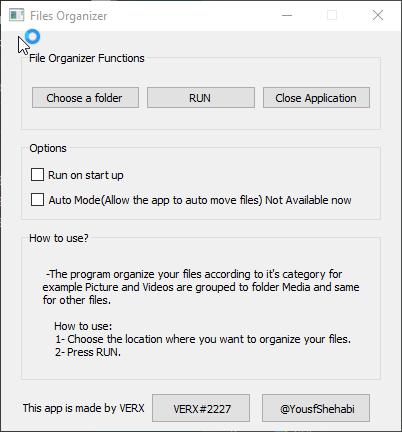
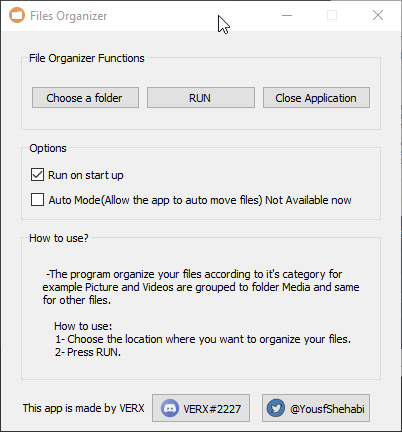
ok what I did is this
but the problem with it
it runs with no icons
@proper glade
 proper glade
how are you specifying the paths to these icons
my best guess atm would be that you need to make sure you're using absolute paths, rather than relative ones. when the script is executed during startup its working directory will likely be something else
so all your relative paths will be resolved in relation to this working directory
instead what you could do is, let's say your app structure is something like this:
resources\
  icon_1.ico
  icon_2.ico
  __init__.py

app\
  main.py
inside resources\__init__.py you could do something like this:
from pathlib import Path

resources = Path(__file__).parent

icon_1 = resources / 'icon_1.ico'
icon_2 = resources / 'icon_2.ico'
then in other areas of your app:
from resources import icon_1, icon_2 # etc
qt also has its own resource management system you could look into https://doc.qt.io/qt-5/resources.html
though imo it's not really necessary when working with python
it's primarily aimed at problems which are harder/more work to solve in c++
earnest solar
This is how I specify icons , # Buttons ICONS self.button_discord.setIcon(QIcon("discord.png")) self.button_twitter.setIcon(QIcon("twitter.png")) self.setWindowIcon(QIcon("window_icon.png"))
Execuse me I am supper newbie finished my first month at programming what I understand from you is to make a module that define my resources then call it where I ever I want. is that what are you trying to teach me ?
you can take a look at my code if you need to, https://hastebin.com/osoludobuc.py
earnest solar
I tried to do what you told me, ```
at resources_init_.py
from pathlib import Path
resources = Path(file).parent
icon_discord = resources / 'icon_discord'
icon_error_blue = resources / 'icon_error_blue'
icon_twitter = resources / 'icon_twitter'
icon_window_icon = resources / 'icon_window_icon' ```
from resources import icon_discord, icon_error_blue, icon_twitter, icon_window_icon

class Window(QWidget):
    def __init__(self):
        QWidget.__init__(self)
        self.main_ui()


    def main_ui(self):
        self.setWindowTitle("Files Organizer")
        self.setWindowIcon(QIcon(icon_window_icon))
self.setFixedSize(400, 400) ```I get this error TypeError: QIcon(): argument 1 has unexpected type 'WindowsPath'
printing one of the icons and I get path of the icon but with no extension C:\Users\VERX\PycharmProjects\Files Organizer\resources\icon_window_icon
tried to convert the windows path to string and still it doesn't work
proper glade
when processes (e.g. python.exe to run a script) are started, they are assigned what is called a 'working directory'. how this working directory is determined depends on context. for example, if you navigate to a specific folder in a terminal, then run an exe, the working directory of the exe's process will be set to that folder, even if the exe itself isn't there.
when dealing with relative paths e.g. images\some_file.png, most programs will usually use the working directory as a base, so images\some_file.png becomes [working directory]\images\some_file.png.
however, when you specify the complete (aka absolute) path, from the drive up, e.g. C:\users\username\documents\images\some_file.png, they will ignore the working directory and check this specific path directly.
when windows starts your python script during startup, it is likely setting the working path of the python process to something other than the directory of the script itself. as a result, your program is looking for those icons in the wrong place, since they are specified using relative paths, which will use the working directory as their base path.
so to this effect, the goal of the resources module is to make sure all resources have an absolute path. this way they wont be based on a potentially changing working directory. instead, they will always be the same.
__file__ is a special python variable whose value is the absolute path of the script which it's in (in this case being that __init__.py). resources = Path(__file__).parent therefore is a Path object referring to the folder the current script (__init__.py) is in, aka the resources folder.
using the resources / [file] syntax creates a new path object pointing to a file inside the resources folder, which you can then import from anywhere, and with the safety of knowing that it'll always point to one path and one path only.
as for argument 1 has unexpected type 'WindowsPath' , qt only takes strings as paths. so you can simply convert the path to a string first e.g. str(icon_path)
and with regard to the lack of extensions, just add them in. if your file is called icon_1.png then the definition for it should be resources / 'icon_1.png'
@earnest solar
earnest solar
First thank you so much for explaining it adds up a lot to me I am really thankful.
I converted the windospath to str the error is gone but still I can't see the icon.
        self.setWindowTitle("Files Organizer")
        icon_path = WindowsPath(str(icon_window_icon) + '.png')
        self.setWindowIcon(QIcon(str(icon_path)))
        print(icon_path)
self.setFixedSize(400, 400) ```I made this to see that if it works.
@proper glade sorry for keeping you busy.
earnest solar
ops
proper glade
looking at your original snippet you had names such as "discord.png" and "twitter.png"
so you'd move these files into the resources directory
then set up their variables like discord_icon = resources / 'discord.png'
also
        icon_path = WindowsPath(str(icon_window_icon) + '.png')
        self.setWindowIcon(QIcon(str(icon_path)))
worked ^^
proper glade
there is some unnecessary work being done here
earnest solar
I was just testing it ^^
copy paste was wrong :d
thank you it works I will test the new shortcut and see how it works
earnest solar
I am really thankful.
yes I did this instead icon_window_icon = resources / 'window_icon.png'
proper glade
right, just make sure you arent doing things like this:
        icon_path = WindowsPath(str(icon_window_icon) + '.png')
        self.setWindowIcon(QIcon(str(icon_path)))
converting a string to a path then back to a string again
no need, just the one conversion will suffice
if you set up the path object correctly first time
proper glade
all good
also as a note, when working with pathlib you don't need to specify WindowsPath
just Path will do. then pathlib will decide which kind of path class to use based on your system
so your code will run correctly on other systems
proper glade
nice, congrats on on your first project :)
earnest solar
thx
 fossil plover
anyone her able to help me with qt designer?
proper glade
what problem are you having with it? @fossil plover
i dont use it personally but might be able to help figure out, or someone who does could see it and chime in
as a rule of thumb, it's better to go ahead and describe your problem instead of asking if anyone's around to help first.
(in this server, at least)
fossil plover
Ah shit forgot to write this down
Ok so
Here's the code https://repl.it/repls/PlainVillainousLightweightprocess

Powerful and simple online compiler, IDE, interpreter, and REPL. Code, compile, and run code in 50+ programming languages: Clojure, Haskell, Kotlin (beta), QBasic, Forth, LOLCODE, BrainF, Emoticon, Bloop, Unlambda, JavaScript, CoffeeScript, Scheme, APL, Lua, Python 2.7, Ruby,...
When this gets run it opens a window where you have to press continue to go to thee next page
The issue is that after you press continue once and reach the second page
You have to tick a consent box before you can continue to the 3rd page
When you tick the consent box and press continue, nothing happens until you press it for the second time
I got some help and it seems the issue is that when you tick the box and press continue, the continue button changes it function to become go to the next page
So only on the second press, when the function actually is for it to continue, does it go to the next page
I'm the code that's on line 25
Now what I think I need to do is make it so that the one continue button has two functions, check if the consent box is ticked and continue to the next page
But I'm not sure how to do that
@proper glade
proper glade
@fossil plover sounds to me like you simply need to check which page youre on in the callback for your continue button
then execute the correct action based on that
im having trouble following the flow of your code, but it seems that there might be a misunderstanding of how signals/slots work
when you connect a new slot to a signal it doesnt automatically disconnect other slots or replace its behaviour
bleak smelt
@fossil plover Out of curiosity, why have you chosen not to use a class with an init method?
@fossil plover Have you tried to separate the if and elif?
def notChecked():
    if window.checkboxConsent.isChecked():
        window.buttonConsent.clicked.connect(nextPage)

    if not window.checkboxConsent.isChecked():
        window.errorConsent.show()
 solid jackal
using tkinter, how would i create a button that sets an entry value to a variable
proper glade
@solid jackal you can set your button's command callback to a function which does this
e.g.
def set_entry_text(entry, text):
  entry.delete(0, tk.END)
  entry.insert(0, text)

variable_containing_text = "here's some text"
entry = Entry(parent, width=123)
button = Button(
  parent,
  text = "Magic Button",
  command=lambda: set_entry_text(entry, variable_containing_text)
)
you could also use a StringVar object to house the text, and pass that as the entry constructor's textvariable param. when you change the StringVar's value using the .set method, the entry will automatically be updated as well.
e.g.
string = StringVar()
entry = Entry(parent, textvariable=string)
string.set("here's some text")
and then for your button's command:
command=lambda: string.set(variable_containing_text)
 stoic sphinx
hi if anyone has experience with GUIs please dm me
sudden coral
Why can't you just ask your question here?
You're far more likely to get a response that way
stoic sphinx
can somebody make me a GUI please?
sudden coral
This is a learning community not a "do stuff for me" community
If you are making one yourself, we can help you with that.
stoic sphinx
I don't know how :(
sudden coral
You can learn!
sudden coral
In what way will it differ from a normal terminal emulator?
stoic sphinx
there will be no title
like cmd and terminal have titles
i just want a complete terminal box and nothing else
sudden coral
Hmm 🤔
I suppose you'd need some terminal widget for whatever GUI framework you choose
I don't have experience with that personally. I did find this with a quick search https://github.com/lxqt/qtermwidget

GitHub
The terminal widget for QTerminal. Contribute to lxqt/qtermwidget development by creating an account on GitHub.
sudden coral
Maybe you can just use the windows API to hide that stuff, if you don't need to be cross platform
 shy jacinth
hey guys some lightweight way to display picture fullscreen?
bleak smelt
@shy jacinth We're going to need a lot more information to help you.
shy jacinth
well I'm looking to make a screenshot tool in python but problem is I can't freeze screen, and since I want an option to select area of screen I need it to freeze for user to have time to make selection of area. Now I was thinking of "freezing" the screen by displaying fullscreen(borderless?) renderer (not sure correct word, canvas?) and showing the image of previously captured screen. I feel like pygame and alike would be too slow for that but I haven't tested yet, just googling and asking around atm before I start testing
 young timber
possibly something like this? https://github.com/harupy/snipping-tool
sudden coral

GitHub
python screenshot. Contribute to ponty/pyscreenshot development by creating an account on GitHub.
young timber
oh that one is much better
shy jacinth
@young timber omg yes, exactly that. @sudden coral Thanks I use that already, but that doesn't solve the issue with "freezing" screen
young timber
👍
 chrome imp
So I'm wanting to make a gui that will have a zoomable map in the middle that you can add lat, long dots onto it then once that is made add additional info about that spot on a pop-up when clicked. After that import all the data into a text file. Anyone have any or know of any examples, I'm pretty noob at python so I'm sorry for a strange question. Would love any help
Also I only have access to what's in anaconda. Would this idea be possible?
alpine blaze
kivy has a mapview widget that has the ability to display such points, with widget you can show when clicking them, here is a quick tutorial about it https://www.youtube.com/watch?v=P940dd1VxsU
In today's video I show you how to add a beautiful map to your kivy app using the MapView widget. It has great performance and is super simple to get set up!👇 LINKS AND INFO! 👇
Consider donating to me if you are able to and appreciate my content: https://www.paypal.me/...
you could totally add some double click interaction or long press or whatever, to create a new point at the position, and put some TextInput in the widget displayed when the point is touched, and save all thepoints on exit, into some json document or whatever 🙂
@chrome imp
i think you can install kivy through conda-forge, but i don't use it so i don't know
chrome imp
I can't use anything not already in anaconda unfortunately cause of my stupid company @alpine blaze
In base anaconda
So I guess it's just pyqt and tkinter from my research
That looks amazing though
chrome imp
I kind of read about kivy. Is it a ton better than pyqt? Maybe I can argue but I don't think kivy is free right?
I couldn't find any good examples using pyqt but I'll search some more. Figured I'd ask here
tribal path
kivy is free licensed under MIT. the qt stuff though afaik is a mix/mess of different licenses, and the various qt libs here are simply wrappers for the underlying (C++?) qt itself, while kivy is wholly python
chrome imp
Hmm ok if it's MIT licensed it might be ok. I'll have to look. Is it possible to install without pip and all that. I can't cause of firewall crap
sudden coral
You can install anything you want without connecting to the internet if you can transfer the files from another disk
chrome imp
so is kivy generally recommended for GUI making on PC over pyqt?
sudden coral
I wouldn't say either is generally recommended over the other
if we set aside the sheer popularity of Qt
chrome imp
gotcha. it seems this mapview widget kivy has would come in handy for what im trying to do . i cant find any map examples using qt
sudden coral
Then you should probably just go for kivy
chrome imp
i know this is a big nub question so i apologize but if i ever finish this and want someone else to use, they will not need kivy right?
earnest solar
I have a question I finished my GUI using pyqt5 I can't make my exe version of it it gives me an error pyinstaller , " your script can't be ... ". anyone could help
This is my project folder structure
in resources >> I have some icons also and config.ini
Debug, [7256] PyInstaller bootloader 3.x
and so many other errors :d
I am using python 3.7
rocky dragon
You'll need to update your pyqt rthook in pyinstaller if you didn't do that for latest pyqt to work
earnest solar
I installed latest pyqt5
it is not what you mean?
@rocky dragon
fixed, the issue is I was using auto-py-to-exe ...
solid jackal
im creating a UI using tkinter grid,
w = tkinter.OptionMenu(respwin, variable, "light blue", "orange", "yellow", "red", "white", "light green")
    entry2 = tkinter.Text(respwin, height=1, width=2)
    w.grid(row=3, column=0)
    entry2.grid(row=3, column=1)
w is the option bar, and entry 2 is the small box, shouldnt they be next to each other?
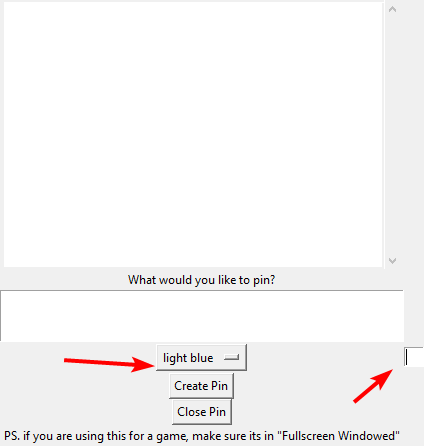
since the columns are only 1 apart?


