#user-interfaces
1 messages · Page 40 of 1
 lyric cave
 kind kraken
my instinct would be to just print whenever something changes (like, when worker 3 finishes print "worker 3 finished" once) instead of trying to make a live updating positional display
but i don't know if your worker library can do that
lyric cave
Ah, one of the polish points for this is that it can manage to show the status of each worker in order.
just printing them as they finish/fail is a step backwards
kind kraken
huh, personally i think "what order things happened in" is more meaningful than "the order in the list of workers" but i guess it's not my assignment
lyric cave
okie, I shall await any other suggestions :D
kind kraken
anyway, if you're printing all ten of them every time through the loop, the move_up*position ends up doing more printing than necessary
lyric cave
I'm not, the loop is over active_workers
kind kraken
and printing them with regular line breaks at the end avoids the need to flush stdout
wait, does that remove workers when they're finished or an error? then how do you print those
lyric cave
yep. There is a check for finished workers which are removed from the active workers list and have their status printed for the last time; just... elided that.
kind kraken
hmm idk then
lyric cave
okie, I shall await any other suggestions :D
 polar stratus
Any nice UI design modules?
 digital rose
Are there any other visual strong libraries in python besides tkinter, Because tkinter is Nice I suppose But Really... visually atractive... maybe also a more flexable one?
 thorny spruce
Pyside 2 is an option
 craggy talon
yo
someone help plsss
import tkinter as tk
import requests
from tkinter import font

root = tk.Tk()


root.title('GradeHelper')
root.geometry('1920x1080')
# root.iconbitmap('sun_icon.ico')

canvas = tk.Canvas(root, height=1920, width=1080)
canvas.pack()


def start_menu():
    label['text'] = 'Welcome to GradeHelper'
    label['font'] = ('Eina02-Bold', 50)
    label.place(relwidth=1, relheight=1)
    button['text'] = 'Start learning.'
    button.place(relx=0.7, relheight=1, relwidth=0.3)


frame = tk.Frame(root, bg='#99ccff', bd=5)
frame.place(relwidth=1, relheight=1)

mainframe = tk.Frame(root, bg='white', bd=5)
mainframe.place(relwidth=0.9, relheight=0.8, relx=0.5,rely=0.1, anchor='n')


entry = tk.Entry(mainframe, font=('Eina02-Bold',20), bd=2)
#entry.place(relwidth=0.65, relheight=1)

button = tk.Button(mainframe, bd=3, font=('Eina02-Bold',16))
# button.place(relx=0.7, relheight=1, relwidth=0.3)

# lower_frame = tk.Frame(root, bg='#99ccff', bd=15)
# lower_frame.place(relx=0.5, rely=0.25, relwidth=0.75, relheight=0.6, anchor='n')

label = tk.Label(mainframe, font=('Eina02-Bold',20), justify='center')
start_menu()

# """

root.mainloop()
howcome my button doesnt show up
 grim bronze
I'd like to know something : is it possible to create a single (custom) tkinter canvas item ? Say I want to extend the Canvas class with a "create_bezier" method, would it be possible to group all the lines making that bezier curve into a single object id ?
haven't found anything in the docs
I suppose I'd have to create tags for that
but I wonder if there is a better way
@craggy talon it's because although you can read from the global scope at any time, you can't write without the global keyword. But that is a terrible way to design a GUI with tkinter, as it's something that greatly benefits from OOP
craggy talon
whats a better way you suggest? @grim bronze
grim bronze
import tkinter as tk


class MainWindow(tk.Frame):
    def __init__(master=None):
        super().__init__(master)
        self.canvas = tk.Canvas(self, height=1920, width=1080)  # use self.master.winfo_height or self.master.winfo_width to adapt to different
                                                             # screen resolutions
        self.button = tk.Button(self, bd=3, font=('Eina02-Bold',16), text="Start Learning")
        self.label = tk.Label(self, text="Welcome to GradeHelper", font=('Eina02-Bold', 50), justify="center")
        self.entry = = tk.Entry(mainframe, font=('Eina02-Bold',20), bd=2)

        self.label.grid(row=0, column=0)
        self.button.grid(row=0, column=1)
        self.entry.grid(row=0, column=2
        self.canvas.grid(row=1, column=0, columnspan=3, sticky="nswe")


if __name__ == '__main__':
    root = tk.Tk()
    root.title('GradeHelper')
    root.geometry('1920x1080')
    gui = MainWindow(root)
    gui.grid(sticky="nswe")
    root.mainloop()
 loud sapphire
Hello dear Kivy specialists!
I have an issue with the ScreenManager. It just doesn't swap screens, no errors or anything.
Setup:
class RadioPlayButtonScreen(Screen):
    pass

class RadioStopButtonScreen(Screen):
    pass

class ScreenManagement(ScreenManager):
    pass
.kv
ScreenManagement:
                transition: FadeTransition()
                RadioPlayButtonScreen:
                RadioStopButtonScreen:

<ScreenManagement>:

<RadioPlayButtonScreen>:
    name: 'RPBtn'
    Button:
        text: 'Play'
        on_press: app.Radio.radio_play()
        on_release: app.root.current = 'RSBtn'

<RadioStopButtonScreen>:
    name: 'RSBtn'
    Button:
        text: 'Stop'
        on_press: app.Radio.radio_stop()
        on_release: app.root.current = 'RPBtn'
What am I doing wrong?
I must note that this screenmanagement is inside a floatlayout.
 sharp tide
I need some help with a very small tkinter project
please @ or dm me if you're familiar with tkinter and I will send my code
thank you.
digital rose
@loud sapphire so your app.root is not screenmanagement, right? Maybe it is FloatLayout etc.
I mean maybe you need something like screenmanagement.current : 'RPBtn'
loud sapphire
hmm.. so I'd have to refer to ScreenManagement via id?
I get this then:
AttributeError: 'super' object has no attribute '__getattr__'
@loud sapphire
You cannot access the ID defined in the widget tree while inside a specific rule.
You can specify these relations directly in the tree:
ScreenManagement:
                id: sm
                transition: FadeTransition()
                RadioPlayButtonScreen:
                    on_release: sm.current = 'RSBtn'
                RadioStopButtonScreen:
                    on_release: sm.current = 'RPBtn'
something like this
loud sapphire
Damn, I was hoping to keep the RadioScreen part as one separate component.
Actually I don
t think it helped
digital rose
although I seem to be confused, wait a second.
you can do something like this
from kivy.app import App
from kivy.lang import Builder

KV = """
FloatLayout
    MyLabel
        text: '123456'

<MyLabel@Label>
    on_touch_down: print(app.root)
"""

class MyApp(App):
    def build(self):
        self.root = Builder.load_string(KV)

MyApp().run()
So on release should work too
@loud sapphire something like this should work
from kivy.app import App
from kivy.lang import Builder

KV = """
FloatLayout
    ScreenManager
        id: sm
        Screen1
            text: 'screen1'
        Screen2
            text: 'screen2'

<Screen1@Screen>
    text: ''
    name: '1'
    on_touch_down: app.root.ids['sm'].current = '2'
    Label
        text: root.text

<Screen2@Screen>
    text: ''
    name: '2'
    on_touch_down: app.root.ids['sm'].current = '1'
    Label
        text: root.text


"""

class MyApp(App):
    def build(self):
        self.root = Builder.load_string(KV)

MyApp().run()
AttributeError: 'super' object has no attribute '__getattr__'
Still run into this. I remember it being something that the class is not instanciated yet?
digital rose
@loud sapphire could you give more error info?
loud sapphire
 digital rose
could you change MyApp to something like this
class MyApp(App):

    def build(self):
        self.root = Builder.load_file('My.kv')
or
class MyApp(App):

    def build(self):
        return Builder.load_file('My.kv')
where My.kv is your kv file
This works for me in this case
tho I'm not good at loading kv files (I just load kv strings)
@loud sapphire
loud sapphire
Thats what I do already.
Thats a really odd error
digital rose
from kivy.app import App
from kivy.lang import Builder

from kivy.uix.screenmanager import ScreenManager, Screen

class Screen1(Screen):
    pass
class Screen2(Screen):
    pass


class MyApp(App):

    def build(self):
        return Builder.load_file('My.kv')

MyApp().run()
My.kv:
FloatLayout
    ScreenManager
        id: sm
        Screen1
            text: 'screen1'
        Screen2
            text: 'screen2'

<Screen1>
    text: ''
    name: '1'
    on_touch_down: app.root.ids.sm.current = '2'

    Label
        text: root.text

<Screen2>
    text: ''
    name: '2'
    on_touch_down: app.root.ids.sm.current = '1'

    Label
        text: root.text
this is working code (although you can check it out)
just try to compare it with your one.
it would be very simple if you removed all the "excess" from your code that does not affect the presence of an error.
I always do that 🙂
loud sapphire
Aghhh
It closes immediately without errors if I move it into a structure like yours.
I removed the clutter
FloatLayout
    ScreenManager
        id: sm
        Screen1
            text: 'screen1'
        Screen2
            text: 'screen2
Can't I have this part like this instead?
FloatLayout:

<FloatLayout>:
    ScreenManager
        id: sm
        Screen1
            text: 'screen1'
        Screen2
            text: 'screen2
And in any case, if my own set-up doesn't work, how come it doesn't error?
It just doesn't swap the screen
digital rose
FloatLayout:
<FloatLayout>:
this won't work
you can do something like
MyFloatLayout

<MyFloatLayout@FloatLayout>
    ScreenManager
        id: sm
        Screen1
            text: 'screen1'
        Screen2
            text: 'screen2'
or
MyFloatLayout

<MyFloatLayout>
    ScreenManager
        id: sm
        Screen1
            text: 'screen1'
        Screen2
            text: 'screen2'
in py define new widget class:
class MyFloatLayout(FloatLayout):
    ....
Ah, yes, thats what I did. I called it RadioLayout. Just used the example code for the question.
digital rose
you can show the code, preferably minimal (where the error occurs)
 latent gazelle
hey guys any idea how could i connect something like this :
arrayResults[1] = test1()

button_RTC = tk.Button(mainWindow, text="RTC Test", font=40,bg='#928987',  command=test1)
button_RTC.place(relx=0, rely=0.65, relwidth=0.1, relheight=0.05)
how can i connect the arrayResult to a button?
loud sapphire
Thanks for helping last week me2beats! I had to rush into the week, was too busy to get back to my project
 still nacelle
``
import tkinter as tk
root = tk.Tk()
def open_window():
top = tk.Toplevel(root)
sleep_for is just a function I made for the timer
root.after(sleep_for, open_window)
root.withdraw()
root.after(sleep_for, root.deiconify())
root.mainloop()
``
Whenever I withdraw my root, it will keep a blank window open until after the timer ends. When I deiconify(), it replaces the blank window with the original one I had. The top will open as intended to though. How do I make it so the blank window never appears in the time between when I set my top to open. Please tell me if you need any more info to answer the question.
 twilit plinth
Is this the place to ask for help for PyQt?
I'm having trouble understanding how to use isSignalConnected() method which accepts a QMetaMethod as a parameter. I need to detect if a signal is connected to one of my QObjects before disconnecting the signal. (I can disconnect the signal fine, just need help with isSignalConnected() usage).
 sudden coral
@twilit plinth Well in c++ you'd get it with QMetaMethod::fromSignal but that doesn't seem to exist in python
It looks like a pain in the ass in python
You can use QObject.metaObject() to get a QMetaObject
Then use QMetaObject.indexOfSignal("signalname") to get an index
then QMetaObject.method(index) to finally get a QMetaMethod
Have not tried any of this. Just did some digging with the docs
 proper glade
https://github.com/PyQt5/PyQt/blob/master/Demo/IsSignalConnected.py#L40 this is how you do it with pyqt apparently
oh that's doing the same thing mark said anyway
twilit plinth
@sudden coral @proper glade thank you both. Works perfect
twilit plinth
@sudden coral @proper glade I spook too soon. I keep getting an index of -1.
sorry trying to fix formatting
sudden coral
Don't think the parenthesis are meant to be part of the signal name
sudden coral
The meta object has a way to get all methods iirc
twilit plinth
sudden coral
You should iterate them and see what the signal is supposed to be called
twilit plinth
ok
sudden coral
Good luck with it. I'm going to bed so I won't be around to respond until morning
Maybe meta or someone else can meanwhile
twilit plinth
np, thanks for the help! will give it a shot
proper glade
@twilit plinth you have to be a bit more specific with the signature
so currentChanged(int) rather than just currentChanged()
twilit plinth
Ok, it's working for the layoutChanged portion. I don't understand what the int is for though. I thought currentChanged() was emitted whenever the current tab was changed.
twilit plinth
Oh I see
proper glade
https://doc.qt.io/qt-5/qabstractitemmodel.html#layoutChanged im not sure how you're supposed to normalize this signature
but it's working right?
twilit plinth
yes. it gave me a positive integer for the layoutChanged index and it appears to be working properly.
but always -1 for currentChanged
proper glade
did you change it to currentChanged(int)
i.e. .indexOfMethod("currentChanged(int)")
twilit plinth
ohhh
yes
i think it's going to work because my first print statement gave me 32
instead of -1
ok working fine now
thanks!
proper glade
import PyQt5.Qt as qt

signature_cache = dict()


def method_signatures(q_object: qt.QObject):
    try:
        return signature_cache[type(q_object)]
    except KeyError:
        meta_object = q_object.metaObject()

        methods = (
            meta_object.method(i) for i in range(
                meta_object.methodCount()
            )
        )

        signatures = {
            method.name().data().decode():
            method.methodSignature().data().decode()
            for method in methods
        }

        signature_cache[type(q_object)] = signatures
        return signatures
here's a helper function you can use to get signatures quickly @twilit plinth
returns a dict of name: signature
>>> pprint(method_signatures(qt.QWidget()))
{'_q_reregisterTimers': '_q_reregisterTimers(void*)',
 '_q_showIfNotHidden': '_q_showIfNotHidden()',
 'close': 'close()',
 'customContextMenuRequested': 'customContextMenuRequested(QPoint)',
 'deleteLater': 'deleteLater()',
 'destroyed': 'destroyed()',
 'grab': 'grab()',
 'hide': 'hide()',
 'lower': 'lower()',
 'objectNameChanged': 'objectNameChanged(QString)',
 'raise': 'raise()',
 'repaint': 'repaint()',
 'setDisabled': 'setDisabled(bool)',
 'setEnabled': 'setEnabled(bool)',
 'setFocus': 'setFocus()',
 'setHidden': 'setHidden(bool)',
 'setStyleSheet': 'setStyleSheet(QString)',
 'setVisible': 'setVisible(bool)',
 'setWindowModified': 'setWindowModified(bool)',
 'setWindowTitle': 'setWindowTitle(QString)',
 'show': 'show()',
 'showFullScreen': 'showFullScreen()',
 'showMaximized': 'showMaximized()',
 'showMinimized': 'showMinimized()',
 'showNormal': 'showNormal()',
 'update': 'update()',
 'updateMicroFocus': 'updateMicroFocus()',
 'windowIconChanged': 'windowIconChanged(QIcon)',
 'windowIconTextChanged': 'windowIconTextChanged(QString)',
 'windowTitleChanged': 'windowTitleChanged(QString)'}
>>>
@proper glade awesome thanks
 stone hatch
How TF do i get a widget's grid info/data in tkinter? I specifically need to know the padx and pady of a widget...
 round stag
You can set StringVar, IntVar etc and use the get method with the widget their in with the name of the Var to retrieve it
StringVars/IntVars for the values within .grid
stone hatch
I didn't know you could use StringVar/IntVars in grid, thx
Problem is what I'm trying to do is loop through all objects that don't have padx/pady set in .grid and set it to 5 and I don't think making 2 new IntVars for every single widget is a nice solution here :/
I can already loop through all my widgets, that's easy but I need to check their padx/pady which currently sounds like a nightmare
round stag
You can always set a load of IntVars in an array
There’s probably an easier way to do it though. Just using regular vars in a class for example
round stag
Not seen that one
stone hatch
Lemme double check...
round stag
You can always do ALT+M in the regular Python IDE, type in Tkinter and look through the grid code
round stag
Is there a built in method in Tkinter for resizing a widget using the mouse when the program is running?
I’ve tried searching but I can only find mouse down events and mouse co ordinates which would be painful with the grid manager.
@stone hatch, I read up on the grid info method and I think this should work.
info = widget.grid_info()
padx = info[“padx”]
pady = info[“pady”]
twilit plinth
In PyQt, I'm trying to impletement a QSortFilterProxyModel in my model/view so that I can do some custom sorting. However, when I switch my view to this proxy model then it seems like emitting a layoutChanged signal no longer has any effect. I have a proxy model and used setSourceModel() to my TableModel. I set the view's model to the proxy model. I call the layoutChanged signal on my TableView.model().
twilit plinth
Here is my simplified code: https://hastebin.com/ofimuzapid
I also read in some forum that it's better design to have the model determine when it needs to layoutChanged. Would you do this by checking say the length of my data_list in either the Model.data() or Model.rowsCount() overriden methods? It seems like that would be worse since it does the check repeatedly. Rather then if I put layoutChanged in my add_task() method like I currently have it, it only "worries" about sending the layoutChanged signal when I add to my data (so only when it needs to).
sudden coral
It's definitely supposed to relay signal to the original model
How did you determine that signal isn't being emitted
twilit plinth
I discovered the proxy model emits a dataChanged signal for you. so if I have an item in my table, and I add a new item, the current row will update with the new item's data (so datachanged signal I assume). It isn't until I reload the program (I reload the file where this data is serialized) and the view then shows both items instead of just one.
I hope I worded that okay. I can explain better if you don't know what I mean.
I should mention that I actually don't append to the data list. I insert at index 0.
sudden coral
I personally haven't messed with this much but I remember doing some "hack" to force a view to update.
Since you're subclassing have you followed the guidelines here https://doc.qt.io/qt-5/qabstractitemmodel.html#layoutChanged
Well you did say it works without a proxy
twilit plinth
yes. I did not follow that guideline you linked, though. I could try that even though it worked before.
sudden coral
If you try to connect to the layoutchanged signal can you observe that your test slot does not trigger
Both connecting to the proxy and directly to the source model
twilit plinth
yes it connects to both
sudden coral
Then the view needs something besides that signal to update?
twilit plinth
I'm not sure. There is another problem that might be related. If I enable sorting (self.setSortingEnabled(True)) then I get an attribute error in my proxy model when I override lessThan() https://hastebin.com/sakoyujebe.rb
sudden coral
Have you looked at the left index in such case?
Does it make sense given the current state of the model?
I imagine it's returning none cause it can't find anything at that index
twilit plinth
yeah, it's returning none
I didn't put parents as arguments for any of these models because I thought when I use functions such as setModel() it will set the parent. I can try doing that.
Tried it and get the same behavior.
sudden coral
Sorry, I'm not sure what is wrong
twilit plinth
Np, I'll take a closer look at what's going on in the rest of my code.
twilit plinth
Well I "fixed" my problem but I'm not sure if it's correct to do. I just called the signal to my task_item_model rather than self.model(). So I skip the proxy model when calling the layoutChanged signal.
I fixed the other problem (sorting) by passing Qt.DisplayRole to sourceModel().data()
 def lessThan(self, left_: QModelIndex, right_: QModelIndex) -> bool:
        left_data = self.sourceModel().data(left_, Qt.DisplayRole)
        right_data = self.sourceModel().data(right_, Qt.DisplayRole)
oh teh second problem was something else really stupid of me. Since I was following example I forgot to use python syntax for type() and str() lol
 gray warren
 autumn badge
Check youtube @gray warren
round stag
I literally just worked my way through some Tkinter examples in Stack Overflow but YouTube tutorials are definitely a better idea
round stag
I am trying to get change the Text widgets unfocused selected texts colour however I am getting an error stating that “inactiveselectforeground” is an unknown option.
However, it is documented that it is an option along with “inactiveselectbackground”, “selectbackground” and “selectforeground” which all work.
Here’s some code - on mobile so no text formatting sorry
from tkinter import *
root=Tk()
Text(root, inactiveselectforeground=“red”, inactiveselectbackground=“blue”)
root.mainloop()
twilit plinth
Ok, I'm still having trouble. I can't call the layoutChanged signal directly to my model (by bypassing the proxy model) because I then get segmentation faults. I tried a bunch of things, and thought the problem might lie in some other parts of my code. So then I wrote a simple quick program with the same model/view + proxy model structure and I'm having the same issue. Emitting layoutChanged on the proxy model doesn't appear to get to the model, and therefore the view isnt' updated. Here is my basic test program: https://paste.pythondiscord.com/ogifekasim.py
Actually the behavior is better shown by changing line 33 to insert at index 0 instead of append: https://paste.pythondiscord.com/upekahaloy.py
 proven basinBOT
@twilit plinth, it looks like you tried to attach a file type we don't allow. Feel free to ask in #community-meta if you think this is a mistake.
twilit plinth
Here is my requirements.txt:
packaging==19.2
pip-review==1.0
pyparsing==2.4.5
PyQt5==5.13.2
PyQt5-sip==12.7.0
six==1.13.0
@twilit plinth https://doc.qt.io/qt-5/qabstractitemmodel.html#layoutChanged
there's a bunch of other stuff that needs to happen before emitting layoutChanged
could be that?
 vernal minnow
can a tkinter cascade menu appear when hovering, rather than requiring it to be clicked? like how cascades usually work
twilit plinth
@proper glade I have tried emitting the layoutAboutToBeChanged signal first which did not solve the behavior. I'm not sure I understand how to use changePersistantIndex(). I tried it by putting in row/column indexes but I'm not quite sure I understand it.
There is this example: https://github.com/baoboa/pyqt5/blob/master/examples/itemviews/customsortfiltermodel.py but it doesn't use an internal data structure. It just adds items "manually" inserting rows.
proper glade
i dont know enough to help with this, unfortunately
personally i avoid qt's convoluted model stuff and write my own easier to understand pythonic ones
as for your errors
are you sure what you're getting is a segfault?
if youre running the program inside pycharm make sure 'emulate terminal in output console' is checked in the project run config
both pycharm and qt do some weird stuff to stdout/stderr so you might not always see error output without this option enabled
 weak rivet
How do I get an image to display on a tkinter canvas with a transparent background?
 glossy hazel
Does your image have a transparent background?
weak rivet
nvm I sorted it
 scarlet mountain
from tkinter import *
def    change():
    var.set(var.get()+1)
    root.after(1000, change)
root = Tk()
var = DoubleVar()
var.set(0)
t1 = Label(root, text=var.get())
t1.pack()

root.after(1000, change)
mainloop()
Hey, im trying to learn tkinter and dont understand why my label wont change
stone hatch
t1 = Label(root, textvariable=var)
Or something like dat, cant remember exactly and not at pc
But idk if that works with a DoubkeVar :/
round stag
If you use classes you can just use the following.
def change():
self.t1.config(text=self.t1text+1)
self.t1text = 0
self.t1 = Label(...)
scarlet mountain
Thanks i will try it. I thought DoubleVar can change the text label automatically
weak rivet
def draw_ladders(self):
    self.squares = {}
    odd_ten_list = [[int(str(i) + str(n)) + 1, -1] for i in [(2 * n - 1) for n in range(1, 6)] for n in range(10)]
    even_ten_list = [[i, 1] for i in range(1, 101) if [i, -1] not in odd_ten_list]
    odd_ten_list = [odd_ten_list[i:i + 10] for i in range(0, len(odd_ten_list), 10)]
    even_ten_list = [even_ten_list[i:i + 10] for i in range(0, len(even_ten_list), 10)]
    big_list = []
    for i in range(10):
        if i % 2 == 0:
            big_list.append(even_ten_list.pop(0))
        else:
            big_list.append(odd_ten_list.pop(0))
    start_x = 30
    for row_num, row in enumerate(big_list):
        for number in row:
            y_coord = 570 - (row_num * 60)
            x_coord = start_x
            if number[0] % 10 != 0:
                start_x += 60 * number[1]
            self.squares[number[0]] = [x_coord, y_coord]
    ladders = []
    for i in range(5):
        start = random.randint(2, 80)
        end = random.randint(start+10, 99)
        self.ladders.append([start, end])
        med = [(self.squares[start][0]+self.squares[end][0])/2, (self.squares[start][1]+self.squares[end][1])/2]
        ladder_image = Image.open("clipart-ladder-1.png")
        self.canvas.create_image(med, image=ImageTk.PhotoImage(ladder_image))
for some reason the ladders won'r appear
won't*
        for i in range(5):
            start = random.randint(2, 80)
            end = random.randint(start+10, 99)
            self.ladders.append([start, end])
            med = [(self.squares[start][0]+self.squares[end][0])/2, (self.squares[start][1]+self.squares[end][1])/2]
            ladder_image = Image.open("clipart-ladder-1.png")
            self.canvas.create_image(med, image=ImageTk.PhotoImage(ladder_image))
it's just that bit that doesnt work
twilit plinth
@sudden coral @proper glade I finally figured out the solution to my problem with the proxy model in PyQt. I needed to call beginInsertRows() and endInsertRows() on the QAbstractTableModel before and after I add to my data list. I then needed to call invalidateFilter() on my QTableView.model() (which is set up with a proxy model). No layoutChanged calls involved.
 white echo
is there any drag and drop gui idle for python?
white echo
is it necessary to install visual studio for pyQt5?
I tried by pip install pyQt5 method it work for default IDLE but not for pyCharm...
I want to use pyQt5 in pyCharm
 autumn reef
It is not, it is asking for the C++ build tool, not the entirety of visual studio
white echo
there is already install some visual studio c++ tool is it not enough for that? 🧐
autumn reef
It is never enough, different cpp version requires different build tool version xd
white echo
hmm...thank you
 full harbor
Hello guys
I'm a beginner I'd like to create a Phonebook app using GUI any recommendation?
 fast wave
hi. i want to show my script directory in a treeview in pyqt. i wrote this code but it shows the root dir of OS.
def FilesTreeview(self):
        path = os.path.dirname(os.path.realpath(__file__))
        self.model = QFileSystemModel()
        self.model.setRootPath(path)
        self.ui.treeView.setModel(self.model)

        self.ui.treeView.setAnimated(False)
        self.ui.treeView.setIndentation(20)
        self.ui.treeView.setSortingEnabled(True)
 silver monolith
 pulsar bough
hi
 past palm
good evening developers
i have a question regarding colored output to console
i have been using colorama to color the output to console but it's kinda pain in the ass
i have found blessings and termcolor
what are your opinions on colorama and these options?
any help is appreciated
also, please ping me i have this channel hidden
past palm
just tried termcolor, pretty easy to use
it works like this:
from termcolor import colored
print(colored('saki', 'color'))
 stray moss
is there any method for setting QSpinBox values from an array in PyQt5
similar to how you can pass a tuple of values in tkinter's spinbox widget
sudden coral
No. It's designed to increment or decrement a range of integers
You could use like a bidict to map integers to the actual values you want displayed and then override the to and from text methods
That's a bit hacky though
proper glade
it's doable fairly easily. QSpinBox has a stepBy method you can override.
https://stackoverflow.com/questions/20289468/set-specific-values-in-a-qspinbox
@stray moss
https://paste.pythondiscord.com/ugovagisib.py threw together a python port
proper glade
only when the buttons are clicked?
stray moss
yeah
proper glade
or would you be ok with the procedure being executed if incremented/decremented using mouse wheel?
proper glade
yes
stray moss
damn
proper glade
in any case, you can use stepBy if you're okay with it being called when the mousewheel is used too
stepBy gets called for every increment/decrement
 remote ravine
anyone knows some good sources for gtk3 + python
i know for the original site but some up to date videos or other websites would come in handy
autumn badge
Anyone here know much about Kivy? Is there an improvement in speed or something else by using the kv language vs doing everything in python?
 river flint
I just started using Tkinter and I only see ways to create GUI by first creating a canvas, but how do I create something on my screen without having to create a visible frame behind it
 tranquil cargo
@river flint woah I started tkinter too
I think you put a frame on it
Like a have a master class and then have an initialising function for the master frame
digital rose
@autumn badge there is no improvement in speed when using kv lang, but it is more convenient in most cases.
You clearly see the structure of the widgets (widget tree). you can use ids
there are also convenient simplifications for binds
Convenience can be very important when creating large applications.
weak rivet
How do you put multiple of the same image onto a tkinter canvas with PIL
this works:
        for i in range(5):
            start = random.randint(2, 80)
            end = random.randint(start+10, 99)
            self.ladders.append([start, end])
        self.ladder = Image.open("ladder_pa-1.png").resize((45, 30))
        self.laddertk = ImageTk.PhotoImage(self.ladder)
        self.canvas.create_image(210, 200, image=self.laddertk)
to put on 1 image
but as soon as I indent the last 3 lines, nothing appears
not even the first one
autumn badge
@digital rose Thanks. I will have to dig more into it
I have an app where a lot of labels and items will be generated from data in a json file
 slender burrow
What ui library would you recommend for creating something like this? How feasible would it be to use something like Kivy?
digital rose
@autumn badge Well then adding these widgets from python makes more sense, I think, as it can give you more flexibility
@slender burrow it is 100% possible to do using kivy.
Although I have not tried it yet (create a game), so I can’t name the main difficulties.
First of all you need to find game assets I think)
autumn badge
@digital rose Thanks. Looking at how Kivy scrolls on windows and Mac, I dont know if that will be the best interface for my customers. I think this time I will have to try something else
digital rose
@autumn badge is something wrong with scroll?
autumn badge
the click/drag doesnt work well with the app i am making. The scroll bar option is not the right implementation fit for my app. I am going to be working with people who are very Windows heavy users and will want more native UI features. I was hoping to use kivy so i could implement the desktop app easily into mobile so they could use the app while on the go (my customers are sales people so being able to use certain apps for their job while out at a location would be super nice)
digital rose
I understand you. Yes, it may take some time to create more native widgets.
autumn badge
I am working on writing the app in flask, having writen a few apps in QT, tkinter and pysimplegui.
So far, I havent found a UI that i want to stick with
 rocky dragon
were the libs you used lacking in how they look or ease of writing/understanding it?
slender burrow
@digital rose I've got the assets, I just need to find the right library to help me use them!
autumn badge
lacking int he functionality for windows and mouse using
 daring holly
has anyone here got any recommendations for a scientific GUI for plotting a lot of realtime data/configurations with python?
digital rose
hello Im trying to get selenium with python to swtich browsers tabs as I was able to get it to create a new tab and go to it but I can not get the program to actually go to the next tab and run code there. Any help?
daring holly
omg hi @proper glade
proper glade
sup
 sleek cradle
is zerorpc the best way to use electron with python?
 wispy oar
With PyQt5, what is the standard code structure when __name__ == "__main__"?
Without it, I usually just call main(), but I've seen in other projects that this isn't used for PyQt5
For example, I previously used
    import sys
    app = QtWidgets.QApplication(sys.argv)
    mwindow_agenda = AgendaWindow()
    mwindow_agenda.show()
    sys.exit(app.exec_())
Yeah that is basically what I use
wispy oar
So how would it work if I'm converting from a non-OOP program to an OOP program? I have a main() function and stuff
sudden coral
You could still move it to a function and then call that from inside the if statement
sudden coral
Like I said, you can put that code in main instead
wispy oar
And just put all the stuff I mentioned above in the main() function, before all the functions are called?
sudden coral
it doesn't matter really, it's just a more stylistic difference
wispy oar
Ah okay
sudden coral
In fact, it's probably better for it to be in a function because that way any variables you need are scoped locally to a function instead of the whole module
wispy oar
Would you say there's anything wrong with this structure (outside of the line lengths which got messed up from indentations)? https://paste.pythondiscord.com/ohosinosoq.py
I'm just trying to go through the process of connecting my current code to the GUI
wispy oar
Yeah I think that's one issue I'm having, because I want to set some labels to have initial values after being calculated in a function
I was using setText() and nothing was happening, so I'll try moving that line to the bottom of main()
 mighty frigate
app.exec_ will keep the hand until the ui shut
and right after sys exit with the error code of the ui
wispy oar
So I'm having issues with calling the functions from inside the class
wispy oar
Doing the latter would just mean
mighty frigate
or subclass Application and handling your data there
wispy oar
Putting the rest of the stuff after sys.exit() into __init__ right?
mighty frigate
main is a non problem to me
yes
conceptually it's not great
but it works
Qt is messing with mvc anyway
wispy oar
Okay thank you, I've got it working (somewhat) now
wispy oar
I have this TypeError which I don't really understand
        # Predicts future sales of a given beer in a given month.
        self.btn_predict.clicked.connect(self.predict_sales(
            data_frame, beers, red_helles_growth,
pilsner_growth, dunkel_growth))```Exception has occurred: TypeError argument 1 has unexpected type 'int'
I don't know why it's erroring since I updated it to work with my UI
sudden coral
when connection you need to give it a function
wispy oar
The only things I've changed for that are getting the user inputs from UI forms instead of manual terminal inputs, and then adding the connection
sudden coral
what you did was call the function
so really you are passing the return value of the function to connect(), rather than the function itself
What you may want is a lambda?
 brave whale
hello gentlemen
sudden coral
like connect(lambda: self.predict_sales(....))
wispy oar
Yeah that works, how does the lambda change the flow of the code?
sudden coral
Like I said, connect() expects a function to be given
Using a lambda here is equivalent to the following
def predict_clicked():
    self.predict_sales(data_frame, ...)

# Notice it's predict_clicked and NOT predict_clicked()
self.btn_predict.clicked.connect(predict_clicked)
I find it 50x easier to explain stuff like this over the phone or voice chat here
sudden coral
Yeah maybe but I don't imagine many want to voice chat
brave whale
chickens :b
wispy oar
Oh okay, thank you, that makes more sense
wispy oar
Is there any downside of using a grid layout and then doing this rather than using a form layout?
sudden coral
It's mainly for convenience but you can read about some of the differences here https://doc.qt.io/qt-5/qformlayout.html#details
wispy oar
Okay thank you
 bleak gazelle
Hello there. I have a question about Pyqt5. How can I add new items (QListWidgeItem) to QListWidget and not removing previous items?
sudden coral
QListWidget.addItem()
bleak gazelle
@sudden coral well, maybe my code is broken:
FancyListWidget and FancyItemWidget are slightly modifed QListWidget and QListWidgetItem
        fancyList = FancyListWidget(self)
        fancyList.setAlternatingRowColors(True)
        if not fancyList.isVisible():
            self._grid.addWidget(fancyList, 0, 0)

        # Replace by for file in DataModels.items(sort=...)
        for file in files:
            fancyItem = FancyItemWidget(self)
            fancyItem.setTitle(file)
            fancyItem.setDescription(file)
            fancyItem.setIcon("empty_box.png", 32, 32)

            itemWidget = QListWidgetItem()
            itemWidget.setSizeHint(fancyItem.sizeHint())

            fancyList.addItem(itemWidget)
            fancyList.setItemWidget(itemWidget, fancyItem)
files is list with strings (['file1', 'file2'])
mighty frigate
what's the problem here
mighty frigate
so
as you can see here : https://doc.qt.io/qt-5/qlistwidget.html#setItemWidget
setItemWidget takes an item and a widget as params
you're providing 2 items I believe
(you said FancyItemWidget was a QListWidgetItem)
(which isn't a QWidget)
bleak gazelle
bleak gazelle
I lol'd
mighty frigate
looks alright to me, maybe you broke something when overriding some things ?
bleak gazelle
Hm. Maybe.
mighty frigate
you said when you add things, it override the previous ones
bleak gazelle
Yeah
mighty frigate
we're talking like, graphically or with a debugger you see the items being overidden
mighty frigate
you sure you're not creating another listview or something ?
bleak gazelle
In Apps/CloudyFF -> _buildTable
mighty frigate
so when you're adding something, you open a dialog box and you retrieve something
and then, you ask for a view update
bleak gazelle
Yep
mighty frigate
but the very first thing you do is removing every widgets and creating another listview
mighty frigate
to me, the clearwidget will delete every widgets and their children
and that's why the items are dropped
bleak gazelle
No, still overrides
mighty frigate
try this
put a breakpoint before and after the openfile
and check the addr of the listview, I think the python for this is id (not sure tho)
if the addr isn't the same before and after, the listview is deleted somewhere
or at least replaced by another one
to me, you're creating another (empty) listview each time the buildtable func is called
twilit plinth
Another pyqt question: I am using a table view/model. I have a slot that gets executed that enables a button whenever I have one row selected in my table (but not more or less). The problem is the "less" part, as when white space is clicked in the table, there is still an index that is considered selected. I would preferably like the index to be completely deselected but at least be able to tell when a row is not selected.
The table is currently is: setSelectionBehavior(QTableWidget.SelectRows), setSelectionMode(QTableWidget.ExtendedSelection)
I am currently using QTableView.selectedIndexes() to get indexes, then adding the indexes' row to a list to only get how many rows are selected.
ohh I think my problem is that the signal "clicked" doesn't get emitted when whitespace is clicked.
twilit plinth
I found the solution: Instead of using QTableView's "clicked" signal, I needed to get a selection model with QTableView.selectionModel() and emit a "selectionChanged" signal from the selection model. So:
QTableView.selectionModel().selectionChanged.connect(my_slot)
 unique python
Hey hey @twilit plinth I am going through similar problems with pyside2, could you tell me how to do to edit cells in a tableview and save thoose changes
twilit plinth
@unique python This example really helped me: https://www.learnpyqt.com/courses/model-views/modelview-architecture/
I had to do things differently because I'm using a QSortFilterProxyModel.
If you have more questions after you have read that example I can try to help.
unique python
thank you very much
twilit plinth
👍
unique python
I think that example it isn't able to help me
I am working with a table and what I need to get saved the data from edited cells in the table view
unique python
I solved it with this two things:
  def celdasCambiadas(self, topLeft, bottomRight):
        if self.modo_boton_editar_guardar == "editar":
            return
        else:
            print(self.model.record(topLeft.row()).value(0))
            self.model.updateRowInTable(topLeft.row(), self.model.record(topLeft.row()))
            self.db.commit()
And self.model.dataChanged.connect(self.celdasCambiadas)
 inland shell
yo anyone here free to help me out with some stuff?
 sudden tree
Hello, so ive been using tkinter to have 6 entries inputs to be appended into a csv file using a button but for some reason I cant get the input of the entries. Could some one help?
invoice = StringVar()
entry_invoice = Entry(root, textvariable=invoice)
customer = StringVar()
entry_customer = Entry(root, textvariable=customer)
date = StringVar()
entry_date = Entry(root, textvariable=date)
recipe = StringVar()
entry_recipe = Entry(root, textvariable=recipe)
gyle = StringVar()
entry_gyle = Entry(root, textvariable=gyle)
quantity = StringVar()
entry_quantity = Entry(root, textvariable=quantity)


def upload_data():
    with open('test.csv', 'a', newline='') as csvfile:
        writer = csv.writer(csvfile)
        csv_invoice = invoice.get()
        print("1")
        print(str(invoice.get()))
        csv_customer = str(customer.get())
        csv_date = str(date.get())
        csv_recipe = str(recipe.get())
        csv_gyle = str(gyle.get())
        csv_quantity = str(quantity.get())
        writer.writerow([csv_invoice, csv_customer, csv_date, csv_recipe, csv_gyle, csv_quantity])
        print("New data has been uploaded")


sales_data = Label(root, text="Input New Sales Data", font=("arial", 30, "bold"))

label_invoice.grid(row=1, column=0)
label_customer.grid(row=1, column=1)
label_date.grid(row=1, column=2)
label_recipe.grid(row=1, column=3)
label_gyle.grid(row=1, column=4)
label_quantity.grid(row=1, column=5)

submit_button = Button(root, text="Submit")
so whenever i append the 6 entries
it just appends ",,,,,"
 noble sail
if someone could glance at #help-kiwi when they have a moment i'd appreciate it ❤️ anticipate it being a small mistake thank you
twilit plinth
@unique python I see you mean the user edits the tables and you get the data when it's edited. I haven't tried to do that yet so I'm not sure.
 echo herald
Hi, Im making an alarm for for a school project, ive gotten the comparing times finished. I want the window of the "add alarm" to get destroyed when the user presses "save" (to save the alarm). But when i do window.destroy the input doesnt save to the file anymore, does anyone know why?
Code is https://paste.pythondiscord.com/bitupuyonu.py
 glacial gust
@echo herald when you call destroy, it destroys that widget (and since it's a window everything inside it). So you'll have to recreate it to show it again. That's pretty pointless though, so instead call window.withdraw() to hide it to the user. deiconify() will show it again. You'll also need to set a "protocol" option so that pressing the "X" button calls your code instead of destroying it:
def on_cancelled():
    window.withdraw()
    # Do whatever cancelling should do.

window.wm_protocol("WM_DELETE_WINDOW", on_cancelled)
wdym by deiconfig?
sorry im new to python and coding so im a bit confused at everything
😅
i understand everythin until the protocol part
@glacial gust
glacial gust
It's honestly a weird internal TK thing that Tkinter is exposing to you. It's just that the function you provide will be called when the user clicks the X button on the window, instead of destroying it.
window.deiconify() is the name for the "un-minimise" command - turn it back from being an icon on the taskbar.
glacial gust
@echo herald withdraw hides it, deiconify shows it.
The names are terrible, sorry about that.
echo herald
so it minimizes it?
or it .destroy but without destroying the values
@glacial gust
glacial gust
It hides it completely to the user.
echo herald
oo cool
glacial gust
iconify() minimises it.
glacial gust
You'll also want to add to your window creating code window.transient(master=your_main_window). This marks it as a child of your main window, so it doesn't appear on the taskbar by itself, is minimised when the main one does, etc.
The protocol method defines a function that is called when you press the X button on the window. Otherwise it'll destroy the widget, which isn't what you want...
echo herald
o god gimme a sec to process all of this lmao
can i put the protocol in the function?
echo herald
@glacial gust
glacial gust
I'm not sure what you mean.
The easiest thing to do would just be to do window.wm_protocol("WM_DELETE_WINDOW", window.withdraw).
Put that after you first create the window.
echo herald
so the window that i want to user to not see is not the main window its a pop up window when the user presses "add" and after the user inputs the time and presses "save" i want the window to disappear.
@glacial gust
full harbor
Hello guys anyone here using tkinter?
 tidal radish
!ask
proven basinBOT
ask
Asking good questions will yield a much higher chance of a quick response:
• Don't ask to ask your question, just go ahead and tell us your problem.
• Try to solve the problem on your own first, we're not going to write code for you.
• Show us the code you've tried and any errors or unexpected results it's giving.
• Keep your patience while we're helping you.
You can find a much more detailed explanation on our website.
round stag
@full harbor ^
What exactly regarding Tkinter do you need to know?
 sudden harness
Was wondering how to create a new window in tkinter. Could anyone help? Thanks!
round stag
@sudden harness what exactly do you mean? The window is the whole application. Do you mean as in different canvas'/frames?
 bleak star
Hey does anyone here use the Pythonista 3 iOS application?
thorny spruce
Use a Toplevel widget for a secondary window
 steep bluff
Hello, I have a question concrning tkinter. How can I create a Combobox, where you can not input a text.
full harbor
@round stag sorry for the late reply how can I make the Entry in the center of GUI
round stag
@full harbor look into the following: layout managers, weight and sticky. @ me if you read through things and still don’t understand.
@steep bluff ComboBoxes don’t have a text input. Are you sure you’re talking about the right widget?
glacial gust
@steep bluff to prevent users from typing into a Tkinter Combobox, you want to set the "readonly" option on it - that still allows users to select your presets, but not type in custom ones. Use the ttk.Combobox version, then call yourbox.state(['readonly']).
You can still manually set the text value if you want to via code.
digital rose
Hey do you guys know why
win.unbind_class('Button','<Key-space>')
```Doesn't work?Here I'm trying to unbind the space key from all the buttons.
I'll just move this to #help-coconut
 weak sapphire
(pyglet) So I have a problem with my implementation of zooming where the zooming point is allways at the center of the tilemap, is there any way to move it to the center of the screen, or, if possible, implement another method of zooming that doesn't require messing around with opengl?
rendering code can be too big to send through discord (at least through this channel), any better way to send the code?
autumn badge
@echo shell i do wonder how likely it would be for someone to come after me. would i have to disclose the gui framework i use?
 echo shell
If it's just very niche they likely would never even hear about it
Even if they did it's not like they would sue unless it was making very large amounts of money
But if that were the case you would just buy a license
autumn badge
yea
and i think it would be easy enough to swap to pyside from pyqt
still trying to figure out how to install qt 4.8 on my damn mac
sudden coral
Why would you use qt4 when qt5 is out
autumn badge
pyside2 uses qt5
weird, PyQt and PySide2 work on my computer, but every time i load a hello world my computer doesnt see any of the QT modules like QTApplication and QTWidgets
and i have Qt 5.9.2 installed
sudden coral
Then why did you need 4.8? you're trying to use pyside not pyside2?
I don't think you need qt installed anyway for pyside2 to work
autumn badge
because i was looking at pyside
it is weird. I installed pyside2 and pyqt and when i try to import from pyqt.qtwidgets, it doesnt see any of them. I think i need to add some whitelist to my pylint, but last time i did that, my VSC got all screwed up
sudden coral
Did you try to run any code?
Sometimes linters get things wrong
In fact I remember someone else complaining that VSC autocomplete is not working for pyside2
autumn badge
the code works great
it is the linter
its not working for pyqt, pyside2 or wxpython
{
    "python.linting.pylintArgs": [
        "--extension-pkg-whitelist=PyQt5",
        "--extension-pkg-whitelist=PySide2",
        "--extension-pkg-whitelist = wx, win32api, win32file, win32process",
        "--disable=all",
        "--enable=F,E,unreachable,duplicate-key,unnecessary-semicolon,global-variable-not-assigned,unused-variable,binary-op-exception,bad-format-string,anomalous-backslash-in-string,bad-open-mode"
    ]
}```that is my settings.json file
anything i am doing wrong?
sudden coral
Oh I wouldn't know honestly. I don't use VSC that much.
IIRC I also use flake8 not pylint on there
autumn badge
what IDE do you use?
sudden coral
PyCharm, and even there it's not perfect with pyside2 (I have not tried the other libs)
autumn badge
most things VSC is awesome
but it is some of the things like qt and wx that just dont play well
sudden coral
Basically a lot of people complain https://github.com/mottosso/Qt.py/issues/199

GitHub
autumn badge
it seems like it happens more with GUI frameworks
ah well, that will be tomorrow ThothLoki's problem
 wispy steppe
If anyone has extra time and would like to help with the creation of my Jojo bot you can help create stands here https://docs.google.com/document/d/1o4gkz4jmROzNSp79LvOwggQBW2sUI5gZ0Ft6MF2WEPo/edit?usp=sharing

Google Docs
Help create new stands for Botaro! The format is: [‘Name’, HP Stat, Attack Stat, Speed Stat, Range Stat] For reference 500 is the mid tier hp stat, 50 is the mid tier attack stat, 50 is the mid tier speed stat, and 2 is the mid tier range stat Please make every stat ex...
autumn badge
anyone have any opinions on pyglet or enaml?
 serene spade
is there anyway i can drag and draw a circle in tkinter
thorny spruce
You'll want to use a tkinter.Canvas along with handling the mouse move and mouse down events
serene spade
i am drawing a grid first, then a circle on the grid. now i want to change the color of the squares close to the circumference
the only way i see is to redraw the squares but how could i get accurate pixel coordinates for that?
thorny spruce
So doing it only around the circumference makes it a bit harder
kind kraken
don't redraw the squares... how are you drawing them originally
when you call create_rectangle it returns a value that identifies the item on the canvas, you can use itemconfig to change the color
so when you initially create them save the id and the pixel coordinates in a list, then you can loop through them and use the coordinates to calculate which ones are close enough to the circle (use pythagorean theorem to determine the distance from the center of the circle)
thorny spruce
So to find the positions you can use the following https://stackoverflow.com/a/14829908
From that you can use canvas.find_overlapping(x1, y1, x2, y2) to get the ids that overlap with that area. Then use canvas.itemconfig to modify the properties
serene spade
this is how i draw it
but thanks for the tip, i am using tkinkter for the first time so i dont know alot
 arctic apex
I'm getting a very strange error with Tkinter. I've written a subclass of Toplevel to create tooltips however when I instantiate Toplevel, it throws a "String is not callable" error from setting the master. I've checked that the object that I'm passing in as the master is a Tk instance but I'm still getting the error. At this point I have no idea what's wrong anymore
Here is the relevant code:
https://paste.pythondiscord.com/zodagofura.py
thorny spruce
You should have __init__ accept a master which in your case you'd pass window
def __init__(self, master, widget: Widget, text: str=None, getText: Callable=None):
    Toplevel.__init__(self, master)
what's wrong with getting master from the widget?
thorny spruce
It's not really necessary and you should avoid using private methods prefixed with _ as generally they aren't intended for use outside of the class itself
Does that fix it? If not can you post the full error message
thorny spruce
The full error message please
arctic apex
that's the full message
thorny spruce
Are you in debug mode?
arctic apex
not that I'm aware of. how do I enable that?
thorny spruce
Actually you're in Visual Studio right?
arctic apex
yes
thorny spruce
Can you run your script through something else, either cmd or IDLE?
arctic apex
will do
thorny spruce
I'd like to see the full error message and I'm not sure how to get that through VS
arctic apex
  File "C:\Users\Sam\Desktop\optimisation\GUI.py", line 539, in <module>
    page1=inputPage()
  File "C:\Users\Sam\Desktop\optimisation\GUI.py", line 288, in __init__
    popoutSettings={"var": self.currency, "coords": (240, 150)}, height=2, width=20)
  File "C:\Users\Sam\Desktop\optimisation\Modules\Widgets.py", line 176, in __init__
    self.tooltip=ToolTip(self.button.master, self.button, getText=lambda: f"State: {self.state}")
  File "C:\Users\Sam\Desktop\optimisation\Modules\Widgets.py", line 33, in __init__
    Toplevel.__init__(self, master=master)
  File "C:\Users\Sam\AppData\Local\Programs\Python\Python37\lib\tkinter\__init__.py", line 2342, in __init__
    self.title(root.title())
TypeError: 'str' object is not callable```That should be window.title("Optimisation")
If you are wanting to set the window title to something other than the default
 thorny spruce
Nw
arctic apex
is it possible to group widgets into one container after they've been instantiated? similar to a <div> element in HTML
thorny spruce
You can put them in a Frame if that's what you mean?
arctic apex
Pretty much
So that's the container part sorted. I want to take already instantiated widgets and put them into a Frame. Is that possible ? I think it'd require changing the master which isn't allowed AFAIK
thorny spruce
Why do you need to group them? The only reason you need a Frame is to help with the layout of your widgets
And what do you mean isn't allowed?
arctic apex
If I have a group of widgets such as a bunch of RadioButtons or a (Label, Entry) pair, I'd like to create only one instance of my ToolTip class for them. It seems dumb to make 7 instances of ToolTip which are identical apart from their parents
https://stackoverflow.com/questions/6285648/can-you-change-a-widgets-parent-in-python-tkinter sauce for
I think it'd require changing the master which isn't allowed AFAIK

Stack Overflow
Is there any way to change a widget's (ttk.frame in this case) parent? I can't find any keywords to use in the widgets .config. Is this not possible in python tkinter? What I'd like functionally is...
thorny spruce
Your tool tip is just a Toplevel widget, why would you need multiple of them for a radio button?
 analog elbow
Does anyone here use PyQt?
 bleak smelt
@analog elbow I do
autumn badge
out of curiosity, what makes QT better than tkinter
besides the amount of lines of code and the qt designer
rocky dragon
Widgets and other tools provided by the framework, more customizability, easy native look (when you're focusing on one os)
autumn badge
thanks
now if pyqt or pyside2 would just play nicely with VSC, maybe i would use it
analog elbow
@bleak smelt any good resources for learning how to build desktop apps?
autumn badge
bleak smelt
@analog elbow Sentdex on youtube is decent. A lot of what I've learned has been from Stack Overflow and googling examples. Majority of the time you won't find the answer you're looking for, but if you putz around with it long enough, you'll get the result you're looking for.
analog elbow
hm okay thankyou
bleak smelt
If you get stuck on something or want an opinion, I've been messing around with PyQt5 for about a year.. I'm FAR from an expert, but I've tried to expose myself to quite a bit.
arctic apex
@thorny spruce sorry for the late response mate.
Your tool tip is just a Toplevel widget, why would you need multiple of them for a radio button?
There are multiple radio button instances and I want each of them to display the same tooltip. For example: everything in the box should have the same tooltip when hovered since they relate to the same subject
It seems a bit silly to create 4 instances of my ToolTip class to allow each of the 4 widgets to have the same tooltip. Instead it makes more sense to me to group them into one instance
thorny spruce
You can just pass all of them to your tool tip
arctic apex
I'll try that
serene spade
i have a numpy array of 415 images, and the coordinates of a rectangular box for each of the 415 images, and I need to plot them in an animation kind of a way
well, doesn't ahve to be a live animation, but atleast the figures should plot one after the other
for i in range(num_frames):
    img = frames[:,:,i]
    box = bbox[i]
    fig, ax = plt.subplots(1)
    ax.add_patch(patches.Rectangle((box[0],box[1]),height+1,width+1, linewidth=2,
    edgecolor='red',fill=False))
plt.imshow(img)```i'm doing this,but it throws a warning which says more than 20 images have been opened
serene spade
fixed it, adding plt.pause(0.1) works
 ember cedar
I have a very specific UI related question, I don't want to make anyone mad, and I'm 100% new to discord. Is there a friendly NPC out there willing to help a new character get started without clogging up what seems to be the main chat?
kind kraken
just go ahead and ask your question @ember cedar (probably won't be me though, i need to go in 20 minutes or so)
ember cedar
I know this is a python server, but I'm having a UI issue that has brought my project to a standstill with C# / .NET framework.
sudden coral
@ember cedar There is a C# Discord you can ask in https://discordapp.com/channels/267624335836053506/267624335836053506/654825217843134465
full harbor
Hello,how can I fix this I put all the jpeg.file in same directory with the python code
 charred yew
i want to know how make a "menu" kind of thing using my own png or jpg files as the buttons. Also i want to know how i can make the graphical stuff for ping pong game. (in python ofc)
pls welp meh
.-.
;w;
 agile moss
There are various options you can use
If you want to program (mostly 2d) games, look into PyGame
agile moss
tkinter is a GUI interface that comes with Python, so that's another option
charred yew
i have tried to find how to use tkinter but god i cant get it work..
so i jut have to keep trying ptobably...
until it works
agile moss
In what way does it not work?
full harbor
Hello
 high sigil
hi, I'm new and I want to create a game with only python with tkinter module but I don't know where can I learn it -_-. anyone can help me?
 alpine blaze
tkinter is not great imho, i mean, i did a tetris with it once, i wouldn't want to do something more complex
my preference is kivy, and it works for games, at least 2D ones, but there are other options, like pyglet (but i don't know it at all), or pygame (but i did use it a lot and i don't find it great).
 loud gulch
I'm not too good at QT, so this is probably a dumb question... I'm doing this:
        self.layout = QtWidgets.QGridLayout()
...
        self._loaded_csv = QtWidgets.QLabel("Loaded File: None")
        self._load_csv = QtWidgets.QPushButton("Load CSV")
        self._refresh_csv = QtWidgets.QPushButton("Refresh CSV")
        self._json_output = QtWidgets.QPlainTextEdit(readOnly=True)

        self.layout.addWidget(self._load_csv, 0, 0)
        self.layout.addWidget(self._loaded_csv, 0, 2)
        self.layout.addWidget(self._refresh_csv, 0, 1)
        self.layout.addWidget(self._json_output, 2, 0, columnSpan=3)
And columnSpan just does not seem to be working at all
loud gulch
Figured it out....apparently it's positional arguments only, i have to specify it like arg, 2, 0, 1, 3 :/
digital rose
Hello
I needed help on something
So I'm using Kivy for developing an app
and I'm trying to figure out the kivy syntax for creating code onto a button which will open up the file dialog
(What I mean by this is like an "upload files" button which opens up your files once you click on it)
 gloomy mountain
@digital rose As in, you want to open the file dialog provided by the system (android?)
digital rose
yes @gloomy mountain
alpine blaze
@digital rose the plyer module has a method to open a native file manager
 celest oriole
what would you guys recommend for creating complex GUI's in python? tkinter?
alpine blaze
no i wouldn't
depending on what you want, i would say Qt if you want a very desktop looking app, or Kivy if you want something much more custom (or if you want your app to work on android/ios as well as desktop).
@celest oriole
celest oriole
thank you! 🙂
digital rose
@alpine blaze
could you please show me how to use plyer for opening a native file manager
because i've been trying with tkinter
and it doesn't work
digital rose
I have a button on kivy
alpine blaze
@celest oriole yes, but you might need dependencies depending on your os
@digital rose did you look at the plyer documentation?
digital rose
hang on
import kivy
from kivy.app import App
from kivy.uix.label import Label
from kivy.uix.floatlayout import FloatLayout
from kivy.uix.textinput import TextInput
from kivy.uix.button import Button
from kivy.uix.widget import Widget
from kivy.properties import ObjectProperty
import tkinter
from tkinter import Frame, Tk, BOTH, Text, Menu, END
from tkinter.filedialog import FileDialog, LoadFileDialog, SaveFileDialog

class StemGrid(Widget, Frame, Tk, Text, Menu, FileDialog):


    def onOpen(self):

        ftypes = [('Python files', '*.py'), ('All files', '*')]
        dlg = filedialog.Open(self, filetypes = ftypes)
        fl = dlg.show()

        if fl != '':
           text = self.readFile(fl)
           self.txt.insert(END, text)


    def btn(self):
        self.onOpen()


class StemApp(App):
    def build(self):
        return StemGrid()


if __name__ == "__main__":
    StemApp().run()
so this is with tkinter and kivy
and i have a separate kv file for my button
alpine blaze

GitHub
Plyer is a platform-independent Python wrapper for platform-dependent APIs - kivy/plyer
alpine blaze
there is a kv string in the example
and it doesn't matter, if you understand the example, you should be able to adapt
calling a function is calling a function, whether you do it from python or from kvlang
celest oriole
not good
alpine blaze
@digital rose no, that part "doesn't go in your code" it's an example, you have to understand it and adapt it to your code
don't expect to build working software by copying bits of code from here and there and frankeinsteining them together
alpine blaze
well, copy the whole example and run it.
it's a one file thing, you can run it standalone
you don't need to edit it at all for that
digital rose
but you just said a part of it "doesn't go in the code"
alpine blaze
i was answering to "so this part goes in the kv file"
which seemed to indicate you wanted to cut some part of the code and put it in a separate file
there is no need for that
digital rose
I figured out how to use that
@alpine blaze
do you know how to make a button that triggers the file dialog box but not for selecting a file, for saving a file
alpine blaze
look at the plyer api, it should be really similar
digital rose
@alpine blaze
i got it to open up the save file dialog box
but it doesn't let me save as a file type
rocky dragon
for two child layouts in a horizontal layout in qt, how would I force them both to occupy half of the parent regardless of their contents?
 wise sierra
is it possible to hide the application from the taskbar and "mulitview" ??
I'm trying to remake gyazo... and when opening gyazo it's not showed in the taskbar etc...
rocky dragon
you can put it into the tray
wise sierra
oh so then it's not getting showed in both cases ?
sudden coral
@rocky dragon Look into the stretch argument of addWidget
You may need to mess around with the size policy too
Ah you said layout not widget
wise sierra
sudden coral
well there's setStretch maybe that can be applied to layouts too
addLayout also has a stretch arg
wise sierra
hiding that would be really cool 😄
rocky dragon
If it has a gui open I think it also needs a taskbar app without some trickery. But being in the tray will allow it to listen to stuff as a script and also have a pop-up gui or other options if that's what you want
wise sierra
I really don't need the gui
it's just for creating a "selection box" so I know which area should be recorded
or is there another way to do that ?
rocky dragon
Am I thinking about this window right? Seems a bit complicated with all the layouts https://i.imgur.com/CQF0xaG.png
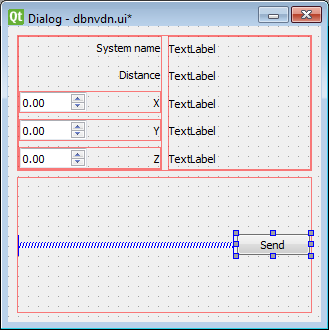 sudden coral
You may be able to accomplish the same thing with a single grid layout
If you play with the spacing, size policies, etc
I haven't worked on UIs in a while though so I am rusty
I remember those spacer widgets being very useful though - had a bunch of them and would edit the size policy to my liking which was usually enough to do what I wanted
digital rose
i got it to open up the save file dialog box but it doesn't let me save as a file type
can someone please hlep
rocky dragon
Not expecting anyone to resize, but with the grid (on the right) a spacer in the layouts for the double spinner/(x,y,z) combinations pushes the whole grid to the right, so when the window is expanded it leaves a space on the left instead of centering like the combined layouts. Any other way to make one widget occupy all available space in a layout with the other getting its minimum?
https://i.imgur.com/PSliGey.png
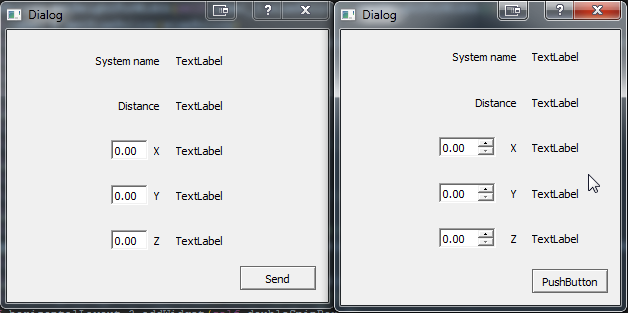 sudden coral
set the sizepolicy of one to expanding and the other to minimum?
rocky dragon
sorry, was thinking of one thing but wrote another. Meant to stuck it to the left of the label while forcing the label to it's minimum size, keeping the size of the spinner at its default
sudden coral
Not sure off the top of my head. I'd have to try out different size policies for myself to see what, if anything, works
rocky dragon
Gonna use the grid since it's a lot simpler with the code at least. Had some meh experiences with it before so didn't even consider using it
 eager sierra
 tranquil flint
PyQT maybe
alpine blaze
or Kivy 🙂
digital rose
Is there any library to make GUI programs for phone
rocky dragon
both mentioned above, kivy is simpler I think but didn't try any
digital rose
What about tkinter?
alpine blaze
Not supported on phones, and not a great option anyway
Kivy is fun, you should try it
:)
 pliant pike
Kivy:
Can someone tell me how I can change the text in a label in my main window (I have two windows) right when the program is run. I'm using the .kv file. I'm basically trying to make a program that shows the weather and some trees you can plant based on the co concentration in the atmosphere and weather.
gloomy mountain
Well, you want to change the text attribute of the Label object
What's your issue with doing so?
pliant pike
https://hastebin.com/azociguhaq.py : This is the program file
https://hastebin.com/ubugizaxid.makefile : This is the .kv file
Note: The program uses the geocoder module which gets the user's location (It's to get the weather in the location)
When I didn't have the multiple screens, my code worked fine
but when i added multiple It goes to the default values and doesn't change when the program is run
In the build method, it's supposed to take the Grid() class, change it's values and return that instead of kv but because I'm using mutliple screens, I don't know how to do so.
gloomy mountain
Gah, don't pass your kv around using a global variable, that's horrendous to read
pliant pike
Oh okay
gloomy mountain
But anyway, your problem is that you instantiate a Grid() and modify its attributes, then don't do anything with it because you instead display the kv-loaded WindowManager
pliant pike
How do I modify the attributes of the kv-loaded WindowManager?
gloomy mountain
The simplest solution is: don't, just delete the WindowManager root rule in the kv and construct your simple gui from the build method
Alternatively, don't create a new Grid() and change it, modify the grid of the object returned by Builder.load_file
e.g. give the Grid in your kv rule an id, and access it that way
pliant pike
you mean the """Grid""" under the first """WindowManager""" statement?
gloomy mountain
Yes
pliant pike
Thank you for your help 😄
I'll try to focus on the readability of my code next time .
 sterile monolith
Hello, I'm trying to add a custom list widget item with a Thread but It's not working, can you help me?
class QCustomQWidget (QWidget):

    def __init__ (self):
        super().__init__()
        self.textQVBoxLayout = QtWidgets.QVBoxLayout()
        self.textUpQLabel    = QtWidgets.QLabel()
        self.textDownQLabel  = QtWidgets.QLabel()
        self.textQVBoxLayout.addWidget(self.textUpQLabel)
        self.allQHBoxLayout  = QtWidgets.QHBoxLayout()
        self.iconQLabel      = QtWidgets.QLabel()
        self.allQHBoxLayout.addWidget(self.iconQLabel, 0)
        self.allQHBoxLayout.addLayout(self.textQVBoxLayout, 1)
        self.setLayout(self.allQHBoxLayout)
        # setStyleSheet
        self.textUpQLabel.setStyleSheet('''
            color: white;
        ''')
        self.textDownQLabel.setStyleSheet('''
            color: gray;
        ''')

    def setTextUp (self, text):
        self.textUpQLabel.setText(text)

    def setTextDown (self, text):
        if text:
            self.textQVBoxLayout.addWidget(self.textDownQLabel)
            self.textDownQLabel.setText(text)

    def setIcon (self, imagePath):
        self.iconQLabel.setPixmap(QtGui.QPixmap(imagePath))
This is the custom widget class and I'm calling it with;
for index, name, icon in [(i, "Be aware of his ",  "resources\\images\\instruction\\kill.svg")]:
            # Create QCustomQWidget
            myQCustomQWidget = QCustomQWidget()
            myQCustomQWidget.setTextUp(index)
            myQCustomQWidget.setTextDown(name)
            myQCustomQWidget.setIcon(icon)
            # Create QListWidgetItem
            myQListWidgetItem = QtWidgets.QListWidgetItem(self.mainQuests)
            # Making items unclickable
            myQListWidgetItem.setFlags(Qt.NoItemFlags)
            # Set size hint
            myQListWidgetItem.setSizeHint(myQCustomQWidget.sizeHint())
            # Add QListWidgetItem into QListWidget
            self.mainQuests.addItem(myQListWidgetItem)
            self.mainQuests.setItemWidget(myQListWidgetItem, myQCustomQWidget)
I can create the custom list widget and it's items but can't add item with Thread.
The error is :
QObject::connect: Cannot queue arguments of type 'QVector<int>'
(Make sure 'QVector<int>' is registered using qRegisterMetaType().)
QObject::connect: Cannot queue arguments of type 'QVector<int>'
(Make sure 'QVector<int>' is registered using qRegisterMetaType().)
QObject::connect: Cannot queue arguments of type 'QVector<int>'
(Make sure 'QVector<int>' is registered using qRegisterMetaType().)
QObject::setParent: Cannot set parent, new parent is in a different thread
QObject::installEventFilter(): Cannot filter events for objects in a different thread.
QBasicTimer::start: QBasicTimer can only be used with threads started with QThread
QObject::setParent: Cannot set parent, new parent is in a different thread
QObject::installEventFilter(): Cannot filter events for objects in a different thread.
Any suggestions?
pliant pike
Kivy:
I've been trying to fix it for a while now but I still seem to do it
Here's the edited program file
https://hastebin.com/cagokilego.py: The .py and .kv have been combined into one to make it easier to read
I've made the code a bit nicer in my opinion but It still doesn't do what it's intended to! now it gives me this error:
 Traceback (most recent call last):
   File "kivy program trial.py", line 80, in <module>
     """)
   File "C:\Users\Robin\AppData\Local\Programs\Python\Python37-32\lib\site-packages\kivy\lang\builder.py", line 399, in load_string
     widget = Factory.get(parser.root.name)(__no_builder=True)
   File "C:\Users\Robin\AppData\Local\Programs\Python\Python37-32\lib\site-packages\kivy\factory.py", line 131, in __getattr__
     raise FactoryException('Unknown class <%s>' % name)
 kivy.factory.FactoryException: Unknown class <WindowManager>

***Repl Closed***
 versed trout
Hello I have a question is there a way to open a new window after some while loop ? And if yes then how ?
pliant pike
which interface module are you using? Example: Tkinter, Kivy... etc.
versed trout
PyQt5
pliant pike
Sadly that's a module I haven't learnt yet. Sorry I hope someone assists you.
gloomy mountain
@pliant pike You're loading the kv before the classes inside it are defined
Load it in your App.build method
rocky dragon
Any good way to move from defining GUI in .py to qml?
 prime mirage
!ask looking for some guidance, I have a bot in python and want to connect to a flask page that can read variables the bot is writing in realtime.. aka front end showing stock prices and such. is this possible?
proven basinBOT
ask
Asking good questions will yield a much higher chance of a quick response:
• Don't ask to ask your question, just go ahead and tell us your problem.
• Try to solve the problem on your own first, we're not going to write code for you.
• Show us the code you've tried and any errors or unexpected results it's giving.
• Keep your patience while we're helping you.
You can find a much more detailed explanation on our website.
sterile monolith
Can someone who knows PyQt5 Thread write me?
 subtle otter
Kivy is such a pain sometimes
It takes forever to build android applications with it, so I guess it's only reliable in desktop apps
wxpython is something I would recommend to everyone though. It's easy to learn and runs instantly
gloomy mountain
I'm not sure what relationship you're inferring between build time and relability
In any case, it takes a few minutes to actually do the compiling for android, subsequent builds just take a few seconds (like less than 10s)
 earnest solar
I am very new to python in general.. but I am learning fast and doing good, and now I am trying to learn how to create GUI. What is your advice on what library I should use or you recommend for beginners?
sterile monolith
@earnest solar Try C# for GUI. But, if you still want to write it with Python, choose PyQt5 because other ones are pretty old and trash. PyQt5 is also trash but there are docs and a lot of people using it. It's also cross-platform, and If you download the Qt Creator, you can easily make a GUI. Qt Creator is like Visual Studio.
Edit: Also, I think there is no thing like "for beginners" GUI coding for Python. Every one of them is hard lol
earnest solar
@sterile monolith Thanks bro, so C# is the best for GUI.
autumn reef
Kivy is modern and is great for making apps in general
You can see them being showcased here - https://discordapp.com/channels/267624335836053506/658417343407456266/658422019523739667
For stdlib only approach, you also have tkinter as well - no external library / module needed
digital rose
can tkinter be turned into an android application
sudden coral
Theoretically yes, but doesn't sound like a great experience. You are better off using something that was designed with Android support in mind like Kivy or Qt
alpine blaze
(probably ignore any opinion that says only one thing is nice and everything else is trash, it's unlikely they tried and learned enough about the other options to give such a clear cut statement)
last time i did C# was in school, and we had to use that to build UI, and i didn't love it, had at least one case where the api was missing features that i considered basic, and didn't give any way to extend the things, short of gross and very involved hacks)
earnest solar
@alpine blaze I found PyQt5 decent and python is my first ever language. I wouldn't learn C# just to do Gui although I have seen good opinions on it. PyQt5 is well designed and has good support and documentation.
alpine blaze
yes, i didn't use it much, but i've heard a lot of good about it, i've been happy with kivy for everything myself, but it's very different, and strong at different things than pyqt/pyside, for conventional desktop applications, pyqt is probably more suited.
sterile monolith
lol tshirtman, Firstly I didn't say only one thing is nice, secondly, did you even try WPF C#? Are you guys getting paid for promoting kivy lol
sudden coral
Well it does read that way
if you still want to write it with Python, choose PyQt5 because other ones are pretty old and trash
sterile monolith
PyQt5 is also trash
sudden coral
Did you just mean old PyQt versions and not "other ones" as in "every other Python GUI library"
OK fair enough but I think the point still stands to just call so many things "trash" it's pretty dismissive
 hearty fossil
hey, so im using kivy to do a GUI with multiple windows/screens
but i want to use FloatLayout
and i also want to use the Builder.load.file thing, so how should i format it
class MainWindow(Screen):
    pass

class AnalysisWindow(Screen):
    pass

class WindowManager(ScreenManager):
    pass

kv = Builder.load_file('mt.kv')

class Thingy(App):
    def build(self):
return kv```mores specifically in the build method of Thingy class, what do i write for return
ik if i want to use builder i have to do return kv but if i wanted to do FloatLayout, i have to do return FloatLayout()
gloomy mountain
The build method should return the widget that you want to be your root widget
It doesn't matter where it comes from, it just matters that that's what it is
If your loaded kv includes a root widget definition, then kv will be assigned to this object, so you can return that
Also, I would do Builder.load_file in the build method on general principle
It avoids getting confused about class definition order
(But it isn't actually necessary, just a clearer way to do things if you want to use the return value, imo)
earnest solar
thanks in advance you can view the code using hastebin>> https://hastebin.com/jacocokudo.py I am having trouble understanding few things on my code using PyQt5 I managed to solve some errors but I don't understand how it is fixed for now .. (excuse me that I am only 3 weeks into programing anyways..) at the functions Buttons , labels, and main_ui. I don't understand why I have to put self. at the begging of my lines I see similar programs for PyQt5 that doesn't have self. at the begging of each line.. so what does it mean and how it reflects on the class next thing I didn't get I getting error before using lambda: at line 40,45 I have done some search and it turns out I have to put single line function lambda to solve this issue why is that.
alpine blaze
@sterile monolith i'm one of the contributors to kivy, and i do put some of my money in supporting it, and i have no financial interest in it, it's not a company, it's a project maintained by volunteers in their free time. but if you like c# good for you. Also i do think it was wpf i used, but it's been some time, does the calendar widget still doesn't allow you to highligh a day in a color of your choice, or to bolden more than one day at a time? It's a small thing, but discovering that the only way around that was to do border detection on the result image and manually inject pixels, got me pretty bewildered back then.
sudden coral
@earnest solar What's your question really? What self and lambdas are?
hearty fossil
ah ok, thanks @gloomy mountain (sorry for the late reply )
earnest solar
@sudden coral I know what self refers to but I don't understand it's positions in code ... I know lambda is small function but I don't understand why I have to use it there ..at line 40, 45
gloomy mountain
@earnest solar You don't have to use a lambda (a normal function definition is fine if you want), the real point is that you must pass a function as an argument
earnest solar
@gloomy mountain yes
gloomy mountain
@earnest solar What alternative are you imagining? Not using a lambda and writing the function call directly?
earnest solar
I write the function directly but it gives me an error.
rocky dragon
it doesn't have to be a lambda, you could use functools.partial to be clearer. When you connect a button, it connects it so when you click it, it calls the function object you passed it. so when you pass func it calls func() if you pass lambda : func(arg) it calls the lambda, which in turn calls hte function with the arguments
the lambda isn't needed where you have it, but you musn't call the function
gloomy mountain
@earnest solar So your problem is, when you write the function directly it does exactly what it says: you run the function that one time
You don't want to do that, you want to tell the code "run this functio when the button is clicked"
That means you must actually give it a function to run
rocky dragon
when you call it when passing, it does func()() which is calling the result of func
 gloomy mountain
@earnest solar Consider how this code is actually evaluated
What is the return value of button_choose_folder_click()?
earnest solar
folder_path
gloomy mountain
So what's that, a filepath as a string?
gloomy mountain
Then self.button_choose_folder.clicked.connect("C:\some\file\path")
Do you see that?
The code doesn't know what you mean, it only knows what you actually wrote, and since you wrote a function call it runs the function call and effectively replaces it with the return value
earnest solar
I need to understand more give me few mints ..
@gloomy mountain This is how it should work as per Qt doc, self.button_choose_folder.clicked.connect(self.button_choose_folder_click()) but when I do it this way it doesn't run my GUI instead it runs the function as if the button were clicked and this window pop out when I run the code > https://i.imgur.com/zcWleOL.png
 sudden coral
!e ```py
def button_choose_folder_click():
return "C:\Documents\file.txt"
function = button_choose_folder_click
print(type(function))
called = button_choose_folder_click()
print(type(called))
@sudden coral :white_check_mark: Your eval job has completed with return code 0.
001 | <class 'function'>
002 | <class 'str'>
@earnest solar This is what inclement was trying to explain
Notice how when the () is added, it calls the function and therefore the type is str instead of function
Qt wants the type to be function
 tribal path
or at least a callable
earnest solar
@sudden coral So if the return of the function```button_choose_folder_click()
No you are missing the point
It wants the function
NOT what the function returns
therefore you cannot call the function there
tribal path
(unless what you want there, is a callable returned by the function ; but here thats not what you want)
earnest solar
finally I understood this, so it just the () if add them then what ever is there is that is string but Qt is requiring a function instead so removing () then it is a function. thus the better statement will be button_choose_folder.clicked.connect(self.button_choose_folder_click)
tribal path
pretty much, it allows it to call it when needed/asked to instead. If you need to pass arguments as well, then you would look to lambda or partials
earnest solar
sorry for asking lots of questions .. you can view the code here https://hastebin.com/azaneleraf.rb So my problem is I have connected button Run to butto_run_click at line 49 and when I run the program and click run button the function runs fine but after that the program crash with>> Process finished with exit code -1073740791 (0xC0000409)
The button is working and executing the code at the function but it just crashes after it does that
 heavy cliff
I just asked a PyQT question on SO, would be great if somebody could help https://stackoverflow.com/questions/59488921/pyqt-qtwebengineview-loads-page-on-windows-but-not-on-macos-using-same-conda-en
Stack Overflow
I developed a PyQT5 app on Windows and I am now trying to get it to run on my Mac (10.14 Mojave). I used conda export to export the windows environment and I am using that environment, minus the
hearty fossil
another kivy question: let's say i want to do FloatLayout, but with multiple screens
how would i set that up in the .kv file, using ScreenManager
at first i tried doing
class MainWindow(Screen):
    pass
class SecondWindow(Screen):
    pass
class WindowManager(ScreenManager):
    pass``` in the python file and
WindowManager:
MainWindow:
SecondWindow:``` in the kv file
however, the screen doesnt display anything; its just black
gloomy mountain
So what is your root widget?
hearty fossil
sorry i just started kivy yesterday, what is a root widget?
but i did include this part that might be the root widget
class Main(App):
    bal = StringProperty(f'{lines[0].strip()}')
    def build(self):
return FloatLayout()```would that be FloatLayout()?
gloomy mountain
Yes, the root widget is whatever you return from the build method
hearty fossil
oh
gloomy mountain
This widget simply gets drawn filling the window
hearty fossil
<MainWindow>:
    name: 'main'

    FloatLayout:
        Label:
            text: app.bal
            pos_hint: {'left':1, 'top':1}
            font_size: 40
size_hint: 0.75, 0.25```im assuming i did something wrong here, in the .kv file?
gloomy mountain
Well, what do you want to happen?
hearty fossil
i want to use FloatLayout to display a Label with multiple screens
gloomy mountain
Well, that could mean a few different things in practice, but let's address the immediate problem - you still have the issue that your window is empty?
gloomy mountain
What is your build method returning?
hearty fossil
rn its returning FloatLayout()
gloomy mountain
Okay, so the problem is simple, FloatLayout doesn't draw anything
hearty fossil
oh
gloomy mountain
What do you want your root widget to be?
hearty fossil
the ScreenManager?
class WindowManager(ScreenManager):
pass``` although i set it up as a classhow would i reference it in my build method
gloomy mountain
If you just want to return any instance of the WindowManager, then do return WindowManager()
If you want to return the root widget rule from your kv file, then return the result of Builder.load_file (I know you had that the other day)
hearty fossil
i just tried that but it still shows an empty screen
gloomy mountain
Well, does the WindowManager() draw anything?
gloomy mountain
It sounds like your code is fine, you're just displaying widgets that don't draw anything
gloomy mountain
Try taking a step back and display a Label
Make sure that works
Then put the Label inside your widget tree and see if you can get them to display that way
hearty fossil
hmm
    MainWindow:
    SecondWindow:

<MainWindow>:
    name: 'main'
    Label:
text: app.bal```i used this code but its not working
gloomy mountain
What is the value of app.bal?
hearty fossil
its a string that says 1000.00
gloomy mountain
I mean, let's be sure that there's any text to display :p
hearty fossil
i tried using 'test' in place of app.bal, but it doesnt display anything either
gloomy mountain
Are you 100% sure? For debugging, I'd set it to text: "test" or something
Okay, and what is your root widget now?
hearty fossil
wait lemme test again
    MainWindow:
    SecondWindow:

<MainWindow>:
    name: 'main'
    Label:
text: 'test'```doesnt display anythin either
and my root widget is windowmanager
WindowManger()
hearty fossil
hmm
gloomy mountain
Just change WindowManager: to <WindowManager>: in your kv
Forget about root widget kv rules
gloomy mountain
Do you understand why?
hearty fossil
im not entirely sure
but i did remember that something in <> is a parent or root widget?
 brave vapor
hi, so i tried programming this "conways game of life" https://en.wikipedia.org/wiki/Conway's_Game_of_Life and i got it to work with a gui, but the gui only updates when i close it any suggestions how to fix it? https://paste.pythondiscord.com/muzavisezi.py (really dont know anything about tkinter - jsut edited a calculater GUI)
 alpine blaze
uh, the while True loop that creates the gui and run mainloop seems bad, you probably want to do that only once
probably only the CurrentWorld = generation(CurrentWorld) line should be in the loop
and you want a function that can update the window using the CurrentWorld
clearing the frame and then drawing again in it should be fine
brave vapor
how do i do that? xd
alpine blaze
well, looking for documentation on the Frame object might help
i forgot how terrible the state of tkinter doc was
there is apparently a grid_forget option to hide widgets from a grid, but i don't know if it clears things propely, maybe it would be easier to keep references to your Labels in a list, and update their bg color depending on the new state
if you want i have a tetris i coded in tk over ten years ago, the source code is half in french and it was before i knew a lot about python, but it still works. 😄 i didn't touch tkinter since
proven basinBOT
Hey @alpine blaze!
It looks like you tried to attach a file type that we do not allow. We currently allow the following file types: .3gp, .3g2, .avi, .bmp, .gif, .h264, .jpg, .jpeg, .m4v, .mkv, .mov, .mp4, .mpeg, .mpg, .png, .tiff, .wmv, .svg, .psd, .ai, .aep, .xcf.
Feel free to ask in #community-meta if you think this is a mistake.
alpine blaze
oh right, no zip
don't take this code as a good example, of python practices, but it knows things i forgot about tkinter (it's played by mouse btw, left/right/middle clicks and wheel to move right/left/rotate and down)
thorny spruce
If you want to do something repeatedly without a while True loop then you want to use the .after method
Which is generally in the form of
def step(...):
    # single iteration
    widget.after(10, step, ...) # schedule again for 10ms

step(...)
Hey, I have a small question I am using PyQt5, I want to position my button at the bottom right corner of the window and I already have horizontal layout. how I can do that the picture explain more. https://i.imgur.com/nlIzGnH.png
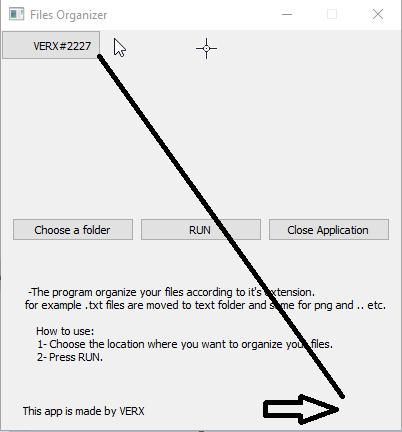


 stone spade
Hey i have a big question i want My program to have the user select login or register then i want the program to close that ui and open the one for register or login based on the button click
alpine blaze
Use ScreenManager
heavy cliff
Is PyInstaller supposed to work when I have multiple python files in one app? Don't know if I'm misunderstanding it, but its not working when trying to build my PyQt5 app..
alpine blaze
yes, i did build apps that had dozens of python files with pyinstaller
make sure all of them are either imported when you import main, or referenced in the hiddenimports
rocky dragon
If you're on latest pqty version you need to update pyinstaller's pyqt rthook from develop
heavy cliff
@rocky dragon thanks for the heads up, im on pyqt 5.14 which seems to be the latest. how do i update the hook?
alpine blaze
Importing the python way, just make sure the modules are imported so pyinstaller detects they are used
rocky dragon
Copying the code from here to your local pyinstaller copy should work https://github.com/pyinstaller/pyinstaller/blob/bootloader-works/PyInstaller/loader/rthooks/pyi_rth_pyqt5.py
full harbor
Hello what is wrong with this whenever I remove the columnspan it also make the button separately
separated*
 rugged sinew
Getting started with Kivy, from @gloomy mountain's website, is a supremely useful collection of learning resources for Kivy: http://inclem.net/2019/12/19/kivy/getting_started_with_kivy/
earnest solar
I have simple question, I have to do these functions #First - Function for identifying files at specific location #Second - Function for checking if the files are already existing at folder location #Third - Function for moving the files to the location
Do I have to make a class for all these functions ? or I just call one by one, Excuse me I am newbie to programming.
thorny spruce
Wouldn't need a class. Just separate functions is fine. They should be standalone.
Not sure how this is related to UI though, if you are having trouble try a general help channel.
 inland plank
hi! i want to write a trade manager for poe, similar to mercury trade and I'm wondering which guide framework to use. I want to draw foreground windows that don't have the typical windows look, but are just small frames, like I pasted.
I'm experienced with python, but never created a gui with it, do you have a recommendation for me please?
alpine blaze
i'm partial to it, but it seems like kivy would be a great fit, as you can draw the widgets pretty much how you want them
inland plank
@alpine blaze i'll have a look
inland plank
@alpine blaze does kivy have any benefit over pyqt5 or something else?
alpine blaze
it's more python based, instead of wrapping a c++ api, it's directly built in cython+python, so it's a more pythonic api, it's opengl based, and a thin abstraction over it, so you have a lot of flexibility on that, it's natively multitouch, which makes it more natural on android/ios, also it's available on android/ios.
inland plank
@alpine blaze ah sounds cool. I only target windows though, so I don't know if I can fully benefit from this. I'll give it a try
 teal galleon
Does kivy bind required python libraries during compilation of a project?
alpine blaze
can you clarify the question? you don't usually need to build against kivy, the interface is python only, so i think the answer would be no?
 stoic cove
Guys I've build an app with tkinter but I was getting windows not responding even though the code was working fine. Did some research and learned that it was caused by loop function I have attached to the button so I tried threading but it's not working... it's calling the functions just when the script starts running.. it's supposed to run after pressing the button. HERE IS MY CODE:
from test2 import *
from tkinter import *
from PIL import ImageTk, Image
import webbrowser
import threading

# Basic Window for GUI
root = Tk()
root.title("Maple")
root.iconbitmap("maple.ico")
root.geometry("400x400")

# Maple Banner
banner = ImageTk.PhotoImage(Image.open("maple_banner.png"))
Label(image=banner).grid(row=0, column=0)


def app():      # Button function
    if var.get() == "ZERO":
        t1.start()
        t2.start()
    else:
        pass


def callback(event):        # Function for callable URL
    webbrowser.open_new(event.widget.cget("text"))


# Contents of GUI
var = StringVar()
var.set("ZERO")
Radiobutton(root, text="GAIN CRYSTALS BY FOLLOWING", variable=var, value="ZERO").grid(row=1, padx=120, sticky=W)
Radiobutton(root, text="GAIN CRYSTALS BY LIKING", variable=var, value="ONE", fg="grey").grid(row=2, padx=120, sticky=W)
Button(root, text="START", width=20, command=app).grid(row=3, pady=10)
Button(root, text="END", width=20, command=root.quit()).grid(row=4,pady=5)
Label(root, text="Join the community and learn how to setup the bot").grid()
URL = Label(root, text=r"http://bit.ly/39haqEi-maple", fg="blue", cursor="hand2")
URL.grid()
URL.bind("<Button-1>", callback)
Label(root, text="").grid(pady=10)
Label(root, text="Visit My GitHub for more projects").grid()
URL2 = Label(root, text=r"https://github.com/AVIXASH", fg="blue", cursor="hand2")
URL2.grid()
URL2.bind("<Button-1>", callback)

# End loop
root.mainloop()
this is the main GUI
other dependencies👆
teal galleon
@alpine blaze oh hey, I mean, you can build your stuff with kivy for different platforms, instead of running directly with python, can’t you?
alpine blaze
Yes you can, with pyinstaller for example
subtle otter
true tho
 somber rapids
I am working on the qualifier for the code jam....I just have a single python file with my function, and at the bottom of it I call my function with various inputs. I am just at the testing functionality phase. So I will just print the result of the called function. ANd it prints fine,but it is different format then I guess calling the function directly from the command line...
So if I use the print for an object, it will just convert it to string? So this is what they got in the description:
datetime.datetime(2019, 12, 16, 0, 0)```When I run mine as described i get:
2019-12-31 23:12:34
sudden coral
The example is demonstrating its use in a REPL, which represents the datetime object differently than it is when printed.
Point is, the returned object's type needs to be a datime.datetime
somber rapids
Ok..I was just curious as to the difference. If I run it from the prompt I do get:
datetime.datetime(2019, 12, 31, 23, 43, 21)
I havne't done python in years
sudden coral
It uses repr() instead of str() basically
if you did print(repr(parse_iso8601(...))) you should get something similar to the example
stone spade
When using Kivy how do make a grid and use that grid in screen manager
earnest solar
Hey, I have made pyqt5 app and I take from the user folder_path , how I can save this path for next application startup?
rocky dragon
You'll have to save it to your drive, at has the QSettings class for storing on the registry or ini files
 sullen thunder
Hey all, I am curious about screen resolution effects on the deisgn with PyQt5.
A few months back I got new 4k monitors. As such I have implimented the use of the following code to scale the project properly.
    if hasattr(QtCore.Qt, 'AA_EnableHighDpiScaling'):
        QtWidgets.QApplication.setAttribute(QtCore.Qt.AA_EnableHighDpiScaling, True)
    if hasattr(QtCore.Qt, 'AA_UseHighDpiPixmaps'):
        QtWidgets.QApplication.setAttribute(QtCore.Qt.AA_UseHighDpiPixmaps, True)
I recently got a laptop with a 1080p monitor and the layout has gotten messed up. Font sizes appear to be either two big or small. The widgets appear to lose their sizing.
I am mixed on if the issue is related to the stylesheet or the snippet above. Any thoughts?
Like are set Font sizes in the stylesheet what is causing the issue? Should I inpliment different style sheets for different resolutions?
glossy hazel
Hey, how to do a "partial" clear of the terminal/console/bash? Like, just clearing a certain number of lines. Please ping me if you know, ty!
 grim reef
@glossy hazel you do this with terminal escape codes. The search query you need is 'VT100 escape codes', article here: https://gist.github.com/fnky/458719343aabd01cfb17a3a4f7296797
 rocky dragon
You can manipulate the cursor with ansi codes over the output otherwise I guess curses which have more magic
[print("*"*10) for _ in range(10)]
print("\u001b[6A")
[print(" "*10) for _ in range(5)]
as an example that clears a half of the first prints
 near notch
anyone know a good front end framework for creating really professional web ui?
alpine blaze
I heard good about bulma (css framework), but didn't try it, and for js logic react and vue are popular options, i'm a bit partial to vue, but react is okay too.
alpine blaze
yes, i keep missing occasions to try it, but it does
near notch
however

Design the structure of your webpage with these CSS classes
try to work out how to get a container as a navbar to cover the entire top
wouldnt happen to know how to remove the margin?
@alpine blaze sorry for the ping ^
it mentions this:
but im just using html and the provided css link
<link rel="stylesheet" href="https://cdn.jsdelivr.net/npm/bulma@0.8.0/css/bulma.min.css">
    <script defer src="https://use.fontawesome.com/releases/v5.3.1/js/all.js"></script>
Create your own theme with a simple set of variables
i think?
this certainly means that you can't use the default build, and instead need to do your own
near notch
so would i do this in a css file?
and just like my css file too?
ah its not css is it
ive only ever used bootstrap
alpine blaze
no, you need to compile the bulma source, after changing this variable, into a a new css, the easiest way is probably sass-cli
near notch
and is sass-cli a file?
im totally learning this right now
so i guess by compile, you mean yoink its css from the github, put it into my own and edit the variable
alpine blaze
ok, well, i'm not an expert in these things, in web i do more backend than front, but your browser understand css, not scss, (sass), which is a better language, in which bulma is written, so to tweak it, you need to use a converter to go from the sass source to the css version.
yeah, the instructions should get you there step by step
alpine blaze
yes, in the end you'll have a css file that you can use with your html file
near notch
right
and to make it worse
im actually doing this on my existing website
localhost. but the rest of the site is using bootstrap and all
so i made a quick route, and made a new css file in my static folder
alpine blaze
should be fine, i guess
near notch
and im using pycharm
xD
its saying choco install sass but im completely lost
am i doing this on my pc's terminal (cmd prompt)
or am i adding an environment variable?
ive found sass in the environment variable list
and its popping an error when i try to install it
alpine blaze
fun, for me it says gem install, maybe the page detects i'm on linux and it says choco to you because you are on windows
choco is a package manager for windows
alpine blaze
i would say it's unrelated
alpine blaze

Chocolatey
Chocolatey is software management automation for Windows that wraps installers, executables, zips, and scripts into compiled packages. Chocolatey integrates w/SCCM, Puppet, Chef, etc. Chocolatey is trusted by businesses to manage software deployments.
near notch
i need to get powershell?
this is a hell of a lot
how will i even transfer this to a website host
rocky dragon
choco is pretty useful for installing stuff like that overall
alpine blaze
you won't need to transfer this to your website