#user-interfaces
1 messages · Page 38 of 1
 thick moat
 alpine blaze
your root widget is the Application widget right? so you can access the ids in its rule through its ids property, so you can do app.root.ids.some_id and put id: some_id in the widget you want to access this way
@thick moat
if you want to do it for all the buttons in the BoxLayout, you can add a padding in the BoxLayout, if just for one, you can use size_hint_x on the button to either give it a different ratio than 1 (100% of the parent), or None and set the width directly, and you need to position it in the center using pos_hint: {'center_x': .5}
 digital rose
@thick moat also you maybe can use padding+spacing
from kivy.app import App
from kivy.lang import Builder


KV = """
BoxLayout

    spacing: 100
    padding: 100

    MyButton
    MyButton
    MyButton


<MyButton@Button>
    text: '123456'
"""


class MyApp(App):
    def build(self):
        return Builder.load_string(KV)

MyApp().run()
 hearty fossil
im using pygame rn, and i ran the code
import pygame
pygame.init()```
however, im getting the error `Module 'pygame' has no 'init' member`im using vs code btw
how can i fix this error?
alpine blaze
did you name your python file "pygame" ?
alpine blaze
when you import pygame, and print pygame.__file__ what does it print?
hearty fossil
i googled it and it said something about user settings but i couldnt find it
uhh
pygame 1.9.6 Hello from the pygame community. https://www.pygame.org/contribute.html C:\Users\Minec\AppData\Local\Programs\Python\Python37-32\lib\site-packages\pygame\__init__.py
alpine blaze
ok, good
oh, you mean your editor says that, but you didn't try running the code, right?
the error you mentionned
hearty fossil
well, i had anther pygame file, and it worked, but it had the errosr
so its functional but it has the errors, and i would like to fix the errors
alpine blaze
yeah, people say it's an issue with vscode, and you can fix it by saying it to whitelist that extension, it won't show you about errors with its usage then
hearty fossil
oh
alpine blaze
(it can't show you good errors now either, because it fails to import it)
hearty fossil
oof
alpine blaze
i don't use vscode or pygame, maybe someone else will know a better answer
 tidal spruce
How reccomend is it to use qt desginer/creator to create a quick ui vs actually learning the library?
 rocky dragon
for me it was creating the windows in qt designer at first but then I realised it was missing some stuff I needed so converted to mostly pure code
but it's nice to know how it'll look before you spend 10 minutes writing something and getting the layouts right
alpine blaze
oh, so you can't mix things, update an ui maintained in a qt designer project, through code?
that's a bit sad, it should really be possible by giving ways to refer to existing widgets in the UI and manipulating their children
 sudden coral
You can
Just that the generated code isn't particularly pretty
I can't wrap my head around the ui file loading feature cause it returns an instance of the widget which is more difficult to customise
 karmic shoal
I use pyside-uic to convert the .ui file to .py, then I usually have the instance as an attribute of my GUI class, although you can also subclass it
sudden coral
Yeah but still then you can pass your own widget to setupUi()
If you directly load the .ui file (no code conversion) you will be returned an instance
and you of course can't subclass an instance
You can probably still access the widgets inside but that's kind of awkward
Plus no code generation means no tab completion
 glacial stone
hello! im using spotipy to make a gui-based app. when i ask for authentication from spotify's api, i get a command line input prompt asking me for a URL. i want to be able to pass in a url to a gui text input that i made, and have it be the argument to the command line prompt
so i want to be able to give an input to the "Enter the url...." part through a GUI/ through my python code
my code doesnt ask for input, thats something that a function in the spotipy module does on its own
i havent been able to find any way to do that online, or maybe im not exactly sure what to look for
any ideas?
so essentially i want to pass in an input to a gui to a text-ui
sudden coral
That's too complicated. Just re-implement this function yourself but use a GUI inside of print() and input() https://github.com/plamere/spotipy/blob/master/spotipy/util.py#L9
 glacial stone
i was just gonna ask if i should manually edit spotipy's code to circumvent that
okay
thanks!
on a side note, if i wanted to upload my code to github and used part of spotipy's code, where and how would i disclose that?
sudden coral
Check their license
thick moat
I am using kivy and I am wondering how I can center widgets vertically. My kv file so far ```MediaButton@Button:
size_hint: None, None
size: 300, 100
pos_hint: {'center_x': .5}
pos_hint: {'center_y': .5}
MediaTextInput@TextInput:
size_hint: None, None
size: 300, 100
pos_hint: {'center_x': .5}
pos_hint: {'center_y': .5}
<Application>:
    GridLayout:
        size: root.width, root.height
cols: 1
cols: 2
RecycleView:
RecycleBoxLayout:
orientation: "vertical"
size_hint_y: None
height: self.minimum_height
BoxLayout:
orientation: "vertical"
MediaButton:
text: "Play/Pause"
MediaButton:
text: "Stop"
MediaTextInput:
text: "Video Title"
MediaTextInput:
text: "URL"
MediaButton:
text: "Add"
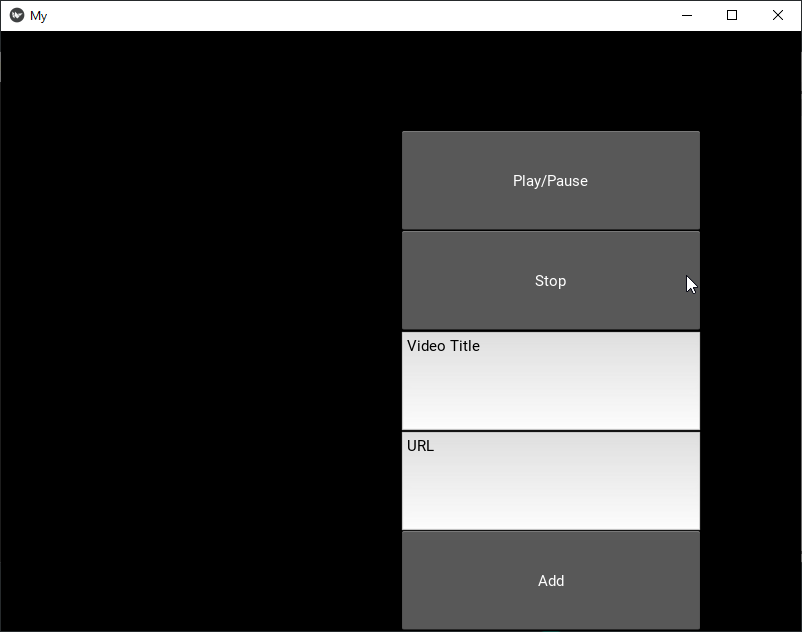 thick moat
@alpine blaze
alpine blaze
<Application>:
GridLayout:
size: root.width, root.height
just make Application inherit from FloatLayout, so you can use pos_hint and size_hint in here
you can also enable inspector (either by adding inspector= in the [modules] section of your .kivy/config.ini, or passing -m inspector to your program, then you can ctrl-e to inspect your app
it'll make it easier to understand sizing issues
thick moat
what? i did not under stand a single word you said @alpine blaze
alpine blaze
well, read again, can't answer more right now
alpine blaze
it's similar to the inspect element function in browsers
just activate it how i told you to, and you'll see how helpful it is
earlier i told you to have Application inherit from FloatLayout, change your python code to read "class Application(FloatLayout)" instead of "Application(Widget)"
then you'll be able to manage the child's position using pos_hint and size_hint
i don't know if there is a ready to go example, but it shouldn't be too hard with RecycleView + RecycleGridLayout + some helper functions to sort on a column
 rapid pulsar
Okay, RecycleGridLayout sounds like a good keyword. Thanks.
 livid lynx
Hi guys! I'm curious about something. Is there a way to refresh a GUI while under debug mode? Let's just say I make a breakpoint in the callback function of a button. The debugger stops at that point and I change something within the UI object. The UI is unresponsive. Is there a way to force it to refresh? Thanks!
livid lynx
@alpine blaze PyQt
alpine blaze
Ok, i don't know about that
livid lynx
@alpine blaze Thanks for the answer. I'm googling that function + 'in pyqt'. It's a start
rocky dragon
livid lynx
@rocky dragon It took me a while to decipher the C++ code on that page but I got it. Calling PyQt5.QtCore.QCoreApplication.processEvents() refreshes the UI. Thanks a lot to all!
rocky dragon
for the documentation, :: is a dot
that's most of what you need to know for it 😄
then there's also -> for a dot
livid lynx
it took me way too much to figure that out
rocky dragon
you should be able to call it from your app that has the event loop instead of the whole QtCore.QCoreApplication
livid lynx
myApp = QtWidgets.QApplication(sys.argv) myApp.processEvents()?
rocky dragon
yep
if it's in an another file, QtWidgets.QApplication.instance() returns the app object but then it knda defeats the purpose of having a bit less bloated code 😄
livid lynx
Just tried myApp.processEvents(). It works. Now I'm even more confused. myApp object is a QtWidgets.QApplication. Does this class inherit from QtCore?
rocky dragon
QApplication inherits from QGuiApplication which inherits from QCoreApplication
sudden coral
I haven't but you should probably outline why you want to switch
livid lynx
@rapid pulsar Piece of cake in QT. QtWidgets.QTreeWidget is what you are looking for.
 tribal path
filchooser examples in kivy not help?
 lethal rain
import kivy
from kivy.app import App
from kivy.config import Config
from kivy.uix.boxlayout import BoxLayout

################## Config ####################

Config.set('graphics', 'width', '700')
Config.set('graphics', 'height', '400')
Config.set('graphics', 'resizable', False)

##############################################

class SigninWindow(BoxLayout):
    pass

class SigninApp(App):
    def build(self):
        return SigninWindow()

if __name__ == "__maain__":
    SigninApp().run()```

```kv
import kivy
from kivy.app import App
from kivy.config import Config
from kivy.uix.boxlayout import BoxLayout

################## Config ####################

Config.set('graphics', 'width', '700')
Config.set('graphics', 'height', '400')
Config.set('graphics', 'resizable', False)

##############################################

class SigninWindow(BoxLayout):
    pass

class SigninApp(App):
    def build(self):
        return SigninWindow()

if __name__ == "__maain__":
    SigninApp().run()```

it wont work. gui isnt working D:😐 ima cry
digital rose
@lethal rain do you use kivyMD or something like this?
lethal rain
kivyMD i use kivy but never heard of just kivyMD
digital rose
@lethal rain wait, do you want to remove the system (the topmost) buttons and leave only your buttons?
digital rose
@lethal rain
from kivy.core.window import Window
Window.borderless = True
@lethal rain interesting question:)
well.. Window has left and top parameters
I think you can change it when you drag your head area
lethal rain
emmm
digital rose
@lethal rain Do you have difficulty with this?
digital rose
I think you don't want it
lethal rain
😐
digital rose
you can just change Window.top and Window.left on_touch_move
I'll try wait a few mins
lethal rain
the thing is i use Config :/ its better 😐
however it gives me a error
 File "kivy\_event.pyx", line 703, in kivy._event.EventDispatcher.dispatch
   File "kivy\_event.pyx", line 1214, in kivy._event.EventObservers.dispatch
   File "kivy\_event.pyx", line 1098, in kivy._event.EventObservers._dispatch
   File "E:\python\lib\site-packages\kivy\lang\builder.py", line 64, in custom_callback
     exec(__kvlang__.co_value, idmap)
   File "C:\Users\LurkingPsycho\Desktop\python\socketio\signin.kv", line 14, in <module>
     on_touch_down: self.click
   File "kivy\weakproxy.pyx", line 32, in kivy.weakproxy.WeakProxy.__getattr__
 AttributeError: 'SigninWindow' object has no attribute 'click'
jesus looks like i need todo API
😐
digital rose
@lethal rain well I found this
https://stackoverflow.com/questions/50191454/move-kivy-window-by-label-drag-kivy-python
but it seems it doesnt work on my ubuntu

Stack Overflow
I want to create custom window header of a Kivy window. I am very new to kivy so please provide some explanation how the events work. I need to simply move the window by "moving" the label.
First ...
digital rose
did you remove all kivymd things in it
like from kivymd.theming import ThemeManager
lethal rain
i dont have kivymd its just kivy
D:
import kivy
from kivy.app import App
from kivy.config import Config
from kivy.uix.boxlayout import BoxLayout
digital rose
no I mean in that example
digital rose
I mean that example on stacoverflow
it has some lines with kivymd code
lethal rain
oh
digital rose
so you need to remove them
lethal rain
oh ok
digital rose
you don't
lethal rain
import kivy
from kivy.app import App
from kivy.config import Config
from kivy.uix.boxlayout import BoxLayout

################## Config ####################

Config.set('graphics', 'width', '700')
Config.set('graphics', 'height', '400')
Config.set('graphics', 'resizable', False)
Config.set('graphics', 'borderless', True)

##############################################

class SigninWindow(BoxLayout):

    def __init__(self, **kwargs):
        super().__init__(**kwargs)

    def validate_user(self):
        user = self.ids.user
        pwd = self.ids.pwd
        info = self.ids.info

        uname = user.text
        passw = pwd.text

        if uname == '' or passw == '':
            info.text = '[color=#FF0000]Username or password required![/color]'
        elif uname == 'admin' and passw == 'admin':
            info.text = "[color=#008800]Logged in successfully![/color]"
        else:
            info.text = "[color=#FF0000]Invalid username or password![/color]"

class SigninApp(App):
    def build(self):
        return SigninWindow()

if __name__ == "__main__":
    SigninApp().run()```
thats what i gotwell I see some problems with dragging a window this way
@lethal rain
from kivy.app import App
from kivy.lang import Builder
from kivy.uix.label import Label

from kivy.core.window import Window

#Window.size = (500, 300)
#Window.borderless = True


KV = """
MyLabel
    text: '123456'

"""
class MyLabel(Label):

    def on_touch_down(self, touch):

        self.mouse_pos = Window.mouse_pos
        self.w_left= Window.left
        self.w_top= Window.top

        self.new_left = Window.left
        self.new_top = -Window.top

        self.last_x = self.mouse_pos[0]
        self.last_y = self.mouse_pos[1]

        super().on_touch_down(touch)

    def on_touch_move(self, touch):

        self.new_left += Window.mouse_pos[0]-self.last_x
        self.new_top += Window.mouse_pos[1]-self.last_y

        Window.left = self.new_left
        Window.top = -self.new_top

        super().on_touch_move(touch)

class MyApp(App):
    def build(self):
        self.root = Builder.load_string(KV)


MyApp().run()
could you try it?
lethal rain
if child.dispatch('on_touch_down', touch):
File "kivy_event.pyx", line 707, in kivy._event.EventDispatcher.dispatch
File "C:/Users/LurkingPsycho/Desktop/python/socketio/signin.py", line 20, in on_touch_down
self.mouse_pos = Config.mouse_pos
AttributeError: 'ConfigParser' object has no attribute '
nvm i found issue and it works
lol
the config i was the issue 😃 i changed it and it works fully
now the only issue i need to fix is the minimize button which il just google or somthing i dont want to make you do all the work ;p
digital rose
@lethal rain is it work ok? did you try to set borderless mode on?
digital rose
my window twitches when moving this way
digital rose
on my ubuntu with borderles on, it works very bad : (
lethal rain
haha
digital rose
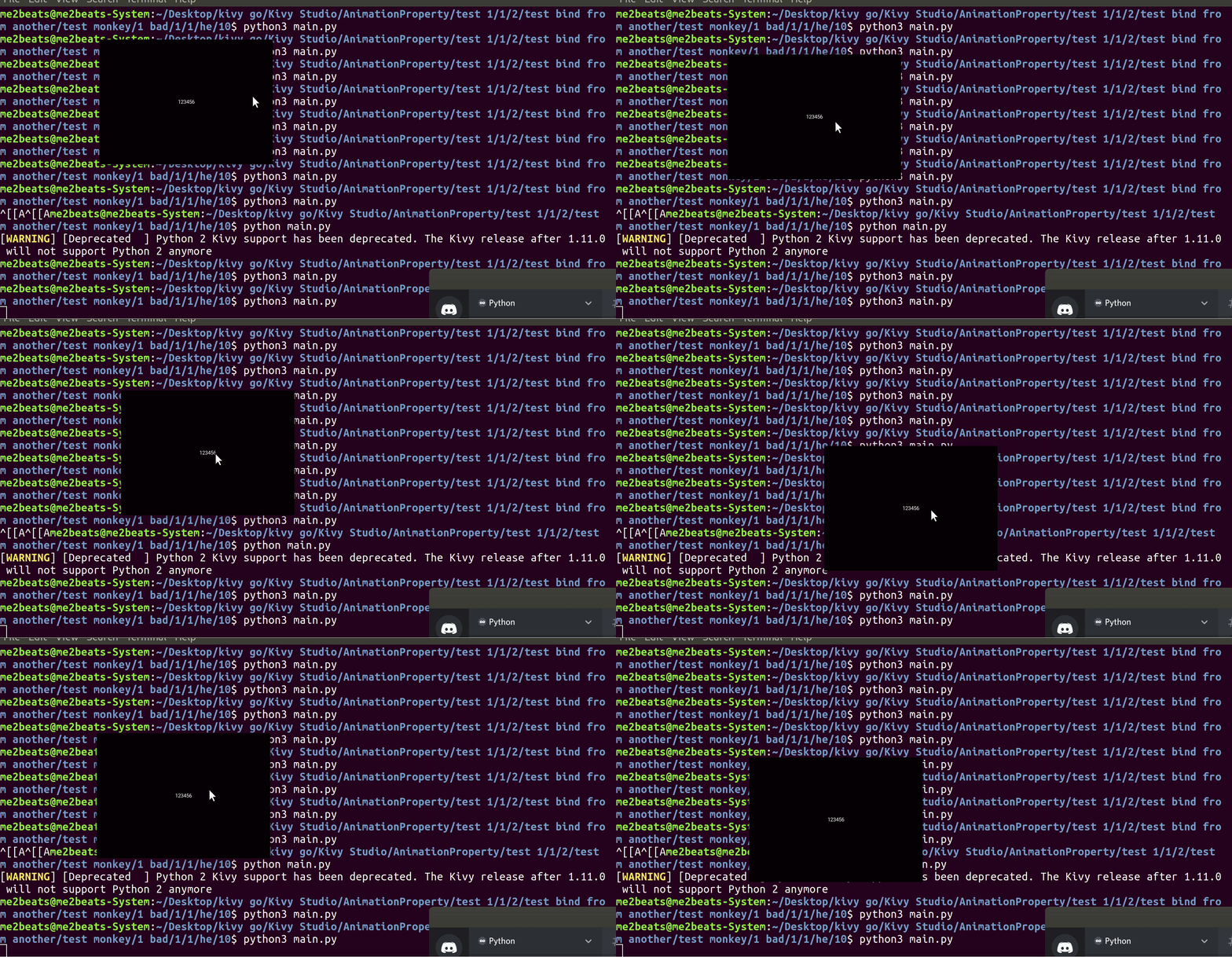 lethal rain
lol
digital rose
@alpine blaze pls look at this (the code is above)
lethal rain
is Window.minimize() the right code to minimize XD
@digital rose doesnt api suck sometimes
lethal rain
give out multi errors
digital rose
maybe you have a typo in the code
lethal rain
nope D: just says not defiend even tho it is
alpine blaze
hm, fun
tried using touch.dx & touch.dy directly but this doesn't work well, so i guess your way is a better direction to take
from kivy.app import App
from kivy.lang import Builder
from kivy.uix.label import Label

from kivy.core.window import Window

#Window.size = (500, 300)
#Window.borderless = True


KV = """
MyLabel
    text: '123456'

"""
class MyLabel(Label):

    def on_touch_down(self, touch):

        touch.grab(self)
        self.mouse_pos = Window.mouse_pos

        super().on_touch_down(touch)

    def on_touch_move(self, touch):

        if touch.grab_current is not self:
            return super().on_touch_move(touch)

        dx = Window.mouse_pos[0] - self.mouse_pos[0]
        dy = Window.mouse_pos[1] - self.mouse_pos[1]

        Window.left += dx
        Window.top -= dy

        self.mouse_pos = Window.mouse_pos[0] - dx, Window.mouse_pos[1] - dy

    def on_touch_up(self, touch):
        if touch.grab_current is not self:
            return super().on_touch_up(touch)
        touch.ungrab(self)


class MyApp(App):
    def build(self):
        self.root = Builder.load_string(KV)


MyApp().run()
better, but that doesn't work if you move too fast
because kivy doesn't get events outside of its window :/
@digital rose @lethal rain
 pulsar cipher
this is probably a rather basic question but if I want to build a bigger PyQt application how do I go about structuring my code well, currently what I am thinking is having most vital functions in my gui.py file, however, I am sure that is not the proper way of creating a bigger application as typically you could import the ui file or convert it and would rarely touch it I think. I hope this makes sense.
rocky dragon
this is how I did mine https://github.com/Numerlor/Auto-Neutron (still working on a code cleanup), separating UI and workers into groups, but most of my windows were also handmade or heavily edited
 loud sapphire
Hoy, can I set a label text like this at all? It displays empty for me.
class Kell(Label):
    def update_time(self, *args):
        self.text = str(get_other_data().get_time())
in .kv:
<WeatherScreen>:
    name: 'weather'
    BoxLayout:
        orientation: 'vertical'
        BoxLayout:
            orientation: 'horizontal'
            Kell:
.
.
.
getting time in .py
class get_other_data():

    def get_time(self):
        current_time = strftime("%H:%M:%S", localtime())
        current_timezone = datetime.datetime.now(datetime.timezone.utc).astimezone().tzinfo

        return current_time
class TestApp(App):
    def build(self):
        CurrentInfo = Kell()
        Clock.schedule_interval(CurrentInfo.update_time, 1)
        return presentation
yep, pretty sure that's the issue, you are calling it as a class method, so it can't update your instance
you need to get your Kell instance that exist, not create a new one
you can give it an id in the kv rule, and get your weather screen, to get the kell instance by id from it
loud sapphire
Hm, I can't understand that quite yet.
So I put the ID on it. Then use it on Py side somehow..
I don't see how to use the existing instance
I think it's a lack in core python understanding though 😄
Can't I solve this in the Kell class, instead of the WeatherScreen?
I can do it by removing the () when using Kell in the build function, right?
I get an error that
'float' object has no attribute 'text'
alpine blaze
no, you can't just use the class
you have to understand the difference between a class and an instance
you have an instance created in your kv, when you put Kell: it instanciates, you could have multiple Kell instances this way, and they wouldn't necessarily display the same value, so to update the value one of them display, you have to get it
<WeatherScreen>:
    name: 'weather'
    BoxLayout:
        orientation: 'vertical'
        BoxLayout:
            orientation: 'horizontal'
            Kell:
                id: kell
now, i don't know how WeatherScreen is instanciated, but i'll assume you have its parent ScreenManager in your root rule of your app.
class TestApp(App):
    def on_start(self): # in build the tree is not yet, loaded, so we use on_start instead
        my_kell = self.root.ids.screenmanager.get_screen('weather').ids.kell
        Clock.schedule_interval(kell.update_time, 1)
        return presentation
@loud sapphire
loud sapphire
Oh. I see.
So would I also have to define a build function with this?
So far I thought it was the main thing
Weatherscreens parent is a BoxLayout, which's parent is also a BozLayout. These are defined in the rule of BoxLayoutWidget, which I created in Python and it's actually a screen at this point.
In the root of the KV, just the BoxLayoutWidget is instanciated, everything else is in it's rule.
BoxLayoutWidget:

<BoxLayoutWidget>:
    id: boxlayoutwidget
    BoxLayout:
        orientation: 'vertical'
        BoxLayout:
            orientation: 'vertical'
            WeatherScreen:
@loud sapphire just keep in mind that such an example will not work, if you want to do something like this:
BoxLayout
    MyLabel
        text: '12345'
    Label
        text: my_label.text

<MyLabel>
    id: my_label
    font_size: 20
If you want to use id, then you can do this:
BoxLayout
    MyLabel
        text: '12345'
        id: my_label
    Label
        text: my_label.text

<MyLabel>
font_size: 20```oh, so it's not a Screen from the ScreenManager module? well you can still use ids, but not get_screen then
rocky dragon
How can I scroll to index in QTableWidget while keeping row at index at the top of the visible area?
rocky dragon
Seems to be, had a hard time searching for scroll stuff for some reason
Will check it tomorrow
 copper root
Hey fellows, I'm working on a project with a basic UI using Tkinter. Currently I use a bunch of global variables to handle state and events. Does anyone have advice for dealing with events without using global variables?
lethal rain
does this look out of place or is it just me?
tribal path
make a class, attach stuff to self
lethal rain
class MainProgram(BoxLayout):
    def __init__(self, **kwargs):
        super().__init__(**kwargs)

    def mainprogram(self):
pass``` i did thatthanks @proper glade works perfectly
 proper glade
sweet
rocky dragon
now to figure out how to implement a usable autoscroll with it
livid lynx
Hi guys! I have a question regarding PyQt5. I would like to hide the ugly 3 dot handle of a splitter. Does anybody have any idea how I could go about that?
digital rose
@lethal rain looks nice. Am I right this is kivy?
I would align the text of the header to window center, now it has moved to left because of minimize and close buttons.
also imo, minimize and close buttons have too much distance between each other (if you are not going to add another button between them, for example, maximize)
loud sapphire
Is it normal that one function runs 5 times on startup in Kivy? I added a the print here and I see it always 5 times when the I run the code.
def get_current_temp(self):
        temp = self.data['main']['temp']
        temp = str(temp)
        print("ye")
        return temp
But I run it only once when setting the label text
def display_temp(self):
        temp_label = self.ids['temp_label']
        temp_label = get_weather_data().get_current_temp()
        return temp_label
It seems to happen to any function I add a print into.
loud sapphire
Also, does this one mean that the instance is not there yet?
AttributeError: 'super' object has no attribute '__getattr__'
I'm trying to dig until the correct widget (label) using id's
CurrentInfo = self.root.ids.a.parent.ids.b.parent.ids.weather_screen
And it works until the ids.b But the next one gets an error.
Weather screen is a screen defined in Python, which's rule is defined in .kv.
I tried adding this id into the rule itself and also into the rule of the other widget rule where this one is instanciated.
There'd be another layer of digging, as weather screen holds the widget that I'm trying to reach
This whole thing seems a bit unoptimal. As I want other parts in there to keep updating too.
I think I'll take a new approach to try to avoid this here. I should probably start updating the parent widgets using the Clock and then pack the functions in there.
alpine blaze
@loud sapphire 1/ that doesn't seem normal, but there is probably a good reason from the rest of your code. 2/ yes, this error usually means it's looking for an id that is not yet in ids
(and yes, we should probably make that error clearer)
your chain of ids is really weird, why would you, starting from the root, get an id to get its parent, then (this parent being a rule, right?), get another id inside it. that seems overly complicated
loud sapphire
I thought that the weather screen would be one 'module'.
I should probably follow some guidelines on which stuff I should define in rules and which should I initialise in the beginning of the KV file, not inside the rules.
Currently the .kv file only runs 1 widget, everything else initialises inside that widget's rule - sounds bad when I think of it.
alpine blaze
it's normal that the kv returns one widget, but you can create multiple rules aside it, and use them in that root rule
one big rule is indeed a pain to maintain
using rules reduces repetition a lot
and makes it a lot more readable
loud sapphire
Multiple rules aside it? Meaning multiple rules per widget?
Currently , the widget that's the root of .kv has, in it's rule, all other widgets. Or the main structure of the app ..
All these other widgets, have their own rules - at least screens.
alpine blaze
no i mean like ```yaml
FloatLayout: # this is your root rule
BoxLayout:
orientation: 'vertical'
Header:
id: header
Body:
id: body
Footer:
id: footer
Header@FloatLayout:
size_hint_y: None
height: 200
Image:
pos_hint: {'center_y': .5}
x: root.x + 50
Label:
text: 'hey ho!'
pos_hint: {'right': .8, 'center_y': .5}
Body@BoxLayout:
RightPanel:
id: right
Content:
id: content
Footer@BoxLayout:
orientation: 'vertical'
Label:
text: 'copywrong 2019©'
Label:
text: 'yeet'
Right@BoxLayout:
Button:
text: 'do_something'
Button:
text: 'anything!'
Button:
text: "i can't even"
Button:
text: 'Fine!'
Content@RecycleView:
data: [{text: 'weeeeee'} for t in range(5000)]
viewclass: 'Label'
RecycleBoxLayout:
orientation: 'vertical'
size_hint_y: None
height: self.minimum_height
something like this
loud sapphire
Do you usually prefer to do most things on .kv side?
So far I created a class in .py and then used it in .kv.
BoxLayoutWidget:

<BoxLayoutWidget>:
    BoxLayout:
        orientation: 'vertical'
        BoxLayout:
            orientation: 'vertical'
            WeatherScreen:
            ForecastScreen_3h:

        BoxLayout:
            orientation: 'horizontal'

            AnotherScreen:
            andAnotherScreen:
.
.
. #more rules downwards, every new class would be added into the rule of the root
This one is a bit too extreme then?
When it comes to defining the root structure.
alpine blaze
i usually do as much as possible on the kv side, but sometime it's too much for my own good, logic should be more on the python side, only very simple things, with local effects, in the kv side, but for structure, it's good to do a lot in kv, really makes things easier
i've add apps with tousands of lines of kv, about as much python, i wouldn't imagine how much python it would have been to replace all the kv
 royal cove
Hello, im trying to get some help in understanding how qtimer works
Based on some search results, it seems that qtimer works on the same thread instead of spawning a different one. However, that would mean if i call an infinite loop using a qtimer, the gui would freeze but that doesnt seem to be the case
Could anyone enlighten me on the matter? feel free to ping as i might not be looking at this channel often enough
sudden coral
What do you mean by "calling an infinite loop using a qtimer"? As in connecting the timer's timeout signal to a custom slot that contains an infinite loop?
royal cove
Correct
sudden coral
Not sure what's going on there then
Can you check if you're in the same thread from the slot?
royal cove
Uhm im not sure on how to do that
sudden coral
Qthread has a static method that returns the current thread
royal cove
Trying to multitask outside rn so not in a position to do so, but will check when i get home
sudden coral
I believe the python standard library also has a way to get the current thread
Either should work
And you can compare that against a thread retrieved outside the slot
sudden coral
Perhaps relevant docs https://doc.qt.io/qt-5/signalsandslots.html#signals
I'm not sure how to interpret that though
So the slot will block yet still be independent of the gui event loop? 🤔
I guess I just don't understand how its gui event loop works
lethal rain
    def validate_user(self):
        user = self.ids.user
        pwd = self.ids.pwd
        info = self.ids.info

        uname = user.text
        passw = pwd.text

        if uname == '' or passw == '':
            info.text = '[color=#FF3333]Username or password required![/color]'
        elif uname == 'admin' and passw == 'admin':
            info.text = f"[color=#00FF00] User '[color=#00FFFF]{uname}[color=#00FF00]' has successfully logged in! [/color]"
            MainProgram()
        else:
            info.text = "[color=#FF3333]Invalid username or password![/color]"

    def hide(self):
        pyautogui.click(0,0)

class MainProgram(BoxLayout):
    def __init__(self, **kwargs):
        super().__init__(**kwargs)

    def mainprogram(self):
        pass
``` am i doing somthing wrong? it wont open a new window :/i don't see what is suppsode to open a new window here
oh, the MainProgram() in the middle
well, for once MainProgram is a BoxLayout, not an app
but second, kivy is not good at multiple windows, it can currently only have one per process
if you want to open a new one, it's better to spawn a new one
which is a pain
but you can do popups inside kivy
it's just in the same window
lethal rain
oh popups it is then
😐
        elif uname == 'admin' and passw == 'admin':
            info.text = f"[color=#00FF00] User '[color=#00FFFF]{uname}[color=#00FF00]' has successfully logged in! [/color]"
            with open('mainwindow.py', 'r') as f:
                f.read()
                if __name__ == "__main__":
                    MainWinApp().run()

        else:```

is that a good start because it cant detect my class inside my other file ;|no that looks very wrong
what do you think MainWindow().run() does? (or the if __name__… part, for that matter)
digital rose
it's a method for Gtk.Application
inherited from Gio.Application : https://lazka.github.io/pgi-docs/Gio-2.0/classes/Application.html#Gio.Application.run
"This function is intended to be run from main() and its return value is intended to be returned by main()."
this part seems useless, since you do not store the file contents:
"with open('mainwindow.py', 'r') as f:
f.read()"
alpine blaze
well, i though this was a kivy app, not a gtk one
but maybe it is a gtk one, i don't know
digital rose
I'm 100% sure this is kivy :)
Boxlayout, etc..
By the way, you can not write def __init__ if there is nothing there, like in your case @lethal rain
digital rose
that's why I really like the customizability of kivy.
I just created a custom animation class with a relative parameter and I didn’t have to ask the devs to implement this in a next version (tho I really think this is a useful feature).
PS: The gif shows the animation steeply. It’s actually smooth
from kivy.app import App
from kivy.lang import Builder
from kivy.uix.label import Label
from kivy.animation import Animation as A


KV = """
MyLabel
    text: '123456'
    on_touch_down: self.anim()
"""

class MyAnim(A):
    def __init__(self, **kw):
        super().__init__(**kw)
        self.relative = kw.get('relative', None)
        if self.relative is None : return
        self._animated_properties.pop('relative')

    def start(self, widget):

        if self.relative:
            for k, v in self._animated_properties.items():
                self._animated_properties[k] = getattr(widget, k)+v

        super().start(widget)


class MyLabel(Label):
    def anim(self):
        a = MyAnim(x=100, y = 100, relative = True)
        a.start(self)


class MyApp(App):
    def build(self):
        return Builder.load_string(KV)

MyApp().run()
well, there is a BoxLayout in Gtk too
tribal path
@digital rose were you able to get your animation string > anim.sequence to work?
digital rose
@tribal path well, I decided for a while to just use eval. literal_eval would be preferable, but I seem not ready to spend time on this yet. this is necessary for my animation system, it is rather unusual, because it should set the entire animation for one or several widgets by name (including autobinding of necessary methods to events and creation of kivy properties if they do not exist for this widget). then I plan to test in practice how convenient such an animation system is.
tribal path
yea replace & eval would do. ast parse is a little safer. havent used ast much myself but this seems to work if you want to give it a try.
from kivy.animation import Animation
from ast import parse
def Anim_parser(anim_str: str):
	vd = {}
	anim_str = "var = "+ anim_str
	anim_str = anim_str.replace("{", "A(**{").replace("}", "})")
	exec(compile(parse(anim_str), "<ast>", "exec"), {"A": Animation} , vd)
return vd["var"]```its safer there as iirc the only callable allowed there will be Animation @digital rose
 kind kraken
@tribal path I believe builtins will be available too
tribal path
yea looks that way. adds __builtins__ to the global arg slot
whats the right way to validate here btw? iterate/validate a dump of the parse & if it passes eval the string?
kind kraken
I'd be tempted to write a class to evaluate the AST directly by hand
though that's probably overkill
digital rose
@tribal path I tested a little and everything seems to work, really cool! thanks:)
here is the code for experiments, if someone needs
from kivy.app import App
from kivy.lang import Builder
from kivy.uix.label import Label
from kivy.animation import Animation

from ast import parse
def Anim_parser(anim_str: str):
    vd = {}
    anim_str = "var = "+ anim_str
    anim_str = anim_str.replace("{", "A(**{").replace("}", "})")
    exec(compile(parse(anim_str), "<ast>", "exec"), {"A": Animation} , vd)
    return vd["var"]

KV = """
MyLabel
    size_hint: 0.25,0.25
    text: '123456'
    on_touch_down: self.test()

    canvas.before:
        Color:
            rgba: 0.5,0.4,0.6,1
        Rectangle:
            pos: self.pos
            size: self.size
"""

class MyLabel(Label):
    def test(self):
        #Anim_parser("{'x': 300}+{'x' : 0}&{'y':300}+{'y':0}").start(self)
        Anim_parser("({'x': 300}+{'x' : 0}&{'y':300})+{'y':0}").start(self)

class MyApp(App):
    def build(self):
        return Builder.load_string(KV)

MyApp().run()
@tribal path @kind kraken
Is there something wrong with builtins here?
kind kraken
it depends on if your data can come from an untrusted or malicious source
digital rose
Well, as far as I understand, this is safer than only eval
tribal path
I suppose we could do a very simple verifier, allow xy{}()&+ and digits. or could that be abused... x/y could be assigned to vars I guess.
digital rose
@tribal path tho not only x y, it can be a kivy property with any name
also where are such args as 'transition' = 'in_out_sine' etc
I think it can be done a little later (this option is already pretty good imo)
tribal path
yea haven't touched animations much myself other than some fade ins. might start using them now though
 ruby path
Basic info: tkinter framework, python 3.7, windows10
Hi. So, I'm trying to essentially merge a live-updating clock function that creates its own tkinter window and fills it with a clock into an existing program I have/am building. I would like my program to display the clock in the upper right corner, and I already have a frame prepared for it, but I'm not sure how to actually get the clock in there. Would anyone be willing to give me a hand with this? I'm not sure how to go about doing it and the tkinter docs have been almost no help with this issue, either has googling, although it helped with a couple other small issues regarding this problem.
Here are the code blocks. To not fall into the XY problem, I'll post all of the code from both sources, although I am going to omit some from my GUI program because as far as I know, the functions I'm omitting are entirely irrelevant. Just know that there's a dictionary and a set of functions that get called when a keypair from the dict is "called" or whatever.
Here's the code for the clock. https://pastebin.com/VFTBBETC
Here's the code for my GUI. Pls forgive, am noob and it's messy and it's my first GUI. https://pastebin.com/WwGEERFS
 ruby path
Anyone...?
sudden coral
Can your question be boiled down to "how to position a label at the top right of a frame"?
ruby path
I think it could, yes. But then, the question is, how do I put that clock into the label and also run/activate it on runtime?
sudden coral
the clock is the label
as for how to activate it, just call the tick() function once
ruby path
Where do I call tick?
sudden coral
Doesn't really matter as long as the label already exists. So you could do it right after you add the label
ruby path
😮
How do I localize the display of the clock to the label widget though? I see that being specified nowhere in the code.
I realize this might be a dumb question.
sudden coral
The clock is the label (look at line 11). At line 20 you set the text of the label
ruby path
But I truly don't understand this aspect of this stuff.
OH! Clock.config!! HECK
Ok. Now I'm having GIL issues. Lol
Oh it works. O:
And it doesn't break when the launcher is used! Holy shit! HOLLAH
Thank you @sudden coral !!
sudden coral
You're welcome
ruby path
holy shit oh my god it works. I'm so hyped right now
lethal rain
xD
<MainWindow>
    id: win
    orientation: "vertical"
    spacing: 3
    space_x: self.size[0]/3
    canvas.before:
        Color:
            rgba: (.135, .206, .250, 1)
        Rectangle:
            size: self.size
            pos: self.pos

    BoxLayout:
        size_hint_y: None
        height: 50
        canvas.before:
            Color:
                rgba: (.06,.45,.45, 1)
            Rectangle:
                size: self.size
                pos: self.pos
        MainLabel:
            text: "HighTech Hosting - Control Panel - Main"
            bold: True
            size_hint_x: 2
            spacing: 3
        MinButton:
            text: "-"
            bold: True
            size_hint_x: .1
        ExitButton:
            text: "X"
            bold: True
            size_hint_x: .1
whats wrong with this D:
digital rose
@lethal rain try
    BoxLayout:
        size_hint_y: None
        pos_hint: {'top': 1}
from kivy.app import App
from kivy.lang import Builder

KV = """
BoxLayout
    Label
        size_hint_y: None
        pos_hint: {'top': 1} # <--- you need this
        text: '123456'
"""


class MyApp(App):
    def build(self):
        return Builder.load_string(KV)

MyApp().run()
@lethal rain still problem ?
lethal rain
yes
want file? because right now its not wokring properly D:
well its working but the text and banner wont go to top
digital rose
@lethal rain can you create a minimal example using only kivy widgets?
it is useful with 100% of cases
lethal rain
?????
import kivy
from kivy.app import App
from kivy.core.window import Window

from kivy.uix.popup import Popup
from kivy.uix.label import Label
from kivy.uix.boxlayout import BoxLayout


################## Config ####################

Window.size = (700, 370)
Window.borderless = True
Window.resizable = False

##############################################

class MainLabel(Label):

    def on_touch_down(self, touch):

        touch.grab(self)
        self.mouse_pos = Window.mouse_pos

        super().on_touch_down(touch)

    def on_touch_move(self, touch):

        if touch.grab_current is not self:
            return super().on_touch_move(touch)

        dx = Window.mouse_pos[0] - self.mouse_pos[0]
        dy = Window.mouse_pos[1] - self.mouse_pos[1]

        Window.left += dx
        Window.top -= dy

        self.mouse_pos = Window.mouse_pos[0] - dx, Window.mouse_pos[1] - dy

    def on_touch_up(self, touch):
        if touch.grab_current is not self:
            return super().on_touch_up(touch)
        touch.ungrab(self)

class SigninWindow(BoxLayout):

    def __init__(self, **kwargs):
        super().__init__(**kwargs)

    def validate_user(self):
        user = self.ids.user
        pwd = self.ids.pwd
        info = self.ids.info

        uname = user.text
        passw = pwd.text

        if uname == '' or passw == '':
            info.text = '[color=#FF3333]Username or password required![/color]'
        elif uname == 'admin' and passw == 'admin':
            show_popup()
        else:
            info.text = "[color=#FF3333]Invalid username or password![/color]"

def show_popup():
    show = MainWindow()

    popupWindow = Popup(title="Connected to 'Server: 127.0.0.1'", content=show, size_hint=(None, None), size=(700, 370))

    popupWindow.open()

class MainWindow(BoxLayout):
    pass

class SigninApp(App):
    def build(self):
        return SigninWindow()

if __name__ == "__main__":
SigninApp().run()```@lethal rain simple popup example
from kivy.app import App
from kivy.lang import Builder


KV = """
Popup
    BoxLayout
        orientation: 'vertical'
        Label
            text: 'some label text'
        Label
            text: 'some label text'
"""

class MyApp(App):
    def build(self):
        return Builder.load_string(KV)


MyApp().run()
but you see what im trying to do tho
-_-
i know how simple popup is :/ i just want my banner on top ;/
oh well i guess il figure it out later
 modern scroll
Hello, is there a way to get a GUI module like tkinter to display the CLI?
rocky dragon
What do you mean? It should always show up unless you specify a param when launching
Or some kind of an embedded solution
modern scroll
Sorry Iv never used tkinter before so Im not sure what you mean exactly
rocky dragon
the python console will always show up when you launch a python script
if that's what you want
modern scroll
well I have a CLI game and I need the text from the console to show up in a GUI
livid lynx
Hi guys! I would like to kindly ask for some help. I have a tree widget which is populated by some entries. The first column of the tree has a string which represents the number of the entry. The entries are sorted by the first column and when there are more than 9 entries the following issue happens. Any idea on how to store a int in the first column or how to sort the column in such a way that 10>2? Thanks!
rocky dragon
you'll probably need to override the value comparasion operator
and then assign the item where it is changed to compare the whole int to be used in that column
rocky dragon
For my table I created a delegate but I'm not sure if that'll work there
livid lynx
I'm reading the documentation, maybe I can figure something out
rocky dragon
you'll need to reimplement QTreeWidget's item and change the __le__ or __lt__ methods
or something like that
livid lynx
yes
you are right
I get it now
I also found something
    def __init__(self, parent=None):
        QtGui.QTreeWidgetItem.__init__(self, parent)

    def __lt__(self, otherItem):
        column = self.treeWidget().sortColumn()
return self.text(column).toLower() < otherItem.text(column).toLower()```I just have to convert to int I think
lethal rain
@digital rose did a better way round works fine this way lol
lethal rain
MainLabel:
            text: "HighTech Hosting - Control Panel - Sign In"
            size_hint_x: None
            pos_hint: {"center_x": .8}
            bold: True
            size_hint_x: 2
            spacing: 3
my text wont go into center D: whats wrong with it :/
sorry if im being a noob 😐
i googled this for ages
digital rose
can anyone help me with kivy python the code is in #help-falafel
lethal rain
kivy goes in here
nvm i fixed issue but putting a massive space xDDD it looks messy but no one will see it
xD
digital rose
is that for windows ?
digital rose
i don't recognize the window style
 subtle otter
qt5 works on windows
subtle otter
yeah
digital rose
Gtk = Gimp Tool Kit
subtle otter
I dont like to use it though
digital rose
i like it above all the others
subtle otter
It doesnt look as neat as qt
rocky dragon
having trouble finding this, how would I change the disabled text color/style in the palette fot qt? Looks like this by default which makes it look even more prominent than the other entries https://i.imgur.com/ZWXCBOu.png
 fast wave
hi. in pyqt5 QTreeviewWidget, how can i add items to the second column?
loud sapphire
Hey, quick question as I
im starting with the rewriting of my test application
is there a best practice to which kivy widget to use as the root of the .kv?
alpine blaze
i usually use a layout, FloatLayout or BoxLayout, depending on the app, but FloatLayout is most convenient, even if you use a BoxLayout to make the basic layouting of your app, having the hability to add other widgets as sibblings to this (like, to display notifications, or other overlays), is pretty convienent
even if your app is pretty much built around a ScreenManager, it's usually not a good idea to use it as the root, wrap it in a layout, it'll be handy
loud sapphire
I see, thanks for the tip!
alpine blaze
👍
loud sapphire
So how do I fight with widgets that haven't been instanciated yet?
I defined my root structure of the kv much more clearly now, but I'm at this one again:
AttributeError: 'super' object has no attribute '__getattr__'
Why I'm getting this is because I'm trying to user a Clock function to update my actual clock feature every second. Should I use this function on the kv label itself, inside kv? Instead of in the on_start function that runs the whole thing.
alpine blaze
you could use the function to update a property on the app, instead of the widget, and make the rule of the widget refer to the app's property
it's better not to store too much information in widgets anyway, information should flow down to them, not up from them
loud sapphire
It's getters and setters n all that? Edit: ahh..
Warning

Kivy’s Properties are not to be confused with Python’s properties
???
AttributeError: 'float' object has no attribute 'ids'
Happens on this line
kell_id = self.ids['kell_id']
Kell is a Label widget with this id.
How come it now gets a float out of there?
class Kell(Label):
    def update_time(self, *args):
        kell_id = self.ids['kell_id']
        self.kell_id.text = str(get_other_data().get_time())
.kv
            Kell:
                id: kell_id
                text: 'Default text'
update_time is being run by a Clock.schedule_interval/once
loud sapphire
Been playing around with it, can't get past this error.
alpine blaze
the way you schedule update_time must be wrong
the float is certainly the deltatime value the clock gives it on schedule, which means you don't get a self, which means you scheduled the method unbounded, i.e, not attached to an instance
@loud sapphire
digital rose
no init for class Kell
"self.kell_id.text = str(get_other_data().get_time())" <-- does this line give an error ?
loud sapphire
Yep, same, but instead of ids it doesn
t have kell_id
I see the error seems clear. I will try looking again.
Even though the update_time is attached, seems the clock needs to be too just to run update time?
lethal rain
trying to understand whats wrong with my py2exe ;/ all i want is to turn my project to exe file
alpine blaze
are you sure that's the good channel?
@loud sapphire you need to properly set your clock event to call the instance's method, not an unbound version of it
livid lynx
Hi! Does anybody have any experience with PyQt/PySide QFormLayout on MacOS? Just ran a script on a Mac and the QFormLayout does not span the whole layout it's in. Under windows it looks ok. Is there a way to make it behave like it does in Windows or should I just use a GridLayout? Thanks!
digital rose
i've been watching for some months concerning GUI questions, and i noticed that most people ask about tkinter, then also some about PyQt, but hardly anyone has asked a question about Gtk3, which is arguably superior to either of the previously mentioned GUI packages
rocky dragon
What do you find superiour about it? For Qt/Gtk the differences should be mainly cosmetic
well, excluding the tools Qt also brings with it but that may be unwanted
digital rose
indeed cosmetically Gtk3 looks much better in my opinion , but for tkinter i noticed that they have few widgets
alpine blaze
iirc gtk has a very C-like api, it's object oriented "the old way", whereas qt is c++ native, defining much more object oriented abstractions
digital rose
as for customizing the widgets, some things were said to be not possible in tkinter, such as round buttons
alpine blaze
but i don't know how it evolved after the gtk2/3 split, it supposedly is very different from before
(which might have complicated the story a lot for people wanting to try it)
digital rose
do the tkinter widgets support css styling ?
alpine blaze
also gtk might be more popular to linux users, and qt more popular for the general developpers population
digital rose
^ true
alpine blaze
no, i don't think tk supports much styling, if at all
digital rose
that's why it looks old
tribal path
ttk is theming but yea nothing major, but you'd theme with ttk imports
 limpid kraken
hi, what is a good user interface for pygame?
for making a home page/main meun
to make a replica of something like this
with python
alpine blaze
well it's mostly pixel art, but that's nice. why pygame though?
limpid kraken
cuz i made my game with pygame
and is looking for a suitable gui to make a meun page for my game
alpine blaze
ah yeah, if the game is in pygame makes sense then
 runic stream
hi guys, I'm a beginner who knows the basics of python, do you have any raccomandation for an easy to learn GUI module?
 terse gull
I am no expert, but I have heard that Tkinter is not very pythonic
runic stream
I'll see
 young dust
wdym by "pythonic"
 dense folio
Easy to use: pyqt. Easy to learn... that is a different thing
you can use qt creator to create the interface with pyqt/pyside. But if you want to go deeper, it is a really big library
dense folio
so I still have this problem. Using pyside2, when I click on a box I change the palette of the widget's background, and when I select a new palette for the app, those widgets that I clicked before don't get updated :/
 wraith forge
@runic stream Never mind, took care of it myself. That kind of nickname was not acceptable here
 manic fox
whats the best user interface for a login system
like how would i go about creating one
alpine blaze
login system is a very vague requirement, is login all your system going to do? if so, login to what?
because any GUI system is likely adapted to do that
manic fox
all i need for now is that you input a username then a password
how would i create a UI for that
alpine blaze
anything would do, i would do it in kivy because that's what i know best and like most, but there might be constraints that make it not the best choice for you
so it depends on your use case
digital rose
Im using tkinter and i have this
popupMenu.configure(bg=back, fg=fore, font=(TEXT_FONT, 11, "bold"))```to try and set the widget a certain colour right
but part of the widget is still white
and googling tells me to do this
popupMenu["menu"].config(bg=back)
but that doesnt change anything
(the part there is still white)
back fore and TEXT_FONT are all variables that ive set btw
rocky dragon
@dense folio could you send over the UI Code of your app?
rocky dragon
How is the light_me method connected?
or just send over the python code too so I can try to figure somethingg out 😛
rocky dragon
hacky but adding
        for widget in self.findChildren(QtWidgets.QPlainTextEdit):
            widget.parentWidget().setPalette(p)
into change_theme works
maybe faster if you add in a check for palette color before setting a new one but no idea there
dense folio
oh thank you very much Numerlor! 😮
still no idea why it doesn't change by itself... It should right? :S
rocky dragon
too late to get into the logic behind all that so... ¯_(ツ)_/¯
dense folio
xd
 hard coral
I am making a PyQt app with the load ui method but now I am in a situation where I need to overload/subclass a few Widgets, is there away to do this when loading a ui file directly or do I need to convert it to .py first?
hard coral
This can be made when using the Promote functionality in QtDesigner
royal cove
hello, im working with PyQt and trying to get a looping timed process working in a parallel thread to prevent blocking. Trying to put together QTimer and QThread together but have no experience with QThread so far so could really use some help
the current issue is when i create a timer, connect it to a function and start it all inside a QThread, the thread runs to completion and terminates after starting the timer.
Looking for a way to keep the thread alive letting the timer do its job
class Fetch_Thread(QtCore.QThread):
    fetchTimer = None
    def run(self):
        self.fetchTimer = QtCore.QTimer()
        self.fetchTimer.timeout.connect(fetch_raw)
        self.fetchTimer.start(20)
above code runs to completion after timer starts and thread exits, currently trying to prevent that
feel free to ping me if someone is willing to help
rocky dragon
QTimer needs an event loop to work so you need to add self.exec_() to your run method
@royal cove
royal cove
hmm i see, is there a suitable way to set a terminate condition in the thread code itself then?
rocky dragon
Believe the thread just has to end, so stopping the timer ought to work
royal cove
will try stopping the timer from outside then, thanks a lot
livid lynx
Does somebody have any experience with PySide2/PyQt5 on MacOS?
dense folio
@hard coral do you mean loader.registerCustomWidget(YourCustomWidgetClass)?
 serene estuary
I'm currently working with Kivy kv files and having trouble using functions from the code in the .kv
Python File
from kivy.app import App
import kivy
from kivy.uix.label import Label
from kivy.uix.widget import Widget
kivy.require('1.0.7')


class LibraryApp(App):
    classprop="this string"

    def login_screen(self):
        classprop="the other string"


if __name__ == '__main__':
    LibraryApp().run()
.kv file
#:import NavigationDrawer kivy.garden.navigationdrawer
#:set _username "Login"
NavigationDrawer:
    id:navigationdrawer
    GridLayout:
        id:side_panel
        rows:10
        cols:1
        row_default_height: 100
        Button:
            id:login_button
            text:_username
            on_press: login_button
        Label:
            id:for_tests
            text:app.classprop
            text_autoupdate: True


    BoxLayout:
        id:main_panel
        GridLayout:
            id:toggle_button
            cols:5
            rows:5
            Button:
                id:drawer_activate_button
                size_hint:None,None
                width:100
                height:100
                on_press: root.toggle_state()
                Image:
                    source:"./3linemenu.png"
                    x: self.parent.x
                    y: self.parent.y
@serene estuary i can see things that looks wrong, but i'm not sure what you are trying to do. at least the classprop thing is wrong, that's now how you define and use properties in kivy, but since i don't see where you use it, i don't know if that's your problem
serene estuary
that was just a test
I want to know how to use functions in the python file from kv, as they dont seem to be having any effect when I do use them
if there are other problems though please do let me know now so I don't need to come back
alpine blaze
you can call a function or method like you do in on_press: root.toggle_state() this should work
serene estuary
so root.login_button?
alpine blaze
your method is called login_screen but yeah, you could do that
the code currently in the method doesn't do anyting useful though
and it would be app.login_screen() not root.login_screen
serene estuary
yeah its just a test, going to use it to make a login screen in main panel
alpine blaze
root is the root widget of the currentl rule, here NavigationDrawer, your method is on your app, which you can access using the app reference in kv
serene estuary
I did app.login_screen() but nothing appeared to happen
alpine blaze
add a print in your method, and see if it works?
alpine blaze
why would the label change?
serene estuary
do I need to update the label after changing the text its based on?
alpine blaze
i told you your classprop wasn't properly defined or used
it needs to be a property (on of the propreties defined in kivy.properties), to store text, StringProperty is the correct choice
serene estuary
do I need to change the kv or change how its defined in the py or both?
alpine blaze
class Library(App):
    classprop = StringProperty("this string")

    def login_screen(self):
        self.classprop = "the other string"
you just need to define it properly, and to update it, instead of just creating a variable thas in to saved anywhere in your method like you did
serene estuary
sorry
alpine blaze
the property definition is needed for kv to be able to react to changes
serene estuary
do I need to import properties seperately
I assume yes
thanks <3
before I go, is there a way of creating layouts that arent initially shown in the .kv that I can trigger later, like a login screen off of the login button, or would that be something to write entirely in python
alpine blaze
the easiest way to do that is using a ScreenManager with multiple Screens inside, and just tell the ScreenManager which screen to display by setting its "current" property to the name of the screen you want to show
you can define it all in kv
serene estuary
is screenmanager something I need to put above the navigationdrawer?
or just inside the panel I want to use it in
alpine blaze
it depends, it can be at any level, it's just that its children have to be Screens, and can only be displayed once at a time
so things that you want to be always visible shouldn't be inside the screenmanager, only the things you want to show/hide dynamicaly
serene estuary
so if my side menu doesn't change, it's only neccessary for the main one?
do I need to define the screenmanager in the python too?
alpine blaze
not necessarily
BoxLayout:
    orientation: 'vertical'
    Label:
        text: 'this title is always visible'
        size_hint_y: None
        height: 20
    ScreenManager:
        id: sm
        Screen:
            name: 'welcome'
            BoxLayout:
                orientation: 'vertical'
                Label:
                    text: 'this is only visible when current is "welcome"'
                Button:
                    text: 'good by ?'
                    on_press:
                        sm.current = 'good by'
        Screen:
            name: 'good by'
            Label:
                text: 'nice seeing you'
    BoxLayout:
        id:main_panel
        GridLayout:
            id:toggle_button
            cols:5
            rows:5
            Button:
                id:drawer_activate_button
                size_hint:None,None
                width:100
                height:100
                on_press: root.toggle_state()
                Image:
                    source:"./3linemenu.png"
                    x: self.parent.x
                    y: self.parent.y
    ScreenManager:
        id:sm
        Screen:
        ...
is this a good place to put it?
alpine blaze
yes, if that first part is the side menu that doesn't change, it's good
serene estuary
alright thanks for the help
alpine blaze
👍
serene estuary
can I like rate you 5* or something in this server?
alpine blaze
haha, i don't know, that's fine anyway, they already gave me a nice status 😛
serene estuary
<3
digital rose
import kivy
from kivy.app import App
from kivy.uix.label import Label


class myapp(App):
    def build(self):
        return Label(text="Test")


if __name__ == "__main__":
    myapp().run()
``````[CRITICAL] [App ] Unable to get a Window, abort.```just starting and error ;c
tribal path
os? installed deps?
fast wave
i've created a pyqt treewidget like this but it doesn't show all items. what's wrong?
def PopulateListwidget(self):
        self.exec1 = self.cur.execute("SELECT name FROM artists order by _id COLLATE NOCASE")
        self.qtreewidget = QTreeWidgetItem(self.ui.treeWidget)
        for row in self.exec1:
self.qtreewidget.setText(0, row[0])```I never used a treewidget, but you are writing in the same column every time and I don't think it works that way. Are you getting exactly 1 item?
fast wave
no, i want to get all items
digital rose
is there some sort of entry point when i want to get and set the window geometry of other applications?
with python on gnome
digital rose
something like this but in python: https://github.com/jordansissel/xdotool/blob/master/cmd_getwindowgeometry.c

GitHub
fake keyboard/mouse input, window management, and more - jordansissel/xdotool
😄
alpine blaze
this is not related to pygame, but just python and how to manipulate window properties, i think you can use xdotool from a subprocess, but there are probably more pythonic ways to do it
rocky dragon
Any way I can force a window to stay on top of Qt App? Got a modal crash window but in some cases an another modal window can appear above it which steals its focus
 viscid vale
Hi am new
 thorny lichen
Can someone help me figure out what I'm not doing right here?
I'm using PyQt5 and I'm trying to connect a button in the "Layout.py" script to a function in a "Logic.py" script. I know how to connect a button to a function within the GUI file itself, but I keep getting an "ImportError: cannot import name "Ui_MainWindow" from "Layout.py" when I attempt to run "Logic.py"
I've imported the "Layout.py" UI class into Logic.py so I can access the ui class functions and update text labels that are inside the Layout.py Ui_MainWindow class.
From what I understand, you simply need to import the external script into the GUI script so that the button.connect() call can access the external script from the imported file. However, when I import Logic.py into Layout.py and run Logic.py, I get the import error. When I remove "import Logic" from "Layout", the error goes away. However, since I removed the import I cannot access the function I need from "Logic"
Here is a code example: https://paste.pythondiscord.com/kihaqepaku.py
Ignore the "from btn_practice import Ui_MainWindow" line. I renamed the file to Layout.py
rocky dragon
think the issue is circular imports
thorny lichen
I agree, but I can't figure out how to implement it correctly.
rocky dragon
you import logic from layout which imports logic and it goes on and on...
well simplest way would be to keep the gui show stuff to the layout.py so you don't need to import it to logic
or create a different file that has the startup part
thorny lichen
If I instead create all my logic in one program and import it into the GUI, and then run GUI as the "main" program then it'll work. I was led to believe that you "shouldn't" run the GUI as the main, and still run Logic as main.
rocky dragon
I believe the third file that launches it would be the compromise there
something like this https://github.com/Numerlor/Auto-Neutron/blob/master/Auto Neutron.py
thorny lichen
Ah okay, so basically I would have three files: LaunchProgram.py, Layout.py, and Logic.py. Launch would simply instantiate the MainWindow and call MainWindow.show(), and then I should be able to remove the ui.show() from "Logic.py" which should let "Layout.py" call functions that reside in "Logic.py"?
rocky dragon
pretty much
thorny lichen
So which one would be more "Pythonic" or industry standard: Running the GUI script as the main program and import the logic, or go the three-file route and have a dedicated Launch.py?
rocky dragon
maybe there's a better way too but I don't know about it 😄
thorny lichen
Lol, fair enough. Yeah, like I said I know how to ultimately make the program work, but I kept getting told "no you shouldn't run GUI as main" but no one can tell me what the "correct" way is to implement what I'm trying to do.
Oh well, I'll just do what I gotta to do make it work I guess. Thanks for the help.
proper glade
@thorny lichen import one of them where you need them, rather than at the start of the file
i.e. in logic.py: ```python
def main():
from btn_practice import Ui_MainWindow
# etc...
though i agree that the better solution would be a reorganization
 blissful vale
So i need to build a UI for displaying a json, editing it, and have a window with a scroll inside the other window, like this
Which framework would let me achieve this the fastest
I basically have no prior knowledge with most of them
rocky dragon
I'd say qt
blissful vale
So something like pyQT5?
rocky dragon
Yep, or Pyside2. Think everything you want should be somewhat easily doable
blissful vale
Which has the least boilerplate
rocky dragon
between pyqt and pyside?
rocky dragon
they're mostly the same
blissful vale
"qt for python" is another name for pyside?
rocky dragon
Technically PySide2 now but yes
blissful vale
How do i go about setting max & min widths of layouts / components
rocky dragon
for widgets just setMaximumSize(Height/Width)
blissful vale
h/w? or h,w
rocky dragon
sorry bad example 😛
it's setMaximumSize/setMaximumWidth/setMaximumHeight
realised too late that parentheses mean a bit more
the qt docs are pretty good https://doc.qt.io/qt-5/classes.html#
blissful vale
They might be, but it's just a lot to dig through atm
I'll play around with it though, thanks
rocky dragon
I also slightly use pycharms autocomplete when I'm lazy to look through the docs. For example if I want to set something just type in set and scroll through that
blissful vale
Yeah I saw some in the vsc suggestion as well, but the ones I found were uncallable 🤔
blissful vale
What would be the correct way to have a list of items i can pop and add to?
I tried something like this ```py
Question tags
tags = ["boolean", "easy"]
tags_layout = QVBoxLayout()
question_tags_label = QLabel("Tags")
tags_layout.addWidget(question_tags_label)
def delete_tag(tag):
b = tags_layout.takeAt(tag)
tags.pop(tag)
for i, tag in enumerate(tags):
tag_line_layout = QHBoxLayout()
tag_line = QLineEdit(tag)
remove_button = QPushButton("X")
remove_button.clicked.connect(lambda: delete_tag(i))
tag_line_layout.addWidget(tag_line)
tag_line_layout.addWidget(remove_button)
tags_layout.addLayout(tag_line_layout)``` But it ends up not actually removing the items?
(also breaks as the loop isnt reran so next click will be out of range)
rocky dragon
I want to help but reading code on phone is so horrible :D
blissful vale
While I'm at it, what are common ways to structure qt projects?
Just writing it all out in one file is already up to 150 lines, and not very tidy. Which wont exactly improve as i add functionality to it
rocky dragon
I separated groups of UI windows to files, then my workers, a hub file that connects them all and has some logic and one file that launches it
blissful vale
how would you classify a ui group
rocky dragon
I've got popups and mainwindows
But my app has a lot of popups and one window that isn't really a pop-up is with them
blissful vale
Cause this will probably end up being maybe 2 main windows and a popup or 2
Does it make sense to make my own widget files?
Like how this is just a section that shows all alternatives ```py
Question alternatives
question_alternatives = [
"1 == 2",
"1 != 1",
"False == True"
]
answer_layout = QVBoxLayout()
top_row = QHBoxLayout()
question_alternative_label = QLabel("Alternatives")
question_feedbacktag_label = QLabel("Feedback tags")
top_row.addWidget(question_alternative_label)
top_row.addWidget(question_feedbacktag_label)
answer_layout.addLayout(top_row)
for alt in question_alternatives:
row = QHBoxLayout()
alt_text = QLineEdit(alt)
feed_tag = QLineEdit()
row.addWidget(alt_text)
row.addWidget(feed_tag)

answer_layout.addLayout(row)```
Takes a lot of room, and is it's own section
rocky dragon
I have my project stru tired like this https://github.com/Numerlor/Auto-Neutron/ but it's far from perfect
blissful vale
In short, I shouldn't have to worry a lot about it looking cluttered
I guess that's the nature of gui programming 🤔
rocky dragon
Making GUI made the few users like my app more and me hate it more
blissful vale
How would I go about syncing 2 QListWidgets? so if you click one it highlights a value in the other list
Or should I use a grid / some other widget for this?
rocky dragon
Connects current index changes to change index?
Pretty sure there are methods for it but not sure about the names
blissful vale
Any idea what I'd look for
I still haven't figure out much more than how to connect a button to a function
rocky dragon
I'd search for changed in my autocomplete :D
Then there should be a set equivalent
Or look up QListWidget's methods in qt docs
blissful vale
Also, should I be using a Listwidget for a 2 column thing?
I didn't like how table felt
rocky dragon
Depends, not that familiar with all the widgets though
There's also tree that I think can do that
blissful vale
hm
 sudden wraith
What is the best way to create a standalone distributable terminal command for my program? something like this:
$ program -l --argument --input /path/to/input
best depends on your constraints, but i'd start with entry points in setup.py and produce a wheel
so that can be pip-installed and the user will have the commands in their path
sudden wraith
Does that require the user to have python installed? (Probably yes)
sudden coral
Yes
sudden wraith
Is there any way to work around that?
 sand warren
in some cases you can freeze the code into an executable file. but it is error prone and tedious in my experience.
sudden wraith
I managed to make a unix executable, but it had option menus. Like this:
[1]: Something
[2]: Other option.
[3]: ....
>>>
Now I am looking for a program that doesn't need startup and can directly be called from terminal as a command (with arguments).
karmic shoal
option menus? were they a part of your program itself?
karmic shoal
and you want to be able to directly select an option together with launching the program itself from the commandline?
@sudden wraith
sudden wraith
Yes. I think I found something about how to do it. But this brings me on to the next problem: Is there any way to detect if they program is running by double clicking the file or by calling it like this from the terminal: $ Program --argument
karmic shoal
hm, is your solution to the command line arguments the argparse library in Python?
sudden wraith
So if you call it as a command it will use the arguments as inputs. or if you launch it by double clicking the file it will start a shell/terminal with some kind of x = input('Input: ') function.
Does anyone know if argparse works with pyinstaller?
This is the code for the menu I used previously:
def Menu():
    print('')
    print('')
    Menu_Input = None
    while Menu_Input not in ("1", "2", "3", "4", "5", "6", "7"):
        Menu_Input = input('''Choose an option:
[1]: OptionA
[2]: OptionB
[3]: OptionC
[4]: OptionD
[5]: OptionE
[6]: OptionF
[7]: OptionG
>>> ''')
        Menu_Input = str(Menu_Input)
        if Menu_Input == "1":
            #do something

        elif Menu_Input == "2":
            #do something

        elif Menu_Input == "3":
            #do something

        elif Menu_Input == "4":
           #do something

        elif Menu_Input == "5":
            #do something

        elif Menu_Input == "6":
            #do something


        elif Menu_Input == "7":
            #do something

        else:
            pass
it should
it's for parsing arguments though, so for a interactive interface you'd still use something like the code you posted
sudden wraith
Is there a way to detect if it was runned from the terminal or else show the menu
karmic shoal
if you're using argparse to collect the arguments, you could check if there's no arguments, and so run the interactive version
sudden wraith
I will try that, and set all arguments as optional?
Yep
That did the trick
Lets test some more before jumping to a definite conclusion.
proper glade
@sudden wraith sys.stdout.isatty() will return True if running in a terminal
sys being a module that youll need to import
sudden wraith
thx!
I already found a solution
but I will try this.
This doesn't seem to really work, it always returns True.
proper glade
works here
sudden wraith
Hmmm, I will stick with my old system though.
fast wave
how can i load images from sqlite db to qtextbrowser in pyqt5? (i want to use html if possible)
def readImage(self):
        cur = self.db.cursor()
        covers = cur.execute("select cover from covers")
        pm = QPixmap()
        for cover in covers:
            pm.loadFromData(cover[0])
            self.ui.textBrowser.setHtml("<img src=pm /img>")
@fast wave check this out https://www.qtcentre.org/threads/4163-QPixmap-into-QTextBrowser
Hi.
How can I see a QPixmap into a QTextBrowser with the HTML code?
The QPixmap is loaded from a SQLite database.
Thanks
fast wave
@proper glade thanks
 fickle needle
anyone here knows PyQT5? can someone explain QT Threads to me?
rocky dragon
Perhaps this would better suited for an another channel since the only thing they have with UI is the qt lib, but they're pretty much the same as normal python threads + you have signals
proper glade
they have some behaviours that normal python threads dont have
i.e. can be started multiple times
iirc automatically start in daemon mode
oh yeah they can also be terminated
cant kill python threads directly like that
rocky dragon
(not that you should terminate them)
 gentle mango
Is this where I can ask about renpy or is there a better channel?
wraith forge
This probably the best option out of the ones we have. What's up
 median valley
Hello Paython Community
 agile moss
Hello, @median valley
 candid eagle
hey is anyone familiar with QT?
ive made a gui with QT but it doesnt have any functionality yet, i thought this way might make it easier for someone to help and as a program checklist of sorts
karmic shoal
what sort of help do you need?
 sage heron
What package should i use if i wanna do a GUI ? Tkinter ?
karmic shoal
I recommend PySide2, which is the official Python wrapper for the C++ GUI library, QT
Also, can you please change your display name to comply with our name policy here? -> https://pythondiscord.com/about/rules#nickname-policy

The server rules, along with an explanation of what happens when they're broken
sage heron
This better ?
fickle needle
@candid eagle I'm making one with PyQT5 now. can't say I'm an expert though, I'm figuring out stuff as i go.
candid eagle
same here my first time using it
still playing about with the layout, but no i want to start coding the buttons etc but no idea where to start lol
i run the app with a script using ```py
import sys
from PyQt5 import QtWidgets
from MyForm import Ui_Form
app = QtWidgets.QApplication(sys.argv)
central = QtWidgets.QWidget()
window = QtWidgets.QMainWindow()
x = Ui_Form()
window.setCentralWidget(central)
x.setupUi(central)
window.show()
app.exec()```
for starters the wheel widgets, i intend on using them to adjust a 24hr clock value which is displayed inside the spin box, can use the spin box for fine increments if needed.
thats the plan just no idea how to do it lol
fickle needle
I'm on my way home, I guess I'll look at it after i reach
candid eagle
@fickle needle no worries cheers dude
ive gotten the spinbox in the right format at least lmao
 glad beacon
hi, need some opinions, actually it is like this by default:
http://prntscr.com/oz62uf
when i hover/press it will change to this:
http://prntscr.com/oz63dg
or should i invert it? remove that shadow when i hover/press it?
1 - Actual
2 - Inverse

 karmic shoal
both look the same to me
glad beacon
well
when you see
the green button
on the 2. image it has like a shadow
in the bottom
what should i do?
karmic shoal
I think it looks nice the way it is right now
candid eagle
@karmic shoal ever used QT Creator?
im trying to link a qdial with a spin box in a time format
iv tried py def dayWheel(): spin = self.day_hour_timeEdit dayDial = self.day_hour_wheel dayDial.valueChanged.connect(spin.setValue) dayWheel() inside MyForm.py
candid eagle
fyi ```py
def init(self):
self.form.day_hour_wheel.valueChanged.connect(self.day_hour_wheel_changed)
def day_hour_wheel_changed(self, value):
    hour = value // 60
    minute = value % 60
    self.form.day_hour_timeEdit.setTime(QTime(hour, minute))``` just incase it helps anyone else
can anyone help me get logging.info to be displayed in a QScrollArea
rocky dragon
You'll need some labels for that, or just use qtextbrowser
proper glade
after adding something to house the text in the QScrollArea you'll also need to define and register a handler to redirect output into it
so i.e. you have a QTextBrowser:
class LoggingHandler:
    def __init__(self, text_browser):
        self.text_browser = text_browser

    def write(self, text):
        self.text_browser.append(text)

    def flush(self):
        pass

    def close(self):
        pass

log = logging.getLogger()
handler = LoggingHandler(reference_to_text_browser_here)
log.addHandler(logging.StreamHandler(handler))
i think a QTextEdit will suffice here though
or QPlainTextEdit
blissful vale
@candid eagle If you don't mind me asking, what do you use for "sections" with a title on your gui?
This part
 weak hatch
Hi all, I'm using curses to create an interface and I'm trying to figure out mvwin and mvderwin. At the moment, everything works as expected except the contents of the window I'm moving are duplicated rather than moved. Code: https://bpaste.net/show/UseD
 split tiger
is this the channel for asking about opengl?
alpine blaze
it's not for it, but it might be the best channel to ask about it
split tiger
how do i get around the issue where importing OpenGL.Tk doesn't work because the issue where sys.maxint is not a valid attribute?
Apparently sys.maxsize is now used, and i updated python but the file didnt change
meaning i can't add a widget for opengl inside a tkinter window
since i need to import OpenGL.Tk to do it but that wont work due to a bug
alpine blaze
hm, didn't use opengl with tk, can you share a simple example and the error you get?
split tiger
haven't used this discord before, how do i share code?
alpine blaze
!codeblock
 proven basinBOT
codeblock
Discord has support for Markdown, which allows you to post code with full syntax highlighting. Please use these whenever you paste code, as this helps improve the legibility and makes it easier for us to help you.
To do this, use the following method:
```python
print('Hello world!')
```
Note:
• These are backticks, not quotes. Backticks can usually be found on the tilde key.
• You can also use py as the language instead of python
• The language must be on the first line next to the backticks with no space between them
This will result in the following:
print('Hello world!')
from tkinter import *
from OpenGL.Tk import *

b = OpenGL(height=100, width=100)
root = b.master
f = Frame(root, width=100, bg='blue')
f.pack(side='left', fill='y')
b.pack(side='right', expand=1, fill='both')

root.mainloop()
i took this from https://stackoverflow.com/questions/17367089/non-top-level-opengl-widget-in-tkinter
Stack Overflow
I have a existing tkinter gui to which I would like to add a openGL widget. However, it appears that the OpenGL widget only works if it is toplevel.
This works:
from OpenGL.Tk import *
from Tkinter
i get the error:C:\Users\Alex\PycharmProjects\PrototypeProject\venv\Scripts\python.exe C:/Users/Alex/PycharmProjects/PyGamePractise/testingload.py
Traceback (most recent call last):
File "C:/Users/Alex/PycharmProjects/PyGamePractise/testingload.py", line 2, in <module>
from OpenGL.Tk import *
File "C:\Users\Alex\AppData\Local\Programs\Python\Python37\lib\site-packages\OpenGL\Tk_init_.py", line 102, in <module>
if sys.maxint > 2**32:
AttributeError: module 'sys' has no attribute 'maxint'
wait
is this bad privacy?
alpine blaze
because we now can assume your first name is Alex?
split tiger
yeah nvm its fine
split tiger
yeah i researched and the attribute maxsize is now used instead of maxint
alpine blaze
you could try some ugly monkey patching, but it's likely you'll run into other issues
split tiger
i tried updating python but that didnt work, and i got pyopengl yesterday
alpine blaze
import sys
sys.maxint = sys.maxsize
split tiger
and i did try changing it to maxsize but then it didnt recognize the tgol package
alpine blaze
before the rest of the code
split tiger
_tkinter.TclError: can't find package Togl
this is same error as when i just changed the code
alpine blaze
how much do you care about using tkinter and python-opengl specificaly? there are other ways to do opengl in python
kivy, pyglet, panda3D, depending on what you want to do
split tiger
well im very new to it and just used tkinter since thenewboston was using it
though i saw another tutorial that used pyqt and did what i wanted
alpine blaze
tkinter is often the default option, but it's not a great option for anything, it's just the standard lib to do GUI in python, but it's a bit limited and doesn't look very good
qt is a good option yeah, more modern and looks nicer in most platforms
 silk echo
yes it comes built in
split tiger
oh i see, thanks
tribal path
usually it is, often it is split off though
split tiger
well it came with mine, i was just asking if it was different from the others, but i understand
does it cost money to download it? sentdex suggests going to riverbankcomputing to download pyqt, is this safe?
when i went to the official site it seems to be paid
silk echo
money for what
split tiger
pyqt, because it seems to be a paid thing here https://www.qt.io/
Qt is the faster, smarter way to create innovative devices, modern UIs & applications for multiple screens. Cross-platform software development at its best.
silk echo
you usually don't download packages from random sites, use pip
and yes pyqt5 is free to use
split tiger
thanks 🙂
silk echo
idk the license, seems GPL v3
tribal path
that would be for a commercial version/license yea.
the various gui & pyqt versions/forks have different license terms
 tawny monolith
hello, im kinda stuck. I have this variable from an entry box in tkinter called username_verify and password_verify. these are set to a stringvar. i cannot use this in an sql insert command and im just stuck i need some help plz
sql part:
silk echo
StringVar != Stringvar
tribal path
& you .get() values from them
tawny monolith
srry i dont understand
i understand that this data type cannot be converted to a mysql type
but im askin is there a way to convert it to another datatype that would work with mysql such as string
when i tried i was getting blank data in the table (using str)
@tribal path finally figured out what u meant and it work! ty
🙂
split tiger
which channel should i ask about python extensions?
tawny monolith
not sure, maybe ask one of the help channels
split tiger
ok thanks
candid eagle
@blissful vale not sure if you mean this py def retranslateUi(self, Form): _translate = QtCore.QCoreApplication.translate self.Light_Modes_Manual_Hours.setTitle(_translate("Form", "Light_Manual_hours"))
candid eagle
like this py <widget class="QGroupBox" name="Light_Modes_Manual_Hours"> <property name="geometry"> <rect> <x>140</x> <y>10</y> <width>551</width> <height>159</height> </rect> </property> <property name="title"> <string>Light_Manual_hours</string> </property>
 civic thistle
what's the framework to go with if I want to create a simple terminal like GUI? I don't have any experience making GUI
basically want to make this independently
(this is hyper running fira code)
key things are window size and I think the taskbar is customized
plus colors are supported
digital rose
seems just as prints to the terminal
clash, for that pic it looks there is no extra GUI needed for this
only the print() function
civic thistle
@digital rose since I plan to bundle it into an executable, if I do it without making a GUI then the default cmd.exe will be used which doesn't looks as good.
so I want to make this outside of hyper (the terminal I'm using)
digital rose
clash, i was just today looking into the module "curses", perhaps you could use it:
https://docs.python.org/3.7/library/curses.html
civic thistle
I was just looking at it too, hopefully should work
candid eagle
anyide if you can use a qtextBrowser and link it to the QCalendarWidget so when you click on a day the browser will display some qradiobuttons but load a new set for every day you select
hope that makes sense to someone lol
tbf i could just use a groupbox instead of the qtextBrowser
candid eagle
candid eagle
anyone able to help using sqlalchemy?
 hexed vine
it's a pretty common thing to use, yeah, but ask away in #databases so it's more accurate to it's topic
candid eagle
ah i wasn't sure as its using a QWidget
split tiger
Can someone help me with PyQt5? thanks
 near lagoon
I probably can't, but just ask your question @split tiger
split tiger
when i import parts of PyQt5 such as QtGui (from PyQt5 import QtGui), for some reason i get the error under the QtGui: 'Cannot find reference 'QtGui' in 'init.py'
however this error may be incorrect, since QtGui is recognised (when i type QtGui i can use tab to finish it, along with any other part of PyQt) and i can use modules from it and pycharm recognises that i have used parts of it
@near lagoon the second line is not greyed because i have used modules from QtGui, so I know its recognised
but it cannot find the reference in the init file
near lagoon
near lagoon
Np, hope that fixes it!
rocky dragon
I had that when I switched my project interpreter and had to correct its paths
 sour kelp
Hi can someone help me (or point me in the right direction) with displaying an animated svg graphic using tkinter? Only thing I found so far were functions to convert svg graphics to png and use them in tkinter. But that's not really what I want. ^^
alpine blaze
I doubt that tkinter has an svg renderer, so your choices would be either embedding a browser, or exporting to png everytime you change a property and display that
Or, well, code an svg renderer from scratch, but that's a muti-year project
(i'm working on one for kivy, so i know one or two things about that)
proper glade
in Kivy's GridLayout, is there a way to specify the x,y index of a widget in the grid?
alpine blaze
Index = y * cols + x
But you must have widgets in other cells
I think someone did a sparsegridlayout
proper glade
thanks, sparsegridlayout sounds more like what im after
alpine blaze

GitHub
A kivy layout for placing widgets in a grid without having to fill all the grid entries. - inclement/sparsegridlayout
proper glade
cheers
btw
while trying out the buildozer tutorial here https://kivy.org/doc/stable/guide/packaging-android.html#packaging-android i ran into the issue with aidl mentioned here https://github.com/kivy/buildozer/issues/824 fixed by setting log level to 2 as mentioned there
might be worth mentioning in the tutorial as well
alpine blaze

“Developing mobile apps in Python straight from your mobile device. #kivy #python #android #tabletproductivity”


Developing mobile apps in Python straight from your mobile device. #kivy #python #android #tabletproductivity
 Twitter
 outer ether
Hi, everyone
Does anyone here use Tkinter?
option_labels[index][0].grid(column=1, row=1, sticky=E+W+N+S) is not adding this label into the grid
 dreamy urchin
In my Tkinter GUI I want to have a feature where the user can press a button to make a group of widgets (i.e. Entries and Comboboxes) to enter information on an object.
The user can press a button to make more groups of widgets to enter information on multiple objects.
This is the code I have to "set up" the widgets.
What code do I use to read the information of each widget from these groups of widgets?
I'm thinking of looping through each group of widgets, and acquiring the data entered into each widget.
here's what the code does
 stable gate
@dreamy urchin how did u style that tkinter app
dreamy urchin
What, like the colours?
I didn't it's white, I just inverted it so it's easy on the eyes.
But you could just change the colour of the bg (background) or "background" value when establishing the widgets and window.
 south belfry
Hey, I'm working on a little project which aims at taking user input and using the mnist dataset to guess the number, I have something that works fine, however I'm using tkinter to draw the number, and I then have to convert the image in 28x28 etc.
I'd like to know I can have the user directly draw in a 28x28 'grid' (emulating the resolution with tkinter basically, anyone knows how to do that ?)
south belfry
Also, how can I change the background under the buttons ? (the white part)
young dust
what i would do is make a frame and make it same relative size and fill it with some color and make it the parent of everything else
ohhh thats an old message
likely already figured out
rocky dragon
for pyqt5 and pyside2, what's the main difference I'll bump into? Thinking about using pyside for an utility for my pyqt app
sudden coral
They don't fully support all Qt things
PyQT5 seems to support more than pyside2
There's a list somewhere on the wiki of all of it
If it's missing something you know you need then it'd be a dealbreaker
rocky dragon
Will just be a simple gui of a table that'll allow entries to bea dded and then dumped to a csv so not much around it
sudden coral
Also I heard there are differences in signals and slots but I can't seem to find any, superficially at least
rocky dragon
a problem I had when trying to switch was some weird settings yelling at me it expected QSomething but got QSameThing
rocky dragon
should be good, only thing I indirectly use is qvariant but that won't be needed in the utility
with that in mind, any way I could have a different context menu in a table between clicking empty space in the widgets and an item?
so if an item is clicked it adds in stuff like edit and remove row
sudden coral
Yeah. They would be separate "widgets", right
Or better to say separate objects as far as qt is concerned
rocky dragon
I've been using the last selected (with right click selecting when pressed above items) but that might have unwanted behaviour
sudden coral
Not sure what you mean
I was thinking it's possible cause you can have the table emit a context menu signal
and then the item would emit its own
Or maybe the table signal would be emitted in both cases
I haven't really played with that
Seems doable though
rocky dragon
right now in my appI provide a few functions in the context menu regarding the items
when an item is right clicked qt selects that qtablewidgetitem and then I use table.currentitem, but that item is current until the user clicks an another item in some way
sudden coral
Why is that relevant?
Are you talking about how you currently tried to do this right click thing?
customContextMenuRequested will have a position so you should be able to determine the widget from that
rocky dragon
That's how I currently do it in a different app, but that would break things in the new one
ah right viewports
thanks!
sudden coral
np
rocky dragon
how could I avoid customContextMenuRequested being emitted twice without disconnecting the singal in the build context method?
sudden coral
Why would it be emitted twice?
rocky dragon
I've no idea but the method gets called twice unless I do that
sudden coral
what's emitting the signal
rocky dragon
me right clicking
sudden coral
Which widget I mean
rocky dragon
QTableWidget which occupies all of the space of the window except its header
rocky dragon
It didn't happen in pyqt5 so I've no idea what's happening
could send the code but it's initial writing and testing so it's kinda spaghetty with me trying stuff
sudden coral
Made a test program
cannot reproduce
I just ran yours
it only prints trigger once
rocky dragon
for me, it prints trigger once at the first click and twice on every click after that
with a menu reappearing if one of the actions is chosen
sudden coral
Can't reproduce
proper glade
licensing is also different between them. iirc pyside2 is lgpl and pyqt is gpl
if thats something you need to take into consideration
rocky dragon
Is this something with my pycharm configuration or pyside2? Some signals aren't showing up in the completion suggestions like QTableWidget.itemChanged and QTableWidget.customContextMenuRequested
proper glade
i know in pyqt sometimes pycharm generates stubs incorrectly
so maybe something similar going on there?
what happens if you right click on QTableWidget and click go to declaration/usages
rocky dragon
sends me over to init in QTableWidget.py
the customContextMenuRequested method is in QWidget although it's only
    def customContextMenuRequested(self, *args, **kwargs): # real signature unknown
        pass
Only thing I was missing in pyqt was connect of signals; could it be because pycharm does t figure out the inheritance?
proper glade
you get connect if you install PyQt-stubs
i think signals are kind of monkeypatched in
so to pycharm theyre just methods
rocky dragon
Guess I'll just have to rely on docs more with pyside, at least there are some nice pyside specific in the qt docs
rocky dragon
        self.clear_table_action.triggered.connect(self.MainTable.clearContents)
        self.clear_table_action.triggered.connect(lambda: self.MainTable.setRowCount(0))
        self.clear_table_action.triggered.connect(lambda: self.MainTable.horizontalHeaderItem(3).setText("Jumps"))
or
        self.clear_table_action.triggered.connect(self.clear_table)
    def clear_table(self):
        self.MainTable.clearContents()
        self.MainTable.setRowCount(0)
        self.MainTable.horizontalHeaderItem(3).setText("Jumps")
I personally prefer the second one, just in case you need to hook something else to clear_table
 tardy sparrow
guys any advices or resources so I make a good gui with pyqt5?
I know how to use a lot of widgets but I can't make a good design
rocky dragon
use layouts and line up things
karmic shoal
if you're not using QtDesigner, using it might give you more immediate feedback to the layout of your app
 umbral plinth
hi
im using tkinter
how do i change the screen
like. lets say i press a button, how would i change all the things on the screen without having to open a new window
without using oop
umbral plinth
Anyone?
umbral plinth
At all
 fluid geyser
It's been ages since I've done any TK but if I remember, you need to destroy all the old widgets and add new ones
candid eagle
anyone here got any experience making custom widgets for QT Creator? im using it for a python based app
 remote ravine
What u wanna create ?
rocky dragon
I have a problem with my exception hook that uses a gui window to show the exception to the user in qt.
It works fine in the main thread but when the exception occurs in a worker thread it it seems like the GUI part of the code also gets executed in it which bugs out the window
This is the window in question
class CrashPop(QtWidgets.QDialog):
    def __init__(self):
        super().__init__()
        self.label = QtWidgets.QLabel()
        self.text_browser = QtWidgets.QTextBrowser()
        self.quit_button = QtWidgets.QPushButton()
        self.main_layout = QtWidgets.QVBoxLayout(self)
        self.setup_ui()

    def setup_ui(self):
        self.setFixedSize(400, 250)
        self.label.setText("An unexpected error has occurred")
        self.quit_button.setText("Quit")
        font = QtGui.QFont()
        font.setPointSize(12)
        self.label.setFont(font)

        self.quit_button.pressed.connect(QtWidgets.QApplication.instance().quit)
        self.quit_button.setMaximumWidth(125)
        self.main_layout.addWidget(self.label)
        self.main_layout.addWidget(self.text_browser)
        self.main_layout.addWidget(self.quit_button, alignment=QtCore.Qt.AlignCenter)
        self.setLayout(self.main_layout)
        self.setWindowFlag(QtCore.Qt.WindowContextHelpButtonHint, False)
        self.setWindowFlag(QtCore.Qt.WindowCloseButtonHint, False)
        self.setModal(True)

    def add_traceback(self, traceback):
        for line in traceback:
            self.text_browser.append(line)
and the relevant exception handler stuff is just
        self.w.add_traceback(exc)
        self.w.show()
When the code reaches add_traceback I get this warning
QObject::connect: Cannot queue arguments of type 'QTextCursor'
(Make sure 'QTextCursor' is registered using qRegisterMetaType().)
and then w.show() does nothing
Any way I could move all of the exception or just the gui stuff to the main thread so it also works there? While the worker threads should be pretty much error prone and the tracebacks still go to a file, I'd rather let the user see that something happened instead of an unexplained crash
livid lynx
Dear friends, in pyqt5/pyside2 I would like have a window pop up asking the user to choose between 2 options. When the user starts the GUI for the first time, I want to ask "Start from scratch or load a file?" and have option A "scratch" and B "load file". How would you go about this? I'm looking for something built in in pyqt like QMessageBox but be able to have the previously mentioned options. Thanks!
rocky dragon
you can change the buttons in QMessageBox
I believe you can add some custom ones to it, or get a base button using box.button and then set its text
livid lynx
Thanks!
livid lynx
@rocky dragon Do you happen to have an example or a link or something to point me in the correct direction?
rocky dragon
not really
for the way I know; create a message box instance, add 2 standard buttons of choice, access those buttons using button = box.button and rename them
that should work
yep
livid lynx
I tried something
doesn't work
a very small window appears which I cannot close
I have to end the python process to get rid of it
rocky dragon
code?
livid lynx
msgBox.setText('What to do?')
msgBox.addButton(QtWidgets.QPushButton('Accept'), QtWidgets.QMessageBox.YesRole)
msgBox.addButton(QtWidgets.QPushButton('Reject'), QtWidgets.QMessageBox.NoRole)
ret = msgBox.exec_()```it does work for me in a simple test script
livid lynx
hmm
rocky dragon
try if just this works
from PyQt5 import QtWidgets

app = QtWidgets.QApplication([])
msgBox = QtWidgets.QMessageBox()
msgBox.setText('What to do?')
msgBox.addButton(QtWidgets.QPushButton('Accept'), QtWidgets.QMessageBox.YesRole)
msgBox.addButton(QtWidgets.QPushButton('Reject'), QtWidgets.QMessageBox.NoRole)
ret = msgBox.exec_()
print(ret)
if it does, it's something else in your script
livid lynx
this is what I get
I'll be damned
it works in another script
interesting
app = QtWidgets.QApplication([])
msgBox = QtWidgets.QMessageBox()
msgBox.setText('What to do?')
msgBox.addButton(QtWidgets.QPushButton('Accept'), QtWidgets.QMessageBox.YesRole)
msgBox.addButton(QtWidgets.QPushButton('Reject'), QtWidgets.QMessageBox.NoRole)
ret = msgBox.exec_()
print(ret)``` Does this work for you?strange, pyside doesn't
lemme try something
from PySide2 import QtWidgets

app = QtWidgets.QApplication([])
msgBox = QtWidgets.QMessageBox()
msgBox.setText('What to do?')
msgBox.setStandardButtons(QtWidgets.QMessageBox.Yes | QtWidgets.QMessageBox.No)
msgBox.button(QtWidgets.QMessageBox.Yes).setText("Accept")
msgBox.button(QtWidgets.QMessageBox.No).setText("Reject")
ret = msgBox.exec_()
print(ret)
the returned numbers are a bit off too, wonder why
livid lynx
are those numbers actually?
rocky dragon
I mean, it does return an int
maybe it was something different but by the time I get it, it's an int alright
ah found the enum it should use
https://doc.qt.io/qt-5/qdialog.html#DialogCode-enum which pyqt used
or at least I think I'm getting confused by the docs a bit
ah, it returns a hex value turned int
now I'm curious on the reason pyqt and pyside differ there
sudden coral
@rocky dragon Could you do something with cross-thread signals? Have a slot that opens the UI connected
Or something with moveToThread
(not sure what would need to be moved)
rocky dragon
signals work but are a bit more messy than I'd like, but from the experiences with moving objects to threads it may be the better alternative
rocky dragon
A recent question got me thinking, what is considered the cleanest way to manage gui window classes? I've been using a class that has all the GUI stuff and some basic gui related logic like this https://gist.github.com/Numerlor/cef870a2c16c46a38ac81de3c8286576
Would subclassing a pure GUI class or using an ui file directly be clearer or is that fine
 unique peak
Hi
Can I integrate eel with my website?
As only the backend part is different
Please @ me
alpine blaze
what's an eel?
karmic shoal
Python library for offline Electron apps, https://github.com/ChrisKnott/Eel
I didn’t answer cause I have no idea if that is possible or not
 lost patrol
Eel hosts a local webserver, then lets you annotate functions in Python so that they can be called from Javascript, and vice versa.
not likely... but maybe
digital rose
Can someone help me with gui?
karmic shoal
!ask please
proven basinBOT
Asking good questions will yield a much higher chance of a quick response:
• Don't ask to ask your question, just go ahead and tell us your problem.
• Try to solve the problem on your own first, we're not going to write code for you.
• Show us the code you've tried and any errors or unexpected results it's giving
• Keep your patience while we're helping you.
You can find a much more detailed explanation on our website.
 grim geyser
Hi. How i get 3 diffrent .py file into one.
I have timeforscore then sore and then main
I want timeforscore and score in to the main file
i have this ui output
if name == "main":
app = QtWidgets.QApplication(sys.argv)
window = MainWindow()
window.show()
sys.exit(app.exec_())
If i put there window = Score() then its work. But if i add window = TimeforScore() then its not working
lost patrol
@grim geyser do you need to import TimeforScore?
grim geyser
I did it
lethal rain
Traceback (most recent call last):
   File "D:/onedrive/python/socketio/signin.py", line 19, in <module>
     HOST = socket.gethostbyname(socket.gethostbyname())
 TypeError: gethostbyname() takes exactly 1 argument (0 given)
idk what im doing wrong
HOST = socket.gethostbyname(socket.gethostbyname())
MainLabel:
            text: f"Connected to 'Server: {HOST}'"
            bold: True
            size_hint_x: .9
            spacing: 3
well, it tells you
digital rose
@lethal rain It says here that get_host_by_name function should take one argument. for some reason you pass get_host_by_name again, this is wrong. you need to pass the host name.
alpine blaze
maybe you meant socket.gethostbyname(socket.gethostname())
 modest ivy
hi all, is there a way to set the height of the main window title bar in pyqt5?
lethal rain
  File "D:\python\lib\site-packages\kivy\lang\builder.py", line 707, in _apply_rule
     e), cause=tb)
 kivy.lang.builder.BuilderException: Parser: File "D:\onedrive\python\socketio\signin.kv", line 153:
 ...
     151:                pos: self.pos
     152:        MainLabel:
 >>  153:            text: "Connected to 'Server: " + HOST + ":" + PORT + "'"
     154:            bold: True
     155:            size_hint_x: .9
 ...
 BuilderException: Parser: File "D:\onedrive\python\socketio\signin.kv", line 153:
 ...
     151:                pos: self.pos
     152:        MainLabel:
 >>  153:            text: "Connected to 'Server: " + HOST + ":" + PORT + "'"
     154:            bold: True
     155:            size_hint_x: .9
 ...
 NameError: name 'HOST' is not defined
   File "D:\python\lib\site-packages\kivy\lang\builder.py", line 249, in create_handler
     return eval(value, idmap), bound_list
   File "D:\onedrive\python\socketio\signin.kv", line 153, in <module>
     text: "Connected to 'Server: " + HOST + ":" + PORT + "'"

   File "D:\python\lib\site-packages\kivy\lang\builder.py", line 692, in _apply_rule
     rctx['ids'])
   File "D:\python\lib\site-packages\kivy\lang\builder.py", line 254, in create_handler
     cause=tb)


Process finished with exit code 1
great now more errors ;-;
 MainLabel:
            text: "Connected to 'Server: " + HOST + ":" + PORT + "'"
            bold: True
            size_hint_x: .9
            spacing: 3```