#user-interfaces
1 messages · Page 37 of 1
 digital rose
thanks!
im lost
i want when i press a button it opens up a dialog box to choose a pic
and create a pixmap
 wet rune
Do you want a message box?
That is appearing when you press a button or something like that?
wet rune
A message box can be achieved with the QMessageBox Widget
digital rose
Ok
I can do that in the designer
i mean the functionality of clicking a button to open up a dialog box that selects an image
how to do that?
wet rune
Shall I send you some simple code where you can press a button and then a message box appears?
digital rose
No thanks its okay
wet rune
Ok
digital rose
thanks for your help
wet rune
yeah, no problem
 lethal widget
What is objectName for in PyQt5?
 rocky dragon
Well it's the name of the object. It gets used in some warnings, tree dumps, finding it and stuff like that
lethal widget
Okay thank you!
 mint lagoon
Hi, I would like to make a sorting algorithm visualization. Could someone recommend me any modules/frameworks to help me do that? I need something that can draw on screen, add buttons, sliders etc. I’ve looked into wxPython, PyOpenGL, Kivy, pygame.
But I’m not sure what would be the best for the task an beginner friendly.
digital rose
Is there a favourable alternative to input("[y/n]") ?
lethal widget
@mint lagoon Have you looked into PyQt?
mint lagoon
@lethal widget No i haven’t. Does it allow me to make something like a graph bar?
lethal widget
I just checked it
You can have sliders and progress bars
I think this are all the widgets the library offer
If you need anything else feel free to @ me, the library provides a designer which is quite good
lethal widget
Can anybody explain me what this means?
QOpenGLWidget provides functionality for displaying OpenGL graphics integrated into a Qt application. It is very simple to use: Make your class inherit from it and use the subclass like any other QWidget , except that you have the choice between using QPainter and standard OpenGL rendering commands.
 alpine blaze
Kivy is also an option, you can draw anything with it, it's directly based on opengl, and there are simple widgets, and you can build your own easily.
 hollow summit
does anyone know if there are ways to implement global keybinds into pyqt5?
like pressing Ctrl+L without the window being open would call a function for example
mint lagoon
Ok thanks guys, I’ll look into it
rocky dragon
@hollow summit you'll need some kind of keyboard hook for that
 glad beacon
hi! can someone help me with kivy? i have 5 questions:
- how do i change the transition to NoTransition in kv lang.
- how do i create a label that i can actually "select" the text that it contains.
- how can i do that a part of my screen, i can scroll it down and up.
- how can i have more than 1 account login? Actually using
app.root.current = "geral" if cargo.text == "a" and passw.text == "a" else "login"but what if i want to add another where cargo and passw are different.. - how can i do something like it only shows/doesn't show something(label, buttons etc) if a var is true or false...
 tribal path
only started looking into kivy again myself... 3. is a scrollview with size_hint_y=None. 4. i suppose you want a dict of user/password?
glad beacon
not exactly
like the code i used above..
it detects if the cargo.text and passw.text are something
that would be a default user from the program
but if i add another line like that
it will "glitch"
it will not work correctly
and about 3. only that?
about scrollview
i found this
        size_hint: (None, None)
        size: (400, 400)
        pos: 100, 100
        GridLayout:
            id: output
            cols: 1
            orientation: 'vertical'
            size_hint_y: None
height: self.minimum_height```but how would i add like shapes and text to this?
tribal path
afaik you just add on whatever containers you're after. staggered like the view & layout there
alpine blaze
@glad beacon 1/ you cant import kivy.uix.screenmanager.NoTransition in kv and assign an instance to the transition property of the. Screenmanager
2/ you can use a hidden textinput in readonly mode and show it when user touches the label, or you could just use a themed textinput to have an invisible background
3/ scrollview's child should be bigger than scrollview to scroll, so usually size_hint_y: None and height: self.minimum_height and make sure children have size_hint_y: None too and a set height
5/ size 0, 0 and disabled and opacity 0 on condition
 severe kraken
i have an issue with tkinter image that the image shows for a second the just shows the background of the canvas
def showImage(tid):
    iconsrc=(path + "\\cache\\" + tid + ".jpg")
    image = Image.open(iconsrc)
    image = image.resize((202, 202), Image.ANTIALIAS)
    icon = ImageTk.PhotoImage(image)
    canvas.create_image(1, 1, image=icon, anchor=NW)
    canvas.update()
it's getting called with
canvas.after(1000, showImage(value['id']))
what ever i set the first argument to is how long the image shows for some reason
but it also hangs the program
im pretty sure that's not the way after() is meant to work
please @ me if you have any input thanks
severe kraken
fixed it by setting global icon within showImage
glad beacon
@alpine blaze and the 4. ? how would i do the same thing as the code above but 3 times? if i copy paste that code 3x it glitches.. and i am getting some issues with characters.. can you help me with that too?
glad beacon
alpine blaze
i sometime do something like:
<MyWidget>:
    hidden: False
    size: (0, 0) if self.hidden else (0, 0)
    opacity: 0 if self.hidden else 1
    disabled: self.hidden
For the text issue, it can happen if the kv is not loaded as utf8, you can use open(encoding='utf8') + load_string(file.read) instead of the automatic loading to avoid this issue
4 is not related to kivy, use a function to check credentials, use any method of checking auth you want in that
glad beacon
is this normal when ctrl left clicking somewhere in my program?
how can i remove this "feature"?
 storm latch
Yeah it's because Kivy is cross-platform. That is how you test touch-based interfaces.
tribal path
it there a preferred guide for kivy other than the docs? starting to port a tk app (that was itself ported from d.py/pil)
 nova sun
anyone tried beeware as an alternative to kivy?
with briefcase/toga
if so what is your opinion on it?
alpine blaze
i didn't try it, and i'm biased as one contributor to kivy, but my impression is that it's very very early, and not as active as it should be if it want to catch up. They set themselves to a very ambitious task, and they have some impressive proof of concept, but it's really nowhere near production ready.
it's not an alternative in the sense it has different objectives. Kivy means the app looks everywhere the same (unless you want to) and is not native looking (unless you make an insane amount of work for that), anywhere. Beeware wants to be native everywhere, but there are seldom widgets, and even less available on multiple platforms
(because it's hard to define common interfaces to abstract widgets from very different platforms)
@glad beacon i though i had answered to that, sorry, it's the multitouch simulation, you can disable it https://kivy.org/doc/stable/api-kivy.input.providers.mouse.html#using-multitouch-interaction-with-the-mouse
alpine blaze
ah ok
glad beacon
xd
alpine blaze
yeah, i was wondering if it was another case of crazyness on my side
glad beacon
lol
alpine blaze
@tribal path there are some tutorials on youtube, i didn't see any particular good written documentation aside our doc
 jolly turret
Kivy looks like a really great project. I am very new to UI with Python, does anyone have some great samples of apps built with kivy so I can see it's capabilities?
alpine blaze
oh my, let me entertain you 😃
tribal path
theres showcase & catalog pys for kivy if you want to run/view those.
thanks i'll have a look, just cant wrap my head around connecting kv with python stuff is all
alpine blaze
so, at my previous company i made extensive use of kivy on big multitouch interfaces, that lasted a few years, here are a few examples
https://vimeo.com/297768834
https://vimeo.com/266530336 (the top part on this one is not kivy, though we could totally have done that in kivy, here it's web and communicates with websockets to the python app)
https://vimeo.com/238618045
https://vimeo.com/257492885
https://vimeo.com/206290310 that's a kind of multitouch CMS
https://vimeo.com/297757037
glad beacon
well thats a good example
alpine blaze
and here are a few more rougth, experimental things i did on my side https://www.youtube.com/watch?v=Umls6ytXasU&list=PLbYnM5cEP79vc5GF9Y84d2lEv5SMpdQJd&index=3

displaying lidar point clouds using a custom 3d view based on kivy code available at https://github.com/TangibleDisplay/cloudpoints
glad beacon
are you french tshirt?
alpine blaze
yes
alpine blaze
nice 😃
there are also quite a few examples of apps in https://kivy.org/#gallery

Open source Python framework for rapid development of applications
that make use of innovative user interfaces, such as multi-touch apps.
some of them very nice
trifusion is awesome for example
jolly turret
wow, thanks for sharing @alpine blaze
Looks like a great platform for large shared touchscreens. What's the device you're using in these videos if you don't mind me asking?
tribal path
looks custom made if not OG Surface
jolly turret
Is this a platform that could be used to make native-seeming apps for mobile or is that out of scope?
tribal path
yea. well dl pydroid3 and run some of the examples, or run via kivy launcher. for an actual apk youd need to compile them though
alpine blaze
yeah, it was usually a big TV with a PQLab overlay on the top, and a computer, usually a NUC for convenience
@jolly turret yeah, kivy also works on android and IOS and a lot of people use it for that
well, depends on what you mean by native-seeming
it won't look exactly like the native widgets, until you put some effort into emulating that
but it can be better integrated and have better framerate performances than web based ports of apps
the good news is that you can make the widgets exactly like you want them to
digital rose
anyone experienced with PyQtWebEngine? i have a personal program that uses it and worked flawless...i have just switched from ubuntu to kubuntu and now program still works no errors at all but QWebEngineView now doesn't show at all even tho everything else is fine! Only differences are from python3.6 to python3.7 and PyQt5==5.9.2 to PyQt5==5.12.2?
tribal path
any difference in underlying Qt version?
digital rose
yeah 5.9.2 to 5.12.2 but nothing in the changlogs about QtWebEngine
tribal path
thats qt version as well as pyqt right?
digital rose
Yeah
tribal path
tried pinging the url you're using?
tribal path
so with kivy what would be the best/ideal way of showing say ~500 options, multiple spinners?
flow I'm thinking is grid of spinners & a filter(s) to reduce options, with choice spawning another AccordionItem to show details.
 dense copper
Wasted 6 hours to find how to do it, and i'm giving up =_=
I beg, tell me guys, to get access to any widget in kivy?
For example if i want to remove Label by pressing a Button next to it..
tribal path
self in .kv should reference the obj, can use that & a callback to destroy I'd assume
self.parent.remove_widget(*widget/self*)
 tidal spruce
pyside2 or pyqt?
dense copper
idk, but self. is not working in methods...
so if i have complicated tree of widgets, i have to use something like: obj.parent.parent.children[2].children[1].remove_widget() ?
dense copper
no way to get widget by id somehow?
tribal path
you can give it an id, and or attach a reference to the object to root. just going one parent up not work?
dense copper
it worked thanks, but its kinda not looks natural :D
usually any lang have simple command like delete_by_id() or get_by_id()
i've read there is something like root.ids. .. but it doesn't work for me
maybe i have to impor something
self.ids. and obj.ids. not working too
alpine blaze
@tribal path you could use a big spinner, maybe a grid popup or dropdown to make more efficient use of the space, or maybe have a combo box (search + dropdown), decide on the UX then implement in kivy, everything is possible.
@dense copper ids are usually the solution, but this is python, the important thing is to know how to pass references around
root.ids is rarely useful in kv because root is the root of the current rule, and root.ids is all the ids in the rule, and all the ids in the rule are directely accessible by the id
but app.root.ids can be useful, as app.root is always the app's root widget, and it has its own ids, and if you know the "path" to a widget (if you know id "a" is defined in rule for SomeWidget, and that SomeOtherWidget contains a SomeWidget instance with id b, and that the app's root contains a SomeOtherWidget instance as id c. the "path" would be app.root.ids.c.b.a) you can access that first widget from anywhere
dense copper
self.root? i'm really bothering about syntax.. not much info around internet.. and kivy.org totally blocked from my place :(
alpine blaze
if self is the app, it makes sense, otherwise, not unless you define a root property to pass another widget into
oh, damn, bad that you can't access the website
i can grab you the pdf version of the doc if that helps
dense copper
1.11.0 is up to date?
alpine blaze
kivy also comes with a directory of examples that you can study
i also have quite a few examples in my gists https://gist.github.com/tshirtman/ the starred ones can be a helpful place to start, https://gist.github.com/tshirtman/starred
hm, actually 1.11.1 was released, but i don't think there are a lot of changes in the documentation
i know we are blocked by some ISP in russia :/, sent an email some time ago to the relevant authorities to ask for unblock, but it seems it's just that our ip is part of a block they don't like :/
dense copper
oh, thanks your examples looks helpful !
i'm using that pdf tho , its kinda painful to navigate, it's one of the reasons why i'm gaining experience with low rate :D
alpine blaze
you can build the doc localy if you clone the source code and install sphinx
there is also a version of the doc on readthedoc, but seems we botched the theme https://kivy.readthedocs.io/en/master/
it's usable, if ugly though
tribal path
was writing a long desciption of the tk version i mocked up but phone died...
anyway I'm still a bit unsure on integrating the py & kv langs.
what I have/will have is a class with methods that return pil images/text to display. would returning a kv string be viable? or would a template elsewhere and just output vars. Eventually I'll switch from pil to have kv draw stuff
alpine blaze
@dense copper happy to help
@tribal path well, not sure exactly what you need, but you can use Builder.load_string() to load custom kv strings if you want, if you want to display images from memory, you can either use the Texture class directly (if it's rgba format or similar), or use the buffer interface with the image providers
drawing with canvas instructions is quite easy and flexible, you should really give it a shot
tribal path
yea thats what I was thinking, load an AccordionItem string, need to see if i can figure out how to apply it though - still pretty new to kv but getting a handle on it
dense copper
Some says that root_widget.ids.known_id can't get widgets whos id was set via python: id='known_id'
and i'm getting {} aswell ^^'
alpine blaze
when you load a string, it loads the rule inside it, and if there is a root rule (one without <> ), it'll return this one as a widget
you can then add this widget to a parent
@silver current you are probably trying too early, in the __init__ of the widget for example, the children are not yet loaded and added to it
usually in kivy it's better to react to things, or let kv settle all the things from rules
making the rules flexible (like, return a default value when something is not defined yet), can be really helpful
good night! will try to answer tomorrow if you leave questions 😃
tribal path
thx, very helpful.
dense copper
class MyApp(App):
    def build(self):
        self.flow = TextInput(text='Flow')
        gl_left = GridLayout(padding=5, spacing=5)
    def testFunc(self,obj):
        print(self.flow)  #working!
        print(gl_left)  #not working!
why i can refer to TextInput (it's a widget, right?)
but can't to GridLayout (widget too?)
 lean marlin
https://github.com/CashDots/Basic-Clicker/tree/master can someone help me? the factories dont make money

GitHub
Contribute to CashDots/Basic-Clicker development by creating an account on GitHub.
 near lagoon
@lean marlin You have a couple of lines like facsmoney * 1.5 which only make a calculation, but without putting the result anywhere. You probably meant *= for the operator.
Also, take a read on kivy properties. If you keep your money variables as NumericProperty, you can have labels etc update automatically, observing the change in the property.
 silk echo
Edit, I'll just switch to another framework
glad beacon
Hi! So.. i am using kivy and i am getting some issues.. the first is that the color of my text from my image is different.. it is purple but in the program it's like red
and the second issue is that i am getting some issues with the image
some pixels are green
alpine blaze
@dense copper well, self is a thing you have access to in both context, but gl_left is only in the first one
@glad beacon hm, are there warnings about color profiles in the console? i think it can happen with images edited in some software, though i never had the issue myself :/ you might want to try saving as png instead of jpg and see if it changes something
ah, i see you got it fixed in the kivy server 😃
tribal path
so just a couple q's
custom button(/label) cant seem to get the text centered -
with :
text_size == to button size
halign = centre
valign = bottom
the text is in the button but not centered
and 2) does switching between siblings in this case AccordianItems require a ScreenManager?
may need to join that server - when I rewrite in kvlang
alpine blaze
oh, if you don't use kvlang for that, you'll want to bind to button's size to update text_size everytime it changes
button.bind(size=button.setter('text_size')) i think, though i never use this form because it's way easier with kvlang
screen manager is needed to switch between screens, not needed for Accordion and its items
tribal path
just about getting the hang of integrating the 2 langs, but might have to keep that in python, (a grid with variable amount of custom Spinners). I did start redoing the button in kv so I suppose I could load that instead, what would you set there?
so can call an event to change focus to the other AccItem?
alpine blaze
I guess so, though i lack context, but you can react to an event and set focus to True on a widget through its id or reference, yes
glad beacon
hello!
so.. like the normal window.. we have like that part where if we hold it we can move the window
(top border/title bar)
and i removed all borders and want to make a custom one
but the problem is that i can't move my window now
..
i know how to exit
but i don't know how to do that
btw using kivy
glad beacon
actually:
i can't move the window
and when i minimize it with Window.minimize()
it's like this when i open it again
and when i double click the app on the the task bar
it stays like this
glad beacon
mention me if you can help me^^
tribal path
for context, a similar issue
    SpinBox
    Label:
        text: "Alter This"```
SpinBox is custom class, how would I alter the sibling Label text from something nested within SB. go from app root? or bind something... and yea wasnt seeing info the focus attribute on searches or was blanking on themGive a reference to label to Spinbox, or maybe have label's text bound to a property of Spinbox, if it makes more sense @tribal path
tribal path
yea makes sence things have gotten a tad messy, but 'tis the norm for me.
tried an AccordItem per option instead of the spinners but quickly ran out of space to draw on. does AccordItem on Floatlayout work - or is there a carosel... probs wont use it but may if filtered down to a usable amount
alpine blaze
i don't often use Accordion for this reason, it takes a lot of space
depending on the situation, tabs or screens or carousel, can be better
ScreenManager is really essential to a lot of applications
digital rose
at tkinter is any way to make it more "friendly?"
glad beacon
i am back @alpine blaze .. are you there?
alpine blaze
@glad beacon now i am
alpine blaze
about objects and classes?
glad beacon
Yes
alpine blaze
class AClass(object):
    def method_a(self):
        pass

    @classmethod
    def method_b(cls):
        pass

    @staticmethod
    def method_c():
        pass
this is a class, you can pass it around, as it's an object.
B = A
you can call the class and static methods on it directly
A.method_b()
A.method_c()
but you can't call method_a directly, you need to instanciate A first
a = A()
a.method_a()
and a is only an instance of A, all instances you create are different objects
a = A()
b = A()
a != b

a.value = 1
b.value # dosent exist
is all that clear to you?
glad beacon
Now I am totally confuse
So my def is like method a
And for that I need to create an instance?
alpine blaze
yeah
but i'm pretty sure you already have an instance
so you don't want to create a new one, you want to use the one you have
or calls to the method of the new one will update the new one, not the old one
alpine blaze
i'm confused that not just one, but multiple tutorials on python and classes you read failed to cover these things
glad beacon
But I don’t think it’s correct
Hmm I will check that in like 5 mins
What happens if I just change that to a class def
alpine blaze
it's not able to save changes to the instance anymore
what's your Geral class and how is it created?
(no need for the full code, just the role and the code where you create the instance)
glad beacon
my geral class in a screen
and i added the def to that class
where should i create that instance?
because i don't think i have one
class Geral(Screen):

    def irsite(self):
        webbrowser.open("Link")

    def irdc(self):
        webbrowser.open("Link")

    def mcusers(self):
        server = MinecraftServer.lookup("mc.hypixel.net:25565")
        status = server.status()
usersmc = ("{0}".format(status.players.online, status.latency))```do you use it in kv?
glad beacon
Geral is also an instance as you said above
alpine blaze
when you put Geral: in kv, it creates an instance of the class
no, that's know what i said
you want to access that instance
the way you do that in kv is by giving an id to this instance
so you can access it from the rule that contains the id
alpine blaze
you need to indent that id like but yes
alpine blaze
not exactly, you need to access that id from the widget that contains it, i assume WindowManager is your root widget, so you could do self.root.ids.geralscreen
but since you are doing this binding in build() of the app, the rule is not loaded yet, so self.root is not defined, and neither is geralscreen
so you need to do that binding after build has returned
glad beacon
WindowManager is the screenmanager
alpine blaze
yeah, i guessed that
but that's your root rule, right?
(i.e, it has no <> around it in the kvlang, and it starts without indentation)
glad beacon
yes
so
self.root.ids.geralscreen.usersmc to get the var?
well to get it on the kv file or in the py file
alpine blaze
we were doing the binding, not the value check
glad beacon
oh
alpine blaze
i though you wanted to use the value in GeralScreen, or it wouldn't make sense to go all the trouble defining it in there instead of on the app
glad beacon
lol the only thing i want is to do like
that every 5 seconds it updates the value of the player count
and changes it in the GUI
that's the big objectif
alpine blaze
yeah, so when i suggested yesterday to put the property on the app, and you decided to put it on the Geral class, was that just an overlook?
it's kind of a 3 lines change
but it's only easy if you understand what you do
glad beacon
well honestly
wait
the stringproperty?
i put it on the MyMainApp class
o the build def
alpine blaze
i told you that was wrong, to put it at class level
anyway, show your code, let's fix it and be done with it
glad beacon
lol
class Login(Screen):
    def loginf(self):
        if logins.get(self.ids.cargo.text) == self.ids.passw.text:
            self.manager.current = "geral"
        else:
            self.manager.current = "login"


class Geral(Screen):

    def irsite(self):
        webbrowser.open("https://??.com/")

    def irdc(self):
        webbrowser.open("https://discord.gg/??")

    def mcusers(self):
        server = MinecraftServer.lookup("mc.hypixel.net:25565")
        status = server.status()
        usersmc = ("{0}".format(status.players.online, status.latency))

class Regras(Screen):
    pass


class WindowManager(ScreenManager):
    pass


class P(FloatLayout):
    pass


with open('my.kv', encoding='utf-8') as kvfile:
    kv = Builder.load_string(kvfile.read())


class MyMainApp(App):
    def build(self):
        Clock.schedule_interval(Geral.mcusers, 5)
        self.title = 'NxAuxiliar'
        return kv


if __name__ == "__main__":
MyMainApp().run()```class MyMainApp(App):
usersmc = StringProperty()
def build(self):
Clock.schedule_interval(self.mcusers, 5)
self.title = 'NxAuxiliar'
return kv
def mcusers(self, dt):
server = MinecraftServer.lookup("mc.hypixel.net:25565")
status = server.status()
self.usersmc = ("{0}".format(status.players.online, status.latency))
and use app.usersmc in the kv lang
 glad beacon
hmm
alpine blaze
oh you load the kv before the app is created
glad beacon
rip
alpine blaze
you could move the "with open…" part inside the build function
glad beacon
doing that right now
lets see now
rip it gives me another error
i think the same
oh
not exactly the same
alpine blaze
probably a typo on my side or yours, in usersmc
glad beacon
class MyMainApp(App):

    def build(self):
        with open('my.kv', encoding='utf-8') as kvfile:
            kv = Builder.load_string(kvfile.read())
        Clock.schedule_interval(self.mcusers, 5)
        self.title = 'NxAuxiliar'
        return kv

    def mcusers(self):
        server = MinecraftServer.lookup("mc.hypixel.net:25565")
        status = server.status()
        self.usersmc = ("{0}".format(status.players.online, status.latency))


if __name__ == "__main__":
MyMainApp().run()```you left out an important part
glad beacon
ohhhhh
i forgot the stringproperty
uh
now i get this
   File "C:/Users/AfonsoSK/PycharmProjects/NxAuxiliar/app.py", line 74, in <module>
     MyMainApp().run()
   File "C:\Program Files (x86)\Python37-32\lib\site-packages\kivy\app.py", line 855, in run
     runTouchApp()
   File "C:\Program Files (x86)\Python37-32\lib\site-packages\kivy\base.py", line 504, in runTouchApp
     EventLoop.window.mainloop()
   File "C:\Program Files (x86)\Python37-32\lib\site-packages\kivy\core\window\window_sdl2.py", line 747, in mainloop
     self._mainloop()
   File "C:\Program Files (x86)\Python37-32\lib\site-packages\kivy\core\window\window_sdl2.py", line 479, in _mainloop
     EventLoop.idle()
   File "C:\Program Files (x86)\Python37-32\lib\site-packages\kivy\base.py", line 339, in idle
     Clock.tick()
   File "C:\Program Files (x86)\Python37-32\lib\site-packages\kivy\clock.py", line 591, in tick
     self._process_events()
   File "kivy\_clock.pyx", line 384, in kivy._clock.CyClockBase._process_events
   File "kivy\_clock.pyx", line 414, in kivy._clock.CyClockBase._process_events
   File "kivy\_clock.pyx", line 412, in kivy._clock.CyClockBase._process_events
   File "kivy\_clock.pyx", line 167, in kivy._clock.ClockEvent.tick
 TypeError: mcusers() takes 1 positional argument but 2 were given
like it opens the app
but then it stops it
oh
ok
i think i know
alpine blaze
it's not a lot of code to read, you should read carefuly, everything is there for a reason
glad beacon
hmm i am getting confused now
it says
that mcusers takes 1 positional argument
but 2 were given
were is the second one
alpine blaze
yes, please read my definition of mcusers again
glad beacon
ok
alpine blaze
and look at the doc for Clock.schedule_interval if it's not clear
glad beacon
is it speaking about
self.usersmc = ("{0}".format(status.players.online, status.latency))
this 2 arguments
alpine blaze
no it's good that they are distinct
not great names, but at least they are distinct
glad beacon
well a little bit confusing
well i think the problem is with the clock
do i need to have that (dt)
like
def my_callback(dt): pass
glad beacon
my value
and my key
like here
    pass

Clock.schedule_interval(partial(my_callback, 'my value', 'my key'), 0.5)```right, yeah, both of these will work if they are not methods, the first one because you actually get dt, and the second one becuase you get unexpected arguments in largs
alpine blaze
you might need it so it's there, if you don't need it, don't use it, but you need to accept it
digital rose
at tkinter is any way to make it more "friendly?"
digital rose
for tkinter
alpine blaze
it's just another UI, different API and different results, but i also think kivy offers much more possibilities in an easier way than tkinter
if it's suited to your particular need depends on your particular need, of course
digital rose
just asking, i use tkinter, is useful for what i need
if i could make it to be more friendly was better
alpine blaze
What's not friendly about it for you?
You can always create your own abstractions around it if you want
If you see things that look like common patterns of usage, allow yourself to try making them easier to implement trough generic code
 karmic shoal
PySimpleGUI has a complete wrapper around tkinter
rocky dragon
How can I bring a Qt window to the top of the qt app
everything I google gets me to bringing it to os focus
 steep bluff
I created a button(with tkinter) but the command needs to be lambda and awaited. how can i get this to work?
digital rose
Button(command=login, image=(PhotoImage(file="my_screenshot.png", height=2, width=30))).pack()
i made the height to 30
and i cant click on button
steep bluff
How can i create a tkinter button command with await and lambda?
 slate umbra
@steep bluff do you know what await and lambda means?
steep bluff
not exactly
slate umbra
go learn what those are first
slate umbra
yes
steep bluff
thanks for this brilliant help
slate umbra
you are gonna have to know what async/await means and then what lambda means to understand how to make the button
dont hate the player hate the game
¯_(ツ)_/¯
digital rose
am creating simple smol CPU temperature monitor program using gtk
def temperature():
f = open('/sys/class/thermal/thermal_zone0/temp')
print(f.read(), end='')
this is what i use for measuring temp i wonder if its correct lol
but i am stuck not knowing how to tell python to pull out the ouput of the command, and put it inside the gtk window
 sudden coral
@digital rose Which GTK library for Python do you use. Have you looked at their docs for labels/text boxes? You can explore the docs for those objects and you may find a function or variable you can set to specify the text they display.
Not familiar with GTK but hope that helps anyway
digital rose
ughh i cannot really read docs by myself man sadly
sudden coral
Well I just gave you some pointers for how you would find something relevant by yourself
digital rose
i mean i am trying slowly, maybe i am close to making it
sudden coral
Look for a function or variable on the object that's named "set_text" or "set_value"
something similar
that's like a typical pattern
Or maybe they have some quickstart guides that cover some basics like this
digital rose
i am just trying to figure out indent troubles but ill see, already solving stuff
 amber locust
I'm using tkinter to make a UI, the things are set up as classes (currently only 2 screens but more to come), how do I swap between them?
amber locust
;-;
 atomic sphinx
@amber locust what do you mean "swap between them"?
I have a pyqt question, I think it should be simple
class Stream(QtCore.QObject):
    newText = QtCore.pyqtSignal(str)

    def write(self, text):
        self.newText.emit(str(text))

class Window(QtGui.QMainWindow):
    def __init__(self):
        ...
        sys.stdout = Stream(newText=self.onUpdateText)

    def onUpdateText(self, text):
        ...
how come passing in that newText keyword when instantiating the Stream object, actually works?
like what's going on there
alpine blaze
QObject must have a metaclass, able to create the newText attribute and initializing in __init__ by keyword, we have the same thing in kivy
 kind kraken
it wouldn't have to be a metaclass
with no __init__ you're relying on QObject's own __init__, which could be accepting **kwargs
(it does use a metaclass, but just what we've seen here doesn't require it)
 young dust
class Win(tk.Tk):

    def __init__(self,master=None):
        tk.Tk.__init__(self,master)
        self.overrideredirect(True)
        self._offsetx = 0
        self._offsety = 0
        self.bind('<Button-1>',self.clickwin)
        self.bind('<B1-Motion>',self.dragwin)

    def dragwin(self,event):
        x = self.winfo_pointerx() - self._offsetx
        y = self.winfo_pointery() - self._offsety
        self.geometry('+{x}+{y}'.format(x=x,y=y))

    def clickwin(self,event):
        self._offsetx = event.x
self._offsety = event.y```im using this class to make my root movable because i have root.overrideredirect(1)
is it possible to disable this while you are in text box?
cause when if i try to select text it moves the window
(tkinter)
 thorny spruce
You could check event.widget to see if it's the root window
def dragwin(self, event):
    if event.widget is not self:
        return
    x = self.winfo_pointerx() - self._offsetx
    y = self.winfo_pointery() - self._offsety
self.geometry('+{x}+{y}'.format(x=x,y=y))```So you can only drag the window if you are clicking on the root window
 livid lynx
I hope this is the right place to ask the following. I just started with PyQt5 today and I'm struggling with intercepting a close event. Can someone help me pls? Thanks!
rocky dragon
for a close event of a window change the closeEvent method
for example
    def closeEvent(self, *args, **kwargs):
        super(QtWidgets.QMainWindow, self).closeEvent(*args, **kwargs)
        #stuff
@livid lynx
livid lynx
@rocky dragon Thanks a lot for the quick reply! I think I'm doing something wrong as it's not working
rocky dragon
Can you post your whole class? use https://paste.pydis.com if it's longer
livid lynx
I've trimmed away all the labels and buttons of the class and pasted it here: https://paste.pydis.com/aveqinideb.py
sudden coral
You should subclass QMainWindow first
rocky dragon
Not sure how it works with the weird qt designer code I don't fully understand, but it should work if you inherit from QMainWindow on your class
something like https://paste.fuelrats.com/buyinarata.py
livid lynx
@sudden coral I'm not sure I understand what subclassing means. So I should make a subclass subQMainWindow and then in the main() have MainWindow = subQMainWindow() instead of what I have now?
livid lynx
@rocky dragon It works. Damn! Thanks a lot!
sudden coral
What I recommend you do is keep the generated class separate from your own class
that way you can edit the window in Qt Designer and generate new code without overwriting any of your own code
livid lynx
I see. I also tried just straight up loading the .ui file but that didn't seem to easy for me
I will take your advice.
sudden coral
I saw some support for loading ui files but I found it easier to make work by just using the tool to generate code
rocky dragon
I found it easier to redo the base code generated from ui files and then use that, but that's mainly because I couldn't get signals to work with them and some things lacking there
sudden coral
I had no trouble with it. Sounds tedious to remake ui files. If you do that then you really can't go back to using the qt designer anymore
livid lynx
Just curious, how do you pass object around classes? For example, I have the Ui_MainWindow object. When I press a button from the main window I want to put some variable from another object into a label of the UI. How can I pass all of this without modifying the generated .py file?
sudden coral
You can either subclass the generated class in addition to subclassing QMainWindow
or you can instantiate the generated class within your own class and save it as an instance attribute
that way you always have access to the object
You can modify the generated object but as long as the code is in your class and not in the generated file then you don't need to worry about having to re-do code when you re-generate the file
livid lynx
@sudden coral I have to google at least 4 things you said but I will eventually understand what you meant. In the meanwhile, thanks a lot for your help
rocky dragon
@sudden coral Could you send me some functional code made with the qt designer that has some communication between windows? Just wondering how it looks
sudden coral
I think one of my previous code jams fits the bill https://github.com/MarkKoz/code-jam-4/tree/master/project

GitHub
Task for our fourth code jam! Contribute to MarkKoz/code-jam-4 development by creating an account on GitHub.
rocky dragon
How do you add stuff like in the methods here? https://github.com/albertopoljak/code-jam-5/blob/master/right_rebels/gui.py
 rocky dragon
for example show_options
sudden coral
First, I always called setupui inside the __init__ I feel it's perfectly suited to go there. The consumer of the class shouldn't have to do that
Then, I always kept a single instance of all my windows and simply reset them when they close. This worked out fine for me but can be more of a hindrance to reset them than to just re-create them when they get more complex.
So in my case I didn't have to deal with setting up signals every time
I only do it once, but yeah I basically did it the same way
GitHub
Task for our fourth code jam! Contribute to MarkKoz/code-jam-4 development by creating an account on GitHub.
My concern with what you did is that those objects will be garbage collected when the function ends
I had issues with that and the fix was to make them instance attributes instead of local variables
rocky dragon
they won't be because self is passed as parent
sudden coral
Oh true
rocky dragon
So you tihnk it would be better to just call self.setup_ui in the init of each window and then call show instead of that in the methods that initialize them?
sudden coral
Yes
When would you want to instantiate the class and not call setupUI? I can't think of a reason
rocky dragon
I'd ask you about my code that I work with more but I commited something ugly yesterday 😄
 flat yew
Ive been trying Pyside2, but I cant get it working
None of my widget show, I just get an empty window
class StartupWindow(QWidget):
    def __int__(self):
        QWidget.__init__(self)

        self.window_selectList = QListWidget()

        for (name, hwnd) in boraxlib.get_windows():
            self.window_selectList.addItem(f"{name} - {hwnd}")

        self.window_selectList.show()

        layout = QVBoxLayout()
        self.btn = QPushButton("Select VM executable")
        self.btn.clicked.connect(self.getfile)
        layout.addWidget(self.btn)

        def get_file(self):
            fname = QFileDialog.getOpenFileName(self, 'Open file',
                'c:\\',"Image files (*.jpg *.gif)")

if __name__ == "__main__":
    # Qt Application
    app = QApplication(sys.argv)

    for (name, hwnd) in boraxlib.get_windows():
            print(f"{name} - {hwnd}")

    window = StartupWindow()
    window.show()
    sys.exit(app.exec_())
I dont get it
everything looks fine to me?
sudden coral
First thought is to try using a QMainWindow but I don't know if that's strictly required; I've just never not used one.
flat yew
Ive one already!
Im trying to make a window before the main window
to choose some init settings
dont know how to do it properly tho
sudden coral
Does the main window work at least?
flat yew
kinda
sudden coral
Can you elaborate?
flat yew
no widget gets shown, but the status and file menu work
sudden coral
How are you adding the widgets?
flat yew
Ive tried directly adding it to it's init, and adding it to the CentralWidget
none work
I think im missing smthing but idk what
sudden coral
For the code you showed above, you aren't using setLayout()
So that's a problem
And you aren't adding the list widget to the layout
rocky dragon
you have int instead of init
sudden coral
oh good catch
 rocky dragon
always good to add a few prints or breakpoints to check if the code you expect is getting executed is actually getting executed
 unique python
I made this with ttk, should I redo it in Qt designer to get something better?
sudden coral
If you want to make it look nicer then yes qt is a good option
But whether or not you want that nobody but you can answer
 hard sparrow
@unique python Honestly a bit of padding and nice positioning can go a long way, you can also just switch to more of a flat style and adjust the colors for a bit more of a metro look if that floats your boat.
unique python
I understand "flat style" as something like this, for me, it's amazing, but no f°°cking idea how to do it
hard sparrow
For buttons, text fields, scales and such its not too complicated; just a matter of removing borders and changing relief styling to flat, then changing the background color.
sudden coral
That's called material design
It was developed by google
I don't know if and how you could do it in tk but hope that at least knowing what it's called is a start for you
unique python
hahah thanks, the image was the first result I got of "flat style" in wikipedia
what where you writing @hard sparrow
?
hard sparrow
Was gonna say its close enough for a start, not sure how to go about adding things like drop shadows and tiny rounded edges to things though.
Honestly if you want to get that fancy I like Kivy myself.
hard sparrow
Its easier to get the look you want as its material design by default (on all platforms)
But I don't think the app for designing a gui is worked on anymore so it would be all by hand.
Though its got an easily readable design language for that so you don't have to manually hand code every widget
sudden coral
Qt has a material design theme built in
I've seen a third party widget package for kivy too
unique python
thanks @sudden coral and @hard sparrow I will take in consideration all you said. But a last question
when I use qt designer, I end with a .ui file
how do I use it then?
sudden coral
There's a tool that comes with pyside2 that converts it to python code
Pyqt5 also has it but it may be in a separate package (pyqt5-tools or something)
hard sparrow
hard sparrow
I would expect its not perfect being dynamic
sudden coral
Generating code suited my needs anyway so I was fine
Was ever so slightly tedious to regenerate code after edits but whatever
I never edited the generated code so it wasn't a hassle to replace
unique python
looks like now I have to read tons of lines of documentation 😃
thanks again to you two
hard sparrow
If only I could go back to GUI libs, currently slogging through making a TUI because I want a clone of ncmpcpp that works in Windows
Getting there though.
And communicating with MPD works fine
Thank goodness for windows-curses that uses PDCurses.
unique python
69 days of music
sudden coral
Thought there was no curses solution for windows
hard sparrow
windows-curses is a module that is basically a patch for the existing curses module included with Python on windows which makes it use PDCurses, works great.
Before you could still work with curses in windows with some unicurses builds and specifying pdcurses dlls but I had issues with those.
Seems even terminal resize detection is working with a small workaround, which was previously one of my major gripes when I was working on TUI ebook reader.
sudden coral
I'll keep it in mind if I ever want to make a tui
hard sparrow
Though obviously stuff like fcntl won't work so Blessings and Urwid are broken.
sudden coral
I have wanted to just for the fun of it I guess
unique python
not understading shit but amazed
sudden coral
Tui is a text based user interface if you didn't know
unique python
I'am googling all this words yup
hard sparrow
@unique python MPD is Music Player Daemon, a small service basically that runs in the background and handles keeping track of a music library and playing audio, mostly used under linux/unix but Windows builds are possible but I'm not a fan of a lot of the clients that talk to it so I'm trying to clone an existing one.
To be fair you can compile ncmpcpp for Windows but I was running into issues linking Boost libs in msys2 so gave up on compiling it, besides its a lot easier for other people to get into it by just downloading an already compiled version of MPD for Windows and installing a client. Hopefully when I'm done I'll have something that someone can simply pip install and be done with it.
sudden coral
boost was a nightmare for me
unique python
ncmpcpp is an old program that dosen't exist anymore?
sudden coral
never figured out how the fuck to compile it. they have their own build system
hard sparrow
Nah it does its a TUI for linux/unix, just a pain to build for windows.
@sudden coral Yeah Meson, I built MPD, MPC, and libmpd just fine though, only ncmpcpp gives me issues.
and that was with using msys2 and not mingw like they suggest
unique python
Sounds like a nice proyect, and the look you gave it is really cool as I can see in the image, if some day you finish it tell me, I really want to see it
sudden coral
post it in #303934982764625920 😉
hard sparrow
https://computingforgeeks.com/wp-content/uploads/2018/03/mpd-ncmpcpp-interface.png
That is what it generally looks like

Yeah I'll likely throw it up on my github first that way I don't just post an image and provide no code to look at 😃
sudden coral
still better than spotify 🙄
hard sparrow
As you can tell I'm missing the actual playlist view atm
 proper glade
trying to switch an existing pyqt5 program to use material design
tried the example here and it doesnt seem to work
i get
QApplication: invalid style override passed, ignoring it.
i also tried using os.environ as shown here https://www.riverbankcomputing.com/pipermail/pyqt/2018-March/040180.html
doesnt do anything either
hmm
QQuickStyle's not on that list
so maybe it's been added
proper glade
just checked, doesnt seem like it, cant find it
there are a bunch of other QQuick things in here
hard sparrow
 sudden coral
Looks like that is for PyQt though
proper glade
where do i import these from
looks like you cant use them directly in code, only in qml
hard sparrow
Oof
sudden coral
Hello
I have discovered this https://doc.qt.io/qt-5/qtquickcontrols2-configuration.html
Can you set the style through that?
sudden coral
Neither have
Though it is my understanding that Qt's native material support is only for QtQuick controls
proper glade
ah rip
sudden coral
You can take a crack at porting https://github.com/laserpants/qt-material-widgets

GitHub
:art: Qt widgets-based implementation of the Material Design specification. - laserpants/qt-material-widgets
Or maybe try just using a stylesheet https://github.com/martinrotter/qt-material-stylesheet/blob/master/stylesheets/material-blue.qss

GitHub
QtWidgets stylesheet based on Google Material design. - martinrotter/qt-material-stylesheet
sudden coral
lovely
proper glade
ready to ship
sudden coral
Well if you spend time tinkering with the stylesheet you could probably come up with something nice
but that sounds tedious
proper glade
its fine
im quite happy with the ui as it is
was just curious how itd look with material design
 cosmic tiger
What GUI Library would people here recommend for a intermediate programmer who had no experience creating applications (outside of decade old WYSIWYG Visual Basic), that has cross-platform (Linux, Win, MacOS) support? I've tried AppJar but the functionality was too basic for what I need without a heck of a bodge, and I've tried learning Kivy but I find the documentation a bit lacking for how to actually use it.
I know of this page listing different frameworks: https://wiki.python.org/moin/GuiProgramming
but I know enough to know that I don't know enough to make a good decision.
sudden coral
Qt if kivy isn't working out
Though I wouldn't give up on it yet
Try looking for examples if you had trouble with the docs
cosmic tiger
The examples don't actually show all the code, other than in the "after the step, file should look like this" part, so just following along with them doesn't actually produce usable results
basically just stuck copy/pasting their code
sudden coral
I can't really comment cause I've not used it
I've just heard its a good choice
I use qt myself
cosmic tiger
I mean, it looked like it would be a good choice, but I just am having troubles getting it to work lol
I don't know GUIs enough to use it properly
sudden coral
I think qt has good docs (well some of the examples have not been converted from cpp to python but they're close enough) and it's a mature library (though pyside2, the python bindings, are relatively young).
But there are some knowledgeable kivy people that hang out here. If you ask a more concrete question for help with kivy they may help you get it working
cosmic tiger
I'll check out Qt because honestly, I know I don't know enough about Kivy to ask any useful concrete questions. Maybe in the future I'll understand it better.
alpine blaze
hm, that's a bit sad to read, what tutorial did you follow? The doc is more about explaining the concepts and showing the api, granted, than about tutorials
cosmic tiger
It was mainly while I was following the Pong tutorial. Things like "serve_ball" only getting a passing mention in a note in the "Adding Ball Animation" section, and then is modified again later in the "Connect Input Events" without even a note that time to explain the change.
flat yew
qt has good docs, but the tuts are all over the place, making it very confusing sometimes
- having like 4 different versions don't help
alpine blaze
@cosmic tiger yeah, i've not been happy with the state of our tutorials, i'm gathering some motivation to do better, we'll see how that fares
cosmic tiger
I know you are, I saw the gist in the other discord. 😛
unique python
@sudden coral at the end I think I will go with wxPython , Qt blowed up my head to use the ui file, and Kivy style ain't nice for me
alpine blaze
i'm curious, if you don't mind, what's not nice in kivy's style for you? you mean how it looks? because it's really easy to customize if you wantot to give it another try
unique python
Yes I mean how it looks, I hate thoose thicks buttons and stuff that makes me remember the front panel of a car
But I really would like to end using kivy beacuse of the cross platform. Do you know a good guide for customizing the style/look?
alpine blaze
hm, not really a guide, but you can write rules to build your own buttons easily, and give them the look you like, or even write a rule that replaces the look of all the buttons in the app. either by setting properties like background_normal and background_down or just clearing the canvas and redrawing the text + decorations, usually i just build my own buttons and use them. I treat the widgets shipped in kivy as placeholders, not definite versions (aside Label/Image, which are basic enough, and the layouts, which don't need any theming)
i'm actually in the process of writting a few tutorials about kivy, i'll note to make one hinting in that direction
unique python
that sounds as the same work I should do in ttk to the program I already have. Do you have any screenshot or example of an app with a different look? so I can know it's possible
alpine blaze
well, there are apps with very different looks here https://kivy.org/#gallery if you want to see things i worked on specifically, https://vimeo.com/272219637 is one, https://vimeo.com/289327060 https://vimeo.com/297757037 https://vimeo.com/272416300 https://vimeo.com/254338352 etc, are all apps i did over the last few years at my previous company, it's all 100% kivy
Open source Python framework for rapid development of applications
that make use of innovative user interfaces, such as multi-touch apps.
i have a lot of other examples, but that should be enough to get you convinced it's possible 😃
unique python
yes convinced, they all look really good
alpine blaze
thanks 😃
tribal path
the atlas stuff is handy for that to, to keep things readable too
sudden coral
It doesn't make sense to have radio buttons for the configuration
typically radio buttons signify "select only one out of many"
Check boxes would be better
unique python
I realised after putting them, but I concluded that they were nicer
sudden coral
Unintuitive from a user's perspective
sudden coral
I dunno. I am not good with design
unique python
hmm
alpine blaze
can't the box containing the option take the full width of the panel? it's weird like this, and if you have multiple item per line, i would look into having them aligned verticaly, like in an grid, for legibility
and yes, checkboxes are more intuitive for users in this case, radio button are almost univesaly used for either/or options
 half vapor
I want to have a GUI with a grid of 255x255 pixels that I can change easily, I tried using Tkinter with a Canvas but having that many rectangles crashes it, what's a good way to do something like that?
hard sparrow
PyGame might be a better idea if you just want to draw individual pixels.
I'm assuming you mean literal pixels @half vapor and not just that many tiles of whatever size will fit on the screen while maintaining aspect ratio.
Specifically pygame.gfxdraw.pixel()
alpine blaze
Kivy should handle it easily too, you can generate a texture of custom size with the Texture class
If you want 255x255 widgets, that's heavier, but should still be possible
livid lynx
Hi everyone! Anybody with some PyQt experience know if there is a way to limit the width of a splitter. When the resizing a window I want the horizontal splitter to work as it does right now. After 1000px window width let's say, I want one side of the splitter to stop increasing. Is this possible without going into the splitter drag event? Thanks!
sudden coral
Hmm I can't think of another way. You're thinking of something equivalent of CSS media queries?
If you find another way I'd be interested in knowing about it
unique python
@alpine blaze I made the box only in the left because I wanted to put something else in the confit but I can’t remember what =). And what do you mean with having them vertically aligned? The container where they are has a vertical top level layout
alpine blaze
i mean the first column is obviously aligned, but the second is not, it would be better if it was like a grid
tribal path
RecycleView on kivy... can you set an action that doesnt self-trigger on app startup. in my case they're popups ~a dozen from the top of the data
was wondering for a sec why the background transparency was decreasing but its 'cus they're stacked
alpine blaze
😆
well, i don't know what action you setup to trigger your popups, but certainly a value change that happens too often
you certainly need to add a condition to it, at least
 thick moat
Which is better Interface library QT, Kivy, Beeware or others (suggest a good one)? @ me if you have a suggestion 👍
Please Help ^
sudden coral
wxPython is another one. And I think you're asking a hard question
Any "what is the best" question is usually hard because in reality it's not so black and white
I'm not qualified to give you any sort of answer cause I've not tried all the libraries. But I can say I use Qt and I like it
cosmic tiger
I'm sure @alpine blaze could tell you which one he likes best.
alpine blaze
would i? 😄
But yeah, it's only personnal preferences, which one is the best depends on your requirements and taste
thick moat
Can Qt make custom ui
and whats the difference between paided and open source is ther significant changes
alpine blaze
i think you can do custom widgets with Qt, yes, though for this i would really advise looking into kivy, it's very very fit to this, you can create and compose any widget you might want. And regarding license, it's MIT, there is no proprietary version, it's all free (but you can support us if you have the means).
thick moat
@alpine blaze well i download qt
can you tell some differences between kivy and qt and what about beware
or pyside
theres so many which one do i chose
the only reason was i didnt dowbload kivy is because it didnt look native
alpine blaze
It's not native, it uses opengl to draw the widgets, and it doesn't try to look like any specific platform by default. You can customize however you want, but we don't think trying to emulate look and feel to any or all platform would be feasible or even desirable, with the current way you can have the exact UX you want, no matter the platform. I don't think ”looking native” is relevant for many apps anymore, you can do material design with kivy using KivyMD for example, or even by coding it yourself, the way kivy works makes that quite easy. A major difference between kivy and qt, is kivy is all python, not a c++ lib wrapped for python, so you can extend anything, python is a first class citizen, not an afterthough.
Beware is a nice idea, but imho the proof that doing multiplateform and native UX at the same time is too hard.
It's not usable for anything serious currently, and is not used at all, despite a lot of pretty intense work.
Not an expert in pyqt/pyside, as i understand it it's mainly a license difference, and a pretty similar api, but don't quote me on that
digital rose
I really like kv language, it is very convenient and readable, in my opinion. Kivy properties are a very powerful thing. Kivy itself is logical and flexible. RecycleView is an indicator that you can create very complex interface elements with kivy. I am now writing a project with a large amount of code (for the desktop) and have not yet encountered any serious problems.
proper glade
is there a learning resource to get started with kivy for people who are used to using qt/pyside?
like examples of how to do the same things side by side?
i just remembered im on the kivy discord server too so gonna ask there as well
digital rose
@proper glade didn't see such tutorial. You can ask a specific question like "how to make X with kivy"
alpine blaze
i don't think there is such thing
But if someone want to do the pyside side, i can try doing the kivy side
The aim of the tasks should be described in english first, so one knows what's important in the code example. Or emulating the default behavior of the other framework would cause unnecessary and taxing work
flat yew
when I put
        window = QWindow.fromWinId(198208)
        self.createWindowContainer(window, self)
        self.setGeometry(700, 700, 500, 450)
        self.setWindowTitle('File dialog')
inside my mainwindowwidget
the stuff inside the widget doesnt respond anymore
like freezes
any1 know why, and how i can slove it?
 barren elm
Is it worth using OOP when using tkinter? Trying to learn it via an old tutorial from sentdex and it seems like a very convoluted way of doing things. Ultimately I am trying to make an app that does stock alerts.
karmic shoal
If you're making a GUI app and are familiar with OOP I'd go with something like PySide2 rather than tkinter, unless you're specifically looking to learn tkinter
thorny spruce
using classes with tkinter is much better otherwise you have globals everywhere and it's a mess because you have to provide callbacks for events
barren elm
Honestly I'm game for using whatever works for a GUI. Not sure why I settled on tkinter. I am looking at other options. Thinking about maybe trying PyQt5. I'll also look at PySide2
And now I see they are similar. Interesting.
rocky dragon
they are different libraries for the same thing
barren elm
Indeed. I do like the idea of the designer for PyQt5. Going to try it out see how it works.
rocky dragon
that should also work with pyside
 loud sapphire
Hello! Any Kivy specialists here?
I'm confused about some basics. Basics such as which module to run in the main class - the app or some layout?
Also, how do I create different screens and fill them with different layouts and content?
And can I place any layout into any screen and any widget into the layout? or is the screen something I shouldn't even use?
alpine blaze
i'm a kivy specialist!
@loud sapphire the main.py module is usually used as an entry point, but that's just a generic choice, inside it, you generaly define at least your application class, which can be named how you want, but must inherit from the App class. and the app's build must return a root widget, which is very often a layout, the two classical ways to do this is either to override the build() method of the app, and return a widget at the end, or to define a kv file of the same name as the app (but without "app" at the end if your app names ends with "app", that's a little weirdness of kivy, i just never use it, i use a simple name for my app, like Something, not SomethingApp, so i don't have to care about that), that kv file will be automatically loaded, and its root rule will be returned as the root widget of the app.
to use different screens in your app, the most common way is to use the ScreenManager class, and to use Screen (or subclasses of it) inside it, you need to give them names (using the name property), and then you can set the "current" property of the screenmanager to the name of the screen you want to go, and it'll switch to it
depending on your screen complexity, you can either define the content directly in the rule that contains the ScreenManager, or subclass Screen so you can write specific rules for each screen, and define the content there
you should use screen, and you need to put a widget or layout inside it, any widget can be put in a layout, and layout are widgets too, so you can nest layouts and widgets however you want
digital rose
@loud sapphire Hello World from kivy main page
from kivy.app import App
from kivy.uix.button import Button

class TestApp(App):
    def build(self):
        return Button(text='Hello World')

TestApp().run()
Here's my minimal template, I often start with it, although it may not be very clear for a beginner.
from kivy.app import App
from kivy.lang import Builder
from kivy.uix.label import Label

KV = """
MyLabel

<MyLabel>
    text: '123456'
"""

class MyLabel(Label):
    pass

class MyApp(App):
    def build(self):
        return Builder.load_string(KV)

MyApp().run()
As you can see. here I created my own widget MyLabel based on Label
@loud sapphire
This is ScreenManager Example
from kivy.app import App
from kivy.lang import Builder
from kivy.uix.screenmanager import ScreenManager

KV = """
ScreenManager

    Screen
        name:'screen1'
        Button
            text: 'This is screen 1. press to go to screen 2'
            on_press: root.current= 'screen2'

    Screen
        name:'screen2'
        Button
            text: 'This is screen 2. press to go to screen 1'
            on_press: root.current= 'screen1'

"""

class MyApp(App):
    def build(self):
        return Builder.load_string(KV)

MyApp().run()
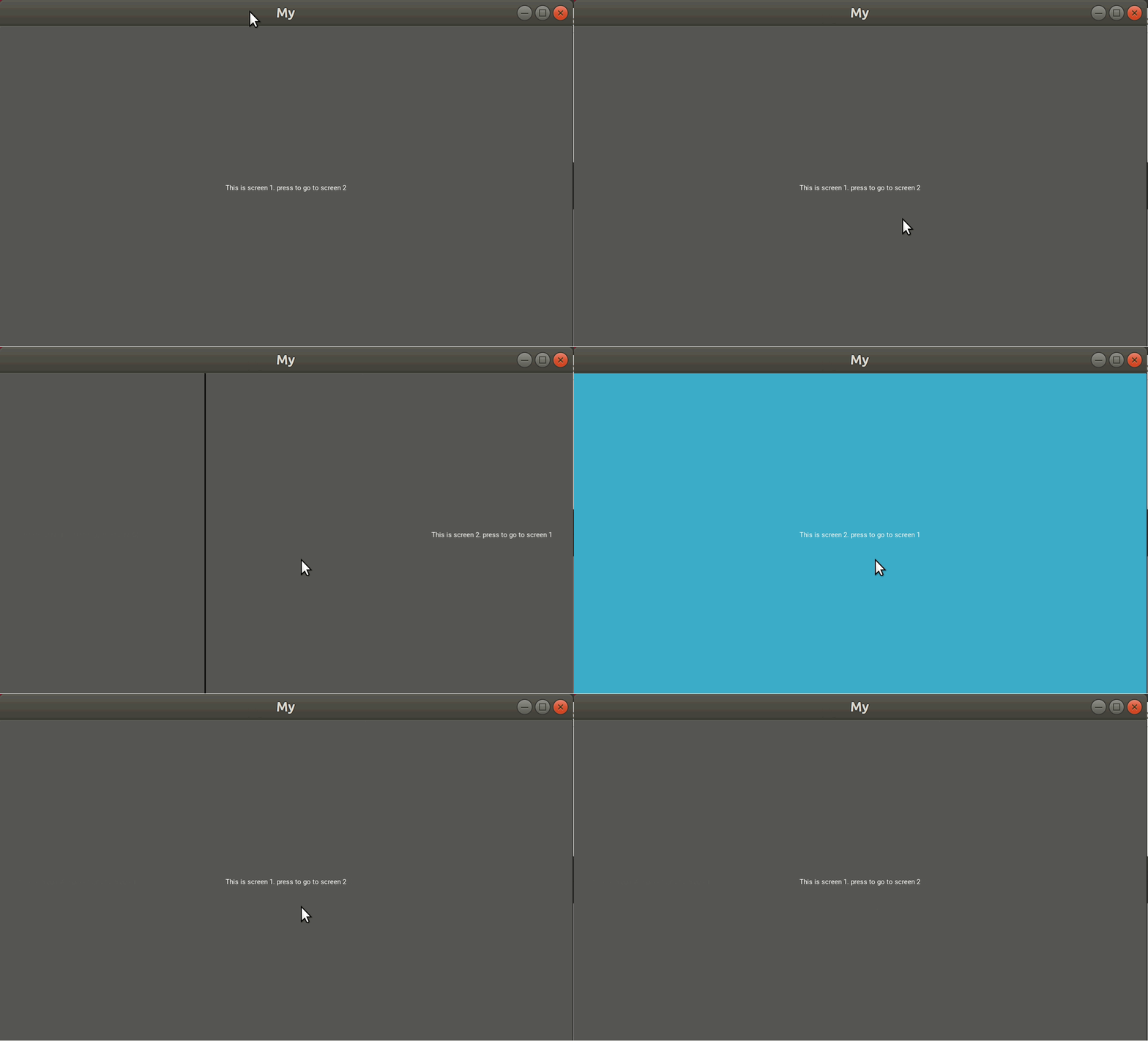
you also can do some things like this
from kivy.app import App
from kivy.lang import Builder

KV = """
BoxLayout
    orientation: 'vertical'

    BoxLayout
        size_hint_y : 0.1
        Button
            text: 'go to screen 1'
            on_press: sm.current = 's1'
        Button
            text: 'go to screen 2'
            on_press: sm.current = 's2'

    ScreenManager
        id: sm
        Screen
            name : 's1'
            Label
                text: 'Screen 1'
        Screen
            name : 's2'
            Label
                text: 'Screen 2'

"""

class MyApp(App):
    def build(self):
        return Builder.load_string(KV)

MyApp().run()
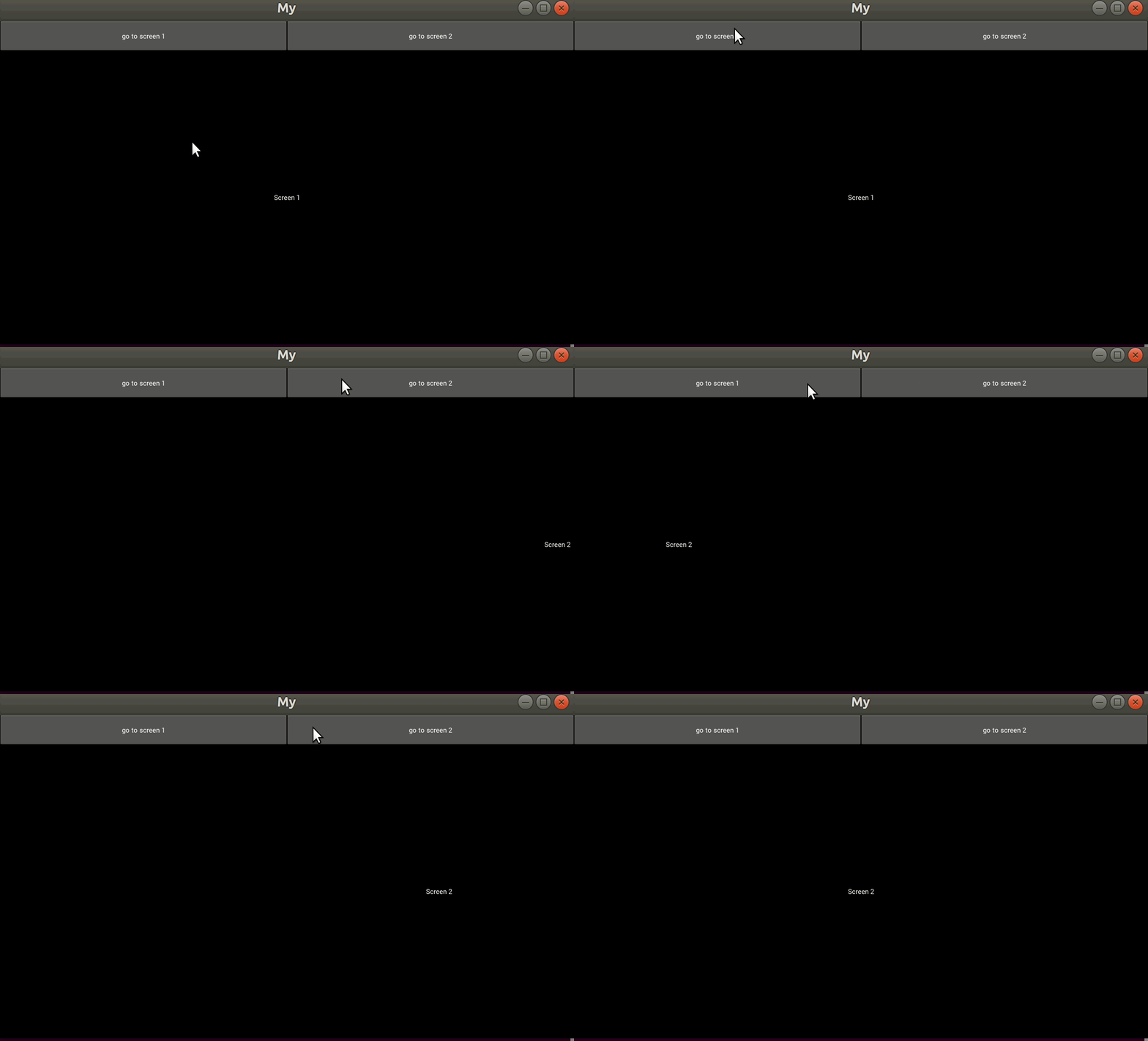 loud sapphire
Thanks for the guidance! me2beats and tshirtman
@alpine blaze So even layouts are widgets - does this example go in the right direction? (from the kv file)
ScreenManagement:
    transition: FadeTransition()
    WeatherScreen:
    RemindersScreen:


<WeatherScreen>:
    name: 'weather'
    FloatLayout:

        Label:
            id: temp_label
            text: root.display_temp() + '  ' + root.display_status()

        Button:
            size_hint: 0.2, 0.2
            pos_hint: {'right':1, 'top':1}
            on_release: app.root.current = 'reminders'
            text: 'back'
            color: 0,1,0,1

<RemindersScreen>:
    name: 'reminders'
    Label:
        text: 'test text'
I'm wondering about how to add these layouts, whether I need to define them as a class in the py file first or is it fine as it is in this example? My point here is that I feel like I did some unoptimal move here and now I lost my flexibility.
Ideally I would like to have the whole WeatherScreen in just one of the boxes in a BoxLayout. Can I treat each section in a BoxLayout as a different screen + apply screenmanager there?
alpine blaze
if you define them like this (<Something>), you need to also define them in python, you can use dynamic classes if you want to do it only in Kv, which allows declaring inheritance in kv (SomethingScreen@Screen instead of <SomethingScreen>)
but it seems that ScreenManager and Screen is not what you want, here they are to switch between different displays in the same physical space, if you want to display things next to each others, at the same time, you don't need them, layouts are enough
ScreenManager is a widget too, so if you want one of the boxes in the BoxLayout to switch between multiple displays, you can use Screenmanager in there and use multiple Screens inside it
loud sapphire
Oh, that sounds perfect. Then I think my only worry is about the syntax here. Does it all come down to the order I define the things in the kv file?
<GeneralScreen>:
    BoxLayout:
    <WeatherScreen>: ## First box would have this content, with 2 screens
        FloatLayout:
            <WeatherScreenForecast>: ## This would be screen 1 of the first box
                name: 'weather_forecast'
                Label:
                    text: 'something'
                Button:
                    on_release: swap to current weather screen
            <CurrentWeatherScreen>: ## This would be screen 2 of the first box.
                name: ''
                Label:
                ......<
    <AnotherScreen>: ## Second box would have different content
        Button:
            text: 'something'
Is this example heading in the right direction or did I get the wrong idea about using <AnotherScreen>: and so on?
digital rose
@loud sapphire You have a screen inside a screen, right?
I do not think you can do that.
As far as I know, any screen should be a child of ScreenManager widget
alpine blaze
you can't use a rule definition (<>) inside another rule definition, you can either directly use the name instead, and nest the content inside, or use just the rule name and define the rule elsewhere
<GeneralScreen>:
    BoxLayout:
    WeatherScreen: ## First box would have this content, with 2 screens
        FloatLayout:
            WeatherScreenForecast: ## This would be screen 1 of the first box
                name: 'weather_forecast'
                Label:
                    text: 'something'
                Button:
                    on_release: swap to current weather screen
            CurrentWeatherScreen: ## This would be screen 2 of the first box.
                name: ''
                Label:

    AnotherScreen: ## Second box would have different content
        Button:
            text: 'something'
<WeatherScreen@Screen>
<AnotherScreen@Screen>
but yeah even like this it looks like not what you want
loud sapphire
So weatherScreen and AnotherScreen can be defined in the py file too right. Just make a class and pass. Then do I still need to define it in the kv file somehow or can I just go straight to just referring to the name.
Like the example with WeatherScreenForecast:
If I have it as a class in the py file, I can use it in kv without first making any rule definition using <>, right?
Does it look something like I don't want due to its structure? E.g. unoptimal code?
I think can clear the first part out by simple trial and error process. It was great help @alpine blaze , thanks! 😃 I now have a much clearer idea on how to approach this. 💪
alpine blaze
no, i mean, you don't put the widgets inside the BoxLayout (you need to add indentation) ,and then you add FloatLayout inside the weather Screen, but i think here you actually want it to be a ScreenManager switching between forecast and current? and AnotherScreen would be aside the WeatherScreen ?
i just have too much to guess here
loud sapphire
Yep, the idea is to try to have the first box to swap (eventually automatically) between 2 types of content, and then anotherscreen would just be another box inside the boxlayout.
alpine blaze
yeah, then it would look more like this ```yaml
BoxLayout:
ScreenManager:
WeatherForecastScreen:
CurrentWeatherScreen:
AnotherWidget:
WeatherForecastScreen@Screen:
name: 'forecast'
Label:
text: 'something'
Button:
on_release: root.manager.current = 'current'
CurrentWeatherScreen@Screen:
name: 'current'
Label:
text: 'It's always sunny'
Using PyQT5 and it closes my window when i run a method via a button bush. No error text. This is annoying to troubleshoot.
sudden coral
Does it happen for any button? Does it happen for any method?
barren elm
just tried a method with only a print statement. Still crashes out. insteresting
made it a function outside of the class and a print statement now works.
ok I got it. functions need to load after the class object.
barren elm
How exactly do you add a widget inside of another widget via a button event in PyQT5?
def test(self):
    self.testLabel = QtWidgets.QLabel(self.scrollAreaWidgetContents)
    self.testLabel.setGeometry(QtCore.QRect(0, 0, 777, 42))
    self.testLabel.setObjectName("testLabel")
    self.testLabel.setText('helddddddddddddddddddddddddddddddddddddddlo')
    self.alert_scrollArea.setWidget(self.scrollAreaWidgetContents)
I used the Designer to make my GUI design. Just trying to add new widgets inside a premade scroll area.
 ember pike
How would I go about adding buttons using a for loop, and using certain buttonsnames like b1, b2, ... in tkinkter
thorny spruce
If you want to put them each in their own variable you can't (well you can but shouldn't) the better option is to add them to either a list or dictionary and access them that way
ember pike
how would i go about that?
buttonList = ['b1', 'b2', 'b3', 'b4', 'b5', 'b6', 'b7', 'b8', 'b9', 'b10']
for i in buttonList:
            buttonList [i] = Button(mainPage, text=title, command=createWindowTest)
            buttonList [i].place(x = 25, y = 25)
i was thinking this but the buttonList [i].place(x = 25, y = 25) doesn't work
@thorny spruce
thorny spruce
When you do for i in buttonList i is a string, so buttonList [i] won't work. All the buttons are being created the same way, Button(mainPage, text=title, command=createWindowTest) what do you want to be different about them? You are also placing them all in the same spot place(x = 25, y = 25)
ember pike
So I have a list of 10 items in a list. And each button needs another name so I can do different tasks with each button
And the coords stuff is already correct in my existing file. That was just a code snippet I typed.
thorny spruce
So you can do something like this
import tkinter as tk

root = tk.Tk()

buttons = []
for i in range(5):
    btn = tk.Button(root, text=f'Button {i}')
    btn.pack()
    buttons.append(btn)

root.mainloop()
 proven basinBOT
Tag not found.
f-string is an unknown tag name. Please check the spelling and try again.
To show a list of all tags, use !tags.
thorny spruce
Oh oops, forgot to add it to the list
edited
So if you want the first button then you just use buttons[0]
If you want to map them to an id then a dictionary would be better
ember pike
So what if I wanted to get the text of the button which is pressed would this work? butName = btn[0]['text']
thorny spruce
How are you handling button presses?
You can do it this way
import tkinter as tk
from functools import partial

def on_button_press(button_id):
    print("You pressed button", button_id)
    print(buttons[button_id])

root = tk.Tk()

buttons = []
for i in range(5):
    btn = tk.Button(root, text=f'Button {i}',
                    command=partial(on_button_press, i))
    btn.pack()
    buttons.append(btn)

root.mainloop()```Tyvm, appreciate the help.
 rare ibex
hello im working with an entry box and im not sure how to make it 'active' by default when the frame is brought to the front
livid lynx
Hi guys! I have a small issue which seems to be very common but I don't even know what to google for. I'll just post a screenshot. My text field has a string in it which is longer than the dimensions of the box and I would like the beginning of the string to be shown. How can i go about in finding a solution for this? Thanks! I'm using pyqt5 btw.
rocky dragon
you could move the cursor to the first index
 dark moat
is there any widely used non-stdlib alternative to cmd for writing REPLs/shells? i need something a bit more powerful but google is just coming back with either cmd tutorials or CLI option parsers
i can write my own if needed (and probably will :P) but a second set of reference code would still be helpful
karmic shoal
I've heard good things about https://github.com/prompt-toolkit/python-prompt-toolkit @dark moat
Got introduced to it by https://www.youtube.com/watch?v=hJhZhLg3obk, which you might also find useful
livid lynx
@rocky dragon I have 10 fields with the same problem. I am looking for an automatic solution for all the fields. Something like textField.setCursorPosition(0)
alpine blaze
just do a loop over all the fields?
livid lynx
@alpine blaze do you know the function to set the position of the cursor?
proper glade
looks like you can do it via stylesheet if you dont want to adjust cursor position for each one manually
though im not sure if this will actually keep the cursor at position 0
rather change it once
alpine blaze
no i don't, but that should be in the doc for the class of textField
proper glade
one other option is having multiple cursors
one cursor to stay in one position
the other to enter text
not sure if lineedit supports multiple cursors though
and you might have to override key handlers to relay input from the cursor with focus (the one in a fixed position at 0) to the one at the end
oh, another, not great option is overriding the LineEdit's paintEvent and drawing the text yourself instead
class LeftAlignedLineEdit(QLineEdit):
    def paintEvent(self, event: QPaintEvent):
        painter = QPainter(self)
        painter.drawRect(self.rect())
        # something in here with fillRect to fill the inside
        painter.drawText(0, self.height(), self.text())
something along those lines
oops, paintEvent, not drawEvent
livid lynx
I solved it! Thank you very much!
proper glade
howd you do it?
livid lynx
The PyQt5 documentation is pretty bad but I looked into PySide2 and found a .setCursorPosition(int) method for a text field which does the job. Maybe it's not the most elegant solution but after every .setText() call I add the .setCursorPosition() function call
rocky dragon
usually better to just look at qt docs
livid lynx
Pretty stupid of me to not figure this out on my own. That's sleep deprivation.
AFAIK the PyQt5 docs are here: https://www.riverbankcomputing.com/static/Docs/PyQt5/
but they seem incomplete
in many places I see TODO which is either what I think it is, namely, To Do. Or some programming jargon I'm not familiar with
alpine blaze
both :P, it's pretty common to mark things as TODO in programs, but it really means To do
you might also encounter FIXME and XXX or NOTE and other variations in the wild
most text editors highlight these words for this reason
loud sapphire
Hello again! Running into some weird problem with Kivy.
I'm running into some unexplainable error that seems to be an indentation error when loading my .kv file?
 TypeError: 'NoneType' object is not subscriptable
```py

Getting this while following the guidance here: https://kivy.org/doc/stable/guide/lang.html
#: import FadeTransition kivy.uix.screenmanager.FadeTransition
BoxLayoutWidget:
ScreenManagement:
WeatherScreen:
RemindersScreen:
AnotherScreen:
<BoxLayoutWidget>:
BoxLayout:
orientation: 'horizontal' #... continuing by describing class rules there
I hope it's not something too obvious because I've been stuck for a while
I've tried it by referring to Kivy core widgets and to different classes I've created in py already.
Always the same error
in Py side it's this line. Presentation is what the App class is trying to return
presentation = Builder.load_file('TestApp.kv')
I found it! WOW
If one of the class rules has an odd indentation (just 1 line in a test class!!) it completely fails to load the file. And the error is just the general one you see above there.
It's scary out there guys, be safe.
digital rose
yeah, and I would also advise physically separating the widgets from each other as often as possible. For example, I have each custom widget located in its own file (as well as custom behaviors).
Do not disdain to create widgets in "python" (I mean using add_widget). Recently I find it more flexible than using IDs, although this is not so obvious.
On the other hand, I always use kv when I need to set many parameters for a single widget (for example, size, pos, color, etc.).
loud sapphire
Every widget in a separate file? How do you make sure the app finds the files?
Also, I've never done this before - how do I keep the data up to date in the app display? I'm currently calling the Openweathermap api to get current weather info, but it does it only once right.. what's the best practice of solving this? Using Python only seems hacky, from what I got from one of the help channels.
Is there some updating that needs to be run on the Kivy side too? This whole area is completely dark for me still.
digital rose
@loud sapphire
I’ll say right away that I have not tested this structure well enough to suggest it.
Here is a simple example of how I achieve this.
root/main.py:
from kivy.app import App
from kivy.lang import Builder

from uix.main_root import MainRoot

class MyApp(App):
    def build(self):
        return MainRoot()

MyApp().run()
root/uix/mainroot.py:
from kivy.lang import Builder
from kivy.uix.boxlayout import BoxLayout
from uix.my_label import MyLabel

KV = """
<MainRoot>
    MyLabel
"""

class MainRoot(BoxLayout):
    pass


Builder.load_string(KV)
root/uix/my_label.py:
from kivy.lang import Builder
from kivy.uix.label import Label

KV = """
<MyLabel>
    text: '123456'
"""

class MyLabel(Label):
    pass

Builder.load_string(KV)
besides i have folders:
bhv (custom behaviors)
utils (useful python functions)
resources (for images etc)
and so on
also as you can see, I do not divide the widget into kv and the python class physically - they are both in the same file. At the moment I find it convenient
alpine blaze
you can use the Factory to tell kivy in which module to find widgec classes, so it loads them on demand
digital rose
@alpine blaze it is also convenient, I suppose this is for widgets in kv file?
I'll look this way too
@loud sapphire for weather updating I think you can use Clock.schedule_interval([here_is_your_function_that_gets_weather_and_updates_widget_text] , 60) <-- if you update weather exery minute
loud sapphire
Ooh, that looks perfect. Thanks @digital rose
digital rose
@loud sapphire something like this
https://github.com/charliecambray/kivy-weather-scrape/blob/master/WeatherApp.py

GitHub
A tool to scrape temperature data from darksky.net and display it with Kivy - charliecambray/kivy-weather-scrape
(tho it seems that the weather will not be updated here, as the weather does not seem to be updated in the code)
if I understand correctly, the author should do requests.get (url)
every minute (that is inside his wCheck method), and update spans, but he doesn’t
thick moat
my first user interface with kv language kivy https://i.imgur.com/cqZMYTA.png any tips
 digital rose
@thick moat Well, it depends on what you want to get) on how you imagine your application, what it can do, etc
thick moat
How do I make the button smaller than the stuff above and make the stuff above smaller so it doesnt fit to edge like a small text box https://i.imgur.com/nDsNyp0.png
@digital rose
probaly native size
digital rose
@thick moat
from kivy.app import App
from kivy.lang import Builder
from kivy.uix.label import Label


KV = """
BoxLayout
    orientation: 'vertical'
    MyLabel
        text: '123'

    FloatLayout

        Button
            size_hint: None, None
            text: '123456'

            size: 200,100
            pos_hint:{'center_x': 0.5, 'center_y': 0.5}


<MyLabel>
    #just background coloring
    canvas.before:

        Color:
            rgba: 0.3,0.2,0.4,1
        Rectangle:
            pos: self.pos
            size: self.size
"""

class MyLabel(Label):
    pass


class MyApp(App):
    def build(self):
        return Builder.load_string(KV)


MyApp().run()
K
digital rose
that is you can set size_hint: None, None
then widget size
then pos_hint
digital rose
@thick moat I think yes, since kivy does not prefer any platform (it is cross-platform), so it does not supply native widgets.
although you can implement almost any appearance if you wish, but it may take some time to do this.
thick moat
@digital rose is qt better at doing native for windows and what are some other options
digital rose
@thick moat
can’t tell you this, I basically had only kivy experience.
thick moat
k
digital rose
as for the first question:
from wiki
"Most GUI programs created with Qt have a native-looking interface"
So you can try this
kind kraken
you might try wxpython too
 shy jolt
Anyone using visual studio code?
shy jolt
i just started using it, but, xD its hurting my brain not being able to use tab to automatically accept closing brackets/parenthesis like visual studio 2017.
i checked keyboard preferences and such
but can't find any setting for it, i'm wondering if you figured out a way or you're fine using it out of the box like it is set up
thick moat
googling
not sure if this is ithttps://marketplace.visualstudio.com/items?itemName=OnlyLys.leaper
shy jolt
obviously you're much better at googling things 😐
shy jolt
xD thank you!
thick moat
not sure sorry
shy jolt
@thick moat no no, you actually helped me! problem solved.. i remember a long time ago using leaper
 meager gazelle
@shy jolt one day you'll realize programming is actually Googling with extra steps 
thick moat
Yeah
 glad igloo
Question: Where can I get people to test my software?
shy jolt
@meager gazelle 😛
thick moat
#unit-testing @glad igloo and #303934982764625920
thick moat
How can i learn everything about the kv language because its pretty small and easy like every attriubute and stuff
cosmic tiger
Is there a designer for PyQt5? I've found mention of it on the internet but attempts to install it so far either fail due to lack of source or because it tries to run from a Qt4 folder
meager gazelle
@cosmic tiger yes, it exists as standalone and embedded in QtCreator iirc
alpine blaze
i don't think #unit-testing is for people to test your software, it's to discuss the ways to test software imho, (unittests, integration tests, CI, etc)
@thick moat the doc page on the language is there https://kivy.org/doc/stable/guide/lang.html and there is the more in-depth page in the api-doc https://kivy.org/doc/stable/api-kivy.lang.html
thick moat
Thanks
@alpine blaze I am using the example from https://kivy.org/doc/stable/api-kivy.uix.scrollview.html?highlight=scrollview#module-kivy.uix.scrollview kv example. But I get this error
alpine blaze
which error?
thick moat
sorry just had to make a paste
code py file ```import kivy
from kivy import Config
from kivy.app import App
from kivy.uix.widget import Widget
Config.set('graphics', 'multisamples', '0')
class Application(Widget):
pass
class MyApp(App):
def build(self):
return Application()
if name == "main":
MyApp().run()
sorry i got impatient 😄
thick moat
kv file ```<Application>
ScrollView:
do_scroll_x: False
do_scroll_y: True
    Label:
        size_hint_y: None
        height: self.texture_size[1]
        text_size: self.width
        padding: 10, 10
        text:
            'really some amazing text\n' * 100
XD
alpine blaze
any widget, yes
thick moat
Great
alpine blaze
fixed the doc, (but you won't see it in the stable version, only in the master version)
(when it'll have been rebuilt)
thick moat
what are you like the creator of kivy or something @alpine blaze
thick moat
what
cosmic tiger
...Tshirtman is a core developer of Kivy
alpine blaze
i'm a core dev, but not the creator
but i've been around the project a looong time 😄
i don't dev a lot on the project these days, i help people that have questions with it a lot though
need to kick myself and start helping the project more again, it's really cool and i wish we had a better case to make
near lagoon
Tbh I think your focus on support is really useful ^_^ The docs can be tricky to follow, and looking through your answers always clarifies. Probably helping a lot of people into kivy.
cosmic tiger
One of the things I like about Kivy is that it seems to work nicely with 4k screens by default
unlike nearly every other UI framework I can find
alpine blaze
that's great to hear, managing screen density is tricky
we still have some issues, like when you move one window between two screens of different densities
should be fixable, someone started on it i think but it might have winded down as it's a bit more involved as they expected
cosmic tiger
I just wish "Kivy Designer" was still around, I am horrid at design
alpine blaze
it would probably help more people if i answered more questions on stackoverflow rather than in chat, as they turn up in google, but i do like the ability to ask questions and point at the solution.
as much as i liked glade when i did some gtk, once i understood kvlang, i never wished for a kivy designer, i'm pretty sure it would be slower to do things with it, and it's obvious that you would have less power
cosmic tiger
more power doesn't help when you don't have the finesse to wield it
alpine blaze
yes, but i do believe learning to weird the power of kv is not that hard, i might be biased of course, after years of using it, but i do remember after an initial confusion, it clicked pretty fast and my productivity changed radicaly
cosmic tiger
It's not kv that's my problem, it's actual design. and getting things in the correct spots, with the correct dimensions, with the correct padding, in the correct colours.
I was horrible with CSS for the same reason
alpine blaze
you can use a drawing program first, i like inkscape for example, draw your UI then cut it into pieces and build these in kvlang
there are of course more design oriented programs like sketch or figma
cosmic tiger
So instead of using a program to desgin an app that outputs kvlang, I should learn a seperate app to make a static image version of the UI and then rebuild that in kvlang myself
alpine blaze
the important part is not that you build a static image, is that you have the freedom to draw anything you want in that UI, it doesn't have to know how to build that in KV, then you can implement these components in any way you see fit.
thick moat
is the room in use
alpine blaze
a program that gives you that much freedom and builds the UI code would be a tremendeous task
@thick moat no, you can ask
thick moat
Should I use kivy or qt
alpine blaze
it depends
i'm partial to kivy, but it depends on what you want to build
in some cases qt is obviously more suited
cosmic tiger
yeah, I understand why kivy-designer was archived, it's a hell of a project to undertake.
use Inkscape instead of Paint, Jpac. I hear it's better 😛
thick moat
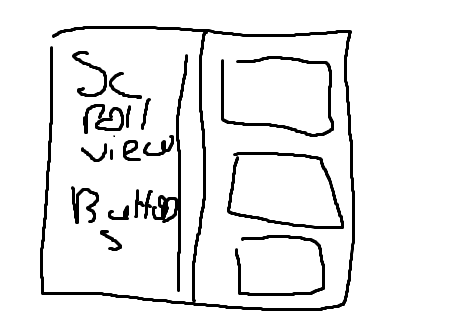 alpine blaze
it is, yeah 😃 though paint is a bit better for that that it was in previous windows versions
thick moat
the only program i have is paint to draw XD
alpine blaze
ok, well, it got the point accross i guess
thick moat
i have this ```<Application>
GridLayout:
size: root.width, root.height
cols: 1
GridLayout:
ScrollView:
do_scroll_x: False
do_scroll_y: True
            Label:
                size_hint_y: None
                height: self.texture_size[1]
                text_size: self.width, None
                padding: 10, 10
                text:
                    'really some amazing text\n' * 100

    Button:
        text: "hi"
well, it seems you want two columns, not 1
thick moat
true
alpine blaze
and inside the first column, you want a lot of buttons? where do they come from?
thick moat
so one side the left first colum there will be a scrool view with alot of button which i can add
on the right 3 buttons
does kivy designer work https://github.com/kivy/kivy-designer

GitHub
UI designer for Kivy - DEPRECATED. Contribute to kivy/kivy-designer development by creating an account on GitHub.
alpine blaze
no
if you have a lot of buttons in the first column, i would say to use RecycleView instead of ScrollView, it's nearly the same thing, but it automatically builds the content from data you give it
alpine blaze
example ```yaml
<Application>:
GridLayout:
cols: 2
RecycleView:
viewclass: 'Button'
data:
[{
'text': 'hello {}'.format(x)
} for x in range(500)]
RecycleBoxLayout:
orientation: 'vertical'
size_hint_y: None
height: self.minimum_height
BoxLayout:
orientation: 'vertical'
Button:
text: 'button 1'
Button:
text: 'button 2'
Button:
text: 'button 3'
this will display 500 "hello {}" buttons to the left, and the 3 static buttons to the right
of course, you usually bind datat to some list property that you update when you want to update the list of buttons
and you usually do a custom class for viewclass, so you can create the on_release handler calling a function in your python code (a method on the app class is a convenient way to do that), and properties of the class that you can also pass in the data dict.
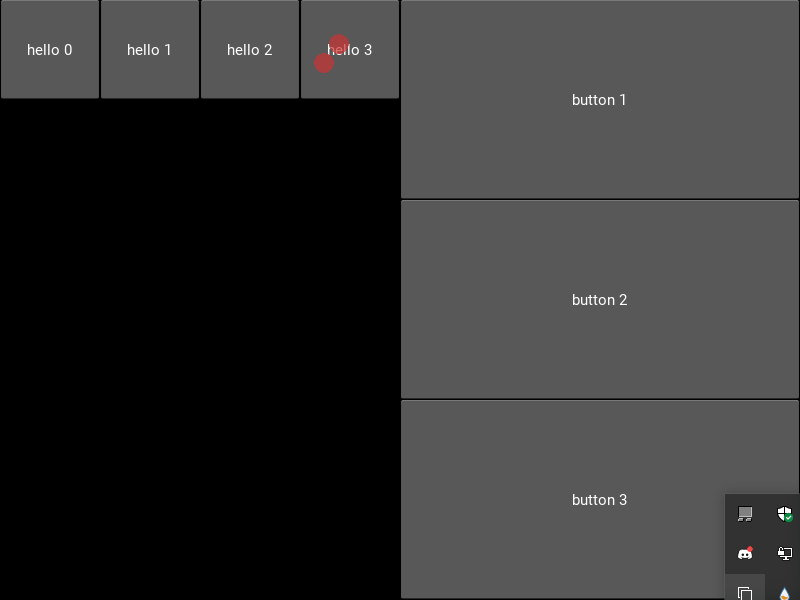


 alpine blaze
oh right, 😄
added the missing orientation: 'vertical' part
in RecycleBoxLayout
i assume you defined Application as a subclass of Widget? you might want to inherit from a layout (FloatLayout or BoxLayout)instead, so you get the sizing (and posing if you use BoxLayout) for free
alpine blaze
the Application class, you defined it somewher, right?
thick moat
main file ```python
import kivy
from kivy import Config
from kivy.app import App
from kivy.uix.widget import Widget
Config.set('graphics', 'multisamples', '0')
class Application(Widget):
pass
class MyApp(App):
def build(self):
return Application()
if name == "main":
MyApp().run()
or it wouldn't run
thick moat
like this
thick moat
yeah ok thanks
alpine blaze
Widget doesn't manage the pos/size of its children
alpine blaze
look at history, i told you half an hour ago 😆
cosmic tiger
Kivy in general: https://kivy.org/doc/stable/gettingstarted/intro.html
Simple Pong Tutorial: https://kivy.org/doc/stable/tutorials/pong.html
Info about the Kv language: https://kivy.org/doc/stable/guide/lang.html
thick moat
Thanks
cosmic tiger
I think you mean 1.75 hours ago
alpine blaze
yeah, time dilatation i guess 😛
thick moat
What can I make button in that recycle box thing from a file
alpine blaze
you read the file and you save the info as a list of dicts in a property of the app at startup, and you bind your recycleview to that property
or you save the file as a json object, and you use kivy jsonstore
i should probably do a todolist tutorial using that
thick moat
@alpine blaze if it read it from a file do I have to do in python and can I store a value in a button object in .kv file then retrieve it when you click it
alpine blaze
reading the file should be done in python, and then yes, you can pass a custom value to your button using the data, and use that value when you click the button, using a custom class for your recycleview makes that easier
<CustomButton@Button>:
    some_id: ''
    on_press: app.some_function(self.some_id)

RecycleView:
    viewclass: 'CustomButton'
@thick moat I am creating something similar to kivy designer.
A very test version will appear at the end of August on github. I will also make a post in show-your-projects
 swift oak
is this where I get help with tkinter?
rocky dragon
with tk you probably can also ask in the help channels and get sufficient help
thick moat
If I want to read something from a file to make each button but want to but it under a recycle view. But how do i get it from a kv file is it id ```kv
<Application>:
GridLayout:
size: root.width, root.height
cols: 2
RecycleView:
viewclass: 'Button'
data: [{'text': 'hello {}'.format(x)} for x in range(500)]
RecycleBoxLayout:
orientation: 'vertical'
size_hint_y: None
height: self.minimum_height
BoxLayout:
orientation: 'vertical'
Button:
text: 'button 1'
Button:
text: 'button 2'
Button:
text: 'button 3'
i think tshirtman can help me out with kivy