#user-interfaces
1 messages · Page 35 of 1
 kind kraken
kind kraken
kind kraken
ok what i'd probably do
and this is from a user-experience design perspective,
is have any button down, change the current drag button
and don't allow modifiers to change mid stream at all
and don't do the history state until mouse up all clear
(i.e. no mouse buttons are pressed)
 proper glade
there's a reason why the history thing is handled on key release instead of mouse release
proper glade
say you've got shift held down and are selecting a bunch of cells, then you release shift and immediately want to start 'drawing' normally. if you handled the selection history on mouse release you'd have to release the mouse as well before you could do this. it'd just be weird
kind kraken
no you wouldn't
just leave the history alone
wait
ok, nevermind
so you do specifically want to be able to change modes mid-stream, without releasing the mouse
i'd written that off as a bad user experience
kind kraken
is self the Step widget here?
what is the purpose of if widget != self in the drag event
proper glade
wdym
kind kraken
say, you left clicked on cell 1, then drag around a little,
proper glade
OH
kind kraken
then, right down left up, drag_button changes to left OR press shift so mode changes to selection
then drag the mouse back over cell 1
etc any number of changes which could have put the cell in any state
proper glade
oh wait that's not a problem, since there'll have to be a mouseReleaseEvent before drag_button changes so it's all good
kind kraken
ok but why
if you can switch modifiers why not switch buttons
actually i'm gonna go ahead and say that that's a bad user experience
because, if someone switches smoothly from one button to the other,
sometimes, that's a release then a press
but sometimes it's a press then a release
the two shouldn't be handled differently
(and I realize, I'd earlier advocated handling it differently w.r.t. history steps... not sure about that now)
ok, the drag_button sets in mousepress can be reduced to self.drag_button = event.button() near the top, instead of part of each branch
and the rest of the branches are the same as in mousemove
proper glade
well atm middle mouse button isn't allowed to become drag button
so thats why i put it in each branch to start with
but i guess i wasnt thinking too clearly at that time 😅
i could just disallow middle mouse at the start
kind kraken
well, as it is, if drag button isn't left or right the rest of the code will do nothing anyway
proper glade
man, it's a lot easier to reason about UI/UXs mentally than it is to describe them in words 😄
kind kraken
ok hmm i suspect there are other parts of the code that aren't clean if they switch modifiers mid-stream
proper glade
the parts ive showed are pretty much the only places that this kind of thing happens atm
kind kraken
yeah but
proper glade
there are the flush_pending_*_change methods but those are like 4 lines each
kind kraken
where does the selection history step get set up if they press shift in the middle
i don't see a key press event
proper glade
haha well spotted, that's a bug i was in the middle of addressing 😄
and then i thought man this is getting tiring to deal with and it's just gonna get more complicated from here on out
better do some refactoring/rewriting
kind kraken
that way you only have one place that you're handling "the mouse is here in this cell while this button is pressed and these modifiers are active"
instead of two
proper glade
yeah, good idea
kind kraken
I think my original idea was to only handle it in mouse move, or somehow whip up a "null move" from within mouse down
but this is cleaner probably
proper glade
generating events is a headache unfortunately
or maybe that was in tkinter
all this ui stuff is starting to fry my brain 😃
kind kraken
but anyway, for your original question
i don't know if there's really any "design patterns" for this kind of thing
you seem to be going for a very specific user experience
but general refactoring principles are always good
proper glade
i feel like there's a pattern to handling combined keyboard/mouse state that ui frameworks probably already implement underneath for internal input tracking and generating individual events and stuff like that, it's just not something they expose at the higher level so you kind of have to reinvent the wheel
tk has bindings for modifier+mouse button directly iirc
kind kraken
I bet currently held mouse buttons are included in the modifiers
they are in most other frameworks
oh no
there's a "buttons", separate from "button"
that'll be it
proper glade
that's a bitfield (is that a correct term for a value that's just meant to hold bitflags?) unfortunately so you cant really get an idea of which button was pressed first
proper glade
ah yep, got you.
 unique python
What's the difference between ttk and tkinter?
 rancid fern
unique python
rancid fern
unique python
and how can I align things to left (like a button or a label), they are in a two column grid, in the 0 column
in ttk
kind kraken
@unique python look at the sticky option for grid
unique python
thanks
 wispy oar
Would JSON be the easiest method of storing sets of data for a QTableWidget, like shown here? https://i.imgur.com/LJ44frX.png

I need the data inputs to be able to be grouped, so each task consists of a task title, subject, due date, and completion.
I already coded the program to get the inputs, as shown below: ``` def save_task(self):
new_task_name = self.Dialog.line_edit_task_title.text()
if len(new_task_name) <= 30 and len((new_task_name).strip(" ")) > 0:
print(new_task_name)
with open('task_list.json', 'a') as outfile:
outfile.write(new_task_name + "\n")
self.Dialog.close()
elif len((new_task_name).strip(" ")) == 0:
self.Dialog.lbl_instruction.setText(
"You have not entered a task title. Please try again.")
else:
self.Dialog.lbl_instruction.setText(
"Your task title exceeds 30 characters. Please try again.")
    new_subject_name = self.Dialog.comb_box_subject.currentText()
    print(new_subject_name)

    new_due_date = self.Dialog.calendar_due_date.selectedDate().toString("dd-MM-yyyy")
    print(new_due_date)

    new_completion = 0```
 mighty frigate
@wispy oar you might want to take a look at Qt model/view system
personnaly, when I feel too lazy I use QVariantMap
it can store almost anything, and it's very easy to load/save json datas with it
 robust lynx
@mighty frigate sorry for the late response; the pros of what?
wispy oar
@mighty frigate The same would be applicable with a QTableWidget, right?
I worked out the JSON part, which is what I was mostly wondering about. Now I'm guessing I can use the row and column numbers to populate the QTableWidget when the program is initiated.
mighty frigate
uh ?
y
@wispy oar yes
@robust lynx electron app or alike vs "classic" desktop app
wispy oar
When the table is sorted, are the rows of data kept together?
So if I sort by due date, it will sort the rows together, not just the due date column, right?
mighty frigate
rows of data ?
wispy oar
I'm not sure how I'd do it if it doesn't do them together.
mighty frigate
but if I may
if all you want is a "list" widget
you might want to use the QListWidget item
with multiple column
also, I believe you can succeed with QTableWidget too
wispy oar
QListWidget doesn't show the column headers, does it?
mighty frigate
that's not a problem
you can use row 0 as header, and disable the row
with a custom style for the disabled item
bam, headers
wispy oar
Hmm okay, which would you recommend out of the two? I'm already quite familiar with QListWidget, because I used it for a program linked to this application (for the user's subjects).
mighty frigate
lemme search a bit
wispy oar
I basically need a widget for a task list, which would be like:
Task Title | Subject | Due Date | Completion
Okay, thank you.
mighty frigate
QTreeWidget is definitively a good widget for that
QListWidget was a mistake
I don't see anything native with QTableWidget, you'll have to do it by hand
so subclass QTableWidget
adding your special sort
and moving a row from another one
column by column I mean
wispy oar
Hmm okay, QTreeWidget does look good from the screenshots I've seen, I've just overlooked it in the past.
mighty frigate
well it's not an obvious choice here
but I believe it has all the features you want
headers, columns, etc
wispy oar
What is the difference between QTreeWidget and QListWidget?
wispy oar
So it's basically the same, but QTreeWidget is multi-column?
wispy oar
Okay, and all the items are connected by default, so I just do sortItems() on one column?
wispy oar
Okay, I'll have a look and see what I can find. Thanks.
 fast wave
In this code i take my words from db in content variable, and put it in completer widget. it kinda works and only shows one item to complete but app crashes with no output error.
        content = self.cur.execute("SELECT Esperanto FROM Words ORDER BY Esperanto")
        for row in content:
            self.completer = QCompleter(row)
self.lineEdit.setCompleter(self.completer)```😃 i worked with it a bit and got somehow better result. now my listwidget moves but the item won't come to top. upon searching on lineedit, i want to filter my listwidget items to that searched item only, and when lineedit deleted, it'll roll back to before (full list).
        the_list = [self.listWidget.item(index).text() for index in range(self.listWidget.count())]
        for index in the_list:
            item = self.listWidget.findItems(index, QtCore.Qt.MatchRegExp)[0]
            item.setSelected(True)
self.listWidget.scrollToItem(item, QtWidgets.QAbstractItemView.PositionAtTop)```@mighty frigate I wanted an electron app because it seems allot more easier to make a web page than a desktop app
wispy oar
Could someone help me out a bit with how I could populate my QTableWidget from saved JSON data?
My program is a task planner, and it has a QTableWidget in the main window like this: https://i.imgur.com/AyBYkaH.png
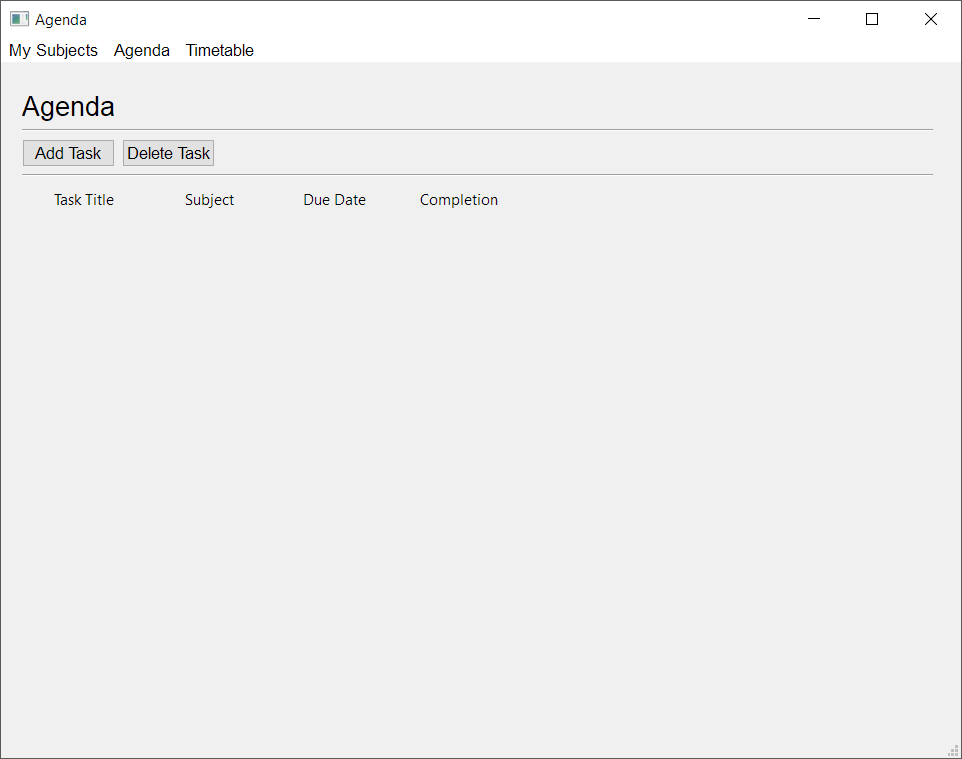
I have already coded the dialog where you can add the tasks and have them saved to JSON, but I'm struggling a bit to think about how I would get the JSON data into the table.
agenda.py (run code from here to run the program): https://paste.pythondiscord.com/xejegifemi.py
agenda_setup.py (generated code from pyuic5 for main window): https://paste.pythondiscord.com/siwutupemu.py
add_task_setup.py (generated code from pyuic5 for dialog): https://paste.pythondiscord.com/efopajesud.py
So for example, I have added a few tasks, so task_list.json looks like this: { "Programming Project": { "subject": "Computer Science", "due_date": "15-04-2019", "completion": 0 }, "Differentiation": { "subject": "Mathematics", "due_date": "16-04-2019", "completion": 0 }, "Further Differentiation": { "subject": "Further Mathematics", "due_date": "17-04-2019", "completion": 0 }, "Further Hypothesis Testing": { "subject": "Mathematics", "due_date": "10-05-2019", "completion": 0 }, "De Moivre's Theorem": { "subject": "Further Mathematics", "due_date": "27-05-2019", "completion": 0 } }
I am looking to get the program to populate the QTableWidget by adding the first key, then the subject, due date, and completion value for the first row.
Then the second key and its subject, due date, and completion value for the second row, etc. I think it might be easier to sort the list by due date afterwards, rather than sorting the JSON file by due date first, but I could be wrong here.
I know I can use .setItem(), and I was thinking about perhaps iterating the X and Y values in a loop (n being the row number, then n + 1, n + 2, n + 3 for the column numbers), but the part I'm unsure about is how to get the nth key and nth values to populate the cells with.
I have to go to sleep now, but I figured that it would be better to ask now and give people the time to think about it if they can help (because I'm not sure if it would be very straightforward). Thanks.
(Also, if you wanted to go through the process of adding new tasks for yourself, it takes the combo box options from subject_list.txt, which currently contains the following:) ```Computer Science
Further Mathematics
Mathematics
 sudden coral
The column number would not be based on the row number
The row would just be current row count + 1 if you want to append. There is a function to get the current amount of rows in the table, so that's simple.
The columns would always be 0 to 3
You can just use a variable to keep track of the current column while youre adding each task
The title is always column 0 and the values in the nested dictionary will go to columns 1 to 3
wispy oar
Yeah, that's true. I think I was confusing it with the cell number (which would still have been wrong anyway).
How would I be able to get the first key, then its values, second key and its values etc? I know how to get them based on the name, but that's no good because the program needs to work based on an index of sorts.
    "Programming Project": {
        "subject": "Computer Science",
        "due_date": "15-04-2019",
        "completion": 0
    },
    "Differentiation": {
        "subject": "Mathematics",
        "due_date": "16-04-2019",
        "completion": 0
    },
    "Further Differentiation": {
        "subject": "Further Mathematics",
        "due_date": "17-04-2019",
        "completion": 0
    },
    "Further Hypothesis Testing": {
        "subject": "Mathematics",
        "due_date": "10-05-2019",
        "completion": 0
    },
    "De Moivre's Theorem": {
        "subject": "Further Mathematics",
        "due_date": "27-05-2019",
        "completion": 0
    }
}```So like, get 'Programming Project', then 'Computer Science', '15-04-2019', and '0' for the first row.
I currently have: ``` # Reads the existing JSON file, then prints it to console and populates list if not empty.
with open('task_list.json', 'r') as outfile:
try:
task_list = json.load(outfile)
json.dump(task_list, sys.stdout, ensure_ascii=False, indent=4)
            self.table_widget_task_list.setRowCount(len(task_list))

            current_row = 0
            for task in task_list:
                current_column = 1
                print(task)
                self.table_widget_task_list.setItem(
                    current_row, 0, QtWidgets.QTableWidgetItem(task))
                for task_details in task_list[task]:
                    print(task_list[task][task_details])
                    self.table_widget_task_list.setItem(
                        current_row, current_column, QtWidgets.QTableWidgetItem(task_list[task][task_details]))
                    current_column += 1
                current_row += 1

        except ValueError:
            print("Empty JSON file.")
            pass```
I'm struggling a bit with the logic of how to implement .setItem() within the for loops.
sudden coral
Use .items() and .values() on the dicts to iterate
for task, details in task_list.items():
    for detail in details.values():
        item = QTableWidgetItem(detail)
To get the column number you can just use a variable similar to what you did with current_row
except it would be defined inside the first loop
wispy oar
Ah, sorry, I didn't see that there was a new message.
I messed about with it a bit before seeing that message, and got it to work partially, but the final column isn't being filled.
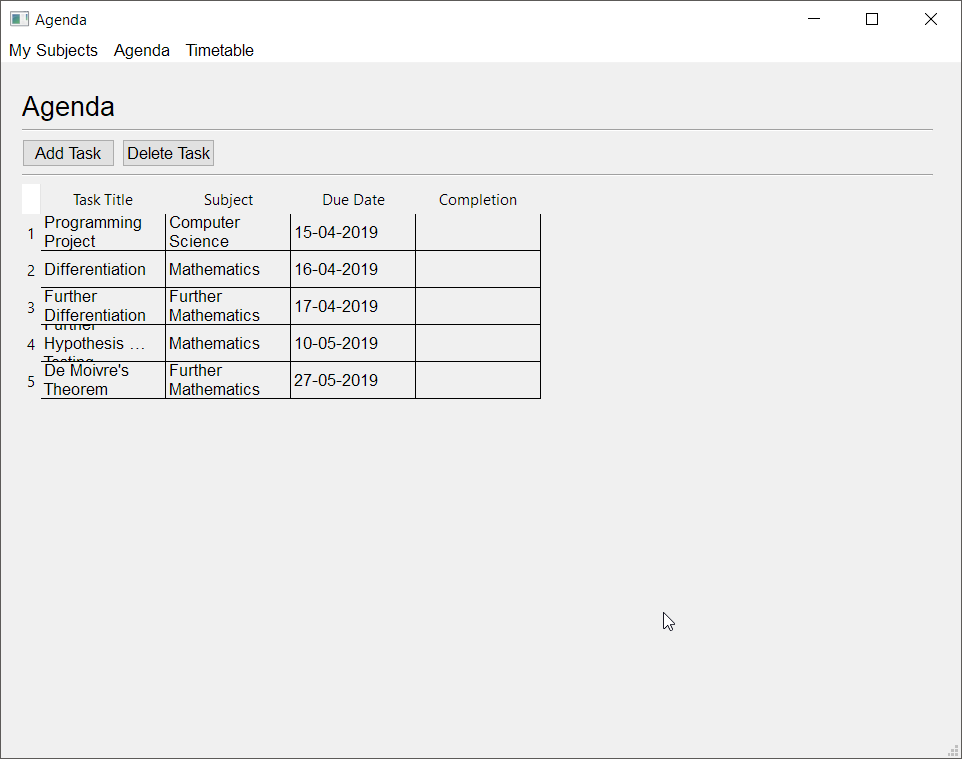
With the code: ``` # Reads the existing JSON file, then prints it to console and populates list if not empty.
with open('task_list.json', 'r') as outfile:
try:
task_list = json.load(outfile)
json.dump(task_list, sys.stdout, ensure_ascii=False, indent=4)
            self.table_widget_task_list.setRowCount(len(task_list))

            current_row = 0
            for task in task_list:
                current_column = 1
                print(task)
                self.table_widget_task_list.setItem(
                    current_row, 0, QtWidgets.QTableWidgetItem(task))
                for task_details in task_list[task]:
                    print(task_list[task][task_details])
                    self.table_widget_task_list.setItem(
                        current_row, current_column, QtWidgets.QTableWidgetItem(task_list[task][task_details]))
                    current_column += 1
                current_row += 1

        except ValueError:
            print("Empty JSON file.")
            pass```
Also, I'm not sure why the columns aren't expanding, which is causing the weird squished effect. Is there a property I would look to change? I thought it was set to expanding by default. https://i.imgur.com/ZjeBtks.png
 sudden coral
Size policy is used for layouts; not relevant to what you're after
there's something you need to set on the header view for the table
I'll find it one sec
wispy oar
Okay thanks, I'll try to implement your changes from earlier to see if it helps with the final column as well.
sudden coral
And this is how you'd get the header https://doc.qt.io/qt-5/qtableview.html#horizontalHeader
Maybe the last column isn't being set cause the value is an integere
try converting it to a string
wispy oar
Yeah, seems like that's fixed it. I changed the original data to a string because I think it'll end up being 'Yes' or 'No' anyway.
What's the difference between the way I iterated and the way you suggested (with task, details and items())? Is it simply a more straightforward way for cleaner code?
sudden coral
Yeah, just simpler way of doing it
You could also use enumerate() instead of a variable for the column and row
wispy oar
What would I replace current_row and current_column with in the .setItem() function? I have: #current_row = 0 for task, details in enumerate(task_list.items(), 0): #current_column = 1 print(task) self.table_widget_task_list.setItem( current_row, 0, QtWidgets.QTableWidgetItem(task)) for detail in enumerate(details.values(), 1): print(detail) self.table_widget_task_list.setItem( current_row, current_column, QtWidgets.QTableWidgetItem(detail)) #current_column += 1 #current_row += 1
sudden coral
Enumerate yields a tuple for each item in the sequence it's iterating
In the tuple, the 0th index is the number and the 1st index is the actual data from the sequence
So you'd need to unpack the tuple like for i, data in enumerate(a_list)
On that note, I don't believe it's possible to unpack a nested tuple, which would be the case with the row if you use .items(), since that also returns a tuple. So, on second thought, I don't think enumerate() is a good choice for the row
wispy oar
Ah okay. enumerate() seems quite complicated anyway.
I might have to look into it more another time when the situation comes to it.
Thanks for helping, I'll get around to fixing the header expansions using the style sheets you linked tomorrow.
proper glade
you can unpack nested tuples using some extra parentheses
>>> k = {1:'One', 2:'Two', 3:'Three'}
>>> for index, (key, value) in enumerate(k.items()):
    print(index, key, value)


0 1 One
1 2 Two
2 3 Three
>>>
I'm having an issue with my program (https://paste.pythondiscord.com/racesiduxo.py) not being able to new tasks with the same task title as an existing task properly. Instead of adding a new item to the QTableWidget, it overwrites the old task which had the same task title.
I'm pretty sure that the issue is that I've used the task title as a key, which cannot actually be used as a unique identifier due to situations like this.
Would I be better off changing the way I store tasks to:
- Using an index value as the key (then making the task title a value)
or
- Using a list of dictionaries
The issue can be observed through this example (steps numbered):
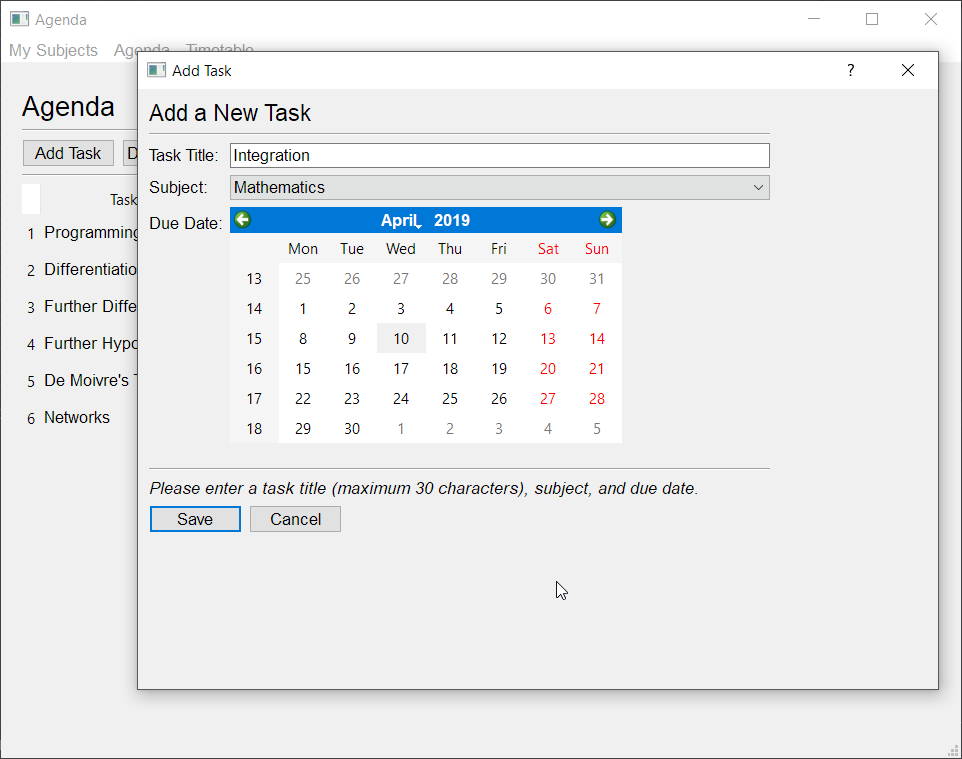
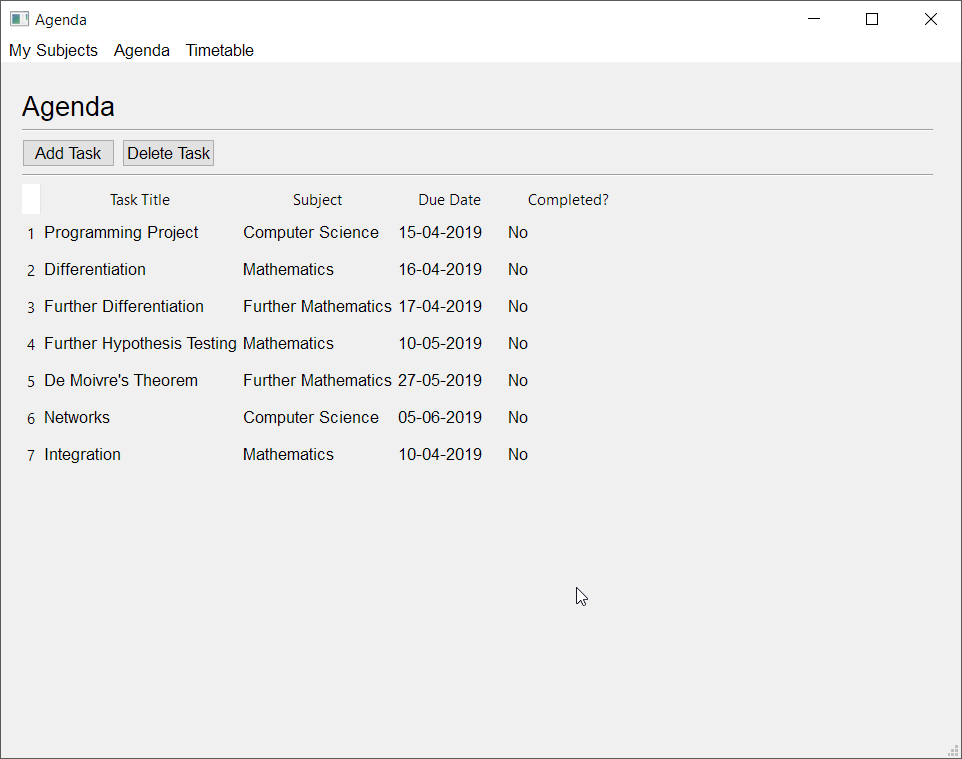
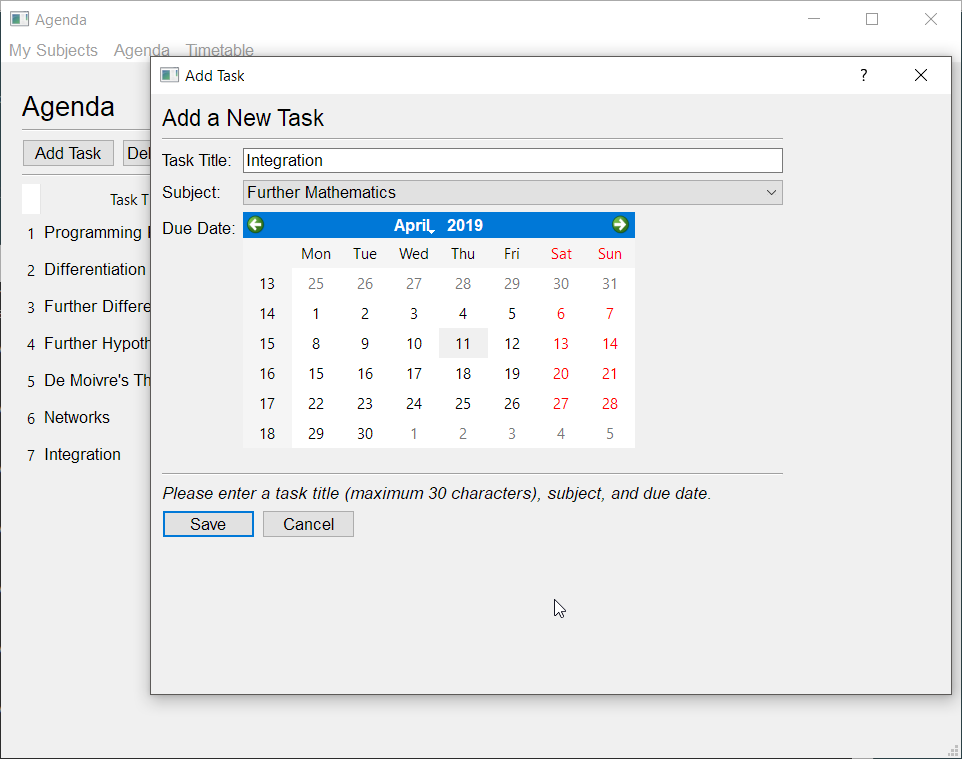
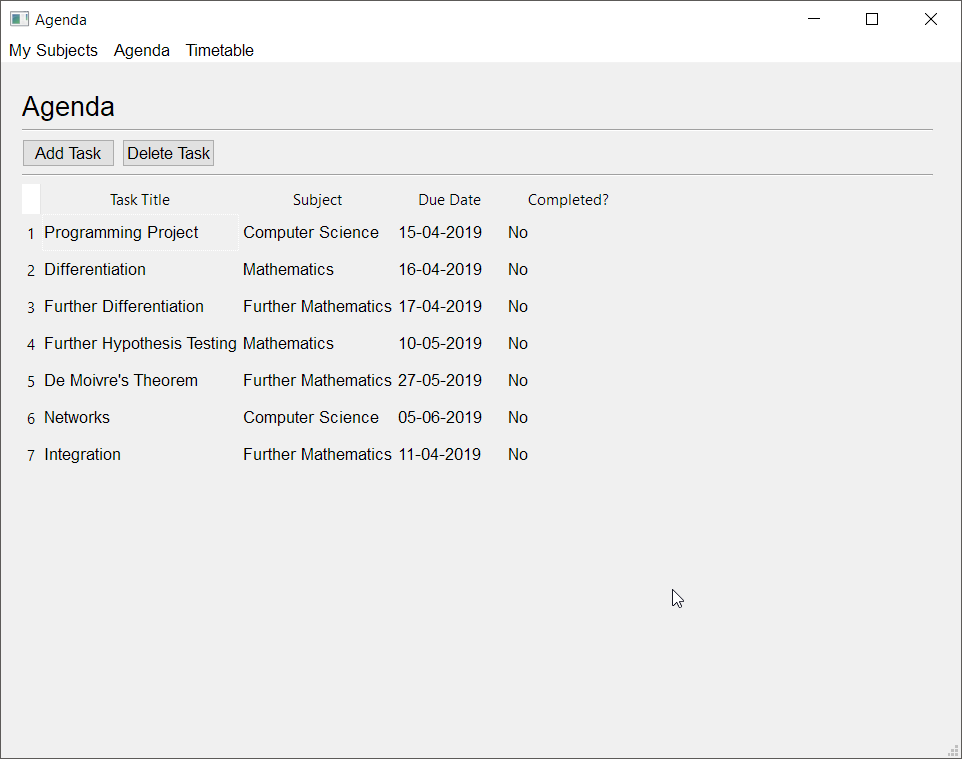
 digital rose
Hi guys is there a way that i can connect (on my pc running) python script to an (ios) app or a webinterface where i can send information to for me to look at it if not visualize it?
@ me bw, thanks 😄
 swift merlin
@digital rose you could use a web framework like django, flask or aiohttp to build a web interface or http api for an app.
youll still have to make the client/website, but if you know javascript or download an existing 'dashboard' javascript framework it shouldnt be that hard to make it live update
digital rose
Hm No I Don’t know any JavaScript, sadly @swift merlin
What about a mobile app @swift merlin
swift merlin
i dont really know much about making IOS apps but I think Kivy can make phone apps with python.
digital rose
idiot me needing help
from tkinter import ttk
class Root(ttk.Tk):
---------------------------------------------------------------------------
AttributeError                            Traceback (most recent call last)
<ipython-input-5-dda59595a5e6> in <module>
      7
      8
----> 9 class Root(ttk.Tk):
     10     def _init_(self):
     11         super()._init_()

AttributeError: module 'tkinter.ttk' has no attribute 'Tk'
normaly people just do import tkinter as tk
https://docs.python.org/3/library/tkinter.html#a-simple-hello-world-program
ttk seems to be an extra set of functions and widgets and isnt where the main tk classes and such are
digital rose
oooh
digital rose
Aight I got a question
How do I import an image in tkinter from a link??
So let’s say this image https://www.nasa.gov/centers/goddard/images/content/638831main_globe_east_2048.jpg

How do I add that to tkinter without saving it in my computer?
 thorny spruce
I think tkinter.PhotoImage has a byte stream option. If not then I'm pretty sure you could do it with PIL.
digital rose
import tkinter as tk
from urllib.request import urlopen
root = tk.Tk()
root.title("display a website image")
a little more than width and height of image
w = 520
h = 320
x = 80
y = 100
use width x height + x_offset + y_offset (no spaces!)
root.geometry("%dx%d+%d+%d" % (w, h, x, y))
this GIF picture previously downloaded to tinypic.com
image_url = "http://i46.tinypic.com/r9oh0j.gif"
image_byt = urlopen(image_url).read()
image_b64 = base64.encodestring(image_byt)
photo = tk.PhotoImage(data=image_b64)
create a white canvas
cv = tk.Canvas(bg='white')
cv.pack(side='top', fill='both', expand='yes')
put the image on the canvas with
create_image(xpos, ypos, image, anchor)
cv.create_image(10, 10, image=photo, anchor='nw')
root.mainloop()

Does that code work for anyone??
I can’t open that image in my computer
It gives me this error
wispy oar
Just wanted to mention that my query about storing as a list of dictionaries vs. storing as a dictionary with indexes as keys is still unanswered (so it doesn't get buried by some of the other later posts which were resolved). Thanks.
Also, I'm not sure how I'd sort the due date column by date (rather than alphanumerically).
I was thinking I might have to make a custom sort which compares the digits from left to right, starting by year, then month, then date. This would be quite janky though, so I was wondering if there was a simpler solution, such as sorting from the JSON file first?
I think my custom sorting idea would look something like this: https://stackoverflow.com/questions/11938459/sorting-in-pyqt-tablewidget

Stack Overflow
How can I sort a coloumn in pyqt by the highest number? Currently I have setSortingEnabled(True) and that only sorts it by the most numbers (ex. 1,1,1,1,2,2,2,3,3) i want to do it by the highest nu...
sudden coral
- I think a list of dicts makes more sense, though the other would work just fine too.
- Use the datetime module(part of standard lib) to covert dates into objects which support date comparison
There's also this but I've never worked with it https://doc.qt.io/qt-5/qdatetime.html
 sullen thunder
@Blazing hey, so first off. Great progress on your project. Looks good as it deveolps.
In regards to your duplication issue. I have come accross a few instances where duplication causes trouble.
You are right in your deduction that duplicate identifiers is probably your issue. In my experience PyQt grabs the first version of the identifier and ignores the rest.
What I ended up doing which really helped is I created a hidden column. It holds the created date down to the millisecond. It allows for a unique identifier reliably.
So it might be easier to add that information use it as the identifier and then just add a sort festure by due date.
You should be able to do that from the json file without the need of an additional dictionary. I do not use json currently so I am unsure.
Also, additional thought regarding your design. The formatting of Due Date may lead to issues with sorting. I have found that the system prefers YYYY/MM/DD or YY/MM/DD (- or /) not sure how important that if to you. Also it's seems inherent for QTableWidget. If you disable the user sort via column then you could get away with a custom sort and display.
 serene spoke
Anyone ever done an UI development with pywin32 and have any idea how one would go about creating a text edit field?
digital rose
okay tinter is killing me
this code for some reason only reads gif's
how do I make it read jpg??
I need help...how do I make it read other a jpg files?
wispy oar
@sudden coral Thanks. I think I'll look into using the list of dictionaries. datetime is a good shout; I'm guessing I'll have to make a function with a custom sort to use this?
@sullen thunder Thanks. It's due for Monday, so I'm hoping I can finish Agenda and then develop Timetable and Grade Book (should be easier, no sorting method and the same sorting method used before respectively), but it'll be a stretch because I have to document this all too.
I'm okay with disabling the user sort via column; perhaps I could add a dropdown menu for different sorts if I want in the future. Why do you say that the formatting of the due date might have issues? I'd prefer to keep it DD-MM-YYYY if possible because that's the standard in the UK.
sullen thunder
@wispy oar the reason why I said you might have issues is because I was having issues with the sorting in my current project.
I originally did it the standard US method of MM-DD-YYYY but I found it got caught up on sorting the year properly. I would have
4/2/2018
4/2/2019
4/3/2018
I didn't want to give a definitive because I am still learning but I had trouble.
Also the first is the hardest. Though documenting doesn't sound fun.
wispy oar
Hmm, I could see how that might be an issue. I was thinking that for UK date formatting though, it might not have the same issues, because it could iterate the comparison from back to front?
As in, US date formatting goes in terms of value for date, middle-least-most, whereas UK date formatting is more in sequence (least-middle-most).
I think I'll try the datetime method of comparing first though, it'll be a lot more straightforward in either case, it's just about how I'm going to perform the custom sort.
sullen thunder
I have found. Test often. I am probably very inefficient of a coder that way but I learn a lot.
wispy oar
I'm going to have to do a bit more research on this, because I don't know exactly what I'm going to do from scratch for either the list of dictionaries (no experience) or custom sort.
Yeah, I've been doing that a lot, it's just time-consuming to find the right solutions/ideas online.
sullen thunder
You also under the gun. Mines hobby education so I am my own due date. Best of luck to you. If I can I will try to be of help in the future
wispy oar
Okay thank you. I'm also using up time I could be spending revising for my exams as well (this is coursework which accompanies the exam; 20% of the grade), so it's in my own interest to finish this properly as soon as possible.
digital rose
I dont know where to start and I am sad
I want to create this game
and there are these buttons
so I have a class for each type of button
cuz duh
but...
then what
like i dont even know what I am doing
thorny spruce
@digital rose tkinter can't recognize some file types. If you want it to work for other types then you will need to use PIL, PIL.ImageTk.PhotoImage is what you'd use in place of tkinter.PhotoImage
digital rose
working with tkinter
how can I make a lever?
I am thinking 2 radio buttons
but how do I make it look like a lever?
can I have the radio buttons transparent and set a canvas image to 2 different images?
kind kraken
i'd probably just use a canvas and if they click anywhere on the whole canvas it switches
digital rose
@kind kraken yeah but I need it to only change when it is hit at the right spot
like if it is facing up and I click on the top half, it shouldn't go down
wispy oar
@rigid pond Make your specific query and someone will help you if they're able to.
I need some help with creating the custom sort for due date in my QTableWidget. I've performed some research, but I still don't really have any clue on how to even start.
I've updated my program so that it uses a list of dictionaries to store the tasks.
agenda.py (run this code to execute whole program): https://paste.pythondiscord.com/woyewijumo.py
agenda_setup.py (generated code from pyuic5): https://paste.pythondiscord.com/ewonozuzif.py
add_task_setup.py (generated code from pyuic5 for dialog window): https://paste.pythondiscord.com/sapifajeqi.py
The problem I want to solve is sorting by the due date column chronologically, not the default alphanumerical sort. I don't mind that a custom sort would disable the user's ability to sort by clicking on the columns. I'd imagine that I need to convert the due_date strings into a datetime format, then compare them for sorting.
I'm actually thinking that it might be easier to sort the list, then populate the QTableWidget (as opposed to populating, then sorting), which I forgot to consider before. I'll research into this a bit first.
kind kraken
@digital rose you can get the mouse coordinates from the event, but I wouldn't bother. As a user, I'd expect to treat it like a fancy looking checkbox.
wispy oar
Managed to solve my issue with sorting the list by due date in case anyone was wondering. I ended up sorting the list of dictionaries using the "due_date" value.
digital rose
ok then
mighty frigate
@wispy oar if you ever wonder how to do that "inside" QTableWidget, the approach is here https://stackoverflow.com/questions/7848683/how-to-sort-data-in-qtablewidget
Stack Overflow
I have a QTableWidget and the first column contains numbers from 1 to 1000. Now I need to sort the table based on this first column.
I'm using the function sortItems(int column, Qt::AscendingOrder...
basically overwritting QTableWidget.sortItems and subclassing QTableWidgetItem with new operators to ease the sorting
wispy oar
Ah okay, thank you.
There's not a way of disabling sorting for only certain columns by any chance, is there?
I was thinking it might be in my interests to keep user sorting for task title, subject, and completion, but disable it for due date (because it wouldn't make sense alphanumerically).
But if I can't do it in an easy way, I think I'll just end up disable user sorting.
wispy oar
Yeah, I did my own sort for due dates, that's why I was looking into disabling the user sort for that column.
mighty frigate
I think I would try the same kind of thing
QTableWidget.sortItems takes the column index and the type of the sort
the first I'd try would be to simply return for x or y index
to disable them
wispy oar
Hmm okay. I think if I manage to get the time to do it, I'll try to implement this because it would be quite nice.
mighty frigate
it's not hard at all
wispy oar
I'm a bit worried about getting things done though in general, because I'd have to document it. I need to get my entire application of programs and the documentation completed by Monday.
mighty frigate
give me a minute
mighty frigate
@wispy oar sorry it took me a while to figure out the detail
from PySide2.QtCore import *
from PySide2.QtGui import *
from PySide2.QtWidgets import *
import sys

def returnFalse(other):
    return False

class DateTableItem(QTableWidgetItem):
    def __init__(self, row, col, parent):
        super(DateTableItem, self).__init__(row, col, parent)

    def __lt__(self, other):
        q_date = QDate.fromString(self.text(), Qt.DefaultLocaleShortDate)
        q_otherdate = QDate.fromString(other.text(), Qt.DefaultLocaleShortDate)
        return q_date < q_otherdate

class CustomTableWidget(QTableWidget):
    def __init__(self, parent=None):
        super(CustomTableWidget, self).__init__(parent)

    def createItem(self, x, y, data):
        data_as_date = QDate.fromString(str(data), Qt.DefaultLocaleShortDate)
        if data_as_date.isValid() is True:
            return DateTableItem(x, y, self)
        return QTableWidgetItem(x, y, self)

    def setData(self, arr):
        for y,_ in enumerate(arr):
            for x,_ in enumerate(arr[y]):
                item = self.createItem(y, x, arr[x][y])
                item.setText(str(arr[x][y]))
                self.setItem(y, x, item)

    def setSortingDisabledForColumn(self, index):
        for i in range(self.rowCount()):
            self.item(i, index).__lt__ = returnFalse


app = QApplication(sys.argv)

table = CustomTableWidget()
table.setSortingEnabled(True)
table.setColumnCount(4)
table.setRowCount(4)
table.setData([
    ["01/01/1980", "01/01/1970", "01/01/1960", "01/01/1950"],
    [1, 2, 3, 4],
    [1, 2, 3, 4],
    [1, 2, 3, 4]
])
table.setSortingDisabledForColumn(1)

mw = QMainWindow()
mw.setCentralWidget(table)
mw.setFixedSize(400, 300)
mw.show()

sys.exit(app.exec_())
but I didn't manage to prevent to sort on some columns, or at least not in a graceful way
wispy oar
Ah okay, I see.
mighty frigate
but this right there can sort dates
wispy oar
Yeah, it looks good, thanks.
mighty frigate
@wispy oar heh
actually you can disable the sort
you have to get the item with QTableWidget.item(row, col)
and "remove" its __lt__ func
def returnFalse(other):
    return False

table.item(0, 0).__lt__ = returnFalse
Wouldn't you need to do this in a for loop, as you'd need to do it for all items in the column?
wispy oar
I'm having an issue with a feature which enables the user to mark a task as complete/incomplete. It should change the fourth column's data, but it gives an error when the button is pressed. # Marks selected task as complete/incomplete. def mark_task_complete(self): selected_row = self.table_widget_task_list.currentRow() if self.table_widget_task_list.item(selected_row, 3).text() == "No": self.table_widget_task_list.setItem(selected_row, 3, "Yes") else: self.table_widget_task_list.setItem(selected_row, 3, "No")
    self.table_widget_task_list.setItem(selected_row, 3, "Yes")
TypeError: setItem(self, int, int, QTableWidgetItem): argument 3 has unexpected type 'str'```implicit cast
wispy oar
?
mighty frigate
wait there's no QTableWidget.setItem(int, int, str)
wispy oar
They use .setItem()
mighty frigate
I don't see any
oh
self.table_widget_task_list.item(selected_row, 3).setText("Yes")
wispy oar
Found the issue anyway, it's really stupid.
It doesn't make sense to me.
It needed to be self.table_widget_task_list.setItem(selected_row, 3, QtWidgets.QTableWidgetItem("Yes"))
mighty frigate
nah you're recreating an item
wispy oar
So I basically didn't have the QtWidgets.QTableWidgetItem
mighty frigate
it's a waste
take the same item
self.table_widget_task_list.item(selected_row, 3)
and use its setText func
self.table_widget_task_list.item(selected_row, 3).setText("Yes")
wispy oar
Oh okay. It's done that way to prevent unnecessary use of memory?
mighty frigate
yes
maybe it's old habits of mine
regarding the doc
all you need to care about is the funcs signature and the types of the params
it's really helpfull at times
wispy oar
Yeah I forgot about the .setText() function as well, because I was searching this documentation (https://doc-snapshots.qt.io/qtforpython/PySide2/QtWidgets/QTableWidget.html) and it wasn't there.
mighty frigate
you should find a link to QTableWidgetItem somewhere in that page
wispy oar
Oh right, I thought it would just come under QTableWidget.
wispy oar
Nevermind, made a basic error for the issue with updating list (deleted the query).
digital rose
tkinter question
I want to make this canvas work like a button
setting the image to something if it is clicked on
but how can I set the image of it?
fast wave
see this maybe helps: https://stackoverflow.com/questions/43009527/how-to-insert-an-image-in-a-canvas-item
Stack Overflow
I am working on a game project for school, which look like this : In-game aspect
I have created these colored polygons like this :
ship = can.create_polygon(410,650,450,600,490,650 , fill= 'red' ,
wispy oar
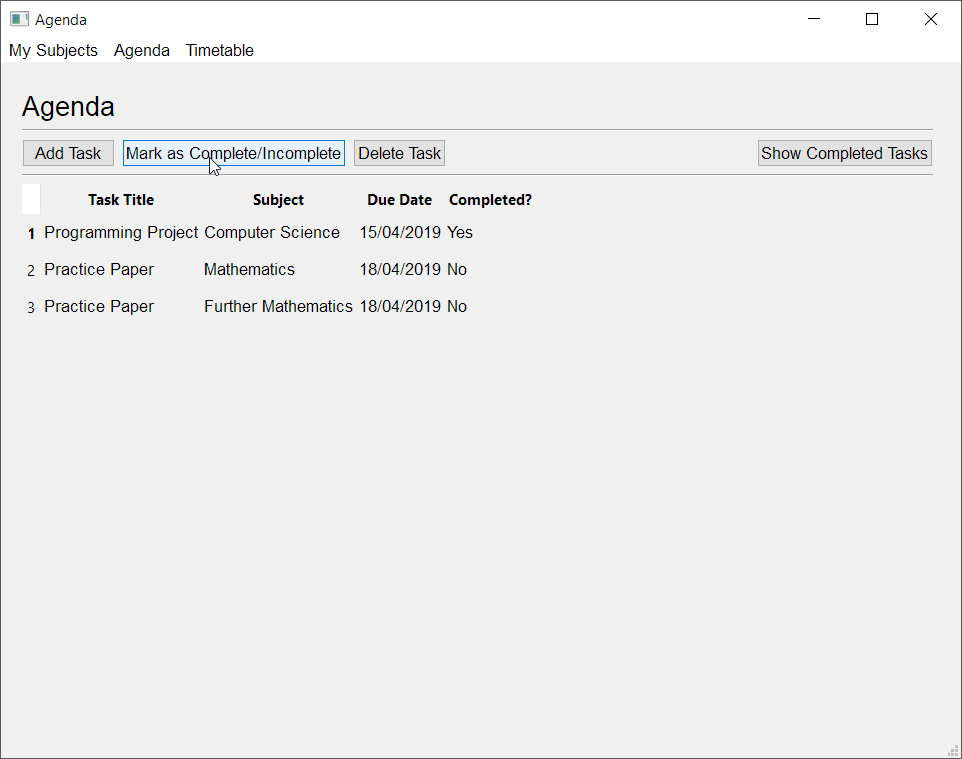
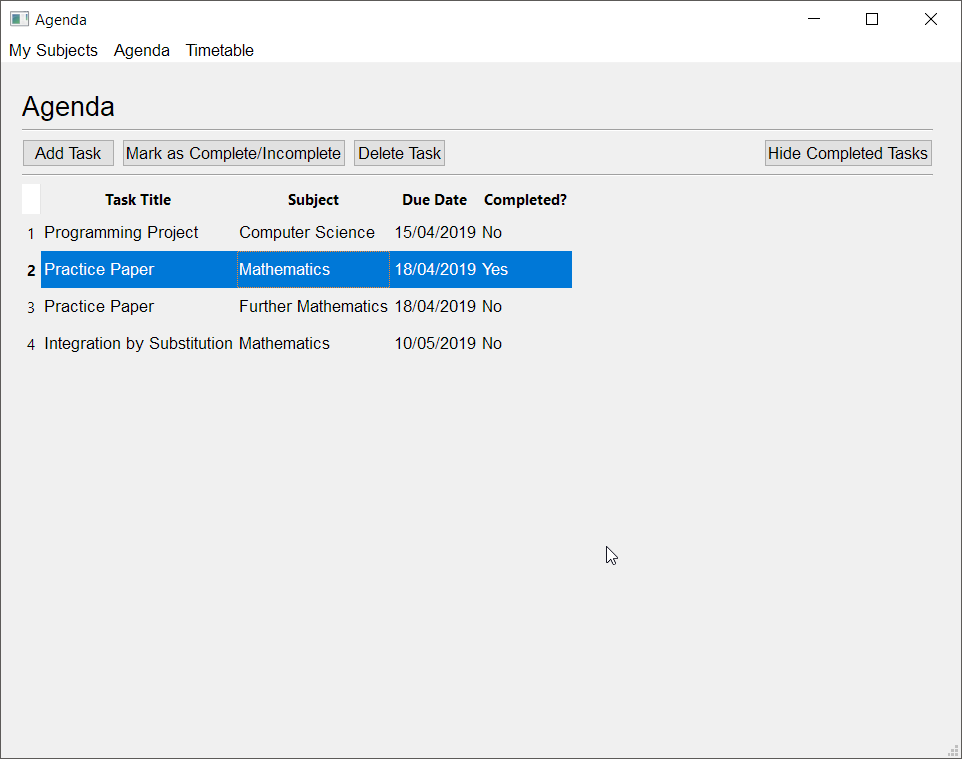
Could someone go through my code and see if they can work out a logic error of some sort? I added a feature on my agenda to mark tasks as complete, and a button to show/hide completed tasks, but the showing/hiding isn't really working consistently. I've looked over it for the last 30 minutes, testing different things, and I can't seem to work it out. https://paste.pythondiscord.com/edeqimuvis.py
The issue I'm having is that the show/hide seems to work fine when I haven't marked anything as complete/incomplete in that session.
However, there an issue when for example, I do the following:
- Open the program. https://i.imgur.com/IyOgLuR.png
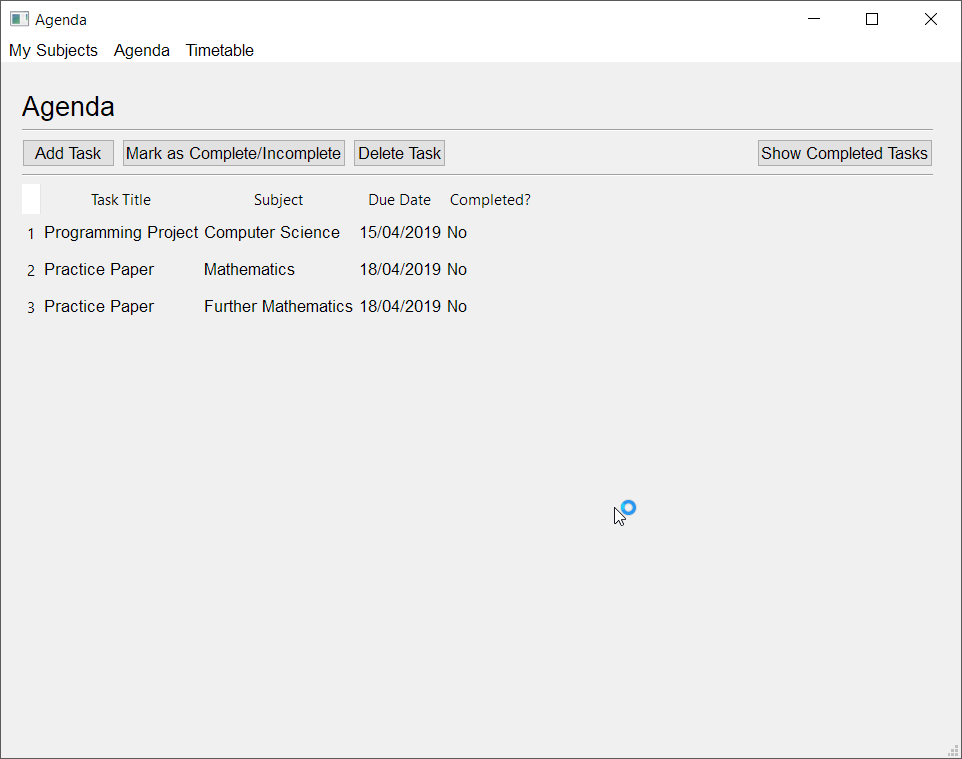
- Mark something as complete. https://i.imgur.com/UAAYsgf.png
- Click the 'Show Completed Tasks' button, then click the 'Hide Completed Tasks' button (list doesn't update once I've marked something yet, so you have to 'refresh' the list view). https://i.imgur.com/UAAYsgf.png
When I performed those steps, the hidden list view is incorrect, as the programming project task should not be shown.
The JSON files are correct, which is what confuses me. Below you can see task_list.json and task_list_hidden.json. [ { "task_title": "Programming Project", "subject": "Computer Science", "due_date": "15/04/2019", "completed": "Yes" }, { "task_title": "Practice Paper", "subject": "Mathematics", "due_date": "18/04/2019", "completed": "No" }, { "task_title": "Practice Paper", "subject": "Further Mathematics", "due_date": "18/04/2019", "completed": "No" } ]
    {
        "task_title": "Practice Paper",
        "subject": "Mathematics",
        "due_date": "18/04/2019",
        "completed": "No"
    },
    {
        "task_title": "Practice Paper",
        "subject": "Further Mathematics",
        "due_date": "18/04/2019",
        "completed": "No"
    }
]```So I think it has something to do with the list variables not being updated.
I ended up tracing through properly again (to be honest, I think I might have gotten lost when I did it previously because the code is so long), and I think the issue might have been line 151.
I changed it to this, and I think it fixed it: task_list_hidden[:] = [ task for task in task_list if task["completed"] == ("No")]
So I changed task_list_hidden = to task_list_hidden[:] =
 rain quarry
What's the best way to go about making a scratch-like (read: drag and drop blocks that snap together) interface?
wispy oar
Is there a way to get rid of the white block in the corner of this QTableWidget? https://i.imgur.com/jzQ6pkG.png
I've already used a few stylesheets to make parts like the QHeaderView transparent, but I can't seem to find a way to make this corner (the background of the corner button, which I've disabled) transparent too.
I've set the whole background-color to transparent in Qt Creator, then I used additional style sheets in my program. # Sets the list of tasks to have a transparent background. self.setStyleSheet("""QTableWidget {background-color: transparent;} QHeaderView::section {background-color: transparent;} QHeaderView {background-color: transparent;}""")
 formal leaf
So im really new to using tkinter, i made a window with an entry text some labels, and a button, when the button is pressed it opens a new window using Toplevel() so far its working but, i dont know if its made correctly, or if there is a better way to do this
Also right where the #this comment is, i dont understand what that line is doing and i tried packing a button on the window called with Toplevel() but it is not showing
Can someone pls see my code and tell me/answer this ^
from tkinter import *
class Ventana(Frame):
    def __init__(self,master):
        Frame.__init__(self,master)
        self.master = master
        self.FirstWin()

    def FirstWin(self):
        self.master.title("2048 but BETTER")
        LoginTxt = Label(root,
                                 text = "Enter your name:",
                                 font="Calibri 12",
                                 bg = "#2e3131",
                                 fg = "white")
        LoginTxt.grid(row=2,column=0, sticky=W)

        LoginEntry = Entry(root, width=18, font= "Calibri 12")
        LoginEntry.grid(row=2, column=1)

        FirstTitle = Label(root,
                               text="Welcome to 2048 but better",
                               font="Calibri 12",
                               bg = "#2e3131",
                               fg = "white",)
        FirstTitle.grid(row=0,column=0, sticky=W)

        def winB():
            windowB = Toplevel()
            windowB.title("Ventana B")
            windowB.minsize(300,200)
        JButton = Button(self, text="Join!",
                                 font = "Calibri 12", fg = "white", width=22,
                                 relief = FLAT, bd = 1, anchor = W,
                                 bg = "#2e3131", command=winB)
        JButton.grid(row=3, column=1)##Join button
        self.grid(row=3, column=0) #thiss

root = Tk()
root.configure(bg="#2e3131")
root.minsize(350,85)
root.maxsize(350,85)
app= Ventana(root)
root.mainloop()
Thanks!
sudden coral
@wispy oar Did you set a style for QTableCornerButton?
wispy oar
@sudden coral No, I didn't know that it was a thing to be honest. I've been able to fix it using that, thanks. # Sets the timetable to have a transparent background. self.setStyleSheet("""QTableWidget {background-color: transparent;} QHeaderView::section {background-color: transparent;} QHeaderView {background-color: transparent;} QTableCornerButton::section{background-color: transparent;}""")
wispy oar
@sudden coral Would you be able to help me a bit with iterating a list to fill in a QTableWidget? I have an idea but I'm not sure how to implement it properly.
I currently have: for row in timetable[::5]: for column in range(5): lesson_details = (str(timetable[row + column]["subject"]) + "\n" + str(timetable[row + column]["teacher"]) + "\n" + str(timetable[row + column]["room"])) self.table_widget_timetable.setItem( row, column, QtWidgets.QTableWidgetItem(lesson_details))
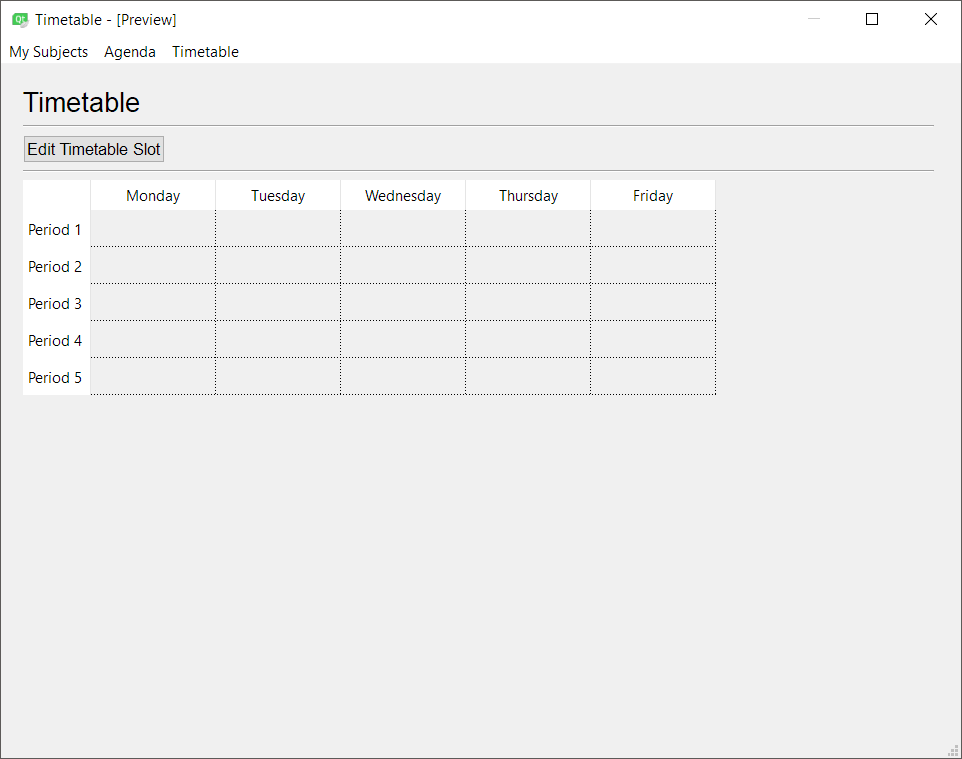
I have this timetable here, and the idea is that the code should go through each item in the list, and add the item from top to bottom, left to right: https://i.imgur.com/4NYj9Nr.png
 sudden coral
First, what does your list look like?
wispy oar
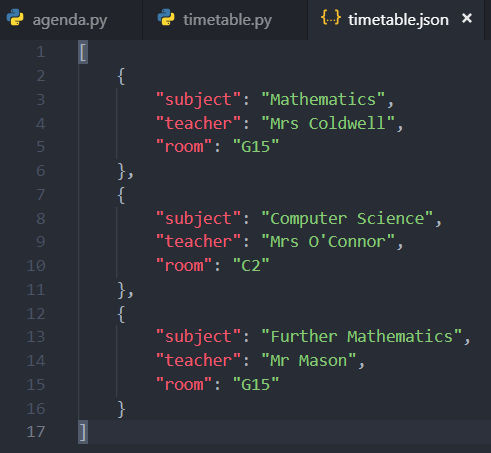
Not completely finished yet, but the structure would be like this, but with 25 dictionaries in the list: [ { "subject": "Mathematics", "teacher": "Mrs Coldwell", "room": "G15" }, { "subject": "Computer Science", "teacher": "Mrs O'Connor", "room": "C2" }, { "subject": "Further Mathematics", "teacher": "Mr Mason", "room": "G15" } ]
sudden coral
What do you want each cell to contain?
wispy oar
For the first cell:
Mathematics
Mrs Coldwell
G15
That's why I made lesson_details, and I was going to make that the item (forgot to add it in the brackets so far).
(Updated the code to include it in the brackets now, edited original post.)
The error is the row + column part, because they're dict values.
The idea is that every 5th index in the list, timetable, is a new row.
So to get the cell ID, so to speak, it would be row + column.
Actually, wouldn't I just use enumerate?
sudden coral
I would have structured the list differently so that it's already split up by period
or the other way, where it's split up by weekday
wispy oar
I thought about doing that, but I thought it wouldn't be adaptable if I wanted to enable the user to change the timetable layout from 5x5 to 6x6 etc. If I did it this way, I was thinking all I'd have to do is change the ::5 to ::6 etc.
sudden coral
I think that would still apply
After all, if you increase your table's size, you still have to add new data to the list anyway.
If you don't add new data, with your method, you'd just have all the data offset
wispy oar
Yeah true.
For what I have currently, I thought about perhaps using enumerate to fix it.
I think that's got around the initial problem, but lesson_details is a dict, so I can't add the item. for row_index, row in enumerate(timetable[::5]): for column_index, column in enumerate(range(5)): lesson_details = ((timetable[row_index + column_index]["subject"]) + "\n" + (timetable[row_index + column_index]["teacher"]) + "\n" + (timetable[row_index + column_index]["room"])) self.table_widget_timetable.setItem( row, column, QtWidgets.QTableWidgetItem(lesson_details))
sudden coral
In this case what you'd need is a way to group the list into groups of 5
Stack Overflow
I have a Python script which takes as input a list of integers, which I need to work with four integers at a time. Unfortunately, I don't have control of the input, or I'd have it passed in as a l...
wispy oar
Doesn't the first line with ::5 kind of do that?
wispy oar
I thought the process would be
0 + 0 = 0th index in timetable
0 + 1
0 + 2
0 + 3
0 + 4
5 + 0, hmm okay.
wispy oar
But it could work with timetable[(5 * row_index) + column_index] couldn't it?
Because then it would be:
0 + 0
0 + 1
0 + 2
0 + 3
0 + 4
(1 * 5) + 0
(1 * 5) + 1
etc.
It's what I did for the method for editing a timetable slot, but I haven't been able to test it yet: ``` # Saves the lesson to the selected timetable slot.
def save_lesson(self):
# Gets the row and column of the selected timetable slot.
selected_row = self.table_widget_timetable.currentRow()
selected_column = self.table_widget_timetable.currentColumn()
    # Gets the user inputs for subject, teacher, and room.
    lesson_subject = self.Dialog.comb_box_subject.currentText()
    lesson_teacher = self.Dialog.line_edit_teacher.text()
    lesson_room = self.Dialog.line_edit_room.text()

    # Validates user inputs for teacher and room.
    if len(lesson_teacher) > 30:
        self.Dialog.lbl_instruction.setText(
            "Your teacher input exceeds 30 characters. Please try again.")
    elif len(lesson_room) > 20:
        self.Dialog.lbl_instruction.setText(
            "Your room input exceeds 30 characters. Please try again.")
    else:
        lesson = {"subject": lesson_subject,
                  "teacher": lesson_teacher,
                  "room": lesson_room}
        index = ((selected_row * 5) + selected_column)
        timetable[index] = lesson

        self.save_timetable_list()
        self.Dialog.close()
        self.update_timetable()```
!e py list_len = 15 for i in range(0, 15, 5): for col in range(5): index = i + col row = i // 5 print(f"{row}, {col}: {index}")
 proven basinBOT
@sudden coral Your eval job has completed.
001 | 0, 0: 0
002 | 0, 1: 1
003 | 0, 2: 2
004 | 0, 3: 3
005 | 0, 4: 4
006 | 1, 0: 5
007 | 1, 1: 6
008 | 1, 2: 7
009 | 1, 3: 8
010 | 1, 4: 9
... (truncated - too many lines)
Full output: https://paste.pythondiscord.com/eyajevalak
sudden coral
That looks like it'll work
wispy oar
Something's really weird, the program isn't reading the list from the file properly.# Reads existing JSON files for lists of tasks. with open('timetable.json', 'r') as outfile: try: timetable = json.load(outfile) json.dump(timetable, sys.stdout, ensure_ascii=False, indent=4) except ValueError: print("Empty JSON file.") timetable = [] for index in range(25): lesson = {"subject": " ", "teacher": " ", "room": " "} timetable.append(lesson)
I used it for a previous program and it seemed to work, so I'm not sure why it's not in this case.
It just goes straight to the except ValueError part, because I printed the timetable to test and it's just full of empty values.
wispy oar
JSON file (it would cause an error because index out of range, but it's not reading it in the first place): https://i.imgur.com/tS0YthB.png
 sudden coral
Try ```py
except json.JSONDecodeError as e:
print(e)
instead of ValueError
Also remove the dump for now as that could also be throwing an error
wispy oar
Returns Expecting value: line 1 column 1 (char 0) Empty JSON file.
sudden coral
But the file isn't empty, right?
wispy oar
No, it's this: https://i.imgur.com/tS0YthB.png
sudden coral
Maybe this is a CWD issue. Are you sure it is reading that file you have open and not a different one? Try specifying an absolute path to the file instead of the relative one you currently have.
wispy oar
Same issue when I direct it through the file directory.
Empty JSON file.```It's confusing me because I literally copied and pasted it from my other program I was working on earlier, and just changed the variable names.
In my other program, I had it as: ```# Reads existing JSON files for lists of tasks.
with open('task_list.json', 'r') as outfile:
try:
task_list = json.load(outfile)
json.dump(task_list, sys.stdout, ensure_ascii=False, indent=4)
    with open('task_list_hidden.json', 'r') as outfile:
        task_list_hidden = json.load(outfile)
except ValueError:
    print("Empty JSON file.")```
It must be reading the wrong file or the current file is somehow corrupted
This minimal example works fine https://repl.it/repls/DependentTastyMacroinstruction

Powerful and simple online compiler, IDE, interpreter, and REPL. Code, compile, and run code in 30+ programming languages: Clojure, Haskell, Kotlin (beta), QBasic, Forth, LOLCODE, BrainF, Emoticon, Bloop, Unlambda, JavaScript, CoffeeScript, Scheme, APL, Lua, Python 2.7, Ruby,...
wispy oar
Yeah, I think the current file was corrupted.
I tried copying that and changing it to timetable1.json and it wasn't working, so it must have been the file.
Perhaps OneDrive might have messed something up when I saved it.
sudden coral
Maybe it was a byte order mark
Those damn pesky things
or some other invisible character(s) at the start of the file
wispy oar
I don't think it was extra characters. I made a prototype program for saving to a JSON file, and that JSON file was the result. It was working in the prototype program.
Then I couldn't be bothered to write a JSON file manually, so I just copied it over to the different directory and used it.
Anyway, thank you. I think it works now that I've added some code to fix out of index errors. ```# Reads existing JSON files for lists of tasks.
with open('timetable.json', 'r') as outfile:
try:
timetable = json.load(outfile)
json.dump(timetable, sys.stdout, ensure_ascii=False, indent=4)
except ValueError:
print("Empty JSON file.")
timetable = []
empty_lessons = 25 - len(timetable)
for index in range(empty_lessons):
    lesson = {"subject": " ",
              "teacher": " ",
              "room": " "}
    timetable.append(lesson)```
The other thing was, because I had to express my lists as global variables, how would it work when I want to connect my programs together?
As in, I was planning on using the menu bar at the top left here to switch between the programs in my application: https://i.imgur.com/DJPR4L1.png
 sudden coral
Do you mean that you need to access the list in another module?
wispy oar
If I had everything in classes, it would be easy because I could do the same as I did with the generated code, but I can't do that now because I have lists read outside the classes.
I need to access the list in another method, and it wasn't defined because it was local.
I initially had it in the __init__ part, but then I had to move it to a global definition because methods like save_timetable_list() wouldn't work.
I need to make it so I can switch between the programs using the menu bar, and I had previously made a small prototype, but it worked by importing the classes. ```import sys
from PyQt5 import QtCore, QtGui, QtWidgets
from PyQt5.QtWidgets import QMainWindow
from agenda import Ui_mwindow_agenda
from my_subjects import Ui_mwindow_my_subjects
from timetable import Ui_mwindow_timetable
Set up the window for Agenda.
class AgendaWindow(QMainWindow, Ui_mwindow_agenda):
def init(self):
super().init()
self.setupUi(self)
Set up the window for My Subjects.
class MySubjectsWindow(QMainWindow, Ui_mwindow_my_subjects):
def init(self):
super().init()
self.setupUi(self)
Set up the window for Timetable.
class TimetableWindow(QMainWindow, Ui_mwindow_timetable):
def init(self):
super().init()
self.setupUi(self)
app = QtWidgets.QApplication(sys.argv)
Workaround for selecting window manually.
while True:
try:
select_main_window = str(
input("Select window (agenda, my_subjects, or timetable): ")).lower()
except ValueError:
continue
else:
if select_main_window == "agenda":
main_window = AgendaWindow()
elif select_main_window == "my_subjects" or select_main_window == "mysubjects":
main_window = MySubjectsWindow()
elif select_main_window == "timetable":
main_window = TimetableWindow()
else:
print("This is not a valid selection. Please try again.\n")
continue
break
main_window.show()
sys.exit(app.exec_())
I don't see why you can't just keep everything inside that Window class
wispy oar
If I do that, the methods won't work because I have an undefined variable, which does confuse me because I put it in __init__. https://i.imgur.com/vpag7HR.png
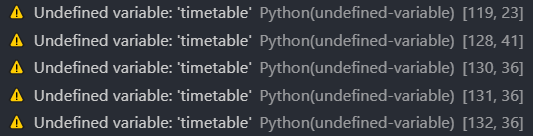
Or should I just put it in the class itself, not __init__?
sudden coral
You need to assign and access it with self.
You can create a function to read the json file and put the function in the class
wispy oar
Oh okay. I'll try that now.
Is this not right? ```# Sets up the Timetable main window.
class TimetableWindow(QMainWindow, Ui_mwindow_timetable):
def init(self):
super().init()
self.setupUi(self)
    self.read_timetable_file()

    # Sets the timetable to have a transparent background.
    self.setStyleSheet("""QTableWidget {background-color: transparent;}
        QHeaderView::section {background-color: transparent;}
        QHeaderView {background-color: transparent;}
        QTableCornerButton::section{background-color: transparent;}""")

    # Connects 'Edit Timetable Slot' button to the Edit Timetable dialog.
    self.btn_edit_timetable.clicked.connect(
        self.open_dialog_edit_timetable)

    self.update_timetable()

# Reads existing JSON files for lists of tasks.
def read_timetable_file(self):
    with open('timetable.json', 'r') as outfile:
        try:
            timetable = json.load(outfile)
            json.dump(timetable, sys.stdout, ensure_ascii=False, indent=4)
        except ValueError:
            print("Empty JSON file.")
            timetable = []

        empty_lessons = 25 - len(timetable)
        for index in range(empty_lessons):
            lesson = {"subject": " ",
                    "teacher": " ",
                    "room": " "}
            timetable.append(lesson)```
You'd need to do self.timetable = ...
the other option would be to have the function return timetable
then in __init__ you would do self.timetable = self.read_timetable_file()
wispy oar
I have ```# Sets up the Timetable main window.
class TimetableWindow(QMainWindow, Ui_mwindow_timetable):
def init(self):
super().init()
self.setupUi(self)
    self.timetable = self.read_timetable_file()

    # Sets the timetable to have a transparent background.
    self.setStyleSheet("""QTableWidget {background-color: transparent;}
        QHeaderView::section {background-color: transparent;}
        QHeaderView {background-color: transparent;}
        QTableCornerButton::section{background-color: transparent;}""")

    # Connects 'Edit Timetable Slot' button to the Edit Timetable dialog.
    self.btn_edit_timetable.clicked.connect(
        self.open_dialog_edit_timetable)

    self.update_timetable()

# Reads existing JSON files for lists of tasks.
def read_timetable_file(self):
    with open('timetable.json', 'r') as outfile:
        try:
            timetable = json.load(outfile)
            json.dump(timetable, sys.stdout, ensure_ascii=False, indent=4)
        except ValueError:
            print("Empty JSON file.")
            timetable = []

        empty_lessons = 25 - len(timetable)
        for index in range(empty_lessons):
            lesson = {"subject": " ",
                    "teacher": " ",
                    "room": " "}
            timetable.append(lesson)
    return timetable```
If it's not really possible, then I could always just define the global variables outside of the class in the main program, student_planner.py.
sudden coral
that looks right
wispy oar
Oh, I think I might have misinterpreted you. I had to put timetable = self.read_timetable_file() in each method where timetable was being used.
The issue though is when it's updating the timetable with the function save_timetable_list(), it doesn't work because it's reading an old version of timetable.
It can be worked around for timetable.py because the function is only used once, but not for agenda.py, where the function would be used many times.
Perhaps it might just be simpler to make it a global variable and just add the code outside the class in the main program, because it is basically acting like one.
digital rose
Hello guys! Here can I ask for help in open cv?
 regal cosmos
in tkinter, is it possible to pass a widget to a class and then display that widget in a frame which was initialised inside of that class?
background being that i have a custom widget which inherits from tk.Text and i want to pass this widget to multiple classes to they can modify the text that is being displayed
concept so far:
import tkinter as tk


class Application:

    def __init__(self, root, widget):
        self.root = root
        self.widget = widget

        self.frame = tk.Frame(self.root, bg='grey')
        self.frame.grid(sticky='nsew')

        # Does not work
        self.widget.grid(in_=self.frame, sticky='nsew')

        # Works
        self.label = tk.Label(self.frame, text='Baz!')
        self.label.grid(sticky='nsew')


root = tk.Tk()
label = tk.Label(text='Foo! Bar! Ham and eggs!')
app = Application(root, label)
root.mainloop()
i keep all widgets inside of frames in my ui, so if i would display it in self.root instead, everything would get misaligned (to put it nicely)
thorny spruce
What I mean is, why create the label outside the class instead of inside
regal cosmos
in order to pass it to multiple classes, so that it acts as a sort of logging window
i saw that something similar can be achieved with Labels and a StringVar, but Text widgets have simple line breaks which i don't want to give up
thorny spruce
So I have my other classes created inside my main class, then have those classes accept the widget as a parameter.
import tkinter as tk


class Application:

    def __init__(self, root):
        self.root = root

        self.label = tk.Label(root, text='Foo! Bar! Ham and eggs!')
        self.frame = MyFrame(root, self.label)

        self.frame.pack()
        self.label.pack()


# Don't have to inherit from tk.Frame
# Otherwise just create a tk.Frame and pass that as master
class MyFrame(tk.Frame):
    def __init__(self, master, widget):
        super().__init__(master)
        self._widget = widget

def main():
    root = tk.Tk()
    app = Application(root)
root.mainloop()```right, that should work from what i can tell
i'll try it out once i get home but sadly that won't be soon
but still, thanks!
wispy oar
I need help with getting the program modules of my application to work together in PyQt5.
I have My Subjects, Agenda, and Timetable as the programs, which are meant to form the Student Planner application.
These programs all work individually, with their main window and dialog(s), but when I try to import all of these programs to work in a master program of sorts, their functionality fails.
This is what I have for the master program: https://paste.pythondiscord.com/basevaqezo.py
When I run it and select 'agenda' (because that's what will hopefully be the default program loaded in once this all works), it initialises the UI, but:
- The font is incorrect throughout the program.
- No data is loaded into the
QTableWidgetdespite the .json file being read as a global variable. - None of the buttons work.
I was wondering if there is some code which just runs the entire of the selected .py file rather than just certain classes? It would probably be the easiest solution to my problem.
I found a solution by using exec(open("agenda.py").read()), but I don't know if it's the best solution for my case. I think it might be, but I'd be interested in input from others to see if it would be the most suitable solution.
For reference, this is agenda.py which I was trying to get the master program to run: https://paste.pythondiscord.com/fajesaheki.py
wispy oar
I've experimented with trying to get the menu bar buttons to open other program windows, but it seems to open the other window, then errors out: https://paste.pythondiscord.com/ucumezurun.py
In the code above, lines 58-59 and lines 83-85 are what I've added.
It produces the error QCoreApplication::exec: The event loop is already running.
wispy oar
Tried a few different things, I don't think I can make the program use exec(open(program.py).read()) to switch between programs.
Not sure what to do though. I could revert back to the idea with the master program (https://paste.pythondiscord.com/basevaqezo.py), but it doesn't seem to be inheriting the widgets from the UI properly.
Files if anyone wants to test it with 'agenda' as the input when executing from student_planner.py:
student_planner.py: https://paste.pythondiscord.com/basevaqezo.py
agenda.py: https://paste.pythondiscord.com/oposimowoy.py
agenda_setup.py: https://paste.pythondiscord.com/jajeditosi.py
add_task_setup.py: https://paste.pythondiscord.com/miyinetemu.py
subject_list.txt: https://paste.pythondiscord.com/hiyudoxeve.py
task_list.json: https://paste.pythondiscord.com/amosirawiq.py
task_list_hidden.json: https://paste.pythondiscord.com/wuyeniwona.py
It opens Agenda, but not with the correct font, or any of the functionality working (such as loading in the tasks from task_list.json or adding a new task). https://i.imgur.com/DYR4RR8.png
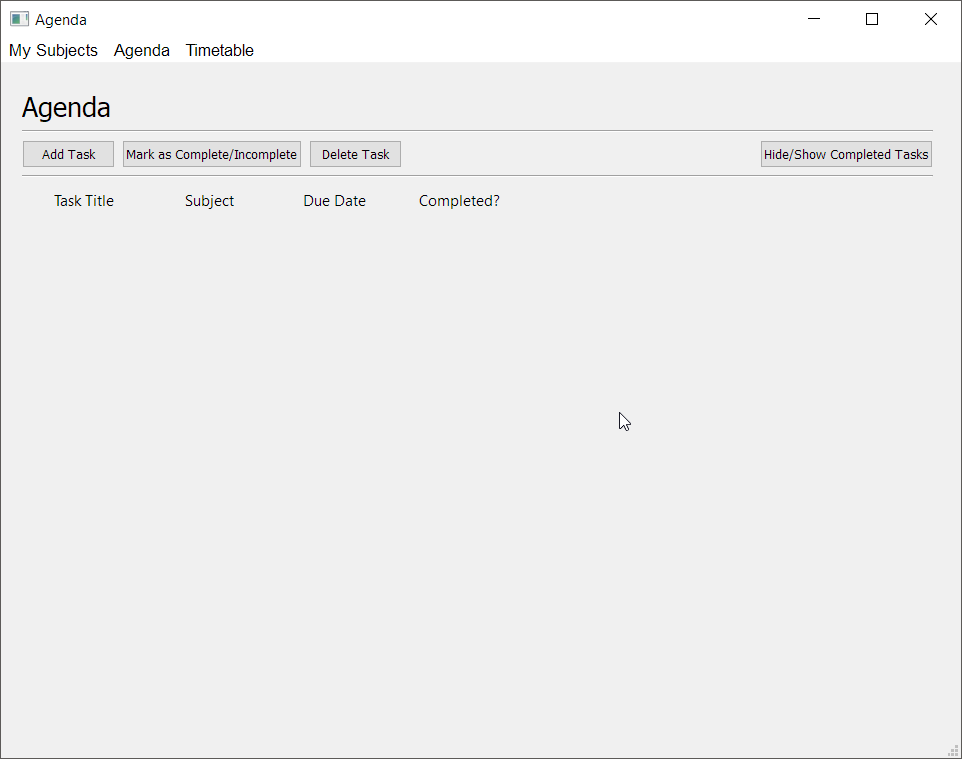


 sudden coral
I think you've just gone about this the wrong way. When trying to do something like this you should avoid having code the class relies on being outside the class
Because what will happen is that the code will only get executed once when the module is initially imported
Maybe that is what's breaking it
You could have put a function in each module that sets up the window and so on
I haven't tested it yet so I'll try and see what the real issue is
 unique spade
is there a way to log what I did input into input boxes?
my code: https://paste.ofcode.org/3ibeCTyC9JjBS2TemxZrr4
That's how it looks:
(it's starts other script after I press button)
I'd want it to log what I did type into the windows+ the button I did press
digital rose
I have a questions:
Question 1:
I need this tkinter thing to play a gif
but its tkinter
I want to set a button image to a gif
if I do normally with a PhotoImage it does not play
I found this on stack:
import tkinter as tk
from PIL import Image, ImageTk
from itertools import count

class ImageLabel(tk.Label):
    """ A label that displays images, and plays them if they are gifs """
    def load(self, im):
        if isinstance(im, str):
            im = Image.open(im)
        self.loc = 0
        self.frames = []

        try:
            for i in count(1):
                self.frames.append(ImageTk.PhotoImage(im.copy()))
                im.seek(i)
        except EOFError:
            pass

        try:
            self.delay = im.info['duration']
        except:
            self.delay = 100

        if len(self.frames) == 1:
            self.config(image=self.frames[0])
        else:
            self.next_frame()

    def unload(self):
        self.config(image=None)
        self.frames = None

    def next_frame(self):
        if self.frames:
            self.loc += 1
            self.loc %= len(self.frames)
            self.config(image=self.frames[self.loc])
            self.after(self.delay, self.next_frame)
however this is for a label, not a tk.PhotoImage object
how can I make a button play a gif as its image?
Question 2:
I want to resize the image
not crop it like what happens when you set H and W
but resize it
how can I resize a PhotoImage object? but still keep it a PhotoImage object that can be used
this also got a stack result: https://stackoverflow.com/questions/28464331/resizing-images-with-imagetk-photoimage-with-tkinter-python
But again, doesn't seem to help me
Can someone help me out here, It would be so greatly appreciated! ^-^
Tkinter, Play Animated Gifs, Resize Images, tk.PhotoImage, utils
Stack Overflow
I'm attempting to make a slideshow with Tkinter but I'm having trouble sizing the images. They only show as the default size while I'd like to make them all uniform. I can do it for individual images
digital rose
How can you make in python windows cmd a script where you have a printed interface consistant in screen
so it would look like ```python
console output
console output
Cool Interface with variabls shown
Ducks Seen in my bed: 39
----------------------------------- ```
so you have that all in --- always on the screen while the scripts run
and meanwhile your normal scripts works further
and prints out its output above the interface
i've seen people do it (no video, lost) before in python, looks very cool and useful, does somebody know what i mean?
sudden coral
Maybe something with curses
I've only heard of it. Not sure what the Windows support is like
Curses may be a bit over the top for what you want too
 karmic shoal
what I have done in the past is clear the screen before printing, so that could be a primitive way to achieve what you want
digital rose
I have a questions:
Question 1:
I need this tkinter thing to play a gif
but its tkinter
I want to set a button image to a gif
if I do normally with a PhotoImage it does not play
I found this on stack:
import tkinter as tk
from PIL import Image, ImageTk
from itertools import count

class ImageLabel(tk.Label):
    """ A label that displays images, and plays them if they are gifs """
    def load(self, im):
        if isinstance(im, str):
            im = Image.open(im)
        self.loc = 0
        self.frames = []

        try:
            for i in count(1):
                self.frames.append(ImageTk.PhotoImage(im.copy()))
                im.seek(i)
        except EOFError:
            pass

        try:
            self.delay = im.info['duration']
        except:
            self.delay = 100

        if len(self.frames) == 1:
            self.config(image=self.frames[0])
        else:
            self.next_frame()

    def unload(self):
        self.config(image=None)
        self.frames = None

    def next_frame(self):
        if self.frames:
            self.loc += 1
            self.loc %= len(self.frames)
            self.config(image=self.frames[self.loc])
            self.after(self.delay, self.next_frame)
however this is for a label, not a tk.PhotoImage object
also, it just doesn't work
how can I make a button play a gif as its image?
Question 2:
I want to resize the image
not crop it like what happens when you set H and W
but resize it
how can I resize a PhotoImage object? but still keep it a PhotoImage object that can be used
this also got a stack result: https://stackoverflow.com/questions/28464331/resizing-images-with-imagetk-photoimage-with-tkinter-python
But again, doesn't seem to help me
Can someone help me out here, It would be so greatly appreciated! ^-^
Tkinter, Play Animated Gifs, Resize Images, tk.PhotoImage, utils
Stack Overflow
I'm attempting to make a slideshow with Tkinter but I'm having trouble sizing the images. They only show as the default size while I'd like to make them all uniform. I can do it for individual images
Question 3:
ok so I also want to have this slider that only can be slid to 3 different options, like this: |---~---~---| those 4 spots are the only places you can put the slider.
Tkinter, Play Animated Gifs, Resize Images, tk.PhotoImage, utils
thorny spruce
For the gif iirc you need to specify the format and frame index
Ah found it https://stackoverflow.com/a/28519037
Stack Overflow
I've been trying to play an animated gif using Tkinter.PhotoImage, but haven't been seeing any success. It displays the image, but not the animation. The following is my code:
root = Tkinter.Tk()
...
You should be able to resize the image with PIL. I think you need to load it, resize and then create a PhotoImage from it.
I don't understand your question about the slider
You just want a slider widget?
The widget for this is called a Scale
 fossil egret
Hi Guys , does anyone have experience creating graphs in tkinter WITHOUT matplotlib module
digital rose
@thorny spruce Here is an example for the slider: See how those spots are the only place you can put the slider? you can't put it in between them.
For the Photoimage, can you explain a bit more? I tried using tkinter's subsample but it never works...
thorny spruce
subsample returns a new PhotoImage. you can only work with multiples though so it's not easy to get right. PIL should have something better
digital rose
@thorny spruce I tried everything, until I figured out something
I have a class that allows labels to display gifs, but I cannot subsample and display the gif at the same time.
do you have a solution?
thorny spruce
I don't know what you mean by you can't. What is the code you are trying?
digital rose
import tkinter as tk
from PIL import Image, ImageTk
from itertools import count


class ImageLabel(tk.Label):
    """A label that displays images, and plays them if they are gifs."""

    def __init__(self, root, image, image_path):
        super().__init__()
        self.im = image_path

    def load(self):  # noqa: D102
        if isinstance(self.im, str):
            im = Image.open(self.im)
        self.loc = 0
        self.frames = []

        try:
            for i in count(1):
                self.frames.append(ImageTk.PhotoImage(im.copy()))
                im.seek(i)
        except EOFError:
            pass

        try:
            self.delay = im.info['duration']
        except:  # noqa: E722
            self.delay = 100

        if len(self.frames) == 1:
            self.config(image=self.frames[0])
        else:
            self.next_frame()

    def unload(self):  # noqa: D102
        self.config(image=None)
        self.frames = None

    def next_frame(self):  # noqa: D102
        if self.frames:
            self.loc += 1
            self.loc %= len(self.frames)
            self.config(image=self.frames[self.loc])
            self.after(self.delay, self.next_frame)
That is my gif player
import tkinter as tk
from PIL import Image, ImageTk

"""Resize the image with a given scale."""
img = Image.open('../assets/potion_red.gif')
basewidth = 64
wpercent = (basewidth / float(img.size[0]))
hsize = int((float(img.size[1]) * float(wpercent)))
img = img.resize((basewidth, hsize), Image.NEAREST)
img.save('../assets/potion_red-RESIZED.gif')
that is my PIL resizer
thorny spruce
Your super().__init__() is empty, it should be super().__init__(root)
I also don't see subsample anywhere
digital rose
I was using PIL
thorny spruce
Does that play the gif?
digital rose
no
thats the issue
can you use subsample to save as a gif file?
just like I did with PIL?
I can try that if it is posssible to
thorny spruce
Did you check the link I posted on displaying a gif?
digital rose
hmm
so I can specify the fram
do you have a working gif player? I know I should probably do it myself, but I just want to see what it looks like
thorny spruce
Not atm, but it would be similar to what you currently have just changing load to use that form instead
digital rose
gotcha, alrighty I hope I will be able to impliment it
can I ping you if I get stuck
thorny spruce
I won't be able to answer straight away
digital rose
@thorny spruce How do you get the number of frames in a gif?
thorny spruce
You can't. Just keep increasing the index until you get an error.
digital rose
my current load looks like this:
    def load(self):  # noqa: D102
        if isinstance(self.im, str):
            im = Image.open(self.im)
        self.loc = 0
        self.frames = []

        try:
            for i in count(1):
                self.frames.append(ImageTk.PhotoImage(im.copy()))
                im.seek(i)
        except EOFError:
            pass

        try:
            self.delay = im.info['duration']
        except:  # noqa: E722
            self.delay = 100

        if len(self.frames) == 1:
            self.config(image=self.frames[0])
        else:
            self.next_frame()
I have no idea how make that work with directly a photoimage instead of the path
what do I change there
thorny spruce
Why do you need it to work without a path?
digital rose
since I need to subsample the photoimage
thorny spruce
There is a couple of things you could do Change it so instead of accepting a single image you accept a list of them. These with be your frames. Pass a function to modify the images as you load it.
digital rose
ok that works
thorny spruce
Could also just create the new gif and save it
digital rose
i like the first one
@thorny spruce is it possible to create an extended class for the tk.PhotoImage that can load gifs?
or does it have to be a label
thorny spruce
It can be anything you want
As long as you know how to implement it for that class
digital rose
@thorny spruce
I tried...
import tkinter as tk
from PIL import Image


class PhotoImageGif(tk.PhotoImage):
    """A tk.PhotoImage object that displays images, and plays them if they are gifs."""

    def __init__(self, file, subsample=1):
        super().__init__()
        self.filepath = file
        if isinstance(self.im, str):
            self.pil_image = Image.open(self.filepath)
        self.subsample = subsample
        self.loc = 0

    def create_frames(self):
        i = 0
        self.frames = []
        last_frame = False
        while last_frame is False:
            try:
                img = tk.PhotoImage(file=self.im, format=f'gif -index {i}').subsample(self.subsample)
                self.frames.append(img)
                i += 1
            except:  # noqa: E722
                last_frame = True

    def set_delay(self):
        try:
            self.delay = self.pil_image.info['duration']
        except:  # noqa: E722
            self.delay = 100

    def load(self):
        self.create_frames()
        self.set_delay()
        if len(self.frames) == 1:
            self.config(image=self.frames[0])
        else:
            self.next_frame()

    def unload(self):  # noqa: D102
        self.config(image=None)
        self.frames = None

    def next_frame(self):  # noqa: D102
        if self.frames:
            self.loc += 1
            self.loc %= len(self.frames)
            self.config(image=self.frames[self.loc])
            self.after(self.delay, self.next_frame)
how bad does this look
ok @thorny spruce so it uhh runs... but my gif looks like this:
not the blue, the tiny white sqaure
        self.image = PhotoImageGif(file="../assets/potion_red.gif", subsample=1)
        self.image.load()
        self.root = root
        self.tk = tk.Label(root, image=self.image)
 eternal tree
Hello, I'm sorry if this is the wrong section, but I was wondering if I could get some help in getting started. What I want to do is be able to read a window.. let's say for instance, FireFox web page... That has a score on it how many times I clicked a button. Is there a way in python where I can read the data on display, or a certain window, and store that value into variable? I dont mean with web scrapping either. Like for instance if I have a video game up and there's a score section, I want python to be able to read a certain part of the screen, and read whatever numbers are there, and be able to tell what numbers they are and store it into a value that I can pull up somewhere later.
thorny spruce
Not sure I'd have to look into it when I get home
Does it still look the same if you remove the subsample change?
digital rose
@thorny spruce I get _tkinter.TclError: unknown option "-image" for
    def next_frame(self):
        if self.frames:
            self.loc += 1
            self.loc %= len(self.frames)
            self.config(image=self.frames[self.loc])  <- this line
            self.after(self.delay, self.next_frame)
probably because it was a label and now its a photoimage object
but uhh, then how do I do that
thorny spruce
It's saying that a PhotoImage doesn't have an image attribute you can change
What was wrong with it as a label?
digital rose
I need it to also work if I set the photoimage to a button etc.
and you can subsample a label
thorny spruce
I'll have to have a look later
digital rose
ok...
thorny spruce
@eternal tree Maybe you're looking for pyautogui but what you're trying to do seems very complex
You basically want image recognition
eternal tree
Essentially yes. Basically what I want to do is run a ROM in project 64 (Nintendo Emulator) and grab my score from the game via reading the window or the screen itself
and then be able to use the data I've collected while playing to produce my score total
digital rose
I figured out things, that line that was my issue, its basically I need it to show that frame, but since its a photoimage object, I need a way for it to essentially set the PhotoImage of the extended PhotoImage. I tried self = self.frames[self.loc] and it works, but then the next line gets an error for saying PhotoImage doesn't have a after attribute.
thorny spruce
I haven't worked with it so I don't know how difficult it would be. You can certainly capture the score as an image but getting your program to recognize it as a number would be the hard part
digital rose
there is a data attribute, so I could somehow convert each of my frames to data before passing it into the config
but what is data
thorny spruce
self = self.frames[self.loc] doesn't modify self outside that scope
eternal tree
@thorny spruce thanks for the tip though I appreciate it. Imma look more into pyautogui
❤
thorny spruce
You are just changing a reference to the variable
thorny spruce
You might have to look into the internals of the PhotoImage class
digital rose
where can I find that
thorny spruce
Source code 😃
digital rose
yeah where can I find that
thorny spruce
Python/Lib/tkinter/__init__.py
It's basically a wrapper though so not a whole lot you can glean into
I would suggest doing something like this if you want the one class to work for both Label and Image
class Gif:
    def __init__(self, path, widget):

        self._widget = widget
        self._frames = ...

    def next_frame(self):
        ...
self._widget.config(image=...)```Just pass the label or button as the widget to config it
digital rose
well thats alot of stuff
hey format works
self.config(format=self.frames[self.loc])
I mean there isnt any errrors
thorny spruce
But does it work?
digital rose
self.after(self.delay, self.next_frame) <- 'PhotoImageGif' object has no attribute 'after'
thorny spruce
self.master.after
digital rose
doesnt exist
thorny spruce
self.tk.after?
digital rose
what do you mean?
ok
well
...
ok so how do I convert a PhotoImage object to image data
OH MY GOD
I DID IT
@thorny spruce
JESUS
it works but im going to clean it up first
@thorny spruce
"""Contains the PhotoImageGif Class."""
import tkinter as tk
from PIL import Image


class PhotoImageGif(tk.PhotoImage):
    """A tk.PhotoImage object that displays images, and plays them if they are gifs."""

    def __init__(self, root, file, subsample=1):
        """Initilize the PhotoImageGif."""
        super().__init__()

        self.root = root
        self.filepath = file
        self.subsample = subsample
        self.loc = -1
        self.pil_image = Image.open(self.filepath)

        self.config(file=self.filepath, format=f'gif -index 0')

    def load(self):
        """Load the gif, cycling through the frames."""

        self.create_frames()
        if self.frames > 1:
            self.set_delay()
            self.next_frame()

    def create_frames(self):
        """Create the frames for the gif."""
        self.frames = 0
        last_frame = False
        while last_frame is False:
            try:
                tk.PhotoImage(format=f'gif -index {self.frames}')
                self.frames += 1
            except tk.TclError:
                last_frame = True

    def set_delay(self):
        """Set the delay/duration of the gif."""
        try:
            self.delay = self.pil_image.info['duration']
        except KeyError:
            self.delay = 100

    def next_frame(self):
        """Go to the next frame."""
        self.loc = (self.loc + 1) % self.frames
        self.config(format=f'gif -index {self.loc}')
        self.root.after(self.delay, self.next_frame)

    def unload(self):
        """Stop the gif."""
        self.config(format=None)
        self.frames = None
now its time to see if I can subsample it
@thorny spruce question, how do you get the width of a PIL image?
thorny spruce
There's probably a width property or something. Have a look at the docs
 safe lark
Does someone here use pyqt5
proven basinBOT
ask
Asking good questions will yield a much higher chance of a quick response:
• Don't ask to ask your question, just go ahead and tell us your problem.
• Try to solve the problem on your own first, we're not going to write code for you.
• Show us the code you've tried and any errors or unexpected results it's giving
• Keep your patience while we're helping you.
You can find a much more detailed explanation on our website.
safe lark
def openWindow(self):
    self.window = QtWidgets.QMainWindow()
    self.ui = Ui_Email_Dialog()
    self.window.show()
I'm opening a new window like this but i cant find how to close the first one
proper glade
I use PyQt5 over PySide2
PySide2 has some weird compatibility issues I haven't been able to iron out yet.
oh and you can close windows using their .close() methods @safe lark
as long as you have a reference to the window somewhere that's all you should need to do to close it.
safe lark
tks
mighty frigate
@proper glade PySide2 comes from the original QtForPython provided by Qt
that's the main reason why I use that one
mighty frigate
can I be a bit mean
proper glade
cant start any pyside2 program unless theyre in a venv and didnt really bother to find a fix
mighty frigate
it's Qt, most stuffs do not work at some point
proper glade
one other benefit of pyqt5 is import PyQt5.Qt as qt
you can access every class in the entire library through PyQt5.Qt
mighty frigate
that's convenient
proper glade
it's possible to generate one for PySide2 as well fairly easily though
mighty frigate
Im stuck with like from PySide2.QtCore import *
proper glade
one thing you could do is create a file called qt.py then paste the output of this in it:
>>> import PySide2
>>> for module in PySide2.__all__:
    print('from', module, 'import *')
why not
proper glade
and then you place this qt.py in the base directory of the project and you can just do import qt anywhere
mighty frigate
I'm still very new at python, is this gonna be "shipped" with the script ? I mean, do I make the footprint bigger by importing * ?
proper glade
it definitely does mean more imports, yeah. i dont really know how much slower it is. though i havent noticed any real speed boost to selectively importing modules vs doing * as far as PyQt/PySide are concerned.
actually i think I have a script somewhere around here for generating a selective import file hold on
mighty frigate
I'll try that
proper glade
https://github.com/0xf0f/qt_import_optimizer here you go, just threw them up on github

GitHub
Contribute to 0xf0f/qt_import_optimizer development by creating an account on GitHub.
it'll need a little tweaking for PySide2 but it should be easy
the main ones you wanna look at are qt_import_optimizer.py and qt_auto.py
one of them goes through all the source files in the project and tries to find the classes youre using, then generates a new qt.py with the appropriate imports
mighty frigate
yea
proper glade
the other one uses a json file that describes which package each class belongs to, imports it and then caches it
what qt_import_optimizer.py picks up on are any instances of qt.[Class]
proper glade
like what?
mighty frigate
anything
2 days ago I wanted to scrap a bit of website
I naively tried to do so with QtNetwork
it was a mistake, Qt feels ok for UI but it's so heavy for other things in python
with requests and BeautifulSoup, I did in 3 lines what I tried to do with 300 lines of Qt and it wasn't any close to working
proper glade
yeah, you gotta keep in mind what those modules are originally for
theyre more important in the c++ library for making sure everything works together smoothly
python doesn't face as many integration problems
mighty frigate
yea
proper glade
ive never really used the qt libraries for anything that doesnt involve a ui yet though, no
mighty frigate
in cpp it' a great tool, even without ui
proper glade
there are some parts of qt that i'd like to use outside of a ui context for sure though
the multimedia stuff for example
there are just no good and easy to use audio modules for python
mighty frigate
oh I didn't know that
sudden coral
I couldn't figure out how Qt multimedia determines which codecs it supports
I remember trying to play midi files and they wouldn't work
proper glade
doesnt it just depend whatever backend's on the system ultimately?
though I can't think of any that'd have trouble playing midi files 😅
swift merlin
midi is usually a special case. you cant just decode it via a codec, you need instrument packs and stuff too.
 rigid ocean
Could someone please explain to me how self works in Python? Directly relating to use in Tkinter, I'm very new to the whole class system.
Also, is there a way to delete a button mid-script?
 still flame
Self is just referring to the class itself or to access member variables or methods.
Any variable with a self. In front is global across the class \ object and sticks around
Usually in ui programming you don’t delete buttons but hide or enable there visibility.
rigid ocean
Okay thanks heaps, I was looking through the forums and such and I tried grid hiding and pack hiding but to no avail. Would you be able to provide an example?
still flame
I haven’t one in tk
https://stackoverflow.com/questions/3819354/in-tkinter-is-there-any-way-to-make-a-widget-not-visible
Stack Overflow
Something like this, would make the widget appear normally:
Label(self, text = 'hello', visible ='yes')
While something like this, would make the widget not appear at all:
Label(self, text = 'h...
rigid ocean
I don't understand, if I use known Tk options like .bind, .pack, tk., etc I get "unknown option" or "Object has no attribute pack". Why am I getting these errors?
digital rose
I am stuck af right now
So I want to creat a timer that counts down from 5
And when the timer hits 0 the program ends
But if I enter a button then the timer stops
I am using tkinter
How do I have a 2nd algorithm going in the background?
digital rose
Nvm got it
 serene estuary
I'm trying to make a class that allows ttk comboboxes to share values*, but I'm having some trouble getting started
*share values meaning when one has selected an item, it cannot be selected from other linked comboboxes
serene estuary
*nvm I'm well on my way to fixing it
 deft plover
Hello, has anybody tried implementing python to electron?
 celest hamlet
@deft plover yes but only on a local level
 lament goblet
anyone available to assist with a tkinter issue?
 quick moth
im also having a tkinter issue, how do I keep the sidebar frame from resizing to fit the button's sizes?
from tkinter import *

servers = ["1","2","3"]

root = Tk()
root.configure(background='green')

SideBar = Frame(background='red', width=200)
SideBar.pack(side=LEFT, fill=Y)

for server in servers:
    Button(SideBar, text=server).pack(fill=X)

root.geometry("500x500")
root.mainloop()
but I'd like it to be width 200, which it is when there are no buttons
like this:
except the buttons take up the entire width
 glass pecan
Try adding SideBar.pack_propagate(False)
 rigid pond
Hi guys, Im using Kivy and need to pass value from sqlite 3 to textInput field, how do i do that? Thank
glass pecan
There are two parts to the question
- How to get a value from SQLite DB
- How to change text in TextInput widget
First one depends on the situation. Text on TextInput can be set as follows.
text_input = TextInput()
text_input.text = value_from_sqlite
 rugged shard
Anyone here use Electron as the front end side to their Gui development?
rugged shard
Built my first app today 😃 used eel library with python 3. It connects to Google Api and when a user hits button it sends a date and time stamp, along with employee's name to a spreadsheet.
Here is MVP
rugged shard
This might help people who are trying to build something like this as well.
https://nitratine.net/blog/post/python-gui-using-chrome/#common-issues-and-questions

Eel is a little Python library for making simple Electron-like HTML/JS GUI apps. This used for creating GUI's in a Chrome app window with HTML, CSS and JS. In summary it hosts a local webserver, then provides features to communicate between JavaScript and Python.
 somber rapids
Anyone here have experience with the python can library ?
proper glade
https://doc.qt.io/qt-5/qt.html#BrushStyle-enum anyone know how/if it's possible to set the density/spacing of the lines when using Qt::VerPattern?
karmic shoal
doesn't look like it
proper glade
sometimes qt makes me want to rip my hair off in one clean sweep
digital rose
I want to anyway
 glossy herald
is there a library for changing the window size of another program?
swift merlin
of a program you didnt make? youll have to interface to the OS to do that or try something like pyautoit
 charred kernel
quick question, how do i clear an Entry widget's text from the beginning to the end?
so far im doing
self.myentry.delete(tk.FIRST, tk.END)
except i receive that _tkinter.TclError: bad entry index "first"
after doing a bit of digging around, i fxied my issue by doing
self.myentry.delete(0, tk.END)
 dire geode
Hey I have a question
(Sorry if it's sound wierd cause I am beginner in this stuff)
How do you create UI and Link the code with specific buttons or any specific function in the design??
 sour girder
could someone help me out with this? Sorry if it's a bit long
I just don't know how to quit all windows in tkinter
reddit
0 votes and 0 comments so far on Reddit
 final flicker
@sour girder hmmmmmmmmmmmm
i sense a problem with this post
posted by u/deleted
and it just says [deleted]
sour girder
ah yeah sorry about that
I actually figured it out
I just needed to remove grab_set
and the wait window things along with destruction of them
basically, the end result is
class MainWin(tk.Tk):

    def __init__(self):
        super().__init__()

        def exitfunc():
            self.destroy()
        self.protocol("WM_DELETE_WINDOW", exitfunc)
        tk.Button(self, text='Tuition Trend', command=self.tuition_trend).grid(row=0, column=0)
        tk.Button(self, text='Room and Board Trend', command=self.room_and_board_trend).grid(row=0, column=1)
        tk.Button(self, text='Total Cost for 4 Years', command=self.total_cost_for_4_years).grid(row=0, column=2)
        self.c = college.College()
        self.start_year = self.c.start_year
        self.end_year = self.c.end_year

    def tuition_trend(self):
        PlotDisplayWindow(self, self.c.tuitionPlot)

    def room_and_board_trend(self):
        PlotDisplayWindow(self, self.c.roomAndBoardPlot)

    def total_cost_for_4_years(self):
        DialogDisplayWindow(self, self.c.dataAnalystPlot)
 fervent pumice
Hi, I have an issue understanding how event handling works with Tkinter. I have an event onSelect bind to a Listbox: self.lb.bind("<<ListboxSelect>>", self.onSelect). I can retrieve the value of the item I click on, however the for loop inside onSelect gets called only the first time I click on an item.
How can I enter the for loop inside onSelect every time I click on an item ?
thorny spruce
It should only trigger when the selection changes
fervent pumice
    def onSelect(self, val):
        sender = val.widget
        idx = sender.curselection()
        value = sender.get(idx)
        # os = [vps[1] for vps in vpsnames if vps[0] == value]
        for vps in self.vpsnames:
            if vps[0] == value:
                os = vps[1]
        self.var.set(os)
Yes, it is, but the for loop is triggered only once. When the selection changes, only value is updated and the for loop is ignored.
thorny spruce
Are you sure the for loop doesn't execute (add a print to before, inside and after the loop)
fervent pumice
Yes, I put print(for) inside the loop. As you can see in the screenshot, it's called once, the value is updated, but the os is not.
thorny spruce
And you have confirmed that value changes right?
fervent pumice
The print(value and print(os) are however printed, so the onSelect is called correctly. Seems like only the for is ignored. If self.vpsnames is empty, the for is ignored right ? I don't understand why it's empty at the second selection change, though
Yeah, value changes
thorny spruce
Do you change self.vpsnames anywhere? Is there an example snippet you can provide that illustrates this behavior?
If the code is too long you can use https://paste.pythondiscord.com/
fervent pumice
It's a bit messy, I'm a beginner in GUI
I deleted client definition, as it contained personal information
Seems like it's an issue with the map() function
thorny spruce
Ah yes, the map function returns a generator, generators are one time use
thorny spruce
Yep that's all you need
fervent pumice
Thanks a lot 😃
thorny spruce
@digital rose Lets go here
digital rose
Okay, busy morning 😅
thorny spruce
Almost midnight for me
digital rose
So I have an entry widget. When the user is done with their input they can hit return or click the submit button or whatever. My issue is that after this has been done and I call the entry.get method, it appears that I still have to hit enter in the interpreter window itself in order to run whatever code the user submitted
Also you're under no obligation to stay up for my sake
thorny spruce
Do you have a code example?
digital rose
from tkinter import *

root = Tk()
root.title('Sheets API')
root.geometry('500x100')

def show_entry_field():
    #print("%s" % (e1.get()))
    print(e1.get())

Label(root, text="Command").grid(row=0)
e1 = Entry(root)
e1.grid(row=0, column=1)
Button(root, text='Show', command=show_entry_field).grid(row=3, column=1, sticky=W, pady=4)
Not sure what you mean by press enter in the interpreter. I don't seem to be getting something like that when running this snippet
digital rose
I'll take some screengrabs
okay so here's the gui with some random command entered
then I hit show
then we go back to the interpreter:
and I had to hit enter HERE in order for the command to execute
digital rose
oh my goodness
thorny spruce
Pressing enter in the REPL just has that behavior where you get the >>>
Really you should have root.mainloop() at the bottom of your script
digital rose
What would that do?
thorny spruce
mainloop is what is actually required for your gui to stay alive
The reason why it works in IDLE is that IDLE also uses tkinter so it's kinda running off that loop
digital rose
Oh okay
thorny spruce
mainloop is blocking and says "keep the gui active and process all events"
digital rose
process all events
does that mean it enables commands to be executed "from" the gui?
thorny spruce
No, events are like, on click, mouse move, on keypress
digital rose
Got it. Would there be a different method for what I'm looking for?
thorny spruce
If you want to run python code then you'd want to eval the string
digital rose
that yes
thorny spruce
Keep in mind though eval is evil and should be avoided in most cases
digital rose
Play on words?
thorny spruce
No, evaling user input lets you run literally anything
So if you don't have control over what is being input it's not advised to use
digital rose
This is for me only, I just want to call functions I wrote from a GUI that I can make look however instead of IDLE
But that makes sense
Thank you!
thorny spruce
Then sure that's fine, just a thing to be aware of
digital rose
👌
thorny spruce
Example usage
>>> result = eval('[1,2,3]')
>>> print(result)
[1, 2, 3]``` half vapor
Is there a good resource for learning the basics of curses? It looks really useful but I don't really understand the docs
 tall storm
can anyone help me with PyQT5?
 placid sable
!ask
proven basinBOT
ask
Asking good questions will yield a much higher chance of a quick response:
• Don't ask to ask your question, just go ahead and tell us your problem.
• Try to solve the problem on your own first, we're not going to write code for you.
• Show us the code you've tried and any errors or unexpected results it's giving
• Keep your patience while we're helping you.
You can find a much more detailed explanation on our website.
 obtuse meadow
Hello, I'm stuck with my program and PyQt5 :/. Anyone can help me ?
    def home(self):

        text_box = QLineEdit(self)
        text_box.move(120, 20)
        text_box.resize(150, 350)

        btn = QPushButton("Add", self)
        btn.move(10, 20)
        btn.clicked.connect(self.btn_add)
        if self.btn_add:
            text_box.setText(self.btn_add_clicked())

    def btn_add(self):

        self.userInput, name_added = QInputDialog.getText(self, "get name", "Name", QLineEdit.Normal, "")
        self.userInput2, mmddyyyy_added = QInputDialog.getText(self, "get date", "Birthdate (mm/dd/yyyy)", QLineEdit.Normal, "")

        name = self.userInput.upper()
        mmddyyyy = self.userInput2.upper()

        self.dictionary[name] = mmddyyyy

        with open("json_birthday_data", "w") as json_openfile:
            json.dump(self.dictionary, json_openfile)

    def btn_add_clicked(self):
        text = "Added"
        return text
`````There is 3 functions, The first for the display of the button, The second when I click on the button (Add an information on my "Json file", the third is to mention when the button is clicked in a "QlineEdit()" with the string "Added".
The issue is, I set in the first function an "if" statement, but unfortunately it doesn't work ... :/. When launch the app, the "added" is directly displayed :/
I would like to added it only when the second function "btn_add" is processed
obtuse meadow
I tried something else, but still doesn't work .... :/
    def home(self):

        text_box = QLineEdit(self)
        text_box.move(120, 20)
        text_box.resize(150, 350)

        btn = QPushButton("Add", self)
        btn.move(10, 20)
        if btn.clicked:
            btn.clicked.connect(self.btn_add)
            text_box.setText(self.btn_add_clicked())
Why don't we have any method ".isClicked" ?
Found something else :
   def home(self):

        text_box = QLineEdit(self)
        text_box.move(120, 20)
        text_box.resize(150, 350)

        btn = QPushButton("Add", self)
        btn.move(10, 20)
        btn.clicked.connect(self.btn_add)
        btn.setCheckable(True)
        btn.toggle()
        if btn.isChecked():
            text_box.setText(self.btn_add_clicked())
        else:
            pass
But in this case, I don't understand, the only way to change if the button is clicked or not is to change the Boolean value "btn.setCheckable(True)". So it doesn't change when I click or not on my "Qpushbutton" on the app ... :/
obtuse meadow
When I click on the "btn" it doesn't change the boolean value of "btn.setCheckable(True)". Any Idea ?
    def home(self):

        text_box = QLineEdit(self)
        text_box.move(120, 20)
        text_box.resize(150, 350)

        btn = QPushButton("Add", self)
        btn.move(10, 20)
        btn.setCheckable(True)
        btn.toggle()
        if btn.isChecked():
            btn.clicked.connect(self.btn_add)
            text_box.setText(self.btn_add_clicked())
        else:
            pass
        if self.btn_add:
            text_box.setText(self.btn_add_clicked())
self.btn_add is a method. In order to call a method you have to add parentheses on the end, like you'd call any other function, so self.btn_add()
then another issue is that self.btn_add doesn't return anything
therefore if self.btn_add(): will always fail since self.btn_add() will evaluate as False
overall i think you've misunderstood about how Qt's slots and signals work
when you connect a slot to a signal, the slot will be called any time the signal is emitted. You don't need to perform any extra checks to figure out if this occurred.
so for example:
class Widget1(QWidget):
    def __init__(self):
        super().__init__()

        self.button_1 = QPushButton('Button 1')
        self.button_2 = QPushButton('Button 2')
        self.button_3 = QPushButton('Button 3')

        self.button_1.clicked.connect(self.on_button_1)
        self.button_2.clicked.connect(self.on_button_2)
        self.button_3.clicked.connect(self.on_button_3)

        self.vboxlayout = VBoxLayout(self)
        self.vboxlayout.addWidget(self.button_1)
        self.vboxlayout.addWidget(self.button_2)
        self.vboxlayout.addWidget(self.button_3)

    def on_button_1(self):
        print('Button 1 clicked.')

    def on_button_2(self):
        print('Button 2 clicked.')

    def on_button_3(self):
        print('Button 3 clicked.')
for toggleable buttons you can use the toggled signal like this:
# ... in __init__:
        self.toggleable_button = QPushButton('Toggleable Button')
        self.toggleable_button.setCheckable(True)
        self.toggleable_button.toggled.connect(self.on_toggleable_button_toggled)

# ... later in the class:

    def on_toggleable_button_toggled(self, is_checked):
        if is_checked:
            print('Button on.')
        else:
            print('Button off.')
Thank you for your return @proper glade , I'm going to take a look on that
obtuse meadow
@proper glade did you see my last post ?
proper glade
hey
which one? the one where you said When I click on the "btn" it doesn't change the boolean value of "btn.setCheckable(True)". Any Idea ? ?
obtuse meadow
Yes right
proper glade
setCheckable doesn't return anything.
it's just used to set whether the button should be toggleable or not
obtuse meadow
Okay
I try to run your first script to figure out how it works, but doesn't work :/
Okay, I modified
proper glade
you can see the official Qt documents for info on this stuff, for example: https://doc.qt.io/qt-5/qabstractbutton.html#checkable-prop They're written for C++ but it shouldn't be too difficult to figure out how they work for python too. And if you need help figuring one out you can always come and ask :)
and as for the script: is there an error?
oh looks like i left out self in a couple of places
one sec ill edit it
obtuse meadow
Thank you. Yes that was coming from "self" and no display yet
proper glade
the way you'd display it is
widget = Widget1()
widget.show()
Somewhere after you initialize the QApplication and before you call its exec method
obtuse meadow
Yep
from PyQt5.QtWidgets import *
from PyQt5.QtCore import *
from PyQt5.QtGui import *


class Window(QMainWindow):
    def __init__(self):
        super(Window, self).__init__()

        self.setGeometry(50, 50, 300, 400)
        self.setWindowTitle("Test")

        self.button_1 = QPushButton('Button 1', self)
        self.button_1.move(10, 20)
        self.button_2 = QPushButton('Button 2', self)
        self.button_2.move(10, 45)
        self.button_3 = QPushButton('Button 3', self)
        self.button_3.move(10, 70)

        self.button_1.clicked.connect(self.on_button_1)
        self.button_2.clicked.connect(self.on_button_2)
        self.button_3.clicked.connect(self.on_button_3)

        self.show()

    def on_button_1(self):
        print('Button 1 clicked.')

    def on_button_2(self):
        print('Button 2 clicked.')

    def on_button_3(self):
        print('Button 3 clicked.')

app = QApplication([])
test = Window()
app.exec_()
@proper glade to show you in your example (Once button pressed, I want to display "Hello" with function "Text box" in "QLineEdit(self)" :
from PyQt5.QtWidgets import *
from PyQt5.QtCore import *
from PyQt5.QtGui import *


class Window(QMainWindow):
    def __init__(self):
        super(Window, self).__init__()

        self.setGeometry(50, 50, 300, 400)
        self.setWindowTitle("Test")

        self.button_1 = QPushButton('Button 1', self)
        self.button_1.move(10, 20)
        self.button_2 = QPushButton('Button 2', self)
        self.button_2.move(10, 45)
        self.button_3 = QPushButton('Button 3', self)
        self.button_3.move(10, 70)

        self.button_1.clicked.connect(self.on_button_1)
        self.button_2.clicked.connect(self.on_button_2)
        self.button_3.clicked.connect(self.on_button_3)

        self.text_box()

        self.show()

    def on_button_1(self):
        print('Button 1 clicked.')

    def on_button_2(self):
        print('Button 2 clicked.')

    def on_button_3(self):
        print('Button 3 clicked.')

    def text_box(self):
        box = QLineEdit(self)
        box.move(120, 20)
        box.resize(150, 350)
        box.setText("Hello")


app = QApplication([])
test = Window()
app.exec_()
you have to store a reference to the LineEdit somewhere the slot can access
so for example, initialize it in __init__ as self.box, then in on_button_1 you can go self.box.setText('Button 1 clicked')
from PyQt5.QtWidgets import *
from PyQt5.QtCore import *
from PyQt5.QtGui import *


class Window(QMainWindow):
    def __init__(self):
        super(Window, self).__init__()

        self.setGeometry(50, 50, 300, 400)
        self.setWindowTitle("Test")

        self.button_1 = QPushButton('Button 1', self)
        self.button_1.move(10, 20)
        self.button_2 = QPushButton('Button 2', self)
        self.button_2.move(10, 45)
        self.button_3 = QPushButton('Button 3', self)
        self.button_3.move(10, 70)

        self.button_1.clicked.connect(self.on_button_1)
        self.button_2.clicked.connect(self.on_button_2)
        self.button_3.clicked.connect(self.on_button_3)

        self.box = QLineEdit(self)
        self.box.move(120, 20)
        self.box.resize(150, 350)
        self.box.setText("Hello")

        self.show()

    def on_button_1(self):
        self.box.setText('Button 1 clicked.')

    def on_button_2(self):
        self.box.setText('Button 2 clicked.')

    def on_button_3(self):
        self.box.setText('Button 3 clicked.')


app = QApplication([])
test = Window()
app.exec()
It's working :
from PyQt5.QtWidgets import *
from PyQt5.QtCore import *
from PyQt5.QtGui import *


class Window(QMainWindow):
    def __init__(self):
        super(Window, self).__init__()

        self.setGeometry(50, 50, 300, 400)
        self.setWindowTitle("Test")

        self.button_1 = QPushButton('Button 1', self)
        self.button_1.move(10, 20)
        self.button_2 = QPushButton('Button 2', self)
        self.button_2.move(10, 45)
        self.button_3 = QPushButton('Button 3', self)
        self.button_3.move(10, 70)

        self.button_1.clicked.connect(self.on_button_1)
        self.button_2.clicked.connect(self.on_button_2)
        self.button_3.clicked.connect(self.on_button_3)

        self.box = QLineEdit(self)
        self.box.move(120, 20)
        self.box.resize(150, 350)


        self.show()

    def on_button_1(self):
        self.box.setText("Button_1")

    def on_button_2(self):
        self.box.setText("Button_2")

    def on_button_3(self):
        self.box.setText("Button_3")


app = QApplication([])
test = Window()
app.exec_()
It's more clear now
Thank you a lot for the exchange @proper glade , that was really interesting
obtuse meadow
What can I use instead "QLineEdit()" to display actions, "QLineEdit" allow me only one line. I would like to display several actions
If you have the page for all the functions, I'm interested 😃
proper glade
iirc you can use one of these: https://doc.qt.io/qt-5/qplaintextedit.html
but i dont think it has a dedicated setText method
instead you have to create a QTextDocument somewhere else https://doc.qt.io/qt-5/qtextdocument.html then use setDocument to assign it to the QPlainTextEdit https://doc.qt.io/qt-5/qplaintextedit.html#setDocument
and then you call the QTextDocument's setPlainText method to set its text
as for a list of widgets there one here: https://doc.qt.io/qt-5/widget-classes.html#basic-widget-classes
each of them list their functions/signals/etc on their pages
obtuse meadow
Thank you !
proper glade
np
 limpid flare
i'm trying to create a set of buttons based off of rows from a sqlite database and having quite a bit of trouble. Anyone available to lend a hand?
obtuse meadow
Anyone knows how can I clear a bloc of line in Qtextedit() ?. I used Qtextedit.clear(), but only delete the first line...
obtuse meadow
Omg, actually it was working... There is a issue, like once I click outside of app frame, things happen, I mean the display appear, or the delete works. Anyone know why I have this bug ?
There is the record of my app. As you can see, for the "Help button" and the "Clear button" I have to click outside of the frame to make it working ... I don't understand why ....
Since 2 days I try to figure out why the button clear didn't work , but it wasn't working because of this bug .... 😦
sudden coral
Can you share your source code? I could play with it when I get some time and see what's wrong
@obtuse meadow
Maybe you have it on git already
obtuse meadow
Yes I have, there is the link : https://gist.github.com/Farfadu/30430b6028b8234aefa20a91f4a6618e

Gist
Birthdate_repertory_GUI_PyQt5_Json_V2. GitHub Gist: instantly share code, notes, and snippets.
Thank you for your help
sudden coral
@obtuse meadow It works for me as you can see. It may be a macOS bug with PyQt5?
obtuse meadow
Omg
That is bug coming from macOS, what a shame xD
I struggled a long time to try to understand what was happening ...
Thank you for that @sudden coral , by the way, what do you think about the app and the script ? (being beginner)
karmic shoal
a good next step would be use a layout instead of using absolute positioning
obtuse meadow
What do you mean @karmic shoal , by layout instead of using absolute positioning ?
karmic shoal
right, as of now you set the window geometry to a certain size, and you placed the widgets using a coordinate system with move(), hence "absolute positioning". I can't test it, but I'm certain if you were to resize your window, the widgets won't scale with the window, and you might have empty space or potentially have widgets go all over the place
PyQt5 has layouts such as QHBoxLayout, QGridLayout, which solve this problem. Here's a nice introduction+examples http://zetcode.com/gui/pyqt5/layout/
Layout management in PyQt5 shows how to
organize widgets on windows. The examples use QHBoxLayout, QVBoxLayout, and QGridLayout classes.
obtuse meadow
That's right, that will not resize the widgets ... I'm going to take a look on that. Thank you @karmic shoal
obtuse meadow
@karmic shoal , is it because of the "QGridLayout()" that the widgets resize correctly ? By the way thank you a lot for the last link, it was really interesting !
obtuse meadow
That is awesome, I didn't know that. By the way it's easier with a "QGridLayout()" to set the buttons. I'm going fix that on my script
There is one thing that I don't understand, at the end of the page, there is :
grid.addWidget(reviewEdit, 3, 1, 5, 1)`````
I don't understand what is X and Y in the coordinates (3, 1, 5, 1). Which value is representing what ?That display the textbox() "review"
sudden coral
This is where it's useful to refer to documentation https://doc.qt.io/qt-5/qgridlayout.html#addWidget-2
obtuse meadow
thx
 silk elk
Hey guys, I've been trying to learn how to make tkinter apps that don't look too horrible. I'm trying to change the default optionMenu to have an arrow like on the right side of this image but it seems difficult to do in python 3.7. I was wondering if anyone could enlighten me on widget design. Thank you
kind kraken
@silk elk use ttk.OptionMenu instead of tkinter.OptionMenu
(the image that you found is using a tkinter.OptionMenu with a picture of a triangle, though - maybe you'll find that approach acceptable)
silk elk
Ah yes sorry I should have mentioned I am using ttk. And I've been trying to implement some of those examples on that stackoverflow page. I cannot get the image to be a reasonable size. Does this have to be done file side or can it be done programmatically?
kind kraken
sorry, i don't know
silk elk
All good thank you
silk elk
So by just manually resizing the image to be appropriate works. except that ttk.OptionMenu no longer has the indicatoron field so I cannot easily remove the minus sign.
 modest maple
I'm trying to get tkinter working, but having problems with columnspan. I want the top 3 fields to expand and fill any remaining space in their row, and I want the buttons on the bottom to fill remaining space uniform.
Here's my code: https://pastebin.com/L8WCiVLw
Running Python 3.7.2

Pastebin
modest maple
Managed to solve it by using "sticky" (W for label, W+E for text field)
Noticed buttons were set to pack, so switched that to grid, but sticky doesn't work there for some reason
obtuse meadow
Hello, I'm playing with GUI "PyQt5" and I try to open a new Window from a main one when I click on a button, there is the script (Below the script, more info:
import sys


class Crm(QWidget):

    def __init__(self):
        super(Crm, self).__init__()

        self.setGeometry(50, 50, 800, 800)
        self.setWindowTitle("CRM TEST")

        self.grid = QGridLayout()
        self.grid.setSpacing(10)
        self.setLayout(self.grid)

        self.home()

    def home(self):

        btn1 = QPushButton("Add client", self)
        self.grid.addWidget(btn1, 1, 1)
        btn1.clicked.connect(New_client)

        btn_q = QPushButton("Quit", self)
        self.grid.addWidget(btn_q, 2, 1)
        btn_q.clicked.connect(self.close_application)

        self.show()

    def close_application(self):

        choice = QMessageBox.question(self, "Execute", "Do you want to quit the application?", QMessageBox.Yes | QMessageBox.No, QMessageBox.Yes)

        if choice == QMessageBox.Yes:
            sys.exit(self)
        else:
            pass


class New_client(QWidget):

    def __init__(self):
        super(New_client, self).__init__()

        self.setGeometry(50, 50, 800, 800)
        self.setWindowTitle("Client_TEST")

        self.grid = QGridLayout()
        self.grid.setSpacing(10)
        self.setLayout(self.grid)

        self.show()


def run():

    app = QApplication([])
    launch = Crm()
    app.exec_()

run()```So, in "def home", When I click on the "btn1", I would like to access to "New_client" and then open the new window. But it doesn't work :/. Someone could explain me what is wrong ? By the way when I run "New_client" separately, the window open
obtuse meadow
I found it, Actually, we need to set a list
To store the others windows in the main
obtuse meadow
Hi, How can we know how many column we have in a "QGridLayout()", I would like to centre a button.
sudden coral
.columnCount()
obtuse meadow
thx
modest maple
turns out tk.All didn't work for columnalign...
obtuse meadow
Hi ! I try to add a setting to my GUI PyQt5. I would like to get the possibility to take a file from my desktop from the app. Which widget can I use ?
I bring a file on the app more exactly ^^
obtuse meadow
I found that :
        name = QFileDialog.getOpenFileName(self, "Open file")
        file = open(name, "r")

        with file:
            text = file.read()
self.message_box.setText(text)````But I have a error message : file = open(name, "r")
TypeError: expected str, bytes or os.PathLike object, not tuple
Any Idea ?
obtuse meadow
found :
filename = QFileDialog.getOpenFileName(self, "Open file")
if filename[0]:
file = open(filename[0], "r")
with file:
data = file.read()
self.message_box.setText(file)``` narrow marlin
I have a question:
I just started to play around a bit with Tkinter and I have a small project in mind. I want to combine it with a very simple install script that I've written before and then share it with a friend. However, I was unable to run the Tkinter-code myself without installing additional packages on Debian. How would one write a GUI-program that does not need additional packages to be downloaded ?
 past palm
Not possible mate
narrow marlin
If programming for windows, is it possible to export as an exe-file?
past palm
Yeah
narrow marlin
Then I guess I'll keep going. I still might be able to learn something
past palm
You can just put in the documentation pip install -r requirements.txt
narrow marlin
Is that like a list of prerequisites to install the specified package?
past palm
Yes

GitHub
A little post-based CRUD web app. Contribute to isakal/Tiwwter development by creating an account on GitHub.
Take a look at requirements.txt
narrow marlin
I see. I really need to learn git and pip
past palm
Corey schafer has good videos explaining both
narrow marlin
Thank you! I Will definetly check him out!
obtuse meadow
Hello, anyone knows how can I set a transparency text in a QTextEdit() ? I mean, describe the input the user have to input with the transparency text.
like : In text box : "Please enter your name" (Once the user write the sentence the transparency goes away and lets place to the user input)
For PyQt5
sudden coral
Maybe you can do it with style sheets
QTextEdit { color: rgba(0, 0, 0, 0) }```Well I suppose it'd be QTextEdit.setStyleSheet("color: rgba(0, 0, 0, 0)") in this case
obtuse meadow
Thank you for your return @sudden coral . It was .setPlaceholderText()
 plain mango
Is tkinter still valid?
 agile moss
What do you mean by valid, @plain mango ?
plain mango
Like is it still used
and is it good
I've been looking at GUIs for python and tkinter seems to pop up a lot
But the dates of most the posts are years old
agile moss
It's still used, but one of the reasons for that is that it's in the standard library. That means it's installed by default.
plain mango
Alright
agile moss
There are alternatives that are also very good
plain mango
Have you got any better ones? Or should I stick with that
agile moss
I'm not really a GUI programmer, but some people really like PySide
Which provides Python-bindings for QT
plain mango
Alright
 finite eagle
I am using wxWidgets
I am trying
the last example on https://wxpython.org/pages/overview/
But my text
is half cut off on both axes
like this:
wxPython
What is wxPython?
wxPython is a cross-platform GUI toolkit for
the Python programming language. It allows Python
programmers to create programs with a robust, highly functional graphical
user interfac
sour girder
if anyone can help, I've written out a bunch of stuff that is causing a problem in #help-coconut . If you're able to help with tkinter, I'd very much appreciate it
 tidal spruce
How to add a padding with pygobject
Like a specific left and right padding
Something like set_border_width but for any widget & specific left, up, down and right values
 candid rose
Question here:
I’m using PAGE to make a GUI for a work project, I’d like to embed two different cmd prompts into the GUI or at least read output and input through text/entry boxes, these used to access ADB shells. Is this even possible with PAGE?
digital rose
hi im having a problem since last night
Stack Overflow
Doing a kivy tutorial and idk what's wrong with my code. My text "First Name" isn't showing up, but the others do like "Last name" and "Email"
I tried asking a friend and he said he doesn't see any
please help
 vocal pilot
Hello. I've been using tkinter for quite a while now and I'm curious to know if those others gui libraries are any better...
sudden coral
Pyside2 :)
vocal pilot
What are the advantages?
sudden coral
Way more features
It's a big framework
It has good docs
It's very popular too so lots of resources for it
vocal pilot
Yeah
sudden coral
Well at least for qt, the cpp framework it is built in