#user-interfaces
1 messages · Page 34 of 1
 manic lodge
 proven basinBOT
Huh? No.
Sorry, but you may only use this command within #bot-commands.
 digital rose
rip
 tawny kite
Anyone able to help me on a small issue with tkinter images in my class?
manic lodge
sorry to butt in
How to get 2dp of datetime.datetime.now - datetime.datetime.now?
 neon crystal
@manic lodge I don't think that's a user interface question, unless 2dp is something I don't know... Try asking again in a help channel
 glacial field
Pyqt tutorials???
 last coral
 nimble lava
what library and wdym part? Like just a word, the top of every letter, or something else entirely?
nimble lava
Different question:
Pygame Fonts. If a font supports bold or italic, how can I actually call onto those without specifically picking the characters out of the ttf table?
 azure bolt
import tkinter as tk
from tkinter import *
from tkinter import messagebox
from tkinter import ttk

def raise_frame(frame):
    frame.tkraise()

def tkinter_start():
    window = Tk()

    SignupPage = Frame(Signup)
    LoginPage = Frame(window)
    Main = Frame(window)

    raise_frame(SignupPage)
    window.mainloop()

def Signup():
    Button(window, text='Go to frame 2', command=lambda:raise_frame(Main)).pack()
    Label(window, text='FRAME 1').pack()


def Login():
    Label(LoginPage, text='FRAME 2').pack()
    Button(LoginPage, text='Go to frame 3', command=lambda:raise_frame(SignupPage)).pack()

def Main():
    Label(Main, text='FRAME 3').pack(side='left')
    Button(Main, text='Go to frame 4', command=lambda:raise_frame(LoginPage)).pack(side='left')


tkinter_start()
Is something like that possible, where I can make methods that are individual tkinter windows
Without the use of classes too
 trim rapids
How can i remove a .place widget
 grim bronze
you can use place_forget iirc. I'm not sure though because I usually just stick to grid and pack, but since there are grid_forget and pack_forget methods, it should be the same in theory
glacial field
any Pyqt tutorials for noobs like me?
 wispy oar
Can someone help me find out what the issue with my program is here?
When I run this program (https://paste.pythondiscord.com/ubuhuhelav.py) alone, it runs and executes all its functions correctly.
However, it's supposed to be run as a module of a main program, and it doesn't work when 'Add Subject' is clicked from this UI: https://paste.pythondiscord.com/vokepewoqi.py
It does give some error about ui not being defined or something, but I'm not sure why.
wispy oar
I tried that, it still gives me the same error.
Error refers to line 200 in my_subjects, then line 21 in my_subjects, then line 62 in add_subject.
NameError: name 'ui' is not defined
wispy oar
That solved the issue, thank you. I'm not sure why I didn't use self. in the first place.
wispy oar
How would you suggest that I go about automatically updating a list whenever a subject is added/removed? https://paste.pythondiscord.com/vokepewoqi.py
I was thinking of using JSON, but not sure about the implementation. I'd probably have to change the way subjects are displayed (I currently have separate labels).
 sudden coral
You could use JSON but I think it'd require a fair bit of manual work to get it going
Like you could use a QListView which uses custom implementation of a QAbtsractItemModel that has a JSON file as a back end.
You could go with a database instead which can provide a model for you, but then you have more complexity added in having to set up the database
Interestingly, something like this has already been done with JSON https://wiki.qt.io/JSONListModel
but it's for QML...
Oh hey maybe you can use this https://doc.qt.io/Qt-5/qstringlistmodel.html
digital rose
I want to make a nice GUI for a selenium program I made for my friend (and for practice)
What is the best module to make a clean GUi and be able to house the selenium window inside the GUI?
glacial field
@digital rose try PyQt it’s very good and looks professional. If you install it you can mess around with buttons etc and where to put them. Or you can use tkinter which is blocky but takes less work
 swift shale
anyone using wxPython?
i wanted to make a windows app for family member but watend it to levrage nativ thingy and dident want to heve her install whole qt bundle, so i went this wxPython
swift shale
solved it, yey
digital rose
How can you set the background color/font color/font family in pyqt5?
 uncut crystal
can someone help me out with a question in pyqt5
 onyx sky
don't ask to ask, just ask
digital rose
i figured out how to do the background color. Still need help with the font color/family tho 
uncut crystal
alright, i'm taking intro to cs so not that complex stuff, I need to create a method that i can call so i prints out a rectangle where i click. I want to do this by doing drawRect but when i try to include this into another class and call it into my paintEvent it says it isn't defined
onyx sky
you're saying method, so it's a method on a class right?
uncut crystal
yes
onyx sky
ok, so how are you trying to call it?
onyx sky
You could post code snippets in here of the two classes and where you try to call it. Use ``` before and after and on the line with the first ` `` include py
onyx sky
so it would look like this:
```py
your code here
```
and it gives you
# your code here
Unless i'm misreading somethying, it looks like qp is a QPainter object, not a rectangle object which is what the method is on?
uncut crystal
can't i use that qp object and call the drawrectangle?
onyx sky
Can I see the actual error you get when you try to run it?
uncut crystal
sorry i'm still new to pythoni have a solid month under my belt
onyx sky
not if drawrectangle() isn't a method of qp.
uncut crystal
is there a way to create a method that would allow me to call it onto the qp from a different class in a different file
onyx sky
I don't understand your question. Why can't you do
if <your if statement>:
rectangle.drawrectangle()```this assignment is supposed to help us with classes, so i have to create the shapes into it's own class
onyx sky
(although, idk. maybe not assigning the class to a variable is bad practice? I would need input from someone more experienced. If it is just do rect = rectangle() \n rect.drawrectangle()
uncut crystal
hmm that's why i thought i would have to call a method that would let me draw the rectangle
instead of defining it in the paintEvent
onyx sky
im not sure what you mean, sorry. I'm not that experienced either. Mb someone else can help?
All i know is drawrectangle is a method of rectangle. You have to call it from an instance of rectangle.
uncut crystal
alright i appreciate the help
onyx sky
yw sorry i couldn't help more
wispy oar
@sudden coral Hi, sorry that I haven't been able to get back to your feedback for a while.
I did look into QStringList a bit, but I'm a bit lost about the implementation.
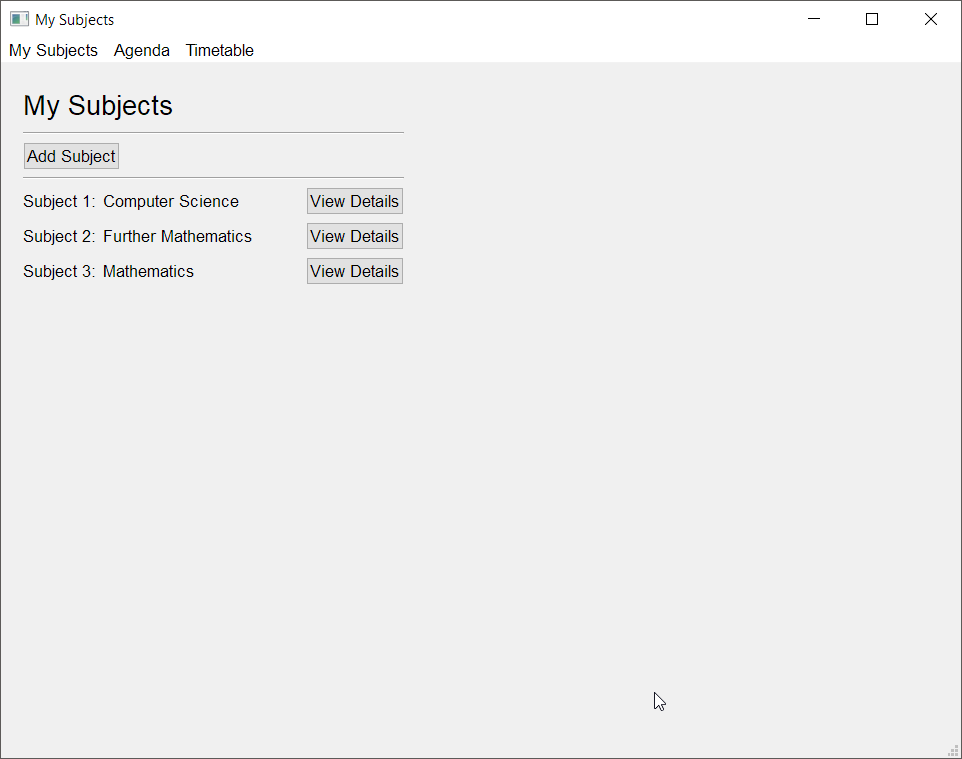
I currently have the user's subjects displayed like this: https://i.imgur.com/ZBjqWZH.png
 sudden coral
The reason I suggested the QStringListModel is because you should use a QListView to display the subjects.
However, those View Details buttons are a little problematic since it'd probably be a hack to try to include them in the QListView as well. So may I suggest a design change?
wispy oar
Yeah sure. To be honest, I might not even end up having the option to view details because I'm running a bit low on my coursework deadline, but I'd happily take some input.
sudden coral
You could
-
Add a context menu (the menu when right clicking) and put a "view details" action in that menu.
-
View details when double clicking an item in the list view.
-
Have a single button which shows the details for whichever item is selected/highlighted in the view.
wispy oar
Ah yeah, #2 seems like a great solution there actually.
sudden coral
Regarding the model. You can read the JSON and get all the subjects as a list. Then you can set the internal list of the QStringListModel with .setStringList()
Because the model will be attached to the view, the view will automatically refresh when the model is updated
wispy oar
So currently as it stands, my program will assign the user's new subject string as a variable for temporary storage.
To save it as a list, I'd just have to append this string to the JSON file?
sudden coral
The JSON file itself is not connected to anything. To update the model, you'd need to re-read the JSON file.
However, I think it's fine to just append to the model's internal list and write the JSON file - no need to re-read after
Thus the JSON file is only used to persist the data i.e. make sure data is still there when program exits
Then you could also approach this by only saving the JSON file when the program closes.
You'd just get the list from the model and write that to JSON
But I don't know how reliable that'd be if say the program encounters and error and crashes
wispy oar
Yeah, that's a good consideration.
Thank you. What would the difference be between using a list view and a list widget? I'm looking at these two now in Qt Creator, and I don't see an obvious way of using the list view.
sudden coral
I am not very familiar with the corresponding "widget" versions of controls
I think it's just an older way of doing the same thing, but also offers less customisation
Like it doesn't use the model/view paradigm
It will look barren in the Designer. You'll need to write code to actually make the view do stuff.
wispy oar
If my use case is limited to perhaps ordering these items alphabetically ascending, and then using these items for a combo box (dropdown menu), would I be better off using the widget? It seems like an easier implementation if it meets my needs.
sudden coral
How is data populated for widgets?
wispy oar
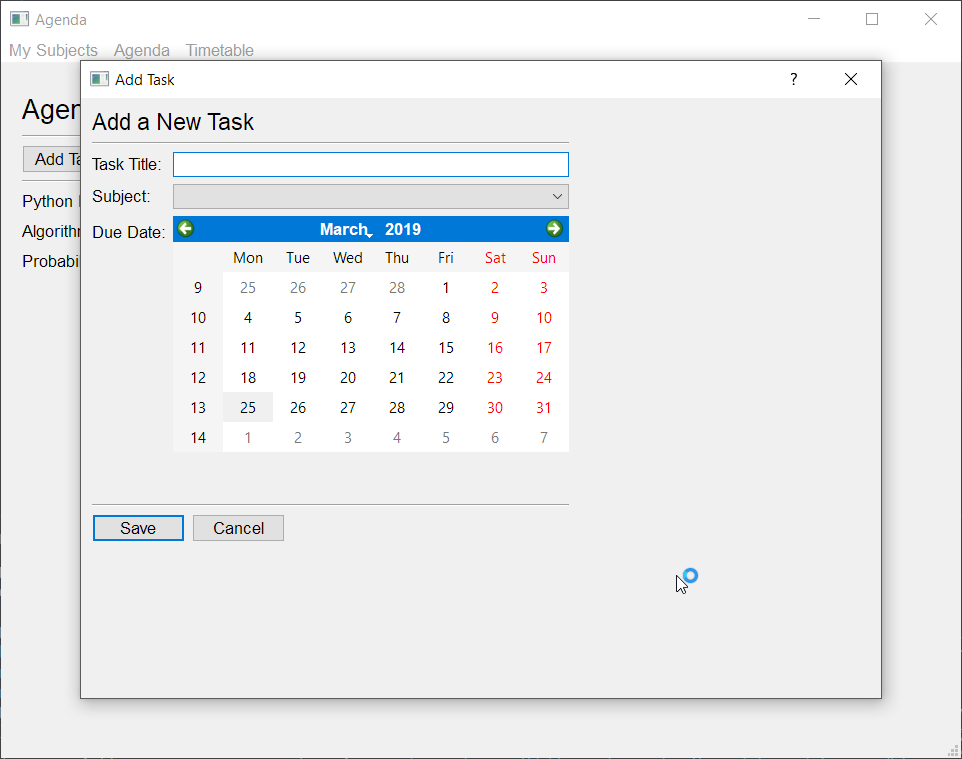
My plan was that this list would be used for a dropdown menu when adding a new task like this: https://i.imgur.com/yH5GhMR.png
 sudden coral
So you need to display the subjects in two different places?
wispy oar
Not sure how data is populated for widgets entirely to be honest, I'm not too knowledgeable in this, working on this as a coursework project.
When I check in Qt Creator, it looks like this: https://i.imgur.com/7A9073m.png
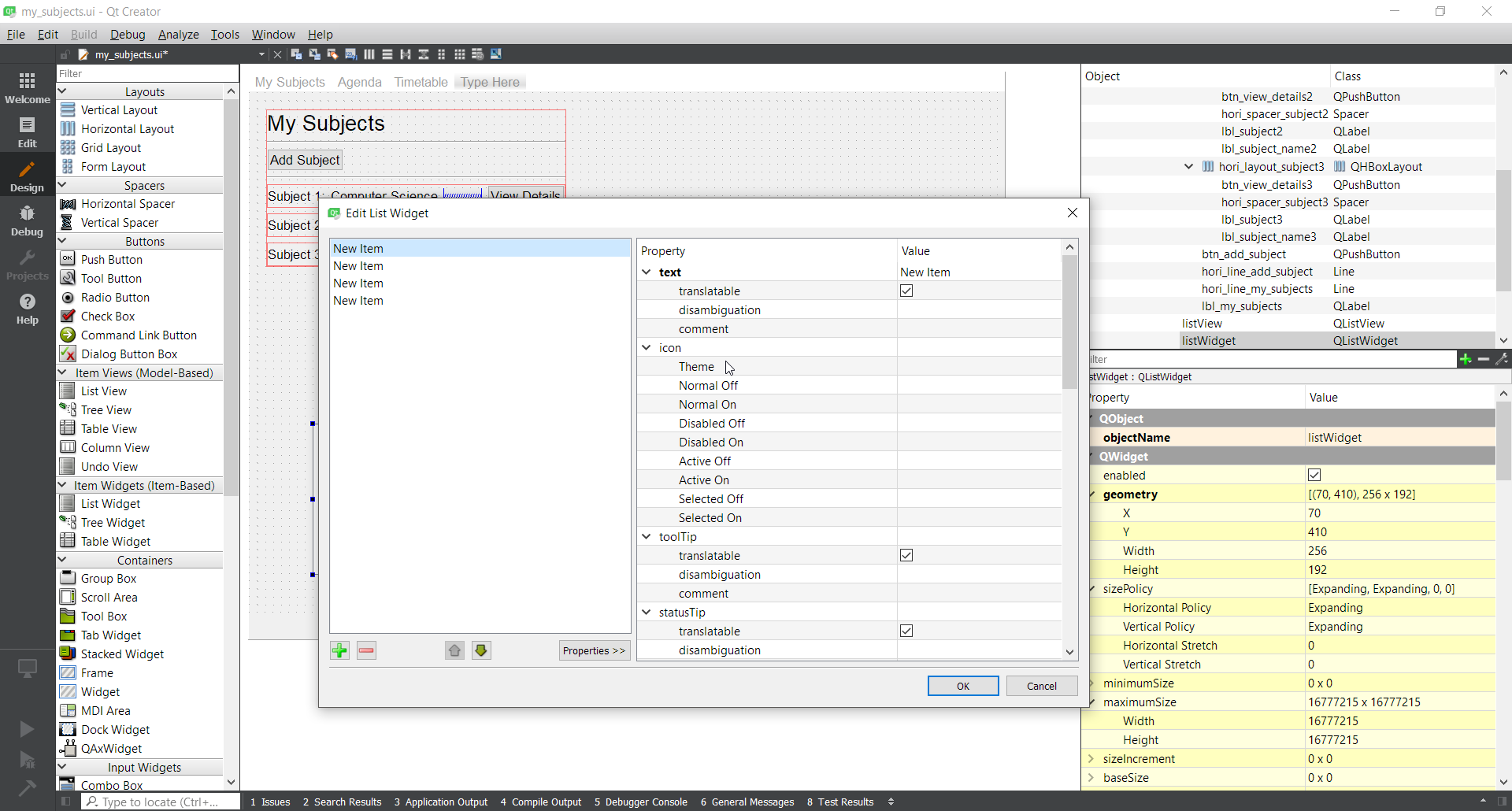
The idea was that the list of subjects would basically enable the user to customise the options in the dropdown menu, because it would be easier for them to select from options than repetitively typing in 'Computer Science' for 10 tasks.
sudden coral
Right, but that's not very useful to you since the data is meant to be added by the user anyway, right?
sudden coral
Simple enough.
But, if you need the subjects displayed on two different controls then a model makes even more sense to me
otherwise you're doing code like that for two different controls
wispy oar
Wouldn't it be a case of the items being sorted from the list in my_subjects.py, then add_task.py reading that list for the combo box?
sudden coral
Yeah, sure.
I just find it to be a kinda convoluted. More work than you really need to do to accomplish it
But if you find that approach more comfortable then go for it
I like my models and views 🙂
wispy oar
It might just be that I don't really understand either of them in too much detail. My knowledge with PyQt5 is limited to creating the user interfaces, and some basic functionality for them.
Could you explain the difference between model-based and item-based, and how they would work?
sudden coral
This goes into great detail what models and views are https://doc.qt.io/qt-5/model-view-programming.html#using-models-and-views
Don't be scared off by the length though
It goes into far more detail than you need to know right now
Just try reading the introduction
wispy oar
Okay thank you. As a side note, does everything in that Qt Documentation apply to PyQt5 as well, or is it just some select parts?
sudden coral
I think both PyQt5 and PySide2 (Qt for Python) strive to be 1 to 1 wrappers of the C++ version of Qt
I've used the C++ docs before and it's fine
They also have PySide2 docs on the same site but it's just faster to search without having to always add "qt for python" at the end
And the PySide2 docs feel a bit less complete in some places, though the examples are in Python rather than C++ so that's useful
wispy oar
Ah, I see. Well, I'll have a read up and see how far I can get. Thank you for the help and explanations.
sudden coral
You're welcome
swift shale
anyone using wxPython? hmm am having truble with combobox can i fill values of it after construction?
swift shale
solvd it
anywya is qt5 standard now for python cuz i see only pyqt5 only mentioning here
i think qt is greate but non free for comercial
digital rose
class window(QMainWindow):

    def __init__(self):
        super(window, self).__init__()
        self.setGeometry(100, 100, 1100, 700)
        self.setWindowTitle('pyqt5 Tut')
        self.home()


    def home(self):
        btn = QPushButton('Start the Browser', self)
        btn.clicked.connect(self.start)
        btn.resize(btn.sizeHint())
        btn.move(0,25)
        self.show()


    def start(self):
        counter = 1
        for x in range (0,5):
            extractAction = QAction('Browser ' + str(counter), self)
            extractAction.triggered.connect(self.start)
            self.toolBar = self.addToolBar('Extraction')
            self.toolBar.addAction(extractAction)
            self.show()
            options = webdriver.ChromeOptions()
            browser=webdriver.Chrome(chrome_options=options)
            browser.get("https://www.google.com/")
            counter = counter + 1

app = QApplication(sys.argv)
Gui = window()
sys.exit(app.exec_())```So this displays a window that looks like this
when the button is clicked a selenium browser is opened
how can i make the browser open inside the gui?
so that when i move the gui the browser moves as well?
this also added a menu tab at the top with the tabs having "Browser 1" "Browser 2" etc etc in it
 sweet ember
Is anyone using Kivy here?
wispy oar
@sweet ember I think you'll find it very difficult to get help with Kivy here, but you might have a longshot chance. I've been looking around here for the last month or two, and most people seem to know Tkinter/PyQt5.
sweet ember
Okay
wispy oar
Yeah, it's better to ask and see what responses you may get, as opposed to asking to ask, then waiting more for the following reply.
Does anyone know if there's a way I can make the background of the QListWidget here transparent instead of white? It sticks out like a sore thumb currently: https://i.imgur.com/eN2L5By.png
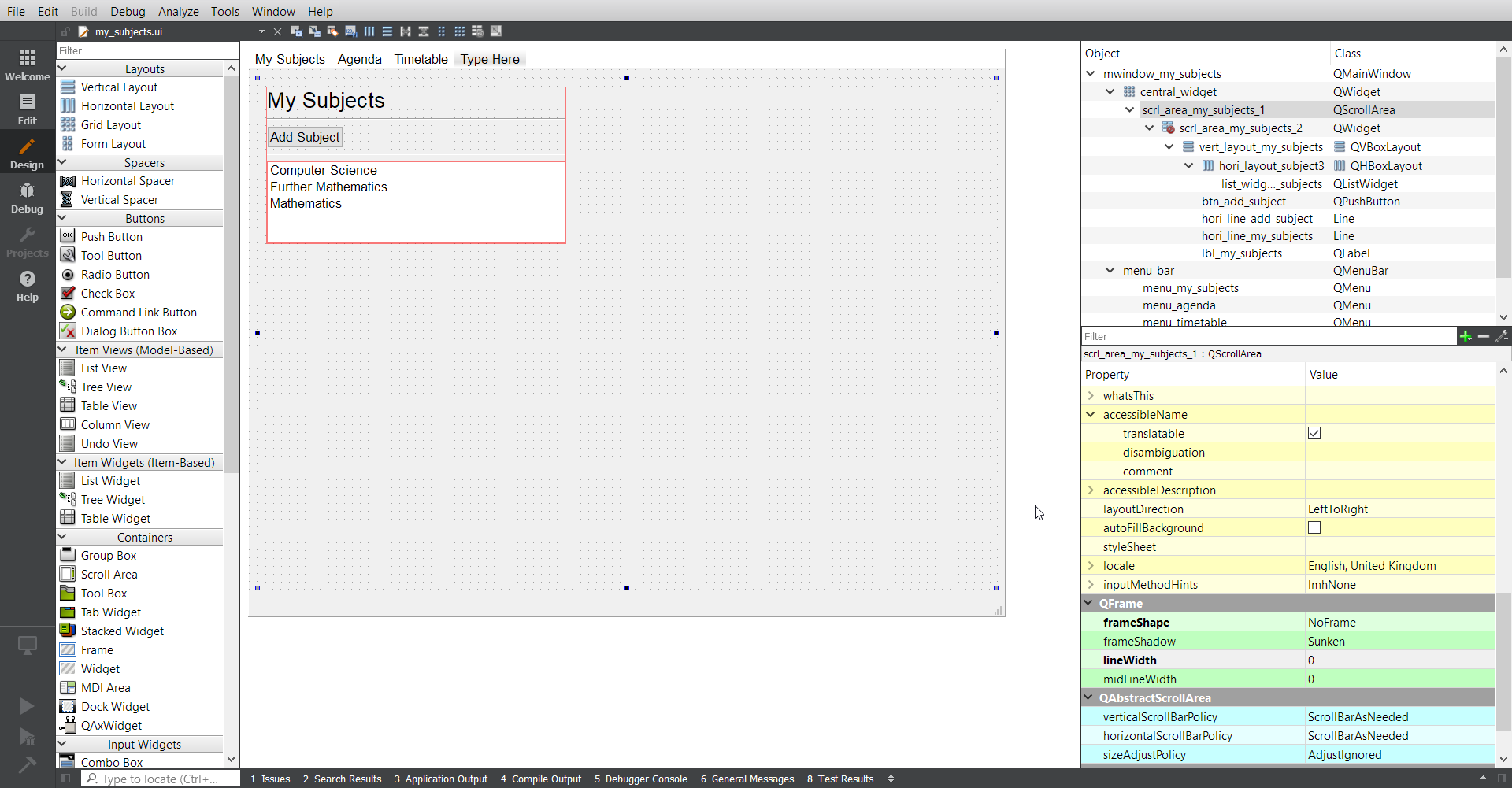
I tried changing the alpha value on the palette, but it seemed to go back to 255, so maybe I'm doing something wrong?
sudden coral
Try using stylesheets
Not very familiar with them myself but it's similar to CSS
You probably want https://doc.qt.io/qt-5/stylesheet-reference.html#background-color-prop
wispy oar
Using self.list_widget_my_subjects.setStyleSheet("background-color: rgba(0, 0, 0, 0);") worked, thanks.
sudden coral
If you prefer I am pretty sure you can specify the stylesheet in the designer too
wispy oar
Yeah I looked for that afterwards in case I wanted to make other changes later on.
It's a bit weird though, if you set the colour, it types the 'rgba...' part for you, but not the background-color, so it isn't valid until you type that in yourself.
wispy oar
@sudden coral How would you suggest I display the list of subjects? I have add_subject.py updated, so now it will append the input to a JSON file.
I looked at this (https://wiki.python.org/moin/PyQt/Adding items to a list widget) and it seemed like it was for a more specific purpose.
I know I can use .addItem(item), but how would I get each item from the JSON file individually? Would I have to convert the JSON back to a tuple first, then perform iterations?
The function I added is: # Saves input as JSON and appends it to the JSON file for the list of subjects. def save_subject(self): new_subject_name = self.line_edit_subject_name.text() print(new_subject_name) new_subject_name = json.dumps(new_subject_name) with open('subject_list.json', 'a') as f: json.dump(new_subject_name, f)
sudden coral
Uh, does that even give you a properly format JSON doc?
I believe you need to read the JSON, add to the dictionary/list you get
then dump the entire thing again
You can keep the dict/list in memory and then just keep dumping that so you dont need to re-read every time
wispy oar
It gives me this, which I think is fine? https://i.imgur.com/BZNHnnf.png
 wispy oar
How is the JSON file supposed to be formatted? I've only previously worked with using it on W3Schools (https://www.w3schools.com/python/python_json.asp). I was thinking of using plain text files, but I figured that JSON is the standard used for a reason; maybe it would be better to use plain text files as this is quite a simple use case?
sudden coral
Yeah plain text sounds better
you're only storing one thing per line so json doesnt give you any benefits
wispy oar
I double checked again, and I was missing the attributes for the values in the JSON file, right?
So it would have like an attribute title, followed by 'Computer Science'?
I was then thinking that JSON might be something which would be more appropriate for storing the actual tasks, which would include the task title, subject, and due date.
sudden coral
Not necessarily. An array can be the top level item in JSON too
What you're describing is a dictionary (known as an object in JSON technically)
wispy oar
So what is the use case for JSON over plain text?
sudden coral
When you need to store data in a more orgasnised manner
wispy oar
Do you think it would be most appropriate to store the subject list as plain text, and the list of tasks (and their details) as JSON?
sudden coral
Yeah that sounds ok
You could still use JSON for both
maybe just to be more consistent
up to you
wispy oar
@sudden coral So I've coded my_subjects.py and add_subject.py to use subject_list.txt and the QListWidget, but I'm not sure how to refresh the QListWidget after I've added a subject.
So basically, if I had a list with Comp Sci, Further Maths, Maths, then I used the dialog to add 'History', the list won't update afterwards.
I currently have: class Ui_mwindow_my_subjects(object): # Setting up the widgets of My Subjects. def setupUi(self, mwindow_my_subjects):
...
            subject_list = data_file.readlines()
            print(subject_list)
            print(len(subject_list))
            for line in subject_list:
self.list_widget_my_subjects.addItem(line.replace("\n", ""))```And this works, but only for the state of the .txt file when the main window is opened, not for the updated state after I've added a new subject.
I did do some research, and found the command QWidget.update(), but how would I implement that into my_subjects.py so it can detect when the add_subject.py dialog has been closed?
 wet canopy
Does anybody know how to grab the input from a radiobutton??
 desert sapphire
It seems you have to provide a variable when making the radio button.

 wispy oar
You can use `` with the code in between them to show the code.
desert sapphire
How are you making the radio button
 desert sapphire
That's not a radio button.
Could you maybe copy and paste the code instead to make it more readable?
!codeblock
proven basinBOT
codeblock
Discord has support for Markdown, which allows you to post code with full syntax highlighting. Please use these whenever you paste code, as this helps improve the legibility and makes it easier for us to help you.
To do this, use the following method:
```python
print("Hello world!")
```
This will result in the following:
print("Hello world!")
By directly putting .grid behind the creation of the combo box, you aren't saving it to a variable.
cmb = Combobox()
cmb.grid()``` lblq1 = Label(test, text='Which NFL team has won the most Super Bowls?', bg='LIGHTGREEN', fg='RED').grid(row=1, column=0)
cmb1 = ttk.Combobox(test, values=['A: Pittsburgh Steelers', 'B: New York Giants', 'C: Denver Broncos', 'D: Dallas Cowboys']).grid(row=2, column=0)
lblq2 = Label(test, text='Which of these words is NOT a term used in Cricket?', bg='LIGHTGREEN', fg='RED').grid(row=3, column=0)
cmb2 = ttk.Combobox(test, values=['A: Fumble', 'B: Wicket', 'C; Crease', 'D: Bowler']).grid(row=4, column=0)
lblq3 = Label(test, text='Which of these cities is well known for holding an automobile race every year around Memorial Day?', bg='LIGHTGREEN', fg='RED').grid(row=5, column=0)
cmb3 = ttk.Combobox(test, values=['A: Los Angeles', 'B: Indianapolis', 'C: Miami', 'D: Austin']).grid(row=6, column=0)
lblq4 = Label(test, text='Which player holds the record for the most consecutive games with a hit?', bg='LIGHTGREEN', fg='RED').grid(row=7, column=0)
cmb4 = ttk.Combobox(test, values=['A: Pete Rose', 'B: Rogers Hornsby', 'C: Joe DiMaggio', 'D: Ty Cobb']).grid(row=8, column=0)
lblq5 = Label(test, text='Which player has the most points scored in NBA history?', bg='LIGHTGREEN', fg='RED').grid(row=9, column=0)
cmb5 = ttk.Combobox(test, values=['A: Michael Jordan', 'B: Wilt Chamberlain', 'C: Kobe Bryant', 'D: Kareem Abdul-Jabbar']).grid(row=10, column=0)
btn1 = Radiobutton(test, text='Finish', indicatoron=0, pady=3, fg='RED', bd=2, command=quizanswer).grid(row=11, column=0)
btn2 = Radiobutton(test, text='Quit', indicatoron=0, pady=3, fg='RED', bd=2, command=test.destroy).grid(row=11, column=1)
mainloop()
return cmb1, cmb2, cmb3, cmb4, cmb5, correct
def quizanswer():
if cmb1.get() == 'A: Pittsburgh Steelers':
correct.append(1)
else:
correct.append(0)
thats as much as I could fit
I used cmb1, cmb2 e.t.c
desert sapphire
    cmb3 = ttk.Combobox(test, values=['A: Los Angeles', 'B: Indianapolis', 'C: Miami', 'D: Austin']).grid(row=6, column=0)```
This doesn't set cmb3 to the combobox. It sets it to the result of .grid(), which is NoneOh, because I used .grid at the end of my other buttons and they work fine. But this one if giving me the NoneType error.
desert sapphire
Those will also be None, you just don't use those.
wispy oar
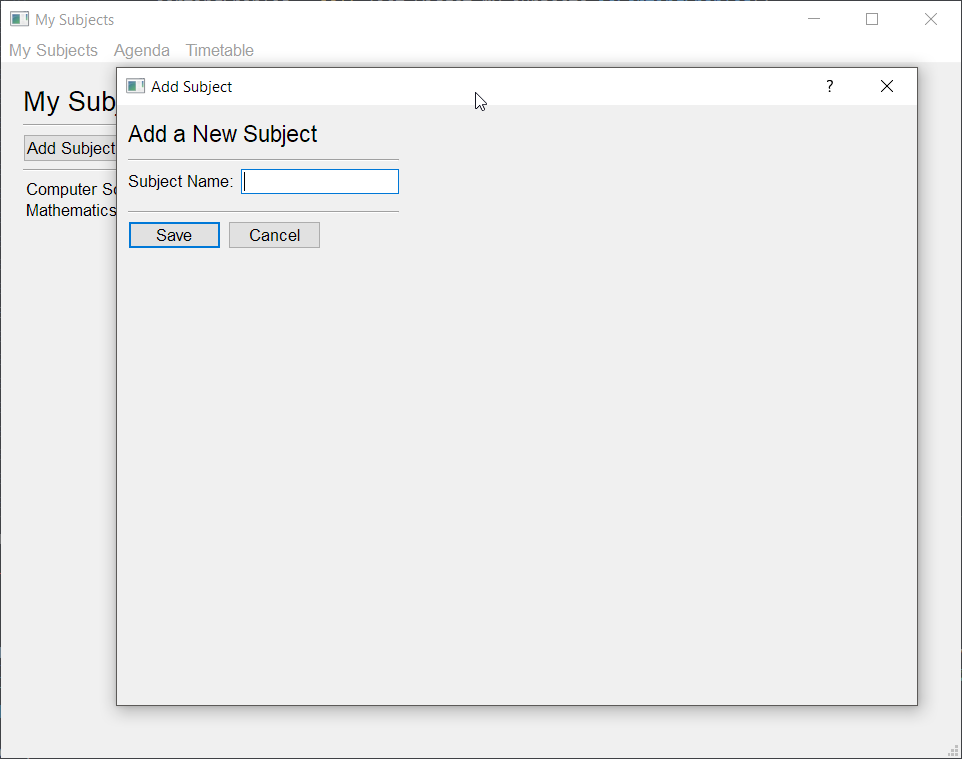
Does anyone know how I could refresh my main window (or just the QListWidget inside of that main window) when a dialog is closed?
I have a main window for a list of subjects, and a dialog to add new subjects. The QListWidget displays the list correctly at first, but it doesn't update itself when a subject is added, and I'm not sure how I could do this. https://i.imgur.com/pC21dcO.png
 sudden coral
@wispy oar QWidget.update() is not useful here at all. The add_subject dialogue is opened via the my_subjects window. This means my_subjects should have a variable containing the instance of the add_subject class. Once you know the dialogue closes, you can access the instance of add_subject from my_subjects and retrieve the subjects that were entered. Then you can append them to the list in my_subjects and update the JSON file.
wispy oar
So, currently I have my dialog set up to open like this: ```
Connecting the button to the setup of the dialog for adding a new subject.
def open_dialog_add_subject(self):
    self.Dialog = AddSubjectDialog()
    self.Dialog.show()```
I may take that back on the update() I don't actually know the listwidget is updated
I assume addItem automatically updates it
wispy oar
addItem adds the items at the start, but it's kind of like a one-time thing.
The whole programs currently look like this:
Lines 304 and 330 in the first file for populating the QListWidget and opening the dialog.
sudden coral
So you can do self.Dialog.line_edit_subject_name and then get the text inside the line edit
From there you can do addItem() as well as writing to JSON or whatever
wispy oar
Yeah that's what I did on line 86 of the second program (the dialog window), but I need a way of coding the first program to detect when the dialog window is closed.
wispy oar
Then I was thinking once it can detect it has been closed, it can repopulate the QListWidget somehow (either by deleting all items then readding, or just refreshing or something).
sudden coral
So the current issue is you don't know how to detect it closing?
wispy oar
Uh, I'm not sure what you mean.
Yeah.
Just looked into it a bit, .show() is non-modal.
sudden coral
Apparently it depends on a property you set
You should use QDialog.open()
then you can connect a slot to the QDialog.finished or QDialog.accepted signal
And if you don't know what signals and slots are they are basically the event system in Qt
It's pretty important to know how to use it I'd say
wispy oar
In the dialog, my accepted button is currently linked to the function for saving a subject. ``` # Connects 'Save' button to save the user input.
self.button_box_new_subject.accepted.connect(dialog_new_subject.accept)
self.button_box_new_subject.accepted.connect(self.save_subject)
    QtCore.QMetaObject.connectSlotsByName(dialog_new_subject)

def retranslateUi(self, dialog_new_subject):
    _translate = QtCore.QCoreApplication.translate
    dialog_new_subject.setWindowTitle(
        _translate("dialog_new_subject", "Add Subject"))
    self.lbl_new_subject.setText(_translate(
        "dialog_new_subject", "Add a New Subject"))
    self.lbl_subject_name.setText(_translate(
        "dialog_new_subject", "Subject Name:"))

# Permanently saves input to a .txt file for the list of subjects.
def save_subject(self):
    new_subject_name = self.line_edit_subject_name.text()
    print(new_subject_name)
    with open('subject_list.txt', 'a') as outfile:
        outfile.write(new_subject_name + "\n")```
I see
you should make that connection from the main window, not inside the dialogue
Otherwise that's basically what I had in mind
wispy oar
So the function would go in my_subjects, or the function and also the .connect() parts?
sudden coral
both
wispy oar
And I'd just put it in here? # Connecting the button to the setup of the dialog for adding a new subject. def open_dialog_add_subject(self): self.Dialog = AddSubjectDialog() self.Dialog.open()
Like, at the end?
sudden coral
Connect the signal before you open the dialogue
wispy oar
The thing is, if I try to put anything in that function (after .open()), the dialog won't work at all.
sudden coral
You mean it won't even open?
wispy oar
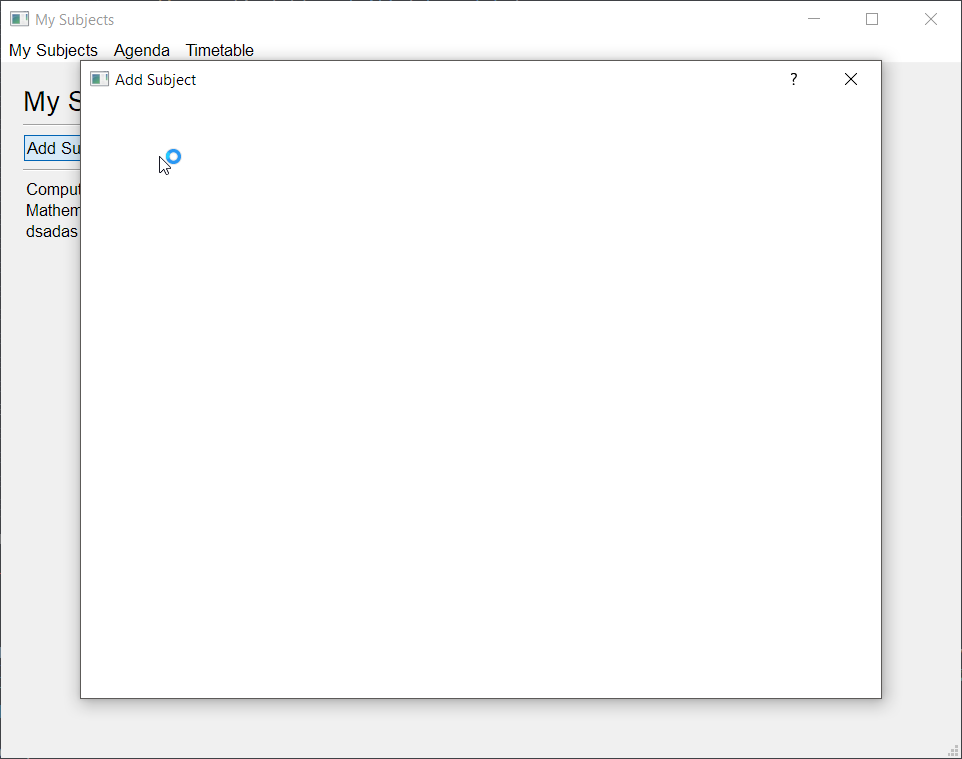
It'll open, but not really properly. The widgets in the window won't load, and the program just crashes eventually.
sudden coral
Maybe cause a parent needs to be set 🤔
wispy oar
 sudden coral
I'll download the files and see for myself
wispy oar
Thanks, it could just be the case that I'm misunderstanding you in terms of how I would make the connections in the main window.
sudden coral
Works fine for me
Since I already did it may as well show you exactly what I meant ```py
def open_dialog_add_subject(self):
self.Dialog = AddSubjectDialog()
# Connects 'Save' button to save the user input.
self.Dialog.button_box_new_subject.accepted.connect(self.save_subject)
self.Dialog.open()
# Permanently saves input to a .txt file for the list of subjects.
def save_subject(self):
    new_subject_name = self.Dialog.line_edit_subject_name.text()
    print(new_subject_name)
    with open('subject_list.txt', 'a') as outfile:
        outfile.write(new_subject_name + "\n")```
Ah, I think it's just because I forgot to move the .open() to the end.
Or actually, I just tried it the other way around, still works. Not sure what I did wrong before.
Thanks, so now I would add to the end of the save_subject function some code to clear the list, then repopulate it?
sudden coral
Just addItem should work
wispy oar
On line 304, I had the lines added one by one by searching through the list.
wispy oar
Well, it would go to line 1, add item, line 2, add item, etc.
sudden coral
Are you thinking you need to read the file again? Cause you don't
new_subject_name is the subject to add
All you gotta do is pass it to addItem()
It will get appended to the end of the list widget
wispy oar
Oh right, I see, that works now. Thank you.
sudden coral
By the way, you should keep the auto generated code and your own code in separate files
The auto generated code is ugly and bulky
You can just subclass the auto generated class like you did with AddSubjectDialog
wispy oar
Yeah you're right actually, it would make things a lot easier for future development as well. For that function, I had open_dialog_add_subject linked to the click of a button. What would I do to trigger this function automatically when the program is run?
 carmine star
What's the difference between communicate() and stdout.read()?
wispy oar
Oh, I would just put self.my_subjects_actions() in the class for the main window?
sudden coral
@wispy oar You can just call that function in showEvent is suppose
maybe that event is a bad idea
apparently it can receive it spontaneously
Maybe the __init__ is a better place
wispy oar
I was going to put it in class Ui_mwindow_my_subjects(object): when it sets up the widgets?
sudden coral
I suppose that works but if you're trying to keep auto generated code separate then you'd end up moving it out eventually anyway
wispy oar
Sorry, I mean the setupUi part.
Isn't that how I'd keep it separate? I'd remove all the extra things I added apart from that one line to connect my separate action code?
So I'd have:
    # Setting up the widgets of My Subjects.
def setupUi(self, mwindow_my_subjects):```...
self.my_subjects_actions()
sudden coral
No, it's not necessary. It seems you think that it's important to write your code in setupUI but it doesn't matter
Let's use the other class as an example, since you already have it ```py
class AddSubjectDialog(QDialog, Ui_dialog_new_subject):
def init(self):
super().init()
self.setupUi(self)
# keep doing whatever you want here...
def some_new_function():
# can add new functions too
So if I had the separate program my_subjects_actions.py, what code would I need to add to the auto-generated code?
sudden coral
Nothing
wispy oar
The AddSubjectDialog class seems like a different use case because it's only triggered in a specific condition, not automatically.
sudden coral
Maybe if you look at some example programs you'll understand
I'll link a project I worked on
Here's the generated code

GitHub
Task for our fourth code jam! Contribute to MarkKoz/code-jam-4 development by creating an account on GitHub.
I put all modules for generated code in a ui sub-package
Then in the widgets package I write my own code for it https://github.com/MarkKoz/code-jam-4/blob/master/project/widgets/captcha_dialogue.py
GitHub
Task for our fourth code jam! Contribute to MarkKoz/code-jam-4 development by creating an account on GitHub.
One difference is that I chose not to subclass, instead assigning it to self.ui
This is just preference, you can keep subclassing if you want
I didn't touch the auto generated file at all
This also makes it very easy to make changes to the UI in the designer and re-generate the file
wispy oar
So when you want to run the program, you just run it from the program you changed, rather than the auto-generated code?
wispy oar
Ah okay, I thought you'd have to import the auto-generated code and then run it from that.
Oh, you did it by importing it on line 8, right?
sudden coral
Yeah I am importing it
wispy oar
Okay I think I understand this better now, I'll just have to see how it goes with my code.
The only other thing was how I can make the QListWidget expand vertically rather than scrolling straight away?
When I looked at the widget in Qt Creator, I set it to expanding size, but it just acts like it's a fixed size.
As in, it currently just scrolls like this: https://i.imgur.com/30ixdWl.png
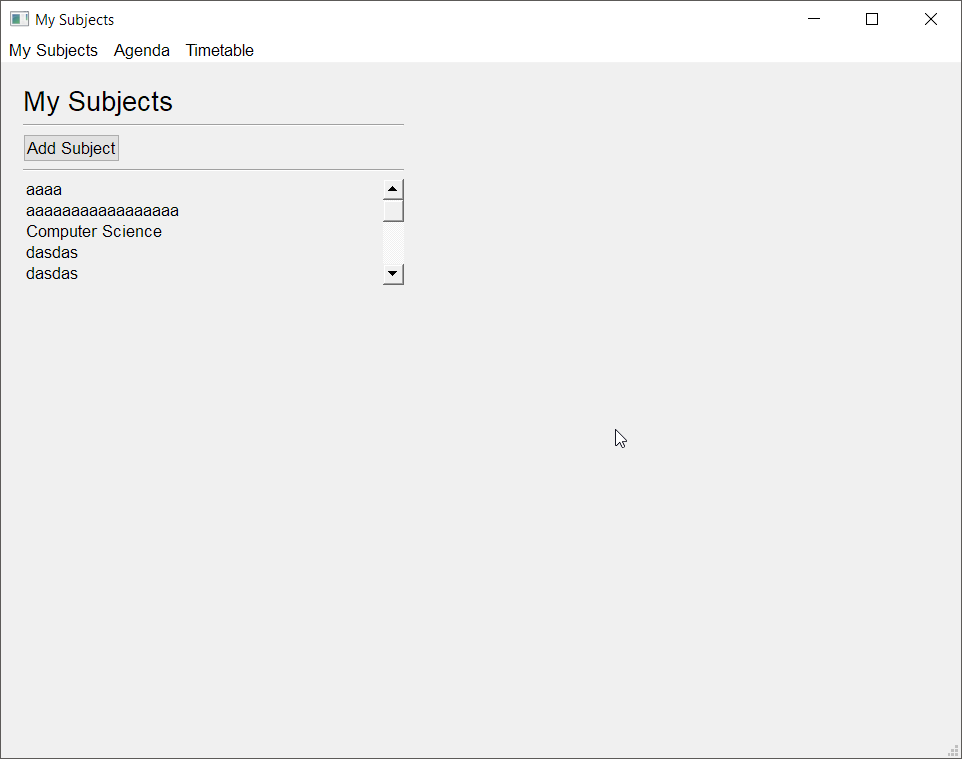
But I only want it to scroll when it would otherwise go beyond the window.
The properties seem like they would be doing this: https://i.imgur.com/R07bhxv.png
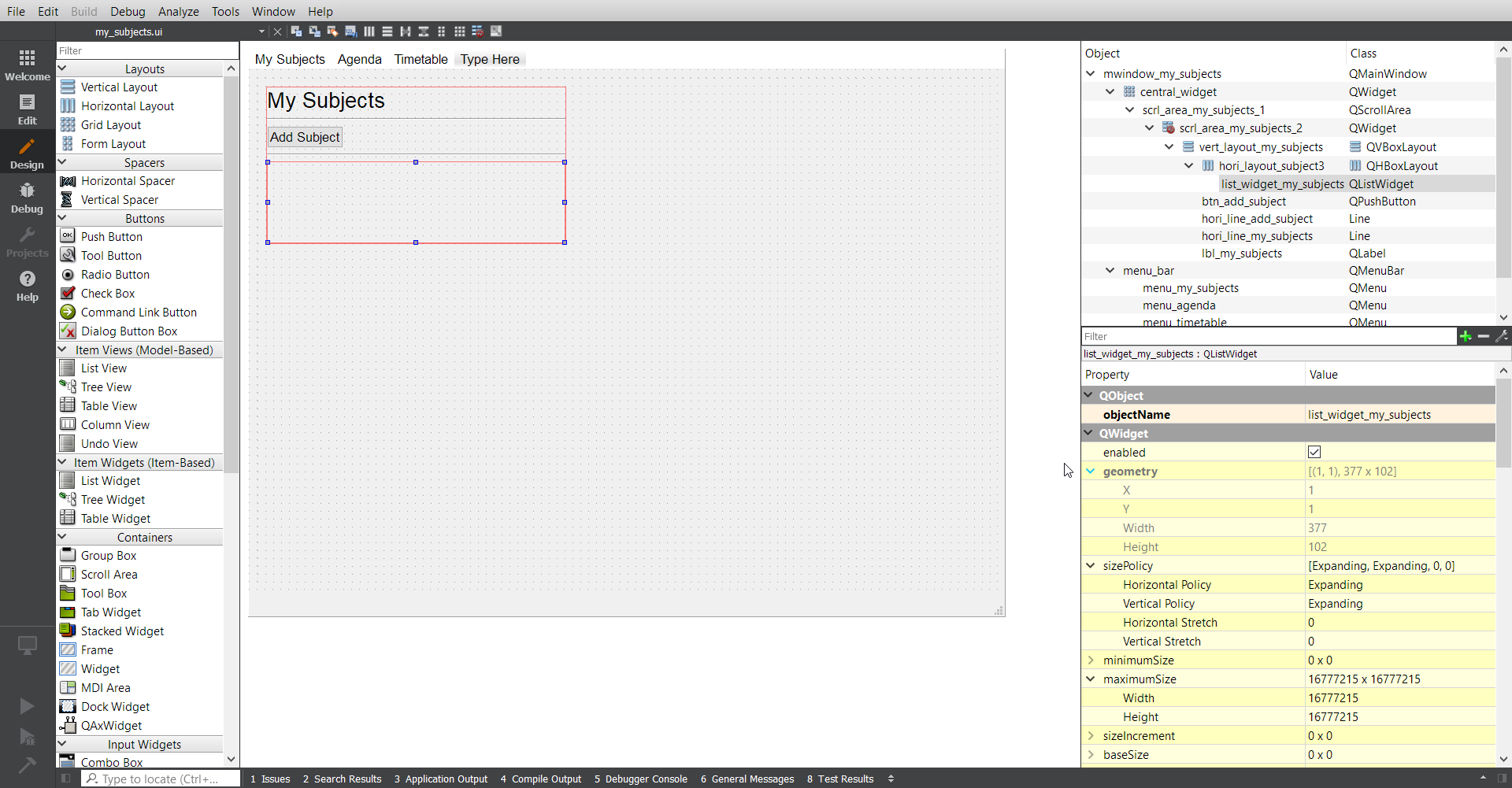
Seems like if I just resize the vertical layout in the editor, it will fix it, but not sure why the QListWidget won't just fit to size. https://i.imgur.com/lHgI97h.png
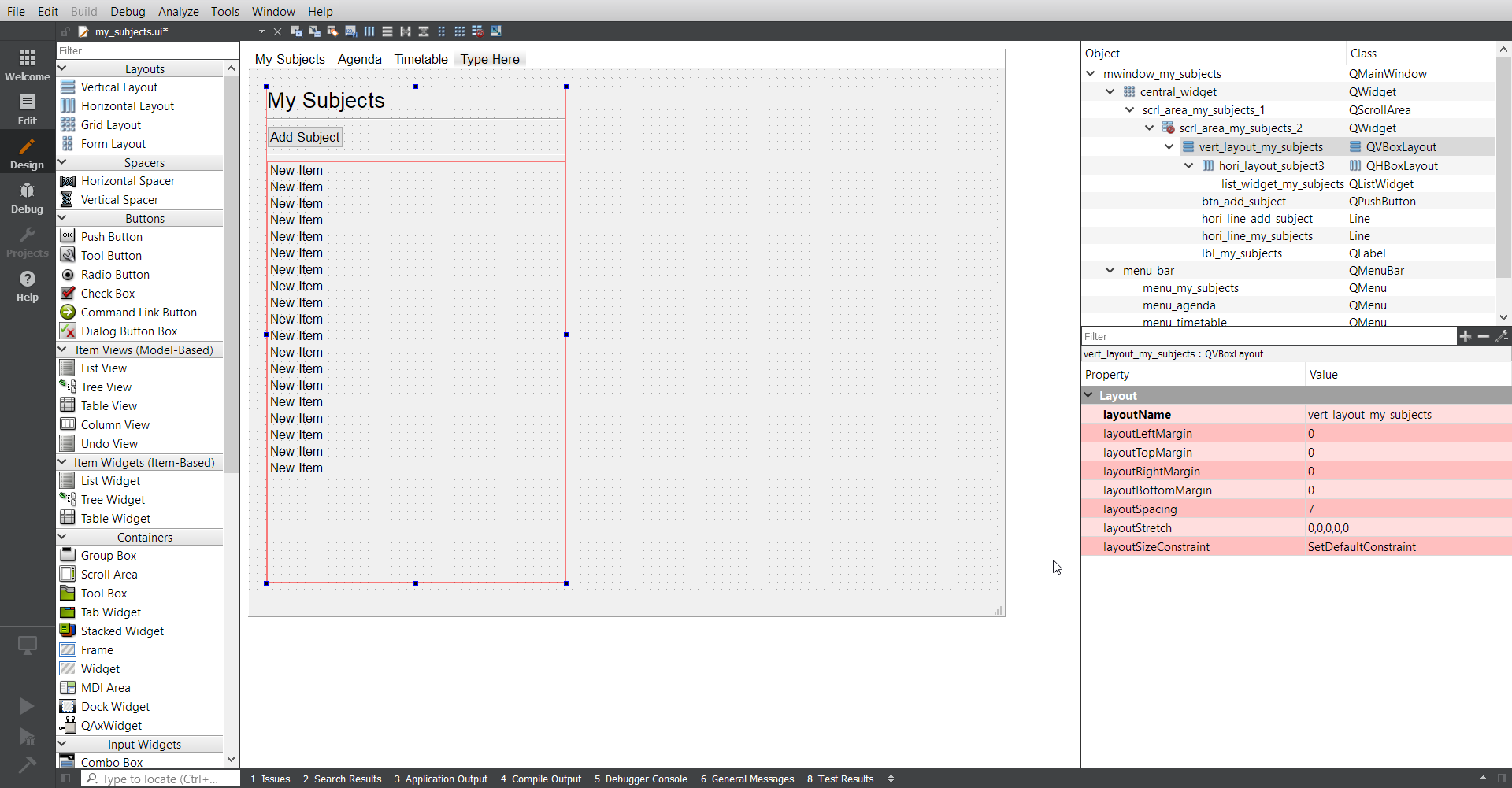 sudden coral
I think you have a lot of unnecessary widgets
You don't the need scroll area or the qwidget under it
And you could probably change the central widget to just be a vertical layout instead of a grid
That way you could get rid of the two other layouts you have
 vernal mango
Anyone know if this is possible with Qt? Or how to go about doing it?
What I want to do is to be able to compare the text in entry 1 and entry 2
 sullen thunder
Anyone know any good PyQt5 Scrollarea tutorials?
wispy oar
Could someone explain why my QListWidget isn't expanding all the way to the bottom?
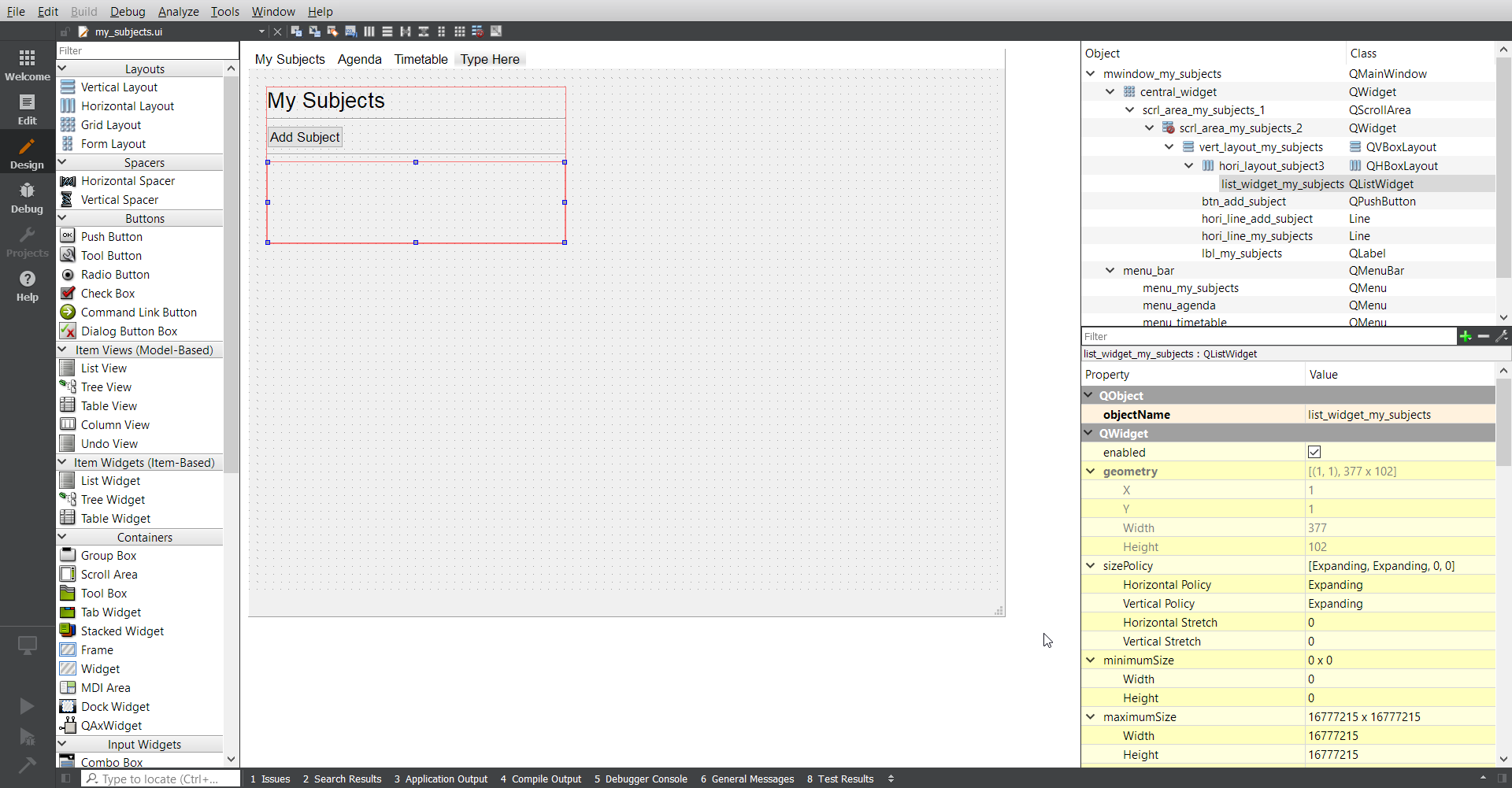
It appears that my vertical layout size is limiting it somehow, but I don't see why, because the QListWidget is set to 'expanding'.
I could fix it by increasing the vertical layout to reach the bottom of the screen, but I don't know what constraint I would be changing, and why it fixes the issue.
 sonic bridge
Can you share the ui file?
wispy oar
sonic bridge
Why list_widget_my_subjects is inside of a horizontal layout?
and why do you need two scroll areas?
wispy oar
I'm not sure to be honest, I'll change that as well.
It's just one scroll area, but they are packaged together; one is the QScrollArea, and the other is the QWidget for it.
If you try adding a scroll area, you'll see what I mean.
wispy oar
It's really strange. Perhaps I should just resize the vertical layout's height and leave it at that?
I was also wondering if you could help me a bit with separating my auto-generated code and the code I added to the program.
So far, I've just been adding the operational code to the auto-generated program file, but it's not really good practice, so I want to fix that.
I have taken out the operational code (the code I added) and put it in another Python file, but I'm not sure what to do with it really.
This is my_subjects.py, the code which I originally had (auto-generated code and operational code in the same file): https://paste.pythondiscord.com/domowucufi.py
This is the my_subjects_generated, the auto-generated code (with comments added because I need it for coursework documentation): https://paste.pythondiscord.com/erayoqinez.py
This is my_subjects_actions.py, the operational code (mostly copied and pasted it from the original program file, but I did try to fit it together somehow, and failed): https://paste.pythondiscord.com/dexutabuso.py
I'm not really sure about the structure of how to get the operational code to use the auto-generated code to set up the widgets.
sonic bridge
I guess its fixed now, try it
wispy oar
Yeah, that works, thank you.
sonic bridge
This widget was causing problems
Which error is throwing now, with the reorganized code?
wispy oar
Well, I had to do a rough reassembly because I don't know exactly what the structure should be.
But from what I have in my_subjects_actions.py now, it says
Exception has occurred: NameError
name 'Ui_mwindow_my_subjects' is not defined
I don't understand that, because I imported my_subjects_generated (the auto generated code).
sonic bridge
which file is my_subjets_actions?
wispy oar
The third one, I'll edit the original message to label them more clearly.
sonic bridge
This is the problem
import my_subjects_generated

...

class MySubjectsWindow(Ui_mwindow_my_subjects):
You are importing my_subjects_generated, not Ui_mwindow_my_subjects
You should use
from my_subjects_generated import Ui_mwindow_my_subjects
or
class MySubjectsWindow(my_subjects_generated.Ui_mwindow_my_subjects):
Ah I see, thank you.
So I changed line 16 onwards to: class MySubjectsWindow(my_subjects_generated.Ui_mwindow_my_subjects): def __init__(self): super().__init__() self.setupUi(self)
I thought that might work because that's how I originally coded the dialog (which is opened from this main window) to open, but the program just runs, does nothing, and then stops.
sonic bridge
You are missing something there.
Remember, Ui files are just dummy classes that only know how to set up some widgets, but the class itself is not a proper window/dialog/whatever.
MySubjectsWindows must inherit from QMainWindow (implying its a main window) AND Ui_mwindow_my_subjects.
from PyQt5 import QtCore, QtGui, QtWidgets
from PyQt5.QtWidgets import QMainWindow

class MySubjectsWindow(QMainWindow, my_subjects_generated.Ui_mwindow_my_subjects):
That makes more sense, I was a bit confused because the generated code just uses 'object'.
I did decide to use the 'from x import y' form instead because it makes the code look cleaner.
sonic bridge
Yeah, it is expected that the main class will inherit from both.
Yeah, I agree, I just forgot.
wispy oar
Now the main window does load, but it only loads the UI. The operational code to make the UI do things doesn't seem to be loading, so I suspect the issue is with where I've placed those bits of code?
This is what I have so far: https://paste.pythondiscord.com/doxakikuja.py
I added the if __name__ part at the end, which got the UI elements to load, but I'm not sure if that's redundant when the generated code has that already. I would have thought that the generated code is designed to work without the operational code adding that if __name__ part again?
sonic bridge
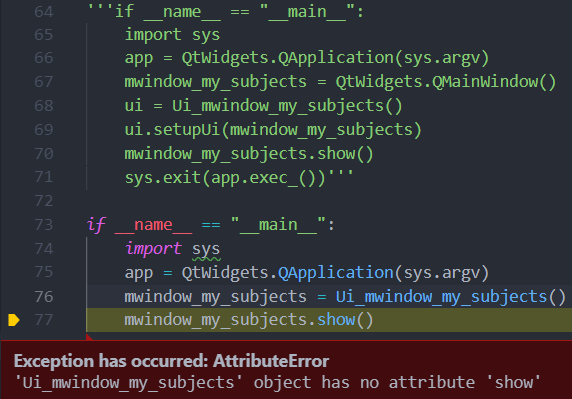
I would suggest to change your entry point code. I dont know how to explain but it is a bit strange to me. I dont get what you tried to do there. This is what I always use
if __name__ == "__main__":
    import sys
    app = QtWidgets.QApplication(sys.argv)
    mwindow_my_subjects = Ui_mwindow_my_subjects()
    mwindow_my_subjects.show()
    sys.exit(app.exec_())
I don't think I changed any of that part, I just used what the generated code gave me at the bottom.
 sonic bridge
if __name__ == "__main__":
    import sys
    app = QtWidgets.QApplication(sys.argv)
    mwindow_my_subjects = MySubjectsWindow()
    mwindow_my_subjects.show()
    sys.exit(app.exec_())
Put that in my_subjects_actions.py file
wispy oar
Yeah, that fixes the issue with the operational code not working. What is the difference between that and the one I used from the generated code?
sonic bridge
Can you put a snippet with that part of generated code? Just to make sure we are talking about the same thing.
wispy oar
Yeah sure. ```'''if name == "main":
import sys
app = QtWidgets.QApplication(sys.argv)
mwindow_my_subjects = QtWidgets.QMainWindow()
ui = Ui_mwindow_my_subjects()
ui.setupUi(mwindow_my_subjects)
mwindow_my_subjects.show()
sys.exit(app.exec_())'''
if name == "main":
import sys
app = QtWidgets.QApplication(sys.argv)
mwindow_my_subjects = MySubjectsWindow()
mwindow_my_subjects.show()
sys.exit(app.exec_())```
First block is just the part I copied from the end of that generated code.
sonic bridge
I never got something like that into my generated code, but it doesnt matter. At the end both do the same thing, I think the last one is cleaner tho. Also that is what every tutorial/book suggest.
I guess if you replace QtWidgets.QMainWindow() in the first code with MySubjectsWindow(), you will achieve the same thing as the second one.
It works nows because the operational code is managed by class MySubjectsWindow. Remember that I said that Ui_mwindow_my_subjects is just a dummy class that only knows how to setup the layout/widgets?. In your first approach, you were aplying that layout into a base class QMainWindow, there was no link between your logic and the window. Now you are aplying the layout over the MySubjectsWindow class, that knows the operational/logic code.
In other words. In your first approach you were just instantiating an QMainWindow and adding the layout. Now you are instantiating an extended QMainWindow class (MySubjectsWindow) that has some logic, and aplying the layout on that.
wispy oar
Oh okay, I understand now; the first block is more like a general piece of code, but the new one is directly using the class MySubjectsWindow. I do agree that it looks cleaner and I understand it more than the first one.
I tried replacing the QtWidgets.QMainWindow() part and it gave me the issue I had before with the operational code not working, but I guess that doesn't matter if I'll be using the other block anyway.
I'm not sure why my code generator adds that block at the end of the code. I saw an example of auto-generated code and it also didn't add it.
I just go to cmd, pushd the file directory, then use the command pyuic5 -x my_subjects.ui -o my_subjects.py.
sonic bridge
I tried replacing the...
Hmm yeah, I never tried that way so I am not sure, but if the second way works then its fine.
maybe the autogenerated code is different because I am using pyside and not pyqt
wispy oar
Oh yeah that's right I think. The other example I saw was also using PySide2.
Thanks for helping, I should be able to use what I learned for my other modules as well, so I can develop things more quickly and stick to the coding conventions.
One quick thing, do I need from PyQt5 import QtCore, QtGui, QtWidgets at the start of the operational code, or is there a way to import it from the generated code? I was thinking it might be redundant, because it's already part of the generated code.
sonic bridge
I guess you dont need them, unless you access to a property/method from these packages in the operational code. Just remove those imports and test if everything works.
wispy oar
I did try to remove them, and also tested if removing it and importing the whole of my_subjects_generated.py would work, but it didn't. I'll just keep it in the code, because I guess the operational code needs it.
Thanks again for helping, your explanations were really useful and helped me to understand what I'm doing a lot better.
swift shale
anyone using wxPython, am having truble with delaying in progressDialog?
swift shale
am trying in progressDialog to add timer inbetwin parts of load
swift shale
this is so frustating i tryed timer and async but no luck
 pliant mango
Any good libraries for creating nice dark themed windows?
wet canopy
Can anybody help me with my Tkinter clock
pliant mango
Nvm, I'm just gonna use Electron
@wet canopy Try posting your issue in help channels
 spare verge
Any idea what the exit hook is for pyside2?
I thought it would be closeEvent but that doesn't seem to be ran
 karmic shoal
it should be closeEvent, how are you closing the window?
 unique spade
how do I place buttons next to eachother?
Button(window, text="WHR", width=3, command=click) .grid(row=6, column=0, sticky=W)
Button(window, text="Messages", width=8, command=click) .grid(row=6, column=1, sticky=W)
Button(window, text="Forms", width=5, command=click) .grid(row=6, column=2, sticky=W)
or a bit separated?
with
.place(x=120, y=415)
?
 kind kraken
@unique spade make your entries above them have a column span
or make a sub frame you can use place/pack in
spare verge
import random
import sys
from PySide2.QtWidgets import QApplication, QDialog, QLineEdit, QListWidget, QPushButton, QVBoxLayout
class Test(QPushButton):
def __init__(self, parent=None):
super().__init__(parent)
val = random.randint(1, 100)
self.setText(str(val))
self.val = val
def __lt__(self, other):
return self.val < other.val
class Window(QDialog):
def __init__(self, parent=None):
super().__init__(parent)
self.resize(300, 300)
self.main_layout = QVBoxLayout()
self.setLayout(self.main_layout)
self.items = QListWidget()
self.items.setSortingEnabled(True)
self.main_layout.addWidget(self.items)
self.actual_stuff = QVBoxLayout()
self.items.setLayout(self.actual_stuff)
for i in range(3):
self.actual_stuff.addWidget(Test())
self.search_box = QLineEdit()
self.search_box.textEdited.connect(self.search)
self.main_layout.addWidget(self.search_box)
def search(self):
print('search')
if __name__ == '__main__':
app = QApplication(sys.argv)
form = Window()
form.show()
sys.exit(app.exec_())
```any idea why the items aren't being sorted? lilac ridge
PyGame would be the Python equivalent for DirectX right? 
sudden coral
No. DirectX is lower level
lilac ridge
Define lower level
sudden coral
PyGame is built on SDL which actually uses OpenGL or DirectX for its graphics side of things
lilac ridge
Aight
sudden coral
lower level means you're more closely working with the hardware e.g. GPU
I don't know too much about that side of things
lilac ridge
Eh, neither do I. For an hypothetical game engine (for simple 2D games, like VNs) would it be better basing it on PyGame or SDL?
sudden coral
I don't know. It depends I suppose. PyGame doesn't offer access to SDL or the lower level things so if you find that limiting then write something yourself with SDL
It'd be a lot more work I imagine
@spare verge QListWidget sorts what is in its internal model (which is modified with .addItem() for example), not what is in its layout.
If you want to put widgets in the list take a look at QListWidget.setItemWidget()
spare verge
hmm
 pine mirage
Can someone tell me why I cant call my "show_entry_fields" function to get the e1 and e2 data entered?
def show_entry_fields():
    global search_area
    global maxpop
    search_area = int(e1.get())
    maxpop = int(e2.get())
    root.destroy()


chkvalue = tk.BooleanVar()
chkvalue.set(True)
print(chkvalue)

Label(root, text="Search Radius").pack(side=TOP)
e1 = tk.Entry(root).pack(side=TOP)
Label(root, text="Max Pop").pack(side=TOP)
e2 = tk.Entry(root).pack(side=TOP)
e3 = Checkbutton(root, text="Only search empty oasis?", var=chkvalue).pack(side=TOP)
Apparently closeEvent is being run when I press the X but not when I press esc
Guess I'll handle that myself
karmic shoal
what did you bind Esc to?
 fast wave
how can i get the index of the items in my db so i can put them in QListwidget ?
import sys
from PyQt5.QtWidgets import *
import sqlite3 as sqlite


class Window(QWidget):
    def __init__(self):
        QWidget.__init__(self)
        layout = QGridLayout()
        self.setLayout(layout)
        self.listwidget = QListWidget()
        self.db = sqlite.connect(r'C:\Users\deadmarshal\PycharmProjects\Tim\test.db')
        self.cur = self.db.cursor()
        self.cur.execute("SELECT Esperanto FROM Words ORDER BY Esperanto")

        for i in self.db.cursor():
            self.listWidget.addItems(i)

        self.listwidget.clicked.connect(self.clicked)
        layout.addWidget(self.listwidget)

    def clicked(self):
        print("ali")


app = QApplication(sys.argv)
screen = Window()
screen.show()
sys.exit(app.exec_())
You should use cursor.fetchall() to get the results
Though I suggest looking into using a QSqlDatabase with the sqlite driver. It gives you a model you can use with QTableView.
You may be able to still use it with a QListView, even though the model is essentially a QAbstractTableModel
fast wave
👍 thanks
lilac ridge
How can I create a main script from which it executes other scripts which define the parts of the game in pygame?
For example let's say that there is main.py and other two scripts c1.py and c2.py. From main.py I would like to start the main loop and execute the contents of c1, when c1 is done I would like to jump to c2. How would I go around to make this? (Idk if it's really UI related but gonna post this here anyway, in case I'll remove it)
I doubt exec(open("./c1.py").read()) would be optimal lol
lilac ridge
I don't think I explained this well, c1 would be just code, no functions or classes defined in it, which I would import from somewhere else. I just want to execute it
sudden coral
when you import a module all the code in it gets executed
Like all the module-scope stuff
lilac ridge
oh
yeah I've just read that up
I can use importlib so I don't have to hardcode it right?
sudden coral
Yeah, but do you need it to not be hard coded?
Are you creating some sort of modular plugin system or something
Are module names dynamically generated?
lilac ridge
No, but it would just look nicer ¯_(ツ)_/¯
sudden coral
It would't IMO
It's unnecessary and extra complexity
import c1, c2 vs ```py
import importlib
importlib.whatever("c1")
importlib.whatever("c2")
can't I just make a for loop of a list of the files? 🤔
though I would probably have to create another thread that checks for basic events
sudden coral
Yes, you can but it's not needed unless you have a shitload of modules
 uneven echo
@lilac ridge if you really really want to know how to auto-load all files in a folder I can show you
names = os.listdir("bot_testing/tests")
mods = []

# Finds all files in /tests/ to be included
for item in names:
    if item[-3:] == ".py":
        item = item.replace(".py", "")
        mods.append(item)

for counter, item in enumerate(mods):

    # Imports the file
    test_file = import_module("bot_testing.tests." + item)
    print(f"File {test_file.__name__} setup! ({counter+1}/{len(mods)})")
How am I able to make a dialog validate a line edit input before closing the window?
I have this dialog which uses 'Save' and 'Cancel' as the button box widget. I want the 'Save' button to avoid closing if the line edit input has greater than 40 characters.
lilac ridge
Yeah that's how I was gonna do it
wispy oar
I know I can use .text() to get the input, but I'm not sure what code makes the button close the dialog. If I can find that out, I'd imagine it's just a case of using an IF statement and indent that part?
sudden coral
Overwrite QDialog.done()
When you overwrite it, to close it you'd just call super().done(the_result)
So if validation fails simply don't call that
and it will remain open
sudden coral
You're subclassing QDialog so you can override the method
 earnest pecan
 fast tulip
I'm using Tkinter and want to grab the selected option from an Option menu and return the text of the selected option. So far I've got
        return value


    moduleOptions = ['CM1101', 'CM1102', 'CM1103', 'CM1202', 'CM1205', 'CM1208', 'CM1210']
    moduleDropdown = StringVar(tab1)
    moduleDropdown.set('--Module \n Select--')


    modules = OptionMenu(tab1, moduleDropdown, *moduleOptions, command=func)
    modules.pack(padx=2, pady=10)

    def showAssessment():

        for module in moduleOptions:
            if (module == func(module)):
                return (module)

    assessment = Label(tab1, text=showAssessment())
    assessment.pack()
But that simply prints the first item of the list.
unique spade
how to fix this issue?
My code: https://paste.ofcode.org/wk9teqzhuQ9UAvFzChmKdM
karmic shoal
you can only use one geometry manager in a given master window, choose either pack or grid to place your widgets
 thorny spruce
You can mix, but not for widgets with the same parent widget
unique spade
hmm
I'm still trying to get it work but I fail quite a bit
what would be the easiest way?
I made it without widgets but when grid is not there buttons are all over the place
thorny spruce
grid is fine, but the reason you can't use it is because another widget that shares the parent for label_l has either been added with pack or place first
unique spade
so how should I really fix this? https://paste.ofcode.org/mjc3zqBxVXJ3zYQ2fwAeQh
thorny spruce
Depends how you want to display the widgets
You can create a new frame
topFrame = Frame(root)
topFrame.pack()

bottomFrame =Frame(root)
bottomFrame.pack(side=BOTTOM)
And then change from root to topFrame
label_1 = Label(topFrame, text="app.Key")
...
entry_1 = Entry(topFrame)
...
I want image to be on top then below row 1 entry text, below entry text row 2 and below that row 3 - 4 buttons
unique spade
it's driving me nuts
calling damn argument that doesn't even exist
pycharm is pain in the ass
 flint citrus
Are you using Python 2 or 3?
unique spade
happens both with 2 and 3
tried tkinterp and Tkinterp
since name of module differes between py versions
same with running already made scripts
it throws errors in pycharm even tho if I run .py normally it works perfect
not to mention I have to reload 50 times after installing something with pip and pray it loads this time
desert sapphire
Tkinter is called tkinter in python3
unique spade
I know
flint citrus
I'm not certain about pycharm, but I know that some versions of Python are built without tkinter. Are you on Linux or another OS with a built-in Python interpreter?
flint citrus
Only one version of Python installed?
flint citrus
And your script works with both when running it manually?
unique spade
not sure which one worked with which version of python didn't check
but I'm pretty sure it's something screwed up in pycharm
flint citrus
My guess is you're getting one version of Python when running it manually and a different one when running with pycharm
so your packages are different between the two
unique spade
how to check which version of python are .py files attached to?
desert sapphire
They arn't attached to a version.
flint citrus
Are you running them by double-clicking the file?
unique spade
yea
flint citrus
hmm. Generally speaking you should run it from the command line so you can control that explicitly.
python2 my_file.py
python3 my_file.py
Run python -V and py -V
unique spade
woah the second one is quite long
first one gives 2.7
should it show 3.7 as well?
thorny spruce
Capital V
unique spade
flint citrus
That is inside the Python interpreter
thorny spruce
from command line not the repl, >>> means you are in the repl and need to use exit() or quit() to return back
thorny spruce
So your python points to 2.7 and py points to 3.7
unique spade
so if I use py <file> it should run with 3.7
thorny spruce
Yes
unique spade
ok, but it still doesn't explain why tkinder doesn't work
thorny spruce
If you really wanted you could do
py -3.7 <file>
py -2.7 <file>```even tho it works in different projecct
thorny spruce
tkinter is the module name, can you provide the error message?
unique spade
let me check with which interpreter
thorny spruce
You can do
import sys
print(sys.version_info)``` to see what version your file is being run withbut why the hell does it call line two when there is nothing in there
oh what the actual f
ohh omg the runner was bugged
just realised it was trying to run totally different file
unique spade
ok I have no idea what I'm doing https://paste.ofcode.org/zqd2qBeBchuJgSZdcXHeGn
flint citrus
Do you need Python 2.7 for something specific?
If not, I recommend removing it and working exclusively with Python 3
unique spade
I need 2.7
flint citrus
There are some significant differences with Tkinter between the two
unique spade
my translation and automation script works only with 2.7
which I'm trying to improve by having gui
flint citrus
In that case, do you need Python 3?
unique spade
I don't think so
flint citrus
Then I'd remove it and just focus on Python 2 for now.
That will get rid of the inconsistencies.
unique spade
sure but it still doesn't help with that crappy gui
flint citrus
What are you seeing?
flint citrus
I see your code, I don't see the gui
unique spade
because it doesn't display due to errors?
flint citrus
Ah, when you said "crappy gui" I assumed you meant the gui and not the errors
unique spade
yeah because
whenever I learn how to do something it can't be mixed with other thing
and it's extremely annoying
flint citrus
Why are you using root.Entry?
unique spade
for entry boxes
unique spade
ok I will show you what I got working
or not because it doesn't work in 2.7
ffs
3.7 working version: https://paste.ofcode.org/hB9cQGpjmvJUYMgMt5FqsE
now I want 3 entry boxes below image and above buttons that are named
 real oxide
Maybe I’m missing it but just create the entries and grid then to topframe
Or create a middle frame and put entries in there
Import Tkinter for python 2 not tkinter
Import Tkinter as tk
Root = tk.Tk()
@unique spade
 lilac raft
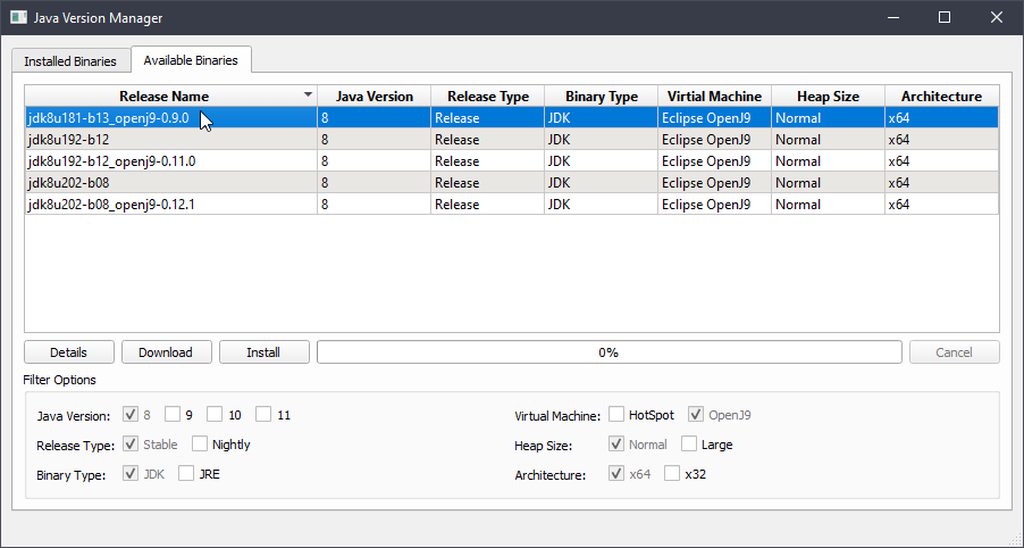
Y'all I need some help with Qt's QTreeView and my subclass of QAbstractItemModel. For some reason, even though the data for each TreeItem is being populated, the data() method for nested values isn't being called.
The offending commit can be seen here (sorry for the lack of comments): https://github.com/spikespaz/jvman/commit/919f6bce6ecd6f0d9e165bb381572576741c42f5
https://github.com/spikespaz/jvman/blob/dev/jvman/models.py#L248-L452
Sorry for the spaghetti code. If you know how to fix that (without putting the append calls in the TreeItem) lmk.

GitHub
Currently WIP because some field data isn't shown in the tree view.
It is evident that the data() method isn't being called for the second
column of values for binaries in the Binaries su...
 thorny spruce
If you are going to prefix your widgets with tk. then you need to import it as such
import Tkinter as tk

root = tk.Tk()```
Or if you import all
```py
from Tkinter import *

root = Tk()```
First is better though, you should always avoid `*` importsi get the error when I try to fill the field and click the button and the new thing should show: ( https://paste.ofcode.org/Sm8HGDXvUcnrAELKKsCrXm )
karmic shoal
@unique spade you have to separate your widget assignment and placement
.grid() returns None, so that's what is being assigned to entry_1
you should separate them like
entry_1 = Entry(midFrame)
entry_1.grid(row=1, column=1)
ok works, awesome : ) thanks
unique spade
I'm playing around with it and how to add the separators to get_all (if I wanted to get string with all info from entry)?
def get_string():
    Name_of_the_eng = entry_3.get()
    Name_of_the_pl = entry_2.get()
    Name_of_the_key= entry_1.get()
    string_to_display = "String name is: " + Name_of_the_key + Name_of_the_pl + Name_of_the_eng
    label_6= Label(Most_bottom)
    label_6["text"] = string_to_display
    label_6.grid(row=3, column=1)
normal comma would do
karmic shoal
you could use string formatting if there's only that three items to show
!e
one = "1"
two = "2"
three = "3"
print(f"Numbers are: {one}, {two}, {three}")
@karmic shoal Your eval job has completed.
Numbers are: 1, 2, 3
that's if you're using Python 3.6 or newer, if you're using <Python 3.6 you can use str.format
unique spade
using 2.7
karmic shoal
if you're using it learn, I'd highly suggest using Python 3, as Python 2 is retiring in 9 months
but till then, you can format the string using the % syntax
actually scratch that, you should still be able to use str.format
!e
one = "1"
two = "2"
three = "3"
print("Numbers are: {}, {}, {}".format(one, two, three))
@karmic shoal Your eval job has completed.
Numbers are: 1, 2, 3
hmm
how does it work for text values with alias?
string_to_display = "String name is: " + Name_of_the_key + Name_of_the_pl + Name_of_the_eng
my example uses variables, they were one, two and three
unique spade
or actually I don't think I will need it, since it will be hidden
I think this should work
string_to_display = "String name is: " + Name_of_the_key + Name_of_the_pl + Name_of_the_eng
    print(string_to_display).format(Name_of_the_key,Name_of_the_pl,Name_of_the_eng)
it doesn't format tho
karmic shoal
.format works on a string
unique spade
if I do it like that :
    string_to_display = "String name is: " + Name_of_the_key + Name_of_the_pl + Name_of_the_eng
    print("Name_of_the_key, Name_of_the_pl, Name_of_the_eng".format(Name_of_the_key, Name_of_the_pl, Name_of_the_eng))
it just gives values as string since I'm using string
how to make it give actual entry values 
 upper bane
Does anybody know how to make UI's for python using html / css / js
Maybe integration with electron or smthn
upper bane
I already use Flask for web apps but I was wandering if there was anyway to make desktop apps (maybe with Flask?)
lilac ridge
I don't know if it works or how is it but you can check out https://github.com/Widdershin/flask-desktop

GitHub
flask-desktop lets you create first class desktop applications in Python with HTML/CSS - Widdershin/flask-desktop
fast wave
How can i get listwidget items index in pyqt5?
upper bane
@lilac ridge thanks 😄 Ill check it out
wet canopy
Hey can anybody help me with a Tkinter issue?
desert sapphire
Depends on what the issue is.
desert sapphire
That doesn't include the actual error. Could you copy paste it tinto the chat?
!codeblock
proven basinBOT
codeblock
Discord has support for Markdown, which allows you to post code with full syntax highlighting. Please use these whenever you paste code, as this helps improve the legibility and makes it easier for us to help you.
To do this, use the following method:
```python
print("Hello world!")
```
This will result in the following:
print("Hello world!")
Ok
‘’’def image():
global lbl1
window = Tk()
lbl1 = Label(window)
btn1 = Button(window, text='Click me', command=img)
lbl1.pack()
btn1.pack()
def img():
photo = PhotoImage(file='baseball.png')
lbl1.configure(image=photo)
lbl1.image = photo’’’
!codebloxk
!codeblock
proven basinBOT
codeblock
Discord has support for Markdown, which allows you to post code with full syntax highlighting. Please use these whenever you paste code, as this helps improve the legibility and makes it easier for us to help you.
To do this, use the following method:
```python
print("Hello world!")
```
This will result in the following:
print("Hello world!")
It's ```
wet canopy
Thank you sir
    global lbl1
    window = Tk()
    lbl1 = Label(window)
    btn1 = Button(window, text='Click me', command=img)
    lbl1.pack()
    btn1.pack()

def img():
    photo = PhotoImage(file='baseball.png')
    lbl1.configure(image=photo)
lbl1.image = photo ```It works on its own, but when I do it in my big program that error comes up.
desert sapphire
What is the error? The photo only shows the top part of it.
wet canopy
When I click it, it won’t show up but in the console it displays the error of the lbl1.configure(image=photo)
desert sapphire
Errors have a name that is usually descriptive of what is wrong.
For example if you try to access a key of a dictionary that doesn't exist you get a KeyError
fast wave
it says the image file doesn't exist. is the image in the same directory of the script?
wet canopy
Correct. It’s In pycharm directory
fast wave
in your def image method, change lbl2 = Label(window) to lbl2 = Label(window, image=photo1)
and remove lbl2.image = photo1 and see what happens
🤔
desert sapphire
if baseball didn't exist it would error on
photo = PhotoImage(file='baseball.png')
wet canopy
Same error, weird
I guess it can’t find the image but I also tried the exact address and still gives me the error
wet canopy
No, but the weird thing is if I do it in a regular file by itself, it works
But when I do it with my other programs beside it, it doesn’t work
desert sapphire
Do you have multiple TK() roots?
wet canopy
I have multiple Toplevel()
desert sapphire
You should only have one in a tkinter program.
wet canopy
kind kraken
multiple Toplevel is fine, it's just Tk that is the problem
doing window = Tk() is suspicious though
wet canopy
True
 neon laurel
Hey, quick question, I can't find my .ui file and have a .py file converted with pyuic5. Fact is, I want to modify the GUI and wondering if there's a way to convert the .py to .ui ?
kind kraken
it says the results will not be perfect, but if you're missing the .ui file it's the best shot
neon laurel
Yup this is the only post I found about it, but they use PyQT4, wondering if this is still a valid solution for PyQT5
neon laurel
Well, I'm having an error as they use some features that match with pyqt4 but not with pyqt5 i.e
Traceback (most recent call last):
  File "restore.py", line 13, in <module>
    dialog = QtGui.QDialog()
AttributeError: module 'PyQt5.QtGui' has no attribute 'QDialog'
it's in QtWidgets now
neon laurel
Oh okay and do you know why they create this dialog and pass it as a parameter of the function?
Because it says
Traceback (most recent call last):
  File "restore.py", line 14, in <module>
    Ui_MainWindow().setupUi(dialog)
  File "C:\Users\Rene\Documents\projet-année\partie-4-lwintjen\MainWindow.py", line 242, in setupUi
    MainWindow.setCentralWidget(self.centralwidget)
AttributeError: 'QDialog' object has no attribute 'setCentralWidget'
as they use :
dialog = QtWidgets.QDialog()
Ui_MainWindow().setupUi(dialog)
(I just changed the class to Ui_MainWindow() instead of Ui_Dialog() )
kind kraken
no, sorry, I don't know much about qt
and i need to go now
you probably need to change the rest to QMainWindow too
sorry i couldn't help more
wispy oar
How can I make my dialog ignore the press of a button box (the built-in one which closes the window when pressed)? I was told to override a method, but I don't really understand what to do. # Saves input to a .txt file for the list of subjects. def save_subject(self): new_subject_name = self.Dialog.line_edit_subject_name.text() if len(new_subject_name) <= 30: print(new_subject_name) self.list_widget_my_subjects.addItem(new_subject_name) self.list_widget_my_subjects.sortItems() with open('subject_list.txt', 'a') as outfile: outfile.write(new_subject_name + "\n") self.sort_subject_list() else:
I managed to get the if statement to work, but I don't know what command to use to stop the dialog from being closed in the else statement.
I tried the following, and I'm not sure if I'm on the right track, but there's a TypeError in the final line of this code, saying it's missing 1 required positional argument: 'event': # Saves input to a .txt file for the list of subjects. def save_subject(self, event): new_subject_name = self.Dialog.line_edit_subject_name.text() if len(new_subject_name) <= 30: print(new_subject_name) self.list_widget_my_subjects.addItem(new_subject_name) self.list_widget_my_subjects.sortItems() with open('subject_list.txt', 'a') as outfile: outfile.write(new_subject_name + "\n") self.sort_subject_list() else: self.event.ignore()
wispy oar
I've managed to get everything working apart from having the dialog window avoid closing. I just need help with how to code that part. # Saves input to a .txt file for the list of subjects. def save_subject(self): new_subject_name = self.Dialog.line_edit_subject_name.text() if len(new_subject_name) <= 30: print(new_subject_name) self.list_widget_my_subjects.addItem(new_subject_name) self.list_widget_my_subjects.sortItems() with open('subject_list.txt', 'a') as outfile: outfile.write(new_subject_name + "\n") self.sort_subject_list() else: self.Dialog.lbl_instruction.setText("Your subject name exceeds 30 characters. Please try again.")
unique spade
not sure how to do it really
neon laurel
Hey, how do we only make appear one time a QMessageBox after a QSpinBox value has changed ? I'm currently doing this :
self.ui.eps_start.valueChanged.connect(self.eps_info)

    def eps_info(self):
        self.eps_info_txt = QtWidgets.QMessageBox()
        self.eps_info_txt.setIcon(QtWidgets.QMessageBox.Information)
        self.eps_info_txt.setWindowTitle("Information about epsilon")
        self.eps_info_txt.setText("If you don't want to decrease epsilon during the game, set epsilon start and end to the same value. And set the decay rate to 0")
        self.eps_info_txt.exec_()
But it appears everytime we change the value of the QSpinBox, I'd like to make it appear the first time we change the value but never again
fast tulip
Hey 😃 I'm currently using Tkinter and trying to figure out the best way to change the state of a button based on a text field. For example, if the characters in the text field are below a certain length, the button remains disabled, but once it passes it it returns to its normal state. So far I've got this:
root = Tk()

def update(*args):
    while True:
        if int(str(len(msg.get("1.0", 'end-1c')))) > 0:
            button.config(state=NORMAL)
            print('Yes')
        else:
            print('No')
            continue

msgLabel = Label(text="Message")
msgLabel.grid(row=0, column=0)
msg = Text(width=40, height=4, wrap="word")
msg.grid(row=0, column=1, padx=10, pady=5)

var = StringVar(root)

charCount = Label(textvariable=var)

charCount.grid(row=1, column=1, pady=5, padx=5)

msg.bind("<KeyRelease>", update)

button = Button(root, text="Working", state=DISABLED)
button.grid(row=2, column=1)

root.mainloop()```In PyQt5, what is the style code for making the header bar here transparent? https://i.imgur.com/wZhhrC0.png
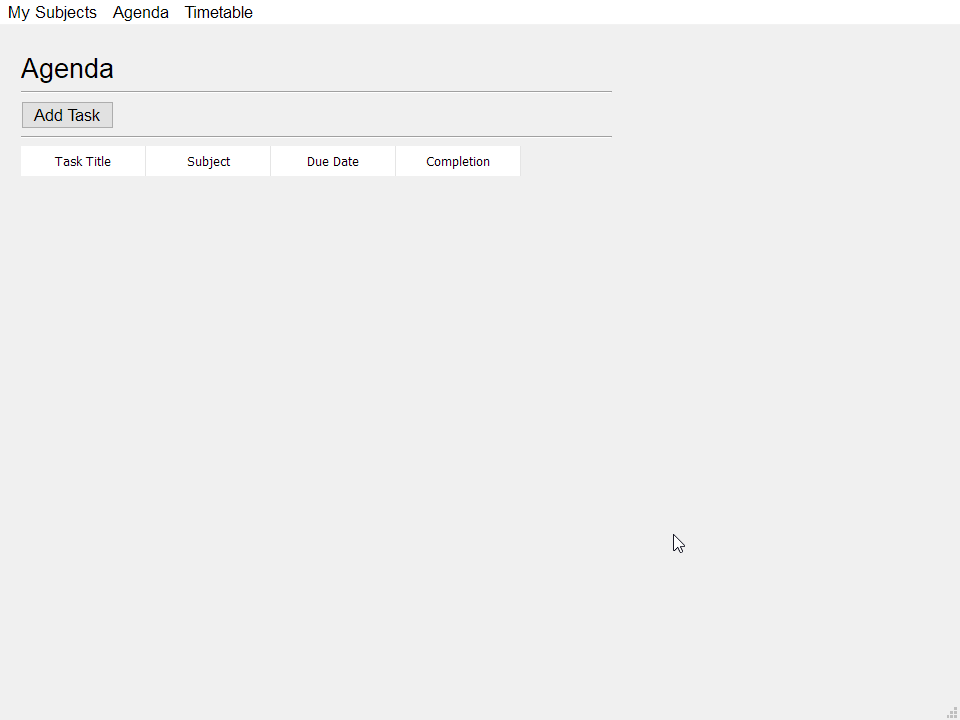
I set the background colour to have an alpha which is transparent, but it only applies to the item background, not the headers.
 robust lynx
What is the fastest /easiest way to convert a web application to a desktop application because I have a flask app but now I want to turn it into a desktop application. I know a decent amount of PyQT but the ui development is allot more harder compared to web-ui development (in my opinion).
vernal mango
electron?
 proper glade
@robust lynx https://github.com/sonovice/QFlask check this out

GitHub
QFlask shows a flask application in a QtWebEngineView (QWebEngineView) using PyQt. - sonovice/QFlask
wispy oar
In PyQt5, what is the style code for making the header bar here transparent? https://i.imgur.com/wZhhrC0.png
I set the background colour to have an alpha which is transparent, but it only applies to the item background, not the headers.
proper glade
which parts are the headers? would you mind sharing some code?
it's hard to form an idea of what to do without knowing what widgets youre using
oh, right, 'Tast Title', 'Subject', etc
is this a QTableWidget?
if so, https://stackoverflow.com/a/11456379 this might do it @wispy oar

Stack Overflow
The following is what I've currently tried. The header text changes color correctly but the background will not change from the default.
template<typename T>
inline QVariant TableModel<T&...
but with background-color: transparent of course
Stack Overflow
I have a QTableWidget where I would like to color individual horizontal header items based on some criterion.
What I have come up with so far:
stylesheet = "::section{Background-color:rgb(190,1,...
there's another way to do it
wispy oar
@proper glade Yeah, it's a QTableWidget. I think that should work, so I'll give it a try. Thanks.
sudden coral
@wispy oar Did you ever figure out that dialogue question you asked a few days ago?
wispy oar
@sudden coral I didn't manage to override the method as you suggested, but I simply removed the signal from the generated code, then used .close() to close the dialog when validation is passed.
So the method ended up being # Saves input to a .txt file for the list of subjects. def save_subject(self): new_subject_name = self.Dialog.line_edit_subject_name.text() if len(new_subject_name) <= 30 and len((new_subject_name).replace(" ", "")) > 0: print(new_subject_name) self.list_widget_my_subjects.addItem(new_subject_name) self.list_widget_my_subjects.sortItems() with open('subject_list.txt', 'a') as outfile: outfile.write(new_subject_name + "\n") self.sort_subject_list() self.Dialog.close() elif len((new_subject_name).replace(" ", "")) == 0: self.Dialog.lbl_instruction.setText( "You have not entered a subject name. Please try again.") else: self.Dialog.lbl_instruction.setText( "Your subject name exceeds 30 characters. Please try again.")
sudden coral
That's a nice solution
Though I'd disconnect the signal rather than modifying generated code
wispy oar
Yeah that's true. I didn't think you could do that. Thanks.
I've coded the ability to delete a subject, but it seems like the program is having an issue when it saves the list after deleting.
If I delete it using the button like this: https://i.imgur.com/qxw8pYg.png
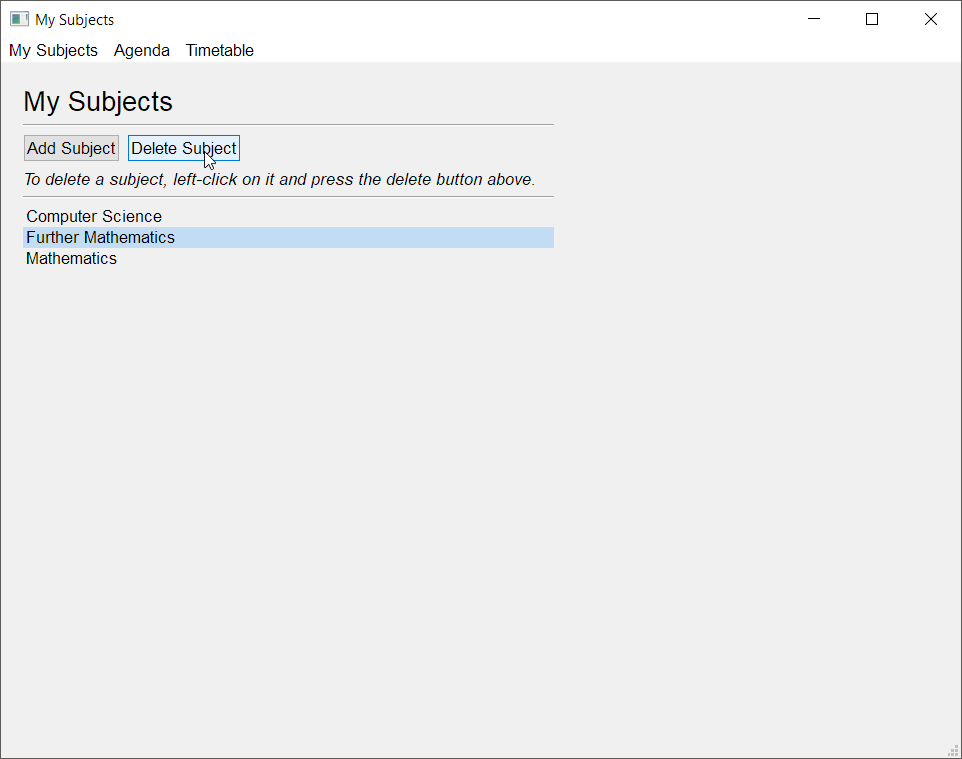
Then it does delete it and views it correctly, but I think it saves it to the .txt file incorrectly. https://i.imgur.com/K14zESE.png
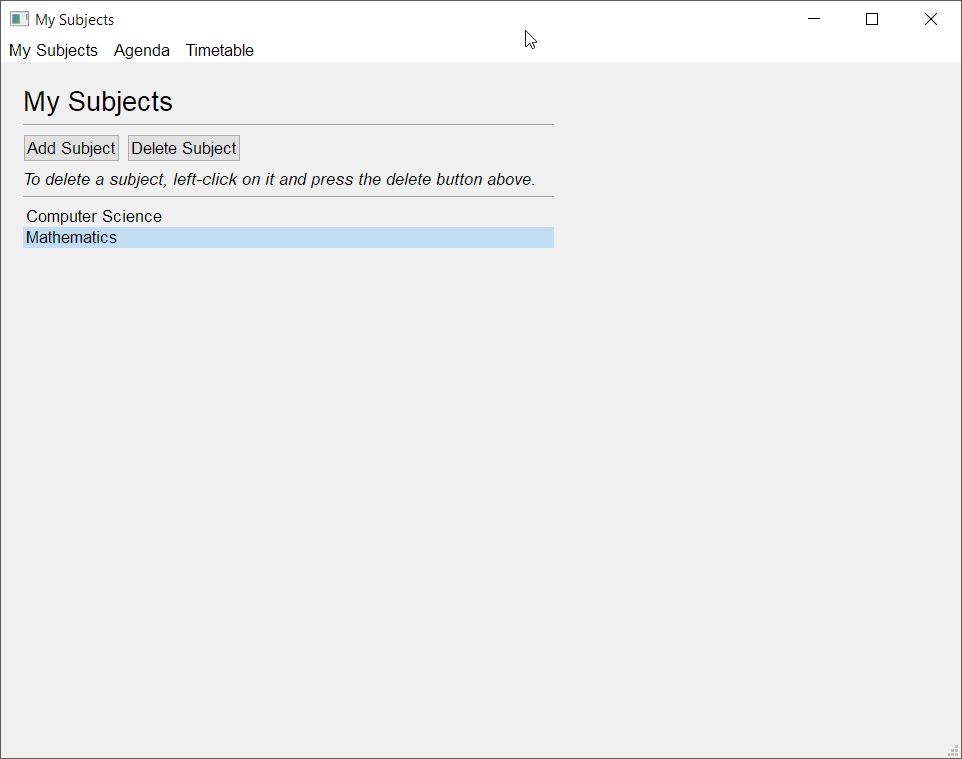
Because if I close it and open it so it reads from the .txt file to populate the list, it appears like this: https://i.imgur.com/Qf96DWJ.png
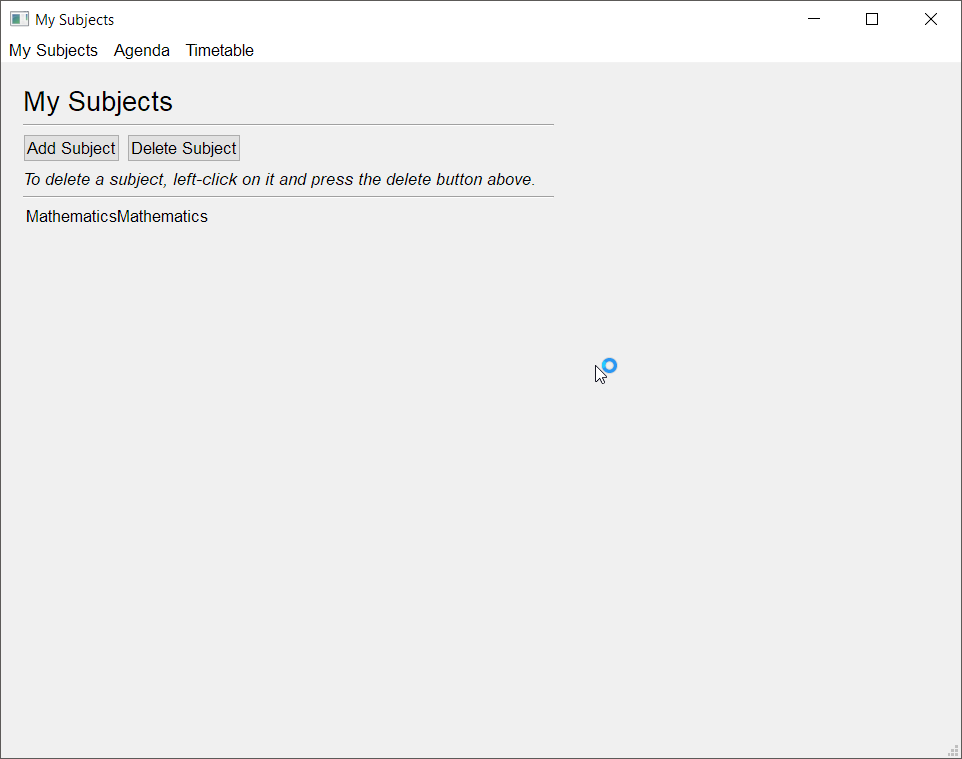
This is the code for it: ``` # Deletes the selected subject.
def delete_subject(self):
selected_item = self.list_widget_my_subjects.selectedItems()
for item in selected_item:
self.list_widget_my_subjects.takeItem(
self.list_widget_my_subjects.row(item))
self.save_subject_list()
# Saves the subject list.
def save_subject_list(self):
    with open("subject_list_temp.txt", "w") as outfile:
        for i in range(self.list_widget_my_subjects.count()):
            subject = self.list_widget_my_subjects.item(i).text()
            outfile.write(subject)
        with open("subject_list.txt", "w") as outfile:
            for i in range(self.list_widget_my_subjects.count()):
                outfile.write(subject)```
Why do you write to 2 files?
wispy oar
Data atomicity, so data isn't lost if the program crashes midway.
sudden coral
Can you show the code for reading the file?
Never mind, I spotted the issue
When you write to the second file, you do not update the subject
Therefore that variable's value remains at whatever it was last set to by the previous loop
That's why it's just Mathematics; it was the last subject
wispy oar
Ah, I had it like that before, but I removed it because I thought it was redundant there with subject already being there above it. I didn't think about it being in the loop.
Okay thanks, that should fix it, I'll have a try now.
sudden coral
Also, you may need to append a newline character for every subject
Presumably you're reading the file line by line
wispy oar
I think it already does it when it adds a new subject.
sudden coral
I wouldn't think so but maybe...
wispy oar
outfile.write(new_subject_name + "\n")```But that isn't present in your code above
wispy oar
That's for deleting a subject.
You'll be deleting '\n', but you'll still have '\n' from the first subject, wouldn't you?
sudden coral
Yes, but you completely re-write the list when you save
The new line is not included as text in the item for the widget
Actually I can't be sure because I don't know how you're reading the file
wispy oar
Yeah I think you're right now that I've tried it.
sudden coral
It just looks like it's only writing a single line based on the second picture
Though if you were right I suppose that could be happening just because the last subject wouldn't have a newline after it
wispy oar
No I just tested it, you were right because the code replaces \n when populating the list.
        with open("subject_list.txt", "r") as data_file:
            subject_list = data_file.readlines()
            print(subject_list)
            print(len(subject_list))
            for line in subject_list:
                self.list_widget_my_subjects.addItem(line.replace("\n", ""))
            self.list_widget_my_subjects.sortItems()
self.sort_subject_list()```This part makes it necessary to add the \n anyway.
sudden coral
You could simplify the replace with a strip
wispy oar
That's a good idea, thanks. I've done .replace() three times like that.
I still can't seem to get the top of this QTableWidget to have a transparent background. https://i.imgur.com/NFa7nbf.png
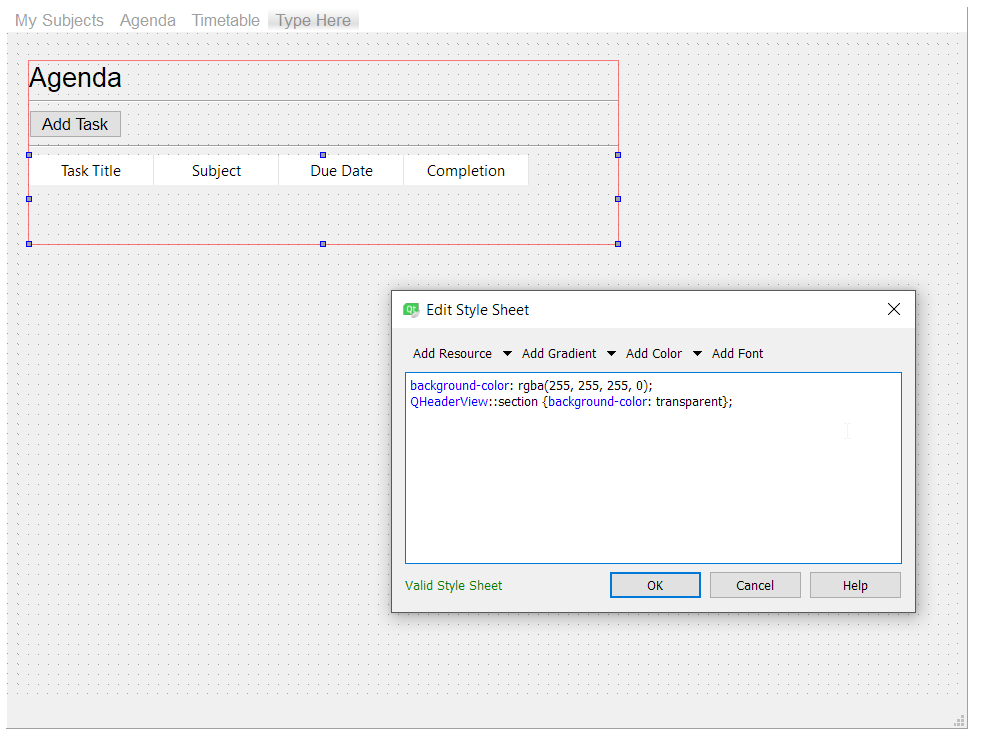
@proper glade suggested using QHeaderView::section {background-color: transparent}, and I also tried removing the QHeaderView part (because the link from above was for QTableView, not QTableWidget, but it doesn't make any difference.
That was suggested from the first link (https://stackoverflow.com/questions/11454694/how-to-change-the-header-background-color-of-a-qtableview/11456379#11456379), and he linked a second method (https://stackoverflow.com/questions/36196988/color-individual-horizontal-headers-of-qtablewidget-in-pyqt/36197865#36197865), but is there a way to do it via stylesheets?
Stack Overflow
The following is what I've currently tried. The header text changes color correctly but the background will not change from the default.
template<typename T>
inline QVariant TableModel<T&...
Stack Overflow
I have a QTableWidget where I would like to color individual horizontal header items based on some criterion.
What I have come up with so far:
stylesheet = "::section{Background-color:rgb(190,1,...
 mighty frigate
it's probably nothing but the background-color does not look valid, as the ';' is misplaced
wispy oar
Yeah, it doesn't affect anything.
mighty frigate
@wispy oar well
import sys, time
from PySide2.QtWidgets import *
from PySide2.QtCore import QObject, Signal, Slot

class CustomMainWindow(QMainWindow):

    def __init__(self):
        super().__init__()
        table_widget = QTableWidget(12, 3, self)
        self.setCentralWidget(table_widget)


app = QApplication(sys.argv)

mainwindow = CustomMainWindow()
mainwindow.setStyleSheet("""
QTableWidget {
    background-color: red;
}

QHeaderView::section {
     background-color: blue;
}
""")
mainwindow.show()

sys.exit(app.exec_())
give me
@wispy oar oh that's unfortunate
there's no transparent for this context apparently
k success
@wispy oar
import sys, time
from PySide2.QtWidgets import *
from PySide2.QtCore import QObject, Signal, Slot

class CustomMainWindow(QMainWindow):

    def __init__(self):
        super().__init__()
        widget = QWidget(self)
        self.setCentralWidget(widget)
        widget.setObjectName("MainWidget")
        table_widget = QTableWidget(12, 3, self)
        layout = QHBoxLayout(widget)
        layout.addWidget(table_widget)


app = QApplication(sys.argv)

mainwindow = CustomMainWindow()
mainwindow.setStyleSheet("""
#MainWidget {
    background-color: yellow;
}

QTableWidget {
    background-color: red;
}

QHeaderView::section {
    background-color: transparent;
}

QHeaderView {
    background-color: transparent;
}

QTableCornerButton::section {
    background-color: transparent;
}
""")
mainwindow.show()

sys.exit(app.exec_())
give this ->
setting only the section of the headers to transparent is not enough apparently
fast wave
i found out that if i'm not mistaken, pyqt doesn't have anything to return listwidget item text, and i should get it with QModelIndex, how can i make one of this for my listwidget?
kind kraken
@fast wave did you try .currentItem().text() like I suggested?
@mighty frigate is there a thing for the body that you could set the red bg on instead of the whole control
there's ::item but that won't style the dead space to the bottom and right
fast wave
@kind kraken .currentItem().text() won't work and doesn't return anything. but currentRow() returns index from 0 till whatever. and .item(index) returns the text items itself. i don't know why it still says : results = self.cur.execute("SELECT English FROM Words WHERE Esperanto = ?", (esperanto,))
sqlite3.InterfaceError: Error binding parameter 0 - probably unsupported type.
        index = self.listWidget.currentRow()
        esperanto = self.listWidget.item(index)
        results = self.cur.execute("SELECT English FROM Words WHERE Esperanto = ?", (esperanto,))
        for row in results:
            self.textEdit.clear()
self.textEdit.insertPlainText(row)```if i remove index from .item again won't work it needs int as prameter, which i'm doing now.
wispy oar
@fast wave You have to use a for loop and an index.
This is what I used: # Saves the subject list. def save_subject_list(self): with open("subject_list_temp.txt", "w") as outfile: for i in range(self.list_widget_my_subjects.count()): subject = self.list_widget_my_subjects.item(i).text() outfile.write(subject + "\n")
@mighty frigate I tried it in the Qt Creator style sheet and it didn't work, perhaps I'm typing it wrong?
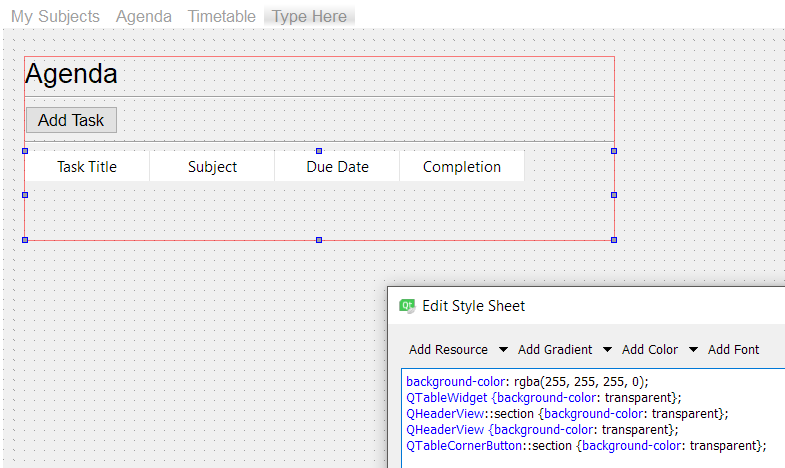 kind kraken
@fast wave what kind of object is esperanto now? do you still have print(repr(esperanto)) in there before that line?
fast wave
@kind kraken repr for esperanto returns: <PyQt5.QtWidgets.QListWidgetItem object at 0x0000000002C0D4C8>
@wispy oar thanks
fast wave
no text doesn't work. esperanto = self.listWidget.item(index).text()
AttributeError: 'NoneType' object has no attribute 'text'
kind kraken
...i thought it was a QListWidgetItem
why is it None now
maybe it's only sometimes set?
try py def listClicked(self): index = self.listWidget.currentRow() item = self.listWidget.item(index) if item is not None: esperanto = item.text() results = self.cur.execute("SELECT English FROM Words WHERE Esperanto = ?", (esperanto,)) for row in results: self.textEdit.clear() self.textEdit.insertPlainText(row)
wait actually
can i see the rest of your code?
there's an itemClicked event that might be a better fit for what you're doing
@fast wave
fast wave
@kind kraken whole code is this: https://bpaste.net/show/d1ead5e2526f
kind kraken
so it is itemclicked, you just don't have the
try this
    def listClicked(self, item):
        if item is None: return
        esperanto = item.text()
        results = self.cur.execute("SELECT English FROM Words WHERE Esperanto = ?", (esperanto,))
        for row in results:
            self.textEdit.clear()
self.textEdit.insertPlainText(row)```it's so weird that pyqt lets you do that
any other ui framework would be screaming about passing the function too many arguments
fast wave
it says
self.listClicked()
TypeError: listClicked() missing 1 required positional argument: 'item'
kind kraken
...what
remove the self.listClicked() line from setupUi
actually i bet that was your whole problem
with the None
fast wave
i removed it now another error.
self.textEdit.insertPlainText(row)
TypeError: insertPlainText(self, str): argument 1 has unexpected type 'tuple'
fast wave
wow! it works 😃 thanks a bunch.
kind kraken
no problem
sorry for getting stuck on this so long, i should have thought about looking at the itemClicked event
i guess pyqt doesn't care if you put a function with the wrong arguments in an event
(if you put too many arguments though it'll hard crash, i ran into that with something else last month)
fast wave
so i deleted if item is None: return because i guess if a row be empty it'll return none, but i have no empty row.
kind kraken
yeah i think it was only because of that first call
it didn't have a selected item
you might consider handling the itemSelectionChanged event for keyboard usage - click is click only aiui
but at least what you have is working now
fast wave
yes later i should add functionality to search with return button on keyboard too.
and make that lineedit autocomplete or filter listwidget 😄
wispy oar
What style sheet can I use to make the top of this QTableWidget transparent? I tried background-color and it's not working. https://i.imgur.com/dgIWpHi.png
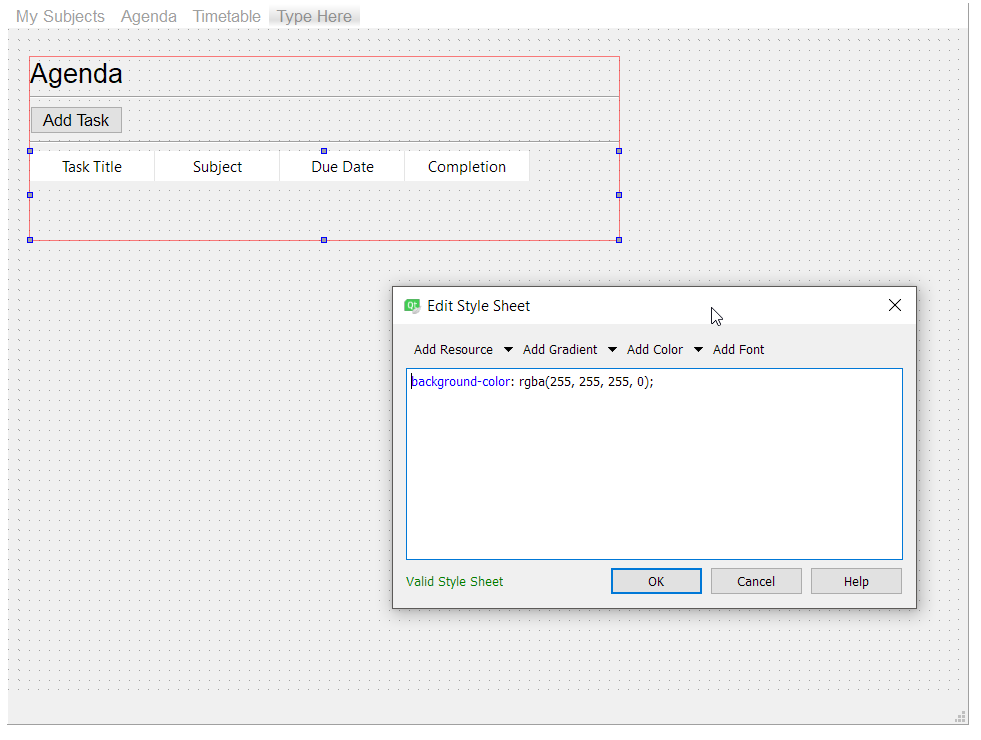 robust lynx
@proper glade i tried using QFlask but the problem is I can't seem to click any buttons once it runs
typing is fine but when I go to submit it there is no response
digital rose
sorry
 tidal spruce
Huh
mighty frigate
QFlask ? never heard of that in Qt
@wispy oar I don't personnaly use the designer
but I'm pretty confident with the code I gave you
@kind kraken the doc is explicit, there's a specific selector to use in order to style the corner - if that's what you're talking about.
wispy oar
@mighty frigate I tried it but I couldn't get it working. Maybe I've put the code in the wrong place, because my program works a bit different. https://paste.pythondiscord.com/daxiqoyuhi.py
It imports the generated code from pyuic5. I tried putting both in and out of the AgendaWindow class.
And changed the variables to match.
Isn't your code for changing the colour of the whole window? I just need the widget to be transparent in the background.
So that it just blends in like I did with this QListWidget. https://i.imgur.com/r4So9Id.png
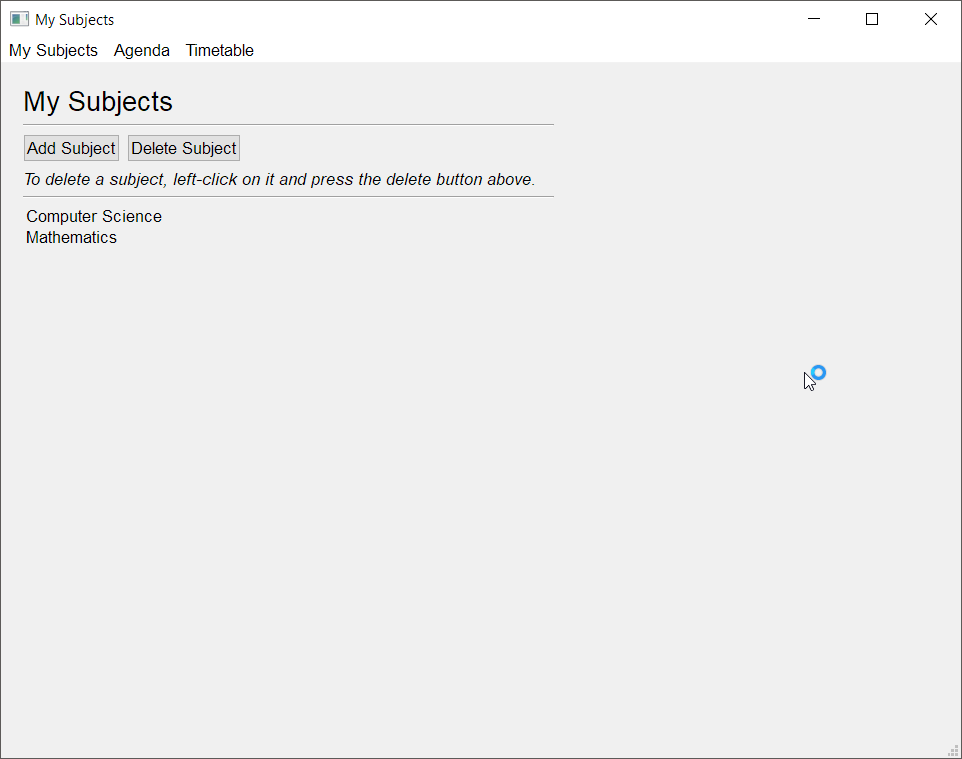 mighty frigate
can't exec...
wispy oar
Can't exec because it comes with the generated code from other files, one minute.
Save these in the same file directory: https://paste.pythondiscord.com/qufusasora.py
That's add_task_setup.py
And agenda_setup.py https://paste.pythondiscord.com/cuhuyarevu.py
agenda.py https://paste.pythondiscord.com/jemekivide.py (changed to comment out some unfinished code)
wispy oar
Alright.
kind kraken
@mighty frigate that means the top left corner, I mean empty space within the main area that isn't part of a cell
if you care about that being red or whatever color
mighty frigate
the doc is explicit
more specificaly
The corner widget in a QTableView is implemented as a QAbstractButton and can be styled using the "QTableView QTableCornerButton::section" selector.
@kind kraken
kind kraken
that is not the component I am talking about
kind kraken
items is the red area, headers is the green area, "the corner widget" is the blue area, I am talking about the purple area.
mighty frigate
code :
import sys, time
from PySide2.QtWidgets import *
from PySide2.QtCore import QObject, Signal, Slot

class CustomMainWindow(QMainWindow):

    def __init__(self):
        super().__init__()
        widget = QWidget(self)
        self.setCentralWidget(widget)
        widget.setObjectName("MainWidget")
        table_widget = QTableWidget(12, 3, self)
        layout = QHBoxLayout(widget)
        layout.addWidget(table_widget)


app = QApplication(sys.argv)

mainwindow = CustomMainWindow()
mainwindow.setStyleSheet("""
#MainWidget {
    background-color: yellow;
}

QTableWidget {
    background-color: red;
}

QHeaderView::section {
    background-color: transparent;
}

QHeaderView {
    background-color: transparent;
}

QTableCornerButton::section {
    background-color: blue;
}
""")
mainwindow.show()

sys.exit(app.exec_())
ok but that's not what i'm asking
mighty frigate
so there's a selector for scrollbars
kind kraken
I am not talking about the scrollbars
I am talking about dead space not filled by an item
like when the list is ten lines tall but there are only five rows
mighty frigate
this would need some tries I guess ,rn Idk
kind kraken
since it sounds like you want the dead space and items to be red, without making any of the rest of the control red
mighty frigate
but one could always overwrite the paintEvent
and draw it as his liking
not a funny task tho
kind kraken
ok wait i thought you were the one trying to get help with this, to make the headers transparent and the data a color
wispy oar
?
No, I just want everything transparent.
I tried using the style code, and it only made the area with the items transparent.
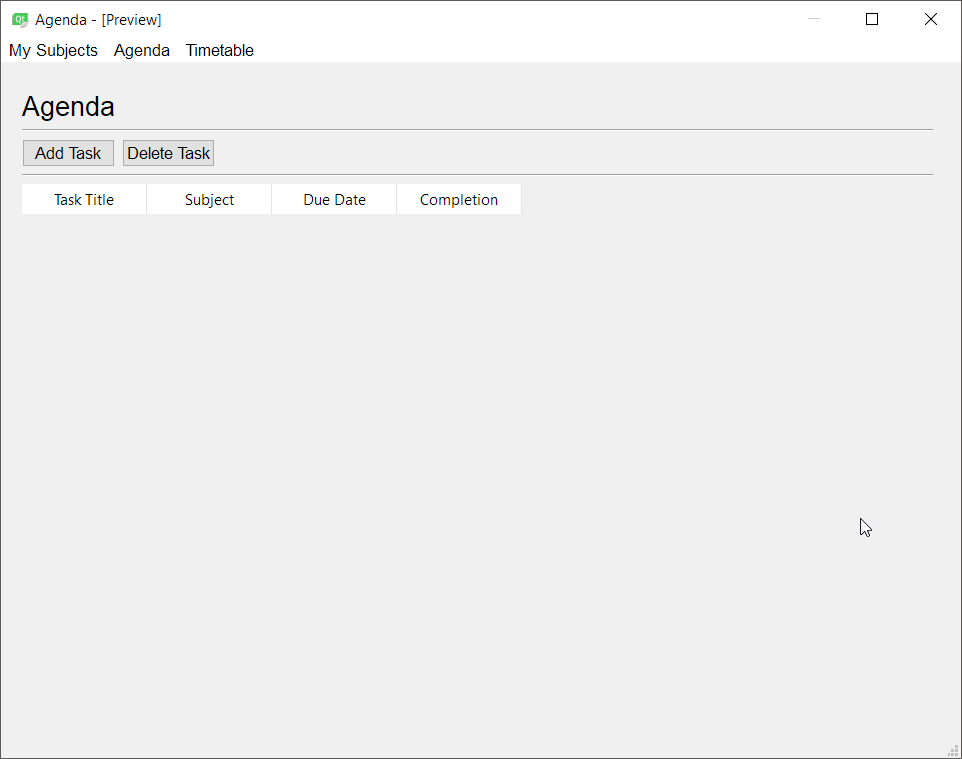 kind kraken
@wispy oar which style code did you try
wispy oar
I want 'Task Title', 'Subject' etc all to be on top of a transparent background too.
background-color https://i.imgur.com/FxUvLqB.png
 wispy oar
Made the alpha 0 to make it transparent.
kind kraken
QTableWidget {
    background-color: transparent;
}

QHeaderView::section {
    background-color: transparent;
}

QHeaderView {
    background-color: transparent;
}
Yeah I'm pretty sure I tried that earlier, I'll try that again.
kind kraken
for some reason I thought you wanted transparent headers and non-transparent body
probably because that was what Eynix was testing
wispy oar
I think that's because someone else linked an example which made the columns red, green, and blue.
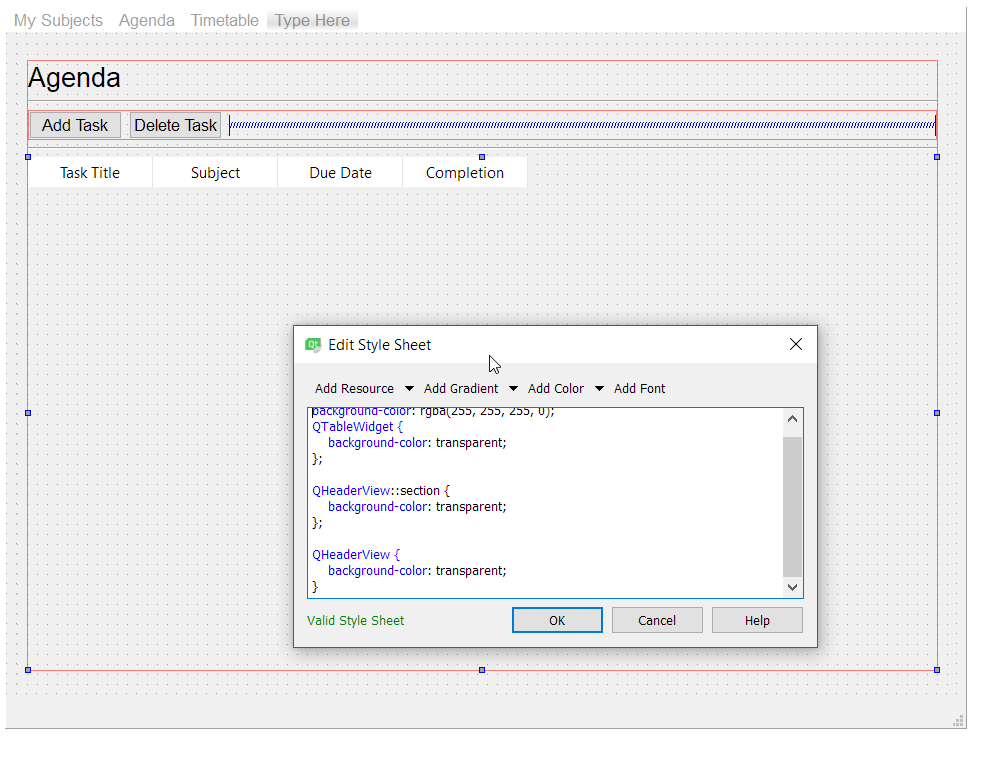
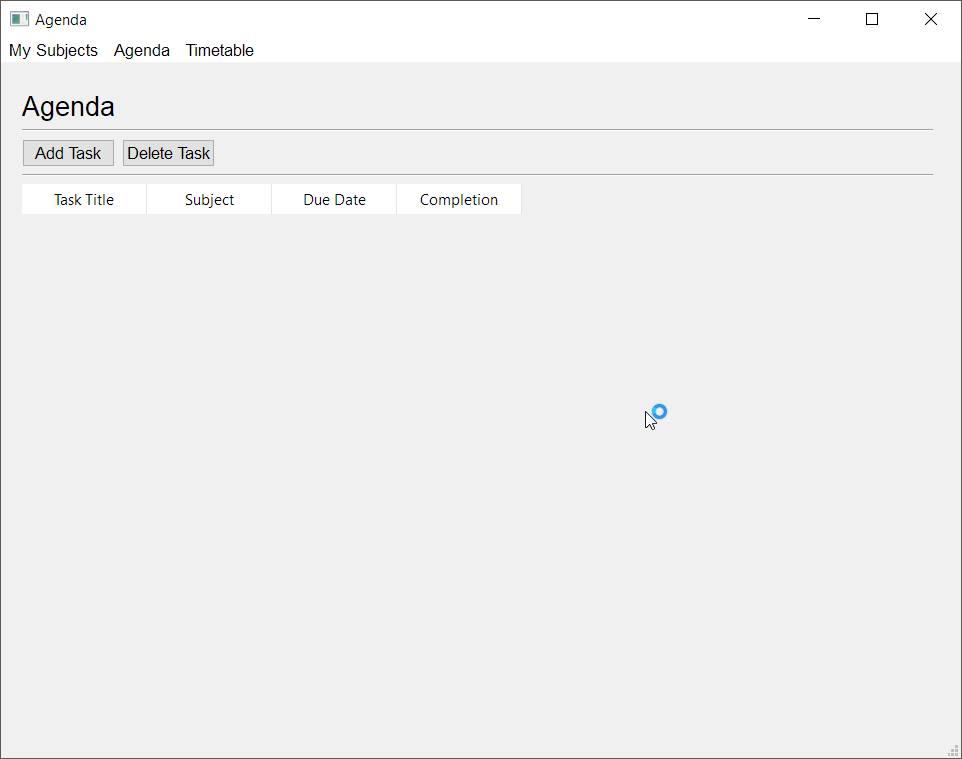 kind kraken
what does it look like if QTableWidget is red?
because if it doesn't look like Eynix's screenshot something's weird
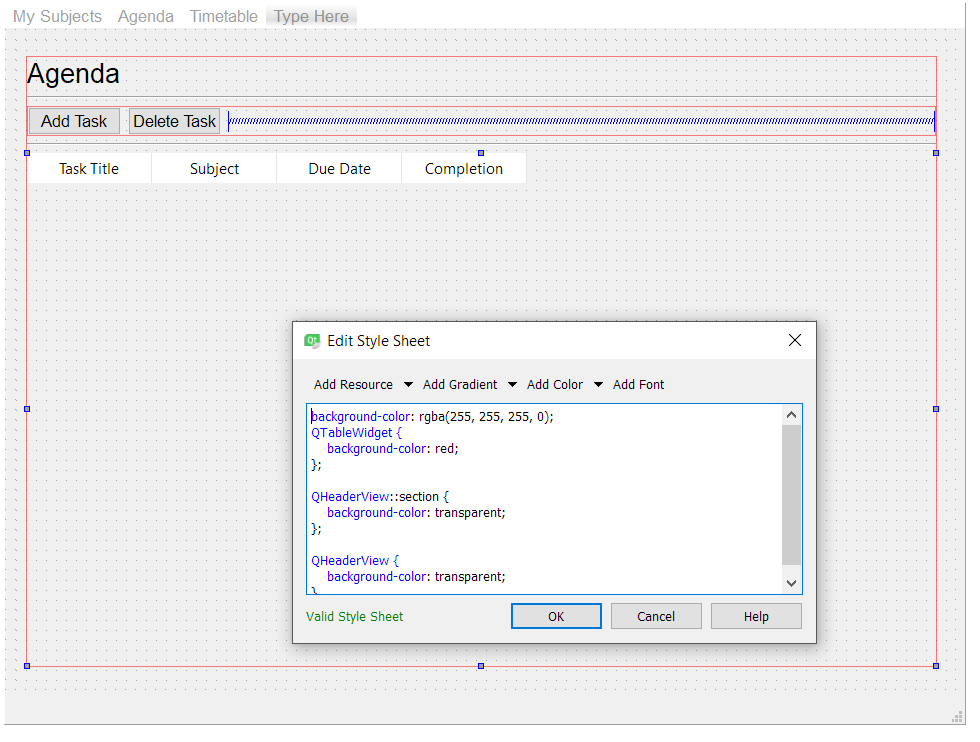


 mighty frigate
look at the first line
kind kraken
I don't know
mighty frigate
looks like youre putting additionnal rules to a rule
kind kraken
like, I don't know if that designer puts the style sheet the same place
that Eynix's code had it
mighty frigate
like
#MyObject {
    background-color: red;
    QTableView {
        // things here
    }
}
and to my knowledge, this is not valid
also you should have the debugger screaming at you for putting bad qss rules
kind kraken
are you able to select the headers directly and add rules?
wispy oar
Yeah, removing that first line does change things, but it makes things all white, so I think the code isn't working when put into Qt Creator this way. Perhaps it's a different format.
It worked when I just put it directly in the code.
Thanks, I'm just really curious about why it won't work with Qt Creator, and why background-color: transparent only makes the data area transparent. I think I'm either inputting it in the wrong place or the format is different.
robust lynx
@tidal spruce https://github.com/sonovice/QFlask
GitHub
QFlask shows a flask application in a QtWebEngineView (QWebEngineView) using PyQt. - sonovice/QFlask
tidal spruce
Ah so like electron but with flask
robust lynx
yeah i guess so
is it hard to set up electron?
and is it possible for me to use a flask server with electron
mighty frigate
@robust lynx what's the pros ?
 unique python
Hi, I am new to GUIs, I made a little proyect with tkinter, and is ugly as fuck
What should I use for make something like that that will not make my mates eyes cry with blood?
The other module I know is Pqt5, but I never used it or anything
 rugged sinew
@unique python even in tkinter, there's something called ttk, which would look a lot better than this.
that'd be the smallest step you could take towards a better looking GUI
QT will make a truly native-looking GUI, and you might want to look into something called pyside2 if you're gonna head down that route.
it's the official Qt for Python module, and is quite popular.
but a slightly larger learning curve from what I've heard. still shouldn't be too bad.
unique python
Thanks @rugged sinew for your answer. Now I was trying the Qt designer that I downloaded from https://sourceforge.net/projects/pyqt/files/PyQt5/PyQt-5.6/, but what's the difference between that that and pyside2?, or the difference is that one is GUI for making GUIs and the other (pyside2) is a module to make GUIs?
The GPL licensed Python bindings for the Qt application framework
rugged sinew
yeah that's essentially it
pyside just lets you write code, like tkinter
I hate using that designer personally because it generates a bunch of ugly code
I'd rather just write my own
besides, you're not gonna learn any python from using the designer :P
unique python
I will not learn to create widgets and set theirs properties, but anything else I will have to do it by code
You really helped me, I will take in to account using pyside2, but the designer looks seductive 👄 haha, thanks.
kind kraken
it is possible to make that tkinter app less ugly
e.g. align the labels to the left, stretch the entry boxes
proper glade
say youve got a grid of objects that you use the mouse with various modifiers to interact with.
is there an established design pattern for implementing the handling the mouse/keyboard in this kind of situation?
i guess a plain old state machine could work
this is what it looks like
at the start it's just left drag with no modifiers, then alt + left drag which lets you 'draw' outside the current line, then shift which lets you select individual cells
and then there's the right click variation of all these which handles turning off/deselection
right now it's all basically hard coded into the event handlers
but i'm finding that it's getting a bit cumbersome to work with
like if i want to add more modifiers later down the road im gonna have to add cases to all the previous branches in every event handler to accommodate them
kind kraken
@proper glade It looks like you could handle tht with mousedown and mousemove alone
mousedown: sets the row that non-alt drawing is constrained to
- invoke the same as mousemove
mousemove: pick cell based on mouse position (and constrain row if alt is not down), then set state based on which button is down and whether shift is pressed
proper glade
yep, ive already got all that implemented. that video is from the program itself.
it's just that the code is kind of messy and cumbersome to work with atm
kind kraken
ok idk what's cumbersome then
proper glade
so im looking for a better way to handle it with some kind of established design pattern instead of hard coding all the cases
kind kraken
maybe the structure of your code isn't what i'm picturing
proper glade
im working on a state machine atm
kind kraken
what state
the only state is the constrain row
can you show me your code? maybe we're talking past each other
proper glade
youve got a bunch of key/mouse button states that can be combined in different ways
gotta handle any of them being on/off at any time
kind kraken
yeah but none of that is state
proper glade
or one turning off during a drag
kind kraken
or, rather, it's not your state, in the sense of a state machine
kind kraken
each drag movement is a separate event, and you check the modifiers in the event handler right
ok but i don't understand what's cumbersome, or what adding a modifier would require you to change in multiple places
nothing in the model i suggested does that
kind kraken
but then i'm making assumptions about your data model too
it's not state in the sense of being state that you set, which is what "state machine" normally implies: each stage sets the state for the next stage to pick up
proper glade
you are setting the state, by funneling it input from the input devices.
i.e. 'key x on', 'key x off'.
kind kraken
uh what
you should be able to check current modifier state without handling keydown events, in most frameworks
proper glade
im talking about the state machine
one central state machine that handles what action the combined keyboard/mouse state should be carrying out
kind kraken
i don't understand where that's happening in your code
proper glade
yeah, sorry, not the cleanest atm 😛
kind kraken
or where you're checking alt at all in your code
proper glade
alt is in mouseMoveEvent
oh wait this is the code for editing the graphs, not sequences 😅
one sec
https://paste.pydis.com/heyizupexo.py there ya go
        modifiers = qt.qApp.keyboardModifiers()

        if modifiers & qt.constants.AltModifier:
            y = event.globalY()
        else:
            y = self.mapToGlobal(qt.QPoint(0, 0)).y()

widget = qt.qApp.widgetAt(event.globalX(), y)```the history stuff is also something you didn't mention
proper glade
ah yeah sorry lol
kind kraken
that actually complicates things a lot
proper glade
didnt think it would be that important. i feel like theres a general way to solve the problem that the history stuff could fit into easily.
kind kraken
sure but
without the history thing you wouldn't have to check keyup events at all
and with it, you have to have special handling for if they press or release shift while the mouse is held down
proper glade
not yet, anyway
im trying to plan ahead
in case i want to add another modifier similar to the history stuff that -will- need key release checking
just wanna go about it in a way that's easier to manage/expand that what i currently have
kind kraken
er, like i said, you have to handle it now if they press or release it while the mouse is held down
proper glade
that was meant to be in response to without the history thing you wouldn't have to check keyup events at all
kind kraken
right
anyway, your duplicate code between the mousedown and move can probably be factored out
to a single function called by both
incidentally part of where i was confused about the state machine thing
i'm pretty sure you can get the drag button from the modifiers, in the mouse move event