#user-interfaces
1 messages · Page 32 of 1
 proper glade
 sullen thunder
Things like Atm, Initial, Statement, Student Loans
sullen thunder
Sorry I had over simplifed the code.
In context it is grabbing it from the tablewidget for comparison
The table widget received it from the combobox
proper glade
What do you get when you try printing the result of findText in that case?
sullen thunder
It's been giving me a -1
sullen thunder
let me know if you need additional code. I have simplified things using lists to reference widgets so multiple different subwindows or ParentType accounts can use the functions.
sullen thunder
It should be correct. I can attempt inputting the direct value
proper glade
you could also pack all these widgets into a class rather than a list, and anyone who needs access to them can get them via an instance of that class
that way you could give them more descriptive names
sullen thunder
Thats probably the novice in me. As admittedly this is just one huge PyQt5 class
well, not exactly 1 class the Mainwindow is though.
the crazy thing. I deleted the database and re-initiated the whole program. It works again
sullen thunder
hopefully next time it breaks. I will know what caused it
in regards to classes though. Is it a bad thing to have a ~1000 line class for PyQt? Its how i learned and it appears to function.
proper glade
it depends on what those 1000 lines are really
generally that means you need to refactor your code and split things up more
there's usually a better way to organize if youre feeling like there's too much going on in one file
sullen thunder
Well, the challenge fore I guess is I chose a design where I have multiple subwindows in the Mainwindow. So the associated functions all end up in the same file. But I see what your saying. I will continue to look for ways to trim it as I go
proper glade
you can split each subwindow into its own module
sullen thunder
There any documentation on that? Otherwise I will look over my code and contimplate it. I like that idea.
proper glade
it's just basic python oop stuff
so say in one file, you describe this class:
import PyQt5.Qt as Qt

class sub_window_1(Qt.QWidget): # or whatever other kind of widget you want
    def __init__(self):
        super().__init__()

    def special_subwindow_function(self):
        print('wow very special much function')
and let's name it sub_window_1.py for sake of example
now in another file, the main window:
import PyQt5.Qt as Qt
from sub_window_1 import sub_window_1

class main_window(Qt.QWidget):
    def __init__(self):
        super().__init__()
        self.sub_window = sub_window_1()

        layout = Qt.QHBoxLayout()
        self.setLayout(layout)

        self.show_sub_window_button = Qt.QPushButton()
        self.show_sub_window_button.setText('Show sub window')
        self.show_sub_window_button.clicked.connect(self.sub_window.show)
        layout.addWidget(self.show_sub_window_button)
and in your main app file you import the main_window class, instantiate it and run its .show() method
sullen thunder
Okay, I think I see where you are going with it. It doesn't appear to function to much differently from my QDialogs that I load from outside modules.
I guess my major concern was. I am using the self.mdiArea to load the subwindows. I wasn't sure if I could create a class. Say
class Ui_SubWindow(object):
    def setupUi(self, MainWindow):
          self.subwindowSummary = QtWidgets.QWidget()
          self.subwindowSummary.setObjectName("subwindowSummary")
          ## etc
I was concerned the mdiArea and associated subwindows needed to be join together.
proper glade
you can have separate references to the sub windows
then add them to the MdiArea using those
sullen thunder
Looks like I know my next OOP project for my program. Should improve readability of my files.
should help me avoid building unncessary duplicates of the window in QDesigner.
being they should in theory all mirror each other with changes in labels.
Sorry If I am jumping ahead of myself a little. I am liking the idea and example
proper glade
it's all good
sullen thunder
Also, I think I found part of what was breaking my program earlier.
proper glade
yeah?
sullen thunder
Above is an image of the subwindow I am building.
What is happening is, When I Update my SQLite3 database and the QTableWidget it appears to be adding an additional space to the front of each input. (Row 4)
sullen thunder
That is a good question. It must have something to do with my update function.
def update_sql(self, parentType, row):
    widgetlist = self.parenttype_widgetlist(parentType)
    status = self.tranaction_status(widgetlist[9], widgetlist[10])
    ledgerName = widgetlist[0].currentText()
    modifiedLN = modify_for_sql(ledgerName)
    updateStatement = "Update " + modifiedLN \
                      + " SET Transaction_Date='" + widgetlist[2].date().toString("yyyy/MM/dd") \
                      + "', Transaction_Method='" + widgetlist[3].text() \
                      + "', Transaction_Description='" + widgetlist[4].text() \
                      + "', Category=' " + widgetlist[5].currentText() \
                      + "', Debit=' " + widgetlist[6].text() \
                      + "', Credit=' " + widgetlist[7].text() \
                      + "', Note=' " + widgetlist[8].toPlainText() \
                      + "', Status=' " + status \
                      + "' WHERE Transaction_Date='" + widgetlist[1].item(row, 0).text() \
                      + "' AND Transaction_Method='" + widgetlist[1].item(row, 1).text() \
                      + "' AND Transaction_Description='" + widgetlist[1].item(row, 2).text() + "'"
    self.post_transaction_sql(updateStatement, widgetlist[0], widgetlist[1])
oh god thats a mess
But i think somewhere in that, is creating the space. It's currently my best starting point
proper glade
ok, couple of things
ideally you should be passing input into your queries using placeholders. sqlite does it by replacing every ? with values from the next argument, which is usually a tuple
before it does this it also sanitizes those values, to avoid injection
which is where someone can put in some input that mimics part of an sql query and therefore perform other operations on your table without you knowing
sanitization alters the input values to prevent this.
another thing, you can extend your strings across several lines in python like this:
some_string = (
    'test'
    'test'
    'test'
)
so, maybe not the most efficient method. However, I have functions in place that check the inputs for unwanted values and reject them. So special characters are generally rejected. It limits the user to Alphanumeric inputs. Depending on the input and the purpose, it doesn't allow for spaces.
proper glade
that'll all be one string, 'testtesttest'
sullen thunder
def check_characters(question):
    checkString = question
    x = 0
    badCharacters = ["~", "!", "@", "#", "$", "%", "^", "&", "&", "*", "(", ")", "=",
                     "+", "<", "?", ";", "'", "[", "]", "{", "}", '"']
    for piece in checkString:
        if piece in badCharacters:
            x += 1
        else:
            pass
    if x >= 1:
        return False
    if x == 0:
        return True
not the most efficient but it does the job.
proper glade
just as an example query:
cursor.execute('select * from table where one_value = ? and other_value = ?', ('input 1', 'input 2'))
if you wanna ask more about DBs we should continue in #databases
sullen thunder
maybe another time. I am sure there is more for me to ask. However, in short. I should look at my Sqlite3 statement for the solution to my issue.
I Unfortunatly got my actual job tomorrow so I need to stop (7 hours should be enough today lol)
proper glade
right, gotta focus on not dying from lack of sleep and food and water too 😛
sullen thunder
otherwise I will never finish my grand overkill project.
but yeah I will hit you up this weekend if my other resources fail me
proper glade
👍
sullen thunder
btw, i think i found the alignment issue.....
it was staring me in the face and laughing
example
Debit=' " verus the proper Debit='"
with that goodbye all
proper glade
see ya
 molten flax
Thanks meta! I didn't think the variable was neccarsary if i didnt need it.
 digital rose
@proper glade Hey, here is the code regarding QThread that raises an error : ValueError: signal only works in main thread
https://paste.pydis.com/tohirudogu.py - for the PyQt5 code
https://paste.pydis.com/veyijasinu.py - for the Scrapy code
i obviously got rid of unimportant parts of code, to make it easier for you to point me towards the right direction
And as i said, i have another QThread that runs and emits the signals just fine, it uses relatively the same code as in the example i just posted, but it creates 20 Threading.thread()'s, inside of which i successfully emit the signal, and no error is being raised
digital rose
you're welcome
i did find few questions regarding that on stack, but they really didn't lead me to any solution
digital rose
process as in python processing library?
proper glade
basically, yeah
Signals are a limited form of inter-process communication (IPC), typically used in Unix, Unix-like, and other POSIX-compliant operating systems. A signal is an asynchronous notification sent to a process or to a specific thread within the same process in order to notify it of...
this stuff
that's what the signal module does
that's where the error is originating from
digital rose
ok, so scrapy basically uses processes rather than threads?
proper glade
im not sure whats going on here, what the signals are used for
digital rose
meaning it uses all of my CPU's
proper glade
you cant really transfer arbitrary data over them
there's like a select few and they all have special meanings
gimme a bit to dig into it some more
digital rose
what if i get rid of the parameters?
proper glade
which ones?
proper glade
no, that's an entirely different concept of signals
digital rose
damn
proper glade
these are entirely separate ideas
pyqt slots and signals are used for communication between objects
these other signals are on an os level
digital rose
oh i see
now
well i am glad i won't have to dig into the documentationless PyQt5 for that answer
proper glade
this is a scrapy issue
digital rose
i will keep looking it up
proper glade
"C:\Users\kinguard\AppData\Local\Programs\Python\Python36-32\lib\site-packages\scrapy\utils\ossignal.py", line 22, in install_shutdown_handlers
proper glade
look at that line, \lib\site-packages\scrapy\
proper glade
i dont have enough familiarity with scrapy to properly diagnose this atm but my best guess is that
scrapy has its own facilities for doing multithreaded work, and you need to use those
instead of handling the scrapy multithreading yourself
digital rose
Well, that's my best hope right now
proper glade
somewhere, somehow, scrapy is doing something with this signal in a thread other than the main thead
since this isn't related to interfaces any more let's move over to help channel
digital rose
sure
proper glade
#help-kiwi is free
digital rose
@proper glade they suggest starting a crawler in a seperate process
rather than thread
but it will make transferring data between processes almost impossible, i still remember that from when i was looking up the differences between Threads and Processes
oh
wrong chat
my bad
 neon laurel
Hey, can we dynamically assign the value of a QSpinBox or QComboBox to a variable ? So like, whenever the user changes the value of it, it modifies the variable ?
I can't do that without refecering directly to the QSpinBox or QCombobox Element ?
Because I did this :
        self.N = self.ui.board_size
        self.WALLS = self.ui.nb_walls
        self.neurons = self.ui.nb_neurons
        self.EPS = self.ui.eps
        self.ALPHA = self.ui.learning_rate
        self.lamb = self.ui.lambda_value
        self.LS = self.ui.IA_strategy
but it means that in my code if I want to check self.EPS I'll need to writeself.EPS.value() and that means I have to modify my whole code. I was wondering if I directly assign self.EPS = self.ui.eps.value() is it going to take the first value of EPS in the program or everytime we change the value of eps, it'll change it?
 sonic bridge
Do you know what signals/slots are for?
A signal will be emit when qcombobox/qspinbox changes it value. You can subscribe to that signal and do whatever you want when that happens.
neon laurel
Oh, that's cool. So every time there's a signal about X QSpinBox, I can check at this moment the current value of X ?
sonic bridge
You can subscribe to mySpinBox.valueChanged and update your var self.my_spinbox_value
neon laurel
I see. I should make an if statement valuechanged then update the value of the Var smth like that ? Or I need to connect valuechanged to a function ?
sonic bridge
Conntect value changed to a function
do you mind to show where are you using those variables
?
neon laurel
I'm using the variables in my class' methods
but this QSpinBox :
    def train(self, n_train):
        if self.LS == 'Q-Learning':
            learning_strategy1 = (self.LS, self.ALPHA)
            learning_strategy2 = (self.LS, self.ALPHA)
        elif self.LS == 'TD-Lambda':
            learning_strategy1 = (self.LS, self.ALPHA, self.LAMB, np.zeros(NN[0].shape), np.zeros(NN[1].shape))
            learning_strategy2 = (self.LS, self.ALPHA, self.LAMB, np.zeros(NN[0].shape), np.zeros(NN[1].shape))
So I'm running a test of the value of the variable self.LS depending on the strategy the user chooses, the code changes
neon laurel
It's a variable that I initialized in __init__, idk if that answer your question
sonic bridge
Well, check if connecting the signal valueChanged to a method and updating self.LS when that happens solves your problem.
neon laurel
Will try, thx!
 earnest pecan
thanks meta!
 pallid thunder
Hi all,
I'm creating a popup window using the code below. but I can't get either the lift() or focus_force() commands to work. they just throw me an attribute error :(
the idea of the code is that when run the first time, the popup opens. but if it'a run again, it will just change the window focus to the popup and bring it back to the front.
    self.popup = 'not created'

    def open_popup_window(self, heading, text):
        if self.popup == 'not created':
            self.popup = pop_up_window(tk.Toplevel(self.master),
                                       heading=heading,
                                       text=text)
        else:
            self.popup.lift()
            self.popup.focus_force()
The errors:
AttributeError: 'pop_up_window' object has no attribute 'lift'
AttributeError: 'pop_up_window' object has no attribute 'focus_force'
Does anyone know why they would be throwing out those errors?
Many thanks in advance
 rapid vector
That error indicates that 'pop_up_window' is not the kind of object you're expecting it to be. What kind of object are you expecting it to be?
pallid thunder
a toplevel object?
molten flax
Hello guys, im trying to make a scrollable canvas inside this frame, but it wont scroll. Its always greyed out. I have to drag the window larger to see the rest.
the relevant code is like this::
faceFrame = LabelFrame(CharactersAssets, text="Face Selection")
faceFrame.grid(row=0, column=1, sticky=E+W+N, padx=3)
faceCanvas = Canvas(faceFrame)
faceFrame.grid(row=0, column=1, sticky=E+W+N, padx=3)
faceScroll = Scrollbar(faceCanvas, orient="horizontal", command=faceCanvas.xview)
faceCanvas.configure(xscrollcommand=faceScroll.set)

faceButtons = []
v = IntVar()
for index in range(0, 32):
    faceButtons.append(Radiobutton(faceCanvas, image=faces[index], indicatoron=0, variable=v, value=index))
    faceButtons[index].grid(column=((index+1)%16)+1, row=((index+1)//17))

faceCanvas.grid(sticky=N+S+E+W)
faceScroll.grid(row=2, columnspan=8)

UNA.mainloop()```any help would be inififnifnfinitely appreciated!
molten flax
thanks
 plush pollen
I think you can probably fix it by adding something like:
bbox = faceCanvas.bbox(ALL)
faceCanvas.config(scrollregion=bbox)
before your last line
for reference, here is the scrollableFrame widget I have made: https://github.com/Macquarie-MEG-Research/Biscuit/blob/master/Biscuit/CustomWidgets/ScrollableFrame.py
GitHub
GUI for easy MEG to BIDS conversion. Contribute to Macquarie-MEG-Research/Biscuit development by creating an account on GitHub.
it only shows the scrollbar if it is needed plus has bindings for using mouse scroll wheel
that class would pretty much work out of the box other than the OSCONST which is just for cross-platform visuals to work nicely (could never get ttk styles to work like I think they should :/)
But that line can be removed if you were to try and just copy paste the code to use it
plush pollen
you might need to actually resize the canvas too
plush pollen
faceCanvas.config(height=bbox[3], width=bbox[2])
between the other 2 lines
hmm, so still nothing
wait, what are you gridding them in?
with my class you need to grid them into something else
gimme a sec
yeah:
    A wrapper for the Frame class to make it scrollable.
    To make use of this fuctionality, pack anything into the .frame Frame of
    this object
no it should be fine
but if you use my class, you want the master for the things you are grid-ing to be ScrollableFrame.frame, not just the ScrollableFrame
I think you are probably doing something similar too
you are grid-ing your widgets into the outer frame, not the inner one
molten flax
so i just made a thing with your class, and gridded everything in there
theres not even a scrollbar now
molten flax
why is it so hard to add a bloody scrollbar
worked fine with my listbox but not a canvas
plush pollen
the best piece of advide I would give is to try print out some of the bboxes of things and see what they are
the reason it happens is because a canvas technically has an infinite size I think. So you need to actually figure out the bounds of the objects contained within it for it know the scroll region
molten flax
ay it has a width and hehight paramter though
plush pollen
the other thing I think you need to do with your original code is grid the scroll bar(s) in the faceFrame, not the faceCanvas
molten flax
lemme try somethin with this
plush pollen
actually yeah, looks like that current code of mine doesn't quite do what it should sorry 😦
I was modifying it and I don't think I had it fixed up properly :/
but your code should be pretty close to working I think
the automatic scrollbar stuff doesn't quite work as nicely as it could
molten flax
doesnt appear like width works on this
plush pollen
GitHub
GUI for easy MEG to BIDS conversion. Contribute to Macquarie-MEG-Research/Biscuit development by creating an account on GitHub.
try this version
that is from before I modified it to draw the scroll bars if needed
it has some code at the bottom too that I was using for testing I think
plush pollen
that is saying the width is 1 pixel
molten flax
its like it doesnt care and just goes as large as it needs
no values work to change its width
plush pollen
I dunno. I still don't really understand how it works lol
I think I just managed to stumble onto something that worked and stuck with it
but I know that I do have it working. So it must be doing something?
molten flax
ill try the other class later
im going to sleep now anyway
thanks a million for your help!
👌
 pallid vapor
Can someone help me please, I'm creating a GUI login and need help with creating a new menu
https://paste.pythondiscord.com/evikeqiran.py
I create the second menu at the bottom of the class in logged_in() (menu = Tk()) but I want to have the new menu as like inheritance like it is originally (so instead of menu.title it would be self.title)
 fickle rivet
Hi, tk.Label(root, image=window).pack(fill=tk.BOTH, expand=1) should create a tkinter.label that expand on the entire windows right ?
 thorny spruce
It should yes
fickle rivet
I made a mistake it's like this
thorny spruce
Well the label is the full size, the image isn't
fickle rivet
so I need to scale the image ?
thorny spruce
You can't get the images to stretch with tkinter so you'd have to scale it
With only tkinter you'll want PhotoImage.zoom or that in combination with PhotoImage.subsample
Otherwise PIL with a Configure event and resize
Again though, this is scaling, not stretch to fit
fickle rivet
I'm already using pillow but the problem is I need to update this 20 times per second so if I need to paste 1200*1800 20 times per second it's getting pretty slow
thorny spruce
Why do you need to update it that frequently. Is it changing?
fickle rivet
it's a sort of game engine
thorny spruce
Yes, but is the image actually changing or are you just redrawing it?
fickle rivet
No it's changing
 hard berry
Hi, sorry if this question is kind of broad but I'm not really sure how to tackle this issue. I've Googled around but I've not found anything comparable to my precise situation that I can borrow from. Basically I have a program using tkinter which lets you test different sorting algorithms visually. Right now I have a main loop which I'm pretty much handling manually:
while True:
    m.run()```

where m is my main object containing pretty much everything, and run is a method which does a few different things:
```python
    def run(self):
        if self.sorting and time.time() - self.start_time >= self.delay.get():
            self.sort()

            if not self.sorting:
                self.pause_text.set('Play')
                self.status = "Done! Press Play to sort again."

                self.algorithm_menu.config(state=tk.NORMAL)
                self.list_type_menu.config(state=tk.NORMAL)
                self.list_size.config(state=tk.NORMAL)

            self.start_time = time.time()

        self.draw(self.numbers)
        self.update()
sort() does one comparison on the numbers and potentially a swap (or, more specifically, it chooses another method to call based on the chosen algorithm), then draw() draws the current list on the canvas in its current order (and draws some other stuff), then finally update() does tkinter's mainloop stuff, just manually because I need to be able to do all this extra stuff in between each update.
(sent too early, editing) Edit: done
fickle rivet
@hard berry what is the problem here 😃 ?
hard berry
I'm editing it, I pressed enter by mistake
fickle rivet
okay 😃
thorny spruce
@fickle rivet Anyway, can you provide some more detail as to what should be happening
hard berry
Currently I'm not sure if this is the right approach. Closing the gui throws an error (which doesn't matter particularly, except it causes an annoying pop-up message when I run it through pyinstaller and close the executable). _tkinter.TclError: invalid command name ".!canvas". I'm fairly sure this is just saying that I destroyed my gui while it's still trying to do stuff with it, and now it can't find the canvas? I read something online about adding a protocol which calls a method when you close the window, but that doesn't seem to have helped. Maybe I was doing it wrong, I'll try to reproduce that approach. I'm not sure if maybe they're something wrong with not use tkinter's mainloop?
(had to split into two messages, too long 😦 )
fickle rivet
@thorny spruce What I want is to recreate my game image (size : 240x140) 20 times per second and show it in fullscreen mode. The problem is with rezising it, is that is too slow to copy all pixels (1 296 000 pixels !). What I thinks that should happend is I paste the original image in tkinter (fastly because it's only a few pixels) and tkinter rezise it 😃
thorny spruce
Yea that's pretty much why you get that error message. Why are you handling updating yourself though and not run mainloop?
fickle rivet
@hard berry you should create 2 thread : one for the tkinter loop and one for updating tkinter content
thorny spruce
No, updating widgets needs to be done in the same thread as tkinter is running
hard berry
I don't know how I can delete+redraw my canvas (for animating) in between each update
thorny spruce
@fickle rivet You should only need to resize the image for as many times as the window changes size
@hard berry You can use .after to schedule a function to run after some time
neon laurel
Hey, I have 2 questions, first one : is it possible to make a QPushButton showing the progression of the function ? Like, I have the QPushButton but I have to enter OK to see where we are in the process (image below to describe).
My code :
# IN ANOTHER CLASS METHOD
        for j in range(nb_games_to_compare):
        self.progressBar(j, nb__games_to_compare)
        self.playGame(players[i], players[(i + 1) % 2])
                i = (i + 1) % 2


    def progressBar(self, i, n):
        if int(100 * i / n) > int(100 * (i - 1) / n):
            self.success_msg.setText(('  ' + str(int(100 * i / n)) + '%'))
            self.success_msg.exec()
And second question: what would be the easiest way to draw a board with QTDesigner ? Using Paint Event method ? And can I draw it above a QMainWindow ? (Screen below to show an exemple of what I want)
sullen thunder
@flavu in regards to the ok. You don't want a QProgressbar visible on the screen? Like make it a pop-up and load?
As for drawing the board in QtDesogner I will leave that to someone else. I don't have experience with it yet.
neon laurel
Yuup, I just saw about QProgressBar @sullen thunder but I'm doing smth wrong because it doesn't work
I initialize it in __init__:
self.progress = QtWidgets.QProgressBar(self)
        self.progress.setGeometry(200, 80,250,20)
Then I call the function that shows it
        for j in range(n_compare):
            self.progressBar(j, n_compare)
            self.playGame(players[i], players[(i + 1) % 2])
            i = (i + 1) % 2
And the function that calls it is defined :
    def progressBar(self, i, n):
        self.progress.show()
        if int(100 * i / n) > int(100 * (i - 1) / n):
            self.progress.setValue(100 * i / n)
Nvm, It works but it's weird. I think I need to define it in a QMessageBox, because I have smth like this atm :
Like the progressbar never ends and still stay there
sullen thunder
Consider instead of a q message box. Create a QDialog box with the progress bar built in
Sorry not super responsive. Work stinks like that lol.
sonic bridge
neon laurel
Haha no worry, I'm in an algo class so cant really be super focus on that too
But I'll look into the docs of dialog and see how it goes
hard berry
Got that working now, thanks Wattle.
hard berry
Hi guys, simple tkinter problem (probably). I have a very standard self.master.iconbitmap("favicon.ico") in my code, where self.master is my Tk class. The favicon is in the same directory as all the code. My friend cloned my code from GitHub (he uses Linux, I use Windows), and when he tries to run it he gets this error:
I assume it's because when he runs it the default directory is different so the relative path doesn't work, but I can't fathom why.
He says the same thing happens if he edits my code to put the absolute path of the favicon in the iconbitmap() call.
 kind kraken
@hard berry if you run python from the command line, the directory is the path the command line was in, not where the python script is located
and i don't know where it is on linux even not command line - the windows graphical shell is nice and always starts apps from the directory they are located in, i don't know if you get the same behavior on linux
also, apparently ico files don't work on liux

Stack Overflow
Well I have this:
import tkinter
gui = tkinter.Tk()
gui.iconbitmap(default='/home/me/PycharmProjects/program/icon.ico')
gui.mainloop()`
But when I run I get an error saying
Traceback (most recent
hard berry
Alright, I'll look into it, thanks
 wispy oar
Could someone help me with Qt Creator and PyQt5 please? I have created a few user interfaces in Qt, and generated the code to various Python files.
Now I'm trying to make a separate Python file which will call upon these files to display the UIs, and I can't seem to get it working.
It seems to correctly run the code from the file I referenced, but then it has an exception error in that other file. If I run the other file separately, it will execute fine.
from agenda import Ui_mwindow_agenda
import sys

class AppWindow(Ui_mwindow_agenda):
    def __init__(self):
        """Set up the ui."""
        super().__init__()
        self.ui = Ui_mwindow_agenda()
        self.ui.setupUi(self)
        self.show()


app = QtWidgets.QApplication(sys.argv)

w = AppWindow()
w.show()

sys.exit(app.exec_())```Above is the code for the 'master' application I want to use to open the user interfaces as modules, and below is the user interface I want to open, for example:
When I run it, it gives the error in the second file (agenda.py):
'AppWindow' object has no attribute 'setObjectName'```AppWindow must extend from QMainWindow AND Ui_mwindow_agenda (in that order)
That is because Ui_mwindow_agenda only has window setup/configuration. Think it as a "abstract" class, and it expects the derived class will provide attributes and methods from QMainApplication.
Another thing wrong is that you are instantiating UI_mwindow_angenda inside AppWindow. that is not how it is meant to be used. Instead you should do:
class AppWindow(QMainWindow, Ui_mwindow_agenda):
    def __init__(self):
        """Set up the ui."""
        super().__init__()
        self.setupUi(self)
Sorry, I'm quite new to PyQt5 in general. So you're saying I need to create QMainWindow first, and then set up Ui_mwindow_agenda afterwards for it to work?
sonic bridge
You need to define a class that inherits from QMainWindow and Ui_mwindow_agenda.
wispy oar
Okay, thank you. I think I need to read up a bit on classes, because I've went into this head first really.
It's for a project I have to do, and I've created the user interface files, converted them into Python files, and now I'm trying to work on getting functionality for this.
sonic bridge
After that, inside __init__ , need to initialize base class (QMainWindow), so that's why need to call super().__init__() and then call self.setupUi(self) that is a method from Ui_mwindow_agenda (you can see this reading generated code) that will populate the window with all widgets defined in the gui file (mwindow_agenda.ui and so Ui_mwindow_agenda.py)
wispy oar
Oh right, so why is QMainWindow needed as well?
sonic bridge
QMainWindow is a class that provides all windows functionalities and properties.
Is basically the canvas where you will put your componentes (buttons, textboxs, etc)
wispy oar
Thanks, I understand now. I'll do some background reading on classes so I can familiarise myself with it a bit and understand it more (because I just took this structure from somewhere else), then I'll try to crack on with this bit of code.
One other thing, how would you recommend me to save records if I want to add functionality for the user to add tasks, then have the list of records sorted by date order? https://i.imgur.com/Cy1mB2y.png
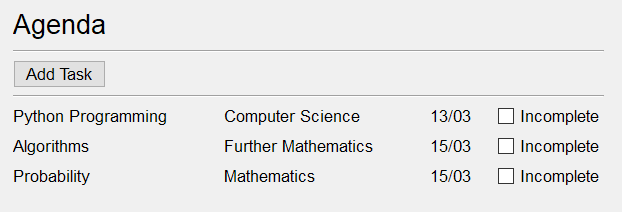
In my user interface, I've created that using a grid layout and labels, but I've done that by editing the text values manually. I'm struggling to see how I'll be able to save these values in a way that they're linked (so each row is connected, so to speak), and then be able to sort the values based on only one column. I want the user to be able to add a task, and have the agenda refreshed so that it's included in the correct position (earliest to latest due date).
sonic bridge
Ui_mwindow_agenda has the responsibility to fill that canvas. So when you inherit from both, inherited class mix both things together, the canvas and the class that knows how to fill that canvas. This is a pretty bad explanation on how it works, but you may get a picture. Would be better to read a proper guide/documentation.
wispy oar
Hmm yeah, I do know the very basic theory of inheritance, but not so much when it's used in practice. I'll watch a YouTube playlist on classes in Python so I can get my head around it.
sonic bridge
Is there any reason to not use a QListWidget / QTableWidget?
wispy oar
I hadn't considered that to be honest, would it be more straightforward than using labels?
I'd assume QTableWidget would be the better one here, seeing as I'm basically looking at displaying and manipulating a table?
sonic bridge
Yeah, my bad. It would be a lot easier, it also provides sorting functions.
wispy oar
Okay that seems like a good idea, thanks for that.
sonic bridge
To do with labels, you will need to create a custom widget that represents a "row" (task, assignature, date, status checkbox).
Then create another widget (may be able to use a modified QListWidget in this case, not sure), that manages the list and ordering. But this way wont be that simple.
wispy oar
I guess I have a lot of learning to do quickly, I need to try to get functionality done by Friday for coursework.
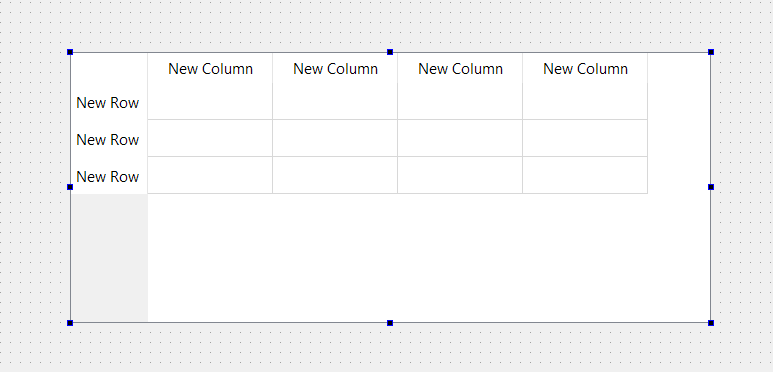
Do you know how I would be able to 'hide' the rows?
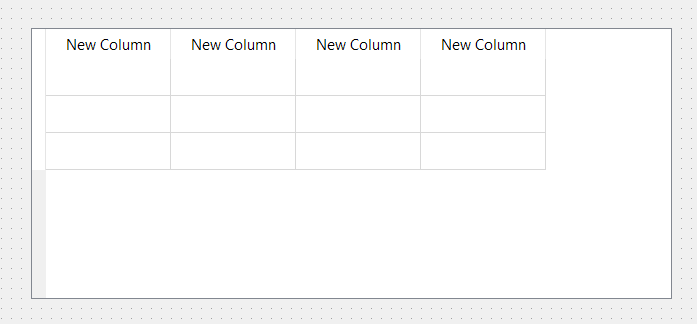
I don't mind having the column titles, but I'd like to remove the row titles so it's more like a table with just the column headers. Is there something specific I would do for this, or would I just change the text to whitespace? This is how it looks by default: https://i.imgur.com/l7w7KF8.png
But it looks a bit strange when I just put whitespace: https://i.imgur.com/B4peW45.png
 sonic bridge
There is a property called "verticalHeaderVisible" that is enabled by default.
wispy oar
Ah yeah, I found that now. Thank you.
sonic bridge
😀
If you want, it seems like it is possible define a QListWidget with any widget. So if you feel comfortable, can also try this way.
Here is an example in c++: https://blog.manash.me/quick-qt-3-how-to-dynamically-create-qlistwidgetitem-and-add-it-onto-qlistwidget-4bca5bacaa01
Not sure how will handle the sorting though. That may be a bit harder, I don't know if it worths the effort.
molten flax
@plush pollen managed to get it to work properly. simple too. hit me up when youre around
plush pollen
Having the scrollable table?
molten flax
yeah
so you gotta have a canvas and a scrollbar in the same place, not the scrollbar in the canvas
and instead of grid you have to use .createwindow on the canvas with your items
how it looks in the end:
faceFrame = LabelFrame(CharactersAssets, text="Face Selection")

faceCanvas = Canvas(faceFrame, height = 100)
faceFrame.grid(row=0, column=1, padx=3, ipadx=1)
faceScroll = Scrollbar(faceFrame, orient="horizontal", command=faceCanvas.xview)
faceButtons = []
faceChoice = IntVar()
for index in range(0, 32):
    faceButtons.append(Radiobutton(faceCanvas, image=faces[index], indicatoron=0, variable=faceChoice, value=index))
    if index < 16:
        row = 0
    else:
        row = 50
    if index < 16:
        column = index*50
    else:
        column = (index-16) * 50
    faceCanvas.create_window(column, row, window=faceButtons[index])

faceCanvas.configure(xscrollcommand=faceScroll.set, scrollregion=faceCanvas.bbox(ALL))
faceCanvas.grid()
faceScroll.grid(row=1, sticky=N+W+E)```which looks like
plush pollen
Ah nice! So I was close with the needing the scroll bar in the frame not the canvas. Not seen create_window before though...
Glad to see you got it figured out!
 serene ether
@PySimpleGUI#0202 Is PySimpleGUI automatically flagged for IAccessible2?
Weird Discord won't let me mention PySimpleGU
sullen thunder
@runic trout Practice with lots of malfunctioning code. (well that is my case)
Just starting?
 runic trout
sorta
ive made a very shitty window
but i still dont fully grasp tkinker
and how it works
mainly how placing of widgets works
sullen thunder
My first GUI program. Trust me it stunk. You'll figure it out.
trying to figure out placement of widgets?
 raw perch
Guys I have a question is it better If I use QT designer alongside PySide2 In PyCharm OR should I just use QT Creator and do everything there
 serene spoke
 pliant mango
sullen thunder
pliant mango
sullen thunder
@raw perch I can't speak for the community. However, it may be a bit of a preference thing. Personally, I use QtDesigner and PyCharm
 runic trout
@sullen thunder yes I am
It's my main problem
And I've been seeing y'all use classes for your root menus and am wondering if that's something that I should do as well
sullen thunder
Root menus? Do you mean how we use a class as basically a large container for the GUI window?
pallid vapor
    def check_username_valid(self):
        self.new_username = self.user_entry.get()
        self.old_username =  app.username

        self.lowercase = [char for char in self.new_username if char in string.ascii_lowercase]
        self.uppercase = [char for char in self.new_username if char in string.ascii_uppercase]
        self.numbers = [char for char in self.new_username if char in string.digits]
        self.spaces = [char for char in self.new_username if char in string.whitespace]

        if len(self.new_username) not in range(6, 16):
            yield "Username must be 6-15 characters long"

        if len(self.lowercase) < 3:
            yield "Username must contain at least 3 lowercase letters"

    def input_valid_data_with_retries(self, validator, bullet="• "):
        while True:
            errors = list(validator())
            if not errors:
                return to_check
            to_print = [(bullet+x) for x in errors]
            print(*to_print, sep="\n")
            print()

    def change_username(self):
        self.user_entry_label = Label(self, text="New Username: ")
        self.user_entry_label.grid(row=1, column=0)

        self.user_entry = Entry(self)
        self.user_entry.grid(row=1, column=1)


        self.submit_button = Button(self, text='Submit',command=partial(self.input_valid_data_with_retries, self.check_username_valid))
self.submit_button.grid(row=2, column=1)```Trying to implement some input-based code into a GUI based input with tkinterThe issue I have is that input_valid_data_with_retries just infinitely prints if there's an issue, it doesn't print the issue(s), wait for another button press on self.submit_button and then run again with the new 'input'
@me upon response please
pallid vapor
^ still need help with this
pallid vapor
^ resolved
 eternal pagoda
@pallid vapor instead of list comp you could use map()
pallid vapor
Someone said to use either map or list comp and said that since I don't know what map does to use list comp
eternal pagoda
map basically makes an iterator
first argument is the check
and second argument is the iterable
there is str.islower, str.isupper and str.isdigit functions
 blissful vale
I'm not sure i would call the first argument a check
blissful vale
It's just func, to make it simple
class map(object)
 |  map(func, *iterables) --> map object
 |
 |  Make an iterator that computes the function using arguments from
| each of the iterables. Stops when the shortest iterable is exhausted.```yea
 obsidian lance
so many discussion about tkinter...as always...
my last eel python gui work as expected and this(creation process) was easy, because html 🙂
sullen thunder
?? so did you make it with html
obsidian lance
@sullen thunder yes
- create html js css gui as official tutorial said
- create python file
my.pyfor interacting with filesystem etc , which js can't python3 -m eel my.py web --onefile --noconsole
... ready executable for your os... need only web browser on the board... chrome/ chromium/ firefox ...may be other will work too
sullen thunder
cool
obsidian lance
i like too... no need pile of time in facking with tkinter near place... but my gui is not very difficult ... at this time it was only buttons... but lot of html elements supported
eel python is just bridge between html/js and python
sullen thunder
care to share an image of it? [Personally working with QT but yeah tkinter is popular for starting]
good to enough if i ever decide to go that route. Been debating how i want to tackle esthetics
obsidian lance
GitHub
Contribute to 3dformortals/data development by creating an account on GitHub.
you tube video titles reader, that not look at ads etc before i choose want i watch or not... little info filter for me
sullen thunder
Ahhh, so lets you choose is based solely on the title
obsidian lance
i just read few users which i want discover time to time... but add new button for other source is enough easy
it faster than load full page and scroll in video list...
eel python best solution if your gui not very difficult
sullen thunder
I will eventually need something like that to create a .exe but i dunno if eel will be the one. Mines all python not JS/html
i think its pyinstaller or something like that
obsidian lance
at this moment executables can be created easy only uses eel and tkinter
other can't because have external dependencies... eel use browser and other need own gui engines , that is the reason why only tkinter (native) and eel(web browser) have good ways to make exe
- solid exe possible... without additional folders etc
sullen thunder
i heave heard good things about the pyinstaller so i will give that a shot. also, eel may still work for me.
just no where near ready.
obsidian lance
python3 -m eel my.py web --onefile --noconsole this syntax call pyinstaller with hack's ...
Pure command
pyinstaller my.py --onefile --noconsole fail with miss parts of app
plush pollen
I have been packaging my program into an exe by having an entry point in my setup.py so that when it is pip installed it registers the name Biscuit (name of the program) to the path so it can then be called directly like that
also, I think you can make pretty nice and complex things with pure tk/ttk:
wispy oar
I have a project to develop a student planner program using PyQt5 and Qt Creator. It should include a screen for the user's subjects, agenda, and timetable.
I was thinking about creating these in individual Python files which are generated from Qt Creator using pyuic5, and then importing them all in one file to open them as classes when a button is pressed.
How would I code this? I've tried using QMainWindow, but it doesn't seem to be working.
This is my code: https://i.imgur.com/cZ9HYHV.png
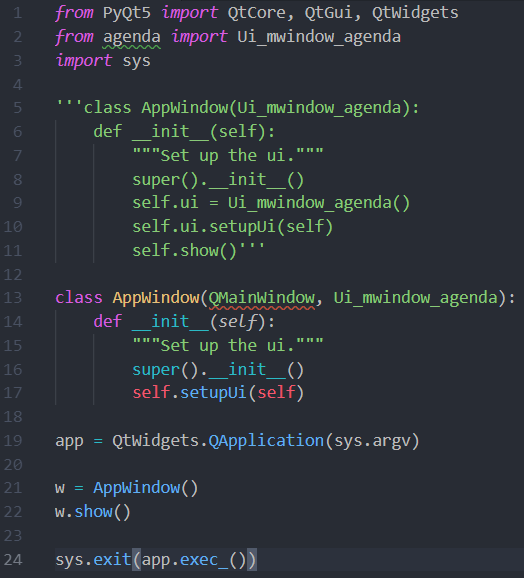
It gives me a NameError: https://i.imgur.com/SaRjets.png
 sonic bridge
You forgot to import it. Rename it to QtWidgets.QMainWindow or set import to from PyQt5.QtWidgets import QMainWindow
wispy oar
@sonic bridge Thank you, it works now!
 grim bronze
Hi there, I have a project ongoing (at this github address : https://github.com/Dogeek/renpy-text-editor) and I'd like some people to help me build this out. The project is basically an all in one IDE for making RenPy (https://renpy.org/) games. I already started out, and I'm using tkinter as the toolkit for this application. If you wish to participate in this project, feel free to DM me 😃
grim bronze
which makes me ask, how you do do to resize/rotate/scale a single item in a canvas with tkinter ?
 minor barn
I am trying to make a Qt QSpinBox widget operate with decimals instead of ints. Any idea how to do it ? I am reading that i must set up Locale settings with QLocale or something like that ?
kind kraken
@minor barn look at QDoubleSpinBox
minor barn
Yes, i found it. I am such an idiot
kind kraken
the locale is needed if you run into problems with comma vs period for the decimal point
minor barn
Thank you anyways, I should've wrote back in the chat
kind kraken
no problem
neon laurel
Hey, to change the value of a QLabel, I can use .setText() right ? Because I'm trying to do so but it doesn't seem to work out.
self.ui.label_16.setText(txt[i] + ' : ' + players[i].name)
Is txt[i] a string? Same for players[i].name?
sullen thunder
Does it spit out an error or just crash?
neon laurel
When I print it?
It doesn't spit out an error or crash but my program does crash anyways bcs of functions later on in the code
This is what is printed
Message to show* Blanc : Humain
Message to show* Blanc : Humain  Noir  : IA
with this code :
                    print('Message to show' + msg)
                    self.ui.player_1_val.setText(msg)
But the label doesn't change
Ohh nvm it changes bcs if I print the value of it, it's the correct one
                    print('Message to show' + msg)
                    self.ui.player_1_val.setText(msg)
                    print(self.ui.player_1_val.text())
Message to show* Blanc : Humain
* Blanc : Humain
Message to show  Noir  : IA
  Noir  : IA
I guess I just have to figure out why my GUI crashs later in the code
 trim rapids
mhmm
 charred thunder
@trim rapids i'm not sure if the Frame step is necessary, i'm testing it now.
charred thunder
not quite what i meant. set the master of the frame to be your root window (like you would with any other widget, tk.Frame(root)) then when you pack the frame, do frame.pack(expand=True)
you'll have to set the root window's geometry though, otherwise it'll resize itself to the frame's size.
trim rapids
instead of .pack() at the end of the label 1 = ...
charred thunder
oh, i prefer to keep them separate. doing label1 = tk.Label(...).pack() does not save the label in label1
trim rapids
oh okay
charred thunder
because .pack() does not return the Label object
so you won't be able to do anything with it after that line if you pack it immediately
trim rapids
ohhhhh
makes sence
sense
hold up lemme try it
yeah didnt work
@charred thunder
charred thunder
oh lovely.
how didn't it work?
what errors did you get?
or unexpected outcomes
charred thunder
oh, you're still packing your inner widgets to your root object rather than the frame itself
you're not actually using the frame there :D
charred thunder
👌
charred thunder
if you take it away, the frame won't expand to the size of the root window. with expand=True, the frame will occupy the full window space while keeping the containing items centered.
don't be afraid to try the code without it to see what i mean :D
trim rapids
yee
neon laurel
Hey, I'm working on a PYQT5 GUI and kind of stuck to implement the playable part because my GUI crashes. The thing I'm trying to do is to get the key pressed of the user to know what move to do. But for some reason, it doesn't work and my program is in an infinite loop and so crashes.
I don't really know how to implement the KeyPressed actions, I tried with QEvent but it doesn't seem to work out.
This is the code I'm running (not the whole code but the block where I have an issue) :
https://pastebin.com/kZ2sij3R
It comes from line 35 where I'm just looping over and over in this while condition and the GUI stops responding so I can't press any key
 grim bronze
hey guys, I'm stuck on this problem : how would you make a tkinter Canvas behave like the canvas in any photo editing software ? Basically, have selection boxes and having the selection box be the main way to interact with the selected image to perform transforms like resizing, cropping or rotating the picture
I have a mock up right now, but the implementation is really not that pretty
Basically I'm testing if the mouse cursor is on an image and if the LMB is pressed to select the image, drawing a rectangle around it, and performing my transform based around certain conditions, like "if the cursor is on an edge, and LMB is pressed and LMB is not released then, resize the picture" stuff
 glacial ermine
peps, do you have any ideas how to make a QToolButton a background color, while still being clickable?
sullen thunder
Wouldn't a flat pushbutton work better?
glacial ermine
hmmm maybe that's worth testing
sullen thunder
maybe this belongs here
Any suggestions on the best method of having the user select an image file to upload an image. I was thinking of using
rname = QFileDialog.getOpenFileName(self, 'Target Receipt', '/home')
However not sure thats right. Thoughts?
It appears that dialog generates
('H:/Pictures 2.0/ABCD/7695.jpeg', 'All Files (*)')
sometimes i just feel silly facepalm
sonic bridge
rname, _ = QFileDialot.getOpenFileName
sullen thunder
what does the , _ do?
 desert sapphire
_ is used for the variable name to indicate you won't use it.
It has no special meaning
Just a normal variable
sullen thunder
Good to know for future reference
I worked around my aforementioned issue by realizing it was a tuple.
plush pollen
also some linters complain when you have unused variables so it makes them happy
also also it is a nicer way (IMO) to get stuff out of struct.unpack
a, _ = struct.unpack(fmt, bytes) #where fmt is such that it only unpacks a single value
as opposed to:
a = struct.unpack(fmt, bytes)[0]
Ah, well when I am done fixing my other functions I will go back and clean that up.
i don't quite mind having rname[0] being I have to call Path(rname[0])
grim bronze
how do you change the tab width in tkinter's text widget
or make a tabulation turn to spaces directly ?
glacial ermine
I have an interesting case for you guys
so let's say that we have a class within a QMainWindow class like this:
class Window(QMainWindow):
    def __init__(self, var):
        self.var = var
        class innerClass:
            def __init__(self, x):
                self.x = x
       instns =  innerClass(42)
app = QApplication(sys.argv)
myGUI = Window(88)

 sys.exit(app.exec_())
what can one do to make innerClass change the self.var of Window ?
glacial ermine
like what type of method can we implement to make the two classes be able to interact with oneanother
if you come up with a solution, ping me
 karmic shoal
why do you have a class inside another class 😛 @glacial ermine
sullen thunder
@glacial ermine what does your inner class do? I have classs called from a QMainwindow.
The way I have them set up, is the inner class is called from within a function The function calls a QDialog for the user to interact with. When the user goes to close the Dialog the closeEvent function would allow me to transfer data.
Def closeEvent(self, event)
    Event.ignore()
    #data to change QMainWindow
    App.accept()  #might need to edit that
The way you have yours designed in the example above I would be unsure how to transfer the data. [Side note: I also use sqlite3 databases. Which helps]
It appears to be a more traditional Python class which works differently.
karmic shoal
a cheat I did was to pass a mutable object referenced by the parent class to the class object created in the parent class, changing one changes the other
neon laurel
Hey, the arrows on a laptop are considered differently than on a desktop computer ?
For some reason, the arrows in my KeyPressEvent function aren't recognized using QtCore.Qt.Key_Up /Down/Left/Right
neon laurel
They're next to ctrl but they have pgup pgdn end and home on it so I was wondering if that is different than on an usual keyboard
sullen thunder
@karmic shoal so kind of like a class global variable? I use those to work within different functions. I could see that working within an inner class. Though isn't there a general distate of 'global varoables'?
neon laurel
@agile moss okay nvm it works for up and Down but not for Left and right arrows Keys
 agile moss
Hmm, that's still a bit odd
Maybe you can record the keypresses to check what they are
How your OS sees them
karmic shoal
@sullen thunder not really, it's like what happens when you pass a list to a function that modifies the list
sullen thunder
Good to know they are not bad form. Granted I couldn't find to many other ways to have access to certain data constantly.
karmic shoal
ummmmmmm I never said that's good form 😛 I did call it a cheat
sullen thunder
Touche you did indeed call it a cheat. I might have one of my professional buddies look at it and give his opinion sometime.
neon laurel
@agile moss oh I figured it out but it's weird tho. If I dont press on alt before pressing on my arrows it doesnt work but after pressing on ctrl the arrows work lol
agile moss
That's interesting; maybe some special keyboard feature for additional options?
neon laurel
What do you mean ?
I should also try on another device to see if thats bound to the device or to my GUI
agile moss
Well, the arrow keys on my laptop are shared with media keys accessible through a modifyer
neon laurel
Oh okay, how can I know if they're on mine ? And how can I make it usable (?) on any device ?
agile moss
I don't know, but using ctrl as the modifyer for that doesn't sound logical to me, so I think it's probably something else
neon laurel
Hmmm weird
nothing wrong with my function, right ?
    def keyPressEvent(self, event):
        if self.gameOn == True :
            print(event.text())
            print(event.key())
            if type(event) == QtGui.QKeyEvent :
                if event.key() == QtCore.Qt.Key_Q :
                    self.ret = 'q'
                elif event.key() == QtCore.Qt.Key_W :
                    self.ret = 'w'
                elif event.key() == QtCore.Qt.Key_A :
                    self.ret = 'a'
                elif event.key() == QtCore.Qt.Key_Up :
                    self.ret = UP
                    print('ok')
                elif event.key() == QtCore.Qt.Key_Down :
                    self.ret = DOWN
                    print('ok')
                elif event.key() == QtCore.Qt.Key_Left :
                    self.ret = LEFT
                    print('ok')
                elif event.key() == QtCore.Qt.Key_Right :
                    self.ret = RIGHT
                    print('ok')
I don't think so, but I haven't used QT myself
Don't see anything that jumps out, though
neon laurel
Okay well, atleast it works idk how but thats already a good start haha
neon laurel
I tried on another device, still have to use alt to be able to have the arrow keys recognized
grim bronze
I have the weirdest behaviour with syntax highlighting something with tkinter/pygments
The thing works if I add in a text with a tag from code
and after that, whatever I type is syntax highlighted properly
but if there is no text inserted in code, or if that text is deleted, then the syntax highlighting doesn't work
glacial ermine
is there any way you could create a button, with a specified background color and without text, that is in a QToolBar() ?
sullen thunder
@glacial ermine in PyQt I found that style is controlled by a css stylesheet inside of the code. So yes you most likely can achieve this and without text. Saddly I don't know how as I haven't done much with the toolbar.
glacial ermine
sadly it seems that the only thing able to sit in a toolbar, QAction, doesn't support setStyleSheet
because it's not a widget
then why the heck is it imported from PyQt5.widgets ?!?!?!?
)':<
sullen thunder
Anyone have experience separating a subwindow from the QMainWindow MdiArea?
I want to attempt to refactor my code and lode the subwindow as a separate ui
 uncut lintel
For bind a key with tkinter is it that ?
from tkinter import *

def up(event)
    print("up")


window = Tk()

window.bind("<Up>", up)
window.mainloop()
hey guys, working on a todo app using python and gtk. Any suggestions for changes?
it looks a bit too wide for me, u kno?
 cinder bison
maybe simplify the dates to just their first letters
and like when you mouse over it theres a tooltip that is it's full name
digital rose
yeah
that would save space!
heres the updated version
or maybe i should just stick with joining the buttons and leave the 3 letters
it would help prevent confusion since there are 2 "S" and 2 "T"
something like this
note that the buttons are connected now
plush pollen
@grim bronze are you still having an issue with the syntax highlighting? I have done a little bit of playing around with using pygments to highlight code in a tkinter Text widget...
grim bronze
I'm having some issues but that particular one is fixed
would you be available to talk about it in voicec chat ?
karmic shoal
@sullen thunder do you mind giving me an example of you using closeEvent to transfer data from a class called from a function in the main class to the main class?
sullen thunder
so, to be fair. I actually pass the information via an SQL Database. I transfer data into a class via the def __init__(self, data):
though i would venture a guess something like this could work
    def closeEvent(self, event):
        string = "hello"  #class global value
        event.ignore()
        self.accept()
        return string
how would you get the data back to the main class though? not sure where return string returns to?
sullen thunder
When I actually look at my code. I am not convinced my method would work to return the string.
i think it will fail
what type of data are you transfering? is it a single data point?
karmic shoal
it's a dictionary
sullen thunder
Why not store the dictionary in an outside file?
you could pass the dictionary freely with modificaitons
 sudden coral
It's unlikely anyone here would know this, but I need to understand some things about how Qt handles errors. I'm looking through Qt's source and, though the function is documented as "returning true on success and false on failure" (in fact, there are several related mutation functions that are like this), I only ever see return true. The function does call QList::append but that doesn't return anything (not like the return value is checked anyway). However, QList::append does throw errors.
I'm wondering if they have some fancy error handling going on that would see an exception was thrown and know to cause something up the call stack to return false. Or I am overthinking it and it's simply documented like that so others, when writing their own implementations of the class, would have the option to return false if they needed it.
And one can see this is the only provider that is used here https://code.woboq.org/qt5/qtmultimedia/src/multimedia/playback/qmediaplaylist.cpp.html#125 (QMediaNetworkPlaylistControl only ever uses QMediaNetworkPlaylistProvider)
This convoluted implementation with a bunch of abstract classes/interfaces makes me lean towards this just being for further expansion by others.
 tidal spruce
How much is glade used to create uis?
neon laurel
Hey, I can't make my arrows keys and shift button work in a KeyEventPress function, when I press them, I don't even enter in KeyEvenPress function (like it doesn't get called), anyone has an idea from where it could come from ? I think it's because they're take from others events (mainly QPushButton) but I don't really know how to solve this priority thing
 night linden
for those who've used Qt (i ask because of PyQt), how big is the difference between the commercial and open source versions of Qt?
furthermore, what does it mean to run the commercial version for free with "commercial licensing"-- can it be used to its full extent for hobbyist purposes?
grim bronze
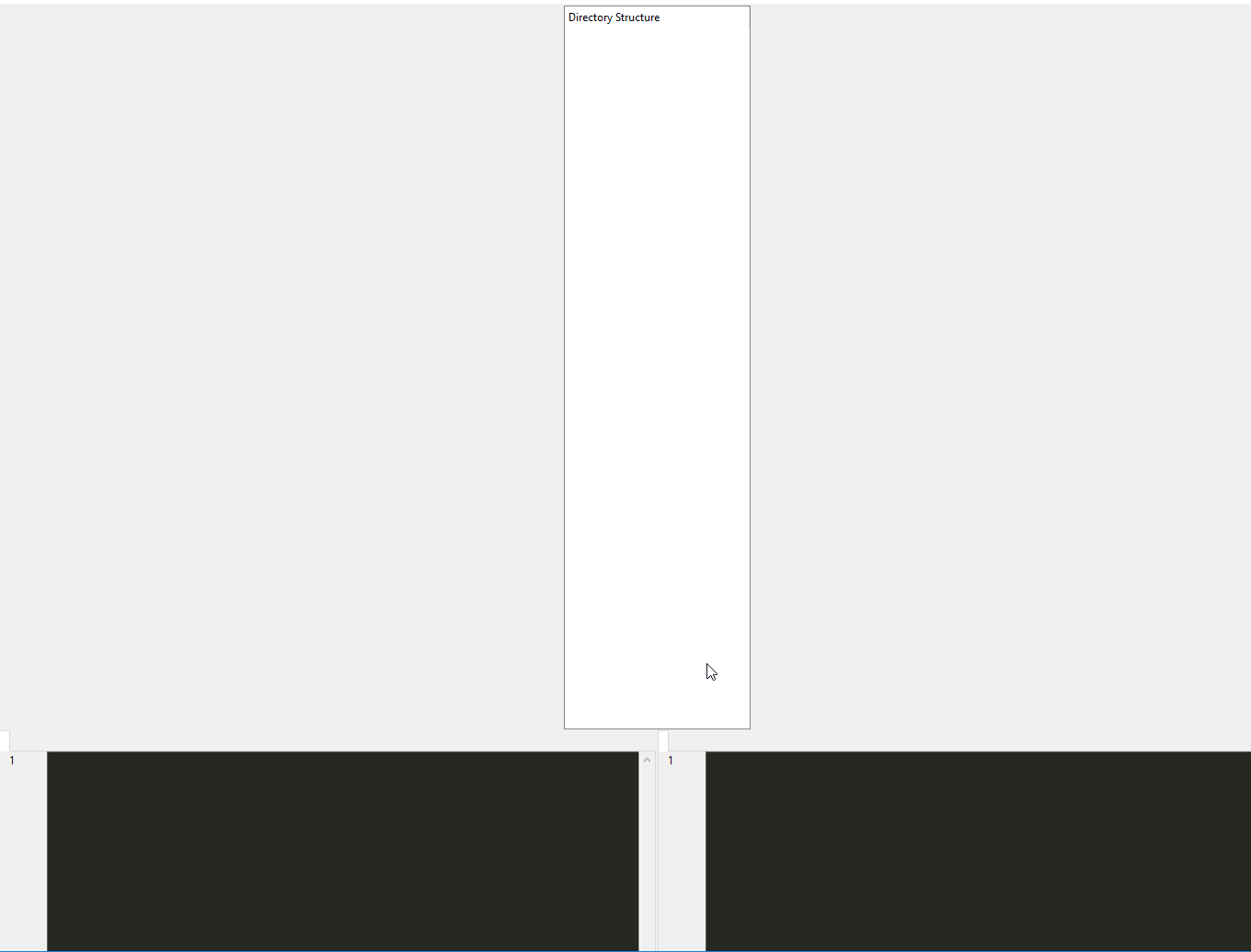
https://i.imgur.com/5xeS8SS.png I got a problem with my GUI layout with tkinter. I'm in the process of switching from the pack() geometry manager to the grid() geometry manager. But doing so resulted in this ugly mess. Here is the code handling the layout
    def __setup_ui(self):
        self.main = MainWindowView(self)

        self.project_manager = ProjectManagerView()
        self.project_manager.grid(column=0)#, sticky="ns")

        self.console_ui = ConsoleView(self)
        self.main.bottom_nb.add(self.console_ui, text="Console")
        self.main.grid(column=1)#, sticky="ns")
 sullen thunder
@night linden I haven't encountered any limitations for hobby purposes yet.
 rugged sinew
@grim bronze can you go into some more detail about what you expected this to look like? maybe what it looks like when you use pack()?
grim bronze
I might have a previous screenshot
but basically the treeview is supposed to be on the left side, and the two text widgets on the right side, taking up all of the space
rugged sinew
are those text widgets both contained in self.main ?
grim bronze
yes they are
rugged sinew
okay, so you may need to specify row=0 for both.
grim bronze
self.main is an instance of a derived PanedWindow
I tried to do that, to no avail
when using grid, I always specify row as a default, this code is just the latest iteration in my tries to fix this
rugged sinew
I gotta see more code I think
grim bronze
I'm reverting the grid changes to screenshot them to you
 drifting sundial
grim bronze
drifting sundial
grim bronze
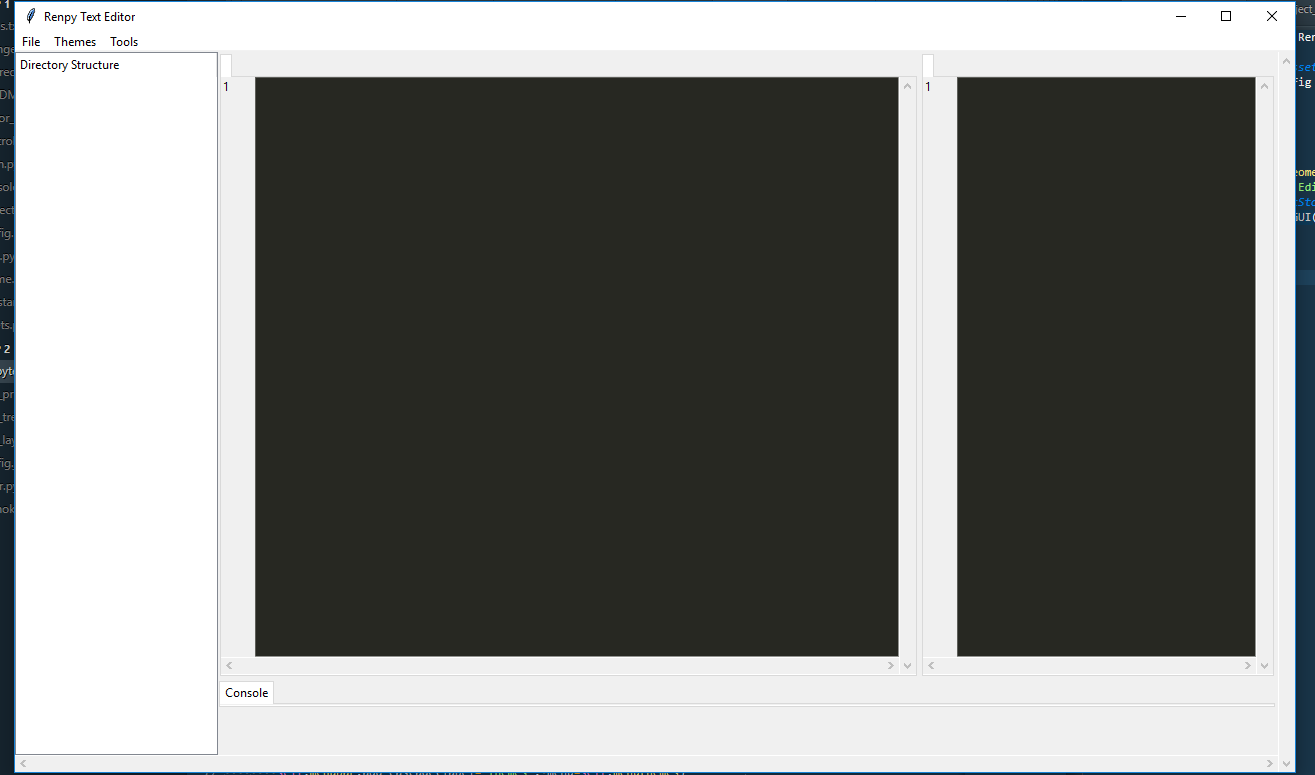
here's what it looks like with pack
the code is hosted at https://github.com/Dogeek/renpy-text-editor

GitHub
Renpy Text Editor - A dedicated text editor for the RenPÿ Engine. - Dogeek/renpy-text-editor
grim bronze
I created the grid-manager branch with my latest changes
rugged sinew
so you're creating all these different frames
and then gridding within those frames
grim bronze
yeah
grim bronze
grid sucks
rugged sinew
no, grid is nice
basically row 0 in one tkFrame is a different place than row 0 in another. a Frame is like a div in html terms
so if you have a div for each element, they're gonna behave like that
grim bronze
though, I wonder why that behavior is happening. My frames are basically custom tk widgets right
rugged sinew
well, they are custom frames.
but I get what you're asking
you can put a frame inside a frame
like divs inside divs
grim bronze
I'm kinda attached to the fact that each part of my UI is independant from the rest and only reports back to a main controller
rugged sinew
but then what you should try is simply making one main window frame and gridding everything else inside of that.
if you follow
then you should in theory be able to use sticky and same rows and stuff like columnspan to do what you want
(although I've never tried)
grim bronze
but then, how does that work with panedwindows
rugged sinew
have you looked into ttk?
grim bronze
well I do use some of its widgets like ttk.Treeview and ttk.Notebook
rugged sinew
or even just pyside2? my real advice is that when you get to this level of complexity, vanilla tkinter is probably not your best option.
rugged sinew
might look into it. its qt minus the hating your life.
grim bronze
And tbh, I'm not a big fan of PyQt either, cause It's basically C++ in python
rugged sinew
yes, and pyside seeks to pythonify qt
more abstract
more like tk
as for paned windows, sorry, that's where my experience with tkinter ends
I've really only used it for simpler stuff than that.
mostly widgets in a single frame
grim bronze
tbh, it's the first time I used panedwindows
never had the need for that widget before, and I must say thatt its syntax is weird as hell
rugged sinew
yes
grim bronze
Well, thanks for your help
rugged sinew
you understand why you get the layout you do with grid at least, right?
that must be of some help
sorry I don't have a straight forward solution you can copy paste out of this chat but armed with that knowledge I'm sure you can crack it
grim bronze
Well I somewhat get it.
rugged sinew
if you've worked with html and css, divs is a great analogy that holds up well
grim bronze
A long time ago. I've nver been into web dev
rugged sinew
the ProjectManagerView() creates a frame, and you grid that to row 0 (in that frame). then you create a second frame with ConsoleView and you grid that to row 0 in the new frame
so they're on top of each other.
because the frames will not sit side by side
unless you stick those two frames inside a third frame
inside which you can use grid to line them up on a single row
by default all frames will just establish a little space of their own and push everything else down below them.
grim bronze
With the div analogy, I assumed that I was doing something like that :
<div class="RenpyTextEditorGUI">
    <div class="ProjectManagerView">
    </div>
    <div class="MainWindowView">
    </div>
</div```hum
okay so, I tried something out
    def __setup_ui(self):
        self.frame = tk.Frame(self)

        self.main = MainWindowView(self.frame)

        self.project_manager = ProjectManagerView(self.frame)
        self.project_manager.grid(column=0)#, sticky="ns")

        self.console_ui = ConsoleView(self.main)
        self.main.bottom_nb.add(self.console_ui, text="Console")
        self.main.grid(column=1)#, sticky="ns")

self.frame.grid(row=0, column=0)```which yield the same behavior as without the frame
but not gridding the frame in puts the project_manager view at it's place
rugged sinew
super(RenpyTextEditorGUI, self).__init__()
this line strikes me as odd
you must have a root Tk() somewhere, that's why you take that optional master kwarg, right?
to pass it into there?
grim bronze
ah, yes, I forgot the master
rugged sinew
so you should probably be invoking super().__init__(master)
RenpyTextEditorGUI needs to be hooked up to that root Tk() instance, and then the other frames can be hooked up to RenpyTextEditorGUI
and hoooopefully that yields better results.
I also can't see anywhere in that file where you actually .pack() that Frame.
like.. the RenpyTextEditorGUI itself
rugged sinew
so it's kinda weird that anything shows up at all :P
oh okay
that's fine of course.
grim bronze
from RTE.views.main import RenpyTextEditorGUI
import tkinter as tk
# from RTE.assets import AssetStore
from RTE.config import config
import os


def main():
    root = tk.Tk()
    root.geometry(config.geometry)
    root.title("Renpy Text Editor")
    # root.iconbitmap(AssetStore.folder())
    view = RenpyTextEditorGUI(root)
    view.grid(sticky="nswe")
    view.main.add_tab("left")
    view.main.add_tab("right")
    root.mainloop()


if __name__ == '__main__':
main()```yeah okay
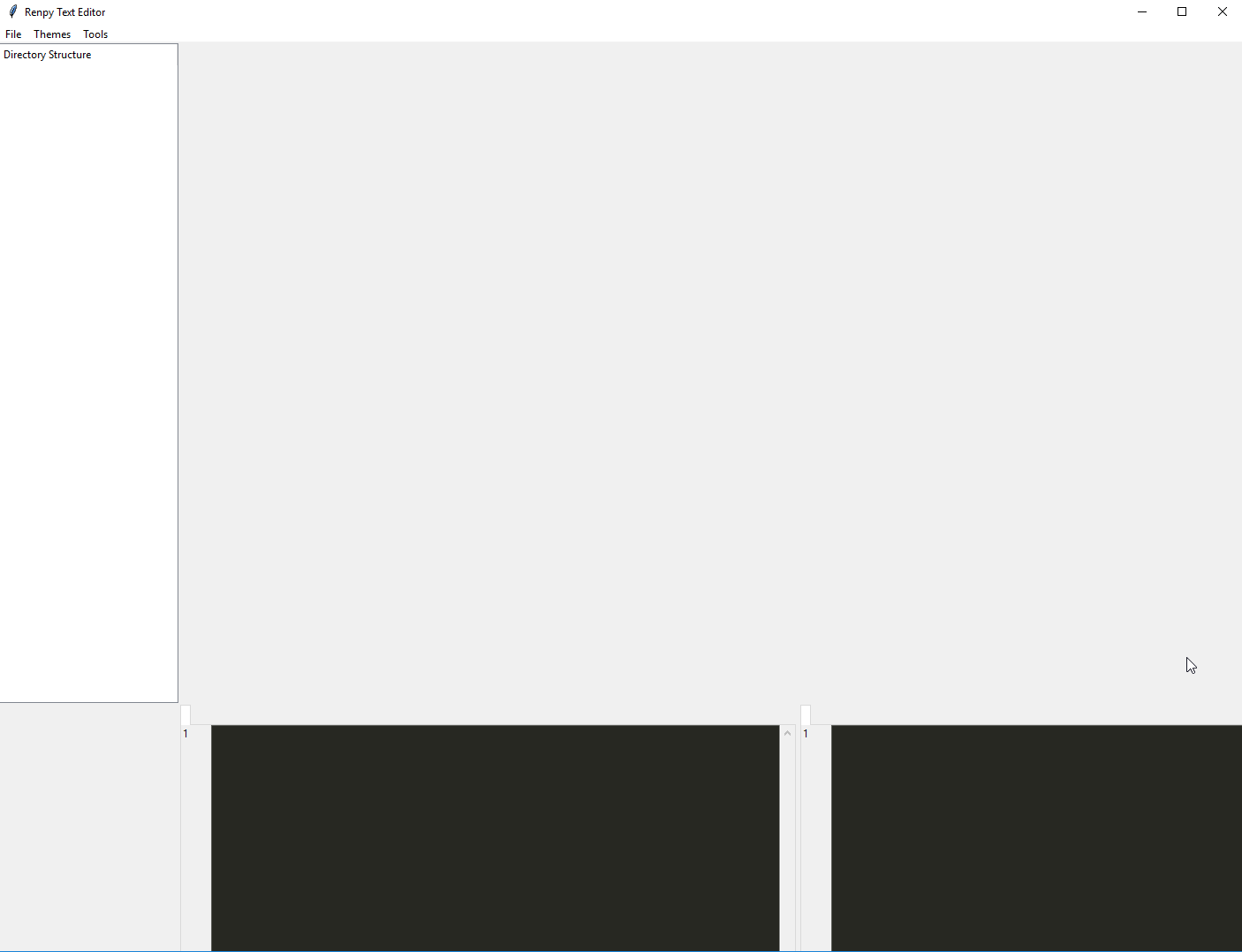 rugged sinew
and now they're both gridded on row 0?
rugged sinew
nice nice
grim bronze
it's still looks a bit off
rugged sinew
how's that?
 rugged sinew
sticky north maybe?
grim bronze
maybe it's just the sticky argument missing
rugged sinew
worth a try
grim bronze
Thanks for your help
rugged sinew
that's what we're here for.
grim bronze
Eventually it was just my masters and slave not being set up correctly
which I will keep in mind for future help
grim bronze
cause I'm pretty sure that's a mistake many people make
rugged sinew
probably, yeah
grim bronze
and I see what you did there 😛
rugged sinew
I didn't realize it had such sinister repercussions myself
I mean
I figured it just wouldn't show shit
or it might throw an error
but no no
that would be too easy
grim bronze
it shows but, completely out of place
those are the worst kinds of errors to be honest
rugged sinew
and this, I think, is why people tend not to recommend tkinter so much.
grim bronze
like, you know there's a bug, but no traceback of any kind
well, I still would recommend tkinter especially to a beginner
rugged sinew
I like it, too. I use it for some of my personal projects. but there are certainly some pitfalls.
grim bronze
in all fairness, I haven't tested pyside, wxPython or PyGTK
rugged sinew
me neither, but I've heard a lot of good stuff about pyside
might be worth testing
for both of us
grim bronze
true, though for this app I'm building, I really don't what to recode it all with a new framework that I don't know yet
The best thing about tkinter is that it's a tool that teaches you about proper GUI programming techniques
I've used PyQt before, and it's just too easy to build something in the designer and then not know anything about gui programming
rugged sinew
I tend to agree with that
grim bronze
but it does have some pretty handy out of the box widgets
have you used ttk.Treeview a lot lemon ?
proper glade
hey guys, sorry to butt in, just got a quick question
in tkinter, after you bind a callback to an event, is there a way to invoke the original event handler in the callback?
grim bronze
it's the default
proper glade
or from anywhere else? how do i bypass the event binding?
grim bronze
to not have subsequent callbacks processed, you have to return the string 'break'
proper glade
that wont work in this case unfortunately
i have something set up that'll need to perform the original event after the callback's finished
proper glade
sorry, should've been more clear then. based on some user choice*
i have a dialog set up that'll invoke a callback when the user makes a choice
grim bronze
I'm sorry, but you want the user to choose whether the event should be processed afterwards ?
proper glade
this dialog pops up when the button is pressed
then when the user selects 'yes', the original event handler should be invoked
yeah, sorry for lack of clarity, maybe some code will make it easier to understand the situation
one sec
    def on_backspace(self, event):
        from project.windows.cloppy_window import CloppyButtonWindow
        from project.windows.cloppy_window_events import CloppyChoiceMadeEventData

        def delete_text(choice: CloppyChoiceMadeEventData):
                # do things to delete text here based on user choice

        dialog = CloppyButtonWindow(self)
        dialog.set_message(
            "It looks like you're trying to erase some text. \n"
            "Are you sure you want to do that?"
        )
        dialog.add_choice('Yes')
        dialog.add_choice('No')
        dialog.choice_made.add_callback(delete_text)
        dialog.show()

        return 'break'
basically I wanted to handle it asynchronously
so one option is to reimplement the behaviour of backspace in delete_text
or try some way to invoke the original handling of backspace
proper glade
that wont work in this case as the dialog doesn't block the event loop when it's showing
the goal is to be asynchronous
the function will end and then when the user makes a choice, delete_text gets called
    def on_backspace(self, event):
        from project.windows.cloppy_window import CloppyButtonWindow
        from project.windows.cloppy_window_events import CloppyChoiceMadeEventData

        def delete_text(choice_data: CloppyChoiceMadeEventData):
            if choice_data.choice == 'Yes':
                selected_start, selection_end = self.get_selection_indexes()
                if selected_start and selection_end:
                    self.set_selected_text('', False)
                else:
                    if self.text_box.index(tk.INSERT) != '1.0':
                        self.set_text('', f'{tk.INSERT}-1c', None)

        dialog = CloppyButtonWindow(self)
        dialog.set_message(
            "It looks like you're trying to erase some text.\n"
            "Are you sure you want to do that?"
        )
        dialog.add_choice('Yes')
        dialog.add_choice('No')
        dialog.choice_made.add_callback(delete_text)
        dialog.show()

        return 'break'
ok, this works for now
i'll move delete_text outside into its own method
digital rose
is my code when i run it
my frame bg isnt in yellow
can idea why ?
please ping me
thanks
tf frame to be specific
problem fixed
 lapis dagger
hey im using tk.Text for a big input how would i see if they is any text in it?
print(bool(self.descriptionEntry.get("1.0", "end")))
i tryed to do this but it print True still if no text in it
grim bronze
self.text.get("1.0", tk.END) == ""
grim bronze
you might want to strop the "\n" characters as well
lapis dagger
ok
proper glade
you could also check just the character at the start
which iirc would be get('1.0', None)
glacial ermine
is it possible to change how the QPen draws?
like instead of having one big brush, what about dividing the brush up into smaller points with some non-drawing space between them
digital rose
I just want the default file dialog from the OS, is it possible to let the empty Tkinter-Window vanish?
filename = filedialog.askdirectory()
 final flicker
so im looping over a dict containing a QPushbutton and a other class. i want to connect the button to a function of the instance of my class. however for some reason the lambda gets lost every loop...
button.clicked.connect(lambda: my_instance.function(someothervar))```@final flicker I think I know the reason, https://docs.python-guide.org/writing/gotchas/#late-binding-closures Python lambdas are late binding, so whenever you click the button, the function will get executed with the last result of someothervar in the loop if it's assigned in a loop
 sullen thunder
Scenerio: Working with Sqlite3 and PyQt5 QTableWidget - Adding information to Sqlite3 and then displaying it on the QTableWidget for review/modification/deletion
Issue: Randomly during the addition of data the QTable will insert a blank row, or not display data for certain rows. [such as in the example below] I am currently unsure what is causing it. The missing example transaction should be for a debit of 60.00. I will use a paste bin to show associated display code.
Also user interface critique welcome. I do have at least one more feature intended on the ledger page (define display range)
digital rose
how do i not left frame resize when i resize my window in tkinter?
kind kraken
@digital rose can you be more specific, what's going on
most resizing behavior can be controlled with various layout manager options, but i'd need to know the specifics of what your layout looks like, how it's created (e.g. grid or pack), and what behavior you want when it resizes
digital rose
oh wait
sry
i want to make a separator between two frames
so i made it as a frame and placed it between two frames which are to be separated
but the frame resizes when i resize the main window
any idea how i can stop it?
@kind kraken sorry for ping
kind kraken
@digital rose how are you placing the three frames in the main window
and can you post a screenshot of your UI?
in general, if using grid, set column weight to 0 (and nonzero in the other columns), if using pack, do the same with the "expand" parameter
tidal spruce
I am beginner-ish with GUIs but don't want to be messing with tkinter or pysimplegui
Whats the next step up?
wxpython/gtk/pyqt?
kind kraken
windows forms with ironpython 😛
I'm not here to tell you which one to use, but the python gtk lib is called pygobject, and there's another version of qt called pyside
qt seems more popular here than any of the others (except tkinter, but I'm pretty sure no-one really likes tkinter vs uses it because it's built in)
tidal spruce
I think i'll go for Pygobject
Forgot the name of it then 😅
I'm already on GNOME so gtk is all pre-installed
Also I can try to use glade with it
sullen thunder
@tidal spruce the answer is. Whatever fits your desired project. At least that's the common advice.
tidal spruce
Yeah
digital rose
import tkinter as tk


class Chromatic:
    def __init__(self):
        root = tk.Tk()
        root.title("Chromatic")
        root.geometry("700x400")
        lf = tk.Frame(root, bg="#352c2d", width=250)
        lf.pack(side="left", fill=tk.Y)
        separator = tk.Frame(root, bg="#e6e5ef", width=7)
        separator.pack(expand=0)
        rf = tk.Frame(root, bg="#352c2d", width=(700-257))
        rf.pack(side="right", fill=tk.Y)
        root.mainloop()


if __name__ == '__main__':
t = Chromatic()```@kind kraken this is the screen shot of the window i dont want that white line to expand as i drag the window
but i am failing to achieve it even with pack(expand=0)
kind kraken
the others need expand=1
also you need to fill X too on the others.
the middle one will auto resize to 0 in that case, though
kind kraken
what do you want the left and right frames to do?
i.e. do you want the left one to get bigger, the right one to get bigger, or both
digital rose
i want the right one to get bigger
kind kraken
import tkinter as tk

class Chromatic:
    def __init__(self):
        root = tk.Tk()
        root.title("Chromatic")
        root.geometry("700x400")
        lf = tk.Frame(root, bg="#352c2d", width=250)
        lf.pack(side="left", fill=tk.BOTH)
        separator = tk.Frame(root, bg="#e6e5ef", width=7)
        separator.pack(side='left', fill=tk.Y)
        rf = tk.Frame(root, bg="#352c2d", width=(700-257))
        rf.pack(side='left', fill=tk.BOTH, expand=1)
        root.mainloop()

if __name__ == '__main__':
    t = Chromatic()
i'm packing them all on the left because mixing packing directions can get weird sometimes, it'll still be on the right side because it's the last one added
kind kraken
those widths aren't gonna stick when you start adding stuff to them by the way, there's other stuff you have to do, that depends on what geometry manager you're using inside the sub frames
digital rose
so what can i do for it?
kind kraken
well are you going to use pack or grid
kind kraken
in general if you call lf.pack_propagate(False) or rf.grid_propagate(False) before adding any controls to it, it'll keep its size
digital rose
oh ill add that line
kind kraken
import tkinter as tk

class Chromatic:
    def __init__(self, root):
        root.title("Chromatic")
        root.geometry("700x400")
        lf = tk.Frame(root, bg="#352c2d", width=250)
        lf.pack(side="left", fill=tk.BOTH)
        separator = tk.Frame(root, bg="#e6e5ef", width=7)
        separator.pack(side='left', fill=tk.Y)
        rf = tk.Frame(root, bg="#352c2d", width=(700-257))
        rf.pack(side='left', fill=tk.BOTH, expand=1)
        lf.pack_propagate(False)
        rf.grid_propagate(False)
        tk.Button(lf,text='Button1').pack()
        tk.Button(lf,text='Button2').pack()
        tk.Button(lf,text='Button3').pack()
        tk.Button(rf,text='Button4').grid(row=0,column=0)
        tk.Button(rf,text='Button5').grid(row=0,column=1)
        tk.Button(rf,text='Button6').grid(row=1,column=0)
        tk.Button(rf,text='Button7').grid(row=1,column=1)

if __name__ == '__main__':
    root = tk.Tk()
    t = Chromatic(root)
    root.mainloop()
[i moved root and mainloop out of the init function because that's an unusual way to do things]
digital rose
oh okay XD
kind kraken
anyway i need to go, hope that helps so far
digital rose
yes it does thanks
so i want to add all the songs present in a directory called songs in my left frame.so i used the os module to find the name and number of songs but how can i fit all the songs in the left frame one by one?
i checked on the ListBox widget but it doesnt no support images and can contain only text whereas i want to add the songs with an image towards its left and then show the song name
?
kind kraken
@digital rose look at ttk.Treeview (it doesn't have to be a tree, and it includes some advanced listbox features like icons and columns) - i'm off to bed now, just happened to see your message
digital rose
okay :D gn
wispy oar
I'm making an agenda for a programming project, and I'm not sure how I would save the data inputs. Does anyone have any suggestions?
trim rapids
Can someone help me with this code because it is not working
its giving me the error of _tkinter.TclError: unknown option "-Menu"
kind kraken
Can you paste your code instead of posting a screenshot?
trim rapids
root = Tk()
root.geometry('300x300')

mb = Menubutton(root, text='This is a menu')
mb.menu = Menu(mb)
mb['Menu'] = mb.menu

mb.menu.add_command(label='Option 1', command=lambda: print('This is option 1'))
mb.menu.add_command(label='Option 2', command=lambda: print('This is option 2'))

mb.pack()

root.mainloop()```haha thank you but wanna tell me why it has to be lowercase
kind kraken
because that's the rule?
trim rapids
okay
kind kraken
I mean, there's not really a "why" to it
kind kraken
it's just that properties are defined in a case sensitive way in tk apparently
kind kraken
the error messages can be confusing for people who aren't familiar to tkinter
trim rapids
Yeah sometimes it gets aggravating but you know thats apart of coding lmao
kind kraken
basically tkinter is a wrapper around tcl/tk, that automatically translates your code to tcl menubutton .1 -text {This is a menu} menu .1.2 .1 configure -menu .1.2 .1 add command -label {Option 1} -command {magic string that runs the python function} .1 add command -label {Option 2} -command {magic string that runs the python function} pack .1
so the configure command is where the error comes in
wispy oar
I'm making an agenda for a programming project, and I'm not sure how I would save the data inputs. Does anyone have any suggestions? I was thinking about using a QTable, but I don't have any experience in using it.
karmic shoal
agenda?
wispy oar
Like a task list.
I created an interface for them to enter a task title, subject (using combo box which doesn't work right now), and due date (using calendar widget).
Nothing works so far, I'm wondering what options would be best for saving these tasks permanently.
sonic bridge
Json?
karmic shoal
sounds like my team's code jam app, we intentionally did it as annoying as possible though
we saved the tasks in a json file, and displayed them using PySide2's QTableView
sullen thunder
@karmic shoal do you have much experience with QTableView and/or QTableWidget?
karmic shoal
the first time I used QTableView is during the jam, and I have a new project currently which I plan on using QTableWidget
not an expert by far, still very new to it
sullen thunder
@karmic shoal okay, have you by chance encountered instances of the table not displaying properly? Been having an issue where my table widget doesn't always refresh with all the data.
karmic shoal
QTableWidget? how are you refreshing it?
sullen thunder
Yes, if you scroll up I have an image and a pastebin link
Sorry, I just realized it's a lot further back than intended
Let me repost the link
karmic shoal
hm
try this snippet? give me a second
instead of
row = 0
for data in result:
    sublist = [data[y] for y in range(0, 10)]
    for col in range(0, 10):
        self.widgetlist[1].setItem(row, col, QTableWidgetItem(str(sublist[col])))
    row += 1
try using
for data in result:
    cur_row = self.widgetlist[1].rowCount()
    self.widgetlist[1].insertRow(cur_row)

    sublist = data[:10]
    for index, value in enumerate(sublist):
        self.widgetlist[1].setItem(cur_row, index, QTableWidgetItem(str(value)))
@sullen thunder
sullen thunder
Unfortunately I am at my day job. However I will take a look at that snippit tonight to see how it performs.
karmic shoal
the main thing I changed is using QTableView.rowCount() to get the current row, then inserting a row using insertRow before setting items to that row
also took the small liberty to clean up the code a bit, sorry
ping me in case this gets buried, it's near 1 am for me so I'll have to check in tomorrow
sullen thunder
That's fine. I will be sure to hit you upm
I will also research the row count and familiarize myself with some additional notes.
If I have success I will post the finished code
karmic shoal
sure, let me know if you don't understand what I changed in the snippet I posted earlier
sullen thunder
I think it makes sense.
karmic shoal
does anyone know of a way to center all the text in the cells of a QTableView?
alternatively, can someone help translate C++ to Python? 😛 https://stackoverflow.com/questions/4958893/how-to-set-text-alignment-on-a-column-of-qtableview-programmatically
Stack Overflow
So far the only solution I have found is to subclass QItemDelegate and implement my alignment rule in the paint() function. Is it really the simplest way?
I am using the C++ API.
sonic bridge
Did you defined a subclass of QAbstractItemModel?
digital rose
Damn, i guess we are all struggling a lot with pyqt. I still haven't found a way to implement a multiline text
 full patrol
Hi, what do you advise to do simple, performant and light user interfaces ?
something that can be distributed easily (eg pypi)
karmic shoal
For very simple stuff tkinter comes with the regular python install on windows
lapis dagger
using arcade to make a simple game but trying to make the ground sprites im trying to have a layer of "grass" then under that 3 layers of "dirt" this is what i got but it doesnt work
    def setup(self):
        self.floor = arcade.SpriteList()
        for square in range(round(self.get_size()[0] / 8)):
            tile = arcade.Sprite("./game/sprites/grass.jpg")
            tile.center_x = (square*64) - 32
            tile.center_y = 200
            self.floor.append(tile)
            for dirt in range(3):
                tile = arcade.Sprite("./game/sprites/dirt.jpg")
                tile.center_x = (square*64) - 32
                tile.center_y = 200 - (64*dirt)
                self.floor.append(tile)
output:
it only shows the dirt layers
sullen thunder
@karmic shoal Hey, so I finally have gotten an opportunity to look at the code snippet you suggested. I needed to modify an additional two lines to the overall display function. However it appears to work. I will have to test it with the addition and modification of data though.
pretty sure it fixed whatever issue I was having. I inspected the snippet you provided. The enumerate function seems to have been the key.
as mentioned I did have to additionally modify the code to eliminate some blank lines. Still, thank you. Additional testing will be ultimatly required but initial testing seems effective.
 tight bear
@lapis dagger The dirt layer is on top of the grass.
for dirt in range(3): starts at 0, meaning the y position is at 200.
karmic shoal
@sullen thunder glad to see you're making progress 😄
lapis dagger
ok im back
def on_key_press(self, key, modifiers):
"""Called whenever a key is pressed. """
if key == arcade.key.UP:
if arcade.check_for_collision_with_list(self.player_sprite, self.floor) != []:
return
self.player_sprite.change_y = self.MOVEMENT_SPEED
elif key == arcade.key.DOWN:
self.player_sprite.change_y = -self.MOVEMENT_SPEED
elif key == arcade.key.LEFT:
self.player_sprite.change_x = -self.MOVEMENT_SPEED
elif key == arcade.key.RIGHT:
self.player_sprite.change_x = self.MOVEMENT_SPEED
def on_key_release(self, key, modifiers):
"""Called when the user releases a key. """
if key == arcade.key.UP or key == arcade.key.DOWN:
self.player_sprite.change_y = 0
elif key == arcade.key.LEFT or key == arcade.key.RIGHT:
self.player_sprite.change_x = 0``` trying to detect if they are not touching the ground, if they are not they cant jump. just to stop poeople spam jumping to "fly" glacial field
Hello, any online resources to learn pyqt
karmic shoal
PyQt5 tutorial is an introductory tutorial to GUI
programming with Python and PyQt5 library. The examples describe widgets, explain
layout management, cover menus and toolbars, dialogs, events and signals, and
show how to do painting and create a game.
I'd use that starting out, then run free and experiment
sullen thunder
@glacial field YouTube also has a nice collection of videos if your patient to sit through them.
Personally I ended up breaking down and buying a book.
Zetcode is great for a non Q Designer method of learning PyQt. I got my intro with that.
karmic shoal
@sullen thunder what book did you buy, and what do you think about it?
sullen thunder
I purchased the book
"Qt5 Python GUI Programming Cookbook" - by B.M. Harwani
I thought it was a decent book to teach the concepts and the majority of widgets. It is weak in regards to threading and networking/server functionality.
Otherwise I did enjoy using it and it provided me a great backbone to build upon. I went from that to the Qt documents and been learning since.
Packtpub appears to be glitch when I go to check the book. They might be pulling it from the shelves.
There is a new book called
"Hands-on Qt for Python developers" by Volodymr Kirichinets going on sale in May. That may be a good source. I plan to use a free token on it.
Though the major thing is I found that the books can have typos and errors. Doing the examples and testing them/expanding upon them is a great way to learn
@karmic shoal
karmic shoal
thank you ^^
glacial field
Mhm
 cold urchin
Essentially I have two python interpreter's on my jetbrains
However an element in pyqt5 only work with one interpreter
Even though the modules are the same in both interpreters
cold urchin
@sullen thunder Could you help me out?
sullen thunder
I am not super experienced with the pycharm by jetbrains.
I have found that sometimes pycharm needs to be reset. (Simple exit and Restart). Not sure why pycharm has a tendency not to always recognize a module that is being imported.
cold urchin
@sullen thunder THis has not worked whenever I switch interpreters it all of sudden works
I am really stuck
sullen thunder
So, how do you have two different interpreters on pycharm? Could one of them not have access to the QT install? Didn't realize there could be or were two interpreters
I feel like the normal help channels should be able to assist. Or did they send you here?
cold urchin
I havent purposely setup two interpreters
They are kind of just there
The venv/scripts/python.exe is the one that works for some reason
@sullen thunder I got no response from the help channels
 fast garnet
Anyone know how to add an image in tkinter
 main cloud
@fast garnet
import Tkinter as tk
from PIL import ImageTk, Image

path = 'C:/xxxx/xxxx.jpg'

root = tk.Tk()
img = ImageTk.PhotoImage(Image.open(path))
panel = tk.Label(root, image = img)
panel.pack(side = "bottom", fill = "both", expand = "yes")
root.mainloop()
 sullen thunder
@cold urchin yeah, this is not something I have experience with. However it is something I now want to look into. As it could explain some stuff. But, I don't have any solutions to your dilemma.
cold urchin
alright thanks so much : ) @sullen thunder
fast garnet
so i got this
    path = 'C:/Users/Charlie/Desktop/ye/cmder/charlie_aio/my_logo.jpg'
    Label(text ="", bg = "black", ).pack()
    img = ImageTk.PhotoImage(Image.open(path))
    panel = tk.Label(screen, image = my_logo)
    panel.pack(side = "bottom", fill = "both", expand = "yes")
    screen.mainloop()
and i get tk is not defined
@main cloud
nm i got it


 glacial field
oh
fast garnet
its a window
fast garnet
def dash_screen():
    global screen5
    screen5.configure(background='black')
    screen5 = Toplevel(screen)
    screen5 = Toplevel(screen)
    screen5.geometry("1350x700")
    screen5.title("Charlie AIO")
just wanted to try help because othe rpeople help me
fast garnet
thats it
fast garnet
its all good
digital rose
@fast garnet can u show the imports if you dont mind?
i mean the whole code
nvm im sorry for the ping its not clear
sullen thunder
Anyone have any knowledge of or opinions on the PyQt5 license. Not purchasing now but researching forater.
trim rapids
    # { Making the Whole Foods Label }
    whole_foods_label = tk.Label(frame, text = 'Whole Foods Coming Soon!')
    whole_foods_back_button = tk.Button(frame, text = 'Back', command = whole_foods_back)

    # { Removing Store Selection Labels and Buttons }
    store_selection.grid_remove()
    publix_button.grid_remove()
    target_button.grid_remove()
    whole_foods_button.grid_remove()

    # { Printing the Whole Foods Label }
    whole_foods_label.grid()
    whole_foods_back_button.grid(row = 5)

def whole_foods_back():

    whole_foods_label.grid_remove()
    whole_foods_back_button.grid_remove()

    store_selection.grid()
    publix_button.grid()
    target_button.grid()
    whole_foods_button.grid()
can someone tell me whats wrong with the whole_foods_back(): function because it not removing the label and the back button
NameError: name 'whole_foods_label' is not defined
^^^That is the error that i get when I hit the back button
 onyx sky
did you try using a debugger to see what variables are set at that moment and track it down?
trim rapids
no but I will try
onyx sky
ok :D idk guis but when i get a variable is not defined error and i think it should be that's what i tend to do
 wheat mason
from tkinter import *

# all data is in a dictionary
# key = name
# data = list of strings
# index 0 = paid (string of Y/N)
# index 1 = division (string of division
# index 2 = round1 (string)
# index 3 = round2 (string
player_data = {}

window = Tk()
window.title("Tourney Tracker")
window.geometry('350x200')
lbl = Label(window, text="Enter Name").grid(column=0, row=0)
txt = Entry(window, width=10)
txt.grid(column=1, row=0)


def add_player():
    player_data[txt.get()] = []
    window.update()
    print(txt.get() + " was added.")


def remove_player():
    player_data.pop(str(txt.get()), None)
    print(txt.get() + " was removed.")


add = Button(window, text="Add Player", command=add_player)
add.grid(column=2, row=0)
remove = Button(window, text="Remove Player", command=remove_player)
remove.grid(column=3, row=0)

if len(list(player_data)) != 0:
    players = list(player_data)
    tkvar = StringVar(window)
    popupMenu = OptionMenu(window, tkvar, *players)
    Label(window, text="Player Select").grid(row=1, column=0)
    popupMenu.grid(row=2, column=0)


    def change_dropdown(*args):
        print(tkvar.get())


    tkvar.trace('w', change_dropdown)

window.mainloop()
How can I get the dropdown menu to display once there is data in the dictionary?
obsidian lance
before you solved this, think about using html js css + eel python as backend engine... it much easier than tkinter etc... and too can be exported as solid executable... but you are the boss@wheat mason
 hexed vine
@obsidian lance please avoid simply replying with a suggestion to an alternative library if the one they're using is perfectly fine to use.
it's not helpful to their current issue
digital rose
@proper glade have you had any experience with using scrollareas?
I basically wrote an event, that changes text values of labels that are inside of scrollarea
and for some reason, when i trigger it, it totally messes up the layouts inside of scrollarea
i am just trying to change text values, without changing any stylesheets, or sizes or fonts
I even tried to get around this hard way, and tried to first clear all the layouts inside of scrollarea of child widgets, and then add them again, that didn't work either, and i still get a messy result with 10 cm blank spaces between labels
never mind, self.scrollarea.setWidgetResizable(True) did the trick
proper glade
@digital rose yep ran into this exact same issue with scrollareas
the docs arent always helpful when it comes to this stuff unfortunately
too much trial and error going on
sudden coral
tkinter docs are pretty poopoo
proper glade
the effbot tkinter docs are pretty nice though imo
saved me from myself quite a number of times 😅
digital rose
@proper glade well apparently that partially did the trick
now the widgets are "relatively" in the right places
but by that relatively i mean there are still big 30px margins around the label
proper glade
.setContentsMargins
digital rose
tried it
hang on
i have groupbox inside of scrollarea
and main layout inside that groupbox
i'll try to call that on layout
which i think i already did, and to no avail
proper glade
youll need to take both into account, yeah
they have separate margin settings
what about the groupbox
does it have a layout for itself too?
never used groupboxes so idk
hmm let's see
digital rose
oh
you can't add the layout to scrollarea
if i am not mistaken
can be wrong tho
it only can be set to one widget
thats for certain
which happens to be groupbox in my case
proper glade
maybe setSpacing on the GroupBox?
oh, I meant whatever layout the scrollarea is inside
that and the layout of the thing you have inside the GroupBox
digital rose
ok well i just noticed
that inner groupbox inside of scrollarea is being centered
as if it was in vbox
centered vertically
but not horizontally
it's still weird, because i do have initial default values set for all the labels, and everything looks perfectly, until i actually change their names
😔
proper glade
stretch policies set for the labels?
digital rose
don't think so
how to check whether they are being stretched or not
gonna add the frame via stylesheet i guess
proper glade
insertWidget(int index, QWidget * widget, int stretch = 0, Qt::Alignment alignment = 0)