#user-interfaces
1 messages · Page 29 of 1
 waxen needle
(no special application in mind, id just go through some tuts i guess to get familiar with gui programming)
 crude sparrow
@waxen needle PySimpleGUI is a great way to start with GUI programming
None
You can run it using either tkinter or Qt. They both have all the basic GUI widgets. The Qt version, PySimpleGUIQt, has some additional widgets like a dial, menu button, system tray.
waxen needle
heh, thank you but i cant help but think you are kind of biassed 😄 stares at your name
ill check it out tho
 wraith forge
You're like a walking advertisement and I can't even be mad
You've got me curious about it, I'm going to give it a look as well
crude sparrow
Someone posted their experience on Reddit today (and no, wasn't me)

Just spreading the word with my Discord user name
waxen needle
so you are trying to say you name isnt mike?
crude sparrow
I can promise you'll have a GUI on your screen in under 10 minutes. pip install, copy a recipe from the Cookbook and run.
uhhhhh.... Mike?
😉
Not THAT guy again
waxen needle
😄
crude sparrow
MikeB is a better name
I want to be anonymous
if that's even possible
Just want the package to be famous, not me
I'm out to change the Python stdlib
waxen needle
waxen needle
to late, no anonymity for you
waxen needle
tbh tho, try MikeTheWatchGUI
crude sparrow
ok, so maybe I wrote the crummy package
nice one
My stuff gets lots of downvotes. I've got trolls
Some people don't want it to be easy to have a Qt GUI on other peoples' screens
or any GUI is my guess
waxen needle
gotta pay of them fake chinese upvotes
crude sparrow
there ya go
I hit 50,000 pip installs since July last week
so someone must like it
just give it a try.... copy and paste a program from the Cookbook
pip install pysimplegui
waxen needle
ill do when i get to have some pare hours
the code from the tuts doesnt look bad at least
crude sparrow
for your next GUI, give it a try. Some people are saying it took them an afternoon what they thought would take a week
It's really "simple"
but has massive depth
waxen needle
gotta attend my lectures now tho, gl with your project
crude sparrow
cya
wraith forge
Well, it's certainly going to be my next project for the next day or so (playing around with it)
Part of me isn't sold on how elements are added to a window, though. The crap tons of lists feels kind of messy looking, although I don't doubt it's intuitive.
crude sparrow
The lists represent the GUI window.
A "list" of elements represents a "row" in your GUI
A list of those lists is a window
There are
"container" elements like columns and labelled frames that make almost any layout possible
I'll be happy to help
Using PyCharm makes it downright trivial.
You write a widget and you see all of the ways to configure it in a single line of parameters
Text - size, background color, text color, font, ....
all on one line of code
 twin warren
Hmmm
Now you've piqued my interest.
crude sparrow
That line of code equates to probably 25 lines of Qt code that I execute on your behalkf
behalf
You need an IDE to really appreciate it
ControlP is your friend
I make all the same Qt calls that someone programmiing in Qt would be making
It's a code generator simiilar to the Qt Designer
wraith forge
Okay yeah, that makes it easier to visualize now
crude sparrow
except the user never sees any Qt code
it's a visual representation of your window
wraith forge
So is this your creation or are you just an advocate for it?
crude sparrow
yea, it's mine
crude sparrow
You can trivially do stuff like have a slider control a dial
that's one line of code
yea, I posted there
wraith forge
👍 Good good
crude sparrow
You'll see if you use it
if you've done any GUI work in other frameworks, I'm willing to bet bitcoin you'll like it
I don't have any bitcoin, but I'm not going to need any 😉
twin warren
$3000 is a lot of money to place on a bet like that...
crude sparrow
I would take the bet
The reaction is very rarely negative once someone uses it
Then the reaction is generally really positive
Anyway
Thanks for considering it
wraith forge
One request. Dark theme for the website. (I'm a bit obsessed with them and it makes stuff much easier to read)
crude sparrow
Hmmm... I don't see a way in readthedocs
wraith forge
Dang. Oh well, I appreciate you looking at least
 frosty ermine
Having a bit of a problem with Kivy; I'm trying to make a dropdown for a screen, but it won't seem to set the width of it. Can anybody help?
Python: https://ghostbin.com/paste/xt2e4
Kivy: https://ghostbin.com/paste/heg58
The arg size_hint doesn't seem to work, if I set it this way, the dropdown just never appears
The dropdown for the file button works tho
 near lagoon
@frosty ermine First of all, you're re-creating the dropdown widgets with contents every time you open them. I don't think you want that, perhaps instead create them once when login is confirmed, and then just open with edit/file button?
Regarding the sizes, the dropdown needs size_hint_y on the child widgets to be None according to docs (you're using 0.1 in the "open a file..." case. Put None there and you should see something at least). And to change width, there's a default setting of auto_width = True that you'll want to disable.
I suggest you take a few looks at https://kivy.org/doc/stable/api-kivy.uix.dropdown.html, and perhaps try building the dropdown separately in a standalone test app before you integrate it into the rest of the project.
frosty ermine
Okay, thanks @near lagoon! Just to ask tho, how can I make it when login is down, and it appears everytime they click the button?
Thanks for all this btw
near lagoon
I keep rewriting this, going way too much in-depth. In your kv file, what you want to happen when Edit is pressed is this:
on_press: editdropdown.open()``` So it's just calling the `open` method on the dropdown widget. To create it, I suppose the clean way is to make a separate widget for it and then just declare it in your kv file somehow. I'll see if I can whip up an example, haven't done dropdowns >_>Okay, thanks
near lagoon
@frosty ermine Sorry for taking so long! Dropdowns are new to me too and they were weirder than I thought 😄 Finally got a working example though: https://paste.pydis.com/avulocorah.py I recommend you play around with it, or make a similar small example yourself, and see how it works.
I chose to define the structure of the dropdown in kv lang, you don't have to do it that way but I find it clearer. Then what I did was to create the dropdown widget as the screen initializes, and save it as an attribute of the screen. The edit button can then open it with root.editdrop.open(self) when pressed (notice the self there, didn't realize that was needed but it was)
 neon crystal
@crude sparrow Literally just started learning Qt Designer last night... but I'm already on PySide2 and don't want to downgrade 😦
ah, the reddit guy said no PySide2 yet, but your site says PySide2. that's encouraging.
crude sparrow
PySide2 is preferred
No downgrade needed... I'm thinking of dropping PyQt5 support
 young marten
Hey guys I'm trying to create a custom widget, I was told I need to use a layout for it to be visible so I am just using QVBoxLayout, although the layout just creates padding I don't want to use, I would be content with a widget I can specify the geometry for
Widget Code
class InstanceCard(QWidget):
    def __init__(self, parent, instance_name: str='instance3'):
        super().__init__(parent)
        layout = QVBoxLayout()
        layout.setGeometry(QRect(0, 0, widgetStackWidth, 450))
        self.setLayout(layout)

        #iData = get_instance(instance_name)
        #print(iData)


        # Top of card

        topSS = """
                QLabel  {
                    border-top-right-radius: 3px;
                    border-top-left-radius: 3px;
                    background-color: rgb(114, 137, 218)
                }
                """

        btmSS = """
                QLabel  {
                    border-bottom-right-radius: 3px;
                    border-bottom-left-radius: 3px;
                    background-color: rgba(0, 0, 0, 50)
                }
                """

        self.topCard = QLabel(self)
        self.topCard.setGeometry(0, 0,
                                 widgetStackWidth,
                                 200)
        self.topCard.setStyleSheet(topSS)

        self.btmCard = QLabel(self)
        self.btmCard.setGeometry(0, 0,
                                 widgetStackWidth,
                                 250)
        self.btmCard.setStyleSheet(btmSS)

        self.instanceLbl = QLabel(instance_name)
        self.instanceLbl.setFont(ubuntu(14))
        self.instanceLbl.setGeometry(10, 10, self.instanceLbl.width(), self.instanceLbl.height())


        layout.addWidget(self.topCard)
        layout.addWidget(self.btmCard)
        layout.addWidget(self.instanceLbl)
        self.show()
Is there a different layout I should be using? A different approach I should take? thanks 
The card ends up looking like
 sharp rapids
ik this is a bit vague of a question but i dont have the specific code on me rn so i cant show what im working with. but when using pygame when i try and display text or draw shapes to the screen they start flickering on the screen. anybody know why this could be. ill be able to show my code soon just not rn
sharp rapids
this is whats happening
 bleak smelt
Anyone know a good way to implement a toast message inside of a PyQt or PySide app?
crude sparrow
I can do it using PySimpleGUI. I just added the capablity. You can look in the code to see how it's done
You need to create a system tray icon and do it through that
bleak smelt
I'm looking to have the toast happen inside of the app, not outside.
bleak smelt
Hmm
crude sparrow
Create one and then use it to show the message
QSystemTrayIcon
TrayIcon.showMessage(title, message, qicon, time)
crude sparrow
If you didn't want to do that, then you could pop-up a frameless window down in that area of the screen.
 tawny kite
Hey, anyone can help with my radiobuttons, they seem to both be on when i move my mouse over them
 fiery quarry
Could someone create a simple window that displays a table with 7 rows and 4 columns in PySimpleGUI? I was not prepared with how annoying gui in python is... I'll take a nap.
crude sparrow
@tawny kite what pacakge are you using?
@fiery quarry I Can help. Take a look at the Table Element demo program in the GitHub http://www.PySimpleGUI.com

GitHub
Launched in 2018 Actively developed and supported. tkinter and Qt supported. Super-simple to create custom layout GUI's. Python 2.7 & 3 Support. 100 Demo programs & Cookbook for rapid ...
tawny kite
Its ok, I fixed it now, thanks
 lethal bobcat
Good morning Hello, was hoping some could help me. https://paste.pics/f812bfb560424533b788b9228c56ac0f

trying to get the image to show.
fiery quarry
@crude sparrow Is there no way to change row height? I would like to fit a little more info per row. https://i.imgur.com/gv5Uink.png
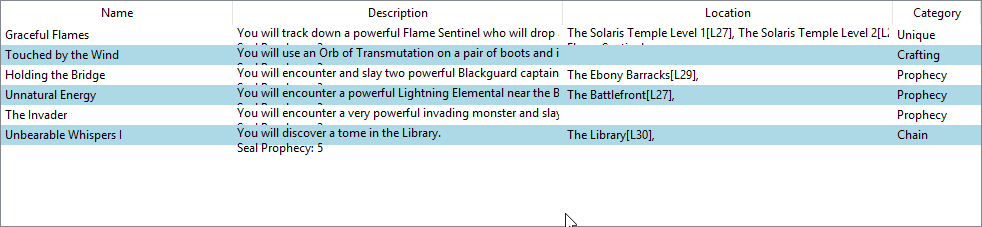 crude sparrow
Hmmmm....
I don't think so, lemme check on it
Which version are you using?
Qt or tkinter?
looks like tkinter
fiery quarry
just installed pysimplegui so prob only tkinter
crude sparrow
I don't see a way to do it. Let me see if I can change something
fiery quarry
I'll switch to the QT version if that one is able to
crude sparrow
The Qt table is limping along 😐
It should work, but I was struggling a bit with sizing it
Can't hurt to try.
fiery quarry
Do I have to worry running pysimplegui and PySimpleGUIQt in the same env?
crude sparrow
will be no issues
I run them both all the time
just switch the import statement and poof, you're done
I see the setting in tkinter, I'll add the capability
give me a few minutes
Another option is to create the table using Text elements or an input element. This will give you more size control. Working on the table now, but tkinter isn't behaving.
fiery quarry
Just tried QT version and it looks not as good
crude sparrow
@fiery quarry, I have found the right setting in tkinter and have modified the code, but it's not resizing correctly.
crude sparrow
OK, I found something that's working
it adjusts the row height on all rows however, not just a single row
Normally...
fiery quarry
that looks fine
crude sparrow
ok, get a new PySimpleGUI.py file from the GitHub Master Branch and you'll find a row_height parameter
it's in pixels
fiery quarry
just replace it in my env?
crude sparrow
just put the PySimpleGUI.py file in your application folder
Then all you have to do is delete it later when I release to PyPI
I'll get it into the next release
I've been working on one for a few days now, so perhaps as soon as today
crude sparrow
sure... enjoy!
fiery quarry
Would wraplength be possible for tables too? @crude sparrow
crude sparrow
maybe... doesn't column size determine that? I've generally stayed away from that and put it onto the user to break up their text how they see fit
fiery quarry
Or is it a default setting
crude sparrow
I use whatever default is set by tkinter from what I recall
fiery quarry
atleast max_col_width doesn't wrap
crude sparrow
ah, I understand now
lemme look at it
Trying to get a release out and get your stuff onto it. If this looks likely to be a good feature I'll jam it into the release.
hmmmm... could be an issue
there is no 'wrap' for the table iself
I have to wrap the text myself
I dunno is I have all of the information needed to do that. I need to know the width of each column in characters
It looks like I can't do it automatically
I would have to do it in the same way the application would do it.... loop through the rows, loop through the columns, call wrap for each cell giving it the column width
That's how it works on tkinter at least
You said Qt sucked?
@fiery quarry what kind of table issues did you have with Qt?
fiery quarry
It just looked ugly on windows
with the same code that i used with the tkinter version
and it obv won't work with the brand new row_height :p
btw the readthedoc links on https://github.com/MikeTheWatchGuy/PySimpleGUI/wiki don't exist
GitHub
Launched in 2018 Actively developed and supported. tkinter and Qt supported. Super-simple to create custom layout GUI's. Python 2.7 & 3 Support. 100 Demo programs & Cookbook for rapid ...
crude sparrow
They broke me a while back... damnit
I can't believe that happened
I'll just use the URL I give out http://www.PySimpleGUI.org
None
thanks for notifying me
fiery quarry
don't forget to update the table elements too
alternating_row_color is only listed in the patch notes
crude sparrow
It's in the readme now 😃
it's posted at least... I'll make sure it gets over to readthedocs
Oopps... hadn't merged
GitHub
Launched in 2018 Actively developed and supported. tkinter and Qt supported. Super-simple to create custom layout GUI's. Python 2.7 & 3 Support. 100 Demo programs & Cookbook for rapid ...
It's on the "homepage"
taking forever for the readthedocs to build
fiery quarry
Man I don't feel like I advance in python at all
I just seem to get better at reading the docs of different packages
crude sparrow
Wha? You're writing GUIs
Maybe because the docs suck
I only added the stuff today
it's amazing you found it in the release notes
crude sparrow
OK, maybe the rest of the docs suck
I SUCK at looking at these various GUI packages
url?
fiery quarry

GitHub
A Python wrapper for Google Tesseract. Contribute to madmaze/pytesseract development by creating an account on GitHub.

GitHub
Tesseract Open Source OCR Engine (main repository) - tesseract-ocr/tesseract
fiery quarry
i mean i get the basics working
crude sparrow
everything out there is underdocumented, severly
fiery quarry
but when i try to tamper with the config and pass a custom user-words
i can't find the answers
crude sparrow
I ran a Jupyter notebook yesterday for the first time and thought there was no way in hell I could have figured out all the stuff they put in there
yea, that ain't you
that's the sucky world of free software
hey, getting it up and running is 50% of the battle
consider yourself lucky
holy crap that thing's been forked 4,487 times!
awefully popular. No other example code you can find that gives you a hint?
PySimpleGUI hasn't broken 100 yet... been at 99 for days
oh, but it's only getting 100-200 installs a day
must have been super hot for a while
fiery quarry
if there were as many ocr packages as gui packages they wouldn't have that much attention
your stuff is nice
crude sparrow
I wrote it for myself, so I kinda know what people are looking for as I was looking for it too
fiery quarry
so yours is a godsend compared to the common solutions
crude sparrow
yea, I don't understand, am completely baffled, why no one has presented a GUI in this manner
Qt could have easily provided an alternate "simple" version of their SDK
just to get people hooked
After all it's only 1 source file. How much work could that have been for them.
fiery quarry
its supposed to be a python package
if i can print("hello")
i want as simple of a window
not writing a class with all that init and self stuff
crude sparrow
you can sg.Print('Hello') and it'll print to a window 😃
fiery quarry
exactly
crude sparrow
even easier ...
yea, it's almost like they MADE it difficult when GUIs went OO
I think I've proven an non-OO model does work
and it works quite well
fiery quarry
i even installed kivy
crude sparrow
Keep plugging at your project
fiery quarry
now my env looks like a mess
crude sparrow
I'm working on Kivy now
really? It's just a pip install
I'm working on PySimpleGUIKivy
it's up next instead of WxPython
You'll get past your problem on the OCR stuff.... have you posted anywhere?
fiery quarry
i tried in the help channels
but noone was interested
i work with pycharm and pipenv
crude sparrow
how about stackoverflow?
fiery quarry
i have yet to post or create an account :<
crude sparrow
I use pycharm with their built-in env on the Linux versions I'm running
on windows anaconda
Heck, try out stack overflow
fiery quarry
oh for kivy i had to install stuff like this
python -m pip install docutils pygments pypiwin32 kivy.deps.sdl2 kivy.deps.glew
python -m pip install kivy.deps.gstreamer
had to go through those steps first to get it working
install kivy already added so many different packages that I didn't think I'd have to manually add all those
crude sparrow
Come to think of it, I had to do that too
I ran into a bunch of errors
On Linux it seemed to just work
just know it ain't you
if these were commercial packages and you were struggling, then yea, maybe have concern
but they're not. You're shooting in the dark. There's no one to call for tech support.
Just think how difficult it was before the internet
Last time I was coding there was no internet that had answers 😃
Email,Yahoo was the search engine of choice, or alta vista
Certainly no stack overflow
fiery quarry
sometimes limited and curated info can be better than the surplus of the internet
crude sparrow
Yea, true, but then again, I ported 90% of PySimpleGUIQt by using HowDoI, a stack overflow tool.
Rarely had to look at the APIs when other people had already done it and posted how
fiery quarry
looking for more accurate tesseract alternatives.... Lite version of Asprise Python OCR is 5000$
crude sparrow
Damn, pricey
fiery quarry
it would be optimal if oneday you could ask the api and not shuffle through it
crude sparrow
But, if you're building a product that's reasonable
Great... my docs are failing due to "timeout"
oops.. now it's back
fiery quarry
I'm starting to think that it is not my fault
the config is just not getting passed on
crude sparrow
that's not your fault
fiery quarry
i guess ill try to workaround with something called Levenshtein Distance
or the less intimidating python library FuzzyWuzzy
 sage oxide
 finite eagle
...
crude sparrow
Of course you can build a game without PyGame. You can build a game with text intput and output.
near lagoon
Kivy might help you there @sage oxide
 final crag
Im using tkinter in GUI but need help
https://pastebin.com/tMrmGjfX This is my code
So this is the outcome
I basically want the two drop down boxes split and in the top left been trying for hours cant fix it.
crude sparrow
Wow, how did you get an image for background??
frosty ermine
I have to say, that picture looks sick
crude sparrow
I didn't think you could do that with tkinter, although maybe I did try this but gave up because the background of the widgets isn't the background image
I just noticed that and I think that's not possible to fix with tkinter. Qt it works correctly.
@final crag I think it has something to do with your grid use. By "top left" to you mean top left of the gray block or on the image?
final crag
dw I sorted it thanks
 tidal spruce
anyone got any idea how to get gtk working with python? i just need whatever version the bog standard import gtk is
nvm found it
some from gi import x
 proper glade
anyone know how to stop QToolTip from being so flickery?
i'm calling QToolTip.showText continually to update it
final crag
Anyone know anything about "invoke" command in python as I found it yesterday dk if it was part of tkinter but it can be used to call a variable to activate it but its now not working.
neon crystal
It really is dumb that the QT designer, which you pretty much need, is included in PySide2 at C:\Users\MyName\AppData\Local\Programs\Python\Python37-32\Lib\site-packages\PySide2\designer.exe
like who is going to go digging there
 pallid vapor
Is it possible to move the buttons (as shown in the image) using tkinter? (@me upon response or I won't see)
crude sparrow
@pallid vapor I would get a Frame, pack the buttons into the Frame, then pack the frame into whatever you are currently putting the buttons into
pallid vapor
@crude sparrow So what would be the approx. code for that?
crude sparrow
Oh, I don't have sample code laying around. Try stuff out. You're packing now or using a grid?
Doesn't matter actually, you can mix I think
row_frame = tk.Frame(containing _frame)
button = tk.Button(row_frame, ...)
button.pack()
row_frame.pack()
I think something like that should work. It's what I'm basically doing in my code
Try using PySimpleGUI 😉
Then you won't struggle with tkinter
yet will still be running tkinter
None
pallid vapor
Ok, thanks 😃
crude sparrow
Your music player will be trivial to code up using PySimpleGUI
I see maybe 5 lines of code from what you've posted
pallid vapor
This is my full code: https://repl.it/@ScottRobinson1/Music-Player

ScottRobinson1
Powerful and simple online compiler, IDE, interpreter, and REPL. Code, compile, and run code in 30+ programming languages: Clojure, Haskell, Kotlin (beta), QBasic, Forth, LOLCODE, BrainF, Emoticon, Bloop, Unlambda, JavaScript, CoffeeScript, Scheme, APL, Lua, Python 2.7, Ruby,...
@crude sparrow
crude sparrow
Oh, hey, great... you've still got a chance to switch over before you get too much further 😃
Would be happy to help... it's really easy
And yet you get the exact same GUI interface shown on the screen.
pallid vapor
Sounds good
crude sparrow
Looks kinda primitive
But you can drop the sliders
GitHub
Launched in 2018 Actively developed and supported. tkinter and Qt supported. Super-simple to create custom layout GUI's. Python 2.7 & 3 Support. 100 Demo programs & Cookbook for rapid ...
See if that looks difficult
You don't need to poll the way I am
I wrote it as a MIDI player front end
I think you'll have a lot of success with it, seriously
None
Plenty of docs and loads of sample programs and a Cookbook too
pallid vapor
It's late so I'm gonna go to bed, but I'll check it out tomorrow. Thanks for the new insight 😃
crude sparrow
no problem.... there have a been a LOT of beginners that have had great success using it
you can post issues in the GitHub and I'll be happy to help support ya
nite
crude sparrow
Discovered you can shrink that layout definition by using a lambda to make a new Element...
    ImageButton = lambda key:sg.Button('', button_color=(background,background), image_filename=image_restart,
                                           image_size=(50, 50), image_subsample=2, border_width=0, key=key)

    # define layout of the rows
    layout= [[sg.Text('Media File Player',size=(17,1), font=("Helvetica", 25))],
             [sg.Text('', size=(15, 2), font=("Helvetica", 14), key='output')],
             [ImageButton(key='Restart Song'), sg.Text(' ' * 2),
              ImageButton(key='Pause'),
                                sg.Text(' ' * 2),
              ImageButton(key='Next'),
                                sg.Text(' ' * 2),
              sg.Text(' ' * 2),ImageButton(key='Exit')],
             [sg.Text('_'*20)],
             ]
 serene estuary
How do you use external libraries with kivy on android? I'm using kivy launcher
near lagoon
@serene estuary I suppose this should cover it: https://stackoverflow.com/a/22609029

Stack Overflow
I'm developing a kivy aplication which depends on a third party library.
How can i set/install this library in android to be able to test my app in kivy launcher? Is it possible or do I have to co...
 tidal cove
In pyqt5, is there a way of overriding QColorDialog to display in the main window instead of appearing as a dialog box?
tidal cove
did it, sorry guys
 sage umbra
is there a way of getting a widget like this in pyqt?
crude sparrow
I can do it in PySimpleGUI easy enough so it's possible in PyQt.
Hmmmm... is that a listbox?
what's the thing at the top, a search?
@sage umbra I don't suppose you can use PySimpleGUIQt can you?
sage umbra
ive made a phat project with just pyqt tho - would it be ez to incorporate it in?
crude sparrow
I can code this search-listbox thing up in under 30 lines of code
yea, I figured as much
sage umbra
or does it need to be a whole new app
crude sparrow
Sure, you could work it in, but they would be separate windows most likely
I dunno what's possible mixing as no one has tried it
Sorry that I don't know how to do it all in Qt itself. I wrote PySimpleGUI so I wouldn't have to code directly in Qt
I'll code up an example for you
sage umbra
oh woah ur pysimplegui
crude sparrow
import PySimpleGUIQt as sg

names = ['Roberta', 'Kylie', 'Jenny', 'Helen',
        'Andrea', 'Meredith','Deborah','Pauline',
        'Belinda', 'Wendy']

layout = [  [sg.Text('Listbox with search')],
            [sg.Input(do_not_clear=True, size=(20,1),enable_events=True, key='_INPUT_')],
            [sg.Listbox(names, size=(20,4), enable_events=True, key='_LIST_')],
            [sg.Button('Chrome'), sg.Button('Exit')]]

window = sg.Window('Window Title').Layout(layout)

while True:             # Event Loop
    event, values = window.Read()
    if event is None or event == 'Exit':
        break
    print(event, values)
    if values['_INPUT_'] != '':
        search = values['_INPUT_']
        new_values = [x for x in names if search in x]
        window.Element('_LIST_').Update(new_values)
    else:
        window.Element('_LIST_').Update(names)
    if event == '_LIST_' and len(values['_LIST_']):
        sg.Popup('Selected ', values['_LIST_'])

window.Close()
None
pip install PySimpleGUIQt
You need PySide2
But it does also run with PyQt5
I just tried both
on Windows
Something weird with my scrollbar on the listbox, but works OK
28 lines in total for everything
Not bad for a filtered search listbox
sage umbra
yea ill try it
crude sparrow
You can always just use it as a popup to get the values
It also works with tkinter
for tkinter install plain PySimpleGUI
tkinter version
By changing just the import statement, I was able to run on tktiner
If you end up coding this search-listbox in Qt, I'm really interested. I want to see how much code it will take to do the same program straight Qt.
sage umbra
had a slight change of plan - not gonna make it a live search anymore
crude sparrow
Nice looking GUI
I still enjoyed the challenge of coding up your search box 😃
I ended up adding it to the Cookbook
tidal cove
good work on PySimpleGui man, i've not actually tried it as ive been learning PyQT, but it looks like i may give it a shot to know up some quick gui's
 void sluice
Do you like tkinter, @crude sparrow
crude sparrow
@void sluice Generally speaking... yea, as long as I don't have to program using it. I wrote PySimpleGUI specifically because I found tkinter to be too wordy and a bit weird. I wrote one tkinter program, PySimpleGUI.py. Now I can run lots of tkinter programs easily 😃
@tidal cove Thanks very much! Give it a try. You'll be shocked at how easy it is after you've done Qt directly.
 rugged sinew
@crude sparrow keep in mind that this is a help channel. what you're doing is bordering perhaps a little bit too close to advertising.
by all means recommend your app if they ask for recommendations, but if people are asking for pyqt assistance, "maybe you can use this thing I wrote instead" might not be the answer we'd like to see in this channel. hope you understand.
crude sparrow
I'm just answering questions
Trying to help where and when I can
I'm sorry if that's offensive
I answered 2 questions that were directed specifically to me today.
I'll be on alert not to "advertise"
crude sparrow
Can anyone tell me what is messing up my scrollbars in my listbox and other widgets with scrollbars?
you can see the scrollbar isn't quite right
I suspect that I'm screwing up the style sheet, but I'm not setting anything that deals with the scrollbar
crude sparrow
Yea, I was right... style sheets....
What I want to do is be able to change things like the font, yet leave everything else alone
I've not been able to figure out how to get the "default" values that I can then modify
It's like an all or nothing
                style = element.QT_ListWidget.styleSheet()
                style += """QScrollBar:vertical {
                            border: none;
                            background:lightgray;
                            width:15px;
                            margin: 0px 0px 0px 0px;
                        } """
That ended up being my fix... my hope was that I could get the default sheet by calling styleSheet() but it's returning a blank sheet
 digital rose
crude sparrow
digital rose
crude sparrow
Porting a text based game to graphic based... I'm getting really close to being done with it. More polish would be good.
Any suggestions?
 storm latch
Looks good. I'd make your stats on the right bigger, and prettier
Looks like the window expands with the hand growth, a scroll effect would be a nice addition
crude sparrow
I expand downwards now. Increased player font size, colored each of the 4 players with one of the 4 colors used in the game. Dunno where to put the Quit button.
 peak ice
Skynet will always win :)
crude sparrow
I dunno.... Hal plays pretty good too
 keen nymph
How can I create a web interface for a Python script/project?
I consider myself a beginner in Python and Web-Development. I have done some projects and have fair understanding of Python Scripts and web development using JS/React. I want to enter web development world (using Flask/Python). I don't have very good understanding of back-end development (limited understanding of servers). However, I have good understanding of Linux.
I have a Python script (implements Selenium). I want to create a "WebInterface" to interact with the script. It means I will run the script on a Linux machine and I want to create a website which will:
- Plot values of objects inside script on the website i.e show the values of variables etc. on the website.
- Stop/Start the script and control the flow of the script.
- Add some codes in the script (like scrapping new websites).
- The web-interface can be accessed from the internet.
Here is how I think this should be done:
- The script will store/save the datapoints/values of objects/variables in a database.
- I will create an api to access the database.
- The website will be wrapped around the api.
I am not sure this is the ideal way, but I can't think of any other way.
So here are my questions:
- The way I think it should be done requires me to run three different scripts (script, api, website). Is it ideal?
- I want to do everything from my Linux machine(run script, serve api and website). Is it possible?
- What are the different ways to approach what I want to achieve?

 quaint atlas
there's bottle too
anyway
has anyone used pysimpleguiqt (what a mouthful) before? I want to create a window and update the text within without destroying the old window and creating a new window. is that possible?
@crude sparrow maybe you've got an idea on how i can do this?
quaint atlas
thank you, and no, i honestly find them quite confusing tbh lmao
quaint atlas
i dunno, i dont find that its very user friendly in a sense
like it almost feels as if its feeding you information, like, cramming you with info in a sense
crude sparrow
If you use the readthedocs version with the outline on the left you'll find it easier
ok..... maybe something a little less metaphysical?
isn't that what "documentation" is supposed to do? 😉
anyway, have a look.. if you're still confused lemme know
crude sparrow
don't be afraid to rtfm
quaint atlas
gotcha
rugged sinew
@crude sparrow less than a week ago I told you not to use this channel to advertise, and now you try to post a link to your discord server in it?
crude sparrow
is that a problem? I was talking to a person specifically about his question he asked me
and I thought it would be better to move offline
it was my attempt to do something good
Is that a bad thing?
rugged sinew
of course it's a problem. it's doing the opposite of what you were told to do.
crude sparrow
then delete it!
rugged sinew
look, if you're not interested in following our rules, maybe you should find another server to hang out on.
crude sparrow
Festive Doggo came in and asked me a specific question
I had no clue that was a rule
I thought it was like telling someone to go to a server to talk
I shouldn't have done that in the open?
I was a moron
rugged sinew
I don't care if you knew it was a rule, you agreed to our rules when you joined this community. if you don't know what they are, maybe you should read them again.
!rules
 proven basinBOT
Rules
The rules and guidelines that apply to this community can be found on our rules page. We expect all members of the community to have read and understood these.
https://pythondiscord.com/about/rules
crude sparrow
Lemme read 'em
rugged sinew
but that's not really my point, either
crude sparrow
Did you read the conversation?
rugged sinew
my point is that I told you last saturday specifically that you were a little too close to advertising for comfort. and you gave me some fucking snide answer where you put "advertising" in quotes.
crude sparrow
I can't ask for feedback on a UI?
Oh geez... dude, I'm sorry if I broke some weird server rule
and that you mistook my intentions
rugged sinew
I don't think I like your attitude very much.
rugged sinew
who said anything about you answering a question
why would I have a problem with that
crude sparrow
I dunno
I'm trying to figure it out
do I not sound surprised and confused?
I got no problem playing by rules and I really don't know what advertising I did after my scolding
clue me in
rugged sinew
last saturday, some guy asked for help with pyqt, and you suggested they use pysimplegui instead. I warned you that this isn't really cool with us. you responded in an arrogant manner.
and just now
crude sparrow
what did I do here in User-Interfaces that constituted advertising?
rugged sinew
you didn't know what - not to advertise after you had just been told?
crude sparrow
you can choose to believe me or not
if I made a mistake, cut me some slack
but get off my ass
not to post a link
 haughty birch
It was going so well
crude sparrow
I spelcificaly put the guy's name in the message
rugged sinew
 crude sparrow
dude, you may think I'm the son of satin for breaking this giant rule
but I didn't know
rugged sinew
@haughty birch can you deal with this
haughty birch
How about not digging yourself into a hole
crude sparrow
I'm trying to explain is all
OK, got it
I messed up
just know I didn't do it on purpose and didn't think I did anything wrong
why would I do something go hugely wrong on purpose?
I'm not an idiot
haughty birch
You're continuing to miss the point, continuing to dig yourself into a hole, and your attitude is terrible
crude sparrow
I've got integrety
wraith forge
You know the rules now, so let's just go from there. It's over, it's done with, let's move on
Sound good?
crude sparrow
I'm reading the rules
I don't understand the rule
Can someone please point it out?
I'm not being smart
I searched for link
nothing about server
what's the rule?
wraith forge
10. We do not allow advertisements for communities or commercial projects - Contact us directly if you want to discuss a partnership!
And where does it say posting a link to a server is advertising?
wraith forge
This is first and foremost a learning server
crude sparrow
isn't that subjective?
wraith forge
Can I talk or are you going to interrupt me? I'm trying to explain it.
When someone comes into the channel asking for help on a particular library (tkinter, PyQt, PySide, etc.), the correct response isn't "That one sucks you should try this instead."
If someone is asking for options or alternatives to the more common UIs, that's when it would be appropriate to mention yours.
The first instance would be advertising, the second would be a suggestion.
crude sparrow
I understand the initial infraction
I just had someone got a foot up my ass
For something that I see nowhere written
I'm kinda really ticked about that
wraith forge
What specifically are you referring to
 fallen oxide
You do understand that a Discord server is a community, yes?
That was our intention with that rule
wraith forge
Ah, the discord server link
crude sparrow
no, I don't understand that
fallen oxide
Well, now you do :P
I'll clarify the rule if you like, but that's the intention of it
crude sparrow
Right, now that I've got a second asshole
wraith forge
Do you want to complain or do you want to work this out
crude sparrow
I don't like being torn into like some wolf for making some weird mistake
wraith forge
Because right now you're not endearing yourself to any of us
crude sparrow
At this point I want to complain
haughty birch
Then maybe listen instead of arguing at every step
crude sparrow
I'm really sorry
haughty birch
Hence "digging yourself a hole"
crude sparrow
But look, I had no idea, I'm seeing nothing written, it's lore for all I know
fallen oxide
I'm gonna update the rules page just for you.
crude sparrow
But I'm going to demand as much respect as any moderataor
haughty birch
Respect is earned, not demanded
wraith forge
Talk a walk for a bit. It's done and over with
crude sparrow
Right
wraith forge
We're aware of where we all stand now
fallen oxide
That'll be live for you when the deployment pipeline has finished running, so now you have something to refer to
quaint atlas
hey there, can i make certain text a different colour in pysimpleguiqt?
in a popup yes
crude sparrow
Yes, you can change the text, background and button colors in a popup.
not not a particular bit of text
Maybe there's a way however.....
Are you using tkinter or Qt?
 ocean solstice
I am trying to make a button responsive so i can put it below my entry,s but i dont know how to do that in Tkinter can someone help me. I am using Geometry
 empty valley
For doing something like that I'd probably recommend using .grid() instead of .pack() @ocean solstice
ocean solstice
@empty valley Thx man
 ripe hazel
does anybody here run java in Visual Studio Code?
quaint atlas
@crude sparrow Qt
 mighty frigate
@quaint atlas I know Qt, more specifically QtCore, QtGui and QtWidgets
is there something I can help you with
quaint atlas
i mean sure, yeah. atm im using pysimpleguiqt but i honestly wouldnt mind migrating over to qt its self. i just want to design a console styled gui that will allow me to add on lines using a sort of function i suppose
my explanation is awful sorry about that
crude sparrow
Can I help you @quaint atlas? I haven't figured out how to do colored text with Qt... checking stack overflow
It looks like the QLabel needs to be set to Rich Text format
 final flicker
@quaint atlas do you just want a button?
qt has colored buttons
qt5 is the newest
crude sparrow
Has anyone seen an application that uses the "Paned Window" widget used from tkinter? It's an unusual widget and am looking for some examples of it in action.
pallid vapor
There’s an example in the answers here: https://stackoverflow.com/questions/45271397/python-tkinter-paned-window-not-sticking-to-top
Stack Overflow
Thanks for taking time to look at this. I've been struggling with this for almost a week and its driving me crazy.
I have a horizontal Paned Window which is supposed to stretch from the bottom of...
@crude sparrow
 floral steeple
C:\pythoncard\lib\site-packages\pythoncard\tools\resourceEditor\resourceEditor.py
C:\python25\lib\site-packages\pythoncard\tools\resourceEditor\resourceEditor.py
im gonna try to find the file of the menu creator
C:\python25\lib\site-packages\pythoncard\tools\resourceEditor.py
MGO
OMG
loading...
search
why am i texting here lol
 desert crag
can anyone help
i have some basic tkinter code
and code i have done in python
but im not sure how i can incorporate the two
desert crag
ok

Pastebin
theres the tkinter
there's my main code which i want to have an interface to
crude sparrow
@pallid vapor Thanks... gave me an idea of one use... I have a program that plots matplotlib plot and also shows the source code for the plot. Rather than showing them both on the same window, this Pane worked really well. In this case it's like a "tab" but without the tab being visible all the time.
https://user-images.githubusercontent.com/13696193/50046965-cb664c80-007a-11e9-9470-b7d1ab3fa20e.gif
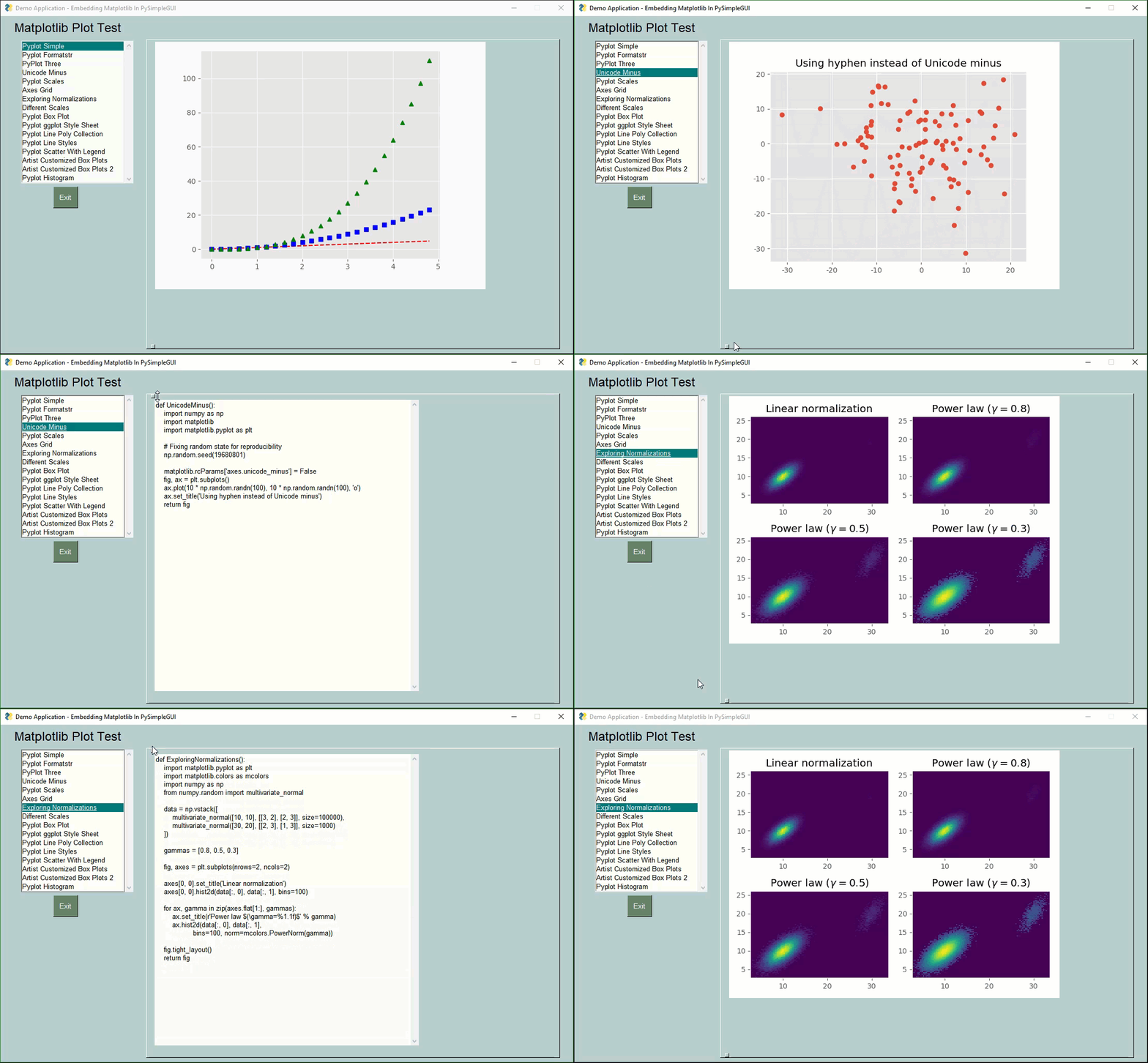
It could perhaps be good with "side by side" video images, one being "processed" in some way, the other being plain.
I can't recall any Windows program that I regularly use having this kind of widget in it
Previously the window looked like this:
proven basinBOT
Resources
The Resources page on our website contains a list of hand-selected goodies that we regularly recommend to both beginners and experts.
https://pythondiscord.com/info/resources
 fringe slate
Hello, how can I have a full screen with tkinter with the menubar ?
pallid vapor
You may find an answer here: https://stackoverflow.com/questions/7966119/display-fullscreen-mode-on-tkinter
Stack Overflow
How can one get a frame in Tkinter to display in fullscreen mode?
? ? I saw this code, it's very usefull,
import Tkinter
root = Tkinter.Tk()
root.overridered...
@fringe slate
fringe slate
Yes, but there is not the menubar
 lime shell
hey, could someone give me some good info or a video tutorial on how to create and display SQL databe on Tkinter ? i would want to insert and remove data using Tkinter GUI(edited)
digital rose
@lime shell search for things indirectly
lime shell
i already kinda done what i wanted,thanks anyways
might have few further question tho
digital rose
I'm not really experienced with tkinter but ask
fallen oxide

As mentioned in the Qt 5.12 release blog we finally reached the point that we can announce the first release of Qt for Python for Qt 5.12. As it has become custom for the project and expected by Python developers, you can install the release via: pip install PySide2 Additiona...
mighty frigate
nice, i'll try it out
crude sparrow
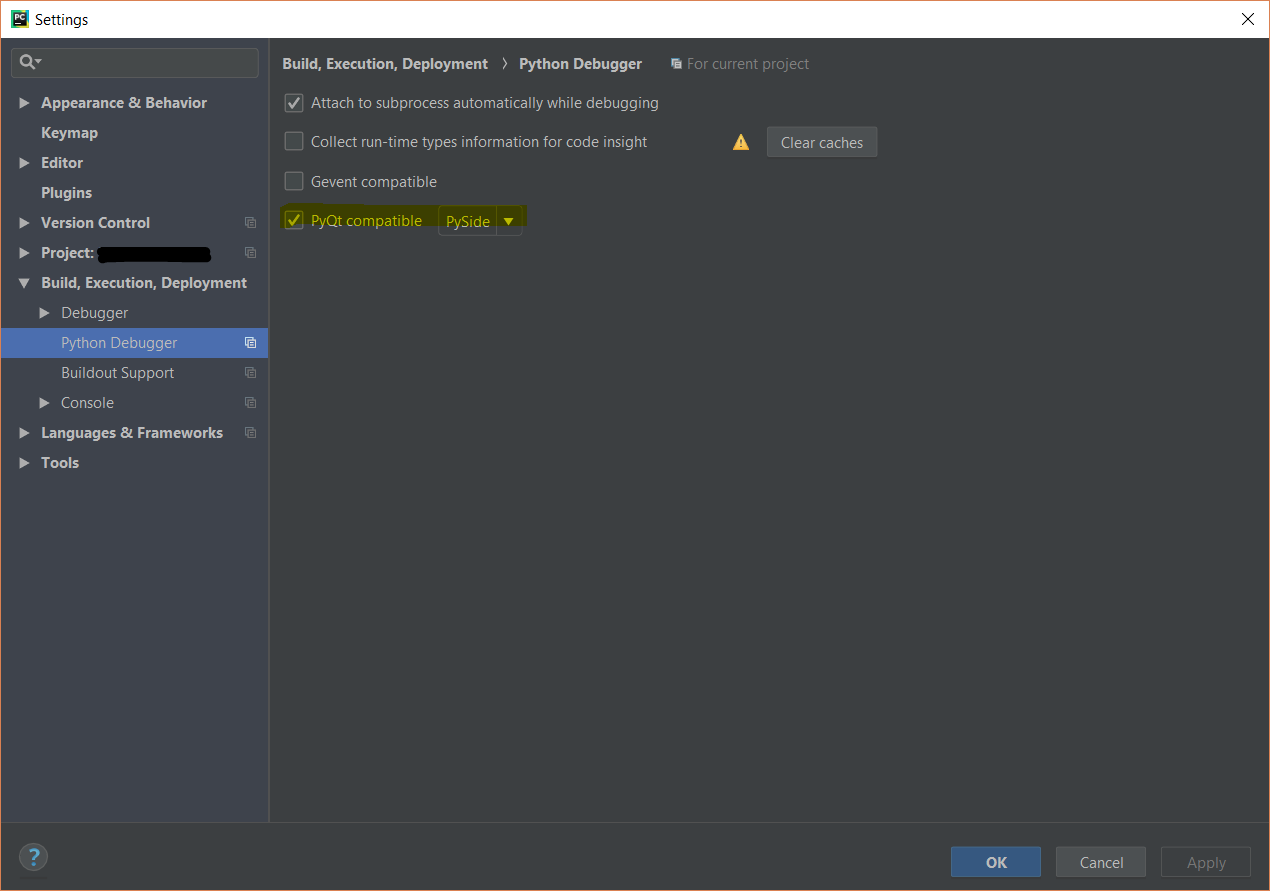
Upgraded to 5.12 yesterday and then was unable to use PyCharm debugger with it. Had to go back to prior version.
It would run normally just fine, but if tried to debug with it then got DLL error
mighty frigate
@crude sparrow what error ?
crude sparrow
Traceback (most recent call last):
  File "C:/Python/PycharmProjects/GooeyGUI/PySimpleGUIQt.py", line 15, in <module>
    from PySide2.QtWidgets import QApplication, QLabel, QWidget, QLineEdit, QComboBox, QFormLayout, QVBoxLayout, QHBoxLayout, QListWidget, QDial, QTableWidget
ImportError: DLL load failed: The specified procedure could not be found.
Only happens when trying to run in debug mode
down-rev to 5.11.2 and it goes away
 mighty frigate
Im so confused regarding the install process
because you updated your Qt install I assume
which sound perfectly fine
but the blog explicitly says "install that with pip"
mighty frigate
okay then
crude sparrow
I'll wait for the stuff to get shaken out
mighty frigate
how to downgrade a package using pip ?
crude sparrow
pip install pyside2==5.11.2
mighty frigate
ok thanks
 amber patio
anyone know how to set a new landmark with turtle pls ?
 fallen blaze
I just got started with PyQt5. Are there any good tutorials you guys would suggest for a beginner?
final flicker
it really depends on what you want your ui to do.
final flicker
i recommend using QT5 designer if you can
its drag n drop what makes it all so much faster
but you can still adjust later
 fast silo
hey guys
Question about the pyqt5 designer
I'm totally new to this, so
If I design a simple window with the designer and generate code out of it, how and where would I write my code?
Like, if button whatever is pressed, then ...
all tutorials I can find seem to cover qt through writing all code manually
 rancid pier
final flicker
rancid pier
final flicker
i think you screenshoted both monitors so its a bit hard to tell whats going on
final flicker
yeah, but i have no idea what the challenge is, so im not of much help lol
bleak smelt
Anyone able to help for a second? I need to screen share what I have going on, to better explain what I'm experiencing. It's in regards to class inheritance.
ocean solstice
@digital rose I think Tkinter is a good one to start
ocean solstice
Does anyone know how the order of a listbox works? I have an for loop and if I print my loop I get another other then if I print it
I want to switch my listbox order to my print order if possible
crude sparrow
tkinter or Qt?
sounds like you need to sort your list in the same way as you're printing and set the listbox using that list
 gentle rain
How does one change the top left title of an application when using PySide2, I can't exactly locate what module would enable me to do this.
twin warren
What piece of the module are you using to build the GUI?
A QWidget or a QGUIApplication?
gentle rain
I got it, I was trying to change the window title from QWebEnginePage when in reality I was supposed to do setWindowTitle(param) on a QWebEngineView object
twin warren
There ya go 👍
gentle rain
im blind ngl
twin warren
Happens to the best of us.
gentle rain
im not used to not being able to peek into the definition of methods haha
fast silo
hey
so I made a layout with qt designer, what I now want to do is figure out where to write my code. Like, if button is pressed, then... The code looks like this:
from PyQt5 import QtCore, QtGui, QtWidgets

class Ui_MainWindow(object):
    def setupUi(self, MainWindow):
        MainWindow.setObjectName("MainWindow")
        MainWindow.resize(800, 600)
        self.centralwidget = QtWidgets.QWidget(MainWindow)
        self.centralwidget.setObjectName("centralwidget")
        self.pushButton = QtWidgets.QPushButton(self.centralwidget)
        self.pushButton.setGeometry(QtCore.QRect(330, 310, 75, 23))
        self.pushButton.setObjectName("pushButton")
        MainWindow.setCentralWidget(self.centralwidget)
        self.menubar = QtWidgets.QMenuBar(MainWindow)
        self.menubar.setGeometry(QtCore.QRect(0, 0, 800, 21))
        self.menubar.setObjectName("menubar")
        MainWindow.setMenuBar(self.menubar)
        self.statusbar = QtWidgets.QStatusBar(MainWindow)
        self.statusbar.setObjectName("statusbar")
        MainWindow.setStatusBar(self.statusbar)

        self.retranslateUi(MainWindow)
        QtCore.QMetaObject.connectSlotsByName(MainWindow)

    def retranslateUi(self, MainWindow):
        _translate = QtCore.QCoreApplication.translate
        MainWindow.setWindowTitle(_translate("MainWindow", "MainWindow"))
        self.pushButton.setText(_translate("MainWindow", "Test"))


if __name__ == "__main__":
    import sys
    app = QtWidgets.QApplication(sys.argv)
    MainWindow = QtWidgets.QMainWindow()
    ui = Ui_MainWindow()
    ui.setupUi(MainWindow)
    MainWindow.show()
sys.exit(app.exec_())```I tried to do a py def __init__(self)
which didn't work, so no clue where to put it
 hoary panther
I got some objects in a QML view and when a particular state changes I need the z for that object to be above all other objects. When going back to the other stage the animations get handled, but the z gets immediately set to 0 again. Is there any non-dirty way to make the z go to zero after all the other animations have happened?
Ive got other objects with different properties, but with the same problem, how do I make sure a property gets set after all the animations have happened, and not before?
twin warren
@fast silo Your button functionality would be held within its own function, and would be set using, for example: py button.clicked.connect(say_hello)
fast silo
yea, I got that, I just don't know where I should place that
and the function say_hello
twin warren
Place it in next to your button.
Your function can live anywhere, so long as it's within the class.
twin warren
Where are you placing the function?
Can you show me your connect line?
fast silo
self.pushButton.clicked.connect(tester)
Is your function within your class?
fast silo
yea
twin warren
self.pushButton.clicked.connect(self.tester)
fast silo
works, thanks a lot!
would I have to write my whole code inside that class then?
or how could I best use multiple modules
or files
fringe slate
Hi, how can I test the color of a click on tkinter (for example, check if the click is on orange)?
crude sparrow
@fringe slate what are you clicking? Is it a canvas with an image of some kind that you are clicking? Or part of the window?
fringe slate
it's a circle in a canvas
sage umbra
Does anyone know how to override a close event in PyQt4? All I want to do is add a "Are you sure you want to close" window
crude sparrow
@fringe slate I would think you'll need to get the x,y from the click on the canvas and then use that to determine where on the canvas is being clicked. Since you're drawing the canvas do you not have the ability to compute what's at a particular location? Can you query the canvas to determine pixel value at a location?
gentle rain
When working with signals in PySide2, is there anyway to specify what part of the object to connect?
class MainWindow(QMainWindow):

    def __init__(self):
        super(MainWindow, self).__init__()
        self.page = QWebEnginePage()
        self.pageView = QWebEngineView()
        self.setCentralWidget(self.pageView)
        self.scriptLoader = scriptLoad.scriptLoader(self.page)
        self.pageView.load(QTRequests.get("https://www.google.com/"))
        self.setWindowTitle(self.pageView.url().url())
        self.pageView.page().urlChanged.connect(self.changeTitle)

    def changeTitle(self, url: QUrl):
self.setWindowTitle(url.url())```Currently im doing urlChanged.connect(func) which passes a QUrl object as func's parameters, I'm wondering if you can make it pass what is returned from QUrl.url() directly without using a lambda.
crude sparrow
@sage umbra - by override do you mean ignore ?
In your closeEvent method of your QMainWindow class, you can call event.ignore() on the event that's passed in
sage umbra
@crude sparrow I tried this but it doesnt work so idk
    def closeEvent(self,event):
        close = QtGui.QMessageBox.question(self.window,"Close The Window","Are you sure you would like close the window?\n"
                                            "Any unsaved data will be lost.",QtGui.QMessageBox.Yes | QtGui.QMessageBox.No)
        if close == QtGui.QMessageBox.Yes:
            event.accept()
        else:
event.ignore()```that's the technique that I use and it seem to work for me. Have you tried it without the messagebox to see if you can control the window?
        def closeEvent(self, event):
            if self.Window.DisableClose:
                event.ignore()
                return
I think you'll have to do your message box outside of this function.
digital rose
How can I move this from the left to the right?
from tkinter import *

root = Tk()

b_division = Button(root, text="÷", fg="black")
b_multiplication = Button(root, text="X", fg="black")
b_subtraction = Button(root, text="-", fg="black")
b_addition = Button(root, text="+", fg="black")
b_equal = Button(root, text="=", fg="black")

b_division.grid(row=0,column=0)
b_multiplication.grid(row=1,column=0)
b_subtraction.grid(row=2,column=0)
b_addition.grid(row=3,column=0)
b_equal.grid(row=4,column=0)

root.mainloop()
Change the column @digital rose
pallid vapor
Create invisible buttons that do nothing for column 0 - 4 then have the visible in column 5?
that possible?
digital rose
hm I was gonna add buttons in the middle anyway, I'll try thanks
 thorny lichen
Hey guys, got a question about PyQt5 loading bars. I've got a QDialog window setup with a progress bar in it and a couple of functions inside that class to calculate the precentage based off access to global variables. I'm able to display the progress bar window along with the Main window upon program execution, but I can't figure out how to call the function that handles the calculations and changing the value of the progress bar.
I know how to get a button to intereact with the progress bar, but not how to get a progress bar to pop up when the program initially opens, show the loading progress, and then close the dialog window
thorny lichen
def displayStartProgress(self):
    self.completed_list = []
    self.status_list = self.updateValues()

    while len(self.completed_list) < len(self.status_list):
        self.status_list = self.updateValues()
        for items in self.status_list:
            for key, value in items.items():
                if value["status"] == True and items not in self.completed_list:
                    print("Key: {} - Status: {}".format(key, value["status"]))
                    self.completed_list.append(items)
                    self.status_percentage = self.map(len(self.completed_list), 1, len(self.status_list), 1, 100)
                    self.progress_window_progress_bar.setProperty("value", self.status_percentage)
                    self.progress_window_label.setText("{} started".format(str(key)))

    self.end_time = datetime.datetime.now() + datetime.timedelta(seconds=+5)
    while datetime.datetime.now() < self.end_time:
        self.progress_window_label.setText("Startup Complete!")
Anyone know why the progress_window_label updates fine during the loading process, but won't display "Startup Complete!" after it's done?
 sudden coral
Do you know if the while loop ever executes?
thorny lichen
It does. I took out the print statements so this code wasn't messy
But yes, I put print statements in the while loop to verify
thorny lichen
I think I'd have to copy the entire program for you to test it. I have several threads and global variable dependencies. Plus I'm updating the global variables from data I'm receiving over sockets to another computer.
sudden coral
Hmm fair enough
thorny lichen
But yeah, I'm not sure why this isn't working either. The loading bar updates with the percentage and updates the labels from the dictionary just fine. It's just when it exits that one loop it doesn't want to update the label anymore.
sudden coral
Do you think maybe something else overrides the text?
did you try printing that label's text right after you set it?
is it still the old value?
thorny lichen
Hmm, no I didn't try that. Good idea
sudden coral
Also, did you try updating the label between the two loops?
thorny lichen
Yes. I tried setting it to blank before updating it to "Startup Complete!"
sudden coral
Did it stay blank?
thorny lichen
I never actually saw it go blank. If it did, then it immediately went back to the last value before entering the second loop
Yeah, still not updating. I even created a new variable and placed the variable inside the setText function and printed out the variable.
sudden coral
Don't know. Doesn't make sense to me
Maybe something from the outside is messing with it
Likely if you create a test program with this, it will work
thorny lichen
So I just realized that if I manually resize the window while it's in the "Startup Complete!" loop, then it displays the correct text...
But if I leave it alone, it's like the window doesn't refresh after it's done with the first loop
sudden coral
Try calling .adjustSize() on the label?
thorny lichen
Is that just a self.label.adjustSize(x, y)?
sudden coral
No, I do not believe it takes any arguments
It automatically adjusts to fit contents
thorny lichen
That didn't work
I'm noticing there's also clipping sometimes on the text when it first comes up unless I resize the window
Can I call a window resize in the middle of the loop?
gentle rain
Does anyone have example usage of setWindowFlags for a QMainWindow in PySide2, I can't figure out how to hide the window close, minimize, maximize buttons on MacOS.
crude sparrow
flags = Qt.FramelessWindowHint
flags |= QtCore.Qt.Tool
qt_QMainWindow.setWindowFlags(flags)
That's what I do to hide the titlebar completely
digital rose
I have this quick program that I made that checks all drives and formats the drive in the system storage you want it to. it worked but now whenever I press the ok button it flashes a command prompt and does nothing
from tkinter import *

def ok():
 drive =   string.get()
 format1 = string2.get()
 os.system("format"+str(drive)+" /FS:"+str(format1)+"/q")
driveinfo=str((os.popen("fsutil fsinfo drives").readlines()))
availabledrives=[]
for i in range(ord('A'), ord('Z')+1):
    if (chr(i)) in driveinfo:
        availabledrives.append(str(chr(i)+":"))

master = Tk()
master.title("picses")
master.configure(background="grey17")
master.resizable(width= False, height= False)
master.geometry("255x130")

string = StringVar(master)
string.set("          C:        ")
string2 = StringVar(master)
string2.set("     NTFS       ")

dropbox = OptionMenu(master, string,*availabledrives)
dropbox["menu"].config(bg="grey70")
dropbox["activebackground"] =("grey70")
dropbox.pack()
dropbox.configure(background="grey70")
dropbox.grid(column="3",row="1",pady=10, padx=10)

dropbox2 = OptionMenu(master, string2, "NTFS", "FAT32", "EXFAT", "HFS")
dropbox2.grid(column="3",row="2")
dropbox2["menu"].config(bg="grey70")
dropbox2["activebackground"] =("grey70")
dropbox2.configure(background="grey70")

w = Label(master, text="Drive:",padx ="10", bg='grey42')
w.grid(column="1",row="1")

E = Label(master, text="Format:",padx = "10", bg='grey42')
E.grid(column="1",row="2",pady=10, padx=10)

button = Button(master, text="OK", command=ok,padx=42)
button.grid(column="3",row="4")

master.mainloop()```Im unsure if this fits in this channel due to it being semi related to UIs but i've noticed that on macOS Mojave, PySide2/PyQT5 enjoys not rendering windows/widgets. Has anyone else experienced and fixed this issue?
digital rose
nvm solved my issue, forgot to add space after "format"
final flicker
hm im getting a import error for pyqt5 on my raspberrypi
thorny lichen
@sudden coral , follow up to what you were trying to help me out with yesterday regarding the "Startup Complete!" text not updating in the label. So it turns out that that PyQt needs to be explicitly told to repaint if there's processing going on in the background. I'm not 100% the details behind how it works. but I found that if I add this after the sexText() call, then it works.
QtWidgets.QApplication.processEvents()
@final flicker Try this on the Pi:
sudo apt install python3-pyqt5
That's what I use to install everything I need for PyQt on the Pi
final flicker
ive done tha
from PyQt5.QtWidgets import QtGui, QtCore
ModuleNotFoundError: No module named 'PyQt5'
thorny lichen
Are you using Python2 or 3?
final flicker
3
sudden coral
that will only install pyqt5 for system's python
so if you're in a venv it wont work
thorny lichen
Yes ^
final flicker
imnot
sudden coral
are you sure
sudden coral
idk then
thorny lichen
pip3 install pyqt5?
sudden coral
was helping someone else with this issue but it's cause they needed to use a different version of python than their system's
final flicker
python3.7 --version
Python 3.7.2
thorny lichen
They've already upgraded to 3.7.2 on the standard Pi image?
thorny lichen
I bet if you open a python 3.5 interpreter and import it will work
thorny lichen
Hmm, try setting up a venv and then doing pip3 install. Otherwise I'd say you might wanna get rid of 3.7 and go back to 3.5
I've been running into similar issues with PyQt and 3.7 recently and I finally got it working after making a 3.7 venv and using pip install
final flicker
hm its on a zero W so im kinda worried about performance
thorny lichen
From the virtual environment?
final flicker
yes. its already struggling
thorny lichen
You shouldn't see any performance hit just from using a virtual environment. If it can run PyQt normally, then a venv won't affect it
thorny lichen
Oh, when why are you trying to import PyQt5?
final flicker
but im using a QObject
thorny lichen
Oh, well then you'll especially be fine using a venv
final flicker
so i can send signals over a custom made tcp socket system
 stiff plume
how did you install 3.7
final flicker
from source
thorny lichen
Why not use the standard socket module instead of a QObject?
final flicker
? i am
stiff plume
did you make sure to install the ssl headers
final flicker
no
thorny lichen
You don't need PyQt to use sockets. Python has a standard library "socket" where you can use sockets.
thorny lichen
If you just want to use sockets, then import "socket" instead of "PyQt5"
final flicker
haha
stiff plume
you need to install ssl if you're building stuff from source, surprised you were able to install pyqt5 actually
final flicker
@thorny lichen the sockets lib isnt just plug n play. i had to write my own implementation of a 2 way socket client server communication
thorny lichen
What's different about a Qt socket and a normal socket?
final flicker
im not using qt sockets (if thats a thing)
thorny lichen
I'm confused why you need Qt then haha
final flicker
im using QObjects to then send signals
qt signals
they have nothing to do with the socket lib
thorny lichen
Hmm, fair enough. Well yea, try setting up a venv and using pip install to install PyQt...I'm betting that the "system" version of python is still 3.5 on your Pi, despite you building 3.7
final flicker
yes it is
but if i call pip like this
python3.7 -m pip install xxx it will use 3.7
thorny lichen
Oh yeah, that should work
digital rose
How would you fade away
a label in tkinter?
like u fade away the frame with like this function...
def fade_away():
    alpha = root.attributes("-alpha")
    if alpha > 0:
        alpha -= .01
        root.attributes("-alpha", alpha)
        root.after(100,fade_away)

    else:
        root.destroy()
but how would i do that on a label
that shows up then goes away
final flicker
@stiff plume where do i get ssl from?
stiff plume
apt-get install libssl-dev
stiff plume
did you install it before or after you installed 3.7.2...
stiff plume
you need to recompile the source then yeah
stiff plume
good night
final flicker
The zero is just very slow.. but what do you expect from 1ghz single core.
But for its size its amazing!
 astral lintel
hi hi
i need some help with PyQt5 things
ive made this small ugly gui rn
when maximizing
it doesnt scale with the maximize things
i kinda need the application to be a fullscreen thing only tho
so like u shouldnt be able to scale it should only be fullscreen mode and there are only minimize option or close option, no maximizing and changing the scale and stuff
how do i do that
in qtdesigner btw
final flicker
there should be a option on the right to set the window size. just set that to the max screen size
gentle rain
Has anyone else had issues with QT window hints not working(making windows just go invisible) on macOS Mojave?
digital rose
copying my question from #help-kiwi upon recommendation from another user:
this should be easy but I think I am overlooking something: the label_frame = tk.LabelFrame(..., width=80) (import tkinter as tk) takes an optional width parameter (cf. http://effbot.org/tkinterbook/labelframe.htm) but when I set a value nothing changes on a visual level? Calling print(label_frame["width"]) prints 80 to the console though, maybe I am missing something in the configuration of the widget?
we talked about how this could be related to the limitation of the window's proportion that widget is attached to but I think I can rule this clue out since the main Window self.master is at the moment not subject to any constraints with respect to height or width
crude sparrow
@digital rose I too have been struggling with the width and height parameter for Frame and LabelFrame. I wasn't able to get tkinter to size the frame to the provided parameters.
digital rose
@crude sparrow so how did you deal when confronted with this situation? My GUI does look quite ugly when the labels and label frames all have different widths
digital rose
as far as tk.Labels() are concerned I have faced no complications when changing their dimensions, though
crude sparrow
Put a blank label in there and you'll be able to size the width
I don't know if you can overlay a canvas but that may be another alternative
digital rose
yes this would work, but it's not a beautiful solution haha
crude sparrow
If you end up overlaying a canvas, please post somewhere
digital rose
I think I'll try the blank label method first
crude sparrow
Yea, it works
digital rose
@crude sparrow I discovered that padx, pady options also can be set as a tuple: padx=(x-left, x-right) as integers. This way you can manipulate the dimension of the widget inside a label frame without adding any empty labels. It's not perfect but the best I could come up with
crude sparrow
right... I use that kind of split-padding pretty heavily sometimes
The baseball UI was done that way
digital rose
still you have to rely on your eyesight to align label frames which yields no precise solution to this problem (what's the point of programming GUI's if you have to revert to something like that?)


 digital rose
true, I'm pretty new to tkinter so I really hope there will be not more of this kind
 umbral sundial
Hello everyone.. so I have a UI question I wanted to run by you guys.. tell me if what im doing is somehow being counter-intuitive or not
may take me a few mins to type it out.. but here it goes
Let me preface this by saying I am pretty new to programming. I am currently in a bootcamp that is specific for Python in NYC.. I know some people don't like bootcamps or whatever but so far im liking it.
my question however is a UI one.....So I'm currently using a mac - im using iTerm2 as my terminal. I use Zsh for my command. I have been trying to get good with Vim as a text editor. I have set up the syntax plugins/etc and am getting comfortable with using my terminal more to execute things.
I recently started using this logitech mouse that I used to use for gaming. I started binding keys to things like splitting panes in iTerm, as well as some commands for editing files within Vim.
Some people have told me to unplug my mouse all together and get used to using your terminal/tmux/zsh/vim etc all from your keyboard because it will help develop good practice. Should I follow that?.. or is me mapping everything i can think of to a hotkey on my mouse beneficial?
digital rose
I wouldn't rely too much on the mouse, not to the point where not having it (it it breaks for instance) makes you useless. Keep your mouse but try to learn the shortcuts too, so the day you end up on a computer without your mouse, you're not too lost.
As far as I'm concerned, I only use the mouse for internet browsing, all the rest is done with the keyboard (i use i3 as window manager, termite as terminal emulator and vim as editor)
digital rose
With all the js stuff going on nowadays, I'd say there are no really good ones...
umbral sundial
hmm... meaning terminal not being able to handle all the new js?
i dont really need bells and whistles... just want to be able to parse through some text from a text based tutorial im using
digital rose
Yeah terminals fail at it, and when you see that many websites even load their menu in js...
But you can try lynx
Or links2
umbral sundial
ok cool thanks
digital rose
Brow.sh is also great, maybe the most advanced right now
It should process js and css3...
You can try it by connecting to brow.sh using ssh, no Auth needed
ssh brow.sh
gentle rain
How does setWindowFlags() work on a subclass of QMainWindow in PySide2, whenever I to try keep my window on top of other windows using the window flag QtCore.Qt.WindowStaysOnTopHint the window goes invisible.
Here is an example of where I think I'm using it incorrectly:
https://paste.pythondiscord.com/reyofodovu.py
crude sparrow
Looking for WxPython help....
What's the right way to perform a non-blocking mainloop call?
astral lintel
Hi I have a table widget but im trying to make the columns go all the way till the end
also i had a general question, there is an application in C# its this sneaker bot
im sort of trying to mimic it
im wondering what widget would mimic that representation
and it needs to have tasks added one by one
digital rose
@astral lintel is that tkinter pyqt? Or something else? What r u using? If it’s tkinter I can probably can help you
astral lintel
Pyqt @digital rose
Although I'm thinking of switching
I just need to make an application like the photo I sent
Not sure what library
The ID Retailer one I wanna mimic
digital rose
@astral lintel oh. If you were using tkinter I would’ve said use list boxes. There must be something similar to a tkinter list box in pyqt. If there is just make columns with it and add stuff to the columns
crude sparrow
@astral lintel due to the buttons on the end of the line I would think you have to create each row as a series of widgets versus a single widget for everything
astral lintel
Hi when using a layout it allows all the widgets in your application to grow with that layout when you lay it out horizontally or vertically or such. But this causes the buttons and widgets to come in a premade layout
which i dont want
i wanted three buttons at the top, and this tree widget at the bottom
the buttons would serve as buttons to take you to another window and the treewidget is for tasks im creating on my program
how do i make it where my buttons grow as the program grows but also so i can lay them out how i want it to
gentle rain
I just learned a very cool fact for anyone doing Qt, if you edit the window flags, some of them require you to show() the window again.
digital rose
Hi, in tkinter when I implement the change event of a combox, it's possible to retrieve the new selected value with .get(0). However, I'd like to have access to the previous selection, too. Without passing this as a new argument, is there anything I can do to get the previous selected combobox entity?
gentle rain
I would probably try and save the last selected value in a variable and update it when you select a new one @digital rose
digital rose
@gentle rain that's actually what I'm trying right now haha
I'll store it as a property of an application because I have multiple comboboxes to keep track of
gentle rain
What are you working on if I may ask, sounds interesting! @digital rose
digital rose
@gentle rain an desktop application to compute and visualize trajectories in vacuum w/o linear drag & quadratic drag (I asked my previous question because I am working on the unit conversion of the results which are displayed in entry widgets, the units are selectable in comboboxes)
gentle rain
Oh, that sounds very, very nice ngl
digital rose
yes, I am learning a lot and it's actually a handy application once its finished 😄
@gentle rain do you happen to know how to update this information? I tried various approaches but it keeps the first value stored (I know why this happens, but not how to prevent this)
gentle rain
Do you have a snippet of the part which updates the variable by any chance?
digital rose
that's the problem, I don't know how to update the variable. I stored it once, and that's it. But I have an idea, I'll be back in a minute
gentle rain
Let me bring out the tkinter bible(effbot cookbook 😎) and lets see if we can figure this out
The issue with binding to the <ComboboxSelected> event is that it'll fire when the widget has already updated, which is most-likely why the variable will save as the newly selected one.
It wouldn't look too good, but you could bind the <Motion> event to update the last selected value whenever the mouse passes over the combobox widget.
digital rose
Yes, and I do want to have the new selected event as a target unit for conversion. That's fine. The issue is with
# code snippt gui
class Application(tk.Frame):
    def __init__(self, master=None):
        tk.Frame.__init__(self, master)
        self.master.style = ttk.Style().theme_use('alt')
        self.master.title("Projectile Motion")
        self.master.resizable(0,0)
        self.ui()
        # fect previous user selection // failed
        self.previous_unit = self.scroll_point_of_impact.get()
scroll_point_of_impact is an alias for the tk.Combobox() widget which has a <<ComboboxSelected>> binding which is in charge of converting the tk.Entry() value
here are some outputs (as print statements lol):
convert!
old meter
new centimeter

convert!
old meter # should be centimeter
new decimeter

[Finished in 7.688s]
I'm messing with if statements atm, lets see if I can get this to save the last value lol
ok
i got something
lul
this isn't pretty at all
but it gets the job done 
digital rose
I've also got a new idea, but let me hear yours first
gentle rain
let me make sure this works
real quick lol
import tkinter as tk
from tkinter import ttk

tkwindow = tk.Tk()
tkwindow.rememberValue = {"currentSelected": None, "wasSelected": None} # dictionary so that we dont have two values

def check_cbox(event):
    if not tkwindow.rememberValue['currentSelected']:
        tkwindow.rememberValue['currentSelected'] = cbox.get() # First time setup
    else:
        tkwindow.rememberValue['wasSelected'] = tkwindow.rememberValue['currentSelected']
        tkwindow.rememberValue['currentSelected'] = cbox.get()
    print(tkwindow.rememberValue)

cbox = ttk.Combobox(tkwindow, values=['Celcius', 'Kelvin', 'Fahrenhiet'], state='readonly')
cbox.grid(column=0, row=0)

cbox.bind("<<ComboboxSelected>>", check_cbox) # calls check combobox whenever new selection.
tkwindow.mainloop()```bam
That should save the last selected value of the combobox
digital rose
cool, thanks
do you know if a binding accepts two commands, e.g. self.scroll_point_of_impact.bind("<<ComboboxSelected>>", self.convert, self.update)?
gentle rain
I have no idea, but I can try real quick
Doesn't seem as if it is, I would just make another function which calls both self.convert and self.update
digital rose
that's seems to be the only way
gentle rain
Do you need an explanation on how the check_cbox function works in my example or do you understand, ik for some people an explanation is just as helpful as working code