#user-interfaces
1 messages · Page 25 of 1
 fallen oxide
 civic isle
So Pyqt was unofficial 😮 ?
 dense whale
Hey
from PyQt5 import QtWidgets, uic
from pytube import YouTube

def Coverter():
    try:
        YouTube('{}'.format(str(lineEdit.text))).streams.first().download(str(lineEdit3.text))
        dlg.lineEdit_2.setText("Downloaded")
    except:
        dlg.lineEdit_2.setText("Error! Not possible.")
What am i doing wrong? It keeps on saying error..
fallen oxide
Impossible to say
You've written spaghetti code
You need to get the exception text to start with
so, except Exception as e:
and then you can dlg.lineEdit_2.setText(f"Error: {e}")
dense whale
Yea. But I dont see where I went wrong.
fallen oxide
YouTube('{}'.format(str(lineEdit.text))).streams.first().download(str(lineEdit3.text))
let's be honest
dense whale
I have defined lineEdit
dense whale
😃
fallen oxide
yt = YouTube(lineEdit.text)
stream = yt.streams.first()
stream.download(lineEdit3.text)
although
text is gonna be a string, so
that's better, isn't it
your issue is that lineEdit is not defined within this scope
Did you define it later on in the function? Did you define it in some other function?
dense whale
No.
 craggy hollow
why do I get this error.
AppData\Local\Programs\Python\Python36-32\lib\tkinter_init_.py", line 2140, in pack_configure
+ self._options(cnf, kw))
_tkinter.TclError: bad option "-bd": must be -after, -anchor, -before, -expand, -fill, -in, -ipadx, -ipady, -padx, -pady, or -side
(edited)
the code line is
topframe.pack(side=TOP)
 sudden stone
@craggy hollow can you show more code?
craggy hollow
I fixed it
dense whale
https://i.imgur.com/Do9iIVz.png
^It downloads videos of youtube. But it the after you press download, it doesnt respond until the video has downloaded. Is there a way to fix it. Maybe putting a progress bar? I'm not sure.
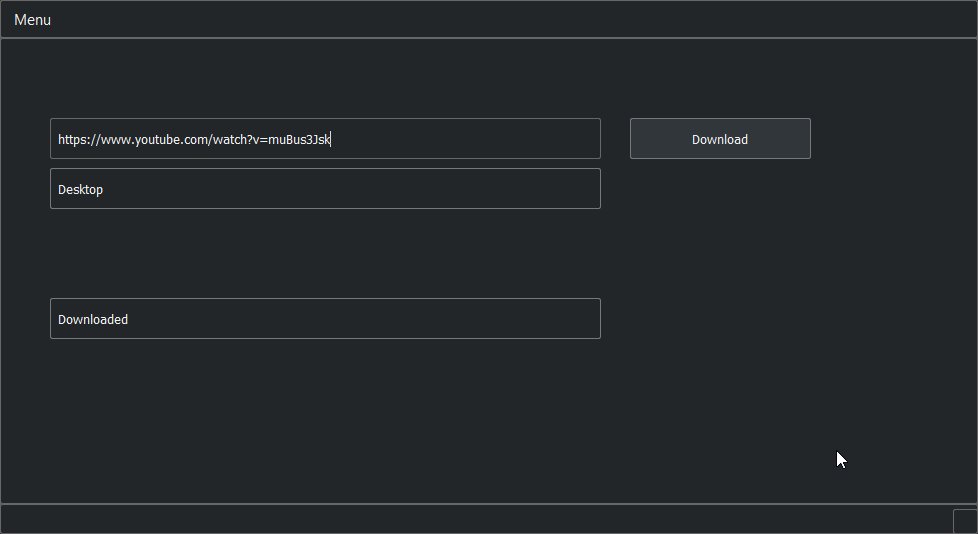
 marble totem
maybe the register_on_complete_callback(func) and register_on_progress_callback(func) methods can be of use
 digital rose
Hi! Tkinter problem here
Label(EncryptFrame,text="File to encrypt: ").grid(column=0,row=1)
fileToOpen = Entry(EncryptFrame).grid(column=1, row=1)


#this is later in the code

def main():
    fileNameToOpen = fileToOpen.get("1.0", END)
fileNameToOpen = fileToOpen.get("1.0",END)
AttributeError: 'NoneType' object has no attribute 'get'
That's the error im getting
Ok I managed to fix that problem
for anyone wondering it's because i put .grid on the same line, you need to have it separate or .get() always resolves to none
sudden stone
@dense whale hey not really help or anything, but could you tell me what you used to create the ui?
tkinter?
 oblique birch
hello guys
dense whale
@sudden stone QT designer then just changed stylesheets to make it have a dark theme.
 sand oar
What is the best library to use to make a nice-looking simple GUI application?
 haughty torrent
Simple GUI? Well, Tkinter is your best friend! @sand oar
Even better, it's built into Python!
sudden stone
Now that’s the type of response we need! Props to you man.
oblique birch
Tkinter is a blessing
anyone does tkinter on a mac?
I got some questoins
*questions
 odd hamlet
tkinter is no blessing
tkinter is horrible
you should be using something like qt or gtk
oblique birch
for beginers its a neat start
I am trying to learn PyQt5
but I have too learn too much and its not on top of the list
 tight bear
Tis a good start. What are your questions?
digital rose
How do I set up differnet grid sizes?
With tkinter
So i can have the text box be that size without making the other things on that row that size
 marble mantle
 kind kraken
@digital rose make the text box span multiple rows
kind kraken
rowspan=4
sand oar
I'm making a PyQt5 application that takes two inputs: the points scored on an assignment, and the number of points possible, and calculates their grade. When I run the following code:
import sys
from PyQt5 import QtWidgets
class Window(QtWidgets.QWidget):
def init(self):
super().init()
    self.init_ui()

def init_ui(self):
    self.points = QtWidgets.QLineEdit()
    self.PossiblePoints = QtWidgets.QLineEdit()
    self.b1 = QtWidgets.QPushButton('Calculate')
    self.percent = QtWidgets.QLabel('')

    numPoints = self.points.text()
    numPossiblePoints = self.PossiblePoints.text()

    self.calculatedPercent = 0

    if((not numPoints == '') and (not numPossiblePoints == '')):
        self.calculatedPercent = (float(numPoints)/float(numPossiblePoints)) * 100

    h_box = QtWidgets.QHBoxLayout()
    h_box.addStretch()
    h_box.addWidget(self.percent)
    h_box.addStretch()

    v_box = QtWidgets.QVBoxLayout()
    v_box.addWidget(self.points)
    v_box.addWidget(self.PossiblePoints)
    v_box.addWidget(self.b1)
    v_box.addLayout(h_box)

    self.setLayout(v_box)

    self.setWindowTitle('Grading App')

    self.b1.clicked.connect(self.btn_click)

    self.show()
def btn_click(self):
    self.percent.setText('Percent: ' + str(self.calculatedPercent))
app = QtWidgets.QApplication(sys.argv)
a_window = Window()
sys.exit(app.exec_())
It just prints 0. Why is this?
 flint citrus
Try printing numPoints, numPossiblePoints, and self.calculatedPercent to see what their actual values are
Also:
bot.tags["codeblock"]
 proven basinBOT
codeblock
Discord has support for Markdown, which allows you to post code with full syntax highlighting. Please use these whenever you paste code, as this helps improve the legibility and makes it easier for us to help you.
To do this, use the following method:
```python
print("Hello world!")
```
This will result in the following:
print("Hello world!")
 sharp rapids
anybody know how to use ListView in kivy
digital rose
Hi, not sure if this counts as a GUI question but
Please anybody who is able to, have a look at my post
Thanks

reddit
1 votes and 0 so far on reddit
which line is causing that error
digital rose
Sorry, its fixed now
sand oar
@flint citrus I tried doing what you suggested, but only blank lines are printed when I press the 'calculate' button.
Here's the current code:
import sys
from PyQt5 import QtWidgets

class Window(QtWidgets.QWidget):
    def __init__(self):
        super().__init__()

        self.init_ui()

    def init_ui(self):
        self.points = QtWidgets.QLineEdit()
        self.PossiblePoints = QtWidgets.QLineEdit()
        self.b1 = QtWidgets.QPushButton('Calculate')
        self.percent = QtWidgets.QLabel('')

        self.numPoints = self.points.text()
        self.numPossiblePoints = self.PossiblePoints.text()

        self.calculatedPercent = 0

        if((not self.numPoints == '') and (not self.numPossiblePoints == '')):
            self.calculatedPercent = (float(self.numPoints) / float(self.numPossiblePoints)) * 100

        h_box = QtWidgets.QHBoxLayout()
        h_box.addStretch()
        h_box.addWidget(self.percent)
        h_box.addStretch()

        v_box = QtWidgets.QVBoxLayout()
        v_box.addWidget(self.points)
        v_box.addWidget(self.PossiblePoints)
        v_box.addWidget(self.b1)
        v_box.addLayout(h_box)

        self.setLayout(v_box)

        self.setWindowTitle('Grading App')

        self.b1.clicked.connect(self.btn_click)

        self.show()
    def btn_click(self):
        self.percent.setText('Percent: ' + str(self.calculatedPercent))
        print(self.numPoints)
        print(self.numPossiblePoints)

app = QtWidgets.QApplication(sys.argv)
a_window = Window()
sys.exit(app.exec_())
 placid quartz
You just want to use self.points.text() and self.PossiblePoints.text() in btn_click.
flint citrus
Yes, otherwise self.numPoints and self.numPossiblePoints are calculated when the UI is inited (at which time they are blank) and they are not recalculated after you enter the values into the app.
sand oar
Thanks. It works!
digital rose
I'm using Menubars and commands
is there a way I can have another
like list drop down
from a command in the menubar
so when i click/hover over the command it opens another list thingy with more actions inside it
this is with tkinter btw
 sinful hill
If I have a while True loop that gets a data from a serial port, does some things with it, and then feeds it into a tkinter gui, how can I do this without the tkinter gui either a) blocking the loop or b) becoming unresponsive? Do you have to resort to threading?
kind kraken
@digital rose add_cascade
@sinful hill You can set up a tcl file handler. https://docs.python.org/3/library/tkinter.html#file-handlers
on unix anyway, not sure on windows.
sinful hill
I did manage to fix it with threading. Would you recommend a file handler instead?
kind kraken
probably not, it just sounded like you didn't want to do threading
kind kraken
@sinful hill the other alternative is to use non-blocking I/O, and poll the serial port on a tkinter timer
then you may not be immediately responsive to serial input though, if that matters for your case
 thick thistle
Anyone doing any mobile development in Python? If so, what are you guys using? I am just curious if Kivy is still being used or if another framework is out there that makes python mobile development a viable option.
digital rose
Does anyone know how I can/could apply a font to a specific selection of text in a Widget in Tkinter Python 3
digital rose
@digital rose you have to define a tag and add it to the selection
digital rose
Hi guys, could anyone look at my post and help me figure out how to terminate a python file with tkinter while executing another python tkinter file?
here is the post: https://www.reddit.com/r/learnpython/comments/8r5usj/tkinter_where_to_place_rootquit_to_make_loginpy/
reddit
1 votes and 0 so far on reddit
Thanks!
tight bear
 tight bear
Ooh, I didn't scroll!
I'm not all too familiar with tkinter, but it seems one solution is to display them at the same time, and switch which one is on top, using frame.tkraise().
digital rose
Wait, what im trying to do is just terminate login.py
because its a little awkward to keep
i want to terminate that after I go into menu.py
What didd you mean which one is on top?
tight bear

Stack Overflow
I have built my first few scripts with a nice little GUI on them, as the tutorials have shown me, but none of them address what to do for a more complex program.
If you have something with a 'start
Just looking at how they're doing it here. It also seems like a much nicer approach using classes for the frames, rather than a bundle of function scoped variables.
digital rose
To be honest, im not familiar with classes
Once I understand classes, I imagine it wont be too hard to transfer
dense whale
Hey there! Could I get some help?
https://hastebin.com/oluqefajad.py
So I don't know what's wrong with the code, but nothing happens. No errors while the window is open but when I close the window, I get:
Traceback (most recent call last):
  File "C:/Users/Alvis/Desktop/PYQTTest/neededtest.py", line 4, in <module>
    from YTYT import Ui_MainWindow
ImportError: cannot import name 'Ui_MainWindow'
All of the UI, etc. loads up. But the video doesn't download. What am I doing wrong?
It doesn't even print anything in the console.
kind kraken
is there a safe way to use tkinter in a multithreaded app without having a Queue that you repeatedly wake up the gui thread to check when it may be empty?
I saw an example suggesting to just call after from the other thread but I can't find any information on whether that is actually thread-safe
 red tartan
can anyone help me with a weird QT issue? working in a QGraphicScene with some custom QGraphicsItems. i set them to movable, but when i drag them they snap to weird places after i drag the first item
video to show what i am talking about (warning music i on in background) https://www.youtube.com/watch?v=okAH4PMqmwc
 red tartan
figured out my issue incase anyone was wondering. i was overloading the mouse event but not calling the event handler because i didn't actully handle the event.
dense whale
Hey there! Could I get some help?
https://hastebin.com/oluqefajad.py
So I don't know what's wrong with the code, but nothing happens. No errors while the window is open but when I close the window, I get:
Traceback (most recent call last):
  File "C:/Users/Alvis/Desktop/PYQTTest/neededtest.py", line 4, in <module>
    from YTYT import Ui_MainWindow
ImportError: cannot import name 'Ui_MainWindow'
All of the UI, etc. loads up. But the video doesn't download. What am I doing wrong?
It doesn't even print anything in the console.
 pulsar coyote
Does anyone here happen to know how to set the felief to flat on the tkinter spinbox buttons?
I tried buttondownrelief=FLAT and it did not error out but it didnt set the thing either
just @ me when anyone responds thanks
 hollow inlet
hi - i want to make a basic timetable program that writes and collects information from jsons with certain names, then displays them on some sort of GUI, would tkinter be reccomended for something simple like this?
 meager gazelle
@hollow inlet sure, why not
dense whale
Hey, does anyone have a solution to my error? 👍
 misty dagger
@dense whale A few seconds of googling suggests circular imports
So something is importing something which imports something which imports the original and it continues endlessly
dense whale
@misty dagger I have no idea what you just said.
misty dagger
If you import module A. Module A might import some things. If one of those things imports module A again. It will go into an infinite import loop, possibly causing that error @dense whale
 misty dagger
What version of python?
misty dagger
Only other idea I've seen is to copy the file and change the name
dense whale
I'll try that
digital rose
Hey, could anyone help out with Tkinter display text boxes
    def insertmessagebox(self, to_insert):
        self.messageBox.configure(state="normal")
        self.messageBox.insert("1.0", to_insert)
        self.messageBox.configure(state="disabled")
I'm using this to make it so the user cant write/input in the text box
But I can still insert/update the box
However now when it gets updated it goes fully white until I click on it
 obsidian lance
@hollow inlet it is not so simple... as i understand you will must display the box with scrolling that show lot of strings... with tkinter it will not easy... if not sure then try)
 signal matrix
How can I have a window closed in tkinter
I have a seperate class in my thing
program
and it makes a little window pop up
kind kraken
@hollow inlet you shouldn't need to change the state to insert text programmatically.
hollow inlet
????
signal matrix
well, I got my situation done
 fast wave
hey. i wrote this code and now when i search on entrybox the listbox lowers down to just one item. how should i get the whole list items back when the entry box is deleted? https://paste.pound-python.org/show/OvVxnCjKa0ZrRQ6FwAaN/
flint citrus
You probably need a reset function that contains the code to initialize the listbox
Actually, it might be simpler to change update_list to pull the query fresh each time
Just modify the query to handle the search logic for you
fast wave
i don't know how 😦
flint citrus
You wrote this right:
SELECT Esperanto FROM Words
i should put this again after i lowered the listbox items right?
flint citrus
You'll need to modify the query to search for your term
Have you done anything else with SQL?
fast wave
no it's my first time
flint citrus
 thorny spruce
I'd change it so you store you initial query results in a list instead of adding them straight to the listbox.
flint citrus
If you scroll down a bit, there's this line in one of the examples:
c.execute('SELECT * FROM stocks WHERE symbol=?', t)
Do some reading on what the SQL WHERE clause does, and how you can use it for searching
thorny spruce
Then change update_list to delete everything and then to loop through the contents of that list adding in those that match
flint citrus
@thorny spruce, that's another way to do it, assuming the database never changes while the program is running
fast wave
i want the listbox first to be populated, then lowered to the item that the user is searching in the entrybox, then the list comes back as before when he deletes it 😃
flint citrus
That's what you'll get from changing the query.
So, basically what you want to do is, instead of pulling the whole list from the database
Just pull the rows that match what the user has typed in so far
And fill the listbox with only those rows
When the user keeps typing, repeat the process
Does that process make sense?
flint citrus
Yep, a lot like that
So SELECT Esperanto FROM Words selects all of the columns rows in the database
A WHERE clause limits the number of rows returned to the ones that match a particular condition
Just like your IF statement in Python
flint citrus
That will match az, alcatraz, or abcdxyz, but not azer
Because % is a wildcard that matches any character(s)
But the a and z represent actual characters.
fast wave
so a-z is a and z in sqlite
flint citrus
If you want to test if a string is in another string (like you're doing in the Python example), like this:
"ell" in "hello"
Where would you want the wildcards?
fast wave
%ell%
flint citrus
Yep
fast wave
😃
flint citrus
So if you do that with the search term, you'll get all results that contain your search term
Just be sure to use the parameter substitution as described in the sqlite3 docs I linked above
To avoid security issues with putting search terms into database queries
fast wave
💯 👍🏿
 frank temple
Hey everybody never made a GUI before where should i start!?
fallen oxide
PySide2 looks like it's going to be the new go-to GUI library, but if you want to just jump in, tkinter comes with Python in most cases
frank temple
Pyside2 it is!!!! Thanks!
signal matrix
Is it possible to add a scrollbar to a Message in tkinter? or a better way to use a listbox where I can have it fit a certain width
Or how can I reduce the font size of a Message
pulsar coyote
font=('Font Name','Font Size')
Put it as one of the options in you widget config
mine is font=('Arial', '10')
signal matrix
what about line spacing?
that actually doesn't matter
no need to find it
I need to figure out how to add a scrollbar to the Message
tk.Message
pulsar coyote
You can set the width and height of a listbox
signal matrix
haven't seen anything
well, using a listbox doesn't help me because when I add the info it spreads over one line
pulsar coyote
Mind explaining what you are trying to show?
signal matrix
I very long string that is of varying sizes, having it organized by line it what I need
in a message
it comes out like this
and in a listbox it comes out as one large line
pulsar coyote
maybe a ScrolledText widget with the option state=DISABLED
You would have to change the state every time you wanted to add/remove text even programmatically but it needs to be disabled if you don't want the user to edit the text in the box
signal matrix
so I would insert my string and it would break it into lines?
pulsar coyote
You would set the option wrap to whatever you want
wrap:
Must be one of: "none", "char", or "word".
Check out this site for more details, I am kinda noob at tkinter
https://docs.python.org/3.6/library/tkinter.html#tk-option-data-types
signal matrix
tkinter is for noobsXD
thanks, I think I got it
So, do you know anything about placement of windows in tkinter?
@pulsar coyote
pulsar coyote
you want them to be exact?
pulsar coyote
2 secs
signal matrix
1920x1080, 1680x1050, I need it to fill the 1680 screen, if I do width=self.current.winfo_screenwidth(), height=self.current.winfo_screenheight(), I get both screens combined
pulsar coyote
I saw a post a while back on somthing like that, I will do some digging for a few mins and try find it
signal matrix
great
pulsar coyote
root.wm_attributes('-zoomed', 1) this might still cover both screens thoe
signal matrix
so, what does that return
pulsar coyote
root being the main tk window, it should just maximimize the application
signal matrix
_tkinter.TclError: wrong # args: should be "wm attributes window ?-alpha ?double?? ?-transparentcolor ?color?? ?-disabled ?bool?? ?-fullscreen ?bool?? ?-toolwindow ?bool?? ?-topmost ?bool??"
if I try to print it
had to change it to fullscreen
now its fullscreen, with no x's, which is kindof a problem
and on the wrong screen
pulsar coyote
I was not thinking correctly. You want to make the widget with the text cover the whole screen? not really sure how to do that sorry. All i can do is make the application cover the screen and fill it with smaller widgets.
signal matrix
I could just make a close button
pulsar coyote
Here is a post on maximizing the app
https://stackoverflow.com/questions/15981000/tkinter-python-maximize-window
Stack Overflow
I want to initialize a window as maximized, but I can't find out how to do it. I'm using python 3.3 and Tkinter 8.6 on windows 7. I guess the answer is just here: http://www.tcl.tk/man/tcl/TkCmd/wm...
Lots of suggestions there.
I have to get back to work sorry, good luck.
signal matrix
okay, thanks
dense whale
posted in wrong channel. 😄 . sorry
from PyQt5 import QtWidgets, uic
from pytube import YouTube
def Coverter():
try:
# YouTube('{}'.format(str(lineEdit.text))).streams.first().download(str(lineEdit_3.text))
yt = YouTube(dlg.lineEdit.text())
stream = yt.streams.first()
stream.download(dlg.lineEdit_3.text())
return dlg.lineEdit_2.setText("Downloaded")
except Exception as e:
dlg.lineEdit_2.setText(f"Error: {e}")
app = QtWidgets.QApplication([])
dlg = uic.loadUi("utubeconvert.ui")
dlg.pushButton.clicked.connect(Coverter)
dlg.show()
app.exec()``` It works, but every time i click download, it freezes until the video downloads.
should i do classes and pass it through a Thread. But I'm not sure how to do that. can anyone help me? misty ingot
Would appreciate some feedback on my GUI: http://prntscr.com/jwevll
I made it with eel

 opal elk
@misty ingot the UI looks amazing!
misty ingot
thanks :) do you think I should move the columns closer together?
opal elk
probably yeah
I mean you created space around to make it look cleaner, but yeah moving it closer would make it look more good
misty ingot

@opal elk
I'm working on making the title bar a lighter grey so I can match that with the menu
misty ingot
ye
it basically makes a website into a desktop app
and you can link buttons to python functions and stuff
btw is this better
 opal elk
Cool 👍🏼
digital rose
Kivy doesn't have a GridBagLayout?
dense whale
Hey! Are there any good HTMLPy Tutorials? I can't find any.
 charred thunder
i've never heard of HTMLPy before but i've always been wondering if there was something like this.
charred thunder
apparently you can use HTMLPy alongside Django, but it seems like the former is primarily for standalone python GUI applications. almost like electron, but less JS :P
dense whale
So with Html Py can I make a standalone python GUI or is it for like a web app.
dense whale
So I want to make an app for both a website and and a client (like discord), can I do this with HTMLPY. And are there any other alt for HTMLPY?
pulsar coyote
I have a single checkbutton next to an entry widget in an app i am making via tkinter. It seems that I need to click on the checkbutton widget to give it focus than click it again to actually activate it, any ideas on a workaround?
plz @ me with responses
pulsar coyote
Will be offline for the next 14 hours, just @ me if anyone has a solution.
Nvm, I will just use a button with a bool value. I will change the background color and toggle the value when it is pressed. I was hoping for a cleaner solution but this is tkinter I'm talking about.
 tidal drum
class ApplicationWindow(QtWidgets.QMainWindow):
    def __init__(self):
        super(ApplicationWindow, self).__init__()
        self.ui = Ui_MainWindow()
        self.ui.setupUi(self)

class Ui_misc_Dialog(object):
    def setupUi(self, misc_Dialog):

    def retranslateUi(self, misc_Dialog):

if __name__ == "__main__":
    app = QtWidgets.QApplication(sys.argv)
    application = ApplicationWindow()
    application.show()
    sys.exit(app.exec_())
If I want that dialog box to pop up, how exactly do I call it? I am atrociously bad at this. (If I didn't include enough of my code, let me know.)
Using PyQt/Designer and it took quite a lot of effort to learn, but I am still awful at this.
tidal drum
Belay that call for help 😛
I figured it out.
class AppDiag(QtWidgets.QDialog):
    def __init__(self):
        super(AppDiag, self).__init__()
        self.dialog = Ui_misc_Dialog()
        self.dialog.setupUi(self)
I am so dumb. I had to make a class and then make it below:
if __name__ == "__main__":
    app = QtWidgets.QApplication(sys.argv)
    application = ApplicationWindow()
    application.show()
    appdiag = AppDiag()
    appdiag.show()
    sys.exit(app.exec_())
instantiate it I mean? Whatever it works lol
Demystifying Designer is...making my life easier.
dense whale
So I want to make a dashboard which contains reminders, todo list ,etc. I think it would look better if I use a HTML/CSS Gui app. Which library should I use: Eel,HTMLPy or any other suggestions ?
 austere niche
This is a weird question, but...
How do most professional software engineers actually make GUI's for their applications? The kind of ones an average user has on their computer: CCleaner, Bandicam, art programs, Cheat Engine, music players, basically any software like that. What kind of GUI frameworks are used for that? Cuz I doubt they're made with TKinter or Qt Designer.
kind kraken
could be .NET, could be MFC, could be plain win32 dialogs, could be coded by hand with win32 stuff
those programs probably aren't written in python is the thing
austere niche
Yeah, good point, thanks
sudden stone
dropbox though @austere niche
and blender
maybe look into those?
and i believe most of those aren't even written in .net
well i know at least most of those art programs arent
i wouldn't use any .net language tbh
i'd stick with c++ and python
 urban ravine
@austere niche not weird question, a very good one actually. they vary, .NET, Qt, GTK... etc. Qt designer is certainly one of them, it's very powerful. Tkinter is a joke though, nobody rly uses it.
sudden stone

i personally dont like qt
probably because of the license
i'm getting into gtk tho
dense whale
Wait, is there a lisence for QT(PYQT)?
marble totem
 meager gazelle
@sudden stone fortunately there is not only one Python Qt library
- PyQt is GPL (you have to pay for non-GPL project)
- Qt for Python is LGPL (less restrictive)
fast wave
hey, i use this code to lower my listbox items and focus on just one item, how can i bring the whole list items back after the user is done.
    def update_list(self):
        search_term = self.search_var.get()
        for item in self.listbox.get(0, tk.END):
            if search_term.lower() in item:
                self.listbox.delete(0, tk.END)
self.listbox.insert(tk.END, item)```if i wanted to format (bold or italic) a bunch of specific words which i get from db, should i use beautifulsoup for that or i can do it with textbox itself? (tkinter)
fast wave
textbox
 sudden copper
Ah lol
Let me check it's been a bit
But I think you should be able to do formatting with tkinter
fast wave
😃 👍🏿 that would be great
sudden copper
Stack Overflow
My question is if there is a way to put in a single ttk.label() a text that show the full text with only some words in the bold font like this.
I am doing this right now applying styles to many ttk.
fast wave
yeah i got that. do you know how should i specify a list of words that when these words were in textbox, it makes them bold?
sth like :
listofwords = ('gram', 'med')
            self.textbox.tag_add(listofwords, '1.0', 'end')
self.textbox.tag_configure("bold", font="Helvetica 12 bold")```I'm not too familiar with working with Text widgets. But do you just need to tag_add for each word?
fast wave
yes, there are like 7 words which i want to tag and bold them which come from db
sudden copper
Just do something like```python
for word in listofwords:
self.textbox.tag_add(word, '1.0', 'end')
If I understand properly
fast wave
i did that, doesn't work 😦
sudden copper
Hmm
fast wave
i should point it to look in db instead of making the listofwords i guess
fast wave
i got something :|. i write this, and it formats the first 3 characters of any word. but i just want the word gram to be formatted.
    def enter_meaning(self, tag):
        for index in self.listbox.curselection():
            esperanto = self.listbox.get(index)
            results = self.cur.execute("SELECT English FROM Words WHERE Esperanto = ?", (esperanto))
            for row in results:
                self.textbox.delete(1.0, tk.END)
                self.textbox.insert(tk.END, row)
                self.textbox.tag_add('gram', '1.0', '1.3')
self.textbox.tag_configure('gram', background='yellow', font='helvetica 14 bold', relief='raised')```Odd.. I'm not sure
fast wave
others are sleeping ? 😐
 mint finch
hello i require assistance with a gui i made
using the lib python_functions
im having soms anti alliasing issues with keying out a color

class newTextBox(pygame.sprite.Sprite):
    def __init__(self, text, xpos, ypos, width, case, maxLength, fontSize):
        pygame.sprite.Sprite.__init__(self)
        self.text = ""
        self.width = width
        self.initialText = text
        self.case = case
        self.maxLength = maxLength
        self.boxSize = int(fontSize * 1.7)
        self.image = pygame.Surface((width, self.boxSize))
        self.image.set_colorkey((255, 255, 255))
        #fillup color
        self.image.fill((255, 255, 255))
        #border color
        pygame.draw.rect(self.image, (255, 255, 255), [0, 0, width - 1, self.boxSize - 1], 2)
        self.rect = self.image.get_rect()
        self.fontFace = pygame.font.match_font("MorrisRoman-Black")
        self.fontColour = pygame.Color("black")
        self.initialColour = (180, 180, 180)
        self.font = pygame.font.Font(self.fontFace, fontSize)
        self.rect.topleft = [xpos, ypos]
        newSurface = self.font.render(self.initialText, True, self.initialColour)
        self.image.blit(newSurface, [10, 5])
this is the code that makes the textbox and prints texts in em
but this text shouldnt have the white outline as shown
this code is inside of pygame_functions which i use as a lib for my "game" (i am trying to get the actual text box to dissapear and only the typable text to show)
mint finch
solved: ((0,)*4)
tidal drum
In PyQt can I set a generic validator and have multiple lineEdits point to it? rather than having to make one for each?
Example of what I'm using:
self.baffle_cost_lineEdit.setInputMask('')
        regexp = QtCore.QRegExp('^([1-9][0-9]{0,2}|1000)$')
        validator = QtGui.QRegExpValidator(regexp)
        self.baffle_cost_lineEdit.setValidator(validator)
        self.baffle_cost_lineEdit.setCursorPosition(0)
This limits input to 1000 as integers only.
I'd rather point to the same one for multiple lineEdits if possible than copypasting this and typing 10+ names
 oak basin
signal matrix
oak basin
signal matrix
I have been using tkinter for my last few programs, is there a better one that I should learn as I know most people hate it as its very bad for learning, I also want to learn another while I'm at it
tidal drum
I am using PyQt, @signal matrix
The general layout and whatnot can all be made in Qt Designer (included with the PyQt5 package)
Saves COUNTLESS amounts of time
Rather than manually entering in alignments, size of labels, setTexts, etc.
signal matrix
oh
tidal drum
It's worth looking at, from a newbie perspective.
signal matrix
I'm hoping for a few opinions
for some interesting opinions
not that yours isn't
just want a few more arguements
kind kraken
i've never really done any serious gui work in python, but i think there's a gtk/glade library
seems like all anyone ever talks about is qt though
digital rose
woudl twisted be best to use with kivy or sockets?
digital rose
@cosmic yew is it good for mobile?
 cosmic yew
no, not at all i'm afraid
you making a mobile app?
Kivy might be more suitable for that
dense whale
https://i.imgur.com/NDUQtNT.png (discord)
https://i.imgur.com/BUvcgUj.png (spotify)
How can I achieve something like this - so where the top bar( I'm not sure what it's called) is in a different colour and I can customize it however I want. Is it possible to do it with PyQt, Eel or HTMLpy?


 rotund flax
I think apps do this by disabling the top bar
They then style their own top bar to have the same buttons as the OSes native
 kindred pewter
Hey guys, what are some of the best GUI libraries out tthere. I've been looking for a good library to use recently and I haven't really decided on one. Desktop applications is what I'm going for. Any recommendations would be great
 shell blade
Python's GUI libraries aren't necessarily that good, but generally we recommend kivy and pyqt
tkinter also works, and is a great cross-platform library too
Less of a hassle than kivy, but I would still try kivy out
kindred pewter
Ah ok @shell blade, thanks
digital rose
    manager: screen_manager
    orientation: "vertical"
    ActionBar:
        ActionView:
            ActionPrevious:
            ActionButton:
                text: "Globe"

                on_release: app.thermostaat()
            ActionButton:
                text: "Verlichting"
                #I want my screens to switch when clicking on this actionbar button
                on_press: root.manager.current= 'light'
                on_release: app.verlichting()
            ActionButton:
                text: "Matches"
                on_release: app.energie()
            ActionButton:
                text: "Profile"
                on_release: app.weer()
            ActionButton:
                text: "Chat"
                on_release: app.weer()
    Manager:
        id: screen_manager


<ScreenNearUsers>:
    Button:
        text: "stuff1"
        #this is a test to see if i can switch through screens
        on_press: root.manager.current= 'match'
<ScreenMatch>:
    Button:
        text:
<ScreenChats>:
    Button:
        text: "stuff3"
<ScreenUserProfile>:
    Button:
        text: "stuff4"

<Manager>:
    id: screen_manager
    screen_near_users: screen_near_users
    screen_match: screen_match
    screen_chats: screen_chats
    screen_user_profile: screen_user_profile

    ScreenNearUsers:
        id: screen_near_users
        name: 'near_users'
        manager: screen_manager
    ScreenMatch:
        id: screen_match
        name: 'match'
        manager: screen_manager
    ScreenChats:
        id: screen_chats
        name: 'chats'
        manager: screen_manager
    ScreenUserProfile:
        id: screen_user_profile
name: 'profile'```how do I cange the color of the action bar, also is there a way to spread the words out a bit on the bar?
urban ravine
cool what gui is that
 eternal lake
hello, starting with tkinter (and coding generally). I would like to ask the user for an entry and use them for calculation later, I'm trying an example, and I clearly don't get something there:
import tkinter as tk

from calculation import function
result = function(numberEntered)


root=tk.Tk()

label_1 = tk.Label(root, text='Enter a number')
entry_1 = tk.Entry(root)
label_1.grid(row=0, sticky='E')
entry_1.grid(row=0, column=1)
numberEntered = entry_1.get() <<< I want to use this guy after clicking on the buttonCompute

# button
buttonCompute = tk.Button(root, text='Compute', width=25, command=function)
buttonCompute.grid(row=4)

root.mainloop()
and calculation.py is simply :
def function(number):
    result = number*7
    return result
you're gonna need to write another function that gets the value from the text box numberEntered.get(), passes it to your function, and does something with the result
like, you might have something like python def compute_command(): try: number = float(entry_1.get()) except ValueError: # number was not a number return result = function(number) entry_1.delete(0, tk.END) entry_1.insert(0, str(result)) to put the result back in the entry box.
and then command=compute_command
@eternal lake ^
you could just put your result = number*7 there, but there's merit to separating business logic from UI management
eternal lake
thanks @kind kraken !
it's gonna be many inputs and many calculation in the side function later
def compute_command():
    try:
        number = float(entry_1.get())
    except ValueError:
        # number was not a number
        return
    from calculation import function
    result = function(number)
    entry_1.delete(0, tk.END)
    entry_1.insert(0, str(result))
    print(result)
This doesn't seem to work; Can't print it so far
kind kraken
what's not working?
kind kraken
works for me
did you remember to change command to compute_command in the button definition
eternal lake
if I leave the try thingy and just write number = float(entry_1.get()), it actually has an error when converting.
Yes I did
kind kraken
well what's in the box
kind kraken
"like" 5?
print(ascii(entry_1.get())
put that somewhere - the top or maybe in the except
kind kraken
are you sure it's exactly '5' and there's no spaces or anything there?
(you might want entry_1.get().strip() if you want to deal with spaces)
eternal lake
yes sure, thanks for the tip though.
mmh, when trying print(repr(entry_1.get())) in the except I have '' only before even clicking on compute.
kind kraken
@eternal lake why is the function being called before clicking on compute?
eternal lake
I have no idea ^^. just it showed this blank '' when I runned, right after I place this print in the except, before I even entered anything
kind kraken
...can you paste your whole code file as it is now?
or, at a guess, did you do command=compute_command() instead of command=compute_command
eternal lake
import tkinter as tk

def compute_command():

    try:
        number = float(entry_1.get().strip())
        print(number)
    except ValueError:
        # number was not a number
        return
    from calculation import function
    result = function(number)
    entry_1.delete(0, tk.END)
    entry_1.insert(0, str(result))
    print(result)

root=tk.Tk()

label_1 = tk.Label(root, text='Enter a number')
entry_1 = tk.Entry(root)
label_1.grid(row=0, sticky='E')
entry_1.grid(row=0, column=1)
numberEntered = entry_1.get()

# button
buttonCompute = tk.Button(root, text='Compute', width=25, command=compute_command())
buttonCompute.grid(row=4)

root.mainloop()
-_- you're right about the () after command... sorry ^^
it works just fine
thanks @kind kraken for patience 
kind kraken
no problem
easy mistake to make, especially since it works for browser click events in javascript
shell blade
what does this have to do with javascript?
 spiral flint
@river steeple Care to paste the line where it errors?
 river steeple
oof
kind kraken
@shell blade nothing, except that event=function() is a common pattern in js (well, html really) so it's my guess as to where people pick it up from.
sudden stone
Lol I’ve never used js but maybe people just haven’t used it the other way
haughty torrent
Anyone have any experience with Tkinter? I'm just starting to mess around with guis and I don't know how to get user input from a user; I'm thinking I have to use a combination of input and entry but I'm not sure.
thorny spruce
You only need an Entry widget
Then on a button press or some event, you use my_entry.get() to get the text they've entered
@haughty torrent
haughty torrent
And I could put that into a var like user_input and use an if statement to have the app respond, right?
Yeah, I think that'll work.
I think.
haughty torrent
Does anyone have an example of Tkinter in action with user input and computer responses?
Like, for example; I type "Hello there!", how do I get tkinter to respond a label or message with "General Kenobi!"?
haughty torrent
Any idea why this won't work? ```python
msg_deets = Message(m_win, text = "Type your message below!", width = 180)
msg_deets.grid(row = 0)
msg_box = Entry(m_win)
msg_box.grid(row = 1, width = 180)
Outputs the following...
```_tkinter.TclError: bad option "-width": must be -column, -columnspan, -in, -ipadx, -ipady, -padx, -pady, -row, -rowspan, or -sticky```Which width are they referring to?
Entry?
Message?
Bad error message, 0/10. Would not error message again.
I'm a dumbass.
The error message was as a result of my msg_box var; the grid() function does not accept width as an argument.
Was supposed to put it with the Entry function.
Fixed now.
kind kraken
yeah tkinter errors are a bit weird because they tend to just be untranslated from tcl
haughty torrent
So, I got my program to take messages and print them. I'm happy with that. But, whenever you send a message, msg_hist gets resized; how do I stop that from happening? Here's my code ```python
Important code, totally not fuckable.
from tkinter import *
m_win = Tk(className = " Chatbox App")
Fuckable code below...
# First, define functions to get messages, send messages, and clear messages.
# Then, print messages in same window while keeping previous messages.
msg_hist = Frame(m_win, width = 130, height = 360)
msg_hist.grid(rowspan = 1)
msg_box = Entry(m_win, width = 120)
msg_box.grid(row = 1)
def printMsg():
global msg_box
msg_in = msg_box.get()
msg_out = Label(msg_hist, text = msg_in)
msg_out.pack()
msg_send = Button(m_win, text = "Enter!", command = printMsg, width = 10)
msg_send.grid(row = 1, column = 1)
m_win.mainloop()```
kind kraken
@haughty torrent msg_hist.pack_propagate(0) will keep it from resizing, but won't take care of scrolling for you though. You probably need a canvas.
Stack Overflow
My objective is to add a vertical scroll bar to a frame which has several labels in it. The scroll bar should automatically enabled as soon as the labels inside the frame exceed the height of the f...
(I'm just guessing you're gonna want it to scroll)
haughty torrent
If I can scroll in a frame, why change to a canvas?
kind kraken
i don't think you can scroll in a frame.
kind kraken
the solution in the SO link is to put the frame (which will freely resize as it does now) in the canvas.
haughty torrent
Yep, I'm changing it to a canvas.
Thanks @kind kraken.
Any idea how I can center the text sent? It's always in the center; I was thinking of using side=left.
kind kraken
pack with anchor=W, and make sure the frame itself is the full width of the space available to it (not sure offhand how)
ok no
give the labels a width and justify=LEFT
haughty torrent
Do I do grid_propagate in the function or on the canvas?
kind kraken
...i'm not sure
honestly, now that you have a canvas, it might be easier to draw text on the canvas than create labels
haughty torrent
I'm a noob who just got into Tkinter today; how do I do that?
haughty torrent
Like I did here msg_out = Label(msg_hist, text = msg_in)?
How do I specify?
Like that? msg_out = msg_hist.create_text(text = msg_in)
kind kraken
something like msg_hist.create_text((0,0), anchor=NW, text=msg_in)
(0,0) is where to draw it, so you'll need to figure that out
haughty torrent
Found two errors: a) Text is centered, and b) Text is not placed under each other, but overlaid on top of each other.
kind kraken
the center is because the canvas is only 130 pixels wide and the window is much wider
kind kraken
maybe because your Entry is 120 characters wide
and I don't remember offhand how to make sure the canvas fills the window
haughty torrent
I think I figured out a solution for frame
Instead of Canvas, I mean.
Have multiple pages.
After ten messages, it starts a new page.
kind kraken
maybe
haughty torrent
Messages are stored in a list, and the user can move back and forth.
I cannot get propagate to work @kind kraken
kind kraken
i don't know
it was pack_propagate, not grid_propagate, right?
you mentioned grid_propagate but the labels are being packed
haughty torrent
grid_propagate is the equivalent.
Ooh.
Maybe...
Brb
Well, pack_propagate works; but now the text isn't being printed.
Like, the label isn't showing up in frame.
kind kraken
what does your code look like now
haughty torrent
# Important code, totally not fuckable.
from tkinter import *
m_win = Tk(className = " Chatbox App")

# Fuckable code below...

    # First, define functions to get messages, send messages, and clear messages.
    # Then, print messages in same window while keeping previous messages.

msg_hist = Frame(m_win, width = 130, height = 360)
msg_hist.grid(row = 0, columnspan = 1)

msg_box = Entry(m_win, width = 120)
msg_box.grid(row = 1)

def printMsg():
    global msg_box
    msg_in = msg_box.get()

    msg_out = Label(msg_hist, text = msg_in)
    msg_out.pack_propagate(0)

msg_send = Button(m_win, text = "Enter!", command = printMsg, width = 10)
msg_send.grid(row = 1, column = 1)

m_win.mainloop()```msg_hist.pack_propagate(0) at the top level, and msg_out.pack()
haughty torrent
Breaks the program; msg_hist completely disappears from the GUI.
haughty torrent
What's your code?
kind kraken
I just copy pasted yours from just now and made the two changes I just said to make
# Important code, totally not fuckable.
from tkinter import *
m_win = Tk(className = " Chatbox App")

# Fuckable code below...

    # First, define functions to get messages, send messages, and clear messages.
    # Then, print messages in same window while keeping previous messages.

msg_hist = Frame(m_win, width = 130, height = 360)
msg_hist.grid(row = 0, columnspan = 1)
msg_hist.pack_propagate(0)

msg_box = Entry(m_win, width = 120)
msg_box.grid(row = 1)

def printMsg():
    global msg_box
    msg_in = msg_box.get()

    msg_out = Label(msg_hist, text = msg_in)
    msg_out.pack()

msg_send = Button(m_win, text = "Enter!", command = printMsg, width = 10)
msg_send.grid(row = 1, column = 1)

m_win.mainloop()
like, it doesn't work great (everything's still centered and max width of 130 pixels), but it works
haughty torrent
Ooh, you didn't replace grid(); you added pack_propagate as another line.
Yeah, it works.
I tried anchor=W, justify=LEFT btw; didn't work for me, perhaps I did something wrong?
kind kraken
you need to give the labels a width
kind kraken
hold on, i had it wrong anyway
haughty torrent
Kay
kind kraken
# Important code, totally not fuckable.
from tkinter import *
m_win = Tk(className = " Chatbox App")

# Fuckable code below...

    # First, define functions to get messages, send messages, and clear messages.
    # Then, print messages in same window while keeping previous messages.

msg_hist = Frame(m_win, height = 360)
msg_hist.grid(row = 0, columnspan = 2, sticky=N+S+E+W)
msg_hist.pack_propagate(0)

msg_box = Entry(m_win, width = 120)
msg_box.grid(row = 1)

def printMsg():
    global msg_box
    msg_in = msg_box.get()

    msg_out = Label(msg_hist, anchor=W, justify=LEFT, text = msg_in, background='red')
    msg_out.pack(fill=X)

msg_send = Button(m_win, text = "Enter!", command = printMsg, width = 10)
msg_send.grid(row = 1, column = 1)

m_win.mainloop()
the sticky is what you were missing to get the frame to fill its cell in the grid
and you need both anchor and justify on the label for some reason
fill=X to set the width of the label to automatically the width of the grid
oh, and i used background=red to see what the width was
haughty torrent
What does sticky do?
What does anchor do?
Justify? wtf?
(I'm a still a noob, remember)
Just ran your code; It works!
I love it!
@kind kraken
kind kraken
sticky makes the Frame size itself to the whole area available to it in the grid, instead of the width and height you give it
anchor and justify are both needed to make the text left aligned within the label (anchor is for single line text and justify is for multi line text)
and fill=X makes the label size itself to the whole width available in the frame
haughty torrent
from tkinter import *

m_win = Tk(className = " Chatbox --Login Beta-- App")
nameIn = ""

while nameIn == "":
    usernameOut = Frame(m_win)
    usernameOut.grid()

    usernameGet = Entry(m_win)
    usernameGet.grid(row = 1)

    def printName():
        global usernameGet
        nameIn = usernameGet.get()

        nameOut = Label(usernameOut, text = nameIn)
        nameOut.pack()
        return nameIn

    nameSend = Button(m_win, text = "Enter", command = printName)
    nameSend.grid(row = 1, column = 1)

done = Label(m_win, text = "Thanks m8!")
done.grid(row = 1)

done2 = Button(m_win, text = "Exit", command = m_win.destroy)
done2.grid(row = 1, column = 1)

m_win.mainloop()```Code runs, but program doesn't start.
Any idea why? I thought the code was full-proof.
kind kraken
you can't do a while loop like that
@haughty torrent I don't understand what you're trying to do with this code
haughty torrent
If the user hasn't assigned themselves a name yet, the login will run; afterwards, they can chat. In this case, it just says "thanks m8". Didn't want to run the risk of fucking up the actual program.
kind kraken
you're not running anything in that loop
what is "the login"?
are you trying to pop up another window?
...yeah you're going to need a completely different approach
haughty torrent
But... nameIn is an empty string, the while loop gets a name for it... Right?
kind kraken
no you have to run mainloop
nothing happens in tkinter until you run mainloop
that's why i'm saying you need a completely different approach
haughty torrent
Login was meant to be name registration, is called nameIn in the program.
Oh.
Ah shit, I'm a fucking idiot.
So, I'll move the mainloop() stuff from the end of the program into the while loop, how do I ensure the rest of the program runs afterwards though? When the requirements to break the while loop are met?
kind kraken
no while loop
you need to handle the condition inside your handler function
hold on
def do_login():
    login = Toplevel(m_win)
    login.title("Login")
    Label(login, text="Enter a username.").pack()
    usernameGet = Entry(login)
    usernameGet.pack()
    def login_ok():
        global nameIn
        nameIn = usernameGet.get()
        if nameIn != "":
            login.destroy()
    Button(login, text="OK", command=login_ok).pack()
    login.grab_set()
    login.focus_set()
    usernameGet.focus_set()
    login.lift()

m_win.after(1, do_login)
m_win.mainloop()
actually you could probably just replace that after with do_login()
no, because then the top level shows in front of the login window
haughty torrent
As in a nooby noob, can you walk me through this code?
kind kraken
ok, m_win.after(1, do_login) sets it so that the do_login function runs soon after mainloop is started (but after the main window is shown)
in do_login,
it creates the ui, then
grab_set makes it so you can't click on the main window
focus_set and lift make the login window the front window
and wait_window ... actually turns out wait_window isn't necessary
any other questions?
haughty torrent
after makes it so that it opens only after the main window, and 1 is the boot order I guess? Right?
With the main window being 0.
kind kraken
1 just means 1 millisecond
haughty torrent
Oh
kind kraken
but 0 makes it happen before everything else is ready... i don't know how to make it specifically wait for that
after is just a timer function, like setTimeout in javascript
if it's 0, everything works except the main window pops up in front of the login window
haughty torrent
After one millisecond, make a window that uses the login_ok function. Right?
kind kraken
the login_ok is the command on the ok button
kind kraken
the do_login function creates the window
haughty torrent
@kind kraken The application works perfectly now; I also found a way to clear the text box, something that was bugging me. I don't understand the arguments for it though, do you think you could ELI5? python msg_box.delete(0, 'end')
kind kraken
@haughty torrent 0 is the beginning and 'end' is the end (Also, END is usable instead of 'end'... in fact, most tkinter constants are just lowercase words). it represents what part of the text to delete, 0-end is to delete all of it
 south belfry
How do I change font size, colour, etc and button shape, border, etc in PyQt5?
 zenith marsh
Hey guys, I am trying to choose a GUI to use, first time using Python and my requirements are being able to show table views, buttons and that it be cross platform (windows & mac). Do you know if something like that exists for Python/
shell blade
Tkinter is good for starting out with and it's cross platform
Not sure if table views are built in, but it would be pretty easy to add
I will note that the docs on effbot.org show off some bad programming practices and it's from python 2.x era
Although tkiner itself has since been updated to 3.x
Basically, just don't do * imports and add parens to print functions and it should work fine
south belfry
i guess i have to give up on pyqt and go fot tkinter
 floral jungle
@south belfry why?
floral jungle
not really
@south belfry I don't know what gave you that idea
Qt is one of the biggest GUI frameworks around
tkinter... isn't, or maybe used to be
You might be able to find more tkinter python code snippets yeah, but I'd barely call that "support"
If you aren't adverse to reading some C++ docs (which are basically the same for PyQt/PySide2), then there's heaps of docs and help out there for Qt
even directly PyQt code as well
south belfry
i wanna find out how to change the appearance and font of pyqt buttons. so far ive only found how to change background colour of the buttons
floral jungle
Easy, you can set a stylesheet on the buttons
also this is a question that I am 100% sure is exceedingly easy to google
I don't understand how you came to the conclusion that there isn't support
https://stackoverflow.com/questions/24659239/how-to-change-qpushbutton-text-and-background-color you probably found this, right? Did you try setting the correct CSS property to change the font?
Stack Overflow
I am using following code to connect QMenu to QPushButton. When button is clicked a pull-down menu with multiple sub-menu's items is shown.
button=QPushButton()
button.setText("Press Me")
font=Qt...
floral jungle
https://www.programcreek.com/python/example/55345/PyQt4.QtGui.QFont there's also this that sets a custom font object as the progressbar's font, this will most likely work for most widgets
This page provides Python code examples for PyQt4.QtGui.QFont.
So you don't even have to use CSS
south belfry
theese never came up for me
floral jungle
Hm strange
zenith marsh
@shell blade Thanks
floral jungle
Sure
digital rose
can you help with kivy?
rotund flax
bot.tags['ask']
proven basinBOT
ask
Asking good questions will yield a much higher chance of a quick response:
• Don't ask to ask your question, just go ahead and tell us your problem.
• Try to solve the problem on your own first, we're not going to write code for you.
• Show us the code you've tried and any errors or unexpected results it's giving
• Keep your patience while we're helping you.
You can find a much more detailed explanation on our website.
digital rose
I have posted in many servers but no one ever says any thing.
I will try again

Pastebin
that is the code
floral jungle
And what's your exact issue
digital rose
    manager: screen_manager
    orientation: "vertical"
    FloatLayout:
        AnchorLayout:
            anchor_x: 'right'
            anchor_y: 'bottom'

        Button:
            text: 'Hello World'
            size: 100, 100
            size_hint: None, None

    AnchorLayout:
        anchor_x: 'left'
        anchor_y: 'center'

        Label:
            text: 'Am i a Label ?'
            size: 100, 100
            size_hint: None, None
    Manager:
        id: screen_manager


<ScreenNearUsers>:
    canvas.before:
        Color:
            rgba: 1, 1, 1, 1
        Rectangle:
            pos: self.pos
            size: self.size

    GridLayout:
        id: grid
        cols: 1


<ScreenMatch>:
    Button:
        text:
<ScreenChats>:
    Button:
        text: "stuff3"
<ScreenUserProfile>:
    Button:
        text: "stuff4"

<Manager>:
    id: screen_manager
    screen_near_users: screen_near_users
    screen_match: screen_match
    screen_chats: screen_chats
    screen_user_profile: screen_user_profile

    ScreenNearUsers:
        id: screen_near_users
        name: 'near_users'
        manager: screen_manager
    ScreenMatch:
        id: screen_match
        name: 'match'
        manager: screen_manager
    ScreenChats:
        id: screen_chats
        name: 'chats'
        manager: screen_manager
    ScreenUserProfile:
        id: screen_user_profile
name: 'profile'```I am trying to create buttons dynamicly
floral jungle
did you add some print messages to check if it gets executed? What's not working
digital rose
   File "/home/jacks/PycharmProjects/routlove/lovegui.py", line 56, in <module>
     MenuApp().run()
   File "/usr/local/lib/python2.7/dist-packages/kivy/app.py", line 802, in run
     root = self.build()
   File "/home/jacks/PycharmProjects/routlove/lovegui.py", line 52, in build
     return Menu()
   File "/usr/local/lib/python2.7/dist-packages/kivy/uix/boxlayout.py", line 131, in __init__
     super(BoxLayout, self).__init__(**kwargs)
   File "/usr/local/lib/python2.7/dist-packages/kivy/uix/layout.py", line 76, in __init__
     super(Layout, self).__init__(**kwargs)
   File "/usr/local/lib/python2.7/dist-packages/kivy/uix/widget.py", line 345, in __init__
     Builder.apply(self, ignored_consts=self._kwargs_applied_init)
   File "/usr/local/lib/python2.7/dist-packages/kivy/lang/builder.py", line 451, in apply
     self._apply_rule(widget, rule, rule, ignored_consts=ignored_consts)
   File "/usr/local/lib/python2.7/dist-packages/kivy/lang/builder.py", line 566, in _apply_rule
     self.apply(child)
   File "/usr/local/lib/python2.7/dist-packages/kivy/lang/builder.py", line 451, in apply
     self._apply_rule(widget, rule, rule, ignored_consts=ignored_consts)
   File "/usr/local/lib/python2.7/dist-packages/kivy/lang/builder.py", line 565, in _apply_rule
     widget.add_widget(child)
   File "/usr/local/lib/python2.7/dist-packages/kivy/uix/screenmanager.py", line 991, in add_widget
self.current = screen.name```the actual exception is missing
digital rose
I am new to GUI programming, what do you mean?
digital rose
hold on
   File "kivy/properties.pyx", line 516, in kivy.properties.Property.set (/tmp/pycharm-packaging/Kivy/kivy/properties.c:5933)
   File "kivy/properties.pyx", line 571, in kivy.properties.Property.dispatch (/tmp/pycharm-packaging/Kivy/kivy/properties.c:6614)
   File "kivy/_event.pyx", line 1225, in kivy._event.EventObservers.dispatch (/tmp/pycharm-packaging/Kivy/kivy/_event.c:13524)
   File "kivy/_event.pyx", line 1131, in kivy._event.EventObservers._dispatch (/tmp/pycharm-packaging/Kivy/kivy/_event.c:12723)
   File "/usr/local/lib/python2.7/dist-packages/kivy/uix/screenmanager.py", line 1054, in on_current
     screen.dispatch('on_enter')
   File "kivy/_event.pyx", line 718, in kivy._event.EventDispatcher.dispatch (/tmp/pycharm-packaging/Kivy/kivy/_event.c:7726)
   File "/home/jacks/PycharmProjects/routlove/lovegui.py", line 26, in on_enter
     self.ids.grid.add_widget(button)
   File "kivy/properties.pyx", line 839, in kivy.properties.ObservableDict.__getattr__ (/tmp/pycharm-packaging/Kivy/kivy/properties.c:12123)
 AttributeError: 'super' object has no attribute '__getattr__'

Process finished with exit code 1
so something goes apparently wrong when you are either trying to access self.ids or ids.grid
that's some kivy magic
hm
You do get to the part where you move the mouse
over it, and then it crashes?
Or does it not even start?
digital rose
it will open the window of the app and then crash pretty much instantly
floral jungle
Right, so something goes wrong when it's building the GUI
digital rose
It worked tell I added the part of dynamicly adding buttons
floral jungle
do you actually access it like this in kivy: self.ids.grid?
it looks a bit like on_enter might be triggered too early
OR
you dont access the grid using self.ids.grid
but in some other way
It would help if you printed self.ids, self.ids.grid for debug purposes
and check what they actually are
preferably on separate lines
digital rose
alright
Can I do it in the same fuction I am trying to create the buttons?
or some where else?
class ScreenNearUsers(Screen):


    def on_enter(self, *args):
        for i in xrange(5):
            button = Button(text="B_" + str(i))
            self.ids.grid.add_widget(button)
like just print it below or would it error out before it would print?
nvm
it came out just an empty dict?
digital rose
alright
floral jungle
you can do it on_enter
above the for loop
print(self.ids, type(self.ids))
print(self.ids.grid, type(self.ids.grid))
digital rose
({}, <class 'kivy.properties.ObservableDict'>)
?
on the self.ids.grid nothing is printed
floral jungle
@digital rose
it looks like self.ids is empty
are you sure that's how you access the grid object
it it maybe just self.grid
after you specify it in the kv file?
@digital rose I suggest you check out the Kivy IRC channel
digital rose
alright @floral jungle thanks
floral jungle

digital rose
ill try self.grid
south belfry
anyone got an entire list of PyQt5 QtPushButton appearance parameters besides colour and background colour?
digital rose
@floral jungle I was able to add the button by only calling self
floral jungle
explain
digital rose
def on_enter(self, *args):
        for i in xrange(5):
            button = Button(text="B_" + str(i))
self.add_widget(button)```oh of course
Sorry, it has been such a long time that I used Kivy
but this makes sense
The class is a ScreenMenu right?
Or a single Screen?
It's just a widget, probably a container for other widgets
but now you are not adding it to the grid, correct?
digital rose
lol
floral jungle
it's not a real layout manager
digital rose
man kivy is odd
floral jungle
your are just adding it directly to the screen. The button is proably placed top left?
digital rose
no in the middle
floral jungle
hm ok
digital rose
bottom
floral jungle
you were right, the ids are accessed via self.ids
@digital rose the only thing I can guess by now, is that the event is triggered too early
without everything having been initialized
but that'd be really strange
Try in #kivy
on IRC
digital rose
alright
what is the best way to learn kivy?
so I dont have to ask questions
its not often that I do
floral jungle
Using the Kivy tutorial on the site first probably. After that there's a great tutorial series for various widgets/techniques here: http://inclem.net/pages/kivy-crash-course/
digital rose
I all ready did the kivy tutorials
floral jungle
The inclem ones?
digital rose
inclem?
floral jungle
the ones I linked above
kind kraken
probably
 tawny kite
ok
so i have an optionmenu
and it works no errors except the selection doesnt show
just a box with a smaller box in it
when clicked shows options
but doesnt show current option
tawny kite
can i send here?
kind kraken
if it's short, yeah... surround in ```py ... ```
kind kraken
the ` key is to the left of 1 on US keyboards.
tawny kite
        self.label_access_options = Label(self, text = "Access Level")
        access_options = ["Student", "Teacher", "Admin"]
        self.current_selection = StringVar()
        self.current_selection.set(access_options[0])
        self.access_option_menu = OptionMenu(self, self.current_selection, *access_options)

        self.label_access_options.grid(row = 3, sticky = W, padx = 5, pady = 5)
        self.access_option_menu.grid(row = 3, column = 1, padx = 5, pady = 5)
k
my bad
u might need the entire code
i can send it
kind kraken
I think I can work with this
tawny kite
ok
kind kraken
except actually no it works for me, i get Student in the box when i put your code in an otherwise empty class
tawny kite
shall i send u entire thing
kind kraken
sure
tawny kite
too long for here...
erjm
Stack Overflow
I cant see to figure out why my Option Menu will not show my current selection, options show up but not the selection. The entire code doesn't present and error once initiated however the problem
its there
anything atm?
kind kraken
hmm
I don't think you're supposed to use Tk() twice
it works if i switch the Tk() in _create_user for TopLevel()
kind kraken
the key thing to remember about tkinter is that it was essentially ripped off from another language (tcl) and not integrated very well. Tk() is the "absolute root" element, with a tcl id of ., and you're meant to use TopLevel for other windows.
tawny kite
makes sense
kind kraken
    def _create_user(self):
        create_user_frame = Toplevel()
        create_user_frame.geometry("400x400")
        cuf = CreateUserFrame(create_user_frame)
        #create_user_frame.mainloop()
[mainloop is also not necessary, you're already running the mainloop. there's other stuff you need to do if you want to stop from clicking the main menu while the user popup is open]
tawny kite
Does this also affect other modules imported into the program
as i have a login system which is also using the Tk()
kind kraken
that depends on what the other modules are doing
kind kraken
i'm not sure
it'd probably be safer to do the same kind of pattern, where you pass the Tk() from main in as the master and use a TopLevel for the popup
but as long as you don't have two Tk() classes active at the same time I'm not sure if anything will break
tawny kite
Ok thanks
and one more thing
does the program flow well from what u can see
first time using classes
in tk
kind kraken
it looks ok to me, except that using "frame" for the variable names for the Tk and TopLevel is slightly confusing
tawny kite
lol
just so i can see whats what and stuff
so i know that that is the frame
as in window
and all that
thanks for the help anywyas
been stuck on that issue for the last 40 mins
south belfry
how can i get qtgui to work on ubuntu
Also how do I install colorama on Ubuntu with python3.6.6? I tried everything. Pip just doesnt wanna let me do it
kind kraken
@south belfry it works fine for me (but ubuntu is on python 3.6.5 isn't it?), but it also is in the ubuntu package manager as python3-colorama.
for the qt issue, is it possible you have a file called PyQt5.py in the current directory?
south belfry
I'll respond tomorrow, I'm going to bed, sorry
kind kraken
ok goodnight, i was going to bed soon too anyway
kind kraken
@south belfry any more information?
south belfry
@kind kraken no such package named python3-colorama
And i dont have a pyqt5.py in the directory
nor do i have on my windows desktop yet on windows it works just fine
kind kraken
@south belfry if you do import PyQt5 then print(dir(PyQt5)) what does it show
what release of ubuntu are you on?
also what error did you get when you tried to install colorama with pip
south belfry
Ubuntu 16.04 (no GUI) 64-bit
kind kraken
oh i am on 18.04
south belfry
well i gotta take what amazon offers me :v
sorry
otherwise id use ubuntu 18.04 with GUI
kind kraken
ok but what errors did you get
south belfry
also dont you think it would be a better idea to try using Windows Server 2016 for my AWS machine?
if it has GUI ofc
would make things easier
kind kraken
what errors did you get when you tried to install colorama
what do you get when you try import PyQt5 and print(dir(PyQt5))
south belfry
last time it worked somehow
now it says cannot import name main
and the fix online didnt work
kind kraken
on what line
south belfry
kind kraken
what "fix online"
south belfry
fix the ''cannot import main''
kind kraken
"pip" isn't python 3.
use python3.6 -m pip install colorama
(or possibly pip3/pip3.6 - where did you get python 3.6.6 for ubuntu 16.04 anyway?)
south belfry

i honestly dont remember
i just googled how to get python 3.6 on ubuntu
and followed some guide there
😅
kind kraken
pip might be in a separate package. But just "pip" on its own on the command line is probably for python 2.
south belfry
:c
anywho i removed colorama from my discord bot altogether so even if you help me out ive given up on that already 😄
because i dont wanna deal with this mess
im more concerned about qtgui not working
kind kraken
ok, what do you get when you try import PyQt5 and print(dir(PyQt5))
south belfry
kind kraken
that is an empty module.... print(PyQt5.__file__)?
south belfry
no
kind kraken
I already asked him that
flint citrus
Oh okay
south belfry
kind kraken
hmm
list files in /usr/lib/python3/dist-packages/PyQt5/ ?
though i'm wondering if there's a conflict between python 3.5 and 3.6 on the system
south belfry
kind kraken
those are all for python 3.5
south belfry
oof
well
i seem to have installed it right now
and come across a problem that unfortunately goes beyond the limits of this machine
south belfry
discord bot
kind kraken
no i mean is it like one you wrote or one you downloaded from somewhere
south belfry
wrote
kind kraken
and what does it use a gui for
south belfry
having a pretty and aesthetic game-like launcher from which i can launch the bot, restart the bot, etc.
Why? Just cause
😄
i like pretty things
kind kraken
anyway, on standard ubuntu you could probably install a VNC X server, but i don't know what limitations amazon has since you mentioned not having a choice on no gui
kind kraken
apt install openbox vnc4server
south belfry
with sudo or not?
kind kraken
almost any apt command is going to require sudo
kind kraken
wait nevermind you're logged in as root anyway so you don't need sudo
(also maybe don't run your bot as root, but you need to figure out how to make a regular user account etc)
south belfry
why?
kind kraken
vncserver - i'm getting instructions from here, though i substituted openbox instead of metacity/gnome/etc because it's more lightweight https://medium.com/@Arafat./graphical-user-interface-using-vnc-with-amazon-ec2-instances-549d9c0969c5

Medium
Amazon ec2 Instances (a.k.a. Virtual Machines) are an amazing resource for any developer these days and regardless of why you use them it…
kind kraken
well, step 2 - you still need the client.
south belfry
the software is a trial software :/
this might be useless info but im using WinSCP and PuTTy
kind kraken
lol they try to direct you to their trial thing on the front page, but you can get the free one at https://www.realvnc.com/en/connect/download/viewer/
Control VNC® enabled computers with VNC® Viewer.
south belfry
wow thats...scummy
kind kraken
No. VNC Viewer is always free to use. Just accept the EULA the first time you run.```(there's a free server too, which is the vnc4server i had you install)
kind kraken
you have to look harder to find the free server on their site btw, it's https://archive.realvnc.com/download/open/
but you already installed it through apt
south belfry
so what do i do next? step 3 in ubuntu?
kind kraken
well i already had you install vnc4server and openbox so that takes care of that
kind kraken
set a password
kind kraken
no, it's normal to go back to the prompt, it runs in the background
south belfry
so i go edit the xtsartup file with nano eh
kind kraken
(you can do netstat -lntp and look for 5901 to confirm that it's active)
kind kraken
i mean, you can if you want, my next step would be to connect to it - set up port forwarding in putty
kind kraken
kind kraken
(i'm not sure why the instructions are using 5902, but your output said the display is :1)
ok now close the putty settings (if you leave it open too long your ssh connection will time out)
and you should be able to connect to localhost:1 with the vnc viewer
south belfry
with cancel or open button?
kind kraken
...with open, and I was doing it on an already open session instead of a new one, but either way works
kind kraken
...huh?
south belfry
open button does nothing
kind kraken
you're opening a putty session aren't you?
what do you mean "does nothing"?
it doesn't open a putty window?
south belfry
ye
kind kraken
did you even have your settings saved? I can't walk you through how to use putty
My intention was to have you put those settings on the one you were already logged in with (in which case the button would say apply not open)

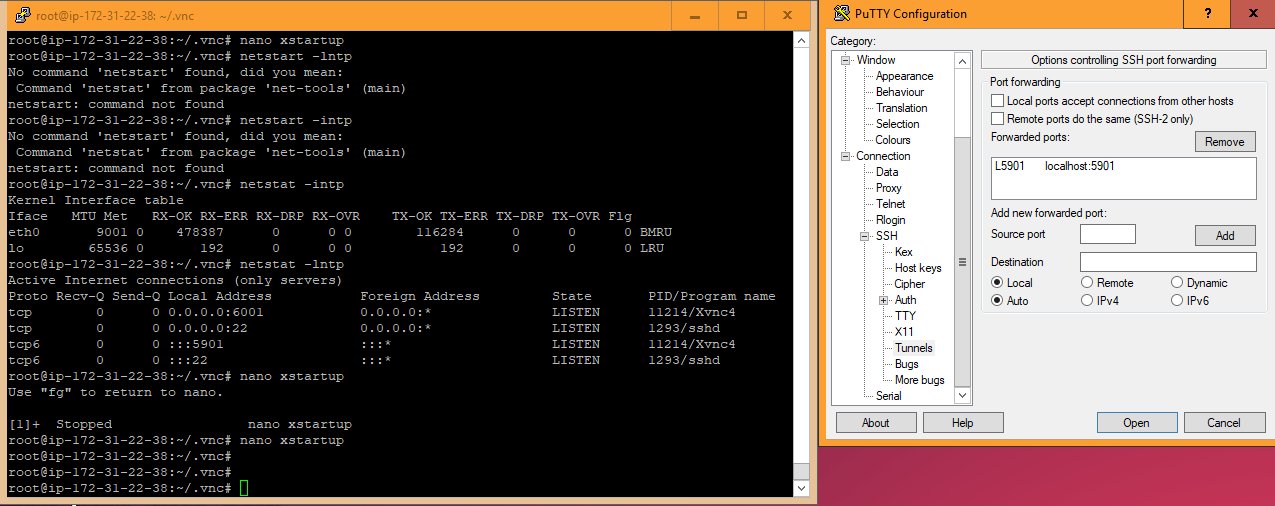



 kind kraken
...do you have the server name typed in in the session part of the options?
and when you said nothing happened I thought you meant that the configuration closed and putty didn't open, not that the configuration stayed open
south belfry
oh
kind kraken
I did not expect this to turn into how to use putty 101
south belfry
brb
south belfry
oh
uh... @kind kraken if you are willing to deal with my dumbness and help me, ping me in the appropriate off topic channel coz theres like 3 and idk which one to go to
rotund flax
moved from #web-development
So
with pyside2 you create your object
and then you use connect methods to hook that up to a function
signal matrix
I assume its similar to other frameworks
rotund flax
It is relatively similar for GUI yes
rotund flax
I don't know many other GUI frameworks
Obviously it is clear there will be similarities
for example in tkinter the function is passed in as a command kwarg to the creation of the Button
signal matrix
yes
rotund flax
with pyside2, you use connect ¯_(ツ)_/¯
signal matrix
I'll look into it, thanks
rotund flax
Nice
craggy hollow
How do I get the width/length of the window.\
craggy hollow
tkinter
rotund flax
You can use win.geometry() for a string
and then to get it in integer format
>>> win.winfo_width()
673
>>> win.winfo_height()
729
where win is a tkinter.Tk instance
 raw plank
ARGH getting the damn footer to stay at the bottom of the content and not in th middle of the screen when there is no other content
craggy hollow
thank you
digital rose
What is the best python lib for graphics? I don't mean GUI, only graphics...
fallen oxide
You'll need to be more specific than that
digital rose
For making dots and lines
The one with the most features
And the most complex
Damn!!! I just found it out and now I am in love with turtle!!
Wow
I love it!
 vital ravine
Anyone who has experience/insight into using boilerplates and 'wrappers' for software like Maya/Nuke?
Maya requires the UI code to be wrapped by some special classes to work correctly, compared to stand-alone Qt Guis.
Is it possible to execute UI-code through another class, so I can develop the UI to be software agnostic, and execute it for the different softwares using different wrappers and boilerplates?
The maya UI main-class already inherits from a maya-method, so I can't just super it in, I think.