#user-interfaces
1 messages · Page 23 of 1
 odd hamlet
due to python being dynamically typed most of the learning will actually be failing
odd hamlet
which doesnt mean change to another language
 digital rose
I dont want to
odd hamlet
for example in java
odd hamlet
if one has an object and tries to execute
myobject.append(1);
and myobject doesnt has the mehtod append java wont allow you to compile it cause it cant set a pointer to the location of the append method for myobject cause it doesnt exist
python on the other side will just run until that line and then notices "oh i dont know where that method is meh ill crash now"
which is one of the reasons many people dislike python)
 shell blade
Either way the code doesn't work, so I don't see a problem.
odd hamlet
yes but
digital rose
the entire reason i picked python is that it is
odd hamlet
python code will fail at runtime
which IS a problem if you run this behind an if for example
digital rose
the entire reason i picked python is that it is limited in some aspects but in most part it can do most things well
odd hamlet
and you accidentally dont test that if
you will have errors for users but you couldnt see them coming
java on the other hand will throw errors before you can compile so you know the error
but thats a story for #361429235241582593
digital rose
but atleast you can feel proud about yourself for 2 seconds before it throws out the error
odd hamlet
thats true
but runtime errors are a big problems, there are tools like mypy or some IDEs which can show you that errors but for that you will (at least for mypy) need to change the way you write code and using those IDE features isnt recommmended for newbies cause it makes stuff too easy and you dont learn to see such errors yourself
digital rose
do you watch rick and morty
odd hamlet
yes but im not sure if im up to date
odd hamlet
i seem to be
hmm
has been some time
tell me bout it in #ot0-psvm’s-eternal-disapproval
digital rose
k
 sudden stone
<@&267630620367257601> (i believe this is the right tag) so what is so wrong about pygame for game development and what are some alternatives?
 wanton tangle
nothing wrong with it. its a wrapper for SDL2 which is used for basic C++ projects quite often
 honest torrent
Uh, yes, there are some issues
honest torrent
For one thing, atleast for me, this may not happen with you, but
pygame wasn't detecting keys
In addition, it doesn't come with any kind of collision, other than with rects, and that can be buggy
 marble shoal
it's a really good framework for doing quick stuff imo, but it's slow as all hell
honest torrent
Yeah, but this is a laptop, if I were to press "w", it wouldn't detect anything
I had to use an external module
But, you may not have that issue
If you can do you own collision, then it's not that bad
But you'll soon realize that it doesn't come with much
marble shoal
it does technically come with "checking if sprites are intersecting" though
honest torrent
And, it does not work
marble shoal
r1 = sprite1.get_rect()
r2 = sprite2.get_rect()
is_touching = pygame.sprite.collide_rect(r1, r2)```works just fine for me
marble shoal
pygame isn't great with logic
not as good as it could be
the real thing that brings it down is performance, but I've personally never had functional issues with pygame myself
 drifting sundial
@sudden stone Pygame is good for beginners learning game development and/or Python
If you're wanting to make an actual full game, however, it has limitations
Ran into this a few summers ago with some friends
It's performance is subpar, and there are a few bugs (for instance, SDL joystick code was compiled with debugging symbols on, so stdout is polluted with debug output)
drifting sundial
I am mistaken then, for some reason I remembered compatibility issues but haven't looked since summer 2016
marble shoal
I don't know how recently py3 support had been added, but as of january 16th, 2017, there have been python 2.7 to 3.6 wheels on pypi
drifting sundial
Yeah, you're right
Also, I was wrong about the "not being updated", last release was Jan 17'
It is a great platform to mess around with
We made a 2D dungeon crawler
I added support for xbox controllers (well, any controller really, yay generic APIs)
and started on networking, but that was a massive beast to tackle
honest torrent
@drifting sundial I just made a networking lib that works great for games if you interested 
 lilac raft
Here's a GUI i made, for the sake of having smth to post.
https://pbs.twimg.com/media/DVerjm_V4AATtoz.jpg
 wanton tangle
That looks good. I love the dark theme
 rugged sinew
looks great!
 fallen oxide
Kinda reminds me of winamp
rugged sinew
yeah, cause just like winamp, this GUI really whips the llamas ass.
honest torrent
What lib did you use?
sudden stone
@lilac raft what lib?
sudden stone
idk if it's just me but the dark theme makes me think of linux
fallen oxide
adapta nokto pls
sudden stone
welp
since i cant find a good enough replacement for pygame looks like i'll be using it
or going back to lua & love2d
shell blade
@sudden stone have you looked into adding box2d to pygame?
shell blade
making a program to scale an image to a canvas's dimesions dynamically was more difficult than I anticipated
why is making an equation to maintain aspect ratio hard
I should probably do this on pen and paper
 rain quarry
@lilac raft > converting FLAC to MP3
you monster
lilac raft
@rain quarry lmao I need to be able to get this ~130gb onto my phone somehow
rain quarry
just get a 256G sd card
I have 1T of FLAC music
on my fucking router
lmao
just decide what songs you mwant on your phone and which not
I set mine to auto-rotate every day
based on genre
 hollow summit
want to start building GUIs on python, what is recommended to start ?
odd hamlet
tkinter
sudden stone
if u want ur GUIs to be ugly
odd hamlet
it is the default package for guis
all guis in python are either ugly or hard to write
 lapis iron
all guis in python are either ugly or hard to write
you CAN make tkinter look nice
but then it takes more work to do that instead of just using kivy or QT
but I'm pro-tkinter for a lot of things just because of not needing extra libraries
and licensing
makes a huge difference for work stuff
rugged sinew
ttk and tkinter isnt terrible
tkinter without ttk however is wristslashingly atrocious
 echo lagoon
Implying you can hear a difference between FLAC and mp3s
echo lagoon
I think most people cant
fallen oxide
I can
I know a lot of people that can
lol
The comparison is a little dodgy, though
MP3 and FLAC are.. not really that similar
you can ask me about it in #ot0-psvm’s-eternal-disapproval if you want
hollow summit
well its just for personal use, but I want it to look nice obviously
sudden stone
working on a ui system
just gotta upscale it
and add a bit more space between em
now im gonna move it to the bottom center of the screen and be done 😄
my art is so bad lol
¯_(ツ)_/¯
shell blade
it looks good!
 digital igloo
Would forms writing ot a database use FLASK or would use use TKINTER/KIVY. Or are those just guis in a OS environment?
 fringe mesa
writing to a database ought to be entirely independent from the way you interact with your application
you could do it from the command line, what you use for an interface does not affect it
are you saying "forms" as in HTML forms?
digital igloo
Yeah webforms. The only way for me to learn is projects. I have a buddy I'm going to write a simle forms driven inventory and reporting system for his Extinguisher business.
I thought if I put it on the web it would be easy access for them and simpler to update on my end and troubleshoot if there were any issues.
fringe mesa
in that case you'll need to use a web framework like flask to serve a web interface
it is true that tkinter and kivy are only GUI frameworks for desktop and mobile and won't be servable over the web
sudden stone
{
    "1":[ "Assets/Art/Tiles/Grass.png", [0, 0], [16, 16] ],
    "2":[ "Assets/Art/Tiles/Grass.png", [16, 16], [32, 32] ],
    "3":[ "Assets/Art/Tiles/Grass.png", [16, 0], [32, 16] ],
    "4":[ "Assets/Art/Tiles/Grass.png", [0, 16], [16, 32] ]
}
idk if this is a good way to store tiles
but yeah
it gots the image
and the placing of it
though they will likely be scaled ingame
or maybe i can add a scale value to it
incase i want to go beyond 16x16 sprites (which isn't likely)
sudden stone
@cinder bison it's a json file
 cinder bison
you can still use a list in one i think?
 twin warren
Are those Sonic tilesets?
sudden stone
no i made these tiles in photoshop
shell blade
and the 2D ones usually have a more geometric style
sudden stone
i took off the menu
item bar*
and it looks like its only doing 2 out of 4 tiles
idk
here is the set i made incase anyone wants to play with it
im prob gonna edit it
shell blade
It could use better tiling imo
sudden stone
twin warren
That's actually pretty nice. What're you using for that?
sudden stone
game
digital igloo
are you grabbing those images from Minecraft?
fallen oxide
That looks nothing like Minecraft
digital igloo
Sorry I'm 48 I don'tplay much minecraft.
odd hamlet
has never played Minecraft
digital igloo
Does anyone here code with Python professionally?
 placid sable
I know lemon and gdude do
I think eivl does too?
anyway, this discussion is better for #ot0-psvm’s-eternal-disapproval
digital igloo
I"m just wondering how many python programs use GUI's in the real work or do businesses use other languages for GUI use?
but it's about GUI' interface?
 placid quartz
I haven't written a GUI (like an OS native one) since the beginning of my carreer.
digital igloo
so in your opinion is it worth learning?
or better to focus on Flask or Django?
for web that seems where most applications have gone anyway
honest torrent
Flask
placid quartz
imo, everything runs on servers so either needs no GUI or has a web interface.
That said, if you're into gaming, then sure. (read: making some 2d games with python)
programming GUIs is a more fun way to learn Python for some I guess. But, realistically, I don't think it adds much for the majority of real life work.
digital igloo
ok I work at CHASE and just thinking this through out loud I'm guessing what @placid quartz said makes sense.
I'll switch to web-development for next quesitions.
thanks everyone.
placid quartz
And GUIs are more fun to show off to friends :P
Some guy may show his fancy 1000-line GUI, people are impressed.
You show your 10.000 line server by showing some nice logs on the console. People are not :P
 uneven echo
xD
sudden stone

 hollow plume
I'm writing a simple inventory program with tkinter, having some trouble with formatting. Nothing system breaking or anything, just unnecessarily ugly. Anyone here able to help?
odd hamlet
ask your question instead of asking to ask your question
hollow plume
well,
well,
I can't get the font settings to work, and where I'm using grid instead of pack it gets everything positioned relative to everything else appropriately but I would like to center the information to the window
still a work in progress, haven't brought in any of the functionality yet, which I worked out in a separate .py file
digital rose
I'm having a problem with TKINTER. I want to make a checkerboard out of buttons but I am having trouble with adding the images to each piece
So far I just have a black set of 64 buttons
hollow plume
@digital rose Have you heard of sentdex? I learned most of what I know for tkinter from his tutorials
https://pythonprogramming.net/tkinter-adding-text-images/ this one sounds like it would be useful for your situation
digital rose
Still having some trouble adding the images. If I try to add the images every single image would be the same. I want to know how I can make a pattern. For example, every 2 buttons are a certain image.
Here is a my code
from tkinter import *
root = Tk()
frame=Frame(root)
Grid.rowconfigure(root, 0, weight=1)
Grid.columnconfigure(root, 0, weight=1)
frame.grid(row=0, column=0, sticky=N+S+E+W)
grid=Frame(frame)
grid.grid(sticky=N+S+E+W, column=0, row=7, columnspan=2)
Grid.rowconfigure(frame, 7, weight=1)
Grid.columnconfigure(frame, 0, weight=1)
#example values
for x in range(8):
for y in range(8):
btn = Button(frame)
btn.grid(column=x, row=y, sticky=N+S+E+W)
for x in range(8):
Grid.columnconfigure(frame, x, weight=1)
for y in range(8):
Grid.rowconfigure(frame, y, weight=1)
root.mainloop()
this is what I get so far
lapis iron
sticky=N+S+E+W is a lot of sugar for sticky='nsew'
for x in range(8):
    for y in range(8):
        if y % 2 == 0:   #  if y is even, then even-x squares are black
            if x % 2 == 0:
                btn = Button(frame, image='black_square.png')
            else:
                btn = Button(frame, image='red_square.png')
        else:
            if x % 2 == 0:
                btn = Button(frame, image='red_square.png')
            else:
                btn = Button(frame, image='black_square.png')
        btn.grid(column=x, roy=y, sticky='nsew')
@digital rose
digital rose
I'm going to spend two weeks to learn PyQt5. Is it a bad idea?
I need to make some gui apps (running on Windows) for my personal projects. Recently I have tried a Tkinter demo and a wx demo. Found that I prefer Qt.
digital rose
@lapis iron I already fixed it thanks anyway
digital rose
I'm having this problem importing an image
from tkinter import *
from PIL import Image, ImageTk
root = Tk()
frame=Frame(root)
Grid.rowconfigure(root, 0, weight=1)
Grid.columnconfigure(root, 0, weight=1)
frame.grid(row=0, column=0, sticky=N+S+E+W)
grid=Frame(frame)
grid.grid(sticky=N+S+E+W, column=0, row=7, columnspan=2)
Grid.rowconfigure(frame, 7, weight=1)
Grid.columnconfigure(frame, 0, weight=1)
btn = Button(frame)
btn1 = Button(frame, bg="red")
Checker = False
blackCheckers=True
whiteCheckers=False
img = PhotoImage(file="black.png")
for x in range(8):
for y in range(8):
if (x + y) % 2 != 0:
btn1 = Button(frame, image=img)
btn1.grid(row=x, column=y, sticky=N + S + E + W)
if (x+y) % 2 != 0 and x < 3:
btn1 = Button(frame, bg="blue")
btn1.grid(row=x, column=y, sticky=N + S + E + W)
if (x+y) % 2 !=0 and x == 7:
btn1 = Button(frame, bg="blue")
btn1.grid(row=x, column=y, sticky=N + S + E + W)
if (x + y) % 2 != 0 and x == 6:
btn1 = Button(frame, bg="blue")
btn1.grid(row=x, column=y, sticky=N + S + E + W)
if (x + y) % 2 != 0 and x == 5:
btn1 = Button(frame, bg="blue")
btn1.grid(row=x, column=y, sticky=N + S + E + W)
for x in range(8):
Grid.columnconfigure(frame, x, weight=1)
for y in range(8):
Grid.rowconfigure(frame, y, weight=1)
root.mainloop()
I keep getting an error saying pyimage9 doesnt exist
 obsidian lance
@digital rose example code look mad, this will look better
if (x+y) % 2 != 0:
    btn1 = Button(frame, image=img)
    btn1.grid(row=x, column=y, sticky=N + S + E + W)
    if x < 3:btn1 = Button(frame, bg="blue")
    elif x in [7,6,5]:btn1 = Button(frame, bg="blue") #again blue?
    if x in [0,1,2,5,6,7]:btn1.grid(row=x, column=y, sticky=N + S + E + W)
and may be you need use this, but i am not sure (or any other methods to make image usable)
from PIL import Image
im = Image.open('nuvfits1.png')
pixelMap = im.load()
is it school homework? then yes, my bad
 charred badger
i'm using pyqt5 to create a simple application
i need to have a singleton controller object
which means i need to derive from qobject
and also (metaclass) singleton
here's my singleton below
when i derive from both, i get an error (below code)
what to do?
__instances = {}

class _Singleton(type):
    def __new__(meta, name, bases, members):
        for class_ in bases:
            if class_ is not Singleton and issubclass(class_, Singleton):
                raise TypeError(("Invalid base type (as subclass of Singleton):", class_))
        return type.__new__(meta, name, bases, members)

    def __call__(class_, *args, **kwargs):
        if class_ is Singleton:
            raise TypeError("The base Singleton type cannot be instantiated")
        if class_ not in __instances:
            __instances[class_] = super(_Singleton, class_).__call__(*args, **kwargs)
        return __instances[class_]

Singleton = type('_', (), {}) # dummy type to allow base type creation
Singleton = _Singleton('Singleton', (object, ), {})
and the error:
class Controller(QObject, '''metaclass='''Singleton):
TypeError: metaclass conflict: the metaclass of a derived class must be a (non-strict) subclass of the metaclasses of all its bases
@obsidian lance thanks for the advice on a cleaner way to do it. And I'm currently trying to make a checkers game and I just started using tkinter about 2 weeks ago.
obsidian lance
@digital rose yesterday i found this project, i try compile example use pyinstaller --onefile --noconsole... and the result is work (but need chrom/chromium installed on system). Compare with elektron 80mb hello world, this way 7mb hello world... and now i will look at this some times. May be it will good way to make crossplatform web based python app
https://github.com/ChrisKnott/Eel

GitHub
Eel - A little Python library for making simple Electron-like HTML/JS GUI apps
 dense whale
might sound like a stupid question but can you call python in a java or c# gui..
as in have a gui written in java and use python to code it
obsidian lance
at least you still will need gates between python - c/java gui
and you will need add this libs into build or this can't work if target pc have only python environment
wanton tangle
Could try Jython?
I wouldnt recommend it though
Better would be to use the C API and another language that can use it
(C/ C++/ Rust/ etc?)
digital rose
Do any of you know if it is possible to use xml and python together to make a gui
because I know it is possible with java
odd hamlet
well
you could indeed use xml as a template for making guis
i am not sure if there is a lib for it let me look up
you could take a look at https://en.wikipedia.org/wiki/QML @digital rose
QML (Qt Modeling Language) is a user interface markup language. It is a declarative language (similar to CSS and JSON) for designing user interface–centric applications. Inline JavaScript code handles imperative aspects. It is associated with Q...
digital rose
oh okay, thank you
 serene estuary
Can someone recommend a library(and tutorial if possible), Tkinter just isn't cutting it
shell blade
kivy
serene estuary
Thx
obsidian lance
@serene estuary before using kivy , strongly recomended test it for building error etc.... if you will do build for other users.... i few years can't build kivy to apk or exe... and then drop it, because under python3 kivy is shit. But python2 may be work done
just try build hello world or other simple project
serene estuary
Your English is a little broken but I got the overall message so thanks, will do
obsidian lance
yep , english is not my native
 empty spire
I'm trying to tie together a grid of buttons to a 2d list of booleans, so that if the boolean is True, the button is one color, and if the boolean is False it's another color.
I also need to allow clicking a button to toggle the state of the boolean it represents, and toggle the colors of the surrounding buttons
What's the smart way to do that?
shell blade
Generate the buttons as you generate the list?
That would make sense for tkinter at least, I don't know what lib you're using.
empty spire
@shell blade It is TKinter
shell blade
Do you use two for loops with ranges to generate the array?
Because if you do then you could literally Just use the vars from the for loops with grid
empty spire
grid = [[False]*size for _ in range(size)]
This is my grid initialization process,
@shell blade
right now I"m trying to get a button to change it's own color when I click it, and not the most recent button created
cinder bison
if you use that to generate a grid, then you'll run into what we here call the Zondo Problem™
lists in python are essentially a list of references to the values inside them, which means if you get a list and you multiply it by a number to make it longer, youve essentially made a list of references to the same value
which means if you change one value, it changes all of them
our suggested way is to use list comprehensions instead of multiplication
grid = [[False for _ in range(size)] for _ in range(size)]
Although it does look a little bit messy
I don't know much tkinter so I can't help you there, but I felt I had to point this out to avoid some trouble for you
@empty spire I would suggest reposting your question so people know it still hasn't been answered
empty spire
it already caused issues for me, so I have fixed it
cinder bison
Ah ok good good, I'd still suggest reposting your question though if you haven't figured it out yet
digital rose
hello guys I need some help with the Urwid library can somebody experienced with it contact me in private please? I have questions about two functions in a code, thanks for helping 😃
digital rose
ok let me post everything here then
cinder bison
It's much easier if you would post those two questions immediately, rather than waiting for someone to offer help first @digital rose
sudden stone
sigh
right when i was starting to like monogame
my teacher gives me pygame assignments
at the end of the course 😦
placid sable
rip
digital rose
Hello guys,
I am working on a sort of console UI to make my terminal chat program look greater, a kind of IRC terminal client like Weechat for example and for this I decided to use Urwid. I have read the docs and found an interesting project using urwid to write an xmpp client, you can find it here: https://github.com/izderadicka/xmpp-tester So I started analysing one file in particular which is the one containing all Urwid related stuff, you can find it here: https://github.com/izderadicka/xmpp-tester/blob/master/commander.py so I commented everything until I found two functions that I can't understand even contacted the author of the code but no response in 3 weeks anyway I join my file with all the comments I put if somebody wanna read it and help me with these two functions I highlighted in the file I would be gratefull to you! thanks.

GitHub
xmpp-tester - Testing client for XMPP - display XML stanzas send/received
GitHub
xmpp-tester - Testing client for XMPP - display XML stanzas send/received
please dont ingore
shell blade
Ask your question here, @digital rose.
Most people won't bother to sift through a file and two links to figure out what you're asking for.
obsidian lance
i can't understand what you want, and i see the file, but have no commented functions , which you can't understand @digital rose
digital rose
ok guys thanks for the advice I will write down here the functions I dont understand:
class FocusMixin(object):
    def mouse_event(self, size, event, button, x, y, focus):
        if focus and hasattr(self, '_got_focus') and self._got_focus:
            self._got_focus()
return super(FocusMixin,self).mouse_event(size, event, button, x, y, focus)
there is this one
and this one
    def add(self,line):
        with self._lock:
            was_on_end=self.get_focus()[1] == len(self.body)-1
            if self.max_size and len(self.body)>self.max_size:
                del self.body[0]
            self.body.append(urwid.Text(line))
            last=len(self.body)-1
            if was_on_end:
self.set_focus(last,'above')
@obsidian lance
@shell blade
and the file is
GitHub
xmpp-tester - Testing client for XMPP - display XML stanzas send/received
hope now somebody can help me thanks everyone 😃
rugged sinew
@charred badger
charred badger
okay
rugged sinew
there's a .drawPoint() method iirc
so you could just do that every time you click, except if you've got all four points and are ready to draw the polygon. in that case you remove all points instead.
does that sound like it might work?
charred badger
i think you misunderstood my question
i wanna draw line paint does
for example a rectangle
it always shows what you currenty have, right?
i want like that
*like paint does
rugged sinew
sure. I understood your question, but I thought you wanted to just slightly modify your current approach with the four clicks and have some visual indication while you were clicking.
but okay, it's simple enough to draw lines between the points too, I suppose
just remember the previous point clicked and draw a line to the next point clicked.
charred badger
okay will try
@rugged sinew i have another question
i have a plaintextedit subclass
i need previous text entered there to be read only
i reimplemented keypressevent
    def keyPressEvent(self, event):
        if event.key() == Qt.Key_Enter or event.key() == Qt.Key_Return:
            # code
        else:
            current_line = self.textCursor().block().text()
            current_line_number = self.textCursor().blockNumber()
            lines_count = self.document().lineCount()

            if current_line_number + 1 == lines_count:
                if event.key() == Qt.Key_Up:
                    # TODO: show history
                    print("Command History up")
                elif event.key() == Qt.Key_Down:
                    # TODO: show history
                    print("Command History down")
                elif event.key() == Qt.Key_Backspace:
                    if len(current_line) - 1 >= len(self.__command_prompt_char):
                        QPlainTextEdit.keyPressEvent(self, event)
                elif self.textCursor().position() >= len(self.__command_prompt_char):
                    QPlainTextEdit.keyPressEvent(self, event)
            elif not event.text() and event.key() != Qt.Key_Backspace:
                QPlainTextEdit.keyPressEvent(self, event)
command prompt char is >(space)
the problem is that when i type something, left and right arrows don't move the cursor left/right
but that should be handled by last elif in else
rugged sinew
and, uh
if current_line_number + 1 == lines_count: what's this supposed to check exactly?
I mean it strikes me as possible that this could be true even if you press left or right
and if so, that elif will never execute
charred badger
it is executed
i print something there
that checks whether current line is command prompt line
where it is allowed to do backspace
@rugged sinew
rugged sinew
ahaa
I see.
btw you should probably be using super()
especially if this is py3
but uh, okay, so the elif does execute because you print something in it - but somehow the left and right still aren't handled? that's curious indeed.
but the other calls to QPlainTextEdit.keyPressEvent(self, event), are those working?
@charred badger
rugged sinew
yeah that wouldn't affect the problem but it is the right way to do it.
charred badger
okay
rugged sinew
very strange that some of them work but not all. are you sure the left and right arrow functionality is actually handled properly in QPlainTextEdit.keyPressEvent?
I mean I don't know QT well enough to say.
charred badger
yes
rugged sinew
you'd assume they were but I don't see anything wrong with your code and you've verified that it executes the right branch and that the call itself works for other keys, so I don't know what you're left with.
either implement them yourself instead of relying on the parent to do it - or someone here who knows QT better will have to help you
maybe you can debug the parent method
if you know how to use a debugger
and try to figure out where it goes wrong
if you're using pycharm it's fairly easy to do so
charred badger
self.cursorPositionChanged.connect(self.__on_cursor_position_changed)
i always set the cursor to the last position
that was necessary not to mess up with >(space)
@shell blade @rugged sinew i always do such stupid mistakes
not news
rugged sinew
aha. so it was moving the cursor, you were just reverting it
that makes sense.
and don't worry so much, I've been writing python for 8, almost 9 years now and I still make stupid mistakes, too.
that's just programming
shell blade
I forgot to write await before some send_message functions when I was writing a discord bot today, and I've been using the library for three months now
fallen oxide
Yeah I do that all the time :P
shell blade
I even had to go to the docs to figure it out
rugged sinew
me too. :D
it doesn't even really give you a clear error when you do that, can be a bit sinister.
shell blade
^
charred badger
@shell blade what are those? await?
i've been writing in python for less than 3 months
but this is not about python. it's about being attentionless
shell blade
it's for the discord.py
and like Lemon said, don't beat yourself up, you'll get better and we still make make mistakes.
rugged sinew
you're gonna make stupid mistakes after learning anything for 3 months
listen, I'm gonna tell you something I learned from Ed Catmull's autobiography which is amazing btw. (he's one of the founders of pixar)
people say that failure is an opportunity for growth and that mistakes are an important part of learning, but most people interpret this the wrong way.
they think of mistakes as a necessary evil.
but that's not what mistakes are. mistakes aren't evil. they're the inevitable consequence of doing something new. They are valuable. Without mistakes, there is no originality.
If you're not making mistakes, you're fucking something up.
you have to learn to decouple the idea that failure is painful from your learning experience. failure should feel like a great adventure. failure is exciting. failure is when your journey to becoming a programming is truly alive.
your brain simply revels in failure, and you should too.
fallen oxide
It's true though
charred badger
well thanks for the words
rugged sinew
anytime, I'm full of words :P
shell blade
You learn nothing if you break nothing
charred badger
i will try to look at mistakes that way
rugged sinew
at Pixar, mistakes are practically encouraged.
charred badger
lol okay
rugged sinew
it's a fun perspective to consider.
charred badger
i will consider that too
rugged sinew
for example
back when they were making Toy Story 2
there was a guy in devops who wrote some code
that deleted the entire server the movie was saved on
fallen oxide
I heard about that
rugged sinew
the entire movie was lost. the company might have gone bankrupt if not for the fact that one of their creative directors had been on maternal leave and had, unbeknownst to the management and against company policy, brought home the entire movie with her so she could work on it on her home computer.
so she told management
I'm very sorry I broke the rules but I have it at home.
and they sent over some techs to her house to retrieve her computer with the greatest of care
transport it to the hq and try to retrieve the data
and it worked, they saved almost the entire thing
but here's the interesting thing
the woman who broke the rules to bring home the machine? she was given a raise for daring to admit her mistake and saving the company
the guy who deleted the server?
he wasn't fired
he was put in charge of making the servers safe so that nobody could ever repeat his mistake
at most companies, these employees might have been punished, but pixar rewards the mistakes and moves forward to learn from it immediately.
fallen oxide
It's a good policy
charred badger
wow what a story
and well, steve jobs got fired from his own compny
and he said that it was good for his later career
remember that speech?
rugged sinew
hmm. no.
charred badger

Drawing from some of the most pivotal points in his life, Steve Jobs, chief executive officer and co-founder of Apple Computer and of Pixar Animation Studios...
rugged sinew
oh yeah I have seen this
charred badger
yeah it's great
fallen oxide
We're getting a little #ot0-psvm’s-eternal-disapproval
rugged sinew
yeah
charred badger
@rugged sinew okay let's get back to the topic then 
odd hamlet
cough say it with gdude cough
charred badger
well i have a graphics scene with its view and items
when hovered, i wanna display info about the item being hovered
and i want to have a rectangle to be drawn near the item in which there will be text
i guess i have to override paint event
but to draw the rectangle with text?
charred badger
@fallen oxide @shell blade @rugged sinew guys
rugged sinew
I'm gone all day. also I don't know the answer. sorryyy.
charred badger
@rugged sinew np
charred badger
i'm porting qt4 qworkspace to qt5 qmdiarea
and ctrl+tab isn't working here
any idea?
charred badger
lol
charred badger
no one?
 inland holly
help
odd hamlet
bot.tags.get("ask")
 proven basinBOT
ask
Don't ask to ask - just go ahead and ask your question!
inland holly
@odd hamlet i did #help-coconut
sudden stone
bot.tags.get("ask")
proven basinBOT
ask
Don't ask to ask - just go ahead and ask your question!
shell blade
bot.help
proven basinBOT
class Bot:
bot.info() # Get information about the bot
class Tags:
bot.tags.get() # Get a list of all tags or a specified tag.
class NoCategory:
bot.help # Shows this message.
# Type bot.help command for more info on a command.
# You can also type bot.help category for more info on a category.
bot.tags
proven basinBOT
class Tags:
    bot.tags.get()           # Get a list of all tags or a specified tag.

# Type bot.tags command for more info on a command.
# You can also type bot.tags category for more info on a category.
bot.tags.get()
proven basinBOT
**Current tags**
» ask
» codeblock
» f-strings
» zen
To show a tag, type bot.tags.get <tagname>.
sudden stone
bot.tags.get("zen")
proven basinBOT
zen
Beautiful is better than ugly.
Explicit is better than implicit.
Simple is better than complex.
Complex is better than complicated.
Flat is better than nested.
Sparse is better than dense.
Readability counts.
Special cases aren't special enough to break the rules.
Although practicality beats purity.
Errors should never pass silently.
Unless explicitly silenced.
In the face of ambiguity, refuse the temptation to guess.
There should be one-- and preferably only one --obvious way to do it.
Although that way may not be obvious at first unless you're Dutch.
Now is better than never.
Although never is often better than right now.
If the implementation is hard to explain, it's a bad idea.
If the implementation is easy to explain, it may be a good idea.
Namespaces are one honking great idea -- let's do more of those!
rugged sinew
use #bot-commands for this sort of thing please. :)
charred badger
i have a graphics item
class Item(QObject, QGraphicsItem):
    pass
then rectangle item
class PolygonItem(QGraphicsPolygonItem, Item):
    pass
how should i call base class init() in PolygonItem
how to inittailize base classes?
@boreal wigeon
 boreal wigeon
if I understood your qeustion correctly, you're looking for super
charred badger
i've heard about it
boreal wigeon
IIRC ... I don't work with multiple inheritance too often. This post has some details https://stackoverflow.com/questions/3277367/how-does-pythons-super-work-with-multiple-inheritance

I'm pretty much new in Python object oriented programming and I have trouble
understanding the super() function (new style classes) especially when it comes to multiple inheritance.
For example if...
placid quartz
Wall of text:
Say you have this.
class A:
    def __init__():
        print('a')

class B:
    def __init__():
        print('B')

class C(B, A):
    def __init__():
        print('C')
        super().__init__()
And you call C().
Init will run, and then it calls super().__init__(). This will call the next class according to the MRO as said before.
You can call C.__mro__ to see which order that is.
Most often it will be the order as you extended the classes, left to right. It takes some weird class constructs to have it different.
So in the example. super().__init__() will call B's __init__.
B has no super call itself, so that's where the __init__ chain will end.
If B had a super().__init__() call, it will then do A's __init__. Even though the B class doesn't extend it.
This is because it knows you're still initialising C.
In general, you almost always want to write the super call. Not writing a super call in your __init__ actually makes your class incompatible with multiple inheritance and I hate it when libraries provide me with useless classes which don't.
Now, if B takes an argument as so:
class B:
    def __init__(arg1):
        print('B', arg1)
        super().__init__()
The above code would work, and be valid for initialising C if you also pass an argument in C's __init__ to the super call.
Because we know that the initialisation order is C > B > A. And C passes an argument to B. B passes nothing to A.
But now let's add an arg to A as well.
class A:
    def __init__(arg1):
        print('A', arg1)
        super().__init__()
Now the B class from above is fine on its own. b = B() would work.
However, when creating C as c = C(), your program will crash because the super().__init__() from the B class will actually go to A next.
And A needs that arg which B does not pass.
So now you have a broken class setup. You can't fix C without breaking B and vica versa.
To fix this, both A and B should extend an extra (the same for both) class you make which has __init__ WITH an arg, and calls super() without.
charred badger
@placid quartz it's clear now, thanks!
charred badger
@boreal wigeon i'm creating a scene and view
then in another function i add itema
items
but those aren't displayed
any idea why?
charred badger
it's qt
boreal wigeon
Never used that either
obsidian lance
Never seen the python code before... can i help?)))
i think cute code will look nice...
charred badger
@obsidian lance the python code>
anyways, it works now...
someone said this before: python works by magic...
no doubt!
 low spire
anyone got a good guide for getting started with tkinter
fallen oxide
I wish
It'd be great if someone did, I'd actually have something to link people to when they ask that
Unfortunately, tkinter is not pleasant to work with
It's quite archaic
And nobody really wants to write one
sudden stone
tkinter is ugly
i just fill it with color
buttons blue
background dark gray
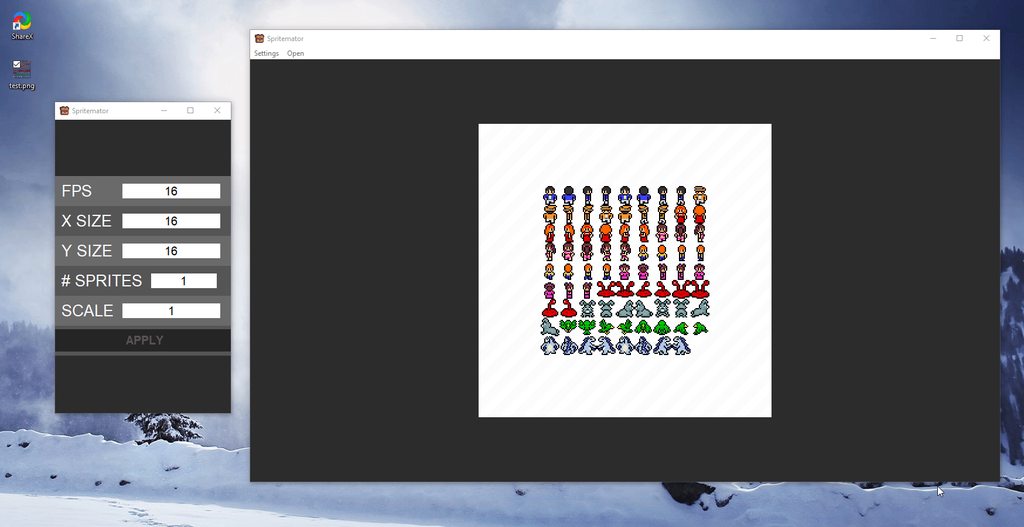
made that a while back
low spire
@fallen oxide do you reccomend another library then?
fallen oxide
People seem to like PyQT or kivy here
obsidian lance
kivy is dangerest way... at first you should understand what you want
can be problems at lest with
-distribute app to another pc
-create the target build for windows , linux etc@low spire
if your programm will work only in your pc with kivy installed then no problem)
low spire
i want windows+linux, needs to be fine natively on other pcs (its gonna be the GUI to decide values for the grapher (see the git link in #303934982764625920 ))
obsidian lance
do you have the gui sheme (sketch)?
at least for windows and linux you should first have linux and windows environments and then try to build app for these platforms. If all work done then can continue. My experience with kivy was not so shiny). I still only can run from source, but can't make build for distribute and stop using kivy . Tried again time to time but look like kivy still support good only python 2.
my app was in python3
low spire
ok soo
can anyone point me to a good pyqt5 guide?
i tried using it earlier
i ended up confused
obsidian lance
from all i test (i am not pro) i was able to create mono exe file with gui from python only use
- tkinter
- wxpython (phoenix for python3)
-eel (result need to chrome / chromium installed on target pc)
obsidian lance
then when you will work with pyqt first think about way distribute qt to not linux platform at least... because pyqt will not work without qt installed... think about it first
low spire
yeah im not too worried
its a small project, just install pyqt with pip 😄 . all i need is a guide to get me started
obsidian lance
)
pyqt need separetaly installed qt in your system if you not under linux
pyqt not qt...
look like you have old qt version installed on your pc , and forgot when you install it , or you use linux
i mean when you give your program to other user without qt installed, and say him... install pyqt use pip... he do this and still can't run your programm
low spire
i appreciate your help on the support side
but what i need is a guide on how to use it. deployment is not really an issue for me, as the user can figure it out 😉
low spire
pyqt5
charred badger
@obsidian lance have you used wizards in pyqt?
obsidian lance
i think not, but not remember neat... look like wizard is step by step pages? next - next etc?
i only use text inputs, buttons, number fields with prebuilded increment/decrement little buttons, pictures for scheme showing
charred badger
@obsidian lance yes that's wizard, and okay...
anyways, i have a wizard with pages
and there's a combo box in one of pages
i register it using registerField()
than read the value of that field on accept slot
and somehow i get 1 instead of the actual string
non empty inputs are regognized as 1, emoty ones as 0
low spire
so anyone got a good guide for pyqt5
obsidian lance

if you can't use pyqt5 without guide , may be you need other way?
papper book etc
or other gui ... like tkinter (at least have some info about using in internet, but may be have no good guide too)
i have only bookmarked links to info about tkinter / wxpython
low spire
@obsidian lance so you expect me to know how pyqt5 works without learning about it?
i am not particularly stupid, i just need somewhere to start
maybe your definition of a guide is different to mine
digital rose
anyone here good with tkinter?
How do i disable a button using conditional if statements?
obsidian lance
what is disable?
wanton tangle
@digital rose button.config(state="disabled")
obsidian lance
button.config(state="disable" if x==2 else "enable")``` is it will work too?@low spire Have you read the docs for it? Usually the docs have their own guide or at least examples within them.
obsidian lance
what? the pyqt docs are all c++? ))) ... pyqt is python side , qt is cross side, that use pyqt5 you need install qt, install pyqt5 environments , then read the pyqt5 python docs , and use knowledge that make result @low spire
if have no tutorials in internet , then you can look at pdf version of pyqt5 papper books....
and remember if you are on law side then not use torrents etc for download pdf versions of book ... ; )
http://www.qtrac.eu/pyqtbook.html pyqt4 but look can't see another
Rapid GUI Programming with Python
and Qt is a textbook that teaches how create GUI applications using
Python 2, PyQt4 (or PySide 1), and Qt 4
PyQt5 tutorial is an introductory tutorial to GUI
programming with Python and PyQt5 library. The examples describe widgets, explain
layout management, cover menus and toolbars, dialogs, events and signals, and
show how to do painting and create a...
 charred dome
stupid question, can anyone explain, if vscode \ atom \ electron have all this fancy rendering and animations, how much frames per second it renders it's interface \ window ? are there fps counter for it?
obsidian lance
@charred dome what animation in vscode your talk about? very interesting
obsidian lance
yes, now i detect...animations)
can fps be depend of your monitor settings?
may be it close to native screen refresh?
 stable heath
So I want to make a GUI using python. I will have several nodes that need to be connected. I want to be able to enter parameters at each node and each connection between nodes. I drew up a diagram showing a rough idea of what I want to do.
This like most of my programs in python is for the sole purpose of reducing the amount of menial work I need to do to do my job. In this case I want to generate coupling matrices which are quite easy to get mixed up when entering by hand
I guess my question is what GUI framework would you recommend?
I'd like to do a sort of drag and drop thing
I haven't used a single GUI framework enough to have a preference.
placid sable
PyQt checks those boxes
You can design a form with Qt Designer
I've not got much experience with it, though
Python bindings for the Qt cross platform UI and application toolkit
stable heath
This looks like it might work well http://www.pyqtgraph.org/documentation/flowchart/
 idle apex
pyqt is almost always good suggestion
 drifting musk
How to detect hovering over a label?
drifting musk
@odd hamlet I am very new to python and don't really get that sort of stuff
Hmm
I it something like
odd hamlet
so basically there is a concept called events in tkinter
you can bind functions to events
drifting musk
label.bind("<Enter>", labelHover) and then I define a function
drifting musk
print("EHEEHEHEHE")```
codeblock
Discord has support for Markdown, which allows you to post code with full syntax highlighting. Please use these whenever you paste code, as this helps improve the legibility and makes it easier for us to help you.
To do this, use the following method:
```python
print("Hello world!")
```
This will result in the following:
print("Hello world!")
Yeah I know but this is just part and
 dusty forge
Hey guys, im new to making GUIs. Can someone guide me to making a text field and whatever is entered into that text field, will assign it to a variable?
shell blade
google "kivy tutorial"
dusty forge
Thanks I'll look into it
obsidian lance
@dusty forge what is your final target ? just learn gui? At least you should know , the kivy.org work full functional only under python2 , python3 have lot of bad places , and 99% that you can run python3 kivy app only from source code... no build desktop or mobile as promised kivy.org... they liers , when they say about python3 support
obsidian lance
@dusty forge http://stts.pythonanywhere.com/python.html#gui try this, my own notes. Font can be changed use up page button
 near idol
hi, got pyqt5 question
how do i show qwidgets in QAbstractTableModel?
digital rose
Ay yo guis 
odd hamlet
henlo
drifting sundial
 obsidian lance
plot lib for non gui scripts inside "guis" channel.... )))
any other channel will be more correct then this)
drifting sundial
Seemed the most logical place to put it
Since it is graphical, and it is a user interface
 vital oriole
 amber patio
Hi, i have a problem with the layouts on Qt designer, i want to create a first layout stuk on the window and insert others layouts on the first one but its doesnt work
and move the layouts everywhere i want
charred badger
when porting an application from qt4 to qt5, saveState() of main window writes QByteArray differently
i did diff of two files
and one of the widgets isn't risen
it was visible when storing the window state
anyone know this situation?
<@&267630620367257601>
 rotund flax
Please don't ping Helpers immediately, the role is there to be pinged if you don't get a response after a longer duration.
charred badger
@rotund flax nobody helped anyway
fallen oxide
Nobody responded because nobody that can actually answer your question has been around yet
charred badger
@fallen oxide yeah okay
stable heath
I'm using the QGraphicsEllipseItem class to represent nodes, How do I controll the order that things are painted in? I have lines connecting the nodes and if I add them after the nodes they just draw on top of the nodes instead of drawing under them. I would like it if the lines always printed bellow the nodes. Uh this is what I'm looking at right now
Also I'm using PyQt5
Should I include my code in a paste bin or something?
honest torrent
Yep
stable heath
It's taken from a example tic-tac-toe game script and modified with the classes node (an elipse) and inverter ( a line)
sorry i haven't commented it very well yet since I'm still learning what I'm doing
honest torrent
Does adding the inverter to the scene before the node work?
stable heath
Eventually I need the nodes to have a number of different properties and change colors based on the properties assigend. I then need the inverters to have a numeric (float) value assignable to them. I'm thinking I'll just have a dialog box pop up when I right click to assign the values
It does but I need to be able add inverters after I add nodes
since the user needs to be able to add the inverters which connect nodes dynamicaly
honest torrent
Alrighty
stable heath
So yeah I would like some way to explicitly controll the draw order
or layers
I saw something about layers but I didn't really see how to apply it or if I could apply it to the QGraphicsScene
object
I'll probably post a more well commented version tonight once I have time to go through. Probably write some proper psudo code as well
honest torrent
hmm, good question
When they add a node, you could try quickly removing all elements, then drawing the lines, then circles. However that's not a great solution
stable heath
Yeah I feel like it would probably add a lot of lag
It seems like something that is probably there but I don't know how to use
It's not really a python question though more of a Qt question, I wonder if there's a Qt discord...
stable heath
So I figured out my orginal problem It looks like that for each node that an inverter connects I need to call inverter.stackBefore(node)
That makes it so the inverter draws before the node. Also for a quick sanity check the scene.items() method draws items in the reverse order that they are returned so the first item in the list should always be on top. @honest torrent
honest torrent
Awesome! Good job
stable heath
So I also found another option that might work even better. ItemStacksBehindParent is a paramater that can be set on children of an QGraphicsItem. However I am not sure how to set parent/children relations.
secondary question, can an object have multiple parents or just one? stupid question. I wasn't thinking about normal class behavior and was just thinking that a parent was just some parameter stored by the child object rather then the object containing the child object.
Ok even better solution, I can assign groups I think. So what I want to do is just create a group for the nodes and a group for the inverters. On a related note I would like to assign a number to nodes when I initialize them. How do I do this with the class set up as shown here? Also I stole the super... stuff from the example I used as a base. so I don't really understand what it is doing and how I could pass an argument to it. as far as I can tell the super(inverter,self).__init__() would just go to the parent class and and then call __init__() on the item which was just initialized. I guess I'm still fuzzy on what exactly super does...
class inverter(QGraphicsLineItem):
    def __init__(self):
        super(inverter,self).__init__()
        pen=QPen(Qt.red,Qt.SolidLine)
        pen.setWidth(6)
        self.setPen(pen)
        self.nodes=[None,None]

    def mousePressEvent(self, event):
        print('clicked')
        pos = event.pos()
        self.update()
        super(inverter, self).mousePressEvent(event)
Great job on finding the solutions, the super function returns the class that (in this case inverter) inherits from
For inverter to have all the properties QGraphicsLineItem has, it passes in self (that instance), so QGraphicsLineItem can set self with it's own properties
stable heath
So does that totally preclude me from passing arguments at initialization?
honest torrent
Oh, no, not at all
For example: ```py
class Parent:
def init(self, name):
self.name = name
class Child(Parent):
def init(self, name, age):
super().init(name) # You may have to do this differently, depends on your python version
self.age = age```
Then ```py
some_kid = Child("Jimmy", 7)
some_kid.age
7
some_kid.name
"Jimmy"
I'm using 3.6.4
honest torrent
Then you can do it as shown
stable heath
ah cool
honest torrent
See, when you create the child __init__ function, that writes over the parent's __init__, so you then must (or, can. You don't have to, but almost always should) call the parent's __init__ seperate.
stable heath
As it turns out item groups are not the way to go here because they not only group the drawing layer but also group the events raised by each object and don't allow separate handling of the event for each item
stable heath
So I have a great deal of the parts working now. I susspect I will need to do lot of extra work to get zooming in and out to work. But in the mean time I need to figure out the problem I am having now. When I run the program I can properly move the nodes (green circles) as I would like. However if after releasing a circle, I click on whitespace it acts as if I have clicked on the circle again and allows me to drag it arround again.
Any inkling as to what might be causing this? The mouseReleaseEvent should be clearing the pointer by setting the variable to None. I just don't know how it still moves after the self.dragging variable is set to none. (just added underline to point out where my question was in my wall of text)
I just attached to file dirrectly, but would paste bin be better?
 unkempt scroll
Most people here would prefer a relevant code-block snippet, a hastebin, or even a gist
stable heath
def mousePressEvent(self,event):
    super(MainWindow, self).mousePressEvent(event)
    #print(self.QGscene.items())
    found=False
    for i in self.QGscene.items():
      if i.clicked and not(found):  #this logic makes it so only the top most item is actually selected
        found=True
        i.clicked=False
        i.setSelected(True)

        found=True
        if True:
          if event.button()==Qt.LeftButton:
            if isinstance(i,node):
              self.dragging=[i,event.pos(),i.pos()]
              print('Item pos: '+ str(i.pos()))
              print('Item rect:'+str(i.rect()))
          if event.button()==Qt.RightButton:
            if not(event.modifiers()&Qt.ShiftModifier):
              i.editProps()
              continue
            p=i.pen()
            p.setColor(Qt.blue)
            i.setPen(p)

      i.clicked=False
      #print(self.QGscene.selectedItems())

  def mouseReleaseEvent(self,event):
    super(MainWindow, self).mousePressEvent(event)
    print('realased'+str(self.dragging))
    self.dragging=None #should cancel any item being moved. since if you look at mouse move, it depends on the dragging varable to function

  def mouseMoveEvent(self,event):
    super(MainWindow, self).mouseMoveEvent(event)
    if self.dragging:
      i=self.dragging[0]
      i.setPos(self.dragging[2]+event.pos()-self.dragging[1])#moves the node
      i.updateInverters()
  def keyPressEvent(self, event):
    key = event.key()
    if key == Qt.Key_R:
        print(self.rect())
    super(MainWindow, self).keyPressEvent(event)
the item i is a QGraphicsEllipseItem class with a few extra paraters added

Pastebin
sudden stone
i question parts of your code
stable heath
I question all of my code. It's like my second time doing anything with Qt and the first time I've thought it would actually be useful to complete.
@sudden stone any specific parts that have obvious fixes?
Well obvious to people who aren't me
 charred thunder
@sudden stone if you're going to comment on someone's code, at least try to give reasons haha
personally, i'd have more blank lines between little segments of relevant code
 wary vigil
anyone got any cool examples of GUI they wanna share? wondering what types of GUI are possible to make trhough python
stable heath
From what I understand basicly anything that is done in 2d and I think, some primitave 3d GUIs can be done
I've only seen 3d from plotting libraries though
stable heath
I fixed it. I just had to explain what was happening to someone else
uneven echo
How do i add a "ACIII table" in a discord bot?
sudden stone
@wary vigil i made a cool gui a while back
should be easy to find it history so i'll get it

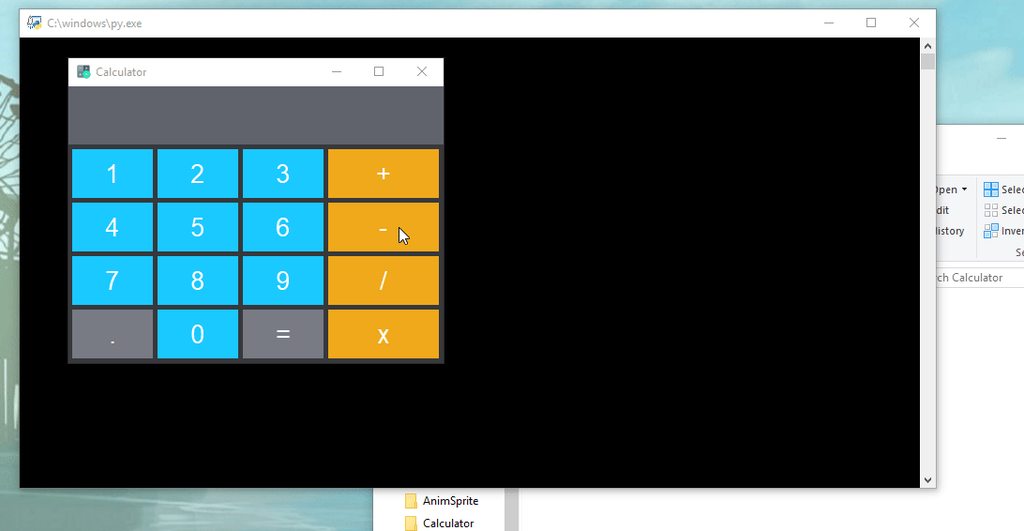


few things i made
calculator, unfinished platformer, spritesheet animator
 boreal otter
wary vigil
boreal otter
wary vigil

any possible way to make any functioning GUI this beautiful? its fucking amazing
this guys so amazing at UI design
rotund flax
using a nice CSS lib, yes
I saw your using electron so anything using CSS can be achieved
However
This channel is for Python GUI libraries
wary vigil
okay thanks
 autumn badge
anybody use kivy? Trying to make some actions based on a list but think i might need separate defs that need to be created on the fly or need a way to pass args to a common def
obsidian lance
@autumn badge what python version you use with kivy?
if you use python3 and want to distribute kivy app to other users, then try distribute first hello world. And after this think again, are you really want use kivy.org?
autumn badge
@obsidian lance right now i am using python 2
what would a good GUI be to use? I am not a fan of tkinter and would love QT if it were free
obsidian lance
@autumn badge look like no good gui for python at this moment
http://stts.pythonanywhere.com/python.html#gui
autumn badge
i love python but the only drawback is the gui (and ability to compile). wonder if i can just run a vb.net gui and have it call python scripts..............
wont be cross platform, but
@obsidian lance what dont you like about kivy?
obsidian lance
@autumn badge i use python3 . and can't even once build linux/windows/android... and noone can explain me why... look like kivy devs just liers. They talk about python3 support, but it fake info)
autumn badge
have you tried it with python 2?
obsidian lance
no... but i tried few time , with pauses more then 1 year :|
3 or 4 times summary
autumn badge
LOL. i like the interface of Kivy
for now, i am not going to package it for distribution. just something i want for myself
obsidian lance
i can run kivy app only from source... but it not enought
autumn badge
will share with the explanation on how to build it
obsidian lance
if you will only run from source, then kkivy not bad way
obsidian lance
link above is my personal notes... about gui... and at this moment i try "eel" it gates python <-> html/js ....
autumn badge
ok. thanks
trying to stay away from html atm. been using Flask for that before wrapped in CherryPy
hollow plume
So I'm not getting an error, it just crashes and I can't figure out why. This program uses PyQt5 to make a simple inventory system for my Dad's enormous vinyl record collection. I'm trying to combine the code I wrote for the SQL lite database and the GUI. My ultimate plan is to load this up onto a raspberry pi with a touch screen and keyboard to take an inventory of said vinyl records. I'm new to PyQt5, new to GUIs, and newish to python as a whole. This is my first "big project". Any help is much appreciated!
 floral moat
im using tkinter to make a dict editor and i was wondering how to have the text box stay the same but every time the user hit print button the text is updated insted of making a new box under it here is my code for the whole project on pastbin https://pastebin.com/CiaY5s6i
fallen oxide
@hollow plume If something "crashes" without an error then you need to be a bit more specific on what you mean by a crash
hollow plume
@fallen oxide so far the only real functionality I've coded is for adding data to the db file. This should happen when you press the big "submit data" button on the add inventory tab. I've got a print statement in there for debugging purposes, that works. Somewhere in the function handling the db stuff it just stops working, a window pops up which reads "python has stopped working" and then it closes.
hollow plume
Well, with fresh eyes I seem to have narrowed it down to lines 288 + 299 in the code, something about how I'm getting the item number in that spot doesn't work. Which doesn't make sense, because that has worked everywhere else I've used it...
here is an updated pastebin: https://pastebin.com/gnY4EHU0
I've cleaned up some naming and by process of elimination determined that the crash happens when python gets to lines 289 + 290 (previous comment was a typo)
sudden stone
 hoary lodge
whats the best way to learn kivy syntax?
charred thunder
practice, honestly.
i don't know kivy much, but you aint gonna improve without giving it a hella-good shot
obsidian lance
@hoary lodge if you realy want it , the looks like
- imagine what you want in result
- start reading kivy docs + try to make step by step your imagined project + make own notes of used parts of docs
@charred thunder hella-good shot may be for python2 only... for python3 100% not good... kivy is head pain for python3 way.
charred thunder
I've heard that, which is why I never really used kivy
amber patio
I dont understand why with PyQt5 i cant open multiple windows
can you help me please ?
digital rose
i am working with gtk+3, and made the following list store:
        store = Gtk.ListStore(GdkPixbuf.Pixbuf, str, bool)
        self.get_files(store)
        treeview = Gtk.TreeView(store)
        horizontal_box.pack_start(treeview, True, True, 0)

        cellrenderertext = Gtk.CellRendererText()
        cellrendererpixbuf = Gtk.CellRendererPixbuf()

        treeviewcolumn = Gtk.TreeViewColumn("Icon")
        treeview.append_column(treeviewcolumn)
        treeviewcolumn.pack_start(cellrendererpixbuf, True)
        treeviewcolumn.add_attribute(cellrendererpixbuf, "pixbuf", 0)

        treeviewcolumn = Gtk.TreeViewColumn("Name")
        treeview.append_column(treeviewcolumn)
        treeviewcolumn.pack_start(cellrenderertext, True)
        treeviewcolumn.add_attribute(cellrenderertext, "text", 1)

        treeviewcolumn = Gtk.TreeViewColumn("Is Dir?")
        treeview.append_column(treeviewcolumn)
        treeviewcolumn.pack_start(cellrenderertext, True)
        treeviewcolumn.add_attribute(cellrenderertext, "text", 2)
i am using following function to populate store:
    def get_files(self, store):
        for fl in os.listdir(CURRENT_DIRECTORY):

            if not fl[0] == '.':
                if os.path.isdir(os.path.join(CURRENT_DIRECTORY, fl)):
                    store.append([Gtk.Image.new_from_stock(Gtk.STOCK_DIRECTORY, Gtk.IconSize.MENU), fl, True])
                else:
                    store.append([Gtk.Image.new_from_stock(Gtk.STOCK_FILE, Gtk.IconSize.MENU), fl, False])
but icons are not showing in the output, everything else runs fine.
what am i doing wrong?
 stable hamlet
How do i bold text in QTreeWidget in Qt Designer?
autumn badge
Hey all, I have a small app made with Kivy as my GUI. Every once in a while after opening and closing it a few times, i go to open it and it does not open. Is there any garbage collection I should be doing on close?
autumn badge
ok. it seems like it gets hung up at times and something doesn't close properly. I like the ease of kivy but it seems pretty resource intensive for what I need. Any suggestion on a better GUI module?
charred badger
qy question
*qt
i have a qpolygonf
how can i get its coordinates?
i.e. qpointf
odd hamlet
at least i dont recommend python for mobile apps at all
use something like swift (ios), kotlin (android) or react native (both) instead
 hasty jungle
oh, never heard about kotlin
obsidian lance
@hasty jungle kivy + python2 may work enough good for mobile, kivy+python3 = headpain. Kotlin have poor documentations...it fresh at this moment
just try make apk hello world use kivy, and you will see how... wtf... is uncomfort
hasty jungle
@obsidian lance thank you
so i was reading about and i found that python can be used for web, and two options are django and flask
obsidian lance
@hasty jungle i use django few times... it powerfull , but big and not flexible. Look at "bottle python" too... it microframework and looks like faster then flask or django.
have you a target? why python , and what you planed to do with python?
p.s. for do desktop app with gui you can use "eel" too
fallen oxide
bottle is unsuitable for large applications
I've used it
heck I've contributed to it
obsidian lance
large for large... = django
autumn badge
@hasty jungle if you are making small web apps, flask is very easy. I would bottle my flask app in CherryPy though
digital rose
Hello have anyone here experience configuring button commands in tkinter?
        for x in range(0, len(discovered_files_in_folder)):
            self.listlabels[x].config(text=discovered_files_in_folder[x])
            self.listbuttons[x].configure(command=lambda: app.frames[ReceiptPage].PopulateReceipt(discovered_files_in_folder[x]))
            if x == 11:
                break
doing this will turn every button command into one with the last discovered_files_in_folder variable
don't know if it makes sense but what I'm trying to say is, even though I change every button in self.listbuttons command induvially, they all turn out like the last edited one.
fringe mesa
and you're sure discovered_files_in_folder is full of unique elements?
digital rose
yes
I have tried printing each one before I make assign it and it prints out diffrent things each time.
the text is discovered_files_in_folder[x]
fringe mesa
ohhh, hang up, I'm gonna bet that your buttons in listbuttons all point to the same button object, which you've duplicated a number of times
digital rose
might be it
but I can change each buttons text indivudally perfectly fine, color aswell but not command
fringe mesa
some object somewhere, either the buttons themselves or something that they contain, is being duplicated between them
they've got a common reference, and that's why when you modify them in a for loop they all end up with the last thing in the list
because you're really just modifying the same object multiple times
fringe mesa
(if I knew more about how tkinter buttons work I could maybe tell you where the issue is, but I'm afraid I've never used it)
digital rose
Ill try printing the buttons to see where they point
its strange they all point to diffrent objects, atleast thats what i think they do
Command Location Button  0 :  74847096<lambda>
Command Location Button  1 :  74888096<lambda>
Command Location Button  2 :  74888136<lambda>
Command Location Button  3 :  104094656<lambda>
Command Location Button  4 :  104123168<lambda>
Command Location Button  5 :  104123368<lambda>
Command Location Button  6 :  104123568<lambda>
Command Location Button  7 :  104123768<lambda>
all point to different lambda functions, what do those functions return when called?
digital rose
ill try
wait how do i run them
they change positions each time
nevermind i got it to work!
turns out you can't pass variables in lambda functions
doing this
self.listbuttons[x].configure(command=lambda pasfile=discovered_files_in_folder[x]: app.frames[ReceiptPage].PopulateReceipt(pasfile))
compared to what I did before solved it.
thanks for the help. I might finish this code this weekend afterall
fringe mesa
hmm, that's actually really interesting what you did there. I guess the problem was that x was always the last index and each lambda would look for it when called
very very interesting
good luck getting it finished!
digital rose
thanks!
fallen oxide

PySide2 - the bindings from Python to Qt - changes skin this spring. Under the hood it is still PySide2 - just better.
obsidian lance
@fallen oxide is it improved version, with advantages? or just new release
fallen oxide
It has proper support by the Qt company
obsidian lance
sonuds like... the pyside version specially developed for qt, by qt dev team?
honest torrent
Niiice
 lethal furnace
What is the most easiest way to create a simple GUI for a Hangman game?
honest torrent
For a beginner, use tkinter
However if you've used tkinter before, I suggest trying out PyQt
 tardy shell
Is there anyone here really good with tkinter? I'm running into a issue with progress bars losing their color after a loading task finishes
obsidian lance
may be it normal behavior? task is finished... don't need color. Are you sure this is bug?@tardy shell
i am not good with tkinter
tardy shell
The problem is if I need to run the task again the color is gone
if the task didn't need to be repeated I wouldn't care about the behavior
obsidian lance
may be you need reset any parameter to 0 again?
tardy shell
I've tried just straight destroying everything without luck lol
obsidian lance
one my python tkniter app , on linux have bug...after pressing , last button always look like pressed... it work but look broken) every time
tardy shell
sounds like a similar issue
obsidian lance
no, it ubuntu only... windows work done
google search without result? i found only example which set tkinter style manually and rewrite the default theme... but not tested)
https://stackoverflow.com/questions/13510882/how-to-change-ttk-progressbar-color-in-python may be you should too use full own style for progress bar
Does anyone know how I can change the color of my ttk.progressBar? It now shows a green color, and I would love to have it blue.
import ttk
self.progressBar = ttk.Progressbar(frame3, length=560, m...
tardy shell
woot, got it working, thank you
digital rose
@lethal furnace try pygame for a simple hangman game
obsidian lance
@tardy shell but it not explain why color disappear... may be default theme or default theme bug....
tardy shell
I'm pretty sure it's just a feature of the default windows theme that was being used
obsidian lance
will be interesting look at explained code with both variants... but have no good t kinter books etc
tardy shell
tkinter defaults to the windows theme
tardy shell
10
lethal furnace
thanks @digital rose
obsidian lance
may be win 7 will work little different. When i first time test tkinter on ubuntu after windows, i will little surprised , the gui looks very different, but have a little plus , the ubuntu gui look better then windows... default
tkinter ubuntu 16.04
charred thunder
you can actually make tkinter look really good, it's just harder
sudden stone
with ttk right?
it wont look the best but its a step up i guess
i never used ttk when i used tkinter
sudden stone
who was it
charred thunder
trying to find it
sudden stone
o do you know what the app was about i can try to find it
charred thunder
nah i got it
@misty ingot made this really cool looking GUI here with tkinter. http://prntscr.com/j019e3
 placid sable
woah
charred thunder
certainly looks good
@sudden stone i'd add a margin to your digit display, i don't like how it touches the edges haha
 misty ingot
thanks
charred thunder
haha no problem ^^
charred thunder
yeah fair enough
sudden stone
this however i used a couple of times https://imgur.com/kIbFmVD
because i was into game development and making pixel art
charred thunder
yup, that's pretty cool.
but it just shows that a good GUI can come out of tkinter
 high willow
PyQt? I'll try it.
obsidian lance
@high willow
http://zetcode.com/gui/pyqt5/
https://lenivaya10001.github.io/development/python.html#gui my own notes about gui... just link + little info
PyQt5 tutorial is an introductory tutorial to GUI
programming with Python and PyQt5 library. The examples describe widgets, explain
layout management, cover menus and toolbars, dialogs, events and signals, and
show how to do painting and create a...
misty ingot
I was going to use pyqt but I don't think they allow you to sell your software
high willow
Thanks, cocore.
Huh? They don't allow you to sell it?
Well, my intention was for it to be free, but if I wanna sell it, I won't be able to. 😠
misty ingot
I may be mistaken but that's what I thought their license was
obsidian lance
not only sell, but you can't comfort make build... it head pain, but work and have docs
in tkinter wxpython eel, just pyinstaller myscript.py --onefile --noconsole and you have exe(win) or just executable without .exe on linux
high willow
Nah. I want something that I could perhaps sell.
sudden stone
tkinter!!!!
xd

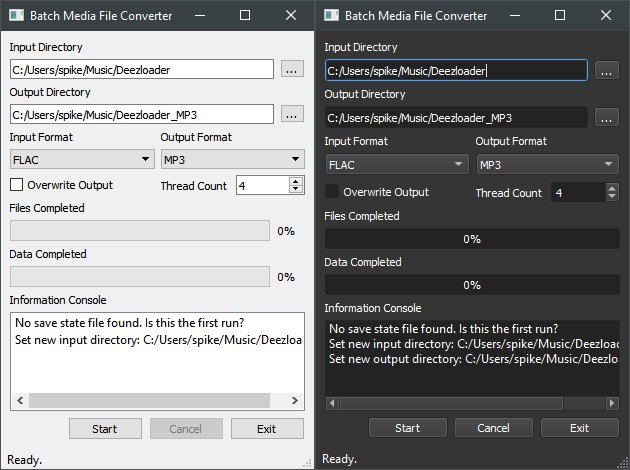

 charred thunder
oh god lemon whyyyy
sudden stone
reported
placid sable
banned
odd hamlet
what did you not make
autumn badge
quick question about PyQt5:
I can set my widgets where ever i want but what is the best practice aor alignment and whatnot?
autumn badge
nevermind. found the layouts tutorial 😃
autumn badge
OK, can anyone point me in the right direction for PyQt5 Qtimer???? I am trying to make something that will auto update ever hour
sudden stone
i think a few people said you cant do anything commerical with it
honest torrent
@autumn badge What is your question?
autumn badge
i was trying to update a Label text every hour and was looking at how to do (also best method). I found Qtime and dug into it a bit more an think i have what i need. Now all i need to do it actually make the query I am running work!
 desert shadow
@charred thunder pretty
uneven echo
Has anyone made a aciii chess board that works in discord
charred thunder
nah no problem
dusty forge
@misty ingot you into sneaker bots too?
dusty forge
you got any bots?
fallen oxide
😞
We've been squashing people asking for help with sneakerbots because they break the ToS of the sites they scrape, and are also potentially illegal
This is not the server to discuss them
odd hamlet
How are sneakerbots so popular. I never heard of them outside of this server
placid quartz
Here I was thinking it was something dodgy cause it's sneaky.. No it's literally shoes 😂
digital rose
its because you can make tons of money buying limited edition sneakers then reselling them later on
some of my friends do that irl but they dont use bots
bots are helpful tho since they sell out fast AF
or maybe some people like wearing them idk
but all i know is you can buy shoes for $250 then sell them for $1000 later on if you wait
honest torrent
Question, I want a combo box to update it's items when clicked, what's the best way to go about doing this? Examples on stackoverflow have not been working, and I believe that's a result of PyQt
honest torrent
(found a workaround, but a solution would still be apreciated)
 peak veldt
My fantastic GUI. Definitely can't make it look any better 😉
I really need help prettying this thing up. I'm shit at design though
sudden stone
make all the buttons a solid color xd
honest torrent
I mean, it's perfectly fine. Maybe use a disabled text box to put the answer into, that might look nice
It's hard to get much better then that in Tinketer
obsidian lance
@peak veldt add naked beauty lady on background 
peak veldt
Oh, right
honest torrent
What's your question?
digital rose
I have a Pyqt widget that I use to control an opencv live video feed from multiple cameras,the problem is that with cv2.imshow(), a new window opens everytime, I need to make a gui that can allow me to put these opencv windows where I want in the Pyqt widget
honest torrent
Might want to look at this: https://gist.github.com/saghul/1055161/019c16a93e0cc8ac245e2dd0ab6d0e31ed7d1b4d
 amber patio
There si someone who use Qtdesigner on python please ?
i have a probleme which very diffucult to explain and i need to show you the program
honest torrent
So, ah, when implementing a scrollbar, the scrollbar never shows up. Instead, it compresses the QFrames
*ignore that everything turned blue, encoding issues
Here's my current code, that I believe to be relevant: https://hastebin.com/opucohimew.py
sudden stone
what did you use to create that ui?
boreal wigeon
judging from the Qs, Qt
sudden stone
oh ok because it doesn't look ugly like tkinter