#user-interfaces
1 messages · Page 22 of 1
 pulsar sable
that is my output
whenever i click the random name button, nothing happens
it might be a stupid mistake but i have no idea what is going wrong
@wise rapids are you free to help?
...or anyone...
@fallen oxide
@shrewd orbit
 digital rose

✨ Level Up!! ✨
Ginger_Ninja08 just got to Level 1 - Beginner
 wise rapids
I have no idea how to code
pulsar sable
oh ok
wise rapids
I'm not even sure what I should do
 golden moat
whats the best python gui
 fallen oxide
haha
hahaha
ha
no.
Alright, to be completely serious, there isn't really a "best"
some of them are fairly bad, and some of them are acceptable
nothing will knock your socks off
golden moat
how about tkinter?
fallen oxide
really bad
golden moat
fuck
fallen oxide
PyQt is popular here
golden moat
ive been using that xD
fallen oxide
tkinter is just a pain in general
golden moat
ill switch
fallen oxide
which isn't surprising considering its TCL origins
anyway, PyQt is hard to install and harder to distribute
the choice is ultimately up to you but the gui landscape isn't great
golden moat
any other suggestions?
fallen oxide
Not really
PySide is more or less in the same boat
Wx is abandoned
GTK is a mess
...tkinter is a mess
golden moat
im at lost than.. RIP
fallen oxide
tkinter will work fine if you can figure it out
it's just a mess and doesn't look great
 honest torrent
pyQt is gr8, expect for the camleCase
 rotund flax
camelCase sad
fallen oxide
They're correct to stick with it at least
digital rose
😦
rotund flax
sad
 obsidian lance
the hell guido van rossum))) , so long time and still have not at least not painful gui library with id and normal behavior. Fuck the effects and super new futures, just give us make buttons labels and switchers comfort way. gui do)
fallen oxide
@obsidian lance Tkinter is really old, originally written for Tcl. Guido has said he's interested in replacing it but so far he hasn't found a gui library he likes
obsidian lance
@fallen oxide How long has it been said?
fallen oxide
I'm not sure
fallen oxide
Not really
obsidian lance
:| then my fonts in browser or web version of discord is problem?
hope guido choose something flexible for python gui. The python is interpretator , and dinamicaly typed language as i understand
and hope he choose it before we all stay old and not functional)))
honest torrent
Now it's up to GDUDE, to make C extensions and make a GUI API
honest torrent
 It all makes sense now
fallen oxide
haha
obsidian lance
need push to guido , think little faster about gui do. May be he worry about the gui which he was choose/create can be not enought good as his name consonance). hope he not plane do gui all life)
 tight tide
Hey, I would like to some advice from you about my idea. I am going to make a task sheduler for myself. I have an equation which still needs work on cuz I am trying to make a perfect one. Tho atm I just want to test my equation with giving values to my variables.
That being said, I want to see my results in gui as well.
Which Gui library and additional libraries should I use? I wanna add timeline and Graph as well..
honest torrent
If your just doing a timeline and graph, and simply displaying data, matplotlib is your guy
Otherwise, any of the GUI APIs will work just fine for that
tight tide
@honest torrent Thanks.
digital rose
the console on spyder freezes all the time.. any suggestions?
obsidian lance
@digital rose you use spyder for python development?
some times ago i try use spyder... it will comfort... but not long time, ... bugs crushes etc. Now i use pycharm community or vscode + python extension, all free and have under linux/win os
 cloud sedge
fallen oxide
cloud sedge
fallen oxide
Most people don't want Kivy, it has a very specific target audience
honest torrent
PyQt has been nice to me
digital rose
I use Notebooks.. occasionally Spyder
obsidian lance
@cloud sedge my first app for android i try to make use kivy.... i complete coding ,then few weeks or even close month summary i try to find way that make apk , and no result... windows too and linux too... only kivy lancher and run from source ))). After this i kick this shit off. and learn the haxeflixel... close year ago. few weeks ago i remake my kivy app use haxeflixel and publish it on google play. Before this i third time try to make apk from kivy again, with new!!! version of kivy... and result was same...))) . be careful with this. But slider widget on kivy is cool :|. but without apk is cool only less 10%) not more
and no man ask me why kivy can't do that... and way of create kivy apk is real ugly... like shamanic dance coding
kivy still no good support python3 , it is real
99% kivy users use it with python2 , and this bad, because python3 released close 10 years ago
and documentation of kivy is poor , but have irc channel
 idle apex
i agree with Zwack, PyQt5 has been good to me
was even able to use pyinstaller with it to get a standalone exe
fallen oxide
You guys should look at Eel (posted in #python-discussion earlier as well) if you are already familiar with HTML and js
It's quite light but should be suitable for small apps
 steady spade
Hi, am new to python, and i need some help with my script, i guess it's pretty simple , i just still don't have enough knowledge.. Well it's a little script that solves quadratic equations
and i want the result to appear on my window
not in pycharm
Here is the code
import cmath
from tkinter import *
from tkinter import ttk


def equasolution(*args):
    value1 = float(a.get())
    value2 = float(b.get())
    value3 = float(c.get())


    dp = "Les solutions de l'équation sont: "
    dn = "Pas de solutions"
    dz = "une seule solution"
    d = ((value2**2) - (4 * value1 * value3))
    s1 = ( -value2-cmath.sqrt(d)) / (2*value1)
    s2 = (-value2+cmath.sqrt(d)) / (2*value1)
    s = (-value2) / (2 * value1)

    if d > 0:
        print(dp, s1, s2)
    else:
        if d < 0:
            print(dn)
        else:
            if d == 0:
                print(dz, s)

root = Tk()
root.title("EQUA DEGRE 2")

mainframe = ttk.Frame(root, padding="50 50 120 120")
mainframe.grid(column=0, row=0, sticky=(N, W, E, S))
mainframe.columnconfigure(0, weight=1)
mainframe.rowconfigure(0, weight=1)

a = StringVar()
b = StringVar()
c = StringVar()


a_entry = ttk.Entry(mainframe, width=7, textvariable=a)
a_entry.grid(column=1, row=1, sticky=(W, E))
b_entry = ttk.Entry(mainframe, width=7, textvariable=b)
b_entry.grid(column=1, row=2, sticky=(W, E))
c_entry = ttk.Entry(mainframe, width=7, textvariable=c)
c_entry.grid(column=1, row=3, sticky=(W, E))


ttk.Button(mainframe, text="Calculate", command=equasolution).grid(column=3, row=5, sticky=W)

root.bind('<Return>', equasolution)
root.mainloop()``` rugged sinew
almost correct
remember the language name after the first backticks
```python
your code
```
then you get syntax highlighting :)
steady spade
okay lemme try again
steady spade
YAY, thanks
rugged sinew
now, tell us what problem you're having with this code
steady spade
I posted a screenshot, I want the result of the equation to appear on my window, not in pycharm
rugged sinew
well, when you do print() it will print stuff to sysout, in this case that means pycharm
so instead of doing those print statements, you're gonna want to push that information into an element in your gui
rugged sinew
so you basically have to create some sort of element to hold the information you wanna display, and then update that element with the correct info.
I'm actually not that well versed in tkinter so I'm not sure which element type to use off the top of my head
steady spade
Thank you , what do u think is better for a GUI ? PyQt or Tkinter ?
rugged sinew
pyqt for sure
everyone around here loves it
but it's a bit more complex, though
a little more learning
but that shouldn't scare you. :)
rugged sinew
from a quick google, it looks like a label is indeed the way to go
steady spade
Hmm , okay i'll see
steady spade
I finally did it !!
Thank you @rugged sinew for helping me, i really appreciate it, what u said was useful :))
Well, here is the code
import cmath
from tkinter import *
from tkinter import ttk


def equasolution(*args):
    value1 = float(a.get())
    value2 = float(b.get())
    value3 = float(c.get())


    dp = "Les solutions de l'équation sont: "
    dn = "Pas de solutions"
    dz = "une seule solution"
    d = ((value2**2) - (4 * value1 * value3))


    if d > 0:

        s1 = (-value2 - cmath.sqrt(d)) / (2 * value1)
        s2 = (-value2 + cmath.sqrt(d)) / (2 * value1)
        solution = "s1 = " + str(s1) + "\n s2 = " + str(s2)
    else:
        if d < 0:
            solution = "Pas de solutions"

        else:
            if d == 0:
                s = (-value2) / (2 * value1)
                solution = "s = " + str(s)
    result_text.delete("1.0", END)
    result_text.insert(END, solution)


root = Tk()
root.title("EQUA DEGRE 2")

mainframe = ttk.Frame(root, padding="20 20 70 70")
mainframe.grid(column=0, row=0, sticky=(N, W, E, S))
mainframe.columnconfigure(0, weight=1)
mainframe.rowconfigure(0, weight=1)

a = StringVar()
b = StringVar()
c = StringVar()
solution = StringVar()

a_entry = ttk.Entry(mainframe, width=7, textvariable=a)
a_entry.grid(column=1, row=1, sticky=(W, E))
b_entry = ttk.Entry(mainframe, width=7, textvariable=b)
b_entry.grid(column=1, row=2, sticky=(W, E))
c_entry = ttk.Entry(mainframe, width=7, textvariable=c)
c_entry.grid(column=1, row=3, sticky=(W, E))
result_text = Text(mainframe)
result_text.grid(column=2, row=8, sticky=(W, E))


ttk.Label(mainframe, text="La valeur de a").grid(column=2, row=1, sticky=(W, E))
ttk.Label(mainframe, text="La valeur de b").grid(column=2, row=2, sticky=(W, E))
ttk.Label(mainframe, text="La valeur de c").grid(column=2, row=3, sticky=(W, E))


ttk.Button(mainframe, text="Calculate", command=equasolution).grid(column=3, row=5, sticky=W)

result_text.insert(END,solution)
root.bind('<Return>', equasolution)
root.mainloop()```no problem. good job!
obsidian lance
@steady spade why lot of people prefer use sqrt(x) , but not ```
x**(1/2) or x**0.5
suarerooting and multiplying something by 1/2 are 2 very different things
fallen oxide
He's not multiplying
** is the power operator
and yeah, the square root of something is just that thing to the power of 0.5
the reason is because using the power operator looks like shit in comparison :P
Python is all about readability and the way your code looks
so yeah, that's why
digital rose
@fallen oxide wasn't like that when i sent that message :)
He edited, he just had 0.5x and 1/2x
fallen oxide
ah okay
 long crystal
can i mimic this sort of table in tkinter?
https://comfy.moe/nhuugu.png

i tried using treeview, but i cant seem to insert anything except text into the columns
so i cant put a progressbar
im trying to make a download manager gui thingy... so the design seems really fitting, but i couldnt find any probably way make it behave like so
obsidian lance
@digital rose @fallen oxide at first i type double asterisk and not use triple ` syntax and text was bold and distorted
fallen oxide
@long crystal You'd need a real gui lib for that, probably
alternatively you'd have to write your own widget
obsidian lance
no short way man
long crystal
you think its possible with wx maybe?
obsidian lance
even kivy, hard to use, but have lot of widgets , not allow you fast do that like html etc
digital rose

✨ Level Up!! ✨
cococore just got to Level 2 - Memer Rank 1
obsidian lance
wx, don't know, i use it few times, but use only buttons and text input fields
long crystal
well, it seems so superfluous - every torrent, download manager and program that can download stuff primarily has those
o.o
fallen oxide
they mostly use GTK
but even then you usually need your own widget
nobody said UI work was easy
long crystal
how can one make their own widget? ;-;
obsidian lance
at least you will must create table create cells , may be table strings , and addon progress bar , text , etc in loop for every string
then create this like class file , mymagictable... and make instance t=mymagictable(...trulala...), if all will work done)
for example tkinter have frame and two elements... summary 3 elements , which can be used like box for other widgets
i forgot last two... frame, may be scrollpanel etc... and my memory last other info)
long crystal
o,o this is confusing... i practically have to make it out of other widgets, right?
obsidian lance
you create frame... it can't displayed... like transperent rectangle... you will type something like
f=Frame()
t=mymagictable(f,....) #this your own created class, where "f" is parent link or something
as result your table will displayed as part of Frame
long crystal
i know what a frame is ;v im just trying to understand the process of creating said widgets
obsidian lance
the situation can be little worst... may be you can only create own big widget from prebuild little parts not more... but i am not sure
 manic pelican
        self.table.setRowCount(1)
        self.table.setColumnCount(4)
        self.table.setItem(0, 1, QtWidgets.QTableWidgetItem('test'))  # row, col
```how would i make it so that the table isin't editable
i tried
self.table.NoEditTriggers
but it does nothing
fallen oxide
Wouldn't you just setEditable(False)?
 polar olive
self.table.setEditTriggers(Qt.QTableWidget.NoEditTriggers) # Can't edit but can select.```@polar olive thank you that works
had to do
self.table.setEditTriggers(QtWidgets.QTableWidget.NoEditTriggers)
appreciate it
polar olive
nice
 sudden stone

such horrible controls
i'm going to change the controls once i finish the basics of the program
then im gonna revamp it and give it a better look
digital rose
Looking forward to see the progress
sudden stone
honestly
almost all the features work
besides the spritesheet feature
i might as well make the program look better
time to design it in photoshop
digital rose
Oh nice, I am pretty amazed by what computers can do.
 placid sable
It looks pretty good so far!
digital rose
nice job
sudden stone
thanks
the blue bar wont be there
it will be a normal bar
but you get the point
placid sable
development is coming along really nicely!
digital rose
Can someone help me in python3?
sudden stone
i don't like kivy as much
digital rose
Show your progress M2?
sudden stone
I haven't got done much
I'm about to work on the settings window + the import and stuff
digital rose
Keep those updates coming, really interesting to see this at work whilst learning something different. Widens the horizons of what Python can really do.
sudden stone
yeah
i'm finally getting to work on this window
i'm gonna make it bigger though
digital rose
Oh very nice, so you are initially creating your own Photoshop?
sudden stone
not really
its more of the animation part of asesprite
and adding that with photoshop
is basically asesprite
digital rose
Hmmm I see.
So you create buttons with code and hyperlink them, though the design alone sits with Photoshop?
sudden stone
i just use two different programs
photoshop and this animation program created by me
i might make my own pixel program some day
steady spade
Hi, i finally compiled my python file to exe, but when i run it, the command prompt shows with the program, is there any way to hide it?
steady spade
Yea, but now, i run the exe file, and the command prompt shows up with the program, and i was asking if there is a way to hide it
 odd hamlet
Yes If You Compile the exe with the --noconsole Option .....
odd hamlet
Like i wrote in the Screenshot
steady spade
am sry , u're right
odd hamlet
The Alternative would be calling os.fork() and Then killing your Parent Process
steady spade
Thank you
obsidian lance
@steady spade pyinstaller yourscript.py --onefile --noconsole
if app is base python only , without external libs then will onefile.exe
obsidian lance
sad, but no easy way to do this syntax with pyqt app, but can with wxpython, tkinter case
steady spade
i was wondering if i can design a GUI layout in photoshop, and then code it somehow in python, i don't know if this is possible
obsidian lance
no way to do this fast... i not pro ... only way i know make what you want is use kivy.org (but in real this is shit, because it still work only with python2 good, python 3 still can't be properly converted to apk etc... only for kivy launcher and run from source)
but you can use tkinter widget and make buttons + image... but it will not fast (bad docs for tkinter and examples is not nice)
steady spade
I see, that's sad :((
obsidian lance
and for future
- pyinstaller create linux app only under linux, windows exe only under windows
-tkinter can run crossplatform code (win ,linux) but gui will look different , margins borders etc
-wxpython can run crossplatform code but with bugs... windows add new element on top , but linux on back... it look like shit), and you need fix your code.
-pyqt work done, but you need installed qt on each machine when you want run your app in case of pyinstaller. And you need qt + pyqt on each machine when run source. this huge
@steady spade this mind , at this moment python have no comfort gui lib...still have no
steady spade
I guess there must be a way to import a custom GUI and then code it somehow, idk..
obsidian lance
this is magic dance with drums. We need native gui, but guido don't like any present libs, or other reason don't swith tkinter to another
rotund flax
Guido has said that when something nicer than tkinter comes along which he likes then tkinter will be gone
obsidian lance
tkinter is abnormal) . This only gui lib i know which have no default ID parameter for widgets... it look ready mad first time)))
and unicode displaing symbols problem make it worst...
honest torrent
If PyQt was pythonic, I bet it could have been implimented
obsidian lance
i must recode each unicode symbol with number greater then 65535 to plain text string because tkinter can't display this... because tkinter ooold
what a fake)... the python 3 presented as full unicode support, but tkinter can't this... 0:)
digital rose
Very nice. 
sudden stone
thanks
placid sable
Looking good!
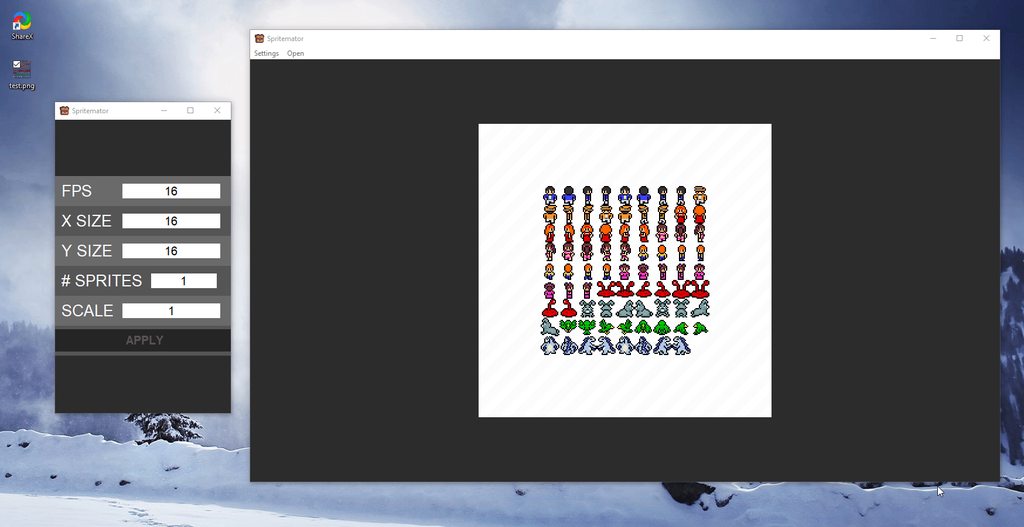 rotund flax
Nice one
sudden stone
tkinter
rotund flax
for tkinter that's pretty sick lmfao
sudden stone
yeah but i needed something like this for 2d sprite making
the spritesheet is what i found online
this version looks really close to my original design
of course i added a few extra things like a menubar
and im gonna edit the # sprites to be STARTxEND
like 2x5
obsidian lance
@placid sable tkinter linux look, look better then windows
 placid sable
It's looking good!
digital rose
^
digital rose
wait a minute
sudden stone
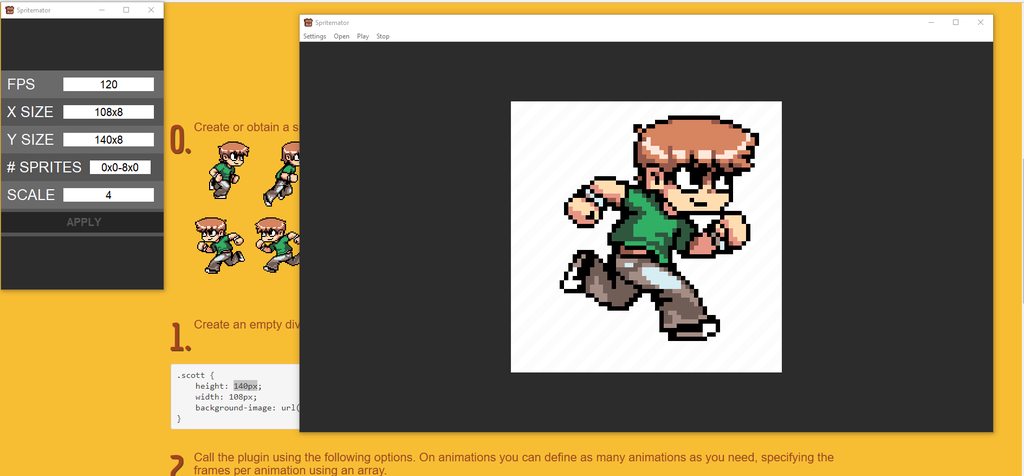
i'm done
i just can't get fps right
but other than that
its done!!
created with tkinter (no ttk) and pil
only 287 lines of code
rotund flax
damn that's awesome 😄
placid sable
I agree
obsidian lance
no way, @steady spade , when you use grid , then all cells will have biggest value..... if you have widgets with width 100 px , 50 px , 25 px, the grid result will 100x3 cells.
read about .place() method
steady spade
Okay, thank you
honest torrent
https://hastebin.com/ofuhirufab.py I have the following code that I want to display a very simple animation of a box falling down. I know the generating part works, because if I use mainloop, it displays the first image. However when I want to create the actuall animation, a box pops up with nothing in it
honest torrent
Is there a better GUI lib to do this with? I can also access the RBG values of each pixel
obsidian lance
@honest torrent remember ... gui is not python way at this time... no good gui lib for python
honest torrent
Well, I know that
obsidian lance
python is server or console/terminal
honest torrent
Although PyQt is decent
And python can still be used for GUIs
Take dropbox > they use python for their desktop app
so does Cura, 3D printing software
honest torrent
Well of course
obsidian lance
https://hastebin.com/ofuhirufab.py
- at first you use "global img"
- at second you delete global image
- at last you create new image , but what if destroy() method not erase image but delete object like "del img" then you create a local var inside function.
but i am not sure
honest torrent
I use global img because it's not worth making a class
It doesn't delete the img from what I know, simply removes it from the gui
obsidian lance
do you try just redefine img? ```python
print("Plz Display")
if img is not None: #no need
img.destroy() #no need
img = tkinter.Label(root, image=tkpi)
img.place(x=0, y=0, width=s.width, height=s.height)
sure
steady spade
Hi, i made a program that does the "ctrl+s" shortcut automatically in every period of time (you choose that period of time in the beginning)(i did it so i don't forget pressing ctrl s every time when am using photoshop or illustrator), i used a while loop to do that, but my GUI starts lagging when i try to quit ..
import pyautogui
import time
from tkinter import *

def ctrlspress(*args):
    t = float(n.get())
    while t > 0:
        time.sleep(t)
        pyautogui.hotkey('s')


root = Tk()
root.geometry("200x120")

n = StringVar()

Entry(root, textvariable=n, width=15).pack(side=LEFT)
Button(root, text="ACTIVATE", command=ctrlspress).pack(side=TOP)
Button(root, text="QUIT", command=root.quit).pack(side=BOTTOM)

root.bind('<Return>', ctrlspress)

root.mainloop()
The issue is fixed.
 unkempt scroll
Was it an easy fix, or something painfully obscure? I know I've been bitten by some tkinter bugs in the past glares at shared variable option menus
steady spade
@unkempt scroll It was an easy fix, i used the tkinter after() method to make a loop instead of the "while loop"
obsidian lance
@steady spade i think about pause between loops in while but look like "after()" can work better... i don't know , cause not use in even once
sudden stone
damn i'm late
i had a similar problem with my sprite animator
but yeah the after method works fine
polar olive
While loop was probably blocking the gui. Your code never gave any control back to GUI code to react to button presses and etc.
steady spade
Hi, I'm trying to add a timer to my program, for example if i want the program to press CTRL+S every 10 minutes, i want the timer to start from 10 min and go down to 0. Here is the code:
import pyautogui
import tkinter
from tkinter import *
import tkinter.font as tkFont

root = Tk()
root.title("AutoSave")
n = StringVar()

def ctrlspress():
    global after_id
    global t
    t = int(float(n.get()) * 1000)
    pyautogui.hotkey('ctrlleft', 's')
    after_id = root.after(t, ctrlspress)

def definet():
     global t
     t = int(float(n.get()) * 1000)

definet()
sec = str(t)
def tick():
    global sec
    sec -= 1
    time['text'] = sec
    time.after(1000, tick)


def start_loop(*args):
    t = int(float(n.get()) * 1000)
    root.after(t, ctrlspress)

def STARTALL():
    start_loop()
    tick()

def stop_loop():
    global after_id
    if after_id:
        root.after_cancel(after_id)
        after_id = None

root.rowconfigure(1, weight=1)
root.configure(bg='#2f3542')
helv22 = tkFont.Font(family='Helvetica', size=22, weight='bold')
helv15 = tkFont.Font(family='Helvetica', size=15, weight='bold')
bn1 = Button(root, text="Start", font=helv15, command=STARTALL, width=40, height=4, bg='#222f3e', fg='white').grid(column=0, row=0, columnspan=4)
bn2 = Button(root, text="Stop", font=helv15, command=stop_loop, width=40, height=4, bg='#222f3e', fg='white').grid(column=0, row=6, columnspan=4)


L1 = Label(root, text="Save every", bg='#2f3542', fg='white', font=helv22).grid(column=1, row=5)
entry = Entry(root, textvariable=n, font=helv15, width=9).grid(column=2, row=5)
L2 = Label(root, text="seconds.", bg='#2f3542', fg='white', font=helv22).grid(column=3, row=5)
time = Label(root, width=8, height=2, bg='black', fg='white', font=helv15)
time.grid(column=1, row=8)

root.bind('<Return>', start_loop)

root.mainloop()```In line 16, i try to do sec = t , but i get the error : t is not defined
It looks like this with sec = 60 https://imgur.com/95jjK9Z
 sudden stone
t isn't defined
before you use any functions
it trys to set sec = t
t is only defined in a function
so for that to not error, you would have to call a function first or define t before the line "sec = t"
my explaining isn't the best so i'll make an example
def create():
    tissue = 5

toilets = tissue *2
create()
Tissue wouldn't be defined until create() was called
and since create was called after you tried using tissue
it would error
def create():
    tissue = 5

create()
toilets = tissue *2
#create()
now it's defining tissue in the function before using it
tissue = 1
def create():
    tissue = 5

toilets = tissue *2
create()
another solution would to be just to define tissue
without a function
@steady spade hope this helps
steady spade
@sudden stone It's still an error, but i added "global tissue" then it worked, but for some reason i still don't have it working in my program
def create():
    global tissue
    tissue = 3

create()
toilets = tissue*2

print(toilets)```
It prints 6 in the outputnow t is defined, but the new error i get is "n is not defined", since
t = int(float(n.get()) * 1000)```is n defined on startup?
if you put a number into the field before start it won't happen
steady spade
I updated the code above, now n is defined on startup
n = StringVar()```edit broke smth
Its better to format it so that function are at the top before any other code, currently you have them all over the place.
Running the edited version (that you changed after my message) brought multiple new bugs, I would roll back to previous one 😄
In that version the reason why you got "n is not defined" error was because you didn't enter a number into N"Save every N seconds" field.
You could use IntVar() instead of StringVar() as the values should be only integers anyway, that will also mean that n.get() will give you an integer directly, you won't have to convert it manually.
steady spade
Thank you
sudden stone
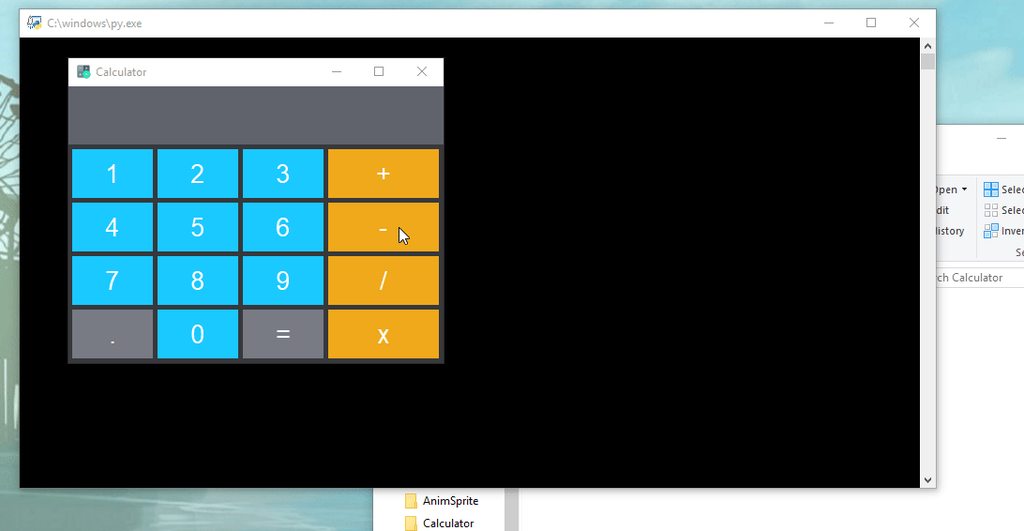
meh created simple calculator
pure tkinter
only image is the icon
from tkinter import *
lol the only thing i imported
a few things i could do to it to make it better
like repeating decimals
placid sable
I like it
 smoky kayak
hello m2, i like it a lot but i feel like you should replace - with / and + with * so then the most used buttons + and - will be closer to the = button 😄
this is useful for people who want to do quick calculations with minimal mouse movement 😄
sudden stone
okay thanks for the tip!
smoky kayak
no problem 😄
hey @sudden stone i saw your sprite tkinter application too and i really liked the flat dark theme 😄
smoky kayak
i would now replace - with / 😄
smoky kayak
no problem at all my friend 😄
hey do you think it'd be possible for me to introduce a flat dark theme to my program too or would it be too difficult with my layout 😄
@sudden stone 😄
smoky kayak
remove border of widgets ? 😮 never looked into that, how do I do that 😄
thank you btw 😄
sudden stone
and set the foreground color (for textbox, button, label) to change the text color
bd=0
smoky kayak
i am so very inspired by your design 😄
sudden stone
❤
sudden stone
yeah it did
.config(font=("Arial", 15))
i don't know if the default font was arial but
in my design i made in photoshop i used arial
smoky kayak
thank you so much 😄
i tried applying that .config to the root but it didnt work 😄 do you apply it to each individual widget
sudden stone
well i do a loop for parts that are pretty much the same
and use the index to place them
like in the calculator
smoky kayak
ohhh 😄 dynamic i love it
sudden stone
    settings = Toplevel(master)
    settings.attributes('-topmost', 'true')
    settings.configure(background=background_color)
    settings.title(TITLE)
    settings.geometry(f"{SETTINGS_GEOMETRY[0]}x{SETTINGS_GEOMETRY[1]}")
    settings.iconbitmap(ICON)
i have only done that once before but i used .place(x=0,y=0) and added a fixed amount depending on the height/width of the widgets before it 😄
and thank you for that 😄
sudden stone
yeah that's how i created the settings window
and when the button was pressed it would call the function
and create it
smoky kayak
what hex color codes did you use for the dark parts 😄
sorry if i am asking too much here 😄
smoky kayak
thank you 😄 i will work on my gui now
and nope! not right now 😄 thank you for your help
sudden stone
good luck! be sure to tag me when you share i cant wait to see
smoky kayak
i will 😄 thank you so very much
sudden stone
np!
smoky kayak
i think im gonna rewrite this to be done in a loop instead first 😄 i am so very angry at myself for writing this
smoky kayak
anyone know how to fix the ugly text on tkinter on high dpi screens?
left is tkinter, right is default Windows text
@sudden stone here it is so far, any suggestions? 😄
and now it is all done in a loop 😄
sudden stone
looks nice!!
smoky kayak
thanks m2 😄
polar olive
@sudden stone Does your calculator only work with buttons or also corresponding keyboard input?
sudden stone
i'm lazy so the only way you can do keyboard input is by typing it in lol
that would be a cool idea thoug
i might actually do that
sudden stone
one is east and one is west
opposite directions
imo you should use grid
and put them on the same row, differect column
honest torrent
class SongFrame(wx.Frame, tags.File):
TypeError: multiple bases have instance lay-out conflict```  OwO What's this?Basically, you're doing multiple inheritance, but it's not clear which class should be used for unoverridden functions and variables
there's a conflcit, basically, they declare some of the same things
can't do that
fallen oxide
what you want is a mixin, probably
honest torrent
I don't think I want to use wx.Frame anyways though
I need like, some kind of seporator
fallen oxide
I'm curious as to why you're even inheriting tags.File
honest torrent
Just, a box that I can put a grid in
Because I think using self.name might be easier
I could always do self.song.name though
honest torrent
True that
The tag lib was weird though
I had to do py import pyprinttags as tags tags = tags.taglib
honest torrent
prbly because it uses Cython
honest torrent
https://gist.github.com/anonymous/e34360488ff5cfacf85fce5099397c4b Whenever I attempt this, it opens a window with no content, and doesn't have the SongFrame in it
 mild flame
Hi, i'm moderately comfortable with the basics of python, but i don't know anything about adding a gui to my program, where should i start?
mild flame
Thanks, will do
obsidian lance
@mild flame be careful... tkinter have poor docs and abnormal structure... the widgets have no "id" parameter etc...
i don't think this good point to start... tkinter is compact and prebuilded (as result you can just "pyinstaller script.py --onefile --noconsole" and have onefile exe windows / linux package) but this is all good places of tkinter... For example tkinter widgets can't display unicode characters with number greater then 65536 (for example if you want display message from email you will fail often without manual recoding symbols with number > 65536 to coded string)@mild flame
 shell blade
What alternatives are there to tkinter?
rotund flax
^
 drifting sundial
pygame....no
 wanton tangle
PyGI for GTK+3
drifting sundial
PyQT and I believe wxPython both support native platforms quite well
shell blade
I hear about kivy often
shell blade
I've used it before
drifting sundial
Same
Worked on a game with two friends two summers ago. Was a top-down dungeon crawler
shell blade
it doesn't have good gui stuff bundled with it, so I would have to make everything myself
wanton tangle
@drifting sundial what do you mean by support native platforms quite well like GTK3
drifting sundial
Worked pretty well, but managing everything got out of hand, manging objects was getting ridiculous
shell blade
what's a gtk3
wanton tangle
GTK3 is a GUI framework like Qt and wxWidgets are
wanton tangle
GTK3 is written in C, Qt in C++, wx too I think? Tk (tkinter) in Tcl
wanton tangle
GTK isn't a window manager lol
drifting sundial
I've only heard about it in the context of linux guis for the most part, so I assumed it was a window manager lol
Yay learning 😅
shell blade
Why should I switch from tkinter aside from better unicode support?
wanton tangle
Tkinter looks ugly
wanton tangle
And isn't native on any platform
shell blade
even windows?
drifting sundial
its portable and somewhat easy to get started with
but looks ugly on every platform
sudden stone
i dont understand why people would use pygame for guis
i personal like using tkinter
drifting sundial
tkinter is good for small apps imo
sudden stone
yeah i made some cool stuff
wanton tangle
Pygame isn't a GUI framework. Pretty much nobody uses it for GUIs
wanton tangle
A graphics framework isn't a graphics user interface framework
sudden stone
calculator with tkinter
shell blade
it could be
sudden stone
pretty simple lol didnt do much with it
wanton tangle
Not really. To be a GUI, you have to provide direct warppers for widgets
wanton tangle
Being able to make your own widgets doesn't make you it a GUI framework
sudden stone

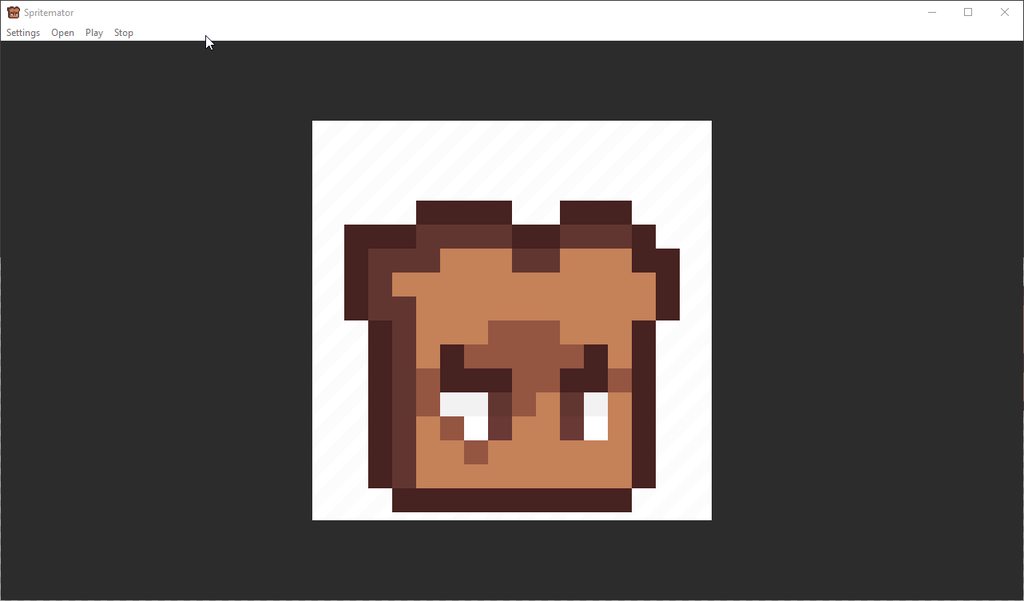
pretty proud of this
https://i.imgur.com/r0d4AJ3.gifv
this is what the settings look like (back when fps was broken)
the only image was the icon and the canvas background
i love canvas
❤
rugged sinew
looking real good, @sudden stone
 cinder bison
o thats cool
 echo lagoon
Best GUI to create a chess game?
fallen oxide
They'll all do it, but Qt is the nicest overall toolkit
shell blade
pygame
wanton tangle
Pygame isn't a GUI framework. You can embed it in a Qt window
shell blade
You can also do \ to nullify formatting
\~~tkinter~~
~~tkinter~~
shell blade
You can type backslash normally if it's followed by a space
digital rose
yes
but not if it's followed by a ~
to say \~ you have to say \\~
this is getting off topic...
shell blade
yes
obsidian lance
@echo lagoon not tkinter i think. tkinter is for simple button app with text . And can't display unicode with number greater then 65535
 meager gazelle
@obsidian lance TKinter is much more than enough for a simple Chess-Game 🤷
obsidian lance
look like you right... solomon)
 lapis iron
 shell blade
ok
tkinter is fine imo
isn't aurora 4x basically made with the same level of gui complexity?
fallen oxide
Tkinter is just very, very old
It's originally from the Tcl days, and was designed for Tcl
And for some reason there's a Python wrapper for it
Tcl is long dead, though
shell blade
I mean, it works I guess
fallen oxide
Just about, yeah
shell blade
Also, while we're here, I should mention that I attwmpted to put the GUI I posted a while back into a module
fallen oxide
GUI applications aren't usually suitable candidates for modularisation
You can do that if you're running them in their own right
But since every GUI library has its own main event loop, you just can't really use them in something else
shell blade
So just cram all the GUI code at the top of the file and ignore it?
fallen oxide
Haha, not really what I meant
You can modularity within your application
Just don't build it with the intention of making an API for another app
fallen oxide
Ah okay, yeah
 gentle rain
Just wondering if I were to replace tkinter with another gui framework what would be an easy one to switch to in your opinions?
fallen oxide
Nothing is really exactly like Tk
But that's a good thing for the most part
Qt is a popular one
gentle rain
Does it allow custom shaped guis?
gentle rain
I think so idk how to put it in english
shell blade
Custom size?
gentle rain
Like custom placement/shaped of the minimized and quit buttons?
shell blade
Most likely, although I have not used QT
fallen oxide
No
Qt is designed to integrate with the system it runs on
You can hide the titlebar if you really want and draw your own icons, but I can't think of a good reason to do that
digital rose
Going to ask there: is there any way to move buttons to certain shape in Appjar?
sudden stone
@fallen oxide isn't appjar like tkinter?
nvm
ignore i said anything lol
did some research
 barren siren
I'm looking to make a game. A handful of buttons, and a window with vector graphics. Which will be modified during gameplay. Kind of like the old Flash games? Any recommendation of what GUI I should look at ?
shell blade
I've used tkinter without issues, although others have said that pyqt is better
barren siren
I'm wondering if I should check out "Unity" actually...
barren siren
Apparently it uses .NET. And then you can use IronPython.
shell blade
Good luck with that, lemme know if that works out for you.
barren siren
How hard can it be? 😉
shell blade
¯_(ツ)_/¯
shell blade
Did someone say to use pygame, pyqt, tkinter, or just learn c#?
barren siren
Joseph, what did you try to make?
wanton tangle
Ironpython had been abandoned for many years @barren siren
rotund flax
I tried to make fluid
barren siren
aw
wanton tangle
If you're using Unity, use C#
barren siren
....so, pyqt looks interesting
rotund flax
Qt is interesting
PyQt is also interesting
they should've named it QtPy for Cutie Pie but okay
wanton tangle
You're looking to make a game, pyqt is gui
barren siren
...yes?
rotund flax
PyQt is no use for game development
It can make static interfaces and stuff, but it's just not got the right features for game dev
barren siren
ahhhh.
wanton tangle
People really need to understand the difference between graphics libraries and graphics user interface libraries
barren siren
Well, I just wanted to do something simple. Like a flash game without the flash. The important part is vector graphics and vector animation
rotund flax
Essentially, for game dev, knowing C# is a must, either if you go down the route of using your own graphic engine or using something like unity
wanton tangle
C# only for unity. C++ otherwise
shell blade
I wasn't aware that pyqt had no graphical abilities beyond buttons and stuff, but tkinter does have a canvas widget with drawing tools
shell blade
C# is good for monogame too
wanton tangle
@shell blade pyqt has canvases too, just canvases have little ability of themselves and are too low level
If you want to make a simple game with python, use pygame. Nothing gets simpler than SDL2
shell blade
pygame has terrible GUI support iirc, isn't embedding pygame into tkinter or pyqt a thing as well?
wanton tangle
Yes it is
Make a basic Qt UI, embed the pygame surface into a frame
There's also pyglet of you want some direct OpenGL action
Though OpenGL is sort of awful
shell blade
He said he only wanted basic vector graphics
wanton tangle
Why not literally just write a flash game?
Nothing wrong with that
The problem was never with flash, it was always the flash plugin itself
shell blade
Different lang and different workflow, but flash is quite accessible.
wanton tangle
Flash games work without it
wanton tangle
Flash is just JavaScript. Similar enough to python that it shouldn't be too hard to learn
barren siren
Flash is dying. I literally can't get flash games working under linux, and under windows I had to download a specific player. Time to move on.
wanton tangle
Do you mean online Flash or Flash itself
Might as well use HTML5 and WebGL or something if you want to feel newer
shell blade
I still play flash (muh anecodtal evidence), and there are still popular flash game sites like kongregate and miniclip, but this is getting kind of off topic either way
barren siren
Can you do animated vector graphics in HTML5 and WebGL?
wanton tangle
Oh another option if you want a low level vector graphics environment I've had success with
Is pycairo
Cairo is bloody awesome
shell blade
Hearing you not criticise something is promising 
wanton tangle
😅 I'm opinionated
barren siren
lol
shell blade
What is it?
barren siren
wanton tangle
Cairo (stylized as cairo) is an open source programming library that provides a vector graphics-based, device-independent API for software developers. It provides primitives for two-dimensional drawing across a number of different back ends. Cair...
Cairo has been the go-to solution for custom graphics for the GTK stack
Had to use it because GTK doesn't provide an image widget that is resizable so I had to draw a Cairo surface that could reload and resize the pixel buffer from my image of choice as I resized the window
Though I wasn't using it with python, I was using Cairo with Vala but looking at pycairo guides
shell blade
Would it be your first choice outside of GTK though?
wanton tangle
They have similar APIs
Yes
If I want something low level, definitely Cairo. It's wicked fast and flexible
I only got to know about it because of GTK but Cairo itself is used in a lot of places
shell blade
If it's fast, then I'll definitely keep it in mind if I need a fast graphics thing
 kindred bluff
Hi, if I want to create 2D and 3D graphs in a GUI, would tkinter+matplotlib be the best combination for that?
shell blade
dunno how matplotlib works for builtin 3D graphics, but with some math of your own, I'm sure tkinter+matplotlib is suitable
kindred bluff
well tbh I don't actually know how to do 3D in matplotlib
shell blade
Well, with some math I'm sure it's possible
kindred bluff
but I found documentation for mplot3d
kindred bluff
I'm more worried about tkinter bcs I'm having trouble finding nice examples
I want to make it y'know, extravagant
but for now I only know how to make a simple calculator
shell blade
Well, if you like my tkinter GUI, I have a gif of its functionality posted in #303934982764625920
It's surrently configured to be used for text though, but you could easily switch out the central widget with matplotlib
kindred bluff
the theme toggle is so cool
shell blade
yeah, it was a bit of a pain to figure out, but it's nice
Adding your own themes is pretty easy too
I could just DM you the template if you wanted, @kindred bluff
kindred bluff
I would appreciate that
shell blade
Aight
wanton tangle
Matplotlib works great with 3d
obsidian lance
@kindred bluff
sudo apt-get install python3-matplotlib
kindred bluff
thanks 😃
obsidian lance
@kindred bluff np, and can use "rmouse -> mention" on user logo picture, that mark message red symbol in new message list of user. It allow separate message flow if lot of people talk same time
 dense whale
Hey there.. What is the best python framework for building gui?
rotund flax
there are quite a few, and it's mainly about personal preference
some of the well known ones are tkinter and PyQt
shell blade
it also depends on what platforms you want to run it on.
for example: I'm 90% sure you can't (easily) export tkinter to android
fallen oxide
Yeah, that's "good luck with that" territory
shell blade
otherwise, tkinter and PyQt are safe bets for any desktop platform.
Was this helpful, @dense whale?
kindred bluff
what about wxPython
fallen oxide
Pretty sure it's not maintained @kindred bluff
kindred bluff
what do you mean by maintained?
because an update seems to have been released like two weeks ago
fallen oxide
checks
Huh, you're right
I was under the impression that WX itself was unmaintained but I guess not
kindred bluff
does someone perhaps know why the 3d plot starts wiggling when you hover over it?
obsidian lance
@kindred bluff pastebin.com too please :)
placid sable
hastebin > pastebin
obsidian lance
@dense whale tkinter is prebuilded, but can't show full unicode letters, as result if you try show unfiltered message from your email in tkinter widget you will fail. remember it. and tkinter have not default "id" parameter. It insane , but you can emulate it by hand coding
@spare verge what is gist?
 spare verge

GitHub
GitHub is where people build software. More than 28 million people use GitHub to discover, fork, and contribute to over 78 million projects.
obsidian lance
@fallen oxide just for comfort, don't want save file on my pc or use editor
kindred bluff
sorry didn't see the message immediately
obsidian lance
yes, gist look pretty , need test once
kindred bluff
@obsidian lance https://pastebin.com/2SEth3ge is this good?

Pastebin
placid sable
I'll take a look when I get home, if it's not solved by then.
kindred bluff
I've noticed that if I make the buttons bigger than the graph it works
but then the buttons looks weird
obsidian lance
enought , and your english comments good as mine)))
kindred bluff
btw, what does sticky=nsew actually do?
obsidian lance
self.btn = tkinter.Button(self,text='Izlaz', command =  izlaz)
        self.btn.pack(ipadx=125)
        self.btn = tkinter.Button(self,text='button')
        self.btn.pack(ipadx=125)
why you use same name for different objects?
self.btn1 self.btn2 will be better i think
kindred bluff
I'm not sure tbh
the code is kind of an abomination that I made using whatever I could find online
and glued it using the limited knowledge I have about tkinter and classes
obsidian lance
@kindred bluff digging of window is result of change numbers in coordinate toolbar... look like you need fix it width or format numbers
try this
self.btn = tkinter.Button(self,text='Izlaz', command =  izlaz,width=100)
        self.btn.pack(ipadx=125)
        self.btn = tkinter.Button(self,text='button',width=100)
        self.btn.pack(ipadx=125)
this is hardstyle solution)
you can use not 100 but 99 in width
you are the boss)
kindred bluff
how do entries work? I'm trying to replace input with entry so that everything is done within the GUI
shell blade
have you looked at the tkinter documentation yet?
kindred bluff
oooh, I was looking at the wrong page
I'll check that out now
yeah that didn't help really
kindred bluff
I've been trying different stuff by replicating what I saw online but I can't seem to do it properly.
If someone could help make it so that the t=linspace(start, end, points) is defined using entry, I'd be really grateful
obsidian lance
+1 for wx widgets ... yesterday i change my gtk colors for ubuntu that make all folder background black. And wx application , started on my ubuntu stay black too
tkinter still grey
shell blade
?
wanton tangle
@obsidian lance if you'd used GTK instead of wx, your thing would have followed your GTK theme completely :p
obsidian lance
@wanton tangle can i just use same python code + GTK, that create linux + windows app , with available just "pyinstaller myscript.py --onefile --noconsole" and have monofile executable for os?
wanton tangle
Well, for one, you shouldn't be creating single file python executables for Linux. Ever
Linux comes with python preinstalled and has ways of ensuring you have all the packages you need
Linux is not windows, shouldn't treat it as such
And no, GTK doesn't work very well with windows. But for GTK based distros, which happen to be the most common ones, it is significantly better than wx or Qt
obsidian lance
ok
sudden stone
prepare to see many post from me
im going to transfer my game to python instead of c#
not much i gotta do to make that transformation
sudden stone
im more experienced with python & pygame than c# & monogame
 marble shoal
gotcha
if you plan on making any fairly detailed game, though, I recommend staying away from pygame
pyglet and cocos2d are both much much faster than pygame (the reason mainly being batching together draw calls, where pygame enforces you blitting everything seperately)
sudden stone
so you vsay pyhlet and cocos2d are much faster than python
marble shoal
oops
sudden stone
you mean pygame?
marble shoal
yeah sorry
marble shoal
pyglet is a framework, cocos2d is a game engine
cocos comes with things like actions, screen effects, backgrounds, animation management, menus, etc
sudden stone
isn't pyglet more for 3d?
marble shoal
it can be done in 3d, though I've seen more instances of 2d in it than 3d
marble shoal
just a word of advice for optimization, make sure that each new sprite is in a Batch, but make sure the amount of sprites/images in a Batch doesn't exceed 50
hopefully you'll learn how to use Batches later on, but in summary, Batches make the sprite blitting much faster, because it blits all sprites/images in that Batch all at once
graphics libraries, and graphics cards for that matter, don't particularly like it when they get draw call after draw call. they like it a lot more when all the data they need is coming in at once
sudden stone
about
cocos2d is a framework for building 2D games, demos, and other graphical/interactive applications.
marble shoal
huh
never knew they considered themselves a framework for such broad use when a lot of their stuff pertains to game actions
sudden stone
im hearing that pyglet isn't python 3
marble shoal
...huh?
pyglet works just fine with python 3
I don't remember if I used a wheel/egg or if I just pip installed but I'll check right now
yep, pyglet works absolutely fine in python 3
sudden stone
ok thanks
 uneven echo
Anyone here used tkinter?
fallen oxide
Unfortunately. But not in detail.
uneven echo
well you see
marble shoal
the details were lost in therapy
uneven echo
I've come across a interesting problem
The left one only works on linux
The right only works on windows
fml
Anyone got a fix to make the module name no caps?
fallen oxide
I'm pretty sure it's lowercase on all platforms
fallen oxide
The uppercase is likely a C module wrapper
marble shoal
gonna guess you're not using the same version across systems
marble shoal
if you're using the stock python command on rpi then it's going to be 2.7
marble shoal
I just do alias python=python3.5 (once py3.5 is installed) to alias python to python3.5
gonna have to drop that in your .bashrc though
marble shoal
yep, though make sure that command works first
 amber turret
If you want 3.6 you'll need to either add it to your repositories and dl it or build it manually for 3.6.4
If you need it
uneven echo
Na 3.5 will do fine
amber turret
Ya
dense whale
are there any popular apps that is fully made with python (if thats possible). 😄
odd hamlet
GUI ones not that much there are some less known but good ones in pyqt
apps in general hell yes
dense whale
k .thanks
rugged sinew
most major apps will use a combination of technologies and languages
not pure python
but google, dropbox, youtube, spotify and reddit use a ton of python.
sudden stone
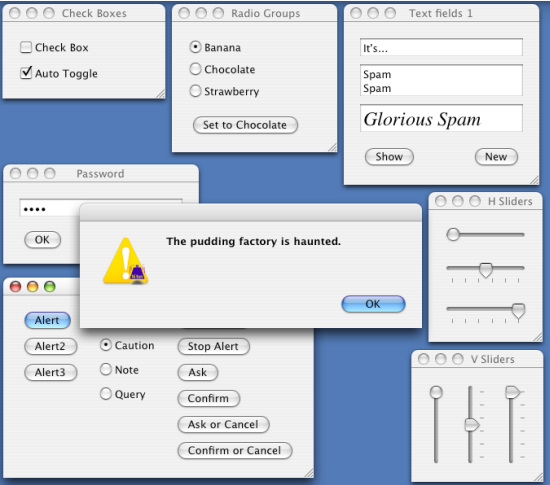
Dice Insights
How to choose the best Python GUI for you? Here are the best 7 currently available.
i love that tkinter isn't up here lol
rugged sinew
have any of you guys tested gooey?

GitHub
Gooey - Turn (almost) any Python command line program into a full GUI application with one line
it looks like a fun idea.
uneven echo
I wanna make a home automation gui..... Is it better than tkinter?
honest torrent
looks neat
wanton tangle
@uneven echo For that, a web UI would be more suitable since you'll be able to access it from any device
uneven echo
@wanton tangle I'm using Ifttt webhook
So I can do it for tasker, a python script etc
placid sable
IFTTT is fun
rotund flax
My friend is an admin on IFTTT
placid sable
I swear you have friends who are admins everywhere
rotund flax
agreed
rotund flax
If This Then That, an automation service, off topic tho
shell blade
welp, I'm officially done with tkinter
moving on to kivy
oh boy, installation errors
digital rose
Hello?
placid sable
Hello
digital rose
https://pastebin.com/Y3pfvAWi Do you know how to collect data from textboxes?
fallen oxide
for the record, just ask your question in future
no need to check if someone is here
digital rose
K
fallen oxide
Yeah, because you're doing ent.get, not ent.get()
get is a function
you do have to call the function
digital rose
print(ent.get())
fallen oxide
yes
digital rose
LOok def create_window():
root = Tk()
root.title("Write your Note")
ent = Entry(root, width=100).pack(side=TOP, padx=100, pady=100)
b = Button(root, height=1, width=10, text="save", )
b.pack(side=LEFT, padx=2, pady=2)
root.mainloop


def save():
    print(ent.get())
It stillwont print
fallen oxide
Are you calling save() anywhere?
It doesn't look like it
you're also not calling mainloop()
digital rose
*facepalm
fallen oxide
It looks like you haven't done a Python tutorial - are you doing Python at school or something?
digital rose
I am self teaching and using tutorials from lynda.comand youtube. This is a dumb mistake
fallen oxide
If you'd prefer a book, try Automate the Boring Stuff with Python
digital rose
K
LIke This def create_window():
root = Tk()
root.title("Write your Note")


ent = Entry(root, width=100).pack(side=TOP, padx=100, pady=100())

b = Button(root, height=1, width=10, text="save",command=save())
b.pack(side=LEFT, padx=2, pady=2)
def save():
    print(ent.get())
root.mainloop()
OK, but now you're calling save() when you don't want to be
it should just be command=save
digital rose
HEy. I have been working my program down to this final error: "C:\Users\Talkcom Inc\PycharmProjects\Randomizer\venv\Scripts\python.exe" "C:/Users/Talkcom Inc/PycharmProjects/Randomizer/venv/Lib/RANDOMIZER.py"
Exception in Tkinter callback
Traceback (most recent call last):
File "C:\Users\Talkcom Inc\AppData\Local\Programs\Python\Python36\Lib\tkinter_init_.py", line 1699, in call
return self.func(*args)
TypeError: save() missing 1 required positional argument: 'ent'
Opps
I meant "C:\Users\Talkcom Inc\PycharmProjects\Randomizer\venv\Scripts\python.exe" "C:/Users/Talkcom Inc/PycharmProjects/Randomizer/venv/Lib/RANDOMIZER.py"
Exception in Tkinter callback
Traceback (most recent call last):
File "C:\Users\Talkcom Inc\AppData\Local\Programs\Python\Python36\Lib\tkinter_init_.py", line 1699, in call
return self.func(*args)
TypeError: save() missing 1 required positional argument: 'ent'
digital rose
Tag
If you are going to post code in Discord, please use syntax highlighted blocks, as it makes it more legible for other users.
To do this, you should input your content like this:
```python
print("Hello world!")
```
This will result in the following:
print("Hello world!")
but withou the python thats for highlighting
digital rose
'''"C:\Users\Talkcom Inc\PycharmProjects\Randomizer\venv\Scripts\python.exe" "C:/Users/Talkcom Inc/PycharmProjects/Randomizer/venv/Lib/RANDOMIZER.py"
Exception in Tkinter callback
Traceback (most recent call last):
File "C:\Users\Talkcom Inc\AppData\Local\Programs\Python\Python36\Lib\tkinter_init_.py", line 1699, in call
return self.func(*args)
TypeError: save() missing 1 required positional argument: 'ent' '''
Opps
odd hamlet
blank line after triple `
digital rose
How do i go downa line
odd hamlet
just enter if you are in a codeblock
i mean its a codeblock it was made with keeping in mind people will do newlines there
digital rose
"C:\Users\Talkcom Inc\PycharmProjects\Randomizer\venv\Scripts\python.exe" "C:/Users/Talkcom Inc/PycharmProjects/Randomizer/venv/Lib/RANDOMIZER.py"
Exception in Tkinter callback
Traceback (most recent call last):
  File "C:\Users\Talkcom Inc\AppData\Local\Programs\Python\Python36\Lib\tkinter\__init__.py", line 1699, in __call__
    return self.func(*args)
TypeError: save() missing 1 required positional argument: 'ent'
there we go
digital rose
That is the last error
odd hamlet
ok can you show us the defintion of the save method plus the way you call it?
digital rose
"C:\Users\Talkcom Inc\PycharmProjects\Randomizer\venv\Scripts\python.exe" "C:/Users/Talkcom Inc/PycharmProjects/Randomizer/venv/Lib/RANDOMIZER.py"
Exception in Tkinter callback
Traceback (most recent call last):
  File "C:\Users\Talkcom Inc\AppData\Local\Programs\Python\Python36\Lib\tkinter\__init__.py", line 1699, in __call__
    return self.func(*args)
TypeError: save() missing 1 required positional argument: 'ent'
THen
def create_window():
    root = Tk()
    root.title("Write your Note")

    ent = Entry(root, width=100).pack(side=TOP, padx=100, pady=100)

    def save(ent):
        ent.get()
        print(ent.get())
    b = Button(root, height=1, width=10, text="save",command=save)
    b.pack(side=LEFT, padx=2, pady=2)
    root.mainloop
ok thats a bad idea
ent is a already defined variable name
dont use it as an args name
digital rose
what should i use
odd hamlet
not ent
digital rose
Like text
odd hamlet
for example
when i was writing tkinter i used to go with e1 e2 e3 or entry1 entry2 entry3 if i had a bigger amount of input fields i didnt really want to give good names to
digital rose
so ent1 would work
digital rose
e1 would be best
digital rose
All it says now is ```
TypeError: save() missing 1 required positional argument: 'e1'
oh
of course it does (sry missed that)
a button function doesnt get any event
its always a click when its triggered so no event
aka
dont have any args at all
and also
if you want to access the content of your entry widget
use ent again
sorry for not seeing that
odd hamlet
def create_window():
    root = Tk()
    root.title("Write your Note")

    ent = Entry(root, width=100).pack(side=TOP, padx=100, pady=100)

    def save():
        print(ent.get())
    b = Button(root, height=1, width=10, text="save",command=save)
    b.pack(side=LEFT, padx=2, pady=2)
    root.mainloop()
this should work
digital rose
Yes
File "C:\Users\Talkcom Inc\AppData\Local\Programs\Python\Python36\Lib\tkinter_init_.py", line 1699, in call
return self.func(*args)
File "C:/Users/Talkcom Inc/PycharmProjects/Randomizer/venv/Lib/RANDOMIZER.py", line 14, in save
print(ent.get())
AttributeError: 'NoneType' object has no attribute 'get'
odd hamlet
hmmm
oh and
no * imports you shouldnt do that poluting global namespace
ooh
you do pack in same line
digital rose
import tkinter
from tkinter import *
odd hamlet
change
ent = Entry(root, width=100).pack(side=TOP, padx=100, pady=100)
to
    ent = Entry(root, width=100)
    ent.pack(side=TOP, padx=100, pady=100)
thats your code?
import tkinter #AND
from tkinter import *
digital rose
Ye
odd hamlet
that doesnt make sense
digital rose
Y'
odd hamlet
use import tkinter OR from tkinter import *
digital rose
*Facepalm