#topgg-api
1 messages · Page 80 of 1
 vapid cape
vapid cape
vapid cape
did the console show an error?
vapid cape
try this ```js
let embed = new Discord.MessageEmbed()
.setTitle("Vote !")
.setDescription(${vote.user} a voté sur | https://top.gg/bot/688390331523530978)
.setColor('#00AAFF')
bot.channels.get('694001560539234364').send(embed).catch(console.log)
check your console
vapid cape
and still crash?
vapid cape
anything in the console?
vapid cape
what is your discord.js version?
vapid cape
check your console
 restive otter
Yes
vapid cape
do you see testing123?
vapid cape
you get the message?
restive otter
Yes
vapid cape
or if for some reason top.gg is not working, but thats unlikely
so there's nothing more i can help with
restive otter
I have save
I have put game07.ouiheberg.com:25578/dblwebhook
I have make and look
Its like you
The problem : i have test and nothing on my console
vapid cape
if you want to test using reqbin, you need to put {"user":"test"} in the content
 sick stag
Im using dbl npm in discord.js
seems like webhook.on ready works, it logs 0.0.0.0:5000
but on vote and on posted doesnt seem to work
however dbl.hasVoted and all other methods are working
vapid cape
show code
sick stag
const bot = new Discord.Client();
const DBL = require('dblapi.js');
let dbl = new DBL(process.env.DBLTOKEN, { webhookPort: 5000, webhookAuth: process.env.DBLKEY }, bot);
dbl.webhook.on('ready', hook => {
  console.log(`📯 Webhook running at http://${hook.hostname}:${hook.port}${hook.path}`);
});
dbl.webhook.on('posted', () => {
  console.log(':ribbon: Server count updated and posted!');
});
dbl.webhook.on('vote', vote => {
  console.log(`💎 User with ID ${vote.user} just voted!`);
});
posted is not a webhook event
dbl.on("posted")
what did you put in your top.gg page?


 willow spindle
dbl.webhook.on
vapid cape
vote is on webhook
sick stag
ahh the authorization key?
vapid cape
and url
vapid cape
is authorization the same as your process.env.DBLKEY?
sick stag
yes
When clicking test button
app.post('/dblwebhook', function(request, response) {
    console.log("Someone voted!");
});```this is fired
and of course, i check headers and authorization
to make sure its from dbl
But webhook.on vote
vapid cape
is your webserver running on the same process as the bot?
sick stag
doesnt seem to log anything
im not gonna lie
i have no idea what does that mean, i guess it is, and what i'll say will probably point whats wrong
im using glitch rn
so i guess its running in the same process
vapid cape
then you need to use the existing webserver on dbl
vapid cape
remove webhookPort:5000 and add webhookServer:listener
vapid cape
where listener is what you put under whatever = app.listen()
sick stag
I tried what you suggested, the dbl.on("posted" works.
But the dbl.webhook.on("vote" doesnt seem to work. Im testing with the "Test" button
vapid cape
show your current code
sick stag
let listener = app.listen(process.env.PORT);
let dbl = new DBL(process.env.DBLTOKEN, { webhookServer:listener, webhookPort: 5000, webhookAuth: process.env.DBLKEY }, bot);
dbl.webhook.on('ready', hook => {
  console.log(`📯 Webhook running at http://${hook.hostname}:${hook.port}${hook.path}`);
});
dbl.on('posted', () => {
  console.log('🎀 Server count updated and posted!');
});
dbl.webhook.on('vote', vote => {
  console.log(`💎 User with ID ${vote.user} just voted!`);
});
app.post('/dblwebhook', function(request, response) {
  if(!request.headers || request.headers.authorization !== process.env.DBLKEY) return;
  console.log("❤️ New vote registered!")
  console.log(request.headers)
})
however, the webhook on ready logs this
📯 Webhook running at http://0.0.0.0:5000/dblwebhook
 spiral steeple
you said you're on glitch?
vapid cape
remove webhookPort:5000
spiral steeple
your url in your edit page should be https://your-project-name.glitch.me/dblwebhook as well if it isn't
sick stag
it is
Tim, not working still after removing port
Steven in my bot edit page it is
https://MYPROJECTNAME.glitch.me/dblwebhook
vapid cape
are you using express directly or via http.createServer?
 balmy hamlet
^
sick stag
uhmmm
vapid cape
if you're using http.createServer, try using the server variable instead of listener
if it still doesnt work, just use your post handler, it all the same thing anyway
in fact you dont even need dblapi.js at all, you can do everything with node's http
balmy hamlet
yeah
sick stag
to receive new votes too?
vapid cape
you said your app.post("/dblwebhook") was working, right? then just use it
sick stag
tried the createServer think, not working
but using /dblwebhook, i cant find the user id
vapid cape
you can
balmy hamlet
it's just a web request
sick stag
trying rn
balmy hamlet
just handle every request that gets sent to your server
check if it's from dbl
and then use the data that got sent
ez
sick stag
wow, nice
i've used apis just requesting and parsing json
but i used request.body and it didnt work
i used the bodyParser.json()
and it now logs:
balmy hamlet
blank
sick stag
{
bot: '484148705507934208',
user: '290640988677079041',
type: 'test',
query: '?test=data¬RandomNumber=8',
isWeekend: false
}```thanks guys
balmy hamlet
congratulations
balmy hamlet
now use that data as you want to
don't call it an npm
I can see that you're also from a spanish country, and it's a very common mistake to call node modules NPMs @sick stag
just call them modules (modulos) and you'll be fine
sick stag
yeah 
balmy hamlet

sick stag
thanks, ill keep working now. Finally working 
balmy hamlet
kk
restive otter
Tim my friend have vit for the bot and the bot not send message
restive otter
im getting a 404 when trying to find my bots last 1000 votes,
(GET - returning not found)
tried both
https://top.gg/api
https://top.gg/
as bases

Spice up your Discord experience with our diverse range of Discord bots
are either of those the correct base url for finding a bots votes?
willow spindle
you don't have a bot on the site 🤔
restive otter
nevermind, the .net library is easier to use
am i not allowed to access other bots' vote count?
i tried with dank memer
willow spindle
you need api key
willow spindle
for get api key you need to an approved bot on site
restive otter
also thank you, was about to try without that
balmy hamlet
@willow spindle to*
willow spindle
👌
 true talon
const dbl = new DBL(process.env.dbltoken, {webhookPort: process.env.PORT (should be set to 3000 by default), webhookAuth: 'same as here https://lumap.is-inside.me/xv967mPM.png '}, client)```
ye
https://lumap.is-inside.me/e1WPi3LZ.png assuming ur using glitch, this should be https://[name of ur glitch project].glitch.me:3000/dblwebhook


try another
3001?
yes
replace name by ur glitch project name tea

LEARN HOW TO READ
try another
try 5000
first make sure code is working
second update url
well
r u using glitch?
just try process.env.PORT
no
just try it
u use what log gives you
 silent orbit
well for me on glitch most ports work
i just use express with port 3004 and rest of stuff 3001 - 3003
restive otter
Can you help me because when my friend vote or i test on the top.gg test button they aren't message in my console or my channel
 sturdy frost
post code
restive otter
Ok
const DBL = require('dblapi.js');
const dbl = new DBL(".............L8Fg4", { webhookPort: 25573, webhookAuth: '...' });

dbl.webhook.on('ready', hook => {
  console.log(`Webhook running at http://${hook.hostname}:${hook.port}${hook.path}`);
});

dbl.webhook.on('vote', vote => {
  console.log(`User ${vote.user} just
         voted!`);

  let embed = new Discord.RichEmbed()
    .setTitle("Vote !")
    .setDescription(`${vote.user} a voté  pour BryXou sur \nhttps://top.gg/bot/688390331523530978`)
    .setColor('#00AAFF')
  bot.channels.get('694001560539234364').send(embed).catch(console.log)
});
hide more of ur token
restive otter
Yes
sturdy frost
you're not passing dbl the client
restive otter
?
sturdy frost
http://${hook.hostname}:${hook.port}${hook.path}
this url
check it
if nothing, check that the port is open
restive otter
Okey
When i launch my bot i have a message in my console : running webhook on 0.0.0.0:25573..
So its ok
restive otter
I have look
sturdy frost
what does it show
restive otter
404
Its not an webheberg
Why it work when i make a http request
My host support can open new port
true talon

 blazing kraken
const dbl = new DBL('DBL TOKEN', { webhookPort: 5000, webhookAuth: 'password' });
dbl.webhook.on('ready', hook => {
  console.log(`Webhook running at http://${hook.hostname}:${hook.port}${hook.path}`);
});
    let destekKanal = "697077636492689508";
dbl.webhook.on('vote', vote => {
 destekKanal.send(`${vote.user} top.gg üzerinden oy verdi teşekkürler!`);
});```
can you help?Like me
The message dont send when i vote or test
And on http request online it work
 oblique trout
It's most likely a port issue
 signal sage
My on_guild_post function is never called (python)
My code is this:
import dbl
import discord
from datetime import datetime
from os import getenv
from discord.ext import commands

class TopGG(commands.Cog):
    def __init__(self, bot):
        self.bot = bot
        self.dblpy = dbl.DBLClient(self.bot, getenv("dbl_token"), autopost=True)

    async def on_guild_post(self):
        time = datetime.utcnow().strftime('%H:%M:%S')
        print(f'[TOP.GG] {time} - Guilds atualizados: {len(self.bot.guilds)}')

def setup(bot):
    bot.add_cog(TopGG(bot))
 sullen nymph
Because autopost calls its own internal function for posting guild count
signal sage
in the examples has the on_guild_post, but ok
sullen nymph
Funny you say it because I confused it with update_stats
sullen nymph
I don't understand why self was missing there
signal sage
yeah
Should I inherit the DBLClass and modify the post function?
the on_guild_post
signal sage
0.3.4
@sullen nymph i found the error
this line dispatch the on_guild_post
but in the examples has not the @commands.Cog.listener()
i guess it's the problem
 green mantle
sitting here with my non commands.bot client not having these issues
tbf
it would work if it was within the class which inherets bot/client
so ig that where u got that from shiv
sullen nymph
No I just couldn't use dblpy at the time of writing that example and I haven't been using d.py for a while
green mantle
F
signal sage
still not working, should I wait the 30 minutes?
sullen nymph
What does your cog look like rn?
signal sage
import dbl
import discord
from datetime import datetime
from os import getenv
from discord.ext import commands


class TopGG(commands.Cog):
    def __init__(self, bot):
        self.bot = bot
        self.dblpy = dbl.DBLClient(self.bot, getenv("dbl_token"), autopost=True)

    @commands.Cog.listener()
    async def on_guild_post(self):
        time = datetime.utcnow().strftime('%H:%M:%S')
        print(f'[TOP.GG] {time} - Guilds atualizados: {len(self.bot.guilds)}')

def setup(bot):
    bot.add_cog(TopGG(bot))
this
sullen nymph
It should've technically sent a request when you loaded the cog
signal sage
yeah
i dispatched the guild_post inside an eval and i got the print
so isn't the function
sullen nymph
Wait and see if it works 
signal sage
ok
sullen nymph
If you can use the DBLClient attached to the cog, idk what could be causing it
signal sage
yeah, maybe in the first request the guild_post doesn't work yet
I think the problem is the dispatch
I tested with the on_dbl_vote
but i got nothing
green mantle
Dispatch is defo working
signal sage
Nvm
i was running with another token
lol
(i think the problem is this)
Should've given an error
sullen nymph
It was supposed to throw an exception
signal sage
hmm
restive otter
Why when a people vote i don't receivded a message in my console ?
I have test with http request and it work
When i test with top.gg test button nothing on my console
Im on v11.6.3 discord js
signal sage
Same problem, my on_dbl_vote never gets called
sullen nymph
Did you initialize the webhook
sullen nymph
no
signal sage
Did you initialize the webhook
@sullen nymph how?
sullen nymph
If you specify wenhook_port in DBLClient kwargs, the webhook will run
Refer to dblpy docs :p
restive otter
A person has vote for my bot but it write the id of the person how to get his username
oblique trout
{clientUser}.fetchUser("id")
restive otter
Ok thx
restive otter
@fluid rock show code please?
@fluid rock sa a marché pr toi ?
How to get the username of the person when the person vote ?
 fluid rock
@restive otter et toi quand quelqu'un vote tu recoi un message ?
fluid rock
?? ou
restive otter
Donne ton url
fluid rock
bah jsp c'est quoi mdr
restive otter
Genre l'url que ta mit dans la partie api
@fluid rock wait... A second
Where's the posted event in your dbl code?
fluid rock
restive otter
@fluid rock do you have that event?
 console.log('Server count posted');
}```
@fluid rock if you don't have this event it will not update the server count...I removed this event
fluid rock
I thought it was useless
vapid cape
the posted event is only for logging, its not required
if you want to use the autoposter you need to add your client to dbl
willow spindle
get it from client
willow spindle
vote.user is ID of the user who was voted. So you can use client.users.cache.fetch(vote.user) for get User object
fluid rock
@willow spindle plz vote for test https://top.gg/bot/684773505157431347

Discord Bot List
C'est un bot français avec message de bienvenue / de départ / ticket et pleins d'autre chose.
willow spindle
use "Test" button
willow spindle
click edit button and scroll down
fluid rock
willow spindle
yes
willow spindle
show result
 hidden solstice
await
willow spindle
await/async
willow spindle
await client.users.fetch....
hidden solstice
.... async vote =>
 pale fulcrum
^
hidden solstice
Discrim?
fluid rock
i want flav28#8314
hidden solstice
.username + .discriminator
willow spindle
.tag
willow spindle
use then() https://nmw03.is-inside.me/PDIZiiW1.png
 vapid cape
that wont work
unless he puts the entire embed inside the .then
just do this
(await client.users.fetch(vote.user)).tag
you await the promise first, then get the .tag property of the result
if you do without the extra (), it tries to get the tag property from the promise before it resolves
willow spindle
👏
blazing kraken
I have a site, how can I do it this way
vapid cape
iframe
blazing kraken
I don't understand, can you help me, buddy
 subtle matrix
so
blazing kraken
okey
blazing kraken
thx
subtle matrix
np
blazing kraken
white screen @subtle matrix
blazing kraken
subtle matrix
i don't think it's works with the /
so just

nvm
it works for me
i tested it
blazing kraken
I could not
blazing kraken
subtle matrix
try use this then
willow spindle
google is not a browser
blazing kraken
@willow spindle uu türk reis
subtle matrix
<iframe src="https://discord-uzayli-bot.glitch.me/komutlar.html">
<p>Your browser does not support iframes.</p>
</iframe>
</body>
</html>
subtle matrix
oh
blazing kraken
@subtle matrix can you throw the edit part
subtle matrix
yes
 kind barn
Hello. Console is telling
Webhook running at http://0.0.0.0:5000/dblwebhook
What is the variable of setting the ip??
What should i add ?
kind barn
My vps ip : port 5000
vapid cape
change your DBL to new DBL(token, {webhookPort:port, webhookAuth:auth}, client)
you dont need 2 DBLs
1 DBL can do both
kind barn
Aha
kind barn
And in website should the vps' ip start with http?
Or only ip
Aha
Thaaaanks
Fixed when added ```/dblwebhook` in the website
Thanks a lot bro 
vapid cape
👍
willow spindle
get it from client
restive otter
I dont see can you give me an example ?
willow spindle

Discord.js is a powerful node.js module that allows you to interact with the Discord API very easily. It takes a much more object-oriented approach than most other JS Discord libraries, making your bot's code significantly tidier and easier to comprehend.
restive otter
I dont understand it
balmy hamlet
...
balmy hamlet
ok
 tardy nimbus
any reason why API is suddenly returning false for voting even though I (and other members testing it) have already voted today? its been working before
restive otter
my bot doesn't like to post they server count. The library is discord.py, I just need to know why it won't update
sullen nymph
What's your code looking like
restive otter
lol ngl its 3 am I just copied over the example but filled in the required bits
sullen nymph
y'know, showing the code wouldn't hurt in this case 
restive otter
class TopGG(commands.Cog):
    """Handles interactions with the top.gg API"""

    def __init__(self, bot):
        self.bot = bot
        self.token = '*****'
        self.dblpy = dbl.DBLClient(self.bot, self.token, autopost=True)
If i remember correctly it does it every 30 minuets
with the autopost
sullen nymph
What's the current server count?
sullen nymph
What's your dblpy version?
sullen nymph
Try using post_guild_count yourself and see if that does the trick
restive otter
@sullen nymph where? im completely new to the api
sullen nymph
Eh... anywhere in your bot?
You can do self.bot.dblpy and then call bot.dblpy.post_guild_count from anywhere where you have access to your bot object
restive otter
ye didnt work
sullen nymph
Wot
restive otter
IT still didn't post the server count
restive otter
there is no error
 restive otter
I did when you said make sure its okay
sullen nymph
 rigid ridge
کسی ایرانیه اینجا یک سوال دارم
 ashen plinth
HEy guys does anyone here has an example on how to use the c# api
the documentation is wrong i think
my bot is not yet approved maybe its that
vapid cape
yes, you need your token before you can use the api
 ancient pawn
is there no way to use dblapi.js with other libs that arent djs or eris
and if that is the case is there documentation on how to manually post stats because i cant find it
vapid cape
yes you can manually post stats with dblapi and also without it
with dblapi
without dblapi
ancient pawn
ok
so what is recommended interval for posting
the interval on first ss would suggest 30 minutes
 maiden nacelle
a good interval would be whenever a server adds your bot
vapid cape
30min is the default in dblapi
i personally do 24h
some people do on every guild create/delete event
vapid cape
does it?
ancient pawn
yes
if u try inviting a bot it tells u guild count
or an approximation of it for large bots
ancient pawn
vapid cape
well, idk if that info can be accessed programatically through the api
anyway if thats something that will be eventually available for all bots and if it will be accessible and accurate, top.gg will probably eventually switch to it
otherwise, it will keep being this way to ensure accurate guild counts and availability for small bots
ancient pawn
also @vapid cape where is that page that describes how to manually request
still cant find it

i need to figure out what is returned
ancient pawn
thats not always true
vapid cape
you can try making a request to it
ancient pawn
lol wtf is the ratelimit on posting
i successfully did it once
but now its returning weird ass error
ok nvm might be my end
 knotty garnet
it's.....well.....that you're being rate-limited
 bright apex
o
 golden scroll
How's top.gg api working with discord.py?
maiden nacelle
Read the docs, theres an example
 hexed glade
Discord said that the verification process takes around 5 days and maybe more at the beginning with the amount of verification needed.
restive otter
can someone help me?
im tryting to do this
``` console.log(User with ID ${vote.user} just voted!);
const role = bot.guilds.get(675254454139748352).roles.find('name', 'Person_Vote_BGBot');
const user = vote.user
let embed = new RichEmbed()
.setColor(#5780cd)
.setAuthor(<@${vote.user}> Upvote !)
.setTimestamp()
.addField(User <@${vote.user}> With ID ${vote.user} Just Upvote For my Bot )
.addField(He UpVote in https://top.gg/bot/672883668594720773 )
.addField(We Have <@${vote.count}> UpVotes )
.setFooter(bot.user.username.toUpperCase(), bot.user.displayAvatarURL)
bot.channels.get(694189734146211901).send(embed)
bot.channels.get(694189734146211901).user.addRole(role);
bot.fetchUser(vote.user).then(u => { u.send(Thanks For Voting To BGBot) })
});```
but idk how i can define vote.user to add a role
vapid cape
let guild = bot.guilds.get(guildID)
let role = guild.roles.get(roleID)
let user = bot.users.get(vote.user) || await bot.fetchUser(vote.user)
let member = guild.members.get(user) || await guild.fetchMember(user)
await member.addRole(role)
await user.send("thanks")
await bot.channels.get(channelID).send(embed)
 fiery shadow
Imagine not using v12 

vapid cape
then the member doesnt exist in that guild
vapid cape
console.log(member) then
restive otter
ok
 proper pagoda
Hello, someone with this error? Prism is not a constructor
 edgy merlin
One question:
The BotID is the id of the bot user?
 wet sequoia
yes
edgy merlin
oh ok, thx for anwsering
wet sequoia
np
maiden nacelle
It can't be more obvious
edgy merlin
:V
 left egret
@wet sequoia @restive otter @knotty garnet This is the API channel. Any off-topic conversation or #development related topics in this channel will be deleted and muted the next time as we don’t tolerate this at all here. Please consider reading this channel’s topic 👍
 jaunty steppe
I'm using dblpy module and hosting the webhook at http://HOST_PUBLIC_IP:2468/BOTNAME/vote, so in https://top.gg/bot/:ID/edit wbhook URL do i put http://HOST_PUBLIC_IP:2468/BOTNAME/vote?
sullen nymph
Yes
jaunty steppe
alright
also https://i.imgur.com/XhUtcU6.png it keeps saying module not found even though it is very much installed
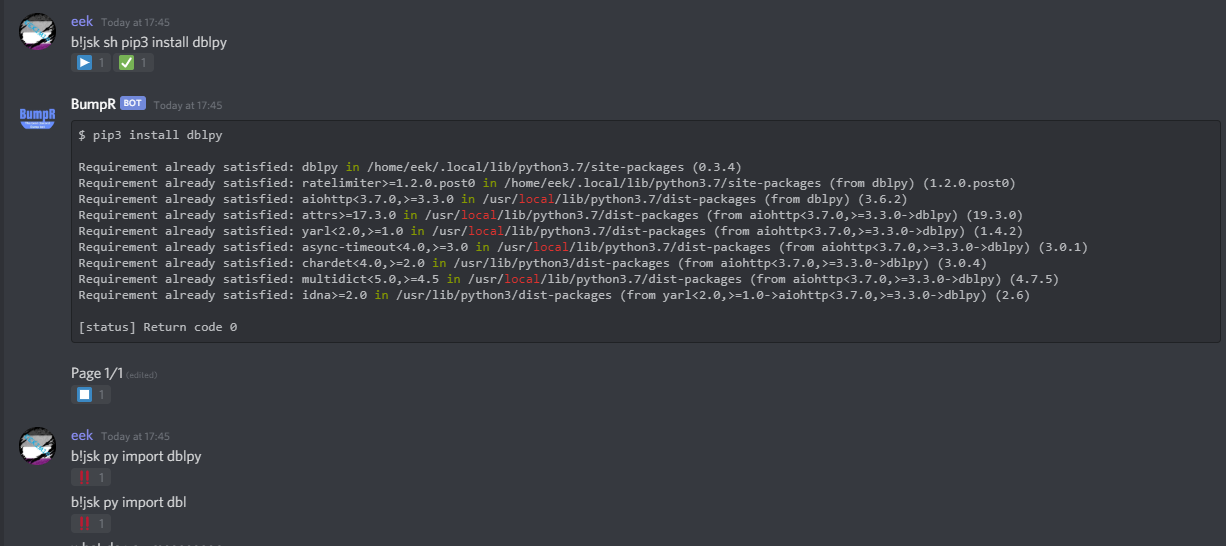
nevermind just had to reboot
gotta love py
knotty garnet
@left egret but we were talking about the api
 lavish lake
const dbl = new DBL(yourDBLTokenHere, { webhookAuth: 'password', webhookServer: server });```
uh I don't know what do I need do define as password and server :/I've never used webhooks and I'm completely lost
pale fulcrum
password is whatever but you dont need server unless you are using expressjs or something
 vale sonnet
If im not mistaken, the consturctor automatically posts stats every 30 mins right?
No need for
dbl.postStats(client.guilds.size, client.shards.Id, client.shards.total)```I think so yes
vale sonnet
Including shards too?
pale fulcrum
iirc it does sharding yes
vale sonnet
dope
How does that work with shards tho? Will it automatically add stats acrossed shards or-?
pale fulcrum
yes
vale sonnet
dope
pale fulcrum
it will say x shards x servers
vale sonnet
Where do you recomend i post stats while started? I was doing it in my main file but do i really wanna post stats every time a new shard spawns? @pale fulcrum
pale fulcrum
so I dont know if I do anything correctly
but I have a main file
that has all of my functions, I call the DBL.start() which sets the webhook and shit, and also works for shards
pale fulcrum
Terano.DBL.Start(client, config.token.dbl); this is the code I use
start creates a new DBL with its token and my client
vale sonnet

pale fulcrum
and I guess dbl does it
vale sonnet
Lmao i was gonna ask about webhooks next... this jawn confuses me :joyL
pale fulcrum
webhooks are not my strong suit but I guess nothing is tbh
if you just use dbl's webhook, you set a webhookAuth and webhookPort then make a listener
vale sonnet
Currently i have my new DBL(etc) and DBL.on('events") etc etc in the same file that i spawn my shards
Yeah for now i wanna make sure i do stats right
its a bit confusing now that i sharded
vale sonnet
Actually i probally do want it to fire every time a new shard is spawned.... otherwise if a shard goes out it wont count that shard's stats
(When it restarts)
Is there anyone here with a sharded bot that does stats and vote webhooks? Definetly need some help lmao
pale fulcrum
technically, I did test sharding so I might be able to help
vale sonnet
lmao
We have a very complex error/command/shard/event handler, so im just a bit confused on where i should put the DBL constructor.... also not sure at all how vote webhooks work :jyo:
been reading docs for the pkg but
pale fulcrum
so the way I do it, is that In the index.js, I do the normal shit (I have no idea how it does not error saying the port is already used) but the vote webhooks just send a post request to your webhook that says a user voted
vale sonnet
Lmao so everytime you start a new shard you do this?? Thats stupid
(Also not sure how your shard managers and hanlders are setup but)
pale fulcrum
ok I dont know how it works but it does
vale sonnet
@pale fulcrum Where do we get the webhookAuth?
pale fulcrum
you set that to whatever you want
vale sonnet
Oh? Do we even need it?
pale fulcrum
yes
vale sonnet
I see...
pale fulcrum
in your bot's edit page, scroll down and set the settings for the webhook
vale sonnet
So like
const dbl = new DBL('TOKEN', { webhookPort: 69, webhookAuth: 'whateverIWant'}, client)```ahhh i see them
So we just copy the value there and put it in webhookAuth
pale fulcrum
so it would be http://your.ip.here.forthevps:PORT/dblwebhook
for the webhook url
or whatever
vale sonnet
Yeah...
Lmao im legit just using this to get votes
Heres what i got @pale fulcrum
dbl.webhook.on('ready', hook => {
    util.success(`Top.GG webhook started at http://${hook.hostname}:${hook.port}${hook.path}`);
  });

dbl.on('posted', () => {
    util.success('Top.GG Stats Posted');
  })
dbl.on('error', e => {
   util.error(`Error posting Top.GG Stats: ${e}`);
  })

dbl.webhook.on('vote', vote => {
    client.channels.cache.get('693204858068664491').send('working')
});```Seems to not send anything
pale fulcrum
what do you use for hosting?
pale fulcrum
no the webhook logs no matter what
vale sonnet
Ah
pale fulcrum
you need to see if you can access from outside
vale sonnet
How should i go about this?
pale fulcrum
You can put the address in something like chrome and see if it loads
it should load and say there is no webpage if open
pale fulcrum
thats localhost
vale sonnet
Obviously
vale sonnet
Gateway adress yeah>
pale fulcrum
yeah so can you access it from outside of your local network?
vale sonnet
Yeah and i cant open the port on my local networrd
id have to test on vps
Wait so where do you have all this code? Becouse currently i have it starting up with every shard in ready seems kinda inefficient @pale fulcrum
pale fulcrum
I have it in the index.js which the main.js calls for sharding
I do not know if its supposed to work
technically, you can set the webhook to a different one and use other shit to call it for the bot but idk
vale sonnet
I have:
-Index.js which calls main.js for sharding (i have a constructor)
and i have my dbl stuff in main.sj
vapid cape
its more efficient to have dbl on the sharding manager
at least the webhooks, for posting is less important, but still more efficient
vale sonnet
My handler is super complex
so idk 😂
@vapid cape Hold up, if you start webhook thing on each shard, then the port is already used by the first shard lmao
so that dosnt work
vapid cape
yes
you have two options, either put the webhook listener in the manager, or make it work only on shard 0
vale sonnet
So youre saying to toss it in here
    shard(filePath, shards = 2) {
        const manager = new ShardingManager(filePath, {
            token: this.token
        });
        if (shards === 0 || isNaN(shards)) {
            manager.spawn()
        } else {
            manager.spawn(shards)
        }
}```I'm a bit confused haha
vale sonnet
yeah ill just use 2 constructors lol
vapid cape
and get the guild count from broadcastEval
vale sonnet
so ill have
const DBL = require("dblapi.js");
const dbl = new DBL('TOKEN', client)

dbl.webhook.on('ready', hook => {
    util.success(`Top.GG webhook started at http://${hook.hostname}:${hook.port}${hook.path}`);
  });

dbl.on('posted', () => {
    util.success('Top.GG Stats Posted');
  })
dbl.on('error', e => {
   util.error(`Error posting Top.GG Stats: ${e}`);
  })

. . .


    shard(filePath, shards = 2) {
        const manager = new ShardingManager(filePath, {
            token: this.token
        });
        if (shards === 0 || isNaN(shards)) {
            manager.spawn()
        } else {
            manager.spawn(shards)
        }
        const dblHook = new DBL('TOKEN', { webhookPort: 5184, webhookAuth: 'AUTH'})
        dblHook.webhook.on('vote', vote => {
            client.channels.cache.get('693204858068664491').send('working')
          });
    }
I did in the 2nd one
const dblHook = new DBL('TOKEN', { webhookPort: 5184, webhookAuth: 'AUTH'})```ah i didnt see it
but still, there is no client in the sharding manager file
so that will not work
vapid cape
that makes no sense tho?
vale sonnet
We have a class that's called from this file to spawn shards
vale sonnet
Whatever shard it is haha
We also have a client.shard.id value to know which shard its running on
vapid cape
so let me get this right
you have shard 0 and shard 1, then you have a copy of shard 0 in the manager file?
vapid cape
@vale sonnet ok, so...
you have a regular non-sharded client on your sharding manager file
when you cross 2500 guilds, that client will no longer login
vapid cape
so essentially you have 2 copies of your bot, one sharded, one non-sharded
vale sonnet
No... that client is onyl one shard
vapid cape
do you set the client.options.shards anywhere in your code?
vale sonnet
Nope
((Also would like to note, a diffrent team meber wrote our new cmd handler just 2-3 days ago, and i really dont know too much about how it works))
vale sonnet
Lmao
vapid cape
you call main.js from your index.js right?
vapid cape
once main.js is loaded, it starts a client, and logs in to that client
vale sonnet
well we have 2 main.js files
vapid cape
then the shard method is called, and the shard method creates fires main.js again, which in turn creates another copy of client
vale sonnet
Well heres the thing
 thick sinew
!pp
vale sonnet
in the main.js file we use enmap and have client.shard.id = id and if you check that value its diffrent for each shard
So im positive it creates a new shard
and is working correctly
or else that value wouldnt change
vale sonnet
We have one that calls the handler func
and bot manager
const {BotManager} = require('../modules/command-handler/main')

const retr0n = new BotManager('TOKENk','MOGNO-STR', 'Retr0n')
retr0n.handler(__dirname + '/commands', __dirname + '/events', ['516840368843522073', '269309639332593665', '588521648349642753'], '3.0.1')```Anyway, idrc about that stuff, justt need dbl to work lmao
bc that all works just finw
vapid cape
it all works fine doesnt mean you dont have possible ghost clones of clients running somewhere wasting memory
vale sonnet
Lol the bot takes up literally no memory
vapid cape
you sure about that?
vapid cape
how are you measuring that?
vapid cape
even after running a few hours?
vale sonnet
After running for days
vapid cape
doesnt sound right to me
vale sonnet
│ 7 │ ◉ retr0n-3.0-3 │ default │ N/A │ fork │ 25821 │ 2D │ 3 │ online │ 0% │ 52.7mb │ hpaulson │ disabled │```2d, 52mb
htop says the same
vale sonnet
THats with 2 shards
vapid cape
is your discord.js modified in any way?
vale sonnet
Nope
vapid cape
then thats impossible
vale sonnet
use v12
Both versions of my bot are very low... newest version runs around 55mb 2 shards
vapid cape
an unmodified discord.js on 2000 guilds with no commands whatsoever, just by being logged in, will consume 300-500mb ram after a few hours regardless
vale sonnet

vapid cape
i have tested this multiple times and i have worked with discord.js's internal functions
i have my own library to control this behavior
 vapid cape
im telling you, something is off
vale sonnet
Either way we got 16gb ram, the bot uses the least of all our processes, so im good haha
dbl webhook still aint working though
Sayin port is alreqdy in use, bc of shards
vapid cape
then just make it if(shard.id === 0) { start the webhook listener }
vale sonnet
So like
        client.on('shardReady', (id) => {
            util.success(`Shard ${id} connected`)
            client.shard.id = id
            if (id === 0) {
                const dblHook = new DBL('TOKEN', { webhookPort: 5184, webhookAuth: 'AUTH'})
                dblHook.webhook.on('vote', vote => {
                    client.channels.cache.get('693204858068664491').send('working')
                  });
            }
})```yeah so thats what I ended up doing
vale sonnet
xD
pale fulcrum
    this.on("shardReady", id => {
      if (id && id == 0) Terano.DBL.Start(this, this.config.token.dbl);
      this.logger.log(`[   Shard Manager   ][Shard ${id}] Ready | Watching ${this.guilds.cache.size} guilds!`.green);
});```mine is built into the client extension
vale sonnet
same concept tho
Name same error
Error: listen EADDRINUSE: address already in use :::5184
    at Server.setupListenHandle [as _listen2] (net.js:1309:16)
    at listenInCluster (net.js:1357:12)
    at Server.listen (net.js:1445:7)
    at DBLWebhook._startWebhook (/home/root/retr0n-master/node_modules/dblapi.js/src/webhook.js:45:18)
    at new DBLWebhook (/home/root/retr0n-master/node_modules/dblapi.js/src/webhook.js:27:12)
    at new DBLAPI (/home/root/retr0n-master/node_modules/dblapi.js/src/index.js:69:22)
    at Object.<anonymous> (/home/root/retr0n-master/modules/command-handler/main.js:14:13)
    at Module._compile (internal/modules/cjs/loader.js:1158:30)
    at Object.Module._extensions..js (internal/modules/cjs/loader.js:1178:10)
    at Module.load (internal/modules/cjs/loader.js:1002:32)
Emitted 'error' event on Server instance at:
    at emitErrorNT (net.js:1336:8)
    at processTicksAndRejections (internal/process/task_queues.js:84:21) {
  code: 'EADDRINUSE',
  errno: 'EADDRINUSE',
  syscall: 'listen',
  address: '::',
  port: 5184
}```can you console.log the shard id?
vale sonnet
nvm
i had the webhook stuff in the other construct
aye
seems to be workiing
How do i test and see if it works when soemone votes
vapid cape
there is a test button
vale sonnet
yeah nothing happened
Aslo would it make sense to only post stats on shard 0 too? or every shard?
My current output is:
✔️  Shard 0 connected
✔️  Top.GG webhook started at http://0.0.0.0:5184/dblwebhook
✔️  Top.GG Stats Posted
✔️  Shard 1 connected
✔️ Top.GG Stats Posted```But when i click test nothin happens 
vapid cape
dblapi will post the guild count for each shard separately
vale sonnet
huh?
vapid cape
what did you put in the url and authorization?
vale sonnet
Where? In the construct?
vapid cape
in the website
vapid cape
top.gg sends the webhooks to the url you specify in the url field
with an authorization header specified in the authorization field
vale sonnet
OOh
lmaooo i didnt even see that box
so should i put the url it logged (with my ip ofc)
vapid cape
yes
vale sonnet
Did that, still nothin
Wait, are the event listners supposed to be within the shard event listner?
feel like there may be scoping issue here
vapid cape
dbl.webhook's event listener has nothing to do with the client or anything
its a simple webserver
vale sonnet
No ik
im saying
This is my webhook code
        client.on('shardReady', (id) => {
            util.success(`Shard ${id} connected`)
            client.shard.id = id
            if (id === 0) {
                const dblHook = new DBL('TOKEN', { webhookPort: 5184, webhookAuth: 'AUTHO'})
                dblHook.webhook.on('ready', hook => {
                    util.success(`Top.GG webhook started at http://${hook.hostname}:${hook.port}${hook.path}`);
                  });
                dblHook.webhook.on('vote', vote => {
                    client.channels.cache.get('693204858068664491').send('working')
                  });
            }
})```does it have to do with the fact its inside the client.on('shardReady',
vale sonnet
true
Wait couldnt i put my stats construct in the same spot @vapid cape
bc client is acessable
vapid cape
yes you could
vale sonnet
Just tested again, cosole log didnt fire
vapid cape
there's only 3 possible reasons
- url is wrong
- authorization doesnt match
- port is blocked by firewall
vale sonnet
I did ufw allow for port, so thats good
url and auth are totally right
At the URL should it just be white screen?
vapid cape
somewhere in headers
i dont use postman so idk
you can try sending a request without authorization
you will receive 403 forbidden if its working
vale sonnet
Yeah i got 403
lemme try reqbin
with auth
does it go in the token box?
Okay i put it in custom and got 400
 cold ledge
https://raid-shadow-legends.is-inside.me/eRFJRHQ4.png
anyone see why this wouldn't work?
 vale sonnet
Just use the package lol @cold ledge
cold ledge
@vale sonnet cant with the sharding manager im using dum dum
if i could have it easy i would
vale sonnet
Lmao then make a better handler for shards 😂
cold ledge
this one is good lol
vale sonnet
if you consider not ebing able to use packages good then-
cold ledge
anyway my issue has nothing to do with shards
if you aint gonna be helpful leave the chat
cold ledge
not helpful
vapid cape
add headers: { 'Content-Type': 'application/json' },
vale sonnet
anywayyy @vapid cape bassed on our previous convo i take it youre fairly experience with sharding?
vapid cape
a bit
vale sonnet
Nvm cant even ask here lol, just read channel topic
vapid cape
you can ask in #development
jaunty steppe
hey
So when i POST to the server that dblclient is hosting, it works fine. If i include all the fields and stuff it acts as normal, however the webhook test button and actual votes aren't firing at my server? why?
oblique trout
You might have the port issue?
jaunty steppe
no its the right port
 queen jacinth
Can someone explain why whenever I type the link to get to my bots page it says 403 forbidden
pale fulcrum
Your bot hasnt been added so you can only access the page if you are logged in to the account that added it
queen jacinth
Oh
 arctic arch
@restive otter Hey are you aware your bot Kepi is getting getting ratelimited 10k times in 30 minutes?
true talon
lol
 heady cradle
if you just and only want to post stats, which would be better, using the package or just node-fetch
 opinion
 facts
facts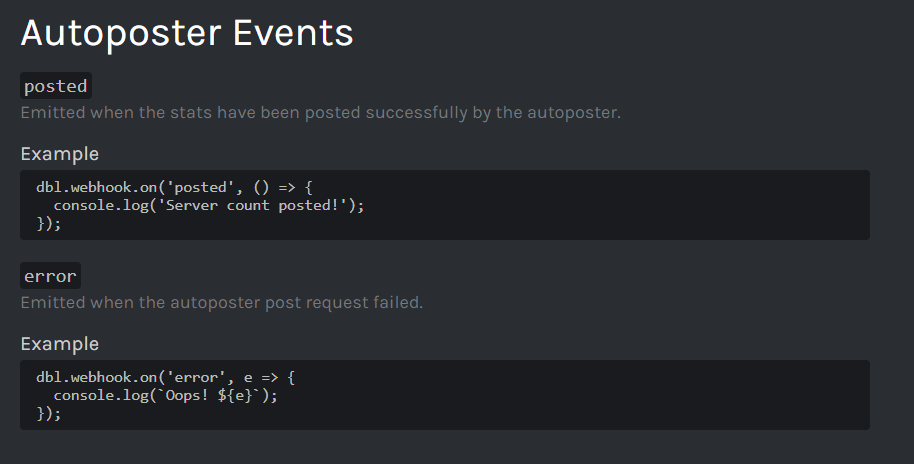


 silent orbit

 slender bough
Is there a way to GET, how long time left there is on a users vote cooldown?
Can't seem to find it here: https://top.gg/api/docs#users

Spice up your Discord experience with our diverse range of Discord bots
silent orbit
i don't think so
slender bough
Hmm odd, I know that other bots do it somehow
/bots/{bot.id?}/check
That's what I'm looking for, nvm 😄
restive otter
ok ok
proper pagoda
Hello, I do not understand how the API works, I should receive the votes there? no ?
proper pagoda
@vapid cape Go in private?
vapid cape
 forest forum
Oh, I'm questioning the same topic it seems. Inside the "authorization" field, we input any password we'd like right?
sullen nymph
Yup
restive otter
On the JDA Api the api.getVoters() method is depreciated, what should be used instead?
heady cradle
a database?
you can store voters in a db and fetch from there when you need to
or you could make a request to the api yourself
vapid cape
looking at the source code, doesnt look like there is a replacement, so you should still use it i guess
restive otter
@vapid cape The problem I have is it's very inaccurate, there's no telling when a user voted etc. Even setting a 12 hour cooldown internally, it still produces names of users that haven't voted in the past 12 hours
vapid cape
because it uses this endpoint
thats how the top.gg api works, its not the library's fault
 quartz obsidian
How can i add how many votes Cloud Music has to botinfo?
 gaunt quail
gaunt quail
gaunt quail
how can i authorize myself
silent orbit
with your bots api token
gaunt quail
Can you explain more?
spiral steeple
you normally make a http GET request to the url with your bot's API token as the value of the Authorization header.
 rich helm
its like that for every bot
@green mantle
I don't think it is. You just need to use the correct url^^
In your case OSMX, try http://top.gg/api/bots/597444503242276874/votes
green mantle
i mean no
you litterally cant access it
unless you have the headers
even tho it was the wrong url to begin with
rich helm
i can access that page(for my own bot) while logged in through a browser
sullen nymph
Yeah you can access that endpoint from the browser
 jaunty sable
Is this method still working? I tried to eval client.shards.total and it failed
 old cypress
Discord.js is a powerful node.js module that allows you to interact with the Discord API very easily. It takes a much more object-oriented approach than most other JS Discord libraries, making your bot's code significantly tidier and easier to comprehend.
jaunty sable
Hmm ok thanks
restive otter
In the JDA library, how do you return the total number of votes?
The total in api.getvoters() is inaccurate
 hoary blade
Its not inaccurate
The library you're using is basically making api requests to the official api
So, it's not the library's fault
You can still use the raw api
Wich i prefer especially if you don't want to use third party packages
restive otter
can someone help me?
i have this code:
      console.log(`User with ID ${vote.user} just voted!`);
        let embed = new MessageEmbed()
            .setColor(`#5780cd`)
            .setAuthor(`<@${vote.user}> Upvote !`)
            .setTimestamp()
            .addField(`User <@${vote.user}> With ID ${vote.user} Just Upvote For my Bot `)
            .addField(`He UpVote in https://top.gg/bot/672883668594720773 `)
            .addField(`We Have ${vote.count} UpVotes `)

let guild = bot.guilds.cache.get(675254454139748352)
let user = bot.users.cache.get(vote.user) || bot.users.fetch(vote.user)
let member = guild.members.cache.get(user) || guild.members.fetch(user)
const channel999 = member.guild.channels.cache.find(ch => ch.name === 'upvotes-logs');
channel999.send({ embed: embed }) });```but idk why it dont work
i use discord.js v12
 dense basalt
The guild ID must be a string not a number at:
let guild = bot.guilds.cache.get(675254454139748352)
and fetch is an async function
async vote => {
...
await bot.users.fetch(vote.user)
...
that means the token is wrong
 tender garnet
my website was offline this morning so webhooks stopped working
and GET/bots/{bot.id?}/check endpoint still not working
do you have any plan to fix it ?
green mantle
I dont think you can actually use the normal check for votes considering Koya gets easily over 1k votes a month
jaunty sable
Guys. I am using JavaScript.
How can I not post the current ID
As it said that it’s optional
oblique trout
Current ID?
vapid cape
@restive otter token not available means you tried to get a vote event before the bot was ready
 distant trellis
What's it doing when it tests the webhook? I think I set everything up properly but I'm not getting any data