#topgg-api
1 messages · Page 74 of 1
 arctic arch
 sullen nymph
In case you still need to view the response body, I'm not exactly following the conversation here
sullen nymph

 restive otter
-bots 676513213764075535
 abstract mothBOT
 This user has no bots
abstract mothBOT

 sullen sequoia
They don't approve my bot yet
sullen sequoia
Ok
 woeful fulcrum
Hey.
J'ai précédemment créé un code pour poster les serveurs de mon bot.
Le problème étant que j'ai eu beaucoup de mal pour le faire, il a fonctionné une fois, et depuis il ne fonctionne plus.
Pourriez-vous m'aider ?
 green mantle
- English only here ty,
- see https://top.gg/api/docs and go to your chosen programming language
- look at the example and read the docs
 vapid cape
he said his code used to work and no longer works
green mantle
oo
vapid cape
show your code nyfos
woeful fulcrum
ok
Mention me in the future plz 
I just do that on events guildCreate and guildRemove :
dbl.postStats(client.guilds.size);
are you using discord.js v12/master?
woeful fulcrum
Ok
nothing
dbl.postStats(client.guilds.size).then(console.log('Statistiques postées')).catch(console.error);
vapid cape
does statistiques postees show in the console?
woeful fulcrum
No
Just that :
Le bot est désormais connecté
index.js:8328
(node:17396) DeprecationWarning: TextChannel#sendEmbed: use TextChannel#send instead
warning.js:25
DiscordAPIError: Missing Permissions
you have it on guildCreate and guildRemove right? it will only work when the bot joins or leaves a guild
woeful fulcrum
No, also on client.ready
woeful fulcrum
yes
client.on('ready', () => {
  dbl.postStats(client.guilds.size).then(console.log('Statistiques postées')).catch(console.error);
  var PostedEmbed = new Discord.RichEmbed()
  .setColor('7289da')
  .setDescription(`Informations du bot postées sur DBL !`)
  console.log('DBL・Server count posted !')
  publiclogsHook.send(PostedEmbed);
  setInterval(() => {
      dbl.postStats(client.guilds.size).then(console.log('Statistiques postées')).catch(console.error);
      var PostedEmbed = new Discord.RichEmbed()
      .setColor('7289da')
      .setDescription(`Informations du bot postées sur DBL !`)
      console.log('DBL・Server count posted !')
      publiclogsHook.send(PostedEmbed);
  }, 1800000);
});
show your dbl config
vapid cape
dbl = new DBL()
woeful fulcrum
thank
sullen nymph
deleting the message won't exactly help also 
woeful fulcrum
it's ok
vapid cape
does DBL・Server count posted ! show in the console?
vapid cape
then your ready event is not working
woeful fulcrum
Just DBL・Webhook running at http://(...)
vapid cape
wtf
the new DBL() you posted didnt have webhooks enabled
you have two completely different files
woeful fulcrum
no, another dbl const
vapid cape
why another dbl const?
woeful fulcrum
first
, client)
second
, { webhookPort: 5000, webhookAuth: 'password' });
don't panic
vapid cape
you dont need to have two
woeful fulcrum
ok i try that.
vapid cape
just have one with (token,{webhook options},client)
vapid cape
also, where does the console.log(Le bot est désormais connecté) come from?
vapid cape
you have two ready events?
sullen nymph
Why would you ping Oliy
vapid cape
🤦
woeful fulcrum
It's "urgent"
vapid cape
its not urgent...
woeful fulcrum
@vapid cape it's not about that
vapid cape
urgent things are attacks and raids on this server lol, and things that affect everyone
sullen nymph
and even then you would mention the moderators instead
 modern ermine
How can I did show server count in my bot?
I cant see in website
<@&304313580025544704>
 craggy sentinel
-atmods
abstract mothBOT
Please do not mention (ping) more than one or two moderators for help, unless there is an emergency.
Here are some examples of emergencies:
- Raids / Multiple members mass spamming.
- Severe disruption of Discord's ToS (NSFW content, etc)
- Anything that requires more than 2 moderators to handle.
craggy sentinel
restive otter
its esay to learn dbl api?
 hollow sandal
probably easier than you think
restive otter
ok
 ionic flame
There is nothing to learn tbh
restive otter
Jonin has undefined total votes and undefinedmonthly votes
if(command === `votes`) {
        let url = `https://top.gg/api/bots/662517805983334416`;

        request(url, function(err, response, body) {
            let bot = JSON.parse(body);
            message.channel.send(`Jonin has ` + bot.points + ` total votes and ` + bot.monthlyPoints + ` monthly votes`);
        });
    }
any reason why im getting undefined?
craggy sentinel
make sure you're submitting the correct token
because i'm pretty sure you're not sending one at all
restive otter
is this what im missing perhaps?
craggy sentinel
yeah
restive otter
well where would i add that......
 spiral steeple
Most of them handle it the same dont they?
url, opts, callback
or opts, callback
vapid cape
yeah they should, just wanted to confirm and send the docs page for it
btw
As of Feb 11th 2020, request is fully deprecated. No new changes are expected land. In fact, none have landed for some time.
finally lol, for some reason the lib was 5mb big
restive otter
yes im using the request library
 weary ember
O the fat ass boi which most "light" weight packages compare them is depreciated
vapid cape
if you wanna keep using it (nothing wrong with that), you can add the headers like this: js request(url, {headers:{"Authorization":DBLToken}}, function(err, res, body) {})
if you wanna switch libraries, there are literally dozens of them, but the folks at the request github put together their own list of recommended alternatives: https://github.com/request/request/issues/3143

GitHub
Since the announcement of request going into "maintenance mode" (full details in #3142) I'd like to collect a list of alternative libraries to use. Please comment below an...
most people these days use node-fetch because its syntax is compatible with the browser's Fetch api, which makes your code work in both node and browsers
i have used got and liked it very much, but i just checked out bent and looks really interesting
vapid cape
axios is also popular, it was made by the guys at facebook or something
restive otter
soooo for boomers by boomers?
vapid cape
actually facebook has been pretty good at tech innovations, regularly creating tools and programs that compete with the likes of google and microsoft
so basically yes, by boomers
but for millenials
restive otter
that is so true
spiral steeple
probably sends all your data to facebook when you make a request
vapid cape
vsc steals all your code and gives it to bill gates
spiral steeple
But bill gates is a cool guy
vapid cape
lets help mr bill gates defeat zuckerberg by giving him all our codes
/end shitposting
green mantle
restive otter
tHX
 civic pebble
Hola, anyone know why I would be getting this error? UnhandledPromiseRejectionWarning: Error: 400 Bad Request
Ready event code: ```Promise.all(promises)
.then(results => {
const serverCount = results[0].reduce((prev, guildCount) => prev + guildCount, 0);
shardCount = (client.shard.count);
dbl.postStats(${serverCount}, ${shardCount});
console.log(${serverCount}, ${shardCount});
console.log("DBL WORKS");```
civic pebble
Not sure why that matters, I need help with the 400 bad request error
civic pebble
as an int it's the same result
vapid cape
doesnt json serialize ints anyway?
vapid cape
try adding a shard id
arctic arch
the second argument is shard id
if you want to post shard count without posting per shard values then add a null or undefined in the middle
arctic arch
you could send server count per each shard and the api calculates your server count
or you could pass in an array of server counts per shard and we'd calculate the server count and shard count
vapid cape
if i send an array of server counts, do i still need to specify totalshards? or does it replace both the shardid and shardtotal fields?
arctic arch
if you send an array, shard count will be the length of the array
vapid cape
cool, thx
restive otter
how do you get the user's credentials when he votes for the bot?
i tried to get it via json but i got it ```json
{'error': 'Unauthorized'}
@restive otter if you're using master version you won't be able to disable it since it uses that, otherwise if you're on stable use unknownCommandResponse in the client options.
 fast mirage
hey guys, can any of you help me i'm having trouble pulling votes in python
green mantle
whats ur current code
fast mirage
@commands.Cog.listener()
    async def on_dbl_vote(self, data):
        logger.info('Received an upvote')
        print(data)
whats your full code
fast mirage
import dbl
import discord
from discord.ext import commands, tasks
import asyncio
import logging


class TopGG(commands.Cog):
    """Handles interactions with the top.gg API"""

    def __init__(self, bot):
        self.bot = bot
        self.token = ... # set this to your DBL token
        self.dblpy = dbl.DBLClient(self.bot, self.token, webhook_path='...', Authorization='...', webhook_port=...)

    # The decorator below will work only on discord.py 1.1.0+
    # In case your discord.py version is below that, you can use self.bot.loop.create_task(self.update_stats())

    @tasks.loop(minutes=30.0)
    async def update_stats(self):
        """This function runs every 30 minutes to automatically update your server count"""
        logger.info('Attempting to post server count')
        try:
            await self.dblpy.post_guild_count()
            logger.info('Posted server count ({})'.format(self.dblpy.guild_count()))
        except Exception as e:
            logger.exception('Failed to post server count\n{}: {}'.format(type(e).__name__, e))

        # if you are not using the tasks extension, put the line below

        await asyncio.sleep(1800)


    @commands.Cog.listener()
    async def on_dbl_vote(self, data):
        logger.info('Received an upvote')
        print(data)


def setup(bot):
    global logger
    logger = logging.getLogger('bot')
    bot.add_cog(TopGG(bot))
webhook_auth isn't the same as Authorization
fast mirage
could you explain? I did not understand
fast mirage
in this case is this webhook_auth the new attribute?
ready I updated this, more and now how is the question of votes?
green mantle
async def on_dbl_vote(self, data): Gets triggered by the vote event
you need to actually have the webhook server running and give the site the url to send to
fast mirage
how do you put this webhook there?
vapid cape
did you check the link i posted?
if you want to receive vote events, like "user X has voted for the bot", your code needs to be like th example showed in the link above
did you fix your code according to the example?
then you need to go to your top.gg bot page and click the edit button
and scroll down to this part
in the authorization, you put the same password you put in webhook_auth in your code
in URL you put the url of your bot's server. where is your bot hosted?
sullen nymph
I feel like on_dbl_ready event that fires when the DBL webhook is started might be helpful
fast mirage
in the url do I put the url of a webhook from my server's discord?
fast mirage
what? how do i get this?
 willow spindle
where do you host your bot?
fast mirage
vps
willow spindle
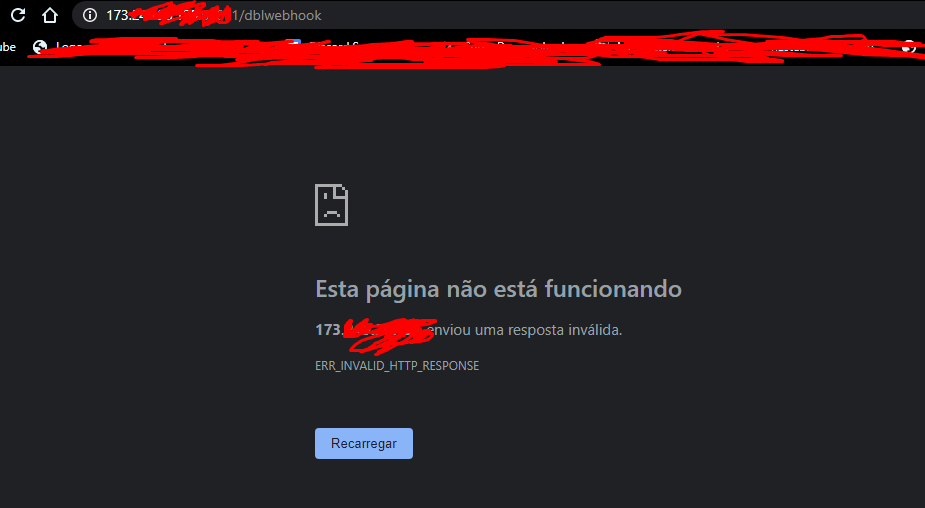
http://<your vps ip>:<port>/dblwebhook
 fast mirage
your?
fast mirage
to trying to enter the page with this data more of "This page is not working"
green mantle
you cant access the page direct
you cant just put it in your browser to check if its working
fast mirage
can i test if i put the correct data?
webhook_path='http://VNC IP:port//dblwebhook' correct?
sullen nymph
No it's the thing after the IP and port
fast mirage
whats?
sullen nymph
http://0.0.0.0:0000/testing
/testing in this case would be the webhook_path
fast mirage

vapid cape
let me explain in his language
vc tem q botar o endereço ip do seu servidor
o URL é o ip do seu server, a porta q vc colocou na configuração do modulo dbl, e a pagina /dblwebhook
ai quando uma pessoa votar no seu bot, o top.gg vai enviar o voto para esse url, e o seu server vai receber
fast mirage
aaa no caso http://prntscr.com/r6hu5d
 vapid cape
nao tem como abrir esse link no navegador, porque os navegadores funcionam no modo GET, enquanto que o envio do top.gg é em modo POST
isso, essa porta vc coloca no link, assim IP.DO.SEU.SERVER:5000/dblwebhook
fast mirage
IP address ou VNC IP
vapid cape
ip address. o ip do vnc é differente?
fast mirage
sim
 vapid cape
parece que sim
fast mirage
and now? how I treat the vows
vapid cape
nessa parte do seu codigo ```js
@commands.Cog.listener()
async def on_dbl_vote(self, data):
logger.info('Received an upvote')
print(data)
    @commands.Cog.listener()
    async def on_dbl_test(self, data):
        logger.info('Received an upvote')
print(data)```depois no site salva a config e clica no botao test
ve se no seu log aparece "received an upvote"
fast mirage
era pra aparecer algo no console certo?
vapid cape
sim
fast mirage
não apareceu, Authorization é o token ou webhook_auth ?
vapid cape
é o webhook_auth
fast mirage
eu deixei o
webhook_path assim webhook_path='http://...:5000/dblwebhook'
ta errado?
vapid cape
no site vc coloca inteiro
fast mirage
ainda sem respostas :/, eu acho que é a senha do webhook_auth, onde pega senha dele pra eu vê se ta correta
vapid cape
nao pega em lugar nenhum, voce q cria ela
webhook_auth="senhaQualquer"
desde que no Authorization do site seja igual
fast mirage
não entendo pq não estou recebendo a mensagem do teste :/
vapid cape
manda por dm o seu codigo e as suas configs do site
fast mirage
does anyone know how to resolve this error```fix
Error handling request
Traceback (most recent call last):
File "/usr/local/lib/python3.7/dist-packages/aiohttp/web_protocol.py", line 418, in start
resp = await task
File "/usr/local/lib/python3.7/dist-packages/aiohttp/web_app.py", line 458, in _handle
resp = await handler(request)
File "/usr/local/lib/python3.7/dist-packages/dbl/client.py", line 413, in vote_handler
self.bot.dispatch(event_name, data)
UnboundLocalError: local variable 'event_name' referenced before assignment
use #development but that means you didnt assign the variable yet
 sand hollow
How do I get the web hook shit to work so it sends s message when ever someone votes?
sand hollow
Discord.js
willow spindle
sand hollow
I'm confused on how to make it send a message to a specific channel in a specific server when someone votes for the bot
Can anyone help me please?
Please ping me if you can help
vapid cape
language and library please
 tacit trout
I want to make a VC which updates the bot's vote count when someone votes..
I already have to code for changing the channel name, I don't know how to make the "trigger"
Library: discord.js
 worn quail
dblapi.js?
tacit trout
yes
const DBL = require("dblapi.js");
const dbl = new DBL(`${config.dbl_api}`, client);
webhooks
or you could just fetch the raw data... though that would really not be worth it
tacit trout
how would i use the webhook way.. cause i can't get it in my head no matter how hard i try to understand webhooks
tacit trout
I'll go back to the docs.. but is there anything else i have to add for it to work?
{ webhookPort: 5000, webhookAuth: 'password' }
what am i supposed to put in the password
sullen nymph
Yeah that should be good
tacit trout
is thre anything i have to add for password or do i just leave it?
sullen nymph
Anything you come up with
You use the webhookAuth to confirm that the requests actually come from DBL
tacit trout
kk
sand hollow
How are you supposed to set up the vote thing
Like where when someone votes it will send a message in a channel
sullen nymph
Test button + vote event
restive otter
that api is so cool
willow spindle
yes
willow spindle
.length
 heady cradle
sullen nymph
heady cradle
sullen nymph

GitHub
Report bugs and give feedback regarding the Discord Bot List and Discord Server List - DiscordBotList/issues
woeful fulcrum
Hey !
I've a problem with .hasVoted(id) and .getVotes()
When I verified if a user has voted, the code below reply everytime "true"
if (dbl.hasVoted(message.author.id)) { message.channel.send('true') } else message.channel.send('false')
And when I use get votes, my code below reply everytime that I never voted....
var UserVotesCount = 0
var UserVotesDesc = "You have'nt voted for KoroïBot !"

votes.forEach(vote => {
          if (vote.id == message.author.id) {
            UserVotesCount++
            // Just said "0"

            UserVoteColor = "a38411"

            UserVotesDesc = ":smile: - **You've voted for KoroïBot !**"
            // Just said I have'nt voted...

            // Even if I put the line below, it tells me all the time that I didn't vote,
            // and i don't count any votes.
            message.channel.send(UserVotesDesc + UserVotesCount)

          }
        })
Is it normal ?
Sorry for my spelling, I'm french... 
The two codes below have working one or two times on ~ 25 tests...
🇫🇷 - Si vous pouvez m'aider, mentionnez-moi
🇺🇸 - If you can help me, mention me
woeful fulcrum
Third problem :
When I use .postStats(client.guilds.size), my console said "Stats posted !" but it doesn't change anything in the top.gg site...
For example, I've 66 servers.
In the top.gg website, I saw that I've 51 servers..
arctic arch
-bots @woeful fulcrum
abstract mothBOT
 arctic arch
-botinfo 610229650517524491
abstract mothBOT


Bot info
ID
610229650517524491
Username
KoroïBot
Discriminator
6387
Short Description
KoroïBot est un bot multi-fonctions français, bientôt disponible sous 4 autres langues. Simplifiez-vous la vie avec KoroïBot !
Library
discord.js
Prefix
K! ( bientôt changeable )
Total Upvotes
33
Monthly Upvotes
32
Server Count
51 Servers
Owner(s)
@woeful fulcrum
Links
woeful fulcrum
Need informations ?
arctic arch
where is that "stats posted"
woeful fulcrum
In my code
when a guild is added, and when the bot is loaded
Ow. I understand.
Wait
dbl.postStats(client.guilds.size).then(console.log('Statistiques postées')).catch(console.error);
@arctic arch
arctic arch
if (dbl.hasVoted(message.author.id))
this part, hasVoted is a promise so you need to await or .then it to see if a user had voted
could it be client.guilds.size is actually 51?
woeful fulcrum
thanks. I'll try it.
My bot is currently starting...
I wait the postStats event
-botinfo 610229650517524491
abstract mothBOT
Bot info
ID
610229650517524491
Username
KoroïBot
Discriminator
6387
Short Description
KoroïBot est un bot multi-fonctions français, bientôt disponible sous 4 autres langues. Simplifiez-vous la vie avec KoroïBot !
Library
discord.js
Prefix
K! ( bientôt changeable )
Total Upvotes
33
Monthly Upvotes
32
Server Count
51 Servers
Owner(s)
@woeful fulcrum
Links
arctic arch
got an error?
arctic arch
400 bad request 'Required parameter server_count or shards missing'
woeful fulcrum
Oh I think I know.
But I've that :
dbl.on('posted', () => {
  var PostedEmbed = new Discord.RichEmbed()
  .setColor('7289da')
  .setDescription(`Informations du bot postées sur DBL !`)
  console.log('DBL・Server count posted !')
  publiclogsHook.send(PostedEmbed);
})
And it's log in console "server count posted"
arctic arch
are you running postStats before the bot is ready
woeful fulcrum
Nop.
arctic arch
the posted event does nothing if you post manually
do you have your client in the contructor
new DBL(token, client)
arctic arch
https://canary.discordapp.com/channels/264445053596991498/412006692125933568/681807353775259685
here you're using client, change it to bot
woeful fulcrum
yes I do it
arctic arch
and if you provide the bot in the contructor you don't have to use .postStats
abstract mothBOT
Bot info
ID
610229650517524491
Username
KoroïBot
Discriminator
6387
Short Description
KoroïBot est un bot multi-fonctions français, bientôt disponible sous 4 autres langues. Simplifiez-vous la vie avec KoroïBot !
Library
discord.js
Prefix
K! ( bientôt changeable )
Total Upvotes
33
Monthly Upvotes
32
Server Count
66 Servers
Owner(s)
@woeful fulcrum
Links
arctic arch
arctic arch
getVotes gives you the last 1000 votes, they don't disappear with the vote timer
restive otter
what do i do with my api key of my bot?
restive otter
I cant copy it@willow spindle
willow spindle
yeah it is too long
vapid cape
what do you mean you cant copy it? its not too long...
restive otter
it very long
sullen nymph

restive otter
How can i install dbl api with npm?
willow spindle
npm i dblapi.js
vapid cape
restive otter
thx
restive otter
How could I get the user "x" who voted and get his number of votes using the DBL API? (Discord.js)
how can i setup a webhook that send in my console who voted my bot?
restive otter
how can i setup a webhook that send in my console who voted my bot?
restive otter
@limpid vector you can self host
as long you have ram
more than 4gb of ram
@limpid vector aswell thats not the channel for this questions
green mantle
you really shouldnt expect to pay 100/month
a cheap vps for like 10$ will last you ages depending on ur situation
 shut heath
green mantle
shut heath
green mantle
my servers cost me £60 a month for electricity and they are beafy so yh 100 is a big extreme
green mantle
might be a move to #development btw
 dense basalt
True
vapid cape
@limpid vector my bot is on 2300 guilds and my vps costs $3 a month
galaxygate 1gb ram
many people also use contabo, which is much cheaper, like 5 euro (~$6) for 4gb ram
but contabo is based in europe, so the ping to discord is higher
assuming you already run your bot from the command line, its pretty much the same
another thing is that most discord libraries have lots of room for performance tweaking and optimization
so depending on what your bot does, there are a lot of things you can disable to use less resources
but thats a bit more on the advanced side
 limpid vector
yeah lol
vapid cape
but for instance, my bot which is in 2300 guild uses 60mb ram
 severe quiver
Sorry to interrupt, but my bot is only in 4 guilds and somehow uses 300mb so I assume I'm doing something very inefficiently xd
vapid cape
we should probably move to #development
restive otter
How could I get the user "x" who voted and get his number of votes using the DBL API? (Discord.js)
Help please
vapid cape
there is no way to get ALL votes from a specific user
there are two things you can do
use getVotes to get the bots last 1000 votes, and then count how many times the user appears in the list
or use the webhook and save all votes in your database
the first option will only be accurate in for the last 1000, the second option will only be accurate until the date when you started using it
restive otter
Ok, I'll take a look, thank you very much @vapid cape
If I saved the vote in Boolean in the database, after that, I would use true / false to check if it voted and from 12 to 12 hours reset the employee Boolean?
vapid cape
it would be better to keep record of when the user voted
for example
userID - timestamp
userID - timestamp
userID - timestamp
then you can filter by user id, and count the times they voted, and you can compare the timestamp of the last vote to see if 12 hours passed or not
restive otter
Mhm, okay, thank u
 silk bluff
Hie!
I am using getVotes() method to get my bot's votes
But it returns 2 but my bot's votes are 37
Whie so?
 coarse haven
is there a way you can stop the bot token changing automatically
vapid cape
are you receiving an email saying your token has been reset? does you bot stop working until you put a new one?
 true talon
why is my bot returning Oops! Error: 400 Bad Request when I start it?
yes this is DBL related
an my token is correct
restive otter
@vapid cape i want to make a DBL webhook, but i dont know how to setup one, should i put my bot id instead of id in the webhook url?
and how can i setup a webhook inside of my bot?
coarse haven
yes tim
it says
my bot has connected to discord about 1k times in a short amount of time
vapid cape
@coarse haven then you are doing something wrong in your code
vapid cape
@true talon that means something is wrong with the request, ie: missing server_count
true talon
hm
vapid cape
@coarse haven what reseter?
coarse haven
hmm
restive otter
Cannot access 'dbl' before initialization
coarse haven
var h = 6;
const resetter = setTimeout(() => {
    console.log(Restarting Glitch project...);
    require('child_process').exec('refresh');
}, 66666);
what initialization????
true talon
I use https://top.gg/api/docs#jslib 's examples, and I never see how to post server count (it's apparently automatic)
wait ik
it's beacause it's changed in v12
now server count is client.guilds.cache.size
true talon
and apparently dblapi.js dont support latest v12
vapid cape
@coarse haven why are you resetting it every minute? wtf
vapid cape
66666 = 66.666 seconds = 1 minute and 6 seconds
coarse haven
I am doing it as glitch doesnt like up update the json files and I have fo somehow manage if to do something
oh that was an example
I do it every 1 hr
I had it on my clipboard so I pasted it
vapid cape
1 hour would not cause that problem, you're doing something else wrong
discord allows you to login 1000 times per day
your token is being reset because your bot is trying to log in more than that
@true talon yes dblapi.js was not updated for djs v12 yes, but its easy to workaround
just use postStats instead of the autoposter
@restive otter i cannot see your bot's edit page, only you can
true talon
ok
coarse haven
ok thanks I will remember that
vapid cape
@restive otter did you install dblapi.js? did you setup the webhook configuration?
restive otter
i dont know how to setup the configuration
i installed dblapi.js
i need to use a discord webhook?
restive otter
ok
true talon
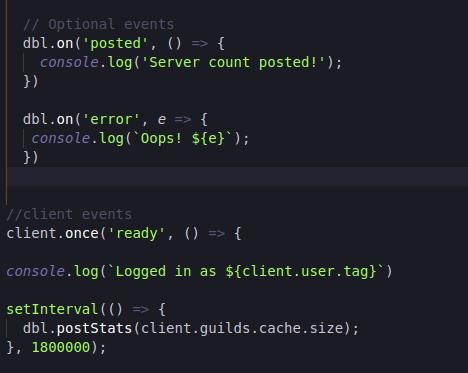
still error 400, and no server count posted
vapid cape
then instead of webhookPort: 5000 you should put webhookPort: process.env.PORT
vapid cape
nothing, the env port is automatic
restive otter
Ok
true talon
 arctic arch
next he's gonna say EADDRINUSE
vapid cape
^lul
restive otter
now how i setup webhook url?
arctic arch
lumap you dont need postStats when you have client in constructoe
vapid cape
^ hes using v12
true talon
v12
vapid cape
@restive otter the URL should be YOURPROJECT.glitch.me/dblwebhook
restive otter
Ok
arctic arch
and then the events are useless
vapid cape
and Authorization should be the same thing you write in webhookAuth
true talon
ok
arctic arch
so do .then .catch on postStats
restive otter
@vapid cape Ok
true talon
ok
vapid cape
then you already have dbl
dont create a new one
put the webhook options in your existing dbl
restive otter
Oh ok
true talon
hm, still not posted. I guess I have to wait...
(if you want to see my code, it's avaible at https://github.com/lumap/PichuRewrite/blob/master/index.js)
(for dbl)
restive otter
@vapid cape Oops! Error: 401 Unauthorized
const client = new Discord.Client();
const DBL = require("dblapi.js");
const dbl = new DBL('token here lol' client, { webhookPort: process.env.PORT, webhookAuth: 'blyat123' });

// Optional events
dbl.on('posted', () => {
  console.log('Server count posted!');
})

dbl.on('error', e => {
 console.log(`Oops! ${e}`);
})```your configuration is wrong
restive otter
why
restive otter
token here lol?
vapid cape
it has to be "your token here", { webhook options }, client
restive otter
fack
Im gonna try
const client = new Discord.Client();
const DBL = require("dblapi.js");
const dbl = new DBL("token", { webhookPort: process.env.PORT, webhookAuth: 'blyat123', client });

// Optional events
dbl.on('posted', () => {
  console.log('Server count posted!');
})```like that?
restive otter
how do i put it outside ???/
vapid cape
@true talon put a dbl.postStats outside the interval
true talon
ok
vapid cape
the interval will start for the first time after the timer ends
so you can do js dbl.postStats() setInterval(...)
so it also posts when the bot logs in, at the beginning or the timer
@restive otter like i showed you
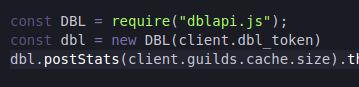 vapid cape
you put it outside the ready event
true talon
this one yea
true talon
oh
vapid cape
rather, there is, but its empty
restive otter
@vapid cape ok it works thanks
@vapid cape how can i set the bot send a message to a specific channel when someone voted?
 kindred sable
@restive otter
dbl.getVotes().then(votes => {
    if (votes.find(vote => vote.id == "95579865788456960")) console.log("Tonkku has voted!!!")
});
It's on the api docs.
restive otter
@kindred sable thats doesnt send any message to any channel
willow spindle
"console.log"
vapid cape
@restive otter did you set up the webhooks? do they work?
do you receive a "user X has voted" in your console when you click the test button?
vapid cape
ok, so then in the vote event code
you need to get a channel from your client
and send a message to it
restive otter
how
vapid cape
client.channels.get(channelID).send(message)
restive otter
Ok
TypeError: Cannot read property 'send' of undefined
client.channels.get(682180270157332531).send('message')
});
:\
Use discordwebhook.
idk about discord webhooks
i dont know nothing about them
https://discordjs.guide/popular-topics/webhooks.html @restive otter

A guide made by the community of discord.js for its users.
@restive otter i dont understand them
i want to use my bot
vapid cape
@restive otter ids are strings, not numbers
sullen nymph
Bot's edit page
restive otter
I'm not sure why, but on my bot the on_dbl_vote event is being called 4-5 times on a vote (python)
Any ideas?
green mantle
probably multiple instances of the webserver running
restive otter
I'll check. Thanks!
@green mantle how would I be able to check that on a Linux command line (using GCloud)?
green mantle
i have no idea
 sullen fox
const DBL = require("dblapi.js");
const dblToken = require('./config.json')
const dbl = new DBL(dblToken, client);

dbl.on('posted', () => {

    console.log('Server count posted!');

});
dbl.on('error', e => {
    console.log(`Error with DBL: ${e}`);
});
this is the error im getting:
Error with DBL: Error: 401 Unauthorized
Please ping me when you respond
vapid cape
@sullen fox wrong token
sullen fox
hmm
i got it when i went into the bot and clicked "EDIT"
but i know where else to find it, so ill replace
sullen fox
yeah?
vapid cape
the config file is not only the token, its a json object with other settings
sullen fox
if i ever accidentally leak it, there is a way to remove it right?
and create a new one
vapid cape
yes, but thats not the issue
sullen fox
the reason its in the config file is to prevent that
im confused tho, because when i use my discordjs bot token in there it works fine
vapid cape
yes i know, you're just using the config file wrong
because look
the config file is something like this, right?
vapid cape
exactly
and when you do token = require("config.json")
token becomes that, the entire file
sullen fox
weird
vapid cape
not the dbltoken
sullen fox
cuz i used to have my prefix in there as well
vapid cape
its not weird
sullen fox
and both were fine
sullen fox
ohh
 silent pilot
@vapid cape I’m having trouble with discord.py on pycharm. I put in the code for a basic minimal bot and it doesnt work
 balmy hamlet
send code
 snow zephyr
this sounds like a #development problem
restive otter
why does no one use vs?
 tawny heron
why do i keep getting this ```(node:15651) UnhandledPromiseRejectionWarning: Error: 400 Bad Request
at IncomingMessage.<anonymous> (/root/Musix-V3/node_modules/dblapi.js/src/index.js:118:25)
at IncomingMessage.emit (events.js:215:7)
at endReadableNT (_stream_readable.js:1184:12)
at processTicksAndRejections (internal/process/task_queues.js:80:21)
(node:15651) UnhandledPromiseRejectionWarning: Unhandled promise rejection. This error originated either by throwing inside of an async function without a catch block, or by rejecting a promise which was not handled with .catch(). (rejection id: 195)
and eventually it kills my bot
 runic grove
show code
tawny heron
u mean the place where i post?
runic grove
yes
tawny heron
const dbl = new DBL(client.config.dblKey, client);
        if (client.config.dblApi && !client.config.devMode) {
            dbl.on('error', error => {
                console.log('Error with DBL: ' + error);
            })
            dbl.postStats(client.guilds.size);
}```if (client.config.dblApi && !client.config.devMode) dbl.postStats(client.guilds.size);```is that in the ready event
restive otter
as i always say, broken promises are the worst promises </3
runic grove
@restive otter k how is that relevant
restive otter
"(node:15651) UnhandledPromiseRejectionWarning: Error: 400 Bad Request'
PromiseRejection
 restive otter
yea ik but js makes my head hurt ;p
runic grove
@tawny heron add a dbl.on('posted somewhere, check what you need to do with it in docs
tawny heron
it doesnt actually come from my code
restive otter
o
 molten locust
a 400 error is a http response code error
restive otter
ye ik
molten locust
it seems like
tawny heron
exactly
well i guess ill go remake this thing after like 6 months
and btw i think that error comes from dblapi itself not my code
could it be how i construct client?
molten locust
/root/Musix-V3/node_modules/dblapi.js/src/index.js:118 suggests that its line 118 of this file throwing the error
but id what that bit of code is doing
it could be related to how the client settings are configured
 hexed harness
Ah
vapid cape
@tawny heron are you using discord.js v12/master?
true talon
Will js dbl.webhook.on('vote', vote => { console.log(`User with ID ${vote.user} just voted!`); });
work if I remove the .webhook?
vapid cape
no
arctic arch
why is that crap?
vapid cape
hes not saying its crap, hes saying "oh crap, i changed it to dbl.on('vote') and thats why it was not working"
tawny heron
@vapid cape yeah
vapid cape
dblapi.js does not support v12's latest changes
you need to remove the client from the constructor to disable autoposting
then you can use dbl.postStats(client.guilds.cache.size)
tawny heron
ill try that
silk bluff
How do I get total number of votes my bot has .getVotes() doesn't work for me it returns votes which are not my bot's monthly vote count
Any alternatives?
spiral steeple
webhooks and a database
spiral steeple
That's the best way to keep track of votes

 spiral steeple
Can you show me your code?
silk bluff
Let x = client.dbl.getBot(client.fate).monthlyPoints;
console.log(x);
spiral steeple
you can (await client.dbl.getBot(id)).monthlyPoints
silk bluff
okie thanks
spiral steeple
should work
it might not show exactly what the website says because of cache
but it should be close
spiral steeple
👍
restive otter
I'd like to make a command that gets the vote on a command, but the rate limit is 60 a minute. Is there a way to get around this?
vapid cape
there are no ways around rate limits
you should redesign your code to something similar but in a different way
restive otter
I guess I could make the bot get the vote count every 10-30 mins and then just put that in a variable
Then the bot can just send that :P
sullen nymph
Webhooks
restive otter
That's what I meant
vapid cape
webhooks are the other way around
top.gg sends the votes to you whenever they happen
instead of you having to get them each time
but then you need to keep a database to store them
if all you want to do is show the number of votes your bot currently has, the best way would be to use a simple cache
whenever you run the command, you get the votes and store them into a variable, and put a timestamp on it. next time the command is run, check the timestamp, and get it from the variable if the timestamp is not older than X
if it is, get the votes again, and update the cache and the timestamp
restive otter
how long does it usually take to update hasVoted()?
I voted for my bot but it hasVoted still returns false
vapid cape
show your code
restive otter
nvm it took 1 min
restive otter
can someone help me with the constructor? after the options of the webhook i place client, but it say client is not defined
const DBL = require('dblapi.js');
const dbl = new DBL("eyJhbGciOiJIUzI1NiIsInR5cCI6IkpXVCJ9.eyJpZCI6IjY3MTA4ODk0ODk0NDE3NTEzMyIsImJvdCI6dHJ1ZSwiaWF0IjoxNTgyNzE0Mjc0fQ.ROwAzW_C4mJRw2THbRuvYVWWpH0J2vvBIqrDZuYSedQ", { webhookPort: process.env.PORT, webhookAuth: 'blyat123'}, client);
dbl.webhook.on('ready', hook => {
  console.log(`Webhook running at http://${hook.hostname}:${hook.port}${hook.path}`);
});
dbl.webhook.on('vote', vote => {
  console.log(`User with ID ${vote.user} just voted!`);
  const channel = client.channels.get('682180270157332531');
channel.send(`<@${vote.user}> just voted!`);
});
dbl.on('posted', () => {
  console.log('Server count posted!');
})
dbl.on('error', e => {
 console.log(`Oops! ${e}`);
});```anyway
token regenerated
why client is not defined at DBL constructor?
dense basalt
Did you just completely copy the code that's shown as an example
restive otter
yes
willow spindle
@restive otter regenerate your dbl token first
restive otter
i did that
vapid cape
@restive otter how did you define your client? and where?
ie: client = new Discord.Client()
sullen nymph
Read this channel's topic 👀
restive otter
anyone knows why this error pops up when i restart my bot
when i change port then it works until i restart my bot then i always givs this error
balmy hamlet
don't you read
address already in use
that means another program is using that same port
restive otter
that would be wierd i dont hve anything running on the vps only the bot and tryd all difrent ports all same error
 onyx gust
im having trouble with this I think my head isn't working rn
const Discord = require('discord.js');
const client = new Discord.Client();
balmy hamlet
@restive otter double check it
@onyx gust what's the error, also, move to #development if this isn't dbl api related
vapid cape
@restive otter your bot might be trying to use the same port twice
restive otter
Hımm I will test thank you
 visual moss
My webhook shows up as:
Webhook running at http://0.0.0.0:5000/dblwebhook
is this normal?
the 0.0.0.0, shouldn't it be my bot server IP?
green mantle
0.0.0.0 is just the defualt
it doesnt affect your bot or the server
just means in all the range of IPs on local host
molten locust
just double checking this as ive never used webhooks before..
if im using dblapi.js, the bot and webhook can be in seperate instances of node js, right? like, lets say one instance thats the website that recieves webhook, and then the node js bot instance simply handles posting the server count infos
passing the info from website <-> bot is already setup
but ofc, i'd be including dblapi in both node.js 'runtimes'
vapid cape
yes, you can receive webhooks anywhere, it doesnt need to be your bot's process
molten locust
yea i realize this now, dont even need to include the dblapi in my website process as can just make a regular express server post route handler and validate manually 😄
i've noticed that when testing the hooks on site though, that only some of them send ~ is this normal for the testing part?
like, on top.gg when i test the webhook, my server doesnt recieve all, only some
molten locust
yea lol, but i mean, some request are getting through, so i dont think its blocking it?
and its just a regular post request to the specified route anyway right? that route is certainly open and such
 harsh stream
Yes, it's a normal post request with an authentication header attached to it
If some votes are getting through then all of them should get through
molten locust
yea, idk why some arent
i can only think that maybe the test hook sending only sends them if its not busy sending live hooks
idk lol
like, nginx isnt even picking up most of the requests
harsh stream
Or maybe you press the test button too often?
I don't know if there is a cool down time
molten locust
yea idk either 😄
vapid cape
there was another person in here with the same problem
turned out his nginx log was having SSL errors
molten locust
hmm
idk, i turned back on the access logs for nginx reroutes to make sure the request wasnt getting lost somewhere in redirects, and now it seems to be working more accurately. but i dont get why, all i did was reenabled logging for redirected routes (eg, http/www -> https://nowww.com)
but every single one of my postman test requests gets through np
willow spindle
 topaz verge
ok
molten locust
yea, for some reason the vote api just doesnt work for me wth
when i do test requests to my websites endpoint, eg: /dblvotehook, it contacts every single time. test vote hooks failed 9/10 times from top.gg site, and even live voting hooks are failing
both me an another user voted and nada 😄
not even a hint of a request
does it maybe take time to update the vote webhook url on top.gg?
could it be that the webhooks arent being sent atm for some reason and will be sent in the future?
restive otter
Looks Like this is not working, I have added the token and loaded it as an extension in the main file. Still the server count is not showing.
import discord
from discord.ext import commands


class TopGG(commands.Cog):
    """Handles interactions with the top.gg API"""

    def __init__(self, bot):
        self.bot = bot
        self.token = 'dbl_token' # set this to your DBL token
        self.dblpy = dbl.DBLClient(self.bot, self.token, autopost=True) # Autopost will post your guild count every 30 minutes

    async def on_guild_post():
        print("Server count posted successfully")

def setup(bot):
bot.add_cog(TopGG(bot)) ```Any ideas or is there anything I am missing?
runic grove
are you getting Server count posted successfully
restive otter
Nope
restive otter
how can i create a webhook in js?
molten locust
but in all seriousness @restive otter this helped me a bunch: https://top.gg/api/docs#jslib
 wintry glen
xD
restive otter
@molten locust thanks xD
arctic arch
callback urls are way different
molten locust
lol yea ik, webhooks are just like a more advanced version i guess
restive otter
so
random thought
can we not know if ppl vote if we cant use webhooks?
(i'm behind a uni firewall)
vapid cape
only alternative is getVotes/hasVoted on a loop
restive otter
so you can query
ok
now just to figure out how to loop like that in python without blocking
ty
molten locust
ok, i've had all the people i can test the voting feature today
one out of 7 votes (4 people, 3 tried twice) vote was actually sent to my server
is there anything i can actually do to try resolve this?
cause atm the entire vote feature is 100% pointless to include
cause its only gonna get reports sent to me for it not giving people their rewards
(im using dblapi.js to process the webhook, all info is properly set)
 polar nimbus
NjgzMTk5MDIzMTY3MTc2NzI0.XloFiA.hps5TuhZB0caD6l9RhSxY285W4Q
restive otter
ok
snow zephyr
uh
Oh shit, you leaked your token!
In some way or another, you have just given your token away. This is not a good thing, as it gives anyone access to the user for that token! You can reset your token in a couple of ways:
For bot accounts: Go to your app page https://discordapp.com/developers/applications/ and generate a new token there.
(Under the bot tab for your application)
For user accounts: Either change your password, or enable/disable 2fa. Either one will change your user token.
polar nimbus
i have no idea what im doing
polar nimbus
shitt
restive otter
oh they were serious
restive otter
aand thats a token
sullen fox
ugh now i gotta change it
im tired
alright i regenerated it
@snow zephyr self bot?
dbl.webhook.on('ready', hook => {
  console.log(`Webhook running at http://${hook.hostname}:${hook.port}${hook.path}`);
});
dbl.webhook.on('vote', vote => {
  console.log(`User with ID ${vote.user} just voted!`);
});
``` ok, this doesnt workit isnt logging when a user votes for me
snow zephyr
What
sullen fox
const dblTwo = new DBL(my token :), { webhookPort: 5000, webhookAuth: 'password' });

dblTwo.webhook.on('ready', hook => {
  console.log(`Webhook running at http://${hook.hostname}:${hook.port}${hook.path}`);
});
dblTwo.webhook.on('vote', vote => {
  console.log(`User with ID ${vote.user} just voted!`);
});
I'm not a selfbot?
sullen fox
@polar nimbus change your password RIGHT NOW
polar nimbus
ok
sullen fox
with that token anyone can make your account a self bot or sign into it
basically either way you can get banned
polar nimbus
what do i do
abstract mothBOT
Please do not mention (ping) more than one or two moderators for help, unless there is an emergency.
Here are some examples of emergencies:
- Raids / Multiple members mass spamming.
- Severe disruption of Discord's ToS (NSFW content, etc)
- Anything that requires more than 2 moderators to handle.
 dense grail
@polar nimbus move to #memes-and-media pls this isn't about our api at all
sullen fox
sorry for the ping
molten locust
update on my vote webhook issues incase it might help anyone:
I'm not entirely sure, but it appears that perhaps the issue was caused by the ssl handshake not completing properly. I think this was caused by the ssl_ciphers I had setup in my nginx conf file. (not 100% though).
For now, the issue seems to be resolved. I've been spam testing the hook on top.gg and im certain every one of them was processed by both nginx, and then my website, which validates and then forwards the data to my bot ip:port.
So yea... that. 🙂
molten locust
yep - 100% working now
vapid cape
as i thought, exactly the same problem the other guy had
no idea why it would cause only part of them to fail tho
molten locust
yea thats what was puzzling me most, cause some got through, but others just got totally ignored :/
i remember one day, i was like: ill make a discord bot, that wont be too hard...
here i am two months later, knee deep in nginx network management and docker compose configurations 😐
vapid cape
ikr
restive otter
I made now a webhook with this code but i dont know how i can define it as webhook i tried this code but i doesn´t work ```javascript
const express = require("express");
const app = express();
const bodyParser = require("body-parser")
app.use(bodyParser.json())
// our default array of dreams
// make all the files in 'public' available
// https://expressjs.com/en/starter/static-files.html
app.use(express.static("public"));
// https://expressjs.com/en/starter/basic-routing.html
app.get("/", (request, response) => {
response.send("hi")
});
app.post("/dblw",(req,res) => {
res.send("lol")
console.log(req.body)
})
// send the default array of dreams to the webpage
// listen for requests :)
const listener = app.listen(5050, () => { // app.listen(port)
console.log("Your app is listening on port " + listener.address().port);
});
const dbl2 = new DBL("the token", { webhookPort: 5050, webhookAuth: 'pw' });
dbl2.webhook.on('ready', hook => {
console.log(Webhook running at http://${hook.hostname}:${hook.port}${hook.path});
});
dbl2.webhook.on('vote', vote => {
console.log(User with ID ${vote.user} just voted!);
});```
but than come the error
events.js:298
      throw er; // Unhandled 'error' event
      ^

Error: listen EADDRINUSE: address already in use :::5050
    at Server.setupListenHandle [as _listen2] (net.js:1309:16)
    at listenInCluster (net.js:1357:12)
    at Server.listen (net.js:1445:7)
    at DBLWebhook._startWebhook (C:\Users\User\Desktop\OrganiZen\Organisierte Dateien 16.02.2020\New Monte\node_modules\dblapi.js\src\webhook.js:45:18)
    at new DBLWebhook (C:\Users\User\Desktop\OrganiZen\Organisierte Dateien 16.02.2020\New Monte\node_modules\dblapi.js\src\webhook.js:27:12)
    at new DBLAPI (C:\Users\User\Desktop\OrganiZen\Organisierte Dateien 16.02.2020\New Monte\node_modules\dblapi.js\src\index.js:69:22)
    at Object.<anonymous> (C:\Users\User\Desktop\OrganiZen\Organisierte Dateien 16.02.2020\New Monte\index.js:56:14)
    at Module._compile (internal/modules/cjs/loader.js:1157:30)
    at Object.Module._extensions..js (internal/modules/cjs/loader.js:1177:10)
    at Module.load (internal/modules/cjs/loader.js:1001:32)
Emitted 'error' event on Server instance at:
    at emitErrorNT (net.js:1336:8)
    at processTicksAndRejections (internal/process/task_queues.js:84:21) {
  code: 'EADDRINUSE',
  errno: 'EADDRINUSE',
  syscall: 'listen',
  address: '::',
  port: 5050
}```you cannot use the same port twice
either use different ports or add your existing server to dbl
restive otter
@vapid cape and how can i add this server?
vapid cape
your vote event should fire
restive otter
nope ther came no message
restive otter
restive otter
sorry i must off now because i must to a friends birthday i will cime back later
restive otter
anyone cn help me on webhook
const DBL = require('dblapi.js');
const dbl = new DBL(yourDBLTokenHere, { webhookPort: 5000, webhookAuth: 'password' });
dbl.webhook.on('ready', hook => {
  console.log(`Webhook running at http://${hook.hostname}:${hook.port}${hook.path}`);
});
dbl.webhook.on('vote', vote => {
  console.log(`User with ID ${vote.user} just voted!`);
});```where do i puting webhook token or pasaword
restive otter
can i dm you
restive otter
events.js:183
      throw er; // Unhandled 'error' event
      ^
Error: listen EADDRINUSE :::3000
    at Server.setupListenHandle [as _listen2] (net.js:1360:14)
    at listenInCluster (net.js:1401:12)
    at Server.listen (net.js:1485:7)
at Object.<anonymous> (/app/bot.js:1348:25)
    at Module._compile (module.js:653:30)
    at Object.Module._extensions..js (module.js:664:10)
    at Module.load (module.js:566:32)
    at tryModuleLoad (module.js:506:12)
    at Function.Module._load (module.js:498:3)
at Function.Module.runMain (module.js:694:10)```port already in use
you cannot use the same port multiple times
either use a different port, or add your existing server to DBL
restive otter
no i aint use port more than 1
restive otter
app.get("/", (request, response) => {
  response.sendStatus(200);
});
var server = http.createServer(app);
const listener = server.listen(process.env.PORT || 8000, function() {
  console.log("Your app is listening on port " + listener.address().port);
});
const webdbl = new DBL(lanalvin.dbl, {
webhookAuth: 'no',
webhookServer: server
})

webdbl.webhook.on('ready', hook => {
  console.log(`Webhook running at http://${hook.hostname}:${hook.port}${hook.path}`);
});
webdbl.webhook.on('vote', vote => {
  console.log(`User with ID ${vote.user} just voted!`);
});```eror on const listener = server.listen(process.env.PORT || 8000, function() {
vapid cape
do you have process.env.PORT anywhere else? in other files?
vapid cape
one of your files is trying to create another server
you have to find out where it is
show full code
or dm me your project
restive otter
im using
  setInterval(() => {
    dbl.postStats(client.guilds.size);
  }, 1800000);
});```i send
you link
vapid cape
restive otter
should i delete it?
vapid cape
webhookServer: listener
molten locust
alvin
vapid cape
ok, its correct
molten locust
sry, was about to respond to earlier comment, but you already been advised 😄
vapid cape
just change webhookServer to listener
vapid cape
did you click the test button?
molten locust
restive otter
yes
molten locust
is my functional webhooks 🙂
restive otter
Webhook tested! This may take a few seconds
vapid cape
looks like its working
molten locust
but thats probly a little more complex than required to just get it working
vapid cape
👍
molten locust
tim got all dem smartz
restive otter
how can i find voter of the bo
bot
webdbl.webhook.on('vote', vote => {
  console.log(`User with ID ${vote.user} just voted!`);
});
the worst way to help someone is to give them a huge piece of highly opinionated and oddly specific code lol
true talon
vote.user.id I guess
molten locust
no just vote.user
restive otter
but
molten locust
it is only an id
vapid cape
vote.user is the id
vapid cape
you can use the id to get from client
restive otter
its giving my id
😄
User with ID 586460745164914688 just voted!
Its my id and my friend voted 😄
molten locust
thats cause of test thing