#topgg-api
1 messages · Page 31 of 1
 dense fjord
 calm torrent
# right after `client = discord.Client() `
dbl_client(client, KEY_DBL)
dbl_logger = logger.getLogger('bot')

# basically anywhere but before the next code
async def update_stats():
    """This function runs every 30 minutes to automatically update your server count"""
    while True:
        logger.info('Attempting to post server count')
        try:
            await dbl_client.post_server_count()
            logger.info('Posted server count ({})'.format(len(client.servers)))
        except Exception as e:
            logger.exception('Failed to post server count\n{}: {}'.format(type(e).__name__, e))
        await asyncio.sleep(1800)

# right before client.run
client.loop.create_task(update_stats())
wait why did u modify the lib
why dont u update your aiohttp or something
dense fjord
I can't async branch requires 1.0.5
calm torrent
just update and then test to see if it breaks 
ive used async branch on the latest version
dense fjord
Crazy
Also the only change i see is using async def and await in stead of @asyncil.coroutine and yield from
dense fjord
I physically can't If i try to install above 1.0.5 I cannot lock
calm torrent
lock?
dense fjord
Is there a seperate version of discor.dpy with a higher version of aiohttp
pipenv lock
calm torrent
you could fork the repo
and edit requirements.txt
then do pip install git+yourgithubforklink
dense fjord
Also if I increase version of aiohttp it will break my code cos they changed the name of some shit that I need
dense fjord
It's building
And I get a syntax error
Oh wait
If this doesn't work I'll just make my own unofficial lib
calm torrent
you can just do http requests.. don't have to make a full lib for updating server count..
calm torrent
send the full error
dense fjord
2018-06-09T16:38:35.057190+00:00 app[worker.1]: Forbidden: Forbidden (status code: 403): {"error":"Forbidden"}
2018-06-09T16:38:35.057194+00:00 app[worker.1]: Traceback (most recent call last):
2018-06-09T16:38:35.057195+00:00 app[worker.1]: File "bot.py", line 301, in dbl_api
2018-06-09T16:38:35.057197+00:00 app[worker.1]: await dbl_client.post_server_count()
2018-06-09T16:38:35.057205+00:00 app[worker.1]: File "/app/.heroku/python/lib/python3.6/site-packages/dbl/client.py", line 100, in post_server_count
2018-06-09T16:38:35.057207+00:00 app[worker.1]: await self.http.post_server_count(self.bot_id, self.guild_count(), shard_count, shard_no)
2018-06-09T16:38:35.057208+00:00 app[worker.1]: File "/app/.heroku/python/lib/python3.6/site-packages/dbl/http.py", line 189, in post_server_count
2018-06-09T16:38:35.057210+00:00 app[worker.1]: await self.request('POST', '{}/bots/{}/stats'.format(self.BASE, bot_id), json=payload)
2018-06-09T16:38:35.057211+00:00 app[worker.1]: File "/app/.heroku/python/lib/python3.6/site-packages/dbl/http.py", line 160, in request
2018-06-09T16:38:35.057213+00:00 app[worker.1]: raise Forbidden(resp, data)
2018-06-09T16:38:35.057269+00:00 app[worker.1]: dbl.errors.Forbidden: Forbidden (status code: 403): {"error":"Forbidden"}```check your token
dense fjord
Im using the offiical python lib atm
 hollow wraith
i was using request in JS.. the site i was trying to post to required headers.. or i was getting 403 Forbidden
not the same site.. mind you.. but you could atleast try
dense fjord
eh @calm torrent my token was wrong I changed to correct one and it still got 403
calm torrent
try a print(KEY_DBL) and see if its the right output
dense fjord
Yeah it logs it when it starts and I check it with one on page and it is the same
calm torrent
im not sure then..
hollow wraith
did u try adding any headers?
dense fjord
It should automatically add headers cos its the official lib. I guess Im gonna have to make my own though
hollow wraith
youre using the request lib
dense fjord
which uses the aiohttp lib which is where the error comes from
hollow wraith
ah.. my bad.. read this and thought u were using request await self.request('POST', '{}/bots/{}/stats'.format(self.BASE, bot_id), json=payload)
 restive otter
any news on webhooks yet?
 light crag
no
 arctic arch
webhooks should work again, can someone confirm?
 glass dust
yeah, finaly, thx
 robust olive
Will it be sending out the votes missed 
arctic arch
sadly no
robust olive

 snow fiber
What was the issue Tonks?
light crag
Oliy
 scenic cape
Doesn't seem to work for me still
robust olive
hmm, ya. looks like it stopped w0rking again 
glass dust
Yup dead again
scenic cape

restive otter
YAY! thanks for fixing the webhooks!
light crag
Both
scenic cape
I just got the vote request like 1½ hour after I voted, so I guess both?
restive otter
it seems dead again
 normal light
Umm is there a official discord channel?
 empty shoal
define official discord channel?
 young whale
kappa
 narrow charm
Can anyone tell me whats the use of shard_id while posting bot's stats to the API ??
 fleet relic
Anyone here know how to use weebly api so my bot will update a command if the website updated. I use discord bot maker
Also how to make it show 3 latest
 humble bison
@fleet relic This channel is only for the Discord Bots List API, that would be more suited for #general or #development.
fleet relic
Okie
calm torrent
@narrow charm In case you send the server count per shard, dbl will add them up for you
 summer oracle
receiving webhooks again 👍
 terse trellis

restive otter
const DBL = require('dblapi.js');
const dbl = new DBL(yourDBLTokenHere, { webhookPort: 5000, webhookAuth: 'password' });
dbl.webhook.on('ready', hook => {
  console.log(`Webhook running at http://${hook.hostname}:${hook.port}${hook.path}`);
});
dbl.webhook.on('vote', vote => {
  console.log(`User with ID ${vote.user} just voted!`);
});```Im quite confused with this. what gets in the webhookAutthingy?What I put here?
hollow wraith
doesnt do anything for me either.. isnt that supposed to pass another parameter in the webhook that the listener can use to verify authenticity
restive otter
Also If I use the code in my onRead event it doesnt even log that the webhook is running
I followed the steps from the website
hollow wraith
onRead?
hollow wraith
are u using an ide?
arctic arch
what part of the code did you put in your onready?
if you put just the events it's possible that the webhook is ready before your bot is
hollow wraith
Dbl is seperate from the bot isnt it?
arctic arch
yea
hollow wraith
Should still log that the webhook is running
arctic arch
nah
the function you place in the ready event runs after the bot is ready obviously
if the webhook is already ready when the event handler is registered, there are no events
therefore no log
so just place it in "the root" of your code, not inside any callbacks or event handlers
hollow wraith
Oh, i see what youre getting at
Suppose i assumed no one would put it in a callback or anything.. thats what i get :(
 dapper bramble
k
 slim reef
rip webhook yet again
arctic arch
no it works
 slim reef
oof didn't noticed you guys changed how webhooks worked gotta fix that on our end
arctic arch
what change?
slim reef
above is what i get from the webhook
arctic arch
yea
and it's been like that since the beginning
only change really is the query part
 arctic arch
idk what you did then lol
slim reef
idk either, that is strange
restive otter
dbl.webhook.on('ready', hook => {
      console.log(`Webhook running at http://${hook.hostname}:${hook.port}${hook.path}`);
    });
    dbl.webhook.on('vote', vote => {
      console.log(`User with ID ${vote.user} just voted!`);
    });``` thats what I put in the on ready event
with this
```js
const DBL = require('dblapi.js');
const dbl = new DBL(process.env.DBLTOKEN, { webhookPort: 5000, webhookAuth: 'woah a password' });```dont put it in the ready event
restive otter
I dont know why But it seems like the whole api doesnt work for me
I just tested this with the .hasVoted()
always said no
Im confused 🤔
"dblapi.js": "^2.0.1" thats the latest version?
hollow wraith
Those methods dont work properly. Which is why u should use webhooks
arctic arch
what do you mean those methods dont work properly
 slate merlin
works for me
arctic arch
Uncle can you not scare me with false information
slate merlin
😂
arctic arch
@restive otter that is indeed the latest version
hollow wraith
In the C# lib one of the end points is depreciated.. and the other is supposed to get voters in the last 24 hours.. but doesnt stop at 24 hours
arctic arch
they're clearly using the js library
why are you talking about the C# library all of a sudden and confusing people?
hollow wraith
Are the endpoints different?
 sudden sparrow
Any one who can make a bot? Plz
 sullen nymph
Wrong channel. Check #development. Read this channels topic.
 neat wedge
 mystic wing
They have delays I think
mystic wing
Hmmm it's been slow for me idk why then
humble bison
API meme time, but can I send webhook requests to a post event on my bots express server that'll send it to the bot?
like just add a router.post('/webhook', ...
snow fiber
You'll want to link it up to a DB and have the bot access that I guess
humble bison
I already know what I'm doing on that side, got my complicated system 👌
but I just needed to know about the express part
humble bison
Oo okay, cheers. will have a play around with it.
humble bison
owo
arctic arch
npm install discordbotlist/dblapi.js@next I think
arctic arch
 humble bison
ooh
 frail cedar
noice
 proud sphinx
Tonkku ❤ dblapi.js
arctic arch
of course, I made it
 thorny parrot
I'm curious if I can get the statistics of my bot for my website in like a GET request instead of the image.
got it
arctic arch
oh wow, didn't know that was possible
Someone's webhook auth had incompatible characters for a HTTP header
From now on any incompatible characters will be removed from the headers
Please tell me if some characters have been removed that shouldn't have been
restive otter
@arctic arch no its npm i DiscordBotList/dblapi.js#next
arctic arch
ah right
calm torrent
there should be a max number of chars imposed if not already added
 pseudo patrol
if 1 instance is an array of shards how would I add it up with the other instance to post
calm torrent
just send the shard_id and dbl will add it
pseudo patrol
 but I am posting 15 shards per instance with one post
unless I specify instance num then it should add it right 🤔
thorny parrot
Halpp
https.get('https://discordbots.org/api/bots/432533456807919639'
```Even doing that now and my votes are still the wrong amount."points":43
When I visit it
in the 800s in the command
light crag
i love that missing )
thorny parrot
:p
https.get('https://discordbots.org/api/bots/432533456807919639', (resp) => { is the entire line
 desert minnow
The links showing 43 for me too. It might just be the caching system?
desert minnow
I'm not 100% sure on how DBLs' API works
It's just showing 43 points
So it's correct
thorny parrot
I'm calling that link though so it shouldn't be different.
thorny parrot
"points":43 when I visit it
in the 800s in the command
 arctic arch
where are you getting 846 from
thorny parrot
https://discordbots.org/api/bots/432533456807919639 ...
"username":"Member Count"
desert minnow
Ok yeah. Fuck.
light crag
Yeah the API should return 43 upvotes
desert minnow
There's literally no trace of 846 anywhere there
thorny parrot
let votes = JSON.parse(data).points;
 timid nexus
I'm getting duplicate webhooks
arctic arch
I'm not
timid nexus
I removed the timer on my end (was from back when DBL had a way to remove ur vote and vote again)
I only ran it like that for a minute or so and got 2 duplicates
 full pelican
My gambling bot went offline
hollow wraith
Yeah.. i havent changed anything in my code and just got duplicate votes from webhook
proud sphinx
@full pelican it has nothing to do with the dblapi
timid nexus
Webhooks are just really buggy overall.
I've had some people where webhooks only got sent when they used their PC, some people whl get duplicates, some who get sent without them even voting and some who don't get sent at all even when they do vote
It's just really inconsistent and weird
arctic arch
if some people dont get it when they're on their phone then the vote didn't succeed either
what browser are they using
timid nexus
I'm not sure, it was a while ago
It would give them the 24 hour voting cooldown but nothing would be sent to the bot, when they used a pc or another device it would work fine
If I remember who it was I'll ask them, but it was a long time ago
arctic arch
I can't get any duplicates in any way
timid nexus
can u monitor mine?
I could log them myself but I'm sure if you logged mine you would see dupes
calm torrent
30 requests till sanic gives up and returns a 429
 junior goblet
if it is getting annoying could you add something in your code temporarily to check if a request has come more than once within a certain time
calm torrent
nice idea ill add that
calm torrent
looks like dbl keeps POSTing if i return a 204
if i return a 200 (or a 400 or 429), it doesnt spam me
junior goblet
hmm
i always return 200 so idk sorry
and yeah sorry miles that's all i can think of
calm torrent
@timid nexus do u return a 204?
timid nexus
nah, lemme just check smth
arctic arch
I don't see how responding with a 204 would cause it to repeat
calm torrent
test it 
timid nexus
nah mine always responded with a 200
calm torrent
let me do some testing
timid nexus

arctic arch
I just tested with a 204 and I still only get one
calm torrent
are you returning any json data?
i tested with 200 400 429 204 and 204 becomes an inf loop
sanic logs the multiple requests
restive otter
Is webhooks down again? Have some reports of our daily command not working.
arctic arch
no I theres no tracking
timid nexus
duping randomly for me
arctic arch
make sure the issue is not within your implementations
calm torrent
i created something on my server to just return a 204 and not do anything else
still a loop
return response.text(None, status=204)
timid nexus
tonkku the code is literally
check authorization
check cooldown (that i only added bc of the dupes)
gib vote shit
calm torrent
sanic here
arctic arch
@calm torrent try now
calm torrent
fixed thanks
timid nexus
i havent seen any dupes either
restive otter
We figured out our side webhooks working fine
restive otter
Can I use the API to get the total vote count of the current running bot?
 surreal junco
restive otter
surreal junco
restive otter
ooooh
But
I'd have to do an API call, right?
thought the vote count might be cached or something ¯_(ツ)_/¯
so I could prevent an API call to go easy on it
snow fiber
You can cache locally if you want
But it's better to store it locally anyway and retrieve the voters with the web hook
 ashen hull
A limit at 100 votes right?
 clever rock
How do the getVotes work? get the latest 1k votes?
proud sphinx
Yes
clever rock
for example I got 1.5k votes.
It will get the latest 1k then disregard the earlier 500 votes?
proud sphinx
Use a webhook for more than 1000 votes
clever rock
yeah but we are still working on it so Im just asking how this last 1k votes work like get always the latest 1k ?
arctic arch
yes, always the latest 1k
arctic arch
@humble bison did you try the new version
restive otter
Is there a way to get the server count without having to add it each time to dbl.org?
 loud gulch
if you dont post you cant get it from the api
restive otter
Can it be done automatically is what I'm asking
 tiny condor
So, I am posting the server count each 30 minutes. But some how the bot doesnt show "Online" on the webpage, Do I miss something 🤔
payload = {"server_count": len(self.bot.guilds)}
async with aiohttp.ClientSession() as aioclient:
    await aioclient.post(url, data=payload, headers=self.bot.discordlistheader)
Instead this is the result
Because the server count is all oke I assume the POST works. 🤔
arctic arch
the bot isn't in this server so @abstract moth can't see the status
tiny condor
That doesnt provide more info, and if I search further there is no info about it as well
ah
but it doesnt XD
This happens in the server
not in DM wtf
restive otter
@arctic arch no i am meaning on the website of dbl i can post how many servers my bot is in.. I was wondering if there is a way to automatically update that without having to manually put a number in each time i get a new server
sullen nymph
Make a loop?
arctic arch
are you manually posting each time you get a new server?
sullen nymph
They're probably not posting the count on a removed server. 
restive otter
Not lately i have been looking for a way to automatically do it
 austere swallow
yus
arctic arch
if you're using discord.js you might want to try out dblapi.js @restive otter
arctic arch

GitHub
dblapi.js - An official module for interacting with the discordbots.org API
 arctic arch
does npmjs have a place for changelogs
austere swallow
hmm update readme xD
arctic arch
there's a bot making framework discord-anvil that has dblapi.js in dependencies but doesn't use it lul
austere swallow

Maybe I should contribute something
tonkku does ratelimits apply to /users endpoint?
desert minnow
Can someone just quickly confirm that an API key is only given out once a bot is approved. Setting up stuff for the stats and the API list doesn't have a key for me yet.
austere swallow
yes
restive otter
@arctic arch ok thank you and yes i use discord.js
 tranquil walrus
Does anyone happen to know why I am getting this error when using dblapi.js to send stats to discordbots.org? Getting 403 This host is not accessible
Here's a log output and a code snippet, not changed any of the default settings so using the default interval to send stats
https://gist.github.com/njb-said/ff537ba0b909a3334570ff9f21d6104a
tranquil walrus
Wouldn't it say Forbidden rather than host is not accessible?
loud gulch
yes
tranquil walrus
Or is that snekfetch reinterpreting the status code
loud gulch
maybe that
 shut ibex
yes
tranquil walrus
Tried that, still erroring.
 cunning forum
Are you passing the dbl token or your discord token
 cedar marten
how can i get my discordbots.org token ?
sullen nymph
On the bot's Edit Bot page.
cedar marten
why when i try ti get the bot guilds log this: Oops! Error: 403 This host is not accessible.
hollow wraith
Does your bot have permission to do so?
 digital vector
when i try post my guild count i get Oops! Error: 403 This host is not accessible. ive tried generating a new token a few times but i still cant get anything to post. im using discord.js
arctic arch
show code
ashen hull
...
digital vector
its the code used in the example on the page ```const Discord = require("discord.js");
const client = new Discord.Client();
const DBL = require("dblapi.js");
const dbl = new DBL('Your discordbots.org token', client);
// Optional events
dbl.on('posted', () => {
console.log('Server count posted!');
})
dbl.on('error', e => {
console.log(Oops! ${e});
})```
just with the rest of my stuff added into it
arctic arch
is the token your bot token or the token from discordbots.org website?
digital vector
website
ashen hull
uhhh... @arctic sonnet no
Just a question: is it possible for you to show the full error? By letting the error not be catched. I belive that it would show stack trace iirc
digital vector
i can try
(node:4) UnhandledPromiseRejectionWarning: Error: 403 This host is not accessible.
at _response.transport.request.then (/app/node_modules/dblapi.js/node_modules/snekfetch/src/index.js:193:21) at <anonymous>
at process._tickCallback (internal/process/next_tick.js:188:7)
thats the full error i get without the error catch
arctic arch
you can log JSON.stringify(e) and it'll be the whole snekfetch thing
warning: its big
digital vector
k
arctic arch
before you do that, what does e.body contain
digital vector
<html>
  <head>
    <title>403 This host is not accessible.</title>
  </head>
  <body>
    <h1>Error 403 This host is not accessible.</h1>
    <p>This host is not accessible.</p>
    <h3>Guru Meditation:</h3>
    <p>XID: 871760029</p>
    <hr>
    <p>Varnish cache server</p>
  </body>
</html>```thats everyting i just got
arctic arch
thanks
digital vector
no problem
tranquil walrus
I posted it last night too 😛
arctic arch
I wonder what causes that tho since not everyone gets that
digital vector
its weird
arctic arch
I for example have never gotten that
digital vector
want the JSON.stringify(e) log?
tranquil walrus
I haven't touched the code or config for that bit, so not sure why it suddenly stopped working
My code is here https://gist.github.com/njb-said/ff537ba0b909a3334570ff9f21d6104a
Pretty simple 😛
digital vector
i got the code right off the website cuz im lazy that way
calm torrent
i have a loop that posts to all the botlists
restive otter
How do I add a discord bot to the rank system
calm torrent
loud gulch
i just started the bot and i got Error: 403 This host is not accessible.
 worthy sand
did you remove /votes or something
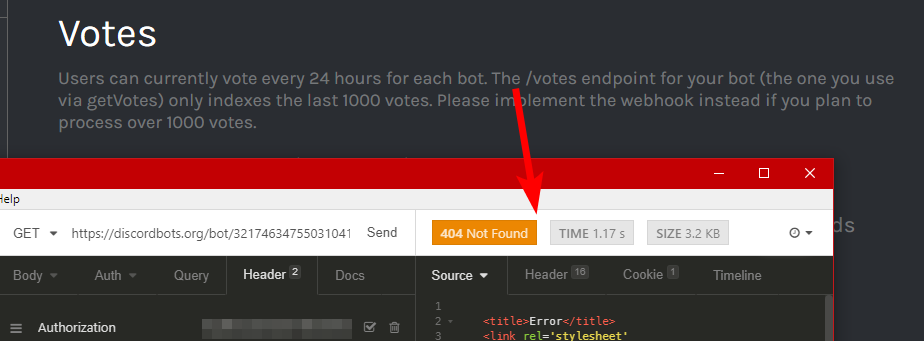
and no, i'm not using webhooks
i don't want to open yet another port that can be scanned and abused just for a small little feature
 worthy sand
forgot /api
now it's working
ty
would probably just be better to use the lib
FOR FUCKS SAKE NPM

AAAAAAAAAAAAAAAA
 cedar marten
why when i try to get the guild count log this: Oops! Error: 403 This host is not accessible. ?
 hoary timber
Do you have a Bot-API token?
cedar marten
yes
digital vector
@cedar marten it a issue that's known
Tonkku doesn't even know why it's happening
restive otter
@worthy sand update npm lol
hollow wraith
It would probably help if u could log your entire request.. headers and all, and sent the log to tonkku
digital vector
<html>
  <head>
    <title>403 This host is not accessible.</title>
  </head>
  <body>
    <h1>Error 403 This host is not accessible.</h1>
    <p>This host is not accessible.</p>
    <h3>Guru Meditation:</h3>
    <p>XID: 871760029</p>
    <hr>
    <p>Varnish cache server</p>
  </body>
</html>``` this? @hollow wraithI also got another error when I logged it a different way which had way to many numbers in it
hollow wraith
thats the response
 hollow glen
reee
 wide mulch
@hoary timber Do you even know what the error means?
 vapid cape
im getting 403 as well
vapid cape
instead of using dblapi.js would it work by sending an http post request?
cedar marten
oh
vapid cape
im working on it right now
done, it works
but isnt it kind of abusable that you can set whatever server count you want?
 full socket
I would assume the website mods have a way of detecting fraudulent server counts 🤷
light crag
Use the client to get server count
vapid cape
yeah i am, but i could simply write something like 99999 if i wanted (to get banned)
xD
 smoky trench
webhooks still appear to not be sending at all
hollow wraith
Ive gotten a few today
smoky trench
not even the test button is doing anything 
hollow wraith
Got the right link? I haven't tried testing recently.. but my last upvote came in less than 3 hours ago
smoky trench
Yeah I am able to post to it myself
hollow wraith
Just got another vote. So idk. Cant test myself rn
smoky trench
i checked the url and tried posting myself to the same one in the options for the bot and it worked fine but it doesnt work when I press test or when someone upvotes
hollow wraith
Cosmo is online.. maybe shoot him a dm
humble bison
Tonkku handles the api things iirc though..
arctic arch
someone using the dblapi.js library, can I get someone's full e object from the error event
 lilac mulch
UnhandledPromiseRejectionWarning: Error: 403 This host is not accessible.

    at _response.transport.request.then (/rbd/pnpm-volume/da798564-6304-4b1e-97b4-8578499e20f9/node_modules/.registry.npmjs.org/snekfetch/4.0.2/node_modules/snekfetch/src/index.js:193:21)

    at <anonymous>

    at process._tickCallback (internal/process/next_tick.js:188:7)
@arctic arch
arctic arch
not an unhandled promise rejection
ashen hull
@arctic arch tried with runkit (without auto-post) and it had no errors
It correctly changed my bots server count to 40
desert minnow
Don't have that error on my end. Just the fact that I have no API key right now so it's always returning Unauthorized 
Well at least my bot was added to the Testing Server
austere swallow

desert minnow
Yeah mines' fine now.
desert minnow
Anyone have any idea by requesting the IDs of voters returns null 
Using DBL-Java-Lib
desert minnow
Ahh, so the API isn't updated
F/e
Thanks
The regular getVoters method is invalid too 
Returns a single SimpleUser instead of a list
Rats
Guess I'll fork it and fix it up
 elfin solstice
make a PR and ask the author to merge and update the lib 
desert minnow
Will do~ 
digital vector
@arctic arch I got this for the json.stringify(e) {"body":{"type":"Buffer","data":[60,33,68,79,67,84,89,80,69,32,104,116,109,108,62,10,60,104,116,109,108,62,10,32,32,60,104,101,97,100,62,10,32,32,32,32,60,116,105,116,108,101,62,52,48,51,32,84,104,105,115,32,104,111,115,116,32,105,115,32,110,111,116,32,97,99,99,101,115,115,105,98,108,101,46,60,47,116,105,116,108,101,62,10,32,32,60,47,104,101,97,100,62,10,32,32,60,98,111,100,121,62,10,32,32,32,32,60,104,49,62,69,114,114,111,114,32,52,48,51,32,84,104,105,115,32,104,111,115,116,32,105,115,32,110,111,116,32,97,99,99,101,115,115,105,98,108,101,46,60,47,104,49,62,10,32,32,32,32,60,112,62,84,104,105,115,32,104,111,115,116,32,105,115,32,110,111,116,32,97,99,99,101,115,115,105,98,108,101,46,60,47,112,62,10,32,32,32,32,60,104,51,62,71,117,114,117,32,77,101,100,105,116,97,116,105,111,110,58,60,47,104,51,62,10,32,32,32,32,60,112,62,88,73,68,58,32,56,55,49,54,54,49,54,56,50,60,47,112,62,10,32,32,32,32,60,104,114,62,10,32,32,32,32,60,112,62,86,97,114,110,105,115,104,32,99,97,99,104,101,32,115,101,114,118,101,114,60,47,112,62,10,32,32,60,47,98,111,100,121,62,10,60,47,104,116,109,108,62,10]},"raw"
I forgot to send it the last day
If that's any use for you
arctic arch
that's only a part of it
digital vector
Oh I have it in 2 parts
1 sec
{"body":{"type":"Buffer","data":[60,33,68,79,67,84,89,80,69,32,104,116,109,108,62,10,60,104,116,109,108,62,10,32,32,60,104,101,97,100,62,10,32,32,32,32,60,116,105,116,108,101,62,52,48,51,32,84,104,105,115,32,104,111,115,116,32,105,115,32,110,111,116,32,97,99,99,101,115,115,105,98,108,101,46,60,47,116,105,116,108,101,62,10,32,32,60,47,104,101,97,100,62,10,32,32,60,98,111,100,121,62,10,32,32,32,32,60,104,49,62,69,114,114,111,114,32,52,48,51,32,84,104,105,115,32,104,111,115,116,32,105,115,32,110,111,116,32,97,99,99,101,115,115,105,98,108,101,46,60,47,104,49,62,10,32,32,32,32,60,112,62,84,104,105,115,32,104,111,115,116,32,105,115,32,110,111,116,32,97,99,99,101,115,115,105,98,108,101,46,60,47,112,62,10,32,32,32,32,60,104,51,62,71,117,114,117,32,77,101,100,105,116,97,116,105,111,110,58,60,47,104,51,62,10,32,32,32,32,60,112,62,88,73,68,58,32,56,55,49,54,54,49,54,56,50,60,47,112,62,10,32,32,32,32,60,104,114,62,10,32,32,32,32,60,112,62,86,97,114,110,105,115,104,32,99,97,99,104,101,32,115,101,114,118,101,114,60,47,112,62,10,32,32,60,47,98,111,100,121,62,10,60,47,104,116,109,108,62,10]},"raw":{"type":"Buffer","data":[60,33,68,79,67,84,89,80,69,32,104,116,109,108,62,10,60,104,116,109,108,62,10,32,32,60,104,101,97,100,62,10,32,32,32,32,60,116,105,116,108,101,62,52,48,51,32,84,104,105,115,32,104,111,115,116,32,105,115,32,110,111,116,32,97,99,99,101,115,115,105,98,108,101,46,60,47,116,105,116,108,101,62,10,32,32,60,47,104,101,97,100,62,10,32,32,60,98,111,100,121,62,10,32,32,32,32,60,104,49,62,69,114,114,111,114,32,52,48,51,32,84,104,105,115,32,104,111,115,116,32,105,115,32,110,111,1
16,32,97,99,99,101,115,115,105,98,108,101,46,60,47,104,49,62,10,32,32,32,32,60,112,62,84,104,105,115,32,104,111,115,116,32,105,115,32,110,111,116,32,97,99,99,101,115,115,105,98,108,101,46,60,47,112,62,10,32,32,32,32,60,104,51,62,71,117,114,117,32,77,101,100,105,116,97,116,105,111,110,58,60,47,104,51,62,10,32,32,32,32,60,112,62,88,73,68,58,32,56,55,49,54,54,49,54,56,50,60,47,112,62,10,32,32,32,32,60,104,114,62,10,32,32,32,32,60,112,62,86,97,114,110,105,115,104,32,99,97,99,104,101,32,115,101,114,118,101,114,60,47,112,62,10,32,32,60,47,98,111,100,121,62,10,60,47,104,116,109,108,62,10]},"ok":false,"headers":{"date":"Sat, 16 Jun 2018 12:07:01 GMT","content-type":"text/html; charset=utf-8","transfer-encoding":"chunked","connection":"close","set-cookie":["__cfduid=dd58fa74d052eaa87ce542de75a6757cf1529150821; expires=Sun, 16-Jun-19 12:07:01 GMT; path=/; domain=.discordbots.org; HttpOnly; Secure"],"x-v
It was over the discord limit so I had to split it
arctic arch
it's still not complete
digital vector
That's everything I got when I done it
loud gulch
looks incomplete
digital vector
It was right out of my terminal
arctic arch
scroll down
digital vector
Can't rn I'm away
vapid cape
i can complete with what i got yesteray
    at _response.transport.request.then (.../node_modules/dblapi.js/node_modules/snekfetch/src/index.js:193:21)
    at <anonymous>
    at process._tickCallback (internal/process/next_tick.js:118:7)
  request: undefined,
  body: body buffer here same as above,
  ok: false,
  headers:
   { date: 'Sun, 17 Jun 2018 01:10:17 GMT',
   A 'content-type': 'text/html; charset=utf-8',
   A 'transfer-encoding': 'chunked',
   A connection: 'close',
   A 'set-cookie':
   A  [ '__cfduid=d465203f15027ccdf72770b3674233f21529197817; expires=Mon, 17-Jun-19 01:10:17 GMT; path=/; domain=.discordbots.org;
pOnly; Secure' ],
   A 'x-varnish': '959250680',
   A 'retry-after': '5',
   A 'strict-transport-tecuri-y': 'max-age=15552000;0includeSubDomains; preload',
   A 'x-content-type-options': 'nosniff',
     'expect-ct': 'max-age=604800, report-uri="https://report-uri.cloudflare.com/cdn-cgi/beacon/expect-ct"',
     server: 'cloudflare',
     'cf-ray': '42c1a2b5dedc9fcc-IAD',
     'content-encoding': 'gzip' },
  statusCode: 403,
  statusText: 'This host is not accessible.' }
Request undefined?
vapid cape
yeah
restive otter
2 things,
is it allowed to have in your code a system where if a user votes it says in a DM a thanks message? and if so how would I do it?
 short forge
idk about it being allowed but it being possible, yeah
the api sends the user id and the type of upvote
if the type of the upvote matches 'upvote' you can get the user id from the json, get the user, and send from there
restive otter
oh hell
I used the pinned webhook example
This just spammed in the console
hook is not defined
hollow wraith
U have the dblapi.js?
restive otter
yea
hollow wraith
There is a new verison too might do a search on npm to find the proper name of the newest release
restive otter
oh, I just had to change a thing and it stopped spamming that
I tried to make it toggle on bot initilation
hollow wraith
Need specified port open
 gilded dawn
I'm a little confused is discord technically IRC?
 hybrid herald
Just for me or for everyone?
[18/6/2018 - 10:13:42 | ERROR]:
There was an error when I tried to post my servers count on https://discordbots.org/.
Error: 403 This host is not accessible.
There has been a lot of issues with that
And no.. discord is a super fancy javascript website.. if im not mistaken.. i forget the type of JS it is
Electron or something
sullen nymph
Correct. 
arctic arch
the js doesnt matter
discord is very inspired by irc
but it's also alot more modern
hollow wraith
Its a website
arctic arch
irc can also be on a website
irc is a protocol
doesn't define what kinda application it is
irc could very well be on a electron application
 solar granite
Has anyone found a solution for the 403 This host is not accessible thing when using dblapi.js?
hollow wraith
I believe the dblapi lib uses snekfetch. But yeah, do it manually.. the posting issue in the library hasnt been resolved
vapid cape
i did it with request
light crag
Yes that is lightweight and works
arctic arch
also those having issues what's the snekfetch version
 sand hazel
@arctic arch 4.0.3, seems to occur after you bump the dependency ver
arctic arch
it's been happening before that aswell but seems to have increased after that
sand hazel
My previous version was 3.6.4, that's a major semver bump
arctic arch
a module that does http requests shouldn't break like that tho
sand hazel
major semver, you never know 🤷
arctic arch
I did test everything after the update myself
whatever semver, the http protocol is what it is
timid nexus
noticing dupes again 👀
arctic arch
just one?
anyway the weird part about the 403 issue here is that again, not everyone is getting the error, despite the same setup
 cursive furnace
It's since the last update of the module that I have this error
Yep, the 2.0.1 version doesn't have this error :x
restive otter
im using snekfetch v4.0.3 (was using 4.0.2) never had this error before
arctic arch
man you're way behind jacz
gonna roll back to snekfetch 3 if there's no other solution
restive otter
whoops
arctic arch
and some issue needs to be filed on the snekfetch repo
restive otter
i mean v4.x.x
arctic arch
the ones who had this issue before probably got snek v4 from d.js
so me rolling back wont help those
elfin solstice
no it got reverted
restive otter
no
restive otter
when
elfin solstice
look at lewds commit

GitHub
This reverts commit 46af6e3396e94f795c7f539035a36e733139be07.
elfin solstice
that aswell
arctic arch
maybe I'll use http lul
 uncut crystal
@arctic arch dewit tbh
arctic arch
yes tbh
restive otter
wat 
 naive ether
restive otter
naive ether
restive otter
Where do I get new bots?
 lone locust
@restive otter Api isn't the appropriate channel for asking that. Usually shit post or general. You go on one of their profiles and click on Invite. If you are talking about adding new ones to this server's queue, use discordbots.org/newbot
restive otter
Thank you.
restive otter
trackRegularWebClick()
So DiscordBots does collect stats about the user?
(if I understand this correctly)
 coarse heath
const dbl = new DBL(yourDBLTokenHere, { webhookPort: 5000, webhookAuth: 'password' });
``` yourDBLtoken is the api key, or the bot number?
 azure pollen
plain english
coarse heath
nope, it's confusing, since you both have the api key and the number from your bot
shut ibex
you dont have a number for your bot?
coarse heath
445167974228295682 this no?
full socket
Make sure you have ports open on your deployment env and that the path in DBL matches the path in your code
arctic arch
also make sure the webhook auth matches what is listed in dbl
restive otter
I was about to make a remark about the 403 error but decided to scroll up and saw it being discussed a lot already 👀 I'm personally using snekfetch v4.0.4, albeit it no lib for the api just raw requests
(i see no reason to bloat my code with a lib when request.get() is just 1 method)
okay
arctic arch
@restive otter is request snekfetch or the request module?
restive otter
snekfetch
arctic arch
alright
restive otter
ignoring the fact that v4 removes the .text property (this is why I was going to change it to .body), this is my request code:
const request = require('snekfetch');

// some other code

const info = await request.get(`https://discordbots.org/api/bots/${bot}`).set('Authorization', process.env.discordbotskey),
  infoEmbed = new MessageEmbed(),
  infoParsed = JSON.parse(info.text);

// more other code
well made it work at least for now by using the regular request library in lieu of Snekfetch not working, not exactly fond of having to use callback code but it is what it is. https://hastebin.com/iguzarupop.js
elfin solstice
well im using snekfetch 4.0.2 without problems in my own implementation
restive otter
I normally only use callbacks for ES6 shorthand functions such as Array.forEach
elfin solstice
not sure if thats snekfetch
restive otter
hm let me try going down to 4.0.2, i'm on .4
elfin solstice
lemme check my version to make sure
"snekfetch": "^4.0.0"
i use 4.0.0
works fine

arctic arch
^4.0.0 can mean 4.0.x
restive otter
also 4.0.0 was still release candidate 
elfin solstice
oh i have 4.0.1 installed
restive otter
unless he went from 4.0.0.0-rc.0 to just 4.0.0, idk
elfin solstice
but since i use yarn it installes 4 different versions for all my deps
snekfetch@^4.0.0, snekfetch@3.6.4, snekfetch@^3.0.1, snekfetch@^3.6.0,
well 2 in this case but 4 versions are required by other deps
restive otter
on 4.0.1 I still get the 403 error, and my yarn lists 3 versions but the other 2 and < 4.0 so they shouldn't have the issue at all.
$ yarn list --pattern snekfetch
yarn list v1.7.0
├─ booru@0.4.0
│  └─ snekfetch@3.6.4
├─ discord.js@12.0.2-main
│  └─ snekfetch@3.6.4
└─ snekfetch@4.0.1
Done in 0.47s.
the one who figures out what triggers the 403 error gets a cookie
restive otter
i'll do it for a hoodie
the body of the error doesn't really say much more either methinks 
<!DOCTYPE html>
<html>
  <head>
    <title>403 This host is not accessible.</title>
  </head>
  <body>
    <h1>Error 403 This host is not accessible.</h1>
    <p>This host is not accessible.</p>
    <h3>Guru Meditation:</h3>
    <p>XID: 294125860</p>
    <hr>
    <p>Varnish cache server</p>
  </body>
</html>
The request is what he needs.. the response doesnt mean anything besides the error code.
restive otter
and therein lies the issue, due to some bug in snekfetch the request is undefined. I did create an issue on devsnek's github for this though: https://github.com/devsnek/snekfetch/issues/44

GitHub
Version or commit hash: v4.0.3 and v4.0.4 at least (v4.0.3 is on runkit, 4.0.4 through yarn add) Explanation of issue: The request property of the SnekfetchResponse object is consistently undefined...
hollow wraith
Yeah noticed that in someones dump.. but it works for some.. and doesnt work for others?
restive otter
likely related to the version of snekfetch they are using. This issue is starting v4.X
restive otter
hmm... so I kind of found the issue Snekfetch has. In <= 3.6.4 there was this line in the constructor: this.request = transport.buildRequest.call(this, method, url, opts); and a total of 15 occurrences of this.request as it is being used more often, but in >= v4.0.0 it changes to a single occurrence which is in the SnekfetchResponse object as what is assigned to request, thus it is obvioulsy undefined.
Even found the exact commit that will have caused the issue with the request property being undefined so I updated the issue I linked above. Now we really wait for devsnek.
restive otter
@restive otter dude, request isnt meant to be there
that issue is...
unrelated to your guys issue
@hollow wraith 
arctic arch
but jacz it is meant to be there AND it would help debugging this shitfest so shut up
 humble bison
its a good idea not to argue with a Website Administrator, just a tip
hollow wraith
So an undefined request that needs to be a post request is unrelated?
restive otter
its undefined because its not used any where in the code since the http2 rewrite. /tableflip
arctic arch
ok chill
restive otter
damn son, no need to be so hostile. sheesh
oh ninjad
I do agree the http/http2 request should be in the object
arctic arch
ok those having the issue:
const snek = require('snekfetch')
const req = snek.get('https://discordbots.org/api/bots')
req.then(() => {
  console.log(JSON.stringify(req.options))
})
$ node app.js
(node:18184) UnhandledPromiseRejectionWarning: Error: 403 This host is not accessible.
    at _response.transport.request.then (E:\UserFiles\Downloads\test\node_modules\snekfetch\src\index.js:191:21)
    at <anonymous>
    at process._tickCallback (internal/process/next_tick.js:188:7)
(node:18184) UnhandledPromiseRejectionWarning: Unhandled promise rejection. This error originated either by throwing inside of an async function without a catch block, or by rejecting a promise which was not handled with .catch(). (rejection id: 2)
(node:18184) [DEP0018] DeprecationWarning: Unhandled promise rejections are deprecated. In the future, promise rejections that are not handled will terminate the Node.js process with a non-zero exit code.
from that code with also adding auth.
const snek = require('snekfetch')
const req = snek.get('https://discordbots.org/api/bots')
console.log(req.options)
``` can also use that(if u just want the options)
sand hazel
Was able to produce it on runkit https://runkit.com/rumblefrog/snekfetch-dbl
However only in node v8.11.2 and below
Once I switched to v9.11.1, which apparently switches to http2 API, it was able to return 200 statuscode
restive otter
great... so it's a node issue. That's basically even worse sighs
vapid cape
makes sense, im on 9.7.4
restive otter
so its a http2 issue
im guessing, dbl sends that it allows http/2 so snekfetch uses http2 to only get cloudflare being like 
 glass shell
 lilac grove
 charred portal
An Idiots Guide @glass shell
Oh
Ignore me. I mistook the phrase "any API stuff" and wasn't thinking of the channel name.
 summer spoke
He was talking about THIS api
charred portal
Yea I figured that. Thanks Captain Correction.
summer spoke
I also don’t know sooooo
restive otter
Is it just me being retarded or does the API not work?
I do: js const DBL = require("dblapi.js"); const dbl = new DBL('TOKEN', bot);
and i got errors
and i do change 'token' to my real token
Error:
Unhandled Promise Rejection. { Error: 403 This host is not accessible.

    at _response.transport.request.then (/rbd/pnpm-volume/56bb6374-c1ad-46d4-80b4-f3f7d57bb25b/node_modules/.registry.npmjs.org/snekfetch/4.0.4/node_modules/snekfetch/src/index.js:193:21)

    at <anonymous>

    at process._tickCallback (internal/process/next_tick.js:188:7)

  request: undefined,

  body: <Buffer@0x27e2e18 3c 21 44 4f 43 54 59 50 45 20 68 74 6d 6c 3e 0a 3c 68 74 6d 6c 3e 0a 20 20 3c 68 65 61 64 3e 0a 20 20 20 20 3c 74 69 74 6c 65 3e 34 30 33 20 54 68 69 ... >,

  raw: <Buffer@0x27e2e18 3c 21 44 4f 43 54 59 50 45 20 68 74 6d 6c 3e 0a 3c 68 74 6d 6c 3e 0a 20 20 3c 68 65 61 64 3e 0a 20 20 20 20 3c 74 69 74 6c 65 3e 34 30 33 20 54 68 69 ... >,

  ok: false,

  headers:

   { date: 'Wed, 20 Jun 2018 05:00:39 GMT',

     'content-type': 'text/html; charset=utf-8',

     'transfer-encoding': 'chunked',

     connection: 'close',

     'set-cookie':

      [ '__cfduid=d5b9f57eba9e2a013ce8900c66228cb241529470839; expires=Thu, 20-Jun-19 05:00:39 GMT; path=/; domain=.discordbots.org; HttpOnly; Secure' ],

     'x-varnish': '339051431',

     'retry-after': '5',

     'strict-transport-security': 'max-age=15552000; includeSubDomains; preload',

     'x-content-type-options': 'nosniff',

     'expect-ct': 'max-age=604800, report-uri="https://report-uri.cloudflare.com/cdn-cgi/beacon/expect-ct"',

     server: 'cloudflare',

     'cf-ray': '42dbac481ccd95c8-IAD',

     'content-encoding': 'gzip' },

  statusCode: 403,

statusText: 'This host is not accessible.' }```I believe your not giving it your token.
light crag
All you have to do is replace TOKEN with your token
gilded dawn
@restive otter
light crag
oh he does replace it gg
restive otter
yes
light crag
Don't use the library
restive otter
oh
gilded dawn
use snekfetch ez
light crag
^
gilded dawn
just a sec I'll get the code
light crag
Set an Authorization header with your token
restive otter
name?
light crag
Authorization
restive otter
Oh
gilded dawn
const snekfetch = require('snekfetch')

setInterval(() => {
  snekfetch.post(`https://discordbots.org/api/bots/stats`)
    .set('Authorization', 'YOUR DISCORDBOTS.ORG API TOKEN')
    .send({ server_count: client.guilds.size })
    .then(() => console.log('Updated discordbots.org stats.'))
    .catch(err => console.error(`Whoops something went wrong: ${err.body}`));
}, 3600000)
https://images.danktronics.org/images/N9wAmYsmseM8iqNcDlLSn3ar1c7V7eJtPjHVxp2a.png this basically explains what is needed
 restive otter
ok thanks!
gilded dawn
whatever works for you.
restive otter
yeah thanks!
sand hazel
@arctic arch So the issue my case is the node version, it returns 403 on v8.11.2, but 200 on v9.11.1
calm torrent
@arctic arch a pretty comprehensive error traceback above
arctic arch
oh right I forgot the fact that it was an error response lol
@restive otter change the then to catch
@restive otter can't do that
the request needs to be executed to have ALL the options of the request
arctic arch
oh and it's not a http2 issue (since my requests are also using http2 and nothing's wrong)
and I am on node v10.4.1
so maybe snekfetch has something broken with node 8
needs investigating
arctic arch
so maybe its not a node 8 issue either
its got something to do with something external its gotta be
restive otter
okay what the fuck
so installing node v8 on my pc then trying it works... but on my rPI using the same nvm install and node install it errors
on snekfetch v4.0.2
using node v8.11.2

seems like a node 8 issue
probably snekfetch?
lemme check
sand hazel
I included a playground link like way above, here it's again https://runkit.com/rumblefrog/snekfetch-dbl
Just switching the node determines if it errors or not for me
arctic arch
every time I load it does it do the request or does it load pre-made output from your notebook
sand hazel
You have to copy it into your own notebook
Or else you see my cached response
Then you run it
arctic arch
I have to log in tho so rip
 atomic sluice
Does anyone know if there is a limit on how many unique invites a bot can create? I think there is a limit per channel, (because I've seen it in very big servers), but I can't find any documentation about it. The official docs are not really helpful.
https://discordapp.com/developers/docs/resources/channel#create-channel-invite
Discord
Integrate your service with Discord - whether it's a bot or a game or your whatever you wildest imagination can come up with.
restive otter
i've never heard of any such limit but then I also don't think it is realistically possible to reach any limit unless you like create 100 invites within the span of say 1 hour to which I would seriously wonder why
arctic arch
is the 403 error still a thing
restive otter
Looks like it's fixed https://favna.s-ul.eu/oJJ5nXnh.png

oh boy.. posting however is still broken @arctic arch , GET does work however. This is from my command that posts my bot's latest stats:
The 403 error: https://hastebin.com/wutawudaqi.js
The code: https://hastebin.com/uhiyicafap.js
restive otter
 uh aight I'll regen it I guess
well that's odd. I regened my token and plugged it in and restared, tried again and got a 403 again now I restarted the bot once more and get a 401. https://hastebin.com/wibehewaci.js
arctic arch
there's also a branch in github of dblapi.js now with snekfetch removed would be lovely if some people would test it out for anything that I forgot or whatever
restive otter
and it's back to 403. The inconsistency is bothering me more than it failing ngl
arctic arch
actually sorry
401 would mean you have an invalid token
403 would happen when the token and the bot id dont match
restive otter
oh wait i'm retarded 
I have a separate bot app for testing my bot so I don't test unstable code in production and refernce it is client ID
 tidal rover
how can i get a bot's votes
proud sphinx
what language are you using?
tidal rover
@proud sphinx discord.js
proud sphinx
use dblapi.js made by Tonkku
™

Spice up your Discord experience with our diverse range of Discord bots
tidal rover
ok thanks
sand hazel
@arctic arch yeah it seems to resolve for some reason
sand hazel
Nothing changed, 
tidal rover
trying to get my bot votes and this comes up http://prntscr.com/jxakj8
 restive otter
show code pls
arctic arch
@tidal rover you need to wait for the promise
tidal rover
@arctic arch what do u mean
light crag
@tidal rover https://developer.mozilla.org/en-US/docs/Web/JavaScript/Reference/Global_Objects/Promise read this

MDN Web Docs
The Promise object represents the eventual completion (or failure) of an asynchronous operation, and its resulting value.
sand hazel
Welcome to async, learn it, it's good for you 
restive otter
welcome to stuff which returns a promise!
restive otter
concerning JS async/await, just saying these are great vids. Adding to the second, nearly every vid from JSConf is great to learn. Watch them in some free time. https://youtu.be/568g8hxJJp4 https://youtu.be/8aGhZQkoFbQ

💖 Support the show by becoming a Patreon https://www.patreon.com/funfunfunction async and await in JavaScript allows us to pause the execution of functions, ...

JavaScript programmers like to use words like, “event-loop”, “non-blocking”, “callback”, “asynchronous”, “single-threaded” and “concurrency”. We say things l...
arctic arch
this convo is more suited for #development
humble bison
Sorry for my messy underlining - but just adding this line will auto post my server count right? :V
or do I need to add the thing to .ready
restive otter
*hey m8
humble bison
I already know the methods
wanna know if it autoposts when you add that line or you need to post manually
 proven river
Adding a constant wont autopost anything
You'd have to actually use the constant, which it shows you how to do in the methods
specifically the .postStats one, which is the one you're asking how to do
But that line is required to call for "dbl".
humble bison
Well apparently it does autopost? 👀
It has an option called autopost interval or something
 sudden rampart
that should work
proven river
from the looks of it, the autoposter is the example code in the .postStats section
I do see what you're talking about though, but that's an event listener. It waits to see if that original line of code (the .postStats) actually finished and if it was updated on the webpage itself
It doesn't actually do anything but check on your bots page and tell you if your server count was updated.
Just like how the Github webhook in discord doesn't actually upload anything itself. It just tells you when changes were made and that's it
humble bison
.-.
and alright
Well I think its working how I said @proven river, I've only added the const dbl = ... and its posting fine:
proven river
Well what else did you have? You had to have some code in there already. lol
Did you forget to add the constant first?
sudden rampart
there's an autoposter in dblapi.js
vapid cape
it does post automatically, the dbl class has this in the source this.client = client; this.client.on('ready', () => { this.postStats() .then(() => this.emit('posted')) .catch(e => this.emit('error', e)); setInterval(() => { this.postStats() .then(() => this.emit('posted')) .catch(e => this.emit('error', e)); }, this.options.statsInterval); });
statsInterval is 1800000 by default
proven river
For some reason that isn't on the website. It just goes straight in to AutoPoster without explaining that it has one by default. Good to know, but needs to be documented
but this is still here for the base js script
client.on('ready', () => {
    setInterval(() => {
        dbl.postStats(client.guilds.size, client.shards.Id, client.shards.total);
    }, 1800000);
});
that raises a question though. If you wanted to override the default update interval, would you go ahead with this code or would you modify the dbl constant?
sudden rampart
this.options.statsInterval
proven river
I know that, but DBL(token, [client]) can also have other arguments
so it seems like you can just put
const dbl = new DBL(token, [options.statsInterval {interval}], [client]);
yeah i guess it would be simpler if the class itself didnt fire it without being told to
and just run it with the .on('ready')
arctic arch
 tidal nova
hallo
 gilded summit
So, quick question: I just need to use new DBL(TOKEN, client)) and my server count will be autouploaded?
arctic arch
yup
gilded summit
Cool
Holy crap the tokens are long
@arctic arch If I try it for my test bot, will the number go back to undefined once I terminate it?
gilded summit
Oof
Alright
Thanks
Does new DBL post shards?
Also, does it constantly post or once every time the bot starts?
shut ibex
Of 30min afaik
arctic arch
that is the default yes
coarse heath
If I want to listen for votes, I just have to install request and use the example on the docs?
const DBL = require("dblapi.js");
const express = require('express');
const http = require('http');

const app = express();
const server = http.createServer(app);

const dbl = new DBL('TOKEN', { webhookAuth: 'password', webhookServer: server });
dbl.on('posted', () => {
  console.log('Server count posted!');
  var guild = bot.guilds.find(g => g.id == "448434988333924353")
  var channel = guild.channels.find(c => c.id == "457160657473896448")
  channel.send(`Server count posted!`)
})

dbl.on('error', e => {
 console.log(`Oops! ${e}`);
})
bot.on('ready', () => {
    setInterval(() => {
        dbl.postStats(bot.guilds.size, bot.shards.Id, bot.shards.total);
    }, 1800000);
});

dbl.webhook.on('ready', hook => {
  console.log(`Webhook running with path ${hook.path}`);
});
dbl.webhook.on('vote', vote => {
  console.log(`User with ID ${vote.user} just voted!`);
});

app.get('/', (req, res) => {
  // ...
});

server.listen(5000, () => {
  console.log('Listening');
});
do you mean using the webhook?
yea so
those posted and error events aren't going to do anything because you are managing posting manually
(no client is given to the constructor and you are using the postStats function)
then you need to make sure port 5000 is open, get your public ip and insert the details at the bottom of the edit page to listen for votes with that
coarse heath
I added the client, so that's working again will see if that port is open
it can be any port right?
arctic arch
any port works yea
and if you have the client in there make sure you remove the postStats code or you'll be posting things twice
coarse heath
is there any other way to listen for votes beside webhooks?
proud sphinx
No
coarse heath
Great, I don't have access to my router config to open ports
mystic wing
🤔 are you in a dorm or?
there should be passwords/usernames on the bottom of the unit
and you can look up the defaults online with your router number
http://www.routerpasswords.com/ @coarse heath -(unless it was changed)
Find default password of your router quick and fast with the internets largest router password database.
coarse heath
Nah I have to enter the s/n number which is correct and support from my provider denies there is a problem and refuses to help
And switching is not possible because tv/phone/cellphone and internet is all at same providor
mystic wing
It would probably be cheaper to invest in a vps if you want to do webhooks
tidal nova
hello
proud sphinx
@coarse heath usually open
coarse heath
In the edit bot section you can enter the webhook url, now the ip of my server is 95.85.XX.XX, do I just add :portnumber
so it looks like this atm: 95.85.XX.XX:XXXX
X are ofcourse real numbers
arctic arch
dont forget http://
and the path which is /dblwebhook by default
http://95.85.XX.XX:XXXX/dblwebhook
coarse heath
oh ok thanks, yep was missing that
I am probably doing something wrong but the console.log says the hook is running on http://0.0.0.0:0/dblwebhook
arctic arch
the lib doesn't know your public IP address so it's 0.0.0.0 for now
the port is 0 because you're linking it to express, whatever port express has is what it will run on
restive otter
My bot is on about 6k servers.
This is how I post my bot stats (d.js):
client.on("guildCreate", guild => {
  client.shard.broadcastEval('this.guilds.size').then(results => {
    dbl.postStats(results.reduce((prev, val) => prev + val, 0), client.shard.id, client.shard.count);
  });
});
And this is what it says on Discord Bots:
 rustic edge
need paid discord bot help
restive otter
which is wrong, because my bot is only on 6k servers.
arctic arch
you can fix that by removing client.shard.id, client.shard.count
arctic arch
you're posting all your servers in each shard so they add up
restive otter
then I can't show the shard count
coarse heath
and how would I bind a port to express? I did this ```js
const app = express();
app.set('port', 3000); //a testport
const server = http.createServer(app);
const dbl = new DBL(AuthDetails.DBLTOKEN, { webhookAuth: 'password', webhookServer: server });
server.listen(app.get('port'), () => {
console.log(Listening on port ${app.get('port')});
});
then you can make the id null and only send a count
restive otter
ooh
arctic arch
you have bound a port, right there on the second line
arctic arch
the port of 3000
restive otter
misa back
coarse heath
yep but the lib still says it's running on port 0
arctic arch
yea I couldn't find a way to get the port of the linked server so it always shows 0, sorry for the confusion
coarse heath
Node version: v10.2.1
Discord.js version: 11.3.2
logging in with token
Webhook running with path /dblwebhook
Webhook running at http://0.0.0.0:0/dblwebhook
Listening on port 3000
Logged in! Serving in 19 servers
wow
coarse heath
so in theory it should work?
const app = express();
app.set('port', 3000);
const server = http.createServer(app);
const dbl = new DBL(AuthDetails.DBLTOKEN, { webhookAuth: 'password', webhookServer: server });

dbl.webhook.on('ready', hook => {
  console.log(`Webhook running with path ${hook.path}`);
});
dbl.webhook.on('vote', vote => {
console.log(`User with ID ${vote.user} just voted!`);
var parrot = bot.guilds.find(g => g.id == "448434988333924353")
var channel = parrot.channels.find(c => c.id == "457160657473896448")
channel.send(`${vote.username} has voted`)
});
dbl.webhook.on('ready', hook => {
  console.log(`Webhook running at http://${hook.hostname}:${hook.port}${hook.path}`);
});
dbl.webhook.on('error', e => {
  console.log(`Oops! ${e}`);
});
dbl.webhook.on('posted', () => {
  console.log('Server count posted!');
});

server.listen(app.get('port'), () => {
  console.log(`Listening on port ${app.get('port')}`);
});
app.get('/', (req, res) => {
  console.log("it did something")
});
red: duplicate ready event, you only need the top one
blue: the webhook doesn't have the error and posted events they are in dbl.on but also no client is linked to the dbl module so no stats posting is happening anyway
also make sure the webhookAuth is the same as the Authorization field in the webhook edit section (and that it's actually a "password" you want to verify requests with)
coarse heath
so "password" is in this case the value I should fill in the authorization field ?
arctic arch
yes
coarse heath
Error: This function requires a token to be set
I get this error now
coarse heath
Error is fixed but nothing is received if I press the test button on the website
arctic arch
is the port properly open and no firewalls blocking for sure?
coarse heath
it's a remote vps
arctic arch
here's how you can test that
change console.log('it did something') to res.send('it did something'), then try to go to the same url (but without /dblwebhook) in your browser
coarse heath
ok now it works
I had to force open the port apperently
so it's no longer an issue about ports, I think
arctic arch
did you try testing after you forced it open
arctic arch
passwords match?
coarse heath
I did it a 4th time and suddenly I got a log
coarse heath
thanks for the help
 fleet lantern
Hey
coarse heath
hi
fleet lantern
How can I download the api?
i go to the github
and just have the maven or gradle
coarse heath
download an api?
arctic arch
@fleet lantern https://github.com/DiscordBotList/DBL-Java-Library#download
GitHub
DBL-Java-Library - An API wrapper for https://discordbots.org/api/docs that works in Java
fleet lantern
@arctic arch please, read what I just said
arctic arch
hmm
fleet lantern
arctic arch
what do you use then if you dont use maven or gradle
arctic arch
I assume using maven or gradle is the best practice
fleet lantern
never did before
arctic arch
but you can download the source and build the jar file yourself
sand hazel
you f00l
digital vector
Welp now the server count got posted and I didn't even touch anything
gilded summit
I've never worked with webhooks before and I want to get votes. Do I need to do app.listen or any of that stuff?
full socket
Yeah listen to http requests on a port and make sure it’s open in the firewall
Also I think your app would need elevated privileges
full socket
Admin on windows or super user on linux
full socket
I’m not sure about it though
I’ve only tried it on Windows and gave me unauthorized exception when I ran it without admin
arctic arch
you need elevated permissions for ports lower than 1000 iirc
gilded summit
I'm sorry but I still quite figure it out. Can someone please paste a full script that just console logs the incomming vote for me to work off of?
arctic arch
javascript?
arctic arch
https://discordbots.org/api/docs#jslib
take a look at the second example here
Spice up your Discord experience with our diverse range of Discord bots
full socket
Actually I didn't know that Tonkku. That changes a lot
gilded summit
@arctic arch I don't need to require anything else? That's all I need?
arctic arch
that's all you need code-wise but you need to make sure you're able to receive http requests on whatever you're hosting on
gilded summit
Exactly. I don't know how to do that
arctic arch
do you have a vps or are you hosting from home
gilded summit
VPS
arctic arch
got any firewalls?
gilded summit
I doubt it. It has a whole thing for HTTP requests
arctic arch
then you should be all set
arctic arch
which example are you talking about
gilded summit
All I need is this?
const dbl = new DBL(yourDBLTokenHere, { webhookPort: 5000, webhookAuth: 'password' });
dbl.webhook.on('ready', hook => {
  console.log(`Webhook running at http://${hook.hostname}:${hook.port}${hook.path}`);
});
dbl.webhook.on('vote', vote => {
  console.log(`User with ID ${vote.user} just voted!`);
});
With the correct port, of course
arctic arch
and auth
gilded summit
That's the verify thing in the bot panel, right?
arctic arch
yea
restive otter
@humble bison this bad?
humble bison
mhm
restive otter
ok lol
 light otter


 loud gulch
 last cedar
for the webhook example, I cant seem to console.log who voted
like it doesnt work :/
Hello?
sand hazel
h el l o
last cedar
For some reason, the webhook doesnt tell me who voted
even though I did it exactly like the example
restive otter
Hello, how do I use the api to GET the vote?
austere swallow
Are you using any libraries for the API?
restive otter
Kinda new to API so don't really understand ;-;
austere swallow
Oh okay... well most of the time the bot api for DBL would suffice for most operations, I'll link you the API documentation in 1 sec
restive otter
😄 Thanks.
austere swallow
Spice up your Discord experience with our diverse range of Discord bots
austere swallow
For starters I'd say you look at the Tools section and find your library, usage instructions are also pretty much well stated on there