#development
1 messages · Page 1358 of 1
 tired panther
 boreal iron
I don't even know what he wanna do exactly
boreal iron
ok, that's completely different to what u explained above, but ok
boreal iron
last_line_break = string.split("\n").slice(-1)[0];
 pale vessel
so \n within 1024 range?
 earnest phoenix
yeah
addField can take up to 1024 lengths. I want to divide the last \n of 1024 to make the lyrics look good.
(El Yasso)\n\nYaşarım her anı hype\nGoodbye bad vibe\nDiyolar \"Yapalım pipe\"\nZaten kafa Red Light\nOlmazlar hiç offline (Alo)\nVampirler hep online\nÇok collabo ortam, L sar\nYetmez kilogram (Siktir)\nKafanı kıran baseline'ım\nSözlerimiz olur destan\nKüçücük çocuklar ezber yapamaz beni\nBen değilim ben trapstar\nYolun sonunda polis\nİhtimallerin içinde bulunur hapis, yes\nÇıkmaz sokaklarım risk\nDolu belinde emanet sağı solu kes\nPes etmedik biz hiç\nEs vermedik bugüne kadar\nStres, dert gelir hep üst üste press\nFast life fast die, please god bless\nGiremezsin, gizli bir bölge bu\nGörmesin tezgahı ört, hey\nİçimde dinmez bir öfke bu\nYaklaşıyor felaket\n\nGer göğsünü gez bütün âlem\nÇekemez konuşur el âlem\nDelikanlı görsün bu mahalle\nAlev, alev, alev\nYandır dönsün meşale\nZaten yattı bu ihale\nVur baba dönsün nevale\nAlev, alev, alev, alev\n\nKafamız on numara, ey\nGeziyoz bitch ukala gibi\nYavşaklar tilt bu ara, ah\nKafanı vur duvara, ey\nSürtükler gece arar\nÇiz Ati sabaha kadar, ey\nBirer sana bana, ha\nHaz etmem hiç yalakadan\nYa, bi' dumanla high olmam, legalize it\nHak edene party var, ama sana high kick\nÇabalar yalak adamlar alamaz diss\nKafa taş la mantar yani havalar mis\nAramazsam kaltak kafa yakar\nBana aşkla yanaşmakta, saçma sapan kıçım arşta\nSavaşmam kaçmayana kadar\nPara bastım dar zamanda banka kadar\nBana bakma, taşak paçamdan aka aka\nHarçlık balya balya çıkar ramazana\nKara kışta yattık ha kıç dona dona\nParasıyla aldık rap'ine de koca soba\nSenin kıça tıpa, benim rap'im nigga\nÇekip bi' fırt devam, keyif gelir her an\nYenilmedim ama delirmeye ramak kala bil\nHayalim hamak falan değil\nYa da yalan paradise\nKafam kazan, anla bitch, ah\n
lyrics file like this.
boreal iron
oh... got it now
 indigo flax
hi
boreal iron
@earnest phoenix
let result = [];
let string = "your text";
let split = string.split("\n");
let idx = 0;

for(let i = 0; i < split.length; i++)
{
  if(split[i].length == 0) continue;

  let len = ((result[idx]) ? result[idx].length : 0);

  if((len + split[i].length) < 1024) result[idx] += split[i] + "\n";
  else
  {
    idx++;

    result[idx] += split[i] + "\n";
  }
}```result is an array with each item being not longer than 1024
earnest phoenix
thx
boreal iron
You can basically create a loop and add each item of the array result as embed field.
earnest phoenix
I'll try it after the game.
You can basically create a loop and add each
itemof the arrayresultas embed field.
@boreal iron I'll do that. thanks.
 sly marten
['commands'].forEach(handler => {
^
TypeError: Cannot read property 'forEach' of undefined
how do i fix this
boreal iron
that error doesn't make sense, lmao
u can of course access the array directly using forEach
sly marten
boreal iron
indeed missing a ;
sly marten
where
 sudden geyser
boreal iron
sudden geyser
boreal iron
Multiple ; are missing
sudden geyser
Usually, Automatic Semicolon Insertion is enough to do the job. You don't need semicolons in JS, but JS is dumb a large number of times.
sly marten
lite ty that was the problem
boreal iron
You don't need semicolons in JS, but JS is dumb
indeed, but the correct syntax requires ;
being to lazy to add ; is... errr... idk what to say
sudden geyser
The correct syntax in that situation. The error is just very ambiguous.
Using semicolons or not is the developer's choice. I prefer them (especially since I don't want to alternate often when using other languages).
 zenith knoll
message.awaitReactions(filter, { max: 1, time: 10000 }).then(collected => {
if (collected.first().emoji.id == 771205690239746079) {
const e = new Discord.MessageEmbed()
.setAuthor(Cancelled by ${message.author}, message.author.avatarURL({ dynamic: true, format: 'png', size: 1024 }))
.setTitle(Server Setup • Cancelled)
.setDescription(Server Setup **cancelled**.\nTo restart the process, do #serversetup again.)
.setTimestamp()
.setColor('RED');
return message.channel.send(e)
}
Why no work? Lmao cannot read property emoji of undefined
sudden geyser
Check if the collection is empty.
You also didn't include errors: ["time"] in the options.
Which would throw an error instead of returning an empty collection.
zenith knoll
You also didn't include
errors: ["time"]in the options.
@sudden geyser ive never needed to do that
like im confused sorry
zenith knoll
uh so is it not working bc im taking too ling?
sudden geyser
Did anything pass the filter in the time you had?
 boreal iron
Just console.log(collected)
zenith knoll
ok?
(node:9576) UnhandledPromiseRejectionWarning: TypeError: Cannot read property 'emoji' of undefined
    at D:\dbots\EyeBot Security\commands\serversetup.js:40:38
(node:9576) UnhandledPromiseRejectionWarning: Unhandled promise rejection. This error originated either by throwing inside of an async function without a catch block, or by rejecting a promise which was not handled with .catch(). To terminate the node process on unhandled promise rejection, use the CLI flag `--unhandled-rejections=strict` (see https://nodejs.org/api/cli.html#cli_unhandled_rejections_mode). (rejection id: 1)
(node:9576) [DEP0018] DeprecationWarning: Unhandled promise rejections are deprecated. In the future, promise rejections that are not handled will terminate the Node.js process with a non-zero exit code.
``` @boreal ironSo it is empty
sudden geyser
If you're sure you're reacting as expected, you may want to check your filter.
As it's likely not returning truthfully.
Aka nothing passes the filter
zenith knoll
const filter = (reaction, user) => {
return user.id === message.author.id;
};
@sudden geyser wait i should be texrting a emoji??
im so confused lol
sudden geyser
No, it expects a reaction.
 quartz kindle
does the error appear as soon as you react or only after 10 seconds?
zenith knoll
10 secs
quartz kindle
are you reacting to the correct message?
quartz kindle
ye lul
 sterile wasp
Can anyone solve my question?
https://stackoverflow.com/questions/64616019/how-do-i-find-the-main-directory-of-my-balena-project

Stack Overflow
So, I am hosting a discord bot with a Raspberry Pi 3 Model B and Balena, I want to find the directory of my project. For example, Error: Cannot find module '/home/app/node_modules/sqlite3/lib/binding/
 quick ridge
hello how can i set background color like song colors
earnest phoenix
iterate over every pixel and see which color is the most dominant one
quick ridge
how can i do that its my first canvas project
boreal iron
lmao
earnest phoenix
since you're using canvas
there's also a trick of drawing the image on a 1x1 canvas
i just remembered that
i used that trick in web design to generate card backgrounds
nevermind i did some research
it gets you an average color
not the dominant one
Welp, I am back here again. My welcome message I put together isn't working... I feel like it's something obvious that I am missing...
bot.on('guildMemberAdd', member => { member.guild.channels.get('762109185562247199').send("Welcome"); });
what isn't working
is the event not getting triggered at all
or
The event isn't being triggered at all
quartz kindle
you need to enable server members intent in your discord developer portal
otherwise you wont receive member events
earnest phoenix
OHHHH
I enabled presence intent
ty <3
hey guys, i am looking for builders and scripters for my game, someone interested?
 tight plinth
yep
just show the error, the code and the context and ill be able to help you
im pretty sure you didnt wrote the entire code
nah thats not the issue
i wont tell you the answer rn as im not 100% sure about it but
try to analyze every line of your code
what it does
where it goes
etc
this is probably the issue
no
wait
hmm
idk
try to console.log file
and just file
i saw tim typing, i'll let him continue to help you if he's still around
i'm gotta sleep, 12:38am hurts
not from this file
another error from another file
check ur console
then dont use discord.js commando ig
use the normal one
or
quartz kindle
which version of commando are you using?
tight plinth
thanks discord
quartz kindle
xD
tight plinth
you should consider using discord.js
quartz kindle
install it from github
npm install discordjs/discord.js-commando
that will install 0.11-dev
you need to have git installed
 tacit spruce
Hi anyone knows how to setup on_dbl_vote without cog?
 blissful coral
I am using a forEach, for each guild that I find the user in with my bot. How would I do this:
let count = 0;
guilds.forEach(g => {
msg.reaction.add(`reaction here`) //translate the 0 or a 1, 2, etc into: :one: :two: :three:
count++
})``` agile lance
if(!message.guild.id == "Id here") return;
``` It supposed to only work in said server but it still works in all servers, Doesnt return a error vernal rivet
 i mean thats one way of doing it. you could probably use the find method, and use the predicates to find the guilds your user is in. its an id of what you can do extreme
if(!message.guild.id == "id") return; // If this is true, then we are going to return false, and vice versa
if(message.guild.id !== "id") return; // if they don't equal each other then return false, else return true
Ohh thanks
vernal rivet
np
 umbral zealot
you defined member as message? How's that working out in your head?
Show us mod-logs.js maybe
sudden geyser
It's your code. I don't know what file you want.
It's just what you assigned member as for the variable.
umbral zealot
Though to be perfectly honest, you should go to bed. Because:
Tired Programmers are Dumbass Programmers
sudden geyser
what
umbral zealot
Yeah go to sleep, this doesn't make sense.
sudden geyser
So the user running the command couldn't be resolved to a guild member
umbral zealot
When you wake up realise you can't put a message handler inside a command that's already in a message handler
sudden geyser
There are scenarios where it may be null, like if the command was run in a DM
umbral zealot
No there are no scenarios where a command should have a client.on("message" line.
This is 100% wrong
sudden geyser
Confused. Scenarios referring to where message.member will be null
vernal rivet
your basically making another instance of the event.
umbral zealot
This should be a simple function that's called directly from the existing message event.
That would make perfect sense.
vernal rivet
^^^^^
umbral zealot
Having more than one handler for an event means that all the handlers are run at once, which means, you're using more code for the same thing, more CPU, more RAM, more everything.
This should be something like ```js
module.exports = (client, message) => {
// run the thign you need to run directly
};
Then imported where the message event is, and run as: ```js
yourmodlogfunction(client, message)
inside the message event.
Go sleep.
Sleep good.

 viral plover
Confused. Scenarios referring to where
message.memberwill benull
@sudden geyser
Yeah, I'm having this issue.
I'm using my bot in my server andmessage.memberis consistentlynull.
Old code that's worked for months is suddenly not working.
umbral zealot
@viral plover Discord started enforcing the GUILD_MEMBERS intent requirement On Oct 27th
Discord's Article on the subject: https://dis.gd/gwupdate
If your bot has stopped being able to access cached members, you don't have access to the privileged GUILD_MEMBERS Intent. GUILD_MEMBERS is a privileged intent, it is not sent to bots that have not been allowed to use it.
If your bot is not verified you can go turn on the GUILD_MEMBERS intent in the Bot section of the dev portal, or you can fetch the users manually.
If your bot verified, need to request this privileged intent from Discord through https://dis.gd/contact (general request), or figure out how to fetch members only when necessary.
viral plover
Oh okay.
Thank you very much.
 sand dome
@earnest phoenix https://www.youtube.com/watch?v=nW8c7vT6Hl4&t=720s&ab_channel=Lucas will be easy to start

In this video, we go over how to setup a discord bot in python using discord.py v1.0.1 (rewrite).
If you have any suggestions for future videos, leave it in the comments below.
GITHUB: https://github.com/Rapptz/discord.py
DOCUMENTATION: https://discordpy.readthedocs.io/en/la...
earnest phoenix
I'm using discord.py atm
I'm trying to make a text based adventure game where you start by saying a command in the server the bot is on and then dms you a randomly generated story
umbral zealot
Sounds like a great project.
sand dome
ye but pretty much work
earnest phoenix
hey guys
umbral zealot
Yeah a lot of work and logic and a whole lot of writing code and text, too.
earnest phoenix
i have a question
sand dome
yep?
earnest phoenix
why my music bot is throwing this
😢
every time i want to play any song it crashes and show that
earnest phoenix
Yeah a lot of work and logic and a whole lot of writing code and text, too.
@umbral zealot the downside is i don't know alot of python, i only know the basics like async def, def, variables and the print command
umbral zealot
Well then you have quite the challenge ahead of you!
earnest phoenix
Wow thanks
umbral zealot
Text-based adventures are super interesting, actually, but they're not for the faint of heart.
umbral zealot
They're mostly about data, though. What data to pull when, what logic path to take... I'd start with writing down some of that logic on paper.
earnest phoenix
XD
umbral zealot
@earnest phoenix so fix it soon
earnest phoenix
hell yeah
okey 
They're mostly about data, though. What data to pull when, what logic path to take... I'd start with writing down some of that logic on paper.
@umbral zealot ok I'll learn more python
umbral zealot
You'll need to think about that logic regardless of what language you're using
It's about the core data flow, not about what syntax to use. Though yes, you'll need a fair amount of programming knowledge to do it, too.
indigo flax
I have no name!@1600eca8-80d0-4054-a8a2-064bfe38ecde:~$ node index.js
/home/container/index.js:10
client.login(config.token)
SyntaxError: Unexpected end of input
at wrapSafe (internal/modules/cjs/loader.js:931:16)
at Module._compile (internal/modules/cjs/loader.js:979:27)
at Object.Module._extensions..js (internal/modules/cjs/loader.js:1035:10)
at Module.load (internal/modules/cjs/loader.js:879:32)
at Function.Module._load (internal/modules/cjs/loader.js:724:14)
at Function.executeUserEntryPoint [as runMain] (internal/modules/run_main.js:60:12)
at internal/main/run_main_module.js:17:47
client.login(config.token)


SyntaxError: Unexpected end of input
    at wrapSafe (internal/modules/cjs/loader.js:931:16)
    at Module._compile (internal/modules/cjs/loader.js:979:27)
    at Object.Module._extensions..js (internal/modules/cjs/loader.js:1035:10)
    at Module.load (internal/modules/cjs/loader.js:879:32)
    at Function.Module._load (internal/modules/cjs/loader.js:724:14)
    at Function.executeUserEntryPoint [as runMain] (internal/modules/run_main.js:60:12)
at internal/main/run_main_module.js:17:47```Hopefully my text based adventure will be based off from the game the stanley parable and have some random elements
umbral zealot
@indigo flax you're missing a } or ) or ] somewhere in your code. Somewhere/anywhere/we can't really tell
indigo flax
const client = new Discord.Client()

const config = require('./config.json')
const command = require('./command')

client.on('ready', () => {
  console.log('The client is online!')

client.login(config.token)```your ready event isn't closed.
sand dome
@earnest phoenix
you need to use really few things for that:
import random - to randomly choose between stories
made few stories so:
stories = ["name 1", "name 2"]
then randmly choose one by
random.randint(0, len(stories) - 1) - i did -1 on there because lenght doesnt begin with 0 but with 1
[EDIT] there is much more you actually will need but this is good for begin
earnest phoenix
Ah
umbral zealot
@sand dome that's step 1 of 25123 steps of logic 😂
sand dome
yep
sand dome
but he said he's not as good at python so i told him a bit about libraries etc he needs to use
umbral zealot
No... it's not, Austin.
sand dome
like random
umbral zealot
I can clearly see it's not closed
indigo flax
const client = new Discord.Client()

const config = require('./config.json')
const command = require('./command')

client.on('ready', () => {
  console.log('The client is online!')

client.login(config.token)```Because I'm not blind
umbral zealot
 sand dome
YE EXACTLY THAT XDDD
indigo flax
const client = new Discord.Client()

const config = require('./config.json')
const command = require('./command')

client.on('ready', () => {
  console.log('The client is online!')

)}

client.login(config.token)```doesnt work
i completely lost my memory on coding
sorry i didnt
im not in the mood rn
umbral zealot
then don't program
because right now you're being a dumbass.
Wait until you can see clearly.
indigo flax
okk
umbral zealot
Then step away from the computer, grab a glass of water, take a nap, and come back when you're refreshed and thinking straight 👍
earnest phoenix
Is there a discord bot API thing that supports LUA
sand dome
try:
const Discord = require('discord.js')
const client = new Discord.Client()

const config = require('./config.json')
const command = require('./command')

client.on('ready', () => {
  console.log('The client is online!')


}

client.login(config.token)
idk might work, i'm not js guy
in arrow functions you might not need this one bracket )
umbral zealot
yes because you're tired and not thinking straight and should not be operating a computer right now
just like you shouldn't operate heavy machinery under medication. 😕
sand dome
hey do you guys know why this function is executed like 1 minute after bot is up and running, cause commands work but it doesn't write this ready and amount of servers that it's in only if i wait like 1/2 mins then it appears:
@client.event
async def on_ready():
    await client.change_presence(status=discord.Status.online, activity=discord.Game("$commands"))
    print("ready")
    print(len(client.guilds))
Are you fetching all members of your guilds, perhaps?
sand dome
no, only thing i do here is write down lenght of list with all servers where the bot is in
it's simply to know in how many server my bot is
earnest phoenix
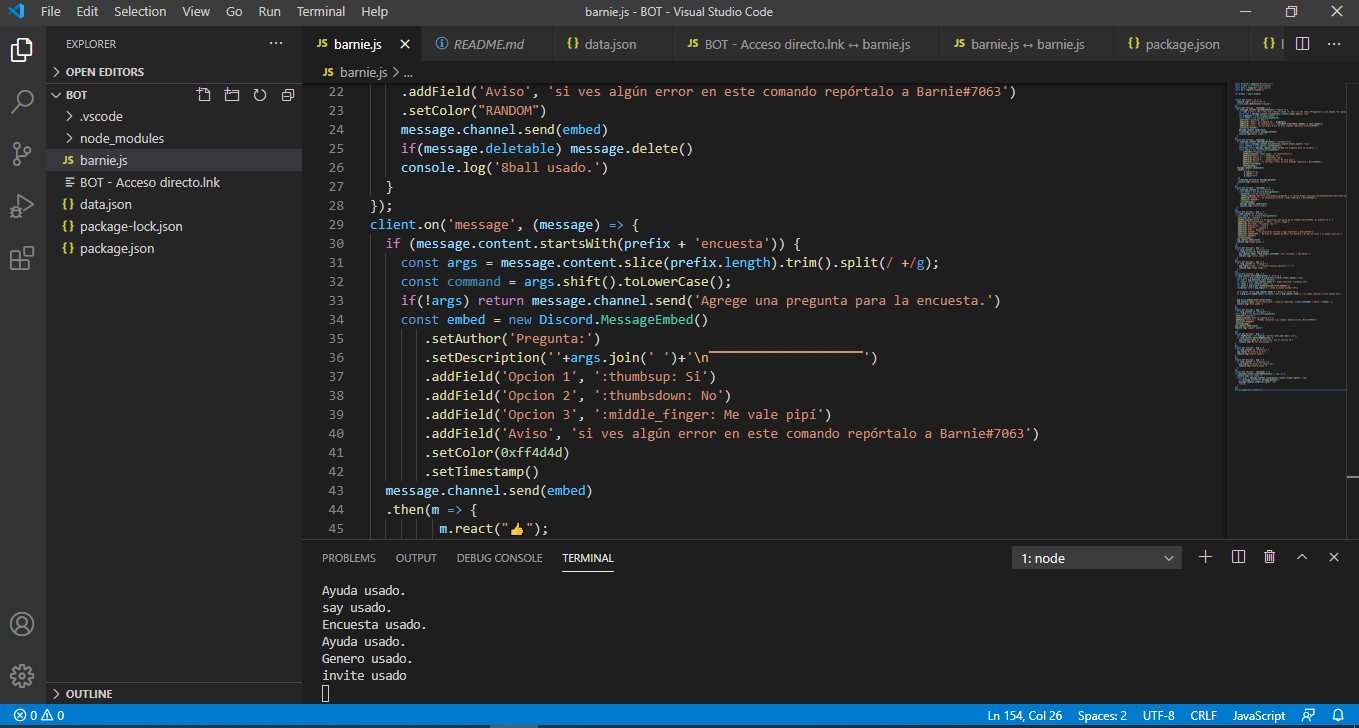
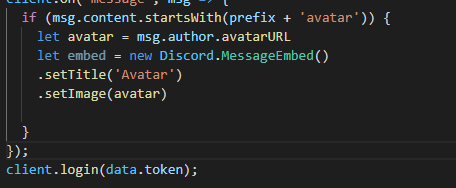
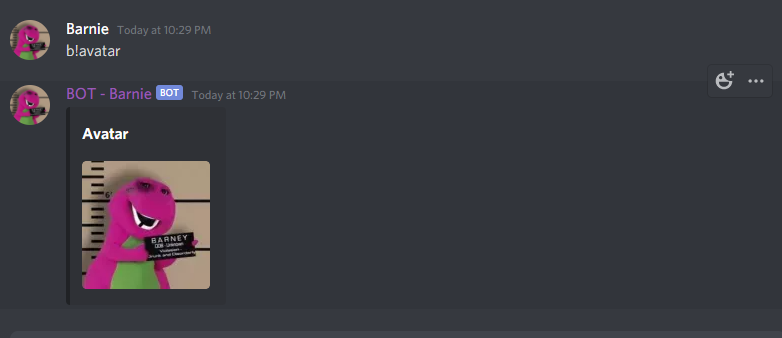
can someone tell me what's the code for the "avatar" command?
 hot crest
no spoonfeeding
earnest phoenix
i tried sometimes
sand dome
i dont even know what avatar command is
earnest phoenix
to made it by myself
umbral zealot
It's literally just getting the avatar URL from a user object.
earnest phoenix
yeah but i'm a novice coding
xD
the avatar command as if it's something glorious we're all supposed to know about 
hot crest
guessing you are using unmodified discord.js 🤮
sand dome
if you can't figure it out look at documentation of other sources like github and stackoverflow
earnest phoenix
guessing you are using unmodified discord.js 🤮
@hot crest no
umbral zealot
@earnest phoenix Useful links for learning JavaScript and Node:
Javascriptinfo: https://javascript.info/
Codecademy: https://www.codecademy.com/learn/javascript
FreeCodeCamp: https://www.freecodecamp.org/
Udemy: https://www.udemy.com/javascript-essentials/
Eloquent JavaScript, free book: http://eloquentjavascript.net/
You-Dont-Know-JS: https://github.com/getify/You-Dont-Know-JS
NodeSchool: https://nodeschool.io/
CodeSchool: https://www.codeschool.com/courses/real-time-web-with-node-js
hot crest
unmodified libraries 🤮
umbral zealot
basically right now, "Go learn the language first then it will become obvious"
hot crest
yep
hot crest
check the docs
earnest phoenix
xd
umbral zealot
Ok then go look at the documentation of the library you're using 👍
earnest phoenix
i'm using node(?
sand dome

Discord.js is a powerful node.js module that allows you to interact with the Discord API very easily. It takes a much more object-oriented approach than most other JS Discord libraries, making your bot's code significantly tidier and easier to comprehend.
earnest phoenix
 umbral zealot
Otherwise what do you expect from us, that we first guess what language you're using, then we guess what library you're using, then we guess what structure your bot uses for code, and then we spoonfeed you the exact code you need, thus, writing the bot for you leaving you in a position of doing literally nothing and us doing all the work?
Go look at the docs and do it yourself, don't be a help vampire.
earnest phoenix
i'm using JavaScript
hot crest
Spoonfeeding is bad
umbral zealot
Here. This is what you need: https://discord.js.org/#/docs/main/stable/class/User?scrollTo=displayAvatarURL
Discord.js is a powerful node.js module that allows you to interact with the Discord API very easily. It takes a much more object-oriented approach than most other JS Discord libraries, making your bot's code significantly tidier and easier to comprehend.
sand dome
all you have to do is add parameter to emblem like image or icon and put there this url
earnest phoenix
wich URL?
hot crest
the avatar url
earnest phoenix
alright
 hot crest
would not
earnest phoenix
 earnest phoenix
alright
blissful coral
dynamic meaning -- if the user has a animated profile picture it will show it as the file format instead of a still png
 sand dome
yep
earnest phoenix
thx guys
now i got problems with 3 commands
(my bot is no spanish so i'll try to translate)
when i use my kick command
i have to mention someone
that's right
but
at reason appears the mention
umbral zealot
could you please make complete sentences before sending messages.
 hollow sedge
@earnest phoenix code?
earnest phoenix
wait
client.on('message', msg => {
if (msg.content.startsWith(prefix + 'kick')) {
const args = msg.content.slice(prefix.length).trim().split(/ +/g);
let user = msg.mentions.users.first();
if (!user) return msg.channel.send('X | Debes mencionar a alguien xD')
let razon = args.slice(1).join(' ');
var perms = msg.member.hasPermission("KICK_MEMBERS");
if(!perms) return msg.reply("X | usted no puede kickear xD");
if (!razon) return msg.channel.send('X | Falta la razón xD');
if (!msg.guild.member(user).kickable) return msg.channel.send('X | no puedo expulsar a este humano xD');
msg.guild.member(user).kick(razon);
msg.channel.send(:white_check_mark: | Usuario Expulsado: ${user.username} | Razón: ${razon}.);
console.log('Kick usado.')
}
});
razon means reason
the mention is the reason and idk why
hollow sedge
Well you're probably getting the wrong argument
umbral zealot
Step 1) learn js
Step 2) learn to manipulate strings in JS
STep 3) ???
Step 4) PRofit
 drifting wedge
as in like an input
hollow sedge
@drifting wedge that's Python not html??
drifting wedge
@drifting wedge that's Python not html??
@hollow sedge like in html
drifting wedge
<input type="text" class="form-control" aria-describedby="basic-addon1" placeholder="{{ vanityurl }}" id="vanityurl">
this is my input
how can i make this a form
hollow sedge
So..you want to get input with flask?
drifting wedge
yes
drifting wedge
no like like i have an input
how can i id it as a form
{{form.vanityurl(size=30)}}
hollow sedge
Idk what you're asking
But all the information to getting an input should be in link
earnest phoenix
how would you have a bot screen share discord.py
umbral zealot
You don't, bots can't do video streams and screenshares.
hollow sedge
..
umbral zealot
Your friend is wrong.
drifting wedge
self bot time lmao
wait so basically
i have an input from in html right
with wtf-flask
hollow sedge
It's better to use something other than screen sharing anyways
hollow sedge
As in there are better alternatives
earnest phoenix
@hollow sedge i was planning on doing a movie bot
drifting wedge
how can i have that as inputs
earnest phoenix
as a addon
umbral zealot
Well you can't do a movie bot. It's just not possible.
earnest phoenix
ik
hollow sedge
Wait what? How would you get the movies
umbral zealot
It would be illegal anyway
hollow sedge
Exactly
earnest phoenix
yea true
hollow sedge
@drifting wedge ? I don't understand why my link won't work for you
 carmine summit
Why is guild.owner returning null
drifting wedge
@drifting wedge ? I don't understand why my link won't work for you
@hollow sedge we have css styling
drifting wedge
which response
/
umbral zealot
@carmine summit you need to fetch members that are not cached.
Discord started enforcing the GUILD_MEMBERS intent requirement On Oct 27th
Discord's Article on the subject: https://dis.gd/gwupdate
If your bot has stopped being able to access cached members, you don't have access to the privileged GUILD_MEMBERS Intent. GUILD_MEMBERS is a privileged intent, it is not sent to bots that have not been allowed to use it.
If your bot is not verified you can go turn on the GUILD_MEMBERS intent in the Bot section of the dev portal, or you can fetch the users manually.
If your bot is verified, need to request this privileged intent from Discord through https://dis.gd/contact (general request), or figure out how to fetch members only when necessary.
carmine summit
ah ****
umbral zealot
Just literally guild.members.fetch(guild.ownerID) that's it.
umbral zealot
yes. because of the changes in intents.
umbral zealot
what? no.
The cache will still fill up with certain things, discord.js can still create the member cache on some things.
earnest phoenix
how do i do input forms with flask / html
@drifting wedge ask https://google.com

Happy Halloween 2020! #GoogleDoodle
umbral zealot
but it won't get as many members. So you need to fetch them manually as necessary.
carmine summit
wdym manually
earnest phoenix
smh !!
umbral zealot
I mean using guild.members.fetch("some user ID") to fetch members as you need them.
This gets you the data and adds that data to the cache.
carmine summit
so remove the .cache
 quartz kindle
client.users.cache contains online/active users
before the change, your bot would receive a list of all online users and they would all be placed in the cache
after the change, your bot only does that if you have the server members intent enabled in your discord developer page
umbral zealot
not "just remove cache". Fetch is not the same as get().
quartz kindle
regardless if you have them cached or not, they can be manually cached by using the .fetch() function
carmine summit
aghhh this new update makes me confusing
so I have to do guild.members.fetch()
then i can use .cache
quartz kindle
yes
umbral zealot
guild.members.fetch("some id") also actually returns the member, though
quartz kindle
but fetch also returns the result, so you dont even need to use cache anymore
umbral zealot
well it returns a promise that resolves in the member.
 livid ingot
i got a couple of 429 errors today and got blocked for 3 hours
does this mean my bot has been flagged by discord for API spam?
 compact briar
anyone having an issue with guildMemberAdd recently? worked last week, now is no longer working
umbral zealot
@compact briar Discord started enforcing the GUILD_MEMBERS intent requirement On Oct 27th
Discord's Article on the subject: https://dis.gd/gwupdate
If your bot has stopped being able to access cached members, you don't have access to the privileged GUILD_MEMBERS Intent. GUILD_MEMBERS is a privileged intent, it is not sent to bots that have not been allowed to use it.
If your bot is not verified you can go turn on the GUILD_MEMBERS intent in the Bot section of the dev portal, or you can fetch the users manually.
If your bot is verified, need to request this privileged intent from Discord through https://dis.gd/contact (general request), or figure out how to fetch members only when necessary.
compact briar
oof thanks
umbral zealot
sounds like you need to update to discord.js version 12.
 errant perch
its up to date
umbral zealot
That error only happened in v11.
errant perch
12.4.1
umbral zealot
You think you're on v12 but you're not.
umbral zealot
can you run npm ls discord.js in your project folder
umbral zealot
.. show you what version is actually installed.
 feral arch
How could i move a message?
I mean, if the message goes too high in the chat, i want to "resend it"
umbral zealot
You can't re-send it from the user's account, so it would come from the bot
but you can just send a message to another channel, using the message content from the user.
feral arch
it would be a message generated by a bot
umbral zealot
A bot is still a user that sends messages, so that doesn't change how you do it.
zenith knoll
    at Client.<anonymous> (D:\dbots\EyeBot Security\index.js:21:17)
    at Client.emit (events.js:315:20)
    at Object.module.exports [as GUILD_CREATE] (D:\dbots\EyeBot Security\node_modules\discord.js\src\client\websocket\handlers\GUILD_CREATE.js:33:14)
    at WebSocketManager.handlePacket (D:\dbots\EyeBot Security\node_modules\discord.js\src\client\websocket\WebSocketManager.js:384:31)
    at WebSocketShard.onPacket (D:\dbots\EyeBot Security\node_modules\discord.js\src\client\websocket\WebSocketShard.js:444:22)
    at WebSocketShard.onMessage (D:\dbots\EyeBot Security\node_modules\discord.js\src\client\websocket\WebSoc    at WebSocket.onMessage (D:\dbots\EyeBot Security\node_modules\ws\lib\event-target.js:125:16)
    at WebSocket.emit (events.js:315:20)
    at Receiver.receiverOnMessage (D:\dbots\EyeBot Security\node_modules\ws\lib\websocket.js:797:20)
    at Receiver.emit (events.js:315:20)```


guild.owner.send(`Hey there, ${guild.owner}! Thanks for inviting me to **${guild.name}**!\nDo #serversetup to set your server up with my many features such as ModLog, Auto Security Anti-Nuke, and much, much more!`)uh
umbral zealot
@zenith knoll Discord started enforcing the GUILD_MEMBERS intent requirement On Oct 27th
Discord's Article on the subject: https://dis.gd/gwupdate
If your bot has stopped being able to access cached members, you don't have access to the privileged GUILD_MEMBERS Intent. GUILD_MEMBERS is a privileged intent, it is not sent to bots that have not been allowed to use it.
If your bot is not verified you can go turn on the GUILD_MEMBERS intent in the Bot section of the dev portal, or you can fetch the users manually.
If your bot is verified, need to request this privileged intent from Discord through https://dis.gd/contact (general request), or figure out how to fetch members only when necessary.
In discord.js: guild.members.fetch(guild.ownerID) to fetch the guild owner.
feral arch
the thing is
is an embed message that i'm editing constantly simulating a game, based on the user's input
but if the message goes too high, i want to move it to the start of the chat
and deleting the old message and sending a new one generate problems because i'm editing the old message
umbral zealot
if you're editing it constantly, you have its current state to edit, don't you? So just send() it instead of using edit()
¯_(ツ)_/¯
feral arch
and the references got confused
umbral zealot
Well I dunno then, definitely new Discord.MessageEmbed() should work perfectly fine.
errant perch
i checked
feral arch
if I delete the old embed message and send a new one, the reference to the message that i was editing get lost
errant perch
let me double check
umbral zealot
@feral arch sounds like something that you can fix, then. That's the only way to "move" a message - to send a new one.
errant perch
god
fuck
i was exporting the thing wrong
ya know
.execute(message, args, color, PREFIX, Discord, bot);
this thing
i had them in the wrong damn order
the worst part is, is that that wasnt the first time
umbral zealot
Glad you figured it out! 👍
feral arch
are messages passed by value or by reference?
earnest phoenix
which lang? @feral arch
feral arch
Js
earnest phoenix
o
 crimson vapor
is it better to use <form> or fetch() in html?
pale vessel
it depends on what you're trying to do
 limber flume
Hello, i got a problem with reaction embed thing when i run the command and then run it again and click on the reaction on that command the embed before the new embed changes as well as the new embed

im using this res = await self.bot.wait_for('reaction_add', check=lambda r, u: u.id == ctx.author.id, timeout=15)
crimson vapor
@pale vessel sorry for ping and late response, assuming I am trying to upload a file to a host
pale vessel
you should use form then
pale vessel
wdym
crimson vapor
roki and I couldn't get the file to upload correctly
pale vessel
<form method="POST" action="/upload"> stuff <input type="submit"></form> for example
pale vessel
not all browsers support fetch
crimson vapor
oh
 terse girder
uhh
my bot was caching over 1 million users after startup, but ever since the domain move and after it's reached over 3k servers and has been updated to the newest release of d.js, it's only been caching 20 thousand
anyone else getting this?
sudden geyser
Do you have intents enabled?
terse girder
the code hasn't been modified at all since this, only d.js has been updated
i don't believe so
sudden geyser
Then that may be your issue.
terse girder
it's causing a lot of bugs
terse girder
ah
earnest phoenix
After fur friend's intent request got approved, you can enable intent on your bot code
terse girder
is that a new features or something?
earnest phoenix
Yeah
terse girder
how new?
earnest phoenix
Discord APi update and shit
terse girder
and what does it do?
terse girder
then how could this relate to my problem?
earnest phoenix
Ask lite he have more knowledge in intent ig
terse girder
there's no issue with api limits
or maybe there is
i don't have access to the console
well i do
im just lazy and only have one monitor lmao
sudden geyser
It makes it so you can subscribe to certain events you receive from gateway (intents will apply to some rest routes in the future). You can enable the intent on the developer portal, but I think requesting intents requires you asking Discord for support on it. Though, a lot of bots get rejected even if they think they need intents because there are ways to work without intents.
I don't have the best knowledge on intents either.
But that's roughly how it goes.
feral arch
Hello, i got a problem with reaction embed thing when i run the command and then run it again and click on the reaction on that command the embed before the new embed changes as well as the new embed
@limber flume i have the same problem xD i was trying deleting the old message, but i had problems with references
sudden geyser
Discord even has this article you can read https://dis.gd/gwupdate
terse girder
many thanks
terse girder
how would i apply for those intents?
earnest phoenix
Its in discord dev portal ig
terse girder
nope
this?
the bot is already verified, and the article only shows you how to verify it
most articles suck tbh, they don't tell you a lot of information
pale vessel
earnest phoenix
what happens if you JSON.stringify() an object like Map or Promise or smth
most articles suck tbh, they don't tell you a lot of information
@terse girder because you ignore half of it
terse girder
most things they say get repeated in them
just to ignore the actual unanswered questions
earnest phoenix
nope
@terse girder you're saying that discord support articles suck because they try to explain you the basics before answering your questions
terse girder
no, im saying they suck because they only tell you nothing but the basics
but some tell you decent information
 sturdy star
module.exports.run = async (bot, message, args) => {
    const embed = new Discord.MessageEmbed()
        .setTitle("How to put message author's avatar as a thumbnail?")
        .setThumbnail(message.author.avatarURL)
        .setColor('#975e0a')
        .setTimestamp()


    message.channel.send(embed);
}

module.exports.config = {
    name: "embed",
    description: "example of an Embed.",
    usage: "m!embed",
    accessableby: "Members",
    aliases: []
}```it doesn't load the message author's avatar
sturdy star
oops
pale vessel
avatarURL() doesn't work with users without a profile picture though
pale vessel
if you want to support that, use displayAvatarURL()
terse girder
are 'guild_presences' and 'guild_members' the only intents that requires whitelisting?
pale vessel
yeah
terse girder
ah
sturdy star
const user = "183936902141968385"

module.exports.run = async (bot, message, args) => {
    const embed = new Discord.MessageEmbed()
        .setTitle("How to put message author's avatar as a thumbnail?")
        .setThumbnail(message.author.avatarURL())
        .setColor('#975e0a')
        .setTimestamp()


    user.send(embed);
}

module.exports.config = {
    name: "embed",
    description: "example of an Embed.",
    usage: "m!embed",
    accessableby: "Members",
    aliases: []
}```now i got this so i want it to send a message to @lethal sundial every time someone enables the command
it's of course incorrect
pale vessel
you didn't even fix the #development message
sturdy star
what is the command itself
ok
const user = "183936902141968385"

module.exports.run = async (bot, message, args) => {
   const user = memberID => '183936902141968385';

    const embed = new Discord.MessageEmbed()
        .setTitle("How to put message author's avatar as a thumbnail?")
        .setThumbnail(message.author.avatarURL())
        .setColor('#975e0a')
        .setTimestamp()


    user.send(embed);
}

module.exports.config = {
    name: "embed",
    description: "example of an Embed.",
    usage: "m!embed",
    accessableby: "Members",
    aliases: []
}```what is wrong in here
tired panther
@sturdy star whats the error?
 tribal siren
hm
tribal siren
never tried doing that
sturdy star
ok lemme try that
nah
same error
i also tried to put the const user = "183936902141968385"; inside the module
and it's still the same
tribal siren
that's strange
 stable eagle
Actually, discord.js doesn’t know that it’s a user. You gotta do smth like:
const user = <Message>.client.users.cache.get(ID)
sturdy star
should i put it inside the module?
stable eagle
@sturdy star well, yes.
sturdy star
TypeError: cannot read property 'send' of undefined
stable eagle
What did you put?
sturdy star
module.exports.run = async (bot, message, args) => {
   const user = message.client.users.cache.get(ID)

    const embed = new Discord.MessageEmbed()
        .setTitle("How to put message author's avatar as a thumbnail?")
        .setThumbnail(message.author.avatarURL())
        .setColor('#975e0a')
        .setTimestamp()


    user.send(embed);
}

module.exports.config = {
    name: "embed",
    description: "example of an Embed.",
    usage: "m!embed",
    accessableby: "Members",
    aliases: []
}```@sturdy star not literally ID, I meant the user id...
sturdy star
yes, i copied your one
stable eagle
replace ID with the user ID you wanted
sturdy star
my actual code is like this:
module.exports.run = async (bot, message, args) => {
   const user = message.client.users.cache.get(183936902141968385)

    const embed = new Discord.MessageEmbed()
        .setTitle("How to put message author's avatar as a thumbnail?")
        .setThumbnail(message.author.avatarURL())
        .setColor('#975e0a')
        .setTimestamp()


    user.send(embed);
}

module.exports.config = {
    name: "embed",
    description: "example of an Embed.",
    usage: "m!embed",
    accessableby: "Members",
    aliases: []
}```yes that's my code
stable eagle
You forgot to make the user id a string
stable eagle
That would work too, but what I meant: 'ID'
sturdy star
oh
 shadow lynx
how is it to see the verification level in a field
stable eagle
message.guild.verificationLevel I think
shadow lynx
👍
sturdy star
thank you very much 
stable eagle
Dont ask to ask
client.guilds.cache.has
this.client.guilds.cache.get
What is the property before toUppercase?
args.shift() is a function
@earnest phoenix Well, it basically means that args is undefined
It can’t shift smth that has no value
pale vessel
no, it means that args is empty
earnest phoenix
would you like to see the whole file code?
@earnest phoenix yes of course with the bot token too
tired panther
is there any script , where you can clear the ram?
pale vessel
process.exit()
tired panther
without that xd?
 twilit rapids
Empty your caches is a thing you can do
tired panther
@twilit rapids How do u empty cache?
 feral aspen
How can I add the Server Count?
earnest phoenix
 lean wing
why this dosen't respond ??? ```
client.on('GuildMemberAdd', (member) =>{
console.log(member);
});
that's not a valid event
it's guildMemberAdd
and you need the server members intent to receive any kind of member events
 crystal wigeon
hey
um
does anyone know of a work around for hosting discord bot on glitch? uptime robot doesn't work since glitch has banned ping services
i dont wanna run a script on my host machine
earnest phoenix
rent a cheap vps
I wanna make a list with all guillds. But because its more then 2000 characters that's a no-go, so I wanna split it in parts (embed pages), how I can do that
crystal wigeon
well im looking for a free service since im still a student and dont have money xD
earnest phoenix
@earnest phoenix why not just upload the list to some bin service, i.e. hastebin or paste.mod.gg
@crystal wigeon a vps is 3 bucks a month
that is also a way, but it would be cooler in a embed
earnest phoenix
what's gcp?
crystal wigeon
google cloud platform
earnest phoenix
o
 acoustic vortex
where i have prob?
        if (message.member.hasPermission("MANAGE_MEMBERS")) {
        let person = message.guild.member(message.mentions.users.first() || message.guild.members.cache.get(args[1]));
        if (!person ) { return message.reply("You didn't specfiy a person!"); }

        let time = args[2];
        if (!time) { return message.reply("You didn't specify a time!"); }

        let mainrole = message.guild.roles.cache.find(role => role.name === "Members");
         if (!mainrole ) { return message.reply("Couldn't find the main role"); }

        let muterole = message.guild.roles.cache.find(role => role.name === "Muted");
        if (!muterole) { return message.reply("Couldn't find the mute role"); }

        person.roles.add(muterole.id)
        person.roles.remove(mainrole.id)
         message.channel.send(`${person.user} has been muted`)

        setTimeout(function () {
            person.roles.add(mainrole.id)
            person.roles.remove(muterole.id)
            message.channel.send(`${person.user} has been unmuted`)
        }, time * 10000);
    }
        break;```

it will mute and unmute the person instantlythere is none
earnest phoenix
there is gcps free tier without a credit card but it's super weak
it can't even run node without crashing iirc
crystal wigeon
it wont even let me create a vm without credit card
 mighty quail
Where did anyone even make a website- I just wanna know that.
 obtuse jolt
how can i get the roles of a user in a discord server thats in a different shard
 wild adder
Hello so quick question
Due to discord docs updating for some reason when I wanted to show the amount of users the bot was watching I did
bot.users.cache.size
What is the update for that now?
I'm not sure lok
Lol
mighty quail
no one answered mine-
obtuse jolt
@wild adder this works for me
client.guilds.cache.reduce((a, g) => a + g.memberCount, 0)```Alright thanks
obtuse jolt
 lean wing
it's guildMemberAdd
@earnest phoenix nope it's not working
wild adder
It's not that
mighty quail
Where did anyone even make a website- I just wanna know that.
@mighty quail :c
wild adder
Well I don't think
obtuse jolt
@mighty quail what website
mighty quail
For my bot.
wild adder
Hmm
earnest phoenix
@lean wing did you enable the intent
obtuse jolt
@mighty quail well, you can download templates for websites which is the easier way or you could learn html and css
wild adder
Ye
mighty quail
Where can I get the templates?
obtuse jolt
you could use a bootstrap template
earnest phoenix

mighty quail
Bootstrap?
earnest phoenix
discord bot dashboards are way more complex than just fancy html and css
lean wing
@lean wing did you enable the intent
@earnest phoenix no
earnest phoenix
well enable it
mighty quail
you could use a bootstrap template
@obtuse jolt Link?
obtuse jolt

The most promising and mobile-ready free Bootstrap admin dashboard templates for SaaS applications and other online projects.
obtuse jolt
you dont need to
 solemn jolt
Why i have this error in this code
earnest phoenix
you tell me
obtuse jolt
@mighty quail I use this https://startbootstrap.com/themes/sb-admin-2/ and mine looks pretty nice so, yeah

Start Bootstrap
A free Bootstrap admin theme, dashboard, or web application UI. All Start Bootstrap templates are free to download and open source.

yours won't look the same
but
¯_(ツ)_/¯
mighty quail
Oo-
 lyric oxide
Hi, I'm adding the bot to my discord but it doesn't appear on "my profile"
solemn jolt
 if (!message.member.bannable) return console.log(message.member.usetname+" I can't ban this man");
message.channel.guild.members.cache
.get(message.author.id)
.ban()
message.channel.bulkDelete(msgCount, true);
you don't have to keep spamming your issue it's literal 5 damn messages above
lyric oxide
me ?
My issue is not on top.gg search or anything like that, it's just not showing at all on my profile, can't create it
obtuse jolt
@solemn jolt well there are a few things here, bulk delete only deletes up to 100 messages sent in the last 14 days, also you can just do message.guild.members.cache and you are aware you're checking if the user that sent the message is bannable right?
lyric oxide
Not the same issue
earnest phoenix
i was referring to robot reva
lyric oxide
oh ok my bad
obtuse jolt
oh yeah you spelt username wrong
 earnest phoenix
members do not exist in dms, make sure to filter dms out
solemn jolt
@obtuse jolt i'll try again
 late scaffold
How can I get the bot to add emojis? ($?????)
obtuse jolt
add the fix for spelling mistakes don't forget that'll come up as an error later on
late scaffold
How can I get the bot to add emojis? ($?????)
solemn jolt
bot.on("roleDelete", async channel => {
  const entry1 = await channel.guild
    .fetchAuditLogs({
      type: "ROLE_DELETE"
    })
    .then(audit => audit.entries.first());
  console.log(entry1.executor.username);
  const entry = entry1.executor;

      if (!entry.bannable) return console.log(entry.username+" I can't ban this man");
      channel.guild.members.cache
        .get(entry.id)
        .ban()
        .then(b => {
          channel.guild.owner.send(
            `**⇏${entry.username} is baned couse delet ${guild.role.lmite} role**`
          );
        })
})
```@obtuse jolt bannable is error
obtuse jolt
I don't think .executor is a thing in channel.guild
your code is basically saying
channel.guild.executor.username
obtuse jolt
are you testing the bannable against a guild member or just the user?
solemn jolt
Guild member not user
obtuse jolt
I'm not sure, I've never used role delete events
you'll have to ask someone who knows how to use the event
solemn jolt
How can i fine someone now role delet event?
obtuse jolt
you could ask in the official djs discord server
@solemn jolt https://discord.gg/bRCvFy9
tired panther
@solemn jolt Do u mean reading audit log?
lean wing
@lean wing did you enable the intent
@earnest phoenix i enable it but it gives me an error
the codeconst client = new Discord.Client({ ws: { intents: ['GUILDS', 'GUILD_MEMBERS', 'GUILD_MESSAGES'] }, });error
Starting bot
(node:23632) UnhandledPromiseRejectionWarning: Error [DISALLOWED_INTENTS]: Privileged intent provided is not enabled or whitelisted.
    at WebSocketManager.createShards (C:\Users\30699\Desktop\tsamis_bot\tsamis_bot\node_modules\discord.js\src\client\websocket\WebSocketManager.js:258:15)
(node:23632) UnhandledPromiseRejectionWarning: Unhandled promise rejection. This error originated either by throwing inside of an async function without a catch block, or by rejecting a promise which was not handled with .catch(). To terminate the node process on unhandled promise rejection, use the CLI flag `--unhandled-rejections=strict` (see https://nodejs.org/api/cli.html#cli_unhandled_rejections_mode). (rejection id: 1)
(node:23632) [DEP0018] DeprecationWarning: Unhandled promise rejections are deprecated. In the future, promise rejections that are not handled will terminate the Node.js process with a non-zero exit code.
lean wing
can you help ?? i dont know how
quartz kindle
Discord Developer Portal
Integrate your service with Discord — whether it's a bot or a game or whatever your wildest imagination can come up with.
click your bot
click bot
scroll down
enable it
 acoustic veldt
hello
any discord.py dev here who can help me in a function
I want to know
how can I develop a function which checks the time
and then sends a message accordingly
in a range of time
sand dome
try to use time module
 kindred sleet
Is a limit of 100 messages okay for a purge command?
acoustic veldt
ya its ok
sand dome
yep
kindred sleet
thanks, I would like to set a limit to prevent the bot from crashing
sand dome
@acoustic veldt
import time

def checkTime():
    lt = time.localtime(time.time())
    return time.asctime(lt)

checkTime()
this will return time like:
Sat Oct 31 13:43:45 2020
acoustic veldt
thanks bro but thats now what I want , I mean , that when i type a specific command , the bot checks time , and after checking time , if it is 3 pm it says a specific texxt
 solemn latch
Not a py dev, but can't you just make another time object and check against that.
quartz kindle
3pm in which timezone tho
acoustic veldt
@quartz kindle IST
quartz kindle
 tired panther
const premium = await client.shard.broadcastEval(`this.guilds.cache.get("692021327283879957").members.cache.get("${message.author.id}")`);
        console.log(premium);```
It's output is [null] , but this user is in the guilddo you have intents enabled (specifically the server members intent)
tired panther
no, do I need that, my Bot is verified, than I have to request discord
quartz kindle
discord no longer sends you members without the server members toggled on, but you can still fetch them yourself
also, fetching works independently from shards, so you dont even need broadcasteval
acoustic veldt
can someone help me , how do I make a function which when I type a command , it checks time and then sends a specific message according to the current time
for discord.py
tired panther
@acoustic veldt Do u have basic coding experience xD?
did u heard from a if-clause?
discord no longer sends you members without the server members toggled on, but you can still fetch them yourself
@quartz kindleSo my idea of premium won't work?
quartz kindle
but you can still fetch them yourself
tired panther
how xD?
acoustic veldt
@acoustic veldt Do u have basic coding experience xD?
did u heard from a if-clause?
@tired panther yes I do
tired panther
so then its easy for u
acoustic veldt
if function wont work because it says that now is not an attribute for date time
quartz kindle
await client.users.fetch(id)
acoustic veldt
I said now = datetime.now() to fetch the current time
it said that it doesnt have a now attribute
tired panther
await client.users.fetch(id)
@quartz kindle ah , then I can see If he is in mutual guild?
How do u get the mutual guild
tired panther
So some of my bot commands are premium
to use premium command u must join my server
So in the if clause it will check if the member is already in the server and will return if he already is
therefore I have to know if the user is in my guild @quartz kindle
 latent ocean
API NOT WORK !
quartz kindle
@acoustic veldt did you check the link i sent you? you most likely have to use a timezone library such as pytz otherwise you will always get the wrong time
unless your hosting server/vps is already in the correct timezone
@tired panther there are tricks for that
tired panther
I want to know them xD, without enabling intent
quartz kindle
with regular discord.js you can either use client.api to send a direct request and receive raw data, or you can create a new guild to enable the managers
for example
acoustic veldt
@acoustic veldt did you check the link i sent you? you most likely have to use a timezone library such as pytz otherwise you will always get the wrong time
@quartz kindle ohok
so I need to import that libarary ?
tired panther
with regular discord.js you can either use client.api to send a direct request and receive raw data, or you can create a new guild to enable the managers
@quartz kindle a guild database 🤣
@acoustic veldt yes , how do u want to fetch the times?
latent ocean
quartz kindle
member = await (new Discord.Guild(client,{id:"guid id here"})).members.fetch("member id")
or
member = await client.guilds.add({id:"guild id here"}, false).members.fetch("member id")
or
member = await client.api.guilds("guild id").members("member id").get()
these two are not the same, they will give you different kind of data
tired panther
the first one looks good, thx again
latent ocean
when a person votes or I click on test it doesn't matter there is no error
acoustic veldt
@quartz kindle ok so I imported and defined ist now how do I use it in my code ??
tired panther
Unhandled promise rejection: TypeError: Cannot read property 'resolveID' of undefined
at GuildMemberManager.fetch (/home/container/node_modules/discord.js/src/managers/GuildMemberManager.js:116:36)
at Object.execute (/home/container/commands/check.js:8:83)
at Client.<anonymous> (/home/container/bot.js:301:11)
at Client.emit (events.js:314:20)
at MessageCreateAction.handle (/home/container/node_modules/discord.js/src/client/actions/MessageCreate.js:31:14)
@quartz kindle does not seem to work
const premium =  await (new Discord.Guild({id:"692021327283879957"})).members.fetch(msg.author.id,false)
    if(!premium){
        const pembed = new Discord.MessageEmbed();
        pembed.setTitle("This is a  premium feature.🌟");
       pembed.setFooter(`Stay in the server, to have premium ;)`);
      return msg.channel.send({embed: pembed,});
    }
``` thats the codeone sec pls
quartz kindle
it will throw an error if the user is not in the guild, so you can add a .catch(() => null) at the end to make it return null instead of erroring
tired panther
yeah it works
So to my next problem,
Do u have to have Intent enabled to fetch if a user is offline or online?
quartz kindle
for that you need the presences intent
tired panther
I enabled it for my beta bot, since for my alpha I have to contact discord.
So the button state is on, do I have to add something in the code?, to fetch the data?
tired panther
okay , will try it rn
quartz kindle
and you need a shard id
not sure if it will work using this method becuse discord.js does weird shit behind the scenes
tired panther
xD
@quartz kindle I am not using sharding in my beta bot
Thats the progress
1.beta bot will check if alpha bot is offline
2. when true it will change the channel name
alpha and beta are in the same server
quartz kindle
you still have shards, just only one shard with an id of 0, so you have to use that
new Discord.Guild(client,{id:"guild id",shardID:0})
because the withPresences option has to go through the gateway, it doesnt go through the REST api
tired panther
ah , U mean that part of shards could be offline
because the withPresences option has to go through the gateway, it doesnt go through the REST api
@quartz kindle unterstood
quartz kindle
it needs to know which shard to send from
tired panther
the beta bot is sending the presence request, and the beta bot does not have sharding
tired panther
and the shard id is then zero?
quartz kindle
yes
a shard is a connection to discord, so you always have at least 1 shard
then when you start sharding, then you will have more shards
now this creates another question, does discord support fetching members from other shards through the gateway? never tested this
tired panther
let status = new Discord.Guild(client.{id:"guild id",shardID:0});
                                     ^ red marked
,
tired panther
client is the alpha bot?
quartz kindle
so i just tested, apparently it doesnt support it
tired panther
okay xD
quartz kindle
so you need to go back to broadcastEval to use withPresences
tired panther
so you need to go back to broadcastEval to use withPresences
@quartz kindle why do u need brodcastEval, when the bot themself does not have sharding?
quartz kindle
broadcasEval(`
  this.guilds.cache.get("id").members.fetch({user:id,withPresences:true})
`)
you were using broadcasteval before
but if not just do the same thing without broadcasteval
acoustic veldt
IST = pytz.timezone('Asia/Kolkata')
now = datetime.now(IST)
@client.command()
async def current_event(ctx):
    if now >= 15:00 and now <= 16:00:
await ctx.send(f'......')```is this correct? @quartz kindle
tired panther
yes
quartz kindle
@acoustic veldt no
acoustic veldt
why
tired panther
where do u define now? or is this python ?
quartz kindle
if you use datetime.now() outside of command function, then its defined only once, and every time you run the command, the time is always the same, it will be the time fro when your bot started
tired panther
I hate python, node js ❤️
acoustic veldt
ok so I need to put it under @client.command() ?
IST = pytz.timezone('Asia/Kolkata')
@client.command()
now = datetime.now(IST)
async def current_event(ctx):
    if now >= 15:00 and now <= 16:00:
await ctx.send(f'......')```@tired panther both are 
umbral zealot
It has to be inside the function
quartz kindle
no, inside current_event
acoustic veldt
oh okay
quartz kindle
then you can do if now.hour >= 15 and now.hour <= 16
acoustic veldt
IST = pytz.timezone('Asia/Kolkata')
@client.command()
async def current_event(ctx):
    now = datetime.now(IST)
    if now.hour >= 15 and now.hour <= 16:
await ctx.send(f'......')```ok
@quartz kindle so do I need to make new commands for every time if I want another one for between 16 and 17 ?
quartz kindle
only if you want to make it a separate command
tired panther
Promise { <pending> }
``` thats the output
of
```js
let status =
client.shard.broadcastEval(`this.guilds.cache.get("734707332163829780").members.fetch({user:735147814878969968,withPresences:true})`);
  console.log(status);
yes, fetch needs awaiting
and so does broadcasteval
so you need to elaborate a bit, also to avoid errors
first check if guild exists, then if it exists await fetch member, then check if member was found, if it was found return status
tired panther
first check if guild exists, then if it exists await fetch member, then check if member was found, if it was found return status
@quartz kindle the guild and user exist to 100%. Its every time the same
How long does the fetch take, after 20 seks,nothing happnd
: Members didn't arrive in time.
    at C:\Users\shahn\3D Objects\Botcode\sharding\node_modules\discord.js\src\managers\GuildMemberManager.js:265:16
    at Timeout._onTimeout (C:\Users\shahn\3D Objects\Botcode\sharding\node_modules\discord.js\src\client\BaseClient.js:83:7)
    at listOnTimeout (internal/timers.js:549:17)
    at processTimers (internal/timers.js:492:7)
Unhandled promise rejection: Error [GUILD_MEMBERS_TIMEOUT]: Members didn't arrive in time.
code ```js
async function() {
let status = await client.shard.broadcastEval(this.guilds.cache.get("734707332163829780").members.fetch({user:735147814878969968,withPresences:true}));
console.log(status);
}
@quartz kindle but then it will say that this command already exists so I cant define it twice
quartz kindle
@tired panther broadcastEval sends the code to be run in all shards
the guild doesnt exist in all shards
tired panther
there is just one shard
quartz kindle
as soon as the code runs in a shard that doesnt have the guild, it will throw cant get members of undefined
if you plan to use shards, you have to account for this. if you dont want to use shards, then dont use broadcastEval
broadcastEval is only for sharding
hollow sedge
@acoustic veldt it'll probably be easier to help you if you explain what you're trying to do
tired panther
as soon as the code runs in a shard that doesnt have the guild, it will throw cant get members of undefined
@quartz kindle Yes , but the bot will never have more then 2 guilds
discord.js server tells the problem is in intent
hollow sedge
wait why are you even sharding it then
tired panther
because my alpha has sharding, and then I just run the same code, removing before some parts
 stuck dawn
hey anyone knows why the join messages don't work?
 still merlin
code?
 sterile ridge
some idea to play music from youtube without download the song on python
?
stuck dawn
wait
client.on('guildMemberAdd', async member => {

    let guild = member.guild;
    let totalUsers = guild.memberCount

    let e = new Discord.MessageEmbed()
        .setAuthor(member.user.tag, member.user.displayAvatarURL())
        .setDescription('Hey <@' + member.user + "> you know that you are the **" + totalUsers + "º** member on this server?")

    client.channels.cache.get('768554592136724521').send(e)
})
since yesterday
this doesn't work
 misty sigil
intents
 young flame


 misty sigil
enable server intent on the dash
tired panther
make a regex in this server for intents xD
misty sigil
no
tired panther
no
tired panther
stuck dawn
hmm ok
misty sigil
^ that
tired panther
@stuck dawn
tired panther
yes
misty sigil
ues
 tulip ledge
So back in the day I verified pretty early and now I can't turn on presence intent cuz I didn't use it back then
Can I still "verify" for it?
tulip ledge
ok ty
earnest phoenix
I’m developer
tulip ledge
cool
sterile ridge
some idea to play music from youtube without download the song on python
?
quartz kindle
@tired panther if your bot wont have more than 2 guilds then dont use broadcastEval
let member = await client.guilds.cache.get("734707332163829780").members.fetch({user:"735147814878969968",withPresences:true}).catch(() => null)
tired panther
okay thx
guild.presences.cache.add is not a function
    at Object.module.exports [as GUILD_MEMBERS_CHUNK] (C:\Users\shahn\3D Objects\Botcode\sharding\node_modules\discord.js\src\client\websocket\handlers\GUILD_MEMBERS_CHUNK.js:13:66)
an error encounterd
tired panther
^12.2.0
quartz kindle
try updating to 12.4.1
tired panther
are there any big changes?
tired panther
@quartz kindle my bot is not reating any more
since I updated now
no command working
okay checking now if the error is coming
it gives an huge array
acoustic veldt
@hollow sedge bro I am trying to make a function , when if I type _current_event , then it checks if the time is between 3 and 4 , and if it is , then it writes ...... , and then If the time is between 4 to 5 it types something else
 digital ibex
how can i get each member who sent a message which was bulk deleted?
using eris btw
hollow sedge
@hollow sedge bro I am trying to make a function , when if I type _current_event , then it checks if the time is between 3 and 4 , and if it is , then it writes ...... , and then If the time is between 4 to 5 it types something else
@acoustic veldt just use if statements to check what time it is then
quartz kindle
@digital ibex bulkDelete should return a collection of messages, each of which should contain an author field
digital ibex
what ive got so far is: js for (const message of cleanMessages) { const msg = await client.getMessage(messages[0].channel.id, message); obj.user = msg.member.user.id; obj.timestamp = msg.timestamp }
oh
quartz kindle
message.author
message.timestamp
lol
quartz kindle
if its just an id then you cant
indigo flax
who knows eris
digital ibex
what do u need?
indigo flax
how do u mention the author
so like u say
!t say hi
it will reply with
Hi - @indigo flax
digital ibex
just
indigo flax
i just need the mention
digital ibex
message.channel.createMessage(`${whatever here} - ${message.member.mention}`)```@digital ibex bulkDelete relies on the cache to return message information, you cant get any information on them after you delete them
eris doesnt use the message cache here at all
it just forwards you discord's response
digital ibex
yeah
indigo flax
let me see if it works
digital ibex
i got rid of cleanMessages which has been messing me around for a few days, so im just going to store the user, timestamp, content in my db which isnt really ideal but its my last resort
indigo flax
help
digital ibex
?
indigo flax
      if(text == "" || text == null || text == undefined || text.includes("<!DOCTYPE")) return msg.channel.createMessage("Translation failed.");
      if (text.length > 200) { return msg.channel.createMessage(text); }
      msg.channel.createMessage({ embed: {
        color: 0xFFFFFF,
        description: emoji+" "+text
}});```that works
but how come
      if(text == "" || text == null || text == undefined || text.includes("<!DOCTYPE")) return msg.channel.createMessage("Translation failed.");
      if (text.length > 200) { return msg.channel.createMessage(text); }
      msg.channel.createMessage({ embed: {
        color: 0xFFFFFF,
        description: emoji+" "+text - ${message.member.mention}
}});```that doesnt work
digital ibex
string literals
indigo flax
do u know how to fix it
digital ibex
remove the ${ }
indigo flax
ok