#development
1 messages · Page 1323 of 1
 opaque seal
They are not ordered tho
 opal plank
it shouldnt matter regardless
if the first one is the bot mention, get second
you are expecting 2 mentions either way
if its not one, its the other
opaque seal
Wait what do you need the bot mention for?
opal plank
they are using it as an alternative prefix
opaque seal
Then just do if(message.content.startsWith("@plush kindle")...
 tardy hornet
oh nice
opaque seal
be careful, mentions from mobile are <@! whethere on pc are just <@
opal plank
exactly what im explaining
includes() or indexOf(), and just look for id, ignore the <@! > bits
tardy hornet
or i can just tell the user?
opaque seal
// Check if the message is a command and get the args
        if (message.content.startsWith(`<@!${client.user.id}>` || `<@${client.user.id}>`)) {args = message.content.slice(23).split(/ +/);}
like that:
if(message.content.startsWith(`^<@!?${bot.user.id}> `)) return message.channel.send('please use the `!` prefix for this command.')
// Check if the message is a command and get the args
        if (message.content.startsWith(`<@!${client.user.id}>` || `<@${client.user.id}>`)) {args = message.content.slice(23).split(/ +/);}
@opaque seal fairly certain you cant do that
opal plank
startsWith() needs to be done twitce
opaque seal
and it works like a charm
startsWith() needs to be done twitce
@opal plank nope hehe, that's js power
 opal plank
didnt i do a thing for matches?
hold'up
https://cdn.discordapp.com/attachments/740216875572527106/758728408578129960/Code_MiDJycHosR.png
https://cdn.discordapp.com/attachments/740216875572527106/758728406736306176/Code_99Y8Hy6xlo.png

 tardy hornet
if (message.content.startsWith(`<@!${bot.user.id}>` || `<@${bot.user.id}>`)) {args = message.content.slice(23).split(/ +/);}
still didnt work, its still killing the bot
opal plank
cuz i told you
its not about the prefix
you still getting .first()
told ya to use a spread operator and get the second mention
tardy hornet
idk how
opal plank
[...]
spread the map onto an array
get index [1]
remember to spread the values rather than the map itself
otherwise you'll get pairs of keys/values
opaque seal
if (message.content.startsWith(`<@!${bot.user.id}>` || `<@${bot.user.id}>`)) {args = message.content.slice(23).split(/ +/);}still didnt work, its still killing the bot
@tardy hornet what do you mean with killing the bot?
tardy hornet
i got a command. !kill @mention and its killing the user.mention.first(), but because the mention prefix, its killing the bot

 boreal iron
lol just check if the ID isn't the BOT's ID
opal plank
user.mention.first() returns the FIRST mention, you need the SECOND, which would be fine for spreading the map MENTIONS into an array, and getting index[1]
opaque seal
or doing .last()
tardy hornet
he just asked
opaque seal
seen that there are only two mentions most of the times
tardy hornet
so i told him @opal plank
opal plank
mentions.size > 2 => throw error
tardy hornet
it should be .second() tho
opal plank
idk if d.js has a second() method tbh
what im suggesting is vanilla js
treating a Collection as a Map
since collections arent native
 earnest phoenix
actually this is the bot made for studding discord server it can answer maths question which are there in lessons if yo like it invite.

 still wave
When is my bot going to be in my server and be active I created my bot like 5 mins ago
tardy hornet
ooof
opaque seal
Mate you need to code your bot
opal plank
you need to invite it as well
still wave
How ?
tardy hornet
check out a youtube video
opal plank
generate a link in the portal
opaque seal
Lul
opal plank
dont
tardy hornet
thats where youtube come to the picture
opal plank
youtube videos is the worst source you can link them
they are outdated most of the times
opaque seal
opaque seal
Depends on the video
opal plank
90% of the videos is like that
tardy hornet
they are outdated most of the times
@opal plank you can see the once that were uploaded in the last 30 days
opal plank
as a dev its good practice to foward them to docs, as you'll need to grow accostumed to reading documentations either way
good luck finding youtube videos on small or advanced libraries that are updated and throughly explained

thats what docs are for
its always up to date
they give you ample examples/snippets too
and are thoroughly explained
opaque seal
Or just go on github find open source stuff and learn from that
opal plank
i'd much rather foward them to w3 schools, which is a very simple and interactive website to learn js and the sorts
if they already have a footing, mozilla docs are much better, though also harder to learn if you are a begginer
opal plank
actually, use the discord permission calculator
i prefer that over the one they provide in the portal
still wave
Huh?
still wave
K
opal plank

opaque seal
Start here @still wave
https://discordjs.guide

A guide made by the community of discord.js for its users.
opal plank
you should indeed read that too(if you plan to use JavaScript) ^^
opaque seal
it's the easiest way to make a bot
 misty sigil
but one of the least efficient
opal plank
i dont have enough proficiency in other langs to say anything, so imma be quiet about that

what i can say is that Ts aint bad
its cozy and nice to play with
opaque seal
JDA ftw
still wave
I have a link now what to do now ?
opaque seal
mate follow the guide I sent you
still wave
Omg I am not new to make discord bots I made tons 2 years ago I forgot how to now!
misty sigil
If you weren’t new I’d suspect you’d understand that guide
it’s frankly the easiest guide to understand and someone with no coding knowledge could make sense of it pretty easily
opaque seal
we aren't here to tell you step by step what to do sry
still wave
It said to Copy the something token I did but where do I put the link on am not on laptop so I can’t do somethings that it’s saying .
opaque seal
are you saying you are trying to make a bot from mobile?
Uhm your token mate
you exposed it @lyric stag
 lyric stag
0ops
 vague jay
help meeeeeeeeeeeeeeeeeeeeeeeeeeeeeeeeeeeee plz
lyric stag
why my bot isn't working https://prnt.sc/uzt0lq
 opaque seal
try node index.js
 clever dust
save the file
 quartz kindle
@lyric stag you didnt save the file
 slender thistle
Ctrl+S
quartz kindle
Yes
lyric stag
thx it worked
vague jay
help meeeeeeeeeeeeeeeeeeeeeeeeeeeeeeeeeeeee plz
hello?
anyone here
oh and i use unity
quartz kindle
@vague jay not enough information, i have no idea what youre doing or what thats supposed to be
vague jay
uh...
quartz kindle
I have never worked with unity before so idk, but have you tried googling the warning?
vague jay
fine
 hard ginkgo
Says player is missing
vague jay
no
quartz kindle
Then do so
quartz kindle
9 times out of 10 the code youre copy pasting is linked to or relies on another code
So it wont work unless you adapt it
quartz kindle
Well you can always learn
vague jay
sigh
quartz kindle
We all suck at one point
slender thistle
made for discord bots
@opaque seal we support general dev questions too
 vague jay
can somebody help mE PlZ
tardy hornet
i did that:
message.channel.send(`${message.client.guilds}`)
and it sent:
[object Object]
quartz kindle
Lmao
tardy hornet
?
quartz kindle
Hes not talking to you dash
tardy hornet
what does he need?
vague jay
unity c#
opaque seal

Discord.js is a powerful node.js module that allows you to interact with the Discord API very easily. It takes a much more object-oriented approach than most other JS Discord libraries, making your bot's code significantly tidier and easier to comprehend.
tardy hornet
oh and tim,
message.channel.send(${message.client.guilds})
its sending
[object Object]
https://discord.js.org/#/docs/main/stable/class/Client?scrollTo=guilds @tardy hornet
@opaque seal ty
Discord.js is a powerful node.js module that allows you to interact with the Discord API very easily. It takes a much more object-oriented approach than most other JS Discord libraries, making your bot's code significantly tidier and easier to comprehend.
quartz kindle
dude...
tardy hornet
then plz help me
@vague jay with what?
vague jay
unity c#
quartz kindle
Nobody can magically help you without more details about your project, and the fact that you copy pasted code means there might be a lot more missing on your project than only that
opaque seal
I think you'll have more luck if you ask in a dedicated discord server or if you search documentation online
vague jay
i searched the docs
tardy hornet
i changed it to that, message.channel.send(${message.client.guilds.cache})
not its sending [object Map]
opaque seal
cache is a collection
vague jay

Basic tutorial on adding player movement. We make the player move forward, backward, left, and right. He will also sprint forward!
Script: https://pastebin.com/p3NyWT5b
Google+: https://plus.google.com/u/1/116701053346441320174/posts
Instagram: https://www.instagram.com/nick...
opaque seal
Discord.js is a powerful node.js module that allows you to interact with the Discord API very easily. It takes a much more object-oriented approach than most other JS Discord libraries, making your bot's code significantly tidier and easier to comprehend.
vague jay
can it help?
opaque seal
use .size on cache
opaque seal
yes
tardy hornet
i think you got my idea wrong
ik how to see how many servers my bot is in
i want to get a list with invites to the servers
@opaque seal
opaque seal
then you need to loop trough every guild and generate an invite
iirc that's against something I don't remember what
i.e. you shouldn't do that
tardy hornet
well i dont know the guilds that added my bot
i want the bot to send a invite to me
 heady heron
lyric stag
heady heron
lyric stag
not workin? https://prnt.sc/uztvc7

 gentle lynx
im so confused. im doing a leveling system. if the user is level 1, what should the xpNeeded be?
nevermind
Should I make it like this?
 faint prism
why not use a math function
faint prism
Or something like level = floor(exp/1000)
opal plank
exponential with cap would prob be my recommendation tbh
and then root to calculate the level
lyric stag
https://prnt.sc/uztvc7 why isn't workin?
opal plank
that way you just store one int, which is the exp the user has
dealing with math and one single gauge would be the smartest move imo
 drifting wedge
how do i make my domain from get.tech form github studend pack link with my cpanel vps?
i currently am on a shared vps, with same ip and subdomain as another website
 fluid basin
you need to add it under additional domain?
I'm not too sure how restricted is the cpanel on your side
drifting wedge
I'm not too sure how restricted is the cpanel on your side
@fluid basin yea, i put the cpanels (Subdomain)s name servers
but i think thats the issue
its not like updating
like last time it never fully propagated after like 4 days
but it semi does
fluid basin
you need to ensure the nameservers for your domain is pointed to your cpanel
I believe according to the service you are using they should have some instructions on how to do that
what hosting are you using for your website rn @drifting wedge
drifting wedge
what hosting are you using for your website rn @drifting wedge
@fluid basin well its my friends vps
the domain is get.tech
the domain provider
fluid basin
oh then you just need to change the domain to point to the vps ip
drifting wedge
its shared tho
drifting wedge
sorry if this is promotion: so my friends website is eukserver.com
mine is arch.eukserver.com
so i put the ip?
they both have same ip?
fluid basin
u should actually ask your friend on this
drifting wedge
u should actually ask your friend on this
@fluid basin he gave me the nameservers
do i need his help?
fluid basin
if you changed the get.tech namesevers to the ones he provided
fluid basin
and setup the domain as an additional domain
drifting wedge
yea
fluid basin
it should work
drifting wedge
but it gives an error since its not propagated
fluid basin
well in that case you should ask your friend
opaque seal
Can anyone help me with this?
https://stackoverflow.com/questions/64324555/cant-modify-embedded-list-in-morphia

Stack Overflow
I have the following Entity:
@Entity("users")
public class UserModel {
@Id
private ObjectId id;
private String userID;
private String prefix;
private List<TodoList>
lyric stag
cannot close my bot to restart it Ctrl+c
it do nothing
earnest phoenix
the icon path is the same but its showing big for main page and small for another page i want to make it small any way
 lean wing
https://prnt.sc/uztvc7 why isn't workin?
@lyric stag
you need to change thesendmessage('pong')tosend(pong)
lyric stag
Ok
 sudden geyser
@earnest phoenix if you want it to be small like your second screenshot, you shouldn't be using og:image as that represents the image field of the embed, which is large.
 pearl trail
still have to write it one by one 😳
sudden geyser
You could make a function that does that callback hell for you, preferably in a promise-like way.
const getStats = (index) => new Promise((res, rej) => {
  cpuStats.usagePercent({ coreIndex: index, sampleMs: 2000 }, (err, percent, seconds) => {
    // handle your error here and stuff. Call `res(...)` resolve the promise, or `rej(...)` to reject with an error.
  })
})```
See this: <https://developer.mozilla.org/en-US/docs/Web/JavaScript/Reference/Global_Objects/Promise>If you find yourself writing a lot of code that's very similar, you may want to rewrite it as you're not following DRY - don't repeat yourself.
pearl trail
oh wow, thanks 

 earnest phoenix
@sudden geyser Is there something that also shows a image/thumbail metatag that discord will embed it
opal plank
reply() causes a mention
@lyric stag also check for your prefix before running commands
lyric stag
my prefix is /
lyric stag
how it also worked?
opal plank
i just told you
sudden geyser
@earnest phoenix would setting it to og:thumbnail work?
tardy hornet
https://prnt.sc/uztvc7 why isn't workin?
@lyric stag
to send it in the channel that the user typed the command in:message.channel.send('pong')
to mention him the with answer:message.reply('pong')
to send the user in DMs:message.author.send('pong')ormessage.author('pong'), one of them, i dont remember.
opal plank
@tardy hornet you are replying to an old problem
he updated his code
that code wont even work as sendmessage() isnt a method
lyric stag
bro
tardy hornet
?
lyric stag
i sayed message() not reply() so why the bot maked the both commands?
tardy hornet
show the code.
lyric stag
ok
 lyric stag
 tardy hornet
he probably didnt save/break
opal plank
send() should not yield a mention
tardy hornet
save it
opal plank
save and restart the bot
tardy hornet
yeah
pearl trail

opal plank
ctrl + c on the terminal
tardy hornet
click on the terminal
opal plank
then run the command again
tardy hornet
and Ctrl + c
pearl trail
option + c in mac os 
 opal plank
im fairly certain you got another bot running somewhere
tardy hornet
yeah
opal plank
ctrl + shift + esc => then kill all node.js apps you see there @lyric stag
tardy hornet
before people get their bot running 24/7 they need to learn to make the bot
lyric stag

ctrl + shift + esc => then kill all node.js apps you see there @lyric stag
@opal plank
opal plank
just do that
lyric stag
i hate you .
tardy hornet
bro you have your bot running any where? @lyric stag
 tardy hornet
bro we are just trying to help
lyric stag
r u thinking i am stupid?
opal plank
WHAT?
tardy hornet
whats ctrl + shift + esc => do?
 opal plank
what?
tardy hornet
nothing can delete that bro
opal plank
do you know what Task Manager even is ?
lyric stag
do you know what Task Manager even is ?
@opal plank srry bro .
 opal plank
👍
earnest phoenix
og:thumbnail is not a thing tho
earnest phoenix
flying gorrila
faint prism
no u
opal plank
killing node.js should also kill the terminal inside VSC in case they have a debugger running
which i doubt*
lyric stag
@opal plank srry bro , i didn't know who am i for a while it worked https://prnt.sc/uzw0vt
 opal plank
😛
tardy hornet
yo @opal plank
opal plank
thats me
tardy hornet
my bot got added to 30 servers today 🙂
opal plank
hell yeah good shit
 hasty sparrow
@earnest phoenix Use og:image
fluid basin
lol good for you
earnest phoenix
@hasty sparrow it keep showing the big image
opal plank
im getting a couple per hour on twitch, discord is much more calm in this regards
earnest phoenix
@earnest phoenix Use
og:image
@hasty sparrow imagine explaining blasted Cloudflare how to use OpenGraph
faint prism
My bot is stuck at 60. I think I should completely redesign it
earnest phoenix
...
tardy hornet
hm
faint prism
Hasn't moved much since the first week in dbl
earnest phoenix
tardy hornet
and i guess thats made my bot roll
opal plank
mine is more targeted to streamers, its quite uncommon for people to use my bot for other uses
hasty sparrow
@earnest phoenix Imagine having to explain to a service provider that uses lavalamps for randomness how OpenGraph works
lyric stag
mine is more targeted to streamers, its quite uncommon for people to use my bot for other uses
@opal plank give it's invite link 🙂
opal plank
thats ads, cant do
lyric stag
😦
opal plank
||wink wink check my status||
tardy hornet
@opal plank can i see your bot?
 sonic lodge
drifting wedge
sonic lodge
drifting wedge
anyone here is expert at css?
@earnest phoenix i am an expert in being a expert in expertness of css-expertize
earnest phoenix
I localhost a bot which is in Python but there's been an issue where it just stops posting feed anymore. How would I go on about resolving that?
faint prism
might need more information
earnest phoenix
It runs and keeps querying but somewhere in the middle just stops posting to Discord.
without seeing your code we can't help
also please don't ask me for help with python i am da javascript guy
faint prism
consider setting a breakpoint and stepping through the logic
faint prism
Is having a single file for an entire project normal in python or something?
 gritty bolt
My bot is hosted on AWS EC2 in Ohio. Will users of my bot in other places, let's say Australia, experience very high ping when using the bot?
And if so, how do other developers fix this?
faint prism
AWS is pretty good for global ops I'd imagine
earnest phoenix
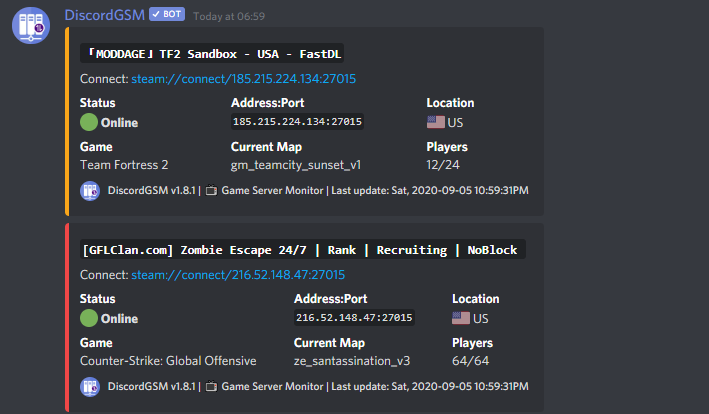
Nope. I will just link the github. I thought that file is where the issue might be
GitHub
📺 Monitor your game servers on Discord and tracks the live data of your game servers. Also support one-click deployment to Heroku, self-hosted. Invite: https://discordgsm.com/invite - DiscordGSM/Di...
fluid basin
the lag wont be noticable, unless you have a music bot @gritty bolt
gritty bolt
yeah
fluid basin
well you will need a server closer to their region I guess
but discord is already doing a good job at routing so it should be too bad
you really dont need to worry about this imho
lyric stag
https://prnt.sc/uzwt99 why not working
 fluid basin
read the errors?
faint prism
====?
 lyric stag
👀
faint prism
= assignment
== comparison, equals value
=== comparison, equals value and same type
iirc this is what JS does
 pale vessel
what about ==== 
faint prism
doesnt exist
pale vessel
damn
 carmine summit
First human to use 4 ewual signs
faint prism
why not working
@lyric stag #development message
tardy hornet
@opal plank i have seen so many bot that do that and i want to know how, when a bot, for this example: rythm added to a server he send a message in a random channel, like how to use him
and i want to know how to do that
tardy hornet
but when he join
opal plank
iterate thru the channels available and get the first one where role @ everyone has SEND_MESSAGES permission
thats it
lyric stag
 carmine summit
guild.channels.cahce.forEach
carmine summit
@lyric stag define token ffs
carmine summit
Define bad
opal plank
im not trying to be rude
but if you dont know about it, dont suggest it
its better to be quiet sometimes
you CLEARLY dont know what you're talking about
and time after time i see you giving users here bad advice
for example, this is a indentation error
nothing to do with defining token
also forEach is horrible iterator
 pale vessel
forEach 
pale vessel
for loop 
opal plank
please, for the love of god, do your research first or dont try to help people with half assed knowledge, you harm more than you're helping
fluid basin
bought nitro before 2019 @tardy hornet
tardy hornet
o
carmine summit
Im still confused why having ; cause error
fluid basin
erwin i think you mean unclosed braces
opal plank
i assume its all under 'message' =>
carmine summit
Yes
fluid basin
blocks*
carmine summit
})
opal plank
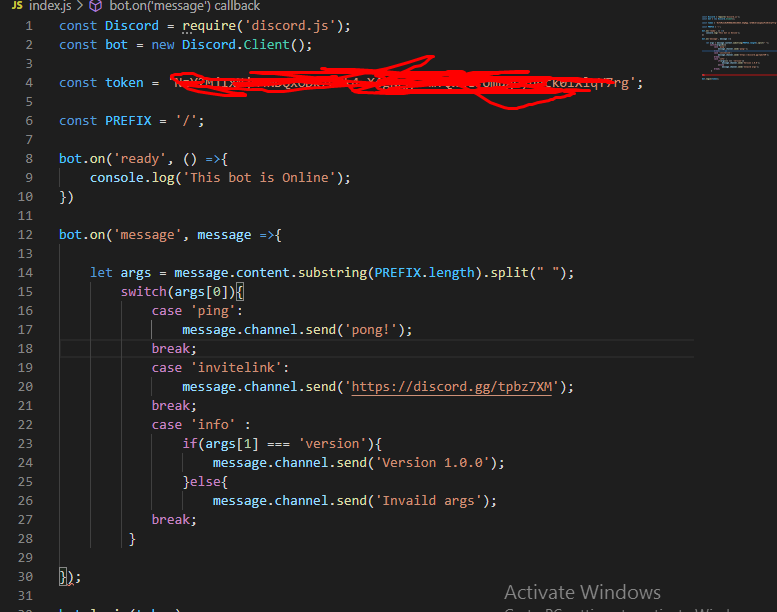
likely }); missing in the end
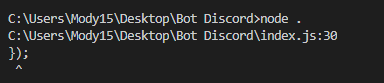 opal plank
hence why i said to show the code
copy paste the code in here https://paste.awoo.rocks/
remove token for the love of god
fluid basin
for the love of god
@opal plank ah yes
carmine summit
I'm still confused on why Erwin hates forEach
lyric stag
 fluid basin
every morning I wake up to discord token reset because a stupid bug in v11 didnt get noticed by sempai
lyric stag
ok
carmine summit
Your missing } in line 29
faint prism
Jerry, why not use functions for your bots logic instead of placing it inside the switch statement
pale vessel
close your else statement
pale vessel
that was for the switch
lyric stag
bro i am new in programming
Jerry, why not use functions for your bots logic instead of placing it inside the switch statement
@faint prism
opal plank
https://paste.awoo.rocks/ paste ur code here
lyric stag
i swear
faint prism
I know. So consider my advice since it's a learning experience
carmine summit
message.channel.send(`Invalid Args`)
}```i paste it!
opal plank
send link
fluid basin
djsv11 has so many bugs I swear
lyric stag
carmine summit
Yeah im on mobile
pale vessel
right...
opal plank
const Discord = require('discord.js');
const bot = new Discord.Client();

const token = '';

const PREFIX = '/';

bot.on('ready', () => {
  console.log('This bot is Online');
});

bot.on('message', (message) => {
  let args = message.content.substring(PREFIX.length).split(' ');
  switch (args[0]) {
    case 'ping':
      {
        message.channel.send('pong!');
      }

      break;
    case 'invitelink':
      {
        message.channel.send('https://discord.gg/tpbz7XM');
      }
      break;
    case 'info':
      {
        if (args[1] === 'version') {
          message.channel.send('Version 1.0.0');
        } else {
          message.channel.send('Invaild args');
        }
      }
      break;
  }
});

bot.login(token);
Ads
pale vessel
erwin what in the world
fluid basin
what?
opal plank
it would only break if it fell under else
it would continue on the next if he had another case
or default
 torn jasper
Can anyone help me?
pale vessel
with?
torn jasper
Discord.js
pale vessel
yeah what's the problem?
earnest phoenix
+1
carmine summit
He forgot to add }
earnest phoenix
?
pale vessel
or just remove { xd
torn jasper
Uh, im just creating a new bot rn, so thats what i need help with. Basically, i need to set the bot's status to the number of servers and members its serving
earnest phoenix
Uh, im just creating a new bot rn, so thats what i need help with. Basically, i need to set the bot's status to the number of servers and members its serving
@torn jasper setActivity('') TYPE: PLAYING {
opal plank
heres a tip for you
earnest phoenix
or
pale vessel
ugh
earnest phoenix
something like this
pale vessel
link them the docs
torn jasper
const discord = require('discord.js')
const client = new discord.Client()

client.on('ready', () => {
    setInterval(() => {
      targetGuild = client.guilds.cache.get('766262827476320276')
      if(targetGuild) {
          client.user.setPresence({ game: { name: targetGuild.memberCount + 'HEY!', type: 'WATCHING' }, status: 'online'  })
                .then(console.log)
                .catch(console.error);
      }
}, 1000 * 60 * 1);

});

client.login("XXXX")
Thats my code till now
But it doesnt show the status
pale vessel
both
earnest phoenix
client.user.setStatus('online')
client.user.setActivity('✅ !help For All Comands!', {type: 'PLAYING'})
pale vessel
setPresence is for setting status and activity under one method
fluid basin
uh you cant convert a string to int
opal plank
oh interesting
lyric stag
thx @opal plank
opal plank
carmine summit
Who would wanna change their bot status?
torn jasper
client.user.setStatus('online')
client.user.setActivity('✅ !help For All Comands!', {type: 'PLAYING'})
@earnest phoenix Thats different. I need it for showing the numbers of servers and members its serving
Me i guess...
earnest phoenix
ok
torn jasper
const discord = require('discord.js')
const client = new discord.Client()
client.on('ready', () => {
setInterval(() => {
targetGuild = client.guilds.cache.get('766262827476320276')
if(targetGuild) {
client.user.setPresence({ game: { name: targetGuild.memberCount + 'HEY!', type: 'WATCHING' }, status: 'online' })
.then(console.log)
.catch(console.error);
}
}, 1000 * 60 * 1);
});
client.login("XXXX")
client.user.setActivity(`${client.guilds.cache.size} Guilds`, {type: 'WATCHING'})
pale vessel
you can use client#guilds#cache#size for guild count
earnest phoenix
@earnest phoenix Thats different. I need it for showing the numbers of servers and members its serving
@torn jasper ${client.users.guilds.cache.size}
torn jasper
client.user.setActivity(`${client.guilds.cache.size} Guilds`, {type: 'WATCHING'})
@carmine summit trying this one
pale vessel
and for members, you can either accumulate all guilds' member count or use client#users#cache#size
carmine summit
Wait thats a thing?
pale vessel
client#users#cache#size can be unreliable though since it relies on cache
carmine summit
Ah yes
pale vessel
unless you fetch all members
earnest phoenix
client.on('ready', () => {
setInterval(() => {
targetGuild = client.guilds.get('GUILD ID HERE')
if(targetGuild) {
client.user.setPresence({ game: { name: targetGuild.memberCount + ' people verifying!', type: 'WATCHING' }, status: 'online' })
.then(console.log)
.catch(console.error);
}
}, 1000 * 60 * 5);
});
what about this?
torn jasper
const discord = require('discord.js')
const client = new discord.Client()

client.on('ready', () => {
    client.user.setActivity(`${client.guilds.cache.size} Guilds`, {type: 'WATCHING'})
});

client.login("XXXX")
Right now i set it to this
earnest phoenix
client.on('ready', () => {
setInterval(() => {
targetGuild = client.guilds.get('GUILD ID HERE')
if(targetGuild) {
client.user.setPresence({ game: { name: targetGuild.memberCount + ' people verifying!', type: 'WATCHING' }, status: 'online' })
.then(console.log)
.catch(console.error);
}
}, 1000 * 60 * 5);});
@torn jasper
how u did that code embed
pale vessel
damn
torn jasper
I am getting uhh, an error before ${client......
earnest phoenix
thing?
carmine summit
const discord = require('discord.js')
const client = new discord.Client()

client.on('ready', () => {
    client.user.setActivity(`${client.guilds.cache.size} Guilds`, {type: 'WATCHING'})
});

client.login("XXXX")
Hope Erwin doesn't scold me for that
earnest phoenix
client.on('ready', () => {
setInterval(() => {
targetGuild = client.guilds.get('GUILD ID HERE')
if(targetGuild) {
client.user.setPresence({ game: { name: targetGuild.memberCount + ' people verifying!', type: 'WATCHING' }, status: 'online' })
.then(console.log)
.catch(console.error);
}
}, 1000 * 60 * 5);});
@earnest phoenix now its not setPresence now is setActivity
ohhh
it was earlier
i did for my bot
bcz u have discord.js v11
yes
v11
torn jasper
Hmm
earnest phoenix
vs code
ye me too
vs code
how do i create something like image manipulation?
in embed?
in js
carmine summit
Canvas
earnest phoenix
ok
torn jasper
I have 12.3.1
earnest phoenix
I have 12.3.1
@torn jasper ok
carmine summit
I have 12.3.1
@torn jasper you sureM
carmine summit
Thats how you know a man is in a mobile
earnest phoenix
HE TYPES BOT IN A DISCORD BOT MAKER ANDROID!!!
torn jasper
Its showing an error
const discord = require('discord.js')
const client = new discord.Client()

client.on('ready', () => {
    client.user.setActivity(`${client.guilds.cache.size} Guilds`, {type: 'WATCHING'}) \\ The error is after setActivity(**`**... That ` is where the error comes
});

client.login("XXXX")
and what is the error?
pale vessel
they did
earnest phoenix
oh
torn jasper
Wait..
carmine summit
FFS STOP COPY PASTING CODES FROM THE STREETS
earnest phoenix
indentation error
FFS STOP COPY PASTING CODES FROM THE STREETS
@carmine summit hi
who copypasta?
carmine summit
Hallo
torn jasper
Okay the error's gone but the status aint coming
earnest phoenix
maybe change WATCHING to PLAYING
earnest phoenix
:D
torn jasper
tysm
carmine summit
Yeah I just thought WATCHING is not an qctivity
torn jasper
Now if i also want users, i just do client.users.cache.size ?
carmine summit
You can call me stoopid now
pale vessel
watching needs a valid twitch stream url
torn jasper
Yeah
pale vessel
oh yeah
earnest phoenix
stream
pale vessel
streaming ye
torn jasper
Lol
carmine summit
watching needs a valid twitch stream url
@pale vessel STREAMING???
torn jasper
Now if i also want users, i just do client.users.cache.size ?
@torn jasper Uhh am i correct?
earnest phoenix
no
 flazepe
pale vessel
flazepe
pale vessel
it existed
carmine summit
Tryna remove .cache if no work
earnest phoenix
no
torn jasper
Okay lemme try it once
pale vessel
damn
carmine summit
If no work
torn jasper
Wait
client.user.setActivity(`${client.guilds.cache.size} Guilds and ${client.users.cache.size} users`, {type: 'WATCHING'})
?
torn jasper
Thats the code i wrote for showing users and guilds
faint prism
static class Factory
{
  ICommandLogic GetSomeCommandLogic(IConfig config) =>
    new SomeCommandLogic(config, AnotherFactory.GetSomeThing())
}
...
public class SomeModule : ModuleBase<SocketCommandContext>
    {
        [Command("something")]
        public async Task SomeAsync() =>
             await ReplyAsync(embed: Factory.GetSomeCommandLogic(config).Run(ctx););
    }
How does one implement a factory is JS
carmine summit
Ewww Java
faint prism
eww C#?
carmine summit
Im pretty sure that is Java
 prisma oriole
i thinks its c#
prisma oriole
looks like elm
pale vessel
perhaps haskell
faint prism
Pretty sure Java doesn't use PascalCase for methods
torn jasper
I just coded the bot to show the numbers of users and guilds its in but how do i make it refresh like every minute, coz i just kicked an alt from the server, and the users is still the same (using discord.js)
pale vessel
camelCase i guess
prisma oriole
i tried c# for the first time a while back it was kinda fun
@torn jasper use setInterval
carmine summit
I just coded the bot to show the numbers of users and guilds its in but how do i make it refresh like every minute, coz i just kicked an alt from the server, and the users is still the same
@torn jasper
setInterval(foo => {
//Do stuffs every 3000ms
}, 3000)
Like where do i do that.
carmine summit
I dunno
torn jasper
client.on('ready', () => {
    client.user.setActivity(`${client.guilds.cache.size} Servers and ${client.users.cache.size} Users`, {type: 'WATCHING'})
});
``` In here where?Ask urself
torn jasper
Hmm
carmine summit
 prisma oriole
do it outside an event emitter
torn jasper
I will remove it from there
faint prism
Does nobody use a factory design pattern?
prisma oriole
i kinda just make my code very bloated and call it a day
 stoic hull
Anyone know what this means? Can't find a reason.
RangeError [BITFIELD_INVALID] : Invalid bitfield flag or number.
i assume your using djs?
stoic hull
Yes.
prisma oriole
its probably because you didnt use a bitfirld or number in a permission firld
field
stoic hull
Well, it works in a private server. But when i test it on a bigger server it resolves into that error.
stoic hull
I used MANAGE_GUILD.
carmine summit
Show code
stoic hull
        const member = message.mentions.members.first() || message.member
        let text = ''
        const test = [
            'ADMINISTRATOR',
            'CREATE_INSTANT_INVITE',
            'KICK_MEMBERS',
            'BAN_MEMBERS',
            'MANAGE_CHANNELS',
            'MANAGE_GUILD',
            'ADD_REACTIONS',
            'VIEW_AUDIT_LOG',
            'VIEW_CHANNEL',
            'READ_MESSAGES',
            'SEND_MESSAGES',
            'SEND_TTS_MESSAGES',
            'MANAGE_MESSAGES',
            'EMBED_LINKS',
            'ATTACH_FILES',
            'READ_MESSAGE_HISTORY',
            'MENTION_EVERYONE',
            'USE_EXTERNAL_EMOJIS',
            'EXTERNAL_EMOJIS',
            'CONNECT',
            'SPEAK',
            'MUTE_MEMBERS',
            'DEAFEN_MEMBERS',
            'MOVE_MEMBERS',
            'USE_VAD',
            'CHANGE_NICKNAME',
            'MANAGE_NICKNAMES',
            'MANAGE_ROLES',
            'MANAGE_ROLES_OR_PERMISSIONS',
            'MANAGE_WEBHOOKS',
            'MANAGE_EMOJIS'
        ]
        const testy = {
            true: 'yes',
            false: 'no'
        }

        const embed = new MessageEmbed()
        .setTitle(`Testing a new command`)
        .setColor(`DARK_VIVID_PINK`)
        test.forEach(p => {
            text += `${p} → ${testy[member.hasPermission(p) ? true : false]}\n`
        })
        embed.setDescription(text)

message.channel.send(embed)```Tryna remove READ_MESSAGES
carmine summit
<@!>
Or you can use user
message.author
client.users.cache.get()
Nono
You can litterally just use message.channel.send(message.author)
slender thistle
<@! is an indication that a member has a nickname afaik
which makes about zero sense or difference in the end
 wary flame
Top left corner is 0, 0
wary flame
^


 pale vessel
@vale garden wat
wary flame
A bit stretched
 dapper compass
Hi, how can I eval the on_guild_join event with my eval command please?
Typing -eval await discord.on_guild_join(ctx.guild) doesn't work
 vale garden
x1 is 650 and x2 is 660
@vale garden howw is it so stretched
x1 = 25 and x2 = 200 looks fine
why is this like this
wary flame
Is it strechted across the y axis
dapper compass
you want to evaluate an event?
@pale vessel Yes! To test if my bot is correctly working when he joins a guild
pale vessel
you should avoid doing that
 fervent goblet
is there a reason why my user count of my bot is not accurate? its using client.users.cache.size but its in a server with 100k people but its not showing up
faint prism
not sure that's how it works
dapper compass
And I know it's possible cause I already did it with eval on_member_join but I forgot how..
pale vessel
did you cache all members?
wary flame
is there a reason why my user count of my bot is not accurate? its using client.users.cache.size but its in a server with 100k people but its not showing up
@fervent goblet not all users are cached
dapper compass
you should avoid doing that
@pale vessel Why?
faint prism
why not just add and remove a bot from a testing server?
carmine summit
I think there is only x, and z axis
pale vessel
because it could lead to memory leak and what auger said
dapper compass
Cause it's simplier with a simple text, I'm just trying to know if the bot sends a message when joining a serv! @faint prism @pale vessel
faint prism
Right but the discord js lib handles events from the api
not from when you want to call it I think
fervent goblet
how do i cache users?
dapper compass
I'm using discord py, and I already did it with on_member_join :/
how do i cache users?
@fervent goblet Take a look at theIntentswith the 1.5
pale vessel
@fervent goblet fetchAllMembers under ClientOptions and make sure you enabled the guild members intent
and if your bot is verified, make sure it's whitelisted for the intent
wary flame
Wont that cause a lot of unneeded memory usage
pale vessel
yeah it'll keep creating a listener for it
dapper compass
I don't really understand the problem :/
But I figured out, it wasn't discord.on_guild_join() but -eval await bot.on_guild_join(ctx.guild)
slender thistle
what the living fuck did you even want to do
carmine summit

 unique stump
ok im confused
    @commands.Cog.listener()
    async def on_dbl_test(self, data):
        print(data)
        user = self.bot.get_user(data['user'])
        if not data['isWeekend']:
            await bank.deposit_credits(user, self.weekday_coins)
            await user.send(f"You were given {self.weekday_coins} for voting for me on top.gg!")
apparently get_user is returning a NoneType object
carmine summit
Its iirc
client.on(guildCreate, guild => {
//Ur code here
})
Wait nvm
U not js user
dapper compass
what the living fuck did you even want to do
@slender thistle 😳
pale vessel
lmao
faint prism
yeah
carmine summit
Ok bye
slender thistle
@unique stump int(data['user'])
vale garden
hi
im back
so i have a question
if x1 is 650 and x2 is 660
it means that the x1 coord is 650 and x2 is 660 riht
right
wary flame
Yes
wary flame
So your image is 660 - 650 = 10px across the x axis
wary flame
I agree
wary flame
What coords do you have set on the y axis
vale garden
oh kk
wary flame
(Guessing the image is square)
vale garden
but how
wary flame
Get the size in px of your src image and use those for on the canvas
Maybe the src image is just wierd
wary flame
see 25 - 200 looked fine
25 - 200?
carmine summit
Cracking the sweet spot in canvas is oddly satisfying
carmine summit
Why don't you just add the image pixel's so that it is not stretched
 narrow crescent
Okay uhh, i need help with the refresh thing for user and guild thing that i made
vale garden
thx a lot
narrow crescent
client.on('ready', () => {
    client.user.setActivity(`${client.guilds.cache.size} Servers and ${client.users.cache.size} Users`, {type: 'WATCHING'})
});
When i put that set activity code out of ready, it caused and error, so i put it back in.
Main Thing - I need this code to work every 1m. So that it refreshes how many server's it is in, and how many users its serving.
earnest phoenix
V12?
narrow crescent
Latest i guess
wary flame
You need to set the timeout inside lf the ready event
You error because you call it before the bot is ready
narrow crescent
idk what u mean, im new to bot making
wary flame
ready event: settimeout(function, time in ms)
Maybe someome else can make a snippet but i am on mobile so i aint doing that
narrow crescent
Where do i need to put this?
wary flame
Inside of ready 🤦
narrow crescent
Sorry lol
fervent goblet
client.once('ready', () => {
    setTimeout(() => {
client.user.setActivity(`${client.guilds.cache.size} Servers and ${client.users.cache.size} Users`, {type: 'WATCHING'})
}, 1000);
});
client.once('ready', () => {
    setTimeout(() => {
client.user.setActivity(`${client.guilds.cache.size} Servers and ${client.users.cache.size} Users`, {type: 'WATCHING'})
}, 1000);
});
Wont you get rate limited for running this every second
narrow crescent
i removed one person from the server, hasnt updated yet
wary flame
Not me
pale vessel
it's a timeout
narrow crescent
there were 5 users, and it didnt went down to 4
That 1000ms thing i can set it 10000 for 10s
fervent goblet
i mean you can change it
narrow crescent
But the code didnt work, my bot's status didnt get updated
fervent goblet
it wont
narrow crescent
I need something that changes it every (1hr i guess?
wary flame
1hr should be fine
fervent goblet
@wary flame its not a loop tho.
quartz kindle
that code is a timeout, not an interval
fervent goblet
its a timeout
wary flame
Fuc i ment interval
narrow crescent
Means i need interval yeah
quartz kindle
yes
fervent goblet
yeah
quartz kindle
a timeout only runs once, an interval runs forever
narrow crescent
I just change setTimeout to setInterval?
quartz kindle
yes
wary flame
Yes
narrow crescent
Okay
carmine summit
client.once('ready', () => {
    setTimeout(() => {
client.user.setActivity(`${client.guilds.cache.size} Servers and ${client.users.cache.size} Users`, {type: 'WATCHING'})
}, 1000);
});
@fervent goblet API ABOOZ
 earnest cloud
I need help bot developers
pale vessel
ok
fervent goblet
ask a question
pale vessel
go on...
earnest cloud
So you know plasma bot
narrow crescent
Wait
pale vessel
nope
wary flame
Actually no
fervent goblet
nope
earnest cloud
Bruh
earnest cloud
Yeah it’s been offline 10days now
pale vessel
ask in their support server
quartz kindle
rip
pale vessel
💸
narrow crescent
I changed the code to setInterval
earnest cloud
Idk the link XD
pale vessel
should be in their bot page
narrow crescent
Lemme kick one person and see if it works
wary flame
This aint the place to ask
 crimson vapor
on my VPS I run my discord bot. Around every 60 seconds there is a spike in the cpu, does anyone know what causes this or how I can fix it?
earnest cloud
@narrow crescent send me the support server link in DMs pls that would be nice
narrow crescent
I dont have man
pale vessel
run htop or something million
wary flame
on my VPS I run my discord bot. Around every 60 seconds there is a spike in the cpu, does anyone know what causes this or how I can fix it?
@crimson vapor what are you doing every 60 seconds
quartz kindle
@crimson vapor what language does it run on?
earnest cloud
Oh
crimson vapor
node js, using klasa framework
narrow crescent
I set it 5s for test, it didnt change rn, lemme check again
5000ms
Nope it didnt change
crimson vapor
I can tell that node is causing the cpu spikes because htop and I know it is the bot because I stopped everything else to make sure it was
quartz kindle
do you have any interval running?
crimson vapor
I do not think I have any intervals
narrow crescent
client.once('ready', () => {
    setInterval(() => {
client.user.setActivity(`${client.guilds.cache.size} Servers and ${client.users.cache.size} Users`, {type: 'WATCHING'})
}, 5000);
});
This code should change that guilds and users every 5s?
crimson vapor
node 14.12.0
quartz kindle
@narrow crescent yes
crimson vapor
yeah the spikes are just under every 60 seconds
narrow crescent
But it isnt i think
pale vessel
does it happen on roki too?
quartz kindle
how many guilds is your bot in? @narrow crescent
earnest phoenix
how to use py on glitch.com
pale vessel
since he's using klasa too right?
crimson vapor
yes but I think his are more random
earnest phoenix
how to use py on glitch.com
quartz kindle
@narrow crescent i just checked the source code, discord.js does not remove users from cache
only members
crimson vapor
yeah roki's are less consistent
narrow crescent
I didnt understand..
crimson vapor
basically in d.js, your user still exists
earnest phoenix
how to use py on glitch.com
pllzzz tell
quartz kindle
there are two types of user data, users and members
earnest phoenix
narrow crescent
I put in users.cache
quartz kindle
a user, is a discord user, it has a username, profile picture, tag, id, etc...
a member is a guild-specific user, it has nicknames, roles, etc
crimson vapor
@earnest phoenix no one is answering you because no one here uses py or knows if it is possible
narrow crescent
Okay so i should put members?
quartz kindle
when you kick a person, their member version gets deleted from the guild
earnest phoenix
@narrow crescent restart our bot problem solve
quartz kindle
but their user still exists because it doesnt depend on guilds
narrow crescent
Okay
I am only creating this bot for my server, so i dont need to really care about guilds
I will change that to member
quartz kindle
ok so you can do something like client.guilds.cache.first().members.cache.size
earnest phoenix
how to start py file on package.json
slender thistle
How to do the impossible