#development
1 messages · Page 1222 of 1


 digital ibex
wrong mention, mb
 sweet kestrel
lol
 charred geyser
i still haven't got it working
 radiant kraken
Add a break also after the you don't have the crafting table
sweet kestrel
k
radiant kraken
What break does is it stops the loop
charred geyser
    let settings = await Guild.findOne({
        guildID: guild.id
});```yeah
digital ibex
what is guild?
sweet kestrel
yay
charred geyser
the schema
digital ibex
show the code
charred geyser
digital ibex
    let settings = await Guild.findOne({
        guildID: ——> guild.id <——
});``` \
charred geyser
\
charred geyser
    let settings = await Guild.findOne({
        guildID: guild.id <——
    });```
@digital ibex what should it be becuase it cant be message.guild.id which is what would normally be used
sweet kestrel

digital ibex
it can be whatever u want, just as long as its unique
radiant kraken
what's wrong  @sweet kestrel
charred geyser
nah
sweet kestrel
digital ibex
and why cant it be the servers id?
sweet kestrel
a real bruh moment
charred geyser
it needs to be the guild id
digital ibex
um.. yes?
charred geyser
becuase its not specific
digital ibex
but what is guild ?
charred geyser
guild where
sweet kestrel
digital ibex
    let settings = await Guild.findOne({
        guildID: ——> guild.id <——
});```i don't get it, what is wrong with that
 earnest phoenix
just don't accept dm commands
sweet kestrel
charred geyser
@digital ibex how would i get the guild id in that context?
sweet kestrel
I mean, is suppose to run the embed messsage and the             await ctx.send("Opening crafting table...", delete_after=3)
isn't it?```@radiant kraken
digital ibex
charred geyser
it cant be
digital ibex
why?
sweet kestrel
now is just running the else command, I have a crafting table, so it should not run the else command
digital ibex
it needs to be in the message event
charred geyser
no it doesn't
sweet kestrel
charred geyser
bruh
sweet kestrel
the upper part
digital ibex
true
sweet kestrel

digital ibex
but
charred geyser
maybe 🤷
radiant kraken
I mean, is suppose to run the embed messsage and the             await ctx.send("Opening crafting table...", delete_after=3)
isn't it?```
@sweet kestrel u added a return after the opening crafting table, just remove it
digital ibex
unless discord.js has parsed that shite
radiant kraken
yeah
charred geyser
how r u importing member?
@digital ibex Module.exports = async (client, guild, member) => {
digital ibex
show ur event handler
radiant kraken
@sweet kestrel it should've send the embed tho
charred geyser
fs.readdir('./events/', (err, files) => {
    if (err) return console.error;
    files.forEach(file => {
        if (!file.endsWith('.js')) return;
        const evt = require(`./events/${file}`);
        let evtName = file.split('.')[0];
        console.log(`Loaded event '${evtName}'`);
        client.on(evtName, evt.bind(null, client));
    });
});
ok
radiant kraken

 lime current
sad
sweet kestrel
@radiant kraken help noooooooooo
radiant kraken
it's probably something to do with ur db afaik
sweet kestrel
😦
digital ibex
in this case, “guild” is the member, so if u do guild.id, it’ll return the member who joined, their id
charred geyser
bruh
digital ibex
member isnt a thing
charred geyser
yeah
sweet kestrel
I think you breaked the if statement
😦
noooooooooooooooo
noooooooooooooooooooooo
noooooooooooooooooooooooooooooooo
charred geyser
bruh
TypeError: Cannot read property 'roles' of undefined
its endless
let role = guild.roles.cache.find(r => r.name === settings.autoRole);
member.roles.add(role).catch(console.error);
I think you breaked the if statement
what do you mean by breaking the if statement ?
radiant kraken
yes it should've stopped after the if statement
digital ibex
what is guild?
charred geyser
should that also be guild.guild
radiant kraken
what break does is that it exits the loop
digital ibex
yh
 radiant kraken
or replace break with return, which exits the function entirely
 wanton furnace
Dm me if you can program c#
charred geyser
@digital ibex nope.
digital ibex
nope?
charred geyser
let role = guild.guild.roles.cache.find(r => r.name === settings.autoRole);
like that?
digital ibex
idk try it
charred geyser
i did
no work
;(
at least the console is logging autoRole: 'Member',
i just need to figure out how to give the member the role
let role = member.guild.roles.cache.find(r => r.name === settings.autoRole);
maybe member.guild
nope
 midnight blaze
I am doing it like that for message event.
let role = message.guild.roles.cache.find(role => role.name == "test");
charred geyser
no
midnight blaze
what no?
charred geyser
it wont work like that
its not a message event
its guildMemberAdd
so message is undefined
charred geyser
ok
im trying to auto role
but pulling the role from my database
so giving a member a role in guildMemberAdd
midnight blaze
and this didnt work? member.guild.roles.cache.find(role => role.name == "member");
You could also just create the role and then assign it, so it will work on all guilds. If your idea with the database doesnt work
charred geyser
TypeError: Cannot read property 'guild' of undefined
the database is not the issue
it is able to find the data from the db fine
it is just applying the role
member.guild.roles.cache.find(role => role.name == "member"); logs TypeError: Cannot read property 'guild' of undefined
midnight blaze
try this just for fun ok?
verified = await member.guild.roles.create({
        data: {
          name: "member",
          color:"black",
          permissions: [],
          position: member.roles.highest.position + 1
        }

      })
 let role  = member.guild.roles.cache.find(role => role.name == "member");
message.member.roles.add(role)
Just to test it out, if "let role = member.guild.roles.cache.find(role => role.name == "member");
because for me it worked, if I remember correctly. I dont have ide right now, to test it.
charred geyser
ok
btw i cant do message.member.roles.add(role)
TypeError: Cannot read property 'guild' of undefined
charred geyser
you deleted it
thats what i am using?
it is the same thing
just with a handler
midnight blaze
<client>.on('guildMemberUpdate', (oldMember, newMember) => {
try{
    const removedRoles = oldMember.roles.cache.filter(role => !newMember.roles.cache.has(role.id));
    if (removedRoles.size > 0) console.log(`The roles ${removedRoles.map(r => r.name)} were removed from ${oldMember.displayName}.`);

    const addedRoles = newMember.roles.cache.filter(role => !oldMember.roles.cache.has(role.id));
    if (addedRoles.size > 0) console.log(`The roles ${addedRoles.map(r => r.name)} were added to ${oldMember.displayName}.`);
}catch(err){console.log(err)}})
what does console log says?
use this event as well
to get more information
midnight blaze
it doesnt matter? You get more information tho?
The syntax to add members when they join your guild is right.
midnight blaze
yes, it is just an other event
midnight blaze
idk, as you see, collection.roles.add works. They use IDs tho..maybe you can try that with an Id?
 open oracle
why does this not work when i say "!ping"?
client.on('message', message => {
    if (message.content === '!ping') {
    // send back "Pong." to the channel the message was sent in
        message.channel.send('Pong.');
}});
what does the rest of your file look like?
open oracle
one sec
client.login('${token}');

const Discord = require('discord.js');
const client = new Discord.Client();

client.on('ready', () => {
  console.log(`Logged in as ${client.user.tag}!`);
});

{
    "prefix": "!",
    "token": "MY TOKEN",
    "meaning_of_life": 42,
    "passwords_array": ["please", "dont", "hack", "me"],
    "secret_passcodes": {
        "bank": 1234,
        "home": 4321
    }
}

client.on('message', message => {
    if (message.content === '!ping') {
    // send back "Pong." to the channel the message was sent in
        message.channel.send('Pong.');
}});
move client.login to the bottom
open oracle
ok
open oracle

A guide made by the community of discord.js for its users.
charred geyser
lol
midnight blaze
client.login() must be bellow const client = new Discord.Client();
charred geyser
you cant really put json formatting into a js file
yeah
you're gonna wanna make a file called config
midnight blaze
also this here
{
    "prefix": "!",
    "token": "MY TOKEN",
    "meaning_of_life": 42,
    "passwords_array": ["please", "dont", "hack", "me"],
    "secret_passcodes": {
        "bank": 1234,
        "home": 4321
    }
}
change to
let object = {
    "prefix": "!",
    "token": "MY TOKEN",
    "meaning_of_life": 42,
    "passwords_array": ["please", "dont", "hack", "me"],
    "secret_passcodes": {
        "bank": 1234,
        "home": 4321
    }
}
and require it like it says
midnight blaze
at least make it into a object
charred geyser
nah
thats too complex
add that into a file and save it as config.json in the same directory
and then add const config = require('./config.json'); to the top of your main js file
midnight blaze
do what seasnail says, but if you want to keep that in your file, change it at least into an object
charred geyser
also you can delete everything other than prefix and token lol
idk where you downloaded that from but its useless
open oracle
this doesnt work
const Discord = require('discord.js');
const client = new Discord.Client();

client.on('ready', () => {
  console.log(`Logged in as ${client.user.tag}!`);
});

{
    "prefix": "!",
    "token": "MY TOKEN",
}

client.on('message', message => {
    if (message.content === '!ping') {
    // send back "Pong." to the channel the message was sent in
        message.channel.send('Pong.');
}});


client.login('${token}');
ofc not
open oracle
ok
midnight blaze
add that into a file and save it as config.json in the same directory
and then add const config = require('./config.json'); to the top of your main js file
so...
midnight blaze
do this
open oracle
ok
charred geyser
and put your actual token
open oracle
ik that
charred geyser
in the " " after token
midnight blaze
he did this
client.login('${token}');
you didnt define token as a veriable.
when you did what seasnail said change this part into
client.login(config.token);
oh yeah lol
charred geyser
yeah
the whole thing
it has comments and shit
imagine copy
also
hello Ben
you have been typing for a very long time
feel free to hit enter
open oracle
LMFAO
midnight blaze
@open oracle bruh, read the discord.js guide before you do a bot xD
charred geyser
we noticed
its not really that easy
well
it can be
but you will run into a LOT of issues if you dont even understand basic js
bruh.
 proven lantern
my bot was declined for a second time because it could be used to abuse the api. what type of rate limiting do i need for this command?
!h 2v2v2v2 xbox halo reach. this command creates 4 channels for the 4 teams. My bot originally allowed any number of teams and there was no rate limit to the number of commands that could be entered. I limited the number of teams to 12 and put in a rate limit to the command as requested by the mod who declined the bot. after a month the bot was just denied again today. i talked to the mod a bit, but never got a clear answer about how to rate limit this in an effective way. how should i rate limit this command?
 summer torrent
can someone spam this command
proven lantern
there is a 5s cooldown
my idea is to have these rules numberOfApiCalls <= 12; cooldown = numberOfApiCalls * "5 seconds";
midnight blaze
client.on('guildMemberAdd', member => {

      try{

        let role = member.guild.roles.cache.find(r => r.name === 'Member');
         member.roles.add(role)
      }
      catch{
        console.log(Error);
      }


    });
@charred geyser this is what I use for a server and this works for me.
I was looking on my ide to check if there is something else, but there isnt..your problem is still not solved right?
proven lantern
i just want to have a solid answer before i submit my bot and wait a month
charred geyser
@charred geyser this is what I use for a server and this works for me.
I was looking on my ide to check if there is something else, but there isnt..your problem is still not solved right?
@midnight blaze from this i got[Function: Error] { stackTraceLimit: 16 }
open oracle
const Discord = require('discord.js');
const client = new Discord.Client();

client.on('ready', () => {
  console.log(`Logged in as ${client.user.tag}!`);
});

client.on('message', message => {
    if (message.content === '!ping') {
    // send back "Pong." to the channel the message was sent in
        message.channel.send('Pong.');
}});

client.login(config.token);
```this doesnt workis node supposed to magically know what config is
charred geyser
and then add const config = require('./config.json'); to the top of your main js file
@charred geyser
charred geyser
@midnight blaze from this i got [Function: Error] { stackTraceLimit: 16 }
for your code
midnight blaze
Idk, it works for me 🤔
charred geyser
🤷
earnest phoenix
try catches are expensive
earnest phoenix
why not just simply check if you can add the role in the first place instead of catching errors when it fails
charred geyser
TypeError: Cannot read property 'guild' of undefined
 ember lodge
someone knows how can i put the circle next to the text? (html)
https://i.imgur.com/rRTObuR.png
Code: ```html
<div id="preloader">
<div class="loading-area">
<div class="banner">
                <h1 class="animate__bounceInDown">Suggestion is loading...     <div class="lds-ring"><div></div><div></div><div></div><div></div></div></h1>

          </div>
          </div>
          <div class="left-side"></div>
          <div class="right-side"></div>
    </div>
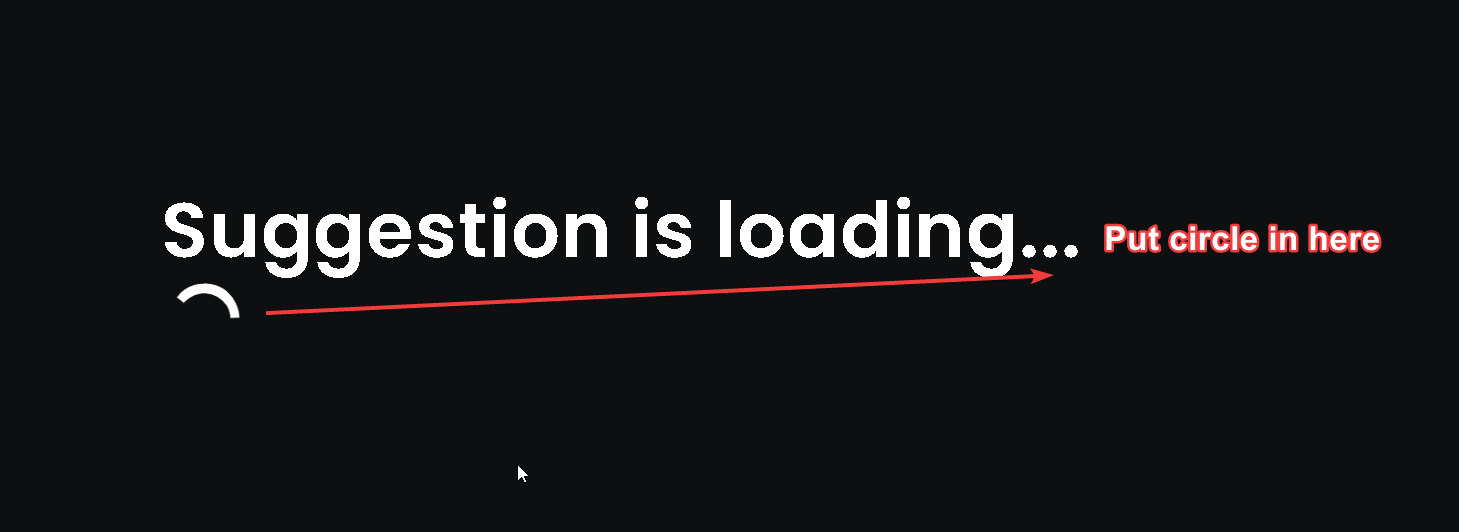 midnight blaze
I only added those so he can catch the error messages 🤔
earnest phoenix
ah
charred geyser
me?
midnight blaze
y
charred geyser
const Guild = require('../models/guild');
const mongoose = require('mongoose');
const Discord = require('discord.js')

module.exports = async (client, guild, member) => {
    const Guild = require('../models/guild');
    let settings = await Guild.findOne({
        guildID: guild.guild.id
    });
    let role = member.guild.roles.cache.find(r => r.name === 'Member');
    member.roles.add(role)
};
@ember lodge use a span, or a more "proper" way is to align with a css flexbox
charred geyser
you can ignore the settings bit for now
ember lodge
ok thxs
charred geyser
that is just for the db
bruh this is so broken
ill try it in my main js
bruh
it works as a seperate thing in bot.js
just not with the event handler
earnest phoenix
@Chrøma#1711
charred geyser
wdum @midnight blaze
proven lantern
what are the rules for rate limiting discord api calls?
charred geyser
client*
digital ibex
which endpoint?
midnight blaze
@proven lantern how about you join the discord server for that? API
charred geyser
https://discord.com/developers/docs/topics/rate-limits @proven lantern
Discord Developer Portal
Integrate your service with Discord — whether it's a bot or a game or whatever your wildest imagination can come up with.
midnight blaze
proven lantern
i know what the rate limit is @midnight blaze
charred geyser
or that
midnight blaze
just ask there your questions
digital ibex
why not here
charred geyser
10
proven lantern
but my bot is getting declined and i am rate limiting users
charred geyser
ReferenceError: guild is not defined @midnight blaze
i might just use it not in the event handler lol
proven lantern
yes
midnight blaze
@charred geyser yeah, just use it on your main. It doesnt matter too much after all
proven lantern
what are the rules for rate limiting api calls made from the bot?
my bot has been denied twice now. i added the rate limiting rules they asked me to but it was declined again for the same reason
charred geyser
now its not working :/
midnight blaze
@charred geyser xD but it worked before
charred geyser
i know
lmao
bruh
now it is giving me
ReferenceError: message is not defined
ok i got it working
and with the database!!
nice
 vale garden
hi
this is a part of my index.js that i just added
if (!cooldowns.has(command.name)) {
        cooldowns.set(command.name, new Discord.Collection());
    }

    const now = Date.now();
    const timestamps = cooldowns.get(command.name);
    const cooldownAmount = (command.cooldown || 3) * 1000;

    if (timestamps.has(message.author.id)) {
        const expirationTime = timestamps.get(message.author.id) + cooldownAmount;

        if (now < expirationTime) {
            const timeLeft = (expirationTime - now) / 1000;
      const lol = timeLeft / 60;
            return message.reply(`please wait ${lol.toFixed(1)} more minute(s) before reusing the \`${command.name}\` command.`);
        }
    }

    timestamps.set(message.author.id, now);
    setTimeout(() => timestamps.delete(message.author.id), cooldownAmount);

    try {
        command.execute(message, args);
    } catch (error) {
        console.error(error);
        message.reply('lol dude that command doesn\'t exist');
  }
and im getting this error
TypeError: Cannot read property 'execute' of undefined
ok now why is this timer not working
lol
    let timeout = 3.6e+6
    let amount = Math.floor(Math.random() * 900 + -100)

    let timer = await db.fetch(`timer_${message.author.id}`);

        if (timer != null && timeout - (Date.now() - timer) > 0) {
            let time = ms(timeout - (Date.now() - timer));
            message.channel.send(`You can only work again in **${time.hours}h ${time.minutes}m ${time.seconds}s**`)


        }
this isnt workinggg
i dont see anything wrong here
oof
what
wdym
its for this line
command.execute(message, args);
but it works fine everywhere else
 delicate shore
How to generate a server invite link discord.js
 pale vessel
d o c s
delicate shore
N O P L Z
delicate shore
Docs are kind of gay
 fluid basin
coding a bot without docs is kind of gay
pale vessel
just use botghost like me, no coding skill required 😎
 steep shale
Bruh botghost is ass
earnest phoenix
How do I check if a number is NaN in JavaScript? NaN === NaN and NaN == NaN both returns false for some reason.
 arctic cape
== is equalizing i gues === is used to check
earnest phoenix
== checks for value and === checks for value and type
NaN is defined as a number so idk how should i check if a number is NaN
earnest phoenix
nvm i found the isNaN() function 😅
earnest phoenix
i think you can just check for message.guild
btw why do you want to check for the guild’s id lol
just check for the channel type i guess?
steep shale
wdym
vale garden
lol
 sick fable
So, basically. I am a dumbass in coding because I am learning it.
sick fable
@vale garden bruh, I am learning it. I really don't know it. I am not a master in coding like you guys.
I started it a week ago. So, Just get it. 😂
steep shale
Python?
vale garden
hi
oh kk
btw how do you find the logo for a server
lol
i thought message.guild.icon would work
steep shale
What lib
vale garden
me?
steep shale
yeah
vale garden
js
steep shale
idk then
pale vessel
message.guild.icon works, it returns the hash of the guild's icon
use the method if you don't want to construct the url yourself
arctic cape
@vale garden it works it just updated ti iconURL IN V12
earnest phoenix
It was iconURL in v11 too, it's just a method now
arctic cape
But it worked as icon in v11 for me wth 🤔
earnest phoenix
It also works as icon in v12, this return a string of the icon's hash, the method just constructs a url to the icon
earnest phoenix
if (!cooldowns.has(command.name)) {
cooldowns.set(command.name, new Discord.Collection());
}
const now = Date.now();
const timestamps = cooldowns.get(command.name);
const cooldownAmount = (command.cooldown || 3) * 1000;

if (timestamps.has(message.author.id)) {
    const expirationTime = timestamps.get(message.author.id) + cooldownAmount;

    if (now < expirationTime) {
        const timeLeft = (expirationTime - now) / 1000;
  const lol = timeLeft / 60;
        return message.reply(`please wait ${lol.toFixed(1)} more minute(s) before reusing the \`${command.name}\` command.`);
    }
}

timestamps.set(message.author.id, now);
setTimeout(() => timestamps.delete(message.author.id), cooldownAmount);

try {
    command.execute(message, args);
} catch (error) {
    console.error(error);
    message.reply('lol dude that command doesn\'t exist');
}
steep shale
?
 frail ocean
@earnest phoenix can you explain the issue that you are experiencing with errors, your expected and actual output rather than pasting a bunch of code. Please also use code blocks:
```JS
// code here
```
earnest phoenix
Stupid thing don't work I added a index.js and it isn't working at all
 near veldt
ur bot?
frail ocean
Stupid thing don't work I added a index.js and it isn't working at all
@earnest phoenix please don’t say it isn’t working. We need the following things to help you:
- your code ✅
- expected output ❌
- actual output ❌
- any errors in the console ❌
near veldt
CODE: https://sourceb.in/ / https://hastebin.com/
ERROR: (provide screenshot)
EXPLANATION: (blah blah)

💻 Sharing code made easy
someone pin that maybe?
idk
if peeps need help with their code ig
¯_(ツ)_/¯
people like using vps's and bot hosts to host their bots but me, i dont use a bot host or a vps
 slender thistle
length of guild's channels property
earnest phoenix
nvm
@vale garden #Message.guild return guild not guild manager
so you can just use .channels

Discord.js is a powerful node.js module that allows you to interact with the Discord API very easily. It takes a much more object-oriented approach than most other JS Discord libraries, making your bot's code significantly tidier and easier to comprehend.
vale garden
wat
slender thistle
message.guild.channels
earnest phoenix
^
vale garden
i got it working by using message.guild.channels.cache.size
 pure lion
Why use the js in keyword (any context)
pale vessel
please read docs
pale vessel
in? you mean "guilds" in message.client?
for example
or for in?
@vale garden read docs https://discord.js.org/#/docs/main/stable/class/Guild?scrollTo=mfaLevel
pure lion
I just read the docs
vale garden
kk
pale vessel
nOt yOU
vale garden
dud
pale vessel
firefox
pure lion
I read those docs
 broken ibex
hi
vale garden
hi
broken ibex
hi
vale garden
{ name: "Server Name", value: message.guild.name, inline: true},
        { name: "Server Owner", value: message.guild.owner, inline: true},
        { name: "Server Description", value: message.guild.description, inline: true},
        { name: "Server Region", value: message.guild.region, inline: true}
btw
here
broken ibex
Hm what are you tryna do
vale garden
the first 3 fields are on 1 line
broken ibex
u cant change it
broken ibex
only 3 each line
vale garden
like 1st 2 on the 1st line
earnest phoenix
Discord manages it
vale garden
and next 2
broken ibex
4th goes another line
vale garden
oof
broken ibex
This is so sad
vale garden
lol
broken ibex
😩
 broken ibex
😶
 earnest phoenix
oof
delicate shore
Once Tim is online I would request him to say - My dad works at discord
 hazy sparrow
const prefix = 'bow'.toLowerCase() am i doing it right?
pale vessel
b-but it's already in lowercase
hazy sparrow
so const prefix = 'BOW'.toLowerCase()?
slender thistle
Pointless
 slender thistle
Might as well go into a constant .toUpperCase().toLowerCase() loop
slender thistle
prefix = 'bow'
if message.content.toLowerCase().startsWith
hazy sparrow
Yea i use a handler so no message.content.startsWith()
Wait hold on i got a idea for that
Brb
done it worked
ty all
near veldt
apparently my interval status for my bot doesnt wanna work
oh wait
it works now
strange
vale garden
hi
how do i get the user whos message has been collected
im tryna make a 4 player card game
vale garden
oof
near veldt
most likely from how your message.js or commands.js is set up
also
im too lazy to look back at my code, albeit i copied and pastad it into a sourcb.in file
does this look ok. ik it isnt but i want everyones opinion
its an experimental command as of rn
earnest phoenix
how do i get the user whos message has been collected
@vale garden collect.on takes a callback function and the first parameter is a Message class of discord.js
Why i am getting this error ?
delicate shore
oi
 supple oriole
`let invite
    if (invites.size > 0) {
      invite = invites.first() // Invite Exists
    } else {
      let channelID // Invite does not exist. Create one.
      const channels = message.guild.channels.cache
      for (const c of channels) {
        const channelType = c[1].type
        if (channelType === 'text') {
          channelID = c[0]
          break
        }
      }

      const channel = channels.get(message.guild.systemChannelID || channelID)
      invite = await channel.createInvite()
    }

    bumpLogic(client, message, row, invite)
    lastDate[message.guild.id] = now
  }).catch(console.error)
})
}`
Ur invite command sur
delicate shore
@earnest phoenix ARE YOU sure you are entering correct auth
thanks @supple oriole
supple oriole
:D
delicate shore
:D
supple oriole
-bots 587663056046391302
 gilded plankBOT
 delicate shore
not here ;-;
 earnest phoenix
Yes
delicate shore

earnest phoenix
slender thistle
Which auth do you mean
delicate shore
and @earnest phoenix if this related to top.gg api
#topgg-api
earnest phoenix
wtf
slender thistle
webhook auth doesn't return any errors
delicate shore
🤐 cool
earnest phoenix
Can some one help me?
If someone vote my bot then he will receive a coins
Is this code is right?
slender thistle
vale garden
hi
does anyone also now how to collect like 4 messages from 4 different people at the same time
like i have 4 filters
but idk how to collect all of them at the same time
or together to be exact
slender thistle
@earnest phoenix Yes, you are running the webhook but did you make sure the port 5000 is actually open in your router settings?
vale garden
lol
earnest phoenix
that's not smth to lol about
wtf is wronf with you

Developers didn't made video on it
wut
Developers didn't made video on it
@earnest phoenix yes we did

slender thistle
I mean, there's plenty of tutorials on how to open a port
earnest phoenix
what even is a port
surfing through the internet and sailing on ships through ports 
slender thistle
In computer networking, a port is a communication endpoint. At the software level, within an operating system, a port is a logical construct that identifies a specific process or a type of network service.
 slender thistle
An unique value appended to the IP/domain address
slender thistle
nice
earnest phoenix
Just help me in vote
: (
@earnest phoenix we can help with the dbl shit in #topgg-api we can't tell you how to give coins for voting since we dunno how your code works
yeah dbl shit
earnest phoenix
You're not being helpful at all
uhhh yeah but i never even tried to anything with the api so
slender thistle
@earnest phoenix Are you hosting the webhook on a VPS
earnest phoenix
Nope
slender thistle
80 too
earnest phoenix
skype loves to steal 80
btw if you're gonna use the webhook on a VPS with .env files go for process.env.PORT cuz most VPSs default to the PORT variable in env files when doing http shit
huh
a vps doesn't care what you run on it
it doesn't care about your .env file
slender thistle
It's certain frameworks/websites that care about .env
With a VPS you choose the port yourself
 split holly

earnest phoenix
@earnest phoenix What the fuck are you on about?
Can you not spread false info!?
 livid otter
is there a prefix discard command when the bot is tagged
 cinder sandal
guys i have an error with my main bot file with the mongo db code:
TypeError: User.FindOne is not defined
 thorn spruce
@cinder sandal Sequelize ?
cinder sandal
read the title of the issue, mongo db
thorn spruce
yeah mb sorry MongoDB use models?
thorn spruce
I think the problems are there
cinder sandal
also the issue is in my main.js file
thorn spruce
// export
module.exports.User = User

//import
const db = require("./data/user.js")

db.User.findOne()
if my memories are good
cinder sandal
i have them imported in the main.js file like that:
global.User = require('./data/user.js')
is it wrong?
thorn spruce
global?
cinder sandal
did i exported it wrong or no?
thorn spruce
i edit my message look
cinder sandal
can i do const User = require('./data/user.js')
thorn spruce
it is better to give another name to your constant so as not to confuse them
delicate shore
Anyone wanna be distracted
slender thistle
This is #development
cinder sandal
@thorn spruce now it gives TypeError cannot read property 'FindOne' of undefined
i really should not use any databases and not make economy commands they give only errors....
let user =  DBModules.User.FindOne({ guildID: message.guild.id, userID: message.author.id });
    let guild = DBModulesGuild.Guild.FindOne({ guildID: message.guild.id });
    if (!user) {
        User.create({ guildID: message.guild.id, userID: message.author.id});
    }
    if (!guild) {
        Guild.create({ guildID: message.guild.id});
}```if i remove DBModules and define User it will send an error even without defining it
 buoyant orchid
i'm making a discord bot dashboard how would i go about saving data?
pale vessel
you know that's not true
cinder sandal
TypeError: User.FindOne is not a function
hwo to fix it?
code:
let user = User.FindOne({ guildID: message.guild.id, userID: message.author.id });
let guild = Guild.FindOne({ guildID: message.guild.id });
if (!user) {
User.create({ guildID: message.guild.id, userID: message.author.id});
}
if (!guild) {
Guild.create({ guildID: message.guild.id});
}``` strong axle
then async it
exports.run = async (client, message, args) => {
//code, this depends on your command handler and how you set it up in your index.js
}```my command handler is that
 const args = message.content.slice(process.env.PREFIX.length).trim().split(/\s+/)
  const commandName = args.shift().toLowerCase();

  if (!client.commands.has(commandName)) return;


 const command = client.commands.get(commandName);


if (!command) return;

if (command .guildOnly && message.channel.type === 'dm') {
    return message.channel.send('You can\'t use that command in DMs!')
}

if (command.args && !args.length) {
     let reply = `Wrong Command Usage!`;

    if (command.usage) {
        reply += `\n Command Usage: \`${prefix}${command.name} ${command.usage}\``;
    }

    return message.channel.send(reply);
}```where i put it
strong axle
is that your index.js 
strong axle
so you don't have a command handler?
cinder sandal
i have
if (message.author.bot) return;
client.nodb = (user) => console.log(`[DataBase] the user is not in the database.`);
let user = User.FindOne({ guildID: message.guild.id, userID: message.author.id });
let guild = Guild.FindOne({ guildID: message.guild.id });
if (!user) {
User.create({ guildID: message.guild.id, userID: message.author.id});
}
if (!guild) {
Guild.create({ guildID: message.guild.id});
}
// prefix
if (message.content.indexOf(process.env.PREFIX) !== 0) return;
// const args = .. etc``` strange nacelle
If it shows invalid user does it mean not has been declined??
If it shows invalid user does it mean not has been declined??
@strange nacelle bot*
strong axle
send your full index.js and bin it pls
💻 Sharing code made easy
btw js is case sensitive
cinder sandal
just figured it out
strong axle
ok
cinder sandal
i need to change client.on('message', message => {
to
client.on('message', async(message) => {
cinder sandal
i don't have any commands in main.js
because i have a command handler
to avoid the main.js file to be big
strong axle
yeh thats what most people use
cinder sandal
adding async gives many unhandled rejection warnings
strong axle
then only add it to your 1 command
 silver rapids
strong axle
silver rapids
strong axle
well you probs will need it if your bot gets big
cinder sandal
it only gives bugs etc. quick.db was more stable but it's trash
strong axle
catch the errors then lol
 quartz kindle
mongodb is a complex database system, it requires some knowledge to be able to use effectively
pale vessel
they're most likely outdated or you didn't follow them correctly
cinder sandal
most likely outdated
hazy sparrow
const example = "examplestring";
How do i make this not case sensitive?
earnest phoenix
what do you actually want to do
hazy sparrow
Make my bot prefix not case sensitive ;-;
earnest phoenix
you can transform both strings (to lowercase / to uppercase), however that will have an impact on performance
both as in, prefix and message content
quartz kindle
that happens when you try to access a channel or message that you no longer have access to
for example edit/delete a channel or message after your bot was kicked from the guild
 low shard
Hi Tim
You know how I can to do status like this 1,500 Members
?
@quartz kindle
Help?
quartz kindle
setActivity or setPresence in discord.js
 thin turret
That will set the entire file to prefix
You would do
const { prefix } = require(...)
low shard
@manic osprey you try ?
low shard
Works?
 manic osprey
yes
low shard
Oh ok
manic osprey
@low shard do you know module.export?
low shard
See what ?
manic osprey
i have bad problem.
low shard
Show me
@quartz kindle you can help me ?
What is your bad problem
@manic osprey you show me ?
manic osprey
C:\Users\User\Desktop\tester\command\UptimeCommand.js:3
module.exports = class UptimeCommand extends GeneralCommand {
                                             ^

TypeError: Class extends value #<Object> is not a constructor or null```see
It’s v12?
thin turret
Look up the type error
manic osprey
this is type error
 eternal osprey
hey guys why is my leave command notworking?
manic osprey
    at Object.<anonymous> (C:\Users\User\Desktop\tester\command\UptimeCommand.js:3:46)
    at Module._compile (internal/modules/cjs/loader.js:1251:30)
    at Object.Module._extensions..js (internal/modules/cjs/loader.js:1272:10)
    at Module.load (internal/modules/cjs/loader.js:1100:32)
    at Function.Module._load (internal/modules/cjs/loader.js:962:14)
    at Module.require (internal/modules/cjs/loader.js:1140:19)
    at require (internal/modules/cjs/helpers.js:75:18)
    at Object.<anonymous> (C:\Users\User\Desktop\tester\index.js:20:21)
    at Module._compile (internal/modules/cjs/loader.js:1251:30)
at Object.Module._extensions..js (internal/modules/cjs/loader.js:1272:10```because discord.js isn't a class?
thin turret
Yeah look up the type error at the very top
 finite bough
eternal osprey
finite bough
eternal osprey
no idea tbh
why is this leave command not working?
channelID property is undefined
as error
thin turret
Then thats why its not working
manic osprey
yeah
pale vessel
that should work lol
manic osprey
cant class
eternal osprey
i changed it to channel only
pale vessel
the id can be resolved to a channel
manic osprey
flezape
eternal osprey
should that work?
manic osprey
can you help me?
pale vessel
with?
manic osprey
from fix error
pale vessel
GeneralCommand is not in discord.js, i don't think
where did you even get that code from
manic osprey
ok sec
cinder sandal
i watched a tutorial for mongodb economy commands discordjs and it errored that mongo.js file doesn't exist
the file
what it does
it's didn't even mentioned
manic osprey
module.exports = class UptimeCommand extends GeneralCommand {
    constructor(client) {
        super(client, 'uptime', {
            desc: 'Gets a bot\'s uptime.',
            usage: '<id>'
        });
}```Is your path correct?
pale vessel
that's not GeneralCommand
manic osprey
remove?
cinder sandal
what the file even does
is it useless?
is monjo.js file necressary for economy commands?
pale vessel
it's not from discord.js
manic osprey
ah=(
thin turret
Naturally
thin turret
How would you know what the file does if it doesnt exist
And why are you requiring it if doesnt exist
eternal osprey
client.on("message", async (message) => {
  if (message.content == "!leave") {
    client.channels.get('734123034243367003')
    client.leaveVoiceChannel(message.member.voiceState.channel);


    const exampleEmbed =
    new Discord.MessageEmbed()

      .setColor("#FF0000")
      .setTitle("**Leave/Join traffic**")
      .addField("The bot has left your voice channel!", '*Resurrect the bot again using !join, if you are in a voice channel!*')
      .setImage('https://media.giphy.com/media/sFuUyrIqP0mpG/giphy.gif')
      .setFooter("Command hosted for Cameronbra!");


    message.channel.send("<@" + message.author.id + ">")
    message.channel.send(exampleEmbed);
why is this not working?
(node:8976) UnhandledPromiseRejectionWarning: TypeError: client.channels.get is not a function
 ember flame
also
client.leaveVoiceChannel is not a function in v12
eternal osprey
really
ember flame
yes
Discord.js is a powerful node.js module that allows you to interact with the Discord API very easily. It takes a much more object-oriented approach than most other JS Discord libraries, making your bot's code significantly tidier and easier to comprehend.
eternal osprey
what should i use then
ember flame
message.guild.voice.channel.leave()
You might want to check out the Discord.js Guide on upgrading to v12
https://discordjs.guide/additional-info/changes-in-v12.html
A guide made by the community of discord.js for its users.


 gritty bolt
How do I define messageReminderModel in my node-schedule function?
 global.messageReminderModel = mongoose.model('messageReminder', messageReminderSchema);
            global.messageReminder = new messageReminder({user: user, messageLink: messageLink, time: time});
            messageReminder.save(function(err) {
                console.log(err);
                console.log("Successfully saved reminder." + messageReminder);
            });
        });
    }
});
} catch (err) {
    console.log(err);
}
},
//Node-Scheduler Function
nodeSchedule: async function scheduler() {
try {
    await messageReminderModel.find({}).forEach(data => {
        let currentUnix = Date.now()
        if(data.time <= currentUnix) remindUser()
        schedule.scheduleJob(data.time, remindUser);
    console.log("Scheduled a reminder.");
});
} catch (err) {
    console.log(err);
}
}
}```@pale vessel
https://discord.js.org/#/docs/main/stable/class/Message?scrollTo=guild message.guild
https://discord.js.org/#/docs/main/stable/class/Guild?scrollTo=voice guild.voice
https://discord.js.org/#/docs/main/stable/class/VoiceState?scrollTo=channel voice.channel
https://discord.js.org/#/docs/main/stable/class/VoiceChannel?scrollTo=leave channel.leave
that should explain it
pale vessel
bruh
gritty bolt
can anyone help with my problem?
i've been trying to fix it for the past 20 mins and idk what to do
earnest phoenix
i am looking at that for like 3 seconds now and already i am confused
messageReminderModel.find({}).forEach()
what
 finite stirrup
hi can someone tell me how can i add a presence to my bot that changes every few seconds?
currently i have a static presence
earnest phoenix
you can do that by setting an interval, tho i recommend to not change it too often
like every 30 seconds should be fine
gritty bolt
its working with a db
finite stirrup
uhm
earnest phoenix
just add ```js
let presences = ["hello","it is I","am dumb"];
setInterval(()=>{
client.user.setPresence({activity:{name: presences[Math.floor(Math.random()*presences.length)]}})
},30000)
 sudden geyser
Flaam what library
finite stirrup
discord.js
earnest phoenix
that is discord.js
finite stirrup
im trying thanks constantin
gritty bolt
I'm trying to schedule tasks for each item in the db
earnest phoenix
@finite stirrup you can add, remove or modify presences the bot has a chance to set in the "presences" array
gritty bolt
using node-schedule
earnest phoenix
so go wild
sudden geyser
Yeah Constantin's example is good. Also make sure the interval time is reasonable (I recommend at least 30 seconds like in the example)
finite stirrup
ok
mhh i don't know what im doing wrong but it's not working
glitch gives me an error
finite stirrup
i really don't know, this is my first bot
gritty bolt
messageReminderModel.find({}).forEach()
@earnest phoenix this is how I find everything in my mongoDB Model and preform a function on each of them correct?
earnest phoenix
like all the way up, there should be something like const something = new discord.Client() @finite stirrup right?
@earnest phoenix this is how I find everything in my mongoDB Model and preform a function on each of them correct?
@gritty bolt no
gritty bolt
how do I do that
earnest phoenix
the .find(function) is used to find an element in an array that matches the conditions
the .filter(function) is used to filter stuff out
pale vessel
it's mongo lol
finite stirrup
const bot = new Client({
pale vessel
find returns an array of results
earnest phoenix
@finite stirrup then replace "client" on line 3 of my sample with "bot"
then it should work
finite stirrup
ok
gritty bolt
so then how do I preform a function on each entry
gritty bolt
i want to do a function on every entry in the DB
earnest phoenix
messageReminderModel.find({}).then(values => {values.forEach()}) or in an async function, (await messageReminderModel.find({})).forEach()
gritty bolt
wait isn't that what I had
earnest phoenix
no
earnest phoenix
depends if you have an async function or not
if you dont have an async function, then its js messageReminderModel.find({}).then(values => {values.forEach()}) or ```js
(async function() {
(await messageReminderModel.find({})).forEach()
}())
if you do have an async function already, its ```js
(await messageReminderModel.find({})).forEach()
i already have an async function
earnest phoenix
then you can use the bottom one
finite stirrup
that didn't work
thorn spruce
Hi someone know how patch the bug of typescript shardingManager (Import error) i test with require i got same error
earnest phoenix
process.exit() should do the trick
kills the process, but since pm2 is active, it will restart
ember flame
I use process.exit(1) for mine
 nimble kiln
I use
process.exit(1)for mine
@ember flame exit(1) technically tells your system that your application closed with an error
It doesnt really matter as long as you dont catch it, but exit(0) is a successful exit
looks good
nimble kiln
oh didnt even look at that
ember flame
!message.author.id === false // true
nimble kiln
Can you even negate message.author.id like that?
message.author.id !== '684409102830403587'
This is what he wants to see I guess 😄
ember flame
JS can type convert like it is nobodies business
message.author.id !== '684409102830403587'
Can you even negate message.author.id like that?
@nimble kiln
yes
nimble kiln
yeah and with his === 'ID'?
ember flame
that will compare false to the id
ember flame
👍
 drifting wedge
hey
anyone know how i can center some text in PIL:
like not in the middle tho
like in the bottom middle
nimble kiln
Bruh you still not figured it out?
https://stackoverflow.com/a/1970930
Maybe this?

Stack Overflow
How would I center-align (and middle-vertical-align) text when using PIL?
drifting wedge
ty
@nimble kiln no lol
but ill try, ty
also, how can i do something when a message is reacted to
like i add reaction
and run code when a reaction is like added
nimble kiln
With discord.js you have <client>.on('messageReactionAdd', (reaction, user) => {
drifting wedge
im using python
nimble kiln
Then I can't help, sorry 😄
finite stirrup
bot.on("ready", () => { let i = 0; console.log([READY] ${bot.user.tag} has been successfully booted up!); setInterval(() => { const statuses = ["Playing 1", "Playing 2"]; i === statuses.length - 1 ? i = 0 : null; bot.user.setActivity(statuses[i], {type: "PLAYING"}); }, 600000); });
can someone tell me why this code is not working?
thin turret
Well whats wrong with it
 cinder patio
Any errors?
earnest phoenix

 cinder patio
You never increment i, so it will always show Playing 1
earnest phoenix
?
cinder patio
Also that ternery expression is super unnecessary and just makes things hard to read. Use an if statement
vale garden
hi
so im making a card game command
and this is my code so far
i just started it
const filter = m => m.author.id === message.author.id
    const filter2 = n => n.author.id === message.author.id
    const filter3 = o => o.author.id === message.author.id
    const filter4 = p => p.author.id === message.author.id

const collector = message.channel.createMessageCollector(filter, { time: 15000 });

message.channel.send("Type `ready` to enter the game");

collector.on('collect', m => {

if (m.content == "ready" && m.author.id === message.author.id) {
message.author.send("test")
}})

const collector2 = message.channel.createMessageCollector(filter, { time: 15000 });

collector2.on('collect', n => {

if (n.content == "ready" && n.author.id === message.author.id) {
message.author.send("test")
}})

const collector3 = message.channel.createMessageCollector(filter, { time: 15000 });

collector3.on('collect', o => {

if (o.content == "ready" && o.author.id === message.author.id) {
message.author.send("test")
}})

const collector4 = message.channel.createMessageCollector(filter, { time: 15000 });

collector4.on('collect', p => {

if (p.content == "ready" && p.author.id === message.author.id) {
message.author.send("test")
}})
but for some reason
it is dming me 4 times
when i type ready once
plz help
 restive furnace
or just use i !== statuses.length - 1 ?? i = 0;
 thick gull
it is dming me 4 times
@vale garden you made 4 collectors react to ready ofc it will dm 4 times
cinder patio
Wait, why do you have 4 collectors in the first place?