#development
1 messages · Page 1141 of 1
 left nacelle
 solemn latch
Defining stuff looks like this
let args = "something";

A guide made by the community of discord.js for its users.
 faint prism
the user's message
 viral iris
@solemn latch can I ask?
solemn latch
I'm not at my desk, so I can't really help with anything too complex
left nacelle
i read all of it.
viral iris
I'm not at my desk, so I can't really help with anything too complex
No u can help I guess it just a question
solemn latch
Mky
viral iris
Look u know file handler?
solemn latch
Yeah
viral iris
Ok
I did 3 code in same file with prefixnews
Can I put message.channel.send(embed1, embed2,ebmbed3)?
 sick cloud
hey there - i'd like some help on working out the oauth2 spec for my app. i'm following https://www.oauth.com/oauth2-servers/access-tokens/client-credentials/ to implement it to allow my users to log in, which seems to work fine. however it specifies the following:
Client Authentication (required)
The client needs to authenticate themselves for this request. Typically the service will allow either additional request parameters client_id and client_secret, or accept the client ID and secret in the HTTP Basic auth header.
now, i only have a user's email and password, would i be able to replace the secret and id with those or do i have to use those? in such case, how would i get access the user's secret and if i only have their email and password, with no access token
all help is appreciated, thank you
solemn latch
You can only send one embed per message
viral iris
So how to make them 1 by1
solemn latch
Did you define args?
left nacelle
omfg idk
solemn latch
Defining things is the most basic part of javascript.
left nacelle
its not my fault im dumb.
solemn latch
Its stuff you learn about the first hour of programming
left nacelle
?
faint prism
It's all about assigning values to variables
left nacelle
what
solemn latch
A guide made by the community of discord.js for its users.
left nacelle
these guides dont help
left nacelle
ughh
solemn latch
And it gives a handful of resources for learning
solemn latch
All of them
 placid iron
Goodnight guys. Hope you endure the #development
solemn latch
I wont
placid iron
F
solemn latch
Gn
left nacelle
its gonnna take too longgggiggggg

 strange trout
Have fun
solemn latch
Programming and development is mostly learning
left nacelle
im too lazy and its probably boring af
solemn latch
I've been programming on and off for years and I spend a large portion of my development time learning
left nacelle
and im gonna forget what i learnt in the next hour or so
solemn latch
If anything, its primarily reading
 near ether
Lmfao wtf did you think you’ll magically start making a bot without needing to know even a little bit of programming
solemn latch
research, learning, reading, looking for libs
left nacelle
no
strange trout
I mean that's pretty much everyone that comes asking for help here
left nacelle
nah i just wanted to create a cool bot
and i thought it would be easier
didnt think it was gonna be this hard
but still im gonna forget everyting i learned in a hour or more
solemn latch
Bots are not really a first project kind of thing
strange trout
Was for me 
 drifting wedge
is ther something wrong
        colour = discord.colour=blue.()
)```its giving me an error
strange trout
What's the error
drifting wedge
colour = discord.colour=blue.()
^
SyntaxError: invalid syntax
 thick gull
ohok
solemn latch
I never knew why I didn't like python, now I know its because the way python spells color
strange trout
I like python
 waxen adder
it should show like this but it didn't
waxen adder
one min
 earnest phoenix
put it in a div and set max-width for the div
waxen adder
i did
earnest phoenix
position is irrelevant
waxen adder
oh
earnest phoenix
you did not xeinostorm, otherwise it would widen out
waxen adder
ok
uhh it got deleted
i did like that
but when i added it to top.gg
it didnt show like what i want
ok thx
it didn't fix

lol
earnest phoenix
because the position is absolute
yes
i took 2 years in web development
lol
it's because the position is absolute
i did
waxen adder
huh
earnest phoenix
they just didn't do what i said
earnest phoenix
put it in a div and set max-width for the div
@earnest phoenix
it's because the position is absolute
@earnest phoenix
i took 2 years in web development
lol
it's because the position is absolute
@earnest phoenix
faint prism
@torn ravine Tfw I never updated the help command to show the lastest two sorting commands I just added
 torn ravine
I noticed
waxen adder
but i need hight
faint prism
😛 good thing it reads from a text file. EZ fix
torn ravine
lol
waxen adder
lmao
waxen adder
yea
earnest phoenix
gets out of hand really easily and it's messy
waxen adder
but its not for everything
earnest phoenix
best to use own classes
waxen adder
uhh its gone
earnest phoenix
it would be easier to assist you if you showed what you have yeah ^
waxen adder
earnest phoenix
the code for it
 golden condor
What
 karmic compass
how do i check if a message contains a mention in discord.js?
 sudden geyser
<Message>.mentions
sudden geyser
It's a class instance: https://discord.js.org/#/docs/main/stable/class/MessageMentions
karmic compass
ok
 errant perch
    case "play":
      if (!message.member.voice.channel) return message.channel.send('Please connect to a voice channel.')
      if (message.guild.me.voice.channel) return message.channel.send('I am already connected')
      if(!args[1]) return message.channel.send('Please input a YouTube URL after the command.')

      let validate = ytdl.validateURL(args[1])
      if (!validate) return message.channel.send("This isn't a valid YouTube URL.")

      let info = ytdl.getInfo(args[1])

      let connection = message.member.voice.channel.join();

      let dispatcher = connection.play(ytdl(args[1], { filter: 'audioonly'}));

      message.channel.send(`Now playing ${info.title}`);
break;```i keep getting this error
TypeError: connection.play is not a function``` halcyon ember
im using the mysql wrapper to get data from a mysql db, but in my mysql i have item names with different capitalization and I'm making it so that users can find items case-insensitive. but when i do .find(i => i.name.toLowerCase() === args[1].toLowerCase()) it doesnt return anything
 cobalt pasture
I want to customize my discord server listing on top gg but it is my first time using css and I dont want to screw things up
one of the things I want to do is change the entire background picture and have a floating icon like what some bots pages have. (for example: @573958899582107653 bot top gg page).
Does anyone have the code or know a tutorial video to have a customized background image and have a floating icon? (You can DM me the code - My DMs are open)
sudden geyser
@errant perch .join() returns a promise.
You need to resolve it first, then call .play(...)
sick cloud
this is pretty cool
guess your bot's description now shows up in discord itself too
love it
sudden geyser
that's hot
torn ravine
discord has a botlist?
sudden geyser
OR what library
 low shard
jsj
sudden geyser
Discord.js or Eris
torn ravine
low shard
disjs
torn ravine
currently blank for me
sick cloud
lmao
sudden geyser
mobile bad
sick cloud
low shard
@sudden geyser discord.js
sudden geyser
OR You can use <User>.fetchFlags(...) which returns a promise (I think)
Which returns this class https://discord.js.org/#/docs/main/stable/class/UserFlags
earnest phoenix
is it possible to make a text link in python?
like Invite Me and when you click it it redirects to the bots invite link
sudden geyser
You can use markdown for that ([text here](url here)) which often requires the text be sent as an embed
sudden geyser
Try it out and see
Though you don't need the () around the whole thing. It can just be [text here](url here)
sudden geyser
forgot to mention you can't use markdown in some fields in an embed
you can't use it in the footer but you can use it in the description
You could also set a title field and set the title url
earnest phoenix
How can I make it so that my bot's embed description can have something where is simulates an enter key?
thick gull
or you can add a new line in your code
earnest phoenix
I cant explain it
thick gull
(“
$$
&&
“)
earnest phoenix
Can i do .setDescription twice?
 autumn summit
a
cobalt pasture
I attempted to try an edit my background for my discord server but I cant get it to work. what am I doing wrong?
earnest phoenix
@commands.has_any_role('Founders', 'Head Staff', 'Junior Staff', 'Senior Staff')
async def clear(ctx, amount=100):
    await ctx.channel.purge(limit=amount)
await ctx.send(f'I Have Cleared **{amount}** Messages :)', delete_after=5)``` how do i make it say the amount of messages it cleared? per say i type ``.clear 500`` and there is only 50 messages in the channel, it will delete all messages and say ``I Have Cleared 500 Messages`` but i want it to say the exact amount.@earnest phoenix
 tawny badge
Halo
tawny badge
Tempat promosi di mana ?
earnest phoenix
@earnest phoenix
@autumn summit ?
sudden geyser
@earnest phoenix I think .purge(...) returns a list of message objects
autumn summit
count = 0
for x in or ctx.channel.history(limit=None):
count += 1```that should do it
sudden geyser
So you should be able to check the size of it to see how many were deleted.
earnest phoenix
@autumn summit How do I have a embed description look like someone pressed an enter key, creating a text like this?
Some took ehej
But iDK
autumn summit
uh waht
thick gull
@autumn summit How do I have a embed description look like someone pressed an enter key, creating a text like this?
Some took ehej
But iDK
@earnest phoenix you can add a new line (\n)
i told you
earnest phoenix
count = 0
for x in or ctx.channel.history(limit=None):
      count += 1```
@autumn summit where
autumn summit
anywhere @earnest phoenix
thick gull
if you mean diffeeent fields like titles and then value
autumn summit
just add another fielkd
thick gull
A guide made by the community of discord.js for its users.
sudden geyser
@autumn summit that's not very efficient though. That would fetch every single message sent in the channel, and that does not even count how many messages were actually deleted
earnest phoenix
@thick gull Thanks, I can code an advanced bot but i cant edit a description lol
autumn summit
@sudden geyser
thick gull
ahok
autumn summit
He says
earnest phoenix
@autumn summit that's not very efficient though. That would fetch every single message sent in the channel, and that does not even count how many messages were actually deleted
@sudden geyser ye can u help then
autumn summit
if he purges 500 messages in a channel
autumn summit
but 500 > than the amount of messages in a channel
earnest phoenix
i want it to say how much it actually cleared
autumn summit
then he can use that
earnest phoenix
i want it to say how much it actually cleared
autumn summit
oh
sudden geyser
I already explained above a different method that is also not wasteful: https://canary.discordapp.com/channels/264445053596991498/272764566411149314/742570032105521267
sudden geyser
Fixed url*
cobalt pasture
for me, none of the CSS tutorials for me to work with top gg is not working for me. I would appreciate it if someone sends me the code template to have a custom picture background and with the icon moving
earnest phoenix
error with the "or"
@autumn summit
remove or
still doesnt work
says the amount i typed
halcyon ember
Is there a way to see exact data bot was made
thick gull
account created
sudden geyser
If you want to do it dynamically aka at runtime just check the bot user's account creation date
thick gull
.createdAt()? (Can’t remember if this was the right thing)
earnest phoenix
@thick gull user.created_at.strftime(date_format)
thick gull
i use djs
halcyon ember
Same
 surreal notch
module.exports = {
  name: "say",
  description: "Get the bot to say what ever you want!",
  usage: "<msg>",
  run: async (bot, message, args) => {
    if (!message.member.permissions.has("ADMINISTRATOR")) return;
    let MSG = message.content.split(`${bot.prefix}say `).join("");
    if (!MSG)
      return message.channel.send(`You did not specify your message to send!`);
    message.channel.send(MSG);
    message.delete();
  },
};```output *
ik its the problem of args but how to fix it
sudden geyser
is args not formatted already
thick gull
^^
sudden geyser
why are you trying to parse the raw message content again
thick gull
args.join(‘ ‘)
 paper cliff
^ this
low shard
@sudden geyser you can tell me again how to do the badges ?
sudden geyser
<User>.fetchFlags() returns a UserFlags instance. You can then use .has() on it to see if the user has one of the specified flags (or any method that suits your needs).
sudden geyser
You can find the documentation on the link I sent you.
thick gull
okay fetch flags
sick cloud
https://cdn.discordapp.com/attachments/720488806746423389/742579393662025808/unknown.png
can i ask how this looks
 paper cliff
i don't know what's your app about but I like it
sick cloud
@paper cliff do you know what onenote is
sick cloud
it's basically my own onenote, but way better & free
earnest phoenix
never got help yet so ima repost
when i clear messages it sends i have cleared x messages but it returns the amount i typed in, how do i make it say the actual amount of cleared messages
cobalt pasture
does anyone know anything about CSS
cause I am a stupid idiot when it comes to CSS
 pale vessel
just ask
paper cliff
@earnest phoenix the cleared messages are returned
so len(cleared)
or something like that
cobalt pasture
just ask
I TRIED asking and no one is responding to me.
cobalt pasture
I was figuring out how to have a custom background for my discord server on top gg but it is not working for me. the tutorial videos dont work for me with top gg
paper cliff
give me a page that exists that have a custom backgroung
didn't know there was a feature like that in top.gg
cobalt pasture
but I am pretty sure I am not allowed to send links here
 fluid basin
screenshots will do
cobalt pasture
ok give me a minute
this is actually from a bot page
and here is a server example with custom background
earnest phoenix
c s s
paper cliff
top.gg is just (probably) looking for the custom invite splash background thing or whatever they call it
cobalt pasture
so how do I do it for a bot?
cobalt pasture
ok. I wonder if I should try and release some bots on top gg
paper cliff
why not, it's free?
cobalt pasture
lets hope people dont make fun of my bots
paper cliff
it's up to you to 'secure' your bots
cobalt pasture
what do you mean my "secure" my bots
paper cliff
i don't know, what do you mean by "don't make fun of my bots"
cobalt pasture
what I mean is that people would possible hate my bot because of how it is.
earnest phoenix
how do i add permissions to a command? (py)
paper cliff
@cobalt pasture ah lol, just make a cool bot
@earnest phoenix did you read the documentation?
earnest phoenix
nah, send
cobalt pasture
@cobalt pasture ah lol, just make a cool bot
I want to make cool bot but I feel like people will hate it
pale vessel
dab on em haters i guess
paper cliff
^
cobalt pasture
also, what is a good solution to keep my bots hosted 24/7 (I am publishing a bot made in node.js or discord bot maker)
paper cliff
@earnest phoenix
https://discordpy.readthedocs.io/en/latest/ext/commands/api.html#discord.ext.commands.has_permissions
@commands.command()
@commands.has_permissions(manage_guild=True)
async def my_super_command(ctx):
pass```it's an example ^ but look the doc
@cobalt pasture Discord Bot Maker, the thing on Steam?
cobalt pasture
yep.
cobalt pasture
yep. apperently
paper cliff
then just run it on a 24/7 server
cobalt pasture
what is a proper 24/7 server?
pale vessel
cry where did you used to host your bot?
cobalt pasture
ok. I will keep the discord bot maker program open until I get it hosted to a server
earnest phoenix
aws ec2 since i had some lambda integrations but then migrated over to DO
 crisp geyser
I have a memory leak in my bot, but can't find it 😟, can anyone help me to compare 2 heap snapshots? (one at bot startup, and the other a few hours later, when it uses about 0.7GB more). I can send you the snapshots by DM
crisp geyser
Yep
paper cliff
i don't know if we can do anything interesting with the snapshots
and it probably contains sensitive information
so you should keep them for you?
crisp geyser
Yeah I thought about that
Maybe I can tell someone the differences I find
And see if they have an idea of where an issue like that can be, not sure
paper cliff
Look in your code again, there is something you're missing probably
how many guilds your bot have?
crisp geyser
2k
 crystal socket
@gilded dawn i don't know if you ever got your error fixed but you need to upgrade d.py
paper cliff
wait how do you host your bot??
crisp geyser
linux vps
 gilded dawn
@crystal socket thanks!!
 midnight sorrel
earnest phoenix
midnight sorrel
earnest phoenix
be more specific
paper cliff
@midnight sorrel The documentation is there if you need: https://discordpy.readthedocs.io/en/latest/index.html
Look for the on_member_joined event and add a role?
it's on_member_join my bad
earnest phoenix
hey guys
how do i host my bot for free without watermark
???
you don't
wdym
pale vessel
watermark?
earnest phoenix
pay for resources you spend - welcome to capitalism
crisp geyser
how do you get a watermark in a bot lol
pale vessel
lmao
paper cliff
WTF
earnest phoenix
i hosted my bot using botghost
pale vessel
i feel bad
paper cliff
even Discord bot designer bots don't have a shitty watermark
earnest phoenix
anyways, you should rent a vps
paper cliff
lol
earnest phoenix
someone has got to pay for the resources that are being spent, "good" and "free" don't go hand in hand very well
cobalt pasture
hopefully the staff here are patient about bots that are in this server. cause right now, I am attempting to restart my bot right now
crystal socket
@earnest phoenix pay
thats the only way
botghost doesn't allow you to export your code
paper cliff
so you will have to recreate your bot :')
cobalt pasture
I wonder if my discord bot magically appeared on this server
paper cliff
bots are on approval first
cobalt pasture
ok.
earnest phoenix
how would i do this for my bot? discord.py, ik how to add roles but not mention and stuff.
Im having a bot in 154 servers, written in discord.js, and the problam is its taking like 2-3 minutes to emit the "ready" event, how can i fkx this?
paper cliff
DiD yOu ChEcK tHe DoCuMeNtAtIoN @earnest phoenix
earnest phoenix
lies
send again
The documentation is there if you need: https://discordpy.readthedocs.io/en/latest/index.html
@paper cliff
pale vessel
literally scroll up
paper cliff
@earnest phoenix Hey, is it your internet connection?
pale vessel
this poor man
paper cliff
like, did you try on other computers?
earnest phoenix
@paper cliff idk, i tried on glitch, my computer, and even my VPS
thick gull
I was having that issue earlier, it went away later
paper cliff
it's the same result?
earnest phoenix
its the same
paper cliff
then you have something going wrong on your code
paper cliff
instantly?
paper cliff
oh wow
earnest phoenix
emitted*
paper cliff
did you try another bot token?
earnest phoenix
and also "client.user" accessable just after 3 minutes
paper cliff
do you have the last discord.js version?
earnest phoenix
11.6.4
paper cliff
oh well
earnest phoenix
im finding time to update it lol
paper cliff
maybe something is going bad in the background then
it's an old version
try it on a new version?
earnest phoenix
yes i will, i wil update my bot today and hope for it to work
paper cliff
you can also try runnning only a file containning bot.login just to see if you have the same result
if you have the same result, it's likely a library issue on 11.6.4
earnest phoenix
ok thanks
i'll try
@client.command()
async def role(ctx, member, role):
userrole = discord.utils.get(member.server.roles, name=f'{role}')
await client.add_roles(member, userrole)
await ctx.send(f"{member} Was Given {role}")
how do i fix this
istg every yt tut is outdated af
paper cliff
DiD yOu ChEcK tHe DoCuMeNtAtIoN @earnest phoenix
 outer niche
I was about to say that
paper cliff
member.guild.add_roles I guess?
outer niche
member.add_roles should work just fine @earnest phoenix
Of course there's still some more things wrong inside of that I suggest checking the documentation
earnest phoenix
discord.ext.commands.errors.CommandInvokeError: Command raised an exception: AttributeError: 'str' object has no attribute 'server'
paper cliff
hire a developer, it's easier in your case I guess
outer niche
Mate you really need to check the documentation it says it inside of it server is no longer a thing
cobalt pasture
I am attempting to figure out how to host a discord bot (specifically node.js) for free
paper cliff
i thought that Discord Bot Maker was Python bots?
cobalt pasture
no. they are .js bots. Python is .py
paper cliff
🤔
well, hosting for free is difficult
cause hosting is what it is
it's something running 24/7
cobalt pasture
well, I actually found a tutorial video that might help
cobalt pasture
I think the tutorial video I found is doing Heroku
paper cliff
but they are generally slow
 stable nimbus
Does anybody know the time limit inbetween channel name changes?
paper cliff
and Heroku is not 24/7 free unless you give them your credit card info
@stable nimbus i'm not sure but isn't it 1 / 5 seconds?
cobalt pasture
and Heroku is not 24/7 free unless you give them your credit card info
@paper cliff but I am going to see how well it goes anyway.
stable nimbus
A friend said stuff like channel topics and other things is like 2/5min
Twice in a 5 min period
paper cliff
wtf
stable nimbus
Idk if that applies to channel name or not.
paper cliff
lemme check
stable nimbus
I'll ask in DJS
paper cliff
Heroku is not 24/7 free unless you give them your credit card info
@earnest phoenix i know
stable nimbus
Glitch might be better but you're limited to 1k hours a month I think.
paper cliff
Glitch is specific to JS
stable nimbus
A little more than double.
paper cliff
where Heroku have multiple build packs
paper cliff
but whatever the best is to pay for a vps
that's it
or buy a Raspberry Pi
and host it yourself :')
or host it on your phone or whatever
they're plenty of things you can do if you don't wanna pay monthly
cobalt pasture
I think I am getting closer to being able to host my bot online HOPEFULLY 24/7
stable nimbus
I prefer IcedHostLLC personally, its nice.
earnest phoenix
yo, is it possible to add command via eval?
 buoyant sigil
idk i tried editing a json with fs but didnt work it just doesnt reply
stable nimbus
JSON is not good with that.
buoyant sigil

stable nimbus
FS is not meant to edit files, but view them.
stable nimbus
Can't do that.
pale vessel
you can delete, write, append, or recreate
paper cliff
@earnest phoenix what's your lang
stable nimbus
AH.
 sonic lodge
what are you using the json file for
paper cliff
@buoyant sigil what hoster
stable nimbus
Okay.
earnest phoenix
NodeJS
buoyant sigil
what
earnest phoenix
discord.js
buoyant sigil
idk i use it XD
sonic lodge
if it's something like server prefixes, you should switch to a real db
stable nimbus
Best not to then.
buoyant sigil
@buoyant sigil what hoster
wut u mean
stable nimbus
@sonic lodge Is right.
sonic lodge
hi fuzzy
stable nimbus
Using a legit DB is always nicer than nothing.
buoyant sigil
ye
stable nimbus
Hey mate.
buoyant sigil
but idk how to use one i will add it when i learn it
paper cliff
@earnest phoenix yes easily it dpends on your command handler implementation
eval("bot.commands.set('lmao', ...)") should do the trick
again it depends on how it works for you
stable nimbus
What DB are you using? Cause I use SQL
earnest phoenix
ic
sonic lodge
you have lots of options for dbs and there's plenty of guides for each online
paper cliff
one day I used Mongodb for an another bot
thick gull
you could use quick.db to learn
paper cliff
^
pale vessel
no
stable nimbus
I use SQL cause its just englush.
paper cliff
lol
stable nimbus
Literally a dumbed down english once you get the hang of it.
sonic lodge
    RowDataPacket {
        chance_of_success: 0,
    }
]```Lets hope the website managers would not mind my bot being offline for a bit because IDK how long it will take for the Heroku to reconize my bot files
stable nimbus
Is your bot in the approval process?
stable nimbus
If so you might wanna get it started now.
stable nimbus
[
    RowDataPacket {
        chance_of_happiness: -25,
  }
]```what?
 haughty igloo
paper cliff
haughty igloo
paper cliff
lmao is it a windows VPS?
earnest phoenix
yo
haughty igloo
How can I reset the modules I downloaded?
paper cliff
btw your project doesnt have a package.json file
npm init -y
creates the package.json file
npm i discord.js
and add discord.js as a dependency
haughty igloo
haughty igloo
Wdym
paper cliff
i don't know how do you start your bot
haughty igloo
which command resets modules?
paper cliff
delete node_modules folder
cobalt pasture
I think I am going to remove my bot from bot approval queue right now
paper cliff

 marble salmon
SO im makin a bot and it wont do a command but if i do a on_message it will get all the messages
haughty igloo
Power Shell Not Released?
haughty igloo
What do i need?
paper cliff
you probably need a Linux vps
it's simpler and cheap
but it works too on a Windows vps
npm install installs all dependencies listed in the package.json file
then you can start your bot
@marble salmon use discord.ext.commands extension
it's an extension built in discord.py
really useful
here is how it works
marble salmon
Kk
paper cliff
free providers are not recommended as they are slow and they are really limited
but there is Heroku or Glitch as free providers
crisp geyser
Is there a way to clear/empty client cache?
A lot of ram is being used over time, I thought that there was a way of clearing cache at intervals it would help, instead of restarting the entire bot
paper cliff
the cache is necessary for the bot to work actually
crisp geyser
Oh hey again danny :p
paper cliff
If you think your bot shouldn't take more than 0.7 Gb, try running your bot with only a bot.run/bot.login statement to see if that happens there too
crisp geyser
I've been analyzing my memory snapshots and all extra consumed memory are discord.js cache arrays
paper cliff
then it seems necessary
 oak cliff
Are you using intents already?
Those helped me cut my mem usage significantly since my bot stopped caching what I dont use
crisp geyser
Nope, not using intents
oak cliff
10/10 recommend.
paper cliff
ah yes forgot this thing existed, it allows you to say to Discord: i don't want that and that, stop sending me them
crisp geyser
I will look into it
oak cliff
I also use discord.js-light if you want to look into that
oak cliff
It cuts back discord.js's caching but otherwise is exactly the same
crisp geyser
lol I have just opened that npm page 1 minute ago
paper cliff
so you should setup that right now :)
oak cliff
Try using intents and see If that helps ur mem
crisp geyser
I'm looking into intents right now
By the way @oak cliff, you are using both discord.js-light and intents?
oak cliff
Yep
My bot is not in a lot of servers tho so I couldn't really give you a good estimate of usage
crisp geyser
Do you mind if I dm you to clear some doubts? all good if you do not have time
 delicate shore
hey
oak cliff
I cant right now as I'm trying to get my daughter to sleep, sorry
delicate shore
i just got a vps
and i am new to o t
it*
i did all the code there
like package.json index.js server.js
crisp geyser
no problem, thanks Xyuh and Danny for the tips
delicate shore
[Pterodactyl Daemon] Exit Code: 1
[Pterodactyl Daemon] Out of Memory: false
[Pterodactyl Daemon] Error Response:
[Pterodactyl Daemon] Aborting automatic reboot due to crash within the last 60 seconds.```but it says this
alr nvm
alr nvming
i installed npm
it was problem
 lusty quest
@crisp geyser look into D.js-light
crisp geyser

npm
A discord.js 'anti-caching' framework focused on combating its aggressive caching behavior to prevent excessive resource usage
lusty quest
yes
crisp geyser
That is d.js v12 right?
lusty quest
yes
lusty quest
almost everything is the same. but by default only Guilds are cached
crisp geyser
So I just need to use fetch instead of cache for the few functions I have using cache
lusty quest
yep
but fetch will cache the stuff you fetched (add false to the query to disable it)
.fetch(id,false)
crisp geyser
Good to know, don't mind if it caches tho
lusty quest
the Author of the package is also here on the Discord
lusty quest
some stuff is less intuitive if you want to use permissions you need to cache some stuff
(roles and overrites)
crisp geyser
Only things I'm using permissions for is to check if I can react and a few more things with message.channel.permissionsFor(message.guild.me).has(ele)
lusty quest
also the sweep methods could be interestening for you
i think you only need to cache roles and overrites if you check permissions for members not the bot itself
crisp geyser
What is swap for?
lusty quest
on your system?
crisp geyser
Oh sorry, you said sweep lmao
lusty quest
sweep will clear the cache.
npm
A discord.js 'anti-caching' framework focused on combating its aggressive caching behavior to prevent excessive resource usage
crisp geyser
For what I have seen the only cache I need is Guilds
I don't use any other type of cache
lusty quest
the package is nice. got my Bot from about 200MB ram usage down to 90MB ram usage
crisp geyser
That's really cool, how many guilds is your bot in?
lusty quest
240
lusty quest
sure
 stiff stream
earnest phoenix
stiff stream
earnest phoenix
im developing a dashboard for my bot, and i built it first using Glitch, then after finishing it i downloaded the files to my Windows VPS, and after starting the dashboard on port 80 using a domain + cloudflare, im having those errors in console
https://prnt.sc/txk266
and its not loading imgaes and stuff, how to fix?
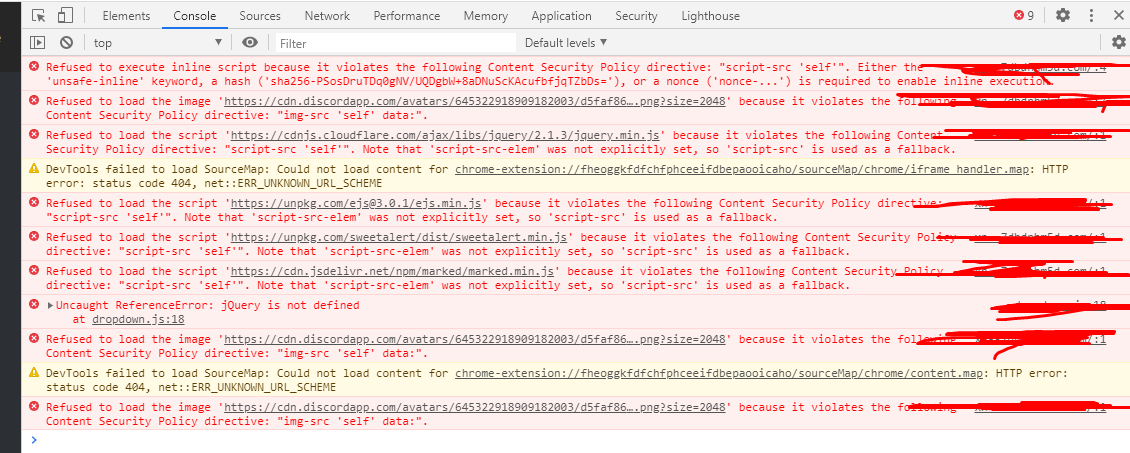
and its not loading images and stuff
how can i fix that
lusty quest
your security Policy doesnt allow it.
earnest phoenix
i heard about the mate tag
lusty quest
but i dont use Windows VPS so idk
earnest phoenix
bot i dont understand how to use this meta tag to make this works
lusty quest
idk im not a web dev. also i prefer to use Linux over windows on Server.
 glass steeple
in discord py how can i take channel as input from user to send message to that channel??
channel: discord.channel
lusty quest
i think he wants the channel object from the message
 spice pier
message.channel then?
surreal notch
how to download all my files from vsc
golden condor
Wdym @surreal notch
 misty sigil
Aren’t vsc files stored locally
 glass steeple
Taking color argument as channel and then saying channel not found
async def embed(c: discord.Colour, channel : discord.TextChannel, t, *, args=None):
    embedVar = discord.Embed(title = t, description=args, color=c)
await channel.send(embed=embedVar)```You just said it like 30 seconds ago
earnest phoenix
Hmm, i got something in my mind tho, show the code please
 fringe axle
The "setwelcome"?
      async run(message, args) {
        let wchannel = await db.fetch(`wchannel_${message.guild.id}`);
    if (!args[0]) {
return message.channel.send("No id provided");
}

if (!message.guild.channels.cache.get(args[0])) {
return message.channel.send("This channel aren\'t a part of this server");
}

            await db.set(`wchannel_${message.guild.id}`, args[0]);
            const embed = new MessageEmbed()
            .setDescription(`The welcome channel was set to ${message.client.channels.cache.get(args[0])}`)
            .setColor('#ea6ef1')
            .setAuthor('| Welcome Channel', 'https://cdn.discordapp.com/avatars/714745136122429491/e16289a6de8bd22fb433b1e029fe98e1.png?size=2048')
            .setTimestamp()
            .setFooter(`Requested by ${message.author.tag}`);
            message.channel.send(embed);
            }
          }
async run(message, args) {
let wchannel = await db.fetch(`wchannel_${message.guild.id}`);
if (!args[0]) {
return message.channel.send("No id provided");
}
console.log(args[0]);
if (!message.guild.channels.cache.get(args[0])) {
return message.channel.send("This channel aren\'t a part of this server");
}
await db.set(`wchannel_${message.guild.id}`, args[0]);
const embed = new MessageEmbed()
.setDescription(`The welcome channel was set to ${message.client.channels.cache.get(args[0])}`)
.setColor('#ea6ef1')
.setAuthor('| Welcome Channel', 'https://cdn.discordapp.com/avatars/714745136122429491/e16289a6de8bd22fb433b1e029fe98e1.png?size=2048')
.setTimestamp()
.setFooter(`Requested by ${message.author.tag}`);
message.channel.send(embed);
}
}``` delicate zephyr
@crisp geyser you can save a load of memory with intents
you dont technically need djs-light
pale vessel
try sending <#channelid> in the server
earnest phoenix
Can you try this and see what it logs into the console? @fringe axle
fringe axle
I'll try
delicate zephyr
it'll help but so will intents
earnest phoenix
Tf
fringe axle

earnest phoenix
My man, how did you define args
earnest phoenix
Not that
fringe axle
What then?
earnest phoenix
The part that has
let args = //whatever here in your main file
fringe axle
Uh
earnest phoenix
If it's index.js or whatever you named it
fringe axle
Don't have that
misty sigil
thats your problem
earnest phoenix
im developing a dashboard for my bot, and i built it first using Glitch, then after finishing it i downloaded the files to my Windows VPS, and after starting the dashboard on port 80 using a domain + cloudflare, im having those errors in console
https://prnt.sc/txk266
and its not loading imgaes and stuff, how to fix?
misty sigil
your using args when they don’t exist
fringe axle
Means?
misty sigil
Do you have an events folder?
earnest phoenix
@fringe axle ```js
async run(message, args) {
let argsC = message.content.split(" ").slice(1);
    let wchannel = await db.fetch(`wchannel_${message.guild.id}`);
if (!argsC[0]) {
return message.channel.send("No id provided");
}
if (!message.guild.channels.cache.get(argsC[0])) {
return message.channel.send("This channel aren't a part of this server");
}
        await db.set(`wchannel_${message.guild.id}`, argsC[0]);
        const embed = new MessageEmbed()
        .setDescription(`The welcome channel was set to ${message.client.channels.cache.get(argsC[0])}`)
        .setColor('#ea6ef1')
        .setAuthor('| Welcome Channel', 'https://cdn.discordapp.com/avatars/714745136122429491/e16289a6de8bd22fb433b1e029fe98e1.png?size=2048')
        .setTimestamp()
        .setFooter(`Requested by ${message.author.tag}`);
        message.channel.send(embed);
        }
      }```
Try this mate
fringe axle
Thanks
misty sigil
you can’t use args[0] without defining args
misty sigil
you can try message.mentions.channels.first()
but that’s only like #265156361791209475
delicate shore
ok so
fringe axle
Not your bad Master
delicate shore
i am using a npm package
delicate shore
        client.moderator.warn(message.guild.members.get(message.mentions.users.first().id), {
            reason: args.slice(1).join(" "),
            author: message.member
        }).then((warnData) => {
            console.log(warnData); // {...} (id, type, author, reason and more)
        });
}```Looks good
delicate shore
this is the code
earnest phoenix
Yea
delicate shore
it says client.moderator.warn(message.guild.members.get(message.mentions.users.first().id), { is not a func
fringe axle
Now I need to wait till someone joins
 delicate shore
ok
earnest phoenix
console.log(client.moderator.warn);```yeh
earnest phoenix
Did it log anything
delicate shore
it just says
fringe axle
OMG
delicate shore
message.guild.members.get is not a function
earnest phoenix
Yea
fringe axle
@earnest phoenix THANKS SOOOO MUCH!
earnest phoenix
Np
fringe axle
Great help!
delicate shore
it isn't?
earnest phoenix
@delicate shore did you forget cache
delicate shore
lol
@earnest phoenix client.moderator.ban(message.guild.members.cahce.get(message.mentions.users.first.id), { ^ TypeError: Cannot read property 'get' of undefined
earnest phoenix
cache not cahce
delicate shore
;-;
golden condor
Databases
golden condor
Then... Why do it the second time?
fringe axle
@earnest phoenix my next mission: Message edited/Deleted logs.
earnest phoenix
First happens in messageUpdate event and second in messageDelete event
@delicate shore Show code of where that happens
delicate shore
k
delicate shore
                if(!args[0]) return message.reply(`Correct usage is sptempban @user time reason For eg- sptempban @roblox 1d playinf roblox`)

        if(!args[1]) return message.reply(`Correct usage is sptempban @user time reason For eg- sptempban @roblox 1d playinf roblox`)
                if(!args[2]) return message.reply(`Correct usage is sptempban @user time reason For eg- sptempban @roblox 1d playing roblox`)

        if(!message.member.hasPermission("BAN_MEMBERS")) return message.reply(`You Don't have permission to use this XD`)
         client.moderator.ban(message.guild.members.cache.get(message.mentions.users.first.id), {
            time: ms(args[1]),
            reason: args.slice(2).join(" "),
            author: message.member
        }).then((banData) => {
            message.channel.send(banData)
           console.log(client.moderator.ban)
           console.log(banData); // {...} (id, type, author, reason and more)
        });
    }
Easy but not that much
earnest phoenix
Hmm
earnest phoenix
Yea
delicate shore
i am so stopid
earnest phoenix
But check if there's a mention exists tho
delicate shore
op
fringe axle
@earnest phoenix I need help... xD
earnest phoenix
What do you need help in, I'm here
fringe axle
      async run(message, args) {

try {
    if (message.author.bot) return;
    const snipes = message.client.snipes.get(message.channel.id) || [];
    snipes.unshift({
      content: message.content,
      author: message.author,
      image: message.attachments.first()
        ? message.attachments.first().proxyURL
        : null,
      date: new Date().toLocaleString("en-GB", {
        dataStyle: "full",
        timeStyle: "short",
      }),
    });
    snipes.splice(10);
    message.client.snipes.set(message.channel.id, snipes);
    let embed = new MessageEmbed()
      .setTitle(`Message deleted!`)
      .setDescription(
        `**The user ${message.author.tag} has deleted a message in <#${message.channel.id}>**`
      )
      .addField(`Content`, message.content, true)
      .setColor(`RED`);
    let channel = message.guild.channels.cache.find(
      (ch) => ch.name === "member-log"
    );
    if (!channel) return;
    channel.send(embed);
  } catch (e) {}
    }
};
IDk what I use in the CommandHandler
const { Command } = require('discord.js-commando');
const { prefix } = require('../../config.json');
    const { MessageEmbed } = require('discord.js');
    const fs = require('fs');
    const Discord = require('discord.js');
    const Canvacord = require("canvacord");
    const db = require('quick.db');
    const canvas = new Canvacord()

    module.exports = class HelpCommand extends Command {
      constructor(client) {
        super(client, {
          name: 'level-on',
          aliases: ['on, levelsystem-on'],
          group: 'guild',
          memberName: 'levelon',
          description: 'Enable the level system',
           });
      }
``` My CommandHandler in every command looks like this ^^^^^^how to make my folder into zip
fringe axle
Wait
I have a better idea
client.on("messageDelete", async (message) => {
  require("./commands/guild/messagedelete")(message);
  try {
    if (message.author.bot) return;
    const snipes = message.client.snipes.get(message.channel.id) || [];
    snipes.unshift({
      content: message.content,
      author: message.author,
      image: message.attachments.first()
        ? message.attachments.first().proxyURL
        : null,
      date: new Date().toLocaleString("en-GB", {
        dataStyle: "full",
        timeStyle: "short",
      }),
    });
    snipes.splice(10);
    message.client.snipes.set(message.channel.id, snipes);
    let embed = new MessageEmbed()
      .setTitle(`Message deleted!`)
      .setDescription(
        `**The user ${message.author.tag} has deleted a message in <#${message.channel.id}>**`
      )
      .addField(`Content`, message.content, true)
      .setColor(`RED`);
    let channel = message.guild.channels.cache.find(
      (ch) => ch.name === "member-log"
    );
    if (!channel) return;
    channel.send(embed);
  } catch (e) {}
    }
);
@earnest phoenix can this work?
No, It doesn't. xD
earnest phoenix
Of course it wouldn't, client.snipes is not a property of client natively
fringe axle
means?
earnest phoenix
Also unshift() is not even a thing
fringe axle
uh
earnest phoenix
message.client.snipes = new Discord.Collection();```I don't see that request.charAt anywhere in the code you showed
It's in the index.js in the 102nd line
earnest phoenix
Hmm then idk where that is
Search for that i guess
Lol
Anyone know the rate-limits of webhooks?
fringe axle
Ok
misty sigil
try const { MessageEmbed } = require ('discord.js') at the top
surreal notch
how to make my folder into zip
earnest phoenix
Wot
misty sigil
make a zip file
delicate shore
i need help
surreal notch
how
misty sigil
put stuff in zip file
earnest phoenix
@delicate shore help in
misty sigil
you can do it in the right click menu afaik
delicate shore
as u can see here
in this pic
it should be banData.id
only
i use that
but it says cannot read property id of undefoned
undefined
surreal notch
ok i got it
earnest phoenix
banData is undefined
delicate shore
no
misty sigil
well it’s kinda obvious banData is undefined
delicate shore
rest everything is cool
rest everyhting works
reason
user id
author id
eveyrhting
earnest phoenix
Uhh, what has banData.id has to offer
golden condor
User who was banned?
 midnight blaze
why not get the id of the user in a different way? You really need to use banData.id for that?
fringe axle
@earnest phoenix I need to define member and message in here client.on("messageDelete", async message => { but how?
midnight blaze
I see, interesting 
golden condor
const member = message.member
fringe axle
Okay
IT WORKED! Thanks!
@earnest phoenix
client.on("messageUpdate", async (oldMessage, newMessage) => {
  const member = message.member
  let embed = new MessageEmbed()
      .setTitle(`New message edited`)
      .setColor(`GREEN`)
      .setDescription(
        `**The user ${oldMessage.author.tag} has edited a message in <#${oldMessage.channel.id}>**`
      )
      .addField(`Old Content`, oldMessage.content, true)
      .addField(`New Content`, newMessage.content, true);

    client.channels.cache.get(lchannel).send(embed);
    const message = message
});
why do you have that
fringe axle
Okay
pale vessel
like, message IS message
fringe axle
Wait
After I deleted it
client.on("messageUpdate", async (oldMessage, newMessage) => {
  const member = message.member
  let embed = new MessageEmbed()
      .setTitle(`New message edited`)
      .setColor(`GREEN`)
      .setDescription(
        `**The user ${oldMessage.author.tag} has edited a message in <#${oldMessage.channel.id}>**`
      )
      .addField(`Old Content`, oldMessage.content, true)
      .addField(`New Content`, newMessage.content, true);

    client.channels.cache.get(lchannel).send(embed);
});
Both
pale vessel
what
midnight blaze
@pale vessel I see people using this oldMessage, newMessage wrong xd
earnest phoenix
const member = oldMessage.member;```what's message for anyway
fringe axle
Okay?
pale vessel
where's line 133
fringe axle
And then I delete "oldMessage"?
earnest phoenix
No
fringe axle
uh?
pale vessel
line 133
fringe axle
const member = oldMessage.member;
client.on("messageUpdate", async (oldMessage, newMessage) => {
  const member = oldMessage.member;
  const embed = new MessageEmbed()
      .setTitle(`New message edited`)
      .setColor(`GREEN`)
      .setDescription(
        `**The user ${oldMessage.author.tag} has edited a message in <#${oldMessage.channel.id}>**`
      )
      .addField(`Old Content`, oldMessage.content, true)
      .addField(`New Content`, newMessage.content, true);

    client.channels.cache.get(lchannel).send(embed);
});
restart your bot?
earnest phoenix
Just change
const member = message.member;```
To
```js
const member = oldMessage.member;```Yea

 earnest phoenix

fringe axle
Worked, thanks!
 slender thistle
No shit?