#development
1 messages · Page 1139 of 1
 earnest phoenix
 modest maple
Assembly Programming Tutorial - Assembly language is a low-level programming language for a computer or other programmable device specific to a particular computer architecture in contrast to
 pure lion
Why thank you cry
 fallow steppe
And when I use server variables ( server name / id / owner ), will it return id of the new joined or left guild? @misty sigil
 misty sigil
yea
fallow steppe
Thanks!
 slender thistle
we're not personal dogs to teach everyone basics
Well, why do you feel obliged to help everyone in that case
 misty sigil
It returns full guild object @fallow steppe
fallow steppe
Oki
misty sigil
You can do anything you can do with message.guild
 solemn latch
the docs tell you whats returned
earnest phoenix
most of the time i just assist people into making a conclusion themselves
fallow steppe
I want to create a server log ( a channel that logs server joins and leaves ) so thats why I asked
 amber fractal
Except the people that dont ever come to a conclusion
Just walk in circles with them then say you have to leave
earnest phoenix
unfortunately
earnest phoenix
assembly is fun
pure lion
I want to learn anyway
earnest phoenix
wait till you get into cpu-specific instructions and machine code
amber fractal
Well yeah, it's a low level lang they all look like hell
slender thistle
why not give up and carry on if you don't feel like not being hostile towards them in that case
pure lion
wait till you get into cpu-specific instructions and machine code
Actually sounds like fun
earnest phoenix
machine code is absolute hell
amber fractal
I meant they walk themselves in circles to the point trying to help them is just infuriating
modest maple
until you realise about Thread and memory safety
 faint prism
wait till you get into cpu-specific instructions and machine code
@earnest phoenix Yeah lol. Different Assembly languages for specific cpus and architectures
amber fractal
You try to help and they just dont listen
slender thistle
Then stop trying and do your business
misty sigil
assembly is weird
fallow steppe
So when I try to trigger the event, I do client.on.guildCreate { ... } @misty sigil?
pure lion
machine code is absolute hell
010001001000101010101010101010100
amber fractal
That's what I do...
pure lion
Boom I made an os
amber fractal
That's why I said tell them you have to go and leave
solemn latch

modest maple
thats not machine code......
faint prism
Well assembly is just very low-level, not machine code. Just more so than languages we are used to
pure lion
No offense but why the fuck do you write machine code
misty sigil
@fallow steppe wouldn't it be
client.on("guildCreate", (guild) => {

})```?machine code is binary
 pale vessel
no
solemn latch
your missing a ,
misty sigil
yes
faint prism
yes
fallow steppe
@misty sigil i'd use this instead then?
pure lion
@misty sigil you are a verified dev-
earnest phoenix
we had a specific set of instructions in CS that we had to translate from binary without a calculator, i wanted to cry
 queen violet
No offense but why the fuck do you write machine code
@pure lion you'll never get people writing machine code anymore, it's just what your compiler outputs
solemn latch
yeah looks right now
misty sigil
lmao i am
misty sigil
i just forgot a ,
modest maple
and read the machine code for exploits
fallow steppe
But what in the world is this channel rn
pure lion
we had a specific set of instructions in CS that we had to translate from binary without a calculator, i wanted to cry
Okay now this sounds like hell
faint prism
@pure lion you'll never get people writing machine code anymore, it's just what your compiler outputs
@queen violet Unless you use JIT 🙂
 jolly wave
RIP
misty sigil
But what in the world is this channel rn
@fallow steppe Great question.
queen violet
machine code is binary
@earnest phoenix people writing it don't just write binary tho you can write text that compiled directly to machine code
earnest phoenix
yeah im aware
queen violet
@queen violet Unless you use JIT 🙂
@faint prism unless you use any non native language
jolly wave
Error 503 Backend fetch failed
Backend fetch failed
Guru Meditation:
XID: 163578730
xd
modest maple
yes
pure lion
Btw someone told me they wrote their bot in "010" then proceeded to show me binary

jolly wave
oh
earnest phoenix
this is a big reason why intermediate languages exist in the first place
modest maple
dbl backend is taking a shit
its not a new issue
its just slowly happening more and more as the backend burns into a smoldering ash
solemn latch
they where hiring some new devs, hopefully itll get better
pure lion
Time to buy a host and not host on your 39 year old laptop
misty sigil
yea 
pure lion
Wouldn't it be epic if I got hired x)
queen violet
this is a big reason why intermediate languages exist in the first place
@earnest phoenix they exist cuz people were lazy with writing compilers
modest maple
Idk why they even want backend JS devs
earnest phoenix
lol
solemn latch
i wouldnt even want to get hired
earnest phoenix
i believe dbl's backend is straight up a dumpster fire
modest maple
Id just rip the entire backend out and start over
modest maple
Any reasonable backend dev doesnt want to touch that shit show
pure lion
I'd just do crtl a and rewrite the entire thing
earnest phoenix
their frontend was a disaster a year back, don't know if it still is
misty sigil
you'd need to lmao
queen violet
Can you imagine working for DBL
solemn latch
you gotta understand they get a shitton of people visiting the site
pure lion
Yeh
 rustic nova
can't be that bad
@pure lion
 modest maple
The backend is a dumpster file which suprises me considering that the site really isnt very complicated in design
earnest phoenix
Can you imagine working for DBL
let me translate that for you, can you imagine being underpaid
pure lion
The backend is a dumpster file which suprises me considering that the site really isnt very complicated in design
Mood tbh
 sudden geyser
'love' questionable
misty sigil
but it works so lmao
queen violet
The backend is a dumpster file which suprises me considering that the site really isnt very complicated in design
@modest maple ye like holy shit it's a fucking bot list
amber fractal
Just gotta get veld to remake it
earnest phoenix
no
pure lion
How hard is it to make queries to a db
queen violet
but it works so lmao
@misty sigil but it doesn't 10% of the time
pure lion
Smh
earnest phoenix
veld's code is so bad
sudden geyser
not hard
modest maple
Like people shit on discord for being unstable then you look at DBL's backend and realise that you know, DBL is more likely to be fucked
misty sigil
20% of the time
amber fractal
gotta get actual devs to remake it then?
pure lion
FUCK IT IM MAKING DBL 2.0 (backend only ofc)
pale vessel
development moment
slender thistle
^
earnest phoenix
if you want to do something as big as DBL's scale you need a performant language
earnest phoenix
yes really
misty sigil
dbl is quite big
slender thistle
Hi this is #development
solemn latch
hi development, im dad
misty sigil
oh right
modest maple
yes and we're talking about dev stuff shiv <3
pale vessel

earnest phoenix
we're having a development related conversation
faint prism
#development is about developing bots
amber fractal
not just bots
slender thistle
very indirectly tbf
modest maple
Sure you might need some framework to not be a shitshow like dbl already is
earnest phoenix
node as backend for this scale is shit mainly because it's singlethreaded, you need to be able to push your machine specs to the limit if you want to squeeze out performance
modest maple
But even Flask and Python would be enough
misty sigil
@faint prism bots is in brackets, it can be any type of development
modest maple
Hell Uvicorn and python can handle more requests in a minute than DBL handles in a month
earnest phoenix
knowing how to thread and manage threads in programming is extremely useful and can be a huge performance booster to apps
modest maple
It just you know, needs to not be a burning reck
faint prism
@faint prism bots is in brackets, it can be any type of development
@misty sigil It's parenthesis tyvm
And I think that implies it should be related to bots
slender thistle
not exactly
amber fractal
It's general development...
 cinder patio
Hey, on a similar topic, do y'all think using node.js for a game server is a good idea
faint prism
no?
earnest phoenix
it's just a pointer to "hey you can ask questions about your bot code here"
amber fractal
Probably not
misty sigil
Hey, on a similar topic, do y'all think using node.js for a game server is a good idea
@cinder patio no.
slender thistle
Any development-related discussion is fine, it's just that Discord bots are mainly the topic because this is mainly a support server for a bot list website
faint prism
Gotcha
amber fractal
C++ for that stuff is pretty nice I believe
earnest phoenix
almost all triple a multi games use cpp yeah
modest maple
even as a backend streaming data needs to be quick
faint prism
It's also a super insecure language
amber fractal
Well it's not thread safe is it?
modest maple
not if you can actually code it properly lol
earnest phoenix
wym i love BSODing my windows by messing around with raw memory
amber fractal
That's why they usually have devs that know what they're doing
Unless it's activision 
modest maple
Its native, if you're scared about not knowing what youre doing with memory safety or thread safety use rust and have it enforce it on you lol
faint prism
misUsing C++ is the leading cause for memory leaks though iirc
earnest phoenix
yup
amber fractal
that goes for any lang tho
faint prism
Not Rust
earnest phoenix
java
amber fractal
memory leaks?
amber fractal
all langs can get mem leaks
modest maple
its just much harder because the compiler enforces you to standards
faint prism
I believe Rust was made to prevent that
cinder patio
It's gonna be a multiplayer browser game so I am not sure what to use exactly. I just started coding the server in javascript but I dunno
modest maple
Rust was made for that
misty sigil
having 130 message events is one of the major causes of memory leaks in new bot developer's code.
modest maple
But you can still do with thinks like unsafe rust
faint prism
Then they deserve memory leaks lol
fallow steppe
@misty sigil about that, where can I read about guild properties?
cinder patio
By what to use I meant which programming language
fallow steppe
Like name, id, owner etc
faint prism
Can't force a driver to wear a seatbelt ig
modest maple
There are some things you just cant do safely
misty sigil
https://discord.js.org/#/docs/main/stable/class/Guild @fallow steppe

Discord.js is a powerful node.js module that allows you to interact with the Discord API very easily. It takes a much more object-oriented approach than most other JS Discord libraries, making your bot's code significantly tidier and easier to comprehend.
fallow steppe
Ok
 left nacelle
just downloaded discord.js
modest maple
Another reason Rust has an unsafe alter ego is that the underlying computer hardware is inherently unsafe. If Rust didn’t let you do unsafe operations, you couldn’t do certain tasks. Rust needs to allow you to do low-level systems programming, such as directly interacting with the operating system or even writing your own operating system. Working with low-level systems programming is one of the goals of the language. Let’s explore what we can do with unsafe Rust and how to do it.```Like use http post calls for logins
left nacelle
forgot ti downlosd it earlier
pure lion
Can I host a mongodb cluster through nginx?
pale vessel
i thought you gave up @left nacelle
faint prism
"Trust me, I know what I’m doing.”
C++ devs
pure lion
Big fucking mood right there
left nacelle
im trying again
modest maple
Yes?
left nacelle
@pale vessel
pale vessel
good luck this time
 surreal notch
how to send two embed in same command in cmd handler discord.js v12
modest maple
so you shouldnt even need it and idk if it even can do it with DBs
pale vessel
yes
left nacelle
i got the latest versions
pale vessel
that's a starter i guess
surreal notch
how to send two embed in same command in cmd handler discord.js v12
pale vessel
send it twice
solemn latch
iirc, bots can only do one embed per message
surreal notch
hOw
pale vessel
like, send it normally
solemn latch
so you have to send them in two seperate messages
surreal notch
I saw someone doing that
faint prism
Just msg.Reply() twice
left nacelle
bot still offline
pale vessel
only webhooks can have multiple embeds in one message
solemn latch
^
misty sigil
try running it lad
 sonic lodge
you misspelled "require"
surreal notch
faint prism
That's two. The break in the red line
sonic lodge
also require accepts a string
faint prism
But, make your bot reply twice with 2 seperate embeds
surreal notch
module.exports = {
  name: "help",
  usage: "help",

  category: "extras",
  run: async (client, message, args) => {
  const embed = new discord.MessageEmbed()
.setTitle("Command List")
.setDescription("Here is all my commands!")
      .setFooter("Powered By Ragnar")
      .setTimestamp()
      .setColor("#FF0000")
   .setThumbnail("https://images-ext-2.discordapp.net/external/uKya972PBlPLPFbA7nQ8Wxcg511fSrkN-kptVoq_fnM/%3Fsize%3D2048/https/cdn.discordapp.com/avatars/730114390036316251/c301fd4e6f626eb256b9ac381b6bf733.png?width=702&height=702")
.addField("r!help","Shows this Message")
.addField("r!emoji","Shows the number and types of emoji's in server!")
.addField("r!help","Shows this message")
.addField("r!help","Shows this message")


return message.channel.send(embed)

const help= new discord.MessageEmbed()
.setTitle("Join our Support server and Invite the Bot")
      .setFooter("Powered By Ragnar")
      .setTimestamp()
      .setColor("#FF4500")
.setThumbnail("https://images-ext-2.discordapp.net/external/uKya972PBlPLPFbA7nQ8Wxcg511fSrkN-kptVoq_fnM/%3Fsize%3D2048/https/cdn.discordapp.com/avatars/730114390036316251/c301fd4e6f626eb256b9ac381b6bf733.png?width=702&height=702")

  .addField("Join Support Server:", "[Click Here](https://discord.gg/KUcHXhC)")
.addField("Invite Bot:", "[Click Here](https://discord.com/oauth2/authorize?client_id=738811950066040882&permissions=8&scope=bot)")
  message.channel.send(help);

}}```<channel>.send(embed1)
<channel>.send(embed2)
pale vessel
lol
solemn latch
your returning on the first send
surreal notch
I tried something this but dont working
solemn latch
return message.channel.send(embed)
surreal notch
oh
solemn latch
return means dont do anything after this
pale vessel
clicks invite
left nacelle
ughhhhh module not found
solemn latch
npm i discordjs
left nacelle
all i need is a module to fix it
pale vessel
did you actually install it?
pale vessel
npm i discord.js
left nacelle
i did
solemn latch
in the correct folder?
surreal notch
@solemn latch it worked ty
solemn latch
np
misty sigil
@left nacelle Do you have a package.json
surreal notch
@left nacelle do it in package.json
misty sigil
node . looks for the start in package.json afaik
pale vessel
in the picture, yes
pale vessel
who are we talking to again
surreal notch
lol
misty sigil
try just node file.js
solemn latch
windows key + shift + s
misty sigil
file being your bot file name
solemn latch
then control + v to paste into discord
surreal notch
simply press prt sc
sonic lodge
alt + prtscn for just the selected window
surreal notch
before delete
solemn latch
print screen is so far away tho
sonic lodge
hotkeys, use em
solemn latch
🤔
solemn latch
windows key + shift + s is snipping tool
sonic lodge
sniping tool? that's illegal
misty sigil
you dont need discord.js in there
surreal notch
oh
misty sigil
you're trying to start it
surreal notch
I open manually by search
misty sigil
try node index.js or node whateveryourfilescalled.js
left nacelle
someone told me to do that
surreal notch
@sonic lodge no
sonic lodge
i was kiddingggggg
misty sigil
what is your bot file called @left nacelle
pale vessel
it's index.js
left nacelle
Discord Bot
pale vessel
in the picture
misty sigil
try node index.js
left nacelle
somethinf supposed to happrn?
misty sigil
yes
solemn latch
it runs the index.js file
left nacelle
nothing haplens
solemn latch
did we confirm djs is installed
left nacelle
pale vessel
oh jeez
misty sigil
are you immediately cancelling it using Ctrl + C
have you tried acc running it the normal vsc way?
earnest phoenix
use sharex to screenshot your screen, actual pictures of your screen are hard to read
misty sigil
like, uh, with the debug button
misty sigil
yea
pure lion
gets js from Discord< I've done it!
misty sigil
you need to change that to a string
solemn latch
const Discord = require('discord.js');
left nacelle
i did that
modest maple
requiee
left nacelle
i did change my spelling
modest maple
👀
left nacelle
like i said
misty sigil
did you make it a string though
solemn latch
did you make it a string tho
misty sigil
give us up to date code please
solemn latch
from this error, it looks like its looking in the wrong location
because its not a string
left nacelle
its a string
left nacelle
one moment
solemn latch
then control v in discord client
solemn latch
we dont need the whole thing, just the updates
sonic lodge
move it to a config file and you won't have to cover it each time you screenshot
left nacelle
left nacelle
idk how but ok
solemn latch
control + s
left nacelle
ok done
solemn latch
run it again
with token in place, and save again
you have to save every time before running
left nacelle
IT WORKS
 pine aspen
gg
sonic lodge
you'll eventually get into the habit of saving every few characters of code you type
left nacelle
now i gotta make it speak
faint prism
My last problem was because I was trying to be abstract and use interfaces where I had to use concrete :/
left nacelle
i did
solemn latch
capital t
 distant sequoia

solemn latch
your code has it case sensitive
solemn latch
ay
faint prism
🎊
left nacelle
i feel dumb
misty sigil

A guide made by the community of discord.js for its users.
left nacelle
i didnt know i had to save it
faint prism
Trial and Error
solemn latch
programming takes time to get used to
distant sequoia
@left nacelle Trial and error is best way to learn....do some reading and then just fumble your way through a project.....eventually you'll be amazing
faint prism
Well, that and constantly soaking up new info
left nacelle
ur the smartest in the galaxy
distant sequoia
hello fellow weeb
faint prism
Lol Rick and Morty is considered an anime now, is it?
solemn latch
it is an animation
faint prism
Well that is what anime is short for
@left nacelle Trial and error is best way to learn....do some reading and then just fumble your way through a project.....eventually you'll be amazing
@distant sequoia Just wait until you get into design patterns/principles 🙂
 languid pollen
can anyone here help me? How do i randomize embeds? (discord.py)
 low marlin
Hi i need help
solemn latch
randomize?
slender thistle
Define "randomize"
distant sequoia
yes
faint prism
User a random number generator to pick an index in an embed array. Just stay within index's bounds @languid pollen
languid pollen
i have a couple of embeds and i want the bot to send a random chosen embed
low marlin
i wanna do if bot is disconnected (by clicking right click)(not by leave command or music end) how can we end the queue
slender thistle
Store them in a list and then use random.choice
faint prism
Or that
distant sequoia
works
faint prism
JS has some EZ extensions doesn't it? lol
distant sequoia
solemn latch
js.ez
low marlin
i wanna do if bot is disconnected (by clicking right click)(not by leave command or music end) how can we end the queue
@low marlin 👀
low marlin
where
faint prism
On message event, parse the string
misty sigil
else if(message.content === "thing"){
do thing
} @left nacelle
solemn latch
the guide you where linked to covers it
left nacelle
ok
 delicate shore
umm
left nacelle
what i did was copy and paste this
bot.on('message', msg=>{
if(msg.content === "test"){
msg.reply('Test Complete Bot is Active');
delicate shore
the lyrics command in my bot
just increases my bot ping
to 1k+
i need to add 30 seconds cooldown
faint prism
> bot.on('message', msg=>{
>     if(msg.content === "test"){
>         msg.reply('Test Complete Bot is Active');
      else if (msg.content === "anotherone")
          msg.reply('That's another one');
is it having trouble processing that?
might want to put the code that handles lyrics on a separate process
delicate shore
is it having trouble processing that?
might want to put the code that handles lyrics on a separate process
@solemn latch
i am not pretty much getting that
faint prism
just increases my bot ping
@delicate shore It sounds like you aren't doing it async
delicate shore
i am
solemn latch
nodejs is single threaded, if you have code that blocking, nodejs will not do anything until its done doing something
delicate shore
@delicate shore It sounds like you aren't doing it async
@faint prism my msg event is in async
solemn latch
so, if you have something that blocks code for extended periods of time(1 second is extended), ideally you hand that off to some other process
cinder patio
That doesn't mean that code inside it can't block the event loop
surreal notch
const Discord = require("discord.js");
const bot = new Discord.Client();
module.exports = {
  name: "avatar",
  aliases: ["av"],
  category: "Extras",
  usage: "avatar <user>",
  description: "Change the guild prefix",
run: async (client, message, args) => {
      let user = message.mentions.users.first() || message.author
      const embed = new Discord.MessageEmbed()
           .setColor(0x333333)
        .setAuthor(user.username)
        .setImage(user.displayAvatarURL());
    message.channel.send({embed})
}}```
I m using this but i want high quality avatar cmd^
surreal notch
lol
surreal notch
Okie
left nacelle
i has one more issue
delicate shore
i have*
left nacelle
bot requires code grant
delicate shore
guys*
left nacelle
lol
solemn latch
what in the world are you doing that needs a code grant
delicate shore
i on did purpose it
 left nacelle
ok it worked
delicate shore
distant sequoia

left nacelle
can u send me the link to the guide?
solemn latch
A guide made by the community of discord.js for its users.
misty sigil
yes there is
solemn latch
you should follow it in order
misty sigil
check the command handling section afaik
you should follow it in order
@solemn latch ^ cant stress that enough
solemn latch
you can just hit the next one when you reach the end
left nacelle
i found it
solemn latch
i also suggest skimming over most of the guide before doing anything more at all.
get a basic general understanding and whatnot
solemn latch
djs is known for being one of the easier libs, with the best guide and docs
misty sigil
yea
faint prism
lol
misty sigil
thats called coding
sonic lodge
the function is not closed
solemn latch
you seemed to delete a section of your code
left nacelle
?
solemn latch
every { needs a }
sonic lodge
function myFunction() {

// missing "}"
// the program doesn't know when the function ends```every ( needs a )
misty sigil
same goes for every [ needing a ]
solemn latch
every dbl needs a tim
left nacelle
still says theres a problem
earnest phoenix
he just straight copied code
 placid iron
https://discordpy.readthedocs.io/en/latest/api.html#discord.TextChannel.purge
https://img.rovi.me/I18vpH2yUn.png
ight so how do i get it to have the limit be the number of messages to delete rather than the number it searches through as the documentation is being poop
 solemn latch
just a heads up your searching for problems that contain b
so you cant see the problem
 opal plank
@left nacelle https://www.w3schools.com/js/
learn javascript before making a bot
or go buy Discord Bot maker or something
earnest phoenix
ew
pale vessel
don't give them ideas
 earnest phoenix
no ones gonna help them if they buy a bot
opal plank
they support team will
left nacelle
it says } expected
earnest phoenix
learn js
opal plank
at least 30 pages in. Then come back if you did it
misty sigil
read mdn too
misty sigil
ok.
earnest phoenix
i don't like how you've just copied the code
earnest phoenix
you pass through msg but you're using message?
left nacelle
mhm says no problems but doesnt send the msg
earnest phoenix
you wonder why
opal plank

earnest phoenix
go learn basic js
misty sigil
you can't access variables that arent made
solemn latch
js is amazing like that
pure lion
JeremEEEEEE
solemn latch
misty sigil
cLARKSOOOOOOOOOOOn
opal plank
Js compiler goes brrrr
solemn latch
lmao
misty sigil
theres docs on that
pure lion
I need to boost this server asap so I can be cool
earnest phoenix
how do i fetch a channel?
solemn latch
client.channels.fetch(id)
earnest phoenix
via the guild i mean
left nacelle
?
 haughty igloo
solemn latch
haughty igloo
solemn latch
guild.channels.fetch(id) iirc
sudden geyser
@opal plank aka it won't complain until it reaches that scope?
haughty igloo
Bot offline
opal plank
@sudden geyser precisely
earnest phoenix
nope not a method @solemn latch
 fringe axle
@lusty quest uh, hey
opal plank
Ts would've absolutely caught that
misty sigil
so, uh you use 11+ message listeners?
fringe axle
How can I get non-cached channels?
haughty igloo
so, uh you use 11+ message listeners?
@misty sigil wdym
fringe axle
Because welcome still not work. xD
misty sigil
show code.
 restive pebble
fetch
earnest phoenix
channels should always be cached
sudden geyser
Python's in the same boat as well but all JS looks out for before actually running it just looks for syntax
haughty igloo
@misty sigil wdym show code
earnest phoenix
@opal plank it did
haughty igloo
And which code
fringe axle
client.on('guildMemberAdd', async member => {
  let wchannel = await db.fetch(`wchannel_${member.guild.id}`);
    const channel = db.get(`wchannel_${member.guild.id}`)
  let text = `Welcome ${member} to ${member.guild.name}`
  client.channels.cache.get(wchannel).send(text)

});
unless you're using a library that removes caching features
misty sigil
the bot code
fringe axle
Because this is not working...
opal plank
@earnest phoenix it did not, his code compiled
earnest phoenix
have you confirmed that it's returning the correct id
so, uh you use 11+ message listeners?
@misty sigil the Turkish bot tutorials show them to make message listeners for each command idk why
i thought u were talking about my code
fringe axle
have you confirmed that it's returning the correct id
@earnest phoenix no, the channel ID is undefined
misty sigil
but das fuckin stupid
opal plank
@sudden geyser indeed only linter catches that. Tis why im loving TypeScript thus far
earnest phoenix
oh my fucking god
opal plank
@earnest phoenix nah, other person code
restive pebble
ts is hot x)
opal plank
misty sigil
ts hot :p
restive pebble
i had so many bugs before i used it now it shows during compile its very easy for me now x)
fringe axle
earnest phoenix
it's undefined
fringe axle
And, it's not sending anything in it.
restive pebble
lol
fringe axle
Yea, idk why.
faint prism
Yea, idk why.
@fringe axle
it's undefined
@earnest phoenix
fringe axle
      async run(message, args, { text }) {
    let wchannel = await db.fetch(`wchannel_${message.guild.id}`);

        db.set(`wchannel_${message.guild.id}`, `${text}`)
        const embed = new MessageEmbed()
        .setDescription(`The welcome channel was set to <#${text}>`)
        .setColor('#ea6ef1')
        .setAuthor('| Welcome Channel', 'https://cdn.discordapp.com/avatars/714745136122429491/e16289a6de8bd22fb433b1e029fe98e1.png?size=2048')
        .setTimestamp()
        .setFooter(`Requested by ${message.author.username}#${message.author.discriminator}`);
        message.channel.send(embed)
        }
      }
How I set the welcome channel with ID
faint prism
${text}
restive pebble
${text} ?
opal plank
why you passing text ?
opal plank
as an object?
earnest phoenix
this hurts
earnest phoenix
isnt the channel id supposed to be in the args array
restive pebble
u have to parse as object
earnest phoenix
I hurt myself
@fringe axle we do not condone these actions
fringe axle
uh
restive pebble
and read it
fringe axle
I'm confused...
restive pebble
try console.log(text)
opal plank
we do not condone these actions
@earnest phoenix unless you do this https://ptb.discordapp.com/channels/264445053596991498/272764566411149314/742415902821056633
fringe axle
I wrote it by myself.
try console.log(text)
@restive pebble did it.
"send is not defined"
earnest phoenix
@opal plank frick that hurt
restive pebble
it means no text x)
fringe axle
client.on('guildMemberAdd', async member => {
  let wchannel = await db.fetch(`wchannel_${member.guild.id}`);
    const channel = db.get(`wchannel_${member.guild.id}`)
  let text = `Welcome ${member} to ${member.guild.name}`
  client.channels.cache.get(wchannel).send(text)

});
oh my god
fringe axle
If someone joins ^^^^^^^^
earnest phoenix
because it doesn't know wtf wchannel is
that piece of code is not the issue, the issue is that you're setting an incorrect channel id
opal plank
how are you passing the text?
restive pebble
quick.db x)
earnest phoenix
lmao
 lusty quest
@fringe axle look up fetch
earnest phoenix
they're not erwin, it's why it is undefined
opal plank
makes sense
earnest phoenix
the channel id is in the args array
fringe axle
means what @lusty quest?
lusty quest
if you cant get a channel from the cache you can fetch them
left nacelle
how do i restart my bot
earnest phoenix
he has unused vars as well
opal plank
passing a string as object is also big brein
restive pebble
lmao
earnest phoenix
superbrain that's not the issue
fringe axle
if you cant get a channel from the cache you can fetch them
@lusty quest okay
earnest phoenix
how do i restart my bot
@left nacelle use a process manager
the channels are always going to be in cache, their issue is setting the wrong id in the database
solemn latch
since your just using node
control + c
left nacelle
i need to restart my bot cuz i made chanfes
fringe axle
Just replace cache with fetch?
 wheat terrace
hi
earnest phoenix
the channels are always going to be in cache, their issue is setting the wrong id in the database
@earnest phoenix
restive pebble
exit process
opal plank
@wheat terrace fuck off
fringe axle
hm.
lusty quest
ok then its not this issue
earnest phoenix
i need to restart my bot cuz i made chanfes
exit the process (ctrl + c) then start the node process
fringe axle
I don't copy
opal plank
take a guess 
fringe axle
I'm just new and try my best.
restive pebble
ok
earnest phoenix
not an excuse
fringe axle
Yea
 golden condor
No
fringe axle
That's why I asked here
golden condor
@earnest phoenix it is an excuse because everyone starts somewhere.
restive pebble
x)
golden condor
Everyone was a beginner once
fringe axle
Thanks
restive pebble
x)
earnest phoenix
yeah but you can't just come here and say shit like that
fringe axle
D:
earnest phoenix
this is like the fourth time im telling that the id is in the args array and you should be getting it from there, i don't know what the fuck you're doing with the text variable but it's undefined because you're not passing anything to it
solemn latch
typically you should learn js before making bots
earnest phoenix
if you're a beginner learn the language
restive pebble
x) this is a fight channel
fringe axle
I don't say shit. I'm new, coded a code that worked in my eyes.
solemn latch
fight me 1v1 halo @restive pebble
restive pebble
no
low marlin
i wanna do if bot is disconnected (by clicking right click)(not by leave command or music end) how can we end the queue
solemn latch
restive pebble
me dont play halo rip
left nacelle
now bot isnt doing anything
solemn latch
you stopped your bot
restive pebble
lmao
misty sigil
code.
earnest phoenix
solemn latch
it wont do anything
left nacelle
i started it again
restive pebble
start again rip
solemn latch
then your changes broke it
fringe axle
this is like the fourth time im telling that the id is in the args array and you should be getting it from there, i don't know what the fuck you're doing with the text variable but it's undefined because you're not passing anything to it
@earnest phoenix It's justw!setwelcome <id>and it worked but q.db say's it's undefined...
opal plank
prob bout to crash cuz he put some more copy pasted code
misty sigil
lol
low marlin
i wanna do if bot is disconnected (by clicking right click)(not by leave command or music end) how can we end the queue
@low marlin can someone tell me
opal plank
@left nacelle i know how to fix your bot
earnest phoenix
voiceStateUpdate
left nacelle
to Test to _test
misty sigil
we all do Not Erwin
restive pebble
npm test
opal plank
@left nacelle wanna know how to fix bot?
misty sigil
show us your code
fringe axle
Okay, I'm out.
faint prism
rhetoric
fringe axle
I'll fix it
earnest phoenix
i told you how to fix it
opal plank
restive pebble
x)
earnest phoenix
wait i swear we told him to learn js multiple times
four times
you chose to ignore what i said every single time
restive pebble
x)
misty sigil
love it
faint prism
@slender thistle token leaked https://discordapp.com/channels/264445053596991498/272764566411149314/742422833862410290
misty sigil
TOKEN LEAK
opal plank
@earnest phoenix he's doing the same here
earnest phoenix
bruh image ain't even loading
restive pebble
lol
faint prism
@left nacelle Please change your token ASAP
golden condor
You need to cover your token
misty sigil
is your function even closed
golden condor
Your token is important
 queen moss
Oml
faint prism
ty shiv 🙂 or whoever ghost mod
restive pebble
imagine who is even copying it lul
left nacelle
forgot to
earnest phoenix
uhh no you're bots dead
opal plank
im getting too heated with this one
left nacelle
i just made a new one
earnest phoenix
imagine hardcoding a token tho
restive pebble
x)
slender thistle
Can we calm down and carry on
misty sigil
show me your message event code @left nacelle
earnest phoenix
without the token
misty sigil
I said message event auric
earnest phoenix
learners
misty sigil
send all code acc
earnest phoenix
ffs
left nacelle
what
misty sigil
can you send it in code block
opal plank

faint prism
Well
opal plank
token leaked again
misty sigil

slender thistle
well
faint prism
He said he changed it since that
left nacelle
yeah i did
faint prism
Don't post tokens lol
left nacelle
i did
misty sigil
not a screenshot
left nacelle
const Discord = require('discord.js');
const bot = new Discord.Client();
const token = 'NzMyNzMyOTIzODMyMTcyNjA1.Xw44tg.11m0w2DVNS2hs5BJhcc7xcUu0Nw';
bot.on('ready', () =>{
console.log('This bot is online');
})
bot.on('message', msg=>{
if(msg.content === "_test"){
msg.reply('Test Complete Bot is Active');}
})
misty sigil
i did
@left nacelle
- It wasn’t all the code.
- It had the token
- It was a screenshot
opal plank
pure lion
Error: couldn't connect to server 127.0.0.1:28015, connection attempt failed: SocketException: Error connecting to 127.0.0.1:28015 :: caused by :: Connection refused :
connect@src/mongo/shell/mongo.js:362:17
@(connect):2:6
exception: connect failed
exiting with code 1
```oh boned i am oh say can you see how boned i amoh my bots offline
misty sigil
@left nacelle where is the if statement closed
earnest phoenix
he doesn't even login
faint prism
earnest phoenix
the bot doesn't login
sudden geyser
@left nacelle have you tried reseting your token
opal plank
const Discord = require('discord.js');
const bot = new Discord.Client();

const token = 'BIG_BRAIN';

bot.on('ready', () =>{
    console.log('This bot is online');
})

bot.on('message', msg=>{
    if(msg.content === "_test"){
        msg.reply('Test Complete Bot is Active');}
})```there
how hard was that?
misty sigil
god
pure lion
🥄
earnest phoenix
guys he didn't even do bot.login(token)
it's offline because you reset the token and it kicked the bot off the gateway, you need to update it in your code
opal plank
nah i didnt change anything, i just removed token and put in code block
faint prism
he regened the token
earnest phoenix
can you tell him to make the bot login
misty sigil
you’re forgetting bot.login @left nacelle
earnest phoenix
bruh said that 2 times but guess he ignored me
opal plank
@earnest phoenix he's ignoring all of us
im not even sure why we helping at this point
left nacelle
im not ignoring
misty sigil
ok is your bot online?
opal plank
you are
left nacelle
im just tyoing in code and dont see it
misty sigil
it will greatly help
opal plank
left nacelle
not on yet
misty sigil
what is your full code
opal plank
wel'll foward you docs, thats it
left nacelle
im forgetting bot.login
solemn latch
lol
earnest phoenix
frick this im getting my ice cream
opal plank
@earnest phoenix same here
solemn latch
they said that 10 minutes ago
left nacelle
ik
misty sigil
@earnest phoenix I’m off to do the same
left nacelle
thats why i said it
misty sigil
it’s 5pm almost 6pm here
pure lion
how does ufw work
misty sigil
what yes
solemn latch
whatcha mean how does it work
left nacelle
ok finally did it hopefully
slender thistle
This article contains some ufw commands https://www.digitalocean.com/community/tutorials/how-to-set-up-a-firewall-with-ufw-on-ubuntu-18-04
solemn latch
i do too ;p
pure lion
same
solemn latch
frontend often requires a creativity i dont have
pure lion
saaaaaaaame
lusty quest
did you got ufw running now?
misty sigil
you don’t need to br creative for backend
just think of idea, and no more creativity
pure lion
i had it running on the same day i bought my server
misty sigil
just code
pure lion
did you got ufw running now?
e
lusty quest
ok
 midnight blaze
@misty sigil you need express that is it
misty sigil
and a bit of creativity
 stable nimbus
I need a bit of help with something. I'm using discord.js v12.2. What I am trying to do is when a command has an error, I send an error response in the chat, and I want to add the error type into the embed, and TypeError I know just isn't enough.
const embed = new MessageEmbed()
        .setAuthor(message.member.displayName, message.author.displayAvatarURL())
        .setTitle(`:warning: Command Error :warning:`)
        .setColor(0xFF0000)
        .setDescription(`Hello <@${message.author.id}>! There was an error while running your command, if the problem persists, please stop running the command and contact my support team so we can get a fix! Thank you!`)
        .addField(`Support Server: `, `To report directly, come and visit the support server using [this](https://discord.gg/PagSDjA) link!`)
        .addField(`Report Command: `, `You can also use my handy dandy report command! (If you're unsure what it is, use \`/bugreport\`, or \`/helpfeedback\` for all feedback commands!)`)
        .addField(`If you submit through the bug report command, this was your recent command: `, commandName)
        .addField(`Type of Error: `, error)
        .setFooter(copyright.copyright);
        await message.delete();
        return await message.channel.send(`Hey <@${message.author.id}>!`, embed);
    }```
This is my codeerror.stack?
solemn latch
iirc
<Channel>.send(error) often sends the first line of the error
faint prism
Gib stacktrace
stable nimbus
Okay, well I want to put it into an embed so I'm wondering mainly now if I did it right @solemn latch
pure lion
how 2 nginx + mong shell?
Error: couldn't connect to server 127.0.0.1:28015, connection attempt failed: SocketException: Error connecting to 127.0.0.1:28015 :: caused by :: Connection refused :
connect@src/mongo/shell/mongo.js:362:17
@(connect):2:6
exception: connect failed
exiting with code 1
```oh boned i am oh say can you see how boned i amOkay yes how I have it is correct, I was just unsure.
@solemn latch You're correct, error does display the first line of the error.
 gilded plankBOT
 That's a user, not a bot...
 sinful belfry
@gentle wyvern bot commands in testing channels please
 gentle wyvern
Sorry
 wheat valley
Hey
misty sigil
hello.
 odd lichen
If you make a bot. Steal someone’s command handler if you are lazy
solemn latch
the guide also goes into dynamic command loading/execution which is really useful for bots with more than a couple commands
odd lichen
Otherwise make your own
stable nimbus
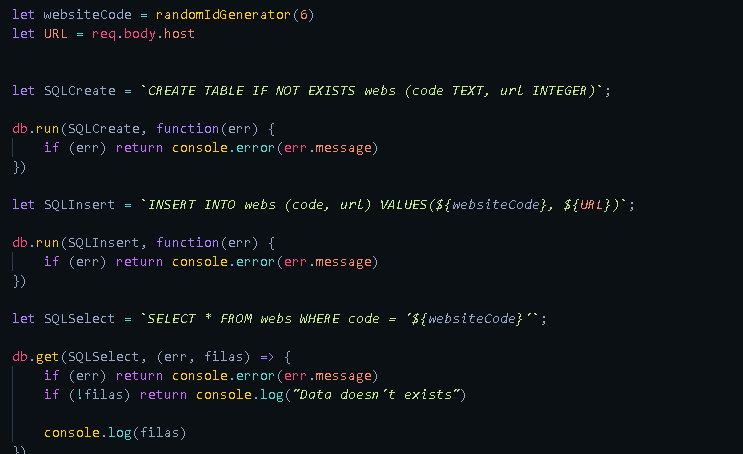
Unsure what I've done wrong, but a command is just not running even though I have everything set up correctly?
At least I think?



 stable nimbus
I get no error but I get no response from the bot.
faint prism
"webs" isn't a table
stable nimbus
const embed = new MessageEmbed()
            .setAuthor(message.member.displayName, message.author.displayAvatarURL())
            .setTitle(`:mosquito: The Bug Report! :mosquito:`)
            .setColor(0xFF0000)
            .setDescription(`Thank you for your report <@${message.author.id}>! Sorry that this is happening! My dev team will look into this report and get it fixed as soon as they can!`)
            .addField(`Note: `, `Please allow me about 5 seconds to send your report, I'll let you know when its in!`)
            .setFooter(copyright.copyright);
            message.delete();
            message.channel.send(`Hey <@${message.author.id}>!`, embed);

            setTimeout(function(){
                const embed01 = new MessageEmbed
                .setTitle(`:mosquito: The Bug Report! :mosquito:`)
                .setColor(0xFFD700)
                .setDescription(`Hello! There is a bug report from ${message.author.tag}! Here is the information!`)
                .addField(`The command is: `, command)
                .addField(`The error is: `, TheError)
                .addField(`This was made at: `, Date.now())
                .setFooter(copyright.copyright);

                const embed02 = new MessageEmbed()
                .setTitle(`:thumbsup: Success! :thumbsup:`)
                .setColor(0xA1EE33)
                .setDescription(`Thank you for your report <@${message.author.id}>! Every report helps me to be a better bot!`)
                .setFooter(copyright.copyright);

                client.channels.cache.get('742157639122681947').send(embed01);
                message.channel.send(`Hey <@${message.author.id}>!`, embed02);
}, 5000)```My current code
 ember lodge
But i created it on let SQlCreate @faint prism
faint prism
https://pythontic.com/database/sqlite/create table (Queries are the same)
https://www.sqlitetutorial.net/sqlite-create-table/
CREATE TABLE [IF NOT EXISTS]
ember lodge
it's for sqlite 3?
ember lodge
idk
 restive furnace
linux specific*
faint prism
linux is the kernal
restive furnace
and ubuntu uses linux kernel
faint prism
I doubt the kernel is responsible for fonts
restive furnace
well, manjaro (a different os using linux kernel aka different linux distro) does that error sometimes too
earnest phoenix
How to make a bot
midnight blaze
@earnest phoenix I know why
you are using repl.it
and you are trying to do canvas
faint prism
Fine, "linux-based OS specific error"
midnight blaze
you have first to install the font
repl doesnt have common fonts
I also see that you are using repl, because you have send a screenshot of your terminal
If you know what the problem is
then solve it?
earnest phoenix
How to make a bot
@earnest phoenix
faint prism
#502193464054644737 @earnest phoenix
midnight blaze
I wont explain all, but this should help you. You can simply google this, how to install fonts on repl for canvas.
const { registerFont } = require('canvas')
registerFont('fonts/OpenSans-Regular.ttf', { family: 'FontName' });
 eternal flame
oop
 heavy nova
How can I change the background of my bot
eternal flame
im still trying to figure this out, im trying to make my bot switch between 3 statuses very 10 minutes and do that continuously, im putting each status in a setTimeout and then wrapping the whole thing in a setInterval where the interval is 30 minutes (10 + 10 + 10) and i cant get it to work
midnight blaze
so?
well, if they do not have a function like registerFont
it wont work on repl
earnest phoenix
Hello I have a question.
midnight blaze
@earnest phoenix use canvas on repl. The rest is bs.
heavy nova
@heavy nova this is an embed..
@midnight blaze I'm new to this, how could I do it?
midnight blaze
create canvas
not embeds
does it? then it has a function
registerFont function
ok, good
so you dont get the error anymore?
pure lion
register font must be called before the creation of the canvas
midnight blaze
@pure lion not really, it works for me like that
pure lion
wha-
earnest phoenix
How hack discord
faint prism
wha-
pure lion
const Canvas = require('canvas')
Canvas.registerFont('path.ttf', {'FAMILY-SHIT': 'Big Dicc 44px'})
Canvas.createCanvas(69, 69)
midnight blaze
const { registerFont } = require('canvas') /// you take registerFont from the canvas
registerFont('fonts/OpenSans-Regular.ttf', { family: 'FontName' }); ///then you use it
How hack discord
@earnest phoenix You open chrome, press F12 -> Console, and type:while(true) alert('hacking dIsCoRd...')
stable nimbus
So this is something I actually need help on, and still haven't figured out.
I want my bots server count to update every 15 seconds, so when the status changes, it reloads the server count for the next time it gets displayed. But I've been trying to get this done with no success
client.on('ready', () => {
    console.log('Ready to RP!');
    guilds = client.guilds.cache.size;
    console.log(`Starting up in ${guilds} servers!`)


    const activities = [
        {
            'text': ' /help',
            'type': 'PLAYING',
        },
        {
            'text': ' my admins!',
            'type': 'LISTENING',
        },
        {
            'text': ' the /news command! (last updated on 07/01/2020)',
            'type': 'LISTENING',
        },
        {
            'text': ` over ${guilds} servers!`,
            'type': 'WATCHING',
        },
    ];
    setInterval(function() {
        const activity = activities[Math.floor(Math.random() * activities.length)];
        client.user.setActivity(activity.text, { type: activity.type });
    }, 15000);
});

client.on('guildCreate', (guild) => {
    guilds +=1
    console.log(`I am now in ${guilds} servers!`);
});
client.on('guildDelete', (guild) => {
    guilds -=1
    console.log(`I am now in ${guilds} servers!`);
});```
This is everything I've done so far, but I can't figure it out.@stable nimbus why not use client.guilds.cache.size instead of the guild variable declared at ready
as that'll be what it was when it was ready
plus while thats technically not api abuse having it at 15 sec
I'd still reccomend making it longer
 drifting wedge
get_prefix
    with open('prefixes.json', 'r') as f:
FileNotFoundError: [Errno 2] No such file or directory: 'prefixes.json'```it was working
its a json db
ill move it to a proper db soon
misty sigil
go learn quick db it isn't that hard lmao
drifting wedge
im using sqlite
earnest phoenix
@drifting wedge absolute path maybe?
misty sigil
naw thats json?
drifting wedge
i mean ill just move to sqlite
earnest phoenix
instead of relative
slender thistle
There's no file
drifting wedge
the file is in the same foler tho
slender thistle
is it the main file
drifting wedge
i thinks o
earnest phoenix
@drifting wedge then use ./