#development
1 messages · Page 983 of 1
 dapper lynx
Did that but still offline
 pale vessel
click more on top right and select logs
pale vessel
yeah, either change the script in procfile or rename bot to index
you should just rename the main file to index.js, it's simpler
can't read
wait
dapper lynx
My main file is index.js
dapper lynx
Change Procfile then because it says bot.js
pale vessel
yep
dapper lynx
Just wondering, to modify the bot can i just code in the github repo local directory then and then just commit and push in the app
pale vessel
yeah
dapper lynx
And since auto deploy it should just automatically change the bot to work on the new code
pale vessel
yep
dapper lynx
Alright so it doesn't requite effort then
pale vessel
that's how github works
 dapper lynx
Worker is changed to node index.js in resources but bot still offline
pale vessel
always check logs
dapper lynx
pale vessel
you need to install the ffmpeg buildpack
dapper lynx
In Heroku?
pale vessel
can you show more logs?
dapper lynx
That was everything in logs
 spiral coral
but module error
dapper lynx
spiral coral
pls help me
spiral coral
@pale vessel help me pls
pale vessel
npm i express
 wet dove
@spiral coral The error says that express is not found
pale vessel
aight i need to eat brb god of alabama
spiral coral
glitch error ?
dapper lynx
@pale vessel
 barren willow
You use your bot in heroku
spiral coral
so what do i do now?
wet dove
Glitch blocked pinging services
spiral coral
:/
barren willow
Glitch blocked pinging services
- glitch projects very slow
If your bot dont have webpanel go use heroku
barren willow
Very easy to use
dapper lynx
As someone who used Glitch for a few weeks once i can not recommend
barren willow
Gods of alabama u need to install node js in deploys
barren willow
Go github upload
spiral coral
okey
dapper lynx
Wait how do i install node js in deploys, i have node js buildpack?
barren willow
Go Check Youtube Videos
dapper lynx
I'll just wait for flazepe honestly i hate using YouTube as help
barren willow
Bende mk
dapper lynx
Either the videos are outdated or just don't actually help
barren willow
Tamam
pale vessel
@dapper lynx go to settings/buildpacks and add https://github.com/jonathanong/heroku-buildpack-ffmpeg-latest.git
after that redeploy manually
dapper lynx
Just add the link and redeploy?
Yeah nvm i can see it's installed ffmpeg
Ummmmm hmm
pale vessel
ye
dapper lynx
Bot turned on but i don't see anything logging like the status updating etc
Just says turned o
On*
Fattttt bruh i think
Hmm no it's just a few things broken
I believe the Cannot read property 'displayAvatarURL' of null error is coming from the fact i don't have a token for client
Because i can't use my help command without that
Well i can remove the author thing but it wouldn't look as cool lmao
Bot works fine and from what i can tell NO lag or choppy audio
Would i be able to just do the same thing for the client part and put process.env.token, or process.env.client or something
Then at config vars obviously
 twilit rapids
I believe the
Cannot read property 'displayAvatarURL' of nullerror is coming from the fact i don't have a token for client
@dapper lynx uh did you even read the error
dapper lynx
Yes, and from my experience with my code i am pretty sure it is down to what i think it is so that is what i am trying first
twilit rapids
...that you don't have a token for your client?
dapper lynx
No i have my bots token, then client too because my bot decides not to get guild or member info without it
twilit rapids
Because what that error says is that whatever you're calling 'displayAvatarURL' on is just null
dapper lynx
Yeah and it is because i didn't input a value for client, if i do then it doesn't give an error
I removed it to upload to heroku because i didn't want the token in my repo
 copper cradle
dude
you would've gotten a way diff error if that was the case
you wouldn't even be were you currently are
dapper lynx
Hmmm
Wonder why i fixed it then with my solution.....
changed the value of client.login to process.env.client then added it to config vars alongside token and inputted the client token and it now works and i don't get the error
dapper lynx
If i don't have the client.login then my bot can't get guild or member info so it outputs the error
Either way there is no point having a discussion about it if i fixed it
I have bot.login for the bot to come online
copper cradle
dude
do you have 2 instances?
dude
that was your problem, you were probably trying to access things from the instance you named 'client'
and since it wasn't logged in then everything was null
 restive furnace
always put client#login on the bottom of file
it makes sure that you have only 1 instance
copper cradle
it doesn't make sure
this dude has the following =
let bot = new <Discord>#Client();
let client = new <Discord>#Client();


bot.login('token'); //instance 1 logs in
client.login('token'); //instance 2 logs in
that's why they had that thing null, and thus why adding the token to it fixed it
dapper lynx
Since you think it's an issue i changed up my code so it now only uses bot rather than client, just had it the way i did because 1 it doesn't cause issues, and 2 because i was rushing to get my bot finished and i was tired so i just did it that way
copper cradle
wait
bc they were getting things from the 2nd instance, which wasn't authenticated, thus everything having to do with it would be null
now
The probles is kinda small
just bear to using 1 instance
dapper lynx
Btw i only had bot.login(TOKEN); at the end of my code not client.login too
copper cradle
it doesn't matter where you put them
dapper lynx
Again rushing, figured it worked anyway without so didn't put it
dapper lynx
Well i don't now but yeah i did basically
copper cradle
yeah
dapper lynx
I am aware where the issue arose but still
I was calling client in my code where client token was empty, whereas i should have been using just bot like bot.on etc rather than also client.on
dapper lynx
Anyway i gotta get some sleep, i already love how helpful everyone is in this server compared to the one i was trying to get help in previously
I also like the thought that i can turn off my computer and go to sleep and know that my bot will stay online the entire time
 wheat jolt
can someone explain me how the gateway intents work?
copper cradle
@dapper lynx have a good night
 low estuary
What time is it? For me its 10am
 dapper lynx
For me it's 9:12
About to go sleep because I was up all night so at least gotta get a quick sleep
Hey um hold on, my bot went offline
 candid granite
@pale vessel how did you spoof your bots online status to mobile?
dapper lynx
I deployed my bot to heroku but when I turned my PC off my bot still went offline
candid granite
sometimes if there are errors the bot crashes and you have to fix the issue
candid granite
^
 river thistle
hey i use sharding for my bot, but whenever the shard is not in my bot server where all the custom emojis are, it can't grab them
how can i fix that ?
 earnest phoenix
For some reason you can barely do stuff to your bot if you code it on c#
I coded my bot on c# and the stuff it can do wre very limited
dapper lynx
Bruh it's because of that fix I implemented so I don't have to use 2 instances
river thistle
btw coded in nodejs djs v12.2.0
dapper lynx
Now it tells me I can't use "bot" before initialization
earnest phoenix
I tried coding my bot on djs and the bot cant get online
dapper lynx
So I'd have to put the status thing after the bot comes online I believe but my PC is already off and I'm about to go to sleep
river thistle
nvm

Stack Overflow
im trying to get a larger discord bot of mine to save all custom emojis it grabs from another shard to a cache so I can serve better response times for each shard. To give a theoretical example, my...
dapper lynx
@earnest phoenix if you need some help I can help later on it's 9am for me I'll be online in 5 hours maximum because I'm going for a quick sleep
Hope you can get your problem fixed before then though
For discord.js I mean btw
restive furnace
https://stackoverflow.com/questions/59441311/caching-custom-emojis-from-another-shard
i dont use custom emotes (atleast yet) on my bot

Stack Overflow
im trying to get a larger discord bot of mine to save all custom emojis it grabs from another shard to a cache so I can serve better response times for each shard. To give a theoretical example, my...
 surreal sage
I have a giveaway command but it does let the bot win, how can i prevend it from doing?
like if i do if(user.id === client.user.id) {} then the script to reroll in the {} it will do it once if its the bot
if its the bot after it just lets the bot win
i want it to like loop
candid granite
what does it look like when you roll?
if(user.bot){
  return
} else {
  reroll
}```@surreal sage
candid granite
^
earnest phoenix
        wm[message.guild.id] = {
            toggle: 1,
            channel: cmention,
            message: args.splice(1).join(` `)
        };
        fs.writeFile("./welcomemessages.json", JSON.stringify(wm), (err) => {
            if (err) console.log(err)
        });
        message.channel.send(`The server welcome messages has been turned on.`);
    }```
im trying to make a customizable welcome message but i can add in the json file the ${member.user}
*Please help*👀 json db
 honest perch
@earnest phoenix just going to say that it will most likely corrupt
surreal sage
other words: it will break and all data will prob be lost
anyone show an example https://prnt.sc/t3p32w
im wanting to use it for giveaway cmd so that a bot cant win
earnest phoenix
          return
}```👀 thats just for once
i used that already but when it rerolls after that the bot can still win
surreal sage
try {
if (command === "giveaway") { //Requires "pretty-ms" module
        if(!message.member.hasPermission("ADMINISTRATOR")) return message.reply("You don't have permission!")
        const channel = message.mentions.channels.first() || args[0]
        if(!channel) return message.reply("Specify a channel!");
        const item = args[1]
        if(!item) return message.reply("Specify a item!");
        const time = args[2]
        if(!time) return message.reply("Specify the time!");
        const ms2 = ms(time)
        var milli = parseInt(ms2, 10)
        const embed = new Discord.RichEmbed()
        .setTitle("Giveaway! :tada:")
        .setDescription(item)
        .setColor("#7cfc00")
        .setFooter(`React 🎉 to join`)
        .setTimestamp()
        channel.send(embed).then(msg => { //nothing here>
          const intev = setInterval(() => {
            if(milli === 0) {
              clearInterval(intev)
              const peopleReacted = msg.reactions.get("🎉").users;
                var winner = peopleReacted.random()
                        channel.send(`${winner} has won ${item}! :tada:`)
                        const finalE = new Discord.RichEmbed()
                        .setTitle("Giveaway Over")
                        .setColor("#7cfc00")
                        .setDescription(`Winner: ${winner}`)
                        setTimeout(() => {
                          msg.edit(finalE) //test
                        }, 10)
            }
            milli = Math.floor(milli - 1000)
                    const embed = new Discord.RichEmbed()
        .setTitle("Giveaway! :tada:")
        .setDescription(`${item}\n\nTime Left: **${nice(milli)}**`)
        .setColor("#ff8c00")
        .setFooter(`React 🎉 to join`)
        .setTimestamp()
                    msg.edit(embed)
            msg.react("🎉")
          message.delete()
        }, 1010)
        })
    }
} catch (err) {
        console.log("Timeout")
}``` this is the code i madebtw it looks like its copied from someone but trust me i made it
i copy pasted it from my github
👀
surreal sage
thats just once too
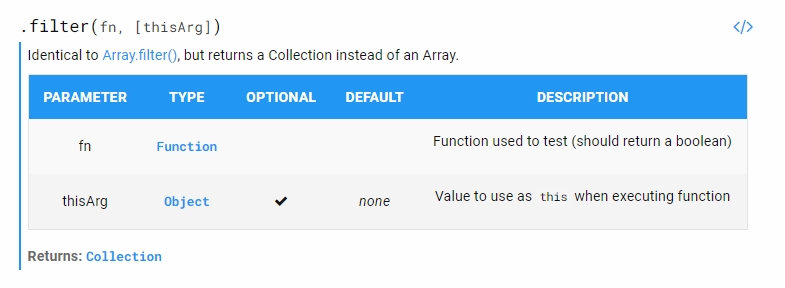
i have to use .filter on the user collection
but idk how to use .filter

Discord.js is a powerful node.js module that allows you to interact with the Discord API very easily. It takes a much more object-oriented approach than most other JS Discord libraries, making your bot's code significantly tidier and easier to comprehend.
earnest phoenix

A guide made by the community of discord.js for its users.
 blazing ravine
https://cdn.discordapp.com/attachments/712134171484487681/724198289930453053/unknown.png
https://media.discordapp.net/attachments/712134171484487681/724198237896179772/unknown.png

 earnest phoenix
can i see the code?
earnest phoenix
it doest know what the title means
blazing ravine
bro its showing this
earnest phoenix
soo its undefined
 golden condor
I'm using my raspberry pi and I keep getting segmentation fault when trying to start my bot, please can I have some aid
blazing ravine
@earnest phoenix its possible to fix ?
golden condor
 earnest phoenix
try node .
blazing ravine
darkless can u answer me pls
earnest phoenix
yes, wait 1min
blazing ravine
thnaks
earnest phoenix
@blazing ravine try this in your console npm i discordjs/discord.js
blazing ravine
ok
golden condor
install git
blazing ravine
@earnest phoenix can we make this from package.json
golden condor
yes
earnest phoenix
try to install the
https://git-scm.com/downloads
golden condor
repl should have git insatalled
earnest phoenix
why y using this webste ?
earnest phoenix
try it on your pc
blazing ravine
ye i try
 modest maple
repl also bad lmao
blazing ravine
not wrork
earnest phoenix
just try it
blazing ravine
yes i try before 10 min same packages
not work
givign the same error
ハーリさん (CF8) its possible to fix the problem ?
earnest phoenix
try on your pc (not in the website) to install the npm i discordjs/discord.js
earnest phoenix
install the git
blazing ravine
how
earnest phoenix
 lusty spade
hi, i have been wanting to make a warn command but it requires quick.db but when i try to install quick.db it always fails
earnest phoenix
try this client.on('debug', console.log);
blazing ravine
earnest phoenix
try now to play music
 errant remnant
Anyone good with designing & like to help me setup the my bots page?
earnest phoenix
@blazing ravine sorry, i dont know what else i have to do to resolve your problem
blazing ravine
😦
modest maple
what
errant remnant
giveaway?
 winter basalt
why #support and #661244601910296576
errant remnant
^
winter basalt
pretty sure #development is a good channel to ask
errant remnant
giveaway winner gets to do work for me
 autumn summit
i meant to say general 
errant remnant
i thought this channel would be the place to ask
autumn summit
ok
golden condor
glitch blocked ping services ibn case that is your question
 ancient sand
noup
golden condor
is it not staying online?
ancient sand
yeah
golden condor
glitch blocked ping services ibn case that is your question
ancient sand
how i can fix it
golden condor
sorry bout that
ancient sand
and he is fall down
golden condor
Try local host
winter basalt
use another host if you really need it
ancient sand
i need transfer file
ancient sand
to viusal studio
golden condor
or try status cake
ancient sand
whats that
winter basalt
 long yew
if (message.content.startsWith('.mute')) {
      if (!message.member.permissions.has('KICK_MEMBERS'))
      return message.channel.send('You need the "Kick members" permission to use the mute command')
      person.roles.add(mainrole)
      message.channel.send(`${person} was successfully muted.`)
    }
  })
what's wrong?
surreal sage
@long yew Send full script
long yew
ok
client.on('message', async message => {

    if (!message.member.permissions.has('KICK_MEMBERS'))

    let mainrole = message.guild.roles.cache.find(r => r.name === 'Muted')
    let person = message.guild.member(message.mentions.users.first())

    if (message.content.startsWith('.mute')) {
      if (!message.member.permissions.has('KICK_MEMBERS'))
      return message.channel.send('You need the "Kick members" permission to use the mute command')
      person.roles.add(mainrole)
      message.channel.send(`${person} was successfully muted.`)
    }
  })
bruh
surreal sage
this script is coded totally wrong
long yew
oof i realised
give me a sec
 client.on('message', async message => {

    let mainrole = message.guild.roles.cache.find(r => r.name === 'Muted')
    let person = message.guild.member(message.mentions.users.first())

    if (message.content.startsWith('.mute')) {
      if (!message.member.permissions.has('KICK_MEMBERS'))
      return message.channel.send('You need the "Kick members" permission to use the mute command')
      person.roles.add(mainrole)
      message.channel.send(`${person} was successfully muted.`)
    }
  })
better?
surreal sage
no
move the "let"'s to the command line
 client.on('message', async message => {
    if (message.content.startsWith('.mute')) {
      if (!message.member.permissions.has('KICK_MEMBERS'))
    let mainrole = message.guild.roles.cache.find(r => r.name === 'Muted')
    let person = message.guild.member(message.mentions.users.first())
      return message.channel.send('You need the "Kick members" permission to use the mute command')
      person.roles.add(mainrole)
      message.channel.send(`${person} was successfully muted.`)
    }
  })
~~ and the arguments are wrong too~~ nvm
long yew
ok
i'll try
client.on('message', async message => {
    if (message.content.startsWith('.mute')) {
      if (!message.member.permissions.has('KICK_MEMBERS'))
    let mainrole = message.guild.roles.cache.find(r => r.name === 'Muted')
    let person = message.guild.member(message.mentions.users.first())
      return message.channel.send('You need the "Kick members" permission to use the mute command')
      person.roles.add(mainrole)
      message.channel.send(`${person} was successfully muted.`)
    }
  })
@surreal sage
restive furnace
you didnt put {} on ur if
golden condor
the return]
earnest phoenix
why the message.replace doesnt work?
its not a function
and what i have to do?
@earnest phoenix
ancient sand
Error: The YouTube API key you provided was not a string.
at new YouTube (C:\Users\t4r3x3-PC\OneDrive\Desktop\music\node_modules\simple-youtube-api\src\index.js:26:44)
at Object.<anonymous> (C:\Users\t4r3x3-PC\OneDrive\Desktop\music\index.js:16:17)
at Module._compile (internal/modules/cjs/loader.js:1133:30)
at Object.Module._extensions..js (internal/modules/cjs/loader.js:1153:10)
at Module.load (internal/modules/cjs/loader.js:977:32)
at Function.Module._load (internal/modules/cjs/loader.js:877:14)
at Function.executeUserEntryPoint [as runMain] (internal/modules/run_main.js:74:12)
at internal/main/run_main_module.js:18:47
anybody
golden condor
@ancient sand it isn't a string
earnest phoenix
``` msg = wmessage.content.replace(@MEMBER, ${member.user});
^
TypeError: Cannot read property 'replace' of undefined``` anyone help
golden condor
wmessage.content is undefined
ancient sand
@golden condor
ancient sand
what to do
golden condor
Meaning it is not text
MAKE SURE YOUR YOUTUBE API KEY IS A STRING
oop
caps
Sorry
long yew
can anyone help?
client.on('message', async message => {
    if (message.content.startsWith('.mute')) {
      if (!message.member.permissions.has('KICK_MEMBERS'))
    let mainrole = message.guild.roles.cache.find(r => r.name === 'Muted')
    let person = message.guild.member(message.mentions.users.first())
      return message.channel.send('You need the "Kick members" permission to use the mute command')
      person.roles.add(mainrole)
      message.channel.send(`${person} was successfully muted.`)
    }
  })
what's wrong
ancient sand
@golden condor is 'api key' ?
long yew
golden condor
Yes
earnest phoenix
Can you guys learn some js & d.js
golden condor
lul
client.on('message', async message => {
    if (message.content.startsWith('.mute')) {
      if (!message.member.permissions.has('KICK_MEMBERS'))
    let mainrole = message.guild.roles.cache.find(r => r.name === 'Muted')
    let person = message.guild.member(message.mentions.users.first())
      return message.channel.send('You need the "Kick members" permission to use the mute command')
      person.roles.add(mainrole)
      message.channel.send(`${person} was successfully muted.`)
    }
  })
@long yew add return after 'KICK_MEMBERS'))
earnest phoenix
let wm = JSON.parse(fs.readFileSync("./welcomemessages.json", "utf8"));
let wmessage = wm[member.guild.id].message
msg = wmessage.content.replace(`@MEMBER`, `${member.user}`);
                           ^

TypeError: Cannot read property 'replace' of undefined```
the message from the json https://prnt.sc/t3q27s golden condor
Can u console.log(wmesage) and send the results
 surreal sage
How to use collection.filter
 vivid crescent
Is a say command a good idea, user requested and not too sure
earnest phoenix
@golden condor i found the problem, thanks for the help!!!
surreal sage
@vivid crescent you can do it but limit it so people dont abuse it
vivid crescent
E.g require mod role or something & a cooldown
surreal sage
put the name of the user in the embed or so
so i like if someone advertises thru it they can see what user send it
 gilded plank
 raw light
oh sry I missclicked
golden condor
How to use collection.filter
@surreal sage like this <collection>.filter(con => your condition here (e.g. con.username === "Dev"))
filter returns a collection
 placid cobalt
how do i make a channel manager that works? i followed the discord.js.org stuff but i just keep getting errors
 vagrant cedar
https://discordapp.com/channels/264445053596991498/265156286406983680/724225464566022164
how did he this rainbow line
im using nodejs and discordjs
placid cobalt
how do i create a channel through discord.js?
restive furnace
also u guys who sensors token, you just need to sensor the last thing after last ".", since anyone can get anyones 2 first parts of the token.
golden condor
how do i make a channel manager that works? i followed the discord.js.org stuff but i just keep getting errors
@placid cobalt wdym
What version discord.js are you on
placid cobalt
v12.something
golden condor
https://discordapp.com/channels/264445053596991498/265156286406983680/724225464566022164
how did he this rainbow line
im using nodejs and discordjs
@vagrant cedar gif
What is your code
vagrant cedar
just want to know how i can do a rainbow line in embed text
placid cobalt
oh sorry
i dont have any now
i was following the discord.js.prg page but that didnt work
placid cobalt
yeah
imm trying to make a server config command that sets up the server
eg channels and categories and roles
 golden condor
Example
placid cobalt
going for lunch rn brb
golden condor
<guild>.channels.create('name', options)
GuildChannelManager#create#options = type, topic, nsfw, bitrate (only vcs), userLimit (only vcs), parent (aka category), position, rateLimitPerUser (slowmode)
 lusty quest
did you call the correct key?
lusty quest
just to be sure
ancient sand
but no changes
surreal sage
i totally forgot how but how do i fetch a channel with a id in 11.5.1
lusty quest
client.fetchChannel() iirc
surreal sage
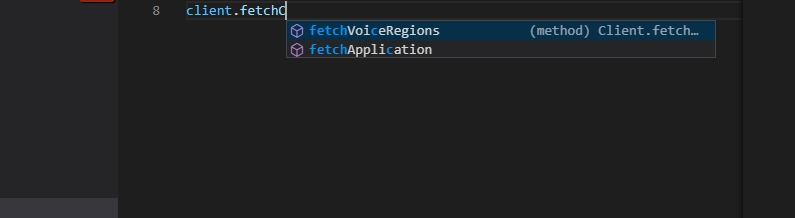 lusty quest
@ancient sand where did you define the Key in the Code?
ancient sand
lusty quest
and you pass the GOOGLE_API_KEY to the constructor?
@surreal sage client.channel.fetch then i think. idk it makes no sense to build new bots on V11 since they will be non functional in a few months
surreal sage
client.channels.get()?
lusty quest
get is for cached stuff
ancient sand
lusty quest
fetch get non cached stuff too
surreal sage
there is no fetch
lusty quest
then try get
wait i think channels are cached but messages and users can be non cached
lusty quest
glitch is crap
ancient sand
my bot so close to approving
golden condor
get a good host
lusty quest
did you pass the const value to your constructor?
its possible that you pass a invalid object to it
then it should also fail the string check
 digital ibex
hi, ```js
const Client = require('./classes/Client.ts');
why am i getting this error: SyntaxError: Cannot use import statement outside a module
lusty quest
did you export your client in your Client.ts?
ancient sand
digital ibex
yeah
digital ibex
i did
lusty quest
@ancient sand just run a simple line to see what your key value in your constructor gets. eg console.log(key)
@digital ibex how did you export the client?
lusty quest
there is stuff that is even more annoying
ancient sand
but same thing fuck me
hah
i can't do that
i need to do node_modules\simple-youtube-api\src\index.js
digital ibex
wut
lusty quest
did you call the module?
restive furnace
why everyone uses the music bot example and comes here complain "wHy tHiS nO wOrK???"..
autumn summit
ok i need some help or ideas
i made this “ticket bot”
and i wanna save transcripts as txt files and it all goes to one channel
how do I get all the info from a channel and put it into a txt?
digital ibex
hi, why am i getting this error: TypeError: client.getRESTUser is not a function ? my code: js devs.forEach(async (dev) => { console.log(dev); const user = await client.getRESTUser(dev); developers = user.username; console.log(developers); });
in javascript
im kinda confused
autumn summit
it’s not a function?
ancient sand
i get up bot hell yea
lusty quest
i never have seen getRESTUser as a function
digital ibex
 obtuse stone
this is no cap the best command ever
can someone please help me? i made a "_leave" command and it works but if i run the command when its not in a channel the bot will crash
 summer torrent
it is message.guild.me.voice.channel
golden condor
message.guild.me.voice.channel
obtuse stone
ok ill try that ty
i do have that
unless u mean where it says if(message.guild.voice.connection)
ok it worked! thanks
golden condor
yeah]
obtuse stone
will that be a problem
golden condor
change that to if(!message.guild.me.voice.channel)
obtuse stone
ok thanks
 tacit kiln
Error: Cannot find module 'quick.db'
Require stack:
- C:\Users\Hp\Desktop\Nuage-Bot V2\komutlar\otorol.js
- C:\Users\Hp\Desktop\Nuage-Bot V2\bot.js
at Function.Module._resolveFilename (internal/modules/cjs/loader.js:1020:15)
at Function.Module._load (internal/modules/cjs/loader.js:890:27)
at Module.require (internal/modules/cjs/loader.js:1080:19)
at require (internal/modules/cjs/helpers.js:72:18)
at Object.<anonymous> (C:\Users\Hp\Desktop\Nuage-Bot V2\komutlar\otorol.js:2:12)
at Module._compile (internal/modules/cjs/loader.js:1176:30)
at Object.Module._extensions..js (internal/modules/cjs/loader.js:1196:10)
at Module.load (internal/modules/cjs/loader.js:1040:32)
at Function.Module._load (internal/modules/cjs/loader.js:929:14)
at Module.require (internal/modules/cjs/loader.js:1080:19) {
code: 'MODULE_NOT_FOUND',
requireStack: [
'C:\Users\Hp\Desktop\Nuage-Bot V2\komutlar\otorol.js',
'C:\Users\Hp\Desktop\Nuage-Bot V2\bot.js'
Can anyone help me?
summer torrent
install quick.db
obtuse stone
go to ur node_modules folders and check if quick.db is there
it should be there i think
tacit kiln
no it is not here.
summer torrent
 obtuse stone
quick.db should be in the node_modules folder
tacit kiln
https://nmw03.is-inside.me/A1kIqdvD.png
@summer torrent in whitch website do you found it?
and can you send me the link from dm?
obtuse stone
how do i make my bot say "I'm already in a channel" if its in a channel and "I do not have permission to join this channel" if it doesnt have permission to join?
summer torrent
@tacit kiln https://www.npmjs.com/package/quick.db "Installation"

npm
An easy, non-locking, persistent better-sqlite3 wrapper designed to be easy to setup & utilize
or you can ask discord.gg/plexidev
tacit kiln
I solve it but , there is a one more problem.
    at Object.compileFunction (vm.js:344:18)
    at wrapSafe (internal/modules/cjs/loader.js:1106:15)
    at Module._compile (internal/modules/cjs/loader.js:1140:27)
    at Object.Module._extensions..js (internal/modules/cjs/loader.js:1196:10)
    at Module.load (internal/modules/cjs/loader.js:1040:32)
    at Function.Module._load (internal/modules/cjs/loader.js:929:14)
    at Module.require (internal/modules/cjs/loader.js:1080:19)
    at require (internal/modules/cjs/helpers.js:72:18)
    at C:\Users\Hp\Desktop\Nuage-Bot V2\bot.js:21:17
at Array.forEach (<anonymous>)```db has already been declared
obtuse stone
Can someone help me with this? https://discordapp.com/channels/264445053596991498/272764566411149314/724262854110347375
 spare goblet
question re discord.js v12
if I'm doing <message>.reactions.cache.map(r=>r.users.cache) where the message is defined by fetching it manually through id
I assume this only returns cached users that are in the cached reactions (?)
is there a method to fetch all user snowflakes that reacted to something including users not cached and reactions not cached? by fetching the message, does the reactions all show up in that cache or nah?
 still merlin
How do I send a message to a certain channel? I've tried
 message.serverlogchannel.send(
        `Server Log channel active - log channel ${serverlogchannel}`
      );
``` but I get a error
```js
sers\Jon\Desktop\SpiderBot Project\index.js:718
      message.serverlogchannel.send(
                               ^

TypeError: Cannot read property 'send' of undefined```@still merlin that's because serverlogchannel is not defined in the message object
still merlin
hh- I have a function for serverlogchannel
spare goblet
no, message.serverlogchannel is not defined
serverlogchannel might be if you declared it before
 solemn latch
spare goblet
solemn latch
spare goblet
In order to send a message in a text channel you need to do <textchannel>.send(string)
hence if serverlogchannel is a text channel object and you'd like to send a message to there, do serverlogchannel.send(blabalbalablabla)
if its an id then do message.guild.channels.cache.get(serverlogchannel).send(blafldsflajfak)
still merlin
I've used serverlogchannel on line 500 I think to set it but its now undefined? coding be confusing
spare goblet
No
solemn latch
@obtuse stone are you using discordjs v12?
spare goblet
just because you defined serverlogchannel doesnt mean you defined message.serverlogchannel
that's not how object works
obtuse stone
how do i check lol
solemn latch
package.json
spare goblet
object works like this
message = {
  content: "thing"
}```

what you're doing by trying to run a function on message.serverlogchannel is not the same as the variable serverlogchannelFrom web to chat bot
spare goblet
@earnest phoenix no
earnest phoenix
hello
i have a problem
i learned relatively a lot of javascript in 3 months
Ok
solemn latch
pretty sure its client.channels.cache.get()
on 12
earnest phoenix
no
obtuse stone
ok thanks
earnest phoenix
i mean
i learned relatively a lot of javascript in 3 months
@earnest phoenix did you learn anything
I mean web dev
what problem you need help with @earnest phoenix
And something like that
no
What did you learn?
only discord.js and node.js
Ok
and other stuff about the language
no web stuff
member.guild.channel.cache.find(ch => ch.name === "welcome")
oof i was trying to do this
why __ cache __
spare goblet
tfw nodejs can be used to develop site 
earnest phoenix
wait
because it needs to be cache
no web stuff
@earnest phoenix can u dm me with the sites i should learn idk what i should learn the guys say i should learn everything
html
obtuse stone
@solemn latch now i get ReferenceError: client is not defined
earnest phoenix
show the code
solemn latch
define client 
earnest phoenix
i mean
yeah
but
there can be other problems with it
show the code imma gonna check lol
tacit kiln
Require stack:
- C:\Users\Hp\Desktop\Nuage-Bot V2\bot.js
[90m at Function.Module._resolveFilename (internal/modules/cjs/loader.js:1020:15)[39m
[90m at Function.Module._load (internal/modules/cjs/loader.js:890:27)[39m
[90m at Module.require (internal/modules/cjs/loader.js:1080:19)[39m
[90m at require (internal/modules/cjs/helpers.js:72:18)[39m
at Object.<anonymous> (C:\Users\Hp\Desktop\Nuage-Bot V2\bot.js:10:10)
[90m at Module._compile (internal/modules/cjs/loader.js:1176:30)[39m
[90m at Object.Module._extensions..js (internal/modules/cjs/loader.js:1196:10)[39m
[90m at Module.load (internal/modules/cjs/loader.js:1040:32)[39m
[90m at Function.Module._load (internal/modules/cjs/loader.js:929:14)[39m
[90m at Function.executeUserEntryPoint [as runMain] (internal/modules/run_main.js:71:12)[39m {
code: [32m'MODULE_NOT_FOUND'[39m,
requireStack: [ [32m'C:\\Users\\Hp\\Desktop\\Nuage-Bot V2\\bot.js'[39m ]
}
Can anyone help me , I setup the quick.db but I am taking this error 😦
spare goblet
@tacit kiln npm install quick.db
solemn latch
o wait your doing a find
earnest phoenix
@tacit kiln do you mean a file or a module?
obtuse stone
tacit kiln
yeah
obtuse stone
?
earnest phoenix
i understand now!
tacit kiln
I installed already
obtuse stone
ok ill try it
earnest phoenix
oh and don;t forget
obtuse stone
xD
solemn latch
client does
earnest phoenix
member.guild.channels
still merlin
Someone help-
I have used guild so many times before and its undefined?? (Guild is defined on line 400 I think and this is line 713)
   guild.channels
      ^

ReferenceError: guild is not defined```ok
tacit kiln
@spare goblet I already do that.
spare goblet
@tacit kiln r u using glitch
solemn latch
@still merlin javascript isnt linear like that
tacit kiln
Atom
 sudden geyser
Amazri this is similar to when you were talking about args. If you have access to message, you can just use .guild
spare goblet
try restarting your project
sudden geyser
or check if you have it defined in your scope
earnest phoenix
@obtuse stone try this: ```js
member.guild.channel.cache.find(ch => ch.name === "welcome")
@earnest phoenix so this?
earnest phoenix
yes
obtuse stone
ok
earnest phoenix
yes
np!

dont spoonfeed code
wdym
guide them to the solution instead
oh ok
i mean
i dont know how to tell them
solemn latch
documentation
earnest phoenix
yeah
solemn latch
earnest phoenix
ok
hey
i have a problem
with music commands
i currently blocked them
to prevent people from crashing the bot
still merlin
I changed it to message.guild because it seems I defined guild as message.guild but now I get this error- hh
TypeError: message.guild.channels.get is not a function
at Client.<anonymous> (C:\Users\Jon\Desktop\SpiderBot Project\index.js:719:10)```the error is ```css
ERR_INVALID_ARG_TYPE
@still merlin what version of discord.js are you using?
still merlin
12
earnest phoenix
i mean
i don't want to spoonfeed
but
i think it's the only way ;-;
i mean
im kinda tired
to search it on documentation
im just gonna tell you
earnest phoenix
cuz you're doing it wrong
still merlin
the code is
      message.guild.channels
        .get(serverlogchannel)
        .send(`Server Log channel active - log channel ${serverlogchannel}`);

      break;
  }
});
get doesnt go to .channels
it goes to cache
earnest phoenix
yes
solemn latch
channels.cache.get()
earnest phoenix
yes
still merlin
   channels.cache
      ^

ReferenceError: channels is not defined``` .-.wha-
solemn latch
you still need to define channels the same way
still merlin
ffs
erver count posted!
C:\Users\Jon\Desktop\SpiderBot Project\index.js:719
      message.channels.cache
                       ^

TypeError: Cannot read property 'cache' of undefined
at Client.<anonymous> (C:\Users\Jon\Desktop\SpiderBot Project```message doesnt have the property of channels
still merlin
message.channel.send so I asumed it did .-.
solemn latch
message.channel != message.channels
message.channel is just the channel the message was sent in
earnest phoenix
msg.guild.channels
solemn latch
https://discord.js.org/#/docs/main/stable/class/Message?scrollTo=guild
it does have the property guild
which guild has the property channels
earnest phoenix
msg.guild.channels
@solemn latch i just said that
solemn latch
🤔
the point of giving the answer in docs is to get users to look at them
so they dont need help as often
digital ibex
helo
solemn latch

digital ibex
i have this js devs.forEach(async (dev) => { console.log(dev); const user = client.getRESTUser(dev) developers = user.username; console.log(developers); });
why is it erroring here:
 hardy vector
you know what would be a good idea a discord.js docs bot
digital ibex
TypeError: client.getRESTUser is not a function ? in eval it works perfectly fine
oh boy
solemn latch
are you doing this when getRESTUser has been defined?
digital ibex
that won't be causing the error
its saying its not a function, when in the documentation it shows it in the functions bit
solemn latch
eris?
 sick gazelle
Hi everyone
I get some trouble to use a custom emoji on my channel. When I send it, it just shown it id between ':' but never the custom emoji. Does any of you works with custom emoji and can give me some help ?
solemn latch
is client defined
digital ibex
yes...
solemn latch
i dont know eris.
but
"REST mode is required to use this endpoint."
did you do that?
solemn latch
@sick gazelle if you know the id and name of the emoji
<:name:id>
sick gazelle
How can I know the name ? I know the ID but I have no name
digital ibex
\:emoji:
digital ibex
not every library has that
sick gazelle
I just uploaded the emoji on my server's parameter and it gives me an ID but noting else
\:emoji:
@digital ibex Seems not to works... I get :123456789: displayed but not the emoji
digital ibex
send a screenshot
sick gazelle
sick gazelle
 slender wagon
Why doesn't quick.db install on windows
solemn latch
@digital ibex just to make sure, can you console.log(client) inside that loop.
just incase
sick gazelle
I don't have a name, only an ID
solemn latch
you named it the id
 tulip ledge
Anyone knows how to fix? My friend just gave me free hosting on her host service but can't seem to connect to the mysql database
digital ibex
i log client.getRESTUser and it says
sick gazelle
Ohhhh, I just have to rename it ?
solemn latch
and this is inside the loop @digital ibex ?
digital ibex
im confused
solemn latch
whats your error @slender wagon
digital ibex
why would the error have anything to do with the loop?
earnest phoenix
@digital ibex
solemn latch
earlier we had someone trying to do something with client, while client wasnt ready
digital ibex
thats not eris, eris doesn't have a dark mode lul
digital ibex
or is it
o
im doing js const user = await client.getRESTUser(dev); developers = user.username;
works in my other bot
 smoky spire
you didn't put the parenthesis in your console log
So you logged the function itself
digital ibex
oh boy
solemn latch
i asked him to log that
digital ibex
im stupid
earnest phoenix
:)
digital ibex
thank
solemn latch
@slender wagon
https://www.npmjs.com/package/quick.db
theres a note with potential requirements to install quick.db for windows
npm
An easy, non-locking, persistent better-sqlite3 wrapper designed to be easy to setup & utilize
lusty quest
@tulip ledge is the database server running?
 vernal basin
is anyone familiar with java / gradle able to help me with this
I followed a tutorial but I'm bamboozled as to why it's not able to find the version
 grizzled isle
How did you import the JDA?
vernal basin
er
grizzled isle
I see it nvm
vernal basin
I don't know
grizzled isle
Iirc dependencies are for maven, i used Maven, lemme do some research right quick.
vernal basin
I followed this guide and changed the version numbers

but even the old version #s still give the same error
 devout wagon
Is that an existing version?
grizzled isle
@vernal basin its dv8 not d8v
devout wagon
Oh true lol
vernal basin
oh wait
devout wagon
Didn't notice that
grizzled isle
Np
lusty quest
any suggestions in how to get the current CPU usage in node.js?
 heady ember
i have now a working currency system... uff
PS: has somebody free memory on a online server? i would like to have my ShadowBot 24/7
earnest phoenix
nobody will host for free
pale vessel
especially 24/7...
dapper lynx
Cannot read property user of undefined when i use play command
Believe it would have something to do with that?
The bit highlighted user
dapper lynx
So i just remove the bot part
restive furnace
ye
solemn latch
restive furnace
voiceChannel.permissionsFor(msg.member) will potenttially work
dapper lynx
Yeah that doesn't work at all
solemn latch
client.user
message.guild.me
dapper lynx
It's for permissions like Woo said
I can't do client.user i'm not using client mine would be bot.user
 vale garden
hi
dapper lynx
Which is what it already was msg.bot.user
vale garden
how do you check if someone is in your server
message.guild.members.cache.get(args[1])
isnt working
replacing get with fetch also isnt working
dapper lynx
It apparently does because msg.bot.user worked with no issues before i deployed to Heroku
solemn latch
whats it returning @vale garden ?
vale garden
i made a if else statement
and it cant kick a user if he isnt in the server
so i used this for that
but when i did t!kick (someone from my server)
it said that he isnt in the server
tulip ledge
@lusty quest I asked my friend who gave me the server and she said it should she is checking it now
lusty quest
ok
solemn latch
why not use the already gotten member data in the message?
message.mentions.first()
https://discord.js.org/#/docs/main/stable/class/Message?scrollTo=mentions
@vale garden
vale garden
wdym
lusty quest
any suggestions for getting the percentage CPU usage within node.js?
solemn latch
the message already contains the users data, you dont need to get it again
pale vessel
message.mentions.members.first()
solemn latch
^ that one thanks
vale garden
ohh
kk
hi again
im getting this errir
error
User.kick is not a function
even tho it is
User.kick([Reason]);
    const Embed = new MessageEmbed()
      .setTitle(`You have kicked a member!`)
      .setDescription(
        `You have kicked the user ${
          bot.users.cache.get(User.id).username
        } from this server!`
      )
      .setColor(`#ff00ff`);
    message.channel.send(Embed);
is User defined?
solemn latch
can i see the whole thing
vale garden
const { MessageEmbed } = require("discord.js");
module.exports = {
  name: "kick",
  description: "Kick a specified user from the server",
  category: "moderation",
  usage: "<user id> <reason>",
  run: async (bot, message, args) => {
    if (!args[1])
      return message.channel.send(
        `Specify the name of the guy you wanna kick lol. `
      );
    let User = message.mentions.members.first(args[1]);
    if (!User)
      return message.channel.send(
        `Lmao that dude isn't even in this server.`
      );
    let Reason = message.content.split(`!kick ${User.id} `);
    if (!args[2])
      return message.channel.send(
        `Specify why your kicking him. You can't kick someone for no reason bruh.`
      );
    if (!Reason)
      return message.channel.send(
        `Specify why your kicking him. You can't kick someone for no reason bruh.`
      );
    if (User.kickable === false)
      return message.channel.send(
        `You can not kick this dude, cuz he has a role higher than or equal to me. So gtfo lol.`
      );
    if (!message.member.permissions.has("KICK_MEMBERS"))
      return message.channel.send(
        `Lol you aren't allowed to kick him.`
      );
    User.kick([Reason]);
    const Embed = new MessageEmbed()
      .setTitle(`You have kicked a member!`)
      .setDescription(
        `You have kicked the user ${
          bot.users.cache.get(User.id).username
        } from this server!`
      )
      .setColor(`#ff00ff`);
    message.channel.send(Embed);
  },
};
You dont need to provide args[1]
In message.mentions.members.first()
First just grabs the first mention
vale garden
oh ok
 prime cliff
if (!args[2])
      return message.channel.send(
        `Specify why your kicking him. You can't kick someone for no reason bruh.`
      );
    if (!Reason)
      return message.channel.send(
        `Specify why your kicking him. You can't kick someone for no reason bruh.`
      );```

You can just make this `if (!args[2] || !Reason)`Also you don't even check if the bot has kick perms
earnest phoenix
const commands = require("./commands.js")
let text = args.slice(1).join(" ")
let name = commands.text.name
let embed = new Discord.MessageEmbed()
embed.setTitle(`Information About ${name.charAt(0).toUpperCase() + name.slice(1)}`)
embed.setDescription(commands.text.description)
embed.addField("Usage", commands.text.usage)
embed.addField("Category", commands.text.category)
embed.setFooter("< Required Parameters >")
embed.setColor("BLACK")
return message.channel.send(embed)
help
if i write in args[1] data
it wont work
but if i write it in code it will work
for example
let text = 'data'
message.reply(commands.text.name)
////////////////^^ this wont work
message.reply(commands.data.name)
/////////////^ this will work
any clue?
well... yeah
text is a string
a string has no property named name
how to fix
make it object
solemn latch
or just get rid of .name
earnest phoenix
i need its name
solemn latch
the name of a string?
earnest phoenix
i module export it
const commands = require("./commands.js")
will work
but if i made it
let text = 'data'
it wont work
solemn latch
then yeah.
let text = { name: "data" }
solemn latch

earnest phoenix
you're creating unnecessary overhead, small, but unnecessary
nah
i want user get it buy args[1]
v..help data
i made my imbeded links thing
but i completely
fucked the music commands
reeeee
rip 5 hours
time to go die
@solemn latch help ??
@earnest phoenix ??
solemn latch
vernal basin
anyone have any good resources for learning how to use databases / long-term storage? (java)
solemn latch
earnest phoenix
fetch(codecodiscordbot.glitch.me)
will this work
without any extra libraries
or require();s
@solemn latch
no lol
fetch is a part of node-fetch
 onyx snow
Hi, I created my first bot named Memeszek.
After I waited so long for the reply.
I opened the top.gg site and my bot doesn't not exist.
I think you just deleted my bot without any feedback!
Can I try to add my bot again? Did I have any errors in description?
Thanks
 slender thistle
You never added your bot from this account
onyx snow
Yeah, sorry. Audiophile DEV
slender thistle
https://discordapp.com/channels/264445053596991498/325648177178869760/717634582568239125 last time the bot was reviewed
Bot hasn't been submitted since
onyx snow
Does github offer free hosting 24/7?
restive furnace
no
onyx snow
Thx
restive furnace
buy a vps
dapper lynx
Hey just wondering, if i were to modify my bots repo from a different computer will my local directory for my github repo on my main computer update?
earnest phoenix
no
you need to push from the other pc and pull from your main
you can automate this with webhooks, which will require running a webserver
I used to host my project on glitch, now i want to move ove rto repl.it
Can i have some help with setup?
I want to install discord.js and express, hide the token and keep the project online 24/7
dapper lynx
Ah it's fine i'll just stick to using the 1 computer, just thought it could be easier to use my laptop when i'm away from my computer
tulip ledge
Anyone knows how to fix this?
Error: connect ECONNREFUSED 127.0.0.1:3306
at TCPConnectWrap.afterConnect [as oncomplete] (net.js:1141:16)
 tiny ruin


 earnest phoenix
what
slender thistle
Stop asking in every channel
This isn't a server to find people to play games with
tulip ledge
Please @ me if you know a solution
prime cliff
connect ECONNREFUSED 127.0.0.1:3306
pale vessel
basically what it literally means
prime cliff
I swear people don't even know how to read or google simple errors lol
earnest phoenix
because most "devs" here are help vampires
googled "hOW tO MAK DisCORD BOT FAST" and copy pasted from a youtube video
tulip ledge
@pale vessel ECONNREFUSED means that the machine blocked your connection
So its not as easy to just connect to it
prime cliff
Fyi it's localhost too so your database or whatever you are trying to connect to is setup wrong
tulip ledge
I'll talk to my host then
pale vessel
you shouldn't
tulip ledge
Why not? @pale vessel
solemn latch
its likely an issue with your setup, not your host
dapper lynx
I can't use snekfetch with Heroku? That or i got the wrong github link for my buildpack?
lusty quest
wasnt snekfetch deprecated?
earnest phoenix
I created command to get channel name and then it know where to send welcome message but i use command handler and that command is in wlcc.js but my guildMemberAdd is in index.js it says that welcomechannel is not defined but it is in other file what to do 😦 pls help
dapper lynx
I have no idea Super
dapper lynx
But i'm trying to use it for reddit memes since i mentioned it to my friend and they are practically forcing me to add it so
lusty quest
if you use node.js i can help you
earnest phoenix
@lusty quest can u help me xd?
lusty quest
node.js?
earnest phoenix
yes
lusty quest
if yes wich discord.js version
earnest phoenix
v12
dapper lynx
Wait if i switch to nodefetch i can use the same code? But just use nodefetch as const?
lusty quest
use <client>.channels.cache.get( channelid) in your guild member add file
lusty quest
@dapper lynx ```javascript
const { data } = await fetch('https://www.reddit.com/r/memes.json?sort=hot').then(response => response.json());
const allowed = message.channel.nsfw ? data.children : data.children.filter(post => !post.data.over_18);
if (!allowed.length) return message.channel.send(sorry but it seems like we're out of memes);
const randomInteger = Math.floor(Math.random() * allowed.length);
console.log(allowed[randomInteger].data.url)
try this
it will prevent NSFW posts outside of NSFW channels
and will check that the return is valid
uses node-fetch
dapper lynx
Wait is that the whole code for the command?
lusty quest
almost
 empty owl
yo wtf my forum post in glitch turned into a mega thread
solemn latch
thats the code to get something from reddit, and does a couple checks
dapper lynx
Excluding like the message output for the actual meme and the command part
earnest phoenix
@lusty quest i did this client.channels.cache.get(channelsend)
lusty quest
lol make a embed and use that in the console.log as setImage
earnest phoenix
and i still get channelsend is nto defined
long yew
how do i host my bot 24/7?
lusty quest
@earnest phoenix you need to define it.
solemn latch
host it on a vps
earnest phoenix
its like
u type command and channel name
and then it gets it from there
channel name
solemn latch
why not define it in the proper file?
dapper lynx
Would this work?
lusty quest
idk
dapper lynx