#development
1 messages · Page 937 of 1
 spice smelt
 mossy vine
anything is better than using JSON for your database solution
@dusky marsh id argue that ini files are significantly worse
 dusky marsh
lmao well sure yeah
personally, i hire agents to search through a document drawer for records as my database.
 cinder patio
I'd argue that using discord channels and messages to store your data is even worse
 gilded ether
wtf
spice smelt
that’s weird
gilded ether
excuse you can do that?
spice smelt
if anyone knows firebase, what’s the difference between the classic database and the « firestore » ?
 steel heath
off topic
 vivid crescent
dusky marsh
gilded ether
vivid crescent
dusky marsh
gilded ether
i don’t think so
 slender thistle
Depends on the definition of web app
 zenith terrace
how, let it be replaced by the number of servers
@cedar nova #topgg-api
 nocturne narwhal
where is my dbl token how ı find it ?
 rain jacinth
 cinder patio
syntax errors

 cinder patio
lowercase i

 earnest phoenix
learn how to debug
we can't fix every single error you get
you need to learn how to fix it yourself
do research on the error, browse the docs
 slender wagon
okay so i have a music bot and it always reaches the api key quota limit
is there any way how i can solve that?
 unique nimbus
Make it more efficient?
slender wagon
oh well the bot is almost in 100 servers now
and switching betwen api keys isn't easy either cuz it is a real mess
 modest maple
just dont use YT api lol
slender wagon
any suggestion
modest maple
webscraping if you dont want to pay for a bigger limit
slender wagon
oh yeah
unique nimbus
Just be careful because YouTube can block your IP
modest maple
YT will do that anyway just for streaming it
unique nimbus
yes
 tulip wave
I haven't had any issues with yt yet and my bots used quite a bit for music
slender wagon
huh
tulip wave
@slender wagon btw what language u using?
slender wagon
alright noted
tulip wave
Doesnt use API keys
slender wagon
and the simple-youtube-api
tulip wave
Replace simple-youtube-api with yt-search
slender wagon
do you use that?
tulip wave
Yep
slender wagon
how many servers?
tulip wave
2300
slender wagon
oh okay that would be fine for me lmao
tulip wave
I get 100+ songs played a day
 digital ibex
hi, with eris, how can i create a message collector?
digital ibex
its not in the eris docs
tulip wave
Rly?
digital ibex
yes
tulip wave
Not sure then
You'd probably have to have something in the message event that allow you to collect messages from a specific channel the.
Then*
digital ibex
there isn't a message event which allows u to collect messages from a specific channel either
tulip wave
The message event is how you bot can see messages in the first place
digital ibex
yes
tulip wave
You will need to implement someone in there that you can use for a collector
digital ibex
but thats got nothing to do with able to collect messages from a specific channel, and if i were to do that, that probably would make my cpu usage
like
so
high
i was looking at https://github.com/minemidnight/eris-additions, but its not really what i need
that looks for a specific message, then u can do whatever
tulip wave
Like I said you will need to implement your own solution to it and I gave you an idea that may or may not work
I personay don't have much experience with Eris so I can rly help
slender wagon
const channel = message.guild.channels.cache.find(ch => ch.name === "your-channel");
i'm not sure but this might help u find the channel that you need
digital ibex
if it helps anymore in anyway
 white anvil
you will need to create a property on your client that can handle message collectors at the event level
each collector should have an associated channel/user and valid inputs, as well as an expiration and a function to execute upon collecting a message
that function should probably have the collected message as a parameter
white anvil
it’s not too bad but that’s essentially how the djs collectors work except they use events for different things that can happen with the collector
probably not too hard to implement that either but its usefulness depends on what you’re doing
digital ibex
oki
 upper hinge
Anyone know why when using the Pillow library in Python, the colors are inverted, or they're not the original colors
rain jacinth
I have a question, if you want something to be logged in a channel but in your code it says it has to be in that specific channel....how do i put it as it can be put in multiple channels
 quartz kindle
you want to log something in multiple channels?
like post a log in two channels at once?
rain jacinth
No like if my bot's were in different servers and one is named idk staff logs and the other is named activity log
How to make it as it can be in those channels instead of having to make a channel called like staff logs
quartz kindle
you will need a database to keep track of them
make a command that lets the user chose the log channel they want, save that channel id in your database
quartz kindle
then when you want to log stuff, get the channel id from the guild's database
have you ever used a database before? or any kind of storage? like json files
quartz kindle
what are you storing in them?
rain jacinth
const testChannel = message.guild.channels.cache.find(c => c.name === "channel1Name");
channel1Name.send("message 1")
// repeat this basically
Like that
I use command handler..
quartz kindle
i mean, what are you storing in your json files
rain jacinth
On my warnings one, how much warn the user has
On the xp one
How much xp does the user have
 pale vessel
you shouldn't use json files as a database
quartz kindle
so you will need to do the same, just for the channel ids
rain jacinth
So like this? `const testChannel = message.guild.channels.cache.find(c => c.name === "channel1Name");
channel1Name.send("message 1")
// repeat this basically`
quartz kindle
no
the json files
you need to save the channel in a json file, so you can remember which channel the user wants their logs to be in
rain jacinth
This is just CONFUSING
quartz kindle
thats why i asked
rain jacinth
So i need to make a json file
quartz kindle
if you're using json files already
quartz kindle
for example, yes
then you need to make a command that lets the user chose a channel, for example !logschannel #mychannelhere
make it only usable by guild admins
rain jacinth
So on the json file i do that?
quartz kindle
and that command should get the channel the user chose, and save it in the json file
the same way you save other things in json files, like your xp
rain jacinth
Ok so
That's on my index.js file
https://hastebin.com/lecowogaru.js and this is on my levels.js file
rain jacinth
which file
quartz kindle
in both
rain jacinth
Yeah?
quartz kindle
you require the xp data, then you modify a user from it, then you writeFile it
you will need to do the same, but with guilds and channels
rain jacinth
yeah
quartz kindle
require the channels file, and edit the channel of a guild id
quartz kindle
for example ```js
channels = require("channels.json")
channels[message.guild.id] = message.channel.id;
fs.writeFile("channels.json",JSON.stringify(channels))
the same way you did with your xp
(note, that code is not for copy and pasting, just to show hows its done)
rain jacinth
Ok someone else said that i just need to type this multiple time const testChannel = message.guild.channels.cache.find(c => c.name === "channel-1-Name"); // the channel name
testChannel.send("message 1") // send to the channel defined above
// repeat this basically
quartz kindle
no
rain jacinth
Ok, i'm just confused....
quartz kindle
you said you want people to be able to chose their own logs channels, correct?
rain jacinth
yes
quartz kindle
so they dont need to make a channel thats named exactly the same every time
rain jacinth
i have a channel names staff logs, all the logs go in it
i just wanna know how to let people choose where they want there logs to be logged
quartz kindle
what he said is if you want to send messages to multiple channels that you know the names of, meaning the users will still need to name their channels exactly the same in all guilds
rain jacinth
oh..
 pure lion
how do i get a list of all the members in an array?
quartz kindle
the only way to let people chose an arbitrary channel of their choice, is to make a command for them to chose it
and then save the response somewhere
in your case, the json file
quartz kindle
i was answering to Rami
pure lion
asgdsdknglkng
rain jacinth
 quartz kindle
wdym members in an array? you want to convert a collection into an array?
rain jacinth
so that first
pure lion
well 2 questions
pale vessel
Asking about your attempted solution rather than your actual problem
pure lion
how to get all members and the put into an array
quartz kindle
@rain jacinth now, another thing: you want guilds to have only 1 logs channel for all logs? or you want people to chose different channels for all the different logs?
rain jacinth
I want people to choose one channel for all the warn report kick ban can be logged in one channel
rain jacinth
That's just confusing, i still haven't slept and my mind is just going what the hell is going on and what is this
quartz kindle
if your channels.json file is completely empty, first of all open it and write {} in it, then save it
otherwise the file is invalid
rain jacinth
ok i did that
quartz kindle
now make a command that lets people chose a channel
rain jacinth
And that's where it get's confusing
quartz kindle
begin with the basics of a command, if you have a command handler, add a command like you do with all your other commands
rain jacinth
so i make another file called channels.js
quartz kindle
for example, depends how you want your command to be named
how do your commands work? is their file name the name of the command?
or you define the name of the command inside their file?
show your commands look like, any command
quartz kindle
and how do you use it in discord? PREFIXban?
does your command handler take the ban name from the file name or from command.help.name?
quartz kindle
ok
rain jacinth
yeah
quartz kindle
and the ban word comes from where? how do you decide that the command is ban ?
does it do it from the file name? because the file is named ban.js?
or does it read it from the module.exports.help part in the command's code?
rain jacinth
i think so or because i put the name as ban
rain jacinth
wdym
quartz kindle
the file that loads your commands
rain jacinth
https://gyazo.com/e10bec2a94b40dbc4a1cbd3a1875aa25 these are all my files
 digital ibex
like, i wanna check how many times i've said "e"
rain jacinth
 pure lion
    case 'ping':
      bot.commands.get('ping').execute(msg, args);
    break;
is this how the command handler is structured
rain jacinth
no.
pure lion
or is there like 42096707694290 different ways
quartz kindle
@rain jacinth so basically you hardcode the name of the command, it doesnt use the file name, nor the module.exports.help code. that means you can name your file anything you want
so you can go ahead and make a channels.js, if thats what you want to call it
rain jacinth
ok i did that
quartz kindle
now add a line for it in your index.js
rain jacinth
so like wdym
 wide ruin
so im working on a 2d game, which needs a smooth ground. Is there a simple function to create a smooth landscape from a seed?
quartz kindle
if(cmd === ${prefix}thenameyouwantforthecommand) { run the command you just created }
wide ruin
like 2d minecraft, so it only needs the top point of each column
quartz kindle
@rain jacinth idk, look at how your other commands work and do the same
rain jacinth
quartz kindle
its basically just adding a normal command, how would you normally add a command yourself?
wait what
wtf
rain jacinth
that's my whole index.js file
pure lion
yeah
pale vessel
how useful
quartz kindle
thats not what i meant
pure lion
bruh
quartz kindle
sigh... this is what happens when you copy code instead of learning, you have a functioning bot but you have no idea how it works, and thus no idea how to add/remove things from it
rain jacinth
quartz kindle
if you're gonna build something, you should at least know what you're building
now you just broke your bot
because you removed the closing of the event (the }))
pale vessel
i feel bad but i can't do anything about it
help
rain jacinth
there fixed..
quartz kindle
so first of all, you should read your code
and learn what it does
this is your command loader
it reads each file in the commands folder
and gets the name of the command from the module.exports.help code
rain jacinth
ok
quartz kindle
so it doesnt matter what you call your file, what matters is the name you write in module.exports.help
this part should be removed, it adds a disk read on every single message, which is very bad for performance
you should instead use require, and put it in the top of your file
like you do with all other json files
but you know what, just leave it, whatever
i dont wanna have to teach you how to fix it as well
this is the code that actually runs the command
so now that you know what does what, and how your command handler works
you know that to add a command, all you have to do is create a new file, and give it a name in module.exports.help
and create a module.exports.run function
rain jacinth
https://gyazo.com/e18897f5fdedb82d1d7dd9300a8e0b5f so i put this on my channel.js file
 quartz kindle
so the channel that you wrote in name: "channel" is the name of the command, so if you write channel you're gonna use it as -channel if your prefix is -
now
check your ban command, and see what you can use from it
you can use this part
but
instead of mentions.users, you want mentions.channels
so you get a channel that is mentioned
and instead of guild.members.cache, you want guild.channels.cache
to get channels by id
and then, if channel was not found, you return a message that says "cant find channel"
instead of cant find user
then you can also do the same permission checking as you did for your ban command
just instead of checking for MANAGE_MESSAGES
you wanna check for MANAGE_CHANNELS
(btw i have no idea why you check for MANAGE_MESSAGES in a ban command, you should check for BAN_MEMBERS permissions instead)
 pale vessel
yes


 tight heath
why is this channel constantly discord.js support btw
cinder patio
because it's popular
 sterile mesa
Because DJs is very popular on yt
tight heath
ye but djs has its own discord server
digital ibex
imagine using djs
cinder patio
People are ruder there lol ¯_(ツ)_/¯
digital ibex
cant imagine
sterile mesa
DJs server only for asking DJs related
tight heath
People are ruder there lol ¯_(ツ)_/¯
that is true
mossy vine
also whenever you want to ask a slightly advanced question in there you will get ignored and 0.000000001s later a retarded question will be posted
tight heath
accurate
sterile mesa
what is cache
rain jacinth
and instead of guild.members.cache, you want guild.channels.cache
@quartz kindle did you meanguild.cache.channels?
sterile mesa

tight heath
 cinder patio
no he meant what he said
tight heath
what is this
mossy vine
@rain jacinth no, guild.channels.cache
sterile mesa
guild.channels.cache.find?
tight heath
since when is message.guild.channels a function
tight heath
you'd do
pale vessel
yesn't
tight heath
message.mentions.channels.first() || message.guild.channels.cache.get(args[0]);
the rest is bogus
similarly for what you do for bUser
rain jacinth
 tight heath
code?
rain jacinth
 tight heath
yeah read what I said
what are you trying to achieve by wrapping m.g.channels.cache around everything
sterile mesa
message.guild.channels.cache.find(channel => channel.name === `${args[0]}`)
Is this the right way?
tight heath
depends
if args[0] is an id it aint gonna work
if it's a name yes
but why ${}
just do args[0]
cinder patio
super unnecessary
sterile mesa
oh
tight heath
without the template altogether
message.guild.channels.cache.find(channel => channel.name === args[0])
sterile mesa
I usually use ``
rain jacinth
and instead of guild.members.cache, you want guild.channels.cache
[11:49]
to get channels by id
sterile mesa
message.guild.channels.cache.find(channel => channel.name === args[0]) || message.guild.channels.cache.find(channel => channel.id === args[0])
What if this? Does this work?
Imma stupid
tight heath
this would work but it's a bit overcomplicated
message.guild.channels.cache.find(channel => channel.name === args[0] || channel.id === args[0])
sterile mesa
WOW
tight heath
or since it's js and you fuck efficiency anyways
 small prairie
whats the limit of channels in one category 
tight heath
message.guild.channels.cache.find(channel => [channel.name, channel.id].includes(args[0]))
cinder patio
I think it's around 100
sterile mesa
Nani for pro js in this channel
cinder patio
That's why I love JS
tight heath
i should make a youtube guide
now that I have a 2080
so my recordings dont lag anymore
sterile mesa
Is obs good?
digital ibex
obs is alright
digital ibex
when i tried to start my eris tutorial, the recording was like, 10 fps
so
my pc is 🗑️ ig
 grizzled raven
js can be fun
only way i understand people not liking having to use js is because of their teachers but
earnest phoenix
const fights = require('../fights.json');
const Discord = require("discord.js");
const botconfig = require("../botconfig.json");
const prefix = botconfig.prefix

module.exports.run = (bot, message, args) => {
  let user = message.mentions.members.first();

  if (!user) {
    const nuaispecificat = new Discord.MessageEmbed()
    .setColor('#ff9900')
    .setDescription(":no_entry_sign: **You need to mention an user to fight!**")
    .addField("Correct Usage:", "lt!fight [userMention]")

    message.channel.send(nuaispecificat);

  }
      const lupta = new Discord.MesageEmbed()
      .setDescription(`${message.author.username} is fighting with ${user.username} ${fights[Math.floor(Math.random() * fights.length)]}`)
      .setColor('#ff9900');

  message.channel.send(lupta);
  }


  module.exports.help = {
      name: "fight"
  }
Why the command doesn't work? if i do a console.log everything looks just fine, but the bot isn't sending any message
zenith terrace
you are the first person I know to do something like that, the
if (!user) {embedthing}```is something wrong ?
zenith terrace
just make the embed then below the embed put
if (!user) return message.channel.send(nuaispecificat)```so its the mention one
earnest phoenix
yes
const lupta = new Discord.MesageEmbed()
      .setDescription(`${message.author.username} is fighting with ${user.username} ${fights[Math.floor(Math.random() * fights.length)]}`)
      .setColor('#ff9900');

  message.channel.send(lupta);
this
the bot doesn't send this msg
cinder patio
wouldn't both embeds get sent if you don't mention anybody
earnest phoenix
no
cinder patio
are you sure
cinder patio
did you save your code
earnest phoenix
yes
zenith terrace
Isn't the return required before message.channel.send
 warm marsh
No
cinder patio
I don't see return anywhere, so if there is no mention the code inside the !user check will get executed, and then the code after it will also get executed
so that makes no sense
earnest phoenix
i can invite you in my test server to test and see
cinder patio
and there are no errors when you don't mention somebody?
zenith terrace
we dont need to test it. Fued literally said about not seeing a return
cinder patio
1000% sure you've saved your code?
earnest phoenix
yes man, the bot is hosted on glitch, it auto save
cinder patio
Personally, I don't trust glitch, reload the page to confirm
cinder patio
that would've errored though
earnest phoenix
yes this is what i've been thinking about
but let try
yes it work now 🤦
:d
hahaha :d
good luck
earnest phoenix
@cinder patio if i don't mention i got the message that i need to mention someone
but i don't understand why i didn't receive any errors
cinder patio
even after you fixed the error?
earnest phoenix
now the command works perfect man
cinder patio
that makes no sense but okay, unless you added the return
cinder patio
And it's the same as this one? https://discordapp.com/channels/264445053596991498/272764566411149314/712999855303163914
oops
earnest phoenix
yes
cinder patio
That's weird, because your code is the same as this one, and here both messages get sent
cinder patio
I know right? And Sabin is claiming it's working fine for them
earnest phoenix
i swear is working
digital ibex
hi, does anyone know why it does add 1 to the users say strike kinda thing amount?
                if (dookiewords.some((e) => args.join(' ').toLowerCase().split(' ').includes(e))) {
                        member.blacklisted.say.amount + 1;
                        message.channel.createMessage('e');
                        console.log(member.blacklisted);
                        console.log(member.blacklisted.say.amount);
                    }
it says e and logs the member.blacklisted
but it doesn't add 1 to their amount, any ideas why? amount is a number
cinder patio
member.blacklisted.say.amount + 1 just returns the amount + 1
it's not assigning it
member.blacklisted.say.amount += 1 would fix the issue
earnest phoenix
^
 rocky solstice
Oh, yeah.
earnest phoenix
How to check if a member is banned ?
cinder patio
Check the docs

Discord.js is a powerful node.js module that allows you to interact with the Discord API very easily. It takes a much more object-oriented approach than most other JS Discord libraries, making your bot's code significantly tidier and easier to comprehend.
That checks if they've left (by any means - themselves or banned), not if they've been banned
rocky solstice
try {
  const banList = await message.guild.fetchBans();

  const bannedUser = banList.find(user => user.id === variable);

  if (bannedUser) await message.channel.send(`${bannedUser.tag} is banned.`);
  else await message.channel.send('That user is not banned.');
} catch(err) {
  console.error(err);
}
or just check the ban list
earnest phoenix
I believe there is a method for checking guild.bans
cinder patio
You can also use just fetchBan
earnest phoenix
@pale vessel no, v12
pale vessel
aexhell gave you v11 code
zenith terrace
I mean all it is is changing it to .cache.find isnt it?
pale vessel
not for bans
earnest phoenix
  const banList = await message.guild.fetchBans();

  const bannedUser = banList.find(user => user.id === User.id);

  if (bannedUser) message.guild.members.unban(bannedUser, Reason);
I have this but this doesn't work
digital ibex
uh, it doesn't add 1 to it @cinder patio
pale vessel
it's not user
banlist returns objects that have the user object and the reason
so .find(object => object.user.id === something)
cinder patio
can you show your code again lost
pale vessel
you can also find reason .find(object => object.reason)
digital ibex
member.blacklisted.say.amount += 1;
``` doesn't add oneoki
if (dookiewords.some((e) => args.join(' ').toLowerCase().split(' ').includes(e))) {
                        member.blacklisted.say.amount += 1;
                        message.channel.createMessage('e');
                        console.log(member.blacklisted);
                        console.log(member.blacklisted.say.amount);
                    }
what's member.blacklisted.say.amount ?
digital ibex
a number, 0 for default
pale vessel
are you sure it's a number?
digital ibex
yeah
pale vessel
not inside a string?
digital ibex
nope
rocky solstice
Hmmm.
digital ibex
the whole thing
zenith terrace
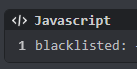
also when was this a thing https://i.imgur.com/Y44IRd0.png
 pale vessel
don't you need to use a query
rocky solstice
What DJS version are you using?
cinder patio
The object's likely frozen
 digital ibex
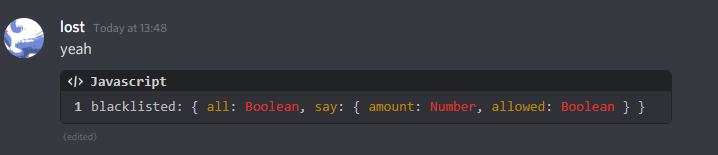
its part of a member model for mongoose
zenith terrace
 earnest phoenix
Night has secret discord features?
rocky solstice

earnest phoenix
 have fun
 wild mist
const filter = (reaction, user) => user.id === message.author.id; any error?
If i use that bot react their self
But if i used
const filter = (reaction, user) => user.id !== message.author.id;
all people can run it
 rugged turtle
Question!! When to make the bot "do not disturb" how to make it respond to commands ?
earnest phoenix
what
rocky solstice
Uhh, can you make the question again?
wild mist
Can u solve my problem?
rocky solstice
Well, I'm thinking.
rugged turtle
When to make the bot "do not disturb" it doesn't respond to commands!
rocky solstice
The message author is the user that executed the command.
 pale vessel
nitro is back ay
pale vessel
ofc
earnest phoenix
i cant disclose here how because someone's gonna report me lol
rocky solstice
When to make the bot "do not disturb" it doesn't respond to commands!
@rugged turtle "When I set the bot's status to DND, it doesn't respond to commands."
pale vessel
your code is fucked
rocky solstice
Completely.
wild mist
This happend when i put user.id === msg.author.id
earnest phoenix
i dont think that's what they meant
pale vessel
what is that embed
wild mist
I using msg.channel.send({embed
pale vessel
nm
rocky solstice
nvm
wild mist
That the problem?
 fickle arch
i need some help on this
                                                             ^

TypeError: Cannot read property 'users' of undefined```what is this.client.gateways?
wild mist
still @pale vessel
pale vessel
it wasn't the problem
wild mist
So what the problem?
 clever garnet
im using discord.js heres my code
https://hasteb.in/poragexa.cs
heres my error
TypeError: Cannot read property 'execute' of undefined
wild mist
Sir ? @pale vessel
clever garnet
all we can do is wait
wild mist
if user react it can pause/resume music
pale vessel
you should compare it with the song requester id
message author could be the one who started the music chain, i think
earnest phoenix
-bots
 gilded plankBOT
 wild mist
It worked thanks @pale vessel
pale vessel
nice
 dusk geyser
-bots

 slender thistle
-botcommands @earnest phoenix @dusk geyser @earnest phoenix
gilded plankBOT
@earnest phoenix @dusk geyser @earnest phoenix
Hey! Bots aren't given permissions to send responses in this channel. Please use #commands or #265156322012561408 to run commands. In addition, bots with commonly used prefixes cannot read or send messages in any channel. This is done to prevent spam and bot abuse.
digital ibex
hi, does anyone know why this is not updating in the db? im trying to create an infraction sort of thing
if (dookiewords.some((e) => args.join(' ').toLowerCase().split(' ').includes(e))) {
                        member.blacklisted.say.amount += 1;
                        message.channel.createMessage('e');
                        console.log(member.blacklisted);
                        console.log(member.blacklisted.say.amount);
                    }
``` it says "e" and logs the stuff to the consolebut doesn't actually add 1
using mongoose if that helps
 sudden geyser
don't you have to actually write to it
 lyric mountain
you can't directly change a var in a db, you gotta get value -> change value -> commit new value
digital ibex
so like
member.updateOne({ blacklisted: { say: { amount: (member.blacklisted.say.amount += 1) } } });
 faint token
is mongoDb good for doing coin systems?
pale vessel

 ripe epoch
im so glad i got a server host working before they veify my bot. cant leave it on all the time lol
faint token
nice
earnest phoenix
what should i add to my discord bot
earnest phoenix
@earnest phoenix let your creativity run free
lol i don't have any ideasss
just brainstorm ideas
earnest phoenix
atm its just a moderation bot with some cryptcurrency features
but idk what else to add
 hardy vector
my skip command says i need to be in a vc chnanel to use the skip commandbut i am in a vc channel
const Discord = require('discord.js')
const client = new Discord.Client()
module.exports = {
name: 'skip',
description: 'skip a song',
execute(client, message, args) {
const player = client.music.players.get(message.guild.id);
if(!player) return message.channel.send("No song/s currently playing in this guild.");
const { voiceChannel } = message.member.voice;
if(!voiceChannel || voiceChannel.id !== player.voiceChannel.id) return message.channel.send("You need to be in a voice channel to use the skip command.");
player.stop();
return message.channel.send("Skipped the current song!");
},
};``` honest perch
@earnest phoenix image filters?
maybe some api usage
like random dog and cat pics
earnest phoenix
whats an image filter
earnest phoenix
yeah all my cryptocurrency stuff is from an api
sudden geyser
@hardy vector message.member.voice.voiceChannel is not a property.
Also you don't need to create a new client at the top.
hardy vector
ik but i forgot to remove
wait but i never say message.member.voice.voiceChannel in the code
sudden geyser
you do: const { voiceChannel } = message.member.voice;
 tender olive
are we allowed advertise bots?
modest maple
not in this server
warm marsh
voiceChannel is from V11
digital ibex
why doesn't ```js
await member.updateOne({ 'blacklisted.say.amount': member.blacklisted.say.amount + 1 });
it doesn't say anything, or there aren't any errors
hardy vector
const Discord = require('discord.js')

module.exports = {
    name: 'skip',
    description: 'skip a song',
    execute(client, message, args) {
        const player = client.music.players.get(message.guild.id);
        console.log(player)
        if(!player) return message.channel.send("No song/s currently playing in this guild.");

        const { channel } = message.member.voice;
        console.log(channel)
        if(!channel || channel.id !== player.channel.id) return message.channel.send("You need to be in a voice channel to use the skip command.");

        player.stop();
        return message.channel.send("Skipped the current song!");
    },
};```it gives me this error TypeError: Cannot read property 'id' of undefined
    at Object.execute (/Users/sadashivappakenchannavar/Desktop/zacian bot/commands/skip.js:13:54)
at Client.<anonymous> (/Users/sadashivappakenchannavar/Desktop/zacian bot/index.js:27:38)if(!channel || channel.id !== player.channel.id) return message.channel.send("You need to be in a voice channel to use the skip command.");
digital ibex
log "channel"
what does it show
also, u can just do if(!channel || channel === null) instead of what ur doing
sudden geyser
@hardy vector if you're not in a voice channel, you're doing if (no channel or <no channel>.id), which throws the typeerror as you can't access a property on undefined.
hardy vector
ok
earnest phoenix
I made a mute command who search if there is a muted role, and if there is not a muted role just create one, but i have problems at creating the role, the role creates, but the permissions doesn't apply for the channels, here is the code
if(!muterole){
    try{
      muterole = await message.guild.roles.create({
      data: {
        name: "Muted",
        color: "#000000",
      },
        reason: 'new muted role'
  })
      message.guild.channels.forEach(async (channel, id) => {
        await channel.overwritePermissions(muterole, {
          SEND_MESSAGES: false,
          ADD_REACTIONS: false
        });
      });
    }catch(e){
      console.log(e.stack);
    }
  }
help ?
sudden geyser
I think the first argument of overwritePermissions should either be an array of collection of OverwriteResolable (https://discord.js.org/#/docs/main/stable/class/GuildChannel?scrollTo=overwritePermissions)
digital ibex
ur not creating a role with permissions sabin
earnest phoenix
i know, i overwrite the channels permissions
 lethal vine
@indigo flax i think u need to say how the bot will read the split of the arguments
zenith terrace
if (message.author.id !== "ID" return message.reply(`You don't own this bot!`));```
@indigo flaxOr
Wait
I think I messed it up
 wet dove
Austin said he has 2 owners
sterile mesa
Just add ||
digital ibex
y do that way
sterile mesa
Idk if its complicated or there's easy way
digital ibex
makes the code look disgusting
wet dove
if (message.author.id !== 'ID' && message.author.id !== 'ID') return message.reply('You do not own this')
 twilit rapids
Have an array of owners and filter through them
digital ibex
if (message.author.id !== 'ID' || message.author.id !== 'ID') return message.reply('You do not own this') is how u do it, not &&
lethal vine
And it compares the user id with db values
digital ibex
r they stored in an array?
sterile mesa
if (message.author.id !== "ID" || message.author.I'd !== "ID") return message.reply("You don't own this bot!");
An array is easier to manage if you ever plan on adding more.
sterile mesa
Please check if its wrong
sudden geyser
Or if you have some sort of constants
sterile mesa
:((
digital ibex
i'd do since arrays are cool
zenith terrace
if(message.author.id !== "ID" && message.author.id !== "ID") return message.reply("Text")
twilit rapids
Doing it like this is hardcoding which is bad practise
lethal vine
This just gave me an idea
twilit rapids
So your ID has to be X and Y for it work
sudden geyser
if (Constants.BOT_DEVELOPERS.includes(id)) { /* magic here */ }```Not sure about you but Discord doesn't give 2 user IDs to one user
sterile mesa
I only add feature allowed for owner only so there's no permission for me ;-;
digital ibex
let owners = ['id 1', 'id 2'];
if(owners.includes(message.author.id)) return message.channel.send('u no perms'); else {
/* do whatver u want */
}
Is that a table?
rain jacinth
https://gyazo.com/c4f2978789b4d0203a5159ecb4927f07 Is this all i need for a custom log channel cmd?
 zenith terrace
The bot itself doesnt really need the manage channels permission if its for logging
rain jacinth
 digital ibex
ye
rain jacinth
my channel.json looks like
 digital ibex
oh
rain jacinth
digital ibex
ur checking if a channel has a permission
check if the messages' author has a permission
earnest phoenix
code:
bot.on("guildMemberAdd", (member) => {

  const db = require("quick.db")

  let chx = db.get(`welchannel_${member.guild.id}`);
     let wlcchannel = member.guild.channel(chx);
    console.log(chx,wlcchannel)

  if(chx === null) {
    return;
  }
message.guild.channels.cache.find(channel => channel.name === args[0] || channel.id === args[0])
This is the same way?
rain jacinth
do i need to remove those 2? @digital ibex
rain jacinth
What perms should it be
digital ibex
whatever u want them to have
digital ibex
@earnest phoenix its not a function
its an object
@rain jacinth whaterv u want them to have, it doesn't matter
earnest phoenix
and how to solve that ?
rain jacinth
 zenith terrace
@earnest phoenix .guilds.channels.get
digital ibex
@rain jacinth i said remove it, not add it
zenith terrace
well cache.get for v12
sterile mesa
Well you use v11?
 frail ocean
v11 will soon stop working later this year in 2020 so I'd update asap.
digital ibex
i recommend switching to eris
frail ocean
October sometime iirc.
rain jacinth
 sterile mesa
What is fs
digital ibex
fs.writeFile or readFile
sterile mesa
Its not the efficient way if you use it to transfer data
 onyx summit
"transfer data"
I think you are trying to say they should use a real database
sterile mesa
Yes
 digital ibex
so remove that bit, just delete it
 sterile mesa
If you trying to tell the person that the bot have no permission try , message.guild.me
if(!message.guild.me.hasPermission('The Perm') anything;
rain jacinth
 digital ibex
no
rain jacinth
is MANAGE_CHANNELS the good perm for this?
zenith terrace
The bot doesn't need the manage channels perm if you want to use logs
sterile mesa
if (!message.guild.me.hasPermission("KICK_MEMBERS")) {
return message.reply("❌ I do not have permissions to kick members. Please contact a staff member")
.then(m => m.delete({ timeout: 5000}));
}
Check if bot has permission
I hate how I have to edit my messages when my autocorrect keyboard does the wrong thing

rain jacinth
Ok removed
digital ibex
what does ur code look like now?
rain jacinth
I just turned of my laptop now
sterile mesa
What r u trying to make
zenith terrace
@rain jacinth whats the command for
rain jacinth
Custom log channel
 surreal notch
How to send dm message to a person if he uses command in discord.js v12
zenith terrace
message.author.send
zenith terrace
Yes
surreal notch
Ok
sterile mesa
You can use
client.users.cache.get('UserId').send("Someone found the command!") Too
slender thistle
In JavaScript, are ```js
fetch('http://example.com/movies.json')
.then(response => response.json())
.then(data => console.log(data));
and
let response = await fetch('http://example.com/movies.json');
let data = response.json();
console.log(data);``` similar/the same?
rocky solstice
Discord.js is a powerful node.js module that allows you to interact with the Discord API very easily. It takes a much more object-oriented approach than most other JS Discord libraries, making your bot's code significantly tidier and easier to comprehend.
rocky solstice
I see.
Use member.user.presence.activity.name? I don't know.
Discord.js is a powerful node.js module that allows you to interact with the Discord API very easily. It takes a much more object-oriented approach than most other JS Discord libraries, making your bot's code significantly tidier and easier to comprehend.
sudden geyser
On the Presence class, there's a property called .activities. Check it out.
 heavy marsh
ooh ok thank you
hardy vector
how do you host a lavalink music bot on a vps bc you hae to have java 11 installed
 amber fractal
so install it?
earnest phoenix
Cannot read property 'send' of undefined
onst db = require("quick.db")
      let chx = db.get(`leavechannel_${member.guild.id}`);
         let leavechannel = member.guild.channels.cache.get(chx);

  if(chx === null) {
    return;
  }

    const defaultmsg = new Discord.MessageEmbed()
  .setThumbnail(member.user.avatarURL)
  .setAuthor(`${member.user.username}`, member.user.avatarURL)
  .setColor("#800080")
  .setTitle("**_A member has just left the guild_**", member.user.avatarURL({ dynamic: true }))
  .setDescription(`:wave: -> ${member.user.username} has just left de guild **_${member.guild.name}_**!\n:wave: -> We hope he will come back!`)
  .addField("User ID", `${member.id}`, true)
  .addField("User Name",`${member.user.username}`, true)
  .addField("Total Users", `${member.guild.memberCount}`, true)
  .setFooter(`${member.guild.name}`, member.guild.iconURL);

    leavechannel.send(defaultmsg);
 copper cradle
well leavechannel is not defined
rocky solstice
Aye.
copper cradle
bc what if they don't have a leave channel setup
copper cradle
yeah
earnest phoenix
it changes from v11 to v12? i v11 was the same code and it worked
and it worked aswell in v12 but only few times
copper cradle
@rocky solstice that has no effect whatsoever
changing let to const will only make the var an immutable definition
rocky solstice
yeah.
earnest phoenix
So, wich is the best solution
copper cradle
console.log chx
earnest phoenix
ok wait
i got 713002542635679797 undefined
You can just use if (!leavechannel || !chx) return;
do you think that will help ?
yes
 indigo flax
https://gyazo.com/00166a5de0ea7e5d5be4bdf28bc6b547 what is wrong with this?

the red dots
indigo flax
@sudden geyser do u have glitch
sudden geyser
Why do you ask?
indigo flax
can u define it for me
earnest phoenix
@earnest phoenix there are 2 things,
first is that the join message didn't work because the channel wasn't set with command and after i set it worked
and the second is that you solved that
=))
sudden geyser
Do you have a good understanding of JavaScript?
Defining and using a variable is babysteps.
 robust iron
My bot has been accepted but on the top.gg page it says ??? Where the status is supposed to be and "N/A" any help ?
 summer torrent
robust iron
summer torrent
robust iron
Why can that occur ?
sudden geyser
You can ask the mod who accepted your bot.
robust iron
Ok thank you
copper cradle
@indigo flax don't ask people to do those things
that leaves you nothing
you'll learn nothing
robust iron
^
copper cradle
and since you actually asked 'can you define it for me' I can assure you you need that knowledge
digital ibex
~~ how did that guys bot get accepted and not mine ~~
~~ oh yeah, cuz it was offline most of the time ~~
~~ and there r like, millions of bugs in it ~~
copper cradle
lol
I've seen some crappy bots accepted
and some devs that aren't actually devs
they just copy & paste crap from the internet hoping it works, and when it doesn't work they come here and ask 'wHy iS bOt nOt wOrK¿¿'
robust iron
@frail ocean my bot got accepted but the status on the top.gg page is "???" And the widgets also don't work, any idea why ?

 digital ibex
@rain jacinth 3rd time i'm telling u, remove it
sudden geyser
Why are you checking if a channel has permission to manage channels.
 digital ibex
ok,
now try it
also, does anyone know how i can make my bot do something when a user uses a command in like, 5 commands in 5 seconds?
in javascript
digital ibex
i'm trying to make the bot not respond to them users
not responding to them is easier, but idk how to like
auto blacklist
kinda
gilded ether
what are you trying to do?
rain jacinth
make a custom log channel cmd
gilded ether
so logging commands
copper cradle
you can't fucking get permissions on a channel
and that dude already told you
the channels object doesn't have that function
and why are you defining a channel as an user
that just makes the shit worse to read
 gilded ether
jesus and it’s a JSON
copper cradle
well maybe it found the channel ¯_(ツ)_/¯
how are you running the command
where are you testing it
does the channel exist
earnest phoenix
How do bots perceive our badges? help me please
copper cradle
maybe the channel isn't cached
gilded ether
all i did for my mod logs is use a actual database. store it there with the message guild id. and then do it from there.
copper cradle
try to use fetch
rain jacinth
fs?
rain jacinth
how on earth do i do that..
gilded ether
read the docs of your lib
amber fractal
well
you could technically build a script to do it all for you, but that'd probably take more time than just doing it yourself
digital ibex
whats javacript v12 🗿
earnest phoenix
if i defined an user
ex
let rMember = message.mentions.mebers.first();
how to dm that member ?
amber fractal
use .send()
just like a channel
if they have dms open it'll send, if not you'll get an error
which you should handle
earnest phoenix
rMember.send('content') , no ?
amber fractal
That should work
earnest phoenix
i tried like that but the mentioned user doesn't receive any message
amber fractal
any errors?
earnest phoenix
no
 silent berry
hello. in my test server, im attempting to make a global chat but have run into a problem. It repeats one msg over and over. there is no errors and there is bot protection. the only error i originally had was unknown measage. but thats bc i had a delete msg line in it.
now there are no errors but it still repeats
amber fractal
 digital ibex
@silent berry u nesting events?
silent berry
@digital ibex wdym
 digital ibex
like
earnest phoenix
=))
amber fractal
that should've given the error Cannot read property first of undefined idk how it didnt
But yep
rocky solstice

digital ibex
event.on('listener', function => { event.on('listener', function => { }))})
also, lovely indentation
earnest phoenix
How do bots perceive our badges?
digital ibex
@silent berry u doing it like that? https://discordapp.com/channels/264445053596991498/272764566411149314/713071897696272485
silent berry
@digital ibex ifi i send the code, would you be able to identify my error in it?
im also on v11.5.1
earnest phoenix
How to check if a member has a defined role ?
digital ibex
wut
silent berry
@digital ibex
helium.on("message", async(msg) => {
    let chatmoderators = ['539195184357965833', '550170362248429568', '437019658374348801', '641795527444529152']
   if (msg.author.bot)return;
   if(msg.channel.name !== 'helium-global-chat')return;
   msg.delete()


   let e = new Discord.RichEmbed()
            .setTitle("Helium Global Chat")
            .setAuthor(msg.guild.name, msg.guild.iconURL)
            .addField("Message content", msg.content)
            .setColor("RANDOM")
            .setThumbnail(msg.author.avatarURL)
            .setTimestamp()
            .setFooter(`Helium Global Chat System || SECURITY | Guild id: ${msg.guild.id} | msg author id: ${msg.author.id} | code by Airbus A350-1000#0001. thanks to him, this bot will have a functioning global chat.`);

            if(chatmoderators.includes(msg.author.id)){
                e.addField("Sent By", `🛠️ Chat Moderator | **__${msg.author.tag}__**`)
            }else{
                e.addField("Sent By", `**__${msg.author.tag}__**`)
            }
        await Promise.all(helium.channels.filter(c => c.name === 'helium-global-chat').map(c => c.send(e)))

        await Promise.all(helium.channels.filter(c => c.name === 'helium-global-chat').map(c => c.setTopic(`Last message is sent by <@${msg.author.id}>`)))


})
and yes ik i dont have catch blocks
earnest phoenix
like i defined the role as
var role = message.mentions.roles.first()
and i want to check if a mentioned member has that role
r u on v12 or v11
v12
member#roles
earnest phoenix
@earnest phoenix wdym ?
Discord.js is a powerful node.js module that allows you to interact with the Discord API very easily. It takes a much more object-oriented approach than most other JS Discord libraries, making your bot's code significantly tidier and easier to comprehend.
silent berry
@digital ibex wdym
earnest phoenix
you would need to get the cache prop in v12 probably
earnest phoenix
then it would be a collection of roles
I don't really understand that docs =))
you could use functions like find() or has()
digital ibex
where is it going wrong?
earnest phoenix
well docs are pretty essential
i have ```js
if(!rMember.roles.has(role.id)) {
but i get TypeError: rMember.roles.has is not a function
wouldnt you have to use roles.cache for v12?
earnest phoenix
oh god that formatting looks bad
silent berry
@digital ibex if i invite you to my test server, would you be able to see what my problem is?
 steep python
A question, how can I animate my bot image in Discord Bot List? I would appreciate it if you could tell me.
digital ibex
no
silent berry
ok
earnest phoenix
@steep python css
silent berry
il dm it
steep python
@steep python css
@earnest phoenix But how? :c
rain jacinth

 digital ibex
if the server allows it anyawys
earnest phoenix
with inspect element and a bit of css knowledge
and google is your friend
you can use <style> tags in your long description to implement your css
steep python
Thanks ❤️ @earnest phoenix
rain jacinth
can i have help :/
earnest phoenix
yes, just ask
 turbid bough
@rain jacinth line 20?
rain jacinth


