#development
1 messages · Page 901 of 1
 grizzled raven
 misty river
looking at some big open source bots, a lot of them seem to use postgres + redis
grizzled raven
which ones did you look at
also tony im just gonna make some assumptions for now
so i see that if you provide an intents field in the options, only stuff that you input in the intents field will be sent to you as packets
only thing im really confused on is the presence and guild member relationship
misty river
YAGPDB
grizzled raven
ok so
if i put something in the intents, i WILL recieve packets for it or i WONT recieve packets for it
misty river
you will
isnt that the point of intents
so you can like, only request stuff that you need
grizzled raven
i thought it was that you put stuff that you dont need, so they dont send it
eh im also stupud so
misty river
its the other way around
 amber fractal
misty river
amber fractal
misty river
anyone know why postgres seems to be so favoured among popular bots
 earnest phoenix
    if (message.author.bot) return;
},```I use that to stop my bot from listening to itself and it doesn't seem to work? any suggestions
 sudden geyser
What doesn't seem to work. Are bots still able to trigger commands?
That }, at the end may be your issue.
sudden geyser
Do you have more than one bot.on("message", (...)) statement in your code.
earnest phoenix
yes
sudden geyser
Is it within your execute block.
sudden geyser
nvm, where do you have your multiple bot.ons? You should only have one, and I believe I told you this last time.
 snow tangle
misty river
snow tangle
misty river
@earnest phoenix why dont you just put if (message.author.bot) return; in the function below
you should only be using one
sudden geyser
@earnest phoenix an event is fired for whenever the event is emitted by its name. Loading multiple events fire each of the functions its set as. When you make a new event with a different function, they're not the same. I can't really tell if you have the second event within that message event, but you should only be using 1 message event. No more.
earnest phoenix
@misty river and @sudden geyser ty the bot stopped spamming
sudden geyser
Okay just make sure you're only using one messge event unless you know for a fact you need more than one.
misty river
np
i dont see much of a downside to using redis as the primary datastore for my bot, as long as i dont run out of ram or something
which i wont
misty river
@hazy jewel like, the websocket latency?
misty river
what lib
 hazy jewel
Discord.JS
misty river
client.ws.ping
hazy jewel
Discord Bot maker
misty river
discord what maker
 hazy jewel
okey
don`t work
kkkk
var ping = Date.now() - msg.createdTimestamp; Actions.storeValue(ping, 1, "latencia", cache);
i use this code
earnest phoenix
the problem is that when I set a custom prefix, I can't use the prefix to execute any commands, Here's the code: https://gist.github.com/IF64/4f7ba6691d58512d3fa8d2aa42164aa1
 earnest phoenix
yes
misty river
why are you creating a new client lol
also, it might be better to store your global/default prefix in a config file
earnest phoenix
I have a db tho
earnest phoenix
oh you're talking about the default config
misty river
yes
earnest phoenix
makes sense
misty river
so it works with the default prefix but not when you set anything
earnest phoenix
Does ytdl download the video and then stream it?
and use the db for custom commands
misty river
@earnest phoenix i think it plays while it downloads the file
misty river
why?
earnest phoenix
because sometimes the songs will have random moments when it jumps/cuts/ends
I finally know why my bot crashed
out of mem?
bc I played an 10 hour video
Yes
lol
misty river
i fixed that by bumping up HighWaterMark as high as possible
earnest phoenix
that looks shiny
earnest phoenix
pretty clean
grizzled raven
he like ur config
grizzled raven
😳
 dense drift
If I get Object object, how do I turn it to a thing again? Object.keys(map)?
misty river
im using akairo for this rewrite
its cool but i dont understand how some of it works
dense drift
NVM, stringify
earnest phoenix
how would I state my globalprefix in my main file
const globalPrefix = {config}?
misty river
is the config file stored in the same directory as this command
earnest phoenix
no stored in folder above it
misty river
const globalPrefix = require("../config").prefix
replace .prefix with whatever you called the prefix in config
so like
.globalPrefix or whatever
earnest phoenix
so the globalPrefix works, but I still need to have the custom prefix execute the commands in the commands folder
now logs give back execute of undefined
earnest phoenix
well this is the first time I got a 2-liner error TypeError: Cannot read property 'execute' of undefined at Client.<anonymous> (C:\Users\IF6\Documents\GitHub\disc-bot-rep\bot.js:45:21) at processTicksAndRejections (internal/process/task_queues.js:97:5)
misty river
what is line 45
misty river
can you send the code for what command you're trying to run
earnest phoenix
I will but one thing to state is that the two commands are in the same folder which probably prevents interaction
oh the command im trying to run?
    name: 'help',
    description: 'help message embed',
    execute(message) {
        const Discord = require("discord.js")
        const helpEmbed = new Discord.MessageEmbed()
            .setColor('#9534eb')
            .setTitle('Available Commands')
            .setDescription('A list of commands the bot will recognize')
            .setThumbnail('https://i.imgur.com/wdrNBe6.jpg')
            .addFields({
                    name: 'Music Commands',
                    value: '`play`, `skip`, `stop`',
                    inline: true
                }, {
                    name: 'Misc. Commands',
                    value: '`brownbricks`, `respond`',
                    inline: true

                }, {
                    name: 'Moderation Commands',
                    value: '`kick`, `ban`',
                    inline: true
                }, {
                    name: 'Bot Settings',
                    value: '`prefix`',
                    inline: true
                }

            )
            .setTimestamp()
            .setFooter('The Saddest Cat On The entire Discord platform', 'https://i.imgur.com/wdrNBe6.jpg');

        message.channel.send(helpEmbed);
    }
}```am i the only one who thinks you should probably clean that up?
absolutely
never thought about it
imma just throw some beautify on that
that's much better
so basically It gives me an error everytime I try to execute a command with my custom prefix
 brisk fiber
how do i let a bot ban random memebrs if they brekaing the rules
earnest phoenix
Hey, how can i get the total number of members of all servers discord js v11 ?

Discord.js is a powerful node.js module that allows you to interact with the Discord API very easily. It takes a much more object-oriented approach than most other JS Discord libraries, making your bot's code significantly tidier and easier to comprehend.
no
all
guilds
and sorry i don't understand verry good the english because im french
this can help https://stackoverflow.com/a/51573064

Stack Overflow
I have a discord bot, and I was just wondering: how do I find out how many guilds the bot is in? So that if I say -guilds it'll tell me how many guilds it's in.
no because client.guilds.size not showing the corret number because i get more 100k users total
ohhh you want to count the users?
in all the guilds?
yes
users or members
 copper cradle
client.users.zize 
earnest phoenix
just members
@copper cradle no because not showing the correct numbers
i get mort 100k user / members
earnest phoenix

copper cradle
remember that this server has 80K members
earnest phoenix
because my bot is in a server with 90k users, 1 with 4k and 1 with 6k
no 90k members not 80k
earnest phoenix
no
copper cradle
you're actually getting the number of users that share servers with your bot
so you just have to skip this server
 cinder patio
You can use reduce
earnest phoenix
@copper cradle if i skip it i get ~ 12k
copper cradle
well
 twilit rapids
Loop through every guild and add their membercount to each other
copper cradle
then that means that without this server your bot has 12K usets
twilit rapids
But that's not a valid way as you could have Mee6 more than 10 times in there
copper cradle
and how do you know the number you're getting from client.users.size is not correct
cinder patio
zSnails, it's probably not correct, I doubt every user would be cached
twilit rapids
I mean they would have to fetch every server for that to be 100% correct
twilit rapids
Some do
copper cradle
¯\_(ツ)_/¯
 true ravine
How do a check if an image from discord's cdn is still available (js)?
earnest phoenix
i have a reactionrole code and every time i react to any message it will add the role / remove
client.on("messageReactionAdd",(reaction,user)=>{
    if(reaction.emoji === emoji && reaction.message.id === message.id);
    reaction.message.guild.member(user).addRole(role)
    ///.catch(err => message.channel.send(errembed1));

    client.on("messageReactionRemove",(reaction,user)=>{
    if(reaction.emoji === emoji && reaction.message.id === message.id);
    reaction.message.guild.member(user).removeRole(role)
    ///.catch(err => message.channel.send(errembed1));```
this is the adding and removing role partYou need to filter the reactions to only include the messaes that you want
earnest phoenix
i tried with reaction.message.id
true ravine
That was what I was going to suggest
earnest phoenix
oh
so if its not the message return ?
true ravine
You could simply do if(listOfMessages.includes(reaction.message.id))
And then put all the messages you want to watch in the listOfMessages array
true ravine
I can't see where you're defining message
earnest phoenix
if(reaction.emoji === emoji && reaction.message.id === message.id);
earnest phoenix
message.id is the message the bot sent
but i think im wrong there
its supposed to be msg
oops
true ravine
Oh lol
true ravine
Personally I would be sending a message and then awaiting reactions on it directly after, rather than using a separate event
earnest phoenix
id rather use an event
but i dont get why its not working
i mean it is, but every time i react to a message it will add the role
(any message)
true ravine
I would do this:
const mes = await somechannel.send("React here!")
mes.awaitReactions(...)
That kind of thing
earnest phoenix
but i want it to last forever
true ravine
Yeah that's possible
true ravine
You could even store the id of mes and then fetch it again when the bot restarts
earnest phoenix
let msg = await message.channel.send(reactionroleembed)
 tight plinth
with discordjs, how can I know who banned someone?
earnest phoenix
this is the "msg"
true ravine
with discordjs, how can I know who banned someone?
I think you have to do something with audit logs because BanInfo only stores the banned user and the reason
tight plinth
oh ok
earnest phoenix
@true ravine
so im deleting the events
and can you help me with the awaitreactions?
true ravine
let msg = await message.channel.send(reactionroleembed)
Yeah so then you do
mes.awaitReactions((reaction,user)=>[YOUR FILTER GOES HERE],{OPTIONS HERE}).then(collected=>{
     //do stuff here
})```collected returns all the reactions to mes
earnest phoenix
just copypaste 👀
true ravine
?
earnest phoenix
the text
earnest phoenix
who even uses screenshots 
but iguess
at least its not a photo
let msg = await message.channel.send(reactionroleembed)
     msg.awaitReactions((reaction,user)=>[reaction.emoji.name === emoji],{}).then(collected=>{
     //do stuff here
})```so somthing like this
true ravine
mes.awaitReactions((reaction,user)=>(reaction.emoji.name==="✅" || reaction.emoji.name==="🗑") && user.id===msg.author.id,{max: 1}).then(collected=>{
Readable version for your enjoyment
let msg = await message.channel.send(reactionroleembed)
     msg.awaitReactions((reaction,user)=>[reaction.emoji.name === emoji],{}).then(collected=>{
     //do stuff here
})```
Not in the square brackets, that was a placeholder
earnest phoenix
uhm
true ravine
One sec
earnest phoenix
like this hihi x)
let totalUsers = bot.guilds.reduce((a,b) => a + b.memberCount, 0);
@copper cradle & @earnest phoenix
@true ravine
how do i make it so if he removed reaction it will remove and if he added it will add
on awaitreactions
i dont know shit about javascript, i just read the docs and understand it in the meantime 
(collected)
copper cradle
twixty https://tryitands.ee

 delicate zephyr
-wrongserver
 gilded plankBOT
Hey! We think you have our server mistaken. We do not provide support, help, or advice for any bot. You need to click on the "Support Server" button on the bot's page, not the "Join Discord" button at the top of our website. If there isn't a button that says Join Support Server, then we can't help you. Sorry :(
 true ravine
How long does discord keep images on their cdn before they're deleted?
earnest phoenix
idk
never had any issues of them getting deleted
or until the message is deleted i think
true ravine
Oh right thank you
tight plinth
with discordjs, how can I intentionally emit a client event? I have to test what happens if someone joins a server, but I'l too lazy to add a bot to the server to test
I tried doing this https://i.imgur.com/GcdPEre.png
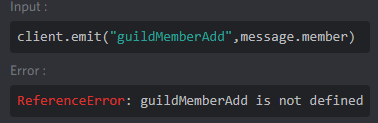
sharex wtf happens
earnest phoenix
thats unfortunately the only way to do that
tight plinth
I remember one time in v11 doing that, but I dont remember how to do it
 west spoke
@true ravine up to 10 days, usually deletes after about a hour.
true ravine
Is that for deleted messages or all messages? Because some images I uploaded and sent ages ago still work
west spoke
it requires the user token after it's "deleted" and sometimes discord misses the image
like user token as in you need to be in the same server
at least that's how it is for me 
true ravine
Oh right thank you
 quartz hill
I want to add a value to Json. But I don't want to read the whole json for that. If there is, change the value. If there isn't, add the value. Is it possible to do this? discordjs
 pale vessel
no
quartz hill
ok thx
west spoke
well i mean, you can read through it only until you reach it
that'd be the fastest way
tight plinth
so I'm currently testing welcome messages with my bot, and I have this code in my guildMemberAdd event https://link-is-qt.lumap.me/r6u2hwri.png . The message is sent, the db works, but the .replace dont work https://link-is-qt.lumap.me/r4kq3ham.png . What I did wrong


 delicate zephyr
he should be sending the new message variable rather than the predefined one
tight plinth
I fixed it
still doesnt work
if I console.log message after the .replace, it seems that the .replace didnt work
earnest phoenix
try to hardcode it for testing
tight plinth
const {GuildsBeta} = require('../../mongoose')
const Discord = require('discord.js')
module.exports = async (member) => {
    let guild = member.guild
    GuildsBeta.findOne({id: guild.id}, async (err,res) => {
        if (err) console.log(err)
        if (!res || !res.memberLogChannel || !res.memberAddMessage) return console.log(res);
        let message = res.memberAddMessage
        message.replace('{memberTag}', member.user.tag)
        message.replace('{member}', `<@!${member.user.id}>`)
        message.replace('{serverName}', member.guild.name)
        message.replace('{serverMemberCount}', member.guild.memberCount)
        let channel = guild.channels.cache.get(res.memberLogChannel)
        if (!channel) return console.log('channel not found');
        channel.send(message)
    })
}```everything else works, emitting the event, storing informations in the db...
delicate zephyr
const {GuildsBeta} = require('../../mongoose')
const Discord = require('discord.js')
module.exports = async (member) => {
    let guild = member.guild
    GuildsBeta.findOne({id: guild.id}, async (err,res) => {
        if (err) console.log(err)
        if (!res || !res.memberLogChannel || !res.memberAddMessage) return console.log(res);
        let message = res.memberAddMessage
            .replace('{memberTag}', member.user.tag)
            .replace('{member}', `<@!${member.user.id}>`)
            .replace('{serverName}', member.guild.name)
            .replace('{serverMemberCount}', member.guild.memberCount)
         //replace it when creating the new variable

        // These return the message with replaced meaning you would need a new variable every time.
        // message.replace('{memberTag}', member.user.tag)
        // message.replace('{member}', `<@!${member.user.id}>`)
        // message.replace('{serverName}', member.guild.name)
        // message.replace('{serverMemberCount}', member.guild.memberCount)
        let channel = guild.channels.cache.get(res.memberLogChannel)
        if (!channel) return console.log('channel not found');
        channel.send(message)
    })
}
🙂
tight plinth
thanks! ^^
delicate zephyr
JS is whack
earnest phoenix
how do you make it so the status is basically a loop that refreshes every 30 seconds
delicate zephyr
using setInterval
earnest phoenix
like this?
setInterval(client.user.setPresence({
        status: "online",
        activity: {
            name: `${client.guilds.cache.size} servers battle it out`,
            type: "WATCHING"
        }
    }), 3000)
but the 3000 being 30000
tight plinth
yes
 tender cedar
is there a way i can make like a command for my bot and allow users to vote on my bot with this api?
like using a >vote and that would make the user that used the command vote for my bot
earnest phoenix
nope
tender cedar
oki thanks
earnest phoenix
(node:4) UnhandledPromiseRejectionWarning: TypeError [ERR_INVALID_CALLBACK]: Callback must be a function. Received Promise { <pending> }
script:
client.on("ready", () => {
console.log(`${client.user.username} is online!`);
setInterval(client.user.setPresence({
status: "online",
activity: {
name: `${client.guilds.cache.size} servers battle it out`,
type: "WATCHING"
}
}), 30000)
});``` royal portal
what does 'The user aborted a request' mean
earnest phoenix
literally what it says
earnest phoenix
yeah
royal portal
but if I have a .catch after sending the message its ok?
because it shows error but bot is ok
earnest phoenix
yeah should work
you gotta ask someone who knows js though, because i only refer to the docs
 nocturne grove
and it says that, does it mean that they have dms off?
@royal portal I thought that's giving another error. I read something aboutuser aborted a requestand I guess it was when sending a message takes too long for some reason
but you can always try sending a DM to yourself if you blocked your bot
royal portal
alr thanks
nocturne grove
wait I'll check it
sending a dm when it's not possible gives this error: Cannot send messages to this user, but you can catch this too of course
 stoic sand
Hello, I'm still just starting out with the development of discord.js; it is a private bot, I try to make a help command with rotating pages but I can't manage to react with emojis, delete is not definited, I don't understand the error, someone could one help me?
    if (msg.content === settings.prefix + 'help') {
        if (msg.author.bot) return;
        const embedhelp = new Discord.MessageEmbed()
            .setColor('#0099ff')
            .setTitle('Tableau de bord de Louveteaubot')
            .setAuthor('Louveteaubot', 'https://www.dropbox.com/s/oc14jg53esuhdid/wolf-head-hand-drawing-vector.jpg?dl=1')
            .setDescription('Bienvenue dans ma matrice ! Découvrez toutes mes options !')
            .setThumbnail('https://www.dropbox.com/s/cccpms8t8fhsqhp/c44f5e4c21e5a8e5af536ca2b8a7bf1b.gif?dl=1')
            .addField('Choissisez les menus :', "test en cours", true)
            .setTimestamp()
            .setFooter('Bot développé par Valmi');
        const embedhelpadmin = new Discord.MessageEmbed()
            .setColor('#0099ff')
            .setTitle('Tableau de bord de Louveteaubot')
            .setAuthor('Louveteaubot', 'https://www.dropbox.com/s/oc14jg53esuhdid/wolf-head-hand-drawing-vector.jpg?dl=1')
            .setDescription('Bienvenue dans ma matrice ! Découvrez toutes mes options !')
            .setThumbnail('https://www.dropbox.com/s/cccpms8t8fhsqhp/c44f5e4c21e5a8e5af536ca2b8a7bf1b.gif?dl=1')
            .addField('pban (mention.user)', "Permet de ban un membre",
                true)
            .addField('pkick (mention.user)', "Permet de kick un membre",
                true)
            .addField('ppurge (nb)', "Permet de faire un giga suppr",
                true)
            .setTimestamp()
            .setFooter('Bot développé par Valmi');
        msg.channel.send(embedhelp).then(sentEmbed => {
            sentEmbed.react('🗑️').then(sentEmbed.react('➡️'))
            client.on('messageReactionAdd', (reaction, user) => {
                if (msg.author.bot) return;
                if (reaction.emoji.name === "🗑️")
                    msg.reaction.delete()
            })
        })
    }
});```Version NodeJS : V12.X
quartz hill
client.shard.fetchClientValues(`users.size`)
this work but I need
client.shard.fetchClientValues(`users.filter(member => !member.bot ).size`)
but this not working bot undefined error
earnest phoenix
my bot twice, why?
kill the clone
...
kill the second instance
:u
Kill your program
or where are you hosting?
pale vessel
@quartz hill try client.shard.fetchClientValues(`users`)
and then filter them afterwards
 winter hawk
Guys, how do you debug your code on vscode whilst using discord.js shards manager?
quartz hill
ok trying now
earnest phoenix
whats the error?
 mossy vine
what version of d.js are you using
then you need to use MessageEmbed instead of RichEmbed
and im pretty sure thats not how you send an embed anyways
wait did you say you want to remove it?
then just... remove it???
earnest phoenix
yeah thats what i was scratching my head to
mossy vine
then just.. dont create and send and embed..
quartz hill
@pale vessel not working
earnest phoenix
then send a normal message without the embed tag
Wait i dont know how js works xD
mossy vine
just remove the code that creates and sends the embed
nocturne grove
How can I make a forEach work synchronically? Is there anything else than doing something like this?
array.forEach(async (element) => {
  await new Promise((resolve) => {
  // do something
  // finally:
  resolve();
  });
});```
Or does that even not work?are those always executed after each other?
mossy vine
yes
nocturne grove
okay thank you!
well it's not working @mossy vine, guess it's because I have a .then() in the for loop
and according to the result, the then is just too late
 surreal notch
const cd = require("./cooldown.json");
const Discord = require("discord.js");
const client = new Discord.Client();
const prefix = "p!";

//LOGIN
client.login("Token");

client.on("message", message => {
  //RETURN IF USER IS A BOT
  if (message.author.bot) return;

  //GETTING CURRENT MILLISECONDS
  let date = new Date().getMilliseconds();
  //CHECKING IF USER CAN USER THIS COMMAND
  let canUse;
  if (cd[String(message.author.id)] !== undefined) canUse = (cd[String(message.author.id)] >= 21600000);
  else canUse = true;
  if (message.content.toLowerCase() === `${prefix}credits` && canUse && String(message.author.id) !== "460690666964385803" /*YOU*/) {
    if (!canUse) {
      message.channel.send("You can only use this command one time in 6 Hours");
      return;
    };
    var numbers = [
      "You have recieved 5 credits for Pokecord Bot\n\nYour reddem code is  ||NwEf||\n\nDM ULTRON#4070 to recieve your gift with reddem code",
      "You have recieved 10 credits for Pokecord Bot\n\nYour reddem code is  ||FtwK||\n\nDM ULTRON#4070 to recieve your gift with reddem code",
      "Better Luck Next time try again in 6 hours",
      "Better Luck Next time try again in 6 hours",
      "Better Luck Next time try again in 6 hours",
      "You have recieved 20 credits for Pokecord Bot\n\nYour reddem code is  ||TraW||\n\nDM ULTRON#4070 to recieve your gift with reddem code"
    ];
    var answer = numbers[Math.floor(Math.random() * numbers.length)];
    var embed = new Discord.MessageEmbed()
      .setColor("#FF4500")
      .setTitle("Pokécord Credits")
      .setDescription(answer);
    message.channel.send(embed);
    //ADDING THE USER TO THE FILE
    cd[String(message.author.id)] = date;
    //WRITING THE DATA TO THE FILE
    fs.writeFile("cooldown.json", cd, "utf8", () => {});
  }
});
client.on("ready", () => {
  console.log("Bot was logged in"); // Output a message to the logs.
});```My bot isn't responding to me
After trying cooldown cmd
tight plinth
what
surreal notch
Bot is not responding to me
 vivid crescent
So #502193464054644737 says all bots are tested with permissions=0 - Does that mean they won't give embed permissions either? 👀
tight plinth
show your cooldown.js
surreal notch
@tight plinththere it is
tight plinth
@vivid crescent permisisons=0 is send & read messages + embed links
so dont worry about that one
vivid crescent
Alright, thought embed links was separate my bad
vivid crescent
he is hardcoding the cooldown
vivid crescent
I think that's the issue
tight plinth
^
vivid crescent
21600000
surreal notch
{}
vivid crescent
Should do date - cooldown or something
tight plinth
empty {} ~= empty file
tight plinth
use something else
surreal notch
What should be there
vivid crescent
@tight plinth think they're just using it as an entry set or something
 rare coral
Hi all! I'm pretty new to working with API's, can someone give me a hand understanding some of the documentation? In the list of properties for a channel object, what do the question marks mean? I'm trying to get a list of recipients from a channel object but it's saying there's no property called "recipients"... Does the question mark mean I need to access it through a .get() or something?
tight plinth
idk
vivid crescent
But it doesn't need to be a sepatate file tbh
tight plinth
@rare coral it means "can not exist"
tight plinth
or null yea
rare coral
Ah so like it'll only sometimes be a property?
tight plinth
most of the time yea
rare coral
But is that supposed to just be for channels with no members? Because I'm querying a channel which does have members in
vivid crescent
Maybe a better word instead of null is undefined - The properties without ? will always be defined in a valid request
tight plinth
so for example dms channels dont have a guild id property
@surreal notch change how you handle cooldowns
use something else than a cooldown.js
vivid crescent
@surreal notch Just actually decrement the cooldown
rare coral
That makes sense, thanks 🙂 In that case, can I then ask a follow up: Why might a non-DM channel not have any recipients property?
 blazing portal
I'd say because it can be an empty voice channel
rare coral
So !nips check is the message, you can see on the right that the channel has members
IT LOOKS PRETTY OKAY don't judge 😉
 deft plinth
Can any one give me the server link of Trivia Alex Or utility Trivia??
vivid crescent
white
rare coral
i came here to have a good time and i'm honestly feeling so attacked right now
deft plinth
Can any one give me the server link of Trivia Alex Or utility Trivia??
This server are in the hit list now😂😂
vivid crescent
there is one api for all the types of channels which is why there are so many nullable fields
blazing portal
@rare coral it says so in the Docs. The recipients are "the recipients of the DM"
no dm => no recipients
rare coral
Oh right, so how do I get a list of users in a channel then?
 next remnant
TextChannel has members, not recipients if that's what's you're looking for
vivid crescent
recipients is a private channel only endpoint afaik
rare coral
so message.channel.members?
next remnant
Yeah
blazing portal
I'm not using the API directly, so this might be wrong, but since there is no user field or anything, you'd wanna get the whole guild members MINUS the ones that can't see it through the permission_overwrites
rare coral
I'm not using the API directly, so this might be wrong, but since there is no user field or anything, you'd wanna get the whole guild members MINUS the ones that can't see it through the permission_overwrites
@blazing portal If I could get the whole guild members that would do in and of itself! Would it be message.channel.guild.members?
next remnant
Yes
blazing portal
Wait, are you using Discord.js? Or is it just this similar
rare coral
No it's discord.py, but .member seems to work, thanks!
blazing portal
Ok
 slender thistle
message.guild.members should also work
rare coral
*.members I mean
How come .members isn't listed as a fied in the API docs? Are they out of date?
slender thistle
It's a discord.py thing I believe
rare coral
Ahhhh, I see
blazing portal
If you are using Discord.py, I would recommend using the Discord.py docs though, not the official Discord docs, as .py might add things to make it easier. like this one 😉
blazing portal
aight can someone ban this guy for... liking white or smth
slender thistle
No theme wars here please 
 earnest phoenix
(node:10196) UnhandledPromiseRejectionWarning: TypeError: Cannot read property 'get' of undefined
tight plinth
which line
tight plinth
whats ops.active
tight plinth
what you want it to be
twilit rapids
One guy creates a tutorial on how to make a music bot on YouTube, literally everyone else copies his code
This code is from TheBelguimGames on YouTube
earnest phoenix
@twilit rapids mine is not from a youtuber 😛
earnest phoenix
if from my friend 😛
twilit rapids
Fun thing is, nobody watches the tutorial but straight goes to the hastebins in the desc
 turbid bough
from friend from a youtube video
tight plinth
ur friend copied it from yt
earnest phoenix
@tight plinth idk, i just know that it works for him
earnest phoenix
Yes
tight plinth
its better
turbid bough
what if i copy python code into js?
tight plinth
it will never work
twilit rapids
Then you will have nightmares the next 3 weeks
 digital ibex
hi
tight plinth
hi
digital ibex
how can i get a guilds prefix?
like, i just want to get the prefix and nothing else
turbid bough
idk do you use json or a db?
tight plinth
what u use as db
digital ibex
let a = require('../../models/Guild'); let p = a.findOne({ id: message.channel.guild.id }); p;
// returns the guilds config stuff (everything)
let a = require('../../models/Guild'); let p = a.findOne({ id: message.channel.guild.id }); p.prefix;
// returns undefined
My bot say two times the event messageUpdate!
digital ibex
with mongoose
tight plinth
nope
a.findOne({id: message.channel.guild.id},async (err,res) => {
if (err) console.log(err)
let prefix = res.prefix
//your code
})
My bot say two times the event messageUpdate!
earnest phoenix
what i can do?
tight plinth
@earnest phoenix u sent this message two times!
earnest phoenix
i have lag
digital ibex
idk
tight plinth
nothing
digital ibex
have u got any code?
earnest phoenix
let me send
digital ibex
oki, thank u lumap
tight plinth
does it works?
digital ibex
im checking now
tight plinth
after defining your prefix put the rest of your codee
earnest phoenix
  client.on("messageUpdate", async (oldMessage, newMessage) => {
    let count = await logs.obtener(oldMessage.guild.id);
  //Obtenemos el nombre del canal donde se edito el mensaje
  let nameChannel = newMessage.channel.name;
  // Obtenemos el nombre del usuario que edito el mensaje
        if (oldMessage.author.bot) return;
     await snipedit.establecer(newMessage.channel.id, {
        "author": newMessage.author.username,
        "antes": oldMessage.content,
        "despues": newMessage.content
    })

  let member = newMessage.member.displayName;
  const embed = new Discord.RichEmbed()
    .setTitle("**MENSAJE EDITADO**")
    .setColor(0xff0000)
    .setThumbnail(newMessage.author.displayAvatarURL)
    .addField('Antes', oldMessage.content)
    .addField('Despues', newMessage.content)
    .addField('ID del mensaje', newMessage.id)
    .addField('Link del mensaje',`[Link](${`https://discordapp.com/channels/${newMessage.guild.id}/${newMessage.channel.id}/${newMessage.id}`})`)
    .addField('Nombre del autor', newMessage.author.username)
    .addField('ID del autor', newMessage.author.id)
    .addField('Mencion del autor', newMessage.author)
    .addField('Nombre del canal', oldMessage.channel.name)
    .addField('ID del canal', oldMessage.channel.id)
    .addField('Mencion del canal', oldMessage.channel)
    .setTimestamp()
    .setFooter(newMessage.guild.name, newMessage.guild.iconURL);
  // enviamos un mensaje de información de la actualización de un emoji en un canal X
  client.channels.get(count).send(embed);
});
This is the code
tight plinth
make sure your bot is not running twice
 warm heart
tight plinth
warm heart
tight plinth
@warm heart youre in dbl you have dbl pfp coongrats
digital ibex
i++
tight plinth
and #topgg-api for this question
digital ibex
lump, it retuns the same thing as what i sent
tight plinth
it returns what
 hasty lotus
hey i'm trying to make a top of user sorted by xp that is contained in a json file. My code looks like this :
var lb = []

    for (const user in xp[msg.guild.id]) {
        lb.push({
        xp:user.xp,
        level:user.level,
        ID:user
        })
        }

        var lb = sortByKey(lb, "xp")

        if (lb.length > 10) {
            lb.length = 10
        }```(xp is requireing the json file)
And this code gives me this error :
(node:23114) UnhandledPromiseRejectionWarning: ReferenceError: sortByKey is not defined```
Would anyone know why ?
digital ibex
rhw whole guild config
earnest phoenix
 digital ibex
like the guild id, the logs channel prefix etc
tight plinth
@hasty lotus define the function lol
digital ibex
i just want the prefix
turbid bough
res.prefix returns the whole config?
digital ibex
yes
tight plinth
res is the whole config
turbid bough
try res.prefix.prefix
digital ibex
ye, but .prefix is meant to get the prefix or?
tight plinth
yes it is
digital ibex
returns the whole config
digital ibex
i tried it
earnest phoenix
  client.on("messageUpdate", async (oldMessage, newMessage) => {
    let count = await logs.obtener(oldMessage.guild.id);
  //Obtenemos el nombre del canal donde se edito el mensaje
  let nameChannel = newMessage.channel.name;
  // Obtenemos el nombre del usuario que edito el mensaje
        if (oldMessage.author.bot) return;
     await snipedit.establecer(newMessage.channel.id, {
        "author": newMessage.author.username,
        "antes": oldMessage.content,
        "despues": newMessage.content
    })

  let member = newMessage.member.displayName;
  const embed = new Discord.RichEmbed()
    .setTitle("**MENSAJE EDITADO**")
    .setColor(0xff0000)
    .setThumbnail(newMessage.author.displayAvatarURL)
    .addField('Antes', oldMessage.content)
    .addField('Despues', newMessage.content)
    .addField('ID del mensaje', newMessage.id)
    .addField('Link del mensaje',`[Link](${`https://discordapp.com/channels/${newMessage.guild.id}/${newMessage.channel.id}/${newMessage.id}`})`)
    .addField('Nombre del autor', newMessage.author.username)
    .addField('ID del autor', newMessage.author.id)
    .addField('Mencion del autor', newMessage.author)
    .addField('Nombre del canal', oldMessage.channel.name)
    .addField('ID del canal', oldMessage.channel.id)
    .addField('Mencion del canal', oldMessage.channel)
    .setTimestamp()
    .setFooter(newMessage.guild.name, newMessage.guild.iconURL);
  // enviamos un mensaje de información de la actualización de un emoji en un canal X
  client.channels.get(count).send(embed);
});
<channel>.mention


 wet scroll
<#someid> inside the field works too
tight plinth
plz dont repost
vivid crescent
You fooled me, thought I was looking at java for a sec
tight plinth
idk why it triggers multiple times
tight plinth
<#channelID>
turbid bough
<#id>
vivid crescent
You have to iterate through the channels and find the one with that name
royal portal
then that will only mention one of the channels right
digital ibex
client.channels.find((e) => e.name === 'general').mention
hasty lotus
ok thx
digital ibex
that?
hasty lotus
now i've got a new error
hasty lotus
(node:23114) UnhandledPromiseRejectionWarning: DiscordAPIError: Invalid Form Body
user_id: Value "[object Object]" is not snowflake.
Yeah what Officially said ^^
hasty lotus
for (const u of lb) {
i++
const username = await bot.fetchUser(u).username
text += `${i}. ${username} - ${u.level} (${u.xp})\n`
}``` this codenot all channels are named general though
earnest phoenix
event message{
event messageUpdate
}
or
event message{
//code
}
event messageUpdate{
//code
}
second one
vivid crescent
@hasty lotus you are parsing a random object as a message or something
u is likely not a user instance
Which is causing your type issue
digital ibex
he said he wants the every channel named general
earnest phoenix
so i dont know the problem
hasty lotus
how can i fix it ?
vivid crescent
@earnest phoenix which event are you using
earnest phoenix
messageUpdate
vivid crescent
@earnest phoenix you might find this helpful https://www.reddit.com/r/discordapp/comments/7dnnfl/using_the_on_messagemessage_function_in_discordpy/

reddit
1 vote and 5 comments so far on Reddit
its a bit dated but eh
vivid crescent
oh you using js
earnest phoenix
yes
vivid crescent
try client.on("message" function... I think
vivid crescent
messageUpdate
vivid crescent
messageUpdate is called when the message is edited I think 👀
Haven't used discord.js though so maybe I'll just shutup then
turbid bough
whats the problem again?
vivid crescent
He was saying the event was being called twice or something
My bot say two times the event messageUpdate!
digital ibex
the issue isn't coming from there
show a few lines above that code and a few lines below that code @earnest phoenix
earnest phoenix
(node:4) UnhandledPromiseRejectionWarning: TypeError [ERR_INVALID_CALLBACK]: Callback mustbe a function. Received Promise { <pending> }
script:
 client.on("ready", () => {
     console.log(`${client.user.username} is online!`);

     setInterval(client.user.setPresence({
         status: "online",
       activity: {
            name: `${client.guilds.cache.size} servers battle it out`,
           type: "WATCHING"
        }
    }), 30000)
});```@digital ibex ok wait
});
client.on("warn", info => {
  // enviamos un mensaje de información de las advertencias en un canal X
  client.channels.get("704028719987163177").send(`Se ha generado una advertencia\nInformación: **${info}**`);

  // por consola
  console.log(`Se ha generado una advertencia\nInformación: ${info}`);
});

client.on("messageDelete", async message => {
  let count = await logs.obtener(message.guild.id);
  // Validamos si el mensaje es de un bot y que sea por mensaje directo
  if (message.author.bot) return; //Acá está
  if (message.channel.type === "dm") return;
    await snipe.establecer(message.channel.id, {
        "author": message.author.username, //establemeos el author del mensaje
        "say": message.content //Y establecemos el contenido del mensaje borrado
    })
  ......
@earnest phoenix setInterval takes a function, setPresence returns a promise
turbid bough
@earnest phoenix you need to set a function like () => {}
amber fractal
() => {
Code
}```@digital ibex already
turbid bough
()=>{code}
turbid bough
wat
earnest phoenix
Hi, I have a question, how can I do that with a command my music bot reproduces a yt link? xD
setInteval(() => {
//code here
), ms('12s')}```setInverval(() => {
updateprecense
}, ms)```ms is a npm
setInverval(() => {
  client.user.setPresence({
        status: "online",
        activity: {
            name: `${client.guilds.cache.size} servers battle it out`,
            type: "WATCHING"
        }
    })
}, 30000)```yes.
earnest phoenix
ok, thanks
quartz hill
client.shard.fetchClientValues(`users.size`)
this work but I need
client.shard.fetchClientValues(`users.filter(member => !member.bot ).size`)
but this not working bot undefined error
turbid bough
what type is member?
digital ibex
how does that work, u r filtering users to a member
idk djs but if thats a thing wtf r they thinking
wait, nvm
quartz hill
Remove bots from all users. Returns the number of the rest.
earnest phoenix
});
client.on("warn", info => {
  // enviamos un mensaje de información de las advertencias en un canal X
  client.channels.get("704028719987163177").send(`Se ha generado una advertencia\nInformación: **${info}**`);

  // por consola
  console.log(`Se ha generado una advertencia\nInformación: ${info}`);
});

client.on("messageDelete", async message => {
  let count = await logs.obtener(message.guild.id);
  // Validamos si el mensaje es de un bot y que sea por mensaje directo
  if (message.author.bot) return; //Acá está
  if (message.channel.type === "dm") return;
    await snipe.establecer(message.channel.id, {
        "author": message.author.username, //establemeos el author del mensaje
        "say": message.content //Y establecemos el contenido del mensaje borrado
    })
  ......
@digital ibex
digital ibex
can you stop pinging me
turbid bough
pings him
earnest phoenix
i ping u just 2 time
digital ibex
yes
turbid bough
@quartz hill try member.user.bot.
quartz hill
users.filter(member => !member.bot ).size this work
and this client.shard.fetchClientValues(users.size) work but need
client.shard.fetchClientValues(users.filter(member => !member.bot ).size)
I am trying to send the number of members to all shards. But except bots. So I'm trying to filter. But it doesn't work that way.
ok trying
 quartz kindle
why doesnt it work? what happens when you try?
turbid bough
its probably cause its a guildmember not a user
quartz hill
bot is undefined error
turbid bough
guildmember does not a bot variable
quartz kindle
^
quartz hill
ok I trying now this
turbid bough
whats the differ?
quartz hill
Cannot read property 'user' of undefined
member.user.bot not working
turbid bough
ok. what type is it even
hasty lotus
Hey, i've got a json file looking like this :
"GUILDID":{
  "userid1":{"xp":"...","level":"..."},
  "userid2":{"xp":"...","level":"..."}
},
"GUILDID2":...```

And i'm trying to sort it with a top command like this :
```js
function sortByKey(array, key) {
        return array.sort(function(a, b) {
            let x = a[key]; let y = b[key];
            return ((x < y) ? 1 : ((x > y) ? -1 : 0));
        });
    }

    var lb = []

    if(!xp[msg.guild.id]) {
        xp[msg.guild.id] = {}
    }

    for (const id in xp[msg.guild.id]) {
        console.log(id.level)
        lb.push({
        xp:id.xp,
        level:id.level,
        ID:id
        })
        }

        var lb = sortByKey(lb, "xp")```

But the problem is that if the for (const id in xp) pushes an "undefined" xp. Does anyone know why ?undefined
undefined
undefined
undefined
undefined
undefined
undefined
undefined
undefined
undefined
undefined
undefined
undefined
undefined
undefined
undefined
undefined
undefined
undefined
undefined
undefined
undefined
undefined
undefined
undefined
/top command executed```in the console :/
turbid bough
is there need to post 100 undefines?
hasty lotus
not really
jut to shox
show
i haven't puted them all xD
but do you see any reason for it to be undefined ?
of course i did a require to the json
const xp = require("../xp.json")
hasty lotus
yes i can print the id
for (const u of lb) {
i++
const username = await bot.users.get(u.ID).username
const tag = await bot.users.get(u.ID).discriminator
text += `#${i} **${username}#${tag}** - niveau ${u.level} (${u.xp}xp)\n`
}```what does id say?
earnest phoenix
setInterval(() => {
      let ping = Math.floor(message.client.ping);
     client.channels.get('705741696322895983').setName(`Ping: ${ping} ms`)
            }, ms('12s'));
      let ping = Math.floor(message.client.ping);
                                    ^
TypeError: Cannot read property 'client' of undefined
 novel estuary
@dull plume move here
 dull plume
ok
novel estuary
@dull plume e.g. to set the count with discord.js and got, you can do ```js
got("https://top.gg/api/bots/" + client.user.id + "/stats", {
method: "POST",
body: JSON.stringify({ server_count: client.guilds.cache.length })
});
yeah but what does the id object in your for loop print out as?
hasty lotus
aah this
turbid bough
earnest phoenix
just client.ping
@hasty lotus work, ty
turbid bough
JSON.stringify
hasty lotus
np
hmm
lb.ID is also undefined
lb.push({
        xp:id.xp,
        level:id.level,
        ID:id
        })
console.log(lb.ID)```tried this
undefined
::
:/
turbid bough
yeah cause lb is an array
hasty lotus
ok so what do you want me to print out ?
turbid bough
id
turbid bough
yes
hasty lotus
yeah this works
turbid bough
what does it return?
hasty lotus
the id
turbid bough
just the id?
hasty lotus
console.log ?
novel estuary
@dull plume e.g. to set the count with discord.js and got, you can do
got("https://top.gg/api/bots/" + client.user.id + "/stats", {
  method: "POST",
  body: JSON.stringify({ server_count: client.guilds.cache.size })
});
wont that only count guilds in cache?
quartz kindle
should be client.guilds.cache.size
hasty lotus
with djs 12 client.guilds.size isn't working
quartz kindle
and yes Thaun, but guilds are always cached by default
turbid bough
ok
 copper fog
I'm friggin new to HTML and I don't know why this code doesn't work
        <script>

        $("#darkm").on("change", function() {

var valuee = document.getElementById("darkm").checked;
alert(valuee)
if (valuee == "true"){
alert("Dark mode on!")
}
   });

    </script>
is it checked? I thought it's value
not sure now
also, it probably isn't string true
it's literal true
copper fog
The alert box shows true when it's checked and false when not checked
novel estuary
if (valuee == true){
alert("Dark mode on!")
}
Alright I'll try it
novel estuary
or even simpler, just ```js
if(valuee) {
alert("dark");
}
you meanjs if(valuee) alert("dark");
turbid bough
idk when people mean "code does not work" does it mean the function does not get exectued?
pale vessel
that's javascript
quartz kindle
@copper fog logging is an essential part of any kind of development. you can find the browser logs by hitting F12 and going to the "console" tab
all logs are written there, including those you generate yourself when using "console.log()"
turbid bough
imagine not logging anything @amber fractal
no matter which application, html or css, logging is important
quartz hill
Can suggest another method? I will show the number of users in all shards. But except bots. (nodejs)
pale vessel
fetchClientValues
quartz hill
I can't use the filter outside.
quartz kindle
whats your current code?
quartz hill
await client.shard.fetchClientValues(`users.filter(member => !member.bot).size`).then(results =>{
        totalsize = results.reduce((prev, memberCount) => prev + memberCount);
      }).catch(console.error);
v11 or v12?
quartz hill
11
quartz kindle
use broadcastEval instead
quartz hill
I never got the right result with Broadcast.But I will try again.
quartz kindle
you will never get the right result anyway because not all users are cached
it will not count offline users for example
quartz hill
client.users.size
Doesn't that count all?
digital ibex
with eris, how can u get the size of the offline members in a certain role?
QQQWWW, only the cached ones
quartz hill
Thanks everyone.
quartz kindle
@quartz hill the only thing that counts ALL users is guild.memberCount
but you cannot filter that
@digital ibex filter by role then filter by status
will also only work on cached members
digital ibex
oh
pale vessel
you filter the members
quartz hill
client.guild.memberCount
this?
quartz kindle
no
quartz hill
ok
quartz kindle
each guild has its own memberCount
there is no global memberCount
you need to join all guilds' memberCounts
pale vessel
you gotta combine all those yeah
quartz kindle
you can use a reduce function, just like you did with your previous code
pale vessel
i hate how they return the fetchClientValues data
digital ibex
role.members.filter((e) => e.status === 'offline') ?
quartz hill
thx so much
I will try it now.
earnest phoenix
discord have problems with the bots?
quartz kindle
not as far as i know?
 wind solstice
there is no global memberCount
@quartz kindle umm, client.users.size
quartz kindle
@digital ibex does eris have role.members?
wind solstice
xd
quartz kindle
@wind solstice thats not the same thing
wind solstice
thats a "global memberCount"
wind solstice
from the bot
digital ibex
role.guild.members
pale vessel
yeah?
quartz kindle
guild.memberCount = total members in a guild
guild.members.size / guild.members.cache.size = number of cached members in the guild
client.users.size / client.users.cache.size = number of cached users in the current client instance
@wind solstice
quartz kindle
cached members is not the same as total members
wind solstice
huh
digital ibex
idk why i thought thta would work
wind solstice

pale vessel
because b r a i n
digital ibex
but then how would i get the members in that role?
pale vessel
you already got it
pale vessel
role.guild.members.filter((e) => <include role id> already returns all members that have the role
wind solstice
?
quartz kindle
members.filter(member => member.roles.includes(role.id) && member.status === "offline")
wind solstice
oh
pale vessel
has is for guild#roles
guildmember#roles is an array of ids
see how eris is memory efficient
i love it
digital ibex
lemme see if it works
pale vessel
haha
digital ibex
so
role.guild.members.filter(
            (e) => e.roles.includes(role.id) && role.guild.members.status === 'offline'
        );
``` doesn't respond with anythingfp
pale vessel
think of e as a member
pale vessel
i use x for every function
quartz kindle
i use t for every function
pale vessel
nice
quartz kindle
because it stands for this
pale vessel
didn't want to get confused with m, message
quartz kindle
lmao
sometimes i for items or indexes
and x/y/z when there are loops inside loops
slender thistle
j for row, i for column
ez
quartz kindle
and my reduce functions use "atir"
a for accumulator, t for this, i for index, r for array
pale vessel
i also use function funcName(f1, f2) { } for whatever reason
instead of funcName(foo, bar)
pale vessel
lul
quartz kindle
a,b for sort functions
pale vessel
yeah, i use (a, b) for reduce
none of these matter but i still like having my own principals
just makes the code cleaner
pale vessel
this is why i never use it
quartz kindle
its fast af tho
i like it because of it
and makes my code look more intense
lmao
slender thistle
for angle in angles:
cosines.append(math.cos(angle))``` :^))ye but later down i need to know which angle is which
this looked easier to understand at the time
slender thistle
Eh, I mean true
digital ibex
hi another issue kinda
quartz kindle
quartz kindle
double quote
pale vessel
yes nice
quartz kindle
lmao
slender thistle
`am i cool yet`
digital ibex
i have ```js
let permissions = [];
if(role.permissions.has('administrator')) {
permissions.push('admin');
}
if(permissions.length < 0) {
embed.field[7] = { name: 'Permissions', value: permissions.join(', '); }
}
that's my secondary option
digital ibex
why doesn't it add a field?
pale vessel
permisssions
quartz kindle
an array length cant ever be smaller than 0
pale vessel
are you think what i'm thinking
digital ibex
oh, pretend its spelt correctly
quartz kindle
lmao
imagine you could have inverted arrays with negative indexes and negative length
slender thistle
Technically possible to do with your own class
digital ibex
doesn't that makes it add a field if the role has perms then it'd add a field or
did i get it the wrong way around
digital ibex
?
quartz kindle
i knew you could have negative indexes
but the length stays 0 all the same instead of increasing lmao
slender thistle
That's interesting
pale vessel
@digital ibex your code has a lot of problems
pale vessel
what is embed.field
why is the length less than 0
digital ibex
i thought it was only thta oen
turbid bough
also, adding a a[0] only adds one to length
digital ibex
i'm using the object embed
pale vessel
it's fields
pale vessel
it's fields and you can use fields.push({ name: "...
digital ibex
thats not really a problem tho
pale vessel
instead of fields[7] =
it is
field is not a thing
unless the embed worked for you
i assume not
turbid bough
check the documentations?
pale vessel
Discord.js is a powerful node.js module that allows you to interact with the Discord API very easily. It takes a much more object-oriented approach than most other JS Discord libraries, making your bot's code significantly tidier and easier to comprehend.
still a collection
earnest phoenix
How long do I need to wait for rate limit?
pale vessel
ok
digital ibex
lemme giv u the actual code
pale vessel
yeah, better that way
copper fog
Coffin doe
pale vessel
maybe you should stick with discord.js
copper fog

earnest phoenix
@earnest phoenix there is no ETA for those i think
@turbid bough oh no
pale vessel
how did you ended up getting rate limited anyway
digital ibex
            let permissions = [];
             if (role.permissions.has('administrator')) {
                 permissions.push('Administrator');
             }
            if (role.permissions.has('manageChannels')) {
                permissions.push('Manage Channels');
            }
            if (permissions.length > 0) {
                embed.fields[7] = { name: 'Permissions', value: permissions.join(', ') };
}```thats kinda what it is with a few things moved
earnest phoenix
how did you ended up getting rate limited anyway
@pale vessel I created 7 apps and try to create the 8 and then got rate limit, and then I try to make the bot on all the apps and got rate limit again on the 6 apps
turbid bough
why lol
pale vessel
no wonder
earnest phoenix
pale vessel
how much more?
earnest phoenix
For the coffin meme
turbid bough
coffin meme?
pale vessel
yes
turbid bough
uh
turbid bough
what exactly are you trying to accomplish with the meme?
pale vessel
raid
pale vessel
it's supposed to be embed.fields.push({ name: 'Permissions', value: permissions.join(', ') });
fields is an array
you just push an element
that simple
digital ibex
wha
turbid bough
you can do it!
earnest phoenix
how much more?
@pale vessel 1 more app and then 3 more bots
digital ibex
i'm using the same way i do for every command which is like that
and ye
fields r an array
so
digital ibex
i add the fields[7] = { object }
digital ibex
oh
pale vessel
you're better off using push