#development
1 messages · Page 827 of 1
 pine aspen
 dusky marsh
are you running the bot on your own pc or some vps
dusky marsh
hm, ive seen this error once before and it was a problem with building the native module on one platform and then using those compiled modules on another platform
ex. copying the bots files straight from say, a windows machine, to a linux machine
pine aspen
Ye.
That's what I'm doing.
I need to upload the node_modules from my PC to the Machine as the npm doesn't work on the machine.
dusky marsh
ah, yeah you cant do that
pine aspen
Is there anyway i can do to fix it?
dusky marsh
npm probably has some rebuild command
pine aspen
I'll send the error.
dusky marsh
try npm rb
pine aspen
Unhandled rejection Error: EROFS: read-only file system, mkdir '/root/.npm'512ff

npm ERR! cb() never called!

npm ERR! This is an error with npm itself. Please report this error at:
npm ERR!     <https://npm.community>
root@85741d70-ac7f-4be4-96eb-90cc39857676:/app/data/DiscordBot# npm rb

> canvas@2.6.1 install /app/data/DiscordBot/node_modules/canvas
> node-pre-gyp install --fallback-to-build

sh: 1: node-pre-gyp: not found
npm ERR! file sh
npm ERR! code ELIFECYCLE
npm ERR! errno ENOENT
npm ERR! syscall spawn
npm ERR! canvas@2.6.1 install: `node-pre-gyp install --fallback-to-build`
npm ERR! spawn ENOENT
npm ERR!
npm ERR! Failed at the canvas@2.6.1 install script.
npm ERR! This is probably not a problem with npm. There is likely additional logging output above.
 opaque kite
I got same error when I trying to install canvas 😡
dusky marsh
could i ask what version of npm and node youre runnin
opaque kite
node v10.x
dusky marsh
hm
im reading online that you might wanna try appending --no-bin-links to the install command. overall however, this sounds like a permissions issue in that your user account doesnt have write access to that directory. i dont have confident working knowledge of linux however to help much further with that. maybe try googling about linux permissions and how to change them
pine aspen
> node-pre-gyp install --fallback-to-build

sh: node-pre-gyp: command not found
npm WARN discord.js@11.5.1 requires a peer of @discordjs/uws@^10.149.0 but none is installed. You must install peer dependencies yourself.

npm ERR! code ELIFECYCLE
npm ERR! syscall spawn
npm ERR! file sh
npm ERR! errno ENOENT
npm ERR! canvas@2.6.1 install: `node-pre-gyp install --fallback-to-build`
npm ERR! spawn ENOENT
npm ERR!
npm ERR! Failed at the canvas@2.6.1 install script.
npm ERR! This is probably not a problem with npm. There is likely additional logging output above.

npm ERR! A complete log of this run can be found in:
How'd i do to install back versions of djs?
pine aspen
k
npm WARN discord.js@11.6.2 requires a peer of @discordjs/uws@^10.149.0 but none is installed. You must install peer dependencies yourself.
o
dusky marsh
just a warning
 copper cradle
yeah
 earnest phoenix
Please help me
I want to add pic to my bot page
How can i do that
I just have link of pic
I want to put my pic in full size
Pic link https://cdn.discordapp.com/attachments/688681667631906840/688685259545772042/20200315_151902.jpg
pine aspen
    bot.on('guildMemberAdd', async member => {
        const welcomechannel = await con.prepare('SELECT welcomeid FROM config WHERE guildid = ?').get(member.guild.id);
        if (!welcomechannel) return;

        const canvas = Canvas.createCanvas(700, 250);
        const ctx = canvas.getContext('2d');

        const background = await Canvas.loadImage('./wallpaper.jpg');
        ctx.drawImage(background, 0, 0, canvas.width, canvas.height);

        ctx.strokeStyle = '#74037b';
        ctx.strokeRect(0, 0, canvas.width, canvas.height);

        // Assign the decided font to the canvas
        ctx.font = applyText(canvas, member.displayName);
        ctx.fillStyle = '#ffffff';
        ctx.fillText(member.displayName, canvas.width / 2.5, canvas.height / 1.8);

        ctx.beginPath();
        ctx.arc(125, 125, 100, 0, Math.PI * 2, true);
        ctx.closePath();
        ctx.clip();

        const avatar = await Canvas.loadImage(member.user.displayAvatarURL);
        ctx.drawImage(avatar, 25, 25, 200, 200);

        const attachment = new Discord.MessageAttachment(canvas.toBuffer(), 'welcome-image.png');

        welcomechannel.send(`Welcome to the server, ${member}!`, attachment);
    });
``` Error welcomechannel.send() isnt a function...ion. This error originated either b
y throwing inside of an async function without a catch block, or by rejecting a promise which was not handled with .catch(). (rejection id:1)
When it clearly is.
earnest phoenix
@pine aspen, you need to fetch the channel
const wCh = client.channels.get(channel ID);
 uneven wyvern
any ideas what i could code?
 pale vessel
not really
 shut kindle
Not really
 hoary elm
Anybody here have experience with the Electron module? Receiving the following error even when running the Project as "Root Admin"
[142:0317/121723.928276:FATAL:setuid_sandbox_host.cc(157)] The SUID sandbox helper binary was found, but is not configured correctly. Rather than run without sandboxing I'm aborting now. You need to make sure that /rbd/pnpm-volume/c187cd94-66ca-4b81-ba61-33382c33ef97/node_modules/.registry.npmjs.org/electron/7.1.14/node_modules/electron/dist/chrome-sandbox is owned by root and has mode 4755
 stoic gate
Does anyone ever have an issue where there bot isn't able to connect?
I just restarted my bot, without changing anything, and it isn't connecting to Discord at all
hoary elm
Are you getting a "Something took to long to do" error?
stoic gate
No errors, not connecting for what is 5 minutes now
 tight plinth
discord is laggy
hoary elm
Yeah they are very laggy lately
tight plinth
in how many servers your bot is?
stoic gate
300~
hoary elm
What lang?
stoic gate
Discord.js
hoary elm
If it's JS you can scroll and find Tims force ready method that he posted earlier
stoic gate
Oh interesting
I restarted it a few more times, and it finally connected after a few minutes
But still it's odd that it would sit in limbo
Not connecting or timing out
hoary elm
Yeah discord has been having that bug lately if I have to restart my bot for any reason sometimes it hangs
But eventually it connects
hoary elm
Np
@stoic gate https://discordapp.com/channels/264445053596991498/272764566411149314/689186559886360597 here's the link to that method I was talking about
stoic gate
Oh awesome thanks!
hoary elm
Np again lol
 lofty moat
I got a question
what you to make your bot run
?
 stiff sedge
wot
 marble juniper
how do you bulk delete messages in v12.0.2
stiff sedge
channel.bulkDelete()
marble juniper
could anyone maybe give me tips on how to optimize the discord.js caching
as wel all know discord.js caches a lot
 quartz kindle
the easy way is regular sweeping
the hard way is modifying it
for sweeping check this https://discordapp.com/channels/264445053596991498/272764566411149314/685609266488410112

 twilit rapids
I guess you can use intents to block certain events, which results in those things never being cached
¯_(ツ)_/¯
Intents sure lower CPU and RAM usage if that's what you're looking for
marble juniper
I just want to lower ram usage
 finite bough
eh
 restive furnace
"use .open FILENAME"
 modest maple
pine aspen
modest maple
pine aspen
Hey
https://minecraftskinstealer.com/achievement/20/New+Poll+by+Syn/Guys+poll
I'm trying to make a command to create this.
how could i do to replace the spaces in the args to +
(" " => "+")
 slender thistle
pale vessel
slender thistle
pale vessel
not mozilla TRIGGERED
 ionic anchor
What is the uptime of bot ?
ionic anchor
No just what is it xD
pale vessel
yes
ionic anchor
Thanks xD
finite bough
@modest maple
 sudden geyser
corrupted :o
quartz kindle
to see if a value (ie, result of a function) is a promise: if(typeof result.then === "function")
to see if function is async: if(function.toString().startsWith("async"))
quartz kindle
another way: if(function.constructor.name === "AsyncFunction")
pale vessel

pale vessel
open discord developer page
 pallid bluff
ok
pale vessel
there should be an oauth link generator
pallid bluff
ok
sudden geyser
Isn't constructor.name kind of unreliable?
pale vessel
give screenie
sudden geyser
Because it's the name instead of something like the instance. Like doing (async () => {}).constructor === (async () => {}).constructor was true (and AsyncFunction is not taken). It's more one of those situations that'll never happen, but not bullet-proof
 mystic violet
anyone know how I would use node-ffmpeg like ytdl?
 lunar hill
@quartz kindle tks)
quartz kindle
Is anything in js bullet proof? Lmao
pine aspen
Hey, how could i fetch a member agian from args?
quartz kindle
v11 or v12?
sudden geyser
JS is wack
pine aspen
v11
 summer torrent
https://nmw03.wheres-my-ta.co/Lo2sVZ.png
is there any way to get this size

 heavy marsh
I need help on something discord.js version 11
Each time my bots logs it does this ....
My code is this ...
//Leaves A Guild
client.on("guildDelete", async(guild) => {
client.channels.get(`688812916639924286`).send(` Left guild **${guild.name} [ ${guild.id} ]** \`[ Now connected to ${client.guilds.size} servers ]\``);
console.log(`[ Guild Leave ] ${guild.name} (${guild.id})`);
});
 grizzled raven
are you sure its not djs v12?
tight plinth
Looks weird
heavy marsh
Yes i have version 11
restive furnace
can ss package.json
and then do console.log(guild.toArray()) on the guild leave event
heavy marsh

 crimson vapor
commando?
heavy marsh
I have some unwanted things installed
restive furnace
and then do console.log(guild.toArray()) on the guild leave event
@heavy marsh
 heavy marsh
What??
restive furnace
kick it from ur guild and then add it back
summer torrent
https://cdn.danbot.xyz/cq1s22cM
@heavy marsh 11.4.2 ??
heavy marsh
yep
@restive furnace ```js
[18/03/20 14:27:49] [ERROR] (node:14) UnhandledPromiseRejectionWarning: TypeError: guild.toArray is not a function
at Client.<anonymous> (/home/container/tutorialBot.js:88:19)
 wintry wing
what would be the best javascript lib for a bot thats the size of 2,000 guilds? (and sharded) I'm currently using discord.js and not sure if I should change libs for performance
summer torrent
eris doesn't use as much memory as discord.js
tight plinth
^
wintry wing
okay thanks
 naive mantle
hey so
this is a part of my command handler:
client.commands = new Map();
fs.readdirSync("./commands").forEach(file => {

  client.commands.set(file.split(".")[],require("./commands / file"))
});```it says
An element access expression should take an argument.ts(1011)
on the brackets
by the require
tight plinth
and
tight plinth
just check admin
finite bough
@hidden spindle the permission the bot will have when it joins the guild
naive mantle
🥳
 hidden spindle
But if i click the checkbox i will automatically have it?
finite bough
not u
hidden spindle
Because it has a permission integer field below
hidden spindle
cool
i was wondering because since it gave me a integer, i thought i had to use some command with that integer to actually make the bot have admin privileges
thanks shiemi
finite bough
np
earnest phoenix
it was a value which determines which permissions should the bot role have when it's invited
you shouldn't check admin and instead check perms which your bot needs
having those values in the invite url however does not guarantee that your bot will actually have the perms on invite
wintry wing
What if discord decides to force their api version up, would eris be affected?
earnest phoenix
all libs would be affected and a lot would migrate
though discord gives a few months notice when they update their gateway versioning
finite bough
^
earnest phoenix
before the old gateway versions go down
finite bough
imagine using the 1st discord version to every exist
naive mantle
help
const client = new Discord.Client();


client.commands = new Map();
fs.readdirSync("./commands").forEach(file => {

  client.commands.set(file.split("."),require("./commands / file"))
});


let prefix = ";";


client.on("message", message => {

  if(message.author.bot) return;

  if(message.content.startsWith(prefix)) {
      let command = message.content.split(" ")[0].slice(prefix.length);

      if(client.commands.has(command)) {

        client.commands.get(command)(message).catch(error => {

        })
      }
  }
});

client.on("guildCreate", guild => {

});

client.on("memberAdd", member => {

});```i have that
wintry wing
and getting api banned
wintry wing
you need to define fs
crimson vapor
LOL
finite bough
@naive mantle u need the fs module
naive mantle
what is it
earnest phoenix
did you know that early discord gateway and api didn't have ratelimits at all
naive mantle
npm init fs?
crimson vapor
add const fs = require('fs') to the top
summer torrent
Object.values(require("mongoose").models).forEach(model => model.collection.stats(function(err, results) {
    console.log(results.totalSize);
}))```
this is my code
result is a 20480. what is 20480? byte?consult with the docs
naive mantle
@finite bough do you say npm i fs to download
earnest phoenix
they exist for a reason
finite bough
yes
naive mantle
k ty
finite bough
and then define it
crimson vapor
fs is there by default, right
naive mantle
kk
naive mantle
what
finite bough
not u
summer torrent
consult with the docs
@earnest phoenix ty i found it
wintry wing
imagine using an outdated lib
finite bough
like u? nah
wintry wing
anyhow
 storm bluff
oke
wintry wing
you're not giving enough info of what the error is
finite bough
^
storm bluff
oke
naive mantle
    at validateString (internal/validators.js:120:11)
    at Module.require (internal/modules/cjs/loader.js:1029:3)
    at require (internal/modules/cjs/helpers.js:72:18)
    at C:\Users\littl\Downloads\Bot Storage\index.js:9:39
    at Array.forEach (<anonymous>)
    at Object.<anonymous> (C:\Users\littl\Downloads\Bot Storage\index.js:7:30)
    at Module._compile (internal/modules/cjs/loader.js:1147:30)
    at Object.Module._extensions..js (internal/modules/cjs/loader.js:1167:10)
    at Module.load (internal/modules/cjs/loader.js:996:32)
    at Function.Module._load (internal/modules/cjs/loader.js:896:14) {
  code: 'ERR_INVALID_ARG_TYPE'
}```@earnest phoenix so you could send more than 5 messages a second if you wanted to?
finite bough
pie what did u do
wintry wing
not recommended @grizzled raven
tight plinth
ratelimit lol
naive mantle
nothing
grizzled raven
bruh
naive mantle
i just installed fs
tight plinth
bruh
wintry wing
its already installed
grizzled raven
did you know that early discord gateway and api didn't have ratelimits at all
cry#2046
wintry wing
you just need to define it to your code
naive mantle
client.commands.set(file.split("."),require("./commands" / file)) has something to do with it
finite bough
try adding const fs = require('fs') on the top
earnest phoenix
yeah @grizzled raven
naive mantle
i have that
naive mantle
what
earnest phoenix
can you like
finite bough
what
earnest phoenix
stop acting like a 9 year old
finite bough
is that the full code?
wintry wing
define file
naive mantle
const client = new Discord.Client();
const fs = require('fs')


client.commands = new Map();
fs.readdirSync("./commands").forEach(file => {

  client.commands.set(file.split("."),require("./commands" / file))
});


let prefix = ";";


client.on("message", message => {

  if(message.author.bot) return;

  if(message.content.startsWith(prefix)) {
      let command = message.content.split(" ")[0].slice(prefix.length);

      if(client.commands.has(command)) {

        client.commands.get(command)(message).catch(error => {

        })
      }
  }
});

client.on("guildCreate", guild => {

});

client.on("memberAdd", member => {

});```thats the code
wintry wing
wait
naive mantle
something is wrong
earnest phoenix
also paste your code in https://paste.mod.gg or any other service you're cluttering the chat
wintry wing
whats the error
naive mantle
C:\Users\littl\Downloads\Bot Storage>node .
internal/validators.js:120
    throw new ERR_INVALID_ARG_TYPE(name, 'string', value);
    ^

TypeError [ERR_INVALID_ARG_TYPE]: The "id" argument must be of type string. Received type number (NaN)
    at validateString (internal/validators.js:120:11)
    at Module.require (internal/modules/cjs/loader.js:1029:3)
    at require (internal/modules/cjs/helpers.js:72:18)
    at C:\Users\littl\Downloads\Bot Storage\index.js:9:39
    at Array.forEach (<anonymous>)
    at Object.<anonymous> (C:\Users\littl\Downloads\Bot Storage\index.js:7:30)
    at Module._compile (internal/modules/cjs/loader.js:1147:30)
    at Object.Module._extensions..js (internal/modules/cjs/loader.js:1167:10)
    at Module.load (internal/modules/cjs/loader.js:996:32)
    at Function.Module._load (internal/modules/cjs/loader.js:896:14) {
  code: 'ERR_INVALID_ARG_TYPE'
}```oh somethings wrong with validators.js
tight plinth
index.js line 7
earnest phoenix
learn how to read your own errors
naive mantle
what
wintry wing
you cant divide strings
naive mantle
bro tim taught me how to do this
wintry wing
+
tight plinth
he lies
finite bough
he dies
earnest phoenix
did he teach you or did you copypaste without knowing what you're actually doing
because i'm betting it's the latter
finite bough
me too
finite bough
he taught me how to act like u understood everything but in reality i did nothing
wintry wing
oh ok
finite bough
._.
finite bough
👏
finite bough
oki
naive mantle
hold the darn dang up
i defined client but it said its not def-
oh i didnt save
lmao
@finite bough how do i define bot
client is defined as the user
i need a const for bot
that is the bot
 finite bough
:/
hidden spindle
Guys, im finding different answers online on how i can select a channel to send a message,
const general = channels.find(channel => channel.id === '689470905612632079');
and tried this
const const general = channels.get(channelId)
thats the bot
hidden spindle
both didnt work
naive mantle
gives me an error
hidden spindle
fuck am i doing wrong xD
naive mantle
ok
 mossy vine
const const is not a thing
finite bough
@hidden spindle 1st
 hidden spindle
const channels = client.channels;
nope
hidden spindle
never defined a guild
finite bough
add guild
naive mantle
module.exports = async function(message) {
  message.reply("Pong!");
}```try message.guild
finite bough
depends upon ur command handler
naive mantle
client.commands = new Map();
fs.readdirSync("./commands").forEach(file => {

  client.commands.set(file.split("."),require("./commands/"+file))
});


let prefix = ";";


client.on("message", message => {

  if(message.author.client) return;

  if(message.content.startsWith(prefix)) {
      let command = message.content.split(" ")[0].slice(prefix.length);

      if(client.commands.has(command)) {

        client.commands.get(command)(message).catch(error => {

        })
      }
  }
});```what do u think u r doing wrong
naive mantle
everything is right
i just need to know how
i can execute my commands
with a certain message
naive mantle
hidden spindle
new Discord.Guild(client, data);
thats what i found, on data i just pass the id of the server i want?
finite bough
try ;ping
hidden spindle
i guess i didnt really understood what a guild is
naive mantle
a server
hidden spindle
since my bot is already on my server
finite bough
guild is a server
hidden spindle
why does it also need a guild?
finite bough
define the server
hidden spindle
🤔
sudden geyser
Maybe you're looking for channels.cache.find
naive mantle
you can do everything with guild
finite bough
._.
hidden spindle
Like, i already have the bot on my server
its kinda confusing, since i also need to code it into a guild
finite bough
what discord.js version?
hidden spindle
newest
naive mantle
are you using the guildCreate event
hidden spindle
nope
finite bough
12v?
hidden spindle
i just invited him
naive mantle
what are you using
hidden spindle
yea
finite bough
try this
hidden spindle
lemme post my code, is very small
so far i have this
const Discord = require("discord.js");
const { timezone, generalId } = require('./config.json');
const CronJob = require('cron').CronJob;

const client = new Discord.Client();

client.login(process.env.BOT_TOKEN);

client.on('ready', () => {
  console.log('The bot is up!');
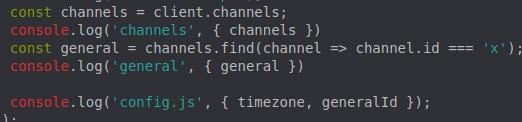
  const channels = client.channels;
  console.log('channels', { channels })
  const general = channels.find(channel => channel.id === 'x');
  console.log('general', { general })

  console.log('config.js', { timezone, generalId });
});
https://prnt.sc/rigyyy why doing this
 naive mantle
lmao your login is last
sudden geyser
it doesn't matter where it's put
mossy vine
^
finite bough
^
naive mantle
oh
hidden spindle
As far as i know it doesnt matter
pale vessel
my immersion tho
hidden spindle
i am looking for the objects methods @tight plinth
pale vessel
did you get any error?
naive mantle
@finite bough can u help me now
hidden spindle
i thought since it was a map it would have a .get method
but i didnt
since maps on js have the get method
finite bough
try adding .cache
hidden spindle
yea
imma try that
the error was that the .find method doesnt exist on channels flazepe
pale vessel
yeah add a .cache
finite bough
JUST DO IT
pale vessel
shh
naive mantle
shiemi help me pls
finite bough
@naive mantle did u make the command handler
naive mantle
no
tim did
then he forced me
to understand what it did
can you just like,,, tell me how my commands can actually do the work
sudden geyser
You mean find an emoji by it's ID?
tight plinth
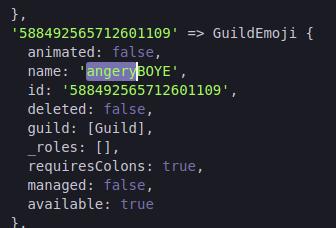
message.guild.emojis.cache.get(emoji => emoji.name === 'angeryBOYE')``` gives me undefined. Anyone knows why?does it exist in the guild
 tight plinth
no
naive mantle
someone pls help
tight plinth
it's emojis
finite bough
nvm
pale vessel
is get same as find?
tight plinth
true
finite bough
like var, const, let have differences
tight plinth
var & let are different?
naive mantle
can like someone actually do my command handler help
tight plinth
lol
naive mantle
😔
finite bough
yes
tight plinth
oh
finite bough
idk from where did u get that command handler
naive mantle
get it done
naive mantle
because
tight plinth
@naive mantle no one here will "do a bot for you"
naive mantle
my brain doesnt work like that
tight plinth


 sudden geyser
are you trying to make your own command handler? What exactly are you trying to do (as in explain)?
naive mantle
i need someone to explain
tight plinth
use thos
naive mantle
my command handler works
earnest phoenix

First 500 people will get 2 months of Skillshare free: https://skl.sh/polymatter4
Patreon: https://patreon.com/polymatter
Twitter: https://twitter.com/polymatters
Reddit: https://reddit.com/r/PolyMatter
Discord: https://discord.gg/polymatter
It’s become popular to encourage ...
naive mantle
but when i use the prefix
pale vessel
cry
naive mantle
then say the command name
pale vessel
pls
naive mantle
the command doesnt run
finite bough
@earnest phoenix xD
finite bough
@earnest phoenix yes
naive mantle
2 days ago
earnest phoenix
your issue is that you're depending on other people without having a clue about what you're actually doing
finite bough
2 days ago
earnest phoenix
exactly
finite bough
sry caps
pale vessel
kappa
finite bough
ys
 viral spade
What is the preferred way of starting specific id shards with a shardingmanager (possibly even less ids, than there are totalShards, because the other ids will be started on another machine)?
My approach from old to new:
finite bough
coz u need to do it
sudden geyser
Try to debug it and see what variables you set are incorrectly being parsed
tight plinth
https://canary.discordapp.com/channels/264445053596991498/272764566411149314/689854042645594188
https://prnt.sc/rih4ln
 naive mantle
no
earnest phoenix
developing doesn't work like that. you can't faceplant into making a discord bot without knowing the fundamentals first; it isn't how it works. you need to learn and familiarize yourself with the language you're working with
naive mantle
im not giving out names because i dont wanna be rude
tight plinth
logic says it works
sudden geyser
Linck I think there's a options.shardList option.
tight plinth
js says no
hidden spindle
Where the fuck do i find that on the docs tho?
sudden geyser
but I don't know if it's preferred or not
earnest phoenix
https://discord.js.org , @hidden spindle

Discord.js is a powerful node.js module that allows you to interact with the Discord API very easily. It takes a much more object-oriented approach than most other JS Discord libraries, making your bot's code significantly tidier and easier to comprehend.
pale vessel
the fucking docs
please dude
read
there's literally a property called cache that returns a collection
in the channelsmanager
naive mantle
ima just not do a command handler
tight plinth
edit : .find works
hidden spindle
i was looking at the channels class
hidden spindle
not even slightly confusing i guess
naive mantle
back to using event commands
finite bough
@earnest phoenix animated emoji and normal emoji have no difference when u r trying to find htem
them
naive mantle
🗿
earnest phoenix
you know what's even a better idea? learning the language first instead of complaining how you don't understand a single thing you're doing
viral spade
@sudden geyser oh so shardlist i can set before spawning? i thought thats just the post getter of the shards
naive mantle
@earnest phoenix thats not helping
earnest phoenix
it very much is
naive mantle
but ig because i have a friend
sudden geyser
I don't know if it's preferred or not, but it's in the docs: https://discord.js.org/#/docs/main/stable/class/ShardingManager
Discord.js is a powerful node.js module that allows you to interact with the Discord API very easily. It takes a much more object-oriented approach than most other JS Discord libraries, making your bot's code significantly tidier and easier to comprehend.
finite bough
:/
naive mantle
and what events are even
a think
thing
and he also told me how to do javascript
earnest phoenix
not properly
finite bough
wdym alessandro
naive mantle
i can do this out of the top of my head
bot.on("message", (message) => {
    if (message.content === ";ping") {
       message.reply("Pong!");
   };
});```what r u trying to do
earnest phoenix
yes you do
finite bough
bruh
earnest phoenix
and you just saw that here
earnest phoenix
moron
hidden spindle
naive mantle
yes, they are, because theyre the ones
naive mantle
that made them
hidden spindle
😄
earnest phoenix
the docs dont help me understand
and that is EXACTLY WHY you need to learn the concepts themselves, the docs are going off by the knowledge they assume you already have (which YOU ARE SUPPOSED TO HAVE)
and which
you do not
naive mantle
saying that discourages me because i dont have any docs that tell me how
finite bough
pie
earnest phoenix
hey you know what's encouraging? learning the damn language
pale vessel
cry is right but sadly these arguments shouldn't be continued here but DMs
finite bough
if u tell me the purpose of every line in ur command handler
pale vessel
ez
finite bough
i will make a better command handler myself
naive mantle
i already deleted my command handler along with all my code
sudden geyser
letting them learn themselves is better than screaming to learn the language imo
pale vessel
wt
sudden geyser
that's your choice
finite bough
._.
naive mantle
yall just discouraged me and now i dont wanna do it
pale vessel
that's actually
naive mantle
because apparently ill never know the language
pale vessel
it starts with a p
finite bough
pure negativity
earnest phoenix
that's wrong, you said you don't want to learn the language and that you do not need to learn it.
pale vessel
and now he give up
finite bough
pls stop fighting
naive mantle
because i never learned how to understand it
BRO CAN SOMEONE JUST GIVE ME A DARN INTRO
pale vessel
ummm that's why you learn
naive mantle
give intro
pale vessel
w3schools xD
finite bough
xD
naive mantle
just give me an intro
pale vessel
even that works
finite bough
actually
sudden geyser
w3schools is a bad source for learning JS. Use a site like Codecademy, but learn to browser docs like Mozilla. Find out how to learn it your way, it's not a straight line and will take a while.
naive mantle
i like how when i ask for the docs you dont give me then anymore
earnest phoenix
there are a ton, and i mean millions, of courses online which are able to help you understand the language better. we aren't here to help you learn it, we're here to help you with a problem which is expected of you that you had already diagnosed it
finite bough

In this #Discordjs video we show you how to:
- NodeJS Setup
- Ready Event Setup
- dotenv stuff
Discord.js #Github:
https://github.com/The-SourceCode/Discord.js-Bot-Development
Series Playlist:
https://www.youtube.com/playlist?list=PLdnyVeMcpY78Hz8fFD1vqhYliBmZKaa7N __...
not docs
earnest phoenix
no
finite bough
an intro
naive mantle
thank you
sudden geyser
even worse
earnest phoenix
stop using youtube tutorials
finite bough
shh
earnest phoenix
help yourself
finite bough
better than fighting ww3 here
pale vessel
do not watch YouTube tutorials.
finite bough
oopsie
pale vessel
what happened to that thing
naive mantle
a youtube tutorial taught me how events work
pale vessel
yikes
naive mantle
so i just forget that knowledge
pale vessel
bad idea
finite bough
then i started reading the docs
naive mantle
yeah but whenever i do everyone gets mad at me because i shouldnt
 shadow shale
Hello how can i make simple chatbot? Ping me with answer
finite bough
@shadow shale depends wdym by chat bot
pale vessel
watch them outdated information
finite bough
@pale vessel shhhhhhhhhhhhhhhh
naive mantle
really
shadow shale
@shadow shale depends wdym by chat bot
@finite bough i mean like it will sort off chat with you
pale vessel
docs is the most reliable and up to date source
naive mantle
youre trying to make me learn outdated
earnest phoenix
the whole point of programming is that you're free to logically resolve problem in your own way. using youtube tutorials does not help you think nor develop skills for yourself, you're just being a sheep, like you are in school, doing what you're being told to do without any explanation as to why and any concepts.
if you cannot resolve logical problems yourself and think logically, in steps, programming isn't for you.
naive mantle
someone just give me the docs already
earnest phoenix
to what
earnest phoenix
what
finite bough
@shadow shale do u have basic discord.js knowledge?
pale vessel
JavaScript lol
finite bough
@naive mantle https://discordjs.guide/

A guide made by the community of discord.js for its users.
earnest phoenix
no
bad

MDN Web Docs
JavaScript (JS) is a lightweight, interpreted, or just-in-time compiled programming language with first-class functions. While it is most well-known as the scripting language for Web pages, many non-browser environments also use it, such as Node.js, Apache CouchDB and Adobe Ac...
naive mantle
bro
pale vessel
ah yes
naive mantle
which one do i use
shadow shale
@shadow shale do u have basic discord.js knowledge?
@finite bough um no if its javascript yee and i mqinly developing in python
naive mantle
ok
finite bough
@shadow shale its ok try searching for some chat bot modules in python
earnest phoenix
mozilla has amazingly written documentation which goes over almost every aspect in javascript
earnest phoenix
tldr
reading comprehension; read with understanding
think about what you're reading
yes
i need eye bleach everytime i enter this channel
earnest phoenix
i've never used it pie, but you're free to look up reviews
i use codecademy for a lot of programming courses i take
since my school covers the membership
naive mantle
they said use this
MDN Web Docs
JavaScript is a programming language that allows you to implement complex things on web pages. Every time a web page does more than just sit there and display static information for you to look at—displaying timely content updates, interactive maps, animated 2D/3D graphics, sc...
earnest phoenix
courses != documentation
finite bough
</p>
finite bough
<p>text</p>
wait wtf
finite bough
^
naive mantle
JavaScript is arguably more difficult to learn than related technologies such as HTML and CSS. Before attempting to learn JavaScript, you are strongly advised to get familiar with at least these two technologies first, and perhaps others as well. Start by working through the following modules:
Getting started with the Web
Introduction to HTML
Introduction to CSS
finite bough
skip css and html
naive mantle
ok
earnest phoenix
you can skip over html and css
earnest phoenix
nope
naive mantle
now im actually getting into something i need to know
JavaScript contains a standard library of objects, such as Array, Date, and Math, and a core set of language elements such as operators, control structures, and statements. Core JavaScript can be extended for a variety of purposes by supplementing it with additional objects; for example:
quartz kindle
yes, learning about data types is the single most important thing in any language
if you know what kind of data you're dealing with, you know what you can do with it
quartz kindle
client side is a browser
server side is what gives information for a browser to connect to
ie: the server that contains the website
naive mantle
so client side cannot run without server side?
naive mantle
ok
quartz kindle
if you make a client, that does not connect to anything, it doesnt need a server
naive mantle
This means that in the browser, JavaScript can change the way the webpage (DOM) looks. And, likewise, Node.js JavaScript on the server can respond to custom requests from code written in the browser.
quartz kindle
node.js can be both
quartz kindle
no
quartz kindle
javascript is a language that requires an "interpreter", which is a program that executes the code. node.js is an interpreter, browsers are an interpreter, everything that you use javascript on, is a javascript interpreter.
A server means it receives requests and returns information, a client means it requests information and receives it.
visual studio code is a code editor / IDE (integrated development environment), it is not a server. visual studio code saves your code and tests it using an interpreter like node.js to show you the result. it doesnt give or receive information from anywhere, it just takes the code and tests it using an interpreter
naive mantle
so node.js is the server side
quartz kindle
when you see artices and tutorials about clients and servers, they are talking about one of the possible uses of javascript, browsers and node.js, but a lot more can be done, node.js is not strictly for servers although many use it as a server
in the case of discord bots, node.js becomes both a client and a server
its a client for the discord API, but also a server that can receive and return requests if you want to
naive mantle
quartz kindle
the library "discord.js" is a discord client
naive mantle
this is what its teaching me rn
 outer niche
    raise CommandInvokeError(exc) from exc
discord.ext.commands.errors.CommandInvokeError: Command raised an exception: Forbidden: 403 Forbidden (error code: 50013): Missing Permissions```the console is the primary output of any javascript program, whatever interpreter you're using to run it, will show the results using the console
in your case, youre using the browser as the interpreter, and the browser's console as the output
if you use node.js, you will be using node.js as the interpreter, and the terminal where node is running as the output
pale vessel
sorry to interrupt you Tim, but when will this course end?
quartz kindle
who knows
pale vessel
js is a lot
pale vessel
that's mostly for websites
naive mantle
its teaching me html. instead of. javascript.
quartz kindle
alert only exists in browsers, it does not exist in node.js
pale vessel
which is what js is intended to
naive mantle
yea
 still mango
So I reported a bot on another server, how long does a review take.
earnest phoenix
SPA as your bot page 😩
naive mantle
it says saying use strict does this
``1. Massively improve performance.
-
Prevent stupid semantics in JavaScript that trip up beginners.
-
Prevent code snippets executed in the console from interacting with one-another (e.g., having something created in one console execution being used for a different console execution).``
naive mantle
so like
if you have big code chunks
they dont interact in a different way
than intended?
still mango
Ohh I was reporting a bot, the report said to join this server and a moderator would message me if more information was needed.
naive mantle
@pale vessel am i right or wrong
still mango
Just didn't know how long that process took
pale vessel
strict mode basically doesn't allow you to use poor features
 floral salmon
hello! Can somebody may help me with the bot? OAO
pale vessel
OK
naive mantle
so its like, ew no. here, do the harder version
crimson vapor
When bot cannot send embeds, they error. What is a way to check if a bot can embed links? if you check guild-wide, it does not apply for specific channels
sudden geyser
What do you need help with (Akaya)?
pale vessel
do the harder and safer version, yes
naive mantle
ok
floral salmon
i just got this bot a few minutes ago for my server, but is it able to "lock" a command for users?
sudden geyser
yeah as long as it's not locking a large portion for something like vote-locking
naive mantle
so variables have to start with a letter, _ or $
floral salmon
how do i do that?
pale vessel
this ain't php
floral salmon
no, i just wanna lock the ".xpadd"
pale vessel
it starts with var
floral salmon
so its not abused in the server.
naive mantle
yea
pale vessel
that's just variable
naive mantle
and then the identifier
pale vessel
constant uses const
naive mantle
must start with a letter, _ or $
pale vessel
there's no such thing
naive mantle
``You use variables as symbolic names for values in your application. The names of variables, called identifiers, conform to certain rules.
A JavaScript identifier must start with a letter, underscore (_), or dollar sign ($). Subsequent characters can also be digits (0–9).``
sudden geyser
how you lock it is how you set up the restriction. We don't know how your commands work or how you're setting them up
floral salmon
i use the basic commands from here so far: https://nadeko.bot/commands
 sacred knoll
I don't use variables.
pale vessel
yes
naive mantle
IM ACTUALLY LEARNING OMG
 warm marsh
Semi colons are required at all in JS.
 lyric mountain
@floral salmon wrong server
 vestal star
What should I call a command that finds you a teammate in any game?
pale vessel
i still use them because I'm used to coding php
lyric mountain
Semi colons are required at all in JS.
@warm marsh they don't, but they're recommended
pale vessel
and PHP is quite strict with their semicolons
floral salmon
omg, i am retarded.... 🤦♂️ thank you tho!
warm marsh
Meh, Developer preference.
lyric mountain
PHP is semicolons
sacred knoll
Variables are code smell. Just use registers.
quartz kindle
php and semicolons is fucking stupid
quartz kindle
but yeah, most of my js has semicolons because of php
warm marsh
Most strong typed languages are strict on their semi-colons.
earnest phoenix
semicolons make your code more readable
lyric mountain
that's due to machine-code generation
quartz kindle
yes
pale vessel
same. i just felt like putting them because it wouldn't feel completed without them
just me
sacred knoll
Don't use compilers they get in the way.
lyric mountain
what?
sacred knoll
Just write some boot sector code & edit ram in hex.
pale vessel
you're declaring it
earnest phoenix
pft, imagine programming, what peasants.
for THE most optimal performance i send voltage signals to my cpu
pale vessel
you didn't assign anything to it yet
pale vessel
yes
warm marsh
Also read into var, let, const. Usually using let and const is better due to it being scoped and not in global.
naive mantle
wowowowwowowowo
pale vessel
no
lyric mountain
compilers are one of your best friends
earnest phoenix
that's a comparison
earnest phoenix
assigning is done with a single equals sign
pale vessel
concatenation would be += IIRC
sacred knoll
Anyway everyone knows prolog is the best for writing bots.
lyric mountain
prolog?
sacred knoll
Imagine not writing your bots in prolog lol
pale vessel
prologue in games?
naive mantle
will const input; not work because a const's value cannot be changed?
naive mantle
bro. im learning
sacred knoll
const in JS is vey weak
naive mantle
what
sacred knoll
Pretty sure JS const is only const for primitives
lyric mountain
like, you might have gotten corona.
naive mantle
WHO ME
pale vessel
we don't need your rambling here
naive mantle
yea
lyric mountain
constants are more performance-friendly depending on where you use them
sacred knoll
I just like having a bit of fun
warm marsh
Fun is for #memes-and-media
naive mantle
const input; will be undefined no matter what because a constant's value cannot be changed right
sacred knoll
Not writing code is more performance-friendly.
lyric mountain
they also work a lot better when defining values that'll be used in the whole code
const input;will be undefined no matter what because a constant's value cannot be changed right
@naive mantle yes
warm marsh
Pie it will throw an error.
sacred knoll
I can write no code in O(0)
warm marsh
Due to not being initialised.
pale vessel
