#development
1 messages · Page 822 of 1
 finite bough

 hoary elm
Lol seems like a bad deal 😂
 restive furnace
and the vps prob worth of 3€/mo
restive furnace
From me, i simply cannot get scammed, anymore.
finite bough
😔
restive furnace
I have been tricked too many times 
hoary elm
And discord has tons of Scammers from Fake Nitro bots to kids selling stuff
Kinda funny actually
 shy turret
client.ping doesn't work anymore 👀
 tight plinth
Client.ws.ping
tight plinth
@shy turret did u just upgraded to v12?
finite bough
what does ws stand for
 modest maple
webscoket
tight plinth
Lol
shy turret
yay? nah
restive furnace
i know everything 

shy turret
i dont 😭
restive furnace
im fast teacher
finite bough
@restive furnace what's 2 +2?
shy turret
imagine actually getting money off a bot
finite bough
44
shy turret
@finite bough idk do console.log(2+2)
finite bough
yes
finite bough
XD
shy turret
like eval(2+2)
finite bough
yes it does
restive furnace
I am fast teacher, i can teach everything abt js and discord.js in 1 hours if im on pc or even fastee
shy turret
i can actually code on my phone pls move #memes-and-media i gues
finite bough
the only problem is
restive furnace
and on pc i am too fast writer
finite bough
they dont understand anything
 mystic violet
Im trying to install lavalink on raspberry pi 3b, I've already got it running but it comes up with an error
restive furnace
post the error, please?
tight plinth
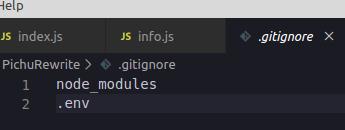
https://prnt.sc/rgdqdj it uploads the .env file to github, even with that code
 lyric mountain
it'll not
tight plinth
it does
lyric mountain
i
tight plinth
have to reset tokens aaaaaaaaaaaaaaaaaaaaaaaaaaaaaaaaaa
mystic violet
lyric mountain
try *.env
mystic violet
(thats the error)
lyric mountain
it wasn't supposed to upload files filtered by gitignore
mystic violet
@restive furnace I got the error
Im trying to install lavalink on a raspberry pi 3, any idea why this error is occurring and how to fix it? https://hastebin.com/ocakevivaq.cs
 wide ridge
some times my client takes a while to reach the "ready" state, does anyone know why?
client.on('ready', () => {
console.log('Bot is online!');
var numServers = client.guilds.size + " servers! | ;help";
client.user.setActivity(numServers, {type: 'WATCHING'});
setInterval(async () => {
var numServers = client.guilds.size + " servers! | ;help";
await client.user.setActivity(numServers, {type: 'WATCHING'});
}, 3600000)
})
I had an issue where it wasn't connecting and returned a "Timeout" error. Most of the time it's fine, but occasionally it just hangs and doesn't log in to the bot properly
mystic violet
what is client defined as?
wide ridge
const client = new Discord.Client();
client.commands = new Discord.Collection();
client.aliases = new Discord.Collection();
wide ridge
oh
 earnest phoenix
per usual
wide ridge
I see
hoary elm
Lol nobody ever thinks if that could be the issue 🤷🏻♂️
wide ridge
feelsbadman
hoary elm
This is true
wide ridge
😭
mystic violet
Im trying to install lavalink on a raspberry pi 3, any idea why this error is occurring and how to fix it? https://hastebin.com/ocakevivaq.cs
 quartz kindle
but it also depends on how many guilds, your connection quality, what you're loading, etc
my bot is not having any issues connecting
earnest phoenix
api issues are weekly at this point, this is going to start happening more and more often because of the go live limit increase
 quartz hill
2020-03-14T19:19:14.023900+00:00 app[web.1]: (node:4) UnhandledPromiseRejectionWarning: Error: Something took too long to do.
2020-03-14T19:19:14.023927+00:00 app[web.1]: at /app/node_modules/discord.js/src/client/ClientManager.js:40:57
2020-03-14T19:19:14.023927+00:00 app[web.1]: at Timeout._onTimeout (/app/node_modules/discord.js/src/client/Client.js:436:7)
2020-03-14T19:19:14.023928+00:00 app[web.1]: at listOnTimeout (internal/timers.js:549:17)
2020-03-14T19:19:14.023929+00:00 app[web.1]: at processTimers (internal/timers.js:492:7)
Why do you think Heroku gives such a mistake when logging in the bot? It's been like this for the last few days. I have not changed the code.
ow very long sorry
earnest phoenix
read a few messages above
hoary elm
Use markdown 🤦🏻♂️
 zenith orchid
If used this code window.location = "google.com", redirect to localhost:8090/gooogle.com. But i want redirect to google.com.
Why that's not worked.
earnest phoenix
then.... just include the protocol?
 sudden geyser
did you try adding https://
 gleaming narwhal
add "https://" to the start
zenith orchid
I know
earnest phoenix
without the protocol, you tell it that it is a relative path, not an absolute one
zenith orchid
So i need to add?
gleaming narwhal
yep
earnest phoenix
yes you need the protocol
zenith orchid
Pf
 copper cradle
lmaoo
zenith orchid
Thx for information
earnest phoenix
this is the result of google trying to kill protocols from their browsers
mystic violet
Im trying to install lavalink on a raspberry pi 3, any idea why this error is occurring and how to fix it? https://hastebin.com/ocakevivaq.cs (sorry for sending this again)
 quartz kindle

GitHub
When I go to play a track I get this error, I was able to find the missing library, but I need to figure out where to put it, since I'm using eris-lavalink as my client.
copper cradle
fucking google it
earnest phoenix

GitHub
Send JDA audio packets from a queue kept in a native library to avoid stutters due to GC pauses - sedmelluq/jda-nas
 elder moss
Is any jobs hiring?
copper cradle
no
sudden geyser
zSnails not trying to be rude but why are you so rude for little reason
quartz kindle
because hes an angry snail
elder moss
How to get bot developer role
sudden geyser
Submit a bot (you made) and get it approved
earnest phoenix
have you by any chance tried reading a channel that's literally named frequently asked questions
 true ravine
You could have stopped there
elder moss
@sudden geyser Thanks
 halcyon turtle
finite bough
halcyon turtle
finite bough
tried to ban u? yes
earnest phoenix
/bots/{bot.id?}/check only returns if they have or not, not a timestamp right?
 zenith terrace
Language?
 slender thistle
Yes, it's there's only a boolean value returned
elder moss
Who knows good jobs for me. Payed jobs. DM me. Bot Development
 heavy marsh
Need a help on discord.js version 11
if(!new RegExp("(https?:\/\/)?(www\.)?(discord\.(gg|io|me|li)|discordapp\.com\/invite)\/.+[a-z]").test(message.content))
But it doesnt work for https://discord.gg/GY....

Discord
Step up your game with a modern voice & text chat app. Crystal clear voice, multiple server and channel support, mobile apps, and more.
How can I fix it?
copper cradle
[a-zA-Z0-9]
heavy marsh
It works thank you 🙂
mystic violet
My lavalink is giving me Uncaught Promise Rejection Error: WebSocket is not open: readyState 3 (CLOSED)
The lavalink is hosted on raspberry pi
I downloaded it from Cog-Creators/Lavalink-Jars
on github
copper cradle
@heavy marsh np
heavy marsh
I am trying to working on something like ...
Every 1 hour search in a group of channel like 10 -15 channels, 100 messages each that contains an invalid invite and delete them.
How can it be done easily on discord.js version 11?
 turbid apex
What should I do to prevent the bot's commands from working over DM
modest maple
what language
turbid apex
Turkish
sudden geyser
What programming language are you using?
modest maple
i really wish that wasnt as common as it is
turbid apex
@sudden geyser english
sudden geyser
two times!
 cold lion
I have been waiting for my bot to be approved for a long time
sudden geyser
Look up "Programming Language" xFalcon
modest maple
@cold lion keep waiting
sudden geyser
Vodka it takes ~2 weeks to get approved at the moment.
turbid apex
@sudden geyser I dont understand u
modest maple
**WHAT PROGRAMMING LANGUAGE, PYTHON? JAVA? JAVASCRIPT? WHAT LANGUAGE MAN **
turbid apex
js
sudden geyser
okay we're getting somewhere
modest maple
We fucking did it boys
sudden geyser
@turbid apex check if the message was sent in a dm. If you're using a JS lib like discord.js or eris you can use if (!message.channel.guild) {...}
 orchid raft
is that your entire code?
sudden geyser
just do it similarly to how you did exports.help
if you did <Command>.help.name, you'd be able to do <Command>.conf.guildOnly
earnest phoenix
is there a way to send a test vote event
turbid apex
After I know "guild0nly" is set to true, the command from the neck dm should not work.
 cursive dagger
@earnest phoenix button on the site
earnest phoenix
Anyone know how to fix Unexpected token after updated to discord.js 12.00.00 on glitch ? (I have change the node version and still getting the same error)
which button
can't find one
just use html lol
quartz kindle
@earnest phoenix you need to use node.js v12 or higher
check engines in your package.json
earnest phoenix
and google exists for a bunch of reasons including that one
So i made a command called hug in my bot for it to show a randomized hugging gifs defined in my code but after use the command everything works except the gif doesn't load at all...
Is there something wrong in my code or... What's it...
 cosmic phoenix
that is not how tenor works
https://media1.tenor.com/images/34a1d8c67e7b373de17bbfa5b8d35fc0/tenor.gif thats the link you would need for the first gif
 turbid apex
Why didn't you do it with the "for loop"
earnest phoenix
Oh... I see
K then... Imma try that...
@earnest phoenix well what did you search
earnest phoenix
first two results literally tell you how
modest maple
and yh cry is right
earnest phoenix
there's more to those pages than fancy colorful code blocks, read the text that explains it
earnest phoenix
how do i use dbl.webhook.on
am i missing something because like
dbl.webhook isn't defined
oh okay
 lofty hamlet
Hi
Shard x's Client took too long to become ready.
I have this problem
For my bot
earnest phoenix
you shoud also probably not take random images from google due to copyright @earnest phoenix
@earnest phoenix you need to use node.js v12 or higher
@quartz kindle yes I did I set it 12.x
quartz kindle
and it still doesnt work?
earnest phoenix
Yep same error
earnest phoenix
I think discord is kind of acting kind of weird today idk why
 dapper hill
Alright. I'm back and I need some help. I have gotten further along in my quest to develop my own bot but I have come upon a road block while trying to program the kick command. I keep getting the same error and I can not seem to find out why. Could someone look over my code and tell me whats going on?
 dusky marsh
mentions vs mention
 raven token
hey guys im doing a https request from a discord bot to a website, i should receive back JSON but im getting a 403 forbidden.. i made a small react application and it works fine there.. am i missing some extra configuration/headers? any help would be appreciated
dapper hill
Thank u a lot @dusky marsh
modest maple
@raven token if you're getting forbidden that means you do not have permission to access that endpoint
you will probably need to pass headers with the required authorisation
raven token
i have been trying to mimic browser headers and all but no luck yet
earnest phoenix
Anyone know how to fix Unexpected token after updated to discord.js 12.00.00 on glitch ? (I have change the node version and still getting the same error)
copper cradle
dude
an unexpected token
is a syntax err
the interpreter found a weird token
which means you fucked it up somewhere
earnest phoenix
I change the token like 10 times already
quartz kindle
@earnest phoenix show full error
earnest phoenix
/rbd/pnpm-volume/958d50e7-3883-495c-9136-93cc721f0884/node_modules/.registry.npmjs.org/discord.js/12.0.2/node_modules/discord.js/src/client/Client.js:40
7:05 AM
} catch {
7:05 AM
^
7:05 AM
7:05 AM
SyntaxError: Unexpected token {
7:05 AM
at createScript (vm.js:80:10)
7:05 AM
at Object.runInThisContext (vm.js:139:10)
7:05 AM
at Module._compile (module.js:617:28)
7:05 AM
at Object.Module._extensions..js (module.js:664:10)
7:05 AM
at Module.load (module.js:566:32)
7:05 AM
at tryModuleLoad (module.js:506:12)
7:05 AM
at Function.Module._load (module.js:498:3)
7:05 AM
at Module.require (module.js:597:17)
7:05 AM
at require (internal/module.js:11:18)
7:05 AM
at Object.<anonymous> (/rbd/pnpm-volume/958d50e7-3883-495c-9136-93cc721f0884/node_modules/.registry.npmjs.org/discord.js/12.0.2/node_modules/discord.js/src/index.js:8:11)
earnest phoenix
I updated it and now it is message.guild.members.random(); is not a function
earnest phoenix
show your package.json
@quartz kindle {
"//1": "describes your app and its dependencies",
"//2": "https://docs.npmjs.com/files/package.json",
"//3": "updating this file will download and update your packages",
"name": "hello-express",
"version": "0.0.1",
"description": "A simple Node app built on Express, instantly up and running.",
"main": "server.js",
"scripts": {
"start": "node app.js"
},
"dependencies": {
"discord.js": "^12.0.2",
"express": "^4.16.4"
},
"engines": {
"node": "12.x"
},
"repository": {
"url": "https://glitch.com/edit/#!/hello-express"
},
"license": "MIT",
"keywords": [
"node",
"glitch",
"express"
]
}
Combining automated deployment, instant hosting & collaborative editing, Glitch gets you straight to coding so you can build full-stack web apps, fast
quartz kindle
yes now its correct
read this to learn how to change your code to v12 https://discordjs.guide/additional-info/changes-in-v12.html

A guide made by the community of discord.js for its users.
dapper hill
Sorry. I am back again. I am working on my ban command now and I keep getting the same error could someone help me find out what I need to fix?
earnest phoenix
Oh thanks
 hoary elm
Where is it saying user is defined?
dapper hill
One moment
quartz kindle
you're defining user twice
ie ```js
const user = bla
...
random stuff
...
const user = bla```
 quartz kindle
lol
there isnt a specific thing you need to change it to
you just cant define 2 variables with the same name using const
first of all check why you are doing that
earnest phoenix
I updated it and now it is message.guild.members.random(); is not a function
@earnest phoenix
Anyone know a alternative to message.guild.members.random I can’t find one yet
quartz kindle
all collection methods have been moved to cache
members.cache.random()
the only things that are not in the cache are API methods, such as .fetch, .create, .edit, .send, etc... things that need to send something to discord
quartz kindle
?
i didnt tell you to remove message.guild
members.random() -> members.cache.random()
you just add the cache, nothing else changes
earnest phoenix
Wait did they change setPresence?
 pale vessel
no
zenith terrace
Ok
pale vessel
not you sorry
pale vessel
it's a little bit different
refer docs
always do that if you're unsure
the migrating page is also good
earnest phoenix
Did they remove streaming? Only playing and watching is on the docs
pale vessel
don't think so
what are you-

Discord.js is a powerful node.js module that allows you to interact with the Discord API very easily. It takes a much more object-oriented approach than most other JS Discord libraries, making your bot's code significantly tidier and easier to comprehend.
earnest phoenix
client.user.setPresence({
game: {
name: "in bed 🛏️",
type: "STREAMING",
url: "https://www.twitch.tv/monstercat"
}

Streaming
pale vessel
i sent a link
the docs has a really good search functionality. people should appreciate and try to actually use it
zenith terrace
Is it not activity?
zenith terrace
I meant the .set
pale vessel
it used to be game
earnest phoenix
client.user.setPresence({
game: {
name: "in bed 🛏️",
type: "STREAMING",
url: "https://www.twitch.tv/monstercat"
}
@earnest phoenix
earnest phoenix
Oh I’m stupid
pale vessel
same. sometimes.
zenith terrace
O I thought it was .setActivity. i guess presence works
pale vessel
i thought you meant the game: { and saying that it should've been activity: { which is correct
earnest phoenix
Is a say command a good idea?
zenith terrace
I would say yea, depending on who you allow to use it and how it is used I guess
earnest phoenix
UnhandledPromiseRejectionWarning: Error: Shard 1's process exited before its Client became ready.
this error is fucking my bot up when i shard
how do i fix it
earnest phoenix
if(!message.channel.id==676786881161330690 || !message.channel.id==648905725963272204){
        message.channel.send(invalid)
}else{
        message.channel.send(worked)
}
Why doesn't this work? No errors, just makes it able to use anywhere and any channel. Btw, worked and invalid are const's of embeds.
Id's are channel ID's
 peak dirge
@earnest phoenix what are you trying to achieve?
earnest phoenix
A channel whitelist
The first if sends an embed saying you can't use that in this channel, but the second one sends a working message
the seconds one always will send
no matter what channel
Hi
peak dirge
I bet you are sure the IDs are correct
zenith terrace
message.channel.id != "channelID" @earnest phoenix
earnest phoenix
Yes
Do I need to use quotes around them?
oh thanks lol
discord lag
is a serious problem
zenith terrace
I mean you can try it with the ""
 stray topaz
Someone know How can I do my bot get emojis from where it isn't 🙏
stray topaz
Yep
zenith terrace
<:emojiname:emojiID>
stray topaz
If my bot isn't in the server where the emoji is, just post the name and not the emoji
zenith terrace
oh
zenith terrace
O
stray topaz
I think I have to use a function to get emojis but not idea what function XD
zenith terrace
So do you want your bot to be able to post emojis for a say command?
stray topaz
my bot can post emojis only from the servers it is in
 prime cliff
@earnest phoenix you can't do
if(!message.channel.id==676786881161330690 || !message.channel.id==648905725963272204){
        message.channel.send(invalid)
}else{
        message.channel.send(worked)
}```

It needs to be `message.channel.id != 676786881161330690`if(message.channel.id!==676786881161330690 || ( message.channel.id!==648905725963272204)) {
message.channel.send(invalid)
}else{
message.channel.send(worked)
}
zenith terrace
@stray topaz so if it can post emojis, what is it you need help with?
stray topaz
My bot can't post emojis from servers where it is not
earnest phoenix
It still posts the invalid embed
zenith terrace
So you are doing <:emojiname:emojiID> Flash?
@earnest phoenix whats the embed then
earnest phoenix
Let me get it
const worked = new Discord.RichEmbed()
        .setTitle(`New shift being hosted by ${message.member.displayName}!`)
        .addField("Shift type:", "")
        .addField("Game Link:", "")
        .addField("Description:", "@<590783420255305739> , ")
        .setTimestamp("Module 1.0.0 | ")
    const invalid = new Discord.RichEmbed()
        .setTitle("There was an error with this shift.")
        .setDescription("Sorry, there seemed to be some trouble")
        .setTimestamp("Module 1.0.0 | ")
@zenith terrace I removed some private info
Both worked before the whitelist
but now it just sends invalid
And I am using v11
zenith terrace
@earnest phoenix Dont put it as .setTimestamp. That means about when the command was used. Put it as .setFooter
zenith terrace
If you want the time, put it as .setTimestamp()
stray topaz
@zenith terrace yep that works,
But for this I have to copy Prefix.say <: emojiname: emojiID>
I'm asking if there is a way that if I copy **Prefix.say  ** my bot it responds: .
zenith terrace
Hmm
earnest phoenix
The whitelist problem still persists.
zenith terrace
Which part was that
earnest phoenix
me?
zenith terrace
Mhm
zenith terrace
@stray topaz I dont know about the bot being able to send it without an embed.
Unless it has the global emoji perm
earnest phoenix
if(message.channel.id != 676786881161330690 || ( message.channel.id != 648905725963272204)) {
        message.channel.send(invalid)
    }else{
        message.channel.send(worked)
    }
But it should
copper cradle
@earnest phoenix ids are strings, not ints
earnest phoenix
oh
copper cradle
The difference between == and === is that: == converts the variable values to the same type before performing comparison. This is called type coercion. === does not do any type conversion (coercion) and returns true only if both values and types are identical for the two variables being compared.
zenith terrace
@earnest phoenix remove them
zenith terrace
Meh
copper cradle
and remove those ()
earnest phoenix
It still didnt work right but I'm exp-
copper cradle
they aren't important
earnest phoenix
Ok it didnt work with the () then either
copper cradle
are you getting any errors
earnest phoenix
No, but it sends the invalid embed when the channel is correct
When it should be sending the working embed
copper cradle
show your current code
earnest phoenix
module.exports = {
    name: "normshift",
    desc: "Host a shift.",
    usage: "",
    execute: async (message, args) => {
    message.delete()
    const worked = new Discord.RichEmbed()
        .setTitle(`New shift being hosted by ${message.member.displayName}!`)
        .addField("etype:", "ee")
        .addField("Game Link:", "")
        .addField("Description:", "")
        .setFooter("Module 1.0.0")
    const invalid = new Discord.RichEmbed()
        .setTitle("There was an error with this shift.")
        .setDescription("Sorry, there seemed to be some trouble")
        .setFooter("Module 1.0.0")
    if(message.channel.id !== "676786881161330690" || ( message.channel.id !== "648905725963272204")) {
        message.channel.send(invalid)
    }else{
        message.channel.send(worked)
    }
}};
I had to remove some private info in the strings
So some are empty and some are random like ee
zenith terrace
if(message.channel.id !== "676786881161330690" || ( message.channel.id !== "648905725963272204")) {
       return message.channel.send(invalid)
    }else{
        message.channel.send(worked)
    }
}};```remove those ()
earnest phoenix
Done
zenith terrace
if(message.channel.id !== "676786881161330690" || message.channel.id !== "648905725963272204") {
       return message.channel.send(invalid)
    }else{
        message.channel.send(worked)
    }
}};```U removed the ( ) yea?
earnest phoenix
Yes
earnest phoenix
3 different channels; two are whitelisted and one is not. They all send invalid
earnest phoenix
Ahhh I feel dumb; I copied a user ID right before pasting it.
zenith terrace
Oof
earnest phoenix
v.v
But it still won't work.
For some reason
And yes, the channel IDs are right this time lol
dapper hill
Hello. I am trying to set up permissions on my server and I keep getting the same error. Could I get some help?
copper cradle
I mean
dapper hill
Im back lol
earnest phoenix
msg is not defined
copper cradle
no
earnest phoenix
oooooooooooo
copper cradle
you forgot a ) at the end of the if statement
and use if statements with {}
just for the sake of clean code
dapper hill
u r very helpful thank u a lot
copper cradle
np lol
 copper cradle
noice
zenith terrace
@earnest phoenix ima try it on my bot
earnest phoenix
mk
copper cradle
yeah
i told u
msg.member.roles.find()
you're doing msg.member.role.find(), but it's msg.member.roles.find()
copper cradle
your package.json file
but you did npm install discord.js
show what's inside your package.json file
where it says
dependencies
zenith terrace
@earnest phoenix change the || to &&
earnest phoenix
Oh?
zenith terrace
Mhm
dapper hill
Discord JS 12
copper cradle
yeah
dapper hill
Thats what I am using
earnest phoenix
I wasnt expecting that but okay
dapper hill
ok let me try that
copper cradle
or was it msg.member.cache.roles.find()
try both
if the first works then don't try this last one
copper cradle
find should work tho
earnest phoenix
The unwhitelisted message sents the working one now lol @zenith terrace
unwhitelisted channel sends*
zenith terrace
message.delete()
    const worked = new Discord.RichEmbed()
        .setTitle(`New shift being hosted by ${message.member.displayName}!`)
        .addField("etype:", "ee")
        .addField("Game Link:", "e")
        .addField("Description:", "e")
        .setFooter("Module 1.0.0")

    const invalid = new Discord.RichEmbed()
        .setTitle("There was an error with this shift.")
        .setDescription("Sorry, there seemed to be some trouble")
        .setFooter("Module 1.0.0")
    if(message.channel.id !== "channelID" && message.channel.id !== "channelID") {
        return message.channel.send(invalid)
    } else {
        message.channel.send(worked)
    }
};``` @earnest phoenix Thats why I have and it works fine on my botso I'm not familiar with everything they changed
dapper hill
Idk what i am doing wrong at this point
zenith terrace
.roles.cache.get
earnest phoenix
I'm on v11, and it doesn't work if it makes any difference
dapper hill
Nope still doesn't work says "Roles" is undifined
zenith terrace
Send your code again
copper cradle
oof
earnest phoenix
hold on
dapper hill
I am screenshoting currentlyu
copper cradle
oof
earnest phoenix
module.exports = {
    name: "normshift",
    desc: "Host a shift.",
    usage: "",
    execute: async (message, args) => {
    message.delete()
    const worked = new Discord.RichEmbed()
        .setTitle(`New shift being hosted by ${message.member.displayName}!`)
        .addField("Shift type:", "")
        .addField("Game Link:", "")
        .addField("Description:", "")
        .setFooter("Module 1.0.0")
    const invalid = new Discord.RichEmbed()
        .setTitle("There was an error with this shift.")
        .setDescription("Sorry, there seemed to be some trouble")
        .setFooter("Module 1.0.0")
    if(message.channel.id !== "676786881161330690" &&  message.channel.id !== "648717359632351283") {
        return message.channel.send(invalid)
    }else{
        message.channel.send(worked)
    }
}};
``` @zenith terraceuuuuuuuuu
zenith terrace
@earnest phoenix remove the double spacing after &&. Should only be one. Idk if it makes a difference but try
copper cradle
show
dapper hill
I will
zenith terrace
There is a double spacing
dapper hill
earnest phoenix
Removed
zenith terrace
is it only 1 space now?
dapper hill
I need to use bigger screenshot sorry
zenith terrace
Yes
copper cradle
you didn't show the error brosky
earnest phoenix
got it
copper cradle
that's just the traceback
dapper hill
zenith terrace
@dapper hill Do you want only people with the BOT TESTER role to use the command?
earnest phoenix
Still doesn't work
dapper hill
Yes I want it so if you dont have the perm "Bot Tester" than you can't use the command. (Ping is just a filler for now)
I was told that I need to capitilise the role in the code
even if it isnt capitilized
in discord
is that correct?
pale vessel
try changing .get to .find
zenith terrace
.find dont work
dapper hill
no no thats defintly not the error
pale vessel
how come
dapper hill
I tried it before
copper cradle
find is a prototype of arr
dapper hill
thats what we were fixing previously
copper cradle
so it should work
pale vessel
yeah
copper cradle
Array.prototype.find()
@earnest phoenix which part dont work. Which one is it sending
pale vessel
just let me know the error
dapper hill
there isnt a error the Role command just simply doesnt work
copper cradle
u sure
pale vessel
he's using v12 right
dapper hill
ya its like its not even there
copper cradle
send the code for the Role command
dapper hill
ok
zenith terrace
if(!msg.member.roles.cache.get(r => r.name ==== "Bot Tester"))
return channel.reply("You dont have the Bot Tester role")``` @dapper hillif we haven't seen the code then how are we supposed to help lul
zenith terrace
@earnest phoenix triple check the IDs
dapper hill
earnest phoenix
Triple checked
copper cradle
it doesn't send the message right?
pale vessel
so you're making it so that it send the message if the member doesn't have the role?
zenith terrace
if(!msg.member.roles.cache.get(r => r.name ==== "Bot Tester"))
return channel.reply("You dont have the Bot Tester role")``` @dapper hill
zenith terrace
k
pale vessel

dapper hill
zenith terrace
change it from channel.reply to msg.channel.send
pale vessel
also put return thing inside a block or inline
dapper hill
I added that there is now this error
pale vessel
lol of course
copper cradle
i
copper cradle
omg
dapper hill
sorry didnt see ur post
copper cradle
lmao
pale vessel
🔫
zenith terrace
@earnest phoenix idk. Works fine for me
earnest phoenix
Sigh
pale vessel
what's the problem?
earnest phoenix
Scroll ^
pale vessel
i scrolled but to no avail
zenith terrace
module.exports = {
    name: "normshift",
    desc: "Host a shift.",
    usage: "",
    execute: async (message, args) => {
    message.delete()
    const worked = new Discord.RichEmbed()
        .setTitle(`New shift being hosted by ${message.member.displayName}!`)
        .addField("Shift type:", "")
        .addField("Game Link:", "")
        .addField("Description:", "")
        .setFooter("Module 1.0.0")
    const invalid = new Discord.RichEmbed()
        .setTitle("There was an error with this shift.")
        .setDescription("Sorry, there seemed to be some trouble")
        .setFooter("Module 1.0.0")
    if(message.channel.id !== "676786881161330690" &&  message.channel.id !== "648717359632351283") {
        return message.channel.send(invalid)
    }else{
        message.channel.send(worked)
    }
}};
``` @zenith terrace
@pale vessel
pale vessel
any error?
pale vessel
bruh
dapper hill
I have the bot tester role and it says that I cant use it
earnest phoenix
No, it works, but the whitelist part doesnt, it always sends working in all channels instead of the whitelisted ones
zenith terrace
It sends the worked embed in the non wgitelisted channels
dapper hill
even tho I have the role needed
dapper hill
There r two roles Bots and Bot Testers. its not only bots its like 10 of my friends and me and around 4 bots that we are all working on together
pale vessel
are the ids you defined bad?
pale vessel
it's the one you wanted to whitelist right
earnest phoenix
Yes
zenith terrace
There r two roles Bots and Bot Testers. its not only bots its like 10 of my friends and me and around 4 bots that we are all working on together
@dapper hill You put in the code"Bot Tester"not"Bot Testers"
earnest phoenix
Both of them
earnest phoenix
night told me to
zenith terrace
&& works
earnest phoenix
I used || but it didnt work either
pale vessel
channel can't have two ids
dapper hill
nore in the code
pale vessel
what the hell
earnest phoenix
^my reaction
pale vessel
change it back
zenith terrace
@dapper hill Double check the role name on Discord. Make sure it is spelled the same way as in the code
pale vessel
yes it's case sensitive
pale vessel
wha
zenith terrace
O
pale vessel
no
zenith terrace
Its prefix is &&
copper cradle
shit
pale vessel
&&
copper cradle
and it responds to the prefix
pale vessel
wtf
copper cradle
wow rude
earnest phoenix
@pale vessel doesnt work
pale vessel
any error?
zenith terrace
Hmm
pale vessel
reverse it
copper cradle
don't use &&, bc you're checking if the channel has both ids
zenith terrace
message.delete()
    const worked = new Discord.RichEmbed()
        .setTitle(`New shift being hosted by ${message.member.displayName}!`)
        .addField("etype:", "ee")
        .addField("Game Link:", "e")
        .addField("Description:", "e")
        .setFooter("Module 1.0.0")

    const invalid = new Discord.RichEmbed()
        .setTitle("There was an error with this shift.")
        .setDescription("Sorry, there seemed to be some trouble")
        .setFooter("Module 1.0.0")
    if(message.channel.id !== "ChannelID" && message.channel.id !== "ChannelID") {
        return message.channel.send(invalid)
    }else{
        message.channel.send(worked)
    }
};```

My code is changed a little bit but it still worksMeh
copper cradle
unless you're on c
zenith terrace
Deal with the pain
earnest phoenix
switch it?
copper cradle
which requires them after a struct def
copper cradle
literally what you're checking is
if this channel has the id <id> and it also has the id <id> do this
which is impossible
cuz channels only have 1 id
earnest phoenix
I already did snail
copper cradle
a
pale vessel
yeah i said that
copper cradle
I'm kinda blind tbh
pale vessel
try using some
pale vessel
because you use it
zenith terrace
when && works for me xD
copper cradle
weird
earnest phoenix
rrrEE
pale vessel
fix your machine
earnest phoenix
so
earnest phoenix
const thingies = ['id1', 'id2']
if(thingies.some('id') || thingies.some('id')){}?
e
ok
zenith terrace
The "CapsLk" feature is on but the letters are all. When its off it does capital letter
👀
My keyboard being weird
Ok it fixed itself
pale vessel
it has its own mind 
zenith terrace
Yes
&&
O the bot muted?
Kicked
xD
@drowsy sentinel I think you only meant to mute a bot if it does that
 drowsy sentinel
No sir/ma'am, I cannot stop bots from sending DMs by muting them.
earnest phoenix
@pale vessel node:14) UnhandledPromiseRejectionWarning: TypeError: message.channel.id.some is not a function
pale vessel
yeah i ducked up
earnest phoenix
I'm in v11
:p
Some random messages of mine take 9999 years to send
why
doe
pale vessel
try reversing the thing like: ```js
if (msg.channel.id == "id" || msg.channel.id == "id") {
Valid
}
else {
Invalid
}
===
pale vessel
whatever
copper cradle
== big gay
earnest phoenix
lul
pale vessel
i do it to save space
earnest phoenix
i trust zSnails only because of their pfp
earnest phoenix
@pale vessel now it just sends valid all the time in all channels
pale vessel
just in case, you changed msg to message right?
earnest phoenix
yes.
pale vessel
can i view the latest code?
earnest phoenix
module.exports = {
    name: "normshift",
    desc: "Host a shift.",
    usage: "",
    execute: async (message, args) => {
    message.delete()
    const arrays = ['676786881161330690','648717359632351283']
    const worked = new Discord.RichEmbed()
        .setTitle(`New shift being hosted by ${message.member.displayName}!`)
        .addField("Shift type:", "")
        .addField("Game Link:", "")
        .addField("Description:", "")
        .setFooter("Module 1.0.0")
    const invalid = new Discord.RichEmbed()
        .setTitle("There was an error with this shift.")
        .setDescription("Sorry, there seemed to be some trouble")
        .setFooter("Module 1.0.0");
    if (message.channel.id === "676786881161330690" || message.channel.id === "648717359632351283") {
        message.channel.send(worked)
    }else{
        message.channel.send(invalid)
    }
}};
i need to remove arrays
pale vessel
try changing === to ==
 pale vessel
because we're stupid
earnest phoenix
ig
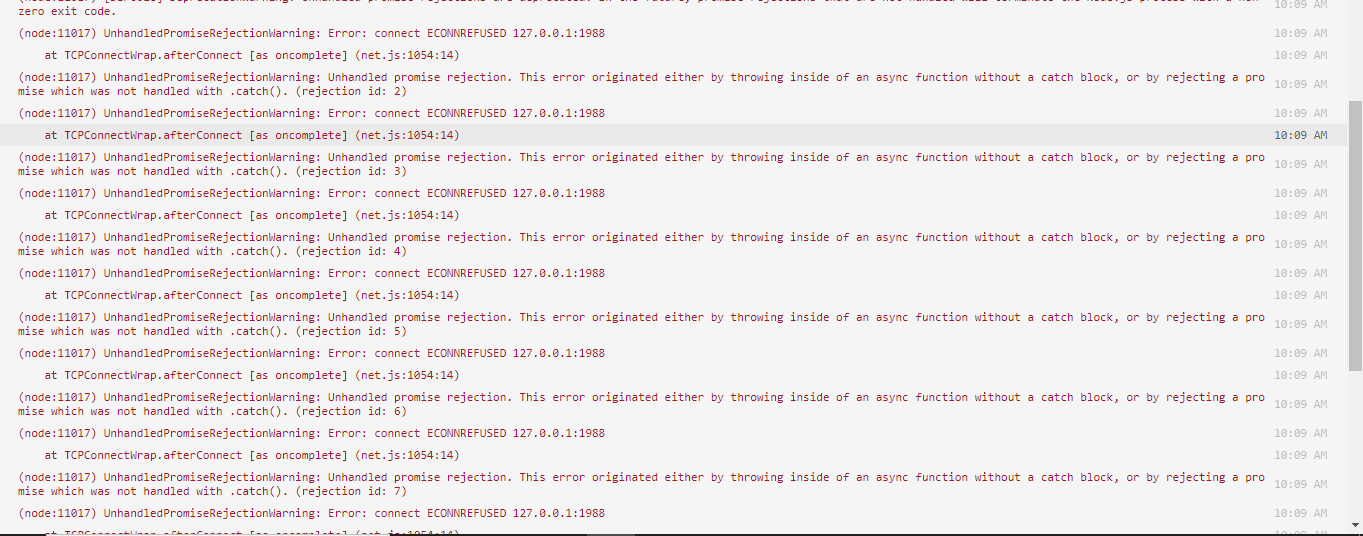
Hey, I was trying creating a simple dashboard for my bot but after doing installation it doesn't run anything and it is hosted on glitch when I turned on debugger it throws this error in console (node:6119) UnhandledPromiseRejectionWarning: Error: connect ECONNREFUSED 127.0.0.1:1988 at TCPConnectWrap.afterConnect [as oncomplete] (net.js:1054:14) (node:6119) UnhandledPromiseRejectionWarning: Unhandled promise rejection. This error originated either by throwing inside of an async function without a catch block, or by rejecting a promise which was not handled with .catch(). (rejection id: 1) (node:6119) [DEP0018] DeprecationWarning: Unhandled promise rejections are deprecated. In the future, promise rejections that are not handled will terminate the Node.js process with a non-zero exit code.
copper cradle
your webserver refused the connection
earnest phoenix
but why
Should I, instead of using ||, put the two ID's in different if statements? @pale vessel
pale vessel
nope
earnest phoenix
yeah i thought so
earnest phoenix
both
 zenith terrace
glitch, even tho it can be the same most times with vs
 zenith terrace
Fun
 pine aspen
Hey
earnest phoenix
hello
pine aspen
.setDescription(`Available commands for PollMate \n \n Prefix: ${}`)
I'm trying to make my prefix somwhat like this
**Prefix: ** pm!
do you know how i could do that?
I'm having trouble putting the prefix in `
earnest phoenix
make it a variable or require it from a config file and then use ${prefix} or whatever the variable is
if i understand
what you want
earnest phoenix
communist doggo approval
pine aspen
I can get the prefix ez
pale vessel
then what's the problem?
earnest phoenix
?
pale vessel
put a backslash
pine aspen
Look
earnest phoenix
under escape
pale vessel
yes it works
pale vessel
his prefix has `
pine aspen
.setDescription(`Available commands for PollMate \n \n Prefix: `\`${prefix}\``)```Like that?
pale vessel
yes
or why are you using template literal when there's no variable to put
use normal quotes
pine aspen
Ok.
pale vessel
it doesn't matter
 zenith terrace
@pale vessel U know how we were struggling to get the ID for the ping command guy?
pale vessel
how?
pale vessel
big oof


 zenith terrace
rip Void
pine aspen
Right, it works.
earnest phoenix
im gonna ping discord and tell them to get me help
 astral yoke
Name is undefined.
const Discord = require('discord.js');
const client = new Discord.Client();

client.on('message', async message => {
    module.exports = {
        config: {
            name: "leaderboard",
            usage: "!leaderboard",
            description: "",
            permissions: "none"
        },
        run: async (bot, message, args) => {
    if (message.mentions.users.first()) {
      var output = await eco.Leaderboard({
        filter: x => x.balance > 50,
        search: message.mentions.users.first().id
      })
      message.channel.send(`The user ${message.mentions.users.first().tag} is number ${output} on my leaderboard!`);
    } else {
      eco.Leaderboard({
        limit: 3, //changable
        filter: x => x.balance > 50
      }).then(async users => {
        if (users[0]) var firstplace = await client.fetchUser(users[0].userid)
        if (users[1]) var secondplace = await client.fetchUser(users[1].userid)
        if (users[2]) var thirdplace = await client.fetchUser(users[2].userid)
        message.channel.send(`My leaderboard:
1 - ${firstplace && firstplace.tag || 'Nobody Yet'} : ${users[0] && users[0].balance || 'None'}
2 - ${secondplace && secondplace.tag || 'Nobody Yet'} : ${users[1] && users[1].balance || 'None'}
3 - ${thirdplace && thirdplace.tag || 'Nobody Yet'} : ${users[2] && users[2].balance || 'None'}`)
      })
    }
  }
}})
Error code:
    at load (C:\Users\Cools\dog1bot\handlers\command.js:15:36)
    at C:\Users\Cools\dog1bot\handlers\command.js:29:27
    at Array.forEach (<anonymous>)
    at C:\Users\Cools\dog1bot\handlers\command.js:29:14
    at FSReqCallback.oncomplete (fs.js:152:23)
npm ERR! code ELIFECYCLE
npm ERR! errno 1
npm ERR! fyre@1.0.0 start: `node src/index.js`
npm ERR! Exit status 1
npm ERR!
npm ERR! Failed at the fyre@1.0.0 start script.
npm ERR! This is probably not a problem with npm. There is likely additional logging output above.

npm ERR! A complete log of this run can be found in:
npm ERR!     C:\Users\Cools\AppData\Roaming\npm-cache\_logs\2020-03-15T04_56_51_456Z-debug.log

C:\Users\Cools\dog1bot>```how are u even
copper cradle
u have a command handler right
astral yoke
yeah
copper cradle
and that code is inside another file right
zenith terrace
Where is this "name", phone doesn't help +_+
copper cradle
@zenith terrace same
astral yoke
yeah
copper cradle
why are you creating another client
astral yoke
cause it couldn't define it
copper cradle
and you don't need a message event
astral yoke
so i just 'solved' it by making another one
copper cradle
yeah no
astral yoke
well then it says client isn't defined
copper cradle
pass client as a parameter inside the run function
zenith terrace
I just got off my laptop since its past 5am
astral yoke
how would i do that?
copper cradle
do you know how functions work?
astral yoke
not really
zenith terrace
I legit cannot find this "name" of undefined
copper cradle
function add(param1, param2) {
    return param1 + param2;
}
//we have the add function, which takes in 2 params, when we call the function we'll be passing in 2 numbers to be added

add(2, 2);
//here we are calling the add function and the code inside of the function will be run, in this case param1 + param2 which gets converted to 2 + 2
Idk If I'm explaining this ok
I mean I get the gist out of it
astral yoke
huh
pale vessel
so you need to pass name to the function
astral yoke
so is it possible to then replace the client with the param?
pale vessel
the code is already a mess
copper cradle
@astral yoke yes it is
that code is inside a function
when you do run: async () => {}
that's a function
 west raptor
callback
copper cradle
no
west raptor
I'm going to use the excuse of it's 1am
copper cradle
I'm not a good teacher
@west raptor understandable
params can be anything you want
so modify them in order to pass client
for example
add client as the last param
and in your command handler pass in client at the end of the function call
I'm should stop
west raptor
also please learn JavaScript and nodejs @astral yoke
zenith terrace
Lol
west raptor
not even knowing how functions work is kinda concerning while coding a bot
copper cradle
yeah
pale vessel
function? what's that 
west raptor
sure some people learn like this but it saves so much trouble you just follow a crash course or something
copper cradle
@pale vessel a thing that makes your computer uhh do stuff
west raptor
computer goes beep boop
pale vessel
oh
zenith terrace
Nah it makes your computer buy food
copper cradle
I hate typing on mobile
pale vessel
Same
zenith terrace
Especially trying to type code
pale vessel
and no syntax highlighting
west raptor
tbf syntax highlighting on mobile would just make it worse
pale vessel
not for me
west raptor
with all the wrapping and shit?
copper cradle
yeah
dapper hill
Guess what guys?!?!?
Im back

How would I make it so if someone doesnt type either of theys commands like ?info Author or ?info Version it will respond with Invalid Command. Right now what it does is it will respond with both so if I type ?Author it will reply with "Version 0.5 Tmax7055" and if I type ?Version it replys with "Version 0.5 Invalid command"
Also could u @ me when you respond because I have this server muted. For reasons.
hoary elm
@dapper hill try something like
//Send message here
} else {
if(args[1] === SomeOtherThing Here) {
// send message here again
}
if(!args[1]) return msg.channel.send("Invalid Command")
That might be why it sends both is because you aren't defining them as seperate args with a else if that makes sense I'm honestly horrible at explaining this stuff lol
dapper hill
no no its fine as long as the code works I can read it and get the jist.
hoary elm
^^ might be a better method
pale vessel
and it looks cleaner
hoary elm
True
dapper hill
wait use switch where @pale vessel
pale vessel
after case 'info'
dapper hill
?
pale vessel
case 'info':
  switch (args[1].toLowerCase()) {
    case 'version':

    break;

    case 'author'

    break;

    default:

    break;
  }
break;```ya but if the person doesnt type either I want it to respond with "Invalid command"
pale vessel
there
dapper hill
do I type the message underneath each case?
pale vessel
yes
dapper hill
ok
pale vessel
like normal
dapper hill
If I want to add a || do i have to put paranthisis if I want to do that
so I can make it so you can do capital and lowercase
pale vessel
no you can't do that. you can do something like ```js
case 'one':
case 'two':
stuff
break;
wait i did it for you
so now you only need to type lowercase
because uppercase is already converted to lowercase
just make sure that args[1] exists
you can check that yourself
i can't spoonfeed more