#development
1 messages · Page 786 of 1
 potent ivy
assuming you got no public IP ?
if so, then its as good as hidden token
if nobody can access the website anyways
 fiery stream
yea
well u can run it local
but someone can inspect the dashboard page and find the token
 mossy vine
^
you cannot hide it
even if you can
you will run into plenty more issues
with literally any visitor having complete control over it
fiery stream
what if i run a nodejs server
 amber fractal
Do all that stuff backend
potent ivy
if you run a nodejs server you dont need "webbuild" of discord.js
 earnest phoenix
for a dashboard you need a backend and a frontend part, there's no one over the other
mossy vine
^^^
fiery stream
oof
amber fractal
Bet I'll do it all in xmlhttprequests
mossy vine
the fuck are you looking at
fiery stream
wdym its someone's open sourced code
mossy vine
how is that related to what you are trying to do
fiery stream
well i can replace the token with "fake token" after login
 earnest phoenix
i hope you're aware that whatever is exposed to the user is exposed to the user, they can see everything that's done, stop the execution, reverse eng. it
mossy vine
^
earnest phoenix
so no, you can't have a bot on the frontend
mossy vine
plus even if you log in, the user can now do anything with your bot
visible token or not
fiery stream
then whats the point of that web build lib
earnest phoenix
some people are idiots
mossy vine
who are you referring to cry
earnest phoenix
people who use the web build
fiery stream
lol thats what i want to ask
fiery stream
i mean why did the even make the lib at first
earnest phoenix
it's stupid
mossy vine
eg webhook sender things
earnest phoenix
you have to have an active connection to the webpage for it to run
which is dumb
at that point you could've just... made the app as a program
mossy vine
d.js isnt only for bots
earnest phoenix
i'm aware
 zenith orchid
@fiery stream, App name?
fiery stream
App name?
earnest phoenix
name
fiery stream
for what app
earnest phoenix
the app
fiery stream
what app tho>
earnest phoenix
no clue
fiery stream
@zenith orchid what app
zenith orchid
This application
fiery stream
lorex
zenith orchid

fiery stream
np
 summer torrent
english only
summer torrent
he speaking turkish.
 grizzled raven
how would you require a module that was installed after the process was started?
deleting the node modules folder cache?
summer torrent
@copper cradle he says "are you Ping"

 copper cradle
How r u gonna require it
You need to declare a variable and assign require(<Module>) to it
That means you need to write the file
 quartz kindle
well, try requiring it anyway from inside the program, might work, or not
grizzled raven
@copper cradle eval
copper cradle
Uhh
 topaz fjord
GitHub app > lorex
earnest phoenix
Lorax
 minor kelp
Trying to load a .py file that is in my bots directory, and it keeps saying ModuleNotFoundError: No module named 'mvce'
The .py file is named mvce.py
This error persists even after restarting
minor kelp
Located: ~/usr/botv2/cogs
File: ~/usr/botv2/cogs
 slender thistle
How are you importing it
minor kelp
import mvce
slender thistle
Python at its finest
quartz kindle
are you running the script from that folder as well?
minor kelp
What one exactly?
quartz kindle

Stack Overflow
 regal saddle
can i translate my python script to javascript or is it so different that i cant do it?
minor kelp
Tim.
slender thistle
Both languages are different but shouldn't be too hard
slender thistle
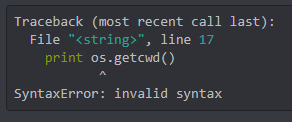
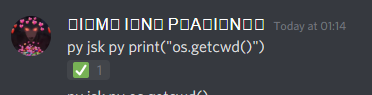
Legosi, print os.getcwd()
quartz kindle
well you didnt say
slender thistle
Tim I don't think python2.7 is supported by any python lib for Discord 
minor kelp
 slender thistle
rip jsk 0/10 never using
quartz kindle
i wouldnt know, i dont use python lul, and i mean, node-gyp was stuck on python 2.7 for an awful long time
minor kelp
Didn't get an output.

 slender thistle

minor kelp
What do i do?
slender thistle
Try to _ctx.send
slender thistle
Try to import cogs.mvce instead
slender thistle
minor kelp
the cogs folder.
slender thistle
And you're trying to import it
minor kelp
As the ownercog is there so it would look for mvce in the same folder
slender thistle
Just please do from cogs import mvce
minor kelp
Alright,
@slender thistle Getting a new error.
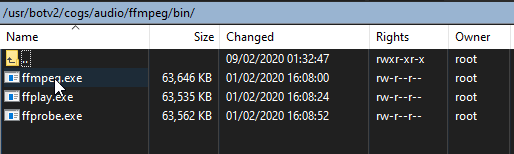
[Errno 2] No such file or directory: '~/usr/botv2/cogs/audio/ffmpeg/bin/ffmpeg.exe': '~/usr/botv2/cogs/audio/ffmpeg/bin/ffmpeg.exe'
There IS a folder with that name and all files ARE in that folder.
 earnest phoenix
~/ is not the same as /
minor kelp
Yes,
earnest phoenix
~/ is the home directory, / is root dir
minor kelp
It had the same error when it was just audio/ffmpeg/bin/ffmpeg.exe in the file
earnest phoenix
you're getting confused how paths work in linux
wherever you're running the bot file
minor kelp
And i don't use Linux. It's expected
earnest phoenix
i told you what's the problem
you put your files in the root directory, not in the home directory
minor kelp
wait i said
@earnest phoenix now what huh?
[Errno 2] No such file or directory: 'audio/ffmpeg/bin/ffmpeg.exe': 'audio/ffmpeg/bin/ffmpeg.exe'
 earnest phoenix
i told you to do ls ~/ and ls / to see the difference
minor kelp
yeah, but fix that if you can
minor kelp
I KNOW
...
The error isnt THERE
it just cant find "audio"
even though
its in the right place
minor kelp
it is.
minor kelp
dude
earnest phoenix
and you're being ignorant
minor kelp
AudioSegment.converter = "audio/ffmpeg/bin/ffmpeg.exe"
AudioSegment.ffmpeg = "audio/ffmpeg/bin/ffmpeg.exe"
AudioSegment.ffprobe ="audio/ffmpeg/bin/ffprobe.exe"

How-To Geek
If you’re coming from Windows, the Linux file system structure can seem particularly alien. The C:\ drive and drive letters are gone, replaced by a / and cryptic-sounding directories, most of which have three letter names.
again
/ is not the same as ~/
and you keep confusing those two
and what you posted above isn't a valid dir
minor kelp
. . .
earnest phoenix
/ denotes the root directory while ~/ denotes the home directory for the current user
minor kelp
Thats literally how i got the file from @west spoke
and guess what
it works for Neko
and not me
minor kelp
y e s
earnest phoenix
...which you still haven't done
minor kelp
i have done that
earnest phoenix
did you see the difference
earnest phoenix
you put your files in the root directory
minor kelp
yes
earnest phoenix
and you're making your code search in the home directory
minor kelp
not anymore
earnest phoenix
what's the dir in your code
minor kelp
as i said
AudioSegment.converter = "audio/ffmpeg/bin/ffmpeg.exe"
AudioSegment.ffmpeg = "audio/ffmpeg/bin/ffmpeg.exe"
AudioSegment.ffprobe ="audio/ffmpeg/bin/ffprobe.exe"
 minor kelp
uh, no
minor kelp
dude
 blissful scaffold
you probably want to do ./audio/
minor kelp
it works for Neko, and guess what linux
earnest phoenix
just install ffmpeg through your package manager and run it like that
minor kelp
i have it installed
earnest phoenix
so when you run ffmpeg in your terminal does it output anything
minor kelp
ok
earnest phoenix
jesus c hrist
earnest phoenix
then why are you trying to reference the damn exe files in the first place
minor kelp
becAUSE thats what i got the file like
earnest phoenix
so you basically ripped it off of someone and now you don't know what you're doing
nice
explains a lot lol
earnest phoenix
neko must be running on windows
minor kelp
raspbian
 wicked pivot
    let user = message.mentions.users.first() || message.author;

    if(user.member.roles.find(r => r.id === "585940956352741403")){
        var BoostInfo = "oui, ce membre est pas nitro boost"
    }else{
        var BoostInfo = "Non, ce membre n'est pas nitro boost"
    }

    if(user.member.roles.find(r => r.id === "632679453251600384") || user.member.hasPermission("MUTE_MEMBERS")){
        var StaffInfo = "oui, ce membre est membre du staff"
    }else{
        var StaffInfo = "non, ce membre n'est pas membre du staff"
}``` UnhandledPromiseRejectionWarning: TypeError: Cannot read property 'roles' of undefined@earnest phoenix go-on, tell me how u would fix it
earnest phoenix
wanna bet you did
minor kelp
ill see
minor kelp
yes
earnest phoenix
well
minor kelp
it gave me
earnest phoenix
try providing an absolute path to it
 split hazel
wtf is user.member
minor kelp
yeah
earnest phoenix
did it work
minor kelp
nope
earnest phoenix
what did you set the path to
minor kelp
AudioSegment.converter = "/usr/botv2/audio/ffmpeg/bin/ffmpeg.exe"
AudioSegment.ffmpeg = "/usr/botv2/audio/ffmpeg/bin/ffmpeg.exe"
AudioSegment.ffprobe ="/usr/botv2/audio/ffmpeg/bin/ffprobe.exe"
earnest phoenix
well
minor kelp
despite what most think
E
[Errno 13] Permission denied: '/usr/botv2/cogs/audio/ffmpeg/bin/ffmpeg.exe'
how the f
earnest phoenix
run it with sudo
minor kelp
bruh
earnest phoenix
you owe me 50 bucks
minor kelp
im literally root
i am signed in as root
why would it not work
how could i run it as sudo, if its a .service
earnest phoenix
what
 sinful lotus
this is why you dont run your bot in root account
minor kelp
i can only use root ;-;
earnest phoenix
running shit with sudo doesn't mean you have to keep it open...?
sinful lotus
you can create a new user
minor kelp
VPS.
sinful lotus
then add it in sudo group
I said you can do it even on vps
vps dedi or whatever you think doesnt matter
minor kelp
i literally do not use linux
sinful lotus
bruh what you use then
earnest phoenix
you could've solved your problems by doing a 10 minute google research
minor kelp
You dont get what i said
sinful lotus
I just bought 3 vps and created a user account for those
minor kelp
i dont use linux on a daily basis
sinful lotus
running things on root acc dont fix as much as they cause problem in my experience
and permitting root login is a bad practice
sinful lotus
everyone gets the same
you need to work and customize it according to your needs
and one thing is adding a user with sudo rights
minor kelp
the bot works (kinda)
sinful lotus
which is really easy and less than 10 minutes to do
minor kelp
ok
i just wanna get past the permission denied thats all
and i cant be asked to go thru with setting up new accounts
earnest phoenix
run your bot with sudo
sinful lotus
yeah and what im recommending is to create a user account
earnest phoenix
it will have sudo perms to access root dirs
sinful lotus
sometimes it fixes things that breaks on root
earnest phoenix
and what was the problem? the wrong dir.
sinful lotus
cause you mess your permissions if you run things on root
sometimes at least
besides as I said, not because it works its ok
once your server pw is leaked and you login as root everytime
then you can say goodbye to everything
minor kelp
i can change it
sinful lotus
yes bur after the damage is done
minor kelp
i have backups
sinful lotus
and probably your vps is destroyed already
yes but how about the bot's servers
they can also nuke those the bot has perms on
😩
minor kelp
How would i know about GalaxyGate's servers?
earnest phoenix
rm -rf * and everything is gone
minor kelp
yes. i know that
sinful lotus
thats why a 10 minute read
sinful lotus
is better than why cause it works
I dont even use passwords on my servers
for double authentication login
crack the first auth, you still need sudo pw
minor kelp
they would still need the IP..
sinful lotus
my servers are always being opened on port 22 just you know
 stable horizon
Not a hard thing to get ahold of just sayin
minor kelp
arent they all?
earnest phoenix
0|xxx      |     at Object.<anonymous> (/root/xxx/Modules/GAwesomeClient.js:8:15)
0|xxx      |     at Module._compile (internal/modules/cjs/loader.js:1144:30)
0|xxx      |     at Object.Module._extensions..js (internal/modules/cjs/loader.js:1164:10)
0|xxx      |     at Module.load (internal/modules/cjs/loader.js:993:32)
0|xxx      |     at Function.Module._load (internal/modules/cjs/loader.js:892:14)
0|xxx      |     at Module.require (internal/modules/cjs/loader.js:1033:19)
0|xxx      |     at Module.Hook._require.Module.require (/usr/local/lib/node_modules/pm2/node_modules/require-in-the-middle/index.js:70:39) {
0|xxx      |   code: 'MODULE_NOT_FOUND',
0|xxx      |   requireStack: [
0|xxx      |     '/root/xxx/Modules/GAwesomeClient.js',
0|xxx      |     '/root/xxx/Modules/index.js',
0|xxx      |     '/root/xxx/master.js'
0|xxx      |   ]
0|xxx | }```well once your server got brute forced
earnest phoenix
How to fix it
sinful lotus
you'll learn a 10mins read and effort is better
minor kelp
@earnest phoenix MODULE_NOT_FOUND..
minor kelp
you sure?
earnest phoenix
Yes
minor kelp
check again
 earnest phoenix
Where to figure out
minor kelp
In your code?
 minor kelp
ik
 regal saddle
kinda yeah
minor kelp
lmao
 regal saddle
what is your problem again? I cant see it discord deleted the chat for me.
earnest phoenix
0|xxx      |     at Object.<anonymous> (/root/xxx/Modules/GAwesomeClient.js:8:15)
0|xxx      |     at Module._compile (internal/modules/cjs/loader.js:1144:30)
0|xxx      |     at Object.Module._extensions..js (internal/modules/cjs/loader.js:1164:10)
0|xxx      |     at Module.load (internal/modules/cjs/loader.js:993:32)
0|xxx      |     at Function.Module._load (internal/modules/cjs/loader.js:892:14)
0|xxx      |     at Module.require (internal/modules/cjs/loader.js:1033:19)
0|xxx      |     at Module.Hook._require.Module.require (/usr/local/lib/node_modules/pm2/node_modules/require-in-the-middle/index.js:70:39) {
0|xxx      |   code: 'MODULE_NOT_FOUND',
0|xxx      |   requireStack: [
0|xxx      |     '/root/xxx/Modules/GAwesomeClient.js',
0|xxx      |     '/root/xxx/Modules/index.js',
0|xxx      |     '/root/xxx/master.js'
0|xxx      |   ]
0|xxx | }``` @regal saddlejavascript?
earnest phoenix
Yes
regal saddle
What you tryna do?
earnest phoenix
Bot hosting
regal saddle
To?
earnest phoenix
From GitHub to vps
minor kelp
yeah obvs
earnest phoenix
Ubantu
earnest phoenix
Galaxy Gate
minor kelp
Alright.
earnest phoenix
🤔
minor kelp
I use galaxygate
earnest phoenix
Same here
minor kelp
its not easy to set-up tho
 regal saddle
i guess you should watch a yt vid
minor kelp
You're better of watching a video tutorial for it.
regal saddle
Would be easier 4 eveyone

 regal saddle

earnest phoenix

minor kelp

sinful lotus
before even trying a bot
 sinful lotus
I suggest learning basic linux security and commands
 sinful lotus
you also get the servers the bot is in on risk
amber fractal
lmao imagine caring about security
regal saddle
xDDDD
sinful lotus
I dont want people to sniff on my eroges saved on my servers tbh
 sinful lotus
they might find my tastes
regal saddle
saya?
sinful lotus
anyways
amber fractal
We already know your tastes
sinful lotus
learn a bit of linux and it will get easier
sinful lotus
bruh
sinful lotus
do you want me to learn windows instead
sinful lotus
windows didnt even need learning
sinful lotus

regal saddle
idk
some people doin stuff on their pc and dont know what they are doing
you know what i mean?
minor kelp
Hm.
 prime cliff
no
minor kelp
guess what
regal saddle
zenith orchid
@earnest phoenix, you are not funny. This channel english onyl.
earnest phoenix
Uh could someone help me I am facing a problem I have no idea how to deal with
So I am hosting my bot using Node.JS and after a few hours the bot gets offline, but the process is still running
sinful lotus
what language and lib
earnest phoenix
JS DiscordJS 
earnest phoenix
alright
heres my predicement
//function that loops in main class
public void nextTick() {
   String example = "test";
   InputGetterThing a = new InputGetterThing();
   example = a.main(example);
   nextTick();
}

//second class file which gets input from user
class InputGetterThing {
  public String Main(String example) {
    waiter.waitForEvent(SomeEvent.class, m -> {
        return someBooleanCheckToFilterOutTheMessageYouExpect;
    }, m -> {
        this.example = "test2";
    }, 5, TimeUnit.SECONDS, ()->{
        event.getChannel().sendMessage("Timed Out").queue();
    })
  return this.example;
  }
}``` We are trying to wait on user input before continuing to the next tickHow do I check the version
however the waiter seems to like spawn its own thread or something
cause it returns the original 'example'
copper cradle
Yeah but u still asked what lang
earnest phoenix
while waiting
copper cradle
Aight heading out
fiery stream
Hash64/64
 dense drift
Anyone have any reason why this might not be working?
const a = `{\n"title": "${title}",\n"color": 0x${hex},\n"thumbnail": {\n"url": "${thumbnail}",\n},\n"author": {\n"name": "${name}",\n"url": "${url}",\n"icon_url": "${url}",\n},\n"description": "${descript}",\n"footer": {\n"icon_url": "${uurl}",\n"text": "${uname}",\n},\n}`
msg.channel.send({embed:
a
})```in correct formattinng
mossy vine
embed needs to be a RichEmbed or Object
sinful lotus
most likely
dense drift
I... think it's formatted right.
mossy vine
you could turn that string into an object with JSON.parse
dense drift
How would I go about that?
sinful lotus
JSON.parse(a)
mossy vine
assuming it wont have a stroke on the \ns
sinful lotus
incorrect formatting is because its just a string
dense drift
I added those thinking it might help.
So do I parse a, then send a? Or do I send parse(a)?
dense drift
Riiight, except it won't quite work unfortunately.
mossy vine
embed cannot be a string
dense drift
Okay, let me try parsing.
Okay, next up, as that looks like it's promising...
0x${hex}
That's how the user would input their color code.
SyntaxError: Unexpected token x in JSON at position 28```That's the response.
Assume the input is something like 0xfa38bE
sinful lotus
just dont do it that way
use the example I sent in picture
that would be easier and less trouble some
dense drift
That hasn't worked in the past, to help you understand, I'm trying to create an embed in a command, handled by my command handler, and then send it later.
sinful lotus
https://discordjs.guide/popular-topics/embeds.html#using-an-embed-object this for a complete rerence
A guide made by the community of discord.js for its users.
how does this thing work
do you cache it?
dense drift
const a = `{\n"title": "${title}",\n"color": ${hex},\n"thumbnail": {\n"url": "${thumbnail}",\n},\n"author": {\n"name": "${name}",\n"url": "${url}",\n"icon_url": "${url}",\n},\n"description": "${descript}",\n"footer": {\n"icon_url": "${uurl}",\n"text": "${uname}",\n},\n`}```

Then later would be send with something like...

```js
msg.channel.send({embed:
a
})```what do you mean by "later"
dense drift
I did the whole \n thing to help someone understand what they requested.
For instance, in an on join event.
sinful lotus
how do you store this letter a
and how the code looks
give more info so I can devise
dense drift
client.on("guildMemberAdd", member => {
member.guild.channels
          .find("name", guildConf.welcomeChannel)
          .send({embed: welcomemsg})
.catch(console.error);```That's roughly how it would be pulled.
and welcomemsg is...
welcomemsg = welcommsg.replace("$guild$", member.guild.name)```Just a replace string.
dense drift
What do you mean by that?
sinful lotus
where is the original
dense drift
No
The original is
{\n"title": "${title}",\n"color": ${hex},\n"thumbnail": {\n"url": "${thumbnail}",\n},\n"author": {\n"name": "${name}",\n"url": "${url}",\n"icon_url": "${url}",\n},\n"description": "${descript}",\n"footer": {\n"icon_url": "${uurl}",\n"text": "${uname}",\n},\n```Then it replaces what it needs to, and then sends as an embed.
Theoretically.
sinful lotus
where is that placed
dense drift
{"title": "Yes",color: 0xffffff,"thumbnail": { "url": "https://frogmaster.xyz/qd1pJz3U"},"url": "https://cdn.discordapp.com/avatars/665786935251304468/99ef11142a7e4356ecdb329d1799e1c3.png?size=2048",},"author": {"name": "Frogmaster","url": "https://cdn.discordapp.com/avatars/177188299943837696/a_3117fa4909ccae45bb30810575e98dfa.gif","icon_url": "https://cdn.discordapp.com/avatars/177188299943837696/a_3117fa4909ccae45bb30810575e98dfa.gif"},"description": "Oh yeah","footer": {"icon_url": "https://cdn.discordapp.com/avatars/665786935251304468/99ef11142a7e4356ecdb329d1799e1c3.png?size=2048","text": "FrogBot"},}}```That's the code it would actually pull.
Stable iirc
That shows that the replaces and whatnot are working.
It's just not sending it.

I've gotten it to do that.
sinful lotus
const exampleEmbed = {
    color: 0x0099ff,
    title: 'Some title',
    url: 'https://discord.js.org',
    author: {
        name: 'Some name',
        icon_url: 'https://i.imgur.com/wSTFkRM.png',
        url: 'https://discord.js.org',
    },
    description: 'Some description here',
    thumbnail: {
        url: 'https://i.imgur.com/wSTFkRM.png',
    },
    fields: [
        {
            name: 'Regular field title',
            value: 'Some value here',
        },
        {
            name: '\u200b',
            value: '\u200b',
        },
        {
            name: 'Inline field title',
            value: 'Some value here',
            inline: true,
        },
        {
            name: 'Inline field title',
            value: 'Some value here',
            inline: true,
        },
        {
            name: 'Inline field title',
            value: 'Some value here',
            inline: true,
        },
    ],
    image: {
        url: 'https://i.imgur.com/wSTFkRM.png',
    },
    timestamp: new Date(),
    footer: {
        text: 'Some footer text here',
        icon_url: 'https://i.imgur.com/wSTFkRM.png',
    },
};
save.to.Database(JSON.stringify(exampleEmbed))

// on guild member add
const data = get.from.Database()
channel.send({ embed: JSON.parse(data) })
rewrite your code into something like that
where in the example embed, before you stringify it and save it to database, modify what already needs to be modified
then when youu need to send it, get it from database, then just JSON.parse() it
dense drift
Okay, I'll tweak
sinful lotus
edited it a bit
dense drift
                                            const embed = {
                                                title: title,
                                                color: `0x${hex}`,
                                                thumbnail: {
                                                    url: thumbnail,
                                                },
                                                author: {
                                                    name: name,
                                                    url: url,
                                                    icon_url: url,
                                                },
                                                description: descript,
                                                footer: {
                                                    icon_url: uurl,
                                                    text: uname,
                                                },
                                            }
msg.channel.send({embed: JSON.parse(embed)})```That's the code
SyntaxError: Unexpected token o in JSON at position 1```That's the error
sinful lotus
did you stringify it first before parsing it
you cant parse it if you didnt json.stringify it first
dense drift
Oh
sinful lotus
or if you dont need to save it on db
dense drift
Didn't know, where do I put that?
sinful lotus
just do ({ embed })
dense drift
Oh by the way, this is a dummy command, that's why I'm doing it like this. Once I know it'll work after saving and pulling, then I'm putting it in the real command.
sinful lotus
JSON.stringify() and JSON.parse()
dense drift
I missed it
Same error, new code:
                                            const embed = {
                                                title: title,
                                                color: `0x${hex}`,
                                                thumbnail: {
                                                    url: thumbnail,
                                                },
                                                author: {
                                                    name: name,
                                                    url: url,
                                                    icon_url: url,
                                                },
                                                description: descript,
                                                footer: {
                                                    icon_url: uurl,
                                                    text: uname,
                                                },
                                            }
                                            JSON.stringify(embed)
msg.channel.send({embed: JSON.parse(embed)})```It doesn't like my o, and I have no idea what it means.

ooo
I see what I did wrong, but now that's what's new.
sinful lotus
you are not saving the stringified data
 marble juniper
make it a variable
dense drift
const b = JSON.stringify(embed)```yes
sinful lotus
then on parse it on embed
dense drift
However, I get the object object thing
marble juniper
then parse that variable
dense drift
                                            const b = JSON.stringify(embed)
msg.channel.send({embed: JSON.parse(b)})```This is the code that did that.
Ooo
I see the error though, it's finally throwing errors

It doesn't like my color
hahahaha
sinful lotus
convert it to int
sinful lotus
Stack Overflow
I would like to convert this: "#FFFFFF" to this: 0xFFFFFF. How is it possible without using eval?
Thanks in advance,
dense drift
🙂
Thank you so much! Time to play with it
I never knew of the parse command, so that helped a ton
marble juniper

 marble juniper
json stringify returns a value but doesn't change the object itself
dense drift
That makes sense.
marble juniper
this is why you needed to make it in a variable
dense drift
I was struggling to make it work, I console logged it and it looked right, but no where on google had any reason why it wasn't working haha.
 dense drift
That it tends to be
Well, it had good hopes hahaha
I ran into another issue.
    member.guild.channels
          .find("name", guildConf.welcomeChannel)
          .send(JSON.parse(welcomemsg))
.catch(console.error);```That's the code that pulls the message
welcomemsg is js {"title": "Yes",color: 0xffffff,"thumbnail": { "url": "https://frogmaster.xyz/58J0k9hK"},"url": "https://cdn.discordapp.com/avatars/665786935251304468/99ef11142a7e4356ecdb329d1799e1c3.png?size=2048",},"author": {"name": "Frogmaster","url": "https://cdn.discordapp.com/avatars/177188299943837696/a_3117fa4909ccae45bb30810575e98dfa.gif","icon_url": "https://cdn.discordapp.com/avatars/177188299943837696/a_3117fa4909ccae45bb30810575e98dfa.gif"},"description": "Yes","footer": {"icon_url": "https://cdn.discordapp.com/avatars/665786935251304468/99ef11142a7e4356ecdb329d1799e1c3.png?size=2048","text": "FrogBot"},}}
dense drift
Okay
Uhhh, so I was big dumb and forgot to upload it.
So it was still the old code hahaha

This is the new error that I'm hitting.

This is what it's trying to send.
msg.channel.send(`welcomeMessage has been changed to:`);
                                            var hex = parseInt(msg.content.replace(/^#/, ''), 16);
                                            const embed = {
                                                title: title,
                                                color: hex,
                                                thumbnail: {
                                                    url: thumbnail,
                                                },
                                                author: {
                                                    name: name,
                                                    url: url,
                                                    icon_url: url,
                                                },
                                                description: descript,
                                                footer: {
                                                    icon_url: uurl,
                                                    text: uname,
                                                },
                                            }
                                            const b = JSON.stringify(embed)

                                            msg.channel.send({embed: JSON.parse(b)})
client.settings.set(msg.guild.id, `${b}`, `welcomeMessage`);```That's the code that does that response.
So, why is it an empty message?
sinful lotus
you are fetching an empty data
marble juniper

sinful lotus
probably from guild create
dense drift
So I'm js console.log(welcomemsg)
Doing that, and this is what it gets:
{"title":"yes","color":null,"thumbnail":{"url":"https://frogmaster.xyz/EnbFnQMC"},"author":{"name":"Frogmaster","url":"https://cdn.discordapp.com/avatars/177188299943837696/a_3117fa4909ccae45bb30810575e98dfa.gif","icon_url":"https://cdn.discordapp.com/avatars/177188299943837696/a_3117fa4909ccae45bb30810575e98dfa.gif"},"description":"yes","footer":{"icon_url":"https://cdn.discordapp.com/avatars/665786935251304468/99ef11142a7e4356ecdb329d1799e1c3.png?size=2048","text":"FrogBot"}}
console.log(welcomemsg)
        JSON.stringify(welcomemsg)
    member.guild.channels
          .find("name", guildConf.welcomeChannel)
          .send(JSON.parse(welcomemsg))
.catch(console.error);```I tried that, and no luck either.
For some reason, it just thinks it's an empty message, when clearly the console.log says otherwise.
Wait
Darn, I thought I figured it out.
I forgot to do embed: in the send.
..Okay, I'm stupid. Thank you all for all your help.
That was the issue, I forgot to do .send({embed: JSON.parse(welcomemsg)}), and then I forgot to upload it...
Y'all are amazing 😄
https://frogmaster.xyz/kRw41fTw My replace functions work perfectly. Thanks again.

 small prairie
How Can i cache messages for using addreaction event in discord.js
cache messages sent before client loginned
 modest maple
ig store message Id's
most people tend to use the raw rection event
because the payload includes message id
mossy vine
cant you get the message id from a reaction object
modest maple
which allows u to compare to stored messages
mossy vine
yeah
earnest phoenix
How do I upgrade the bot to discord.js v12?
earnest phoenix
it gives an error
mossy vine
which you were told how to fix
mossy vine
yes
small prairie
anyways am off
mossy vine
quartz kindle
install git
earnest phoenix
quartz kindle
restart your pc and try again
earnest phoenix
ok
 broken jay
Anyone know good Postgres module for C# with pool? I tried to use Npgsql, but this pooling is not what I want
 uneven wyvern
any good tutorials/guides how to use the sqlite database with JavaScript?
 vague chasm


 quartz kindle
a connection pool is maintaining several active connections to a database for multiple concurrent operations
@uneven wyvern use an sqlite library or driver
for example, sqlite3 (async) or better-sqlite3 (sync)
uneven wyvern
sqlite3
quartz kindle
 uneven wyvern
sqlite3 is probably the most hardest database i ever used
mossy vine
sql is bringing another language into your project for headaches
honestly i just prefer mongodb
easier
earnest phoenix
sqlite is a pain in the ass because it lacks half of the features server databases have but nontheless it's a good database for small projects
orms exist
i always use ORMs now
i can just focus on designing my entities and the rest is done for me
mossy vine
fair
modest maple
ORMs are very nice
hmm
does anyone know
if its possible in python
to take a bytes object
and dump it to string
mossy vine
you mean convert bytes to string?
mossy vine
<bytes>.decode("utf-8") iirc
slender thistle
str(bytes)
modest maple
turns out it is legit just as simple as doing bytes.read()
mossy vine
that works
uneven wyvern
How can I do that every 4 letters the text get splited by a -?
 lament meteor
im not sure how to do it efficiently but u could use for loops
pretty sure there should be a more efficient method
or maybe str.match(/.{1,4}/g).join('-')
 snow urchin
client.guilds.forEach(g => {
  console.log(g.owner.user.id)
})
TypeError: Cannot read property 'user' of undefined
owner is not cached on large guilds
uneven wyvern
^
 sudden geyser
sometimes*
quartz kindle
g.fetchMember(g.ownerID).then(console.log)
uneven wyvern
how can i create a new id once someone downloaded my npm module?
 past pike
i have a command which you need to tag someone, but if i don't tag someone the bots crashed says: Cannot read property 'user' of null
i already tried to add if commands or return but still he says it
uneven wyvern
let user = message.mentions.users.first() || message.author
past pike
it's discord.js btw
uneven wyvern
so if no user has been Pinged it will fallback to the message author
past pike
user is not defined -_-
uneven wyvern
code?
past pike
oh fixed it already
uneven wyvern
lol
uneven wyvern
lmao
past pike
but still thanks for the code
uneven wyvern
Always
past pike
I was testing a kill command and the bot did not respond, so i was wtf and it was he cannot read the property of user
but now it's fixed
thanks man
sudden geyser
if you have a question pls ask it
earnest phoenix
is there something in documentation for anti server griefing
sudden geyser
what do you mean?
 grave mist
How would I make a few <div> in a <div to be in same line
They're now displayed in lines
They're like this now
hi
bye
hibye```
I want them to be
hi bye hibye
is it installed in the correct directory
modest maple
@grave mist thats not rlly how u use divs
grave mist
I'm using it for navbar tbh
grave mist
Building my bot's website where 1 div occupies name, logo at left, 1 div occupies links, 1 div for dashboard
sudden geyser
check your package.json to make sure it's actually installed
earnest phoenix
Can anyone help me how to setup lavalink node
download lavalink
fill out your details in config
run lavalink
See what what to fill
you can't run lavalink on glitch
it's way too heavy
earnest phoenix
I'll on vps
For testing here
glitch can't handle a lavalink server and your bot at the same time
i don't even think it can handle a lavalink server alone
Just help me I'll shift to my vps
follow their docs respectively
modest maple
sqlite isnt that hard to set up
their tutorial is legit simple af
{'name': 'Gegegenokitaro', 'url': 'http://www.crunchyroll.com/en-gb/gegege-no-kitaro/episode-91-the-misty-night-of-angkor-wat-792726', 'release_time': '2:30', 'episode': '91'}
{'name': 'Borutonarutonextgenerations', 'url': 'http://www.crunchyroll.com/en-gb/boruto-naruto-next-generations/episode-142-a-test-of-willpower-792537', 'release_time': '9:00', 'episode': '142'}
{'name': 'Keepyourhandsoffeizouken', 'url': 'http://www.crunchyroll.com/en-gb/keep-your-hands-off-eizouken/episode-5-an-iron-giant-appears-792451', 'release_time': '18:30', 'episode': '5'}
{'name': 'Ifitsformydaughteridevendefeatademonlord', 'url': 'http://www.crunchyroll.com/en-gb/if-its-for-my-daughter-id-even-defeat-a-demon-lord/episode-12-the-young-girls-wish-793454', 'release_time': '20:00', 'episode': '12'}```wew
search
earnest phoenix
^
earnest phoenix
literally google search for sequelize docs
modest maple

earnest phoenix
sudo it
Mean
@earnest phoenix
what
What to sudo
Command
sudo the command you just ran
lol
 thorn nexus
Hey. I need help. I have a music bot. And if you force him out of the channel (not by the command), he no longer enters the channel. discord.js
quartz kindle
show code
thorn nexus
module.exports.run = (client, message) => {
    const channel = message.member.voiceChannel
    if (!channel) return;
    channel.join().then(connection => {
        console.log("Successfully connected.");
    }).catch(e => {
        console.error(e);
    });
}```Uh
zenith orchid
@thorn nexus i think use interval. Check channel user size.
thorn nexus
and what will it give?
copper cradle
The channel size
zenith orchid
Ex: if (channelUSERSSIZE = 1) {
//exit
}
thorn nexus
I am not talking about that
if the bot is forced out of the channel (without using the command, but using the button disconnect the user from the voice channel), then the bot will no longer enter the voice channel on this server
how can this be fixed ?? or how to force a bot to enter the voice channel with a 100% chance
summer torrent
do you get any error on console?
earnest phoenix
try calling leave on the voice channel first before joining
that should reset the state that's cached in the library
thorn nexus
@earnest phoenix
zenith orchid
Which discord.js version?
thorn nexus
@zenith orchid
zenith orchid

Discord.js is a powerful node.js module that allows you to interact with the Discord API very easily. It takes a much more object-oriented approach than most other JS Discord libraries, making your bot's code significantly tidier and easier to comprehend.
earnest phoenix
wrong thing
they dont have access to the connection object... when there is no connection
zenith orchid
I guess I misunderstood.
modest maple
{'type': 'daily_update', 'url': 'https://www.crunchyroll.com/simulcastcalendar?filter=free'}
[09/02/20 | 18:06:00] Starting a new task
{'type': 'daily_update', 'releases': [{'name': 'Gegegenokitaro', 'url': 'http://www.crunchyroll.com/en-gb/gegege-no-kitaro', 'release_time': '2:30', 'episode': '91'}, {'name': 'Borutonarutonextgenerations', 'url': 'http://www.crunchyroll.com/en-gb/boruto-naruto-next-generations', 'release_time': '9:00', 'episode': '142'}, {'name': 'Darwinsgame', 'url': 'http://www.crunchyroll.com/en-gb/darwins-game', 'release_time': '17:00', 'episode': '2'}, {'name': 'Keepyourhandsoffeizouken', 'url': 'http://www.crunchyroll.com/en-gb/keep-your-hands-off-eizouken', 'release_time': '18:30', 'episode': '5'}, {'name': 'Ifitsformydaughteridevendefeatademonlord', 'url': 'http://www.crunchyroll.com/en-gb/if-its-for-my-daughter-id-even-defeat-a-demon-lord', 'release_time': '20:00', 'episode': '12'}]}
Sending Outbound response to Release.
[09/02/20 | 18:06:00] Returning Selenium_1 to free drivers, task complete
{'type': 'release_get', 'url': 'http://www.crunchyroll.com/en-gb/if-its-for-my-daughter-id-even-defeat-a-demon-lord', 'name': 'Gegegenokitaro', 'episode': '91'}
[09/02/20 | 18:06:01] Starting a new task
{'type': 'release_get', 'name': 'Gegegenokitaro', 'episode': '91', 'image_url': 'https://img1.ak.crunchyroll.com/i/spire1/51e9283b8ebb3d798076c1860a561e9f1562249422_full.jpg', 'view_link': 'http://www.crunchyroll.com/en-gb/if-its-for-my-daughter-id-even-defeat-a-demon-lord', 'review_url': 'http://www.crunchyroll.com/en-gb/if-its-for-my-daughter-id-even-defeat-a-demon-lord/reviews', 'rating': '4', 'desc': "Dale is a well-known and highly skilled adventurer despite being so young. One day, he's on a quest and goes deep into the woods and finds a"}
Sending Outbound response to Release.
[09/02/20 | 18:06:01] Returning Selenium_2 to free drivers, task complete```reee
its spawning two tasks
but why 
 red hollow
yo men
can someone give me example of proper use of klasa with kurasuta? (js)
always gettin js Uncaught Promise Error: TypeError: manager.client is not a constructor

 elder yoke
Although my bot is active, inactivity was rejected
earnest phoenix
you have to have a good uptime and the bot needs to be up at the time of review
elder yoke
Already the bot is active since the application
@modern sable
Bot has been active since application but not accepted from inactivity
 west spoke
okay
so what i'm trying to do is make 5 different computers send a .wav file to eachother
to eventually end up in my room
but
since when did this happen
and im running it as administrator
 modern sable
@elder yoke https://top.gg/bot/new

Discord
Step up your game with a modern voice & text chat app. Crystal clear voice, multiple server and channel support, mobile apps, and more. Get your free server now!
earnest phoenix
does anything else have the file open
west spoke
not that I know of
earnest phoenix
hm
west spoke
        out_file = open("tci.wav", 'wb+')
        shutil.copyfileobj(resp, out_file)
out_file.close()```would that conflict with itself?
earnest phoenix
i don't do python so i wouldn't know
modest maple
@west spoke you cirrect me if im wrong but you cant do 'wb+' 'wb' does the file creation anyway
modest maple
'wb' creates the file anyway
west spoke
shrug
uneven wyvern
Anyone has an idea how I could create a new Id once a user created a new Account?
marble juniper
wdym
 orchid coyote
Hello all. I am working on a project that will simplify bot hosting for Discord bot developers. I am needing more information to for me to continue the development of it. If you don't mind, can you tell me what language you program your bots in and what other packages you run with it. Example: I use Discord.Js and usually run Redis, MySQL, MongoDB for my databases. I also use API's mostly Twitch API or Mixer API. The more info I have the better I can make the platform 🙂 Thank you for your time and feedback 🙂
marble juniper
hope this helps
west spoke
what the fuck do I EVEN DO
marble juniper
😄
uneven wyvern
@marble juniper so like every time someone created an account on my site that the user gets its own id what is generated randomly
marble juniper
do you want long or rather short ids
uneven wyvern
18 characterd long
uneven wyvern
how would I save it so that the user can access his account data and id?
marble juniper
you save the id you generated either in a database or a file or whatever
uneven wyvern
i save it in a db, but yeah how would the user would access it?
marble juniper
well
make it so he can request the data out of the database
like the bot giving an id and maybe some access token
idk
uneven wyvern
I don't have a site yet, i use only my piece of code rn. So I can try some things out
marble juniper
so you want to make an id for every new account on "your site" and then also want the user to be able to access it
with express you would just use a path like
"/user/:id"
id would be a parameter
with the id you just made
and maybe you can then load an html or something which prompts you for a password
and then if it is correct let the user access his data
you get what I mean
uneven wyvern
Yeah
marble juniper
im a bad dev
earnest phoenix
i suggest using twitter's snowflakes system for ids
marble juniper
twitter has ids
uneven wyvern
@marble juniper well what am i then lol
marble juniper
a dev
uneven wyvern
a very bad dev
marble juniper
well whatever with accessing data and such you should probably use express since its for a site anyway
uneven wyvern
Ok
copper cradle
Ok
earnest phoenix
what does "fake" mean for alt definer
blissful scaffold
Or maybe some more info if it is related to programming a bot
earnest phoenix
??
modest maple
<div>
  <div>
      <li class="live-feed-1">
         Stay upto date with all the latests news and developments with anime and crunchyroll with Crunchy's live news webhook feed!
        <img src="https://i.imgur.com/wd8Kf3c.png?3" title="Get Live News and More" />
      </li>
  </div>
  <div>
      <li class="anime-details">
        <img src="https://i.imgur.com/q51rq46.png?1" title="Get Anime Details" />
        Want to show off your favourite anime to your friends? Maybe you just want to look up an anime you've heard about.
        We've got you covered! using the "AnimeDetails" command anything is possible!
      </li>
  </div>
  <div>
      <li class="anime-search">
        Want to look for a list on animes or related things, like voice actors, groups and other shows?
        Look no further than the "Search", "Manga", "Group" commands. This will try find you the top 5
        results to your search query! Give it a try with "-search Darling in the Franxx" and see what comes up!
        <img src="https://i.imgur.com/0uS5Q4A.png?1" title="Search for animes" />
      </li>
  </div>
</div>```anyone got any reccomendations
for making that
well
make the text go inline with the image in a block
because CSS decides it no likey correctly
quartz kindle
what do you mean
quartz kindle
and you want the text to be besides the pic?
modest maple
yh
quartz kindle
one option is to use float
float: right
float: left
on the img
another option is to put them in separate tags, and give each tag display: inline-block and width: 50%
another option is to use grid or flexbox layouts
quartz kindle
put overflow: hidden on the parent element
if you use floats
in either case its better to keep imgs and text in separate elements
<img src><p>text</p>
 opaque parrot
anybody able to help me rq?
earnest phoenix
?? @copper cradle
copper cradle
@earnest phoenix explain that question you asked
what does "fake" mean for alt definer
earnest phoenix
i had someone that invited 7 and it said
marble juniper
is there a way in javascript I can see what the result for evaling a certain code is before actually evaling it
like seing the output before it actually executes the code
quartz kindle
@earnest phoenix ask in their support server
@marble juniper how are you going to see the result before executing it?
copper cradle
@Jeremy Cricket#0740 idk & this isn't the channel nor the server to ask
earnest phoenix
i joined the discord tht was on the site it has this one linked
earnest phoenix
can one of u link me their serber
quartz kindle
i dont know what bot you're talking about, but go to its page, and click "join support server"
marble juniper
I just want to prevent that you can get the bot token with eval
quartz kindle
then just manipulate the result before sending the result
or manipulate the string before evaling it
copper cradle
No it doesn't
You clicked the wrong link
Dbl should remove that join discord button from the top bar
It leads to stupid problems like tis
No it doesn't
marble juniper
but how do I manipulate it
I mean you can make another variable which is another variable
quartz kindle
@marble juniper do you want to make a public eval command?
if so, you should run it in a safe container
for example, a child process
quartz kindle
what are you gonna use it for?
quartz kindle
well, securing an eval command is a complex thing
the only way to protect it is to run it in an isolated environment
with all I/O disabled
modest maple
.anime-details, .live-feed-1, .anime-search {
    display: inline-block;
}

img {
    display: inline-block;
}
<div>
  <div>
    <p class="live-feed-1">
         Stay upto date with all the latests news and developments
        with anime and crunchyroll with Crunchy's live news webhook feed!
    </p>
    <img class="live-img" src="https://i.imgur.com/wd8Kf3c.png?3" title="Get Live News and More"/>
  </div>
  <div>
    <p class="anime-details">
        Want to show off your favourite anime to your friends? Maybe you just want to look up an anime you've heard about.
        We've got you covered! using the "AnimeDetails" command anything is possible!
    </p>
    <img class="details-img" src="https://i.imgur.com/q51rq46.png?1" title="Get Anime Details"/>
  </div>
  <div>
    <p class="anime-search">
        Want to look for a list on animes or related things, like voice actors, groups and other shows?
        Look no further than the "Search", "Manga", "Group" commands. This will try find you the top 5
        results to your search query! Give it a try with "-search Darling in the Franxx" and see what comes up!
    </p>
    <img class="search-img" src="https://i.imgur.com/0uS5Q4A.png?1" title="Search for animes"/>
  </div>
</div>```Tim im confused about how to align this all
quartz kindle
.anime-details, .live-feed-1, .anime-search, img {
    display: inline-block;
    width: 50%;
}```open it in the inspector and play around with the width, padding and margin
uneven wyvern
hey i have a lil question for binary,
binary: 11001 =
translated: 240?