#development
1 messages · Page 653 of 1
 floral bloom
floral bloom
floral bloom
Ok
 earnest phoenix
let format = commaNumber.bindWith(',', ',')

let money = game.user[memberID].money.cash

let newmoney = format(money)

message.channel.send(newmoney)```@floral bloom
floral bloom
Thanks, I'll try it 😄
earnest phoenix
@floral bloom it's working?
floral bloom
I haven't done it yet 😄
I'm trying though
@earnest phoenix Thank you so much! It worked! :D
earnest phoenix
np ;)
floral bloom
😄
 sage bobcat
One message removed from a suspended account.
One message removed from a suspended account.
sage bobcat
One message removed from a suspended account.
earnest phoenix
Missing a }) at the end i think
sage bobcat
One message removed from a suspended account.
earnest phoenix
How to make a reload command, my old reload stopped working and I'm using a vps
 cursive dagger
@earnest phoenix code? And error?
earnest phoenix
No there is no error, the command just won't actually re load the file
cursive dagger
Code?
 light sluice
Where do you guys learned to code?
 mossy vine
a great mix of sololearn and throwing shit together until it works
i learned concepts from youtube videos, syntax from sololearn, and gained experience from copying and pasting code, while changing it up just a bit so i understand what does what
light sluice
ok
mossy vine
what
anidiots.guide isnt platform specific

its not
you install it via your preferred package manager
earnest phoenix
linux package manager =/= node package manager
earnest phoenix
Is there a way to make a bot tell if a users in a voice channel and if so set a variable to the name of the channel?
Discord.js
 lusty dew
    client.commands['eval'] = {
        category: "mod",
        name: "Eval",
        desc: "Eval command for owners only",
        usage: "-eval {command} or @Clap Bot eval {command}",
        async run(message) {
How could I get category from client.commands ?
Cause I am not just trying to get category from just eval but all mod commands
 hollow nexus
client.commands['eval'] = {
category: "mod",
name: "Legacy Bot",
desc: "Legacy Bot command for everyone",
usage: "-Legacy {command} or @Clap Bot Legacy {command}",
async run(message) {
lusty dew
What?
Are you trying to copy my code?
or what?
Cause if you are tryingto copy my code good luck
 tight heath
@lusty dew is client.commands an object?
lusty dew
ye
tight heath
what are you trying to do with the category?
are you trying to get all commands that are mod?
tight heath
const modcmds = [];
for (const cmd in client.commands) {
    if (client.commands[cmd].category === 'mod') modcmds.push(client.commands[cmd].name)
}
I guess
storing in an object is kinda suboptimal since it's not iterable
I mean there's object.values() but that's kinda eh
but
ES6 solution:
Object.values(client.commands).filter(i => i.category === 'mod').map(i => i.name)
Discord.js
Why is it that when I add two numbers from on object together, it doesn't work?
client.game.data:
{
    "userID": {
        "money": {
            "cash": 100,
            "bank": {
                "balance": 300,
                "maxBalance": 1000
            }
        }
    }
}
balance command:
let total = client.game.user[memberID].money.cash + client.game.user[memberID].money.bank.balance;

message.channel.send(total);
Output:
100,300
Expected output:
400
are you sure that's how client.game.data looks
 maiden mauve
is 100, being converted to a string?
i dont know if you need a comma
since its the only element
tight heath
like, can you eval JSON.stringify(client.game.user[memberID], null, 2)
floral bloom
It shouldn't be
maiden mauve
nvm its the first element of 2
tight heath
no that doesn't make sense Loafyboy
maiden mauve
you could try forcing them to add as numbers
tight heath
the object looks correctly structured if that's how it actually looks
 amber fractal
https://oliy.is-just-a.dev/0ek5lh_575.png work for me
 tight heath
well if there is a comma in a key somewhere converting it to number is gonna be NaN
so it's probably malformed client.game
floral bloom
Wait...
Somehow client.game.user[memberID].money.cash was changed to a string instead of a number........
tight heath
yes we got that much
floral bloom
Welp, it's fixed now 🤷
tight heath
maybe give the code where it's stored?
maiden mauve
👍
maiden mauve
two days ago I asked a question in here why my variables were undefined in some logs and not in others
found out I was calling a function out of sync twice
tight heath
oof
tight heath
my worst to-figure-out fuckup yet was (sec, let me find the commit)
this today

GitLab
Fork of KSoft.JS custom-made for Aero.
maiden mauve
I haven't used this out of relation to websites
tight heath
which normally you do by this.prop
like
user.username
would be this.username
inside of the user class
but the thing is, proxies take the object they're on as an argument, not as this
so I was like wtf doesn't this work with "this"
because uh that's not how ya do it 
maiden mauve
thats the beauty of pseudo code
you write something and feel great about it
go home and compile it
and spend the next 5 hours raging about an interaction
floral bloom
Lol, I found what converted it to a string. I had a set command that set the user's cash balance, and since the args of a message are strings, it set the user's cash as a string too xD
tight heath
nice
that line was a fix for another thing and I committed it on mobile being happy about fixing that other thing
without really proof-reading
owoof
floral bloom
Now I'm using parseInt(); to fix it. Thanks for everyone who tried to help!
 ember atlas
const discord = require('discord.js');

exports.run = async (client, message, args) => {

    const hi = new discord.RichEmbed();

    .setTitle('New ModMail Thread')
    .setDescription('Please choose a guild from the list below to begin. (type the number above the guild name)')
    .addField('1', 'Library of Code Developers (590070673796235284)')
    .addField('2', 'kasper test (590070673796235284)')
    .setColor('FF0000')
    .setFooter(client.user.username, client.user.avatarURL)

    message.channel.send(hi)
}
``` Anything wrong with this code?One message removed from a suspended account.
One message removed from a suspended account.
 opaque eagle
Wdym
Like ppl have to vote ur bot to use the command? @sage bobcat
I mean it's pretty simple logic, any person who "knows JS" like you kept gloating about should be able to figure it out... but here it goes... check if they voted using the API, and if they did, let them earn their daily. Every time they successfully claim it, store the current time in a DB. The next time they run the command, check if it's been 24 hours since they last redeemed the prize.
sage bobcat
One message removed from a suspended account.
One message removed from a suspended account.
opaque eagle
Cool but there's ur answer still
sage bobcat
One message removed from a suspended account.
opaque eagle
Store the time in a DB and check if it's been 24 hours since that time
 viral plover
Is it possible to upload folders of images to an online database and have a Discord bot access and search through those folders grabbing the links of the online images?
lusty dew
How can I ban someone using their ID
I have the option for mention
but I can't figure out the ID
earnest phoenix
which library
lusty dew
D.js master
 sinful lotus
If d.js I assume
if message.mentions.users.size is zero
check the args
sinful lotus
message has a property called mentions, mentions has a property called users, users is a collection so if its size is zero it means that theres no mentions
lusty dew
Yea I know
earnest phoenix
they're asking how to ban with an id
sinful lotus
yes now Im talking about that
lusty dew
I already have
earnest phoenix
call ban('id') on a guild
sinful lotus
since its zero, you can check your args
lusty dew
let banMember = message.mentions.members.first()
I have that now I also want to add the option to ban by ID
sinful lotus
as I said use .size
also use users since its more fail safe than members
as members can be uncached
lusty dew
ok
sinful lotus
basically what Im telling you to do is
- check the size of users property of mentions
- if its not 0, use mentions.users.first()
- if its 0 check the arguments of the command
- use the id from number 2 if its a mention, or the args in 3 if its not a mention to ban the user
 stray garnet
How to let an Embed looks like this?
 bright spear
@stray garnet wdym
stray garnet
i mean how to get for exapmle "Servers: ${bot.guilds.size}" in one line
earnest phoenix
it already is in.. one line?
stray garnet
In an Embed.
 low wasp
"Servers: " + bot.guilds.size + "\nImANewLine"
bright spear
@stray garnet they arent fields
the title is just bold
Developer: Ace Flame
Guilds: 42
Watching: 24473 members
its just that
lusty dew
wait nvm
maiden mauve
        const purgeTurds = async () => {

            return await players.find( {level: 1, exp: 0, rLevel: 0} );

        };

        purgeTurds().then(async flush=> {

            for(i=0; i<flush.length; i++) {

                flush[i].deleteOne({ flake: flush[i].flake });

            }

        });
players.deleteMany({level: 1, exp: 0, rLevel: 0});
are those identical expressions?
aside from the use of await
cursive dagger
Can you make your code more readable?
maiden mauve
grr not formatting
is that easier to read?
basically, the longer code builds an array then iterates through it with deleteOne of a property every document has
but the problem is, it seems to throw an error for an empty array
whereas deleteMany would just do nothing if it had no results
 quartz kindle
that code can be greatly simplified
maiden mauve
Yeah, I wrote it when I was just learning to use mongo
then I realized that 1 query should do it all
quartz kindle
for example (if i understood it correctly)```js
const purgeTurds = await players.find( {level: 1, exp: 0, rLevel: 0} );
for(i=0; i<purgeTurds.length; i++) {
purgeTurds[i].deleteOne({ flake: purgeTurds[i].flake });
}
you removed the .then callback
quartz kindle
which will also account for empty results, since the for loop wont run if purgeTurds is empty
quartz kindle
the other example checks for flush.length, but flush can return undefined
quartz kindle
not sure, i dont use mongo
quartz kindle
yeah it should
lusty dew
(node:5996) UnhandledPromiseRejectionWarning: ReferenceError: bMember is not defined
I keep getting this error
But like
            if(message.mentions.users.size === 0) {
                let bMember = await client.users.fetch(args[0])
            }else {
                bMember = message.mentions.users.first()
            }
            if (bMember.hasPermission("BAN_MEMBERS")) return message.reply(`Sorry, ${bMember} can't be banned`)
            if (!message.member.hasPermission("BAN_MEMBERS")) return message.reply(`Sorry, you do not have the permission \`\`BAN_MEMBERS\`\``)
            if (!mMember) return message.reply(`This user doesn't exist`)
            let bReason = args[1] || "N/A"
I have it defined
earnest phoenix
you don't
lusty dew
Oh?
 nocturne spruce
    request('https://api.eggsybot.xyz/ataturk', function (error, response, body) {
    if (error) return console.log('Hata:', error); // Hata olursa, konsola göndersin,
    else if (!error) { // Eğer hata yoksa;
        var info = JSON.parse(body); // info değişkeninin içerisine JSON'ı ayrıştırsın,
        message.channel.sendEmbed(new Discord.RichEmbed().setImage(info.link)); // ve konsola çıktıyı versin.
    }
})};```beyler sorun ne
earnest phoenix
the user returned from first() can still not exist
lusty dew
Wym?
earnest phoenix
you're checking if the mentions collection size is 0, if it is, fetch the user with the first argument, however, you're not sure whether the user with such id exists (which can result in an undefined user)
ignore what i said above i misread the code
also isn't it Client#fetchUser
you can't fetch in a collection
earnest phoenix
ah
lusty dew
Yea
and I noticed I have no way of checking if the ID the person uses belongs to an actual user
I forgot how to handle rejected promises or whatever it is called
 split juniper
I have a question.
If you were to store data such as custom settings and custom tokens the moment a user uses a command using their User ID.
Does that go against the TOS for data collection?
Essentially is storing someone’s user id purging the data of users?
earnest phoenix
no
you can collect any user data as long as you have their permission and the data is encrypted
for storing ids you dont have to do either of those
lusty dew
cry, how would I handle rejected promises
earnest phoenix
dunno, i don't do node
quartz kindle
@lusty dew define bMember outside the if block, or use ternary operators
lusty dew
Define it as what though
Cause like
I need to have it defined with those values inside the if block
quartz kindle
if(condition) {
    let variable = something
    variable // exists here
}
variable // doesnt exist here```let and const are more strict with scoping, if you define them inside a block, they only exist inside that block
however var isnt, because var is weird and broken
quartz kindle
you can use var, but the recommended way would be to define it outside of the scope
like this
let bMember;
if(condition) {
    bMember = something
}```Ah
quartz kindle
or using ternary operators:
lusty dew
I forgot you can define things without a value
quartz kindle
let bMember = condition ? something : something_else;```Okie thank you
(node:7044) UnhandledPromiseRejectionWarning: TypeError: bMember.hasPermission is not a function
if (bMember.hasPermission("BAN_MEMBERS")) return message.reply(`Sorry, ${bMember} can't be banned`)
is this not how it's done?
or does master do it differently?
Oh wait
Nvmmm
it is using users
 hollow spire
is it carding
mossy vine
what
lusty dew
Wut
earnest phoenix
inconsistency between platforms
discord clients handle markdown differently on desktop, android & ios
 real helm
Hello
lusty dew
            client.loadGuildData(message.guild.id, res => {
                let banEmbed = new Discord.MessageEmbed()
                .setTitle(`Ban | Case #${res.case_number++}`)
                .addField(`Moderator:`, message.author)
                .addField(`Banned:`, bMember)
                .addField(`Reason:`, bReason)
                .addField(`Time:`, message.createdAt.toDateString())
                .setColor('BURPLE')
                client.channels.get(res.log_channel).send(banEmbed).catch(e => { console.log(e) })
            })
Can anyone explain why it isn't showing the correect number
 lusty dew
It loads guild data from my db
lusty dew
yea
earnest phoenix
doubles
lusty dew
Hm?
 late hill
idk
I'd log res
And check if what's in there is actually what you're expecting to be there
Also
Don't know if you're aware but it'll display the old value before incrementing
Not sure if that's intentional
 fading wigeon
lusty dew
fading wigeon
lusty dew
It isn't incrementing @late hill
mossy vine
@lusty dew try logging res.case_number
mossy vine
also wouldnt ++res.case_number would work better in this case?
lusty dew
I changed it to that
it says 0 in the db
but on the embed it shows one
so I did it again
and it showed one again
so it isn't incrementing properly
quartz kindle
you're not saving anything back to the database
you're just incrementing the variable
lusty dew
(node:5652) UnhandledPromiseRejectionWarning: TypeError: callback is not a function
client.writeGuildData(message.guild.id, res)
 slim heart
Well which is callback and what’s res smh
earnest phoenix
if you're returning with a callback, you need to add a function into the argument of a function you're calling, sort of like resolving promises
function naam(guild, callback) {
}
naam(<guild>, function(res) {
});
How?
opaque eagle
This server
opaque eagle
oh
slim heart
Maybe not idk
opaque eagle
i thought he meant how his user count is so high
slim heart
Not very dev but who knows
stray garnet
@slim heart Yea thx
 gloomy estuary
Guys I need help
sage bobcat
One message removed from a suspended account.
 loud salmon
dbl ask2ask @gloomy estuary
 covert turtleBOT
By asking if you can ask a question, you have already asked a question so simply just ask the actual question. State exactly what the problem is so someone can help you as soon as possible.
gloomy estuary
I typed all correctly but says like this. I host in heroku using github someone help me
sage bobcat
One message removed from a suspended account.
loud salmon
not helping dv :<
sage bobcat
One message removed from a suspended account.
mossy vine
first of all, are you coding on mobile
mossy vine
yeah dont
gloomy estuary
What that line means?
sage bobcat
One message removed from a suspended account.
mossy vine
you have an error somewhere else
gloomy estuary
What mistake I made
sage bobcat
One message removed from a suspended account.
One message removed from a suspended account.
mossy vine
you made a syntax error, likely typo somewhere
but it realizes shits broken on the last line
gloomy estuary
What I have to make it possible
sage bobcat
One message removed from a suspended account.
sage bobcat
One message removed from a suspended account.
 west spoke
@gloomy estuary replace token with your bot token.
I was gonna explain fstrings but idk what version they use
gloomy estuary
And what is the best solution for hosting please say
mossy vine
anything that you pay for really
gloomy estuary
Pins?
sage bobcat
One message removed from a suspended account.
sage bobcat
One message removed from a suspended account.
One message removed from a suspended account.
gloomy estuary
Pinned message
mossy vine
dv youre not being helpful you know that 
sage bobcat
One message removed from a suspended account.
west spoke
Stfu dv I just woke up
sage bobcat
One message removed from a suspended account.
west spoke
And not even how I wanted
I was forced to wake up because video output wasnt coming out of the console my family uses for netfliz
Now the output is blurry, and audio is delayed
gloomy estuary
I also putted token but it remains same
sage bobcat
One message removed from a suspended account.
mossy vine
because you have a syntax error somewhere else
its obvious
wrong token throws api error
west spoke
At the top of the code do token = your bot token and then at the bottom do client.run(token)
Use a variable so we cannot see it
Encase your token in "token"
For example
import discord
client=whatever client you use
token="your token here"
#your events
#
#
#
#
client.run(token)
I have done but it says same 😦
west spoke
Send screenshot
gloomy estuary
west spoke
Did you define TOKEN
gloomy estuary
west spoke
did you seriously just copy it
 slender thistle
Public toookeeeeeen
 lofty hamlet
So @west spoke :
west spoke
..
lofty hamlet
I dév' my admin panel but i have try for test this folder : https://github.com/orels1/discord-token-generator
But this code give the token of the personn look : and me i want just the id of the personn no the token

GitHub
An example discord oauth2 token generator. Contribute to orels1/discord-token-generator development by creating an account on GitHub.
west spoke
You already posted that.
west spoke
What exactly are you trying to get
west spoke
Undo part of that, as I dont know what the fuck it is
west spoke
No
lofty hamlet
Oh ok so yyou can not help me
west spoke
But I'm guessing it will have a .ID part in the <user> area
west spoke
Can you not repeat messages
lofty hamlet
This is oauth2 system
 topaz fjord
You have to set oauth scopes
lofty hamlet
No you can help me if you don't know what is oauth2 lmao
west spoke
@lofty hamletjust fucking do it, I can try.
Dont assume.
I don't know d.js but I've been able to help.
lofty hamlet
@topaz fjord scope and not identify ?
@west spoke this is not discord.js this is oauth
west spoke
I know, it's a fucking example
lofty hamlet
Discord Developer Portal
Integrate your service with Discord — whether it's a bot or a game or whatever your wildest imagination can come up with.
west spoke
lofty hamlet
?
west spoke
That identifies the user, and can retrieve elements such as the name, and id
topaz fjord
in the file discord.js
lofty hamlet
Yeah ?
topaz fjord
Log req.query
topaz fjord
req.query
topaz fjord
Then log req.body
lofty hamlet
@topaz fjord
sage bobcat
One message removed from a suspended account.
maiden mauve
user having an inventory?
more or less same thing just an array, right?
unless each item is more complicated
sage bobcat
One message removed from a suspended account.
One message removed from a suspended account.
One message removed from a suspended account.
maiden mauve
yeah it sounds like a document would just be a list of binary items
type : Number, default : 0 etc
earnest phoenix
How to install FFMPEG on NodeJS
 sudden geyser
Does anyone know how to delete a managed bot role even though the bot's not in the guild yet it still exists?
 hushed berry
@sudden geyser reinv and then ban
sudden geyser
Will try that (edit: worked)
earnest phoenix
Can anyone help with my question xD
lofty hamlet
sage bobcat
One message removed from a suspended account.
maiden mauve
what's the purpose of the items?
sage bobcat
One message removed from a suspended account.
maiden mauve
so "equipped" and "inventory" will be separate?
sage bobcat
One message removed from a suspended account.
maiden mauve
yeah, would make sure you fully understand what you want every item to be capable of before starting to write that
whether you want the database to have the "stats" of every item
sage bobcat
One message removed from a suspended account.
maiden mauve
or a giant file to interpret each string
sage bobcat
One message removed from a suspended account.
maiden mauve
the mongodb is for players
sage bobcat
One message removed from a suspended account.
sage bobcat
One message removed from a suspended account.
One message removed from a suspended account.
maiden mauve
you just want to assign an attack/defense value?
sage bobcat
One message removed from a suspended account.
One message removed from a suspended account.
One message removed from a suspended account.
maiden mauve
well just ballpark it sounds like every item needs 2-3 variables
pie {
type = "healing",
value=25,
}
sword {
type="weapon",
value=10,
}
type could of course be a separate class
sage bobcat
One message removed from a suspended account.
maiden mauve
because later on you will need to differentiate what a player can equip
sage bobcat
One message removed from a suspended account.
maiden mauve
mongoose would be server side
sage bobcat
One message removed from a suspended account.
maiden mauve
I think all you really need is a giant class database
sage bobcat
One message removed from a suspended account.
maiden mauve
i guess you could mongo it too
sage bobcat
One message removed from a suspended account.
 inner jewel
why store that in a db?
sage bobcat
One message removed from a suspended account.
inner jewel
unless you have a massive amount of items or people can create their own there's no need
sage bobcat
One message removed from a suspended account.
maiden mauve
mongoose schema would store whether a player has an item or not
sage bobcat
One message removed from a suspended account.
inner jewel
even with a lot of them you could just save the item stats/whatever on eg a json file
inner jewel
and only save inventories in the db
sage bobcat
One message removed from a suspended account.
maiden mauve
yeah, I agree with giant json file for item properties
you can add/delete from json its just messy
lofty hamlet
I just want that instead of receiving the token I get the id, knowing that I took the file exactly here: https://github.com/orels1/discord-token-generator
GitHub
An example discord oauth2 token generator. Contribute to orels1/discord-token-generator development by creating an account on GitHub.
inner jewel
just do a get on /api/users/@me with the token
maiden mauve
json could quickly differentiate item types/properies
inner jewel
once you get the token, it's a single http request to get the user id
lofty hamlet
🤔
I tested a lot of things but I do not understand how I get the id of the person, ah and I have to get it with the token? Is not it unauthorized to take the person's token? @inner jewel
inner jewel
@lofty hamlet oauth tokens are not the same as a regular token
lofty hamlet
Oh ok
inner jewel
you get those only if the user explicitly authorizes you
and they have limited access
maiden mauve
the mongoose schema would load/save how many of each item a player has
you would have to manually add items to both the jsona nd schema
late hill
I'd add ID's to the items
lofty hamlet
My token that the oauth displays can not be used to send a message for example via a script @inner jewel if i have understand
And so how i can with this token get the id of this user ?
inner jewel
send an http GET to https://discordapp.com/api/v6/users/@me with the authorization header set to Bearer <OAUTH TOKEN>
earnest phoenix
How to install ffmpeg
lofty hamlet
Hum ok so how i can make this for example, i make test with this link for understand the oauth @inner jewel
But now, i don't understand all in oauth
sage bobcat
One message removed from a suspended account.
One message removed from a suspended account.
One message removed from a suspended account.
One message removed from a suspended account.
maiden mauve
you running atlas account?
sage bobcat
One message removed from a suspended account.
One message removed from a suspended account.
One message removed from a suspended account.
One message removed from a suspended account.
maiden mauve
compass just read/writes your database
if you have atlas you never have to activate db
its always online
sage bobcat
One message removed from a suspended account.
One message removed from a suspended account.
maiden mauve
yeah, you shouldn't have to run anything for mongo
compass and bot just connect to it
lofty hamlet
@topaz fjord you're back 👀 so Natan say for get the user id with the token Bearer i do : send an http GET to https://discordapp.com/api/v6/users/@me with the authorization header set to Bearer <OAUTH TOKEN>
And he have decconected and i have say : Hum ok so how i can make this for example, i make test with this link for understand the oauth @Natan But now, i don't understand all in oauth
You can help me ? :d
topaz fjord
What natan said is self explanatory
Also if you don't understand oauth you should learn it before jumping into it
sage bobcat
One message removed from a suspended account.
maiden mauve
have you ever connected to it with bot?
if you don't connect to it successfully within a day it goes dormant
but goes online as soon as you connect
sage bobcat
One message removed from a suspended account.
One message removed from a suspended account.
One message removed from a suspended account.
maiden mauve
I'm not familiar with running it that way
sage bobcat
One message removed from a suspended account.
maiden mauve
when I made an atlas account it's 100% serverside
sage bobcat
One message removed from a suspended account.
One message removed from a suspended account.
lofty hamlet
There is just the aspect of getting the id of the user's avatar etc.
Because they say that identify return all the info of the user but no @topaz fjord
topaz fjord
Do what natan said
Make an http request with the token given
To the endpoint he gave you
lofty hamlet
An http request for ?
topaz fjord
To get their data
lofty hamlet
I want just transform the Bearer token in user infos
topaz fjord
And that's how you do it
lofty hamlet
Oh ok so how i can make this
hushed berry
jesus christ
topaz fjord
@hushed berry ?
hushed berry
its like going in circles
lofty hamlet
But i do not understand how to do
earnest phoenix
@spring ember when i get home im going to try and do something ML & DBL related
 manic skiff
im having trouble getting the bot online even though it should be working
 spring ember
@earnest phoenix keep me posted
manic skiff
do i have to refresh the bot or something? and how do i do that as well
i still dont grasp what those are but im using visual studio code and discord.js probably not what you were asking though
topaz fjord
Do you have an error
topaz fjord
Can you send code without token
manic skiff
i dont really think i get how to actually like. USE the code
im using windows
ok i do that and nothing happens
yea
i do
let me grab it
\Bot\RadicalBot> node bot.js
(node:8036) UnhandledPromiseRejectionWarning: Error: Incorrect login details were provided.
at WebSocketConnection.<anonymous> (C:\Users\jasonjr\Desktop\Bot\RadicalBot\node_modules\discord.js\src\ctManager.js:48:41)
at Object.onceWrapper (events.js:291:20)
at WebSocketConnection.emit (events.js:203:13)
at WebSocketConnection.onClose (C:\Users\jasonjr\Desktop\Bot\RadicalBot\node_modules\discord.js\src\clien\WebSocketConnection.js:390:10)
at WebSocket.onClose (C:\Users\jasonjr\Desktop\Bot\RadicalBot\node_modules\ws\lib\event-target.js:124:16) at WebSocket.emit (events.js:203:13)
at WebSocket.emitClose (C:\Users\jasonjr\Desktop\Bot\RadicalBot\node_modules\ws\lib\websocket.js:191:10)
at TLSSocket.socketOnClose (C:\Users\jasonjr\Desktop\Bot\RadicalBot\node_modules\ws\lib\websocket.js:850: at TLSSocket.emit (events.js:208:15)
at net.js:588:12
(node:8036) UnhandledPromiseRejectionWarning: Unhandled promise rejection. This error originated either by thde of an async function without a catch block, or by rejecting a promise which was not handled with .catch(). id: 2)
(node:8036) [DEP0018] DeprecationWarning: Unhandled promise rejections are deprecated. In the future, promise that are not handled will terminate the Node.js process with a non-zero exit code.
huh
ok
ok
oh
oooooooooh
await
auth.js would be a config for the token right?
ill just
put the right token
in the thing now
because it changed from last time
earnest phoenix
It’s saying syntax error what’s wrong with it
!eval client.user.setGame(“In development.”)
manic skiff
thank you!
earnest phoenix
Wdym?
Oh wait I copied the wrong line
I’m trying to have the bot send a message in a channel, through the eval command but it’s saying syntex error
!eval client.channels.get(“526413689558138892”).send(“Hello!”)
Go to #commands and I’ll show you
What bots I own
So what’s wrong with this
!eval client.channels.get(“526413689558138892”).send(“Hello!”)
Wdym.
 twilit rapids
what
earnest phoenix
What’s wrong with this
!eval client.channels.get(“526413689558138892”).send(“Hello!”)
My bot says syntax error
twilit rapids
what is the full error
earnest phoenix
earnest phoenix
K
manic skiff
and now im having problems including multiple words in something. hold on let me show you what isnt working this time
client.on('message', msg => {
if (msg.content.includes === "rad", "radical", "great", "nice", "awesome", "Rad", "Radical", "Great", "Nice", "Awesome", "RAD", "RADICAL", "GREAT", "NICE", "AWESOME") {
msg.reply('Totally Radical!');
}
what is wrong with this one
because
i cant find a way to have multiple phrases
i feel like a fool
 halcyon nymph
You could use || and an or statement
halcyon nymph
Or you could have it as one string and have msg.content in x
maiden mauve
as far as I know, ".includes" is specifically for array objects
 warm marsh
Could create an array of "rad", "radical", "great", "nice", "awesome", "Rad", "Radical", "Great", "Nice", "Awesome", "RAD", "RADICAL", "GREAT", "NICE", "AWESOME" like let words = ["rad", "radical", "great", "nice", "awesome", "Rad", "Radical", "Great", "Nice", "Awesome", "RAD", "RADICAL", "GREAT", "NICE", "AWESOME"]; then check if (words.includes(msg.content)) {}
maiden mauve
im not sure how it interacts with a string
halcyon nymph
Oh it’s not an array
manic skiff
ok
amber fractal
it works with strings, but that's not how that works
maiden mauve
I think dillon gave you a good answer
warm marsh
const words = ["rad", "radical", "great", "nice", "awesome", "Rad", "Radical", "Great", "Nice", "Awesome", "RAD", "RADICAL", "GREAT", "NICE", "AWESOME"];

if (words.includes(msg.content) {
    // do something
}```for syntax
warm marsh
like that
maiden mauve
alt.f4();
manic skiff
i guess
manic skiff
ok
sage bobcat
One message removed from a suspended account.
maiden mauve
give snowflake [args string]
slice the first 2 strings (command, snowflake)
remainder = item name
check if item name exists
then you set flags on mongoose
sage bobcat
One message removed from a suspended account.
maiden mauve
by set flags I mean save the object
sage bobcat
One message removed from a suspended account.
One message removed from a suspended account.
One message removed from a suspended account.
maiden mauve
json is for the item data
for the stats of the items
mongo is for keeping tabs on the number of items they have
sage bobcat
One message removed from a suspended account.
sage bobcat
One message removed from a suspended account.
maiden mauve
how to find the document that correlates to the item?
sage bobcat
One message removed from a suspended account.
One message removed from a suspended account.
maiden mauve
heres a thought
warm marsh
Make sure it's require not Require.
sage bobcat
One message removed from a suspended account.
One message removed from a suspended account.
warm marsh
Understandable.
sage bobcat
One message removed from a suspended account.
One message removed from a suspended account.
maiden mauve
hold on i gotta look up how much you can jam in a schema
warm marsh
lmao
sage bobcat
One message removed from a suspended account.
maiden mauve
so you parse the json to find the object
sage bobcat
One message removed from a suspended account.
maiden mauve
use the objects "id" to find the database item
that way you can write it in 1 conditional
sage bobcat
One message removed from a suspended account.
maiden mauve
the tricky part is the dynamic of setting a property name
it's easy to find the document of the id
player = await db.find({playerid : id});
sage bobcat
One message removed from a suspended account.
One message removed from a suspended account.
maiden mauve
yes so - you find both
you have the player's db object
and you have the json object
but you need to concatenate them to "db.jsonobject = "
does that make sense?
sage bobcat
One message removed from a suspended account.
maiden mauve
db is defined as a list of your players , your model
sage bobcat
One message removed from a suspended account.
maiden mauve
I'd hope so 😄
db = mongoose.model("players", playerSchema); for example
assuming you had a model players
then your documents/schemas would be the individual player files
with their stats/inventory
sage bobcat
One message removed from a suspended account.
sage bobcat
One message removed from a suspended account.
One message removed from a suspended account.
One message removed from a suspended account.
maiden mauve
I don't see why you need multiple models
sage bobcat
One message removed from a suspended account.
maiden mauve
wouldn't 1 schema hold all the variables of 1 account?
sage bobcat
One message removed from a suspended account.
maiden mauve
😄
like I said make sure you got all the variables you intend to use
before you start coding models
write all out on paper or something
afk a bit
sage bobcat
One message removed from a suspended account.
manic skiff
i couldnt get it to say any more than one thing without it breaking
im just
ima hope one of yall can fix this while still having it work because im out for now
const Discord = require('discord.js');
const client = new Discord.Client();
client.on('ready', () => {
console.log(Logged in as ${client.user.tag}!);
});
client.on('message', msg => {
if (msg.content === 'rad') {
msg.reply('Totally Radical!');
}
});
client.login(no)
mossy vine
whats the error?
sage bobcat
One message removed from a suspended account.
One message removed from a suspended account.
 valid frigate
it looks ok tho lol
manic skiff
there isnt an error with that one
sage bobcat
One message removed from a suspended account.
manic skiff
there isnt an error
sage bobcat
One message removed from a suspended account.
valid frigate
var name doesnt matter
manic skiff
im askin if you can have it respond to multiple phrases with the same result
because
im tired
 sharp torrent
is it ok if i post a challenge here?
valid frigate
probably, since this channel is about bot development
sharp torrent
not even a link
mossy vine
if its yours then it likely falls under self promotion
valid frigate
inb4 minimod 
mossy vine
im not a mod ¯_(ツ)_/¯
mossy vine
not in this server
sharp torrent
welp im just gonna post it in #memes-and-media
sharp torrent
is there
amber fractal
because we dont want self promotion
earnest phoenix
It says the bot should not listen to other prefixes than his. But what about key words? Like you say "toxic" and it reacts or sends an emoji
disable it for this guild
if you're going to list it
anyone play rocket leagu ehere
ornah
lol if you want timezones use moment.js
mossy vine
@earnest phoenix wrong channel?
 gritty bolt
doesnt do what im trying to do though
this takes a unix and handles all the variables
lusty dew
(node:5652) UnhandledPromiseRejectionWarning: TypeError: callback is not a function
client.writeGuildData(message.guild.id, res)
amber fractal
callback is not a function
gritty bolt
I think that means something in your ()s isnt a function when it should be
dont quote me on that though since im blanking out on it
mossy vine
@lusty dew what is writeGuildData
 hollow saddle
@lusty dew I’m gonna take a guess and say where you have res, it should be a function.
So like:
client.writeGuildData(message.guild.id, (res) => {
     // do stuff
});
It may be the other property but honestly you should know what a callback function is if you code a bot
warm marsh
So, Is it bad if I send a message to the owner of a guild on event: guildCreate with like help command or something?
earnest phoenix
yes
warm marsh
Thanks
 sacred minnow
how can i make my bot send an animated emoji?
earnest phoenix
Hey, I am currently having an issue installing certain node modules like when I try install modules like canvas, color-thief-node and such I get a long as hell error but when I do it on my vps it works, why is that?
 high lava
- It may be lack of build tools
- Possibly a mis-match of node versions (I had this problem trying to install on node v12 but only on v12)
But a lot of the time, it's just from missing build tools
amber fractal
What command did you run
earnest phoenix
npm install -g node-gyp
Will that fix it?
Im on some github page about it, it requires some more stuff too.
Imma try it.
amber fractal
Rebuild errors can be annoying
earnest phoenix
Well, how do I actually fix it though.
amber fractal
Uh the easiest solution is to not use windows
but uh
are you on the latest versions?
lusty dew
Can't you do npm install
lusty dew
Yo install all packages your bot is using
amber fractal
oh
lusty dew
Oh I was asking for myself
amber fractal
wait not talking about that
lusty dew
Not him
amber fractal
It would install all the dependencies in the package.json file
lusty dew
I tried doing npm install to install all the packages my bot is using but it doesn't install any of them
Ah mk
earnest phoenix
Ahh
ember atlas
Why am i getting this error? ```0|index | TypeError: Cannot read property 'user' of undefined
0|index | at Object.exports.run (/home/boss/assistant-2/commands/avatar.js:8:24)
0|index | at module.exports (/home/boss/assistant-2/events/message.js:19:9)
0|index | at emitOne (events.js:116:13)
0|index | at Client.emit (events.js:211:7)
0|index | at MessageCreateHandler.handle (/home/boss/assistant-2/node_modules/discord.js/src/client/websocket/packets/handlers/MessageCreate.js:9:34)
0|index | at WebSocketPacketManager.handle (/home/boss/assistant-2/node_modules/discord.js/src/client/websocket/packets/WebSocketPacketManager.js:105:65)
0|index | at WebSocketConnection.onPacket (/home/boss/assistant-2/node_modules/discord.js/src/client/websocket/WebSocketConnection.js:333:35)
0|index | at WebSocketConnection.onMessage (/home/boss/assistant-2/node_modules/discord.js/src/client/websocket/WebSocketConnection.js:296:17)
0|index | at WebSocket.onMessage (/home/boss/assistant-2/node_modules/ws/lib/event-target.js:120:16)
0|index | at emitOne (events.js:116:13)
Code:
```js
const discord = require('discord.js');

exports.run = async (client, message, args) => {
    const resolvedUser = (args[0] !== undefined) ? message.guild.members.get(args[0].match(/[0-9]/g).join('')) : null;
    const botuser = resolvedUser ? message.guild.members.get(resolvedUser) : message.member;

    const embed = new discord.RichEmbed()
    .setAuthor(botuser.user.tag)
    .setTitle('Avatar')
    .setColor(botuser.displayHexColor)
    .setImage(botuser.user.avatarURL)
    .setTimestamp()
    .setFooter(`User ID: ${botuser.id}`)

    message.channel.send(embed);
};
 pale marsh
@ember atlas idk exactly but don't you need to await message.channel.send() or something?
ember atlas
well that error went away i guess
pale marsh
Huh you edited the message
ember atlas
but it brought a new one so idk
pale marsh
Are you sure that's the block that throws such exception?
pale marsh
Lol
What's the code in events/message.js?
PS: idk js that well but still trying to help
ember atlas
thats fine, any help is appreciated lol
module.exports = (client, message) => {
    // Ignore all bots
    if (message.author.bot) return;

    // Ignore messages not starting with the prefix (in config.json)
    if (message.content.indexOf(client.config.prefix) !== 0) return;

    // Our standard argument/command name definition.
    const args = message.content.slice(client.config.prefix.length).trim().split(/ +/g);
    const command = args.shift().toLowerCase();

    // Grab the command data from the client.commands Enmap
    const cmd = client.commands.get(command);

    // If that command doesn't exist, silently exit and do nothing
    if (!cmd) return;

    // Run the command
    cmd.run(client, message, args);
  };
@ember atlas what about commands/avatar.js?
ember atlas
const discord = require('discord.js');

exports.run = async (client, message, args) => {
    const resolvedUser = (args[0] !== undefined) ? message.guild.members.get(args[0].match(/[0-9]/g).join('')) : null;
    const botuser = resolvedUser ? message.guild.members.get(resolvedUser) : message.member;

    const embed = new discord.RichEmbed()
    .setAuthor(botuser.user.tag)
    .setTitle('Avatar')
    .setColor(botuser.displayHexColor)
    .setImage(botuser.user.avatarURL)
    .setTimestamp()
    .setFooter(`User ID: ${botuser.id}`)

    message.channel.send(embed);
};```Seems like the problem is here
high lava
Aren't you just resolving the user twice
 grim aspen
looks like it
high lava
What happens if you do resolvedUser ? resolvedUser : message.member;
If it already exists, you don't need to do it again
 vague chasm
Instead of args[0] !== undefined use !args[0]
high lava
That too
pale marsh
@ember atlas there you go. The nice people have pointed out the issue
vague chasm
You can also use message.mentions.members.first() instead of RegExp. It's your choice though
ember atlas
ty everyone
vague chasm
ur welcome!
ember atlas
const discord = require('discord.js');

exports.run = async (client, message, args) => {
    const resolvedUser = message.guild.members.has(args[1]) ? message.guild.members.get(args[1]) : null
    const botUser = resolvedUser == null ? (message.mentions.first() ? message.mentions.members.first() : message.member) : resolvedUser

    const embed = new discord.RichEmbed()
    .setAuthor(botUser.user.tag)
    .setTitle('Avatar')
    .setColor(botUser.displayHexColor)
    .setImage(botUser.avatarURL)
    .setTimestamp()
    .setFooter(`User ID: ${botUser.id}`)

    message.channel.send(embed);
};
Code ^^
What the hell 
https://i.imgur.com/5wbjayL.png
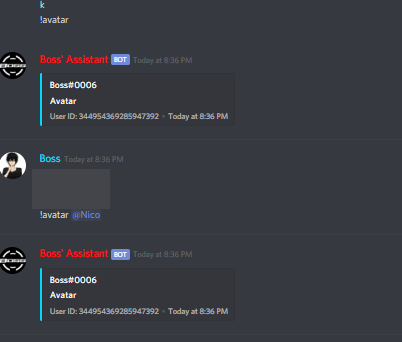
I dont even know what\
earnest phoenix
@ember atlas what version of discord.js are you on
 earnest phoenix
I can recommend trying this
https://discord.js.org/#/docs/main/11.5.1/class/User?scrollTo=displayAvatarURL
<user>.displayAvatarURL

Discord.js is a powerful node.js module that allows you to interact with the Discord API very easily. It takes a much more object-oriented approach than most other JS Discord libraries, making your bot's code significantly tidier and easier to comprehend.
I'm on a different version of Discord.js so I don't know if that's correct or not
 broken shale
I'm on 11.5.1 and it works
 broken shale
code?
ember atlas
const discord = require('discord.js');

exports.run = async (client, message, args) => {
    const resolvedUser = message.guild.members.has(args[1]) ? message.guild.members.get(args[1]) : null
    const botUser = resolvedUser == null ? (message.mentions.first() ? message.mentions.members.first() : message.member) : resolvedUser

    const embed = new discord.RichEmbed()
    .setAuthor(botUser.user.tag)
    .setTitle('Avatar')
    .setColor(botUser.displayHexColor)
    .setImage(botUser.displayAvatarURL)
    .setTimestamp()
    .setFooter(`User ID: ${botUser.id}`)

    message.channel.send(embed);
};
Hmmm
sudden geyser
@ember atlas I think the problem is that the member object does not have that property. Try using it on the user instead of the member
high lava
@ember atlas You only needed to do const botUser = resolvedUser ? resolvedUser : message.member;
 open cove
const discord = require('discord.js');

exports.run = async (client, message, args) => {
    const resolvedUser = message.guild.members.has(args[1]) ? message.guild.members.get(args[1]) : null
    const botUser = resolvedUser == null ? (message.mentions.first() ? message.mentions.members.first() : message.member) : resolvedUser

    const embed = new discord.RichEmbed()
    .setAuthor(botUser.user.tag)
    .setTitle('Avatar')
    .setColor(botUser.displayHexColor)
    .setImage(botUser.displayAvatarURL)
    .setTimestamp()
    .setFooter(`User ID: ${botUser.id}`)

    message.channel.send(embed);
};

module.exports.help = {
      name: ""
}
🤷
west spoke
We dont know what the problem is
amber fractal
I do
open cove
Yes
open cove
We don’t know because we dont know what the problem is.
earnest phoenix
@ember atlas botUser.avatarURL
displayAvatar is not valid in a .setImage i think
And if you want that on the right its .setThumbnail(botUser.displayAvatarURL)
broken shale
@earnest phoenix It works on .setImage
earnest phoenix
Okay
Maybe the cache
Or a big api latency
Hello, can someone help me with php?
Yes
broken shale
Probably not considering it's php
earnest phoenix
Idk, maybe for discord oauth
broken shale
Maybe, slim chance though ¯_(ツ)_/¯
opaque eagle
Doesn't have to be about discord
dev in general
I've asked several questions before which had nothing to do with Discord at all
 wet kite
const discord = require('discord.js');
exports.run = async (client, message, args) => {
    const botUser = message.mentions.members.first() ? message.mentions.members.first() : message.member
    const embed = new discord.RichEmbed()
    .setAuthor(botUser.user.tag)
    .setTitle('Avatar')
    .setColor(botUser.displayHexColor)
    .setImage(botUser.user.displayAvatarURL)
    .setTimestamp()
    .setFooter(`User ID: ${botUser.id}`)
    message.channel.send(embed);
};```
@ember atlas that should fix your issue.. idk why you made it 20x harder lolyoure a legend
earnest phoenix
🥄
topaz fjord
^
wet kite
🙄
 whole hamlet

viral plover
A day or so ago I asked:
"Is it possible to upload folders of images to an online database and have a Discord bot access and search through those folders grabbing the links of the online images?"
Someone responded saying it's possible, which is great, but I don't know the first thing about using online databases.
Does anyone have any recommendations?
viral plover
I haven't chosen one yet.
Naturally something free would be best.
sinful lotus
almost all dbs are free
mysql, mariadb, postgres are just examples of free sql based db
mongo, redis are just examples of no sql based db
viral plover
Are all databases online?
What's the difference between sql and non-sql?
amber fractal
You must mistake this for a google search bar
viral plover
I use this place as a last resort.
I do admit those last two questions were very Google-able, my bad.
amber fractal
Lol it's fine
viral plover
Can any online database do what I want? (The whole uploading folders of images thing)
valid frigate
ok so basically uploading images into a database is no no
you can store data about the image, like generating a unique id for it, but storing the file with the same id name somewhere else like on your filesystem or in the cloud
viral plover
Then maybe a database won't work for me...
If my bot uploads an image from my computer and posts the same image using a link from Imgur it's the same speed.
If I use a rich embed however, the link from Imgur is much faster.
If I can have an online database store my images in folders that I can search through using the bot, then that will save me a lot of effort. Otherwise it'll take a lot of tedious work to change everything to using links instead of uploading files.
Since I don't know much about databases I started asking questions here to see if I could save myself the effort & time.
 bright patio
Why is my bot not approved from earlier?
loud salmon
@bright patio #502193464054644737
 scarlet phoenix
Use an S3 bucket, not the cheapest but is convient
 zenith bane
pale marsh
zenith bane
pale marsh
The library you wrote the bot in @zenith bane
sinful lotus
you can save buffers on a database
turn image into a buffer
then just save it to db
Hi All
Is there any way to save image/pdf files into the mysql database. I am Qt4/C++ using QMYSQL plugin.
I am able to store and retrieve txt files into the database but not any other type of files.
Please suggest.
 prime cliff
"I am able to store and retrieve txt files into the database"
BRUH
stray garnet
Look at Users.
prime cliff
@stray garnet hu?
stray garnet
How can 10 Users Join a Guild in less than a Second? tf
prime cliff
Because they can 🙃
late hill
That's most likely not what happened.
stray garnet
lol
late hill
Your client probably doesn't cache all users (it really shouldn't unless you need it to) meaning it'll slowly cache more and more so you'll see the number raising.
stray garnet
Ok
prime cliff
That too but most libs should show the full count regardless of cache
prime cliff
There isn't a server.membercount for it?
late hill
He's not using membercount per server
late hill
But if he looped through all and added the membercounts it would be right yes
 crude aurora


 quartz kindle
pretty sure they do
prime cliff
But eris uses a lot less ram than d.js does though or that's what i've heard so 
 drowsy sentinel
Yes, because it doesn't cache heavily. But, you can stick get away with a massive bot using d.js
late hill
If you're using discord.js master it shouldn't be much different anymore from what I've heard
sinful lotus
Discord.js Caches a lot of things in expense of ram but with less bandwith usage.
Eris caches a lot of things but with increased bandwith usage
either ways you can hacky hack d.js to fit your cache needs
earnest phoenix
Well i mean
You can code it so discord.js doesnt cache
Brings memory down by alot
 ionic drum
-p นอกจากชื่อฉัน
sinful lotus
not cache members and users = memory down by a lot