#development
1 messages · Page 551 of 1
 earnest phoenix
Oh k
Guess i will just use my pi to code on when im not home lol
I have VScode on it
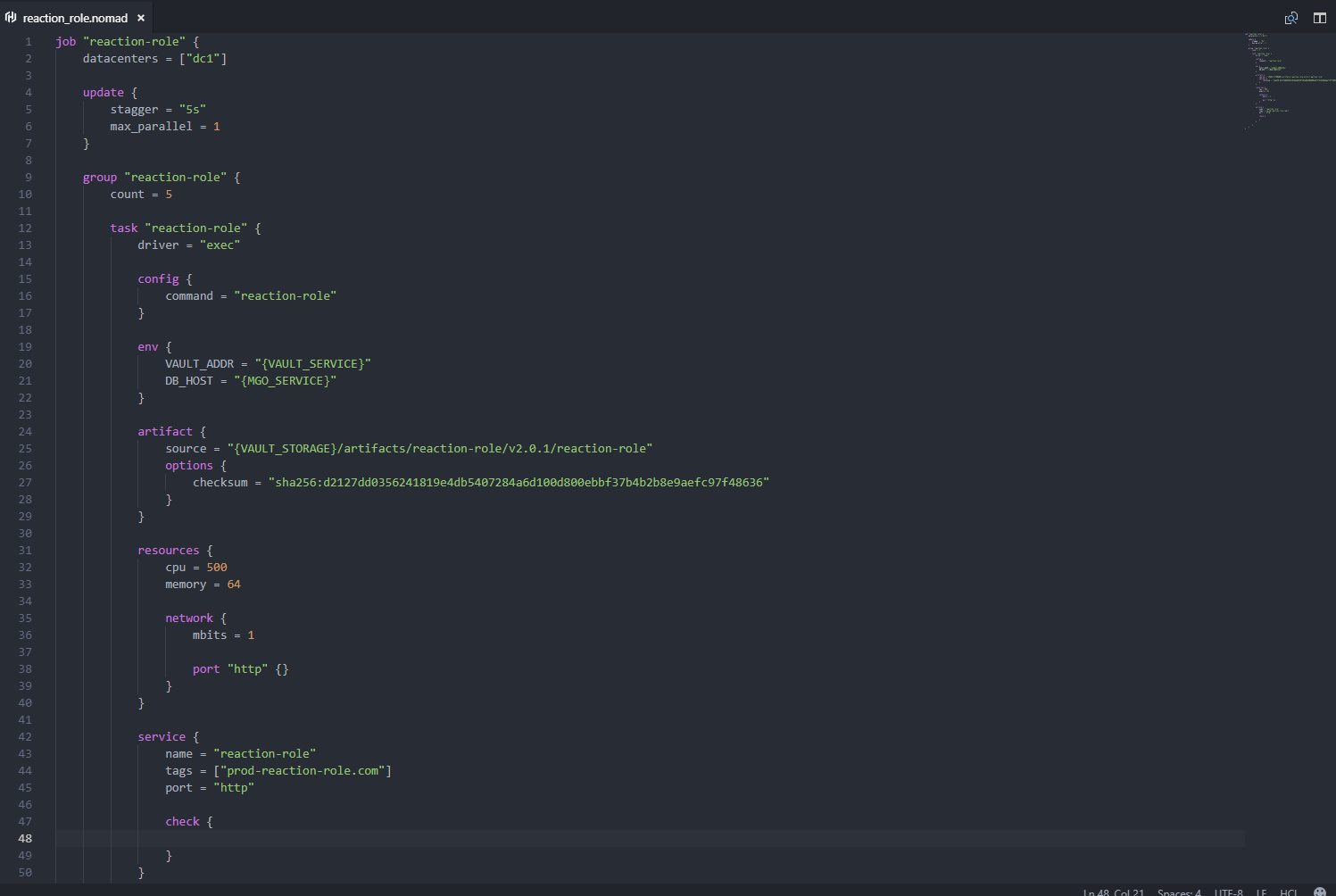
 unreal junco
looks pro
 bright spear
how is it confusing
its practically the easiest thing ever made
do u wanna try setting up a vps or heroku 
 keen drift
fun fact: reaction role first started on a raspberry pi
bright spear
cool
 unreal junco
then y dont u help lol
i am on my pc 14 hours a day
so the bot is on for 14 hours xD
 mossy vine
Cool
unreal junco
just getting the extra 10 hours be nice
mossy vine
Just simply upload your files to glitch
unreal junco
then
mossy vine
Include a start thing in your package.json
unreal junco
wdym
mossy vine
In your package.json file
unreal junco
yeah
{
  "name": "jsbot",
  "version": "1.0.0",
  "description": "my discord bot",
  "main": "index.js",
  "scripts": {
    "test": "echo \"Error: no test specified\" && exit 1"
  },
  "author": "Legend X",
  "license": "ISC",
  "dependencies": {
    "discord.js": "^11.4.2",
    "ms": "^2.1.1",
    "weather-js": "^2.0.0"
  }
}
 coral trellis

mossy vine
Then it should just work
unreal junco
{
"name": "jsbot",
"version": "1.0.0",
"description": "my discord bot",
"main": "index.js",
"scripts": {
"test": "echo \"Error: no test specified\" && exit 1"
    "start": "node main_file.js"
},
"author": "Legend X",
"license": "ISC",
"dependencies": {
"discord.js": "^11.4.2",
"ms": "^2.1.1",
"weather-js": "^2.0.0"
}
}
like that?
unreal junco
ok
mossy vine
(index)
mossy vine
set up an external monitoring thing to ping the glitch thing every 5 minutes so it doesnt go down
unreal junco
wdym
mossy vine
Set up an http monitor
For address put the https://project-name.glitch.me
And done
bright spear
and change project-name to the name of your project
 bright spear
...
 warm marsh
.nomad
bright spear
the site takes you through it
warm marsh
?
bright spear
@warm marsh what
warm marsh
File format?
unreal junco
do i click add new monitor
warm marsh
.nomad is a file format?
keen drift
Yeah it's a file format
bright spear
@unreal junco yes
keen drift
It's for Hashicorp's enterprise deployment solution
warm marsh
Ah what language uses it?
unreal junco
whats the monitor type?
mossy vine
Anything can be a file format tbh
warm marsh
Http
keen drift
It's a structural syntax
unreal junco
mossy vine
oH MY GOD
unreal junco
i did
warm marsh
It's not hard
unreal junco
it is
mossy vine
The name of your glitch projecr
warm marsh
No
unreal junco
how do i get the name of glitch project?
mossy vine
Its not, you just dont bother reading what i said
bright spear
no it really isnt
its whatever name shows in the top left corner of glitch
the name of your project
ree
warm marsh
...
warm marsh
What ever you named the glitch project is the name....
unreal junco
past-turn
warm marsh
That's the name?
unreal junco
i think so
mossy vine
so past-turn.glitch.me is the url
warm marsh
Then put in url bit https://past-turn.glitch.me/
mossy vine
Friendly name is wahzever the heck you want
unreal junco
did that
unreal junco
theni clicked create monirtor
mossy vine
Then its done
bright spear
looks like the project doesnt even load
unreal junco
now my bot is online 24/7?
warm marsh
No
bright spear
warm marsh
Lol
bright spear
u need to fix the issue
mossy vine
You most likely have issue with your code then
warm marsh
Probs getting errors in console
unreal junco
did i need to make a account?
warm marsh
Omfg
bright spear
no
warm marsh
Read the page yourself
unreal junco
its still saving
mossy vine
Oh my fuc-
bright spear
because u didnt do it right
warm marsh

unreal junco
bright spear
did u read the idiots guide page yes or no
 unreal junco
no
mossy vine
Yes ur code is ducked
unreal junco
oh i forgot to add something
warm marsh
...
mossy vine
👏
bright spear
u dont have the express code
bright spear
also
unreal junco
i forgot to put it back in
warm marsh

mossy vine
iS THIS A LEAKED TOKUN
bright spear
yes
unreal junco
no
bright spear
yes
unreal junco
i didnt leak it
mossy vine
Yes
warm marsh
Lmao
bright spear
ree
unreal junco
ok
warm marsh
Newbies...
mossy vine
@bright spear hackerman
mossy vine
@warm marsh wdym by plural lmao
unreal junco
i feel dumb xD
 young jungle
how do I this?
warm marsh
But phone auto correct like a to screw things over
mossy vine
@young jungle whats the problem?
young jungle
I can't add images to the embed code
mossy vine
Read the docs
young jungle
they didn't say
warm marsh
What lang is that?
young jungle
python
young jungle
yeah, but it's rewrite
warm marsh
Oh
I have no idea about images to embeds
In js there is setImage or thumbnail
Check the docs for something like that
warm marsh
...
young jungle
the thumbnail is too small, I'm trying to add an image to the text body
bright spear
@unreal junco check logs
unreal junco
what logs?
warm marsh
Console
young jungle
docs?
unreal junco
ih
warm marsh
Yes
unreal junco
it says
warm marsh
Your library's docs
unreal junco
"couldnt find module "express" "
warm marsh
....
bright spear
then install express ree
warm marsh
Add it in package.json
unreal junco
how
coral trellis
Or do that 
bright spear
done
unreal junco
do i do npm i express in terminal?
coral trellis
^
bright spear
also fyi your computer terminal isnt connected to glitch
unreal junco
where do i type express
bright spear
do u see the add package button
unreal junco
no
bright spear
bright spear
warm marsh
Yes, they docs are mad...
bright spear
d.js has nice docs
unreal junco
do i click docs
bright spear
no
unreal junco
what do i clikc?
warm marsh
Yeah d.js docs are better than d.py docs
I couldn't find anything about embed in there...
unreal junco
instead of starting
unreal junco
so will it be on 24/7
bright spear
yes
unreal junco
thanks soo much
bright spear
yw
warm marsh
@young jungle does set_image or image not work?
unreal junco
i am in a discord server full of bot devs that make bots for their personal doings
so they not in this server
i ask them help but they busy
warm marsh
That link that @bright spear sent shows everything about embed
earnest phoenix
looks like 2 things were given
 slender thistle

mossy vine
alright im having some problems with ytdl-core
so downloading videos as mp4 works perfectly, but if i want only audio it breaks
ytdl('https://www.youtube.com/watch?v=H1Dvg2MxQn8', {filter: 'audioonly'}).pipe(fs.createWriteStream(`audio.mp3`))
it will create a 0kb file with the correct length of the vidoe but no actual audio
 sturdy delta
What happens when I use terminal:
Say in doing node .
It doesn’t do anything. It comes up with something saying “what application do you want to use” and then I click Visual Studio Code, then it opens up a tab called node
bright spear
@sturdy delta do you have node.js installed
bright spear
Weird
sturdy delta
Do you know if I could’ve changed someone with CMD Prompt in Admin Mode.
mossy vine
reeposting because i still dont know why its not working for me
so downloading videos as mp4 works perfectly, but if i want only audio it breaks
ytdl('https://www.youtube.com/watch?v=H1Dvg2MxQn8', {filter: 'audioonly'}).pipe(fs.createWriteStream(`audio.mp3`))
it will create a 0kb file with the correct length of the vidoe but no actual audio
 sick cloud
mp3 never worked for me
 amber fractal
Try wav?
mossy vine
whatever, using node-youtube-dl now
 mental solstice
before venturing into the realm of sharding. For a decent coder, how difficult is sharding to implement?
keen drift
not
mental solstice
sounds promising
After I finish my bot, I will have no choice but to learn. I learned my lesson not learning how to do shards on my c# bot.
 late hill
I guess it depends on the lib you use and what features your bot has
My bot mainly pulls data from my database which means I don't have much issues when it comes to data between shards
 ruby dust
discord.py has one of the easiest sharding management
late hill
I'd say go for the challenge and wait till the last moment 
keen drift
what I learned from all these time is that when it comes time to expand
too much abstraction is really bad
mental solstice
yeah. I should build my js knowledge a bit more. Although the syntax bugs me lol
also I think I love intellisense a little too much.. VSCode tries.. but its not the same.
unreal junco
when you guys helped me work on it making online 24/7 the bot went offline 😦
when i turned off terminal
mental solstice
you have the bot on glitch?
unreal junco
yeah
mental solstice
I'm not sure how glitch works really. maybe u have to add more stuff
unreal junco
ok
late hill
IntelliJ 👏
unreal junco
now a error comes up
    at WriteWrap.onWriteComplete [as oncomplete] (internal/stream_base_commons.js:66:16)
(node:10405) UnhandledPromiseRejectionWarning: Unhandled promise rejection. This error originated either by throwing inside of an async function without a catch block, or by rejecting a promise which was not handled with .catch(). (rejection id: 2)
(node:10405) [DEP0018] DeprecationWarning: Unhandled promise rejections are deprecated. In the future, promise rejections that are not handled will terminate the Node.js process with a non-zero exit code.```well im going to bed
i need help in morning
 inner jewel
it's free if you're a student
mental solstice
im am not a student
 daring dust
I am a student
 last ferry
Is there a way to ignore bulk deleted messages in the .NET api
 lethal sun
message.react doesn't work.
const Discord = require("discord.js");

module.exports.run = async (client, msg, args) => {
	msg.react('😄');
}```Error:
DiscordAPIError: Unknown Emoji��
 lament meteor
maybe 0 space chars?
 smoky mica
module.exports.run = async (bot, message, args) => {

if (!message.member.hasPermission('ADMINISTRATOR')) return message.channel.send('This requies the permission: ADMINISTRATOR');

if (!args[0]) return message.channel.send(`Proper Usage: ${prefix}poll Question`);

const embed = new Discord.RichEmbed()
    .setColor('RANDOM')
    .setFooter('React to Vote')
    .setDescription(args.join(' '))
    .setTitle(`Poll created by ${message.author.username}`);

    let msg = await message.channel.send(embed);

    await msg.react('✅');
    await msg.react('⛔');

    message.delete({timeout: 1000});

}

module.exports.help = {
    name: "poll",
    description: "",
    usage: ``,
    aliases: [""]
}```@lethal sun you can try msg.react(‘🙂’); too
smoky mica
@lethal sun You can copy paste this, my code
daring dust
:)
mossy vine
@daring dust you need the unicode version of the emoji, which you get by putting a backslash before it
 slim heart
Just do an eval and do message.channel.send(“PasteEmoji/do :emoji:”, {code:’xl’})
And it’ll put the Unicode emoji into a code block
mossy vine
yes, that is the unicode version of the emoji
slim heart
If you do the : your bot will send it as the Unicode version in the code block
Because when you send it it turns to Unicode
slim heart
Same
daring dust
Oh
slim heart
So still
slim heart
Oh
 quasi thicket
@smoky mica I try the code pool and i get here
if (!args[0]) return message.channel.send(`Proper Usage: ${prefix}poll Question`);
Prefix is not defined
mossy vine
define prefix 
quasi thicket
What i need to do?
smoky mica
whats your file name where its prefix and token is
smoky mica
he probably doesn't understand xD
 fierce thorn
let prefix = "how you want to define prefix";
daring dust
F
smoky mica
edit the file name
daring dust
I use redis for per server config
smoky mica
per server config?
daring dust
Sometimes the set returns null when its not null :( makes me sad
Settings for each server
daring dust
Its for changing prefix, mod role, admin role, whether the bot’s main feature is on or not, and the logging channel
smoky mica
Oh thats great!
daring dust
:)
smoky mica
I wanna do the changing prefix but idk
daring dust
It took me a long time to work out how to do it
daring dust
I did, but I was looking at Enmap. Eventually enmap worked but not very well. Also its dependency better-sqlite-pool doesn’t play well with linux after its been compiled on macos
I almost became a certified developer
I almost became a certified developer
Wtf my message sent twice
quasi thicket
Should I do that?
const Discord = require("discord.js");

module.exports.run = async (bot, message, args) => {

if (!message.member.hasPermission('ADMINISTRATOR')) return message.channel.send('This requies the permission: ADMINISTRATOR');

if (!args[0]) return message.channel.send(`roper Usage: ${prefix}poll Question`);
  const botsettings = require("../config.json");
const prefix = `yourfilename`.prefix

const embed = new Discord.RichEmbed()
    .setColor('RANDOM')
    .setFooter('React to Vote')
    .setDescription(args.join(' '))
    .setTitle(`Poll created by ${message.author.username}`);

    let msg = await message.channel.send(embed);

    await msg.react('✅');
    await msg.react('⛔');

    message.delete({timeout: 1000});

}

module.exports.help = {
    name: "poll1",
    description: "",
    usage: ``,
    aliases: [""]
}
Enmap works fine for me
smoky mica
I see bourne
mossy vine
how do you exit loop in python?
 quartz kindle
break
inner jewel
^
>>> while True:
...     if i > 10:
...         break
...     i = i + 1
...     print(i)
...
1
2
3
4
5
6
7
8
9
10
11```oh thanks
 soft plaza
are ec2 any good?
 sharp current
Is there anyone that help help me more than just stupid YouTube videos with creating a disord.py bot??
Cause I am absolutely terrible and have no idea why I am even trying!
mossy vine
@sharp current docs
To be fair there are good youtube tutorials
If you dont understand those you shouldnt even bother lol
earnest phoenix
Is there a way for a bot to use discords /tts feature, and if so how?
amber fractal
Library?
d.js has a tts option

Discord.js is a powerful node.js module that allows you to interact with the Discord API very easily. It takes a much more object-oriented approach than most other JS Discord libraries, making your bot's code significantly tidier and easier to comprehend.
Wait
Im just now noticing split is an option
Im sad now
mossy vine
then thats the problem, you are trying to send shard count when your bot isnt sharded
mossy vine
read the docs
earnest phoenix
em but i never didn't do anything about it you can help me? @mossy vine
mossy vine
read the docs
earnest phoenix
which one??
mossy vine
the dbl api docs
earnest phoenix
const Discord = require("discord.js");
const client = new Discord.Client();
const DBL = require("dblapi.js");
const dbl = new DBL('Your discordbots.org token', client);

// Optional events
dbl.on('posted', () => {
  console.log('Server count posted!');
})

dbl.on('error', e => {
 console.log(`Oops! ${e}`);
})
this is working? @mossy vine
mossy vine
idk
quartz kindle
are you using js?
quartz kindle
what do you already have? show the code that gave you the count error
mossy vine
he got error on sending shard count when his bot isnt sharded
quartz kindle
if you're not sharded just remove the shard count
shardCount: ${this.client.shard.count}})
earnest phoenix
pls wait
quartz kindle
remove that
earnest phoenix
ahhhhhh
fucking dbl api
@quartz kindle
{ shards: [] }

Error: 403 Forbidden
my console error
hey
quartz kindle
forbidden means the api key is wrong
earnest phoenix

Spice up your Discord experience with our diverse range of Discord bots
ProxE API Key
its true?
fucking api key
quartz kindle
then idk, make a post request yourself
thats what i do
use request, node-fetch or http/https
earnest phoenix
pls wait tim
const dbl = require("dbl.js");
const { Command } = require('discord.js-commando');
const { RichEmbed } = require('discord.js');

module.exports = class EmbedCommand extends Command {
    constructor(client) {
        super(client, {
            name: 'dbl',
            aliases: [],
            group: 'eğlence',
            memberName: 'dbl',
            description: 'TR Discord bot liste bot istatistiklerini gönderir.',
            examples: ['dbl'],
        });
    }

    hasPermission(msg) {
        return this.client.isOwner(msg.author);
    }

  async run(msg, args) {

  let dblClient = new dbl.Client({
  dbltoken: "benimbotundblapitokei",
  id: "519210018583609365"
});

dblClient.postServerStats({serverCount: `${this.client.guilds.size.toLocaleString()}`}).then((stats) => {
  msg.channel.sendMessage('Discord bot liste istatistikler gönderildi.');
}).catch((e) => console.log(`${e}`));


  dblClient.getBotStats("519216364469223434").then((stats) => {
  console.log(stats);
}).catch((e) => console.log(`${e}`));
}
}
this is my fucking code
When i write this code
def _prefix_callable(bot, msg):
    user_id = bot.user.id
    base = [f'<@!{user_id}> ', f'<@{user_id}> ']
    if msg.guild is None:
        base.append('!')
        base.append('?')
    else:
        base.extend(bot.prefixes.get(msg.guild.id, ['?', '!']))
    return base
I Get This Error
BurNet@Casper MINGW64 ~/Desktop/Chat-App-master
$ python Blue_Walker.py
 File "Blue_Walker.py", line 35
   base = [f'<@!{user_id}> ', f'<@{user_id}> ']
                           ^
SyntaxError: invalid syntax
How can i fix ? (Python)
pls wait
ok
eey @quartz kindle
this is my fucking code
quartz kindle
if you're getting 403, that means something is wrong with the token, nothing wrong with your code, i think
i cant help you
earnest phoenix
who can help me
mods?
quartz kindle
if dblapi doesnt work for you, you can always POST manually
quartz kindle
you can post manually by sending a post request
earnest phoenix
HOW HOW?
quartz kindle
do you have any http library already? like request, snekfetch, node-fetch, etc
quartz kindle
i dont know python, sorry godzilla4
smoky mica
where do i get my bot image widget
 fierce owl
I need help making acommand called (prefix)run
client.on('message', message +> {
    if (!message.guild) return;
    if (message.content === prefix + 'run')
    //The code provided after run
})
This is the base code
soft plaza
you trying to make an eval command
fierce owl
yeah basically
soft plaza
well you should start by declaring your arguments
fierce owl
yeah i understand that part
soft plaza
what don't you understand then
fierce owl
client.on('message', message +> {
    if (!message.guild) return;
    if (message.content === prefix + 'run')
    args code
    //Whatever is here
})
node has a global eval() function
fierce owl
?
quartz kindle
if (message.content === prefix + 'run') if message.content is EXACTLY prefix+"run"
fierce owl
ahhh I understand
quartz kindle
meaning [prefix]run somethinghere will fail
fierce owl
Umm my args dont really work so I need some help with defining args
client.on('message', message +> {
    if (!message.guild) return;
    if (message.content.startsWith(prefix + 'run'))
    //Args?
   eval(args)
})
you can define args by using .split()
earnest phoenix
if (msg.startsWith(prefix + 'HAVA')) {

        weather.find({search: args.join(" "), degreeType: 'F'}, function(err, result) {
            if (err) message.channel.send(err);


            if (result.length === 0) {
                message.channel.send('**Geçerli Bir Lokasyon Giriniz..**')
                return;
            }

            var current = result[0].current;
            var location = result[0].location;

            const embed = new Discord.RichEmbed()
                .setDescription(`**${current.skytext}**`)
                .setAuthor(`${current.observationpoint} > Hava Durumu`)
                .setThumbnail(current.imageUrl)
                .setColor(0x00AE86)
                .addField('Timezone',`UTC${location.timezone}`, true)
                .addField('Derece Türü :',location.degreetype, true)
                .addField('Derece :',`${current.temperature} Degrees`, true)
                .addField('Hissedilen :', `${current.feelslike} Degrees`, true)
                .addField('Rüzgar :',current.winddisplay, true)
                .addField('Nem :', `${current.humidity}%`, true)


                message.channel.send({embed});
        });
I Get This Error :
BurNet@Casper MINGW64 ~/Desktop/Chat-App-master
$ node Economy.js
C:\Users\BurNet\Desktop\Chat-App-master\Economy.js:19
               weather.find({search: args.join " ", degreeType: 'C', function(e
rr, result)}) {
                                               ^^^

SyntaxError: Unexpected string(https://www.npmjs.com/package/weather-js)
@quartz kindle Can u help me pls
inner jewel
because that's not how js works
it's array.join(sep) not array.join sep
you can't omit the ()
earnest phoenix
oh thanks
earnest phoenix
@inner jewel (" ") to " " ?
quartz kindle
error:
his error is showing something completely different from what he posted lol
quartz kindle
yeah
quartz kindle
just split on spaces and splice/slice then join
earnest phoenix
i am haveing soo much fun working on this https://cdn.discordapp.com/attachments/342843844284514307/532645595903426561/test.png
what do you all thank
 fierce owl
?
fierce owl
k
TypeError: Cannot create property 'reply' on string 'message.channel.send('test 1 2 3')'
i got an error
@quartz kindle
I sent /eval message.channel.send('test 1 2 3')
earnest phoenix
@quartz kindle my bot cant write with embed
earnest phoenix
const embed = new Discord.RichEmbed()
.setDescription(**${current.skytext}**)
.setAuthor(${current.observationpoint} > Hava Durumu)
.setThumbnail(current.imageUrl)
.setColor(0x00AE86)
.addField('Timezone',UTC${location.timezone}, true)
.addField('Dere Türü :',location.degreetype, true)
.addField('Derece :',${current.temperature} Degrees, true)
.addField('Hissedilen :', ${current.feelslike} Degrees, true)
.addField('Rüzgar :',current.winddisplay, true)
.addField('Nem :', ${current.humidity}%, true)
message.channel.send({embed});
this
earnest phoenix
@fierce owl when i write command
gives this error
C:\Users\BurNet\Desktop\Chat-App-master\Test.js:37
weather.find({search: args.join(" "), degreeType: 'F'}, function(err, re
sult) {
^
TypeError: weather.find is not a function
earnest phoenix
fierce owl
try getting resourses from an API/Node module
quartz kindle
did you require weather?
 serene sun
@quartz kindle hey! im the guy you helped with all the problems lol. i accidently deleted the putty "session" and need to log back in, can you guide me through what i have to enter in?
serene sun
most likely
quartz kindle
then just open putty again and specify the key file
fierce owl
TypeError: Cannot create property 'reply' on string 'message.channel.send('test 1 2 3')'
Any help?
I am using an eval command
amber fractal
You probaly have a message.reply(your evaled code)
fierce owl
?
   client.on('message', message => {
     if (!message.guild) return;
     if (message.content.startsWith(prefix + 'eval'))
     args = message.content.split(' ').slice(1).join(' ')
     eval(args);
     message.channel.send('Evaling',
     `${args}`)
   })
all good, i got it
fierce owl
well then how do i move it to a different line
quartz kindle
you use \n
fierce owl
ok
serene sun
can anyone help me with making a command in a discord server, where you say the command and the bot sends back saying how many people are in a certain channel?
fierce owl
you mean server?
 calm elm
how do i make my bot send a message to the default channel when it joins?
quartz kindle
there is no default channel
you could loop channels and send to the first one that it has permissions to send to
or you can lookup channel names and send to which ever contains the word "general" in it, if any
earnest phoenix
there used to be a standard to have the default channel as the first created channel "general"
implemented in discord.js
bright spear
Yeah but discord removed the default channel system in an uodate
unreal junco
when you guys helped me make it online 24/7 my bot turns off when my pc sleeps?
bright spear
if its running on glitch then it wont
glitch has nothing to do with your pc
they dont know if ur pc is awake or not
unreal junco
then why does the bot sleep
amber fractal
Glitch Help Center
quartz kindle
the bot was tired
sick cloud
👏
bright spear
Check uptime robot and glitch logs
 dark yacht
Pls help
How to send message (discord.js) (not reply)
unreal junco
how do you make a bot take emotes the server has? that arent discord emotes?
dark yacht
message.guild.emojis (discord js)
dark yacht
Why not function 
function emoji(name) {return client.emojis.find(emoji => emoji.name === name)}
unreal junco
ok
 dull idol
<style>
body {
  background-color: red;
}
</style>```Browser: Firefox (newest version)
Is it wrong to put down there?
dark yacht
Css must be in <head>
unreal junco
                                                                                                                                                       ^^^^^^

SyntaxError: missing ) after argument list
``` error when i used ur command thinghow do i do it?
dull idol
like this? css <head> <style> body { background-color: red; } </style> </head>
dark yacht
No
unreal junco
do i ask someone elsE?
unreal junco
can someone help me with the emotes?
bright spear
@unreal junco you never closed the find
@dull idol no, dont put it in <head>, taho was wrong
just do ```html
<style>
body {
background-color: red;
}
</style>
wdym never closed the find
bright spear
you put a ( but not a )
as the error says
after all the arguments u need to close it
find(...) not find(...
unreal junco
ok
dull idol
I look the red, and it disappears so fast.
unreal junco
there was no error by the emote wont be used
it just says :emote:
not the actual emote
 function emoji(name) {return bot.emojis.find(emoji => emoji.name === 'name')
``` if the emoji name was tree would i need at **tree** anywhere?change 'name' to name
its a variable not a string
also how are you using the function
unreal junco
wdym how you use function
bright spear
well you're defining the emoji function
you'll need to actually use it if you want it to do something
bright spear
??
dull idol
@bright spear like !important only?
unreal junco
 say that is the emoji
bright spear
@dull idol css body { background-color: red !important; }
@unreal junco the emoji function is just a function that will return the emoji object of an emoji with the name passed to the function
so later in your code, after you define the function, you can run emoji('tree') and it will get the tree emoji
dull idol
yep, its working.
bright spear
how did you use it
unreal junco
module.exports.run = async (bot, message, args) => {
  return message.channel.send('you feel off a tree', emoji('tree'));
  function emoji(name) {return bot.emojis.find(emoji => emoji.name === name)

};
};```- thats not the right syntax for .send
- you need to define the function before you use it
unreal junco
how would i define function?
bright spear
just move the function emoji code before you try to send something 
unreal junco
wdym
bright spear
...
instead of ```js
return message.channel.send('you feel off a tree', emoji('tree'));
function emoji(name) {return bot.emojis.find(emoji => emoji.name === name)
do
```js
  function emoji(name) {return bot.emojis.find(emoji => emoji.name === name)
  return message.channel.send('you feel off a tree', emoji('tree'));
 bright spear
it tells you a lot if you know js and understand basic logic and programming concepts
 lunar sequoia
Just use the Unicode lol
unreal junco
i only understood half xD
bright spear
@lunar sequoia its a custom emoji
bright spear
well because your send is wrong
lunar sequoia
It will give you an emoji code, then use that in your send.
bright spear
you need to include the emoji('tree') inside the string
not as a separate parameter
unreal junco
oh
mossy vine
@dull idol you mean the one on the card on frontpage and search? Or background on your bots page
dull idol
background
mossy vine
Learn css
dull idol
k
unreal junco
it works it wasnt working cause the function was in front when i put the message.channel.send b4 the function it worked
bright spear
oh looks like you didnt close the {} @unreal junco -.-
always remember to close your brackets and parentheses ree
unreal junco
ik
its like this now
module.exports.run = async (bot, message, args) => {
  return message.channel.send(`you feel off a tree${emoji('tree')}`);
  function emoji(name) {return bot.emojis.find(emoji => emoji.name === name)


};
};
why did you close it all the way down there
unreal junco
idk
mossy vine
Thats just the result of copy pasting a shit ton of code without understanding it
 tulip grove
Guys, Discord.py Problem...
Sometimes, Embeds don't show on Mobile
but it works on PC
bright spear
thats more of a "discord mobile is a big meme" issue
tulip grove

earnest phoenix
how do i find out the specs of linux
quartz kindle
you mean ram and cpu from terminal?
earnest phoenix
yea
this version of linux i never used before, everytime i press backspace it puts a question mark
sudo does not work so this is weird
earnest phoenix
it worked thanks
yea it did not show the real cpu buts fine
how do i check ram?
because its not on the list
quartz kindle
cat /proc/meminfo
earnest phoenix
Thank you
amber fractal
Is it api abuse if i send messages to only certain channels that are specific to the bot like my-bot-announcements or is that still not allowed
 indigo notch
You mean a channel lock?
amber fractal
Is that what its called?
Itd be optional so they dont have to get them if they dont want to
amber fractal
Its not that, its an automated message for my lottery that announces the winner
I was just asking if its allowed to send to all channels named a specific thing
Because sending to all channels in general is api abuse, right?
(So i was told)
quartz kindle
as long as its opt-in (disabled by default) it should be fine
amber fractal
Alright thanks
dull idol
How i can customize my Donate, Vote, Invite button?
 night imp
dull idol
night imp
dull idol
what attr: val was?
slim heart
@earnest phoenix ?
 lyric talon
Guys, could you help me with a question ?
lament meteor
o
earnest phoenix
pls help me
 earnest phoenix
yes i installed
lament meteor
if u attach the client to the dbl then it auto posts
earnest phoenix
wait
lyric talon
Imagine, how can i create a webhook ?
For example:
I Have a bot, them i call the command +dos.
My bot after that (in a random server)
Creates a webhook and them the webhook send a message
lament meteor
why would u want to create a webhook just to send a message?
lyric talon
Funny things
lament meteor
you can use an existing webhook
earnest phoenix
TypeError: cmd.run is not a function
The question is how can i create
earnest phoenix
@lament meteor
mossy vine
thats not a problem with dblapi
mossy vine
we cant help you without seeing the code
lament meteor
cmd.run() -> cmd.run
u prob messed up ur cmd handler
in the cmd file
wait @lyric talon just a question but... why use a webhook?
and what lib do u use
lyric talon
i'm using dhooks, but the people said to me that the discord.py rewrite have some functions that would help me with the webhook.
I
Just because i think that's better
slender thistle
Using webhooks in discord.py rewrite is simple 
lyric talon
The objective is:
When the people call a famous, this famous became a webhook them he/she appears and say some quote
shivaco. I don't know how to create a webhook in a server that my bot is in
lyric talon
:/ ok, imagine ty
lament meteor
my name is Telk 
lament meteor
tbh that is what people lack @blazing star

 blazing star
async TextChannel.create_webhook
slender thistle
lament meteor
also i suggest leaving the avatar empty
slender thistle
I hope you understand what you are supposed to enter instead of TextChannel
lament meteor
shiv tbh people ask that
slender thistle
Not surprised
lyric talon
ty shiv

 blazing star

earnest phoenix
@lament meteor ty man
lament meteor
no prob
 thorn nexus
help please what can be used for database
mossy vine
a .txt file
 void mantle
i used json in the beginning 
mossy vine
why are you asking if you already know whats good and whats not
thorn nexus
MySQL does not work for me, during installation it says that the server has already been created, but I did not create it
earnest phoenix
hey guys i have a problem
help me pls
my bot has a deletemessages command
but he don't delete messages
how can i fix this
mossy vine
make it delete messages
earnest phoenix
Looking for a sneaker bot developer paying very well message me for more information
late hill
Just don't use welcome messages
If you do add welcome messages to your bot you should make it so it can be toggled
mossy vine
Also guild isnt defined
 pliant copper
hey I have a tts bot but want to update bc 100 servers but don't know anything to add help me plz
great english I know
 dreamy breach
@pliant copper What?
pliant copper
But I promised a update at 100 servers
 knotty steeple
then make it work in voice channels i guess idk
pliant copper
It already does samuraistacks
 dreamy breach
xD
pliant copper
Idfk
knotty steeple
ok so
keen drift
I promise an update of nothing!
pliant copper
I will adddd speech to text🤯😂
knotty steeple
i promise a update for my cli when i get 1 download
pliant copper
😂
knotty steeple
2 later
keen drift
i promise to delete my bot at 100 guilds
earnest phoenix
you actually can but reading a user's audio stream is very undocumented and hard
earnest phoenix
ok
pliant copper
I will just do that
earnest phoenix
speech to text is very bad to do on discord in general
what are you going to do if you have a 100 users speaking in a vc, pipe them all to google?
earnest phoenix
they have cpu power but do you have the money for it lol
pliant copper
Yes😂😂
I have😂
It’s not that people are going to read the whole fucking Harry Potter series😂
earnest phoenix
try {
      var response = await message.channel.awaitMessages( {
          maxMatches: 1,
          time: 2500,
          errors: ['time']
      });
  } catch (err) {
      console.error(err);
      return message.channel.send(embed2);
  }
    let re = parseInt(response.first().content);
    if(re === 'Yes') {
      message.channel.send("See you on the other side! :wave:")
      bot.destroy()
      delay(10)
      bot.login(botconfig.token)
      message.channel.send("I'm back baby! :tada:")
    } else {
      message.channel.send(embed2)}
}```TypeError: Function.prototype.apply was called on #<Object>, which is a object and not a function
I don't understand
knotty steeple
read the error
pliant copper
I don’t either
knotty steeple
are you sure?
inner jewel
let re = parseInt(response.first().content); if(re === 'Yes')
keen drift
u sure
inner jewel
what is this even supposed to do
keen drift
I will read the entire series of harry potter
earnest phoenix
that was an attempt to fix it
it didnt have that
300 iq fix
it was just if responce
i tried ok
inner jewel
how would parsing it to an int ever fix a completely unrelated error
earnest phoenix
idk
 earnest phoenix
do none of you think before trying to bugfix
"hey maybe i shouldnt compare a number to a word"
keen drift
try deleting everything, that should fix it
knotty steeple
yes
knotty steeple
look at ur code pls
earnest phoenix
I don't even know what the error means
earnest phoenix
I don't know what to look for
knotty steeple
code
earnest phoenix
look at my code for what I don't even know what to look for
it is your code
not ours
pliant copper
Just add process.exit() at random location in your code that should fix it
knotty steeple
how did it not pickup on it
earnest phoenix
I use vsc
knotty steeple

earnest phoenix
if you cant understand your own code, backtrack and learn the language before diving face first into it, and thats the tea
pliant copper
😂
inner jewel
Discord.js is a powerful node.js module that allows you to interact with the Discord API very easily. It takes a much more object-oriented approach than most other JS Discord libraries, making your bot's code significantly tidier and easier to comprehend.
i suggest you read the docs
pliant copper
I suggest to delete all the files
knotty steeple
hi
inner jewel
Function.prototype.apply was called on #<Object>, which is a object and not a function
was called on #<Object>, which is a object and not a function
awaitMessages({...})
keen drift
hey uh, @inner jewel If I ever to use hazelcast cluster as my cache layer, how you think I should go about invalidating cache
inner jewel
¯_(ツ)_/¯
keen drift

inner jewel
the only thing i store in hazelcast is a lock
 pliant copper
I have a suggestion so first you want to do const lol = new process.exit();
And after that just type lol in the code that fixes it
keen drift
@inner jewel what's that guy that suggested consul, hazelcast and that little java framework
inner jewel
@pliant copper stop
pliant copper
Ok
inner jewel
you're not helping at all
earnest phoenix
a joke is not funny when you repeat it 3 times in 3 minutes
keen drift
hecc, natan, what's that guy that said it was a breeze with consul, hazelcast, and that microservice java framework
you showed me a screenshot
inner jewel
idk
keen drift


 drowsy lily

 keen drift
it was a meme 