#development
1 messages · Page 436 of 1
 earnest phoenix
and check if they have voted?
 quartz kindle
yes
quartz kindle
yes
earnest phoenix
kk
earnest phoenix
kk
quartz kindle
const can only be used once. if you use it here you will get errors everywhere
quartz kindle
inside the loop yes, on every message
 keen drift
oh we looping
earnest phoenix
Thanks it worked 😄
 earnest phoenix
vscode really helped
quartz kindle
xd
earnest phoenix
vscode helped alot xD
quartz kindle
you're doing good, keep learning
keen drift
vscode is handy
earnest phoenix
Now do I just make another discord account to test if it won't send with a non-voter?
quartz kindle
or wait 24 hours for the vote to reset
keen drift
or someone else vote
Vscode has awful definition lookup time for me
that's one of the downside
 quartz kindle
lmao link blocked by malwarebytes
quartz kindle
discord's preview still works tho
i can see the graphs
just cant read, too small
keen drift
earnest phoenix
Worked
quartz kindle
nice
keen drift
There are a lot of libs for that
quartz kindle
you can use something like jimp or canvas
keen drift
member.addRole
earnest phoenix
thanks
keen drift

Discord.js is a powerful node.js module that allows you to interact with the Discord API very easily. It takes a much more object-oriented approach than most other JS Discord libraries, making your bot's code significantly tidier and easier to comprehend.
earnest phoenix
It didn't actually give the role
(node:23376) UnhandledPromiseRejectionWarning: Unhandled promise rejection (rejection id: 2): TypeError: Supplied parameter was neither a Role nor a Snowflake.
keen drift
What did you put
earnest phoenix
message.member.addRole('HONOURED')
keen drift
I don't think that's resolvable
 fluid basin
It has to be the role var or id
earnest phoenix
oh
keen drift
guild.roles.find('name', 'HONOURED')
earnest phoenix
do I type exactly that?
keen drift
Well that's the gist
You have to mod it if necessary
Actually
message.member.addRole(message.guild.roles.find('name', 'HONOURED'))
try that
You can also find the ID by pinging and appending a \ before it
earnest phoenix
Didn't work
keen drift
what's the errno
earnest phoenix
(node:23565) UnhandledPromiseRejectionWarning: Unhandled promise rejection (rejection id: 2): DiscordAPIError: Missing Permissions
(node:23565) [DEP0018] DeprecationWarning: Unhandled promise rejections are deprecated. In the future, promise rejections that are not handled will terminate the Node.js process with a non-zero exit code.
keen drift
Does the bot have manage roles
keen drift
And the bot's role need to be above the role it's trying to assign
learned it through my bot: https://discordbots.org/bot/reaction-role

Discord Bot List
Clean role management using reactions! Users may join/leave roles just by reacting.
literally only handles roles 😛
earnest phoenix
Wait
Oh yes
the role for bots is bellow the role I want to give
Thanks it worked
keen drift
yeah too many people come into my support server with that error
earnest phoenix
lol
Wait
I need to change it up slightly maybe
Is it possible to constantly check if the user has voted, and after the 24 hours when the vote runs out, remove the role from them?
fluid basin
webhooks
keen drift
Yeah you better off storing the data you get from webhooks
Massive querying API isn't great
fluid basin
webhook will tell your bot if one voted
earnest phoenix
Ill be fine with this
keen drift
Webhook -> Store -> Assign Role | 24 H Job -> Clear Store
 shy verge
imagemagick
earnest phoenix
and is there an else in javascript?
 keen drift
lol what
shy verge
if(isGay) {} else {}
earnest phoenix
I want to give an error message if the user hasn't voted
keen drift
(isBigGay) ? 'U have big gay' : 'u have a non-big gay'
shy verge

earnest phoenix
no
keen drift
No 
earnest phoenix
im not port-fowarding
earnest phoenix
oof
keen drift
And it won't work after you exceed certain votes
earnest phoenix
1000?
keen drift
yeah like 1000 total
earnest phoenix
I will never get that many
keen drift

earnest phoenix
Is that in a day or ever?
keen drift
i think ever
keen drift
lol
earnest phoenix
whats the easiest?
keen drift

earnest phoenix
I want to be able to change the text
keen drift
go with fabric
earnest phoenix
kk
keen drift
they have plenty of tutorials
keen drift
npm i fabric
keen drift
or yarn add fabric
keen drift
so far 


keen drift

earnest phoenix
lol
 vernal crow
Could someone explain how to change the colors of the "Invite" and "Vote" buttons on your bot's DBL page? I'm assuming you have to use HTML in the long description?
keen drift
@vernal crow yeah style tags
earnest phoenix
Can you even use html in your long desc?
vernal crow
I have a style tag for background color
keen drift
yeah you can
earnest phoenix
I thought it was just markdown
earnest phoenix
oof
keen drift
@vernal crow Depending on the css hierachy, I needed to use !Important for some
vernal crow
I'm pretty new to HTML and CSS, so I'm not sure how to change attributes of the buttons directly.
earnest phoenix
Can I please help you with this one
vernal crow
Can I share the HTML I have so far?
keen drift
chromebook 
earnest phoenix
Ok
vernal crow
    background-color: #69EDE6;
}```@vernal crow yeah sure
earnest phoenix
@keen drift Can I help him with this one
keen drift
go ahead
vernal crow
That's excluding the HTML tags surrounding it
keen drift
not like I'm fighting to help people
earnest phoenix
@vernal crow Link your bot page
vernal crow
 vernal crow
Invite and Vote
earnest phoenix
Wait what
keen drift
Just like this https://discordbots.org/bot/reaction-role
Discord Bot List
Clean role management using reactions! Users may join/leave roles just by reacting.
earnest phoenix
K gimmie a sec
vernal crow
Yeah.
earnest phoenix
OK I see
vernal crow

Discord Bot List
NekoBot, General commands, NSFW commands, Simple Moderation commands and more!
This one just does simple HEX colors for the buttons, which is what I'm looking for
earnest phoenix
If you inspect it
I think
and get like the style code or whatever
@keen drift I need a little help
keen drift
already
vernal crow
I may have found something
keen drift
vernal crow
So, Multi mentioned inspecting. Which I tried earlier. This time I may have found it.
There's like 800 style tags
keen drift
It's pretty easy once you get used to it
vernal crow
But one is for long description
earnest phoenix
I'm completely lost with fabric
earnest phoenix
How do I make it actually send the image
keen drift
embed
earnest phoenix
client.on('message', message => {
  if (message.author === client.user) return;
  if (message.content.startsWith(prefix + 'square')) {
    // reference canvas element (with id="c")
var canvasEl = document.getElementById('c');

// get 2d context to draw on (the "bitmap" mentioned earlier)
var ctx = canvasEl.getContext('2d');

// set fill color of context
ctx.fillStyle = 'red';

// create rectangle at a 100,100 point, with 20x20 dimensions
ctx.fillRect(100, 100, 20, 20);
  }
});
?
 keen drift
yeah you can work on other stuff meanwhile
 topaz fjord
Node canvas is based off html5 canvas
quartz kindle
"document" doesnt exist in node.js, there is nothing to display
when working with canvas in node.js you're actually working on a virtual canvas
you have to create it first, and then work on it
just follow the instructions of whatever canvas lib you're using
 high lava
Let's say I wanted to Shard and I wanted to restart all my shards at once with the eval command. Would I go
process.exit()
or
client.shard.broadcastEval(`process.exit()`)
?
 oak nova
 native dock
 ocean vale
the commands for my bot isnt working what should i do
``from discord.ext.commands import Bot
from discord.ext import commands
import asyncio
import time
import discord
Client = discord.Client()
client = commands.Bot(command_prefix = "p!")
@client.event
async def on_ready():
await client.change_presence(game=discord.Game(name="Do p! okay? mmk"))
@client.event
async def on_message(message):
if message.content == "p!Info":
await client.send_message(message.channel, "Penguin Helper Version: 0.0.2 Created by Musicmanlogo#6435 Coded by Penguin#7006")
@client.event
async def on_message(message):
if message.content == "p!Help":
await client.send_message(message.channel, "Here Are The Commands help,info,ping,summon Prefix p! More Commands Coming Soon!")
@client.event
async def on_message(message):
if message.content == "p!Ping":
await client.send_message(message.channel, "Ayy! No Ping pingdy ping ping oh you meant Ping Pong thing okay Pong!")
@client.event
async def on_message(message):
if message.content == "p!Summon":
await client.send_message(message.channel, ":scream: WHO SUMMONED TH- :neutral_face: Oh Thats Me? well Then WHO SUMMONED ME!")
@client.event
async def on_message(message):
if message.content == "p!RAnime":
await client.send_message(message.channel, "Anime I Recommend is One Punchman its pretty good")
client.run ("You.aint,Looking,At.My.BotToken")``
earnest phoenix
K ill let you know whats wrong once I read it
I don't really know python but
¯_(ツ)_/¯
I think I see your problem
Either remove 1 = from the message.content or add 1
Try that
earnest phoenix
I think you have to close the command
or try this :
@client.event
async def on_message(message):
    if message.content === "p!Summon":
        await client.send_message(message.channel, ":scream: WHO SUMMONED TH- :neutral_face:  Oh Thats Me? well Then WHO SUMMONED ME!")
See
I added an extra =
or remove 1
try both
earnest phoenix
did you try both?
ocean vale
yes
ocean vale
nope
earnest phoenix
Well, In java, say I do this :
client.on
    if message.content.startWith(prefix + 'oof') {  - This opens
        message.channel.send('yes, oof')
}  -  Note that this closes
idk what it is in python
ocean vale
k
ocean vale
k
ocean vale
k
earnest phoenix
I suggest maybe just switching to java
I can give you a simple starting script
ik this isn't the best option
but watch this video

Welcome back to another amazing viewer request episode, this time you guys have been asking about how to host your bot on glitch.com. So, watch the video and...
this way the bot will always be online
if you do this
ocean vale
ok
earnest phoenix
Or do this
if you want to continue with python

GitHub
discord_bot.py - 🍺 A simple discord bot that helps you get started within discord.py
earnest phoenix
kk
 austere meadow
does anyone know how i can convert an array of maps into one single map using javascript?
 fervent oyster
 glossy mason
@austere meadow By an array of maps do you mean something like:
// from
[{a: 'foo', b: 'bar'}, {c: 'olga', d: 'ree'}]
// to
{a: 'foo', b: 'bar', c: 'olga', d: 'ree'}
yeah basically
if you need some context behind it, i've just recently started sharding and i want to add all of the users from client.users together
so that i have all users across all shards
glossy mason
Looking at the docs for discord.js you might be able to do something like
// obviously with better variable names
const allUsers = thatShardList.reduce((first, second) => {
    first.concat(second);
});
// or
const allUsers = new Collection().concat(...thatShardList) // I think that's how you use the spread syntax
This is what I was looking at https://discord.js.org/#/docs/main/stable/class/Collection?scrollTo=concat
Assuming I remember correctly, the second example should work.
fluid basin
Or you could do it the not-so-complicated way
Just get the array of all the users
join them
and make a new collection
austere meadow
new Collection([array])?
fluid basin
Or just concat tbh
const allUsers = shard1.users.concat(shard2.users, shard3.users, shard4.users)
austere meadow
hmm
i like @glossy mason's way of doing new Collection().concat(...thatShardList)
fluid basin
Well both are the same
austere meadow
i'd need to loop over thatShardList though wouldn't i
yeah
what is thatShardList, is it the array of maps
glossy mason
Yeah, was just trying to think of a name. It'd be the array of the user collections from each shard.
fluid basin
no its not
I think
According to d.js docs https://trying-to.get-a.life/cJoyysH4.png
 austere meadow
since a Collection extends a Map and Maps are basically just fancy objects
can i do Map.assign()
because the problem is im having trouble bringing the maps together into one array
im just getting [object Map][object Map] as a string
or am i just being blunt
fluid basin
Yeah collections extend maps
glossy mason
What part of that screenshot of the docs makes you "think not"?
keen drift
@earnest phoenix u pinged me?
earnest phoenix
nooooo...
Just wondering if you figured out the embed image thing thats all
sorry
keen drift
i can see deleted messages
earnest phoenix
lol
glossy mason
someFunction(array1, array2, array3);
// is the same as
let bigArray = [array1, array2, array3];
someFunction(...bigArray);
I'll look at it now, just finished a section of my other project: https://illuminate.ngrok.io/5b2f332ec1fa0b0f2ea031e0.png
 earnest phoenix
Looks complicated
keen drift
more like just much of garbled data
austere meadow
@glossy mason @fluid basin thanks again for all your help  but i've decided to just give up on it;
my plan would never have worked because broadcast evalling "client.users" across all shards would produce duplicates, and it would be too hard to combine the UserStore maps together
keen drift
I think 100 servers is one of them
keen drift
The use of at least one of our widgets on your website/github page. (Get widgets for your bot by going to your bot's profile and pressing edit)
oo p s
i don't think I did that
earnest phoenix
wait what happened to those messages
 sick cloud

Soooooo.. I've been working on my reminder bot, and so far its going.. ok. Reminders are pushed to the reminders array, and thats good. But when a reminders over, it just keeps DM'ing me over and over and the code won't remove it from the database/array.
Here's the code:
const humanize = require('humanize-duration');
let reminders = [];

exports.handler = async (client) => {
    // monitor reminders
    setInterval(async () => {
        reminders.forEach(async reminder => {
            let time = new Date(reminder[0].setAt).getTime() + reminder[0].remindAt;
            if (new Date().getTime() >= time) {
                let user = client.users.get(reminder[0].id);
                if (!user) return;
                user.send(`${humanize(reminder[0].remindAt,{largest:1})} ago, you asked me to remind you this: \`${reminder[0].title} :tada:`);

                let data = await db.table('reminders').get(reminder[0].id);
                let newArr2 = data.reminders.splice([data.reminders.indexOf(reminder[0])], 1);
                let newArr = reminders.splice(reminders[reminders.indexOf(reminder)], 1);
                reminders = newArr;
                await db.table('reminders').get(reminder[0].id).update({ reminders: newArr2 });

                console.log('end of reminder')
            }
        });
    }, 3000);
}
Any help is appreciated, I seriously can't figure it out ;-;
earnest phoenix
Idk man
sick cloud
and to classify "it keeps going":
earnest phoenix
Maybe its the await
austere meadow
it seems like you never remove the entry from your reminders array
keen drift
Jesus nested forEach with async
austere meadow
you remove it from the database but never the variable
sick cloud
I am removing them though
let newArr = reminders.splice(reminders[reminders.indexOf(reminder)], 1);
reminders = newArr;
are you sure newArr is what you're expecting
sick cloud
It should be, I'm going off the mdn array docs
that splice returns a new array
and I'm setting reminders as the new array
keen drift
what's the array length
sick cloud
1
fluid basin
hmm
keen drift
at all time?
sick cloud
only one reminder is in there
yeah since I've only added one reminder for testing
when its DM'd the user, its supposed to remove it from the database and array
so it empties
keen drift
So my take on this is the nested async callbacks
earnest phoenix
Anyone know how I could make premium commands for my discord bot?
sick cloud
use a database
keen drift
It's generally not a good ideal to nest callback like that, not to mention async ones
sick cloud
@keen drift I honestly dunno how to do it, so, this is just an attempt, if you have another way to do it I'd love to hear it xd
keen drift
If you change setInterval to setTimeout, will it repeat?
keen drift
So it never dms you more?
austere meadow
it's clear that something is wrong with your code that deals with removing the reminder, i think you should check if newArr is returning what you're expecting
running your code (similar to it) in my case never removed the first item from g https://please.zbot.me/EciWnWnn.png

it's because your indexOf is probably returning -1
keen drift
Yeah it might be
sick cloud
so log newArr?
 wild tide
Anyone know how to make your discord bot page icon expand when you hover over it?
keen drift
Try
sick cloud
ok
austere meadow
you can log newArr but your reminders.indexOf is returning -1 meaning it couldn't find that entry
keen drift
I also would advise getting rid of this nested async callback, it can have unintended side effects
earnest phoenix
@wild tide No I don't
sick cloud
newArr is apparently the same as reminder: 👀
austere meadow
@sick cloud found the problem,
change
let newArr = reminders.splice(reminders[reminders.indexOf(reminder)], 1);
to
let newArr = reminders.splice(reminders.indexOf(reminder), 1);
sick cloud
akright
austere meadow
there's no need for the reminders[] around the indexOf
that just returns the value of whatever is at that index which isn't what you want
you just want the index
earnest phoenix
Hey fishy
sick cloud
okay, gonna try it
keen drift
Also if you use async block, you must check for > -1, array access order is not guranteed
sick cloud
nope @austere meadow it keeps repeating and not removing
logging newArr with the new code gives this:
keen drift
@earnest phoenix Uh, shouldn't
austere meadow
ok what i'd suggest
sick cloud

austere meadow
change reminders.forEach(async reminder => { to reminders.forEach(async (reminder, index) => {
this way you can track the index that the forEach is currently on
then just do let newArr = reminders.splice(index, 1);
austere meadow
that will 100% work and it's faster since you aren't relying on indexOf
no that shouldn't be an issue
sick cloud
alright
austere meadow
it's just better to use the index
earnest phoenix
Is there a way I can get the amount of users my bot is watching throughout all guilds the bot is in?
austere meadow
client.users.size?
keen drift
@earnest phoenix client.users.size
earnest phoenix
Thanks
keen drift
if sharded, you must broadcast or fetchclientvalues
forEach index is still not reliable enough in this case
keen drift
if another async function were to complete before the first
the foreach index would be off
earnest phoenix
oof
keen drift
sec
sick cloud
.-.
keen drift
This is quite trivial because of the async nonsense
sick cloud
setInterval(() => {
        reminders.forEach(async (reminder, index) => {
            let time = new Date(reminder[0].setAt).getTime() + reminder[0].remindAt;
            if (new Date().getTime() >= time) {
                let user = client.users.get(reminder[0].id);
                if (!user) return;
                //user.send(`${humanize(reminder[0].remindAt,{largest:1})} ago, you asked me to remind you this: \`${reminder[0].title} :tada:`);

                let data = await db.table('reminders').get(reminder[0].id);
                let newArr2 = data.reminders.splice(index, 1);
                let newArr = reminders.splice(index, 1);
                console.log(newArr);
                await db.table('reminders').get(reminder[0].id).update({ reminders: newArr2 });
                reminders = newArr;

                console.log('end of reminder')
            }
        });
    }, 3000);
thats how it looks now btw
keen drift
also trying to prevent if db operation doesn't complete within 3 seconds, don't start another one
sick cloud
RethinkDB is pretty quick, doesn't take too long to operate 👀
keen drift
let's hope so
const humanize = require('humanize-duration');
let reminders = [];

exports.handler = async (client) => {
    setInterval(async() => {
        for (reminder of reminders) {
            if (new Date().getTime() >= time) {
                let user = client.users.get(reminder[0].id);

                if (!user) return;

                user.send(`${humanize(reminder[0].remindAt,{largest:1})} ago, you asked me to remind you this: \`${reminder[0].title} :tada:`);

                let data = await db.table('reminders').get(reminder[0].id);

                let newArr2 = data.reminders.splice(data.reminders.indexOf(reminder[0]), 1);

                reminders = reminders.splice(reminders.indexOf(reminder), 1);

                await db.table('reminders').get(reminder[0].id).update({ reminders: newArr2 });

                console.log('end of reminder')
            }
        }
    }, 3000);
}
This is my version, so far
not sure if it makes a difference
trying to cut down on async blocks
earnest phoenix
Can someone help me with a prefix changing command?
sick cloud
@earnest phoenix get a database.
 sick iron
^
earnest phoenix
Multi Raxerz I literally just coded that command today lol
Does it cost money to get a database?
sick iron
Google is your friend
sick cloud
smh no
sick iron
No...
sick cloud
Just host a Rethink instance like I do. Rethink = <3
sick iron
Sql is life
keen drift
sick cloud
keen drift
where is time defined
sick cloud
since you didn't include the time code nwn
let time = new Date(reminder[0].setAt).getTime() + reminder[0].remindAt;
sick cloud
and the code with the time thing breaks anyways
same error as with mine
@keen drift thats with time added. ^^
keen drift
Do you have the output of newArr2
sick cloud
do you want me to console log it?
keen drift
yeah
keen drift
is reminder an array?
sick cloud
yes
keen drift
I thought it was a single object
sick cloud
wait
keen drift
what's reminders then
sick cloud
no
or yes idk
reminders is an array
thats why time is let time = new Date(reminder[0].setAt).getTime() + reminder[0].remindAt;
reminders**[0]**
i think each reminder is popping up as an array of its own
dunno why but thats how it is
keen drift
can you log reminders
sick cloud
yeah hold on
@keen drift
so its an array with arrays containing objects in them i guess xD
thats how the database handles it though so i just rolled with it
keen drift
these data structure mixing is actually confusing me
Do you have to insert newArr2 into the database, the spliced reminders wouldn't work?
sick cloud
dunno
keen drift
sick cloud
.<
keen drift
when u don't know ur own code
sick cloud
reminders(array):
[
    [ { reminder 1 } ],
    [ { reminder 2 } ],
    ...
]
thats how reminders are stored
sick cloud
yes
keen drift
sick cloud
yeah
sick cloud
i guess? 👀
keen drift
u killing me tony
const humanize = require('humanize-duration');
let reminders = [];

exports.handler = async (client) => {
    setInterval(async() => {
        for (reminder of reminders) {
            let time = new Date(reminder[0].setAt).getTime() + reminder[0].remindAt;
            if (new Date().getTime() >= time) {
                let user = client.users.get(reminder[0].id);

                if (!user) return;

                user.send(`${humanize(reminder[0].remindAt,{largest:1})} ago, you asked me to remind you this: \`${reminder[0].title} :tada:`);

                reminders = reminders.splice(reminders.indexOf(reminder), 1);

                await db.table('reminders').get(reminder[0].id).update({ reminders: reminders });

                console.log('end of reminder')
            }
        }
    }, 3000);
}
t r y, I removed the duplicate
if it's the same, it should work still
earnest phoenix
give me a Basic Visual Studio Code
keen drift
Basic Visual Studio Code
keen drift
@sick cloud so I'ma goto sleep, lmk if you still have the problem tomorrow
keen drift
@earnest phoenix I also will get on your thing tomorrow, currently 4am here
earnest phoenix
Hey
keen drift
and it's message.react
earnest phoenix
kk
(node:16797) UnhandledPromiseRejectionWarning: Unhandled promise rejection (rejection id: 2): DiscordAPIError: Unknown Emoji
Do I have to give emoji ID?
earnest phoenix
Ok got it working 😄
 quiet bobcat
👍
earnest phoenix
Do you know how to do image manipulation, like in #265156361791209475 when a new user joins?
 low rivet
language?
earnest phoenix
JS
 sharp oar
 slender thistle
 steel heath
@proud folio
Go and learn how to install a module and install our dblapi.js module, then create an event in DBM, i recommend "Bot Join Server" & "Bot Leave Server" or you can use "On Interval", create a Run Script inside it and use this code:
const DBL = require("dblapi.js");
const dbl = new DBL('Your discordbots.org token', client);
dbl.postStats(client.guilds.size);
console.log("DBL stats updated.");
👌
 proud folio
@steel heath Should i insert my token where it says 'Your discordbots.org token?
steel heath
You have to insert your Discord Bot List token (that you can find in your bot's edit page or https://discordbots.org/api/docs#mybots here)
steel heath
Yeah, you'll see your server count if you did it right in your bot's page
 steel heath
What event you used?
steel heath
No, it's good but you know that event triggers when someone adds your bot to a server, so you have to add your bot to send the count
proud folio
Okay
earnest phoenix
Do you know how to do image manipulation, like in #265156361791209475 when a new user joins?
 frail harness
which lang
earnest phoenix
Js
 vale gull
when i run nodemon it doesnt start. any fix?
 knotty steeple
looks like it started
 upper gyro
You mean you have a line in your code that logs to the console that it started? If that’s the case then we would need to see your code... nodemon is working fine there...
 bitter sundial
@steel heath you don't need postStats if you add the client in the constructor
steel heath
const DBL = require("dblapi.js");
const dbl = new DBL('Your discordbots.org token', client);
console.log("DBL stats updated.");``` you mean like this?const DBL = require("dblapi.js");
const dbl = new DBL('Your discordbots.org token', client);
// Optional events
dbl.on('posted', () => {
console.log('Server count posted!');
})
dbl.on('error', e => {
console.log(`Oops! ${e}`);
})
o, i didnt know these
bitter sundial
those events are new in 2.1.0 tho
 compact moth
hello there. I'm looking for a bot there's able to list all members of a specific role. Is there anyone which know such a bot?
slender thistle
Something like X, Y, Z have role "Member"?
 latent copper
I'm not aware of one but you could always make one 😛
compact moth
afk (oke I'll read all text later pls @ me if you have a bot #I'm not a developre #noob #sorry)
slender thistle
@compact moth @sly snow has .inrole command
vale gull
earnest phoenix
One message removed from a suspended account.
vale gull
fs.writeFile("./mutes.json", JSON.stringify(bot.mutes, null, 4), err => {
fix?
whats the error?
knotty steeple
@earnest phoenix do you even have a commands folder
also
thats a plain string
not a template literal
earnest phoenix
One message removed from a suspended account.
knotty steeple
it has to be a template literal 
earnest phoenix
One message removed from a suspended account.
vale gull
does it have on the docs?
 earnest phoenix
One message removed from a suspended account.
knotty steeple
oh yea typo
earnest phoenix
One message removed from a suspended account.
One message removed from a suspended account.
knotty steeple
um make a command file?
earnest phoenix
One message removed from a suspended account.
knotty steeple
so code your command
earnest phoenix
One message removed from a suspended account.
One message removed from a suspended account.
One message removed from a suspended account.
earnest phoenix
One message removed from a suspended account.
One message removed from a suspended account.
earnest phoenix
One message removed from a suspended account.
 inner jewel
const x = 10
const a = `x = ${x}`
const b = 'x = ${x}'
const c = "x = ${x}"```a is x = 10
b and c are x = ${x}
 jovial sigil
Also one of the strings literals you put () instead of {}
knotty steeple
cuz bot is already defined
jovial sigil
Around the variable
earnest phoenix
One message removed from a suspended account.
One message removed from a suspended account.
 mental solstice
Does addfield need to be addField
You also are using bot as your discord client.. then at Servers in that embed field.. you use client.guilds.size
earnest phoenix
One message removed from a suspended account.
quartz kindle
what do you think it needs to be?
mental solstice
You havent definied client at all.. so that would return a null reference exception
knotty steeple
he is just following a tutorial also
 simple bramble
anyone know a way to make a database for C#/d.net where someone can use a command to ask a question to a server staff member, and it gets posted in a certain channel?
simple bramble
so there's gonna be a "setup" command a server owner can use, where all the questions can be posted
quartz kindle
was just gonna say "unless you wanna do ^"
earnest phoenix
One message removed from a suspended account.
mental solstice
TheGreat. Definitely dont need a DB for that, unless you want the question permanently stored
quartz kindle
try googling sqlite for c#
simple bramble
hm
mental solstice
Oh. And yeah i havent tried sqlite, ive been using mongodb.
simple bramble
ive been using sqlite
quartz kindle
most popular databases are probably sqlite, leveldb and mongo
one of them should fit your needs
earnest phoenix
One message removed from a suspended account.
mental solstice
You dont need to define client
quartz kindle
jim you're not using "client"
mental solstice
U already have a discord client defined :)
compact moth
Thx to @slender thistle for the hint (nakedo works well👍)
mental solstice
Thegreat. Are you calling this code from a command? So probably using Context?
simple bramble
so there's gonna be a setup command someone with admin powers can use, where they basically just do /AJ/setup <#channel> and then anyone can use /AJ/ask <qestion>
mental solstice
Ok.. so setup.. obvioulsy send a query that saves the guild id and the channel id
simple bramble
yes
quartz kindle
he just needs a db to store server preferences, including channel id for relaying questions to
mental solstice
On ask, get the id of the channel for that server
simple bramble
its gonna be different for each server though
mental solstice
Context.Guild.GetTextChannel (idofquestionchannel)
simple bramble
ok
mental solstice
Yeah which is why u will store channel id and guild id.. when someones asks.. you will query the db and find the askChannel of Context.Guild.Id
simple bramble
ok
whats the line of code to make it so that only people with administrator powers can use the command
mental solstice
Hmm.. been a while, one minute
simple bramble
ok
earnest phoenix
One message removed from a suspended account.
One message removed from a suspended account.
 tawdry fox
How I can change all the background of my bot page? (I know that I need to use css, but I don't know what I need to change)
Example of what I am saying
tawdry fox
but what tags I need to change
quartz kindle
use F12 to find them
tawdry fox
I was supposed to have to do that xd
mental solstice
[RequireUserPermission(GuildPermission.Administrator)] @simple bramble
simple bramble
ok
earnest phoenix
One message removed from a suspended account.
One message removed from a suspended account.
 gilded blaze
Why the fuck would you ask. Just run it and see if an error shows up
earnest phoenix
One message removed from a suspended account.
One message removed from a suspended account.
One message removed from a suspended account.
One message removed from a suspended account.
mental solstice
You cant just have a bot online and it get accepted, you need working commands, along with other things
earnest phoenix
One message removed from a suspended account.
One message removed from a suspended account.
quartz kindle
then keep trying
earnest phoenix
One message removed from a suspended account.
quartz kindle
... you applied 10 times?
earnest phoenix
One message removed from a suspended account.
One message removed from a suspended account.
quartz kindle
how did you count 10 times? did you give up on every try?
earnest phoenix
One message removed from a suspended account.
mental solstice
Copying a tutorial is a very small step to getting started. You should understand programming before just diving in. Use Google to your advantage
earnest phoenix
One message removed from a suspended account.
One message removed from a suspended account.
One message removed from a suspended account.
quartz kindle
then you're not understanding the purpose of this website
 frail delta
is there any way to check now many servers ur bot is in?
earnest phoenix
One message removed from a suspended account.
One message removed from a suspended account.
frail delta
besides the "you're bot is online in 2 servers" console.log
quartz kindle
you dont just make a bot work and apply here.
tawdry fox
to have done it in a while and from the mobile is not bad https://discordbots.org/bot/454272495114256394
 earnest phoenix
One message removed from a suspended account.
quartz kindle
you have to design something, have ideas, create features, code and test them out, until you have a proper bot that has working commands, that is usable by the general public. after you have all of that, then you apply
this is website for listing bots that are ready to use
earnest phoenix
One message removed from a suspended account.
quartz kindle
not bots in development or in testing
tawdry fox
but I can't find the tag of the "join support server" button
mental solstice
Use the documentation for the library.. i struggle with JS.. ive been coding for 10 years in different languages.
earnest phoenix
One message removed from a suspended account.
One message removed from a suspended account.
quartz kindle
no you shouldnt
you should learn how to make your own
@frail delta yes, check the size of the guilds collection
frail delta
tyvm
earnest phoenix
One message removed from a suspended account.
mental solstice
You can follow the tutorial to get the base of the bot, sure.. but you arent aware of objects being defined or not. I think you should take some intro to programming first.. there are some decent free hands on websites
quartz kindle
you can follow him to understand how he did it and why, but not copy without understanding
earnest phoenix
One message removed from a suspended account.
quartz kindle
in any case, making a bot requires dedication, you cant just give up everytime it fails
you have to learn why it fails, and fix it everytime it fails
mental solstice
quartz kindle
because it is gonna fail, a lot of times
mental solstice
Also try to use an IDE like Visual Code, so you can debug
quartz kindle
i've been developing my bot for almost a year, and it has failed and crashed thousands of times
but everytime it crashes, you learn, you investigate, you fix, and the bot becomes better and better
 feral matrix
how do I change @everyone permissions with nodejs?
quartz kindle
you want to change a server's everyone permissions?
@earnest phoenix are you familiar with any programming language?
feral matrix
yes @quartz kindle
I do want to change @everyone permissions
disable permissions from the @everyone role
quartz kindle
check this https://discord.js.org/#/docs/main/stable/class/CategoryChannel?scrollTo=overwritePermissions
Discord.js is a powerful node.js module that allows you to interact with the Discord API very easily. It takes a much more object-oriented approach than most other JS Discord libraries, making your bot's code significantly tidier and easier to comprehend.
quartz kindle
@earnest phoenix i dont think drag and drop coding will help you here. do you know which language was used when you did it?
feral matrix
msg.channel.overwritePermissions(msg.guild.roles.find("name", "@everyone"), {
  SEND_TTS_MESSAGES: false,
  MENTION_EVERYONE: false
})
hmm @quartz kindle
it doesn't work
garrrr
it overwrite the perms only for 1 channel
quartz kindle
i dont know if you can change the everyone role
The @everyone role of the guild

Type: Role```its read only
feral matrix
msg.guild.createChannel("Information", 'text',[{
     type: 'role',
     name:'Members',
     deny:0x800
    }])
also why this doesn't work?
it works with id...
which is weird...
earnest phoenix
Hi, I am looking for a changing "playing" code at a certain time. Could you give it to me?
 night imp
Ok you can change it with client.setpresence
earnest phoenix
but I need code for the bot.js
 ruby dust
your best bet would be searching the d.js docs yourself
earnest phoenix
I just need a code that changes the "playing" place at a specified time, not the sentence.
ruby dust
well it's not only about learning js, but also about not being lazy at opening the docs at least once
earnest phoenix
Did we ask?
 tame obsidian
What
latent copper
You mean at a specific time like 14:00 or something like that?
var d = new Date();

if (d.getHours() == XX) {
    // DO SOMETHING
}
Something like that?
tame obsidian
I don’t understand what he means by place
ruby dust
maybe he meant "playing status"
latent copper
I think he means the playing/watching/streaming etc... status
latent copper
Yeah I think his question is really about how to do something at a specific time rather than changing the playing status. Either way, check the docs for changing the status and do some sort of check for the time and change it accordingly. (:
simple bramble
In c#/d.net, how do I make it’s playing status have its server count in it
For example, “type /AJ/help | <servers> servers”
 prime cliff
Use the Client.SetGameAsync("Insert some game text here"); function
prime cliff
Just add it to the string like you normally do
simple bramble
So I would manually have to put “2 servers” instead of it automatic
earnest phoenix
p!search bts
simple bramble
prime cliff
@earnest phoenix does this look like a testing channel
The client has a Guilds() object so use that and get the count from it
simple bramble
Ok
prime cliff
And that would be?
earnest phoenix
const dbl = new DBL('YOUR NOT SEEING THIS REEEE', client);
client.on('message', message => {
  if (message.author === client.user) return;
   if (message.content.startsWith('snipers checkvoted')) {
     const id = message.author.id
     if (dbl.hasVoted(id)) {
        message.channel.send('You have been given the HONOURED role!')
        console.log(id + ' has voted!')
        message.member.addRole(message.guild.roles.find('name', 'HONOURED'))
      }
   }
}

)
This still sends the message
simple bramble
Even if they haven’t voted?
earnest phoenix
Yes
simple bramble
Hm
 gilded plankBOT
This user has no bots
simple bramble
Yeah I don’t have bots yet
earnest phoenix
-bots @earnest phoenix
gilded plankBOT
 Multi Raxerz#6586
Bots
@pallid void
slender thistle
earnest phoenix
What?
slender thistle
Don't use Luca here.
earnest phoenix
I asking a dev question
simple bramble
I’m reading it, give me a minute
earnest phoenix
ok
prime cliff
Yea there is no reason that should be broken unless you are doing something else
slender thistle
There was no point in doing that, honestly.
earnest phoenix
Oof
simple bramble
What lang/library is this
slender thistle
dblapi.js :^
simple bramble
I’m not a fully experienced coder, but I might have found the problem
earnest phoenix
kk
slender thistle
Are IDs stored as strings or integers in hasVoted?
simple bramble
Why do you need to add a role
prime cliff
Yea that could be the issue
simple bramble
It’s probably no use then
earnest phoenix
Well
slender thistle
what could be the issue?
simple bramble
And it may be the role thing then
earnest phoenix
What it's doing is, Sending the message, but then not adding the role to a user who has not voted.
If they have it does add the role
simple bramble
Does the bot have add/manage role perms
earnest phoenix
Yes
simple bramble
Does it send the message even when they didn’t vote?
simple bramble
When does it send?
 simple bramble
So it’s a command?
earnest phoenix
He hasn't voted
 earnest phoenix
You don't?
 restive silo
@earnest phoenix hasVoted returns a Promise
earnest phoenix
It does?
earnest phoenix
So how do I cancel, if not?
restive silo
dont cancel 
restive silo
handle the Promise correctly
restive silo
use async/await or .then()
restive silo
how comes that you make a bot then if you dont know basic concepts of js 
earnest phoenix
Were should I locate the async?
restive silo

MDN Web Docs
The Promise object represents the eventual completion (or failure) of an asynchronous operation, and its resulting value.
slender thistle
That's literally me back in the days when I was trying to edit my Red bot. Enough of my off-topic now, I am out of this channel, sorry.
restive silo
read this up and you should understand what Promises are and how you handle then
you just leaked your token
slender thistle
Rip key
restive silo
dont do that
earnest phoenix
oof
slender thistle
Reset it.
restive silo
Reset it
earnest phoenix
kk
stupid me
client.on('message', message => {
  if (message.author === client.user) return;
   if (message.content.startsWith('snipers checkvoted')) {
     const id = message.author.id
     if (dbl.hasVoted(id)) {
        async
        message.channel.send('You have been given the HONOURED role!')
        console.log(id + ' has voted!')
        message.member.addRole(message.guild.roles.find('name', 'HONOURED'))
      }
   }
}
)
Would async go there?
restive silo
no
earnest phoenix
oh
restive silo
just read up what i sent you
earnest phoenix
I literally learn't nothing
restive silo
..
earnest phoenix
  setTimeout(function(){
   The message script here?
  }, 250);
});
???
earnest phoenix
I'm just doing what it says
 restive silo
that doesn't change that you need to learn for yourself and we wont spoon you code
earnest phoenix
oof k
restive silo
take time to learn
earnest phoenix
I don't need this code. It's just useless
restive silo
you read it so you understand an actuall concept of programming
yea you can make that if you actuall understand Promises
but seems like you dont wanna understand it and just copy&paste shit
 because you fucked even more stuff up
earnest phoenix
because you fucked even more stuff up
earnest phoenix
Come on glitch, time to rewind
inner jewel

GitHub
dblapi.js - An official module for interacting with the discordbots.org API
it returns a promise
which is a truthy value
as in if(somePromise) is the same as if(true)
 earnest phoenix
wait what
restive silo
and then i said he should properly handle the promise
earnest phoenix
so I always get true when I have it in if()?
restive silo
yes because it returns a promise what is always a truthy value
handle the promise

slender thistle
Any good JS guides around, btw?
 granite hedge
anidiotsguide is decent
 granite hedge
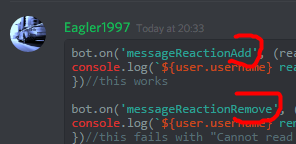
bot.on('messageReactionAdd', (reaction, user) => {
console.log(`${user.username} reacted with "${reaction.emoji.name}".`);
})//this works

bot.on('messageReactionRemove', (reaction, user) => {
console.log(`${user.username} removed "${reaction.emoji.name}".`);
})//this fails with "Cannot read property 'emoji' of undefined"
Does anyone know what the difference is?


 granite hedge
I mean why it would work with adding and not removing
lol
they both should return exactly the same object
read the comments in the code
prime cliff
It should be returning the removed emote but its saying its undefined hmmm
restive silo
do you use the raw event @granite hedge
granite hedge
yeah
restive silo
hah