#development
1 messages · Page 367 of 1
 inner jewel
 languid dragon
u were quick, goddamn
 pale light

 pseudo inlet
so does anyone want to help
 earnest phoenix
With wat
pseudo inlet
@client.event
async def on_message(message):
    if message.author == client.user:
        return

    if message.content.startswith('!shout'):
        author = message.author.id
        if author == devid:
            soutput = message.content[len('!shout'):].strip()
            await client.send_message(message.channel, "@everyone %s" % soutput)
            print(':: shouted %s' % soutput)
        else:
            await client.send_message(message.channel, "You are not allowed to 'shout'.")
No error just outputs nothing
@elder rapids nothing shows in the console
 elder rapids
I said to do those things
I didn't say to check
Follow your code
It's the best way to debug a problem
Breakpoint or console log every line to try and figure out what's it's doing
 patent reef
does anyone know erisssssssss
pseudo inlet
none of my commands work because of one client.event and i dont know any other way to fix it other then removing the client.event
pseudo inlet
yeah
pseudo inlet
what are cogs
patent reef
External imports of command groups
 trim plinth
Is there a good way to hide your bot's token on your bot's github repository?
trim plinth
mk
pseudo inlet
@patent reef
@client.event
async def on_message(message):
    if message.author == client.user:
        return

    if message.content.startswith('!bext'):
        bbeg = message.content[len('!bext'):].strip()
        bmid = bbeg.replace('b', ':b:')
        bout = bmid.replace('d', ':b:')
        await client.send_message(message.channel, '%s' % bout.replace('p', ':b:'))
``` this is making all my commands not registerand i dont know how to use cogs
patent reef
dont use client.event
patent reef
use actual commands
languid dragon
that's also another option
 abstract mango
@trim plinth put your token in a file, .gitignore said file
read the token file on startup
trim plinth
oof
pseudo inlet
i tried using client.command and then the command doesnt work
 heady zinc
yes
abstract mango
if __name__ == '__main__':
    for ext in exts:
        try:
            logging.debug(f'attempting to load {ext}')
            bot.load_extension(f'cogs.{ext}')
        except Exception:
            logging.error(f'Error while loading {ext}', exc_info=True)
        else:
            logging.info(f'Successfully loaded {ext}')
``` this is my cog loading code @pseudo inletyou see
pseudo inlet
that aint py
pseudo inlet
wierd ass python
abstract mango
lol
the strings that begin with f, those are fstrings if you haven't heard of them
and basically how the code snippet works:
iterating through a list of cogs, example: ['fun', 'moderation', 'music', 'basic']
it attempts to load a cog at a time
if not successfully done, it'll let you know via logging and continue loading things
it will also let you know when a cog is good and is now loaded into the bot
 mental geyser
is there a way to make a command that makes my bot join the call that I am in but doesnt play music or anything
earnest phoenix
Mhm
Yes
Question awnswered
Their ya go
@mental geyser Need help making a music bot?
 topaz fjord
He doesn't want it to play music he just said
earnest phoenix
Oof
earnest phoenix
My buddy @mental geyser is having this issue.
2018-02-04T02:50:24.544310+00:00 app[worker.1]: client.user.setActivity(Prefix: / |Servers: ${client.guild.size} |)
2018-02-04T02:50:24.544312+00:00 app[worker.1]:                                                             ^
2018-02-04T02:50:24.544314+00:00 app[worker.1]:
2018-02-04T02:50:24.544315+00:00 app[worker.1]: TypeError: Cannot read property 'size' of undefined
2018-02-04T02:50:24.544317+00:00 app[worker.1]:     at Client.client.on (/app/bot.js:7:61)
2018-02-04T02:50:24.544319+00:00 app[worker.1]:     at emitNone (events.js:111:20)
2018-02-04T02:50:24.544321+00:00 app[worker.1]:     at Client.emit (events.js:208:7)
2018-02-04T02:50:24.544328+00:00 app[worker.1]:     at WebSocketConnection.triggerReady (/app/node_modules/discord.js/src/client/websocket/WebSocketConnection.js:119:17)
2018-02-04T02:50:24.544330+00:00 app[worker.1]:     at WebSocketConnection.checkIfReady (/app/node_modules/discord.js/src/client/websocket/WebSocketConnection.js:135:61)
2018-02-04T02:50:24.544331+00:00 app[worker.1]:     at GuildCreateHandler.handle (/app/node_modules/discord.js/src/client/websocket/packets/handlers/GuildCreate.js:13:31)
2018-02-04T02:50:24.544338+00:00 app[worker.1]:     at WebSocketPacketManager.handle (/app/node_modules/discord.js/src/client/websocket/packets/WebSocketPacketManager.js:102:65)
2018-02-04T02:50:24.544339+00:00 app[worker.1]:     at WebSocketConnection.onPacket (/app/node_modules/discord.js/src/client/websocket/WebSocketConnection.js:325:35)
2018-02-04T02:50:24.544341+00:00 app[worker.1]:     at WebSocketConnection.onMessage (/app/node_modules/discord.js/src/client/websocket/WebSocketConnection.js:288:17)
2018-02-04T02:50:24.544343+00:00 app[worker.1]: at WebSocket.onMessage (/app/node_modules/ws/lib/EventTarget.js:103:16)```If you figure out how ot fix this please tag him with the fix
to*
@austere meadow if ya can help him
He uses discord.js
and client.on
 austere meadow
https://please.zbot.me/L6TDzMfQ.png
just as a word of advice

and client.guild.size isn't a thing
client.guilds.size is probably what you're looking for
mental geyser
okay
Now I am getting this
2018-02-04T02:55:34.652210+00:00 app[worker.1]: client.user.setActivity(`Prefix: / |Servers: ${client.guilds.size} |`)
2018-02-04T02:55:34.652212+00:00 app[worker.1]:             ^
2018-02-04T02:55:34.652214+00:00 app[worker.1]:
2018-02-04T02:55:34.652216+00:00 app[worker.1]: TypeError: client.user.setActivity is not a function
2018-02-04T02:55:34.652218+00:00 app[worker.1]:     at Client.client.on (/app/bot.js:7:13)
2018-02-04T02:55:34.652220+00:00 app[worker.1]:     at emitNone (events.js:111:20)
2018-02-04T02:55:34.652222+00:00 app[worker.1]:     at Client.emit (events.js:208:7)
2018-02-04T02:55:34.652228+00:00 app[worker.1]:     at WebSocketConnection.triggerReady (/app/node_modules/discord.js/src/client/websocket/WebSocketConnection.js:119:17)
2018-02-04T02:55:34.652230+00:00 app[worker.1]:     at WebSocketConnection.checkIfReady (/app/node_modules/discord.js/src/client/websocket/WebSocketConnection.js:135:61)
2018-02-04T02:55:34.652232+00:00 app[worker.1]:     at GuildCreateHandler.handle (/app/node_modules/discord.js/src/client/websocket/packets/handlers/GuildCreate.js:13:31)
2018-02-04T02:55:34.652238+00:00 app[worker.1]:     at WebSocketPacketManager.handle (/app/node_modules/discord.js/src/client/websocket/packets/WebSocketPacketManager.js:102:65)
2018-02-04T02:55:34.652240+00:00 app[worker.1]:     at WebSocketConnection.onPacket (/app/node_modules/discord.js/src/client/websocket/WebSocketConnection.js:325:35)
2018-02-04T02:55:34.652242+00:00 app[worker.1]:     at WebSocketConnection.onMessage (/app/node_modules/discord.js/src/client/websocket/WebSocketConnection.js:288:17)
2018-02-04T02:55:34.652243+00:00 app[worker.1]:     at WebSocket.onMessage (/app/node_modules/ws/lib/EventTarget.js:103:16)
what version of d.js are you using?
mental geyser
11.1.0
austere meadow
setActivity doesn't exist in 11.1
topaz fjord
Use docs for goodness sake
austere meadow
you should use setPresence
you should also update to stable 
11.1 is 2 versions behind stable
topaz fjord
@austere meadow tell me the best way to update d.js and do a full commit without having too long of downtime
topaz fjord
Don't ban
topaz fjord
I ping for succ
 elder rapids
But that's so much work
topaz fjord
I have to update everything tho
austere meadow
im on master so im used to it 
topaz fjord
It's so much work
elder rapids
All my dependencies on my bot are probably like 100 versions behind
austere meadow
did he change it to setPresence
earnest phoenix
Mhm
pseudo inlet
@client.event
async def on_message(message):
    if message.author == client.user:
        return

    if message.content.startswith("!bal"):
        authid = message.author.id
        fname = ("%s.txt" % authid)
        if os.path.isfile(fname):
            read = open(fname, 'r+')
            money = read.readlines()
            await client.send_message(message.channel, px.join(money))
        else:
            nFile = open(fname, 'r+')
            nMoney = nFile.readlines()

            nFile.write('5')
            await client.send_message(message.channel, px.join(nMoney))
``` Error:  No such file or directory.
I want to create a file if there is none and then read from it
Using discord.pyi recommend checking the docs @earnest phoenix https://discord.js.org/#/docs/main/11.2.0/class/ClientUser?scrollTo=setPresence
setPresence takes PresenceData which is an object

Discord.js is a powerful node.js module that allows you to interact with the Discord API very easily. It takes a much more object-oriented approach than most other JS Discord libraries, making your bot's code significantly tidier and easier to comprehend.
topaz fjord
He wants talking to you
 torn widget
?
 thorny hinge
You wanna get upvotes for your bot?
thorny hinge
 potent lily
@pseudo inlet First that's can be good to do :
if ( message.author.bot ) : return ( False )
At you're "on_message" fonction start
torn widget
yhea??
potent lily
To ignore every bots
thorny hinge
The docs explain
torn widget
enter it
thorny hinge
👀
torn widget
i dont understand
torn widget
yhea
thorny hinge
You dont have to connect tokens, just use the dbl api token
For the authorization header
torn widget
how do i do that?
topaz fjord
Use snekfetch and set it
thorny hinge
^
torn widget
?
thorny hinge
Have you ever done http requests?
thorny hinge
🤔
thorny hinge
Well I suggest you learn more about http requests so you'll know what I mean by a get request to /api/bots/:id/votes
Since I'm not spoonfeeding
topaz fjord
^^^^^^^^^^^
torn widget
kk ;lol
topaz fjord
@torn widget why are you trying to get your bots upvotes when it's not even approved
And also the first upvote on the bot is the bot creator
 fluid fable
Please, ask in general, don't tag
torn widget
sorry
fluid fable
Well, i have no power over you, i'm just trying to warn you
pseudo inlet
        else:
           # creates the file
            nFile = open(fname, 'w')
           # makes the file readable
            nFile2 = open(fname, 'r+')
            nFile2.write('5')

            nMoney = nFile2.readlines()
            await client.send_message(message.channel, px.join(nMoney))
``` error is BAD REQUEST (status code: 400): cannot send an empty message HELPin discord.py
potent lily
Why you open 2 files ?
pseudo inlet
im not im creating the file and then reading from it
potent lily
Worked fine for me
So
First you try to write line in read mode
File  = open ( "SomeFile.txt" , 'w' )
File.write   ( "Hello\nIm Jeff"     )
File  = open ( "SomeFile.txt" , 'r' )
print        ( File.read()          )
Open it in write mode , write the content you want into, reopen in read mode and read it
@pseudo inlet That's okay now ?
potent lily
np
mental geyser
how can I make a command that says how many servers my bot is in?
pale light
Discord.js is a powerful node.js module that allows you to interact with the Discord API very easily. It takes a much more object-oriented approach than most other JS Discord libraries, making your bot's code significantly tidier and easier to comprehend.
you can use .size to see the size of a collection

pseudo inlet
    if message.content.startswith('!add'):
        authid = message.author.id
        fname = ("%s.txt" % authid)
        if os.path.isfile(fname):
            read = open(fname, 'r+')
            rmoney = read.readlines(1)
            rmoney = rmoney(map(int, rmoney)) + 1
            read.write(rmoney)
        else:
            nFile = open(fname, 'w')
            nFile.write('5')
            nFile = open(fname, 'r')

            await client.send_message(message.channel, "P$".join(nFile))
            print(':: %s created a new balance' % message.author)
Error: 'list' object is not callable
hel p
hrp pls
 low rivet
read.readlines(1) this should be read.readlines[1]
and why arent you using the commands extension  @pseudo inlet
 umbral eagle
const Command = require('./command.js');
class RoleCommand extends Command {
  constructor(bot) {
    super('role', bot);
  }
async execute(msg, args) {
    for (var [key, value] of msg.channel.guild.roles) {
        if (args[1] == msg.channel.guild.roles.get(key).name)
            try {
                bot.addGuildMemberRole(msg.channel.guild.id, msg.mentions[0].id, (msg.channel.guild.roles.get(key).id));
            }
        catch (Error) {
            msg.channel.createMessage("Something went wrong! I probably don't have permission to do this!")
        }

    }


  }
}

module.exports = RoleCommand;```well this is my role command
 vital lark
 leaden bane
Hi guys!
umbral eagle
Do I need to pass anything special when it comes to perms
heady zinc
no you don't
umbral eagle
could it be related to my command.js?
heady zinc
wdym don't work tho
heady zinc
you should start by putting the error here 
heady zinc
if you use sentry you should capture exceptions everywhere its needed 
umbral eagle
Nah but like
import sentry into every file
or can I slap it in my command.js and it can inherit
heady zinc
if you require it in your command.js
and put is a property of your command class
it will inherit
but smh you just need to console.log() the error
umbral eagle
kk

 tawny lava
because it's not defined
heady zinc
then that has something to do with your command handler
tawny lava
pretty sure you need to do this.bot
umbral eagle
Would there be a reason why other commands would work?
heady zinc
well
show some of your command.js file
smh what i am saying
yeah
fucking
lizard is right
and imma return working instead of saying shit
umbral eagle
That might have been it
aah nope
  constructor(name, bot) {
    this.name = name;
    this.bot = bot;
    this.bot.registerCommand(this.name, this.execute.bind(this));
  }

  async execute(msg) {
    // no-op
  }
}

module.exports = Command;```listen to that scrub
in your command you do ```js
bot.addGuildMemberRole(msg.channel.guild.id, msg.mentions[0].id, (msg.channel.guild.roles.get(key).id));
ah, ok
heady zinc
but bot is not defined
umbral eagle
so it's in there
umbral eagle
I added a this.bot = bot into the constructor
heady zinc
you can just do msg.channel.guild.addMemberRole()
of course pass the args to the function
tawny lava
yes
heady zinc
both works
umbral eagle
I realized the reason why those commands were working
is because they never actually used the bot object
heady zinc
you don't really need it
unless you want to get data specifically related to the client only
umbral eagle
Ah, I see
because when the command is made, bot is a given
so it doesn't need to be explicity referenced
heady zinc
^
umbral eagle
I'm pretty shit at coding
Ah, but if a method comes from using CommandClient, this. would probably work better
 tiny turtle
I converted my C# code to this Json code to work it into my bot.
but these to im not sure how to convert, kinda stumped
maybe someone a bit smarter can help with exp in C# to Json
my bot is a Elder Scrolls Online bot and these are needed,
heady zinc
wait wat
you can't convert C# to JSON
JSON is not even a language in the first place 
tiny turtle
i did the first one and not even sure how lol
heady zinc
JSON doesn't get executed in any way
tiny turtle
tiny turtle
thats what it got turned into to work
what kind of code is it then, im stumped
im still learning all this stuff, got my bot up and running, but trying to get C# into whatever that is, is confusing to say the least
tiny turtle
because I made a bot in C# and I got a beta in DBM and im trying it out
heady zinc
wat
tiny turtle
yea, its somthing new and looks easy enough to use, so i am testing it out
heady zinc
what the hell is dbm
tiny turtle
Discord Bot Maker, I said the same thing lol
tiny turtle
thank gawd thought you were going to explode!
heady zinc
well long story short dbm is not really a quality application, but it is indeed easy to use. Can't help you with that though
tiny turtle
yea, just seeing what I could do with it atm, have both bots on my server atm, its kinda fun to play with
but confusing also, if you figure out what kind of script that is please tag me lol
heady zinc
lemme quickly assess the situation
so you got a bot in C#
and you want to make the code you wrote working with DBM?
tiny turtle
yea just those two things to see how it handles it
I got the other one working and im not even sure how
the golden into the golden converted
heady zinc
iirc dbm just generates JavaScript for discord.js right?
tiny turtle
yea
 young wind
Does anyone here know how long Discord's OAuth2's refresh token is valid for?
 dark tree
When I use the @limber sphinx in my server, the removing a role from being given income command doesn't seem to work. I've tried the same command in quite a few ways and it won't change anything.
Use the role-income list [page] command to find the ID of the income you want to stop and delete. is what it says on the bot's website, but there is no ID that shows up. Must I get the role ID to make it work?
austere meadow
@dark tree you should go to @limber sphinx's support server for that, we aren't responsible for it, sorry
 quiet bobcat
And this hasn't anything to do with development
dark tree
Alright then.
austere meadow
what version of d.js are you running
do you have prism-media installed?
hm
do you have any code in your end event? if so can i see it
i think you should take advantage of reasons
so if you do .end("skip"), and you change your end event to include the reason (dispatcher.on('end', (reason) => {), then you can do
if (reason === "skip") {
play(queue[msg.guild.id].songs.shift())
}
yeah
skip would be a string
yep
what is the collector.stop for?
is that a reaction collector or something
you can add it if you need it
show me code
yeah you need to put "reason" in the parameters of end
dispatcher.on('end', (reason) => {

did you put .end("skip")
remember it will only play the next song if you add "skip"
because thats the reason its looking for
im not sure then
check your play function
because it's either you are messing something up there
or you are missing the "skip"
i dont really use discord.js's dispatcher anymore so im not really sure
 west wyvern
Greetings.
Can someone help me? I'm starting to learn how to dev, I have just a little knowledge on C++, JS n HTML, but Idk how to start programming a bot, so, how do I start? I'm doing this for auto-learn purposes
thorny hinge
You can't really get far with little knowledge
austere meadow
@west wyvern if you have prior knowledge in JS i recommend you try discord.js to make a bot, you can find guides on how to make bots for it at https://anidiots.guide or at https://discordjs.guide
A guide made by the community of discord.js for its users.
thorny hinge
- Learn the lang you wanna code the bot in (make sure you're good at it)
- create the bot application
- Choose a lib
- code ur bot
- run it
west wyvern
Thanks zblonk and aTmG.
austere meadow

west wyvern
Is it neccesary to install Node.js? Or can I use Sublime Text to codify it?
austere meadow
yeah you need to download node.js
west wyvern
kk thx
 untold valley
lol
earnest phoenix
can you send us the error?
west wyvern
earnest phoenix
uh
you need to do node <index>.js
or node <bot>.js
not ur bot name
the file name that u've codded in
west wyvern
Well the thing is that I'm following a tutorial (new into this, I'm auto-learning) and in both tutorials in this steps I get this error, now I tried using the < > with the name I gave to the file/folder and keeps sending me that error
earnest phoenix
bruh
west wyvern
?
earnest phoenix
 west wyvern
I'm trying even with the space between the ">" and "node" and keeps sending me that error
earnest phoenix
bruh
node bot.js
can you send me the files that you have in that folder
a screenshot*
 jagged birch
hello, I'm trying to add in a music feature to my bot and I keep getting error 'Map' is not defined, this is the line of code:
const queue = new Map();
on my test bot its working, but somehow on the main it isnt? I deleted everything out and pasted everything back in from the test bot, but still its the same. am I missing a package or something?
earnest phoenix
may i check the test bot
jagged birch
the code?
jagged birch
ill dm u an invite link
earnest phoenix
k
quiet bobcat
can someone help me? I had an error so I cleaned my configs file and now I have this error ```js
{}
^
SyntaxError: Unexpected token in JSON at position 0```
earnest phoenix
replace {} with []
quiet bobcat
I deleted and made the file again and it worked
west wyvern
Fixed, thanks!
earnest phoenix
np
west wyvern
Uhm I have a doubt, how can I get the parameters from a cmd? Something like
/whois (Name) (Region) (Age) I don't if I explain myself
 scenic crest
Does anyone know if Redis' INCR is threadsafe by design, or if I have to manually ensure that it is
earnest phoenix
im always trying to find way to code a discord.js thing, when i shows how many servers the bot is in, dose someone know a site?
 formal atlas
@earnest phoenix the discord.js documentations...
 buoyant anvil
Hi
west wyvern
Someone know how to make the bot to tag roles?
thorny hinge
@west wyvern what lib
west wyvern
js
thorny hinge
Js is not a lib
 wooden shoal
lmao
west wyvern
New into this, my bad
wooden shoal
discord.js?
west wyvern
Ye discord.js
wooden shoal
ok
thorny hinge
RoleObject.toString() if ur sending only the role mention
If ur sending more u can do
`${roleObject} bla bla bla`
msg.channel.guild.roles.get('name', 'Administrator').toString()
The tostring isnt needed if ur gonna send more than the mention
Since ${} and + " whatever" already stringifies
west wyvern
And how to make the bot to send DM to online members of a role?
thorny hinge
All the members who have the role?
west wyvern
Ye
thorny hinge
wew mass dm 👀
west wyvern
Only the online ones
thorny hinge
Still
 gilded blaze
u can get ur bot banned
thorny hinge
Why would you do that
thorny hinge
To mass dm?
🤔
If you wanna get a message to all the people in a role, just tag it
ezpz
west wyvern
Well ye haha 😅
earnest phoenix
get role members, foreach, send
 earnest phoenix
banned from what
earnest phoenix
not really
someone did that like 5 times in a row and nothing happend
and what if the role is small
topaz fjord
Is pm2 compatible with java
thorny hinge
Try it
quiet bobcat
How do I make so when a reaction happens it triggers something? I want a specific to be reacted with eg 
Using d.js v 12
quiet bobcat
Oh there is?
thorny hinge
Yes
quiet bobcat
Didn't even know lol
quiet bobcat
What?
thorny hinge
Code:
https://gist.github.com/Danktuary/27b3cef7ef6c42e2d3f5aff4779db8ba
How it works:
https://discordjs.guide/#/popular-topics/reactions?id=listening-for-reactions-on-old-messages

A guide made by the community of discord.js for its users.
 fair minnow
I need help with discord.py, my bot simply won't start. I have literally no idea why or why not, all I know that it stops somewhere at client = discord.Client()
I put all the details on here with my bot's code https://www.reddit.com/r/discordapp/comments/7v7twn/so_discordpy_just_does_not_work_and_idk_why/

reddit
Nothing happens. Literally nothing. The bot never comes...
earnest phoenix
hello i do not know how to do it and i do not find it on the internet but how do i create a role with perms and then assign it to someone?
fair minnow
With or without bot?
fair minnow
And what language?
earnest phoenix
JavaScript
fair minnow
In that case, I do not know sorry
earnest phoenix
});
const fs = require("fs");
const readFilePromise = require('fs-readfile-promise');
client.on('message', message => {
    if (message.content === '>help') {

    // send back "Help.txt" to the channel the message was sent in

    fs.readFile('/Users/rowinsalomons/Desktop/Lil\ dumb.html/Help.txt', (err, data) => {
    if (err) throw err;
    message.author.send(data.toString('utf8'))}
})
.catch(err) { message.reply('i cannot send you things with your dms disabled'); }``` at createScript (vm.js:80:10)
at Object.runInThisContext (vm.js:139:10)
at Module._compile (module.js:607:28)
at Object.Module._extensions..js (module.js:654:10)
at Module.load (module.js:556:32)
at tryModuleLoad (module.js:499:12)
at Function.Module._load (module.js:491:3)
at Function.Module.runMain (module.js:684:10)
at startup (bootstrap_node.js:187:16)
at bootstrap_node.js:608:3```Welp
 severe socket
.catch( err => {})
.catch( (err) => {})
or that if you like more
but there it is
thorny hinge
@earnest phoenix what lib
potent lily
D.JS
earnest phoenix
@thorny hinge js
topaz fjord
@earnest phoenix did u close the message event
earnest phoenix
@thorny hinge no
earnest phoenix
Think I did
topaz fjord
show full code please
earnest phoenix
Thats littuarlly it
topaz fjord
send all code without token smh
earnest phoenix
That is all
earnest phoenix
Above, but thats the startup
topaz fjord
then what you gave us is not all code
earnest phoenix
Cus why is it needed,
topaz fjord
so i can see if you closed all you brackets and parenthesis
 deep parrot
@topaz fjord discord.js is a lib
topaz fjord
@deep parrot never said it wasnt
deep parrot
js it self isnt
wooden shoal
^
topaz fjord
why dont you want to show it
@earnest phoenix
because rn your being a little bitch
 hushed oyster
he went offline
wooden shoal
gee gee
topaz fjord
tbh he can fuck off
 languid dragon
can u relax
inner jewel
remove one
topaz fjord
im just gonna say he doesnt know the definition of all
topaz fjord
So i have a java program that runs on localhost, but i have my website which is hosted on my vps already using that. So idk what port to bind to my java program to not interfer with it
 wooden shoal
lol
 cinder pendant
@topaz fjord very late reply but I believe you can just run it on any unused port, and then set up a reverse proxy using nginx so its easier to access
 undone zephyr
i need help on bots
earnest phoenix
wat lang?
undone zephyr
huh?
earnest phoenix
so wat u need help in?
undone zephyr
i just figuured out how to set one up and put it in my server
earnest phoenix
u trying to make a discord bot?
undone zephyr
no
earnest phoenix
or use a discord bot?
undone zephyr
so i put it in my server
earnest phoenix
mkay
earnest phoenix
hmmm. . . is it your bot or no?
undone zephyr
its mine yes
earnest phoenix
I presume u got the code form a yt video?
undone zephyr
code?
earnest phoenix
so u hv a offline discord bot on your server?
undone zephyr
yes
earnest phoenix
do u know any coding languages?
earnest phoenix
here is discord.js guide for discord bots
A guide made by the community of discord.js for its users.
earnest phoenix
Anyone knows how to make a image join message using discord.js? i am blank rn
What @Telk#2726
Screw that theb
Try camvas
CAnvas
Canvas?
Sorry discord too laggy for mem
😦
i want to make something like welcomer bot u know
the image join message
https://github.com/Automattic/node-canvas
GitHub - Automattic/node-canvas: Node canvas is a Cairo backed ...

GitHub
node-canvas - Node canvas is a Cairo backed Canvas implementation for NodeJS.
ok ty
i will try it
It's a node module
Look at York's repos
i can tell
Mikasi
I have a node module xD
is fs worth? cause it takes storage if u hv to much members/servers
tiny turtle
Going from a C# to JS bot with DBM
I need help with these two scripts
https://hastebin.com/yedeyafafu.cs
https://hastebin.com/qeyaziboza.cs
A friend did this for me and gave him 20 to his paypal lol, but he has been deployed and cant help with a prepaid phone
Not that I would want him coding where he is anyways.
from this https://hastebin.com/ehuvelojuq.cs to this https://hastebin.com/tedodebiqu.js for golden
the couple he did just like the ones above work great
jagged birch
I'm trying to add in a music feature to my bot, on my test bot it works perfectly fine, but on my main bot the skip command doesn't work, it just leaves the vc and I get no errors in console. I switched hosting from heroku to glitch.com, would glitch.com be causing it? Because my code is the same as on my test bot, and I have all the required packages installed...
earnest phoenix
-bots all
 gilded plankBOT
User not found
 glossy sand
what are you trying to do?
glossy sand
bot commands belong in #memes-and-media or #commands
earnest phoenix
oh sory...
 agile lake
agile lake
agile lake
ok i just needed to reboot the vps then attempt dpkg config n apt-get update again
solved
earnest phoenix
Code:
  const member = message.mentions.users.first();
  const { RichEmbed } = require(`discord.js`);
  const no = Shrug.emojis.find(`name`, `no`);
  const hexcols = [0xFFB6C1, 0x4C84C0, 0xAD1A2C, 0x20b046, 0xf2e807, 0xf207d1, 0xee8419, 0x8a2be2];

  //if(!member) return message.channel.send(`${no} Please specify a user`);

  const embed = new RichEmbed()
  .setColor(hexcols[~~(Math.random() * hexcols.length)])
  .setTitle(`${message.author.username}'s Avatar:`)
  .setImage(`${message.author.avatarURL}`);
  if(!member) return message.channel.send({embed})

  const mention = new RichEmbed()
  .setColor(hexcols[~~(Math.random() * hexcols.length)])
  .setTitle(`${member.username}'s Avatar:`)
  .setImage(`${member.avatarURL}`);
  return message.channel.send({mention});
}
Error:
ction id: 2): DiscordAPIError: Cannot send an empty message
(node:10564) [DEP0018] DeprecationWarning: Unhandled promise rejections are depr
ecated. In the future, promise rejections that are not handled will terminate th
e Node.js process with a non-zero exit code.```ignore the // i used to make it have to @ the user
heady zinc
the error is pretty explicit
heady zinc
smh
 earnest phoenix
ok
    at item.request.gen.end (D:\Bots\Shrug\node_modules\discord.js\src\client\re
st\RequestHandlers\Sequential.js:71:65)
    at then (D:\Bots\Shrug\node_modules\snekfetch\src\index.js:213:21)
    at <anonymous>
    at process._tickCallback (internal/process/next_tick.js:188:7)
  name: 'DiscordAPIError',
  message: 'Cannot send an empty message',
  path: '/api/v7/channels/409118997305622529/messages',
  code: 50006 }
``` @heady zincafk
agile lake
how do i choose an option on this page for ubuntu
x.x
i can't seem to be able to manipulate highlight to the choice i want
i'm a filthy casual who uses windows so no idea
earnest phoenix
Arrow keys and enter
earnest phoenix
Get a new keyboard

 spare spruce
hey will this work inside my status.txt file Do ${prefix}comingsoon for more INFO! | Prefix ${prefix} | ${dclient.guilds.size} Connected Servers'
last time i did ${dclient.guilds.size} didnt work less on console only
well gessing didnt work :/
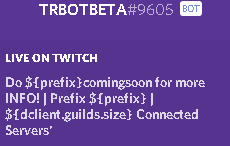 spare spruce
i did this
dclient.user.setGame(games[Math.floor(Math.random()* games.length)],'https://twitch.tv/'+twitch,
so idk what uses
 fleet mason
whats wrong with this command ```const config = require("../config.json");
exports.run = (client, message, args) => {
if(message.athor.id !== config.ownerID)
{
message.reply('You cant use this command.');
return;
}
let member = message.mentions.members.first();
member.kick();
};
at Object.exports.run (C:\Users\sande\Desktop\mybot\commands\kick.js:4:18)
at Client.client.on.message (C:\Users\sande\Desktop\mybot\mybot.js:28:17)
at emitOne (events.js:116:13)
at Client.emit (events.js:211:7)
at MessageCreateHandler.handle (C:\Users\sande\Desktop\mybot\node_modules\discord.js\src\client\websocket\packets\handlers\MessageCreate.js:9:34)
at WebSocketPacketManager.handle (C:\Users\sande\Desktop\mybot\node_modules\discord.js\src\client\websocket\packets\WebSocketPacketManager.js:103:65)
at WebSocketConnection.onPacket (C:\Users\sande\Desktop\mybot\node_modules\discord.js\src\client\websocket\WebSocketConnection.js:330:35)
at WebSocketConnection.onMessage (C:\Users\sande\Desktop\mybot\node_modules\discord.js\src\client\websocket\WebSocketConnection.js:293:17)
at WebSocket.onMessage (C:\Users\sande\Desktop\mybot\node_modules\ws\lib\event-target.js:120:16)
at emitOne (events.js:116:13)
fleet mason
yea i forgot the "u" XD
earnest phoenix
ik this a dumb question but does anyone know how to get the message.author's game?
as message.author.presence.game outputs object
earnest phoenix
.toString()?
deep parrot
yea
earnest phoenix
it keeps giving me object
deep parrot
uhmm
earnest phoenix
i'm guessing you don't do js right?
deep parrot
i do
earnest phoenix
oh
.addField(`Game:`, `${message.author.presence.game.toString()}`) doesn't work
heady zinc
message.author.presence.game.name
heady zinc
did you checked d.js docs
deep parrot
i never tocuhed presence.game xD
earnest phoenix
i think i tried it idk i've tried so much so brb
deep parrot
:readDOCS:
earnest phoenix
i did btw
heady zinc
deep parrot
heady zinc
afaik on v12 and v11.3 it's User.presence.activity.name
deep parrot
he is pulling it from the message.author 😛
heady zinc
message.author is User
 wispy axle
everytime i open this file "bot.py" it closes in like 2 seconds, does anyone know how do i fix it?
austere meadow
@wispy axle that image had your token in it
austere meadow
do you get any errors in the console?
wispy axle
wdym, in "python" file?
wispy axle
it does but it closes in like 2 seconds
wispy axle
three messages
austere meadow
can you tell me them, or screenshot it maybe?
austere meadow
hmm
wispy axle
and also "line 23"
 patent mauve
Try running it from a command prompt so you don't have to deal with the window going away? (shift+right click on folder, 'open command window here', python myfile.py, if windows)
wispy axle
should i reinstall python?
i mean it also doesnt work on other "python" files
idk if i should post the file here
wispy axle
@austere meadow heres the error (sorry for ping)
austere meadow
it says indentation error, so you'd probably have to remove the indentation on that line
wispy axle
"a"?
austere meadow
indentation is the spacing on a line
a [no indentation]
    a [1 tab indentation]
        a [2 tab indentation]
so remove any spacing on that line
https://please.zbot.me/46nHnsPU.png
actually i think its this

see how this is out of line
you need to make that match up with the line below
wispy axle
i fixed it now it says this
wispy axle
how can i install "chalk"?
quiet bobcat
You need to define COMMANDS
wispy axle
wdym?
quiet bobcat
It says that COMMANDS is not defined
So define it
I can't help you more than that
Don't know python
earnest phoenix
can someone tell me how to get the users roles?
 restive silo
Which lang/lib?
earnest phoenix
discord.js
restive silo
well get a member object of someone and then all roles are in an collection property called roles
<GuildMember>.roles
earnest phoenix
message.author.roles i did this but what do i do from here @restive silo?
restive silo
author doesnt return a member, it returns a user object
earnest phoenix
oh
restive silo
Message.member returns the author as member
restive silo
Well depends what you need
earnest phoenix
just the roles list that the user has
restive silo
so the role names?
restive silo
use .map
earnest phoenix
ok
restive silo
.map takes a function as parameter ehst executes for all elements in that collection
give it a function what returns the name of the role
earnest phoenix
yea i just got it's function lol
restive silo
ok
potent lily
🤔
earnest phoenix
restive silo
seems like you didnt got it lul
earnest phoenix
message.member.roles.map
restive silo
map is a function
earnest phoenix
oops lol
restive silo
What takes a function as parameter
potent lily
he's in js ?
earnest phoenix
yes
restive silo
yes thats js
earnest phoenix
i noticed
restive silo
thats d.js not py
earnest phoenix
  const member = message.mentions.users.first();
  const { RichEmbed } = require(`discord.js`);
  const hexcols = [0xFFB6C1, 0x4C84C0, 0xAD1A2C, 0x20b046, 0xf2e807, 0xf207d1, 0xee8419, 0x8a2be2];

  if(!member){
    const nomention = new RichEmbed()
    .setColor(hexcols[~~(Math.random() * hexcols.length)])
    .setThumbnail(message.author.avatarURL)
    .addField(`Username:`, `${message.author.username}#${message.author.discriminator}`, true)
    .addField(`ID:`, `${message.author.id}`, true)
    .addField(`Status:`, `${message.author.presence.status}`, true)
    .addField(`Game:`, `${message.author.presence.game.name}`, true)
    .addField(`Roles:`, `${message.member.roles.map}`)
    message.channel.sendEmbed(nomention);
  }else{
    const mention = new RichEmbed()
    .setColor(hexcols[~~(Math.random() * hexcols.length)])
    .setThumbnail(member.avatarURL)
    .addField(`Username:`, `${member.username}#${member.discriminator}`, true)
    .addField(`ID:`, `${member.id}`, true)
    .addField(`Status:`, `${member.presence.status}`, true)
    .addField(`Game:`, `${member.presence.game.name}`, true)
    message.channel.sendEmbed(mention);
  }

}
``` ok this is d.py yeslol
restive silo
What
potent lily
No
earnest phoenix
i'm totally using d.py
@restive silo just give me the line of code and then i'll understand from there lol
potent lily
the api ( and only the api func ) looks like .py i didnt saw anyone with d.js using it like that
earnest phoenix
oh ok
restive silo
i dont spoonfeed i already gave you everything needed
earnest phoenix
ok
wispy axle
any help?
earnest phoenix
what lib
restive silo
if you dont understand what to do then you lack of basic js knowledge 
potent lily
git the same after a log time @wispy axle
earnest phoenix
that emoji tho
potent lily
yep
wispy axle
wdym?
potent lily
idk it happend sometimes too but didnt caught the problem
wispy axle
is there any ways to fix it?
wispy axle
k
potent lily
idk if thats the client connection just timeout if you do nothing after x time
basicly what timeout mean btw
wispy axle
i still dont know how to fix it
wispy axle
@low rivet
low rivet
obviously it isn't defined if your variable isn't called session
wispy axle
man its really hard
low rivet
do u know python
wispy axle
i know python tho
wispy axle
idk the clien thingy
low rivet
@wispy axle what client
low rivet
?
wispy axle
it keep saying this
potent lily
'bot' i think
wispy axle
idk how tho this is why
potent lily
you have some @bot.event ?
wispy axle
i only have one
potent lily
discord.client.session no ?
wispy axle
wanna see the whole code?
wispy axle
wispy axle
i copied this code from a video
low rivet
can u not 
potent lily
client.run open session
low rivet
write your own code
wispy axle
low rivet
@potent lily if it does, dpy handles closing that itself, so that'll not trigger an error or warning
wispy axle
im new to writing codes
low rivet
not an excuse to not learn
wispy axle
should i start a new file?
potent lily
no i can't do it too the coroutine never happend
await client.close()
or client.logout()
i asked 2 weeks ago no one know
low rivet
have you used discord.py before?
wispy axle
like when i start coding should i put this: import discord
from discord.ext import commands
from discord.ext.commands import Bot
import asyncio
Me?
potent lily
lowl
low rivet
not if you are just gonna copy codes from videos and then switch to another language once someone asks you understand it
wispy axle
k but what option should i use zip? or msi?
wispy axle
idk people keep saying node.js is "good"
 umbral pelican
python is for nubs 
low rivet
you gave up on the lang after not understanding something that you got from youtube
low rivet
@umbral pelican bet you have node js on highlight 
umbral pelican
earnest phoenix
jeeeez
const fs = require("fs");
const readFilePromise = require('fs-readfile-promise');
client.on('message', message => {
    if (message.content === '>help') {

    // send back "Help.txt" to the channel the message was sent in

    fs.readFile('/Users/rowinsalomons/Desktop/Lil\ dumb.html/Help.txt', (err, data) => {
    if (err) throw (err);
    message.author.send(data.toString('utf8'));
});
catch (err) => { message.reply('i cannot send you things with your dms disabled')}; ``` at createScript (vm.js:80:10)
at Object.runInThisContext (vm.js:139:10)
at Module._compile (module.js:607:28)
at Object.Module._extensions..js (module.js:654:10)
at Module.load (module.js:556:32)
at tryModuleLoad (module.js:499:12)
at Function.Module._load (module.js:491:3)
at Function.Module.runMain (module.js:684:10)
at startup (bootstrap_node.js:187:16)
at bootstrap_node.js:608:3
Bruh
help
low rivet
if you wanna catch an error, try something first
try {
//code
} catch (e) {
//if code fails
} ``` uncut slate
@earnest phoenix that's not how js works
earnest phoenix
Tbh, idek how .js works now.
Everyone says, this is right
then someone says, this is not right
earnest phoenix
¯_(ツ)_/¯
uncut slate
find me someone who says that's right, I'll be more than happy to try talking some sense into all of them
earnest phoenix
Can u help me then
uncut slate
not much I can do to be honest, look at 4JR's snippet and adapt
you don't seem to understand js
earnest phoenix
Okay I am leaving this server,
 south finch
welp
uncut slate
no one is asking you to stay :I
south finch
we don't spoonfeed as well.
 cosmic cipher
Hey guys, quick question: What permission is required to fetch invites in a guild? I tried every permission, but it only works with ADMINISTRATOR and MANAGE_SERVER permissions...
I'm pretty sure you need the MANAGE_GUILD permissions to fetch invites, yet my bot was rejected because of it: Bot declined: You don't need manage_guild for invites and leaderboard. I can't test because of this.
umbral pelican
umbral pelican
It will likely just get declined again if you haven't changed anything.
Ask the mod that declined it for more info maybe
cosmic cipher
Ok, will do
languid dragon
not related to discordbots
not related to development
Does anyone know any clipboard software where i can do something like
Ctrl + 1 + C or Ctrl + 2 + C
and both 1 & 2 will have seperate clipboards where i can
Ctrl + 1 + V to paste the first and so on
glossy sand
@languid dragon just google "clipboard manager"
that's a thing just about all managers do
languid dragon
i want suggestions ;-;
i wouldn't have asked if i had a clue of where to look tbh
earnest phoenix
What's the site api ratelimit now?
 near jasper
If you have a bot and would like it to be translated i can for Hungarian on Github
earnest phoenix
 let moneyAmount = message.content.split(" ").slice(1)
    if(!moneyAmount.join(" ")) return message.reply(`You have to type an amount of money.`)
    if(isNaN(moneyAmount.join(" "))) return message.reply(`The Money amount has to be a number.`)
    if(userData[message.author.id + message.guild.id].money < moneyAmount.join(" ")) return message.reply(`You don't have enough money.`)
    var answer1chapter1 = client.send(`You Won! Amount given to you : ${moneyAmount.join(" ") * 2}`)
    var answer1chapter2 = userData[message.author.id + message.guild.id].money = userData[message.author.id + message.guild.id].money + moneyAmount.join(" ") * 2
    var fa1 = answer1chapter1 || answer1chapter2
    var answer2chapter1 = client.send(`You Lost! You lost ${moneyAmount.join(" ")} Money.`)
    var answer2chapter2 = userData[message.author.id + message.guild.id].money = userData[message.author.id + message.guild.id].money - moneyAmount.join(" ")
   var fa2 = answer2chapter1 || answer2chapter2
    var finalAnswer = fa1, fa2
message.channel.send(finalAnswer[Math.floor(Math.random() * finalAnswer.length)]);```help help help
it sends fa1 and fa2
earnest phoenix
nope 😦
thorny hinge
What error
 hard glade
for that script of server info
thorny hinge
Everything that gives errors
hard glade
??
thorny hinge
Show the errors and the code
hard glade
shall I dm u the script?
thorny hinge
Doesn't matter
torn widget
?
thorny hinge
torn widget
know what
hard glade
w8 I gtg
thorny hinge
No need to tag randoms
hard glade
forg it
thorny hinge
?
torn widget
talk in general
 drifting frost
What language are you using?
 edgy vale
python
drifting frost
wElp i can't help yOu
edgy vale
well embeds dont really change over languages
drifting frost
🤷
edgy vale
just the functions 
edgy vale
should i make the stuff like Designation be code lines?
ye the uper topics are fields (Biological classification, physical, etc..)
drifting frost
I'm using DIscord.js/Node.js and heres what i have..
message.channel.send({embed: {
color: 3447003,
author: {
name: client.user.username,
icon_url: client.user.avatarURL
},
title: ('-----[Help]----'),
description: ('Use ** as a Prefix!'),
fields: [{
name: ('Commands:'),
value: ('Commands')
},
{
name: ('Contact'),
value: ('Contect details')
    }],
    footer: {
        icon_url: client.user.avatarURL,
        text: "Text"
    }
}});
Not sure what's different in Python 🤷
edgy vale
wait nvm
drifting frost
ik that not my actual command
thorny hinge
Eye color Yellow 👀
pale light

edgy vale
ima try it with command lines and hope that all the characters are the same size


 inner jewel
code blocks are monospaced
edgy vale
meh got it somewhat to work
just spammed spaces until it looked right
but mobile makes it really bad 
wispy axle
can someone tell me how do i create a help command?
thorny hinge
What lib are you using
thorny hinge
JavaScript isnt a lib tho
trim plinth
.<.
thorny hinge
edgy vale
delete the base help command, then create a help command from scratch
trim plinth
@wispy axle just ask me in the testing server
edgy vale
or search the docs for some delete_command function 👀
wispy axle
thorny hinge
@wispy axle looks like discord.js
wispy axle
its discord.js
thorny hinge
you could have said that
Anyways
Just do an embed
Like ur serverinfo
But change it to fit ur needs
thorny hinge
Yes
low rivet
learn javascript