
#development
1 messages · Page 336 of 1
 weak parrot
weak parrot
weak parrot
lmao
 devout jackal
first of fucking all, i do know how to code, if i didn't then i wouldn't be a fucking bot dev
i am asking for a replacement for message.content.startsWith or someshit like that because it wasn't working
no errors, the code is right, but it ain't working
 umbral pelican
You're assigning message.content not comparing 
devout jackal
FINALLY
 languid dragon
well first of fucking all
message.content is not a variable
devout jackal
yes
languid dragon
second of all
if you want to test something its == or ===
not =
if you knew "code" you'd know this ;]
devout jackal
guess what? i copied your statement and see if it actually works
yes
well, i dont need that shit now
 restive silo
that was pseudo code
devout jackal
since i forgot that i have the code in my docs
anyways, any of you shits know jimp?
languid dragon
yeah i do :]
devout jackal
aight
devout jackal
im quite new to it
restive silo
yes but guess what, since you know how to code you can try to get stuff yourself
devout jackal
google doesn't work
languid dragon
also a fair amount of explainded documentation here https://www.npmjs.com/package/jimp

npm
An image processing library written entirely in JavaScript (i.e. zero external or native dependencies).
devout jackal
i can
restive silo
you can't
languid dragon
obviously
devout jackal
let me finish can you? bitch
devout jackal
well, nevermind, this "community" is fucking toxic, so im gonna go change to another server, "less-toxic"
restive silo
the thing is i love these reaterds who call themelf "bot devs" and say stuff like "i know how to code" but are retarded af and dont know how to use google or any docs which easy to understand
weak parrot
Yeah xD
languid dragon
I mean he wouldn't need to ask if he researched up on the documentation 👀
restive silo
ikr
languid dragon
Tbh half the time i answer questions here i go straight to the docs to check my answers and confirm LOL
 bitter sundial
Tbh
weak parrot

 neon pasture
LOL, that kid is so toxic.
weak parrot
Yup
 prime cliff
wouldnt it be sendfile not sendmessage did you check the docs?
neon pasture
Yes
prime cliff
It seems to be correct unless its not suppose to be file.file?
languid dragon
Fs
 jagged plume
yeah, readfile or something like that
neon pasture
okay
 supple shale
@median lintel WE NEED YOUR BOT THIS IS THE ONE TIME ITS NEEDED
 shrewd field
what are pros and cons of vps
 topaz fjord
Hosting for 24/7 (with exception of bot error)
 stone kiln
🤦
umbral pelican
lol
 tawny lava
Hmm
prime cliff
Ur face is an error
 earnest phoenix
how to add a role to a user with discord.js?
i been trying to do it but i always get it wrong
umbral pelican
what have you been trying
earnest phoenix
i been tryling like
(message.GuildMember.addRole(members, rip)
rip is for the reason
prime cliff
Wait you can set a reason for adding roles
 tawny geode
you can?
 slow swan
@earnest phoenix first get the member property from the message
then find the correct method to add the role
then look at the arguments for it
earnest phoenix
@prime cliff
.addRole(rolereason)
Adds a single role to the member.

PARAMETER    TYPE    OPTIONAL    DEFAULT    DESCRIPTION
role    Role Snowflake
The role or ID of the role to add

reason    string        none
Reason for adding the role

Returns: Promise<GuildMember>
Lol
slow swan
it was even in the changelog
earnest phoenix
maybe the function is guild.member.addRole("members") you think?
prime cliff
to moderation actions which would asume kick and ban for most people
But diddnt know about adding roles xD
slow swan
a) a guild has no relation to a single member (except the owner)
b) no lib would handle getting role ids by name internally
prime cliff
I mean they could implement that but eh
prime cliff
discord bot maker != too noob friendly
earnest phoenix
shit dont think you can add one more function with this
earnest phoenix
i have learned how to code.
slow swan
you clearly haven't
umbral pelican
also  guild not defined
slow swan
I find that hard to believe since you are asking for help with 'guild is not defined'
earnest phoenix
fine ill fix it myself.
im not asking for that
im asking how to add a role to a user.
but anyways like i said fine ill fix it myself.
prime cliff
Do you even check to see if the role is correct
prime cliff
checked 5 times 👀
slow swan
I didn't know "members" was a correct role id
earnest phoenix
also no idea how to get a role id
prime cliff
@earnest phoenix If you want to get a role by name you would need to filter through all the roles untill it matches the name with case sensitive
slow swan
i think discord.js allows for role.find('name', 'members')
earnest phoenix
prob.
prime cliff
Either way works :/
earnest phoenix
i wanna kys
:^)
i just giveup on the role command
im mostly better at other functions
@earnest phoenix man
it's need to be a string
So its not (message.GuildMember.addRole(members, rip)
but (message.GuildMember.addRole(members, 'rip')
 lethal sun
Is it possible to install FFmpeg to Heroku?
slow swan
dont use heroku please
weak parrot
No we need more people using it
lethal sun
weak parrot
I get where he's coming from though
lethal sun

 median lintel
🤔
 quasi marsh
about sharding
How does it work? Especially discord.py
I just cannot really grasp the concept
Is it really just as easy as setting your shard id and amount of shards and spawning processes for each shard?
 hushed pendant
shit 2017-10-30 21:42:35,907 :: INFO :: DBotsOrg returned 400 for {"server_count": 1288}
 rich kiln
try just the number lol
prime cliff
He needs the server_count
rich kiln
i didnt needed to put the obj
prime cliff
@hushed pendant You need to use POST method not GET
rich kiln
Why you dont show us your code lol
hushed pendant
        payload = json.dumps({
            'server_count': len(self.bot.servers)
        })
        ## DISCORD BOTS ##


        headers = {
            'authorization': self.bot.bots_key,
            'content-type' : 'application/json'
        }

        url = '{0}/bots/{1.user.id}/stats'.format(DISCORD_BOTS_API, self.bot)
        async with self.session.post(url, data=payload, headers=headers) as resp:
            commons.logger.info('DBots statistics returned {0.status} for {1}'.format(resp, payload))

        ## DISCORS BOTS ORG ##
        headers = {'Authorization': self.bot.discord_bots_org_key}
        url = '{0}/bots/{1.user.id}/stats'.format(DISCORD_BOTS_ORG_API, self.bot)
        async with self.session.post(url, data=payload, headers=headers) as resp:
            commons.logger.info('DBotsOrg returned {0.status} for {1}'.format(resp, payload))
First part works right
rich kiln
lol
hushed pendant
It was content type
2017-10-30 21:51:56,114 :: INFO :: DBotsOrg returned 200 for {"server_count": 1289}
😃
prime cliff
👌
hushed pendant
Thanks ^^
hushed pendant
What's wrong with that ?
rich kiln
i tought it were fake counting sorry
prime cliff
Yea this is fake @zealous stag
 hushed oyster
so
the way I get a user's ID
is by mentioning them and putting a \ at the front
but is the "!" part of the ID?
bitter sundial
no
hushed oyster
thanks
rich kiln
but u should get a vps
rich kiln
wrong poof sorry
slow swan
lol
rich kiln
@lethal sun < It IS possible with buildpacks
but get a vps pls
earnest phoenix
@hushed pendant your duck hunt will never be as good as the one i made when i was 7 https://scratch.mit.edu/projects/22849844/
Make games, stories and interactive art with Scratch. (scratch.mit.edu)
wait no this is the first version https://scratch.mit.edu/projects/11079891/
Make games, stories and interactive art with Scratch. (scratch.mit.edu)
wow, that game is 7 years old
hushed oyster
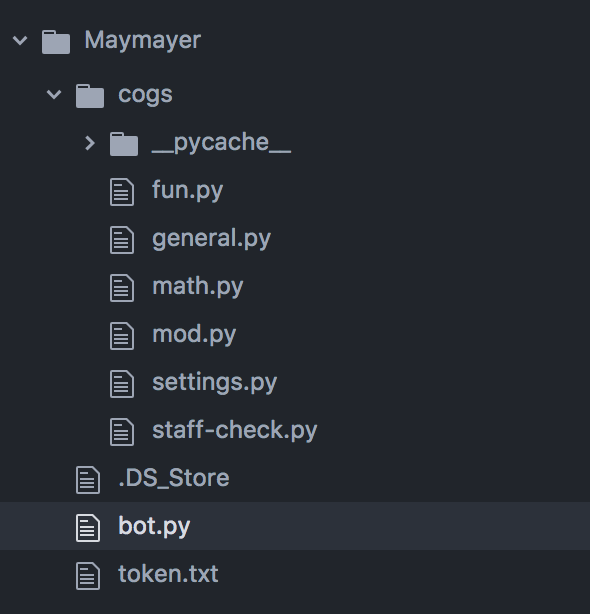
I get a syntax error with this code in bot.py:
```from cogs.settings import Settings```
Here is all of the code in cogs.settings:
 from discord.ext import commands

 class Settings:
     def __init__(self):
         self.dsettings = {
             "OWNERS": ['319503910895222784', '304775824182083585',
 '350285525195816970', '201745963394531328'],
             "MODS": ['242364991511068673', '350820580578033666']
}```and here are my files: https://i.stack.imgur.com/YcWUd.png
 slow swan
bad indentation
earnest phoenix
Hi
languid dragon
Henlo, do you need help with something?
languid dragon
Whatcha doin in #development ? ;]
languid dragon
Wondering why you're #general talking in #development ;]
umbral pelican
lol, dev rank role is from when you add a bot
prime cliff
^
earnest phoenix
i can't add a bot
https://discordapp.com/oauth2/authorize?client_id=371389069764067328&scope=bot&permissions=3533888 <-

Discord
Step up your game with a modern voice & text chat app. Crystal clear voice, multiple server and channel support, mobile apps, and more. Get your free server now!
someone do it for me then..
xD
languid dragon
That's not how you add a bot to Discordbots
earnest phoenix
then tell me how.
languid dragon
[1]. Go to https://discordbots.org/
[2]. Login with Discord
[3]. Click 'Add Bot'
[4]. Fill out form details
[5]. Wait patiently for acceptance

Spice up your Discord experience with our diverse range of Discord bots
 earnest phoenix
Mk
languid dragon
Your invite URL goes here, FYI
http://is-no.fun/88657.png

 north fog
please note: it can take a while (2-3 weeks to finite amout of time)
quasi marsh
(If you are nice it'll be shorter)
prime cliff
You are in the wrong channel or you are gonna ask a silly question i guess
earnest phoenix
I have an idea for a bot, maybe it allready exist, don´t know
weak parrot
Wow
earnest phoenix
yes want to ask 😄
prime cliff
Just develop a bot with your ideas it dosent really matter :/ what is it going to be?
prime cliff
Yea i already knew that with the no pfp
earnest phoenix
We offend need new names and slogans
prime cliff
You should probably learn about Discord first before making a bot unless you actually know how to learn yourself
earnest phoenix
I need a bot that can scrape or save names and then when the list is called on. People can vote
well thought maybe this bot already exist
okay maybe I should read rules and info first! I might have misunderstood the meaning with this slack channel
sorry
prime cliff
slack channel
 thorny hinge
prime cliff
This channel is for bot development so yes you are right
earnest phoenix
so like Discord better
 quiet bobcat
Anyone got any ideas on how to search on youtube with my bot?
prime cliff
Do you know any programming languages?
quiet bobcat
Like for music
earnest phoenix
Did you understand my question ? sorry English is not my first language
Ehm yes
Iknow a few
prime cliff
Few 👀
earnest phoenix
but never messed with bots on Discord
weak parrot
Lol
quiet bobcat
My first project is a bot xd
thorny hinge
ytdl-core and simple-youtube-api @quiet bobcat
quiet bobcat
Simple youtube api?
earnest phoenix
notice please I edited
thorny hinge
Its a module
quiet bobcat
How do I use it?
prime cliff
Google it
quiet bobcat
I got ytdl
thorny hinge
There are some in-depth music tutorials
quiet bobcat
Sorry if I'm bad. My first time coding xd
thorny hinge
I cant explain it tbh lol
quiet bobcat
Ok xd
prime cliff
If its your first time you should not be coding a music bot its for people with more experience
prime cliff
You should learn about the lib you are using first
weak parrot
I did the samething tbh
thorny hinge
Same
prime cliff
Which language jonasjac?
quiet bobcat
JS
earnest phoenix
not even a language lol
prime cliff
Ah that has pretty good docs so it should be simple to do basic things
earnest phoenix
Think you guys are dicks tbh
weak parrot
What
earnest phoenix
I will make that bot myself thanks anyway
quiet bobcat
I think I'm a dick too
weak parrot
Wtf
thorny hinge
weak parrot
How are we the dicks
quiet bobcat
prime cliff
 prime cliff
Where did this context come from about dicks
weak parrot
Idk
quiet bobcat
idk
prime cliff
neither was i
weak parrot
It was a joke
prime cliff
^
thorny hinge
Im pretty sure you have to generate ur own google key
earnest phoenix
ok no problem my bad
quiet bobcat
On google dev?
weak parrot
Yeah
thorny hinge
Yes
quiet bobcat
But how xd
quiet bobcat
v3 or?
earnest phoenix
well can you atleast guide me? some staryer toturial ? I will make the but after ... just need to know the basics
quiet bobcat
I can find you a tutorial
earnest phoenix
Tutorial that would fit for a programmer?
prime cliff
But i thought you already said you knew some programming languages?
quiet bobcat
then idk
earnest phoenix
thanks
thorny hinge
What language are you coding in Az
earnest phoenix
I have a computer Science degree .. never messed with Discord bots though!
thorny hinge
Nice language
prime cliff
 earnest phoenix
But I´m very eager to play around with it! since I have some ideas
thorny hinge
But what language
prime cliff
^
languid dragon
Well a great starter programming language is javascript.
It's easy to understand and great to start off with.
It is somewhat a web-based script but is now server-side thanks to
https://nodejs.org/en/
For a simple Discord bot wrapper to go with Node.JS
You could use the famous Discord.JS
Found here: https://discord.js.org/
Javascript tutorials and other helpful stuff can be found at the official javascript documentation
Here: https://developer.mozilla.org/en-US/docs/Web/JavaScript

Node.js

Mozilla Developer Network
JavaScript (JS) is a lightweight interpreted or JIT-compiled programming language with first-class functions. While it is most well-known as the scripting language for Web pages, many non-browser environments also use it, such as node.js, Apache CouchDB and Adobe Acrobat. JavaScript is a prototype-based, multi-paradigm, dynamic language, supporting object-oriented, imperative, and declarative (e.g. functional programming) styles. Read more about JavaScript.
earnest phoenix
Java , JS , C# , python ! php scripting
prime cliff
Wew
thorny hinge
And the discord.js lib :^)
languid dragon
a youtube video about Discord.JS
https://www.youtube.com/watch?v=024upsEuHaU

I'll be explaining how to get started with creating your own Discord bot with discord.js. Install node.js before you watch this, obviously. This is meant as ...
earnest phoenix
html and css and js php! Idon´t really count them as programming languages lol
thanks guys
appreciate the help
👍
Sorry if I was rude, I misunderstood
languid dragon
Javascript, here, is widely used in Discord Bot Development
thorny hinge
prime cliff
long version 👀
earnest phoenix
Great thanks
thorny hinge
Its more descriptive
earnest phoenix
cool ^^
thorny hinge
And might be better for you, since ur new to Discord
weak parrot
Javascript, here, is widely used in Discord Bot DevelopmentI wish it was used less
quiet bobcat
Yay I got an youtube API now
earnest phoenix
well it´s a very simple bot I need! but yet very useful in all areas gaming , crypto ya you name it
prime cliff
https://weeb.hacked-your.webcam/f57088f.png You need to be no,
 weak parrot
Lol
earnest phoenix
Oh I´m slow! did not get that 😃
quiet bobcat
@thorny hinge Is there a way to make a bot play a game without having to type a command?
prime cliff
With reactions?
earnest phoenix
cheating lol
quiet bobcat
@prime cliff ?
prime cliff
Certain bots use reactions to do stuff
quiet bobcat
I want it to say Playing .help | IN BETA
But now I have to write a command for it
Is there a way to not make me do that?
quiet bobcat
I have it
But I need to write a command to activate it
otherwise it doesnt say playing...
prime cliff
You can do it on startup
 frigid vault
discord.js docs are easy to understand after reading them for a few days
stone kiln
on.ready{
    <client>.user.setPresence()
}```That's one way to do it
quiet bobcat
Ok
quiet bobcat
I am using this
bot.user.setPresence({ status: 'online', game: { name: '.help | IN BETA' } });
frigid vault
👌
stone kiln
looks good
quiet bobcat
so I do that but on.ready before it?
stone kiln
in the on.ready
prime cliff
Yea once you have it set it lasts forever so you dont need to execute it again unless you want to change it with a command
stone kiln
^
stone kiln
1 sec let me check mine
quiet bobcat
I might have fixed it
frigid vault
I think you need client.on('ready' =>
stone kiln
bot.on('ready', () => {
    bot.user.setPresence({
      game: {
        name: `hey`,
        type: 0
      }
    })
});```would it be
frigid vault
Yeah that
stone kiln
np
frigid vault
Glad to hear 👍
quiet bobcat
👍
I might need help with one more thing
Im trying to add a search feature to my bot
But when I try to use it it somehow searches for talking tom
idk why
weak parrot
Welp that's an issue I have never heard of before xD
 quiet bobcat
now it searches for the spectre
frigid vault
@quiet bobcat Would you mind showing the part of your code with the search command?
quiet bobcat
sure
youtube.searchVideos('', 4)
.then(results => {
console.log(The video's title is ${results[0].title});
})
.catch(console.log);
i just found it
and wanted to see if it would work
quiet bobcat
Yeah I figured that out
frigid vault
At this point, it's searching at random
frigid vault
I'm assuming that's an npm package?
weak parrot
That sounds like a good idea
frigid vault
Is the ('', 4) the part where it searches?
quiet bobcat
idk
weak parrot
A bot which searches for random vids xD
quiet bobcat
alright
frigid vault
It's probably how many results it brings up
quiet bobcat
let me try
frigid vault
It'll include the prefix called atm, but it will show something of relevancy.
quiet bobcat
idk anymore
.search hello
The video's title is The Powerpuff girls - Bubbles funny scene
how is that related
quiet bobcat
quiet bobcat
?
So what command isnt included
this one? youtube.searchVideos(message.content, 4)
frigid vault
Hold on, I'll be right back
quiet bobcat
Ok
frigid vault
Replace message.content with it
quiet bobcat
ok
It works
.search omfg hello
The video's title is OMFG - Hello
.search asdf movie
The video's title is asdfmovie 1-10 (Complete Collection)
frigid vault
Noice
quiet bobcat
how do I get it to play that then?
frigid vault
In a voice channel?
quiet bobcat
Yeah
frigid vault
I have no clue, I've never made a music bot
quiet bobcat
ok
quiet bobcat
When I use the ping command I sometimes get this 173.66666666666666ms. I was wondering how do I remove the digits after the comma? The code for the ping command is
       case "ping":
            var embed = new Discord.RichEmbed()
                .setDescription(" :ping_pong: Pong!  (" + bot.ping + "ms)")
                .setColor(0xffff00)
            message.channel.sendEmbed(embed)
split it from the .?
prime cliff
You can just do .split('.');
Cant you?
quiet bobcat
How do I get it to a round number?
 uncut slate
toFixed won't give you a .0
prime cliff
^
quiet bobcat
Oh. I fixed it
tawny lava
👏
quiet bobcat
It was at 1 unstead of 0
prime cliff
xD
quiet bobcat
Thanks @uncut slate
uncut slate
np
earnest phoenix
Wowza!
earnest phoenix
I'm looking for someone willing to work with me as a partner to make an image host, a url shortening service, and some other stuff. DM me... Also, I'd be happy to co-create or partner with other bots /their devs. I'm also going to be building my own dedicated server soon, and would be happy to share server space
 rugged galleon
make a Google bot plz
 clear kernel
https://google.gus.host/ cause im nice
quasi marsh
@earnest phoenix friend of mine made an image host in PHP which I do like (and works but is still indev) https://github.com/MaxKorlaar/Pxl
 earnest phoenix
ok
slow swan
that avatar
earnest phoenix
Ikr
 patent reef
np
 abstract mango
is there any example json for a returned request for upvotes endpoint?
 vital lark
hmm, How do I declare a guild id for Discord.js event messageReactionAdd?
 karmic lake
your savior is here
i know
i know
stare in awe
now what do you guys need
kek
frigid vault

karmic lake
idk
frigid vault
🤔
frigid vault
Ok but what are you trying to do
vital lark
I can do ```js
msg.react('<unicode>');
ok
karmic lake
im confused
vital lark
If they react with ⭐, it goes to a channel that says Starboard shit.
karmic lake
then
frigid vault
ah
frigid vault
That's what you're doing
vital lark
If they react with ⭐, it sends a message in a channel id in that guild.
karmic lake
ok
then get the channel id
wait
what
do you want to know how to
do it in only trusted guilds?
or
what?
vital lark
if (guild.id != 'id') { return; }
``` something like that for `messageReactionAdd`.nah nvm.
frigid vault
I know what they want
@vital lark You want to block every guild except for a specific one, right?
vital lark
yea
frigid vault
Then you're doing good
frigid vault
Though I'd suggest !== And not just !=
why? Idk
@karmic lake actually
message.guild.id is if a message is sent
frigid vault
If guild is determined somewhere, it doesn't matter
 bitter sundial
discord.js?
quiet bobcat
yeah
earnest phoenix
i'm not sure, but try to eval client.user.setUsername(username in a string)
quiet bobcat
ok
jagged plume
bot has a guild member object of it's own
bitter sundial
first lets clear up
do you want to change username in Username#0000
or a nickname in a server
quiet bobcat
Nickname on a server
earnest phoenix
msg.guild.me.setNickname(nick in a string) then
bitter sundial
<Guild>.me is the GuildMember of your bot
earnest phoenix
⬆
bitter sundial
with <Guild> I am referring to the Guild object that you get somehow
quiet bobcat
ok
bitter sundial
if msg is your Message then msg.guild is the Guild I was talking about
quiet bobcat
Ok
I'll tinker on that in a bit
When I startup my bot I get this:
(node:9288) ExperimentalWarning: The http2 module is an experimental API.
 cinder pecan
 opaque bison
MariaDB vs Rethink vs Mongo. What's your thoughts?
 sand fulcrum
hi my dudes its mario here
 round solstice
Who uses Rails?
bitter sundial
trains
median lintel
😂
 drowsy lily
@opaque bison postgres does all of the things that those dbs u listed do
Sql, document storage(json) , and pub/sub
opaque bison
Interestnig.
opaque bison
Yes
 scenic crest
what's the char range for valid usernames? 2-32?
 kindred sierra
I think
languid dragon
nicknames?
kindred sierra
Its 1 to 32
 scenic crest
thank
languid dragon
welc x
kindred sierra
Its 1 to 32 for guild specific names.
scenic crest
^.{2,32}#[0-9]{4}$ this regex hopefully works then
languid dragon
i can check it for you xox
scenic crest
if you wanna
languid dragon
ok uh
earnest phoenix
lol
quiet bobcat
How do I make a command assing a role in discord,js?
tawny lava
command assing ?
quiet bobcat
?
command.assign ?
I mean like I write for example !mute and then it adds the role mute to a target
nvm got it to work
quiet bobcat
Can someone help me figure out why I cant use the unmute command? It says roles is undefined. but not on mute? Reason why I have e .g member2 is that it couldnt find member but when I added member it said it was already defined
 case "mute":
                    let member = message.mentions.members.first();
                    let muteRole = message.guild.roles.find("name", "Muted");
                    let adminRole = message.guild.roles.find("name", "Administrators");
                    if(message.member.roles.has(adminRole.id)) {
                        member.addRole(muteRole).catch(console.error);
                    }

                        break;

                    case "unmute":
                    let member2 = message.mentions.members.first();
                    let muteRole2 = message.guild.roles.find("name", "Muted");
                    let adminRole2 = message.guild.roles.find("name", "Administrators");
                        if(message.member2.roles.has(adminRole2.id)) {
                            member2.addRole(muteRole2).catch(console.error);
                        }
how do you display someones avatar in embeds i tried using the function message.author.displayAvatarURL but it would still show just the link
prime cliff
There are 3 places you can do it small image next to title is the author, thumbnail on the right and large image takes the full embed
languid dragon
{
  "embed": {
    "image": {
      "url": message.author.displayAvatarURL
    }
  }
}
https://leovoel.github.io/embed-visualizer/
Is helpful as fuck with embeds.
umbral pelican
footer as well 
quiet bobcat
Can someone help me?
prime cliff
Oh yea but who even uses footer image
quiet bobcat
                    case "mute":
                    let member = message.mentions.members.first();
                    let muteRole = message.guild.roles.find("name", "Muted");
                    let adminRole = message.guild.roles.find("name", "Administrators");
                    if(message.member.roles.has(adminRole.id)) {
                        member.addRole(muteRole).catch(console.error);
                    }

                        break;
I try to do the same to remove a role but it just gives me errors and errors and errors.
I get errors such as ReferenceError: adminRole is not defined. And if I solve those I get this error TypeError: Cannot read property 'roles' of undefined
quiet bobcat
In what settings?
earnest phoenix
yeah pretty much its prob role
quiet bobcat
TypeError: Cannot read property 'role' of undefined
frigid vault
i totally don't use footer image
quiet bobcat
Its defined on the mute command
as TypeError: Cannot read property 'role' of undefined
oops
as (property) GuildMember.roles: Collection<string, Role>
prime cliff
DM me your guild invite @quiet bobcat
quiet bobcat
Sent it @prime cliff
earnest phoenix
why is this a thing? https://i.imgur.com/z9WU9og.png
 prime cliff
@quiet bobcat brb a min
earnest phoenix
pls someone
tawny lava
show full code
earnest phoenix
const Discord = require('discord.js');
exports.run = (client, message, args) => {
    let helpEmbed = new Discord.RichEmbed()
        .setTitle('Commands')
        .setDescription('MooseBot\'s commands\n`cs`: coming soon')
        .addField('m>help', 'shows this message', true)
        .addField('m>info', 'shows info about the bot (cs)', true)
        .addField('m>ping', 'pong! shows api and guild latency', true)
        .addField('m>google', 'returns result for given search query', true)
        .addField('m>avatar', 'mention a user to get a link to their avatar or don\'t mention anyone to see your own', true)
        .addBlankField()
        .setAuthor('@elfin storm', 'https://cdn.discordapp.com/avatars/199621462586425346/0777fd13a3540236146fb9c332195d9a.webp', 'http://itsmoose.space')
        .setTimestamp()
        .setColor("#FF0000");
    message.channel.send(helpEmbed);
}```why is your embed like that
 rose tangle
 languid dragon
easier 2 do JSON objects ❤
earnest phoenix
its not tho
languid dragon
tawny lava
both work so who cares keke
languid dragon
tru js
earnest phoenix
but why do I get that error?
tawny lava
also message.channel.send({ embed: helpEmbed })
earnest phoenix
yeah, but that doens't fix the issue
uncut slate
@earnest phoenix it was renamed to MessageEmbed
earnest phoenix
damnit
uncut slate
please don't use v12/master if you don't know how to look at docs lol
 uncut slate
yeah either just look at docs before asking or go back to stable
tawny lava
prime cliff
Lol RichEmbed is a better term than MessageEmbed why would they change it xD
Yay lets change the embed object and break everyones commands for the lulz
prime cliff
Ik that :/
prime cliff
🤦 Guild.Roles
shrewd field
doesnt work
languid dragon
languid dragon
shrewd field
ok
earnest phoenix
@supple shale how did you do the "Welcome username to my bot page"?
umbral pelican
 you could just look at the source
earnest phoenix
i can't find the part that does it
earnest phoenix
It's easier to use JSON
@earnest phoenix also, it's Discord.EmbedBuilder I think
prime cliff
🤢 MessageEmbed
prime cliff
https://weeb.hacked-your.webcam/5fd5770.png jonasjac is a pro bot dev 
 median lintel
👏
weak parrot
Lol
earnest phoenix
#development is a better place to talk about development than the spam heavy #commands
home
 crystal void
where were you?
crystal void
o.o
earnest phoenix
flying back in a about an hour
crystal void
where do you live?
crystal void
O_O
earnest phoenix
not bad
sfo to east coast is over 5
this is prob less that 3
maybe 2.5
im going to add a userinfo command I think
earnest phoenix
awesome
earnest phoenix
yeah
quiet bobcat
is there a way to make an unmute command?
I got the mute command down
But I cant get the unmute command to work

 pale light
👍


 thorny hinge
Why are you adding the role
quiet bobcat
At this point I have just given up
thorny hinge
On unmute
quiet bobcat
It was wrong in the cote
member.removeRole(muteRole).catch(console.error);
happy now?
I fixed it
thorny hinge
and that didnt work?
quiet bobcat
nope
pale light
quiet bobcat
😢
thorny hinge
member.removeRole(muteRole.id);```
And you should just check for perms, not an admin role
quiet bobcat
SyntaxError: Identifier 'muteRole' has already been declared
thorny hinge
if(msg.member.permissions.has('MANAGE_ROLES')) instead of checking for an admin role
Or whatever permission u want
quiet bobcat
wait
let me try
Now I got this ReferenceError: member is not defined
Error after error
im giving up
pale light
message.member
frigid vault
Don't
pale light
are you using msg or message
quiet bobcat
message
quiet bobcat
I did that
frigid vault
Coding is hard but it's worth it in the end
Never give up 👀
quiet bobcat
its wrong here member.removeRole(muteRole.id);
pale light
still an error?
yeah
you need to do
let member = message.member;
otherwise member is going to be undefined
quiet bobcat
I have member set as this let member = message.mentions.members.first();
quiet bobcat
Wait
No
It didnt work at all
I can mute people
but cant unmute
So I defined member in unmute aswell but I got this TypeError: Cannot read property 'permissions' of undefined
pale light
lmao
quiet bobcat
So somehow permission is now undefined
👍
But permission works with the mute command
makes sense
quiet bobcat
I'm going to sleep. I'll try to tinker some more tomorrow!
prime cliff
Read the discord.js docs its pretty easy to understand
prime cliff
You need to do a foreach guild to count all the users and guilds
 inner jewel
also that'd count members
 honest bane
if any one will love to help me out then can you message me i am trying to make a bot and i need help
thx
honest bane
oki @inner jewel
if someone can help me then message me i want to make a bot that can play music and do some weird fun stuff (send cat pics memes and more) if any one can please message me thx
restive silo
nobody will message you tbh
honest bane
true but maybe some one will be nice @restive silo
restive silo
no the thing is not if "someone is nice" but your question sounds like "could someone make me a bot for free" to mostly everyone in here and nobody works for free
thats how it is
restive silo
then you maybe want to learn a Programming language first
honest bane
yesa
restive silo
👋
 trim steppe
Hello I consider myself a person
trim steppe
Do you hate me? 😢
earnest phoenix
No
earnest phoenix
The first time I met you, you were so rude to me lol
Anywho
How would I make a ban command?
trim steppe
I was going to bed
earnest phoenix
Oh
trim steppe
Then
trim steppe
And I basically couldn't find docs
earnest phoenix
Rip
trim steppe
The gist of a ban command is to get the ID of the user, then with the guild of the message, grab the member and banne them
earnest phoenix
Yes
trim steppe
You can use message.mentions
trim steppe
i cheat using regex to match a number
earnest phoenix
Lmao
trim steppe
works for both mentions and an id
earnest phoenix
No, since im on d.js
I just use an arry system
Its basically the same thing
Anyways
How would I set up a ban function?
Like
(mention code here).id.ban('Test')
Or is it more complex then that
earnest phoenix
Yes
Well
I can do this
message.mentions.members.first().id
So ye message.mentions
By bad
*My
earnest phoenix
Wait wut
earnest phoenix
Yes
trim steppe
Just do ban on that
trim steppe
Well you need to ban a member
earnest phoenix
Yes
Ik lol
Oh
Forgot the member part
message.mentions.members.ban("Being a bad person")
I can try it
trim steppe
Well that's a collection
earnest phoenix
You literally told me to do ban on my code
trim steppe
message.mentions.members.forEach(member => member.ban());
Well you needed to do ban
As well as this
earnest phoenix
Oh
Interesting
Alright ill try it!
Wait
Nonono
Wouldnt that ban the whole server?
ForEach
trim steppe
message.mentions.members returns a collection of each mentioned user