#bug-discussion
1 messages · Page 124 of 1
 mossy breach
 austere coral
discord shouldn't cause an issue since it integrates with DRG, but it never hurts to eliminate it as a possible issue.
mossy breach
Do i need to restart the computer?
austere coral
you can if you want, but don't start that logitech program
austere coral
I don't know if it's creating a possible network conflict or not, so for the sake of troubleshooting lets disable it.
Especially since everyone and their brother wants their software checking into their servers.
austere coral
are you, by any chance, in a country that has steam blocked?
mossy breach
Im on france
austere coral
you shouldn't have an issue there
austere coral
I'm not sure what your issue may be. You may have to wait for Bjorn (don't ping him) to get on tomorrow (if he's working tomorrow) and go through the many messages above you. He may have some other things to try.
mossy breach
I cant open the overlay while in the screen connection, dors it have something to do with the problem?
Ok
Ty @austere coral
austere coral
the steam overlay shouldn't affect anything
but are you able to message friends in your friends list normally?
austere coral
Yeah I'm not sure what the issue is.
 quiet ferry
Hi, I can’t see any games to join on the map since this am PT. I’m playing via GeForce Now in case it’s an issue specific to that platform.
Please ignore the above. Works now
 sullen vessel
Hi, I can't be joined or join anyone at all. Has there been server issues or is there a known fix? I have restarted the game, pc, reinstalled the game and tried with apps that I would usually leave on off.
On Windows Store for context
 subtle snow
Ive been having frequent screen flashes when activating the Tritilyte machine event
Its like a majority of the screen
Real bad
 dusk sonnet
Had an issue last night where Omen Modular Exterminator machine gun audio continuously played (machine gun fire) after failing it.
 abstract parrot
So my friend just got his fire boi class to level 25 (player rank 9) and finished his assignment and left the lobby to promote him... and came back with silver-1 player rank 35
austere coral
He didn't get it legitimately I can tell you that. There's not really anything that can be done about it. No reporting system.
Although if you suddenly find yourself in a similar situation you can always revert your save
 vivid herald
https://cdn.discordapp.com/attachments/637349103872901130/714244969199566918/unknown.png
https://cdn.discordapp.com/attachments/637349103872901130/714245188301881384/unknown.png

 austere coral
check your windows settings and make sure that your date, timezone, time, and daylight savings is set to automatic.
vivid herald
My time was set to automatic already. I just did the same for my time zone.
Both terminals are working after relaunching the game.
Thanks
austere coral
Yeah missions and weekly assignments are reliant on your system clock. If something gets out of whack with that then it can mess up stuff ingame.
 carmine moat
despawning eggs
 crystal hare
 rotund fable
I join a mission, and someone is down, but I try to pick them up and they're just standing up, unable to be picked up by me.
carmine moat
that revive bug been here for a few updates now
 native rock
@abstract parrot If your friend played a lot before Update 18/19 in October/November 2018, they would have amassed a bunch of extra XP from before promotions were a thing. After the max character rank change from 20 to 25, if they had stopped playing, they would have needed to play from 20 to 25, but then be able to promote. At which point, all that amassed XP could have boosted them to Silver1 legitimately.
Lots of people who had played since Early Access launch jumped multiple promotion levels as soon as promotions were added on account of this system, which was nice at the time, but can lead to confusing situations like this one when it happens a year+ later.
(There still could be something fishy going on if that's not the case that they played before that time period, or if they only have a handful of hours in the game, but I'm leaning towards them legitimately earning those levels, as weird as it may seem)
rotund fable
I will keep on about it until it's fixed, just cost me a mission 
 unreal jay
 fleet canopy
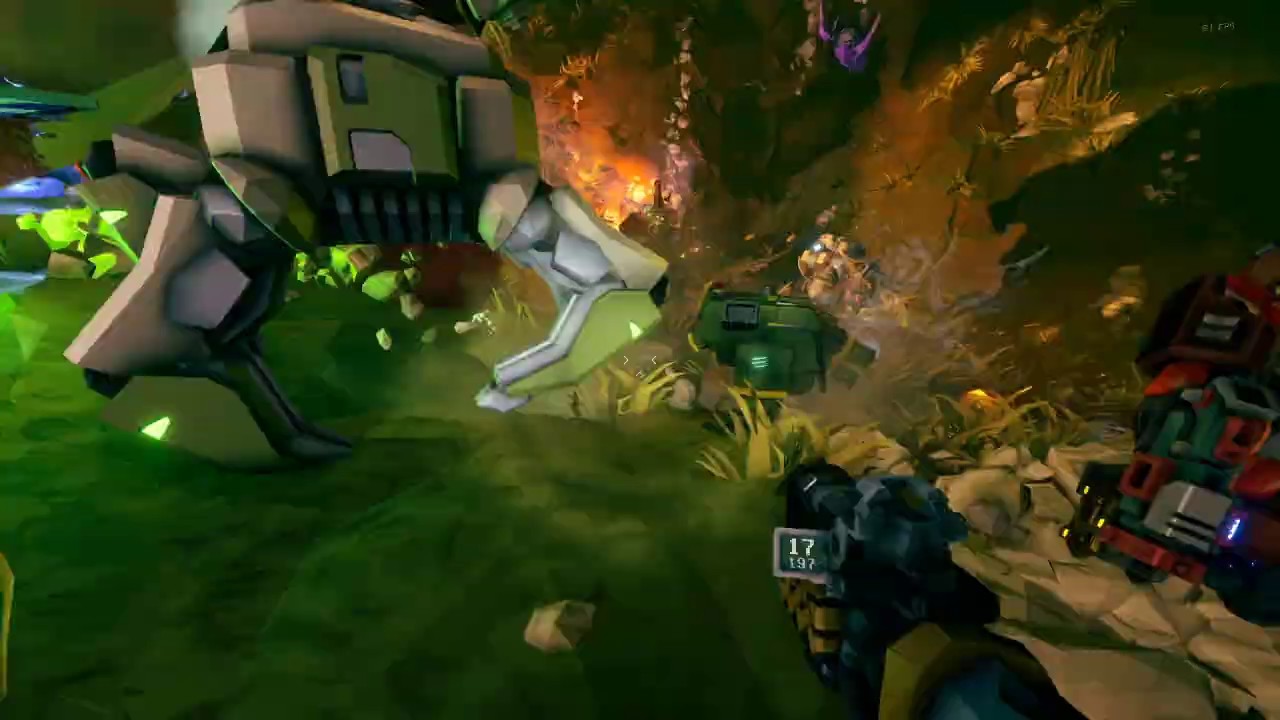
So, I had a bug occur mid-mission. I am... Uncertain of how to report it.
No, I read the thing, but like... EVERYTHING went wrong.
I had disappearing turret ammo (from my bag. I placed the turret, and all of my ammo, save ten in the turret, dissappeared.), but infinite grenades. I developed damage immunity half-way through the mission. One person in my party had infinite flares, but I did not.
I am very confused on what happened and why.
Infinite grenades.
 glad cove
icon of the management closes progress bar https://media.discordapp.net/attachments/604229373695885313/714100496759259176/Screenshot_18.png
 abstract parrot
@native rock Thank you for clarification! He did played a lot before 😄
glad cove
Deep dive, mission to kill dreadnought, all the teammates have only one health bar of the dreadnought, BUT the driller have TWO health bars. When dreadnought was killed driller had one health bar, but there wasn't any other dreadnought on the map. https://media.discordapp.net/attachments/604229373695885313/714100791815962714/Screenshot_17.png
https://media.discordapp.net/attachments/604229373695885313/714100900645306439/unknown.png
https://media.discordapp.net/attachments/604229373695885313/714100902864224296/unknown1.png


 cosmic atlas
after buying the deluxe pack and equipping the Dark Future armor, the game defaulted me to the Supporter paintjob, but I'm not a supporter nor is the paintjob actually in my collection
my friend looked at me and told me I was golden too
i selected one of the paints I do have and it doesnt seem to happen again
ok it happened again when i switched to a different class...
 radiant fox
Hello, love the game, but this issue is driving me crazy. I am having an Issue where my gunner's armor will not change. Everything looks correct when selecting, but as soon as i go click away (to A, B or C or close) it changes back. The proper icon/armor is selected but once im back i look like I'm wearing the MK2 armor. I have also paid for DLC and it will not let me use the gunners armor or the ones I have unlocked. This is only an issue for my gunner and it is only an issue for the armor. I can change everything else, but i cannot change out of MK2 armor no matter what I do :(
please help or advise 🙂 thank you! :)
-OGsandman
anywhere else I could post this that would be helpful? hopefully get the right person to see this? thank you
native rock
Someone else had a similar/the same issue and apparently changing the armor paintjob (the skin color) allowed them to use the correct armor framework. You could give that a shot as a workaround until the devs implement a more permanent fix.
radiant fox
pretty sure i have tried that, but ill give it a try right now, thanks
austere coral
@fleet canopy That's a telltale sign of someone modifying the lobby. You options are to stay or leave next time you run into someone like that. Typically it'll be the host. Unfortunately there's no reporting system for cheaters.
radiant fox
do you mean for whats causing my issue?
what Ghost told me actually worked, once i change the player skin tone it actually chnaged
thank you sooo much !!!! 🙂
fleet canopy
The other two person I was playing with were people who downloaded the game yesterday. One of them was hosting.
While I think you would usually be right, I am certain that that isn't the case, this time.
@austere coral
radiant fox
**oops sorry, i see who that message was for now 🙂
 fading dagger
He said usually the host. Not always. But it's definitely a thing.@fleet canopy
fleet canopy
Oh, absolutely. I'm doing my best to use neutral language. I'm not trying to be condescending or derogatory at all. I just know these two persons and know that they wouldn't do that. This was a genuine bug.
 karmic echo
So, I made a comment on the reddit AMA asking about cave leeches not dropping you properly being fixed and I had a dev blow it off (just have someone catch you!), now I have video proof of leeches not reliably dropping you.
This is so unbelievably frustrating being basically told by a dev "Welp, just play multiplayer lol"
Music volume warning
 ancient cloak
Achievements not popping on Xbox for me when they are popping for everyone else. I’ve tried uninstalling and reinstalling and also delete my account from Xbox and reload but still no achievements. Any suggestions?
 mint mural
just had an issue on a repair 2 mules mission where molly went to the drop pod and got stuck on the side. Just kept going back and forth on one of the toothed track features.
 crystal rampart
I don't know where to post this: but thank you to the developers for fixing grenade/shotgun jumping. I'm having a blast playing as engie/scout again.
 amber portal
Have rubberbanding/texture popping issues on xbox already been addressed?
 rancid yoke
Mmm. Kind of a small bug I recon but. Ive just recently gotten back into playing DRG. And on my gunners revolver I had a neon skin on it. I went to check the skins I had for it and all of a sudden my neon skin just disappeared from my inventory?
austere coral
pinned messages
rancid yoke
Yeah but. I actually did get mine from a crate.
I dont have proof to show that I did but I vividly remember getting it. But alas it doesnt matter that much. Just a skin
Ty for showin me why it disappeared though
 potent nymph
@chrome orbit are you using AMD FX?
@white girder please keep me posted, iam also trying to figure it out
@fading dagger did you guys get the achievements eventually?
@vast sparrow i lot of people miss it in the warddrobe, but it should be there
@lean rose We are trying to fix it, but it requires us switching to another plugin which takes a lot of work. my best advice is to restart your game and try again. Unfortunately, we cannot get any debug info so we dont know what is going wrong, so we cant short term fix it.
 vast sparrow
@potent nymph miss what? Dlc? Neither of us own it in the market place but she has access to it..
potent nymph
can you screenshot? maybe i misunderstood your issue
vast sparrow
I can try to in the morning, it'll be pictures taken from my phone and sent but I'll log into her account and take a picture of the market, her installation, and then her in-game cosmetics
potent nymph
that would be cool 🙂
vast sparrow
But basically I purchased the base game, and when it was installed we both got on and she has access to the Dark Future dlc and I do not. We use the Xbox game share feature cuz we both have our own xbox, so anything either of us purchase we both have access to
This includes dlc
But as I said I will send pictures when my gf wakes up so I do not disturb her slumber, would you prefer them to be sent here or in DM's?
 cold hemlock
@karmic echo I am pretty sure he was just goofing
Devs made similar joke and backfired
potent nymph
Dm is fine
karmic echo
@cold hemlock
potent nymph
@karmic echo okay so me and the game directer just looked at the video. are you sure you died to the fall, because there is a grunt attacking you as soon as you go down. So while it might be an issue, your on very low life, so either you might be getting a tiny amount of fall dmg, or the grunt is killing you as soon as you land
cold hemlock
Usually they lower you but not if you use that perk
karmic echo
Yeah uh, im sorry but glyphid grunts don't swing that fast
Notice my fall speed, there's no way I got swung at in the time I fell and the time I died
 dire imp
@potent nymph if it helps i can corroborate that if a leech dies after fully extending and i drop any distance beyond 5 meters i seem to always go down as well
 steady wing
 dire imp
i always assumed it was treating the entire leech drop animation as fall damage instead of calculating fall damage from where the leech died
steady wing
pretty sure there was rock in the pod and the mule got lost trying to get back to the pod 🙂
fading dagger
@potent nymph no, we didn't get it. I'm not sure if it has anything to do with it or not. But I got the expert miner achievement (complete 100missions) just as we finished that mission, so maybe that's like .. it knocked off my other achievement? Just a thought, maybe it has nothing to do with it
steady wing
we fixed it by chucking explosives at it
karmic echo
I'm gonna go into a single player hazard 5 and lower my health down to that amount and see if a grunt can one shot me
potent nymph
We will keep looking at it xalgirax, maybe there is an issue.
Bat, if it an actual issue we will ofc work on it 🙂 ifi get time i will also try it out
karmic echo
Which, even if it could that isn't what happened. I know this game well enough at this point that with my fall speed there, it's impossible it was me being hit by something in melee range.
fading dagger
Cheers!
 icy mesa
id say if you can test cave leechs on dense biozone since that usually spawns tall huge caves, maybe see if they have a set distance or something they drop you
 glass perch
I found a missing texture but I'm not sure how to report it, I've read through #420195388675588096 but I'm still unsure
 foggy grove
I had a bug in salvage where the uplink and fuel line were burying themselves 50m underground when we were repairing them. Is this a known issue?
potent nymph
screenshot toddler
glass perch
If anyone is willing to perhaps walk me through how to submit a report feel free to ping me, otherwise the missing textures can be found under the bar, in the tunnel
potent nymph
we know its not completely done, so no report necessary in this case 🙂
glass perch
Alright 👍
 lunar mortar
Bit of a long standing visual bug, the plasma chargers dual ring particle effects desync from the gun when you are not the host.
 edgy swan
I turned my HUD off to admire the cave as a drop pod was coming in, when I turned it back on, the HUD indicator for the drop pod was not visible, though everything else came back. Luckily, I could find it on the map.
 graceful hatch
How do I find the latest bug reports in relation to players playing cross platform between Windows 10 and Xbox One X?
And did anyone see this one before? Would have been great if there were 6 players 🙂
 graceful yarrow
Yes it's been reported before
graceful hatch
I have been having a lot of issues with drop outs spiraling into not being able to reconnect at all, between PC and Xbox One games with just the two of us.
And we have ruled out network issues.
graceful yarrow
As for xbox/windows bugs there is no separate channel or even a public list that I know of. Your best bet would be to search this channel with windows or Xbox in the search terms
graceful hatch
We have a good 10 msec of latency
Basically the IN data stream drops to zero and the client to the server drops
We have tryed getting the Xbox to host instead of PC and the same thing happens
The first drop happens after about 30-60 mins, then after than the drops are more frequent
Until eventually you cannot actually reconnect.
potent nymph
We are trying to fix it, but it requires us switching to another plugin which takes a lot of work. my best advice is to restart your game and try again. Unfortunately, we cannot get any debug info so we dont know what is going wrong, so we cant short term fix it.
graceful hatch
Restarting the client makes no difference.
Restarting the Server means you lose your dig.
potent nymph
it does help sometimes, if your session has broken. but ofc it it hasnt, it doesnt help
graceful hatch
The game actually freezes up anyway the most of the time so you have to restart.
As a sidenote about Windows Xbox Live client, I cannto send invites to the PC client from Xbox.
I have to host a public game and ask them to join. In order for the Xbox to server to the PC.
Another of the problems we have noticed is the server list this week takes a long time to load and is jerky, (more so on the xbox) and occasionally freezes the game and requires a restart. - Heavy traffic 🙂 nice problem to have.
potent nymph
we ya, we are very much aware of the issues, and working on getting another system set up to fix it, but its quite a bit of work
this also includes the issues with the server list (of which there are many unfortunately)
graceful hatch
Appreciate the transparency, I do love the game.
We have turned down the difficulty so that you can get through the levels quicker, which helps with the disappointment.
Any ETAs on the next Patch? 🙂
potent nymph
i cant remember it atm, it might be in the roadmap. thanks for understanding. its tricky but we have several people working on it every day
graceful hatch
I get it, Hopefully you are feeding them good.
potent nymph
just enough to work ^^
potent nymph
you too mate
 long bridge
I just inadvertently reproduced bug DRG-1103 (impact axe inventory displays 9, can throw infinite axes) which is currently listed as closed--could not reproduce.
I was having some client lag issues that session (along with incorrect mining particles displayed e.g. Dystrum particles when breaking ice, which seems to go along with lag issues in my experience) so I suspect it may be an issue arising from some kind of desync.
A few notes, in the spirit of playtesting:
- Haz 3 egg hunt in the Glacial Strata, no mutators
- I was playing as Driller as a late-joiner, used a few axes on Glyphids, did not resupply. at one point I checked my ammo to see how many axes I had left and saw I had 9
- throwing an axe did not change the grenade count remaining (9)
- picking up a thrown axe reduced the grenade count to 8
- after reducing grenade count to 8, throwing another axe increased it back to 9
- after spamming my axes for a little while (about 30s on the way to the Drop Pod), my grenade count did eventually go to 0 and I was thankfully unable to throw any more axes. unfortunately, I didn't see whether the counter started decreasing with axes thrown or if it just went directly to 0.
- I will admit, the awesome power did go to my head for a little while.
 potent ravine
i swear to god the difficulty of the game will just sometimes blip up out of no where... difficulty 3 mission solo and i get 3 detonators, 16 praetorians and constant waves of enemies in a cylindrical room, what is that about?
potent nymph
it can get pretty real, real quick
 white girder
@potent nymph - I'm afraid with regards to my loading issue, I've run out of things to try. I even flashed the BIOS and did a second clean install of Windows, but I still struggle to load into the game. I've tried Microsoft's tech support (who ran through the basics but not more), Steam's tech support (who basically told me to fuck off and bother someone else), and Tom's Hardware forums. I'm completely stumped at this point, and may have to concede that I literally just can't play the game any more 😦
potent nymph
have you tried with a clean save?
white girder
I have not - is there a non-destructive way of doing that? Either way, I'm not sure how I feel about wiping hundreds of hours of progress either :/
potent nymph
send me your save, i can try something out
white girder
sure, where is it located on disk?
potent nymph
C:\Program Files (x86)\Steam\steamapps\common\Deep Rock Galactic\FSD\Saved\SaveGames
might not be on C depending on where you install stuff
 tender bone
@graceful hatch (ETA Patch) Devs said on stream and chat, and roadmap early to mid June. Approx 2-3 Weeks now
I'm not sure this is a bug, I think not but a friend asked me to report it anyways. The new salt pits crystals kinda look like they would belong to a roof, or are upside down? I think the middle thing is supposed to be a shaft? Sorry if this is not a bug in cavegen and supposed to look like that. Hoxxes is a weird place man 😄
Looks like Hoxxes Xmas Tree
Hoxxmas Tree
This one def. is a bug since 1.0
The cavegen now definetly puts more cystal bases off, so they're floating. Seen it multiple times.
Here, have an example. Glowing bunny ears
 red glen
So today I bought the dlc cosmetic packs, I got to change the color on my Bulldog and I completely lost my Neonband skin. Just poofed into the ether. Tried resetting, switching characters, etc. Never got it back.
tender bone
@red glen read the 2nd Sticky 🙂
red glen
@tender bone in which chat?
tender bone

 hearty zenith
ancient cloak
hearty zenith
ancient cloak
@potent nymph Achievements not popping on Xbox for me when they are popping for my friends. I’ve tried uninstalling and reinstalling and also delete my account from Xbox and reload but still no achievements. Any suggestions?
 warped tangle
5 dwarf team bug. 2 people were joining at the same time. I think it caused one of the guys to get stuck in the map console of the space rig after but the mission and rewards worked as expected. https://www.youtube.com/watch?v=8R3utkp2Oew&feature=youtu.be
 tender bone
Bug:
The KPI Terminal currently counts crafted items as the class YOU CURRENTLY PLAY, not the class it is FOR.
So crafting a Beard for the Scout while playing the driller on the space rig, pushes the bar for the driller...
(Additionally, please include all those stats you track anyway? Lost packs, helmets etc. From a player point of view, not knowing the background, ofc. it seems easy 😄 )
 steel hamlet
Hi, I've been playing the game smoothly for 80+ hours, solo and multiplayer. Until yesterday, now when I host or join a multiplayer game, the game starts having massives lags and it take almost 8 minutes to load the first mission, then even more time to load the spacerig, if it load at all. After killing the process the loading stil freeze or take ages, even in solo. I have to restart the computer to resolve the issue. I'm sure this has to do with my computer since there were no updates and it worked fine. My SSD is not full (100gb left), my internet is weak but is enough for online games. I suspect some fuckery from the Nvidia and the Nvidia configuration panel but I don't know where to look. Anybody has any idea where I should look for ? (Only things running in background are discord and logitech G hub).
austere coral
What are your specs and which version of the game do you own?
Next time you launch the game, monitor task manager and see how much of your cpu, ram, and gpu is utilized.
Massive stuttering can occur when your cpu is saturated
steel hamlet
I sorry forgot those informations. I'm on a Geforce GTX 750 Ti, i5, 12Gb ram. Playing on steam. CPU, RAM and GPU are not saturated event when the game stop responding.
I'm going to try monitoring the GC with msi afterburner and try changing settings (overlays, CG configuration, reverting on an old drivers...) I'll come check here if someone got ideas or share the same issue. If I find anything i'll report here.
austere coral
If you've got an FX series AMD cpu, go into your audio settings ingame and place a check mark next to disable master EQ
A clean install of your drivers couldn't hurt either.
steel hamlet
Oh, I unchecked the "disable master EQ" recently to see if it changed something and totally forgot about it. I hope it's this.
austere coral
In the Nvidia control panel > manage 3d settings > global settings
there's an option called Low Latency Mode
AMD has a similar option for their cards and it causes massive performance degradation. I don't know if the same occurs with Nvidia, but verify it's turned off.
steel hamlet
Low latency is turned off already. I'm going to try the other solutions. brb.
austere coral
Another option you can try is repairing directX and/or windows .net framework. Those are more related to crashing though so they may likely not resolve your issue.
 topaz lake
Interacted with the equipment terminal as Gunner and it correctly brought up the Gunner page but with the engineer perks. Exiting and reentering fixed the issue. Haven't been able to reproduce.
 quasi lintel
odd static audio after being killed by falling through the world (thanks trawler)
once revived
 clear juniper
hey guys, we just aborted a mining expedition because we were missing the last cave, we didnt had enough morkite to evac
bug or what?
 misty citrus
some of the larger cave generations (sand arches on sandblasted, large crystals in salt pits/crystaline...) block the way ahead. doesnt happen often but if you find yourself in that situation again try to search the perimeter by walking around and using your terrain scanner, especially around stuff that isnt just rock
clear juniper
we did that
i drilled everything and even used my satchels to blow the walls
nothing
nothing showed up on the scanner
 solemn leaf
How short on morkite? may have just missed some veins
austere coral
you sure you weren't missing a dirt tunnel?
The last room usually has more than enough
clear juniper
there was no dirt tunnel
im saying, we searched for like 30 mins, we didnt find anything
might be a terrain generation bug?
 timber nimbus
not sure if this qualifies as a bug or a suggestion-- currently if you're holding shift to run, press the mouse to fire, then release shift, you have to release and repress the mouse to start firing. i'd like it if it'd begin whatever action you have queued up when you release shift
generally true of any action that can't be performed while running
 shrewd stratus
I have been unable to use the server list for two days without 10+ crashes each day, as well as random textures filling my screen while on a dig (nitra texture being the only thing i can see being the most recent) in addition to the sever list crashes my game crashes during join in progress and promotions. This happens so frequently I regularly refer to youtube to figure out what to do next, for instance the promotion screen crashed before it allowed me to "claim" the promotion rewards so i had no idea what I unlocked, and an hour of searching videos outdated by many months I finally figured out what I missed. Love the game, WHEN i actually get to play it
 weak sierra
Molly pathfinding got stuck on the side of the drop pod for a good minute before she went into it https://steamuserimages-a.akamaihd.net/ugc/1016070989632330005/94AE7A4A6D5C1969D42A8A40EF4C689CB67E46A8/

 silver loom
More turret arc bugs!
If you build a sentry, then recall it, then shoot it while flying back to you-it has a chance of procing the turret arc aoe. This aoe can not chain to other buildings nor each other in the air. This will however leave a floating shock thing in the air that can do damage.
You can proc the weaker aoe by building a turret, then moving it without recalling it. You can also get the arc if you build up just one of the turrets. Doesn't seem intended.
 meager estuary
okay so
bosco's pathing completely broke out when it was time to revive me

he took 4 swarms to actually arrive and help me out
 urban hatch
molly is borken keeps moving in the same spot up and down. 2nd time today but previously on the ground I could destroy the ground to re-route him. now he is stuck on dropship and cant do anything
note: after about 5minutes he fixed himself
see how long lol
 chrome orbit
@chrome orbit are you using AMD FX?
@potent nymph
No, i have a R5 2600x. It appears the issue is only when i have my HyperX USB 7.1 surround sound control mixer/game and chat balance dongle connected. If i go straight into a 3.5mm jack into my pc without the dongle the issue is no longer there and works fine but that cable from headset to just pc is VERY short and i need my extended cable that has the mixer to be able to sit where i sit to play. I have a HyperX Cloud Alpha S headset, if that helps. Thanks
 flint flower
 vapid halo
I'm on Xbox, and I seem to have an issue with the Equipment Upgrade milestone not rewarding perk points. I've had it tell me that I've completed this milestone or that milestone for my Equipment Upgrades, but it has yet to reward me any points. Currently, I'm at 43/50 and it shows 2 stars as a potential reward
 opal kelp
the game hangs for me even when I quit to desktop, and still shows as running on steam, does that happen to anyone else?
also slows down network activity to a crawl
subtle snow
Does bosco have a button
 twin fjord
no
subtle snow
Weird
 dreamy quail
That bug has been around for a while
Sucks that you only notice it a good while into the game in my experience 
 tired spindle
Had this bug about a week ago, but it's getting worse and worse, i just can't join lobbies from my country, and close one :/
 radiant sentinel
i don't know if this is a bug or a feature but
everytime i get caught by a leech, i get dropped by it eventually (without killing it), and then i potentially fall to my death, wanted to know if this was on purpose or not
i have Thorns on as well, so i thought that might be the reason
 velvet kestrel
my friend was kicking barrels through the hoop and i saw this typo
 hardy reef
Has anyone had problems where their sounds stop working when they hit the push to talk button? It's only when the push to talk button is hit and it seems to mute everything. I'm not sure what's going on lol
hitting the push to talk button causes the game to freeze for like half a second
Huh. When I switch microphones it kills the background music of the game. Wild stuff
scratch that, when i change either the output or microphone. the audio of the game stops (ambient and sound effects continue). This is really noticable when testing withe jukebox
white girder
it'll be a windows setting
it's muting / lowering other sounds when you're using your mic
 urban oyster
pommel floats
hardy reef
@white girder what needs to get adjusted? it's weird that it would effect things so dramatically 🙂
white girder
you'll have to google for because Windows likes to bury / constantly rename / move things
but there is a setting to reduce volume on applications when you're actively using a microphone
 solemn forum
my mouse has a problem where my clicks wont register all the time, but its only with DRG, does anyone know why? my mouse is just a logitech mouse
white girder
make the game full screen instead of windowed full screen
solemn forum
alright, it works, thank you
 cedar oyster
So turns out you can tame a glyphid while getting supplies from the pod if it shows up where you're aiming, because you're holding E
hardy reef
okay. I think I figured out my audio problems. I think you have to uncheck "Allow applications to take exclusive control of this device"
 agile mural
is there any suggestions for the failing of joining public games? Where it just says joining and then nothing happens?
austere coral
This has been reported a ton (but I'm reporting it anyways because more data points). When the drop pod destroys machine events, the OMEN still leaves behind parts.
 polar ibex
Im trying to join my xbox friend on windows version and it keeps saying mutiplayer session has ended
 tacit heart
Hi fellow miners! Im new to DRG so forgive me if this has been posted before..it happened when i sent Bosco in to mine goodies and he came out with a white glowing box with what seems to be an error code attached on mission exit.
 mental lodge
@tacit heart check pins here 🙂
tacit heart
ah , thank you @mental lodge
lunar mortar
Turret Arc OC for the voltaic smg seems like the best way to kill teammates unintentionally at the moment.
It will often not render the arc effect thus teammates will walk through the arc and die.
Currently trying to see if differing turret elevation is what causes it to not show the arc effect.
 snow harbor
I have reinstalled the game after a while and the skills have been reset, some reason or just a bug
austere coral
perks were overhauled a few months ago. You got your perk points refunded.
 burnt arch
So apparently having DRG alt-tabbed while changing your discord name just gives you this on top of your game when you alt-tab back in it.
Which can be removed with the discord overlay. Idk, it's weird.
 thorny glade
Mactera Grabber very often will spawn without any sounds (no screech, no wings flap) and then half-faze through corners
I think every match I've seen them in since 1.0 had this issue
 frigid raven
I'm having a lot of issues lately with the mixer integration. After going through the oauth step it just says that it's "waiting for the game to be ready" I have no other integrations running. I have tried various orders of turning the stream off, re-auth through the mixer login button, full reboots. Nothing lately seems to help.
austere coral
Mixer is finicky. You should try signing in prior to launching the stream. Even then it may or may not work.
frigid raven
ya, I've tried that as well. I have also tried going into oauth section of mixer and removing all applications, signing into DRG first, then starting everything up. No love. Just curious if anyone had a work around. :/
austere coral
Unfortunately the only work around is to just keep trying. Some days it just doesn't work. Some days it does.
frigid raven
roger that, thanks for reply. It's probably a low priority bug, just unfortunate since it's such a neat feature
 silk breach
When I upgraded my first promotion, it froze on the “choose your reward” screen. I never got to pick a reward. Now what?
 quiet jewel
So I was just in a game where I had a helmet, activated it, dug it out and pressed E but received no cosmetic, anyone else had this happen to them?
I should also add I am not out of cosmetics to collect, I have like 8 in each category to collect still.
 sage cargo
@quiet jewel restart game and check again would be best bet
mossy breach
anyone know about you not dying on a mission? I have been hit by monsters and they deal 0 damage to me
you also have unli grenade for some reason
also 1 shotting every enemy
quiet jewel
@sage cargo tried, no luck but thanks for the idea.
mossy breach
No, I joined my friends session. Hmmm I'll try ask later if he has any cheats on 🤔
glad cove
https://youtu.be/17TRoo9BGYQ
https://youtu.be/9EXv7XZqqCA
https://youtu.be/1K1V6Qlxhic
https://youtu.be/bcn5qrOXQLw
https://youtu.be/AbfsdmZqEjY
https://youtu.be/xzEldA2ENjk


Recorded on 2020.05.17

Recorded 2020.05.19
This video needs some further explanation, I think youtube is gonna compress it so... LSS gunner on zipline was downed on icon but in fact continued staying on zipline and could even continue firing


Recorded on 2020.05.20
I think I alt-tabbed and forgot about the game launched for a minute or two before this happened
mossy breach
Ah he is using a trainer lmao
austere coral
There’s no repercussions for cheating (aside from ruining the game for yourself), just something to be aware of.
potent nymph
@chrome orbit try toggling the Disable Master EQ in Audio Options
 spice trail
Drillboy (The guy who didn't die in 3rd video) claimed he was able to use minigun normally but couldn't change weapon. Rejoining solved it
cold hemlock
Bjorn I dont want to ping you but I hope you can answer me that question... what does Master EQ?
potent nymph
it disables the master EQ used in the unreal engine, which unfortunately has issues with specifically AMD fx cards, but also some other hardware
cold hemlock
Sry I mean what does master EQ does? I tried it on/off and honestly cant tell any difference
From Audio quality point
Is it just a tiny dead end cave or a full fledged tunnel?
 mortal elk
its the next area so a full fledged tunnel. I haven't exlpored it yet but checked the whole room and can't get anymore morkite there so.
Ok so its defintely a bug, its actually not even the whole tunnel but see
cold hemlock
Hmm I did notice 1-2 situation on point extraction where cave pieces had no real connections but I never encountered a „to few morkite“ lvl myself yet
mortal elk
one sec i finish dealing with a wave and i send you next screenshot
its definetly a bug
The part on the right should be empty so i can see that little tunnel wich is the way to the next area.
cold hemlock
That indeed looks special
mortal elk
(I'm deleting the whole thing and make it shorter).
https://imgur.com/a/jbJUGnQ (Map bug where the dirt to the next area is hidden behind actual wall)
urban oyster
@mortal elk seen that a few times, called the sphere room. Always a few giant balls and always a shelf
mortal elk
Well i had this room before but never that next area tunnel hide so idk.
cold hemlock
I got the exact same cave twice yesterday so everything is possible
 placid yarrow
I died at same time as I grabbed zipline. I could not be revived but i could shoot.
mossy breach
might happen on the same frame kinda thing, as in you died and grappled on the same frame. just a guess though
mortal elk
Also i don't know how to reproduce it, happenned to a random person joining my game with o2 warning, he couldn't get any oxygen on any source. He just kept dying, near the mule or even a resupply pod he called himself. And same for the end pod.
 quaint ore
for me it also happens from time to time that the reload animation first finishes then i drop dead. but i dont know what causes that
spice trail
I just reported undying on zipline. Check 3rd video, maybe you'd find out what is similar in our cases@placid yarrow
quiet jewel
Hi I am currently in game and Molly has bugged going back to the drop ship in a mule mission anyway to fix this without abandoning mission?
She isnt moving at all so we cant uplink now.
quiet jewel
We are at the pod but we cant repair the uplink without the mules returned to ship
graceful yarrow
Unless it's salvage
quiet jewel
Yeah its a mule salvage mission
graceful yarrow
Ah, in that case you can attempt to carve out the terrain around her
But if she still fails to leave, you're out of luck
quiet jewel
Worth a shot thanks
graceful yarrow
Find the points where she turns around, and absolutely destroy the terrain there
Take huge chunks out
quiet jewel
Nailed it thank you
graceful yarrow

quiet jewel
It was so loud with the 700 tags in one spot lol
 hearty crane
When I am at the bar and interacting with the barkeeper to upgrade a beer, a dialog appears: "NEW BEER BREWING". If I press ESC instead of selecting the YES/NO buttons, the barkeeper becomes uninteractable and I have to restart the game.
potent nymph
upgrade a beer?
mortal elk
Unlock a beer maybe?
potent nymph
you cant press ESC on that
 hollow ginkgo
Nailed it thank you
@quiet jewel
glad cove
When u dig minerals u get kicked throw the wall where u die
agile mural
no one has any insight for the 75% chance it seems to fail joining public games?
chrome orbit
@chrome orbit try toggling the Disable Master EQ in Audio Options
@potent nymph i have. makes audio just screech or pop and even worse. I have a blue yeti for my microphone. yesterday when i logged in for some reason audio was working fine even with usb dongle plugged in but i plugged my blue yeti because for some reason it was off and the audio messed up again and i unplugged and i couldnt seem to fix it again.
 leaden parcel
is the O2 provided by the mine head supposed to stop after the drop pod is called and the mineral transport leaves?
 modest tiger
i had a neon band skin dissapear when i got fourth relic for the revolver. Has this happend for anyone else?
mossy breach
Ended mission and item reference didn't load properly was a helmet i believe we picked up https://steamcommunity.com/sharedfiles/filedetails/?id=2109681854

Steam Community: Deep Rock Galactic. ref issue
 trail arch
What am I supposed to do in this situation? this has been going on for several minutes and I have no idea how to fix it, I don't even know how this happened!
 glacial terrace
Ended mission and item reference didn't load properly was a helmet i believe we picked up https://steamcommunity.com/sharedfiles/filedetails/?id=2109681854
@mossy breach are you picked up item from the helmet?
Steam Community: Deep Rock Galactic. ref issue
trail arch
still, how the hell did that even happen?
mossy breach
@glacial terrace not 100 on that
glacial terrace
@glacial terrace not 100 on that
@mossy breach do you mean ERR cube?
 tribal sundial
When you try to kick the barrels, they lag and you glitch/go flying. I was able to get myself stuck into the stationary barrel at the back of the bar.
glacial terrace
@glacial terrace looks like jagged son head for pick
@mossy breach They not load on mission end screen, you can reach them from the pickaxe customization terminal
austere coral
@modest tiger pinned messages
modest tiger
thanks
austere coral
@mossy breach also pinned messages
@trail arch Molly’s pathfinding can get confused. When on any mission that isn’t salvage all you have to do is wait. Doors will open with about 10 seconds to spare automatically. On salvage your options are to dig out the terrain around her if she’s in terrain, wait for her to sort her path finding out, platform up to the drop pod to try and disrupt her path finding, or abort the mission.
trail arch
when I had about 15 seconds left, the doors automatically opened
 peak viper
still getting this issue. kind of a shame it's not been patched by now tbh https://ghostshipgames.atlassian.net/browse/DRG-705
 hollow latch

Here is a more recent screenshot for the unreachable zone on the drop pod
None of the medium to small sized bugs can reach you there
 lusty crystal
I've got a bug where I can't change the resolution of the game while in fullscreen. It's showing it as set to 1980x1080 but it's actually at something far lower. Anyone happen to have a solution or know if devs are aware of this?
austere coral
Check the resolution scaler to make sure the game isn't rendering at a lower resolution.
austere coral
have you tried switching to different display methods (windowed or windowed borderless)?
lusty crystal
Yes and it runs well and at 1920x1080 in those display settings
It's only a problem in Fullscreen
But I can't change the resolution at all in fullscreen, it's hard fixed at a low res
Been researching on forums for several days to no avail
Each thread just dies out and no one posts a solution
austere coral
could you navigate to \steamapps\common\Deep Rock Galactic\FSD\Saved\Config\WindowsNoEditor
Edit GameUserSettings.ini
Verify that lines 27 & 28 are the resolution you want as well as lines 31 and 32.
Line 29 is PreferredFullscreenMode=0
Line 63 FullscreenMode=0
If manually editing that doesn't work, I can send you my settings for you to transplant.
lusty crystal
I've actually done this already because I saw a thread saying that this may help. It didn't change anything
If you have any other ideas to fix it I'm more than willing to try. I've already reinstalled and verified my game cache
austere coral
Could you try doing those edits again, except this time making the file read only?
lusty crystal
I'll try this now
 brittle fossil
Why i can't join team when ppl invite me through out the discord?it keeping three dot in the green join button. Any idea?
 copper bane
Hi, recently we got a bug with MULE stuck while going to the Escape pod.
austere coral
@brittle fossil It shouldn't be a factor, but make sure steam and discord are launched with the same permissions (admin).
It may be that discord just doesn't have the permissions to launch the game through steam or communicate properly.
lusty crystal
Still no dice @austere coral Everything is set to my preferred resolution and the file was set to read only.
 exotic jewel
our Scout got stuck in the drop pod ramp. it was already deployed and he somehow clipped in. we tried killing him, digging around, nothing worked. had to end up ditching him 😢
austere coral
I'm guessing your drivers are up to date?
lusty crystal
Yeah
brittle fossil
It may be that discord just doesn't have the permissions to launch the game through steam or communicate properly.
@austere coral my discord are running as admistration
austere coral
Have you tried renaming it to something else and letting the game regenerate the file?
lusty crystal
So delete the gamesetting file and then verify my game cache to regen the file?
austere coral
you could just rename it then launch the game. It should be generated on startup.
lusty crystal
I'll try now
mossy breach
Has anyone gotten a bug where one cannot join the game
Like despite having a stable and good internet conection when i try to join it keeps saying multiplayer session ended
austere coral
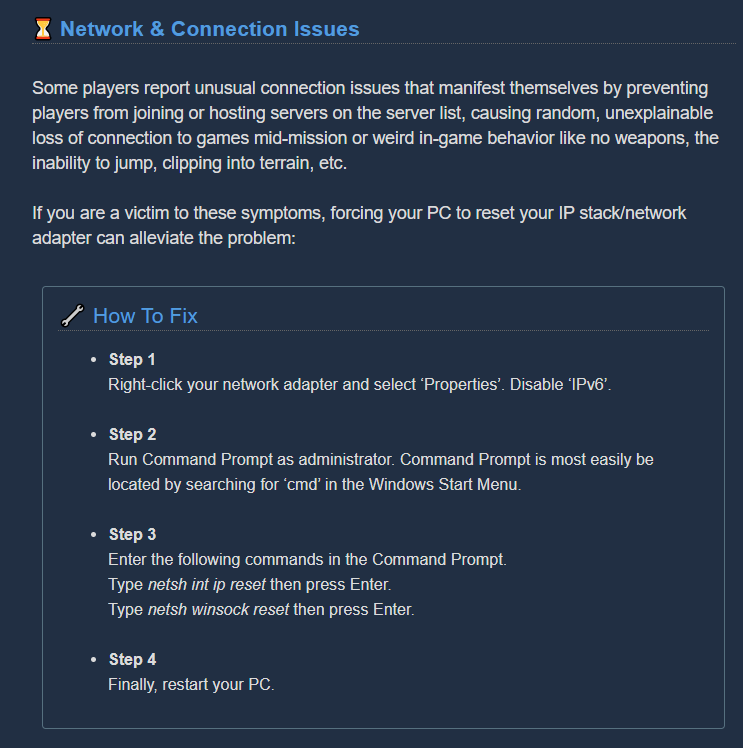
@mossy breach Scroll down and try the troubleshooting in the Network & Connection Issues section https://steamcommunity.com/app/548430/discussions/2/1642039362993864094/

Attention, Miners! Games that crash, won’t launch or suffer from stability issues are undoubtedly the most frustrating part of PC gaming. Although we strive to deliver a flawless gaming experience in the depths of Hoxxes IV, we can’t guarantee you won’t encounter a crash or st...
lusty crystal
So I just tried that @austere coral and it launched in windowed fullscreen. When set to fullscreen, the resolution when back to the fixed low res
Still no dice 😦
austere coral
does this issue happen in other games?
mossy breach
Will do
austere coral
I'm guessing windows 10 too?
lusty crystal
Yup
mossy breach
It works now
And i just died
Since i spawn right in the middle of a swarm
Shouldn't there be some kind of program to prevent incoming dwarves from spawning in the midst of about 10 -15 grunts
austere coral
Just to be absolutely certain, you're using fullscreen rather than windowed fullscreen? Windowed fullscreen in my settings is the only one that locks my resolution.
lusty crystal
Yes im using exclusive fullscreen
And the resolution isn't showing as locked, but it's not changing
It works when set to 720 or lower
but anything over that doesn't change and is just set to some foreign res
austere coral
Give me a minute or two. I'm going to create a user settings file just with those resolution settings and nothing else.
austere coral
There's this one which, according to the UE4 documentation should be windowed fullscreen. This should be mostly a default config except for (attempting) forcing fullscreen at 1920x1080. Edits for future search result accuracy.
This one forces fullscreen. The lesser of the two to likely work.
lusty crystal
Okay I'm trying now
austere coral
Make sure they're both set to read only.
lusty crystal
I'll let you know
Ok so
With the first one, upon starting the game, it was set to windowed fullscreen. When changed to fullscreen it went back to the low res
locked
file was set to read only
austere coral
looks like I can't read their documentation
lusty crystal
Will try the second now
austere coral
it's rather poorly formatted https://i.imgur.com/K5kBKUT.png
 lusty crystal
Oh okay so I'll change that in the setting real quick
austere coral
the second file should be your fullscreen
lusty crystal
trying that now then
Still showing the low res in fullscreen
and unable to change
well I can change it but it doesn't do anything
austere coral
At this point it may be a directx issue.
lusty crystal
So same as earlier still lol
Weird that it's literally only this game though
Not warzone or hunt showdown or any of that kind of stuff
austere coral
Go ahead and delete those files from your directory and let the game generate a normal config.
Even though it's unofficially supported (and can be buggy), throw -dx12 into your launch options. I'm really just throwing rocks at the wall to see what sticks.
lusty crystal
OK will try now
Okay so this is odd
Now when I put it to fullscreen 1920x1080, it make it a window in the top left corner of my screen. Roughly the size of the default windowed discord.
and now pressing alt-enter twice fixed it
austere coral
that's an odd one, but you've got it fullscreen at 1080p?
austere coral
Keep in mind that -dx12 isn't officially supported and can be buggy
austere coral
you may want to, sometime in the future, repair directx and possibly do a clean install of your graphics drivers.
lusty crystal
any tips on how I would go about repairing DX11?
austere coral
You'll want to run this runtime from Microsoft https://www.microsoft.com/en-us/download/details.aspx?displaylang=en&id=35

Microsoft Download Center
The Microsoft DirectX® End-User Runtime installs a number of runtime libraries from the legacy DirectX SDK for some games that use D3DX9, D3DX10, D3DX11, XAudio 2.7, XInput 1.3, XACT, and/or Managed DirectX 1.1. Note that this package does not modify the DirectX Runtime instal...
lusty crystal
And should I uninstall the one I already have before doing this?
austere coral
no, unpack this then run it. It'll conduct repairs on any files that may be corrupted.
uninstalling directx is a nightmare
best to just attempt a repair
lusty crystal
So when I try doing this, it says that everything is up to date and that no installations were made. Is that ok?
Didn't end up workin' 😦
 hidden dagger
Hi. The visual distortion from the EPC's Thin Containment Field explosion causes terrible screen tearing on my PC, has anyone else noticed this?
austere coral
I'm not too familiar with repairing directx. Haven't had to do it on my system.
 granite bear
Finally found a fix to being unable to open steam overlay or even alt-tab, and having the invite friends list soft locking the game. I was originally playing on fullscreen, switching to windowed fixed the issue completely. I dont know if it's just me, but windowed actually functions like fullscreen or windowed fullscreen where i dont actually see the application border. either way that isn't actually an issue for me.
 blissful idol
Hello, I encountered a bug with the scout armors. For some reason the armor won't swap out of the MK4. I can select any other type of armor and it always default back to the MK4. The screen will show that I have a different armor selected, but I will visually see the MK4
 slim hollow
I have a technical problem, I can't play with my XBOX controller, it is connected to my computer and it works in all of the other games, except this one.
When I bought the game it was written that this game have compatibility with the controller, but it looks like it doesnt because it doesnt work at all.
i need help
help
 gentle hazel
my game crashed to desktop, same as my partners' game, same computers, steam version
 woeful osprey
my game is crashing with this error message
Assertion failed: [File:Unknown] [Line: 249] Result failed at C:\P4\UnrealEngine\Main4-22\Engine\Source\Runtime\Windows\D3D11RHI\Private\D3D11Viewport.cpp:369 with error 8876017C
FSD_Win64_Shipping
FSD_Win64_Shipping
FSD_Win64_Shipping
FSD_Win64_Shipping
FSD_Win64_Shipping
FSD_Win64_Shipping
FSD_Win64_Shipping
FSD_Win64_Shipping
FSD_Win64_Shipping
FSD_Win64_Shipping
FSD_Win64_Shipping
FSD_Win64_Shipping
FSD_Win64_Shipping
FSD_Win64_Shipping
FSD_Win64_Shipping
FSD_Win64_Shipping
kernel32
ntdll
mossy breach
Okay this bug is absolutely making me lose my mind
When I click enter, instead of opening chat, the game instead goes into windowed mode 
And when I click enter again, goes back into fullscreen except at 1080p instead of 1440p
graceful yarrow
I wonder if running it in full screen windowed would do anything
mossy breach
It's just strange for me because this only started in 1.0 update, then was fixed in the update after that...then reverted back with the latest update
potent nymph
i think its if you hold shift + enter
 meager hinge
Hey uh, I don't know why but DRG seems to have been making my computer act up since 1.0. I hear weird auto glitches, get frame drops I didn't before. Is this common or is something horribly wrong for me specifically?
 forest crest
It seems that now I and two other people here have had this issue now but there's no posted solution.
I can't change my driller armor. I'm stuck on Mk3 armor. (Other reports were stuck on Mk2 and Mk3 also)
I cannot fix this so I have no clue how it was produced in the first place as I cannot test to cause it.
Any advice on what I can do would be appreciated as I'd like to have my driller look more battle ready.
Zsafol describes my situation exactly, though this is a separate instance of the bug from his friend.
It allows me to select different armors on the cosmetic screen but it does not save the change when exiting it.
Rock and Stone!
potent nymph
are you pressing Switch to class?
forest crest
I believe I've tried both pressing it and already being driller. I'll double check.
Booting into the game, the armor box show's no icon initially.
Having not pressed the change to driller button, the icon saves the armor change, but the character model stays stuck on mk3.
After having pressed change to driller, situation is same as before. Icon changes appropriately, character model does not.
Oh. Actually I somehow fixed it.
For the record: I changed every possible dwarf cosmetic option and it allowed the armor change to stick.
The only oddity that stood out to me was that it didn't show I had a skin color option chosen beforehand.
Yeah, I have a very similar situation on my scout. Skin color not chosen. The icon for it is initially blank, but on armor change, it duplicates the picture of the first armor selected and loads a different armor on the character. It's actually loading an armor I don't even own.
forest crest
Even after relaunching the game, the changes are sticking now, it is 100% caused by not having a skin color chosen.
I'm unsure how it's deselected in the first place, but armor changes will not stick without a skin color chosen.
Tested on 2 of my 4 dwarves whom all had their skin color deselected.
Here's a few images of the UI if it's any assistance.
https://imgur.com/a/LMlBf8d
I'm noticing the scout armor my scout is wearing in part of the bug isn't obtainable via the shop. I think.
quiet jewel
In a haunted cave mission just bugged through the wall
 mellow lark
Is it possible refuel droppod spawns somewhere else?
dreamy quail
What do you mean by somewhere else?
Fuel cells drop within a certain distance from the droppod
It could be hiding in a tunnel around it, take a look at the terrain scanner
 rigid sun
so a really weird bug happened to me
i was messing with the paint jobs on my gunner
and it gave me the gold skin for no reason
potent nymph
its a bug
rigid sun
indeed
 bold spoke
So it's this one
it happens when you lag, and pick up a barrel bomb, and throw it... to be honest it was cool too see my weapon like that.
 clever quail
DOOM-vibes.
 quiet dagger
Me and a friend were doing a dig and we went all the way back to the initial spawn before calling in the drop pod. The game immediately crashed for the host and then everyone was disconnected. Expected behavior?
 iron steeple
austere coral
iron steeple
austere coral
You may have gotten the majority of your engineer time before there were markers for distance traveled. I don't know when they were added, but it's a possibility.
Looks like those metrics were added in update 14. I can't find any reference to additions to that terminal. https://discordapp.com/channels/257785731072786435/367226824721301504/457129256481456129
(not to discount it being an actual bug, just trying to see if there's any way to explain it)
 quick pumice
Encountered a bug today, I would signal Boscoe to go mine out an Egg and as soon as he would start to carry it he would get stuck and would only come back if i pressed X which caused him to drop the egg where it originally was and me having to go up there to get it anyway. this happened in the Radioactive Exclusion Zone.
 pliant arch
Hello
ive just bought the game and i dont seem to get the in game sound to work.
it cuts out on random itervals and only gives me the sound of hovering over the menu.
is there anybody who can help me ?
austere coral
What are your specs?
pliant arch
pc specs?
austere coral
yup
pliant arch
rtx2080 / i9-9900k / 32gb ram
XD dont think it lies there
running it on all ultra tho
austere coral
do you know what sound driver you have on your computer?
 plucky hornet
One glitch I have seen is when I try to join an xbox player from MS store it says multiplayer session ended
pliant arch
let me check
im sorry cant seem to find it
is it under sound input - output
or under drivers sound and games?
austere coral
search for device manager then open it
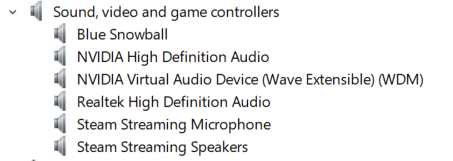
Scroll down until you see Sound, Video and game controllers
Hit the carrot to the left of it to expand it
then see if there's any realtek audio drivers in there
https://i.imgur.com/oZIbQhx.png What mine looks like
 austere coral
hm
This solution is typically for amd FX chips with realtek drivers or realtek with some intel chips. Either way give it a try. There's also an option to do the same thing ingame if you don't want to mess with files. https://steamcommunity.com/app/548430/discussions/2/1729827777339086202/

Hi all Some users are experiencing stuttering/low fps/freezes and Alt+Tab issues when using a combination of AMD FX Series CPU's and Realtek Audio sound, it has also been observed on other combinations, f.eks Intel and Realtek Audio. If you are having issues as described above...
austere coral
can you pm me a dxdiag?
 sleek vector
i diconnected from elite dive and cannot join again, happend many times, so annyoing i cannot finish elite dive and deep dive. why cannot i reconnect to the game and lose all good work i did over that 30min i played. i know should have btetter intertnet but dosnt give me chance connect again.
 wise fractal
Hello, I am having an issue where I can't join any games, it doesn't produce an error unless I try to join off of a friend where it will say "multiplayer session ended" I have tried from my basic connection, I have tried from a VPN in different locations, I have tried uninstalling and reinstalling the game, it is allowed in the firewall, I have tried signing out and back in, same error.
austere coral
no crashes just unable to join a game? Are you on steam or the windows store?
wise fractal
Doesn't crash, just can't join a game, windows store
austere coral
There are some bugs with the networking on the microsoft version of the game. I think someone, I don't remember which dev (sorry), mentioned that they're working on updating the plugin for the microsoft version of the game. Go ahead and try out this and see if it helps at all. https://i.imgur.com/e7qMIaY.png
 plucky hornet
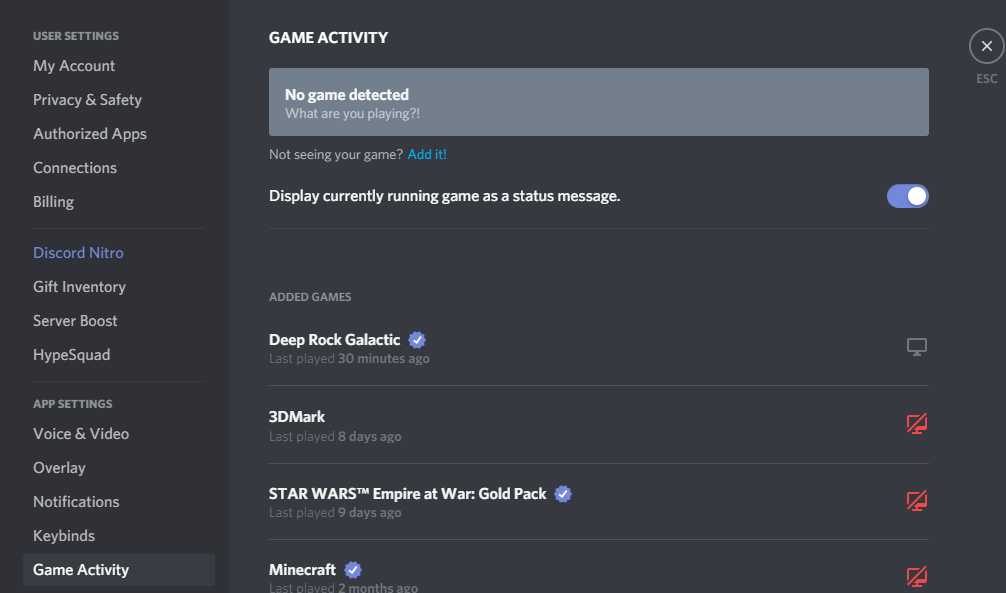
Please I need help. On discord it says I am not playing because I am on microsoft store instead of steam. I cant play with anyone on the discord. Very VERY anyoying
austere coral
Unfortunately the windows store version can't play with the steam version of the game.
plucky hornet
No, it doesnt even say I am playing it on discord
austere coral
Make sure game activity is enabled, you could always add the UWP to discord so it recognizes it. https://i.imgur.com/ps4I7zK.png
 plucky hornet
Ty!!!!
It still isnt working
I thought it did. : P
Right under where it added games and how it says Deep Rock Galactic. It does not show that one for me
I submitted a ticket to discord
austere coral
I feel I should clarify. Only the steam version of the game can send and use invites in #lfg-steam
The windows store and xbox version can't.
austere coral
no worries
austere coral
It's currently a common issue. Give this a try. https://discordapp.com/channels/257785731072786435/402907500619497503/713242887965376623
wise fractal
Thanks, it looks like I will just have to wait until they get a fix for it
mossy breach
i think its if you hold shift + enter
@potent nymph That opens steam overlay, I actually used the one finger typing with just enter to reproduce the bug
It's quite bizarre. Love the game otherwise
dreamy quail
Already made a comment on jira, but i might as well bring it up here. The drills will randomly stop working during dash duration, perhaps even shortly after the duration.
sleek vector
on steam.
 hidden stirrup
Yesterday an Oppressor pivoted on me in place while doing the attack where it hits the ground and sends up pillars of rocks. I took all the damage from the attack despite trying to move out of the way.
 pulsar hare
Hey, I have just been in a salvage mission where after pressing the button on the mule, she walked towards the pod, but bugged and was stuck, we could not do anything to get her lose or continue the mission. we had to leave the mission by suicide pact.
 storm bay
guys i even went as far as refunding the game and repurchasing it in case it was an issue with my licensing, but im still getting the "waiting for steam to load" screen. does anyone know how to fix this?
i've already tried every fix i've found online
firewall, reinstall, validation, running as admin/not as admin
austere coral
quit steam via task manager, relaunch, and verify that you can message someone else on steam. If you can then give the game a launch.
Second thing to check is, are you running any dedicated servers?
If you are, close them.
storm bay
wdym by dedicated servers?
i sometimes run a minecraft server from my laptop and its port forwarded on my router, but its not on atm
austere coral
Check your antivirus and verify that it hasn't quarantined any files related to drg.
storm bay
also i just tried completely restarting steam
how do i check quarantined files? i think im just using windows firewall
austere coral

I'd also check to see if you have any other weird software running while attempting to launch drg
If you have a VPN it may interfere
glacial terrace
Hello, in the Memorial Hall Deep Rock Galactic Memorial Screen, one sentence is doesn't fit for translation. I tried most language and still doesn't fit. Sentence is "IN HONOR OF OUR FALLEN HEROES" and string is "#10507"
austere coral
@storm bay The last idea I have is for you to navigate to the following folder \steamapps\common\Deep Rock Galactic
Right click FSD.exe
properties
Compatibility tab
Make sure compatibility mode is disabled
Place a check next to Run this program as an administrator
apply, ok
launch the game through steam
storm bay
didnt work rip
well, im gonna do a clean install of windows on my pc in a few weeks, maybe that will fix it
austere coral
I'm out of ideas. Bjorn may have some other ideas for you to try when he hops on later.
storm bay
aight
im gonna try installing it not on my separate hard drive but on the hdd that steam is actually on
maybe that will fix it? idk
i dont have high hopes
austere coral
It's something to try, can't guarantee anything though.
glacial terrace
@storm bay can you send windows virus settings?
storm bay
if i am told how to
glacial terrace
Click the Windows icon on the right. The second option has virus settings click on it and click on virus and threat protection settings then send with screenshot
storm bay
right click?
glacial terrace
Here, not right click
glacial terrace
can you enter the section below? Controlled folder access I guess
storm bay
 magic bronze
Friend is getting a black screen every time we fail a mission, while he's loading into the Space Rig
glacial terrace
Weird... are you sure the firewall didn't block the game?
magic bronze
His firewall is off
 wicked mountain
hey guys, today i was playing a mission to collect aqua crystals or something and i got a really strange bug when i became immortal and could only shoot
one guy put a zipline near the deposit, in the last second before my death i grabbed it
and eventaully i got glitched into a state i was immortal, couldnt be revived and the only things i could do was shooting with my primary gun and throwing flares
is it a known bug?
austere coral
yup, a similar one was reported here https://ghostshipgames.atlassian.net/browse/DRG-1516?atlOrigin=eyJpIjoiMmM5NGQzOWJiMmUzNDU1YTk2YTE4NmZkY2MzYTc5ZDIiLCJwIjoiaiJ9
wicked mountain
oh okay
 sullen pendant
had the odd black screen nonsense on other games, going to trawl through my steam discussions to see if relevant.. It's nothing silly like needing to update nvidia drivers, or roll back drivers if recently updated is it?
 mellow stag
anyone know how to get past the unhandled exception crash after start-up?
Quick google search led me to a dev troubleshooting tips post, of which stated reinstalling GPU drivers on a clean install should repair this issue.
This worked for 1 instance of gameplay (2 hours give or take) then I shut down my computer for the night.
I'm now getting the same crashing (not even 24 hours later) and do not feel like reinstalling my vidya drivers for the 2nd time just to have to do it again the next time I want to play this game.
mellow stag
I did that and it now gives me the waiting for steam to load screen
sullen pendant
oh 😦
mellow stag
this game....
got that screen to disappear
in the DRG install file i deleted the steam_appid file and it booted up again without the waiting for steam error
but still bugged me out with an unhandled exception error.
my rig is;
sullen pendant
could try a motherboard driver myself but ur call/ u could just download dotnet framework from m$ might be an issue there all comments seem to point to some C++ error of some sort
austere coral
place -dx12 into launch options. It's unofficially supported and may be buggy, but it illuminates if directx needs to be repaired or not.
mellow stag
I'll give it a shot.
sullen pendant
do u have a vr system?
mellow stag
no
austere coral
Sounds like some files may be corrupted surrounding directx
mellow stag
MMDevAPI is an audio dll 👆
austere coral
run a sfc scan, let that identify if anything is corrupted, then repair.
sullen pendant
that's open command prompt then type sfc /scannow /? for options
mellow stag
already running it
sullen pendant
im a little sketchy nowadays, work's policy has been "if u cant fix it in 20 mins re-image it" 😦
mellow stag
thats not a bad policy for a work compy, but my personal compy i dont feel like re-imaging it for every little issue.
disabled nvidia audio devices and still crashed.
i am going to re-install the vidya drivers and i bet it works. my issue is that i shouldnt have to install the same driver over and over again each time I restart my computer just to play this game.
sullen pendant
yea that's a little daft
austere coral
make sure it's a clean install
mellow stag
always do
sullen pendant
tbh last time i had issues like this i just brought driver reviver software and it sorted out all my shit.. tho cant say it would help u out... i was merely fed up with troubleshooting shit.
oddly it worked, but i couldn't tell u what was causing the initial problem
 static dust
molly gets stuck, on the drop pod
sullen pendant
put a platform under her rump
tho seen spiders doing the same thing and just floating in mid air
static dust
yeah, it worked, thanks @sullen pendant
austere coral
do you still have -dx12 in the launch options?
mellow stag
ive tried both Loan Ranger
but yes, that error was with the DX12 in the launch options
this was without
sullen pendant
could try a revoremover on the program and uninstall it that way, deleting it and all registry keys that uninstallers miss? tho bit of a long shot.
austere coral
Humor me for a bit, download and install the microsoft .net framework 4.8 if you don't have it already. If you do, conduct a repair on it.
austere coral
2019-04-18
austere coral
give it a repair
mellow stag
my only option was to close. Im downloading the offline installer now
since
reasons
austere coral
Microsoft Download Center
This tool detects and tries to fix some frequently occurring issues with the setup of Microsoft .NET Framework or with updates to the Microsoft .NET Framework.
mellow stag
no go Loan
but i managed to find this in my features. wondering if I need to fully install either of these.
austere coral
no idea, I'm grasping at straws
mellow stag
i did it anyway
sullen pendant
don't have either of those even listed on my pc
mellow stag
big nooooooope
 pulsar parrot
Ok, have you done any of the other following, in case it could be:
- Verify integrity files in Steam properties
- whitelist/exclude the executable of the game in your firewall/anti virus program, if any
- might have to do a complete reinstall of your GPU drivers
mellow stag
hiya Zamboni
pulsar parrot
Can link a site with many solutions that could help
mellow stag
I have whitelisted it past windows firewalls, my own firewall, my anti-malware, anti-virus. shit i have even tried it with all of them turned off.
steam says its 100/100 nbd
and have done gpu drivers twice today clean installs without resolve
i had this issue last night, i reinstalled the drivers for my GPU and it ran first try. here i am today (only change was powering off my computer for bed and powering it up after work) 2 gpu installs, 1 .net fix tool, -dx12 launch option, forced redownload of files through steam, about to just uninstall
hold on, im going to move it from my SSD to my M.2 see if maybe it just hates being installed on the F drive.
sullen pendant
does this game have a log file anywhere?
mellow stag
the crash log
sullen pendant
😦
mellow stag
drops a readable xml
sullen pendant
presuming same as what we're seeing
sullen pendant
best u can find is : https://www.exefiles.com/en/dll/mmdevapi-dll/ which mentions possible fixes, tho cant tell if its a fake or lajit site
MMDevAPI.dll errors are related to problems with Windows Dynamic Link Library (DLL) files. Generally, DLL errors are caused by missing or corrupt files. Learn how to download and replace your correct version of MMDevAPI.dll and fix these annoying DLL error messages.
austere coral
I would avoid downloading any significant files like that off the internet
austere coral
I'll just upload mine if you want
mellow stag
I would rather reinstall windows fresh than download any malware from some random site
im curious
pulsar parrot
Might be the way tbh
mellow stag
if i dump the dll, would sfc pick it up?
austere coral
it should
sullen pendant
if it doesn't try a windows repair
tbh your about 2 hrs past my usual point of sticking the usb drive in and hitting the power button so hats off to u this far
austere coral
the issue is the sfc uses a cached version of the file. So if the cached version is corrupted then the replacement will be too.
mellow stag
winsearch came up with 22 different locations for it files dating back to March 2019 and as new as May 6 2020
just gonna casually delete them all
was able to delete 0 of 22 coooooooool
sullen pendant
well if your not on audible yet probably a good time to recommend it, while u wait
mellow stag
see you guys in 20 mins gonna repair windows
the question is, which of these thumb drives has windows and which has my linux installers
sullen pendant
currently getting by with 'the name of the wind, think this is my 6th time listening to it
and which has your bitcoins on it.. prob more important
😉
only linux i use nowadays is hiren
mellow stag
I like to keep 1 flast installer of all the major OS. Windows, whatever the latest crapple is, and some form of linux.
sullen pendant
🤬pple?
mellow stag
To be real though, I think the installer I have for crapple is snow leopard? So like 6 years out of date
sullen pendant
fair enough
tho android to the core
tho 1st smartphone was crapple
oddly still works along with the stereo that has that little dock thing on it
get back to ur audio book 🙂
mellow stag
If this windows repair doesn't work I'm putting in for a refund.
sullen pendant
😦
its certainly odd but you've literally tried everything short of a full re-install
presuming it;s just this game it's happeing to?
mellow stag
this is the furthest ive gotten before a crash
then this
2 new things added to the list.
sullen pendant
its not cus your using sli?
mellow stag
just 1 vidya card
sullen pendant
tried 1 monitor?
mellow stag
one sec
no change
it let me into the pod like it did in that SS above, then it died like it always does.
I get the splash screen to load no problem. then once i click away from the latest news shit and it tries to load into the game insta death
sullen pendant
and defo not the firewall
mellow stag
i wonder
sullen pendant
could try allowing private and public networks
mellow stag
already past that
sullen pendant
tho wouldn't explain the erros
mellow stag
im actually wondering if there is a conf file where i can limit the FPS to like 60 frames for a test
sullen pendant
sadly i'm kinda out of ideas.
austere coral
there is, \steamapps\common\Deep Rock Galactic\FSD\Saved\Config\WindowsNoEditor
gameusersettings.ini
first entry under [/script/fsd.fsdgameusersettings]
austere coral
FrameRateLimit=144.000000 toss that in there somewhere (naturally change the 144 to whatever you want)
austere coral
One last thing to try. Didn't even consider it because I've never seen it cause a crash. https://steamcommunity.com/app/548430/discussions/2/1729827777339086202/
don't let the title fool you, it happened to some guy earlier today with a 9900K without realtek audio drivers (not crashing, but audio stuttering and issue surrounding that).
Hi all Some users are experiencing stuttering/low fps/freezes and Alt+Tab issues when using a combination of AMD FX Series CPU's and Realtek Audio sound, it has also been observed on other combinations, f.eks Intel and Realtek Audio. If you are having issues as described above...
mellow stag
nope
you know, the issue seems to be caused by the audio dll
what if i just try disabling all audio devices
sullen pendant
worth a try but by default there's a ton of audio channels.
mellow stag
welp
im in
one of those disabled jammies was what was holding me up. the only things that are actually connected out of all of those are Bose speakers, NVIDIA HDA, and the Razer.
dear devs, i hope this helps
austere coral
I suspect it may be one of the worst issues surrounding the realtek driver issue that plagues this game. Reenable realtek and see if that crashes the game again.
 vital quail
I've been having a problem that makes me unable to see the assignments of other players and vise versa, is there any fix for that?
austere coral
Verify Windows has the date, time zone, time, and daylight savings are all set to auto in settings.
 proud spade
so ive had a few issues with the rescue missions with the primary assignment, and ive had to do them 3/4 times to get them done, but anyone had this? (steam version)
https://clips.twitch.tv/MoistObliviousHawkRickroll

 unborn patrol
salvage mission, an OMEN spawned right by the broken drop pod. Buried, the activation platforms were missing, only the tower remained without a top, there wasnt a core infuser to be found
 shy vapor
All of my save data was deleted after a game crash on the Microsoft store version and the restore backup data button in the settings does nothing
 copper jewel
I am having the problem when I get a full crew of people I know at least one of us gets kicked mid mission....
It happens every time I get a full crew
pulsar parrot
@shy vapor Gonna do more research unless another person finds a solution. Sadly for Xbox/Win 10 version, all saved data is most of the time entirely gone forever. You can check in this path location to check if anything is there.
Right click Start Menu, click "Run", type in Appdata, then go through Local/Packages/CoffeeStainStudios.DeepRockGalactic_496a1srhmar9w (don't know if it's exactly the same for you, but similar to that)/SystemAppData/wgs
Then in the folder with a bunch numbers, there should be two of these files.
pulsar parrot
So the two files are there, but no savefiles are showing up in game when you click "restore save"? 🤔
Oh duh, probably rewritten.
shy vapor
yeah the button is blank and does nothing
pulsar parrot
@shy fern Hey Just curious if you have any ideas or solutions for this, or it's a loss cause?
 shy fern
Probably screwed due to overwrite. You could possibly see if Xbox does any sort of file backup but my guess is no.
shy vapor
Ill check
mossy breach
20200527103413_1.jpg - dwarf trying to fall through the snow
20200527215837_1.jpg
dwarf keep falling down the hole and reappearing upwards
 limber grail
Load the game up, walk around the hub ship for like 30 seconds and my game crashes. Tried about 15 times now. Any advice?
 wheat sail
when are the devs usually on? I have a level breaking bug and dont want to lose my progress 😦 molly stuck in infinite loop when going to drop pod on salvage mission and not sure how I can reproduce it
shy vapor
@shy fern There isn't a back up or anything on xbox. I saw on reddit theres a way to edit your save file? Or is that only for steam?
pulsar parrot
@wheat sail Devs are in Denmark, CEST. Probably around 2-3 hours, you should see more devs active. Also, where is Molly exactly?
wheat sail
molly is unresponsive after she is called to the drop pod so I cannot call her.
icy mesa
I don't know if it's not been reported but I think the battery packs for the Tritilyte shard event dont make any sounds when being pressed in
pulsar parrot
@wheat sail Let me join your game and see if I can fix it. this is a very common bug
austere coral
@limber grail what are your system specs? Look through these two posts. https://steamcommunity.com/app/548430/discussions/2/1642039362993864094/
https://steamcommunity.com/app/548430/discussions/2/1729827777339086202/
Attention, Miners! Games that crash, won’t launch or suffer from stability issues are undoubtedly the most frustrating part of PC gaming. Although we strive to deliver a flawless gaming experience in the depths of Hoxxes IV, we can’t guarantee you won’t encounter a crash or st...
Hi all Some users are experiencing stuttering/low fps/freezes and Alt+Tab issues when using a combination of AMD FX Series CPU's and Realtek Audio sound, it has also been observed on other combinations, f.eks Intel and Realtek Audio. If you are having issues as described above...
limber grail
intel 8700k, gtx 1080ti, 16gb ram
i tried everything and nothing worked
but when i set the max fps to 60 it worked lol
doesn't make much sense but at least i can play the game now
thanks for the help bud
austere coral
Well if it works it works.
limber grail
Maybe they'll fix the issue next patch
austere coral
By any chance do you have a Realtek audio driver?
 proven apex
Hey everyone! Just wanted to report that fossil spawns seem way too high. Got 8 fossils out of 10 in our first room. Got probably 30 throughout the mission.
limber grail
@austere coral yup
vapid halo
Kind of a nitpick bug, but when I play as the Driller and use the CRISPR, he'll shout "EAT LEAD!" when I'm killing the bugs. The game should recognize when the flamethrower is being used, and a couple lines like "BURN, DAMN YOU!" should be added to the game for that.
limber grail
Well i'm crashing again, bout to just refund the game
glacial terrace
Well i'm crashing again, bout to just refund the game
@limber grail where did you get crash in game?
limber grail
At first it was about 30 seconds after i loaded onto the hub ship, but I lowered my fps limit to 70 and it seemed to help. But now i'm crashing after joining a game. Can't play for more than 5 minutes without crashing
error says D3D device being lost
glacial terrace
did you set -dx12 command on launch settings?
limber grail
no, how do you do that?
glacial terrace
go to your steam library and search for drg then right click and properties
limber grail
ok, i'm at set launch options
glacial terrace
write this there "-dx12"
limber grail
alright done, that's it?
glacial terrace
now join game and look for crash
limber grail
thanks
 whole jolt
For some reason my Mic isn't registering at all for voice chat.
limber grail
video driver reset, says update video driver but i've already done that
glacial terrace
still crashing?
limber grail
yep
screen freezes but still have sound, have to end task
I give up, there's no fix I can find online that I haven't already tried. Really enjoy this game, at least the 10 mins I actually got to play it. But i'm getting a refund. So sad
glacial terrace
ah that's weird... can you send screenshot crash message? It's jira I guess
limber grail
I'll try tomorrow, I think i'm done trying for tonight. Appreciate the help bud
glacial terrace
Bjorn will help you soon
 fallen hill
@limber grail Hey. Sorry to hear your game is crashing. Have you tried the solution listed here? https://steamcommunity.com/app/548430/discussions/2/1642039362993864094/
Attention, Miners! Games that crash, won’t launch or suffer from stability issues are undoubtedly the most frustrating part of PC gaming. Although we strive to deliver a flawless gaming experience in the depths of Hoxxes IV, we can’t guarantee you won’t encounter a crash or st...
limber grail
Yep i've tried all
 fluid elm
Is it normal for the drop pod to take off at 10 seconds?
I just failed a mission trying to clutch a save thinking I had time with my greenbeard friend
potent nymph
it shouldnt be no
 wet slate
I am not sure if I am the only one with this "problem" but for some reason, my mouse doesn't always make the actions appear. Like I want to equip the pickaxe, I have to click it several times untill it does it. Same with shooting, sometimes it's just not responsive, resulting me in hurting myself by those monsters. Like, this issue is ONLY with DRG, any other game works perfectly. Is there a sollution for it or do I need to buy a new mouse?
fluid elm
@trail goblet OK, it said 10 seconds to launch and then it was already taking off
I'll try to record it if it happens again
@wet slate what mouse? updated drivers?
wet slate
SVIPA and yes, fully updated 😄
Like any other game or program works splendid, nothing wrong with the mouse, only in DRG I have this issue.
fluid elm
Seems like you're not the only one
reddit
8 votes and 17 comments so far on Reddit
solo games or multiplayer?
packet loss could cause that if multiplayer

My brother, is having an issue with his left clicks not registering in the game ~20% of the time. His gun will just stop shooting randomly, sometimes its worse than other times. Things we've tried: -There is no Razer/Chroma/Synergy software on the computer, this is a logitech ...
@wet slate are you running fullscreen and @ native resolution?
white girder
^ this is the most common solution to the mouse issue
wet slate
I am running in fullscreen 😄 1920x1080 - so I am not alone with this, so it can be fixed in due time? But I will try playing the game in borderless if that option is there or try a different resolution next time, thanks for now! 😄
 onyx trellis
Hello so my specs are Radeon RX 580 Series and AMD Ryzen 5 2600 six core, 16 GB ram, and every time I run the game and press the ESC key my game instantly freezes. I've tried the engine.ini soundfix with no results
 dire kernel
My game won't launch anymore.
Ryzen2700x, 32GB of RAM, GTX970
Steam says I'm in game for like 3 seconds then that goes away, but the game never launches.
I've formatted, uninstalled the game / reinstalled it. Same issue.
potent nymph
i would suggest you guys check the steam bug forum, we have guides for those issues there
 icy pulsar
I believe the following issue may have been raised in specific cases, but to my knowledge the general bug has not been raised:
When using the "Dark Future" armour paint job, the class specific green trim colour (and also goggle tint, whatever that corresponds to programmatically), is not applied to Gunner helmets as it is for all three classes.
I post three examples to demonstrate this.
 tall walrus
Whenever I use grappling hook with scout it works about 50% of the time leading me to die from fall damage when I am relying on it
icy pulsar
I believe the following issue may have been raised in specific cases, but to my knowledge the general bug has not been raised:
When using the "Dark Future" armour paint job, the class specific green trim colour (and also goggle tint, whatever that corresponds to programmatically), is not applied to Gunner helmets as it is for all three classes.
I post three examples to demonstrate this.
@icy pulsar The same bug may apply to the various sets of Gunner armour, since there does appear to be far fewer locations of green tint on Gunner armours when applying the "Dark Future" paint job in comparison to the same paint job when applied to armour of other classes.
shy vapor
So is there no fix for my save file being reset on the Microsoft store version?
 thin cove
Joo I just palaced an engineer platform above the uplink in a salvage mission and my pc died and restarted xD
mossy breach
It may not be the game issue. Need to see Windows log
thin cove
Yeah may be but stuff like this only happens in this game for this reason
*some reason sry
mossy breach
Hm. Maybe game fails to do calcukation or gets dividebyzero? 😕
thin cove
I mean the platform instantly dissapeared and then my pc restarted idk
spice trail
X rejoined our team while three (Including X) were drunk and one afk, now he sees we are not down and standing still while this isn't true
Can't revive as I can see
mossy breach
I mean you got sober. But yea thats strange
spice trail
X IS sober, while I am not.
- Tried to respawn to fix it *
The fact we're standing still is explained by the fact we're down and can't move at all
mossy breach
Ok. Waiting for other ideas. Maybe no one tested rejoining while drunk ingame. Game may not understand what happening
 left sinew
so apparently my character doesn't like his gun
sullen pendant
So is there no fix for my save file being reset on the Microsoft store version?
@shy vapor you could try right clicking the file and setting it to read only.
mossy breach
@left sinew it may be done as a joke or the game did not understood that there was a gun with that cup 🙂
sullen pendant
still ran with these reactivated, so i suppose it is realtek
@mellow stag unless your playing the game with sound coming out of your monitor i'd still suggest disabling the nvidia high def audio. It also appears further down the list under the system devices tab.
@left sinew it may be done as a joke or the game did not understood that there was a gun with that cup 🙂
@mossy breach lol
 gray junco
While testing some of the creatures’ resistances for the wiki, I found a few resistances that did not what what I could find in the game’s file, so maybe the in game values are not what is intended for that creature:
Dreadnought:
Fire Resistance: 0% (50% in the files)
Melee Resistance: 0% (PST_MeleeDamage: -0.4 in the file)
Nayaka Trawler:
Fire Resistance: 0% (-100% in the files)
Frost Resistance: 0% (-100% in the files)
Carnivorous Larva:
Poison Resistance: 0% (100% in the files)
austere coral
@dire kernel Navigate to the following folder and see if you can run FSD.exe as admin. If you can, it'll show a connecting to steam message. I just want to see if the executable can even be launched and if not; which error message it gives you.
\steamapps\common\Deep Rock Galactic
@limber grail It sounds very likely that it's an issue with your realtek audio driver.
Complete the steps here. https://steamcommunity.com/app/548430/discussions/2/1729827777339086202/
If that doesn't work then:
Navigate to device manager
Expand Sound, video and game controllers
Right click on your realtek audio driver and disable it.
Restart your computer
Attempt to launch the game
Hi all Some users are experiencing stuttering/low fps/freezes and Alt+Tab issues when using a combination of AMD FX Series CPU's and Realtek Audio sound, it has also been observed on other combinations, f.eks Intel and Realtek Audio. If you are having issues as described above...
@thin cove What are your system specs?
thin cove
Rx 580 8gb Vram, 16gb of Ddr4 Ram and a Ryzen 5 2600x
austere coral
is your crashing a recurring event or a one off?
thin cove
The game sometimes crashes when i start a mission land and then leave the droppod
austere coral
Alright go ahead and update your amd gfx drivers, validate game files for drg, and complete the steps outlined in this forum thread. https://steamcommunity.com/app/548430/discussions/2/1729827777339086202/
Hi all Some users are experiencing stuttering/low fps/freezes and Alt+Tab issues when using a combination of AMD FX Series CPU's and Realtek Audio sound, it has also been observed on other combinations, f.eks Intel and Realtek Audio. If you are having issues as described above...
thin cove
Alright I will. Thank you for your help :).
limber grail
@austere coral i've uninstalled and reinstalled my nvidia drivers, and i've uninstalled realtek audio drivers. So far the game is working fine while i'm host and playing solo. But i'm sure it'll crash eventually
austere coral
The game has issues with realteak audio drivers. Make sure you've completed the steps I linked you. That'll be your best bet shy of disabling them entirely.
limber grail
Appreciate the help
sullen pendant
you could also try looking for motherboard dirver updates if you've not done any for a while. seems there's a realtech update on my mobo app that i've not bothered installing but, currently my policy is if it aint broke, dont 🤬 around with it
The game has issues with realteak audio drivers. Make sure you've completed the steps I linked you. That'll be your best bet shy of disabling them entirely.
@austere coral unless someone's using a dedicated sound card (do people still buy soundcards?) then realtech is literally the only sound they'll have on their systems.
limber grail
I've completely uninstalled Realtek Audio and i've still got sound somehow lol
sullen pendant
usb speakers?
limber grail
oh yea duh lol, and headset
 deep kernel
just did the deep dive, stage 0 out of 0 bug happened again but with an interesting twist this time XD
sullen pendant
most usb sound things have their own built in sound card.
austere coral
you played during the reset. This bug only happens on Thursdays. Make sure everyone restarts their game prior to starting the new deep dive.
sullen pendant
what time is the reset usually and how long does it normally take?
austere coral
1200 Z on Thursday
It's like the mission terminal. It's instant, but to be absolutely certain you don't bug yourself out you should relaunch your game immediately after the reset. I'm not sure if it only takes one person to mess it up or if it's host dependent.
deep kernel
very odd as far as im aware we all started a couple hours after reset but maybe one of us started a lot earlier intresting bug though i feel the game if the game forced a restart after the reset before you can start the next mission it might fix it but thats just a thought
austere coral
I'm not 100% sure what the cause is, but a temporary solution would be to prevent players from launching or joining a deep dive without a restart if their game is active during the switchover.
sullen pendant
so having a message across the top of the screen saying "restart client" would be nice then
austere coral
As a stopgap yes. But that's treating the symptom rather than the bug.
sullen pendant
dunno if that's something they could implement tho seeing as it's clients that are actually hosting matches not a central server
 broken hamlet
Anyone have issues where you get stuck in the shell of the droppod at the beginning of missions? Once the screen enters the drop pod my dwarf is not sitting and able to move. Usually ends up with me inside the drop pod walls and being stuck. I have to drop and re-enter the game.
This happens frequently
 vital holly
I was just in a mission with someone. We were drinking in the main hub area but the stumbling drunk vision carried over throughout the entire mission. Is that normal?
austere coral
yup
vital holly
Ah okay. My drunk vision was cleared but his didn't so I wasn't sure
I must have hit the passing out threshold before going in since I drank as the pod was leaving
austere coral
best way to avoid being drunk is to drink a leaf lovers special blackout stout well before the mission starts.
 raw path
 cobalt osprey
I finished my Scout's Promotion Assignment and multiplayer host ended server right as I loaded in. Now my Scout says "Up for Promotion" but has no assignment available and is permanently stuck at 25. Any fix?
glacial terrace
I finished my Scout's Promotion Assignment and multiplayer host ended server right as I loaded in. Now my Scout says "Up for Promotion" but as no assignment available and is permanently stuck at 25. Any fix?
@cobalt osprey if you finished your promotion assignment, you can promote class on memorial hall
cobalt osprey
Omg, I guess that's what the Mission Contorl was explaining before it booted me out of multiplayer host
glacial terrace
yeah go to memorial hall and find promotions terminal, you can promote there
cobalt osprey
yeah go to memorial hall and find promotions terminal, you can promote there
@glacial terrace Thanks. Embarrassing user error. :/
austere coral
Not your fault if you missed the mission control announcement due to the host ending the session
glacial terrace
You're welcome, don't feel wrong 🙂
cobalt osprey
Yeah sometimes the multi host ends and when you emerge back in pod, the mission control repeats, but didn't happen this time.
wet slate
@fluid elm @white girder I was actually playing in Windowed Fullscreen and for some reason my resolution was on 1084xsomething so, I changed to fullscreen 1920x1080 and did not have this mouse issue anymore! Thanks for the support! You Rock!
 thorn coral
So after drinking a lot of beers my gunner suddenly has a -10x slow spool up time for the minigun. I restarted the game and it's still persistent even in a mission.
austere coral
Any chance that you would be able to record that? @thorn coral
Someone else had a similar issue a few weeks ago. The difference was every game he ran was extremely fast. He reset his bios and that resolved it.
dire kernel
@austere coral My crash was caused by a missing dependency. When I realized it only started happening after I formatted, I began considering that I had no other games on steam installed yet. And I remembered thinking it was weird the game doesn't have a "first time running installing some stuff" moment. So I installed a few other games which did have dependencies as part of its steam installation package and then I was able to run DRG
 crimson flax
not sure if bug but i have not seen a single machine event in 20 missions
austere coral
@crimson flax Machine events have a 1/4 chance of spawning per mission. Though that may be lower if you're playing salvage. The pod destroys MEs to prevent a possible conflict with entering the pod. So even with that 1/4 chance you can still get a dry spell since it's RNG.
 viscid birch
I have a weird problem, my came crashed then my account got reset... Is there anyway I can get my account back?
sullen pendant
where u have the account?
austere coral
which version of the game are you on?
sullen pendant
ie steam or ms store?
viscid birch
Steam
austere coral
there's a restore save option in the escape menu
viscid birch
In game prompted me that it noticed my level is wrong from my backup saves
yeah I seen that! Thanks ❤️
What a good feature haha
 remote jewel
Good day gents, my game will constantly crash or take very long with loading times. When I get into a mission it stutters alot.
I tried the Engine fix, nothing changed
austere coral
What are your system specs and which version of the game are you using (steam, windows store, Xbox)?
remote jewel
austere coral
what's your gpu? Should be listed on Display 1
austere coral
I hate to be the bearer of bad news, but there's a lot of issues with the 970 and DRG. I'll see if there's some solutions I can find, but there's no guarantee. In the meantime go ahead and verify game files and do a clean install of the latest nvidia gpu driver.
remote jewel
I just reinstalled the game today, and just updated my Nvidia drivers.
I was hoping that would be the solution
austere coral
you can try placing -dx12 into launch options to see if that smooths anything up. It's unofficially supported and can be buggy so be wary.
It's not looking good for other solutions. This looks like your best bet and you mentioned you already tried it. https://steamcommunity.com/app/548430/discussions/2/1729827777339086202/
Hi all Some users are experiencing stuttering/low fps/freezes and Alt+Tab issues when using a combination of AMD FX Series CPU's and Realtek Audio sound, it has also been observed on other combinations, f.eks Intel and Realtek Audio. If you are having issues as described above...
remote jewel
I'll give the dx12 thing a try, thanks. I'll let you know if that helps
austere coral
You may also want to try disabling your realtek audio drivers, rebooting, then testing with them disabled.
As a next step if -dx12 doesn't help
 warped viper
Hey, was wondering if this was a bug or intended, but an error cube fell down a geyser and for some reason I couldn't get it back out. I've had a few other big resources fall down them too. I can pick it up, but the moment the geyser jets me out I let go of it and it falls down like a brick. Is that intended?
remote jewel
@austere coral ok there are some graphical glitches with the dx12 turned off but I just played my first game in a while that run smooth. That helped. Thank you very much!
Rock and Stone!
limber grail
Uninstalled and reinstalled graphics drivers, disabled Realtek drivers, capped FPS to 60 and still nothing helps. Game keeps frequently crashing mid game and freezing. Saying my Video Card is resetting. No clue what to do, really like this game but it's almost unplayable right now
I'm at my wits end
glacial terrace
Your nvidia settings are resetting all time after crashing? You can send screenshot maybe
limber grail
next time it happens i'll screenshot it
glacial terrace
so did you any overclock to cpu, gpu or ram?
limber grail
no
 spring bridge
Hey so
I found a new crash bug
If you throw one of scouts cryo nades at the rotating pillar event, it will implode your game.
Also my other friend was scout and he threw a slow field nade at it at the same time
austere coral
@urban oyster pinned messages
urban oyster
huh could've sworn I unlocked it prior to release
 novel dragon
The mule got stuck in place and would not move, took me a long while to get the stuff back and forth, and then after that i couldn't find my way back because the mule didn't go back to the Pod and i got lost
 subtle olive
Unsure where to ask this but is progression saved locally or server-side? New computer and didn't back up my save on steam cloud
sullen pendant
you can try placing
-dx12into launch options to see if that smooths anything up. It's unofficially supported and can be buggy so be wary.
@austere coral Is this done through steam? is there a way to do it via the gog galaxy 2.0 launcher? (i've converted to it as it merges every launcher into one page, ie steam, gog, epic, ubsoft, origin etc)
sullen pendant
I just reinstalled the game today, and just updated my Nvidia drivers.
@remote jewel seems to be a bunch of stuttering issues mentioned on the nvidia page im still using 445.87 on my 970 and it's been pretty stable.. I've had odd stuttering issues but i suspect they're more due to the client i've connected to in a joined game. (might be worth rolling back to earlier drivers?)
crimson flax
@crimson flax Machine events have a 1/4 chance of spawning per mission. Though that may be lower if you're playing salvage. The pod destroys MEs to prevent a possible conflict with entering the pod. So even with that 1/4 chance you can still get a dry spell since it's RNG.
@austere coral that would mean that i should've seen them way often than i do now, yesteraday i played around 8 missions and i didnt found one, and yes i checked the whole cave
 clear flame
Hello! I am missing an error cube. Yesterday I got the achievement for having 5 but in-game it shows I only have 4. I 'lost' one cube when my pc restarted in a public mission going for extraction, when I reconnected the squad was on the space rig already. I can give screenshots in a dm, if needed be.
 north ore
I've noticed in the med bay that my team going down seems to apply their count to mine. This doesn't apply to be passed out drunk. The 2 players are my steam friends who havent played a game without me hosting as far as I know. Not a massive issue, it's just odd.
 hexed heath
Im from southeast asia
while finding lobby i always get CN (china) region which is medium. But the ping is over 100, If I filter the FAR option then it shows singapore (Sg) and jp(japan) and hk(hongkong) which actually has less ping. The matchmaking isnt based on ping rather its based on distance.
Should I issue this as a bug report in jira?
potent nymph
no, we are currentlying using that solution, so its intended, but in the future we want it to be based on ping, but we cant right now
hexed heath
ok thanks for the response
potent nymph
its usually a service you buy from someone and implement, developers dont make their own
 lean kraken
Howdy. On my other miners I can equip Dark Future armour except on the scout it seems to bug out and not change over to it.
 still siren
hi there,
i have this weird problem i havent been able to solve and cant find anything on searches
On my engineer and only my engineer, i cant change armor no matter what i do it applies but when i reenter the wardrobe or any other terminal, enter a mission and so forth it defaults back, this is a screen grab of the armor and the armor icon clearly states another is chosen
lean kraken
Seems like I have the same problem on my scout @still siren haha
still siren
funny timing 🙂
 noble dawn
Hi there, Grappling Hook bug still exist in the Scout class? 😄
spice trail
Not sure if it was reported
So, when player uses map it generates green square like particles bound to a place in world. So if you move while using map (Like gunner's zipline) you leave a trail of square like green particles behind
noble dawn
I reported 2 times with a list of 20 or 30 paragraph. @spice trail by me
Hopefully they saw it 😄 @spice trail
If not then it isn't my day 😂
spice trail
Oh, ok
I also wonder if providing the same bug report with video footage would be helpful or not
noble dawn
I did 😂 hopefully they'll rock and stone or rolling stones to the BUGS 😄 @spice trail with 3-5 clip
spice trail
I'm asking in general since there are lots of videos of other bugs in my pocket
 fickle nacelle


