#bug-discussion
1 messages · Page 97 of 1
 pulsar parrot
@stark heron Did you do more than just use ansel?
 stark heron
It's a temporary fix
@pulsar parrot Can't say I know the details. If it happens again, I'll come back with whatever I know
pulsar parrot
Cause Ive ran into that issue before. Ive reported it aswell, but hopefully the devs will check it again.
stark heron
I just know there was a delay between the one Ansel usage and the broken everything
The screenshot I took was basically immediately upon entering and my pings were working for some time after that
(and so was the shotgun)
 gentle hazel
bug or feature? in iron will I eat red sugar, it does not heals me, it consumes the red sugar, and I still die
also sometimes red sugar seems to not be working at all, I hit and nom and I do not heal
I have the sweet tooth perk and steam version
stark heron
Okay, got the details
 kind wharf
Sometimes the sugar is so little you get downed from an attack
stark heron
Iron Will sometimes doesn't actually go away when you heal
kind wharf
Hrm
stark heron
it can happen with sugar, Vampire melee, or resupply
and when it expires, you still go down anyway
ANYWAY
The Ansel details
kind wharf
I don't use Ansel because "This game does not support Ansel" and it's just fancy screenshots anyways
stark heron
Yes, it's caused by Ansel.
Pressing ESC to close the Ansel screenshot panel causes you to be unable to ping objects or use certain weapons in addition to breaking the Terrain Scanner.
Closing it with the "Done" button does not break those, but it does still break your Terrain Scanner.
pulsar parrot
@stark heron The terrain scanner, the devs are aware and fixed when the update is released. The ping object bug is still happening, so I will let them know. Im more interested in knowing how your secondary weapon was not working. Ive only managed it to produce it by using a second program for Ansel which makes sense if you're modifying the game that isn't used to it lol
stark heron
Those are the only two ways I tried closing the Ansel window ("Done" versus ESC) and I expect that the broken laser pointer and broken Scout shotgun are both tied to the same cause
I'll give it a go real quick
Huh. Do I have the conditions backward?
Maybe I do.
One is different from the other.
Okay. When the laser pointer doesn't work (always pings you at 0.0m), the Scout's shotgun also doesn't work.
..maybe it's not related to that? Just camera position?
At any rate, Scout shotgun doesn't work when the laser pointer doesn't work.
And by "doesn't work", I mean "it hits you before it can get out, but since you can't do friendly fire damage to yourself, nothing happens"
it does, however, kill loot bugs if you stand inside them
pulsar parrot
But its only affecting your secondary and nothing else? Im sure it's only secondary, because ive reproduced itmany times. That could be a positioning bug. Whether it is ESC or pressing "Done", I bet it bugs out when it goes back to your first person view.
stark heron
It only affected the Scout shotgun and not the assault rifle.
It did not affect the Autocannon or Burt.
..I think? I don't know if I was still in the bad side of that bug.
pulsar parrot
Only Scout huh? Because I was doing scout with zhukovs and same results xd
stark heron
It's probably just moving where your bullets are traced from, and the AR traces from farther forward than the shotgun.
The first-person camera must not be landing in the right place.
pulsar parrot
Gonna make a video and report it to the devs.
 long bridge
So, um, I got a salvage mission with just one mini-mule.
Still came up as 2 star length, 2 star complexity (like the 2 mini-mule missions usually do)
guess there was just an error generating the second one in the cave.
 normal salmon
My gun spawned out mags for the entire duration of the resupply, it was pretty freaky
 chilly needle
Is multi player currently offline? I’m logged in and can’t join or create a group.
 sudden ridge
I bet it's cauae they're releasing the 27.
 meager crag
I would like acidspitters to stop spawning in a count of 3 right into my face oneshotting me from 100% because some dwarf is ahead of me and they are spawning relative to him, not me.
 mossy breach
Everytime my engineer spins the SMG (Pressing R when it's already reloaded) his left eye goes fully black, my friend took that screenshot for me the moment it happened, he also said the "blackness" of the eye went from top to bottom, like he was blinking, good old minor visual bug
 white fulcrum
If your dwarf pod somehow drops under the mining drill ramp you are stuck and can't get out since the bottom part of the pod and ramp are indestructible
 solar wren
hey is any one else experiencing bugs such as clipping through drop pods/ resupply pods and damage bugs
 arctic hawk
Just so you're aware, Steam rich presence shows "Fungus Bogus" instead of "Fungus Bogs"
 nova tinsel
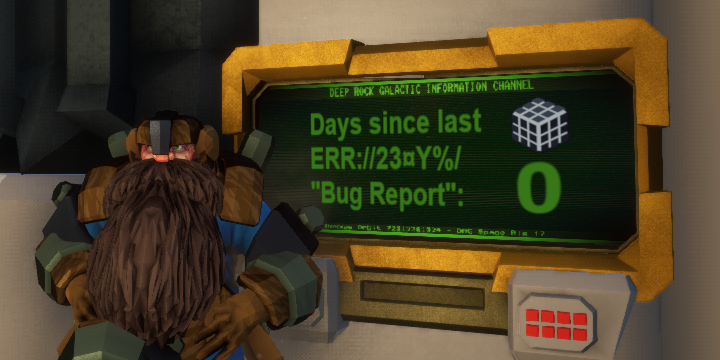
what is the error cube ?
white fulcrum
Where 🤔
nova tinsel
the grey light rubiks cube we can found which appears like an easter egg, will it have a goal ?
kind wharf
Not bug: Feature
 graceful yarrow
it's pinned in every chat
gentle hazel

 lean sapphire
One time I was playing with my friend and we found the cube. Thing is, the mission was bugged and there were no glyphid dreadnaught eggs spawned on the map
This was a while ago though
 dire pollen
Hey I don't know if this is much of a bug, but I was wondering what could cause this game to brick my friend's computer completely. He had good internet and a decent PC but this game seems to just shut down and restart
graceful yarrow
Last guy who had something similar learned his power supply unit was dying.
 carmine moat
@dire pollen it could be hundreds of factors. If it just shuts down and restarts constantly, he problem doesn't have blue screen errors enabled. Look at his bsods with either event viewer or a bsod viewer and identify the problem that way
 white girder
shut down and restart is usually a power supply or overheating problem, but yeah, it could one of a lot of things
 fallen hill
@arctic hawk Good catch. Fixed in the next update.
 sharp ore
Is anyone still getting a bug where firing weapons only works intermittently? I've googled it and tried the fixes recommended in the steam discussion thread but they haven't helped. I can hold down left click and my minigun won't fire, but LMB still works with selecting menus, power attacks and laser pointer. Makes the game kind of unplayable.
fallen hill
@sharp ore Fullscreen and your native resolution fixes the problem
fallen hill
Are you using a Logitech mouse?
sharp ore
no, Microsoft Wireless Desktop 900
sharp ore
@fallen hill upon further investigation it seems I can fire, but only when not doing anything else like walking
stark heron
Can we talk about the language switch on the update news screen, and how it's blending in against the current background?
The UI needs a small rework to accomodate this. As it stands, it's a usability issue, as at least one user has reported difficulty spotting the language switch. I've noticed it myself but have never needed to use it.
carmine moat
u25 probably going to change the screen anyways, and the option is always available in the option menu itself
kind wharf
I myself haven't noticed the thing unless I actually looked. And if it's in the Options menu then it's fine
stark heron
Its existence in the options menu does not negate the good practice of providing users a way to change language without first learning the word for "Options"
carmine moat
isnt the game supposed to match the user's windows language also
stark heron
It also does not negate the fact that the current design places UI text directly on the background image and not in a shaded box, which is bad.
graceful yarrow
it's still not a bug though
carmine moat
theres nothing much to talk about
 eternal quest
i cant seem to join any matches anyone else having an issue right now?
i click join on an open group it says joining then nothing happens
 remote coyote
I don't know if this bug is known but when I click on the perk-screen it sometimes won't let me out. I'm not in the perk-screen anymore and can walk and stuff but the screen won't disappear xD
fallen hill
@sharp ore Strange. Try to change your mouse and see if that resolves it? 🤔
@remote coyote I've seen reports of some terminal UI screens sticking when you leave the terminal. Any details on how to reproduce it would be very much appreciated!
@eternal quest A good workaround for most connection issues in regard to joining a mission is to press ESC and try to disband team once. That sometimes resolves it.
stark heron
Has anyone brought up that a player being disconnected in the middle of taking a resupply can cause the resupply to become unusable?
remote coyote
@fallen hill I think in my case it was because I spammed the E button to much but I am not sure. A friend of mine witnessed the same issue
fallen hill
@stark heron I have not seen it reported, no.
@remote coyote Good to know! I'll investigate.
remote coyote
@fallen hill Always glad to help
sharp ore
@fallen hill The problem seems to be with Windows 10 as my PC (Windows 7) works perfectly fine, and changing mouse does nothing (I've tried two wireless and a wired, to no avail).
sharp ore
Update: I dun goofed. I moved the USB Bluetooth thing to a different port and it works flawlessly. Problem sorted! 
eternal quest
Thanks for the suggestion will try that later
 prisma charm
Hi, guys! Hi! I have a problem with my graphics card (which doesn't only affect DRG). I have fps drops every second as you can see on the video. I got this after reinstalling windows the other day, I never had this before and I didn't change anything in my pc (hardware). My drivers are all up to date and I have already reinstalled them all cleanly. Do you have any idea where that might come from?
Rock & Stone
carmine moat
try a clean install of your graphic drivers
prisma charm
I've tried that before with DDU, but without success
I still have the same problem.
carmine moat
are all the games that have the stutter issue DX12?
prisma charm
Maybe I've never heard of this issue. I've tried with Monster Hunter World and the beta of ghost recon breakpoint
carmine moat
is the power management mode set to prefer max performance in the nvidia control panel?
prisma charm
And i have the same problem with this both games
carmine moat
try changing the cpu power settings to max also and test it. i believe dx12 has certain issues with windows and some cards
prisma charm
I've check and the setting is set to "optimal power"
Did i need to change it to "max performaces" @carmine moat ?
carmine moat
yeah set them both max
prisma charm
Okay thanks i'll try that
Okay it's done but it's worse than before (wtf), may i need to restart my computer ?
carmine moat
if you set it back to what you had before originally, does it go back to what you had before you changed it?
prisma charm
yup 😭
carmine moat
not entirely sure what it could be, could be 2080 specific; https://www.reddit.com/r/techsupport/comments/9hy6fs/major_stuttering_with_all_games_rtx_2080/e6jyofi/ this person solved his issue by installing the HD Audio drivers, maybe google might return other cases
prisma charm
Ok thanks for your help bro' ! Rock & Stone 😄
 warped viper
Hey, bosco nearly killed me for some reason and I was curious if that was a bug or not, I think his ai bugged out after i told him to target a hoarder
graceful yarrow
he may have been targeting something behind you
stark heron
I wasn't aware that Bosco could even do friendly fire damage with his bullets, personally. 🤔 I've seen Bosco do some strange things, but dwarven murder isn't on that list yet.
warped viper
I didn't think he could either, if i was recording it i would post it but sadly i don't got any video software
stark heron
Hoarders are kind of weird, though, so maybe that was a thing?
sharp ore
Warthog Auto 210 description reads "...Holds four wide-spread slugs for rapid death dealing." which I presume means the magazine size, except it holds 6 shells by default. Bug?
 rigid cape
I keep crashing every 5 min into the game
My theory is it doesn't like my FX CPU very much
carmine moat
does it return an error
rigid cape
It's 100% of the time guaranteed to crash, @carmine moat no, it just freezes and doesn't respond to any input forcing me to end task
carmine moat
test another game or dx12 game
rigid cape
I've tested all sorts of games and they run just fine, the latest metro game I believe runs dx12, which doesn't crash
 timid salmon
Hey I've got a friend, trying to join me for the free weekend. He's running the game on 64bit windows and all that jazz, he's pretty sure he should be able to run it. But when he launches the game, it doesn't do anything - he doesn't even get it on his taskbar. Steam is the only thing that even acknowledges he opened the game. Anyone know what the deal is with that?
carmine moat
@rigid cape can try revalidating the game files or a fresh install, maybe even restart your pc. whats your gpu and cpu models
@timid salmon try restarting steam and/or the computer. Has your friend tried reinstalling/revalidating the game as well? And does his other steam games open fine?
timid salmon
Yup, he restarted steam, reinstalled Directx to make sure it was the right version, tried other games, restarted his compuer, validated the game, and reinstalled the game.
Sorry, probably should have listed that ^
pulsar parrot
@timid salmon How about his firewall? DId your friend see if it's preventing it from running?
 runic osprey
[Reproduction rate:] once
[Steps to reproduce:]
it appears to be random
[Expected Results:]
we (my squad) were supposed to start a elimination mission and exit the drop pod
[Actual results:]
my squad an i get stuck in an un-mined shaft usually mined out by the drop pod https://steamcommunity.com/profiles/76561198820263491/screenshots/
shoot, my screenshot didnt work
rigid cape
@carmine moat FX 8370 + GTX 1080. I've found out that 100% I press the gravity button it'll crash the game, it feels like the more that goes on the more likely it is to crash
I suspect it's incompatible/not optimized for FX series chips
pulsar parrot
@runic osprey Yeah all I see is Borderlands and Half life xD
runic osprey
double shit
pulsar parrot
Actually i found it
pulsar parrot
It spawned you far away from the caverns
That's a common issue we've been getting reports of. I believe the developers are aware of this, since how many posts of that has appeared xd
runic osprey
sheesh
pulsar parrot
The developers have been working on the next update, which is also focusing on fixing those bugs.
rigid cape
I wish I could report a bug properly all I have is details of what's happening
carmine moat
@rigid cape try opening the game and go to Options > Audio > Disable Master EQ in the settings.
rigid cape
sure thing
If it doesn't crash when I press the gravity button I'll know it's fixed, will report back
well, worked around rather
carmine moat
did it crash?
rigid cape
loading it up now to see
timid salmon
Friend just checked, and yup, DGR is allowed through the firewall
rigid cape
So far so good @carmine moat, pressed the button and it did its thing, no crash
carmine moat
nice
rigid cape
I didn't think audio would be connected to a game crash
carmine moat
its an issue with the FX chipsets
pulsar parrot
@timid salmon Any antivirus in the presence? It has worked for some people when it's disabled. See if that even works maybe?
rigid cape
thanks, now i get to play the game 😄
graceful yarrow
avast likes to block drg
timid salmon
He says he hasn't got any
carmine moat
can try running in compatibility mode and see if it opens
graceful yarrow
or run as administrator
timid salmon
How do I do that for DFG on Windows 10?
graceful yarrow
dfg?
pulsar parrot
You know what he means
graceful yarrow
I think drg but I'd like to be certain
graceful yarrow

Windows runs programs in user mode by default. If you want to run programs in administrative mode, you will need to specify that explicitly in Windows 10. Running programs in Windows 10 as an administrator is easy. In this article, we discuss 4 different ways to run programs ...
timid salmon
Problem: DRG Isn't in my start menu - or his. Can he just CTRL+Shift Click the Desktop shortcut?
pulsar parrot
You could "Pin to Start" from your microsoft store Library. No?
timid salmon
He bought it via steam though. Does it still show up in the microsoft store as if he owns it, then?
graceful yarrow
no
pulsar parrot
No. Two different platforms.
graceful yarrow
right click the game title in steam, click properties, click create desktop shortcut
pulsar parrot
Then, click the "LOCAL FILES" tab, choose "Browse local files", rick click on "FSD", click on compatibility tab, and check mark the "run this program as an administrator".
timid salmon
AHAH I SEE
Before
The Compatibility tab wasn't there
Should he do Administrator, Compatibility mode, both, or try it each way?
graceful yarrow
try administrator first
timid salmon
Ok so I'm not crazy
it's legit opening a different window for him
the one it was opening for me
it has General, Sharing, Security, Previous Versions, and Customize as tabs
Mine, the one he needs, has General, Compatibility, Security, Details, and Previous Versions
His says "Deep Rock Galactic" properties and has a folder icon, instead of "FSD Properties" with the logo as it's icon, like mine does.
But he's right clicking the same thing as me
stark heron
then he's definitely not right clicking the same thing as you
pulsar parrot
Or might have to troubleshoot the compatibility
pulsar parrot
:o
timid salmon
Oh it crashed
pulsar parrot
🤦
timid salmon
Yup
stark heron
he is not right clicking on the text/icon itself
he is right clicking on white space
timid salmon
Ahhhh That's what it was, I see.
I was so confused how were both managing to get different windows open :/
I was doing it too half the time
pulsar parrot
Relatable
timid salmon
I'm having him run Compatibility Troubleshooting now
stark heron
actually, i would like to argue that this is something windows got wrong about ui design
timid salmon
Definitely
It highlighted the think we wanted to click, and then opened something else entirely
stark heron

because if you put your mouse here, it highlights and gives you a tooltip for FSD.exe
but if you right click that spot you get the context menu for the base folder
bad ui
bad microsoft
🗞
timid salmon
Yeah, noooot great
stark heron
so yes, it's understandable how that could happen
aim for the text/icon every time
it's ESPECIALLY egregious because LEFT-CLICKING THERE selects it properly
bad microsoft 🗞
timid salmon
Yeah, and I thnk if you right click there AFTER left clicking, doesn't that also work? Yeah, should be easier now. Also, what Compatibility mode
should he run it in?
Administrator got steam to load it a bit
but then didn't do anything else
stark heron
it actually does work if you right click after left clicking, but you shouldn't have to because your mouse is highlighting the entry when you hover over it
but continuing to complain about microsoft's bad user experience is #non-drg-chat ¯_(ツ)_/¯
pulsar parrot
Might as well keep complaining. You're still having issues with it
trying to think what else that could be the problem
Idk if it could be the movie splash intros that show up in the beginning of the game launch
Which you probably havent seen it yet >.<
I mean your friend, right?
timid salmon
"Preparing to Launch Deep Rock Galactic" in a steam window
Is all he's getting
And yeah 😛 Technically, my nephew, but also my friend
pulsar parrot
Has it showed that message far too long?
timid salmon
It goes for a sec
and then asks
"Do you want to allow FSD to make changes to your device|
He hits yes
And then nothing happens
Should he turn off Administrator mode and try Compatibility mode?
pulsar parrot
Yes
gentle hazel
@iron owl this is where we talk about bugs
timid salmon
Which Compatiblity mode should he try?
Should we just go one by one til one works?
Or the one for his windows version?
 iron owl
Fair enough. I have a video uploaded of it in a second
pulsar parrot
Try the one for his version first.
iron owl
https://streamable.com/z7b3q this was our big oof. It looked like some lagging parkour, but it also happened to the host
 stark heron
Oh wow, that's disgusting.
pulsar parrot
Now that's a first.
stark heron
The host can desync from his own server?
carmine moat
i had that happen before
stark heron
That's REALLY disgusting.
graceful yarrow
ghost pod
timid salmon
(None of the compatibility modes worked)
stark heron
The server thinks the pod is somewhere else, and the client doesn't agree but doesn't learn from the server where it really is.
You, uh, basically have to accept that that mission is forfeit.
Unless someone can actually see where the pod really is and can get into it.
Did the Mule proceed to the ghost pod or a random location? Were the deposit slots working?
carmine moat
even if you grapple into it, itll just kick you off as it leaves
pulsar parrot
@timid salmon Did you list your friend's specs a while ago?
iron owl
Oh, didn't think of checking those things. Will check that out the next
timid salmon
I had him check to make sure he's on a 64bit system
iron owl
time
timid salmon
Which he is, Windows 10. But I'll have him check
stark heron
Hmm. I see the mule's flare there near the very end of the clip. So Molly definitely went to that location.
That's really weird and kind of bugs me for really big reasons
pulsar parrot
It's salvage too. The only droppod there
stark heron
Of course it's the only drop pod, but I was hypothesizing for a moment that the host's "client" and the "server" were disagreeing
carmine moat
👀
stark heron
client-server mismatches don't get resolved over time, as evidenced by all kinds of ghost minerals
pulsar parrot
Here we go
timid salmon
Gosh Darn it He doesn't have enoguh ram
graceful yarrow
well there we go then
pulsar parrot
there we go
graceful yarrow
rip drg for him until he upgrades, I guess
stark heron
where do you even get a mid-range windows 10 computer with only 4GB of ram
👀
fortunately ram is cheap, but now i'm worried about literally all of his other system specs
timid salmon
Yeaaaaaaaaaah
I thought he could run it
He thought he could run it
He can't run it
arctic hawk
Haven't attempted to recreate but if you throw a shield generator on a qronar it won't spawn right and the shield will be broken the rest of the match
carmine moat
Molly is stuck and won't move if we call it. During extraction, it does get up and move to the pod.
edit: detpack does not work, as you can see the big hole under it
stark heron
Nobody tried dumping a detpack under her? I've seen some interesting mule issues recently, but not one where she literally would not get up again.
I've found places in natural worldgen where she will refuse to actually walk, despite the fact that it's flat, smooth ground
 warm sun
Just witnessed the lack of hitboxes on enemies bug described in reporter
i really hope this shit gets fixed in 25.
it also happened with a driller after freezing up one of the enemies in point extraction, so it's not really fall damage related
 reef tinsel

Started a new mission and where is any of the cave just in a whole .. all 4 of us .. Elimation . mission h4
 mild grove
 grand dome
Loot Bug explosion perk: It activates only when I next to the bug, the distance doesn't feel 2m at all.
 buoyant reef
Hello Guys, Game is very fun, enjoying the free weekend thanks for that.
I notice a slight input issue on the gunner, the machine gun spool doesnt always initialize if you are already pressing other inputs, (w a s d for instance) sometimes clicking the fire button many times seems to get the gun to spool.
Not so much a problem on most other weapons though it does actually affect the pistol too.
 pale sky
 tidal marlin
hello i ve a problem with the game
i got little freeze on mouse cursor and little freeze ingame when im looking around with mouse, else all command on keyboard are fine and still fluid without mouse movement
 storm tendon
Hi guys, just reporting a bug there : If you hold a beer in your and and change your character at a terminal while holding it, the beer will "disappear" (meaning it will float in the air without anyone being able to pick it).
 brave totem
<@&296918282403840000> Any idea why you can't gift someone the game if they are playing free version this weekend?
stark heron
Why did we ping the server management role and not the product development role 🤔
brave totem
Cause, I dont have ability to
stark heron
That's a question to take up with Steam anyway
 dusky garnet
That's likely a Steam issue
brave totem
true, but maybe dev would like to know and fix???
dusky garnet
You could try again later or just gift when the free weekend is over
 solemn leaf
y
brave totem
This weekend has discount pricing
solemn leaf
hm steam probably thinks they own it, so you cant gift it to them
may just need to buy an extra copy for yourself and let it sit in inventory.
then gift it to them after
brave totem
You cant, not an option on steam
solemn leaf
they removed that option? wow steam <
guess they'll need to uninstall/remove the game from their library, then you should be able to gift it to them
stark heron
Valve wants their money and they want it now
 swift horizon
@brave totem the sale is longer than the free weekend. That sounds weird, though.
brave totem
ok, trying to gift out some copies for people. Steam just being stupid
swift horizon
Yeah, that doesn't make sense. You should be able to buy it if you've played it too, so it being registered as being owned is weird.
 blazing urchin
This pickaxe floats above me permanently
I don't know what exactly did it, but I did things like
changing dances while having a drink
drinking while dancing
throwing away mug while dancing
This is how it behaves.
Disregard my screen recording software's poor framerate
I tried to reproduce it, now it's here
I think it has something to do with animations playing at the same time as you enter a dance zone, or doing something with drinks, or combination of three
 violet sundial
It's usually entering/leaving the dance area yeah
 mortal ridge
so my friend was just playing and his game crashed and now his account has been reset to lvl 1
anyway he can get it back?
 native rock
Have them try the "Restore Save" option from the main Options menu.
 jade rivet
guys on a message on the Deep Rock Galactic Information Channel ordnance is misspelt as ordenance and that's probably the scariest problem yet
blazing urchin
there's a ton of misspellings all over the game
jade rivet
I cant believe this
blazing urchin
There was like, some other misspellings. Even one in narrator's subtitles
I think he said Challange or something
I don't remember
I wish I did
gentle hazel
someone smarter and prettier please correct me on this one, I think the spelling errors and grammar mistakes are because the game is being made in Denmark and english is a second language over there
 scenic pulsar
Hey, I was looking to make an ANSEL screenshot with Alt+F2 (was unable to, sadly), and since then my scanner always displays 0.0M and "Unknown Material"
carmine moat
yeah devs are aware
scenic pulsar
Is there any salvaging my solo mission?
carmine moat
ansel will break some aspects of the game, some stuff may still work and you can try to use those
scenic pulsar
Haha, I take that as a no :p
interesting screenshot
Thanks for replying @carmine moat 🙂
 flint thorn
@scenic pulsar It's basically pinging your invisible ansel camera, and it'll get fixed if you can move the camera more
stark heron
it's more "move the camera somewhere else so that you snap back to first person properly again"
your laser pointer and certain hitscans (scout shotgun is notable) are raytracing from the wrong spot in some cases after returning from ansel
and they're hitting things they definitely should not be able to hit (e.g. yourself)
you can see that your pings and hitscans are stopping inside of you by, say, stepping inside of a lootbug and shooting your scout shotgun
it's annoying, but is known
long bridge
saluting while the dancing animation ends causes a pickaxe to float in front of me
pulsar parrot
@scenic pulsar The devs are aware. Dont you worry
stark heron
In Discord Rich Presence, is it intended that the Egg Hunt icon is yellow instead of purple?
pulsar parrot
Yes.
stark heron
For what reason, then? Other mission types have the current icon color.
pulsar parrot
They've changed most of them. Their reason is to distinguish it better to not get confused with other icons, not just the mission icons. All I can say.
stark heron
So it's "future content reasons".
pulsar parrot
Just wait for update 25
stark heron
I was banking on blaming it on "past content reasons". Looking at you, low poly barrels in the Space Rig icon. 👀
 rose patrol
Anyone had a bug where the game randomly stops loading mid load
And you'd have to crash the game
 hybrid magnet
I don't know if it's DRG that causes this, but once in a while when alt-tabbing in and out of game, it's as if my graphics card just stops displaying anything. My monitor just goes black with "no signal" when this occurs
 quaint monolith
i brought barrels on the drop pod and when the loading screen with the drop pod apeared (with it going into Hoxxes) the barrels apeared....
stark heron
That's normal. One of the loading screens has barrels floating in it.
So if there's an actual bug here, a screenshot is worth a thousand words. 👀
quaint monolith
also the glyphid bulk detonator tends to try to blast through some areas to get to you and your dwarven bretheren and it fails to do so sometimes, soooo....... when you try to get close you get incapped and you will be forsaken, as it's impossible to rescue your bretheren with a huge explosion going off every 2 seconds ,as they will be incapped aswell.
 raw vale
and the bulk detonator can spawn under the point extraction platform... and then melee 1shot you through the floor...
 tame yoke
is there a fix to not being able to join games
 azure blade
So I went to dance and my character started flossing. Now Im horrified and dont know what to do
 warm temple
How to read square letters?
 cloud tinsel
you don't,the font in russian is broken beyond comprehension
 night vine
At the menu screen after seeing the 4 classes when starting DRG, there should be a 'language' button, click it to change the language if needed. @warm temple
 lime quartz
Suggestion: Fallback font is either Open Sans or Noto Sans
warm temple
Almost all languages work except Chinese, Russian and Ukrainian. okay
lime quartz
Or maybe Libre Sans could work (all of the fonts do support those letters)
 knotty atlas
found a spelling error thats been in here for a while. is it a bug?
in case you cant tell its the okay. its spelt okat here
raw vale
When in countdown for mission:
Let the long countdown (from not having all in pod) tick down under 5 seconds
Last person gets in pod
The short 5 second countdown triggers, graphically resetting the timer to 5sec (but mission will start at same time it would have originally)
 silent estuary
I was hosting a Lobby with a bunch of greenbeards but the map refused to show me their assignment missions
stark heron
Maybe they didn't have any
silent estuary
no they did, they had the default unlock stuff in order assignment
stark heron
i'm kind of suspicious that those spawn missions
if there is no valid mission in the target biome
and if they're not the host, they can't spawn them
the introductory assignment is weird anyway 👀
 lime edge
So I have a rather large bug to talk about. 2 stories tall and explosive, Glyphid Bulk Detonator. I'm not sure how spawns quite work in this game yet, but I've just had my party wiped in the Magma Core to it. We have done the mission and were already by the escape pod, waiting for the ramp to extend. Then, out of thin air, with no warning that I could see, that guy just spawned in front of the ramp, direcly on top of the entire squad, and oneshot us all, proceeding to fail the 30 minutes long mission just like that.
Is that kinda thing intended?
stark heron
On the ramp shouldn't happen, but there isn't really any minimum spawn distance. Always leave yourself an out.
 lean harbor
had an odd bug in solo point extraction where when I asked Bosco to pick up an aquarq chunk I had already mined, I could no longer pick it up to deposit it. Either from him, or from the ground after telling him to drop it.
didn't have the opportunity to try and reproduce it so dunno if it's a one time thing
stark heron
Those are already fixed for 25, but a fix is to mine more of the area where it came from
Unless you had previously handled it yourself, then.. that's similar, but new? Maybe?
lean harbor
hm, I don't think I had picked it up myself prior, but cool if it's fixed for 25! And thanks for quick tip on how to fix it
stark heron
Sometimes Bosco grabs the gem before it's properly loose, which causes the ghosting
"Breaking it loose" (even if it's been removed) lets you grab it
Bosco can pick it up regardless
You'll hear the clink sound when it comes free
 hidden turtle
I joined host who apparently had bad connection, so in the single game I encountered 3 bugs:
(Every storm had no slowdown on me, but others were affected)
 timid crow
Has anyone had issues with loosing progress ?
I have friend who restarted pc due to freezing issues, then he lost all progress. he is back at lvl 0.
pulsar parrot
@timid crow There is a "Restore Progress" button when he opens up the menu on the side. Have they tried?
 arctic jungle
hello... uhm i know it's not good if someone joins and the first thing is a report of bad news like game crashes...
but here we go... i hope the channel is the right one.
i was trying the game during the steam free weekend, installation and start works without problems.
the first "tutorial" was working too.
but now every mission start will result into a crash ... a ue4 crash reporter crash :P
should i create a jira issue or do you want the dumps directly via web dl?
timid crow
@pulsar parrot We will try now, does that work even if he continued to play after it happened?
pulsar parrot
@arctic jungle This is a good place to report it, but devs would also like if from jira as well. They keep an eye on that more. I would post the crash report in jira.
@timid crow I believe so. It would have his backup savefiles.
timid crow
OK, thanks. We will try it now
pulsar parrot
That is weird. It's suppoed to be on the right side. Hold on
timid crow
Ok, found it. Its under Gameplay Settings.
pulsar parrot
Ah, sorry about that
timid crow
Thanks for your help. We were already grinding lvl again.
pulsar parrot

 midnight jackal
I'm having several issues. When I press Z for push to talk, no one can hear me, and my game stutters while pressing Z. My mic works, I'm using it just fine in Discord.
I also am unable to join existing games, either through Steam or Discord. I click Join and nothing happens.
 wild flame
 pulsar parrot
Basically gives you around 2k experience. Check the pinned messages in this channel.
stark heron
Or any other channel; it's that common of a question. Nothing broke, it's just an unknown alien artifact that the boys in Research and Development haven't quite cracked the code on.
You do get to keep a running total of how many you find, though, but it's only shown in the Accessory Shop; no other terminal shows it.
You can think of the 2000 bonus XP for finding an error cube as a thank-you from Management, nudging you a little closer to your next promotion.
pulsar parrot
@carmine steeple Hello?
pulsar parrot
And you have not done it before, right?
 carmine steeple
nope
pulsar parrot
Take a screenshot of the map of all the missions.
carmine steeple
give me a min
pulsar parrot
Where the big green globe is at i mean
pulsar parrot
Yes
You have a mission already in progress. I think you need to finish that before you can unlock it.
carmine steeple
ah okok make sense
pulsar parrot
Let us know here if the problem is the same thing.
carmine steeple
ty! I'll let you know if it work!
 honest mantle
There was a bug where we successfully completed a mission but when going into the drop ship it left us in the crater and failed the mission
buoyant reef
might be related to a scout bug I found. when dying as you are trying to escape with the cable gun the chracter falls through the floor and is moved to a free space at random on the map. Made a dreadnought extermination a bit of a labrynth to boot 🙂
 patent tangle
hello I wanted to ask how to solve a mistake I had
at the end of the last mission to enable all levels of difficulty my cat disconnected my pc
Upon re-entering the game, my level was 1 and all my progress was restarted
I wanted to know who I should talk to to solve this or if there is any way to solve it.
here my profile to verify the last achievement I had https://steamcommunity.com/id/TOBIArgento/

ːdiplomacyː Dale, que la vida mucho no dura ːdiplomacyː ᴛʀᴀᴅᴇ ᴏғғᴇʀ ʙᴀᴄᴋᴘᴀᴄᴋ.ᴛғ sᴛᴇᴀᴍ_ʀᴇᴘ ´ 𝓶𝓾𝓼𝓲𝓬 duro.
pulsar parrot
@patent tangle Hi. There is a "Restore progress" button when you enter the menu and go to the Gamplay Settings tab. Have you tried that?
patent tangle
@pulsar parrot Ok, I solved it before restarting the progress, saving the previous games I had. Restart everything when entering again, paste the previously saved games and, magically, the file I lost appeared
thax
sorry my english is very bad
pulsar parrot
Nice. No problem man
 round bronze
managed to collect this while playing
stark heron
Still not a bug.
It's mostly useless. You get 2000 base XP for collecting an error cube, and you can check how many you've collected in total in the Accessory Shop, strangely enough.
Other than that, it's just there and it's rare.
lime quartz
I wonder why the Error 23 appears
stark heron
Maybe because ERR://23¤Y%/ is the name of the resource? 🤔
lime quartz
Is it?
stark heron
I wonder why the Umanite appears
native rock
Since we're getting a lot of new people this weekend, reposting this again might be in order:
https://i.imgur.com/oEWsCI5.jpg
 lime quartz
Has a physics bug with barrels been reported?
If not:
- The physics engine goes berserk if you jump on the barrels. You or the barrel flies in random directions.
carmine steeple
@pulsar parrot it work! I need to finish all my mission before. It is not a bug but it was obvious 😅😅😅 Ty ffor the help!
graceful yarrow
@lime quartz the barrels are intentionally janky
 gray zealot
When I start DRG the game crashes and the error report window pops up. This has been happening since update 23 and I thought I would wait for it start working in a later update, so I thought id ask here.
It says "Access violation - code c0000005 (first/second chance not available)"
The startup sound plays but then crashes right away
 pallid crystal
Having the issue of lagging a lot when turning around. Tried to do the Disable Master EQ fix, but didn't do any significant changes. My system is running the following:
i5-6600k @ 3.5GHz
16 gb RAM
EVO SSD
GTX 970
Anything I can try? Having the same problem with other Unreal Engine games I've tried.
lime quartz
I'd give the graphics card a check first.
Sometimes it can fail in a way that makes the card unstable and stuttery
pallid crystal
Everything but Unreal Engine games run perfectly.
lime quartz
(Source: My graphics card couldn't even run Super Nintendo emulator when it failed)
If possible, reinstall the graphics driver and force the game to run in legacy APi mode
(DX9 for example)
pallid crystal
How do I force that, already reinstalled graphics drivers.
lime quartz
There used to be some commandline options you could use
Though devs might've disabled it
(Not specific to this game, applicable to all UE4 games)
timid crow
Not an in game bug, but do you guys know if you Permanently remove DRG from your account if you loose progress ?
I want to gift it to a friend but he cant't receive since he already has it. I saw on the forums that others have the same issue. They suggested deleting the game and all files
graceful yarrow
Yes, saves are locally stored, so if you remove the data you lose your save. Have him back it up
C:\Program Files (x86)\Steam\steamapps\common\Deep Rock Galactic\FSD\Saved
timid crow
Ok, thanks. I was concerned about that.
lime quartz
Cloud save when?
 halcyon helm
A friend of mine was dragged through the broken drop pod on a salvage mission by a trawler and it actually extracted him without completing the objectives. Has this been reported before?
 minor bear
Use the search function to check if your bug has been reported before
 molten kelp
Was jumping between terminals fast, resulter in that Gunners Grenade were in every terminal. Tried to look in shop but was only a grenade there. Fixed after I choose another charcter but still.
 violet thistle
so idk if this is right place to post this but we spawned without a pod and we cant mine anything and because of that we cant get out
minor bear
Rip
 barren vapor
My Scout is at 25 and can't go prestige for no reason. There's no option in the mission thing to prestige the Scout, but there is for all the other characters that aren't max level
carmine moat
Did you already complete the mission assignment
carmine moat
can you provide me a screenshot of the assignment terminal
barren vapor
it's not at the top
 tacit sandal
Maybe upload your save file so someone can take a look
barren vapor
successfully validated
tacit sandal
Saves are in C:\Program Files (x86)\Steam\steamapps\common\Deep Rock Galactic\FSD\Saved\SaveGames (Assuming installed on C)
 hollow drift
Anyone have issues with the game not registering their mouse clicks about 25% of the time?
Windows, GTX GeForce 1060
Using windowed fullscreen
native rock
Does the mouse clicks not registering coincide with you trying to sprint in-game?
Otherwise, try switching the mouse's USB port and see if that helps, (that was another person's solution to a similar issue).
pulsar parrot
@barren vapor Is this the main savefile your currently using or one of the backup saves? Im only getting your Scout at level 17, and rank 7, and hasn't done the "Conquer Hoxxes IV" assignment still active.
native rock
I'm assume it was an old save, unless they renamed it before uploading, since it doesn't have the SteamID attached.
mossy breach
So the game freezes in the middle of Misson 2 near End. I have to close it via task manager and all my progess is gone. This sucks (not the game, its great!)
 tacit crescent
Dunno if anyone has brought this up yet but the Shellbacks can roll through the drop pod and take your shields out before the mission starts
Probably not intended haha
tacit crescent
Unsure of the circumstance, if it's only when landing or if it can happen when landed too.
But it happened mid landing
barren vapor
@pulsar parrot nah I must have sent the wrong one
@barren vapor which one is the correct one
these probably
 wicked pasture
I got a bit of a problem, today for some reason the game crashed and now the resolution scaling defaults to inf value(in game config files) AND ingame choosing resolution itself has broken, not displaying values, and it doesn't seem to change if I press the arrows - except resolution scaling sometimes decides to default to inf value again.
Tried reinstalling, tried repairing, no luck.
...Also thanks to this I discovered that barrel physics, apparently, are bound to your fps, because at 10 fps they are flying very very slowly.
 slim granite
Any Idea why this perk is still locked? When I loaded in I was already level 23.
stark heron
Mole is a Driller armor rig, isn't it?
You need to be the appropriate level in the apprppriate class.
slim granite
It was under the engineer upgrades nvm, im just an idiot
white girder
@hollow drift - it's a well known issue. Use normal fullscreen at your display's native resolution
 rugged zenith
Post mission menu isn't appearing after someone disconnected but still shown in game
 bright oyster
I haven't seen any mention of my bug, and I submitted a report but thought I'd ask here: Has anyone had problems crashing to desktop only when loading into a game as part of a group? I can play solo just fine and can join a server but for some reason attempting to play with a friend of mine crashes every single time I board the dropship and while I'm loading the mission.
 scenic edge
tap fire on the deep core is nearly twice the fire rate of the full auto. intended? or bug
 past gale
Can't hotkey 8 is that a bug?
 sour fable
Hello, I recently purchased DRG and upon mining a single block my games framerate drops to zero then stutters before crashing
 analog umbra
theres a bug with the voice chat, when you load into the main lobby for the first time even if you have push to talk enabled it will still be a hot-mic , you can fix it if you tap the voice button, but i dont like the idea of people hearing me if i dont know im broadcasting
stark heron
@sour fable system specs
stark heron
👀
probably not the problem then
we had someone in here earlier who went through a whole boatload of troubleshooting before he revealed that he had 4gb ram
sour fable
for sure.
I can send the Drone to mine
no problem
Running around during the tutorial works fine, everything up until destroying the terrain with my own character works
stark heron
Can't say I have advice past the usual "verify game files" and "find a crash report, if anything"
 potent nymph
how can you have 20gb ram? isnt it 16 or 32?
stark heron
Multiple sticks are a thing and can definitely add up to ~20GB 👀
potent nymph
@sour fable try turning sound off completely and see if it still happens
potent nymph
is the amd card a fx series?
potent nymph
okay, then try this fix, and you can play with sound again https://steamcommunity.com/app/548430/discussions/2/1729827777339086202/

Hi all Some users are experiencing stuttering/low fps/freezes and Alt+Tab issues when using a combination of AMD FX Series CPU's and Realtek Audio sound, it has also been observed on other combinations, f.eks Intel and Realtek Audio. If you are having issues as described abov...
sour fable
Testing now.
@potent nymph Fixed it. Thanks, happy to be a supporter when your response time is this fast lol.
potent nymph
Great to hear 🙂 Hopefully we can work through the issues from the weekend fast!
fallen hill
@prisma charm Are you still experiencing performance issues? What are your PC specs?
@carmine moat Most of the pathfinding issues you saw with Molly's navigational capabilities should be fixed in the next update! 😅
@buoyant reef If you're having issues with mouse clicks not registering, try to change the display mode to Fullscreen and switch to your native resolution.
@scenic pulsar We're aware that Ansel can cause some things to break in game. Thanks for looking out, though!
@BlackVirtue#8597 We have made some adjutstments to the spawning logic of the Bulk Detonator in the next update, which should prevent it from suddenly spawning ontop of you in the future.
@midnight jackal Try to disable and reenable voice chat and push to talk in the Options menu. You can also try to change the keybind and see if that resolves it.
@gray zealot Is your crash described in this post? https://steamcommunity.com/app/548430/discussions/2/1642039362993864094/
@halcyon helm We are aware that some enemies are able to drag players into the drop pod and ending missions prematurely. We're on it!
@mossy breach Is your game still freezing? What are your PC specs?
stark heron
-searches for @everyone emoji-
(rip, one of them left the server)
Speaking of Ansel, is the last issue wherein some hitscans can break under certain conditions nailed down? Just curious.
prisma charm
@fallen hill Yes, i tried to reinstall my GPU drivers but without succes...
PC Specs : I7 8700k - Asus geforce RTX 2080 dual oc - 32gb RAM DDR4 - MSI Z370 Pro Carbon
I've got the same problem on Monster Hunter World, but not doom (What the fuck), the only thing that change between MHW and Doom is the storage, Doom is on my SSHD and MHW & DRG are on my SSD but i tried to swap DRG to the SSHD and i always have the same problem 😭
potent nymph
@arctic jungle Can you try doing a clean uninstall and install of the game? the programmer who made the code cant really see any obvious issues. Make sure you save game is backed up!
stark heron
it has a very detailed model with a special pulsing effect, the world's most noticeable in-wall decorations, and a name with special symbols
must be a bug
 quaint dagger
Got this minéral yesterday at radiation, thought it was missingLink pokemon :(
 plucky ginkgo
the err kinda set me off is why, thanks though
stark heron
it's an unknown alien artifact that kind of screws with DRG's scanners
fallen hill
@prisma charm Try to limit your fps in the 60 - 120 fps range and see if that resolves the lag spikes.
prisma charm
@fallen hill Yes that approximatively fix it but i want to play the game with 144fps like before 😕
I sent a email to nvidia to see what they can do with my issue, i'm waiting for their answer, i hope it's not an hardware issue
fallen hill
@prisma charm Unfortunately, some GPUs sometimes become unstable when you let the FPS spool into higher ranges. I'm hoping Nvidia can come up with a better solution, especially if you have that issue with all of your games.
prisma charm
Not all justly, i don't have this issue with doom... the fact is thai i have a 144hz screen monitor and i love to play DRG with 144hz with it, but the problem happened suddenly and i didn't know the cause
wicked pasture
'Bout my yesterday post, it has somehow managed to break my graphics card drivers in the process, lul
Here's to hoping an update will do the trick
 dull oracle
Hi, new player here. After completing the objective in a Haz3 mining expedition, we called in Molly to request for drop pod. After that we kept following Molly round and round the cave for what seems to be like an eternity, we ultimately failed the mission because the drop ship took off. But I thought drops ships will only take off 5 seconds after Molly is there?
white girder
no, it will always leave at that time
dull oracle
Even if molly isnt there?
white girder
doors will always open 10 seconds before it leaves
Molly will always be there because it teleports if it's not there in time
dull oracle
So Molly will just vanish in front of us and teleports to the drop ship?
dull oracle
We weren't even fighting the bugs, we were following it
white girder
it's slower than you are and can take routes you can't easily follow
stark heron
Use the map
Terrain Scanner reveals the Drop Pod's location immediately upon pressing the button.
dull oracle
Does the drop ship always lands at the place where it dropped us in the beginning?
white girder
drop pod can land anywhere, more or less
but it will usually be some distance from your current location
stark heron
It typically does in short mining missions but prefers to land a set distance away
Your Driller can take you directly to it by using the map or by looking at the drop pod hud indicator on screen
stark heron
By the way, if Molly starts dancing in place, break the ground under her
That should force her to recalculate and go to the pod proper
 fervent fractal
friend's able to join pubbie games and do solo missions but joining with friends seems to make em crash? they put up a bug report but as far as I'm aware there hasn't been a response
pardon if that comes off as rude or pushy
 sour void
I don't know if this bug has already been reported or not but when arriving in a mission I found myself stuck underneath the the ship with no way out except for leaving the party
fervent fractal
oh, they got a response from bjorn but it was stuff that doesn't apply or stuff they've tried over a dozen times this free weekend and last time there was a free weekend
stark heron
did system specs ever happen to fall out during that conversation
potent nymph
ya iam trying to figure it out, but none of the known solutions seems to work. It's tricky because there can be literally millions of possible reasons due to the nature of pc gaming
fervent fractal
thanks for an update!
cloud tinsel
i joined this game while we were killing the second dreadnought,and then after killing the third,i realised that my map shows me another one...for some reason...even though the mission is complete
weird
pulsar parrot
@cloud tinsel Playing as a client, right? Sometimes it doesnt recieve the exact connection with the host or it bugs when connecting with host. So dreads, eggs, will possibly appear even if they are already gotten. Like minerals aswell.
cloud tinsel
yeah that's weird
stark heron
Clients don't yet properly double-check with the server to make sure data nearby the client (or mission objectives i.e. eggs and cocoons) is accurate. No idea if there's fixes indev.
white girder
actor states not being replicated - in the case of eggs and cocoons it should be a fairly trivial fix
stark heron
terrain synchronizations may be more difficult depending on exactly how terrain is programmed
ideally, it's just a set of points and weights that can be modified individually, which would make synchronizations trivial based on player position
but that's just spitballing; we'd need a dev on site to satisfy that curiosity
white girder
in theory it should just work
each replicated event should be sent to a client upon connection, so they can rebuild the game state based on the network history
in cases where it's failing, it's usually due to things not actually be replicated server-client when they should be
stark heron
Mission Control will inform you of assignment progression and being eligible for a promotion qualification assignment simultaneously, causing both audio clips to play at once. Is this patched up yet?
tacit crescent
If you repeatedly spam the gravity calibration button you can force prolonged indefinite low gravity, hitting the button again during this state and leaving it alone will fix it. However despite having a solution, I don't think indefinite gravity via button spam is intended.
arctic jungle
@potent nymph i was trying this too, even with a different harddrive and usb hdd... just to be sure that is not a harddrive fault :P
was always the same result. steam checksum was without any bad results too,
sometimes i think i got the "wonder machine with quantum influence... it will crash whatever never crashed before"... (my life as a dev/qa ^^)
pulsar parrot
@barren vapor if you're still having problems, let us know.
 gloomy grove
My gunner is at lvl 25 yet there is no promotion assignment. Is this a known bug?
stark heron
Did you already complete the promotion assignment and have yet to promote at the character selection terminal?
 harsh oxide
I died while on a zipline and now im floating in midair unable to die or switch weapons while in the invincible mode from the perk but its not ending
map key is permanently stuck
Game ended and it fixed itself. weird bug tho
 hard geode
<@&296918282403840000> could someone check if i officially own the game somehow? bought a cd key but the whole process has been problematic. The game was running smoothly during the play for free weekend but now im playing it and it keeps randomly taking ages to load screens etc....wondering if its to do with the problematic activation i had?
graceful yarrow
that's something steam would have to check I think
 earnest harbor
yeah we just do stuff on discord...
hard geode
ok cool, will contact steam
graceful yarrow
if it's in your library as a steam game, then you definitely own it
swift horizon
you should be able to see it in your account history
hard geode
hummm, was able to delete and redownload it after free weekend but still suggests i buy it via steam maybe doesnt recognise gifts etc
@swift horizon ty thats helpful 🙂
swift horizon
Click your name top right, account details and either purchase history or the product activation one.
hard geode
nice one
swift horizon
"Licenses and product key activations" should give you a list of Steam store purchases and activations from other stores.
barren vapor
@pulsar parrot Thanks, much appreciated :]
swift horizon
@hard geode That's very dependant on where you bought it. I only have Steam Store/Retail on my list.
buoyant reef
@fallen hill - Hello Mark,
I actually tried something similar, moved upto 2560 or whatever 4K is these days. Thn switched to capped 60FPS from allow anything and that seems to have done it.
Got another odd gameplay thing though, one of our guys spawned and died to a dreadnought two nights ago, the dreadnought hadn't aggrod on the rest of the team so began digging into the downed team mate, by the time we found him they were 150m down and we had no way to aggro the dreadnought back up, was hilarious, not sure if it's intended though.
hard geode
ah ok, wont be using a key store like that again meh
was only £2 cheaper than stream....not worth it
graceful yarrow
third party sellers are notoriously untrustworthy
hard geode
yeah, not really dealt with them till recently
 pliant hatch
if you're doing a salvage mules mission and one of the mules is apparently inside the dropship.. is it bugged?
https://snipboard.io/lenr5W.jpg like this
 stark heron
That screenshot doesn't show the mini mule at all... they are not indicated on the terrain scanner
What leads you to believe it is actually inside?
pliant hatch
I though the blue square was the objective marker
stark heron
No
That is the drop pod location marker
Only eggs and cocoons as objectives will ever appear on the Terrain Scanner
 autumn sun
Sometimes I spawn under the drop pod
:^)
Then when the drop pod goes back up it takes me with it
pulsar parrot
@pliant hatch mini mules can only be found by searching for them and listening to a constant, slow beeping sound, and im sure you know they give a green-dome-shape that pulses. The terrain scanner will not show the mini mules location. So if youre believing its really inside the droppod, you might have to dig it out. Could possibly be a bug of the system positioning the spawn in a awkward spot.
pliant hatch
well.. that explains things.. I'm deaf in one ear so can't hear the direction of sounds.
 feral vault
So I'm getting really choppy audio, plays for a second then stops, It's not my headset because I tried it on another PC and it was fine. Any solutions?
 random echo
Sooo, have anyone tried being stuck in place in your bay, after a mission ending?
pulsar parrot
@random echo In your room, correct? And you can't move your character at all?
random echo
That is correct @pulsar parrot
A hard reset of the game fixed it. Played around 10 hours, and this is the first time it happened 🙂
pulsar parrot
Yeah it's a sucky experience. So far, I only know resetting the game fixes it. It's some sort of hard lock or glitch between the mission end screen and spawning in the space rig. Did you press any buttons or alt tabbed during that time frame? Just curious
stark heron
I find, personally, that the consistent factor when it happens to me is there was a notification from Mission Control about an assignment completion.
random echo
I did, but i think my game was windowed FS, so alt+tab did not really work. @pulsar parrot
stark heron
And I was trying to clear it too aggressively.
random echo
And i couldnt even press esc to like go to pause menu 😛
Like resetting the game is not really a big deal, but kinda annoying if you are in a group
pulsar parrot
 stark heron
👀
pulsar parrot
I even tried Ansel and nothing. I hope the devs get a look on it.
 tardy hazel

bug i found
stark heron
Engine limitations aren't really a bug, are they?
 modest forge
plz fix bugged shield
stark heron
The devs are fully aware that shields still sometimes yeet themselves into the void and never deploy--and therefore never return and never become redeployable.
modest forge
yeah fix it
stark heron
I don't know if any fixes have been made on that front recently though. Update 25 patch notes will tell us
(or a dev, if they're feeling charitable)
 grizzled helm
 signal condor
https://i.imgur.com/avYXSuG.png challenge is spelled wrong
 stark heron
@grizzled helm Beards are getting some TLC for 25. This may end up fixed, but if not, it's still fun.
signal condor
Also https://drive.google.com/open?id=12oMFz155e5IXxqZBAsjJeJP0vDj555eL not sure if this is intended or not but its kinda fun
pulsar parrot
@signal condor Barrels are meant to be that buggy. We all kind of liked it that it shouldnt be tweaked 😄
stark heron
Barrels are... barrels.
I think we're keeping the bar window ball pit for the same reason.
Try throwing mugs or barrels back there 👀
 lapis cargo
I came across this bug just a few minutes ago, I was doing a haz 4 mini mule mission and we were at the end of the mission, waiting for the ship to fuel up when one of those worm things grabbed me and threw me into the drop pod. I was stuck and couldnt get out or help my teammates.
they ultimately died, but the drop pod lifted me out anyway even though it wasnt charged. At the debrief it was mission was a success, I even got the money and materials, But I was doing this mission for a promotion and it didnt count it towards the mission count
fallen hill
@pulsar parrot How did that happen?
 fallen orbit
Yesterday I experienced 2 different bugs. The first one was that I was inside a hole inside the area where the eggs are located. I jumped into a hole seemingly created by one of my friends and for my the entire area was already dug out so I couldn't find my way out because on my screen it was already dug out everything. However, when my teammates dug out everything around me I could again escape the hole.
2nd bug I experienced is that sometimes when you press E on PC to resupply at supply pod the loading screen for progress of how far the process of resupplying is disappears, sometimes it does and sometimes it doesnt (and I am sure I wasnt moving the mouse so it must be a bug)
potent nymph
@arctic jungle gah thats super annoying 🙂 at the moment, i dont know what might be the issue
 young moat
Bug time
The hat purchasable from the latest free weekend is no longer available to be worn
Nonexistant in employee wardrobe
Give me the good boy points
potent nymph
WAT
stark heron
it's ok the hat was dumb anyway 
anyway, I'd like to submit a single complaint about molly making it most of the way to the drop pod, then... not dancing, but TURNING AROUND and going 180m away
just to tack on to the mule weirdness
blazing urchin
can confirm
🦀 🦀 🦀 free hat is gone 🦀 🦀 🦀
potent nymph
should be fixed, iam testing it now and will put it live soon
natalie, its super dumb, but it should be better next update
stark heron
thank you. that was honestly upsetting, she'd left flares literally below the pod on the floor below
potent nymph
new build with hatfix is live now
potent nymph
 blazing urchin
if the game had building mechanics, you'd be able to break stuff and then push a hutfix
you know, to fix the huts
that were broken
potent nymph
😮
 latent iron
Hello, I have a problem. I played one game yesterday in which I was maybe 2 minutes, because it ended quickly. As it turned out, I entered the cheater game. I got 8 million pearls in my backpack, somewhat ruining my progress to the game. Is it possible to throw it out of the backpack?
stark heron
You can restore an earlier save
or you can repeatedly buy/sell in mineral trade to effectively delete it
unfortunately there aren't any anti-cheat measures in place outside of a rollback to a previous save
latent iron
Okay, thank you for your help. In that case, if I don't want to undo the entry, I have to buy and sell the raw material. Well, some work awaits me because there are as many as 8 million: D
potent nymph
sorry!
pulsar parrot
@fallen hill I think it seems to happen when alt tabbing or completely by random between the mission ending screen and loading in the spacerig.
 crimson obsidian
can't seem to use my 360 gamepad for gameplay today [works in some menus but that's it]
 quiet mantle
WISH my Laser Pointer worked....
Me: Found that super rare loot creature!
Team mate: Tag it for us.
Me: Okay (points at object and a tiny white ball saying waypoint shows up.)
---2 minutes later:---
Team mates: I can't find it! Did you tag it.
Me: Yes 100 times! (Frantically tags everything hoping for it to work and it just repeats on everything.)
Team mates: I don't see anything!
Me: -.-
---15 missions later:---
Me: Spot ceiling keeper and tries to tag with pointer = Fail
Team: DEAD
Me: Saving everyone yet again
Team: WTF DUDE
(Sometimes I get banned even though I'm using a mic and warning people! I'm a hinderance to them b/c of it.)
Please fix!
quiet mantle
wtf is a waypoint then?
stark heron
A personal marker.
You can have exactly one. No one but you can see it.
It shows up when you press CTRL (as a HUD indicator)
quiet mantle
O.o
stark heron
and it shows up on your Terrain Scanner
quiet mantle
this needs to be explained more. Everyone I talked to kept saying to long press it lol
stark heron
Pinging something is like what you do to control Bosco. You just click on something using the laser pointer.
Marking/pinging are the same thing
Waypoints are personal use with a long press
you use them to remind yourself where something is; for example, if you happen across the dirt in a room early but aren't done mining in the room
quiet mantle
we also just found out you can see the laser pointer to see team mates through walls.
That is so cool!
 zinc sapphire
Don't know if this is reported yet, but me and 3 blokes were doing an point extraction in Fungus Bogs and could only find 9/10 aquarqs. 20 minutes of digging later we found the last one under a goo pile.
stark heron
There are many more Aquarq than you really need
but I think they shouldn't be spawning in the goo?
 muted helm
Hunh doesnt look like my bug report popped up in the channel when i posted it
 still blaze
stark heron
still blaze
stark heron
It's units of ERR://23¤Y%/, a rare resource which currently has no value as a currency.
stark heron
Its value is in the 2000 base XP you gain for successfully bringing it home
muted helm
is there a delay between posting a bugt and the Jira bug post?
pulsar parrot
@muted helm Maybe. What was your report about first? I think if it's a report that's been posted already, then it wouldn't show up again.
You could also find out by searching in the jira channel and enter keywords for your bug report if curious.
muted helm
It was about the Steam Achievement for promoting 4 dwarves not registering
ive gotten another achivment since that that has registerd but the 4 promos has not
pulsar parrot
Seems like Issue No: DRG-734, where cannot receive Promotion-Related Achievements, like promoting all 4 Dwarves at least once. It's been posted on 6/9/2019.
Achievements commonly get bugged for some people. If restarting Steam, checking on the status or maybe checking if it did unlocked by chance without being notified, hopefully a dev will come by soon to fix or help you on that.
In case, it has to be four Dwarves (Scout, Gunner, Engineer, and Driller) that has been promoted and you paid for the promotion.
pulsar parrot
Then something's up.
muted helm
if it doesnt get fixed ill just use a achivment unlocker
doubly so it if prevents the others from gaining progress
 rigid crystal
Did you have one promoted before the achievement was released?
potent nymph
@muted helm iam interested in trying this out, can you send me your save game? i wont get to it proerply the next 2 weeks, but i will after
fallen hill
@muted helm Have you promoted at all after the achievements were released?
 wet gulch
Good day!
After buying a new computer, the game began to work badly(although all components are selected correctly).I will describe the problem in short: starting the game, the picture moves jerkily(sound is present).Reinstalled it, updated drivers-nothing helped.
Characteristics of my computer:
Radeon RX 570 (8 gb)
Amd ryzen 5 2400g (3600 ghz)
8 GB ram (2400 ghz)
According to the characteristics I fly the game, but when it is running the picture does not move.Sought information on various forums, councils which could help not sow.
I hope for your help.
potent nymph
try turned sound off completely and see if that helps
wet gulch
lol, the game now does not even want to unfold
She turned around, but the situation is still terrible, the picture moves a little better
potent nymph
try turned on sound again, then do this fix: https://steamcommunity.com/app/548430/discussions/2/1729827777339086202/

Hi all Some users are experiencing stuttering/low fps/freezes and Alt+Tab issues when using a combination of AMD FX Series CPU's and Realtek Audio sound, it has also been observed on other combinations, f.eks Intel and Realtek Audio. If you are having issues as described abov...
wet gulch
stark heron
Is your Steam library installed in a different location?
wet gulch
fuck i'am idiot
stark heron
Try "Properties", "Local Files", and "Browse Local Files" on your Library entry for Deep Rock Galactic.
That will take you there directly.
I may have the tab name "Local Files" wrong.
wet gulch
first I opened just program files :D,and then opened the program files x86 folder but there is no galactic deeprock
 broken marsh
Hi! I don't even know if this counts as a bug report, but more of a UI mistake/typo.
The in-game compass doesn't have a heading 310. It goes 290, 300, 320, 320, 330. I didn't see that being mentioned before anywhere, so I assume it's an unintentional mistake!
stark heron
That's an interesting thing to notice. Does anyone even use measurements that granular on the compass? 👀
broken marsh
I certainly do. I'm a longtime fan of flight sims so I will often indicate things with compass bearing and distance, e.g., "Drop Pod coming in at two hundred meters, heading one-five-zero."
Or when I have a particularly boneheaded driller on the team: "Go left. No, your other left. LEFT! Okay, stop, look at your compass. I want you to point to heading one-five-zero and drill."
Either way, it's something that Super Bothered me for basically a trivial reason... and I imagine it would be a relatively minor thing to fix.
(although with programming, you never know)
Anyway, figured I'd report it and let the QA folks double-check me and pass it along to the UI designer.
fallen hill
Please report update 25 bugs in #experimental-bug-discussion
 queen notch
Point extraction can very rarely have unending swarm waves, though unsure if it's problem with swarm event or just periodic mob spawn turning cancerous. I ran into it twice playing from account lvl 1 - 26, open multiplayer Haz 3 both times. 1st time I hosted a dreadnought showed up at around 5/7 quark found then nonstop swarm spawned for 10+ min before we somehow won. 2nd time I joined someone's game and immediately spawned into a swarm, 15+ minutes of nonstop fighting until we ran out of resupply and players left one after another. The frequency of monster spawn is far higher then even during swarms where you can have a few seconds of breather here and there, basically constant mobs with 0 seconds of respite that never ends.
Have to say even though it was ridiculous it was also really fun, wouldn't mind seeing it made official as a rare event / specific game mode for appropriate reward.
 limber ravine
Hello miners 🙂 Has any of you ever happened to block the game in the mission room and start to rotate the view for several seconds and then go back to working normally?
 eager junco
↑ going from memory so dont take that as a bug report. Id rather write it up next time I see it.
 limpid sand
I just finised the second mission on a weapon unlock, and right after araving back at the hub i clicked the contiu butten that aperd. I clicked it before manechment started to talk. His dialog box did not apper and I'm now stuck and cant move. no keybord accion dose anything in game and the mouse is stuck as a pointer.
(not in experemantal)
 dry thistle
Hello fellow miners. Got a intresting bug/mystery for devs.
HW ID of Realtek card: PCI\VEN_10EC&DEV_8168&SUBSYS_85541043&REV_0C
Win 10: OS Build 17134.1006
Drivers: 10.036, dated 2019/07/26.
CPU i5-4690
Video Card: 1070 GTX MSI gaming X
RAM 16GB
Issue: I cannot play multiplayer. I can join servers i see players moving i can chat. But i will not receive my weapons. And after a minute or two i will get desync issue.
Router works fine. Ethernet cable is good.
I discovered similar issues with another game that also runs UE4 only solution to get around this is use tethering from my phone to my PC.
I know its not routing nor cable issue since i used other PC to test if game runs and it runs properly.
So its something wierd with UE4 engine and Realtek GBE drivers/hardware.
limber ravine
@limpid sand similar problem .. only in the steam version ... on Microsoft's one I have no problem.
muted helm
@fallen hill i may have promoted one before achivements but I cant remember. definetly the others have been promoted after achivements came out. reasonably sure all were promoted after, though.
@potent nymph what would be the best way for me to send you my save game
 subtle oak
...I'm not sure what just happened but I think I got stuck in the medbay walls on the space rig
graceful yarrow
@subtle oak if this is for the experimental branch, please use #experimental-bug-discussion
subtle oak
It might be reproducable on the normal branch too? It's not really related to any changes made in it
graceful yarrow
possibly, but if it happened there, it needs to be reported in that channel
 spring canopy
Idk if it's a bug or not but every time i used gunner's shield against the bulk detonator, when he exploded that inflicted damage killed me through the shield. Is it ok or not?
white girder
expected - shield only blocks projectiles, doesn't prevent damage
earnest harbor
 open delta
Not sure where to put this but I wonder why the gunner´s shoulder light is not visible on the model in the mission screen? a bug?
meager crag
https://i.gyazo.com/cdd4e8069d3f6606841b7978862bac58.jpg
Happened when joined mission at its end
Now the list is stretched
 red osprey
not a pug persay but does anyone knowhow to choose what mic drg uses
rn its picking my my oculus mic which is dissabled in device manager
graceful yarrow
pretty sure it goes to your default device
red osprey
do you know how to set something to default device
got it working, i asusme there is no way to boost drg input volume
 heavy geyser
found this interesting resource a bit ago
first time finding it so not really sure if it's a bug or a feature lol
white girder
in before "days since last error cube bug report meme"
 final gazelle
you know it
heavy geyser
good to know then
heavy geyser
oh boy
final gazelle
i unlocked it fairly recently
 full scroll
i found a bug
i was just playing drg as a gunner with the minigun [i dont remember the name]
what happend is we where walking around minding our own buisness mineing walking ext
just randomly in the mission the screen went to black and mission failed [the mission was egg colection]
how was it trigerd? i just dont know.. i was just walking around.. sadly i done have a screenshot..
i hope you guys can do something with this info
stark heron
that's the host abandoning mission
full scroll
i would mind whe where in the mission for like 30mins
stark heron
that's literally just the host being an elf and choosing Abandon from the ESC menu
it sends you to the mission failure screen when that happens
full scroll
HES A LEAF LOVER
i would care about something like host migration
if it happens agian
guz it is the 5e time it happend to me guz of those elfs
ty for responding do..
have a good night further on..
gentle hazel
 polar hazel
Is it just me, or the older voicelines of different classes seem quite high-pitched? Gunner sounds like engineer, engineer like scout and scout is just extremely highpitched.
stark heron
That's #experimental-bug-discussion
but yes, they have changed, and we don't like it
 shell crypt
So, new player here, started during the free weekend and this game's a blast except any time I lose internet during a mission both DRG and steam lock up and stop responding while it tries to dump me back to the hub and I have to use task manager to close everything
well, losing internet as a client in a multiplayer instance, at least; I try to avoid hosting, and internet doesn't appear to affect solo gameplay much
I'm playing on an HP laptop with some manner of AMD 2500 CPU and a vega mobile graphics card with settings turned way down low for most of the graphics stuff but otherwise pretty much default
tacit crescent
Not entirely sure what happened or the cause but the game spawned us up top in the drop pod area
We can't break any of the walls or get out
quiet mantle
Stuck in Key Performace indicators menu... mouse won't return and the character head moves but i can't use mouse to esc. I can alt+tab to another window where I get a mouse but nothing else happens with me clicking on close. Pressing ESC didn't do anything
Just got out of it somehow after everyone left game.
mossy breach
bruh, you can stack overflow the mineral trade thing
just put up a report but I'm not clicking that buy button to see whether it works or not because I don't want 14,316,558 cheaty minerals on my account but it lights up so it probably works  dig only
 fleet zenith
Hnrrrgh thats an integer overflow not a stack overflow
mossy breach
bruh, forgot my terminology
fleet zenith
This server currently has no emotes to convey my feelings about this predicament
mossy breach
fixed my bug report 
 plucky crystal
bug - you can jump behind the forge terminal and there's no way out once you are there! xD
stark heron
#experimental-bug-discussion, but this problem still exists with the mission terminal globe as well even in release
 empty nymph
Does anyone here have problems with mouse stopping responding (specifically Razer products)?
Mouse freezes only when using Razer lightning and can only get fixed by reconnecting. Happens in 2 out of 10 games or so
fleet zenith
Are you the host?
plucky crystal
same issue with myself and friends. checking the box off then on again fixes it. Otherwise push to talk is considered off even when checked and everyone can hear you
host and not host
gentle hazel
yeah, I had the problem of burping and people giggling
 flat forge
Does everyone have inadequate MP synchronization right now? Non-hosts have 0.3 sec delay for me and my friends, in simple things like playing landing camera animation, even though ping is 30-50ms.
(not even sure why a thing like that would have to wait for the server)
graceful yarrow
@rapid sequoia experimental bugs reports go in #experimental-bug-discussion
 rapid sequoia
oopsie
 glossy dust
Friend logged in for the first time in ages, has 100m credits, PC, Not experimental
spring canopy
Our mule got stuck:D
 keen island
Was playing egg scavage mission, somehow found an missing item. Pc, not experimental.
normal salmon
@keen island  < this is not a bug, it's a rare item that gives some extra xp
 hasty badger
I cannot open Steam Overlay in the game, is it just me or it's a game bug?
 raven acorn
Was doing a solo salvage mission. Had Bosco mine this chunk of compressed gold. I'm unable to pick it up, be it on the ground or in Bosco's grip.
flat forge
vid for https://discordapp.com/channels/257785731072786435/258990272967475200/624240994765766656 :
does everyone have this in MP, when you're not the one hosting?
night vine
The same situation is seen by me when I play with players located in America.
mossy breach
Not sure if it's considered a bug but my game crashes HARD almost every time I do a point extraction mission, and only when I'm about to complete the mission. I'm not sure what's triggering it, it's only been on PE missions.
 grizzled jasper
anyone else have a problem where they go down after Iron Will timer even if they heal?
 amber dust
so a mactera grabber came down to get me and missed, and somehow managed to pick up a brood nexus and fly away with it
mossy breach
responding to brood nexus pick up
amber dust

there it is
in action
unfortunately i had to remove audio and such to lower the file size to upload on my junk internet so you cant hear the driller freaking out because he was high
fallen hill
@raven acorn Carriables that can't be picked up after Bosco has touched them have been fixed in the next update.
@mossy breach Feel free to pass me the crash log next time you crash in a PE mission.
 fluid sage
@mossy breach @fleet zenith @gentle hazel if you have Push-to-Talk and it not work then this is one of Discord overall known issue, it related to administrative privileges. Because Discord should capture key, it should have access to it. If your discord runned with user privileges, but game from admin privileges Discord will have no access to capture hotkeys, nor place overlay. To be able to do that you should completely close Discord (from tray), then RMB on your icon on Desktop or Start menu and choose option to Run as administrator. After that PTT ill work as well as overlay (but Drag-and-drop from explorer, from example, will not work unless you back to user privileges)
gentle hazel
@fluid sage my problem wasn't with Discord but the game itself, I found that turning the push to talk off and on works tho
fluid sage
@gentle hazel in your case this may be exactly the problem, if you can't use it, but can in admin mode then this mean what your game runned as admin and why hotkey not work.
 nimble cypress
Steam shows game running after exiting it. It isn't in task manager. When trying to start game, it shows next error, so the only way to start game is to exit Steam and wait it to close the game
graceful yarrow
That brood nexus carry is hilarious
nimble cypress
Game shows in friend list still, flushconfig didn't help, disconnect from Steam didn't help too
It isn't in processes too. Closing steam game overlay didn't help, GameOverlayUI relaunches right away.
Thanks for trying to help
amber dust
Just restart steam
nimble cypress
Have to restart Steam every time after exiting DRG
 whole plover
Hey My entire deep rock account was reset I was wondering if there is anything i can do about it http://steamcommunity.com/id/AlexDeVore/ If you can help, please do i want to get ready for update 25
 buoyant reef
Hey Guys, just had a bug, finished the weekly assignment and as I got back to the base I've lost all control of my keyboard, the mouse cursor has appeared as if I've hit enter to type. Unfortunately nothing is working.
It displayed the green "Assignment complete" section and I clicked continue, that's when this fell apart.
Canoness Avlaen and Cobaltcat, if you see this sorry I left randomly 😄
mossy breach
@main anchor
 main anchor
https://i.imgur.com/0JnNxQI.jpg so we got stuck halfway in the spawn basically


 mossy breach
Classic stuff, happened to my group last night
main anchor
the drop pod didnt fully dig us to the ground so we're like somewhere in the middle.. currently digging down per hand
yeah thought we should share it^^
mossy breach
At least you didn't get caught in the droppod going back up
mossy breach
Ah, normally only Scouts survive that if they think fast
 smoky palm
Scout started doing the running animation in place when forging, he would just run, stop, run stop, continually, and I was soft locked
rigid crystal
smoky palm
o sorry
 vestal idol
Hey I have a quick question for a bug report I'm posting, it's about an achievement but I don't seem to find a "component" or whatever that fits achievement related bugs
(sorry if component is not the right word the bug report page automatically was set to french and the translation is not great)
Closest available option seems like "enemies" but that seems not accurate enough
Oh wait, is it "platform environment"?
Well I tagged the bug report with "Platform environment" and "Enemies" I hope that works
 uncut rain
My mate and I just played a 47 minute long hazard 4 complexity 3 difficulty 3 mission in a duo.
Only to have the mule turn around halfway to the escape pod... It walked all the way back to where it started. We weren't sure whether it was bugged or another path to the drop pod had opened up. So we followed it. It reached where it started from. Then we hear "the mule has reached the drop pod". The mule just walks in circles, then the drop pod leaves.
It was a tough mission we just scraped through and to have that happen at the end really sucks 😦
 lofty island
Any reason to submit a bug about falling through the map? Got a video.
 upbeat idol
Team depository not matching the objective. Happened 4 times now (as fas as i noticed), in the 12 hours ive played this game
 unborn patrol
weird
 strong ginkgo
Me and a group of guys just went into a haz 4 dreadnaught mission with DXP, but we got stuck up in the roof? https://steamcommunity.com/sharedfiles/filedetails/?id=1869059997

Steam Community: Deep Rock Galactic. We spawned above the map?
 low spire
I've noticed that people can use ziplines during pod takeoff when leaving a mission to clip out of the pod when the mission ends. Not any gameplay issues by doing this but visually its a bit odd.
 graceful hare
Had a bug a couple times where I don't land correctly on a mission start. I've fallen through the map and reemerged inside it dead
another time the screen stayed black and I could do nothing
the other time I think I got stuck under the drop pod
you can also get stuck behind the mission select console