#bug-discussion
1 messages · Page 96 of 1
 ember stirrup
This first time this happened. I joined missions before with dead dwarves and I was able to revive them. It might be a sync or connection issue
 pulsar parrot
Broke Bet-C's turret gun somehow. Her mortar bombs thing still works, and I was testing the bug repellent platform which I believe caused her to 'bug".
I still haven't gotten confirmation if this is intentional or a bug when you let got E on Bet-C, it resets the repair meter. https://gfycat.com/oilyoccasionalchick

 distant pewter
It's not intended that it resets, I've changed that for the next patch 😃
 mossy breach
ok so hello there its me i found something in DRG just follow my steps
- Go with scout 2. use gk2 3.go for supply 4.shot your all bullets and make your mag empty 5.try take supply when you having reload animation 6.WTF
mossy breach
and this will workwith every reloadable weapon
 cinder portal
well, it does make some sense, since downed dwarfs also need to be revived from 0 to 100% in one go, and bet-c is basicly downed :P
altho you dont really help he up but repair her like a M.U.L.E. so it should probably stay repaired
 minor otter
not sure if this should go here because it looks like a network error but it was annoying
 inland badger
He is trapped inside the escape pod
pulsar parrot
Doesnt happened with mini mules, and both are robots, not dwarfs. That is why I brought it up.
 split mirage
Can anyone confirm that gunner's shield's duration mods are actually +3 secs, not +1.5?
The lasting effect mod seems to be correct at 2 secs.
 native rock
I'm getting the same results; with no mods it lasts roughly 6 seconds as listed, but with both it stretches to 12, rather than 9 like it shows in the terminal. Tested with only one of the mods, and it was around 9 seconds, so it isn't just a discrepancy with one or the other mod.
¯_(ツ)_/¯
Happy little accident undocumented buff.
split mirage
Yeah, getting the same results here
native rock
It's new from Hotfix 6,7, or 8, since the shield behaved like advertised as of 2019-06-02 based on old footage. Likely changed in Hotfix 7 with all the other weapon/equipment changes. Nice catch.
split mirage
Ah right.
 fervent gyro
I died in iron will while on a zip line and was unable to be revived. It seems gravity didn't take me down. Also, no one could revive me. I was gunner if that helps.
 worldly hinge
I get this bug every once in a while.. when I go to join a game, it pops up the joining modal and then it just goes away and i cant join a lot of games... whats uo?
native rock
If it's happening right now, it's likely because it's Tuesday and Steam does updates on Tuesday, which can break the game's matchmaking; in general though, when it shows the loading message and then kicks you back to the server browser, it's because it tried to put you in the match you selected, but something changed (game became full, match ended, server crashed) sometime between when it update the information in the server browser last and you trying to join the match.
 inner hazel
Looks like Molly decided to go on strike. Me and a friend spawned in. The drop pod drops off Molly and leaves. Molly has yet to leave where she was placed despite being called manually.
Also...she seems to be in different places on my screen versus my friends screen.
I'm going to have to link a video here later. We just did some tests...I don't even know where to begin with this with just words.
 remote bridge
My Egg hunt game: Last egg cannot be picked up. Was using bosco and kept getting swarmed so bosco came to assist (Even though I didn't need him). And now it's glitched.
I guess Bosco attempting to pick it up multiple times broke it...? This has also happened in a Salvage with one of the legs. Luckily there are extra.
 remote bridge
lol...
 potent nymph
your missing a barrel
 graceful yarrow
no you're missing a barrel, bjorn!
potent nymph

 fading trellis
the ones on the other floors possibly
 fleet zenith
Good luck
potent nymph
we tested it multiple people, several times - we know it works 😛
sometimes steam is also slow to update
 vale talon
Oh hello developer
I’ll have to check my profile again haven’t looked at it recently
But...
When I attempt this again it fails.
I will smite you 
 stable shoal
I just built a new PC, Ryzen 3600 w/ RTX 2070 Super on a B450 mobo. The game crashes during the intro movie. I've tried the newest 3 Nvidia drivers (with DDU to clean old), reinstalling game, etc. I've even removed the intro movies but no dice. Also using the latest UEFI update from ASRock, just a couple weeks old.
 rain holly
I recently found out that monsters can hit me through wall. This bug made me lose my whole solo mission.
plese fix it
inner hazel
Here's some clips of the issue I had last night. This is from my friend's perspective. Molly started of by refusing to move, even when manually called. Then we found out that she was in two different places for me versus my friend. Then...this happened.
I'm not quite sure what to make of it.
 pseudo seal
Is there any known issues with voice chat not being push to talk, even though it’s set as push to talk, I keep having to toggle the settings? Also, I’ve occasionally had the sound levels get supper low, then they go back to normal after calling in a supply drop. If these are known issues and logs are needed, what do I need to do to provide the logs. 8700k, AORUS gaming 7 mobo, gtx1080ti, 32gb ram windows 10 64 pro.
 gentle hazel
I have that no-push to talk problem
hilarious when I sing the macarena in the middle of the game
 river pilot
Yup, mashing the key a few times usually shuts it off for me
 glacial pasture
Molly decided she didn't want to get on the drop pod...
 carmine moat
host was scout and his nade bugged to IFG mid mission, even though we both saw pheromones being used
 left forge
@Push-to-talk getting stuck: Aye, end up mashing the key as well to fix it. Perhaps a bug report ought to be sent.
While I'm here, is it a problem for anyone else that pressing M1 to fire weapons occasionally just doesn't work, and you have to mash M1 a bit to get the weapon to fire?
gentle hazel
for me it's set to push to talk, but it's open as default unless I change it again, manually, under options
left forge
Weird. Mashing the key doesn't fix it for you?
I suppose it would be even weirder if your settings are getting changed and mashing push-to-talk actually changes them back.
gentle hazel
I didn't try, I should smash the next round
 bold solar
why i can't pick it?
graceful yarrow
It's a bug that can happen with bosco pulling things out of the wall
bold solar
yes this is happened all the time
 fallen hill
@remote bridge We've fixed a lot of bugs related to Bosco's pick up ability in the next update. One of which should resolve the issue you've encountered.
@left forge Try to change to fullscreen and your native resolution and see if that resolves the unresponsiveness of your mouse clicks.
@glacial pasture Deep Rock seriously need to invest in some better equipment 😠 On a serious note, we hope to have resolved some of the issues related to Molly's sudden laziness in the next update!
The push-to-talk bugs are something we're actively looking in to!
left forge
@fallen hill I'd like to show appreciation that a dev is actually responding here, that's awesome.
I'm on default settings on Windows 10, which include fullscreen. I'll check if default res != native res for some reason next time I have an opportunity.
fleet zenith
I will personally send mark happy cat pictures if they even manage to fix the disappearing shield generator issue
split mirage
Is there any news on fixing the dx12 crashes, assuming it's officially supported?
glacial pasture
@fallen hill Glad to hear, twas pretty funny when it happened though 😆
 jaunty cairn
when an engineer drops a large item with control the scanner comes out but you have to scroll to put it away
any ideas why?
pulsar parrot
@split mirage As far as Ive searched, it's still in its testing phase, so not offciially supported yet. Crashes are still quite present today. Did you have any troubles or were you curious?
@jaunty cairn Sounds like a bug to me. I've seen that before, but never mentioned it. It just displays your scanner even after letting go control key?
split mirage
@pulsar parrot Mostly curious. I've had sporadic CTDs with dx12 on the past, so I was juat wondering if any progress was made.
jaunty cairn
yes @pulsar parrot you have to scroll to get away from it and it sits in between slots 1 and 4
i tap control and it just stays
only happens while carrying a mineral tho
when holding a weapon its fine
mossy breach
Problems with Steam achievements? Why can't I win even though I did it!
remote bridge
Thanks @fallen hill
 desert stratus
Anyone else get this odd glitch with the grapple gun where the harpoon shoots straight off into infinity like a graphical artifact and you can't use it?
Seems to happen in games with high latency
fallen hill
@split mirage Feel free to paste the crash log to me in a private message and I'll look into it.
split mirage
@fallen hill Thanks! I'll try and get a log sent later this evening.
 thin cove
Why does my game keep crashing my pc when I leave the droppod at the start of a mission. I have had this problem a couple times now and it seems to reoccur every time I dont keep my GPU drivers up to date. It happened again now and I have already installed the latest drivers. Any suggestions?
carmine moat
steam or windows version; what gpu
thin cove
Steam version with a Powercolor Rx 580 8G
carmine moat
i would first try reverifying the game files, if no work then do a bios update
thin cove
ok
carmine moat
how does the crash look
carmine moat
seems like you have blue screens disabled on your machine
https://mywindowshub.com/how-to-configure-windows-10-to-create-dump-files-on-bsod/ follow these instructions to enable blue screens, i assume you're using windows
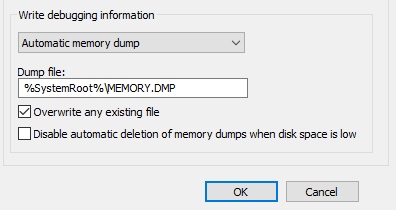
One of the most annoying bugs in a Windows computer is the BSOD (Blue Screen of Death). When the BSOD takes place, a dump file is produced in specific location and the debuggi
and if you want and it happens again, you can pm me with the error log and i can find the problem for you
thin cove
Alright thanks.
carmine moat
or you can google the error that the blue screen spits out the next time it crashes after youve enabled the blue screen
it might have to do with the memory on your gpu but hard to say
 carmine moat
reverify your game files or something
 hollow olive
[Reproduction rate:] 5 out of 13 times
[Steps to reproduce:]
- When you leave a mission
- Hits you through the textures (I don’t remember what these tower sonics are called)
[Expected Results:]
Noting, you just over mission.
[Actual results:]
You can go out of Drop Pod and die if you kill. (I do not know, have not yet been killed after that.)
[PC Specifications:] Hardware: Mobo - Gigabyte GA-970A-DS3P, CPU - FX6300, GPU R9 270X Sapphire Toxic 2GB, RAM DDR3 1333Ghz (OC 2133) 8GB (GoodRam) Dual channel CL 9-9-9-24-33.
Software: Windows 10 64bit Pro v1803.
native rock
@cursive robin It's a UI bug between the game resolution/aspect ratio and the HUD UI Scaling; turn your HUD UI Scaling up and it will reappear. Depending on your resolution, it may need to be pretty high to reappear. I got it to stay at 75% at 1280x720, but only 93% at 1024x768.
 slim viper
anyone else getting constant game crashes after tuesdays windows update?
 cursive robin
@native rock Thanks! I'll try adjusting my settings that way
cursive robin
So I set my resolution to 1280x720 and HUD UI scale at 75% and still no crosshair. I'm gonna do a mission with HUD UI scale at 93% now
 small jewel
Not sure if this is a big or not. I'm playing with a ps4 controller on pc, with headset connected through ps4 controller. The sound is mostly only coming through the left speaker, stuff like footsteps and gun sounds and explosions. Right side is only getting the in-game music
carmine moat
@small jewel https://www.reddit.com/r/FortNiteBR/comments/8hka0v/sound_in_only_one_ear_when_in_game_on_pc_using/ try that
reddit
3 votes and 18 comments so far on Reddit
 chilly needle
O.k. I don’t understand why Glacial Strata and Magma Core automatically have earthquake regardless of mission stat in any lvl. It is highly frustrating to help new players learn how to play their class especially in lower level 1 and 2 in these specific maps. It is because Engineers don’t know how to use platforms properly at low level when large crack open up on the team. Why create such as situation in context, it’s not the end of the world but lower level players do t have a huge load out of gear like fully fledged Lords of The Deep. I only wish more people would play and maybe this situation is a put off for newbies because it’s just another thing they don’t expect. If the map mission says Critical Weakness, that is when I expect the world map to create high difficulty. But I’ve been testing this theory in the last 2 weeks and have found there to be no relevance of what Critical means. In some cases the map configuration has no flaws and there is no earthquake as such to fracture ground especially in Fungus Bogs and Dense BioZone. This is a problem that needs addressing because it messes up game play. I don’t think you should remove it. But I’d suggest you set all maps to have a percentage chance of Critical Weakness regardless and remove it from mission bonus. That way, any map has all features but may include higher danger level than that played. It should also be written into the Region Description to tell players what they may encounter.
hollow olive
Drink bag
[Reproduction rate:] 4 out of 4 times
[Steps to reproduce:]
- Drink beer
- Open any terminal (but not tutirial)
[Expected Results:]
Can't not be.
[Actual results:]
Drink animate not play, but beer will fade.
[PC Specifications:] Hardware: Mobo - Gigabyte GA-970A-DS3P, CPU - FX6300, GPU R9 270X Sapphire Toxic 2GB, RAM DDR3 1333Ghz (OC 2133) 8GB (GoodRam) Dual channel CL 9-9-9-24-33.
Software: Windows 10 64bit Pro v1803.
native rock
@chilly needle The Critical Weakness modifier makes all enemies take drastically higher damage to their weakpoints, and has no effect on the terrain generation. I'm not sure if you were just confused about what Critical Weakness actually did or if this was a suggestion you were making. I'm all for getting rid of random, unavoidable, slowdown mechanics though...
mossy breach
Drop pod lands in weird positions like these sometimes. You should almost always be able to get on it anyways via your classes movement ability or some plain mining and jumping, but it's still annoying
desert stratus
hmm that's odd, I failed a mission and the game softlocked. I can't think of anything that might have caused this, I just went down in a solo mission and when the end screen appeared it was blacked out and there was a constant tinkling sound as if I was depositing minerals.

Will report back if it ever happens again, I suspect it might be a backend issue because my score in all categories was zero instead of the small amount I managed to gather before I died.
carmine moat
i've noticed more softlocking issues like this recently
 candid nymph
I started a mission with a friend and we clipped out of the drop pod on the way down. All the ice was unbreakable where we got dropped off and there was no way out. We canceled mission and the game froze so spectacularly that both of our computers froze including the monitor.
 red forge
Found a bug
gentle hazel
Noise bug, sometimes the grabber noise does not play for everyone in the party, just one or two people.
same with Bulk detonator, I can hear the pick plack of the digging but nobody else could
cinder portal
besides people that play with music or other noise sources omiting ingame sounds, the game seems to have a limited amount of audio channels (duh ofc it has but -> ) the issue is that sometimes too many sounds need to be played and the audio engine cant play all of them. seems to happen with drills a lot especially when you start a mission due to droppod sounds and dwarf voicelines playing filling up the channels.
carmine moat
err cube disappeared from my hands while i was carrying it
cinder portal
if you're in a small space, then any carryable may be pushed oob by the physics engine and then be bounced back somewhere else where there's enough space (usually below you in a cave)
ember stirrup
Not sure if discussed or not but it happened to me before where I join a mission during fuel cells and the thing is invisible. Well it is and it is not. What I mean is it is actually stuck in mid air visually but is actually on the ground where you cannot walk on. Figure I point this out to those reporting it
have to look waaaaaay up to see it so hoping this info helps the devs out
 vapid elk
Stuck on End Screen after mission completion
[Reproduction rate:] 2 out of 2 times. (First mission was the discovery, second mission was the reproduction; The missions were after one another)
[Steps to reproduce:]
- Play through a normal mission
- Last person standing has to drop to 0 health and activate iron will before completing the mission
- Extract as the only standing player
[Expected Results:]
I'd expected to just extract normally. The Iron Will status effect should either of been removed as I (or whoever is the last player) was leaving or shouldn't of downed me as I was leaving.
[Actual results:]
Regardless of whether or not you die before the end screen, the end screen doesn't show the statistics of my mission, player information, or exit button. I'm stuck on the end screen with no way out besides closing the game. The first occurrence was when another player extracted on Iron Will, the second occurrence was by myself, so the bug will effect everyone in the lobby.
[PC Specifications:]
System: Windows 10 64-bit OS, x64-based processor
Processor: Intel Core i5-3320M CPU @ 2.60GHz
RAM: 8 GB
gentle hazel
I broke the game
I promoted a dwarf, invited my partner, he accepted as I click promote dwarf, and his screen went black
and then he couldn't join my game
we both had to restart the game to keep playing together
steam version
chilly needle
@gentle hazel I don’t think that is broken. It’s more likely your server connection disconnected. It’s a bit tricky doing invites inside the hub. It is much safer to invite once you have left the hub or are in mission state. I think this is because you are lock to a set of 4 players and you are inviting into a specific server address. When promoting your toon, you are in your hub but it is in part a lobby where others can join. That may be the problem of lag and location and bandwidth . Not the game.
gentle hazel
first time I found this problem, I always start the game and invite my partner, 0 issues until I did the promotion thing
chilly needle
@candid nymph Same happened to our team several weeks ago. We concluded it may be because we were loading the pod with foreign objects before decent. Even standing in the Pod doors may cause some sort of disruption to the core decent. We got 2 situations. 1 was we were suspended above the map but couldn’t enter it. 2 we got to the base but we’re stuck inside the Pod base area where it landed. Both situations required a hot reboot of the game. It’s kind of a bug but it’s pretty rare but we think you can make this happen if you want to screw up you game play.
mossy breach
@mossy breach
can u try and use a driller with cryo gun and jump in mid air and fire gun and see if it crashes game
@mossy breach
chilly needle
Didn’t crash for me but it got a little laggy. Maybe the Cryogenic-gas doesn’t like being shaken. Oh btw don’t jump around as shooting that thing is a close quarters action to allow your team Gunner to shatter the frozen foray. It’s a team sport not a FPS jumping castle.
carmine moat
just tried on steam on a breeder; was normal
slim viper
Anyone ever have a problem where the supply drop (like you're hitting #5) keeps randomly coming up while playing, i also couldn't throw grenades, and i had to click on things in the menu 20+ times for them to register... no idea what is going on
pulsar parrot
This user has been having problems with achieving achievements in the game. They have done it many times as host and is sure they have done it exactly what is needed. Restarting Steam didnt fix it or redoing the achievement didnt fix it.
First achievement is: "Kill two dreadnoughts within five minutes"
Second one is: "kill two dreadnoughts within 30 seconds."
Third is I think: "Ride Molly for 15 seconds" but this one is showing 2/15 which is weird. If im missing something, let me know. The user already has it unlocked as well, but it translates to, I believe, to ride molly for 15 seconds.
Again, the user is sure to have done it correctly many times. Maybe trying when someone else is a host, but wondering if anyone has ideas what we're missing or if there is a bug.
mossy breach
ive found a bug where my player turns into a grenade in the equipment or accessory terminal
gentle hazel
Neat!
 shell vine
it's same here, dunno why 😃 mabbe some achievements are broken @pulsar parrot
carmine moat
what.
fallen hill
🤔
graceful yarrow
I just noticed there's a small strip on the left side running vertically where the green background of the options menu doesn't cover.
it doesn't change when you toggle and apply different screen mode options
RwWolf, open C:\Program Files (x86)\Steam\steamapps\common\Deep Rock Galactic\FSD\Saved\SaveGames on your computer and send us a screenshot of what's in there
 high arch
graceful yarrow
high arch
graceful yarrow
@high arch I tried to dm you to help but you've got messages from strangers blocked
send me a dm, I've got it enabled
 violet sundial
Just had to abort a mission (with an error cube) after Bosco picked up an egg and I couldn't pick it back up to deposit it.
inland badger
Can someone explain me this?
 narrow cloud
So, sometimes it seems my shooting button (LMB) is unresponsive, for instance I'll try to rev up my mini gun as the gunner but it won't go until I click a few more times, but sometimes it'll work just fine. Any known fixes for this?
carmine moat
@inland badger the game just ended and everyone left i believe
 rain nimbus
@narrow cloud Change your display settings to fullscreen at your native resolution. I had the same problem.
narrow cloud
I’ll give it a shot, thank you for the response!
rain nimbus
no worries, that bug is a PITH
 hasty cosmos
 willow linden
So apparently there's a glitch when you throw the shield, it doesn't deploy, and you can't throw any others out.... wtf... on max difficulty to boot 😦
 twin cobalt
Hey guys, I'm getting this weird behavior when I close the game. The cursor gets distorted, it either get's stuck on the resize type cursor or when there's an input, the input cursor is split into two and the colors are off. Does anyone else see that or is it my machine? I changed my computer and it's the same on the new one too...
EDIT: It's like cursor animations are not happening. The loading cursor also hangs and i have to use it to click on stuff
 orchid sonnet
@inland badger happens to me every time
 rigid crystal
These are two images of some interesting projectile pathing lines
It appears to happen when the projectile is set to land on angled terrain
 half rune
Anyone else who mains scout feel like some of ur shots with the “M1000 CLASSIC” don’t render? Like as if they go right through your enemy?
cinder portal
m1k is a hitscan weapon
desert stratus
getting a weird sound bug
if I run a youtube video in firefox and then boot up DRG, the moment DRG loads into the spacerig the youtube video drops to about 20% volume
this persists even after DRG is closed, and the only way to fix it is to reboot firefox or go into the windows volume mixer and move the slider for Firefox's volume
the instant I change the firefox volume to anything else it goes back to normal (100%)
Should I report this? it only started today near as I can figure out
mossy breach
Have you checked your pcs sound settings to make sure you cant just turn it up again?
desert stratus
well that's just it, when DRG finishes loading the sound drops, but the sound in windows and youtube is still set to 100%
In order to fix it I can change Firefox's specific volume to something less than 100%, which then instantly brings the sound back to normal, if I then drag the volume back up to 100% it returns to normal.
Huh, okay seems like a false alarm.
Firefox had an update pending so I rebooted it and now it works normally.
 proven owl
I just got grabbed by an invisible trawler, it was during a sandstorm in the sandblasted corridor
half rune
My fear upgrade on the M1000 Classic for the Scout isnt working anymore
The others never run away when I headshot a grunt or kill a praetorian in its soft spot anymore
pulsar parrot
@half rune It's focused shots only as well. Even that, it's not working?
half rune
Yes, pretty all I use is focused shots with that gun
pretty much**
I have that gun set up to do more damage with focused shots and to have more damage on weak spots. So it works perfect with the fear upgrade. Though lately when I do get weak spot kills with focused shots the others never run away. Which really sucks because sometimes on haz 4 that upgrade saves my butt
pulsar parrot
Same here. I have noticed sometimes the mod not working, but it could be a sensitive one. Lately, I've been getting the fear affect, but not very effective. Anyway, I'd keep trying it out to be sure. If you know 100%, hope the devs will look over it.
 fossil berry
I couldn't take a screenshot or video cause during the same mission i was being bombarded with enemies, but during Point Extraction missions, Aquarq that are revealed in crevices caused by earthquakes in the Glacial Strata or Magma Core have a weird property where they can be picked up by Bosco, and consequently cannot be picked up by the player. They can still be picked up by the player first if they don't let Bosco take it.
If they make Bosco drop the piece of Aquarq, the player can't pick it up, but Bosco still can.
gentle hazel
I no longer hear the noise of the mactera grabber, I can hear the cries of pain when hit, but not the ciccada like noise when it's about to grab someone
 glad mason
pulsar parrot
glad mason
pulsar parrot
o.o
desert stratus
speaking of sound bugs I've compared the menace sounds from the game files to what I hear in game and they sound rather different
menaces make the same sound burrowing and unburrowing as the spitball does when it hurls a glob. Which is confusing to say the least.
 royal elbow
Beer bug:
- Go jukebox and start a music.
- Go order beer and grab one
- Return to dancing area. Try to hit Enter to drink a beer. Nothing happens
- Leave dancing area and come back. Now it works
desert stratus
lol what the heck
fallen hill
That's weird. Out of curiosity, did the shield not return for the remainder of the mission? @hidden turtle
 hidden turtle
Yes, it did not.
Actually it's very interesting how gunner said Shield! voice line just after I killed spitball infector.
So I guess it was stuck on spitballer inactive while it was alive and when it died it disappeared with him, but for some reason voice line still triggered.
 crisp summit
flying beard YEAH x)https://cdn.discordapp.com/attachments/611646345865986061/611658674561089561/unknown.png

 sleek hemlock
Starting a mission, my friend passed through the roof of the drop pod while it is descending and we got stuck in a eggoïdal room like in the screenshot. The drop pod arrived far under our foot. We could not dig the rock there.
So we quitted the mission and then the application does not respond and is blocked in a black screen
sleek hemlock
at my side I experience at random time a bug where the character walks backward without I touch any button. To stop that, I have to go to in-game menu then resume.
 glass needle
Ok so I asked about this issue in the #drg-chat already but thought I could get more help here
so just wanna get this out of the way I got a crappy pc so I usually go fullscreen and on a lower res to get an optimal performance
the issue is that whenever I got fullscreen (native res) the game doesn't utilize the full extend of my monitor
not a screenshot (atleast not all of it)
just a screenshot of the game put into a paint
also width and length is obviously wrong
just try to envision it in 1920x1080
(screenshot doesn't capture what I see)
 manic agate
My friend and I discovered a bug that is causes (we are on xbox one, didn't know where to go but here). When our controllers disconnected anyway or form, it would take us all the way back to the home screen regardless of in a mission or the Hub. I just wanted to get this out there so the Developers can see it
 dusk jungle
So im currently suffering with a bug, i have just reach level 25 with my scout, however it wont let me do a promotion.
all the other class promotions are there however the scout class is not, is there a fix for this
violet sundial
Does anyone else almost have to load the loading screen before loading the actual level? I often have a black screen before the loading screen comes up (with a 0% loading bar).
I don't know if the new loading screens are the cause, but an option to turn them off in favor of a more basic screen might be good.
 flint prism
I started a simple Elimination mission in sandblasted corridors but one thing prevented me from doing it - I spawned in the closed hole made by a drop pod. Surroundings were not destructible so it was impossible to get out of here. Furthermore, when I tried to leave this bugged mission game crashed, lol.
 honest garden
carmine moat
honest garden
carmine moat
@glass needle did you try going into settings and setting your resolution scale to 100%?
carmine moat
steam or windows
glass needle
steam
carmine moat
whats the game resolution set as?
carmine moat
your windows resolution is set to 1920 x 1080 as well?
glass needle
yes
carmine moat
it seems as if your game resolution is set to wide/ultrawide aspect ratios
glass needle
anyway to fix that
carmine moat
does it only happen with this game?
glass needle
yes
carmine moat
can you screenshot the graphics page in your options for me
carmine moat
you can try checking to see if your text scaling is past 100% (if windows 10)
carmine moat
restarted the game too?
carmine moat
its been like this ever since you tried full screen?
glass needle
uhuh
I'm not sure if the game was originally fullscreen when you first play it
but it was normal then
carmine moat
you can try reverifying the game files
glass needle
but then I tweaked some settings and ye
I already tried doing that several times (also reinstalled)
though I can do it again
carmine moat
it probably wont do anything then
glass needle
yeah
carmine moat
you have more than 1 display?
glass needle
nope
carmine moat
your monitor is native 1920x1080?
glass needle
uhuh
carmine moat
the first image you posted is how you see it on your screen?
with black bars on all 4 sides?
carmine moat
did you change any settings in your nvidia/amd control panel
glass needle
No
carmine moat
it looks like your game might be being letterboxed, but im not exactly sure whats causing it
carmine moat
does windowed fullscreen fill the screen at least?
 scarlet wadi
where do i report a bug?
fleet zenith
here
scarlet wadi
[Reproduction rate:] 2 out of 4 times
[Steps to reproduce:]
- Finish assignment mission
- Click on continue
- RIP
[Expected Results:]
Continue playing
[Actual results:]
All controls freeze (can't move, can't access menu), outside of mouse cursor.
Party members continue to move around so the online session is still running.
Only fix seems to be force-closing the game.
[PC Specifications:] Windows 10 Version 1903 Build 18362.295 (let me know if you need more info)
This 'Continue'
hidden turtle
Another peaceful minute of point extraction:
rigid crystal
By Saluting and entering a dance, the pickaxe will remain floating in the air. Its appearance is dependent on how long through the salute you are.
Reproducable
proven owl
pom pom beard
gentle hazel
@visual pebble please post your steam issue here so it doesn't get buried in all the chatter of the normal chats ❤
 visual pebble
Not sure if steam issue or drg issue. How ever on multiple instances when I reset my computer steam things that DRG is uninstalled. I reinstall it then it finds the files and loads right away no download needed. Does not happen to me on any other game in steam.
carmine moat
@visual pebble have you tried https://support.steampowered.com/kb_article.php?ref=8379-RYIP-2998&l=English
Article "Installed games are appearing as uninstalled"
carmine moat
could just be a steam issue; tried everything on google?
mossy breach
is this the #bug-discussion ?
My favorite bug is the Webspitter
it's purple, I like the color
fallen hill
@slim viper That looks very frustrating. I would suggest trying to play fullscreen and your native resolution and see if that resolves it.
@scarlet wadi Did you use ESC to press Continue?
half rune
So I have unequipped and re equipped the fear upgrade for the scouts semi-auto rifle and it still doesnt work
I’ve used in lots of missions using the focused shot on there weak spots for the final blow and still, nothing
I am 110% positive that it is does not work since last update
scarlet wadi
@fallen hill No. I clicked on it using the mouse
 desert wharf
#bug-discussion I posted this on reddit and it didnt seem to get noticed by anyone. The audio cuts out randomly and it never comes back. I have to close and reload the game to get it back, but then it goes away after a few minutes again.
 pale sky
desert stratus
pale sky
desert stratus
I think that's the same bug that causes you to fall through the pod at the end of the level, and the mine head on point extraction.
cinder portal
@half rune the fear on the m1k does work, however there are a few major limitations to its functionality.
It only works as host and it does not work on macteras or other flying enemies / shellback / younglings
half rune
@cinder portal it only works when u host the game??? Thats the dumbest thing ever devs need to fox that
And no it never worked on macteras or swarmers but I was okay with that. It doesnt work at all lately because I let my friends host
fallen hill
@scarlet wadi Which assignment mission were you doing?
 calm tulip
so im having problems with my connection
for the past few weeks even until now, ive been having connection problems with my friends
my friends would invite me every session until a couple of weeks ago, a storm hit my place really hard
it was also the same day that i would get dc'd from my friends
heres the process of events before a disconnection:
1 - friends send invite
2 - i accept and log in with any character
3 - i get disconnected in the time of between instantly to 5 minutes later
4 - repeat
i tried verifying the game, resetting the internet, reinstalling the game, pretty much everything
and i still get dc'd for no reason
cinder portal
@calm tulip do all of them get disconnected when you host?
does this appear only in DRG? try the same in a game that uses local servers aswell. terraria/minecraft etc, if it happens there too then you know its not a DRG specific issue which whould help a lot to know.
calm tulip
when im the host and i do the invite, the same thing happens to them. they get dc'd.
yes, this applies to drg only
calm tulip
update - i tried it on terraria and i did not get dc'd
drg seems to be the only game that is affected
scarlet wadi
@fallen hill I don't remember exactly. One of the level 10 class ones.
desert wharf
I posted this on reddit and it didnt seem to get noticed by anyone. The audio cuts out randomly and it never comes back. I have to close and reload the game to get it back, but then it goes away after a few minutes again.
 manic cipher
anyone else not able to pick up every aquarq from time to time? was not able to resupply today for some reason.
ember stirrup
It happens a lot
especially if bosco is involved
last time it happened to me was when i had bosco dig for an aquarq and had him stop temporary to shoot something then resume
dunno what is triggering it but I only seen it happen when bosco was involved in some way
cinder portal
so you're saying, you werent able to resupply because you werent able to pick up aquarq? how are those connected exactly 
ember stirrup
never heard of issues of not being able to get supplies from pod unless it kills you as it drops down further from that other glitch
desert stratus
a lot of the time I go to resupply I don't see the "press E to resupply" tooltip
I can still get my ammo if I hold the button down, the sound plays and everything, but the tooltip is missing
That can be annoying if I'm approaching the ammo from a weird angle because I can't tell if I'm close enough.
 trim bone
Is this where we come to discuss the sympathies for glyphids? I can't help but feel like we are committing genocide. Are we the baddies?
fleet zenith
Ruke has a bug, it seems
chilly needle
I I had 2 disconnects yesterday. Both were during a mission and occurred after I called for the drop pod from Molly. It has nothing to do with where I was on the map nor bugs. I was just following Molly back to the Drop Pod landing site on the first disconnect. The second happen as the Drop pod was landing as it was only a short distance away. If it helps both disconnects occurred in Fungus Bogs. I played about 15 games yesterday but I think I will stay out of Fungus Bogs till some sort of assessment is done. It’s highly unusually because this is not something that has been happening in the past.
cinder portal
more then likely host related, since thats who you disconnect from. there are no dedicated servers, so the fact that it was both in fungus is probably just random
 abstract fractal
 hidden turtle
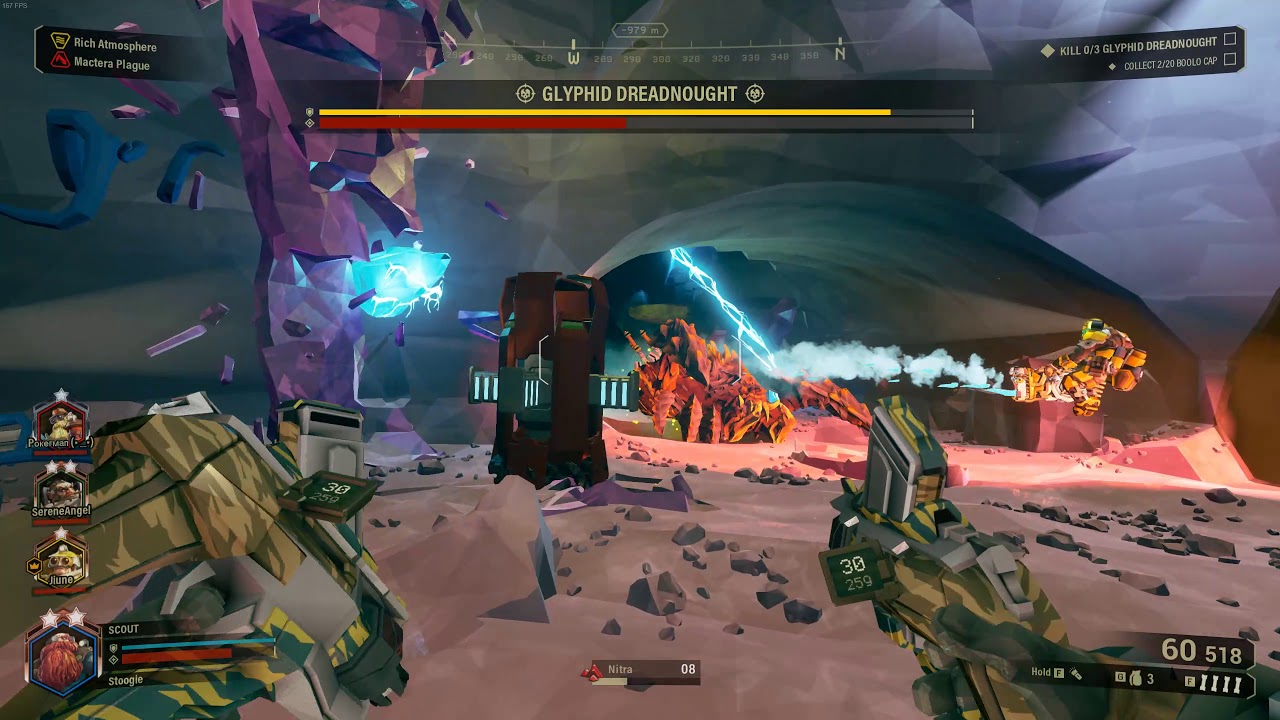
Cave leech visuals getting stuck on the screen for a few seconds.
Usually it's happening when you oneshot it by m1000 in the air (after hook), but there it's something else.
also you can hear voiceline 'egg, I found an egg' on roe lol

salvage bug returns 👀
it was exploder infestation, so exploders wave below doesn't count I think
 strong harbor
I think it was already mentioned but upon completing an assignment mission if you close it after the dialogue but not before the continue counter finishes you will have the dialogue repeat roughly a minute later and are unable to move or interact until the invisible continue counter has finished. Repeated 3/5 times
gentle hazel
we got a bittergem in a very tiny tunnel in Crystaline Caverns? Crystal Caverns? the thing bugged in my partner's hand and it disappeared out of the map :c
 hybrid flame
 torpid ore
You gotta keep your head on a swivel in the mines
And your waist
Just everything on swivels, really
 summer mural
- Play Engineer in a point mission
- Place Aquarq on ground
- Shoot Aquarq with platform
- Aquarq travels down through the ground appearing in the first cave or open space it finds
is this a known bug?
swivels
pulsar parrot
@summer mural Can confirm happens most of the time. Made a clip to give them a visualization of it.
summer mural
oh wow it even goes adjacent
pulsar parrot
Also, like to point this out again in case it's been missed. Leech seems to be bugged, either from the terrain or something else. It didn't seem frozen or a cold vent near it. I've witnessed it almost every time and only in Glacial Strata so far.
 wicked drum
hey guys still not getting the solo missions achievements. havent gotten the 10 mission one yet despite having done like 30
hidden turtle
 ripe terrace
for some reason in DRG at a random given moment my mouse just stops working and i have to replug it
this also happens in killing floor 2 but a lot less than in DRG
these are the only two games it happens on
im using a razer deathadder btw
carmine moat
you tried another mouse?
pulsar parrot
...
@ripe terrace Is the Razer Chroma/Synapse software up to date? I've searched about it and it seems to be the common problem.
ripe terrace
last time i checked it was but i cant recall if the issue occured less when i just updated synapse
carmine moat
Synapse causes a lot of issues for a lot of things. Your best options would be to:
- Update Synapse
- If doesn't work, disable Synapse
- Use a different mouse
Along the way, if you find that it works anywhere along the way, than you know what would be the primary cause.
 tender bone
can we please please fix the 'i have voice push to talk but still my mic is open for people joining' bug?
annoying as heck
 loud rivet
Ugh, I still cant play because of the black screen bug thing, and I've done everything
pulsar parrot
@loud rivet Really? Even the whole list of solutions in the pinned messages?
loud rivet
Yeah
Weird thing is, when I first played it a few months ago it was working fine, when I played it again later on the same day it was broken
pulsar parrot
I wonder if your savefile got corrupted
Well, I'd try speaking with a dev when theyre available. Mark is probably the guy to go for.
 cerulean swan
Me and my boys are having quite a bit of issues, one we have a lot is our controllers disconnect and it boots us from the game
Not sure if anyone on xbox is having the same issue
fleet zenith
starting cave didnt generate a tunnel to the next cave
sandblasted corridors, medium mining expedition
next cave is just fine, has a dirt-blocked tunnel
 dry nest
uhm.... okey
 brittle quail
Well, I've reinstalled the game, verified game files, restarted Steam, restarted the computer, verified FSD.exe had an exception through the windows firewall, added an exception for FSD-Win64-Shipping.exe, run a virus scan, updated my anti-virus, ran another virus scan, disabled by anti-virus. All other Steam games connect to servers and all other internet access on the computer is working normal. Been this way for several days.
I'm completely out of ideas and honestly pretty burnt out trying to figure this one out.
brittle quail
Well, I figured it out thanks to a guy on reddit. The conan server hosted on the same machine that has the "-nosteam" command line parameter completely blocked DRG's steam access despite being a separate executable entirely. Even with all of DRG's firewall permissions removed, the game works perfectly as long as that server is not running... but as far as I can tell, DRG is the /only/ game affected by this cause I've had that server running for months on this machine and not encountered a problem otherwise.
 tacit sandal
@brittle quail One thing that may fix it:
In C:\Program Files (x86)\Steam\steamapps\common\Deep Rock Galactic\FSD\Binaries\Win64\ (if installed on the C: drive)
Made a file called steam_appid.txt and inside type 548430 and save it
mossy breach
cerulean swan
this controller disconnect issue is getting severe
Keep losing so much progress because my controller will disconnect and then it kicks me
 tired scaffold
gee, I wonder what kind of bug report DRG-800 will be
it couldn't possibly be another error cube report, now could it?
 lost lagoon
So I don't have any proof, but my friends and I were playing last night and sometimes the flying grabbers would just be frozen in place. Not like frozen in mid-air kind of deal, it was still flapping its wings and making sounds and moving from side to side with its animation, but it wasn't going anywhere. It wasn't trying to grab or attack us. And we also found one flying spitter that was also stuck in place, but before I could take a picture my friend killed it. Is there a flying problem? It doesn't always happen, just occasionally.
gentle hazel
I get that issue when my friend hosts, he has tiny micro cuts on his internet, so I see enemies running and flying in place, not seen when I host so far
lost lagoon
Well I was hosting and my friend could see it frozen in place as well. We could shoot it and kill it no problem, it was just floating there.
gentle hazel
hmmm
floating normally as if about to grab someone or floating kinda "sad" with it's legs downwards???
lost lagoon
Floating with legs down, like it's idle. It's not trying to grab anyone. It's just chilling.
graceful yarrow
I've got footage of that happening now that you mention it. The grabber sat there for a few minutes doing nothing, directly in front of a player
gentle hazel
that happens to me if I have a weapon that stuns enemies
graceful yarrow
It wasn't being shot
lost lagoon
What 1Tater said.
gentle hazel
with the sad legs as stunned??
gentle hazel
without being attacked at all?
graceful yarrow
Yep
gentle hazel
hmmm, that does indeed sounds like a bug!!
lost lagoon
No health missing.
graceful yarrow
The footage is buried somewhere in my haz 1 shenanigans stream
lost lagoon
xD
 meager crag
Engi got grabbed right at pod entrance pad - got stuck. Also had a nade attached to pickaxe afterwards.
 vast moat
Luckily I was playing driller. I've never had the drop pod just land in the air before
Also lately, Mactera grabbers are not making their high pitch call before they appear and grab me. Been playing a bunch of solo lately for the achievement and can't recall if they aren't making the noise with other players
 atomic plank
game unplayable
pulsar parrot
Had that bug as well xd. I've only seen it happen when players have that assignment so far.
 keen pulsar
What's up with the pc version (non steam) always losing connection?
fallen hill
@brittle quail So removing '-nosteam' from the Conan startup properties resolved the issue? 🤔
@loud rivet Try to make a backup of your save file and save it elsewhere on your PC. Next, remove the original save file from your game folder and see if that enables you to boot up the game properly.
brittle quail
@fallen hill Just re-tested things. "-nosteam" doesn't actually seem to be the issue. I hadn't tested it specifically, just whether or not the server was running. I launch the Conan Exiles server using their DedicatedServerLauncher and, '-nosteam' or not, if the server is initialized and running, DRG cannot see Steam. The launcher can be open and things still work, so it's specifically the server itself causing issues. Unless there's some crazy port conflict going on (7777,7778,27015,25575), no idea why it's a 100% failure situation.
 plain wolf
Visual glitch with the driller. I went to throw a axe at a trawler as it grabbed me the item is now stuck in my hand with all equipment. I have tried throwing a axe to see if it will clear it with no luck. The only weapon it is not visible with is the cryo canon as its modal covers the axe
 brazen juniper
Has anybody else had the glitch where you mined an alien egg and it fell through the floor making the mission unfinishable?
gentle hazel
not that frecuently since the last 2 updates/patches
pulsar parrot
@brazen juniper yes. Supposedly, it would teleport or pop up on the lowest elevation in the map, so it's not a scavenger hunt type of deal, hence Egg Hunt. But it does have the chance to disappear. It was completing no where to be found?
brazen juniper
I think it fell to the bottom of the map, but I just left the mission
 pseudo rivet
vast moat
pseudo rivet
vast moat
In solo, does anyone else have an issue where molly will not follow you sometimes? I've noticed molly will be about 80m away frequently
slim viper
anyway to reactivate an account on the jira bug tracker thing? why even deactivate someone that reports bugs...
graceful yarrow
It's been stated that accounts that have been inactive will be deleted/deactivated. Jira costs the devs money for every active account. @slim viper
slim viper
ah ok
graceful yarrow
As for reactivating it, that's something that a dev will have to answer about. Either Mark or Bjorn would probably know.
potent nymph
@slim viper you should have access now 🙂
just to give you an idea, we are talking a cumulative cost of 500$a month if we dont deactive accounts. So Jira will literally bankrupt us if we dont deactivate accounts 🙂
fleet zenith
I feel bad for having made one now
potent nymph
well, if you use it, its fine 🙂 if you dont i will deactivate it after 1½-2 months of inactivity
fleet zenith
Its probably been deactivated already, then
How much more convenient is it to receive bug reports via jira instead of discord?
potent nymph
depends what it is
cinder portal
have you thought about a 2 channel bug-report setup? one where everyone can post bugreports in a set format like in suggestions, and one where the ones that need adressing (and/or were reproduced by others) simply get copied to
im sure there are cheaper setups that work just as well lol
potent nymph
I mean that is what discord and reddit is? or what do you mean? We currently look at steam forums,/discord/reddit and any bugs that doesnt get solved immediatly, we put in jira until a time where it gets fixed. People who make jira reports cut out the step of us doing it 🙂
 dense kettle
Hello ! I encountered a strange bug today that I was unable to reproduce. It involves a leech and a strong winf from the Sandblasted corridors.
A strong gust of wind threw me away and at the same time a leech grabed me. But instead of being paralysed, I was still able to shoot with my weapon.
I easily destroyed the leech. The map was length 1, complexity 1, egg hunt mission.
Modifiers were Mineral Mania and Cave Leech Cluster.
graceful yarrow
Mineral cluster
 iron steeple
Anyone else getting that bug in end game screen where it shows the players with the losing animations but without any overlay of letters or buttons?
atomic plank
If you hold a drink and go to character creation, even if you hadn't drank it, it would disappear without a trace
 storm fulcrum
Guys? Anyone there? I woud use some help.
graceful yarrow
@storm fulcrum they probably won't get back to you immediately, but if you leave the details of your problem here, one of the QA devs should be able to get back to you when they get in to work tomorrow. They read this channel regularly and do their best to help people out.
pulsar parrot
@storm fulcrum I could possibly help. I have a few suggestions
storm fulcrum
Alright. Ive got a big issue, whenever I play the game for a few minutes, my screen just crashes. Not the PC, not the game, but my monitor stops showing stuf as if it would be disconnected from the PC.It says"No Signal". It happens only why playing DRG, is there a solution to this?
carmine moat
whats your monitor plugged into? the gpu or the motherboard currently?
pulsar parrot
So if your plugs are connected in properly and that's not the issue, and drivers are fine, maybe steam overlay is affecting it. If it didnt turn off your monitor showing "no signal", it would've tried alt-enter or
Go to your start menu, type %appdata% in the search. Then in the window that opens go to the arrowhead folder then the gaunlet folder then open user_settings.config in wordpad. Change borderless_fullscreen = false from false to true
storm fulcrum
@carmine moat The GPU, using HDMI cabel. This thing happens ONLY when ive got DRG turned running on my PC.
carmine moat
try plugging it into the motherboard and see if it still happens
storm fulcrum
@carmine moat My PC wont run if I plug my monitor into the motherboard
Btw, this did not happen a month or two back
storm fulcrum
Its fine, not overheating
Ive got no moe HDMI cables
Is it possible that my rocessor cant handle it anymore?
carmine moat
that shouldnt really be affecting your video output
video is being handled by gpu, since its plugged into the gpu currently
do you have the latest cpu drivers installed? you can test your video through that unless your motherboard hdmi is bad
i think there was an option in BIOS that enables/disables your cpu graphics
storm fulcrum
Ill try to look for it
 glossy zephyr
one of the dread cooons was popped with no Dreadnaught in sight.
We could not complete the mission
We heared the dreadnaught theme at the very beginning of the map when drop pod arrived, but it stopped after a minute
storm fulcrum
@carmine moat I tried to disable onboard grapphics, switching to fullscreen and back, re-installing the game and the bug still occurs 😦
carmine moat
it was already enabled and plugging the hdmi cable into the motherboard didnt work?
storm fulcrum
@carmine moat My onboard gaphics are unable tu run DRG cuz theyre too weak
graphics*
carmine moat
does the no signal error occur on any other games?
storm fulcrum
Nope
fleet zenith
i spammed the grenade button while being revived in a laggy match
storm fulcrum
Just DRG shuts down the connection between my monitor and my PC
fleet zenith
i did see two LUREs on the field but didnt screenshot it due to an angry dreadnought chasing me
 dusk topaz
LowLevelFatalError [File:Unknown] [Line: 200] Unreal Engine is exiting due to D3D device being lost. (Error: 0x887A0006 - 'HUNG') did someone had the same problem ? it happen randomly for no reason apparently
carmine moat
@storm fulcrum afaik, i don't think a program can disconnect a monitor directly; these are the possible things you can check:
- Having your Windows and Game resolution properly match your screens Native resolution (or try other variations such as 720p).
- Check your windows power settings and make sure the monitor is never put to sleep.
- You can try setting your GPU power settings to Maximum performance to see if it changes anything.
- Check internal temps using something like HWMonitor throughout the game (which you've already tried)
- Graphic Driver updates (or rollback if you updated it recently and believe it to be the cause, may even try a clean install before you start spending $)
- Try a different HDMI (reason why this is #6 is because you don't have one laying around currently).
- Since your CPU won't be able to handle the game, you can try another GPU (a spare laying around or a friends)
If it didn't always happen and started recently, its most likely GPU related, or that your power supply doesn't output enough to keep your GPU running during the game (best way to test this is to run an even more intensive game)
storm fulcrum
Dark Sous III runs as always and I thnk that this requires much more than DRG. Ill try to run it in lower resolutions, but It was never a problem before to play in 1920x1080
@carmine moat Even if your ideas wouldnt help me, I still love you man 3
❤
carmine moat

pulsar parrot
There was that one solution I said earlier that maybe could help if it hasn't been mentioned or done yet.
pulsar parrot
From a forum I read:
go to your steam folder
Steam\steamapps\common\Deep Rock Galactic\FSD\Saved\Config\WindowsNoEditor
and open GameUserSettings.ini with notepad
search for ResolutionSize, you will find 2 values X and Y. Set your resolution manually.
just a few lines below those you will see PreferredFullscreenMode, set it's value to 1.
Fullscreen mode = 0 is true fullscreen if neither works. Or Im reading someone say "try alt-enter" that would help go fullscreen mode.
storm fulcrum
search for ResolutionSize, you will find 2 values X and Y. Set your resolution manually.
just a few lines below those you will see PreferredFullscreenMode, set it's value to 1.
Ive got this all the time
pulsar parrot
Its all good.I literally type even when Im working at my job, like right now. That's how much I care for this Discord. I dont mind wasting time to help some Dwarves with issues.
Only thing I could think of is what Spirit said, try another hdmi. Or maybe try another monitor just to make sure.
storm fulcrum
I dont rly think its made by that. Dark Souls II runs fine, Quake Chmpions runs fine, League of Legends runs fine, literally any other game on my PC runs fine.
Any hopes I could be fixed with the next updates?
It*
half rune
Can anyone tell me why my deep rock wont allow me to connect to the internet? I can only do solo missions. I cant host private or public and I can’t join anyone. It’s not my internet because every other game I have is working just fine but deep rock is bugging out
pulsar parrot
Heres a quick glimpse i saw about your issue. Go to go good luck https://steamcommunity.com/app/377160/discussions/0/496881136901580379/

So, interesting problem here. First, the backstory: I got fallout 4, installed it and played it for a few hours. Close it down, open it, play some more. So on, so forth, as expected. I was playing it on high settings, and it ran as smooth as butter. randomly yesterday, and si...
half rune
Can someone remove this guy? ^
storm fulcrum
@pulsar parrot A guys on the net said that he re-installed both his drivers and his game so Iam gonna try this too.
carmine moat
@half rune check your firewall settings or your AV settings
 frail bison
During previous game: After our drop pod had been called i recalled my sentry while carrying a jadiz. The mineral disappeared and my guy continued to "carry" nothing until i switched weapons.
love you guys enough to report it for the betterment of the game, and therefor dwarfkind, but not enough to create a single-use account/login/learn your software/create+populate an entry unless im on payroll.
half rune
@carmine moat I got figured out
But mow there is a sound glitch. A really loud annoying screech or beep every few seconds as I’m playing a mission
As if there is a disruption in my headset
The faster I move around the level the louder and more frequent it becomes
cerulean swan
I would like to report a bug, I opened up my copy of DRG and I was greeted with a lack of beard physics, anyone else have this problem?
gentle hazel
I'm on steam, pc, and I am with three friends. I am hosting, mission is loading, all the sudden I'm alone in the loading screen and i spawn with three boxes in the drop pod seats
pulsar parrot
@storm fulcrum Sure thing. If all fails, hopefully a dev comes by and help you.
@half rune What I do?
Has your problem only happened just now, as well?
storm fulcrum
@pulsar parrot Well, my monitor didnt lost the connection for once but I had to restart the PC vuz of freeze and since I got the same problem again. Man, I dont want to be cut from this game....
pulsar parrot
@storm fulcrum Don't give up, my man. Surely a developer will come by early in the morning to help or sooner.
cinder portal
u did try the usual "muh update your drivers" yeah?
what kind of monitor are you running and did you try to run the game in windowed mode to check if fullscreen is the issue? @storm fulcrum
storm fulcrum
@storm fulcrum Updated my drivers using the Nvidia Experience software and tried both borderless fullscreen adn fullscreen
@cinder portal
cinder portal
did you try running the game in a smaller then desktop windowed mode
just to start ruling out what the issue is
half rune
Are the hazard levels broken right now? Haz 3 is boring and haz 4... well I might as well play haz 5
storm fulcrum
@cinder portal I would love to find out what the issue is but there is no hint towards it. It isnt caused by the Explosive update, my hardware is still the same expect for my mouse and DRG file integrity check says its all fine, I just dont know what to do. Ive already restarted my PC about 20 times today.
carmine moat
do you have a second monitor? if you alt+f4 when it disconnects, does it reconnect when it brings you back to your desktop?
cinder portal
he only has 1 monitor
carmine moat
ignore the monitor part, if you close the game after your monitor loses signal, does the signal come back? How do you usually get the signal to come back after it happens?
storm fulcrum
I cant do anything after, I have to restart my PC
carmine moat
even if you unplug and replug your monitor?
try to take a look at reliability monitor or event viewer and see if it tells you anything. It sounds like your gpu is crashing
storm fulcrum
Even when I replug the monitor It says No signal
I dontk rly know why would my GPU crash from DRG when Iam able to play games like DS III
carmine moat
what if you plugged it into the motherboard after it loses signal
storm fulcrum
Ive got Nvidia GeForce GTX 660
When I plug my monitor into my motherboard ive got no screen
I have to plug it into my graphics
pulsar parrot
gtx 660? Oh man
storm fulcrum
Well, Iam glad I could affor even this
pulsar parrot
It's not passed the minimun, which is 460, but it's recommended for a 970 or higher
storm fulcrum
Stress test with furmark?
pulsar parrot
I believe he said it does
storm fulcrum
Well, few last times Ive tried to play the audio just glitched and stopped playing by layers. First music stopped playing, then sounds.
After a while
carmine moat
check your power supply connections
storm fulcrum
Now they are 100% okay
I mean connections
But I dont think there is something fried in there
carmine moat
you can also try going into nvidia control panel and selecting your gpu for physx processor settings
tacit sandal
What temperature is the GPU running at?
storm fulcrum
Well, I cant rly see the number on my screen, but the vent pipes are cold at touch
How do I acticate the temprature numbers?
tacit sandal
Do you not have anything installed that can show the number?
carmine moat
download something like HWMonitor
tacit sandal
^
storm fulcrum
Alright
tacit sandal
I don't think it's the issue but best to know
It feels like the issue is with the GPU trying to draw more power than it can be supplied
Which can be caused by a few different things, bad GPU, PSU, MB, Home electrics, Cables or connections etc.
storm fulcrum
RIght now the temprature is 40 celsius
carmine moat
monitor it while running drg
storm fulcrum
GPU is correctly plugged into my motherboard and it has its additional supply of electricity connected to it
Well, I always played on high-ultra
tacit sandal
Most important would be Vsync/fps cap
tacit sandal
that's good
storm fulcrum
And I dont rly know what Vsync does
tacit sandal
As if FPS is not capped then the Gpu will over work it self even on low settings
storm fulcrum
Iam a bit of a peasant
tacit sandal
It just sets the fps cap to whatever the monitor can support
e.g. 60 fps for a 60hz monitor
tacit sandal
Technically it also forces FPS to be a factor of that number if it can't reach the cap but that's not needed detail
Just saying it before someone corrects me
But anyway run something till your screen goes black then see what the temp was just before
storm fulcrum
Iam gonna run DS III then
The temp usually raises to 80-90 celsius
Ill return there to share the results
@tacit sandal Well, the tamps are ranging from 60-80 and still nothing
temps*
tacit sandal
Well guess it's nice that it's not black screening
Has it even black screened in anything but DRG?
storm fulcrum
Never
Some games crashed cuz of my processor, but never a black screen
Even DRG
Ive bought it at the 1 yea anniversary
And till now It was Ok
I could peacefully enjoy the game
tacit sandal
Really can't think what could be the cause then
carmine moat
did you find anything in event viewer?
tacit sandal
Last option I can think of (other than what Spirit just said) is rolling back your graphics driver in case the most recent update to it caused this
storm fulcrum
First, the most recent update Ive made today did nor make worse or better situation
Asnd second, what is Event Veiwer?
@carmine moat
pulsar parrot
It's a detailed display of information about your computer. Useful for seeing programs that you may have not seen downloaded and such and also troubleshoot windows and application errors.
Search up control panel in your computer, click administrative tools and look for event viewer.
pulsar parrot
Gotta love google. I guess look for errors when running DRG and it'll show warnings, errors and such maybe?
storm fulcrum
Well, the problem is that I wont rly get to see those arrors cuz my PC just completely freezes and I have to restart my PC
After a few minutes of running DRG
carmine moat
it logs the error of when it happens, so when it goes black again; you can mark the time down and look for that time on event viewer
maybe reliability monitor might make it easier but not sure if it will list the problem
storm fulcrum
And that is...?
graceful yarrow
What you need to do is go play drg and keep an eye on the clock. When the pc freezes, note the time and restart, then check the event log for that exact time. Search the error from the time of the crash on Google and see what it says.
If it's only happening with drg, and not other games, then playing other games to test probably won't ever help
storm fulcrum
As Iam going through the log of the Event Viewer
I just get this warning
Warning: SteamService: Revalidate: C:\Program Files (x86)\Common Files\Steam\SteamService.dll.new
I googled it up
And It happens from the last update
of Steam itself
Well, it looks ike Iam abandoning you miners
pulsar parrot
D:
storm fulcrum
Ive spent nice 60 hours playing, but compared to other games Ive played Its not much time
Nice graphics, cool enemies and amazing soundtrack. For Carl guys, for Carl. Have a nice tim playing.
 tidal yew
i've been seeing this for a while but this is the first time i've remembered to post somethin about it
the "special" textures ores get stay after the ore is mined occasionally
it makes it hard to see if i got all the gold and nitra from an area. I'm assuming it's because I'm on a low spec PC, with minimum settings
 subtle flax
Fuel pods not generating to continue mission
 edgy marten
On a Mule Recovery mission on The Bog. We repaired the uplink, but the Fuel Pods didn't drop for us.
subtle flax
^This (we're in the game together)
edgy marten
We decided to commit seppuku.
graceful yarrow
@edgy marten what's the bug?
edgy marten
The Fuel Pods didn't drop after the Uplink.
We weren't able to complete the mission.
graceful yarrow
Ah, bummer
fallen hill
@storm fulcrum Sorry to hear you're having issues playing the game. Have you tried manually deleting the splash screen video files?
On a side note, it's amazing to see how you guys unite in an effort to help a fellow player out. The DRG community is the best ❤
 white girder
sometimes the fuel pods drop fairly high above the drop pod
fleet zenith
Thats not a bug, thats a bonus challenge
river pilot
Sometimes they drop high up or in nearby caves. Was probably somewhere hidden
storm fulcrum
@fallen hill Deleting splash screen files?
white girder
video is usually streamed from disk in UE4, so deleting /renaming the actual files may well work if you don't want to see them
 warm shale
the real question is are all hoxxes creatures bugs
storm fulcrum
Iam a peasant when it comes to software so I dont rly know what are you talking about
warm shale
and if so should i report them
fleet zenith

warm shale
fallen hill
@storm fulcrum Step 8 here: https://media.discordapp.net/attachments/258990272967475200/604162168555831310/Potential_solutions_for_black_screens_or_game_crashes222.JPG?width=1033&height=802
 storm fulcrum
What does it actually dowith the gameitself?
storm fulcrum
@fallen hill Removing those files did not help, my PC crashed completely.
storm fulcrum
Well, I went through the event viewer again and it looks like Iam getting Kernel error everytime when I run DRG
fallen hill
Can you share the exact error message, please? @storm fulcrum
storm fulcrum
BugcheckCode 0
BugcheckParameter1 0x0
BugcheckParameter2 0x0
BugcheckParameter3 0x0
BugcheckParameter4 0x0
SleepInProgress 0
PowerButtonTimestamp 0
BootAppStatus 0
Checkpoint 41
ConnectedStandbyInProgress false
SystemSleepTransitionsToOn 1
CsEntryScenarioInstanceId 0
BugcheckInfoFromEFI false
CheckpointStatus 0
tacit sandal
Does it have a status code, e.g. something like 0x0000007A
storm fulcrum
Event xmlns="http://schemas.microsoft.com/win/2004/08/events/event">
- <System>
<Provider Name="Microsoft-Windows-Kernel-Power" Guid="{331c3b3a-2005-44c2-ac5e-77220c37d6b4}" />
<EventID>41</EventID>
<Version>6</Version>
<Level>1</Level>
<Task>63</Task>
<Opcode>0</Opcode>
<Keywords>0x8000400000000002</Keywords>
<TimeCreated SystemTime="2019-08-29T09:57:53.642993700Z" />
<EventRecordID>21426</EventRecordID>
<Correlation />
<Execution ProcessID="4" ThreadID="8" />
<Channel>System</Channel>
<Computer>Vutuchovo-králosvké-sídlo</Computer>
<Security UserID="S-1-5-18" />
</System> - <EventData>
<Data Name="BugcheckCode">0</Data>
<Data Name="BugcheckParameter1">0x0</Data>
<Data Name="BugcheckParameter2">0x0</Data>
<Data Name="BugcheckParameter3">0x0</Data>
<Data Name="BugcheckParameter4">0x0</Data>
<Data Name="SleepInProgress">0</Data>
<Data Name="PowerButtonTimestamp">0</Data>
<Data Name="BootAppStatus">0</Data>
<Data Name="Checkpoint">41</Data>
<Data Name="ConnectedStandbyInProgress">false</Data>
<Data Name="SystemSleepTransitionsToOn">1</Data>
<Data Name="CsEntryScenarioInstanceId">0</Data>
<Data Name="BugcheckInfoFromEFI">false</Data>
<Data Name="CheckpointStatus">0</Data>
</EventData>
</Event>
This is the XML version
tacit sandal
Ah 41, Kernel-Power
storm fulcrum
Yep
tacit sandal
Means "the system has rebooted without first cleanly shutting-down"
storm fulcrum
I dont rly know what does it cause
Yeah, its written at it
And Ive googled It already
But I didnt fin a solution
graceful yarrow
"An under-powered or failing power supply might be one reason. For example, if you have recently added Random Access Memory (RAM), additional devices, or hard disks when this problem arose, the power supply might be the cause."
tacit sandal
^ This is what I was originally thinking, it's just odd this issue only happens with DRG running
storm fulcrum
I did add literally nothin to my PC innards. Is it possible that my new mouse requires too much power so the PC itself does not have enough?
graceful yarrow
I'm doubtful the mouse would throw you over
read through this and try the fixes one by one
maybe one of them will help
storm fulcrum
U know what, Il try to get my old mouse first
tacit sandal
Things I would suggest if you have not tried already:
-Removing all overclocks (If you have any)
-Checking the memory, via windows memory diagnostic or memtest86
-And honestly just to be safe probably even replacing your PSU
(I recently had my relatively new one start causing issues that seemed like driver issues out of the blue, at which point it was just a matter of time before it fried the whole system)
tacit sandal
Easy way would just be going into the Bios and reset it to default settings
storm fulcrum
Well, nothing I do helps me
Iam giving up ať this moment
There is no way I could properly play DRG
But ive had a great time
carmine moat
mule came to the droppod but then started taking the drillers path away from the droppod
 rough granite
stuck on mission end screen after a success on solo, camera angle is off and no progress is made from this screen, game is running smooth and audio is fine
 tribal minnow
I've notice the count is off when playing some fossil missions. Once depositing 4 fossils Team Depository will report correctly but mission objectives will report 5. Here I only collected 8 and I "completed" the secondary objective. Once I deposited 9 I got the check mark under the Team Depository.
 modest forge
found a mysterious gem
Came out of a swirly pearl/jadiz-type area. Bosco delivered what looked-like a black-and-white Rubix cube, but the mineral was just an error, as pictured. New mineral pending update?
river pilot
@modest forge https://deeprockgalactic.gamepedia.com/Error_Cube

Deep Rock Galactic Wiki
ERR://23¤Y%/ is an extraordinarily rare resource. It must be dug out of the ground, and can be deposited into M.U.L.E. like all other resources. Once brought back to the Space Rig, it will appear in the players stash of minerals, but is not an ingredient in any upgrade or A...
 normal salmon
Mysterious easter egg 👀
river pilot
Professor google is your best friend
modest forge
But why read a wiki, with dwarves like you around?
river pilot
:T
gentle hazel

 willow bolt
My computer just entirely deadlocked while playing. All but me were down and I suspect I got kicked, which caused an instant mission failure since I heard the start of that.
carmine moat
what do you mean by deadlocked
willow bolt
Black screen, couldn't tab out, had to force shutdown and restart
carmine moat
did you try CTRL + ALT + DEL?
carmine moat
check event viewer and see if anything happened
willow bolt
Is that a Windows 10 thing?
carmine moat
yeah press windows key and type event viewer; try typing reliability history and check that out first
willow bolt
I'm on 7, Ctrl+r event viewer brought nothing up
willow bolt
Found it, not sure where to look in it
okay yeah, found one event
it was from being shut down unexpectedly though
willow bolt
latest before that was also losing power unexpectedly when my power flickered 6 hours ago
well, last critical error
hmm... I can find no logs whatsoever for whatever happened that forced me to shut down
carmine moat
do you hear audio or see anything responsive when it turned black?
willow bolt
I heard the start of the failed mission screen but audio cut out after that
like, less than a second of audio
carmine moat
do you know if you have blue screens enabled?
willow bolt
I actually got a bluescreen earlier today as a result of the power outage I mentioned. I assume that's on by default anyway and I haven't turned it off
checkign anyway though
carmine moat
its only happened once so far right
willow bolt
I've had similar things happen before but the screen freezes on whatever was on screen rather than going black. First time it's happened while playing DRG though
but then I guess the screen might have been black due to transitioning to the mission failure screen
carmine moat
when it happens, did you ever try pressing something like caps lock to see if your keyboard still lights up during it?
willow bolt
I don't recall ever having done that before, honestly
I just thought it might have been related, in this case, to both getting a mission failure and a kick simultaneously
carmine moat
it might be coincidental; if you've had this symptom before, i would try running some hardware checks to make sure your computer parts are still healthy
willow bolt
It actually happened a few times near when I first built this computer and has been a very occasional issue I've dealt with
at this point it's less abotu DRG though
carmine moat
i'd check drivers first, then maybe crystaldisk check your harddrive
it could be ram or hard drive, i think the other cases would have returned a BSOD but im not entirely sure
willow bolt
Of the two I'd think ram would be more likely, but I've also had cases where I ran out of ram and it just ran really slow until I managed to open task manager and kill something
though I guess maybe I had just nearly run out of ram in those cases
carmine moat
could try a ram test if the problem gets too intense
carmine moat
oh not so bad i suppose
 wicked night
So I'm not sure if its just me but, when reloading the flare gun if you start grabbing more ammo from a resupply pod it loops the audio from the start of the reload animation until the ammo resupply bar is full
willow bolt
Hapens for all guns if you deplete the clip and start grabbing ammo before reloading
desert stratus
yeah, it's more noticeable on certain weapons
wicked night
ah alrighty sorta new to the game only 85hr into it
 abstract fiber
Can't detonate old satchel after resupplying :c
fleet zenith
Press R, you can switch between detonator and more satchels
abstract fiber
Wow, why this isn't listed anywhere?
fleet zenith
Idk
 fickle pine
What is that?
fleet zenith

graceful yarrow
Check pinned messages
fleet zenith
Its a long scroll
fleet zenith
Amazing
tribal minnow
Same issue as the fossils. This happened on a Magma core mission.
 chilly turtle
if you are scout and grapple up the hole where the drop ship came through then you fall out the map

Steam Community: Deep Rock Galactic.
here some screen shots
iron steeple
new bug to me, when i selected shield as gunner in game it was like i was holding nothing, the shield was not visible
and when i clicked throw nothing happened
 turbid horizon
anyone know a fix for not being able to join friends? I am on PC, just purchased the game. Friend is on xbox, but when he goes to join me it has him stuck on joining forever
gentle hazel
when you say pc, do you mean windows 10 store or steam?
carmine moat
i assume windows if his friend gets stuck on joining
iron steeple
about what i said earlier, don't know how to reproduce
 regal peak
I have an issue with my audio device, for some reason I cannot get Deep Rock to pick up my microphone. It works fine in discord, steam, teamspeak and a few other games with ingame voice. However, in DRG my voice is either patchy, super quiet or just non-existent. Push to Talk simply refuses to work. I have made sure all my audio devices are up to date but nothing seems to have fixed this issue which is really frustrating because I'd like to be able to communicate to the team rather than having to stop, type and then die.
gentle hazel
well, they have DRG on steam on their steam profile... so...
@turbid horizon which version of DRG do you have on pc? Windows 10 or Steam?
turbid horizon
figured it out @gentle hazel
and I have both. Windows teredo needed to be re-routed to a third party teredo due to microsoft dropping support for it back in 2015. once rerouted all services started working. its a microsoft problem not a DRG
hidden turtle
Bosco didn't revive and went killing Xynarge Charge Sucker instead
I think he just went out of bounds and couldn't perform revival there
so he started killing BET-C until it got shield
storm fulcrum
Guys, ive made an advancement! Instead of PC crash, I get just DRG crash report!
fleet zenith
Nice
 storm fulcrum
I had to bring my PC from the underworld into the planes of living meanwhile
I still have to probably get a new PU
carmine moat
nice
storm fulcrum
While the animation is still going, the mission wont load
storm fulcrum
All the effort was worth it ❤️
 merry rover
hi i have a problem with the game if someone can help me, i had the game running on an older version and i change processor between now and now when i start a mission I have big freeze every 5 seconds from 144 to 1 fps.
but before launching a mission when I'm in the lobby the game runs perfectly well and has 144 fps (the game never crash just freeze during 10-15 seconde)
(I'm french and I use google translation do not judge me ^^)
abstract fiber
That is a strange bug, that menu stuck on my screen, could move and interact with everything like normal but can't close it..
dusk topaz
@abstract fiber I had the same bug, if you go on a mission it's solved the window closed herself and you can interract with everything juste visual bug
mossy breach
Not much of a bug but a mistake, but there’s a missing « be » in the MK3 Drill Suit - Heavy.
« [...] though it HAS been said to __ slightly susceptible to liquids. »
Second to last sentence.
 lunar nacelle
I don't know what this is considered whether it's a bug or this was on purpose, but on Windows I cannot figure out a way to toggle my microphone on and off.
gentle hazel
for in game voice comms? default it's the letter Z
lunar nacelle
Is there a way to tell that DRG is picking up my voice? Also how can I change it?
gentle hazel
hit escape and iif you are in the right it should pop a blue circle to see who is talking, I don't think we have rebinding for keys yet
lunar nacelle
Ohh alright. I'll try that thanks!
gentle hazel
happy to help ❤
 vocal beacon
@abstract fiber I've had that happen before, but it was for the Mission select screen. I just restarted my game.
 slate drift
Glacial strata, golden bugs, haz 4, medium length/complexity elimination.
Mission started with a normal drop, but I suddenly fell up into the roof of the pod. Then got caught on the top of the map, The pod continued down into the map, but left me in this strange tube. The walls where unbreakable with my pick or grenade launcher, and the Platform gun didn't work either.
No Glyphids spawned for the 10 minutes I stayed in the mission. Just letting you guys know it's happened, in case it hasn't been reported yet. ^-^
I amused myself by filling the tube with flares!
modest forge
The most beautiful dead-end ever
Mineral rich, harzard 4 I believe, crystal cavern
We only got 127/325, and could not find any more.
The most massive cave network we've seen was at the bottom, and little besides Red Sugar spawned there, no Morkite whatsoever.
We backtracked back up to the origin, then dug in a random direction to see if there were any more areas. Nope.
Appears to have run out of memory, or something, since we were well below the possible Morkite total, and the cavern was easily 100m across, with no mineral patches besides a couple Nitra and a handful of Red Sugar.
A total dead end of a mission, but an impressive one.
abstract fiber
There is still that infinite loading screen bug... I don't even know if there is a point in reporting it since it's random.
 snow wolf
[Reproduction rate:] 2 out of 2 times
[Steps to reproduce:]
- play a (haz 3+) mission with more than one person, three in this case
2)summon both dreadnoughts, kill both within 30 sec (as in, spawn them, then make sure their deaths are synced within 30 seconds. Spawn time does not matter)
[Expected Results:]
(What is supposed to happen, if the bug had not occurred.)
all players unlock the achievement "Just Another Bug Hunt"
[Actual results:]
(What actually happens, because the bug does occur.)
only player 1 (host) unlocked achievement "Just Another Bug Hunt"
hidden turtle
@modest forge I believe there definitely were caves below, you just couldn't find it. I know some ways to find where to go, one of them is... you know... kill scout when he's using his hook. He'll fall under the ground and see in which direction you need to drill. He can be even teleported to a cave below.
modest forge
@hidden turtle Hmm. Well, we weren't even mad, it was an impressive cave.
fallen hill
@storm fulcrum I'm happy to hear you resolved your issue! What was the fix?
@dusk topaz Look here: https://steamcommunity.com/app/548430/discussions/2/1642039362993864094/

Attention, Miners! Games that crash, won’t launch or suffer from stability issues are undoubtedly the most frustrating part of PC gaming. Although we strive to deliver a flawless gaming experience in the depths of Hoxxes IV, we can’t guarantee you won’t encounter a cras...
@regal peak DRG uses your default recording device as mic in-game. Make sure your preferred mic is set as default before launching the game and see if that resolves your issue.
storm fulcrum
@fallen hill Well, ive been able to play a few missions until my GPU died. The whole problem was that the Guy that made my PC did use 400 W PSU for a GTX660 wich requires 450-500 W PSU. I know how my PC was able to work at all, but I got a new 600 W PSU and my GPU is on the way. Iam sorry I bothered you all. Love you guys ❤️
regal peak
@fallen hill Checked that.The mic "works" but it is so quiet everyone would need their voice chat setting set to 200% just to hear me. Even then it's barely louder than a whisper. Like I said I've checked everything on my end, drivers, settings, I've even bumped up steam's settings to maximum and nothing has worked. Moreover my friend has the exact same headset and microphone as me, a HyperX Cloud2, and his works fine. The only difference being I use Windows7 he uses Windows10. I appreciate the response but at this point I've done pretty much everything I can think of. EDIT As a side note can we please get some sort of feedback mechanism for the ingame mic? It's super frustrating to try and co-ordinate with randoms, "Hello can you hear me" then typing, "Uh guys can you hear me speaking?" Especially when people may not speak the same language as you. Even just an icon on the screen that lets you know the game is picking up your mic would be great.
fallen hill
@regal peak If you press ESC, a blue dot next to your ping and health will indicate whether the game picks up mic audio.
dusk topaz
@fallen hill Ok thanks, i will try
fallen hill
@regal peak Almost all of us here at the office use HyperX Cloud2 as well. We don't have any issue other than having to almost kiss the mic in order for the volume to be fine but I think that's a general issue with the headset.
 strange steppe
Had a bug where I couldn't pick up aquarq after Bosco carried it for me. Posted on Reddit but got no reply.
Okay, obviously I don't deserve a response here either.
distant pewter
Its been fixed on our internal build, @strange steppe
strange steppe
@distant pewter thank you for telling me. Can I ask though, what's an internal build exactly?
distant pewter
We have a version of the game here with all the changes made since the last update that you guys dont have access to
storm fulcrum
My GPU is replaced and Iam back to the game. Thanks to you I figured out my GPU is dead. See you down, in the depths of Hoxxes. ❤️
tacit sandal
Guess this is the place for it
I noticed In the Space rig level that Hoxxes IV has a little mini Hoxxes IV as a moon, guess it’s not meant to be there
 sly kelp
half the game i play, during the extraction the game will just stop responding and I have to hard quit. But it's not always. I don't know what the deal is.
also my account got revoked due to inactivity in the JRA bug report website thing, so lol. not my fault the game is well made 😛
distant pewter
I can break some stuff if you want to 🙃
sly kelp
lol
carmine moat
@storm fulcrum thats great to hear! rock and stone
storm fulcrum
I believe it was mentioned before, but Elimination missions are kinda broken. Sometimes I Enter the mission with Dreadnought music and only one cocoon on the scanner 1
 brittle solar
Hi guys! I have been having a recurring problem with my game/pc freezing when I am playing. Oftentimes (about 3 times per mission) my game will freeze for a few seconds and then go back to normal. Other times, my game or even my entire pc will crash. Any suggestions?
I have verified my files , but besides that I haven't tried too much. I am open to any and all suggestions!
carmine moat
Do you receive any error messages when either the game or your PC crashes?
brittle solar
Only once, and I forgot to read it. I submitted it to devs
Most of the time, my pc freezes up completely, and I have to power it off manually
 white fulcrum
Does it overheat
brittle solar
Thats what I was planning on testing
white fulcrum
In my case it does run quite warm even when fans are running so maybe
brittle solar
I will check on the temps next time I am playing, and I'll get back to you guys soon. Thanks!
white fulcrum
 wise venture
Happened in an earlier game with a bittergem. Got bosco to mine it, and then couldn't pick it up, or interact with at all. Bosco could though. North America
 hollow drift
I have this issue where the game doesnt register my mouse clicks the first few seconds after I change weapons/stop sprinting. Anyone else experience this? It's killed me a few times now
snow wolf
player 1 can't pick up an item that bosco is holding when he despawns due to another player joining, but the joined player can pick it up just fine
carmine moat
@snow wolf a dev mentioned its been fixed on their internal build and should be fixed next patch
snow wolf
oh, neat
slate drift
Ah so it's a recurring issue, damn.
Also had an issue last night where i threw out my gunners shield and it didn't deploy, the generator just plopped onto the ground, it never came back either so I spent the mission without a shield.
Had a very talented teammate with me tbough so we pulled through ^-^
@grave gull
fallen hill
I've had the shield issue happen as well, but I'm struggling to reproduce it consistently @slate drift
@brittle solar Try this! https://steamcommunity.com/app/548430/discussions/2/1729827777339086202/

Hi all Some users are experiencing stuttering/low fps/freezes and Alt+Tab issues when using a combination of AMD FX Series CPU's and Realtek Audio sound, it has also been observed on other combinations, f.eks Intel and Realtek Audio. If you are having issues as described abov...
fallen hill
FYI: I have updated this post to reflect the most common workarounds and fixes for crashes, stuttering and loading issues. Please refer to this post if you have trouble playing the game. Feedback is welcome if you know of any alternative workarounds or more reliable solutions.
https://steamcommunity.com/app/548430/discussions/2/1642039362993864094/
Attention, Miners! Games that crash, won’t launch or suffer from stability issues are undoubtedly the most frustrating part of PC gaming. Although we strive to deliver a flawless gaming experience in the depths of Hoxxes IV, we can’t guarantee you won’t encounter a cras...
lunar nacelle
@gentle hazel Hey an update on that microphone issue I was having, I still cannot toggle my microphone and cannot see what you mean by telling if your voice is detected or not.
My friend and I were trying to figure out how to mute ourselves in-game so we can talk on discord instead but couldn't find the Z button you were referring to in the controls.
This is for Windows 10 btw
sly kelp
gentle hazel
Ah, thanks Krymz! Windows 10 looks very different than Steam version
tacit sandal
Been having a lot of issues with Nvidia Ansel,
After entering it Mini map breaks (you can't rotate or zoom)
And most the time the Laser pointer breaks (can only ping "Unknown material" right at the players location instead of where you are pointing)
And Gunners Zipline and Mini Gun can just become complete duds, while still using ammo
(Mini gun does not shoot bullets, nor deal damage even in multiplayer but still uses ammo
Zipline just place a zipline but does not extend at all)
Noticed it some parts have been reportedunder DRG-385 & DRG-270 but nether mention the laser pointer or mini gun breaking
It's all rather annoying as if you want to take a nice picture you really make the game much harder
breaking 4 of the 6 things you have (Mini gun, Pistol, Ziplines, Shield, Map. Laser Pointer)
2/3rds of equipment becoming duds, DRG really needs to invest in some better equipment
pulsar parrot
The mini map breaking, Im pretty sure the devs confirmed they are aware of it and the laser pointer pointing unknown material like a metric unit in front of you or something close. The rest I think mentioned already, but it's good to keep mention it again in case.
Also, like to point out again, I can only replicate this when using Ansel and Mixer at the same time. Mainly Scout's Zhukovs do not work when shooting as far as I know.
 brisk mirage
is this where i can discuss my love for beetles?
 magic tide
If you use the scanner while holding a gem or w/e (in order to drop it quickly) it locks you into scanner mode, unable to put it down or melee unless you first swap weapons
chilly needle
What does it mean when on Xbox DRG screen goes black an message says Critical Error. It that me or your system because it’s just happened a few seconds ago and I’ve never seen it before.
white girder
depends on what else the screen says, but that's usually an Xbox issue (but it could be caused by software)O
chilly needle
Nothing else except it was a DRG box not a Microsoft msg with a code
white girder
ah, that is unusual
chilly needle
I don’t, I just played another run and it seems fine. Maybe hit a glitch.
I’m wondering if a packet loss could do that?
pulsar parrot
@chilly needle Do you have the code by chance?
storm fulcrum
Is it just me or someone else gets totally retarded landings of the drop pods? Always facing towards a Wall, once landed outside of the Cave
chilly needle
@storm fulcrum No. I’ve had to jump from great heights and be revived by team mates. Nothing new there
storm fulcrum
The game is much harder without a Driller.
carmine moat
this is how management gets rid of excessive miners
storm fulcrum
Yeah, everything was pointing towards DRG management being jerks.
(Iam not talking about Real developers, just to be sure )
The only bad thing about DRG community is that it is so small
mossy breach
where can i report bugs without(!) create account, register or something like that?
are the comments read by the devs in the steam forums ??
Jira i do not(!) understand
carmine moat
@mossy breach read #420195388675588096
mossy breach
I have read this 3 times!!
my english is not so good, but i think iam understand this.
Jira - i didnt understand
carmine moat
just type your bug here
mossy breach
ok
THIS was my question, thanks
[Reproduction rate:] 5 out of 6 times
[Steps to reproduce:]
- spawing outside(!) the pot / on the top op the pot - if there is a multiplayer all other gamers spawing outside too
- the sound are like chipmunks - every speech file is very high spoken and very fast
- shield - and livepoints do not regenerate / reclaim
[Expected Results:]
(What is supposed to happen, if the bug had not occurred.)
[Actual results:]
(What actually happens, because the bug does occur:)
[PC Specifications:] (Hardware, Software): (If you are on PC.)
ach shit!
NEW:
04.09.2019
[Reproduction rate:] 5 out of 6 times
[Steps to reproduce:]
- spawing outside(!) the pot / on the top op the pot - if there is a multiplayer all other gamers spawing outside too
- the sound are like chipmunks - every speech file is very high spoken and very fast
- shield - and livepoints do not regenerate / reclaim
[Expected Results:]
( it should happen exactly the opposite of
(1), (2) and (3).
- spawing INSIDE the pot
- sounds of dwarfes deep and "normal" speed
- shield - and live points should be regenerated!
[Actual results:]
(What actually happens, because the bug does occur:
I REALLY don´t understand this question..!)
[PC Specifications:] (Hardware, Software): (If you are on PC.
Laptop Thinkpad EDGE E330,
CPU Typ Mobile DualCore Intel Core i3-3120M, 2500 MHz (25 x 100)
8 GB RAM DDR3 - 1600 DDR3 SDRAM
Intel HD Graphics 4000
the game was running until a few days ago almost several months without problems and stable!
hollow drift
Just found this bug, can anyone else reprocate? My steps were to hover over an upgrade description (engineer for me), then tab out of the game, then tab back in
 long bridge
So has anyone had weird issues with push-to-talk? I've got it enabled, but I've had multiple people tell me they can hear noise/feedback from my end even when I'm nowhere near the Z key.
(oh hey, turns out there are a bunch of discussions of it on Steam even though the official bug report system doesn't seem to have this mentioned.)
 reef tinsel

Steam Community: Deep Rock Galactic. I think I found a bug !!!
Molly not able to go into pod on a uplink
fallen hill
@mossy breach Spawning on top of the drop pod is usually due to a connection issue between the client and the host in the loading process. The high pitch sounds intentionally occur if you play a mission with the Rich Atmosphere mutator. We're aware of issues related to the shield not always deploying.
@reef tinsel We hope to have resolved most of those pathfinding issues in the next update. I can't promise it will be the end of it, but it will certainly reduce the risk of it occurring.
@hollow drift I've been trying to reproduce that bug but with no success. Are you playing fullscreen or windowed fullscreen?
regal peak
@fallen hill So I did some testing on what you said a couple days ago with having to virtually "kiss the mic" with the hyperXCloud2 and you are right. I can now communicate with my team reasonably well, however, push to talk isn't working, at all.
First of all my game starts in open mic and you have to disable/re-enable PTT. This also happens sometimes after completing a mission and returning to the launch bay, not ideal. I did some digging (no pun intended) and this has been a reported issue since the very earliest periods of the game's alpha stage. This would be a minor annoyance however if PTT actually worked for me, which it doesn't. I've rebound the key numerous times to no avail, after more digging, I find people with the exact same issue all across steam and no solutions. I'd rather not play with open mic, especially when I play with a friend in public games, privacy and all that.
EDIT - Though for now I can just physically move the mic away from my face, which achieves the same result.
wicked drum
Hey guys, third time posting this here, I can not get the Solo achievements.
fallen hill
Which one? @wicked drum
wicked drum
ive done like 30 or so solo missions and havent gotten the 10 one yet
I had 10 done before the patch dropped, but assumed you had to redo them like some other ach's, but i never got it
white girder
are you running solo, or just one player in a multiplayer game? This may make a difference
(I mean it shouldn't, however I can see that it might)
wicked drum
i made sure to run them all solo for that reason
river pilot
How many does it say you've done in your terminal?
river pilot
And how many have you done since?
river pilot
No idea, that's pretty weird. Wish I could help you more, sorry bud. Might be something wrong with your save data
wicked drum
yeah it happens, a dev messaged me and I will hear back soon hopefully, thanks for taking the time though. this has been an issue for me now for a while
It's not like it's imperative. I have 560 hours and love the game, I just want all achievements cus im a sweaty pro gamer
river pilot
I can relate :P
 topaz shell
Hey guys, I’m kinda new to deep rock galactic. I’ve had this bug where my mouse doesn’t register sometimes when I try and mine or shoot. I use an asus comp and wire mouse that’s never had issues before. Any suggestions?
 kind wharf
Try more testing in a different game? It could just be coincidence it's only DRG
Do you have another mouse?
white girder
no, it's DRG that's the problem
use full screen at your display's native resolution
(full screen, not windowed full screen)
topaz shell
Thanks a billion man
 vivid yacht
hey are shorter grenade fuses intended when on a mission with rich atmosphere?
actually nevermind might be wrong about that one
carmine moat
[Reproduction rate:] 3 out of 3 times (you have to be really precise for the bug to occur)
[Steps to reproduce:]
- Recall the turret
- Place turret down right before the turret returns to the Engineer
- The turret itself will disappear, but the silhouette/outline of the turret stays. The turret cannot be used until the Engineer moves far enough away from where they put the turret down
[Expected Results:]
The turret should move to the targeted location to be set up.
[Actual results:]
The turret disappears, similar to the Gunner's disappearing Shield Generator. I am unable to recall or place the turret down, unless I leave far enough away from the spot.
[PC Specifications:] Steam
 arctic cloak
The mouse sensitivity axis are not aligned when in mission, only in hub, so I have to guess what the correct sensitivity settings are by messing with sensitivity during a mission.
 stone crypt
found a grammatical error
driller armor
penultimate sentence missing "be"
as in
"though it HAS been said to be slightly susceptible to liquids."
 dull kite
When two players press 'e' on a beverage at the same time, (may be lag related) one will lose the ability to further use the 'e' key while still on the station (cannot pickup other beverages, cannot kick barrels) and the prompt that says 'kick barrel' , etc. will not appear.
 dark fable


 quartz lynx
Dont know if there is a search function to see if its been mentioned, but silver promotion achieve have not triggered for me, got all four to silver, and am about to go gold on one today, and am a bit worried that the gold promotion will trigger the silver achieve, and then gold will be locked forever or some such.
chilly needle
In Xbox game, Found a common recurring bug where return drop pod is not possible to get to within single player. 1. The pod is positioned in the ceiling not visible above or to side of map area which requires approx 3/4 fuel load for Driller to drill up through wall and sometimes across the ceiling into a closed cavity. This has occurred for me twice this week in Point Extraction. 2. However in other missions this week, the drop pod has been suspended, positioned in mid air with no solid ground access point which requires either a Scout or Gunner to tether directly to the ramp and on one occasion I used my Engineer to put down a bridge as I was able to get parallel to the ramp but But I used 12 pads for that. It’s not a simple thing to make a bridge that the pads don’t connect to readily. 3. It is highly unpredictable to know if a mission is going to be successful now based on this issue and I can say it seems to have become more frequent in the last month of play as I’ve had numerous and the frequency is about 1 :5 or 1:6 games. 4. There is no pattern of map that’s better or worse, at least I mix up my missions. I think it’s a disappointment and is uncertain finish if the drop pod fails to land properly in map area. It is certainly not fair to end up failing a mission based on not being able to reach the pod interior or it’s ramp based on the ramp specifically not being attached to any map area of solid ground or it is in a position that cannot be reached, especially in solo campaign but this isn’t exclusive to solo play. In either case you can’t call in support to remedy the situation in any mission mode because the drop pod has landed.
When you get a chance you really want to look at this because it is not good for continuity of fairness in game play and is highly challenging given the time is minimal in trying to find a solution due to the countdown timer.
 empty hinge
On the end screen on a victory the audio from the clapping victory "emote" plays despite none of the player characters performing the clapping "emote".
 open sand
Render layers may be out of order, highlighting something (mine head in this case) shows the outline over everything, including the player's weapon. Unsure if this is a bug or not.
 stark heron
So is this known/fixed? Sometimes an Aquarq won't light up any decorative Aquarq-is-still-here indicators.
kind wharf
Yikes
I would hate that to happen to me
Sometime the indicators never go dim for me
violet sundial
If it stays lit there's usually a second one right next to it
kind wharf
Problem, there wasn't
tender bone
Im calling a support person. Just had something weird happen with the error
CRITICAL_PROCESS_WENTBOOM
What do?
meager crag
Funny bug but they had no waypoint due to being spawned on floating terrain
stark heron
Encountered an issue recently where my laser pointer would only ping myself (as Unknown Material), my map couldn't be turned or zoomed, and my Scout shotgun literally would not fire pellets. No idea what caused it.
Primary weapon worked fine.
tacit sandal
Using Nvida Ansel
stark heron
I did that once during the mission, but everything worked fine after
It was an unknown amount of time afterward that things broke
 echo egret
I've had a serious bug happen to me several times during the end of missions. I go to the drop pod and wait for the mule to get there. The problem is that the mule will walk back in forth on the same path perpetually. The only way I can get to win the mission is because the doors open for the drop pod at the last possible moment.