#bug-discussion
1 messages · Page 89 of 1
 hoary slate
 shy fern
The M1000 changes it's FOV based on focus time.
So switching back to the Zhukovs makes the FOV difference apparent.
Damn, that is some whacky triangulation.
 mossy breach
If uninstall and reinstall on xbox do i keep my saves?
 sweet grove
ive experienced on multiple occasions exorbantly high numbers of enemies on point extraction missions starting after people join my game
aka i start the game solo, with bosco, then as people join the number of enemies gets so overwhelming we're basically running and dodging. experiencing this on hazard lvl 3
 hasty hill
 summer pine
my left is not my left click for selecting things inmenu screen for some reson its my space bar an i cant figure that out
my options show nonthing
like i can fire my gun with left click but when i press esc i cant get select anything with left mouse i hav to press space
anyone able to help me?
 solemn leaf
Give it a few hours, devs will be in the office later.
 severe depot
 lyric gate
Im noticed an interface bug that can only be fixed by exiting the game
Basically finish the mission and press asap Tab or Esc
And interface will glitch out and you can stack Mission choosing pannel and Menu
You will be unable to choose a nor mission neither exit the game and sometimes a cursor will glitch and you will be able to use it while you are not in menu or any terminal
Anyone experienced this?
 potent nymph
@carmine vessel Try uninstalling your Intel Integrated Drivers, they can cause problems in a number of games
potent nymph
@astral lance did you get your save working? otherwise message me
@graceful lark I dont know your hardware, but mayeb this will help https://steamcommunity.com/app/548430/discussions/2/1729827777339086202/

Hi all Some users are experiencing stuttering/low fps/freezes and Alt+Tab issues when using a combination of AMD FX Series CPU's and Realtek Audio sound, it has also been observed on other combinations, f.eks Intel and Realtek Audio. If you are having issues as described abov...
 graceful lark
@potent nymph Thank but i managed to fix my bug, turns out all i had to do was decrease my max FPS to 60 and that fixed the issue
potent nymph
@mossy breach did you find a solution?
potent nymph
@hoary slate did you get it working or?
@mossy breach hm okay, so can you describe the issue again? i had 200 messages to read through 😃
solemn leaf
sorry
mossy breach
So on xbox one, i have one account i play exclusively with my friend. I wanted to make another so that i could play alone without progressing on that one. I have an alternate account which i use for alternate accounts on other games like Apex Legends or This game.
So i start up the game, complete the tutorial, and notice i cant purchase upgrades on any gear, only bosco. The little price popup doesnt appear to even say whats required.
So i figure thats weird and do a mission. I quit the game after the mission and come back and see its conpletely reset all progress on the account, including joining the club for 5k credits.
And this was repeated several times after uninstalling and reinstalling, turning on and off the xbox etc.
The account i play with my friend is fine, i just cant seem to make new ones?
potent nymph
ah, sorry to hear about that. We dont have a specific system set up for that atm. We are still developing all the xbox features, since we are EA, and all those system are more or less controlled by MS systems, so i cant "hack" a solution right now. If you are interested, you can help other people by writing a description of the issue, and we will take a look at it and try to fix whatever the issue might be caused by
mossy breach
Its no problem. Thanks for your time though.
potent nymph
ill put it in our bug trackers, so we can look at it
mossy breach
Hi , i dont know if this is a bug or not but yesterday i made a private match with my brother and we made the first map of the weekly but at the end of the match my brother get a bit more exp than me ( we play togheter since we buy the game ). We are using a driller ( me / host ) and a gunner ( my brother ). How its possible that my brother get more exp than me ?
 latent zephyr
If he killed more enemies or mined more materials he gets a bigger reward
mossy breach
The total amount of XP earned by killing and mining its not the same for the team ? Because the game say " Minerals mined by team / Hostiles killed by team "
 noble tinsel
Every time I boot up the game a new save file gets created. I tried renaming my backup but whenever I start my game it reverts back to the backup file and a new save file gets created.
Edit: the game said a save file with more progress was detected after a while. Problem solved.
Anything I can do about this?
potent nymph
can you explain what you have done, and what you tried to achieve?
noble tinsel
Thanks for the fast response, but the problem has already been fixed!
potent nymph
ah great! 😃
 clever orbit
When I resupply as a gunner I dont get sheilds although it says I HAVE 4
hoary slate
@potent nymph no not yet
potent nymph
@hoary slate can you write the problem again and i can try to help?
hoary slate
Basically when I try to launch the game, I am met with a black screen. At this point I can hear the audio, but then it crashes.
potent nymph
what crash message do you get?
hoary slate
I get the Ghost Ship Games Crash Reporter
potent nymph
can you paste the info
hoary slate
Sure hang on
I can’t get discord working on my computer right now
Nvm it just came up
here @potent nymph Version: 13074
Access violation - code c0000005 (first/second chance not available)
igd10iumd64
d3d11
dxgi
d3d11
d3d11
FSD_Win64_Shipping!FD3D11DynamicRHI::CommitRenderTargetsAndUAVs() [c:\p4\unrealengine\main4-21\engine\source\runtime\windows\d3d11rhi\private\d3d11commands.cpp:880]
FSD_Win64_Shipping!FD3D11DynamicRHI::RHISetRenderTargets() [c:\p4\unrealengine\main4-21\engine\source\runtime\windows\d3d11rhi\private\d3d11commands.cpp:1144]
FSD_Win64_Shipping!FD3D11DynamicRHI::RHIBeginDrawingViewport() [c:\p4\unrealengine\main4-21\engine\source\runtime\windows\d3d11rhi\private\d3d11viewport.cpp:623]
FSD_Win64_Shipping!FRHICommandListExecutor::ExecuteInner() [c:\p4\unrealengine\main4-21\engine\source\runtime\rhi\private\rhicommandlist.cpp:577]
FSD_Win64_Shipping!FRHICommandList::BeginDrawingViewport() [c:\p4\unrealengine\main4-21\engine\source\runtime\rhi\private\rhicommandlist.cpp:1486]
FSD_Win64_Shipping!FSlateRHIRenderer::DrawWindow_RenderThread() [c:\p4\unrealengine\main4-21\engine\source\runtime\slaterhirenderer\private\slaterhirenderer.cpp:829]
FSD_Win64_Shipping!TGraphTask<TEnqueueUniqueRenderCommandType<FSlateRHIRenderer::DrawWindows_Private'::29'::SlateDrawWindowsCommandName,<lambda_9609773cc530bfaa1bbe99d6670154e1> > >::ExecuteTask() [c:\p4\unrealengine\main4-21\engine\source\runtime\core\public\async\taskgraphinterfaces.h:844]
FSD_Win64_Shipping!FNamedTaskThread::ProcessTasksUntilQuit() [c:\p4\unrealengine\main4-21\engine\source\runtime\core\private\async\taskgraph.cpp:574]
FSD_Win64_Shipping!RenderingThreadMain() [c:\p4\unrealengine\main4-21\engine\source\runtime\rendercore\private\renderingthread.cpp:333]
FSD_Win64_Shipping!FRenderingThread::Run() [c:\p4\unrealengine\main4-21\engine\source\runtime\rendercore\private\renderingthread.cpp:467]
FSD_Win64_Shipping!FRunnableThreadWin::Run() [c:\p4\unrealengine\main4-21\engine\source\runtime\core\private\windows\windowsrunnablethread.cpp:76]
potent nymph
alright, so from what we could fin out, this is due to windows/intel integrated drivers which has problem with several games. Try removing/uninstalling the Intel Integrated Graphics drivers, which are different from you "normal" nvidia/amd drivers
hoary slate
okay so those would be in settings then correct?
potent nymph
iam not 100% sure where it's located to be honest
hoary slate
okay I'll ask my tech geek uncle when I get back from school. Thanks for your help and I'll let you know if it works!
potent nymph
please do! ive suggested it to many people, and havent heard back from any of them, so either it works or they forgot about it 😃
hoary slate
okay then
 wispy escarp
1400 Bugs killed in 45 minutes with 2 players Haz 4 ... and there were at least 100 (maybe even more) alive when we died. i mean i love a massive load of bugs but there were basically no time left to do any mining ... we just ran and mined nitra to somehow get the crucial ammo
 dim tartan
Is this supposed to be the supporter pack armor? Looks different from what is advertised on the steam page tbh
 west nimbus
^ That's soo true man, I was kinda disappointed when I saw it in game 😦
shy fern
The coloration has changed several times since it's release.
 rare linden
lol, literally just yellow coloring
dim tartan
It got worse not better, that's the problem
rare linden
not even shiny
dim tartan
yep
dim tartan
If they want to keep it like that in game just change the steam ad, it's false advertising
west nimbus
I discovered a keybinding bug, where if you change the "use" key from E to something else like "side mouse button 5" for example, the "More Info" tooltip will not show up when you press the use key.
dim tartan
Not a huge problem, I didn't buy the supporter pack to get a shiny armor but because I like how the game evolved and how they are updating it. Just hope it gets better
shy fern
Yeah.
dim tartan
I made a reddit post about the armor thing https://www.reddit.com/r/DeepRockGalactic/comments/ax9fds/supporter_pack_armor_is_not_what_it_should_be/

reddit
0 votes and 2 comments so far on Reddit
 ionic valve
Not sure how much this is bugged behaviour but I came across BET-C for the first time and in my attempt to defeat it, I became stuck between it and a wall. I couldn't move, couldn't see much of anything, and attempted to dig my way free to no avail. BET-C stayed where it was and after running out of Bosco rezes my mission failed. Would be nice if BET-C's behaviour involved some kind of random or avoidance movement occasionally.
 craggy veldt
Whenever I try to open the game these two .exe things open and after a while they just close.
The game works on my laptop so I'm going to go into the files and compare them to see if there is any diffrence
 celest karma
When players join your match why do they spawn directly on top of you? I've had the problem of it launching me off the edge several times killing me
mossy breach
Hi, don't know if it's the right place to report this, one of the new resources of the game got is name bugged
 clear spear
When I try to pick up items on the ground from Bosco, it won't enter my inventory until i dispose of ANY item.
craggy veldt
@mossy breach that isn't a bug
It's on purpose and I think the devs have said they don't know what they are going to do with it
or something ot that effect
mossy breach
Oh ok, is there a way to see it in lobby ?
craggy veldt
I don't think it apears on the mission select screen.
The fact that you found one means you got lucky
so... good job I guess
mossy breach
Wait and see then
craggy veldt
I will
 mortal shuttle
So, I decided to play some DRG, only to notice that i'm back to 0 for some reason. Luckily i recently made a backup of my savefile, because i heard of that, or so i thought.
After copying the savefile in, and replacing it, I started the game up again only to see that I'm still at 0.
Next attempt: I disabled Steam-Cloud, turned off my internet and tried again. Still at 0.
Whatdoidonow
craggy veldt
after looking through my files it seems there is only a couple of missing files. These files are things like the settings though so I don't know why it would stop the game from opening.
I've moved over the files that were missing, save files ect, and it still won't open
 carmine vessel
@potent nymph Thanks a lot !
summer pine
my left is not my left click for selecting things inmenu screen for some reson its my space bar an i cant figure that out
my options show nonthing
like i can fire my gun with left click but when i press esc i cant get select anything with left mouse i hav to press space
summer pine
i dont know what i did but it seems to have fixed itself
 candid flint
Why is it still possible to do it xD
craggy veldt
That bug is the best bug
you should also try doing the cheer thing while the pod opens
you hold your gun in silly ways
mossy breach
Terminal is showing the wrong model in Multiplayer.
mossy breach
@potent nymph so i think i possibly have found why this bug is?
The one with deleting saves
It seems if you have more than one account signed in, it will not save your progress but youre allowed to continue the state. I got it to save on my fresh account by signing out of my other one, and im up to level 3on engineer. I jumped back on today and did a mission, up to level 4 now, once again not able to purchase upgrades. So i quit the game and sure enough im back to level 3
This may not be the direct cause but its certainly correlation
hoary slate
Okay @potent nymph, I removed the intel integrated graphics driver. Now to see if it works
hoary slate
@potent nymph, I uninstalled the intel integrated graphics, and it still doesn’t work. It says i need DX11 feature level 10.0 to run the engine
But after research all i need to do is update windows to fix that
 outer shore
Hi, I've really been enjoying DRG but I'm running into a continual problem with FPS in the game. I'm getting a lot of FPS drops and my video card is displaying some huge drops in terms of percentage being used when the FPS dips hit. It usually slows to just a few frames per second, sometimes freezing entirely. The time interval for these issues is intermittent and I am unsure of what would be causing them. It happens on all maps, even in the base. This is what my video card output looks like when I have the game running:
https://puu.sh/CVgpz/6e9019e59a.png

I'm using:
Windows 7 64
i7 6700k
32gb Ram
EVGA 1080 Ti
The strange part is this only occurs when the game is being played. If I let the game sit in the base in the background, it runs flawless without any stuttering. If I'm moving in the base or doing anything else, it's subject to these FPS drops.
Open to suggestions to assist in alleviating the issue.
hoary slate
@potent nymph removing the intel graphics driver, and updating direct x didn’t help. Do you have any other ideas of what the problem could be?
 thick pier
yo game randomly uninstalled itself from steam after a computer restart, after attempting a reinstall it found the old game files but my save was totally reset
<@&257786783666929665>
<@&296918282403840000>
solemn leaf
oof
check in game options for a backup restore
might be able to find the old files
you can also manually look for them; the direction should be pinned here
i've had my steam frequently do this too, even my whole library, its a pain.
solemn leaf
found it manually, or found it in the in game menu?
either way, you should be able to see which save game is the most recent
solemn leaf
phew
 ocean tartan
Why do the videos on the character select murder my fps?
potent nymph
@mossy breach ill it it to the bug!
 graceful yarrow
Wat
potent nymph
@hoary slate thanks for the followup sanji! at the moment the issue doesnt make any sense, the number in the first part of the crash log is specifically a GPU DLL, so this IS happening because of graphics drivers. I guess i need to to more reseach, but it is super hard, since we dont get the issue in the office.
@outer shore Can you try capping your FPS at 120 and see if that helps?
@ocean tartan the videos is could still use some optimizations, but that will come at a later point
wispy escarp
@thick pier at what Resolution do you run the Game ?
potent nymph
@hoary slate So you removed the Intel HD graphics drivers, and installed the normal ones?
wispy escarp
@thick pier well after some google research many people with modern GPU's were reporting "micro stuttering" on windows 7 in many different games ~ have you checked your performance on Win10 ?
ocean tartan
Well by murder, I mean like from 60 frames per second to 60 seconds per frame
potent nymph
@hoary slate i know iam telling you the opposite of what i did before, but could you try installing the intel HD graphics directly from Intel, some are saying that if you get the update from windows update, it can get borked
outer shore
@potent nymph FPS is capped at 60 with vsync on. Will try again tomorrow at 120 though when I return from work.
outer shore
Ok, will do and will report back tomorrow with results.
potent nymph
thanks 😃
potent nymph
i can ask. We do have some issues that have been fixed, because the game didnt behave as it should, even with bad internet, but there will ofc be some things we cant fix
 median field
In the memorial hall barrels fall through the floor: https://imgur.com/yEX4rMo
 potent nymph
we will never fix barrels, not even a little bit
median field
That's the spirit!
potent nymph
😃
graceful yarrow
you've already broken my heart when it comes to barrels by fixing them the first time T_T
potent nymph
never again....never....again
graceful yarrow
also, unfix the main space rig windows
can't throw stuff through the one behind the molly's anymore
:c
potent nymph
you just need to try harder!
graceful yarrow
now to destroy all evidence
 high elm
I had two separate users spawn on my face this morning. This blocked both of us from moving until they logged out.
potent nymph
we are looking into that bug
high elm
Is there a way i could get you better information?
potent nymph
nah, i think its mainly just doing it at this point 😃
high elm
good stuff. thanks
potent nymph
thank you
 inner trail
I just had a weird bug where the mule wouldnt get to the drop pod
it would go most of the way, stop at a hole in a wall made by one of the exploding glyphids, then turn around and go back ~100m from the drop pod
rather than continuing through the cave on the right which would take you to the drop pod
the drop pod opened on its own just as the timer ran out though so I was able to get in
high elm
At the weekend I was dragged away by one of them flying bugs, and although I couldn't really understand where it was taking me on multiple occasions of our flight it clipped me out of the world, it may have just been due to the 3rd person view as there were a lot of single person tunnels around
 gusty cliff
Had a bug during the elimination where a Glyphid Dreadnought, got stuck in one spot so we (4 players) left him there (bc we needed to flank him) so we killed the other one. when we came back he disappeared or despawned. Spent 20 min trying to find him no luck had to quit.
Also side note those mosquitos love grabbing through walls.
 patent ruin
Endless swarm
craggy veldt
Does anyone have anything that I can try about the game not even opening or am I just screwed?
 distant bridge
 thick pasture
The bug repellant platform launcher upgrade doesn’t seem to work
I know it says “where possible” but they actually just walk on it anyway
Even if they have another path
 warm pumice
If you drink a beer while dancing drinking animation will play 2 times: at 3rd person view, then when music stops at 1st person view
mortal shuttle
Since i didn't get an answer last time, I'm just going to ask again:
My game is mysteriously whiped. Back to 0. I did a backup before tho. I replaced all save files with the backup files, but it didn't work.
I turned Steam Cloud, and even the internet off. Any other ideas for things I could do?
 loud jungle
Not sure if this has been mentioned yet, but Shellbacks sometimes die when they touch the drop pod
https://www.youtube.com/watch?v=wBvW5drjT0M&feature=youtu.be

 frail sequoia
Minehead actually landed on a BET-C and destroyed the parasites... we thought we got a free BET-C but as soon as we "repaired" it it started attacking us...
Had no parasites on it, just a "friendly" BET-C that was still in attack mode
 slim viper
just had someone that could manipulate the mixer integration and spawn in as much stuff as they wanted, it was actually really fun, would make a great game mode, reminded me of Zeus mod for arma 3
 distant orchid
When the music ended and switched me to first person while i was reviving the bottle stayed on my screen. Here i showcase it with the regular revive
frail sequoia
I'd love a test mode where you could just spawn things in. Make it so you can't get gold/xp/minerals from it, of course, just for fun
mortal shuttle
christ
 craggy oasis
found a new resource called "error"
graceful yarrow
@craggy oasis it's not a bug, check pinned messages
craggy oasis
oh ok, thx and sry
graceful yarrow
 thick pasture
^lmao
I have a milestone to complete 8 weapon assignments, I have all of them unlocked but it only says 2/8
 timber skiff
ahh so its an easter egg neat
thick pasture
Does heat radiance actually do anything? I noticed with Cold Radiance it freezes things much more quickly.
I haven't tried HR in the Glacial Strata, but if it keeps you from freezing every 14 seconds that's cool
timber skiff
people tell me its useless
thick pasture
I've noticed a different sound, but I don't use the flamethrower often enough to know if that's because of an update, or because of the modification
I'm wondering if it's just broken like the platform gun "enemy repellant" upgrade that does nothing
graceful yarrow
It's supposed to heat up enemies around you as you use the flamethrower until they eventually ignite, but things die so quickly when you use it it's hard to know if it functions or not
thick pasture
Maybe the sound I heard was it working, and lighting enemies on fire
graceful yarrow
And the repellant platforms work, it's just that if the pathing for enemies is too long around the platforms, they'll say screw it and cross right over them to get to you
thick pasture
So it doesn't work.
graceful yarrow
Nah, apparently that's intended
thick pasture
I wonder if changing it to something more like the gunners shield would make it consistent
graceful yarrow
If they worked perfectly, people would turtle up forever with them
thick pasture
Just an area that they are not allowed to path
But it says "Where possible" not "Where we feel like it"
shy fern
Heat radiance is super good for the crspr.
 faint summit
I can't join games in Quick Join. It spins once and goes back to the list.
outer shore
@potent nymph As requested, set FPS to 120 and turned Vsync off, still have the same FPS drop issue:
https://puu.sh/CVIWS/3375b491ae.png

 shy fern
Everything on Ultra seems to be pretty darn intensive.
At least for my potato.
Some things cause a lot of lag when they are on ultra too.
Praetorian acid spew, breach cutter, shock crystals, drop pods.
outer shore
Game runs fine, perfectly smooth 120 FPS on Ultra only using ~50% of my GPU.
The problem is that the game just trips over itself and goes to like 5 FPS at random times for no apparent reason, then in 2-3 seconds it fixes itself and is back up to 120 FPS.
shy fern
Hmm, weird.
 gentle hazel
yes, my husband did the other night
oh, a crash, he doesn't remember what it said, sorry
 deep sapphire
Well
I just had my first unfinshable game
All the dreadnaught eggs popped at once
and the 2/3 despawned
or were out of the map
I've had this happen multiple times
but never the eggs popping all at once
usually the dreadnaught is sitting silent in one place
searched the entire area
and trust me
we did
no enemies at all
Guess it was just bad luck
shy fern
Yeah, I've been having that happen a lot recently.
We were all together and the Dreadnaughts elsewhere popped for no reason.
high elm
Ramp going through rocks
shy fern
At that rate, the whole game is a bug.
high elm
I guess the best solve for that would be a pointer to where the Dreadnoughts are
 smoky lynx
error cube looted -> crashed game -> resettet whole status
every Dwarf is on lvl 1 now =/
bug report sended
 acoustic hazel
mine is just showing up as a mineral
latent zephyr
Yeah that's what it should do
craggy veldt
I've been trying for 3 days in a row and I just can't get deep rock to open
Does anyone have anything I can try that isn't un installing and re installing?
 modern flare
check installed files in steam?
craggy veldt
yep
modern flare
will it be caused by RAM shortage?
craggy veldt
potentially.
modern flare
is it a black screen or how's is it not opening?
modern flare
like after you pressed start in steam and nth show up?
craggy veldt
Yeah, I press play and watching task manager shows me that 2 exes open but then they close after a couple of seconds
But the thing is, I have proved that I can run it on my laptop which is worse than my pc where it will not open.
craggy veldt
915GB free
modern flare
hmm, not sure
 wind field
anyone experienced this bad boy?
the mesh is a precursor to the position the defence platform will drop
also i had this one when i decided to climb up a shaft a fair ways there were only 3 holes
 merry river
this cave only had 9 eggs out of 10 https://i.imgur.com/3e3fH75.jpg
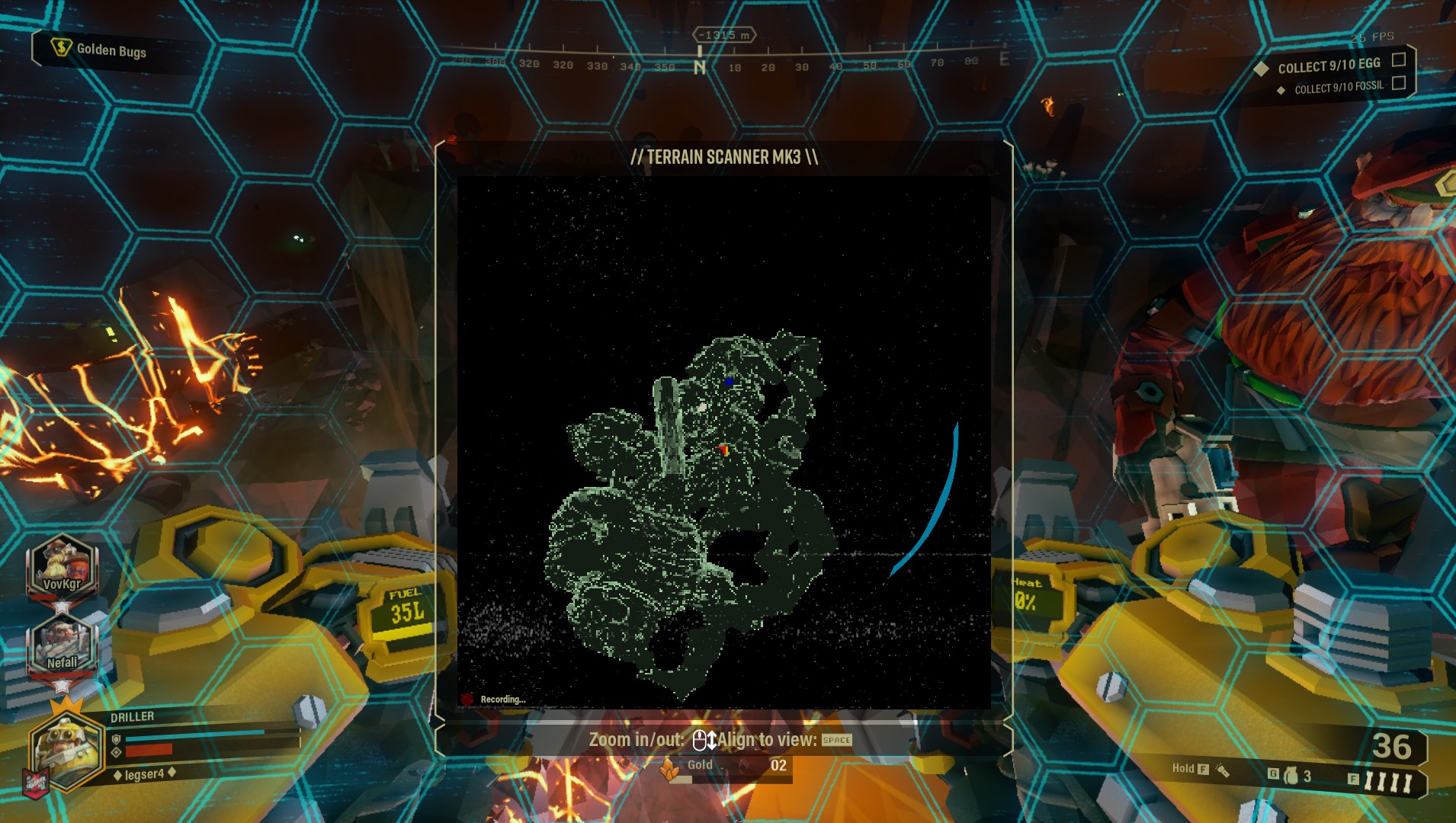
So I had to die with 1000+ gold
last egg just disappeared
high elm
is there a reason they don't show all the things on the scanner?
gentle hazel
also the clusterfudge of markers
merry river
no, the egg disappeared
We tried to collect it, but if fell through the map
This is not first time happening
high elm
@gentle hazel I was thinking layers for each type
gentle hazel
that sounds more like suggestion material to me at this point and not a bug
but it does annoy the heck out of me that aqua crystals are NOT in the radar map thingie
 pulsar parrot
Having eggs in the scanner is too easy in general. Before, we did had to search for the egg. The exterior area of the area used to be like the style of compressed gold or jadiz. That, at least took more time and weren't speedrunning through them without actually speddrunning intentionally. What I think would be nice is having like a pulse signal of where the egg might be in the area. Wait, maybe this should be in the #suggestion-discussion
 scarlet steppe
just had a robot molly shoot me through the wall?
happened first time i just saw her now xD
craggy veldt
Does anyone have anything else I can try to make my game open?
I'm going to keep asking till its fixed
Or I find a work around
When I click play steam says the game is running but then it stops
When I watch task manager I see FSD.exe and FSD-64bitshipping or something like that open
But they close
So nothing opens
The strangest part of it all is my laptop, which is weaker by a decent bit, can run the game just fine.
I've tried uninstalling and re installing several times, I've verified the files, I've made sure my drivers are up to date
The only other thing I can think of is uninstalling drivers
I've not deleted the folder but I might be done that
It's stumped me for like 3 days
I got it during the free weekend
I tried it on my laptop being hopeful it might run
And it ran fine
But it just won't open on my pc
pulsar parrot
@craggy veldt Or perhaps deleting the intro movie films that first shows up when starting your game iscausing the issue. Many people had this type of issue and if you like to do so, go to Deep Rock Galactic\FSD\Content\Movies
 light vault
hello please fix cheaters on this game .guners whit unlimited use of shields
 simple bobcat
There Is a small bug I noticed when jumping + dancing near the Jukebox when jumping the hands are brought together as though an invisible weapon is being held.
light vault
no fun and challenge whit Cheaters
craggy veldt
Didn't think about that cause I'm unsure if my anti virus is actually working or not, I'll check when I get home though
 drifting wadi
Can someone tell me why my friend cant join? We play the game since day one and went on a break for a few months, lots have changed and now we can't join our sessions is there somehow a tutorial block for new beginners or what happened?
shy fern
Orangefrucht, what happens when you try to join each other?
Ima Play Games, you can try using Task Manager to end the Steam Client Bootstrapper.
Sometimes Steam bugs out when it is a startup program.
So when you do that, just manually open up Steam again.
I've had that issue a few times with other games from Steam.
gentle hazel
I got the crystal clipping bug
craggy veldt
Closing steam with task manager didn't work and deleting the intro videos didn't work
shy fern
RIP
gentle hazel
I heard the click kah leeng, the crystal fell to the thankfully existing cave under it
craggy veldt
I also changed the firewall settings and it still won't open
I haven't played a single minute of the game after I bought it and I have 2 cards already
 broken swallow
I've got an issue with getting the "waiting for steam to load screen"
I've tried everything and it still comes up
Tried everything it says to at least
mossy breach
I had been playing alone. When I repaired the radar and completed the secure of a signal, rocket with fuel didn't appear. And Mule seems stack.... I don t know
 willow patio
anyone else randomly get crackling noise coming when ingame ambient sounds are playing in lobby? Sounds like static coming from my speakers but both my speakers and headphones have the same thing but if I restart the game it's gone?
 left socket
I promoted my scout and finished all the assignments
got the "good job" from boss and everything
my scout didnt get promoted and hes stuck at level 25
theres no assignment for a promotion or naything
This would have been my 2nd time
craggy veldt
I have booted up my laptop to try and open deep rock, it opened flawlessly
first try
But for some ungoldy reason it won't open on my pc
left socket
what does it say
craggy veldt
It just won't open
left socket
try running as admin
left socket
is the game open in your task manager under steam?
craggy veldt
nope
left socket
check your task manager on advanced mode and try opening the game ands ee if anything happens
craggy veldt
It opens FSD-Win64-Shipping.exe and FSD.exe as it should but it then closes both of them after about 2~5 seconds
left socket
whack
left socket
o ok
craggy veldt
That's where I see it open the 2 exe files and that's where I see them close
left socket
tbh i have no idea how to solve that
im kinda mad i broke the game but at least i can run it
craggy veldt
Thanks for the salt
I really need it for my wound
😢
Ok so I think I have found concrete evidence of what the problem is, it doesn't open properly.
When opening any other game it will open "GameOverlayUI.exe" which is the steam overlay, Deep Rock Galactic doesn't open this so that means the problem is something with steam I think.
I have another game in my library that doesn't want to open so I'm going to test that also.
So turning off the steam overlay has done nothing and it still won't open
Going to try offline mode, see if that makes a change
I doubt it will but I can dream
My dreams have been shot down
hoary slate
I think that my computer is just to crap to run drg. So I’m gonna save up the money to build a custom pc, then try to play drg.
high elm
attached to a plant that went splode
outer shore
https://puu.sh/CWdop/cf04f9c5ed.jpg - Stuck on loading screen for 2-3 mins. Had to kill the game to get out.
 broken swallow
So yeah this is the screen I'm stuck on
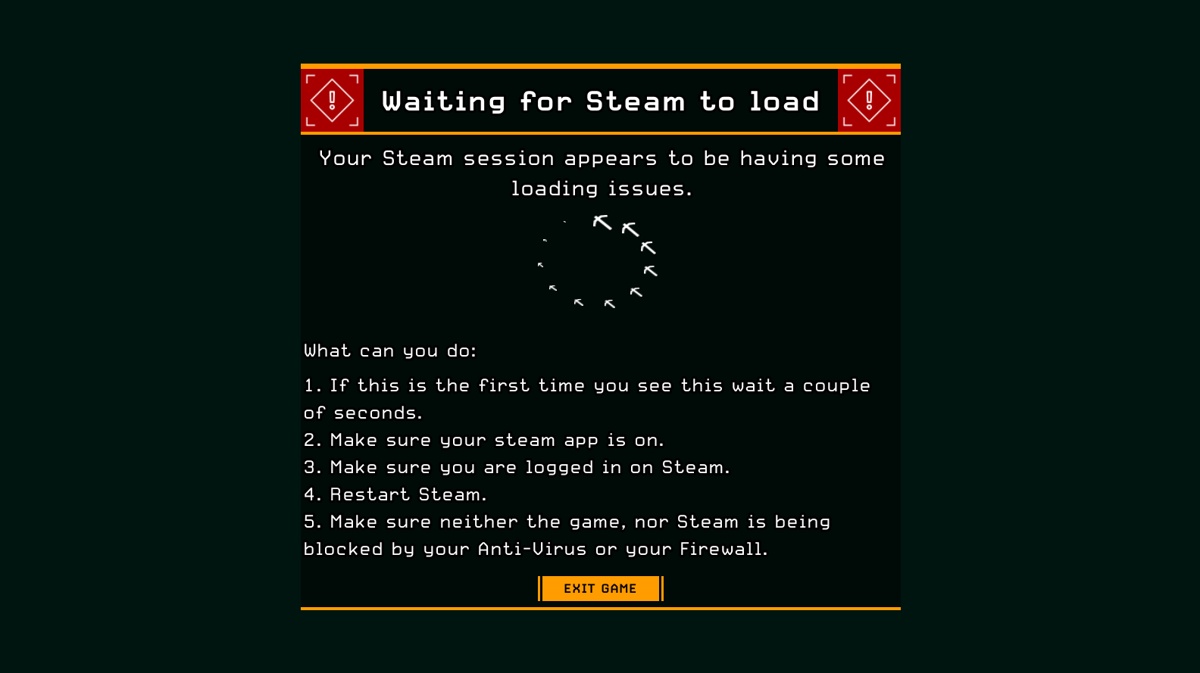
I've tried everything listed and had absolutely no luck
reinstalled the game
restarted my PC.
merry river
@broken swallow Restart steam until it launches. It helped me after 3-4 restarts
 rustic solar
Hi , recently got back into the game and im trying do assigment to unlock weapon. the problem is so far i have to do each mission twice for it to count toward the progression of the assigment
 floral trout
for some reason my game has a nail driven in it when i go to the character selcection terminal
it just slows to a halt
this is troublesome when trying to promote
merry river
Also have this problem. I have 2-3 fps on character selection terminal
 drowsy sand
Hi, just noticed that there is an issue with a wall texture/ the wall in the corridor leading to the upper launch platform
potent nymph
@mortal shuttle are you sitll hvaving the save game issue?
@loud jungle its to avoid them hanging out in the droppod, so its intended
@broken swallow in 90% of cases, it is due to your antivirus locking the game files from steam. Try going into your antivirus and release the files, or google how to do it
@left socket go to the character selection terminal in the spawning area on the spacerigh, you can promote from there
@broken swallow in 90% of cases, it is due to your antivirus locking the game files from steam. Try going into your antivirus and release the files, or google how to do it
i was sick yesterday, so a bit behind, but let me know if there are issues i havent adressed
solemn leaf
any update on the volune issues? Sometimes Grabbers, or explosions are not making noises. Salt stalactites are falling to the floor without even a whimper
potent nymph
i didnt know there was an issue, ill followup
high elm
Wrong audio que when kicking barrels "This is not happening" on a successful kick!
 granite hamlet
Well voice lines are sometimes all over the place, no matter your team comp you always hear scout whining and driller scolding him at the begginning of a mission
 normal star
Is the dreadnaught's armor like a super armor and not the normal armor. This would explain why armor mod'd breach cutter does bugger all dmg to dreadnaught. I understand that the hitbox is tiny, but is that the only reason?
potent nymph
well it works like regular armor, but theres just a lot more of it. Iam not currently aware of any bugs with that
normal star
aiight then don't worry about it and thank you ^^
potent nymph
np 😃
normal star
one nonbug question - i will delete it upon answering - but what is the 'tick rate' of DRG, if you are willing to share that?
potent nymph
what do you mean tick rate?
normal star
actually, sorry do not worry about it.
mossy breach
SOmetimes you spawn under the drop pod
iv only had that happen to me once so its not common
potent nymph
when starting the level or?
mossy breach
ya
normal star
did you join the game in progress?
mossy breach
no
potent nymph
hm ive never seen that
normal star
did your character start in the seat with the pod slowly going down or did you load in with the pod already stopped?
mossy breach
the pod was stopped i was under it
normal star
when you load into games, you generally pop under a person. i wonder if your delayed start caused you to spawn under a person but due to the dropship being the way it is, that person could not move up so the game put you in the droppod.
normal star
i've had people spawn inside me when there is no room to move up. thats always funsies.
mossy breach
its only had it happend to me once so iono
normal star
other fun times is your on the edge of a cliff and the person spawns under you and you get popped up and thrown off the cliff.
 rare sandal
I get that one and sometimes you get stuck if you are in a small confined space
normal star
yeh and then the exploders come and you can't move and you can't shoot since your shooting from inside the teammate.
shy fern
Yeah, I've had like 4 different people (one at a time) get stuck inside the drop pod drills at the start of the match within the last couple of days.
Very often occurrence for me to witness.
normal star
i've never seen that. is this with you hosting or you seeing it other peoples games?
potent nymph
@outer shore hm, that is strange. How updated are your graphics drivers`?
wispy escarp
When we started playing DRG with Update 19 it often happened that people got stuck underneath the Droppod (it seemed only gunner players were affected back then). In later Patches we did not have this occuring anymore.
~ I dont know if it is a bug or intended but having the visual indicators for engineer turrets and eggs in extermination visible at all time can be pretty distracting.
sometimes the visual indicators for turrets will turn off when you hit "ctrl" / use the laser. But not always and recalling + rebuilding them turns visial indicators back on.
Also the visual indicators for thrown grenades sometimes (rare) stays on the hud untill mission end.
mortal shuttle
Yep, I still have those. Something weird I noticed is that I have like 8 "Player.sav"s.
with 7 of them having a long number behind them
I have every file about 8 times
and they all share their own number group
potent nymph
and none of them is your save?
mortal shuttle
I tried deleting them one by one (while copying them into a different folder) and i didn't get mine back
mortal shuttle
Nothing there
It also only shows me one group
The oldest savefile, according to the game, is from 16 december, but I played the game earlier last week
I don't know what would happen if I would change the numbers in the folder (Taking the newest one, and change the numbers according to the group i'm using)
well, ok, I have a march file in there, but that one's 0
After copying my most recent file, make the number match the other, and delete the original, i got my savefile back
Losing my rank 88 savefile out of nowhere was cruel
potent nymph
i can imagine! but jsut to confirm, you got it working now?
mortal shuttle
after playing around with the files themself, yes 😃
potent nymph
good to hear 😃
deep sapphire
Anyone have a bug where their shield bounced
And then didn't deploy
Hopefully I still have the video of it
It bounced off the drop pod (returning) extending walk way and didn't deploy
broken swallow
@potent nymph alright, I did try disabling my firewall and that didn't seem to make a difference sadly.
deep sapphire
Fascinating, does your friend usually have internet issues?
I have terrible latency issues, enemies invisible for 5 seconds when I join, teleporting all over the place
Wondering if it's just another one of those
potent nymph
@broken swallow disabling it will not help, you need to go into your antivirus and release the quaranteened files
broken swallow
Ah yes, I did check the quarantined files and there weren't any in there
potent nymph
ah okay, which are you using btw?
sometimes they will also block access to google analytics, but might also cause the issue
broken swallow
I'm just using windows defender
potent nymph
i see. So the issue is that you just get the message that steam cannot connect with the game?
potent nymph
i understand 😃 and you tried rebooting your computer and steam a couple times too?
and when i say reboot steam, i mean completely shutting steam down, not just closing the windows. you need to click on steam in the taskbar and say exit steam
broken swallow
I have tried both of those. Mhmm.
potent nymph
is there ANYTHING special about your setup? internet, computer etc?`
anything at all, people often forget mentioning things that are fairly critical to know what the issue might be
broken swallow
Not that I know of, I don't do anything special or use and special software.
I'm thinking about it but nothing comes to mind
potent nymph
whats your internet hardware setup?
broken swallow
just wired connection to a router
potent nymph
try looking at this and see if there might be something there. The screen means that there is a problem connecting to steam, so i think thats the way to go to find a solution https://support.steampowered.com/kb_article.php?ref=1456-EUDN-2493
Article "Troubleshooting Network Connectivity"
broken swallow
ok
deep sapphire
You're doing God's work Bjorn
potent nymph
i try friend!
pulsar parrot
Karl would be proud
 gray junco
I noticed two bugs, i don't think they have been reported yet:
The tier 4 mod Hollow point bullet (+50% weakpoint damage bonus) for the M1000 has no effect at all.
The perk Berserker seems to be permanently active on all char no matter if I have it equiped or not (noticed it after killing a preatorian in 5 hitshits in haz 3 without having the perk equiped).
broken swallow
Ah I tried the troubleshooting and still absolutely no luck...
potent nymph
sorry to hear that Rae :S ill try to think of solution, but iam having a hard time figuring out why you are having that issue
broken swallow
It's appreciated, I'm absolutely baffled too. I'm sorry nothiung seems to be working
potent nymph
can you use the steam chat thing?
broken swallow
I can
potent nymph
the coder who made it is back next week, ill talk to him, feel free to spam me monday if we havent found out a solution before then
broken swallow
Ok, then. Will do. Sorry for the trouble
potent nymph
its not your fault... i think 😃 hopefully we can figure it out
outer shore
@potent nymph Yep, all of my drivers are up-to-date
willow patio
@potent nymph in game at times I hear a static crackling noises coming from my speakers most of the time when in main menu or lobby area - it doesn't always happen and restarting the game can often make it go away for a while. I have tested both my headphones and speakers and it's consistent between both. Is this something anyone else has picked up on? If needed I can send you an ingame capture to demonstrate?
pulsar parrot
I would like to see an ingame capture of that issue if thats possible.
gentle hazel
I wouldn't know, I am hearing impaired... :L
so some mobs for me are a real surprise
 blissful bluff
While I'm in the caves, my game has some white flashes on the screen, does anyone know anything about it?
willow patio
I'll try and supply some ingame footage in a bit
pulsar parrot
@blissful bluff Does that occur when Scout throw's his ifg grenade or entirely random while exploring?
blissful bluff
@pulsar parrot With the experience I had, it seemed totally random, but I'm not completely sure
And i did not have scout in the team
pulsar parrot
Graphics card around gtx 980 has that common problem. Usually common when Scout throws a grenade, but for just exploring the caves? Must be like things that bright up or the animations of the environnent. Not sure if you have a nvidia or amd, but I'd check if the drivers are up to date. I'll see if I can find a related issue or someone else knows the solution beforehand.
blissful bluff
I have a gtx 750 ti, the drivers are up to date. I'll pay attention to what may be causing the flashes. Thank you very much. ^^
pulsar parrot
@blissful bluff Though, this on about a different game, but with the same issue. I wonder if this would help. The key factors I found is changing your graphics card control panel or setting it to window mode or a different mode. Here is the link I was looking at. https://steamcommunity.com/app/379720/discussions/0/357286119114797832/

When I start the game, it keeps flashing, goes black, then shows the screen, like twice a second. Over and over, kind of like blinking. I reinstalled, as well as verified twice, no files missing. I have tried turning my resolution down, vsync on/off, etc... Drivers are all up...
blissful bluff
@pulsar parrot Thank you so much, i will try as soon as possible 
 real imp
So I noticed someone on tne DRG subreddit says that when you're playing single player, hitting escape pauses the game, it got over 100 upvotes so I assume it's true ... but my game doesn't do that? Pause/Break key does nothing too and I validated the game files in Steam so I'm not sure what to think at this point. If I hit escape in single player I continue to get attacked.
pulsar parrot
@real imp So, there's two options for singleplayer, besides hosting public and no one joining the whole time. One is hosting it private, which just has it you qnd your friends can only join and play, meaning going to the menu does not pause the game. The other one is hosting "Solo Game", and option you can choose that is fully singleplayer, and you can pause the game.
Or you have already known that?
real imp
Ahhh maybe that is the problem because I played single player before but kinda forgot about it and just play on private now
Still doesn't make sense if private is literally single player until a real person joins
Not a great UI decision
pulsar parrot
Hope that was the issue then
real imp
I'm sure it was, I appreciate your time 😃
pulsar parrot
 pearl crown
Hello guys,hope u can help me. I can't connect to any servers/lobbys with my friend. And it doesn't metter is it public game or lobby with password. We have this problem since free weekends have ended.(played on free weekends and bought it today). Sorry 4 my bad english))
When i try to connect it just send a message like "Session ended"
pulsar parrot
Hmm. Does it happen every single time you start up your game and try to join?
pearl crown
When i start the game it respawn me in lobby when i can choose class/custumise character and e.t.c. And then when i try to connect to anyone(and when friend try connect to me) it sends that message
And yes,it happen every single time when i try to join any game/lobby
Where*
pulsar parrot
I've checked a few steam forums that this problem is caused by the game probably automatically hosting a game lobby. You can try going into the menu and click "Disband Team" to see if that what it was, but more likely a bigger problem.
Could depend on your region or your status of internet.
pearl crown
Ok,thank you very much
rustic solar
is there any way to fix the freaking assigment to unlock weapon ive done 3 egg mission which is what is needed for engineer second weapon and i get no credit doing mission this is anoying!
solemn leaf
did you do the assigned egg mission? it has a flashing diamond icon over the one you are required to do
you dont just do any of them
rustic solar
think i did but will make sure of it thx
willow patio
@potent nymph I have uploaded a video regarding the static / crackling noise in the lobby area. I have found it is concentrated just outside the right dwarf rooms and outside there is a spark coming from the ceiling in the designed appearance of an electrical fault as I know parts of the lobby area are "under construction" because of new features coming. It may be just a sound effect that has been placed to play in this area but it sounds like static or crackling so if it is a designed sound effect maybe the devs might want to source a different "spark" effect to make it sound less like interference from the speakers. The link is https://youtu.be/zo3v6vPDEsE

Think it's the sparks effect coming from the ceiling - it may have been put in to show some sort of production or electrical problem in the lobby area as it ...
shy fern
That noise is from the sparks above you, it's similar to welding noises.
It's intended as everyone has it. Just an ambient AkEvent.
craggy veldt
I never gave that sound a second thought XD
willow patio
lol it was only while recording that I noticed it was present in 1 spot where the sparks were - I thought it was problems with my motherboard sound but never had it anywhere else. Don't mind it now I know it's meant to be there, I think maybe they could put in a different sparking noise just so it does sound like white noise from an untuned radio
craggy veldt
Maybe make it less constant?
willow patio
ye i was thinking make it sound like a burst of sparks now and then rather than a constant crackling
craggy veldt
Like it happens a short while after each spark
gentle hazel
hey, I turned the voice chat on in game, and I hear it
it's like candy wrapper noise
it's the sparks from the cieling
willow patio
personally i find it annoying like a bad sound connection
I'm fine if it's designed like that but i would prefer an occasional single spark sound rather than a constant ambient sound
craggy veldt
Maybe if it only came out with the spark it would have to be a different sound, and the spark would have to be more spaced out.
 hollow olive
hey, just joined discord, mainly to ask this. was in a pub game, hunt mission with mineral mania, part of the weekly job, and the third cocoon either didnt spawn or did spawn and was already broken?
 frail tundra
@hollow olive didn't you see it's marker?
Sometimes that happens, but i thought it was fixed. 🤔
frail tundra
The host have button "abort mission". That's easier 😉
graceful yarrow
Either it didn't spawn, or it broke somehow and the dreadnought didn't spawn in, or it teleported to some other region of the cave when it spawned. Whatever the case, sorry to hear about it. Hopefully that bug where not enough spawn isn't back again.
 late lark
My taskbar keeps wanting to open up. Looks like the Windows cursor and the in-game cursor aren't synced up.
Any ideas?
New bug, or me being dumb?
W10/xbox
 hexed wraith
@late lark whats in graphical settings? fulscreen? windowed mode?
late lark
FS
1920x1080
Only thing I've changed from base settings is controls.
I tend to alt-tab a lot. Some games don't like when I do that. Skyrim being the best example.
Yeah. It definitely feels a bit like the alt-tab Skyrim bug.
hexed wraith
maybe some other software with overlay capabilities stuck over game, like discord. I think windowed-fulscreen allows for easier alt-tabbing
late lark
Discord and Steam are it, at the moment. Actually, AMD whatever crap. Shift+r I think jacks with stuff. Let me try changing overlays and I'll report back.
Radeon*
hexed wraith
try to change screen mode to windowed-fullscreen?
late lark
I might try that too @hexed wraith
For the moment, I alt-tabbed a few times with DRG open and Discord+steam shut down, with no issues.
Started up Discord, no issues.
I doubt steam is interfering with it, but maybe.
Radeon seems to be deactivated. It's overlay, I ean.
mean*
Only thing I haven't messed with is Win+G (windows game menu or whatever).
So I'll report in if I still have the issue, after some additional testing. Thanks!
shy fern
Yeah, the game bar can mess up stuff in DRG.
Like if you take a game clip it'll put the spinning blue circle thing on your screen in-game like it is loading something.
It can also mess up some things like you have to click back in or wait a while to regain functionality in-game.
late lark
Next issue I have is backspace doesn't delete in chat.
Which is fun. 😛
Windows 10 again.
late lark
Who needs delete. 😛
It'd be OK if hitting "esc" to exit chat removed those characters from chat too. My vote is, if it's easier to do that, then do that. 😛
pulsar parrot
@late lark I do the same thing. When it pops up and wont go away, I change the resolution, for example from 1280x1920 to a lower one, I hit apply changes, and then change it back to the original resolution and apply changes. Usually solves my problems, but idk for you.
late lark
I'll give that a shot next time. Logged out after playing for a bit.
pulsar parrot
Hope this helps showing the Goo Bomber splash noise is still there after death. https://clips.twitch.tv/AwkwardSavorySalamanderGrammarKing
 potent nymph
@outer shore Some people are having succes with this, try it out https://www.reddit.com/r/DeepRockGalactic/comments/ak900m/are_you_having_random_fps_drops_try_disabling/
reddit
35 votes and 8 comments so far on Reddit
outer shore
Will definitely try tomorrow and report back. Sleep time here.
potent nymph
it is
 modest thunder
Oh, didn't get a ping but I still checked before I hopped to something else.
There are a couple bugs I noticed with Iron Will. One is that ally portraits displayed on the left will not show the ally as being downed. I noticed that it seems to work like if the ally is hit and that hit is fatal, that hit does not count to their health. It sometimes says they are downed 3-10 seconds later, but sometimes doesn't even then.
Bleh, damn it. There were two other bugs I noticed, but I cannot remember now. xd
I'm sure I'll encounter them again, I'll report them when I do.
pulsar parrot
Error cube is not a bug
willow patio
sometimes I find when playing scout that the flares get stuck from the point I fire them - at least for a brief second before repopulating on their original intended position
modest thunder
So they stick to the place fired from for a moment?
willow patio
ye that's right
bit like input lag from the weapon
they fire start shining in the air directly above me then magically repopulate on the wall somewhere
must be to do with server sync maybe?
pulsar parrot
More common when youre in someone else's server, is that correcr?
Connections are honestly horrible, and depending where their region is, it could be a bit laggy or totally bad. I joined one from Canada and enemies were teleporting and hittings me 5m away from me
modest thunder
I have that problem with flares super badly in multiplayer when not hosting.
Flare is floating by face, then BAM, it's on the ground where I threw it.
 light epoch
Trying to report a bug but can find where, so puting it here instead.
I. Statues in memorial dont show up if you have done a promotion.
After a promo you start at level 1 again, but are really level 26. The requirement for the golden statues are level 20. They might show up if you make it to level 45/75 etc but I havent goten that far yet.
II. Iron will; If being at 0 HP and making it to the escape pod before colapsing, you will be listed as MIA upon mission completion. Revive is not possible unless a teammate is outside the pod as the last teammate entering the pod will end the mission.
 amber trellis
Just lost all my progress
pulsar parrot
@amber trellis Steam user or windows/xbox?
amber trellis
steam
pulsar parrot
Have you checked in the FSD/Saved/Savedgames file to see if you have backup saves?
amber trellis
there are some saves
pulsar parrot
And also, in game menu, options, there should be a option saying "back up save file" or something similar to that
What are the files names?
amber trellis
76561198061280903_Player_ExternalBackup_5.sav
76561198061280903_Backup_0.sav
76561198061280903_Player.sav
bunch of those
I restarted the game and a warning popped up with recent saves
Picked most recent, thanks for the help
pulsar parrot
Nice. No problem man
 vivid arch
I noticed in the changelog that flashes on screen were fixed for GTX 980 cards. I have a 980, and IFGs will still sometimes cause the flashing effect, and it can be quite disorienting
pulsar parrot
@vivid arch Nvidia recently released an update for that specific problem. I believe you do have your graphics card updated or no?
vivid arch
It should be. I didn't notice it today, just something I noticed when started playing. It could be updated now, I'll check when I get home
 tawdry coyote
Due to having issues setting up Jiro for DRG, I’ll have to post this here.
Tried joining a Multi - started joining from the server list...server list disappeared & view went back to the front of the mission terminal. No icons etc on my screen, unable to click/type/anything except move my view around with mouse.
Only way out was to ALTf4.
shy fern
Bosco lights up the Shock Jellyfish things instead of attacking. Microsoft Store version (haven't tested on Steam). The mark also stays attached to the enemy but Bosco does not actively track it with light.
tawdry coyote
Steam does the same IIRC
mossy breach
my salute key stopped working
and I cant figure out why
i tried restoring the keybinds defaults
it only work when bound to something other than v
I like swapping the e and f key binds but the menu seems to have a problem with me reassigning e now
its bugging me so its a bug right? or am i doing something wrong?
normal star
maybe there is a config file you can look at to see if it corrupted some how?
outer shore
@potent nymph That Ansel thing seems to have fixed it. Thank you very much for spending the time and effort helping me with that.
tawdry coyote
Can someone help me with Jira/Atlassian? I can't log in
I've put my issue in the Regs chat
 nimble tundra
I started a Salvage mission, but there were no mini mules, and I couldn't call the Uplink
 blazing crest
This happened, he was stuck. Even in anti-gravity
high elm
at he end of the o the "Mineral Trading Network" assignment missions the congratulation messages are off by one
 bold hatch
for some reason, dropping a c-4 on a pretorian can sometime make your game freeze and subsequently crash
craggy veldt
I found this while doing a mission.
I called in a supply drop and the earth broke right where I called it causing this to happen.
graceful yarrow
what, it not falling? things like that don't fall in game
they land where the initial beacon was placed
even if the terrain is removed
craggy veldt
Yeah, just thought it was intresting and that it should be noted
gentle hazel
imagine calling the supplies near a ledge, now the supplies fall and become very hard to reach
modest thunder
There's nothing connecting the helmet to the body. I think this is like a marine helmet or something?
craggy veldt
I don't even know how this happened.
 muted oasis
My game crashed into non responsiveness when using a flare as gunner during minigun reload time.
Is this a known bug or should I try for reproduction?
 elder loom
I've been looking all over online for a solution to this, but I can't find one that works. Everytime I join a multiplayer session of have someone join mine, this always pops up. There's nothing the devs have recommended that works. Does anyone have a solution?
On PC BTW
 naive hull
That's latency caused by the host, the game has too many things that are controlled by the host and not by the client. A good example of this is if you are scout and you have a bad connection to host, using the grappling hook is utter suffering.
 minor escarp
I have a thumb button on my mouse that halves sensitivity, it's a bit of a reach but maybe you are accidentally squeezing one of those without realizing it :P
 shadow palm
I noticed today re: the gtx 980 flashing, that it would happen on the driller but only with the cryo cannon out. If I swapped to any other weapon, absolutely no flashing.
 dry oyster
Are the resupply pods supposed to only give one c4 charge per pop?
 modern lagoon
Probably, the supply pod refills half your ammo and i doubt it'd round up to two c4
dry oyster
Still, it used to err in the players favor when dealing with odd number supplies. Because of this when resupplying the drillers 3 charges he'd get two back because the 50% would get rounded up from half of three.
 wicked yacht
I got frozen mid air and this happened
minor escarp
nice
mossy breach
So i found a battle MULE on a salvage mission in the glacial strata. When i restarted it, it didn't move at all. It shot enemies that were close to it but it didn't follow any of the four of us like it was supposed to. It stayed in the exact same spot the entire game. Has anybody else been experiencing this bug?
 lavish cape
https://media.discordapp.net/attachments/269191611496398851/554118338414903306/twostreams.gif this a animation bug?

2x streams
shy fern
It uses two ammo per shot, so possibly not.
mossy breach
I am still having trouble with my key mappings. The game wont let me remap E and salute with V does not work. Salute only works when remapped/altmap.
 vital agate
whenever I boot up the game there seems to be a 50% chance all sound will cease working after the logos have finished playing. any tips?
pulsar parrot
Did you plug in your headphones at the same or during that moment? It causes to cut skme of the audio in the game.
vital agate
nope, headphones were already in
audio still work for rest of computer, just the game sound disapears
 jaunty cairn
I found a bug where if you are a high level character but you hover over a Lower level character in the character selection screen and press esc it shows up as the character u are at the level of the other one
Then when you go into a terminal it opens as that character
 rain parrot
I guess this doesn't include the 980 Ti?
 lofty garden
Oh. Alright.
rain parrot
That about the cube?
graceful yarrow
Notabug.jpg
lofty garden
Feature it is.
rain parrot
graceful yarrow
Check pinned messages
rain parrot
Yes, but actually yes
graceful yarrow
Mmhmm
lofty garden
That's not confusing or anything.
graceful yarrow
Nice buff mimic btw
lofty garden
Last DnD game I played had one and I fell in love with the concept.
elder loom
Found the cube yesterday,.
 vale panther
I wonder if the devs even know what the ERR mineral is for
pulsar parrot
Karl's remains
lofty garden
Structural remains of the dwarf fort of Boatmurdered.
 candid cloak
So i did all the promotion missions and command said i have one more mission till promotion still but there isnt any marker? Did i miss something or is this a bug
deep sapphire
@candid cloak still having the promotion issue?
 thin star
I was just in a match where someone had infinite gunner shields. Hacking or bug. will this be fixed?
graceful yarrow
Hacker most likely, and no, not any time soon
deep sapphire
Can't fix hacking
 ocean tartan
I keep forgetting to report this but while I still remember
There's a bug with pointer recognizing your own body(or air in your immediate reach) as an object, which makes pointer unusable since it just points and highlights yourself
It also affects scouts double smg, making it unable to fire shots(I don't know if this is a separatr bug but this only occurs when pointer bug does, so I dont think it's separate)
Also I have footage of it happening on scout
@sour wolf I call upon thee pls hlep
candid cloak
@deep sapphire yes
potent nymph
@outer shore great to hear mate 😃
deep sapphire
Still no Diamond over your missions?
Check out the character selection terminal in your spawn pod
potent nymph
@tawdry coyote i can help you, if you still need help with jira
@elder loom Try looking in your steam settings. Other people have had this issue because of steam country settings
candid cloak
@deep sapphire youre a hero
deep sapphire
I hardly count it as heroism but I appreciate the compliment ❤
potent nymph
i do!
deep sapphire
The Devs are my hero's
potent nymph
awww 😄
So, for people with the light flashes. While we work on this, there seems to be a workaround if you do this:
Go into "NVIDIA Control Panel", go to "Adjust desktop size and position" under "Display". Then look for a check box that says "Override the scaling mode set by games and programs".
 rugged phoenix
Hi, just visited JIRA and can't find any bugs about Acidspitters, so asking here if this is intended:
Observed result: When damaged by Acidspitter, biohazard icon is displayed
Expected result: Acid icon is displayed
this is what I would expect:
 next pine
@vital agate try -NOSPLASH launch option
potent nymph
We have a new Tester @fallen hill Who will be helping you guys, in addition to us who are already trying to help 😃
 fallen hill
Hey guys! Excited to be here. 👋 😀
pulsar parrot
Oh, Hi Mark!
 orchid sigil
I have a strange bug in drg. Game does not start up. Although process in the task manager starts it disappears after couple of seconds.
 quaint plover
im having a really weird bug rn
stutter every few seconds
its really persistent
the whole game freezes for a split second even the music stops
and this is new because i played a few months ago and it run fine
has this happened before?
normal star
assume you've done the usual and updated all drivers yeah?
 cursive kindle
quaint plover
cursive kindle
quaint plover
Yeah drivers are fine
I'll record a video of the issue tomorrow and I guess I'll send it to the drg team
Idk why it's doing this now it worked fine a few months ago and all I've done was upgrade my monitor
elder loom
@potent nymph I'm sorry for @ing you. I've found a solution to this that I haven't seen anywhere online. After three hours of messing around with steam properties and browsing local files, if you disable steam cloud save and delete the "SaveGames" folder, it worked perfectly after that.
 vestal flint
@fallen hill Hey, I was playing sandlbast corridors today, mining mission. The drop pod escape area was in the middle of an air current
got to the safe area and finished mission, when drop pod was returning back to orbit, got displaced by the current
and lost the mission 😮 😮
like literally nothing I could do, the wind current blew me away and the door closed behind me haha, def a BUG that needs fixing !!
@potent nymph
shy fern
Yeah, I agree, it is extremely bad. I've had a few missions that had that happen and it killed everyone but me since I was Scout and grappled inside without letting go.
The GIF is somewhat confusing since there was a Sandstorm at the time as well, but the blast was coming from behind the seats and trying to push me out.
My team died so it extracted me.
 deep sapphire
Unlucky
I suppose there could be a variable that says "geysers spawning this close must not be pointing this angle" or cant spawn close enough to do it in the first place
fallen hill
@orchid sigil What are your specs? Do you get any crash log when the process terminates?
@quaint plover Some players have reported that it could be caused by Nvidia Ansel. For starters, try to update Ansel. If that doesn't work, disable it completely.
If the issue still persists, turn v-sync off and try to cap your framerate in the 60 - 120 range, so that it doesn't spool out of control.
reddit
49 votes and 9 comments so far on Reddit
@cursive kindle Sorry to hear that. Your anti virus could still have Steam or game related files quarantined. Double-check that these are individually restored and marked as an exception in your anti-virus settings before rebooting the game.
@vestal flint @shy fern That does indeed sound frustrating. We are aware of the issue and have implemented a fix for this in the next update. In the meantime, jab your pickaxe into one of the drop pod seats to hold on 😜 Management will hopefully cover the damage!
orchid sigil
my specs are, CPU intel N4200, 4gb of ram, gpu nvidia 820m. No new crash report are created. Until reinstalation of windows play game for 40 hours
and after reinstaling game its dont install redisters
potent nymph
did you install them yourself after temeter?
orchid sigil
im installed c++ from 2005 to 2017, and dont rememmber whats more to install
fallen hill
@orchid sigil Make sure your graphics drivers are up to date. If updating them doesn't solve it, try to verify the game files by right clicking the game in Steam, press "Properties", go to "Local Files" and press "Verify Integrity of Game Files".
orchid sigil
tryed all this, still don`t work
potent nymph
can you try installing the redis package here: programs (x86) - steam - steamapps - common - Deep rock galactic - Engine - Extras - Rredist -en-us - UE4PrereqSetup_x64
orchid sigil
already installed
 rapid merlin
i dont mean to bug in. but ive had issues with UE4 games due to missing refresh rates
i had to leave 60hz refresh rate alone so some games detect it. just one possible factor i guess
orchid sigil
this how it`s look in task manager for few seconds
potent nymph
i talked to a guy a few days ago with that issue, ill just followup and see if he got it fixed
craggy veldt
Hi, @orchid sigil I am that other guy. From my research on the matter I belive it is a problem with the engine, I suggest downloading paladins to see if that fixes it. Both games run of of the same engine at different generations but with me neither game will open.
I have tried downloading the unreal engine directly but it is yet to open so it may be a mix of hardware and engine but I'm not so sure on that.
If you can download and run paladins you may be able to run deep rock as the engine will have installed.
This is all still theory though so don't bet on it.
 lyric monolith
Has anyone reported having leeches spawnkill someone as soon as they join a game in progress?
craggy veldt
That just seems to be unlucky.
Unless it's through a wall it's luck.
But on the matter of cave leeches, the way they spawn means a lot of the time it is a confirmed kill in solo as Bosco will circle them but not shoot the main body.
This is because they spawn slightly in the roof of the cave a simple fix would be to have Bosco hover underneath them or at a lower angle.
fallen hill
@lyric monolith Yes. We are aware and looking into it 😃
lyric monolith
Additional information on that cave leech problem is that the host was already downed and by the time i joined the leech had already reset and was ready to to grab again. Maybe a possible fix could be to have a joining player spawn on a teammate who isn't already downed.
orchid sigil
@craggy veldt thx for advice, trying it and its dont work to
 open bough
On Xbox, if your controller disconnects during a mission, it disconnects you. 😦
I've been playing with my controller plugged in to circumvent the issue, but it's turning a lot of my friends off
potent nymph
how does it disconnect? we actually fixed an issue for last update related to that
wind field
i dunno what i did but i did something
wierdest part is that clip doesn't match either of the guns
craggy veldt
@orchid sigil Well all I can suggest is trying to install the unreal engine manually, although I am yet to do it myself.
orchid sigil
and where i can find unreal engine to install, or you about redistr that in the game directory ?
craggy veldt
I'm talking online, a so far as I can see it will install the epic games launcher but for me that won't even open, please do share if even that doesn't work. The info will be useful.
Just Google it
orchid sigil
@craggy veldt i tryed install unreal engine and it install epic game luncher that dosent work too
craggy veldt
Same as me then...
orchid sigil
as i see it`s problem of ue4 so need to search in there
broken swallow
Hey @potent nymph I'm still unable to play the game due to the steam app issue
pulsar parrot
I had to record this right away. The Spitballer was down a deep hole, about 60m down which is where two Dwarfs were down at, I believe its head was clipping through where the Spitballer was able to shoot through it, which I had to record to show during a wave.
deep sapphire
That's whack
 blissful hollow
Is the "Complete X weapon licenses" not working known already
potent nymph
yep
vital agate
sound has stopped working for me completely now 😦 I get sound for the splash screens and then when I get to the continue screen there is a weird buzzing and all sound disapears, i can alt tab to find sound working elsewhere
i tried adding -nosplash as a launch option but the command didn't seem to work
mossy breach
i digged straigth down cus i wanted to explore and i found a bug if u kept going downwards after the ground becomes messy and like a black mirror supstance. u start to shake alot and the gets teleported out of the map into the abyss and fall for a while.. then you respawn but! ur screen freezes complety and if u open the menu ur picture is gone and the name of the dwarf ur playing was gone aswell.. and u were stuck intill ur buddy finish the mission or dies so heres the tip dont dig straigth down xD
 hidden turtle
lol that last jira bug report
that shape would never work
some other shapes actually work
but it's far from making it useful on haz5
pulsar parrot
"Some other shapes actually work" Yeah, I would like a shape of Karl for my platforms, please
 dim ravine
Hey, question if it's been reported or not but I'm having a potential bug to report and I'm wondering if it's already been reported?
I run on English language but sometimes some system messages (messages in red) is in what I believe to be Japanese?..
I'll try and see if I can get screenshots before but I'm curious if this is a know bug?
 queen nacelle
literally unplayable
 cunning vessel
 fallen hill
@queen nacelle Good catch!
@deep sapphire Did you get any crash log, Mr. Bob Ross? 😜
fallen hill
@mossy breach Sounds like you somehow managed to dig yourself out of the map.
https://tenor.com/view/anchorman-comedy-ron-burgundy-will-ferrell-im-not-even-mad-gif-3386450

 sour wolf
@dim ravine context? 😃
deep sapphire
I sent in the crash log, yes
normal star
first time for me for this: I've seen molly walk towards the droppod, turn around and start walking back towards where it came from, mid way do the connect to droppod animation (while its 120m away), teleport FURTHER away from the drop pod, and then start walking back. At 10 seconds to go (while it is 50m away), the droppod opens up and we lift off without molly. note that this was mactera mod on haz5. side note i had no nitra from supply ammo, it was close call at end lol.
modern flare
does anyone knows if Elimination mission spawning/ marking not enough cocoons is normal or bug?
deep sapphire
I've had it happen once @modern flare
@normal star it can happen that molly gets stuck in one place or goes the wrong way due to a navigation issue, imagine the map like a grid, its unlikely to happen but if one of those grid points break, molly breaks
normal star
yeh i've just never seen it before
normal star
was lols. new kind of nail biting ending for me, surviving 5 minutes with little ammo, no nitra and mactera
was fun
almost prefer it to the normal ending
deep sapphire
Always a silver lining
Except for when you have to force fail an elimination mission
normal star
we heard the mob but never saw it.
normal star
probably glitched in wall
deep sapphire
It's not uncommon for dreadnaughts to spawn on the other side of a wall after an egg breaks
But it's only happened once that apparently all the eggs broke simultaneously and only 1 stayed in the map
normal star
hrmm intersting
warm pumice
Cant find last egg. No eggs on scanner. There was one organic wall without egg inside
 devout citrus
I have a problem using the steam controller
It's not really a bug though
So I looked for community configurations for DRG and applied the most voted one
That one has the right touch pad set as mouse configuration and I notice it's much better than the joystick mouse configuration
But the problem is that when I use that pad the game detects a keyboard and mouse set up and when I use the buttons it detects a controller set up
and what bothers me is that the UI keeps changing when I just walk or look around
 green harness
Ahahaha, that sounds hilarious
^sorry, this isn't helpful
Would it help if you looked into the keybinds and set them all to keyboard ones?
So your analog is WASD, one of the buttons is F, one is Q, etc, etc.
 lavish sonnet
deep sapphire
lavish sonnet
deep sapphire
Just had my 2nd recent game where the dreadnaught popped itself and despawned
shy fern
It's pretty common.
deep sapphire

2 missions out of 108 considering I abandoned that match
Pretty common with the recent update maybe
 gaunt sage
There should be a "recover save" option in the options menu
potent nymph
It also uses steam cloud saves
 plush ocean
It seems experimental branch uses a savegame from months ago for me, and the restore save option only has the same one as the one currently being used. Is there some way to make it use my current save anyway ?
potent nymph
no, it is seperate saves
normal star
there is cheat console to give ya all the stuffs
plush ocean
Oh, didnt know that
 elder hornet


So uh.... is that supposed to happen?
happened twice on two seperate missions
Experimental branch btw
naive hull
 paper smelt
had a glitch where the mule wouldn't move i did have a drop pod a next to it
supply drop pod*
 half hull
<@&296918282403840000> im reporting a glitch about enemies ignoring you. what severity level would that be considered as?
solemn leaf
I think its known; this is on the live version atm? there are so many enemies that some of them just dont know what to do because you've reached an aggro cap
 dusky garnet
Enemies standing completely still?
dusky garnet
Ah, walk right past you?
half hull
yep
dusky garnet
Yup, happens sometimes
half hull
i mean for the entirety of the mission
half hull
i wasnt the host
it was a match i joined using server browser
it only happened to me
btw this was 2 days ago i think]
would that be considered major or just normal
dusky garnet
Depends on how often it happens
 dark gull
I keep falling through the map while getting veins of resources, its happened multiple times now and I've made sure that it wasn't just another cave underneath where i was mining. It just seems like I'm falling through the world. I'm new to the discord and was told to come talk here about it
 slow birch
are missions getting stuck at half of the loading bar for anyone else
cant seem to load into a mission, i even restarted steam
 gritty snow
During the target elimination missions, three times now the juggernauts have spawned in the walls and have resorted to clipping through the walls or be lucky enough to have a driller.
I've screenshotted two of the times.
https://steamcommunity.com/sharedfiles/filedetails/?id=1683793895
https://steamcommunity.com/id/Cahldaer/screenshot/1008150114449747301

Steam Community: Deep Rock Galactic.

Steam Community: Deep Rock Galactic.
oh shoot let me properly report it
deep sapphire
I've known this for months but I figured it was a feature
Is there a reason why you can't hear mission control guy/cheers when disabling hud
 stone ice
Just promoted my driller when I reached level 25, woot! After that was done my level was reset to 1 and I lost my shiny gold statue in the memorial hall. I played a round to see if I really was level 1, or if I was some promoted + 1 level, and I gained two levels of XP in one mission so it sure looks like I'm back to level 1 but with all my nice guns and perks. Interesting.
ocean tartan
Judging from the patch notes, it looks like the Master EQ thing in the options doesn't work right now?
wispy escarp
is it intended that engineers grenade (grenade launcher) bounces off enemies sometimes without the proximity trigger upgrade ? i have armor break enabled and for some shots it simply does not make much sense when the grenade is bouncing into nirvana
same for the direct impact damage upgrade ... i do not get the benefit of direct damage when the grenade does not hit the intended area and is bouncing somewhere else
rapid merlin
i notice the grenade will float as if stopped by a forcefield then it ricochets off and hits another glyphid or wall/floor
wispy escarp
quantum physics
mossy breach
is there a workaround to fix the problem with the not working filters ?
wispy escarp
and we both are artists
deep sapphire
😉 Indeed we are friend
mossy breach
that means no ... ok
mossy breach
there is just on possibility to set filters
when u wanna join an existing group
i can set just hazard 1 and 2, but itt also shows me every other hazard level
it also shows me already full/closed games, even if i have checked open ones
i searched for it in the discord, but either reports have been ignored like my first three attepmts, or its not the same problem
deep sapphire
Perhaps it could be because they didn't understand you
The filters for joining someone's lobby work as this
 mossy breach
well, wasnt just me^^
deep sapphire
If I ONLY wanted hazard 1
I would click that
You can't get rid of the full lobbies
mossy breach
yes, and in that case i would get hazard 2 3 4 and 5 as well
deep sapphire
You can only get rid of the locked ones
I understand now
You're not on the experimental branch are you?
deep sapphire
Where are you from
mossy breach
germany
deep sapphire
My only guess is that it could be due to lack of local games
on that specific hazard type
mossy breach
well, it worked at the beginning
someone who reported it, explained how it happens
- Live in Moscow (possibly other locations?)
- Use"quick join" console
- Behold the server list
- Set the filter to "close", "medium", "far" or "world" settings
- And now it is broken!
deep sapphire
I'll try that rn i suppose
mossy breach
and, unknowingly i did that pretty much at the beginning^^
however, i am not 100% certain if he reffers to the same problem as i do, cause he is describing another result ... but, besides that i dunno what i have possibly done wrong
im not sure, if it has something to do with it, but i played first when it were the free weekend
mossy breach
strangely enough, if i use the full serverlist, the hazard-filter is working
 indigo torrent
Lul
 stable kite
Cryogun makes my screen flash white:( anybody else have this problem?
dusky garnet
@stable kite What GPU do you have?
 silent stump
So is this the place to discuss mission bugs??
stable kite
I7 4770k, geforce gtx 760
mossy breach
and @deep sapphire have u tried ?
deep sapphire
I tried, didn't replicate though. Networking issues can be a result of many different things.
Its out of my range of expertise
hexed wraith
Anybody here who can translate c0005 crash report into human language?
 shadow spire
the engi's turret ammo doesn't refill when using the resupply perk( which refills all your ammo)
so i assume the turrets should also automatically refill when you take a resupply from the supply pod
mossy breach
well @deep sapphire it were working the first 2 days and it is only not working properly when i use the mission terminal, but when i use the quick join, it is working as intendid
 fleet flax
the bugs can be quite dangerous and can interrupt your mining operations i found it easiest to complete the missions when killing all the bugs
gritty snow
me and my friend have discovered void glass
its in the memorial hall and the window in the bar
just throw stuff into it lol
naive hull
you feeling alright over there gunner?
Ah look what you've done, now the glyphids joined in
 slim solar
 UI bug: Mission Control always gives the salvage fail warning one more time than necessary
 ebon bison
idk if bug but if you jump from the launch bridge to the top of the globe where you access quests at, you can get stuck behind the globe indefinitely and have to exit game
we found this out while playing hide and seek
graceful yarrow
Not a bug, just a newbie trap
Your friends can let you out by using the gravity button on the second floor
hexed wraith
anybody heare can read c0005 crash report?
normal star
does it involve murder? fantasy? is it atleast PG13 or older rating?
hexed wraith
what "it"? DRG?
normal star
i was joking
 void axle
Is it a bug if my team mates are fucking useless?
hexed wraith
yes, but not DRG bug. send report to humanity's bugtracker
next pine
This is the chat QA team spends time to read through, be conscious what you are posting here
pulsar parrot
@hexed wraith You mean c000005 with 6 0's? It probably has a lot of 0's to count but usually likes c0000005
Oh god. Its not supposed to be a link * facepalm *
 neon zodiac
I just failed a mission due to the bug reported on Jira as DRG-196, "Environmental Pushers in Sandblasted Corridors can push dwarves out of the drop pod after they lose control at mission end". It says the bug has been resolved as of "Update 23", but it just happened to me. I wasn't sure if I should set up a new report or not.
graceful yarrow
@neon zodiac update 23 hasn't been released yet, it's in the experimental branch phase at the moment. When they push it to the live build, the problem should be fixed.
neon zodiac
Excellent, thank you for clarifying that, Tater. =)
hexed wraith
@pulsar parrot yes, i mean, what does it want from me to stop crashing?
can I post report text here to decypher?
pulsar parrot
@hexed wraith An access violation. I think it could mean something in your computer is not letting the game run. Either your firewall or something else, which is a common thing a lot of people had reported. I also would like to know when does this crash report shows? When you start up the game, during gameplay, or some other time?
hexed wraith
this crash report contains file paths that cannot be present on my pc, like f:\dd\vctools\crt\vcstartup\src\startup\exe_common.inl
pulsar parrot
If those cannot be found in your game file, then that's weird. I found a discussion that is quite related to your issue. To probably solve it is by disabling voice chat or go to Audio Options and settings Master Volume to zero, accepting changes, then returning the volumne to where it was (100%) , but could probably reoccur again. Since this happens during gameplay, I have a feeling that could be the problem. Voice chat, from what Ive been reading a lot, can cause problems. I'll give you the link if you like to check more information about it. I'll see if I can find more solutions.

The game runs fine until a few moments into a mission where it starts to periodically lag, freeze and the audio gos all crackley. Tried a whole load of different fixs and my comp is up to spec so im not sure whats going on. Would like to get a chance to play the game otherwis...
What's also important is your graphics card and drivers are up to date, your specs are compatible for the game, and im not sure but just to let you know, make sure your firewall allows the game to run.
hexed wraith
I mean, it aims for weird file path. shouldn't it target steam library folder? it seems like some absolute path from coder's pc. nvidia driver is fully updated, voice chat was off for a while, i tried the trick with volume , dunno how often i'm supposed to repeat it. firewall allows all ports above 1024 to your 443 for drg exe file
pulsar parrot
What the f-.
normal star
sometimes the game retoggles private game mode. i never notice it til too late where i've wasted time hosting multiplayer missions and wondered why no one joined...
does this on experimental build too
hexed wraith
@pulsar parrot ??