#Troubleshooting
1 messages · Page 4 of 1
 scarlet aurora
 dry wadi
there is a video guide in #998610706133954830
 surreal aurora
Soldering and desoldering is fine by me, I'll take a look at resources

Thanks, guys
 night compass
This is from a DMG LCD.
I know what I must do to fix it, but what type of wire is normally used as jumper wires for something this small?
Just wondering
 night compass
Never mind. I just realised how silly the question is.
Literally answered myself 😅
Just a search away
 nimble ibex
Is there a company that sells remake shells of the Charizard and Venusaur GBA SP’s? I can’t find any on eBay. I’d like to get one of each, but not at $200 per shell. (Please ping for response)
nimble ibex
Are there any wii experts here? My wii powers on and accepts/ejects discs, but it does not have any A/V output at all. Unfortunately, I haven’t tested if it receives signal from a remote yet.
The A/V cord is new and has been tested. It’s hard to look at the pins for the A/V output because they are so long, but I cleaned what I could reach of them
scarlet aurora
I think people might help in #off-topic, but this channel here is for Gameboy related troubleshooting
 restive pasture
Hey all, I've got this AGB I'm working on. At first it wouldn't turn on, and it turns out the switch just needed some cleaning. It boots and seems to run just fine. Visually there was only some minor corrosion in a couple places.
GBA games run fine, but this thing won't boot GB/GBC games. At first I thought it might be cart holder switch not engaging (and it still might be?) but I also noticed these oddities. I've never seen a bodge like this connecting CL1 to cart pin 31, and also R6 on the left is missing.
Any thoughts on what could be causing this to not boot in GB mode? Could anything going on in this image be an issue?

 spare apex
That’s a factory fix. Check the cart switch and that it’s switching to 5V, that’s the most likely cause IMO
restive pasture
spare apex
That’s a factory fix. Check the cart switch and that it’s switching to 5V, that’...
So just to be clear; I shouldn't worry about R6?
I've engaged the cart lever (switch?) manually while booting and still nothing. Any suggestions on how to test it if it's actually switching to 5v?
dry wadi
you cannot operate the switch while its on
there are schematics pinned in #troubleshooting-archived
regardless of motherboard version the circuit works the same. you can meter it out if its a bad switch
restive pasture
dry wadi
you cannot operate the switch while its on
Okay thanks for the info! I found this image, and found normal continuity between the blue line, but nothing between the red line.
EDIT:
I seem to have fixed the issue and this gameboy is running GBA/GB games just fine now. It looks like the C2, S2, C1, and S1 had some corrosion on them, and wicking away the solder and re-soldering the joints seems to have done a good job of fixing the issue.

 naive ginkgo
I made a thread, but was directed to post here. Long story short, I have a CGB-001 that has some REALLY stiff screws that won't budge. I have a small update from my thread. Two screws are now out. One came out easily, the second took some work. the rest will not budge at all. The screwdriver took my DMG-01 apart with ease, so I don't think it's my screwdriver, but I'm not an expert by any means, so I could be wrong. The gameboy color has some bad corrosion on the inside.
How can I get these stiff screws to turn?
 spark pivot
naive ginkgo
I made a thread, but was directed to post here. Long story short, I have a CGB-0...
spark pivot
naive ginkgo
I made a thread, but was directed to post here. Long story short, I have a CGB-0...
More pressure and likely a better screw driver. How much can your screw driver wiggle around when inserted into the screw?
naive ginkgo
spark pivot
More pressure and likely a better screw driver. How much can your screw driver w...
If I'm holding it firmly, the tip doesn't wiggle, but the handle does slightly. let me get some pictures uploaded of it.
I apologize for them being slightly blurry. I have some reeeaallly shaky hands


This is one of the screws I managed to get out
 scarlet aurora
downwards pressure and turn it slowly, if your screwdriver is good it should come out, unless there's something else going on that's holding the screw in place
most of us recommend iFIxit Mako kits because they don't chip as easily, and after I bought it personally I found it much easier to remove these kinds of screws that are stuck or stripped
naive ginkgo
I might have to try that
scarlet aurora
using the right screwdriver size helps as well
too small or too big and you risk chipping the screws and making it harder for yourself
naive ginkgo
Good news: I got it open. Bad news: one of the inner screws is VERY HEAVILY corroded. How do I get this out?

 proven gate
Lots of vinegar? Although it looks like you've already got some bubbling there. Do you have fine-tipped needlenose pliers?
naive ginkgo
I might. I'll see if I have any laying around. I'm working with a friend on it. He says it looks like someone's already tried doing work on it. It's got blue corrosion in the headphone port too.
proven gate
Gotta be able to get a bite on it. Maybe poke into the center and see if there's any/enough metal left, to put an oversized Phillips bit into it.
 neat linden
If you fail to grip it
Grind the head off, remove the board, then use pliers on the remaining stem
naive ginkgo
Unfortunately, this one is a lost cause (at least to me). My friend is gonna trade me a working one to reshell. He does gameboy repair on streams, so he's gonna work on this.
The capacitor below that screw fell off. It had some corrosion around it too. I did manage to get the screw out by drilling into it until the head was gone.
There was also a bubble chipping off just next to the BT+ marking on the board, which had a motherlode of blue corrosion under it.
Thank you to all that offered your advice. 😄 I really appreciate it.
 idle oriole
Is there any issue with putting some solder at the very top of a cartridge pin to bridge a busted connection? I'm assuming the cart reader does not need to make contact with the entire length of the pin
(I know it's tacky to take a phone picture of a screen but I only just got this microscope and I'm being lazy haha)

Was planning on removing a little bit of the above solder mask and tape all the copper around it to avoid getting solder anywhere else and just make a small connection but wanted to make sure that wasn't a bad idea
neat linden
You should be able to see the wear where the cart pins do touch
Mask off that area, maybe an extra 0.5mm or so
idle oriole
Thanks. Can't really see it on this cart but I grabbed a different cart and I can see the pattern if I catch the light just right

That should give me enough space to do it. Thanks!
 outer thistle
I'm trying to find some rechargable AAA and AA 1.5v batteries but all I can seem to find online are bogus chinese brands that claim like 8000mAh from a AAA, any suggestions? I only need the batteries, not the chargers.
spare apex
Fujitsu and Eneloop (Panasonic) have 900-950mAH AAAs but you’re not going to get 1.5V
outer thistle
I was afraid of that since my GBP seems to only want to work off of 1.5v
proven gate
outer thistle
I was afraid of that since my GBP seems to only want to work off of 1.5v
Try tenavolts. You will need to get at least the first set with the charger, but they advertise a constant 1.5V. Been using them for my gbp for several months now and they have done pretty well so far.
 pulsar glen
My potentiometer feels tight and gritty like it needs a lubricant after cleaning with 99 ipa. The same thing happens with power switches, why does this happen?
Nobody ever talks about there being a lube in the switches and my ipa is fine
am I the only one to notice this?
 fathom heron
for potentiometers I recommend buying some potentiometer cleaner. it's a spray that has IPA and some lubricant in it, sold specifically for potentiometers. Give it a small burst after cleaning it normally.
proven gate
pulsar glen
My potentiometer feels tight and gritty like it needs a lubricant after cleaning...
Did you blow the potentiometer out with compressed air after you worked the deposits loose?
pulsar glen
proven gate
Did you blow the potentiometer out with compressed air after you worked the depo...
Yes
pulsar glen
fathom heron
for potentiometers I recommend buying some potentiometer cleaner. it's a spray t...
Okay thank you
 sharp lava
This new gameboy sp I got gets stuck on the launch screen. It never fades to the game. Any idea if this is fixable?
 tropic obsidian
sharp lava
This new gameboy sp I got gets stuck on the launch screen. It never fades to the...
tropic obsidian
sharp lava
This new gameboy sp I got gets stuck on the launch screen. It never fades to the...
Can you show us what the Nintendo logo under GAME BOY looks like on it?
neat linden
sharp lava
This new gameboy sp I got gets stuck on the launch screen. It never fades to the...
Can't help much without pictures
sharp lava
neat linden
Can't help much without pictures
I’ll send some in a minute
sharp lava
pulsar glen
It’s been a minute lmao
Lmao, yeah my bad. Got busy with totk. It does one of these two and just stays there forever

 spare apex
what brikc said, clean your cartridge pins
sharp lava
The game or the gba?
tropic obsidian
Yes.
It doesn’t make sense not to at least check both
But if the Nintendo logo is garbled like that, the SP isn’t reading the cart properly and it’s not going to boot to the game.
sharp lava
I’ve tried to different cartridges. Neither worked. I have another sp that they work on, so I mean… what would I have to do to clean the sp?
neat linden
Search "how to clean cart pins Gameboy" on YouTube

This will work for any model, classic or Advance but is demonstrated on a iQue AGS-101. Works on the SLOT-2 in DS and DS Lite models as well.
I recommend opening the console and using a plastic bristle brush and isopropyl alcohol to clean but if you don't want to open the console or can't open it, a plastic ID card or gift card or credit card ...
sharp lava
Sweet! Thank you! Looks simple enough
neat linden
neat linden
Search "how to clean cart pins Gameboy" on YouTube
This might have come off as snarky
But like, I mean it; most specific tasks can be really google-able
sharp lava
All good! I didn’t even think about google lol
naive ginkgo
So, I decided to try to work on my GBC again (or at least look at it to see what's going on)
I was watching a video where the person took apart the power switch to clean out the corrosion. I noticed something because the plastic piece in mine fell out just before I watched the video.
Image 1 is what is shown in the video.
Image 2 is my plastic piece inside the power switch.
Could those missing connectors be why my gameboy color won't power on? Well, that and the corrosion

 dry wadi
yes you need a new switch now
in my experience if the switch is in that condition, the rest of the board is not in good condition
naive ginkgo
do you think there's a chance I can get this to turn on again if I replace the power switch? I've cleaned out a decent bit of corrosion that was bubbling up under the board, but some is stuck just a smidge away from the trace by the BT+ marking
dry wadi
have you posted pics of your board anywhere
naive ginkgo
I think so. let me look
dry wadi
yes the corrosion is very bad on the few photos you posted


 dry wadi
this gonna give you audio problems


this gonna give you screen problems


this gonna give you power problems


 hot hatch
I assume the answer is the IPS screen is bad, but anyone ever had a problem with a thin black horizontal line in motion like this? (Near the center slightly down…I realize it’s faint and I probably have OCD)

Might not show after discord compression.
hot hatch
Looks like it mostly only shows up on moving green backgrounds, so Pokémon intro is very noticeable and walking around the overworld (but hard to get a picture). But games with different pallets you will barely notice it.
pulsar glen
I can’t see it, I’m dumb though so
fathom heron
I can't see it either
 dry wadi
is it an ITA kit
hot hatch
IPS, the sellers technician though it could be too much OCA glue…said to try heating it with a hairdryer, but I would assume if it was caused by pressure it would always show.
They did give me a partial refund though, it’s pretty minor and I kinda didn’t notice it for months.
fathom heron
that line definitely isn't from too much OCA
there's nothing you can do unfortunately. just hope it doesn't get worse with time
hot hatch
Like a dead pixel line, but depends on the color which is weird.
Next time I’ll add more games to cycle through during a dry run.
pulsar glen
The pixels could be stuck as well. Also I bet you could still return it
That’s something that is really hard to see
you could make the argument you did test it but not with the games it shows
Or I guess worst case try and get a replacement laminated screen part from them because I don’t think they are sold anywhere
hot hatch
I think Makho mentions using a funnyplaying screen with the board, but I’ll have to go back through that video.
 wicked shale
Sorry for this dumb question but is this correct for the GBPP with lipo battery
 dry wadi
no
meter it out
also if thats afterdark its too thick for GBP shells. check your shell trim before you install
 boreal aspen
I'm not in front of it right now, I gave up for the night to look at it with fresh eyes tomorrow
 lucid gull

boreal aspen
Using Tetris to test, it initiates the 2 player game to the setup screen, but the other system doesn't go in. If instead, press start on the other system it would send the Poco to the 2 player setup but then it locked up
So I thought it was a SCK thing but it might be a logic level sync thing too
lucid gull
I usually test with Pokémon 
boreal aspen
lucid gull
I usually test with Pokémon <:shruge:1104423646174392410>
I could probably get pokemon on my ezflash I'd just need a save, Tetris was easier
lucid gull
It’s easy to find completed saves
nimble ibex
GBA that I just got plays sound, but it’s very quiet. I’ve followed what I’ve seen on the internet and replaced the speaker, tried to clean the volume wheel, added solder to the tabs, and bridged some of the pins. It is still quiet. Should I just replace the volume wheel then?
nimble ibex
dry wadi
bridged what pins
3 & 2
nimble ibex
dry wadi
can you please post photos
Will do after work
dry wadi
pin 3 and 2 of what
nimble ibex
The GBA sound wheel
nimble ibex
As labeled on the board and added solder to each tab
fathom heron
which component though? we are definitely going to need pics
nimble ibex
Will send after work
Im pretty new to this, so when stuff looks jank AF, please go easy
fathom heron
that's fine - everyone starts somewhere with this stuff
 fierce gust
my gameboy advance ags-001 is displaying red on the screen instead of other colors and I am concerned as to what may have caused it and how to fix it
perhaps a connection issue with the ribbon cable?
dry wadi
any other information you can provide
things youve done to it, troubleshooting steps youve done
fierce gust
i opened it up to tighten the screw on the hinge cover
and im currently reseating the ribbon cable
i think that was the issue seems to look fine w/o a game
neat linden
Pictures of the interior as well
fierce gust
I think ive got it! i figured i would ask before doing anything incase it was drastic but reseating the cable did the trick!
nimble ibex
nimble ibex
GBA that I just got plays sound, but it’s very quiet. I’ve followed what I’ve se...

Here’s the follow up picture to my problem. Please ping if you have an answer or request further inquiry. Also, please remember that I’m new to this and just trying stuff out on a “cheap” $30 motherboard.
 mossy mirage
If that's an aftermarket wheel, you have things backwards. The leftmost pin should be separate, and the remaining pins bridged in pairs of two
nimble ibex
mossy mirage
If that's an aftermarket wheel, you have things backwards. The leftmost pin shou...
As far as I know it’s original. I just tried adding solder to the pins and bridging them to see if it would work. Reddit said pins 2 & 3, but I should’ve asked here first.
Sorry for ping
mossy mirage
If it's original, you don't need any bridges
nimble ibex
Well after all I did to it, the sound is still quiet. I was asking if I should replace the wheel or if the issue is likely somewhere else
 open glade
If it's original, remove the solder bridges
The GBA indeed have a low volume on the speaker
What you can try is to replace the electrolytic capacitor in the sound circuito. When this cap goes bad, the sound on the speaker go lower
I don't remember which one is it for the GBA, but it's probably CP4, the one close to the volume wheel
nimble ibex
open glade
I don't remember which one is it for the GBA, but it's probably CP4, the one clo...

This one?
lucid gull
Have you tried froggo's suggestion of removing the bridge yet?
sharp lava
I watched a video on how to replace ds lite hinges, and it seemed pretty straightforward. Is there any tips that anyone with experience has for it? I’ve never really taken apart a ds lol
dry wadi
this is a game boy server, other consoles to #off-topic. the hinges are similar to SP try those videos
we have a sister DS discord in #998610706133954830
nimble ibex
lucid gull
Have you tried froggo's suggestion of removing the bridge yet?
It was quiet before the bridge
dry wadi
AGBs are quieter than CGBs if you are comparing
speakers require to be inside the shell to be at full volume
the bridges are not required if that is the original wheel
remove the bridges, check the volume with the speaker in the shell
CP4 can be changed but there are signs for bad caps in #common-issues
nimble ibex
dry wadi
remove the bridges, check the volume with the speaker in the shell
Did that before I added the bridges. I can only hear it when it is right up to my ear
nimble ibex
I can just order new capacitors and a new sound wheel, test out those, and move from there.
dry wadi
there are no good aftermarket wheels. you can measure the range of the wheel. schematics are pinned in #troubleshooting-archived
nimble ibex
dry wadi
there are no good aftermarket wheels. you can measure the range of the wheel. sc...
I think funnyplaying sells OEM wheels
fathom heron
from my experience I'm going to guess bad caps is the cause for this one
nimble ibex
fathom heron
from my experience I'm going to guess bad caps is the cause for this one
Bad caps?
 nimble ibex
Ah Yeah, cap=capacitor
They are cheap enough that I’ll just make the order from funny playing and try them out. I bought 2 broken GBAs for $40 and if this one works I’ll be happy with that. The other one I intend on removing the RAM and CPU for a motherboard swap. I got these to toy around with and learn from.
 stray folio
Anyone know if the boxy pixel SP battery will charge through the original SP charger?
I'm having trouble charging with the usb-c board
Results seem to be similar
strange how it will power on and the charging light comes on but the battery doesn't charge regardless of the port I use
 remote bobcat
Does the charging light stay on when the charging cable is plugged in? Post some pictures of the board/install
stray folio
The charging light does stay on


please forgive my shabby work
the headphone jack works perfectly
the full charge light stays on and the charging light flashes rhythmically on the usb-c board. the original SP charging light stays on.

aha so the same thing with the LEDs happens after desoldering the charging board
my connection looks solid on the charging board. are there other points on the gba motherboard I can solder to for testing?
still, strange that the SP charging light stays on 🤔
I'm starting to think its an issue with the battery
remote bobcat
The TP4056 is used as a pass through in the boxy pixel. How do you know the battery isn’t charging?
stray folio
I left it plugged in over night and the battery strength indicator showed that it was still in the red. It also powers down when I try to load a large rom with an ezflash omega. It will sit in the menu for as long as I've left it powered on tho.
also, the charging board indicates full charge whether or not its soldered to the motherboard
fathom heron
measure the voltage of the battery after charging it for 30 minutes and let us know what you see
remote bobcat
stray folio
also, the charging board indicates full charge whether or not its soldered to th...
The TP4056 is a USB-C pass through for the Boxy Pixel kit. You aren’t using the charging circuit on it; you’re still using the charging circuitry on the SP.
Red battery indicator is most likely a dirty power switch. Did you open it and clean it?
stray folio
remote bobcat
Red battery indicator is most likely a dirty power switch. Did you open it and c...
The battery indicator told me that it was full when I first assembled the kit. I've used it for several hours before getting to this point and the battery indicator changed according to how a battery normally operates. I doubt its the switch but I've not cleaned it and I'll give it a try.
stray folio
fathom heron
measure the voltage of the battery after charging it for 30 minutes and let us k...
I don't have a multimeter but I've left it charging for several hours today to the same end.
fathom heron
you need a multimeter honestly
stray folio
you're tellin me
fathom heron
a cheap $10 one would be sufficient for the testing you would need to do for most mods
I recommend you grab one urgently then we can continue to help you
stray folio
I procured one with the utmost urgency and its reading 3.47 V right now. I'll report back in 30 minutes with the next reading
stray folio
fathom heron
measure the voltage of the battery after charging it for 30 minutes and let us k...
the reading is still 3.47 v
fathom heron
OK from that we can confirm it isn't charging.
So even if your power switch does need a clean, that isn't the cause of your issue. I recommend making a thread so we can deep dive and figure this out
stray folio
 small yacht
Hey team, I have a few GBC boards (13 to be exact 😂) and 12 of them have low, buzzing or high pitch sound when theyre turned on
Is there anything I can try before ordering (and waiting) for capacitors to arrive?
 proper oak
Found this broken fake Pokemon cartridge, missing battery, and it seems like someone has tried to repair it.

 trim jolt
theres no battery because those carts dont need one
proper oak
I think that's where the battery was connected
 trim jolt
 proper oak
Isn't it? It looks perfect for a battery like this one
 trim jolt
theres no battery because those carts dont need one
trim jolt
trim jolt
theres no battery because those carts dont need one
but... i just told you they dont need one
proper oak
Oh, I tried clean it and , seems it just couldn't be read

No logo or something and some pins looks like really damaged
 trim jolt
The cart looks to be in quite bad shape all together.. Blob carts has a tendency to fail but afaik theres no way to fix whats under the blob
proper oak
I will try to reconnect those pins first
lucid gull
This looks like they mounted the chip on a THT board lol
 proper oak
I think I should replace the volume wheel and cap, right?


This AGB can hardly read GB cartridges, but it reads GBA cartridges perfectly fine.
proven gate
proper oak
I think I should replace the volume wheel and cap, right?
I'd first thoroughly clean the power switch. Those are notoriously dirty in agb-001's and can cause other issues (including audio).
proven gate
proper oak
This AGB can hardly read GB cartridges, but it reads GBA cartridges perfectly fi...
Sounds like the switch in the cart socket is sticky, dirty, or faulty. With no cart in, does the small switch arm stay up, or down? Can you push it down manually, and power it on to see if the gb switches gamemodes?

 proven gate
The left contact is discolored, but compared to others it looks fairly clean.
I suggested he first clean/inspect power switch March
proper oak
So I think the volume issue comes from somewhere else
proven gate
May be worth reflowing volume wheel contacts.
How do the cpu pins look? Any signs on the mobo of previous work/repair?
proper oak
No changes
CPU pins looks pretty clean

The previous repairs seemed to only on the switch and battery contacts
back of the reader doesn't look quite right

I believe I saw some battery acid
Just cleaned it
Let's try read some gb cart
Well still getting that black bar
Is it time to order some volume wheels, right?
That's much more painful than can't read GB games
remote bobcat
#troubleshooting-archived message @proper oak
proper oak
What should I do?
remote bobcat
Do you have a multimeter?
proper oak
I do
remote bobcat
Check the voltage on C1/S1. Should be 3.3V
proper oak
I'm not familiar with multimeter, what should I do? Now it is set to 20V, black is on com, and red is on V Ω
Does the board need to be powered on?
I turned it on,c1 c2 is 3.1, and s1 s2 is 1.6
I just didn't see archived
sorry
After insert a gb cart c1 s1 give me 2 to 2.4
s2 c1 is 3.9
c2 s1 is 0
remote bobcat
Sounds like the cart switch is working. Have you tested other GBA games?
proper oak
All gba games work
GB games got a gameboy logo but nintendo logo is a black bar
sometimes it will be a broken nintendo logo
Sometimes it get into menu but game won't work(white screen or freeze) (uncommon)
sharp lava
If I’m cleaning a gba game’s board, is it safe to use isopropyl alcohol on all of it? Can I just use a toothbrush and (gently) go to town?
dry wadi
dip the toothbrush into the isopropyl, dont drown the board
sharp lava
Alrighty, will do
 delicate locust
I think this is the best place for it, Ive already cleaned the pins and it still wont boot on my SP or my DS lite. is it a lost cause trying to fix this cartridge with my limited skills? Should I start looking for someone who can? (Pokemon Ruby)

 dry wadi
there is pretty decent corrosion on the back side. if you are USA
https://discord.com/channels/246604458744610816/1067865163778248837
i know what the listing says, but the same member is very capable of board swaps.
delicate locust
Alright, thank you! Once I get paid I will definitely hit them up to see about a board swap
delicate locust
actually quick question would it be cheaper to buy a new game or swap the board, I bought this without playing so Im not worried about losing Pokemon I love. Ive been trying to find a board to use for the swap but havent been super lucky (No I wasnt planning on doing it myself, I just wanted a price estimate haha)
delicate locust
Alright! Thanks so much!
nimble ibex

Apparently I burnt TP2 while trying to apply the IPS mod to it. Can I do anything about this?
fathom heron
if you look at the agb button nets in #troubleshooting-archived (pins) there is also a cpu pin you could solder to. however I'm not sure I'd advise soldering to the cpu if you managed to burn tp2
you can probably scratch away the soldermask to expose what is left of the trace and go for that
nimble ibex
I’ve scratched at it and think the majority trace was removed with some solder
fathom heron
does your select button still work?
nimble ibex
I’ll test it out real quick
nimble ibex
fathom heron
does your select button still work?
Yes
fathom heron
you got lucky
if im right, that teeny bit of metal on the right of tp2 is what's left of the trace, it runs down and completes the circuit to the select button

how hot is your iron?
nimble ibex
That’s probably the issue. It’s at 450 C
fathom heron
um definitely no way, that's ridiculously hot!
nimble ibex
It’s also a $20 iron
I appreciate the help, I’m still learning and trying to figure this all out.
fathom heron
that explains some of your issues. you need something with better temp control. if that cheap iron has temp control dial it down to 300C
boreal aspen
300-350 is all you need
nimble ibex
Done
fathom heron
my immediate advice is, stop and make a troubleshooting thread asking for help on fixing this. because you risk losing your select button if you mess with what's left of tp2
you could solder to the cpu (or expose trace near it) but I dont advise that unless you have more experience. someone may know where you can scratch soldermask to get a better place to solder to
dont scratch anything else around tp2
nimble ibex
It’s just the screen brightness, so I’m fine with shelving it for now
fathom heron
Alright
nimble ibex
Again, I appreciate the help. I’m new to this and I’m trying to learn.
fathom heron
that's fine. everyone makes a mistake learning and you did the right thing asking for help
nimble ibex
Is there a slight chance some kapton tape could work? At least until another option is offered
fathom heron
you mean to cover up the burnt area to protect it from damage?
fathom heron
no don't try to tape a wire there
nimble ibex
I’ll tape it to cover the damage though
proper oak
proper oak
Is it time to order some volume wheels, right?
so I tried replaced them, now headphone jack working well but speaker still no sound
Is there a way to know if the dirty earphone jack is causing it
This 2 will be connect if Headphone isn't plug

I replaced the speaker and it's working but sound seems still quiet
 proven roost
Can a solder iron heating a point fry/destroy other surrounding connections like diodes etc?
proper oak
Don't be too hot, and don't heating a point too long, you will be ok
proven roost
proper oak
Don't be too hot, and don't heating a point too long, you will be ok
How hot should I run the iron? Mine defaults to 340 degrees I think.
proper oak
I am using a very cheap one, usually 250 degrees Celsius is enough
proven roost
I use a pinecil and if 250 is enough to solder I may have burnt something trying to mod my gba. If it is anywhere under though the leaded solder wont melt.
Fact the normal screen still runs fine, however, makes me think I did nothing wrong and one of the ribbon connector pins is bad. Is there any way to tell if a ribbon connector is bad or does that just mean the gba sp pcb is dead?
proper oak
I'm not very familiar with sp, are you trying to ips mod it?
proven roost
proper oak
I'm not very familiar with sp, are you trying to ips mod it?
Unhinged mod including IPS which is soldering the ribbon then connecting it to brightness adjust (optional), soldering a headphone jack in, and soldering in usb-c charging.
If you wanna see the primary issue check the troubleshooting post I made. Trying to deduce slowly what is causing the ips to not work. More than willing to provide more extensive pics to help sus out the issue.
sharp lava
It never gave me the “won’t save” screen error, but it’s taking FOREVER to save. Is something still wrong?


Nvm, just took forever
open glade
Maybe a repro cartridge?
fathom heron
sharp lava
yeah this screen is weird. Throw pics of your cart in #1013203552866414692
sharp lava
fathom heron
yeah this screen is weird. Throw pics of your cart in <#1013203552866414692>
I posted about it before. I’ve been trying to fix the save #1117812733149188176 message
wicked shale
Is this normal for a screen to flicker using 2x AAA? 🤔
wicked shale
🤔 Im going be upset on myself if it’s really the power switch ..
lucid gull
Is that a laminated cgs screen?
Looks like it. Bucket Mouse and I found that full volume and brightness on the CGS screen causes that issue. It doesn’t happen with FP and Hispeedido kits.
wicked shale
Yup cleaning the power switch didn’t solve the issue .. it doesn’t flicker when connected to the AC or when the batteries is fully charged ..
I do have laminated cgs screen is there anything fix ?
neat linden
How did you clean the switch, if you don't mind me asking
sharp lava
fathom heron
yeah this screen is weird. Throw pics of your cart in <#1013203552866414692>
Any thoughts?
fathom heron
not yet im fixin stuff
wicked shale
🤔
 lucid gull
wicked shale
Yup cleaning the power switch didn’t solve the issue .. it doesn’t flicker when ...
lucid gull
wicked shale
Yup cleaning the power switch didn’t solve the issue .. it doesn’t flicker when ...
I believe those displays use 3.3V, are you soldering a wire or just running it to the battery terminal or is it one of those new ones that don't use a solder wire?
I built that board, the power switch is always cleaned 
wicked shale
This one I solder the wire to the power switch label c
lucid gull
lucid gull
Hispeedido
proven gate
lucid gull
Is that a stock regulator or one of the updated ones?
But then again, even the power adapter runs through the regulator, and Captain said it doesn't do that when on external power or fresh batteries. Hmmmm🤔🤔🤔
lucid gull
proven gate
Is that a stock regulator or one of the updated ones?
GBPP and PMPB
proven gate
Yeah, I'm still not 100% up to speed on the gameboy alphabet soup. But I'm going to assume that means they aren't the originals.
lucid gull
Not stock regulators
 quartz zealot

reddit
8 votes and 6 comments so far on Reddit
Has anyone ever experienced this issue and knows what potential causes could be?
Ribbon cable connector was reflowed. Known good screen. System sound works and afaik boots games
fathom heron
Ah n/m your system does infact read games. so my suggestion was bunk
inspect the board very carefully for corrosion/broken traces
small yacht
Can I use these as replacement caps?
https://www.jaycar.co.nz/22uf-16vdc-tantalum-capacitor/p/RZ6658
From our range of components and electromechanical semiconductors to suit your circuit.
They're available locally so wouldnt have to wait for Aliexpress 😅
fathom heron
which cap are you replacing in which system?
boreal aspen
that would only work for c35 and it's not really recommended to replace aluminum electrolytics with tantalums
small yacht
I've got a whole pile of GBCs with audio issues but would like to replace all caps on the ones that need them
small yacht
boreal aspen
that would only work for c35 and it's not really recommended to replace aluminum...
sounds like a bit of patience is best then 😅
lucid gull
small yacht
I've got a whole pile of GBCs with audio issues but would like to replace all ca...
Dang, what are you planning on doi g with all those once fixed? 
fathom heron
if you are desperate you can shoehorn in a through hole aluminium cap if you're careful to make it clear the case plastic
but you'll be much happier if you do it properly
small yacht
lucid gull
Dang, what are you planning on doi g with all those once fixed? <:POGGERS:840388...
I bought a lot of 35 when I was in Japan - all of the pockets came up fine but most of the colors have audio issues 😭
Only 14 colors and 2 pockets left to repair 😅
trim jolt
night compass
Thks question might be silly, but I want to make sure that I'm doing it right.
I'm trying to check for continuity on a Pkmn Silver board, to confirm if there any broken tracks at all.
I know it's quite messy, but the stuff marked in blue have all been checked, vias and all. The stuff in pink are just a few I had issues with, which I'll reflow and check again, but that's not too important here.
Anyway, as for the question: For the components or tabs that are grounded, do I just check for continuity with the ground (GND) pin/gold finger and the side of the component that is grounded?

excuse the diagram. I haven't got around to installing KiCad yet 😅
dry wadi
continuity to the edge connector ground
fyi pin 31 is AUDIO and is typically not connected
night compass
Thank you. I've managed to fix it now. It turned out to be two separate issues:
- bad solder joints on the MBC3A chip
- incorrect replacement capacitor (for C6) value
Just wanted to make sure everything else was alright.

Also, out of curiosity, what is the capacitor C6 used for?
It boots without it, but I'm not sure if it's safe to run without it since a capacitor basically prevents DC from flowing through while allowing AC (like a filter?). I'm not very knowledgeable with electrical stuff 😅
edit: checked the datasheet and it goes to the Write Enable pin of the RAM chip (i.e. pin 27), and the other side is grounded.
 haughty mica
is there a way to determine what vs of SP you have just by the board ?
boreal aspen
Between 001 and 101? -the board is labeled AGS for 001, and AGT for 101

That's a 101 board
haughty mica
okay so I'm not going crazy phew haha
 calm shore
I'm having trouble fitting my GBxCart in this GBA cart shell. I believe it's a "high-quality" CGS shell from RGRS


Sometimes I can get it to sorta fit, but most of the time it keep slanting like the first picture
scarlet aurora
this part is the front of the shell?
 calm shore
No, it's the back
scarlet aurora
are you placing the PCB like this?

there's this cutout where it fits around the screw post
 dry wadi
the mold of the CGS high quality shells match OEM, there is more internal trimming that has to be done
the gbxcart is designed for bootleg shells with less internal walls.
keep trimming
calm shore
Will the front part still go on if I trim the walls on the back?
dry wadi
these walls

you have to use them modding skills compare. i believe the top notch still engages
calm shore
Alright I'll figure it out, thanks Mike
dry wadi
trim little by little
you dont have to trim too much iirc
i boxed the whole side because i havent trimmed an OEM shell in a while. but there wasnt a lot to trim but iirc its mostly the bottom area
calm shore
Ok
dry wadi
this area
 scarlet aurora
this is how mine is, for reference
 dry wadi
actually is your gbxcart a pro model? only pros fit in GBA shells
proven gate
scarlet aurora
this is how mine is, for reference
Funny this convo was going on, because I was similarly confused as to how the gbxcart was supposed to fit in the agb shell. For some reason, I thought it would just fit and no trimming be required.
scarlet aurora
for some aftermarket shells you don't need to trim, but apparently CGS shells require trimming
probably just filing those parts that mike pointed out a bit
proven gate
Since I got the pro directly through insidegadget and it came with the cart shell, I assumed it was a cart molded for it (including the usb-c access/opening). Not a big deal, just not what I expected. Pretty sure it was printed somewhere and my dumbass neglected to read🤪
dry wadi
its no ones fault. its just a quirk of GBA cart shells. we didnt have this problem before CGS cause all aftermarket GBA shells were the bootleg mold.
 true meadow
Hey y’all, noob to modding GBs - I just installed a funnyplaying ips v3 and there’s a thin white vertical line at the very edge of the screen, is this typical or a sign I did something wrong and should I be worried about it getting worse? Sorry for the kinda blurry pic

 stoic grove
Is that a laminated screen?
Is there any hope for this guy or is this a bonafide “parts” board? Practice board for a mgbc?
 stoic grove
Thanks, I might. Would corrosion there prevent it from turning on? I’ve tested everything else and it seems OK besides this spot.
dry wadi
yes it could. those are mostly display lines, but there could be corrosion under the CPU
lucid gull
I was going to say, a tooth brush and some IPA should clean that up pretty good and it might just work after.
true meadow
stoic grove
Is that a laminated screen?
Yeah it’s laminated. Loving the look of it otherwise.
stoic grove
lucid gull
I was going to say, a tooth brush and some IPA should clean that up pretty good ...
Tooth brush and IPA didn’t get it running but a new power regulator did 😅
stoic grove
true meadow
Yeah it’s laminated. Loving the look of it otherwise.
So… I’ve got one that I put together for my brother and it doesn’t have that. Unless you did something funky installing it I’d say it’s defective. You might try re-seating the ribbon cable though, just in case?
delicate locust
Hello!I recently bought a GBA and was testing it today before I mod it. It seems the start/select button isnt working, I was wondering if it was just a fluke or if theres something more going on? heres a picture of the board (EDIT: Tested again and its only start and select, everything else seems fine but I dont have a way to test the R button)

by fluke I mean like, a membrane issue and not an issue with the board
delicate locust
Update: I shouldve cleaned the contacts before saying anything 😔
stoic grove
All good, did you get it working?
delicate locust
Yep! Thanks for checking in!
 clever totem
Does anyone have experience with the special Japanese tamagotchi game? Both of my copies have this issue where my save will end up corrupted - I think based on the timing and my tamo’s health it’s whenever the game tries to trigger the speaker.
The message reads 「データが不正です。」, or “the data is corrupted”


 midnight quiver
Hey guys I’m recently gotten into game boys then nodding them and now fixing them I have this game boy color that won’t turn on I’m cleaned the power switch and used a multi meter to test the connections from the better terminal to the power switch I will say I have no idea what I’m doing when using the multi meter any tip and I’ve tested the whole circuit board everything has a reading


I’ve tested the screen too and it works
lucid gull
Did you check the fuses like I said?
midnight quiver
yes\
But not ive also never used a muti meter till now so not to sure if im using it correctly
boreal aspen
put it in beep mode, put one probe on each side of the fuse
if it beeps it's good
if nothing happens it's a dead fuse
midnight quiver
Which one is beep mode 😅
 boreal aspen
I don't see a continuity on there, strange
 midnight quiver
thats the one I used to test and numbers came up
boreal aspen
yeah that's diode - so it should still work for most continuity purposes
midnight quiver
002
boreal aspen
you could also put it to the one directly to the left of that and if you get a number then the fuse is good, if you get an overload then it's bad
(the number should be 0 or close to it)
lucid gull
Also read your multimeter's manual if you don't know which setting does what
midnight quiver
ive kinad tryed just a lil overwhelming
but im sure ill get use to it over time
but the fuses seem good what would be the next step
boreal aspen
if I'm interpreting your reading right the fuse is reading 1.1 ohms which is fine
midnight quiver
yeah it reads the same on my working GB
remote bobcat
#troubleshooting-archived message
boreal aspen
^ I was going to skip some of those steps, so just do those in order
midnight quiver
Step 6 seems to be the problem
Red on negative and black on 3
What does it mean if nothing comes up
What would be my next step*
dry wadi
is there continuity between 3-4 on the DC jack
remote bobcat
midnight quiver
What does it mean if nothing comes up
Does your multimeter read OL?
midnight quiver
it reads a rumber then emediatly goes away
remote bobcat
What's the reading on Step 3 (Pins 2 & 3 of the DC jack)?
midnight quiver
remote bobcat
What's the reading on Step 3 (Pins 2 & 3 of the DC jack)?
01.7
remote bobcat
midnight quiver
01.7
Do you get continuity from the positive battery terminal to pin 1 of the dc/dc board with the switch in the on position?
scarlet aurora
Built a Skimzor poco, turning it on with no screen gets me sound and reads games, but whenever I plug the screen in there's no video and no sound, have you guys ever had this problem?
remote bobcat
Pictures of the install? Specifically the FCC
scarlet aurora
 remote bobcat
Soldering looks clean. What about from the other side? I'm assuming that's the OEM connector? FFC connectors get a bit wonky if they're exposed to a lot of heat.
Could be pins crossing and causing a short on the power rails.
 remote bobcat
Yeah, I'm leaning towards the FFC connector as the issue. I'd recommend replacing it
scarlet aurora
Damn, I do have a few coming on the mail already so at least there's that
About the Power LED whats the correct orientation? Couldn't figure it out looking at the board
remote bobcat
 boreal aspen
scarlet aurora
Built a Skimzor poco, turning it on with no screen gets me sound and reads games...
boreal aspen
scarlet aurora
Built a Skimzor poco, turning it on with no screen gets me sound and reads games...
Might be silly but the screen works on a regular CGB right?
scarlet aurora
yeah I tested it before
trim jolt
Ive had that exact issue. Turned out the power pins was shorting when connecting the screen because the connector had melted (yes yes i was stupid and learned not to heat it too much...)
Did you try a different screen kit, just to be sure?
scarlet aurora
no, but I can try just a sec
trim jolt
It doesnt exactly look melted from the pictures. Maybe theres flux on the inside? Did you try to clean it with ipa or do you have a ultra sonic cleaner?
trim jolt
if you have a tooth brush, maybe you can clean the inside carefully
scarlet aurora
I have one of those antistatic brushes
lucid gull
scarlet aurora

Poke around these pins to see if anything is loose
Also let’s see that CPU!
trim jolt
☝️ dis
scarlet aurora
lucid gull
Poke around these pins to see if anything is loose
none of those are loose, I'll post some pics of the CPU
woo baby

pressed down a little bit on the ffc connector and it's alive
it was probably the "wavyness" on it that made some of the pins not make contact with the connector
midnight quiver
remote bobcat
Do you get continuity from the positive battery terminal to pin 1 of the dc/dc b...
No continuity from + better term. to the 1 on dc/dc
scarlet aurora
lucid gull
Holding it down and reflowing often helps
gave it more of a clean, now it boots consistently

the AAs I was using had a low charge as well, just realized it
remote bobcat
midnight quiver
No continuity from + better term. to the 1 on dc/dc
Is the switch in the “ON” position? Have you cleaned your power switch?
boreal aspen
scarlet aurora
gave it more of a clean, now it boots consistently
make sure you run 240p test to catch any hidden color issues
 midnight quiver
remote bobcat
Is the switch in the “ON” position? Have you cleaned your power switch?
midnight quiver
remote bobcat
Is the switch in the “ON” position? Have you cleaned your power switch?
I turned it off then back on now it’s reading 002
remote bobcat
You have any way to hook up a power supply to the battery terminals to measure voltage? Something like a battery pack with alligator clips?
midnight quiver
remote bobcat
You have any way to hook up a power supply to the battery terminals to measure v...
Na I normally take the shell battery terminal out and squeeze the battery's with my fingers I could buy one if you have any recommendations
remote bobcat
scarlet aurora
Got a blue LED installed on my Skimzor PoCo but the LED only works with a multimeter, not when I turn on the console. What could cause the whole console to work except for the LED? (On a CGB)
I soldered it with this polarity in mind #1006398521576005663 message
Hmm D5 looks poorly soldered, I'll reflow it
boreal aspen
I'd check the components around it like that

 shadow topaz
clever totem
Does anyone have experience with the special Japanese tamagotchi game? Both of m...
shadow topaz
clever totem
Does anyone have experience with the special Japanese tamagotchi game? Both of m...
Following as mine is exactly the same. Game will work for about 24 hours and then the data corrupts
clever totem
shadow topaz
Following as mine is exactly the same. Game will work for about 24 hours and the...
On my Reddit post asking the same question someone did a good job of narrowing down the problem - the cart having to stay in a console to work put me off of further debugging the issue for now though. If you have a gameboy DMG (or advance maybe?) and want to see if that makes a difference let me know.

reddit
2 votes and 2 comments so far on Reddit
haughty mica
Is 300-350 Celsius the best temperature for soldering mods to gameboys ? Or what is recommended?
stoic grove
Depends on the solder and iron and which tip you’re using 🤷♂️
spare apex
it’s a good temperature range IME, I default to 320C and go lower for more fragile components like plastic connectors and higher for larger components like vias in a ground plane
keep in mind iron temperature is only one variable, the amount of heat energy it transfers and the temperature of the component and board matter more. and your iron’s thermistor isn’t a precision instrument anyway
I use a J-tip which transfers more heat than the point of a fine conical tip but less than a big chisel tip for instance
haughty mica
Oooo a j tip I may have to look into that thanks for your advise 🙂
proven gate
Standard Leaded solder has a transition temperature around 220C. I usually solder on gameboys between 240-300 C.
If you maintain the solder tip well, then higher temperatures aren't necessary (or advisable) until your soldering experience is sufficient to where you are capable of quickly and accurately soldering components.
 analog grail
spare apex
it’s a good temperature range IME, I default to 320C and go lower for more fragi...
analog grail
spare apex
it’s a good temperature range IME, I default to 320C and go lower for more fragi...
that's weird I also default to 320 for some reason haha
 zenith marten
I found these gbaturbo 1.0.2 pcbs in a box that i forgot about and i could only finde documentation for the 1.0 version. It is probably the same but i cant read the silkscreen on the pcb. Anybody have the old repo or gerber so i could check the description?
 stoic grove
Anyone have or know of a good resource on troubleshooting SP L+R buttons?
haughty mica
proven gate
Standard Leaded solder has a transition temperature around 220C. I usually solde...
this is thew solder i bought - https://www.jaycar.com.au/0-71mm-duratech-solder-200gm/p/NS3005
so if my iron can melt it between 240-300 i should just do that ?
0.71mm resin core solder. Contains tin and lead 60/40.
proven gate
haughty mica
this is thew solder i bought - https://www.jaycar.com.au/0-71mm-duratech-solder-...
That's a bit thicker of a solder at .71 mm, so I would say maybe start at about 260/270 and give that a try. If it feels like it's hesitant to melt/flow ( first make sure the iron tip is clean) bump it 5 degrees and try again. Unless you are soldering onto a 4-6 layer pbc or on a large motherboard, you really shouldn't need to go higher than 300.
haughty mica
im only really doing gameboy mods so defiantly nothing crazy
should i get a smaller diameter solder ??
proven gate
It depends on your comfort/ skill with soldering really. For context, ive been soldering for better part of 20 years now and the solder i have/use is .56mm and .38mm for smd soldering.
Smaller diameter you have to feed more, but it melts faster on contact. Soldering is all about heat transfer.
For general soldering, I would say between .5 mm and .4 mm would be a good starting point.
 torn glen
what's the process like for replacing the cartridge slot on an og GBA? I recently purchased a cheap GBA with a replacement AGS-101 screen and it seems like the cartridge slot is completely dead... I was considering buying the FunnyPlaying replacement slot and trying to repair it myself but I'm not very skilled with soldering
I was trying to mess with the pins to see if I could get it to read the cart but I think I may have just made it worse lol
 mossy mirage
It can be tricky, especially if you don't have experience desoldering through hole stuff
spare apex
It’s not a beginner soldering task but I’ve seen some beginners do excellent work, I recommend wick+low melt solder over hot air if you attempt it. Or both
dry wadi
HDR has a decent method of just cutting all the pins from the plastic body and removing that first
then you desolder the leftover pins
but if you understand none of these words, i would highly recommend finding someone that can do this for you
stoic grove
Anyone know what the deal is with this ring inside of the polarizer burn? It seems like it casts “a shadow.”

 haughty mica
i just found my old DS LITE and thinking i want to turn it into a macro as the top screen is dead
all the guides ive seen are using 1 x 330 Ohm Surface Mount Resistor
my local electronic shop has
330 Ohm 0.5 Watt Metal Film Resistors - Pack of 8
and
330 Ohm 1 Watt Carbon Film Resistors - Pack of 2
both under $1 does anyone know which would be best ?
spare apex
both are rated higher than the SMD resistor
get the smaller of the two, probably the 0.5W
like physically smaller, want the shell to close
haughty mica
Awesome thankyou x
 digital otter
finally got a multimeter
looks like only F2 was blown
digital otter
just to make sure, i just need to get this and replace my current one with it? and it should be as easy as unsoldering and soldering again, right?
https://retrogamerepairshop.com/collections/gba-sp-power/products/game-boy-advance-sp-replacement-fuse

Retro Game Repair Shop LLC
Fuse for Game Boy Advance and Game Boy Advance SP consoles. It can be used to replace F1 on the GBA motherboard. It can be used to replace F1 & F2 on the SP motherboard
damb, $6.66 shipping, if this is the right piece, is there another place that could possibly be cheaper?
 terse dew
the replacement is nice and simple and fuses don't care about polarity, so you just plop the new one in place of the old. if you're not comfortable working with SMD components you'll definitely want to get some practice in first though
 hidden basalt
So like a dumbass I didn't even test my gbc before yeeting into a funnyplaying shell with a q5 laminated screen and it won't turn on or respond at all, how do I even behind to troubleshoot this now D:
Wait oh now there's a red dot on the power led and nothing else, that's progress at least!
lucid gull
Have you checked out this: https://gameboy.github.io/wiki/commonissues#game-boy-wont-power-on

Game Boy Resource
The place for information and tools for Nintendo's Game Boy handhelds.
hidden basalt
I haven't, thanks, I'll do that tonight
stoic grove
So I’m assuming because I don’t have continuity from P00 to the via for right that I need to run a jumper wire—do y’all have recs for which wire to buy?
 stoic grove
I think so, I have continuity from the pad to P00 but not past it
Tried cleaning it, nothing still
fathom heron
expose a little of the copper to the left of P00, cut off a tiny piece of solid wire (or an offcut of a resistor lead you saved etc) and solder that across. you could probably do it with a solder blob if you wanted but a tiny piece of wire might lead to a neater (less tall) result
you'd finish it off with a very thin layer of uv mask if you wanted
 fathom heron
^ this for sure
stoic grove
sorry, what do you mean to "meter" it?
fathom heron
double check with a multimeter to confirm exactly where the break is
stoic grove
Oh, yeah, I'm 99% sure it's there
All the other pads have contuity to corresponding vias
fathom heron
ok, expose a tiny bit of copper and then meter between that and the via
 stoic grove
Exactly
fathom heron
if you get continuity then you can bridge it
stoic grove
Should I just my fiberglass pen on that spot?
use*
I think I'll need something harder...
fathom heron
you could but it might expose the ground plane a bit too unless it's a very fine one so I probably wouldn't
do you have uv mask?
stoic grove
nope : (
fathom heron
ok, you can use kapton tape to mask off the ground plane if you expose too much to make soldering easier
stoic grove
Cool, yeah I have continuity right on the other side there. So just just drop like the tiniest amount of solder and then cover with kapton?
fathom heron
you could put a tiny square of kapton over once done, uv mask is better
stoic grove
Thanks, I'll do kapton for now and replace with the uv mask once I get it.
fathom heron
uv mask is great stuff, definitely get some
fathom heron
im glad to hear that 
stoic grove
I'm fixing this one up for a friend--she'll be stoked. I thought it was gonna just need a simple clean but it wasn't too much worse, which is cool.
 nova nexus
hello guys, accidentally shoved some soldering lead onto one of the pins, any possible way to get it out?

i tried heating then scrubbing it but to no avail
okay so I got it working now. thanks everyone
fathom heron
@nova nexus even though you got your game working, understand that it's now permanently damaged. you cannot fully remove solder from the pin. the only fix is to transplant the chips to a replacement PCB.
next time cover the contacts with kapton tape when soldering
nova nexus
fathom heron
<@167200102224625664> even though you got your game working, understand that it'...
besides the pin being damaged. the game should work fine as intended right
fathom heron
the problem is the pin will oxidise and require constant cleaning. it can also transfer the oxidisation to the game connector in the console, meaning that you end up needing to clean that as well
which game is it?
nova nexus
Pokemon ruby
nova nexus
fathom heron
the problem is the pin will oxidise and require constant cleaning. it can also t...
So clean with toothbrush + ipa constantly?
fathom heron
no, you replace the PCB
if you are in the US, imod.systems might be willing to help you if you cant do it
nova nexus
Ahhh no i dont live there
Also you said cleaning constantly so i was preferring for the in the meantime solution of cleaning with toothbrush + ipa combo
fathom heron
if you're desperate to keep using it like that you can keep cleaning it with IPA but you need to remove the board from the case, because translucent plastic can be damaged by IPA
nova nexus
fathom heron
if you're desperate to keep using it like that you can keep cleaning it with IPA...
how many times per week you think
Or months idk
nova nexus
neat linden
Every few months or so
Got it thanks summer! I’ll clean it every 2 months or so
nova nexus
Any one have an idea as to why it still says battery run dry? apologies on the soldering i may not have the best soldering iron available


 fathom heron
boreal aspen
fathom heron
boreal aspen
its incredibly hard to see but, my assumption is one of 4 things: it's installed backwards, you inserted the battery incorrectly, you destroyed the battery holder or part of it in some way that renders it inoperative, or one of the pads under the solder is gone
correction to the above - it could be 2 or more of those things as well
neat linden
With that solder job it could be one of many issues
No way to diagnose the specific one without cleaning it up. If you don't have a soldering practice kit to practice on, consider sending it out for commission. imod.systems here takes cart commissions
nova nexus
neat linden
No way to diagnose the specific one without cleaning it up. If you don't have a ...
yeah, not in the US unfortunately
nova nexus
fathom heron
I did, the tip of my solder suddenly does not melt the lead when i tried it on the cart
boreal aspen
nova nexus
I did, the tip of my solder suddenly does not melt the lead when i tried it on t...
this advice should also include "watch a bunch of tutorial videos on soldering"
nova nexus
boreal aspen
its incredibly hard to see but, my assumption is one of 4 things: it's installed...
honestly, i think it's the 3rd and the final point
i'll find someone in our country to commision this for me, thanks a lot everyone 😄
 fickle hare
where are you from?
nova nexus
fickle hare
where are you from?
philippines
fickle hare
unfortunately I can't help you there either
 jovial nacelle
is that plastic melted? never used a battery holder so idk if that's normal or if it'll cause issues
fathom heron
the plastic is burnt, yes
lucid gull
Remove the entire thing, clean up everything and re-evaluate.
 runic surge
hi guys! i have an old bootleg gba sp which powers on (charging light etc) but shows no screen display. what are the chances of this still working when i swap the screen? apart from that, i also bought 2 gbas to be modded and i have access to v1 and v2 pcb's for makho battery mod, which should i get, the v1 or the v2? unfortunately the seller does not sell the corresponding bracket so i need to solder it and fix it into place (loc is philippines)
 proud pagoda
Stripped screw on the battery cover, any easy fix?

 marble sail
Try a rubber band between the screw and driver.
proud pagoda
oh shit thats a really good idea
digital otter
that ain't good ain't it
possibly time for a new board?


yeah definitely
i fucked this shit up too much
marble sail
You might be able to glue it down with mask or some other high temp glue. But having it loose so close to the battery is probably asking for trouble.
lucid gull
I'd just get another board, desolder that one and solder the wires to that new one.
digital otter
i was thinking that, until i noticed this on my battery

don't know the hell that happened but it sure doesn't look good
dry wadi
thats a lifted trace, i wouldnt take this any further
digital otter
so just get a new battery and board?
dry wadi
yes. if you would want to try to repair this, it would effectively be reverse engineering this board to repair the trace
while not shorting the thing out
digital otter
all right then, i figured
i was having trouble with charging issues with my GBA SP and it had seemed to be my battery so i tried to redo the wires because i had to replace them before too
but i'll just get the pre-assembled one and save myself the trouble lmao
thanks for the help ‼️
dry wadi
check with your local municipality on how to recycle those correctly. throwing them in the trash results in truck fires. its happened quite a lot recently.
digital otter
oh yeah, true
marble sail
digital otter
so just get a new battery and board?
FP makes a great replacement w/ a frame to hold everything together
runic surge
So err, is this a cartridge issue that needs battery replacement?

It also cycles between green and red light, I'll assume it's a power button issue correct?
fathom heron
green/red flickering means a dirty power switch.
As for your error, no that's not a battery issue. It could be a bad EEPROM memory in the cartridge (or pins are loose and need reflowing) - does it ever get past that message and start working normally?
runic surge
Yea
I managed to play but when I try to save it says that
Also when I rebooted, it said save file been deleted
haughty mica
can a dirty power switch on a GBASP case an IPS screen to have temperamental turn ons ?
sound works evey time
fathom heron
runic surge
Also when I rebooted, it said save file been deleted
Your eeprom has issues or there are bad solder joints. If you're in the US check out the marketplace as imod.systems offers a repair and battery replacement service.
fathom heron
haughty mica
can a dirty power switch on a GBASP case an IPS screen to have temperamental tur...
Yes

 runic surge
fathom heron
Your eeprom has issues or there are bad solder joints. If you're in the US check...
runic surge
fathom heron
Your eeprom has issues or there are bad solder joints. If you're in the US check...
Nah, I'm from the Philippines, I'll try to fix it myself
marble sail
@compact flame
 compact flame
hidden basalt
hidden basalt
So like a dumbass I didn't even test my gbc before yeeting into a funnyplaying s...
compact flame
hidden basalt
hidden basalt
So like a dumbass I didn't even test my gbc before yeeting into a funnyplaying s...
So I got a second gbc that I tested and it works, I installed it, now the gameboy boots up but there's nothing on screen. Any ideas?

 dry wadi
did you test the kit outside of the shell
and is this fully seated

pinch the connector and the flex ribbon between your thumb and forefinger, do not press down on the panel
hidden basalt
I didn't test it outside the kit because I'm dumb but also I'm not sure how you would do that. Do you just close the shell together with the ribbon cable poking out and then slot the batteries in?
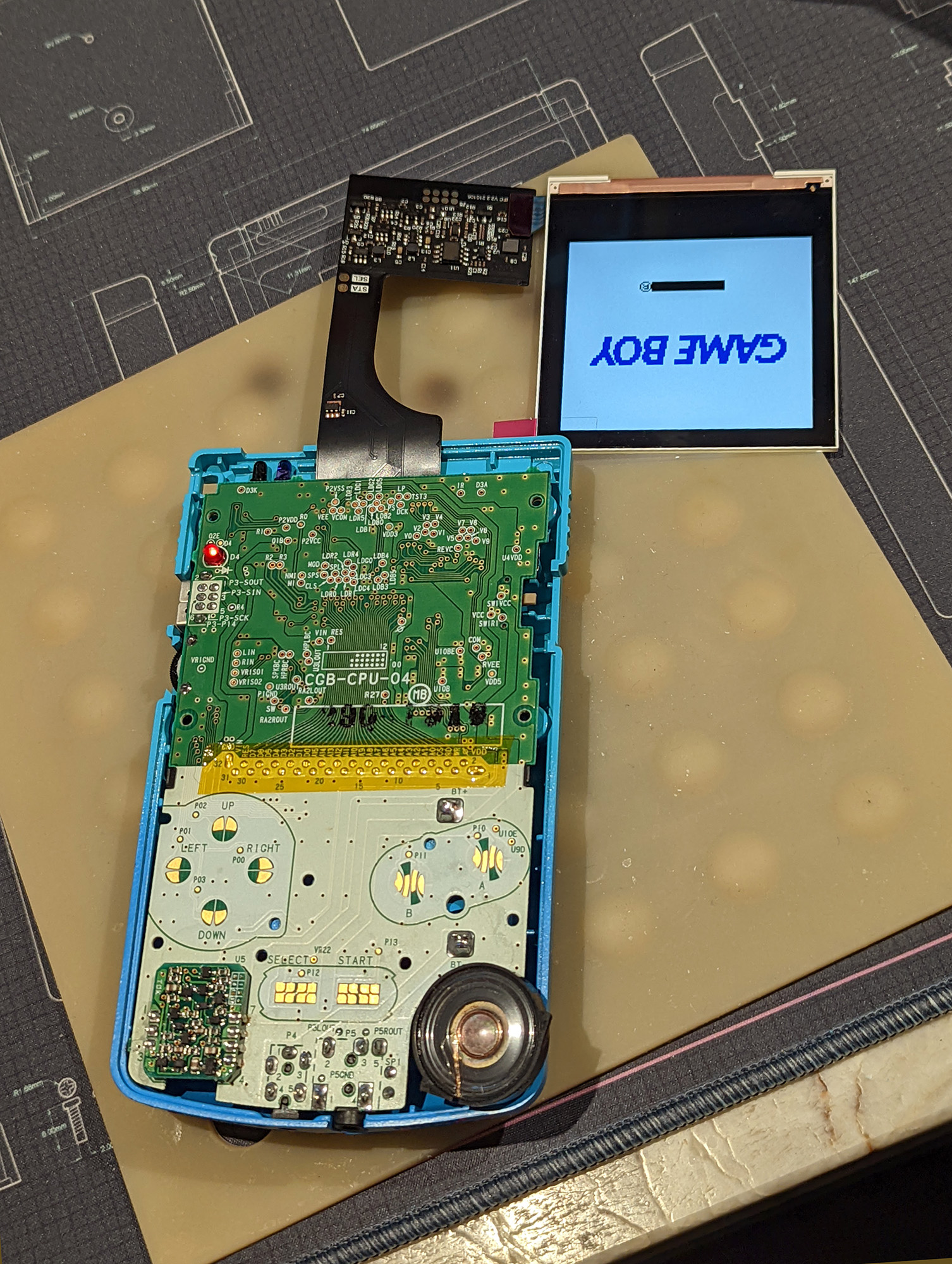
 mystic bramble
hidden basalt
So I got a second gbc that I tested and it works, I installed it, now the gamebo...
mystic bramble
hidden basalt
So I got a second gbc that I tested and it works, I installed it, now the gamebo...
Some kits require soldering from the PWR pad on the ribbon cable to the center, "C" pad of the power switch.
Depends on if it's a later revision or not
dry wadi
i spotted 2.7 on the driver board. 2.6 and later didnt need the power wire
nova nexus
Did I put the orientation of my battery wrong? I just replaced it now it wont recognize the battery

 scarlet aurora
we usually don't recommend battery holders on GBA games, it makes the cart not close well
and it's hard to tell from the picture, but the pads might not be making contact with the battery holder
nova nexus
scarlet aurora
and it's hard to tell from the picture, but the pads might not be making contact...
the battery was working fine, I actually replaced it because sometimes the cart hangs
and thought "I should brush it with IPA and maybe replace the battery as well "
scarlet aurora
wdym with the cart hangs, I don't understand
nova nexus
the one where it makes unholy sounds when the cart is not working
scarlet aurora
oh I see
yeah it's probably cause it's not closing correctly
I've had the same problem with a GBC cart, where since it doesn't close correctly sometimes the edge connector stops making contact with the cart reader slot
but we can wait for the modders to chime in, I might be wrong
most people will tell you to just use a CR1616 tabbed battery though

 proven gate
When you place your multimeter probes at the soldered battery holder tabs, is meter reading good voltage of the battery and the correct polarity?
nova nexus
yup
proven gate
Okay, then the answer to your original question is yes. orientation is correct.
nova nexus
sorry, so the + is on the left side right?
and the - is on the right?
does it need to have the icon?
proven gate
Yes and yes.
 proven gate
nova nexus
does it need to have the icon?
proven gate
nova nexus
does it need to have the icon?
I don't understand what you are asking here.
nova nexus
there are symbols on the battery right, do i need to orient them as well ?
 proven gate
That's not now button batteries work m8
proven gate
The top side you are looking at, that is the + side. The side of the battery down towards PCB is the - side
boreal aspen
the flat sides
proven gate
 stoic grove
I think you need more solder—with the battery tray bending that much to make contact with the traces your battery might not be making good contact with the tray.
 stoic grove
looks like lead-free
scarlet aurora
also looks like cold joints
stoic grove
A veritable cornucopia of potential issues.
nova nexus
lucid gull
Do you still have a pad? 👀
A pad?
terse dew
the exposed copper on the board that the solder sticks to. i'm reasonably sure you do otherwise it'd look different
nova nexus
@terse dew @lucid gull @proven gate @scarlet aurora @stoic grove sorry for the tagging. just wanted to give you guys an update
there were some black "something" in between the contacts of the positive part, we just cleaned that up, and added a pad on top to make sure it stays on contact with the positive and negative. and it works just fine
also just wanted to ask if these are just on the polarizer film and can be fixed.


 boreal aspen
Looks a little like @torpid plaza 's alcohol damaged slate screen
terse dew
yeah makes sense for that to be at the edges
nova nexus
do I just replace the white film thingy inside?
i have a donor part that I can take stuff of
dry wadi

A demonstration on how to repair screen burns on a gameboy advance sp screen, by replacing the polarizing film. I will be using a screen from a gba sp ags 101 model.
Polarizing films I used- https://www.aliexpress.us/item/2255800639387963.html?spm=a2g0o.productlist.main.25.6d1b677ff9TpHw&algo_pvid=544de0b1-a8a7-4d41-8305-0efb77b559e6&algo_exp_i...
proceed at your risk
neat linden
dry wadi
proceed at your risk
By this he means "expect it to end up worse than how it started, but you can try it if you want"
nova nexus
neat linden
By this he means "expect it to end up worse than how it started, but you can try...
i tried this before. everything went well with the screen, except for the ripped ribbon cable 
fathom heron
lol
im sorry to hear that
it's so easy to damage the ribbons
Chicki if you attenpt this again you could hold the ribbon against the back of the panel using some kapton tape - just be very careful unpeeling it to avoid damage to the ribbon or display
nova nexus
fathom heron
Chicki if you attenpt this again you could hold the ribbon against the back of t...
i'll keep this in mind in the future. thanks for the tip!
fathom heron
never apply tape to the back of the bare panels from cgs/etc (where you see a very thin white sheet on the back) as that rear panel is a very thin piece of plastic film but it's fine on the back of any screen with a metal cover plate etc
 torpid plaza
boreal aspen
Looks a little like <@328192765814898689> 's alcohol damaged slate screen
torpid plaza
boreal aspen
Looks a little like <@328192765814898689> 's alcohol damaged slate screen
😪
 last bramble
Fired up my gba today and when playing some Pokémon I noticed it was changing brightness any time I hit L/R. Opened it up to take a look and found this. Hoping that this board isn’t done for, it’s incredibly clean and in great shape otherwise. Can pads be repaired/replaced?

 dry wadi
does your select button still work otherwise
last bramble
Yes
dry wadi
so then you havent broken the signal path to the CPU
you can resolder to TP3 but be careful
this would change your brightness control to start + R/L
last bramble
Ahh ok awesome that’ll work just as well. Thank you!
 fossil scarab
I just installed an IPS kit from funnyplaying into a gba sp, it works fine sometimes but sometimes when i power on the gba it just flickers for a second and goes black
 dry wadi
please post photos of the motherboard as well
fossil scarab
dry wadi
please post photos of the motherboard as well
 fossil scarab
dry wadi
it doesnt have to be powered on
fossil scarab
dry wadi
it doesnt have to be powered on
Sorry for taking long to reply I had to go do a thing

you know what
i think it might just be a battery thing
i left it to charge while i was away and it seems to be more consistant with turning on now
is this normal for it to have trouble powering on on low battery?
i am having a different issue with the screen though, the other display modea are not working
1, 2 and 4 all look the same
as in the standard look
only mode 3, horizontal scan lines, is any different
fossil scarab
fossil scarab
i left it to charge while i was away and it seems to be more consistant with tur...
Actually I am not sure if this is true now its doing it again
neat linden
Have you desoldered and cleaned the power switch?
fossil scarab
neat linden
Have you desoldered and cleaned the power switch?
No I haven't messed with the power switch
Now the screen is making a light clicking sound when I turn it on and not displaying an image, so you think something is shorting out?
To clarify the sound is coming from the screen not from the speaker as it is not installed
fossil scarab
Okay after some experimenting for some reason if I put a cart in and power it on I'll boot to the gameboy screen but it will have a weird pink squiggle under it and not start the game
fossil scarab
The system still turns on like it'll even start the game I can tell.by the menu music
The screen just loses power
dry wadi
do you have a multimeter and know how to use it?
can you measure resistance from pin 1 of the power switch to ground? the bare copper on the bottom of the cart slot side is ground
these leads should also be clipped fully. they could short on things

 fossil scarab
dry wadi
do you have a multimeter and know how to use it?
fossil scarab
dry wadi
do you have a multimeter and know how to use it?
I dont have one sadly I live with my mom and she doesn't really have many more specific tools like that
It's weird it seems completely random whether it turns on
Once it's actually on it works perfectly fkne
I just have to flip the switch like 30 times until the screen decides to work
Once the screen is on there are no more issues during play
dry wadi
stop flicking it back and forth so quickly like your video
im trying to figure out if your system is discharging correctly, but it seems like you have limited skills and tools. if you like, you can post a  in #1049401311101206649 and have someone repair it for you
purple names have been vouched my admins and mods to have troubleshooting and repair skills.
fossil scarab
dry wadi
im trying to figure out if your system is discharging correctly, but it seems li...
I would imagine it's not an issue with the system discharging since it works perfectly fine with the original screen
It's only once the new screen is connected that it starts having issues
fossil scarab
dry wadi
stop flicking it back and forth so quickly like your video
i don't usually that was just to demonstrate without having a long ass video
basically the console always turns on fine, i can here the audio from the game so the game is starting and everything
it's just the screen that doesn't always power on
fossil scarab
dry wadi
these leads should also be clipped fully. they could short on things
i made sure to trim them
dry wadi
the only way to confirm the discharge circuit is with a multimeter
it could also be a power issue, something to be confirmed with a multimeter
could be as simple as needing a power switch clean, but with your soldering skills, it would be best done by someone else
there is a video on how to clean the power switch in id:guide and pinned in #modding
fossil scarab
dry wadi
could be as simple as needing a power switch clean, but with your soldering skil...
I've already cleaned the power switch
it does not seem to have anny effect
fossil scarab
dry wadi
the only way to confirm the discharge circuit is with a multimeter
i'll see if i can either buy one or borrow one from someone
fossil scarab
oh sorry, i was just replying to point out the specific messages i was replying, i followed this guide : https://wiki.handheldlegend.com/power-switch-cleaning-guide
Hand Held Legend
i did the cleaning after i was having the issue already as a way to try and solve it, so that is not the cause of the problem
dry wadi
the power switch looks quite undisturbed if you did open it up
usually no start on reboot or no screen on boot is power switch issues or drain resistor R48 issues
fossil scarab
when you say usually do you mean with a ips screen though or with regular screens, like i mentioned if i connect up the regular ags-001 screen it works just fine every time
dry wadi
both but worse with IPS screens
there is more in-rush on the IPS and more caps to discharge on an IPS
fossil scarab
would i have to have that resistor replaced then?
dry wadi
the resistor doesnt fail, but the circuit can get damaged and it becomes no longer in circuit
fossil scarab
i see
alright, i'll see if i can either buy or borrow from someone a multi meter. Is there a guide somewhere for how to test this specific component
dry wadi

Today, we'll explore the materials electrical engineers work with. We'll look at high-conductors, insulators, and how low-conductivity conductors can be used to generate light and heat.
Crash Course Engineering is produced in association with PBS Digital Studios: https://www.youtube.com/playlist?list=PL1mtdjDVOoOqJzeaJAV15Tq0tZ1vKj7ZV
PBS Spac...

How to use a multimeter. Find out in this tutorial for transistors, resistance, voltage, current, continuity, AC, DC, batteries, frequency, diodes, LED's, capacitors, temperature and much much more.
🎁 3D Print your ideas here ➡️ https://pcbway.com/g/67TWLc
PCB WAY offer expectational value on circuit boards, 3D printing, injection moulding, CNC ...
there are recommended tools in id:guide
fossil scarab
dry wadi
can you measure resistance from pin 1 of the power switch to ground? the bare co...
sorry for pinging you but it's been a little while since i've said anything here, i got ahold of a multimeter from a friend and tried to measure the resistance from pin1 to ground. it's showing up as 997 ohms
dry wadi
how are you measuring, can you try to take a photo
fossil scarab
yeah one sec
dry wadi
 fossil scarab
yeah those are the two contacts im touching
dry wadi
then the discharge circuit is in place
power switch is cleaned and the wipers are lightly bent to make better contact?
cleaned as in opened up and scrubbed
fossil scarab
 fossil scarab
dry wadi
power switch is cleaned and the wipers are lightly bent to make better contact?
fossil scarab
dry wadi
power switch is cleaned and the wipers are lightly bent to make better contact?
Yes I've opened it up and cleaned it
Lightly scrubbed it with ipa and very lightly sanded the contacts a little
fossil scarab
I've tried with both a stock battery and a shitty chinese 900mah one i got on amazon, the no-screen seems to come in waves, like sometimes it'll turn on fine 10 times in a row but then other time it will give me the no screen thing like 15 times in a row
dry wadi

can you measure this voltage when the system is on
and can you post a current photo of it as well lit as you can. if it is daylight, please take it to a window
fossil scarab
dry wadi
can you measure this voltage when the system is on
im only getting around 0.005 volts if im meassuring correctly
 dry wadi
touching the gold squares correct?
fossil scarab
yes
dry wadi
and is the screen black?
fossil scarab
yes
but i get similar results even if the screen turns on
in this video the screen is on displaying the gameboy logo
dry wadi
sorry. misremembering things
fossil scarab
it's alright man i appreciate you helping either way

 fossil scarab
dry wadi
move the red there if you can get a black screen
fossil scarab
dry wadi
move the red there if you can get a black screen
im getting 5.01 volts there
dry wadi
screen is black?
fossil scarab
yeah
dry wadi
without continuing further, it seems like its not a system problem. do you have another SP to test to see if its a kit problem?
fossil scarab
no i don't have another sp, im guessing it could be an issue with the ips screen since everything seems to work fine with the normal ags-001 screen
 feral dome
Hello everyone I made a post about this on the reddit but decided to come here for easier access on my end. I have a pokemon crystal cartridge that recently was taken into the shop I've gotten all my batteries replaced at and the game still will not save after getting the battery replaced.
They tried a few batteries and none could get the game to consistently hold a save
I don't personally own the gamebit to open these up yet but I had them open it for me today so I could get these pictures of the board


There used to be a lot of dirt/corrosion on the backside of the board which was also cleaned up when they did the battery
remote bobcat
feral dome
They tried a few batteries and none could get the game to consistently hold a sa...
When you say “get the game to consistently hold a save”, are you able to save and then continue playing on that save and then after a while the save is deleted? Or does it not hold a save at all?
spare apex
some of the vias and traces look corroded, it’s possible a connection was cut
feral dome
remote bobcat
When you say “get the game to consistently hold a save”, are you able to save an...
As soon as the console turns off, the save is wiped as if there wasn't ever one in the first place
Yeah the cartridge had a decent amount of corrosion on the back when I bought it so I had them clean it up as best they could
But once my gamebit gets here I can always do more work myself
I didn't check the battery with a meter since I didn't have mine with me when they opened it up again
remote bobcat
What’s the voltage on the battery?
feral dome
I can't open the cart back up till I get my own bit but it's a new battery because the old one was the original the game came with
Luckily they didn't charge me for the battery replacement since they weren't successful even though they left a new battery and cleaned the board
But other than not holding a save the game works perfectly fine
Here I'll get a quick video of the save being reset on startup


 remote bobcat
The battery they put in could be dead
feral dome
ill check it in a few days when my bit is here but the store owner who does these repairs said he went through like 3 different new batteries after I came back from the first one
remote bobcat
Either way, you’ll need to open up the cart. Check the voltage on the battery. If it’s good, then check the voltage on the top right pin of the SRAM chip
 mossy mirage
Vertical lines. Can generally be fixed by running a soldering iron at lower temp along the ribbon. Plenty of videos on YouTube
 wary crystal
gotcha, I tried that fix a while ago but I might have been using too high of a temp
thanks!
fathom heron
it also helps to peel off that rubber strip on top of the ribbon if it's still there (carefully). dont heat with it there. send a pic if you are unsure
wary crystal
not sure if I have time right now but maybe later!!
fathom heron
sure!
fickle hare
hold the soldering iron only briefly at the defective spot. even if the line is not immediately visible again, wait a moment until it cools down. only if the line still does not appear, hold the iron again at the defective spot.
wary crystal
is this like a universal fix or will it sometimes not work?
remote bobcat
You may have to work the iron over the spot a few times. Watch YouTube videos as well as what olDirdey says. Should be fixable but some lines may be stubborn. Just be patient and don’t overheat the ribbon
mystic bramble
Also sometimes using tweezers to apply pressure nearby as the solder under the ribbon is solidifying can help get those lines to reconnect
wary crystal
I am running it at 230 C
In videos the picture changes at least a tiny bit but nothing is happening for me
mystic bramble
Hold it there for a second or two longer, to let the heat propogated inward a bit
wary crystal
mystic bramble
Hold it there for a second or two longer, to let the heat propogated inward a bi...
I have held it there for like 30 seconds and nothing for some reason
I nocites a clear plasticy frame over top of the ribbon cable, is that suppose to be there
lucid gull
Something that transfers more heat. I’d up the temp as well
stoic grove
Chisel or knife tip at 450F should be plenty but yeah cone tip essentially useless for most GB projects.
 tiny bane
Hey guys just got my first job lot from Japan and was hoping to get a guidance on learning to solve issues with Gameboys :)

The gba doesn't power on and both the gbc/p work fine but dont have functioning speakers
feral dome
First things to check are the battery contacts in the GBA to make sure they aren't damaged or corroded. After that it's checking the board to make sure it's not damaged or corroded. For the GBCs, check the contacts for the speakers and replace with a new speaker is gonna probably be the easiest fix
fickle hare
wary crystal
are you thinking a flat tip?
try a drop of solder
fathom heron
tiny bane
Hey guys just got my first job lot from Japan and was hoping to get a guidance o...
take a look at our resources in id:guide , you have a lot of reading to do about common issues in our wiki as well. If you have specific questions after you've tried to look at the problems you can ask in troubleshooting
calm shore
I'm trying to install the FunnyPlaying MGB backlight kit, but after we've soldered the wire, the system turns off after being on for only a split second. The system turns on normally again if we re-connect the OEM screen. What could be the cause?
Below is a picture of the soldering work. Also of note is that we're powering the system with AAs and not AAAs, if that's relevant.
 mossy mirage
Could be a dirty power switch if it's especially bad
How are you connecting the batteries?
calm shore
mossy mirage
How are you connecting the batteries?
We have the battery contacts connected to the back shell, and then we place the back shell on the back of the board and put the batteries in

Obviously we don't screw the shell in yet
mossy mirage
Did you insulate the cart slot pins?
calm shore
What do you mean?
mossy mirage
The pins where the cart slot connects to the board -- they should be either insulated(with kapton tape) or trimmed, since they can contact the screen driver board when the Game Boy is assembled
calm shore
I believe we separated the driver board from the slot pins with a plastic bag as a temporary measure. Should we put kapton tape on there instead?
mossy mirage
Worth a shot. I'd also recommend posting full pictures of the board, front and back. Do you have a multimeter?
calm shore
Yes, we have a multimeter
mossy mirage
Use continuity mode to check for a short between pin 1 on the switch and ground
calm shore
Alright, we'll try that. In the meantime, here's pictures of the board

 lucid gull
👀
 mossy mirage
You sure you're getting good contact on the batteries? Any chance you could try with a regular back and AAAs?
mossy mirage
lucid gull
👀
That's a bit sus, lol
calm shore
lucid gull
👀
What the hell is that
fathom heron
please do clean the switch too, that has definitely not been opened.
that wont be the cause of the issues I think, but it will prevent further issues
 calm shore
Okay well whatever it was, we were able to brush it off
calm shore
mossy mirage
Use continuity mode to check for a short between pin 1 on the switch and ground
Which pin is ground? Is that the one in between pins 1 and 2 on the Switch?
mossy mirage
Ground is all over. That big gold square in the bottom right of Zipplet's picture is ground
calm shore
Ok
So according to our multimeter there doesn't appear to be a short
We'll try applying the kapton tape and report back
calm shore
So it turns on when we use the original back shell. We suspect that the batteries are shorting something on the AA shell, since the latter shell leaves the board exposed.

I tried covering that area of the board with kapton tape, but it doesn't appear to have an effect...

Turns out the AAs we were using were just dead. I feel so stupid.
lucid gull
It happens to the best of us
stoic grove
Truly
Me: “Why isn’t my system working anymore????”
Me to me: “did you turn the AA battery pack on?”

scarlet aurora
better to forget to turn it on than to forget to turn it off, with batteries inside of it
 boreal aspen
I blew a fuse yesterday testing with a power supply because I plugged it in with 12v
 mild helm
https://www.retromodding.com/products/game-boy-advance-sp-usb-charging-cable
Using one of these to charge my SP and it's taking a LONG time, i finally unplugged it after 13 hours and the charging light was still on. Is it more likely an issue with the cable, or the battery? Battery works fine otherwise

Retro Modding
Charge your Game Boy Advance SP through a wall adapter, car charger adapter, computer, or external battery pack with this USB charging cable. Allows you to charge your unit while playing.
fathom heron
more likely an issue with the SP or battery rather than the cable
what power supply did you use?
mild helm
Dont have the exact model handy but it's an Anker powered usb hub
fathom heron
alright. that wont be the issue imo. do you have a multimeter?
mild helm
Yes
fathom heron
remove the battery and measure the voltage please
Also drop a picture of the battery here so we can see what you are using
mild helm
Cant right this second but once im free I'll do both and update here
fathom heron
👍 no worries
mild helm
I bought it used and ive never actually opened it, so im curious if the battery is OEM
fathom heron
if it is OEM then your issue is almost certainly a bad battery, but lets figure that out when you have time to open stuff up
mild helm
Just gotta have breakfast + coffee first
mild helm
Looks fine, not puffy

 fathom heron
thats an ancient OG OEM battery
what does it read voltage wise right now? note that even if the voltage reads ok this does not mean the battery is ok, it might have high internal self discharge which would explain the charge not finishing
mild helm
Dumb question cus i havent really used my multimeter much since i got it: these are the settings i should be using right?

I cant get a pic while testing it but the voltage readout is 0.000 and...that dont seem right
fathom heron
Wrong setting you have it set to AC volts. one more click to the right to get DC volts


 fathom heron
and you say it was on charge for 13 hours? that battery is defective
mild helm
Yup, 13. Guess I'll get a mahko then
fathom heron
Yeah. do that and let us know what happens 🙂
please don't be tempted to leave it on charge to try to fix it. a battery that endlessly charges is dangerous
fathom heron
Yep
once you have a new battery, if you still suffer from charging issues let us know and we will help you figure it out
mild helm
Will do. Is it worth keeping the oem one around until then just in case its not the battery?
fathom heron
nope because it's ancient and needs replacing regardless
mild helm
Cool, mahko it is. I think i asked this a while back but forgot the answer: does anyone sell the mahko batteries besides RGRS?
fathom heron

Retro Game Repair Shop LLC
FunnyPlaying and Makho have joined forces to provide access to Makho's powerful MaxPlay Battery for Game Boy Advance SP, requiring no assembly and easily fitting into both FunnyPlaying and OEM GBA SP shells. This efficient battery is tested to provide 8-10 hours of uninterrupted gaming, even in modified consoles; optim
that's based on makho's original design and you can also buy it from funnyplaying directly if you prefer
mild helm
Yeah RGRS doesnt even have the mahko listed anymore
fathom heron
aye
calm shore
So my modded MGB that was working perfectly yesterday (as you can see in #gallery) suddenly won't turn on at all no matter what batteries I put in it. I can't seem to figure out why, but in case you guys have an idea, here's what my board currently looks like.

 trim jolt
have you checked anything yet?
stoic grove
Fuses, continuity to and from power switch?
trim jolt
like the fuse or the dcdc output
calm shore
I can check both of those, let me find my dad's multimeter
stoic grove
Oh yeah, sometimes these CGB power boards just... give up the ghost
Oh but it's MGB nvm
probably same situation
calm shore
I'm not 100% sure how to use a multimeter...is this what the dial is supposed to be turned to for testing continuity?
