#3D - Detecting the position of player clicks via raycasting VS CollisionObject3D input_event signal.

9 messages · Page 1 of 1 (latest)

sage quail
#

Within GDQuest's Node Essentials course, in the Camera article, it explains how to find the position of a mouseclick on 3D objects within the world, from the camera, with raycasting.

I also found an article by KidsCanCode the offers an alternative, using the input_event signal from CollisionObject3D. http://kidscancode.org/godot_recipes/3.x/3d/click_to_move/

What are the major differences in these two approaches? Are they essentially the same outcome?

Also, I'm having some trouble using this same signal to detect input events that are not InputEventMouseButton. I've tried to use if event is InputEventAction or if event is InputEventKey, but neither of them will trigger when I use keyboard input.

func _on_static_body_3d_input_event(camera, event, position, normal, shape_idx):
    if event is InputEventMouseButton and event.pressed:
        print("Key detected!")

The above code will print out when the either mouse button is pressed.
#
extends Node

func _on_static_body_3d_input_event(camera, event, position, normal, shape_idx):
    # Both of these will function.
    #if event is InputEventMouseButton and event.pressed:
        #get_tree().get_root().get_node("World").get_node("Human").target_position = position
    if event is InputEventMouseButton and event.pressed:
        get_tree().get_root().get_node("World").get_node("Human").teleport_position = position
        
    # Neither of these will function.
    if event is InputEventAction:
        print("Key Detected!")
    #if event is InputEventKey and event.keycode == KEY_F and event.pressed:
        #get_tree().get_root().get_node("World").get_node("Human").teleport_position = position

For the InputEventKey check, I even tried it without the additional conditions and it won't register keyboard keys.

My player's script.

extends CharacterBody3D

@onready var armature = $Armature
@onready var anim_tree = $AnimationTree

const SPEED = 5.0
const LERP_VAL = 0.3

var target_position:Vector3 = Vector3()
var teleport_position:Vector3 = Vector3()

# Get the gravity from the project settings to be synced with RigidBody nodes.
var gravity = ProjectSettings.get_setting("physics/3d/default_gravity")

func _unhandled_input(event):
    if Input.is_action_just_pressed("quit"):
        get_tree().quit()

func _physics_process(delta):
    # Add the gravity.
    if not is_on_floor():
        velocity.y -= gravity * delta

    if target_position:
        velocity = position.direction_to(target_position) * SPEED
        armature.rotation.y = lerp_angle(armature.rotation.y, atan2(-velocity.x, -velocity.z), LERP_VAL)
        if transform.origin.distance_to(target_position) < 0.05:
            target_position = Vector3()
            velocity = Vector3.ZERO
    elif teleport_position:
        self.position = teleport_position
    
    anim_tree.set("parameters/BlendSpace1D/blend_position", velocity.length() / SPEED)
    
    move_and_slide()
#

The player's script will allow me to move around, or teleport, based on which variable I tell the signal to set; but only if I'm using InputEventMouseButton.

I'm not sure why the Action or Key input events won't register. The signal documentation says that the event itself is the InputEvent class, and all 3 of the Mouse, Action, and Key events inherit from that same class.

I've even tried to remove the player from the World scene to check that it wasn't consuming the unhandled input event, but that still would not print my test message from within the signal function.

I'm using Godot 4 beta 10.

sage quail
#

Someone in this Godot Discord thread
https://discord.com/channels/212250894228652034/1058638411944177734
confirmed for me that the _input_event signal won't process all input events. I guess the API doesn't bother to explain that.

I suppose that also answers my questions about the limitations of the _input_event signal versus raycasting.

sage quail
#

So I went on a bit of a journey to figure out raycasting from the mouse's position. It looks like it's changed up in Godot 4. As far as I can tell, you need to create a new query object, set its properties, then pass that into the intersect_ray method.

I made a custom class for handling requests for such things as getting the mouse position, but I don't know if it was necessary. From my time with Python, I learned to make handler classes. I don't know if ActionHandler is the most appropriate name, but it's sufficient.

I'm also not sure if my dictionary key check is the best way to do it and it's been awhile since I've written some Python, which I think I used to just set it up with a one line assignment via the walrus operator (don't think GDScript has such a format, since := is already used for static typing).

extends Node
class_name ActionHandler

var params = PhysicsRayQueryParameters3D.new()

func get_mouse_click_position(caller):
    var mouse_position = caller.get_viewport().get_mouse_position()
    var camera = caller.get_viewport().get_camera_3d()
    params.exclude.append(camera.get_camera_rid())
    params.from = camera.project_ray_origin(mouse_position)
    params.to = params.from + camera.project_ray_normal(mouse_position) * 1000
    var result = caller.get_world_3d().direct_space_state.intersect_ray(params)
    if "position" in result:
        return result["position"]
    else:
        return Vector3()
#

I have my CollisionBody3D input_event signal on a floor script. May not be the best place for it, but it functions.

extends Node

func _on_static_body_3d_input_event(camera, event, position, normal, shape_idx):
    if event is InputEventMouseButton and event.pressed:
        get_tree().get_root().get_node("World").get_node("Human").target_position = position
#

Those two culminate in my Player's script.

extends CharacterBody3D

@onready var armature = $Armature
@onready var anim_tree = $AnimationTree
@onready var action_handler := ActionHandler.new()

const SPEED = 5.0
const LERP_VAL = 0.3

var target_position := Vector3(0, 0, 0)
var teleport_position := Vector3(0, 0, 0)

# Get the gravity from the project settings to be synced with RigidBody nodes.
var gravity = ProjectSettings.get_setting("physics/3d/default_gravity")

func _unhandled_input(event):
    if Input.is_action_just_pressed("quit"):
        get_tree().quit()
    if Input.is_action_just_pressed("teleport"):
        teleport_position = action_handler.get_mouse_click_position(self)

func _physics_process(delta):
    # Add the gravity.
    if not is_on_floor():
        velocity.y -= gravity * delta

    if target_position:
        velocity = position.direction_to(target_position) * SPEED
        armature.rotation.y = lerp_angle(armature.rotation.y, atan2(-velocity.x, -velocity.z), LERP_VAL)
        if transform.origin.distance_to(target_position) < 0.05:
            target_position = Vector3()
            velocity = Vector3.ZERO
        anim_tree.set("parameters/BlendSpace1D/blend_position", velocity.length() / SPEED)
        move_and_slide()
    elif teleport_position:
        self.position = teleport_position
        teleport_position = Vector3(0, 0, 0)

I don't know if assigning a new 000 Vector3 is the best way to reset the teleport position. But, if I didn't put that there, the old teleport position would exist still and if I tried to walk the character to a new location it would teleport back to its old position, so I had to do something.

#

The armature and animation tree stuff I blindly wrote while following Logan's video. It mostly works for walking, but I couldn't figure out how to get the character to look at the teleport position, making it so that when they teleport they face the direction they traveled from their original position.
https://youtu.be/VasHZZyPpYU?t=2644

Follow along with me as I model, rig, and animate a low poly character in Blender and then turn it into a basic third person character controller in Godot 4.

Big thank you to @Miziziziz, I heavily based my modelling process off of his "Making some ps1 graphics" video.

0:00 Intro

Modelling
0:51 Setting up model reference
3:00 Torso model
5:57 ...

▶ Play video
#

I also don't know if I needed to put my ActionHandler instantiation into an onready variable. It functioned just fine as a normal variable, but I moved it there just in case.

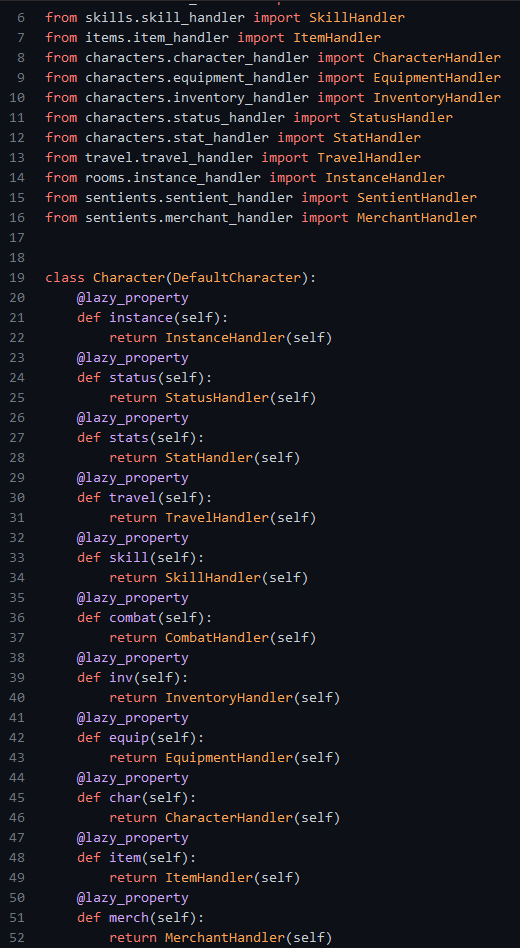
In my previous Python experience with Evennia, it had a decorator called @lazy_property which wouldn't instantiate the handler until it was called for the first time. Preventing all of the characters in the game from generating all of their handlers when the characters are first instantiated, but rather only when the handler is first called upon.
https://www.evennia.com/docs/latest/_modules/evennia/utils/utils.html#lazy_property

Obviously I also forgot to actually make my Godot ActionHandler a property lol, but instead it's just a variable.

https://i.imgur.com/Tu7Uitj.png