
1 messages · Page 1 of 1 (latest)
 broken prairie
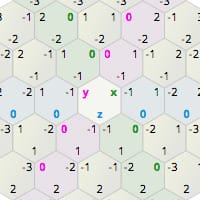
Hello everyone, I've been studying hexagon grid for a few days now following Red Blob Game's Guide (https://www.redblobgames.com/grids/hexagons/) while making my own grid system for Unity. I hope I make a clear point of what my problem is since I'm not really sure how to explain it.
I've implemented a bunch of stuff already, such as drawing the hexagonal grid, determining points in the grid using CubeCoords, AxialCoords or OffsetCoords, conversion from from one coordinate type to another, and so on.
Now after some time testing, I've noticed that when using CubeCoords, modifying the Q and R coordinates works fine, such as it did when using AxialCoords. However, when I modify the S coordinate, nothing happens, which is logical since the S coordinate always equals to s = -q-r, so q+r+s=0 must always be true.
What I've noticed is that if I were to modify the S coordinate individually, Q & R coordinates should be modified in one of two possible different ways (unless I'm missunderstanding something, which I probably am.) What should I do? Sorry if I wasn't clear enough but my head is a mess right now and I don't know how to elaborate more without even knowing if I'm explaining properly.
Amit's guide to math, algorithms, and code for hexagonal grids
broken prairie
Recursive calls issue
UnityEvent recursive calls issue
Okay so quick update, I've quite managed the previous mentioned issue and wrap my head towards a solution, which ended up in me making a custom property drawer for my CubeCoord struct.
[System.Serializable]
public struct CubeCoord
{
    public int q
    {
        get => m_Q;
        set
        {
            m_Q = value;
            m_S = -m_Q - m_R;
        }
    }
    public int r
    {
        get => m_R;
        set
        {
            m_R = value;
            m_Q = -m_R - m_S;
        }
    }
    public int s
    {
        get => m_S;
        set
        {
            m_S = value;
            m_R = -m_S - m_Q;
        }
    }
    [UnityEngine.SerializeField] int m_Q;
    [UnityEngine.SerializeField] int m_R;
    [UnityEngine.SerializeField] int m_S;

    public CubeCoord(int q, int r, int s)
    {
        try
        {
            if (q + r + s != 0)
                throw new System.Exception($"Invalid coordinates. The value of {nameof(s)} will be adjusted so the sum of {nameof(q)}, {nameof(r)} and {nameof(s)} values equals 0.");
        }
        catch (System.Exception)
        {
            s = -q - r;
        }

        m_Q = q;
        m_R = r;
        m_S = s;
    }
}
 deep fiberBOT
@broken prairie, your codeblock was automatically pasted to https://paste.myst.rs/wfg09izn
a powerful website for storing and sharing text and code snippets. completely free and open source.
broken prairie
In my property drawer, I basically create 3 IntField, one for each axis. The idea is that when one axis is modified, the previous axis subtracts the added amount.
In my property drawer, I've wrote the following code:
public override VisualElement CreatePropertyGUI(SerializedProperty property)
{
    VisualTreeAsset ui = AssetDatabase.LoadAssetAtPath<VisualTreeAsset>(DRAWER_UI_ASSET_PATH);

    SerializedProperty q = property.FindPropertyRelative("m_Q");
    SerializedProperty r = property.FindPropertyRelative("m_R");
    SerializedProperty s = property.FindPropertyRelative("m_S");

    if (!ui || q == null || r == null || s == null)
        return base.CreatePropertyGUI(property);

    VisualElement root = ui.CloneTree();

    IntegerField qField = root.Q<IntegerField>(name: "Q");
    IntegerField rField = root.Q<IntegerField>(name: "R");
    IntegerField sField = root.Q<IntegerField>(name: "S");

    if (qField != null)
        qField.bindingPath = q.propertyPath;
    if (rField != null)
        rField.bindingPath = r.propertyPath;
    if (sField != null)
        sField.bindingPath = s.propertyPath;

    qField?.RegisterValueChangedCallback(ev =>
    {
        int newS = s.intValue - (ev.newValue - ev.previousValue);
        s.intValue = newS;
        property.serializedObject.ApplyModifiedProperties();
        property.serializedObject.Update();
    });
    rField?.RegisterValueChangedCallback(ev =>
    {
        int newQ = q.intValue - (ev.newValue - ev.previousValue);
        q.intValue = newQ;
        property.serializedObject.ApplyModifiedProperties();
        property.serializedObject.Update();
    });
    sField?.RegisterValueChangedCallback(ev =>
    {
        int newR = r.intValue - (ev.newValue - ev.previousValue);
        r.intValue = newR;
        property.serializedObject.ApplyModifiedProperties();
        property.serializedObject.Update();
    });

    root.Bind(property.serializedObject);
    return root;
}
@broken prairie, your codeblock was automatically pasted to https://paste.myst.rs/xkhkud0m
a powerful website for storing and sharing text and code snippets. completely free and open source.
broken prairie
The problem with this code is that when I serialize the changes using ApplyModifiedProperties, Unity detects the value changes and fires the event of the changed property, leading to a infinite execution of events. I've tried using a bool variable to handle updating just once, but the bool wasn't updating properly for some reason, besides the fact that it feels a bit nasty to me using a bool to do so (hopefully it is just me and that is an acceptable approach). I've also tried setting the value to the IntField using the SetValueWithoutNotify method, but that didn't also work since it only modifies the visual text of the field, and serializing it doesn't actually apply the changes to its underlying property.
With that being said, I'm not really sure what to do.
broken prairie
Okay, so I made a bit more of progress and rolled back to the attempt where I tried using a bool to handle execution. I use 3 bools instead, one for each field, since only 1 field is modified. and I want to have information about which one I modified. My current event handlers looks like this:
qField?.RegisterValueChangedCallback(ev =>
{
    if (rChanged)
    {
        Debug.Log("Avoided changing Q.");
        rChanged = false;
        return;
    }

    qChanged = true;

    int newS = -q.intValue - r.intValue;
    Debug.Log($"New S is: {newS}. q = {-q.intValue} | r = {-r.intValue}");
    s.intValue = newS;
    property.serializedObject.ApplyModifiedProperties();
    property.serializedObject.Update();
});
rField?.RegisterValueChangedCallback(ev =>
{
    if (sChanged)
    {
        Debug.Log("Avoided changing R.");
        sChanged = false;
        return;
    }

    rChanged = true;

    int newQ = -r.intValue - s.intValue;
    Debug.Log($"New Q is: {newQ}. r = {-r.intValue} | s = {-s.intValue}");
    q.intValue = newQ;
    property.serializedObject.ApplyModifiedProperties();
    property.serializedObject.Update();
});
sField?.RegisterValueChangedCallback(ev =>
{
    if (qChanged)
    {
        Debug.Log("Avoided changing S.");
        qChanged = false;
        return;
    }

    sChanged = true;

    int newR = -s.intValue - q.intValue;
    Debug.Log($"New R is: {newR}. s = {-s.intValue} | q = {-q.intValue}");
    r.intValue = newR;
    property.serializedObject.ApplyModifiedProperties();
    property.serializedObject.Update();
});
The issue I'm facing now is that at the start, when the drawer draws at the start the UI for my field, I get the followingdebugs in the console (shown in the screenshot).
 deep fiberBOT
@broken prairie, your codeblock was automatically pasted to https://paste.myst.rs/rfxm2u7e
a powerful website for storing and sharing text and code snippets. completely free and open source.
broken prairie
I'm a bit confused towards why this is happening. To clarify, each time there's a debug for a new value that will be assigned, eventually a message on the console should be displayed saying that the same field has been avoided to change, which means that I avoided the infinite loop. This works the first time with the new S and Q field values, but then Unity decides to give new values to Q and R and doesn't seem to do any serialization. At first I thought it was because maybe unity doesn't serialize values that haven't changed, but that would contradict why it changes on the first two logs, so yeah I'm really confused about what's going on...
If anyone knows please let me know, I've been strugling with this for the past hour 🥲
broken prairie
I've researched a bit, and I have my suspicions that it might be related to the way Unity handles invoking callbacks. It seems that "sometimes" Unity skips callbacks if the value hasn't changed, which I could believe given the screenshot I previously sent. But, if that's the case, what do I do? Is there any proper design pattern I can follow for this specific case?