#Unity 2D. Bug in Playerprefs on my Inventory system
1 messages · Page 1 of 1 (latest)
 feral current


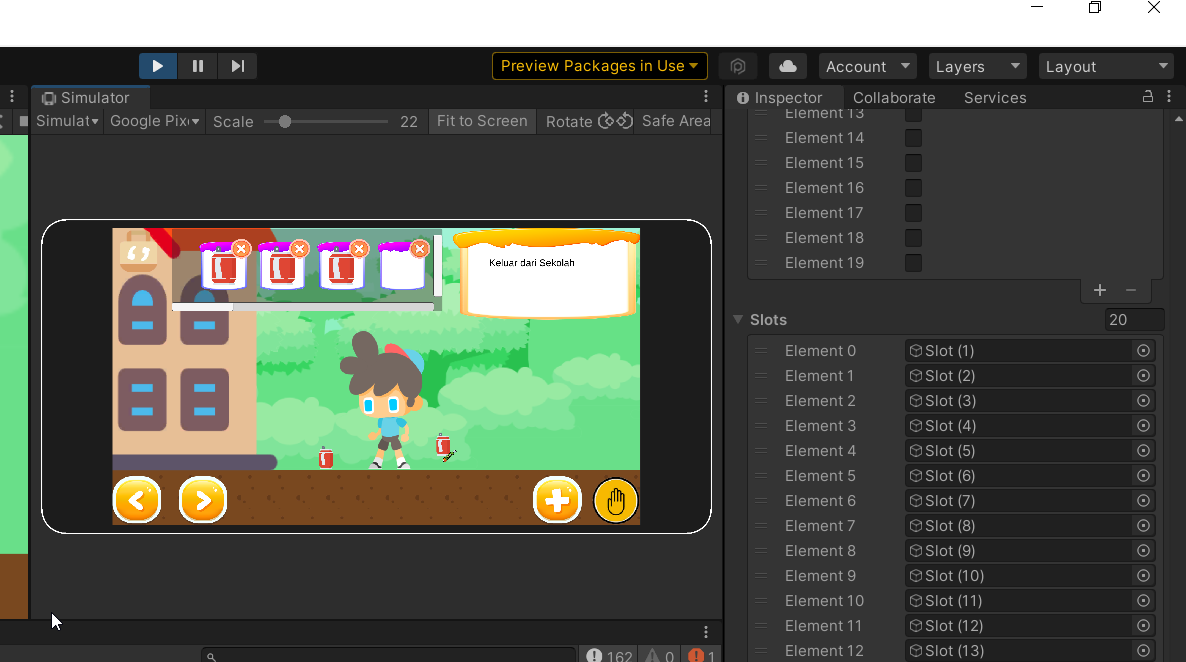
I have a following error. If i pick a soda can and then cutter like this image

then i drop the cutter using cross button in every slot.

the index 0 of slot it become a cutter. Whereas my index 0 of slot it's a soda can.

It happen to vice versa.

index 3 of slot is soda can, the rest is cutter. I press cross button in soda can. and all become soda can.

#This is my Inventory Script.
`using System.Collections;
using System.Collections.Generic;
using UnityEngine;
public class Inventory : MonoBehaviour
{
// Start is called before the first frame update
public bool[] isFull;
public GameObject[] slots;
// Save inventory state to PlayerPrefs
public void SaveInventory()
{
    for (int i = 0; i < isFull.Length; i++)
    {
        PlayerPrefs.SetInt("Slot" + i, isFull[i] ? 1 : 0);
    }
}

public void LoadInventory()
{
    PickUp pickUpInstance = FindObjectOfType<PickUp>();

    // Clear existing items in all slots before loading
    for (int i = 0; i < isFull.Length; i++)
    {
        foreach (Transform child in slots[i].transform)
        {
            Destroy(child.gameObject);
        }
    }

    for (int i = 0; i < isFull.Length; i++)
    {
        isFull[i] = PlayerPrefs.GetInt("Slot" + i) == 1;

        if (isFull[i])
        {
            // Instantiate the itemButton and set its parent to the corresponding slot
            GameObject newItem = Instantiate(pickUpInstance.itemButton, Vector3.zero, Quaternion.identity);
            newItem.transform.SetParent(slots[i].transform, false);
        }
        Debug.Log("Inside LoadInventory: Slot " + i + " isFull: " + isFull[i]);
    }

}
}`
#This is my Slot script
`using System;
using System.Collections;
using System.Collections.Generic;
using UnityEngine;
public class Slot : MonoBehaviour
{
private Inventory inventory;
public int i;
private void Start()
{
    inventory = GameObject.FindGameObjectWithTag("Player").GetComponent<Inventory>();
}


public void ItemRemoved()
{
    inventory.isFull[i] = false;
    inventory.SaveInventory();
    Debug.Log("Item Dropped from Slot " + i + ". isFull[" + i + "] set to false: " + inventory.isFull[i]);
}
public void DropItem()
{
    // Spawn and destroy all child objects
    foreach (Transform child in transform)
    {
        child.GetComponent<Spawn>().SpawnDroppedItem();
        GameObject.Destroy(child.gameObject);
    }

    // Notify that the item is removed
    ItemRemoved();
}
}`
#This is my PickUp script
`using System.Collections;
using System.Collections.Generic;
using UnityEngine;
public class PickUp : MonoBehaviour
{
private Inventory inventory;
public GameObject itemButton;
void Start()
{
    inventory = GameObject.FindGameObjectWithTag("Player").GetComponent<Inventory>();
    inventory.LoadInventory();
}

private void OnTriggerEnter2D(Collider2D collision)
{
    if (collision.CompareTag("Grab"))
    {
        int slotIndex = GetEmptySlotIndex();

        if (slotIndex != -1)
        {
            inventory.isFull[slotIndex] = true;

            // Instantiate the itemButton and set its parent to the corresponding slot

            GameObject newItem = Instantiate(itemButton, Vector3.zero, Quaternion.identity);
            newItem.transform.SetParent(inventory.slots[slotIndex].transform, false);

            Destroy(gameObject);
            inventory.SaveInventory();
        }
    }
}

private int GetEmptySlotIndex()
{
    for (int i = 0; i < inventory.slots.Length; i++)
    {
        if (!inventory.isFull[i])
        {
            return i;
        }
    }
    return -1; // No empty slot found
}
}`
#This is my Spawn script
`
using System.Collections;
using System.Collections.Generic;
using UnityEngine;
public class Spawn : MonoBehaviour
{
public GameObject item;
private Transform player;
private void Start()
{
    player = GameObject.FindGameObjectWithTag("Player").transform;
}
public void SpawnDroppedItem()
{
    Vector2 playerPos = new Vector2((player.position.x)+2, -8);
    Instantiate(item, playerPos, Quaternion.identity);
}
}`
I have no clue, already asking AI but not get the answer
I have already ask AI, but AI only refactor my code and did'nt give the exact solution. I suspect there's error on my "Instantiate" stuff or in my Playerprefs stuff. I expected a kind of solution to my inventory system.
 vagrant vapor
How is your code supposed to know which Item to place in what slot? You simply do not give it that data upon loading.
All you do, is store if a slot is filled, but not what it is filled with. Instead, you just get the first pickup object you can find (pickUpInstance = FindObjectOfType<PickUp>()) and spawn it in every filled slot (Instantiate(pickUpInstance.itemButton, ...)).
I seriously don't know how you expected anything else to happen here.
Besides, you should never use Find- methods. Not only are they bad for performance but also - as you've just experienced in some way - you don't know what they'll return.
And from a code design standpoint, your pickup should never be responsible for populating the Inventory (as you are doing in PickUp.OnTriggerEnter).
feral current
Is this code cause the error sir (pickUpInstance = FindObjectOfType<PickUp>()) (Instantiate(pickUpInstance.itemButton, ...)). ? i think this code get the last item i grab. then what i must do sir if Find method is bad?
vagrant vapor
It does not get the last item you grab.
It gets the first item it can find.
And even if it didn't, it wouldn't work for loading your inventory.
Solving this, is where things get complicated. After all, you cannot serialize the entire item objects.
So, you'll want to give each item a unique id and store that id for each slot. When loading, somehow get the item with the saved id to populate your slots.
feral current
so the Find method is always read the first item in that prefab right? the CutterButton? . My CutterButton is for instantiate itemButton in slot
 vagrant vapor
You need to read documentation 
Find methods only search the scene hierarchy. They have nothing to do with anything in the assets folder.
feral current
I'm sorry sir, i confuse what to do. maybe i just duplicate the inventory script for each item. then use find method as well
vagrant vapor
That is an absolutely atrocious idea. Do not do that.
feral current
i update my code sir from SaveInventory. I try to save the item tag from script PickUp. I passing Instance itembutton from PickUp script so i can identify which item i save. But theres a problem in my LoadInventory i already identify the item using tag, but i can't retrieve from folder Prefabs. its show some null error


 vagrant vapor
Again: Read the documentation.
The Resources.Load method can only load assets that are under Assets/Resources.
Besides that, PlayerPrefs should be used to store preferences. Not game data like inventory content. Better write to a file for that.
And also, why save whether a slot is filled, at all? If a slot is not filled, there simply will not be an identifier.
feral current
what must i do sir, so the best thing is save with json file?
can you guide me sir
vagrant vapor
A json file would be an option, yes.
To serialize json, you can use Unity's JsonUtility class.
As for guiding you... I would probably have to rewrite your entire system to make it work properly, and I do not have the patience and time to do that.
Speaking of working properly, by using Pickup.Instance.itemButton.tag to get your item tag you again take one item's data and save that to everything.
It's almost fascinating how you manage to keep finding ways to make sure you only save one item type...
feral current
i think when i using this way, is close to solve sir. because in this code Debug.Log(PickUp.Instance.itemButton.tag); it shows what tag that save

so if i choose to refactor to json or csv i dont have any clue what to change
vagrant vapor
in this code [...] it shows what tag is saved
It shows that, yes. But the saved tag will always be the same, because you are accessing said tag through a singleton that will not change during the loop.
So you have the exact same problem as before, just implemented in a different way.
feral current
Sir, already change it to json. but why theres null in my json file? the save and load didnt work


 vagrant vapor
What do you mean with "there's null in my json file"?
And please send videos as .mp4, otherwise Discord won't be able to embed them.
feral current
i mean this. it store null object to my .json file. i'm really sorry sir if i ask too lot
 vagrant vapor
Well I am pretty sure that Unity's json serializer won't be able to handle anonymous objects (which is what you create here new { ... }).
Just pass inventoryItems to the serializer directly. And make sure that the class (InventoryItem) is serializable.
Also, you are serializing an anonymous object containing an array of InventoryItems. Why would you tell the deserialization method to generate an object of type Inventory? That is clearly not what you are saving.
feral current
hey, mr. zenvin, i do change my code about inventory like this https://gdl.space/imedihupix.cs and finally it save to .json. But i have a problem in my LoadInventory, i want instantiate a game object based on item tag that i save, i already move my prefab to resources folder and it always said prefab not found.

 vagrant vapor
When loading assets via Resources.Load, the leading path ("Assets/Resources") is implied. So Resources.Load("Assets/Resources/...") would attempt to load from <project root>/Assets/Resources/Assets/Resources/....
Also, you must not have file name extensions on resource paths. So remove the + ".prefab".
You could know both of those things, if you had simply looked at Unity's documentation for Resources.Load.
And storing isFull is still redundant.
If there's no item in a given slot, there will not be an entry in itemTag.
feral current
hey sir zenvin, i already solve this save n load problem. thank you for your help, time and your patience to answer my dumb question 😂 . have a great day sir