#support-2
1 messages · Page 61 of 1
 wintry cloudBOT
You can set a permission or group on a per-world/per-server basis, through what we call "contexts".
 LuckPerms wiki
 grizzled hollow
or how do i set different default ranks for fifferent worlds
 high raven
Add different groups as parent groups of default with context
 prisma hinge
k bye lol
 tame hollow

prisma hinge
So basically when you set a global permission, its everywhere right?
 granite ermine
Yeah, Which is normal.. obviously
But skyblock i told NOT to take global
but it does
include global = false
prisma hinge
Oh yeah, like turbo said, you shouldn't really change those settings, even though theyre there
tame hollow
What makes you think it does
tame hollow
That means nothing
granite ermine
tame hollow
Explain
prisma hinge
That node, you can just add a context of every server but skyblock and it'll fix your issue
Though not ideal i get that
granite ermine
Thats such a stupid way lmao. I have to do this with 300+ permission across every rank....
Instead of it working and ignoring global
prisma hinge
Bro no clue 🤣 It probably does but ive never used it so Im not gonna sit here telling you how to hahaha
granite ermine
Ok so if i need EVERY permission that i currently have to only be on survival,creative,hub,hungergames,quake and NOT skyblock
Might just disconnect it from it's db and run it seperate at this rate lmao
high raven
Ok here's a better idea
Make group that are empty
Add your groups with the global permissions as parent groups of those groups with context
Give players the new groups
Bam, context everywhere, permissions at their root are still global
granite ermine
Wondering how that would affect switching servers etc
granite ermine
Id have to set the context of the groups that already exist.
To be everything BUT skyblock
And then.. I also have player permissions not group based
high raven
No you wouldn't lol this is what I am saying
granite ermine
I would.. Because right now its given my the 'owner' group.. even though thats a global group, and luckperms is set to not include global on skyblock
high raven
The player permissions I can't help with, cause that's generally not recommended, but the groups can be added as parents of other groups
prisma hinge

high raven
Then give the other groups to players
If you want to send an editor link I can make an example for you
prisma hinge
Oh shit I know what you mean
granite ermine

LuckPerms - A permissions plugin for Minecraft servers.
LuckPerms is a permissions plugin for Minecraft servers.
prisma hinge
laz you genius
high raven
Ikr
granite ermine
Ofcourse
I really appriciate the help but imagine for a second that include global= false actually worked
and then on skyblock for perms i do contents:skyblock and it all works fine
prisma hinge
imagine
high raven
include global should work
prisma hinge
i feel like it would work
high raven
and i have solved issues with people setting it, not knowing what it does, recently
anyhow
 granite ermine
It would save alot of time lmao and tidy things up
high raven
This is what I mean
then once you make those groups
rename them to each other
so you don't have to reassign everyone
tame hollow
Random question but have you restarted the server since making that change
To the config
prisma hinge
proxy too?
granite ermine
Sorry bro if its a config option it should work lmao
high raven
It works lol
tame hollow
Probably worth reporting if the config option doesn't actually work
granite ermine
Let me show ya my config real quick if thats ok
tame hollow
But I haven't really seen any proof of it not
high raven
send lp info output
high raven
also, include global will not cause the groups to vanish in places like lp listgroups
granite ermine
wintry cloudBOT
You can download LuckPerms for Bukkit/Spigot, BungeeCord, Sponge, Nukkit and Velocity.
Additional downloads
granite ermine
version?
high raven
yeah you're about 100 back
prisma hinge
100 versions behind
granite ermine
Damn
prisma hinge
so ~100 days lol
high raven
Tazza u got it
granite ermine
The hec do i download
high raven
but not 100 days
granite ermine
that page gave me a stroke
prisma hinge
Lazza the lazbo
granite ermine
prisma hinge
no 😮
granite ermine
Wat am i clickin xD
prisma hinge
where are you
high raven
top link
LuckPerms - A permissions plugin for Minecraft servers.
LuckPerms is a permissions plugin for Minecraft servers.
granite ermine
Well i must have it updates on one of my server because
it saved as 'LuckPerms-Bukkit-5.1.107 (1)'
lmao
Rebooting network everythings upto date
hopefullyy global works now lmao
Also, my typing is shit
granite ermine
Making skyblock will be fun they said
They was wrong
no luck
Still inheriting global
high raven
send lp user <name> info
granite ermine
kk
I mean
Wait
Can i use an existing permission?
Owners full of permissions already
from my other servers
high raven
if it's global yes
granite ermine
Ooh
no perms
in owner group..
for backpack
but it does have backpack perms 😮
granite ermine
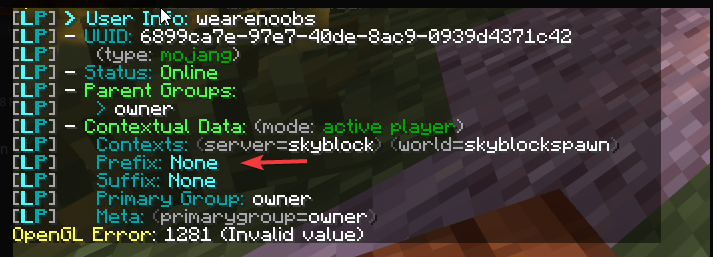
But its prefix does
 high raven
looks like it's pulling the prefix from another server
LP is not at fault here 
weeee
prisma hinge
:partyparrot:
granite ermine
'format: '{vault_suffix}{vault_prefix}{essentials_nickname} &r»'
prisma hinge
Yeah but since its bungee based
prisma hinge
It's bungee based, so it cant do it per server
Itll just get it off the instance of luckperms that bungeecord has which would have the prefix you set
God that was a shit sentence
high raven
Better chat plugin
prisma hinge
Per server chat plugin
granite ermine
Venture chat has that. its a bungee plugin lmao
high raven
lp-bungee is not skyblock - it tells VC you have the prefix
because the only place in your network you don't have the prefix is LP-bukkit on the skyblock
granite ermine
Theres gotta be a way xD
prisma hinge
Hm
high raven
pretty sure my system will work
prisma hinge
placeholder api doesnt have bungee support does it?
high raven
my big brain tried and tested system of abstracting the groups to add context
granite ermine
This is skyblock venture
prisma hinge
Can you set a context on bungeecord?
granite ermine
huh
prisma hinge
this is frying my brain
granite ermine
I know tell me about it, its 3am
high raven
The only thing i can recommend trying is my system
granite ermine
The initial group thing?
prisma hinge
If you're in a group, and bungeecord luckperms can see that you're in it, VentureChat will pull that prefix
high raven
the example I gave
granite ermine
Ah
So basically, I could solve ALL this, By dissconnecting it from the master db...
Right guys
Lets be honest
lmao
high raven
NO
prisma hinge
I mean yeah
high raven
bad idea
granite ermine
how so?
high raven
well
prisma hinge
larry it would fix it
high raven
it would fix one problem yes
prisma hinge
but its just inconvenient
high raven
makes a few more yea
granite ermine
Why is it really? I only do my stuff in lp editor...
high raven
because you'll have to do everything twice
prisma hinge
You cant add people to groups outside of skyblock
granite ermine
Thats fine by me tbh, Groups are earnt and all automatic
prisma hinge
You could ditch venture chat and use deluxechat or something though
high raven
want to add a perm to admin? better remember to add it in each place!
prisma hinge
split storage?
high raven
it's generally more of a headache as you expand
prisma hinge
what if you just added a chat plugin to skyblock
granite ermine
I'd have to put context global + skyblock on a command anyway lmao
high raven
no
granite ermine
(the way it is now)
high raven
nope
prisma hinge
Chuck essentials chat in skyblock or sometghing and see what happens
granite ermine
Lol chuck a none bungee chat plugin disconnecting all chat from my skyblock plugin to the network
high raven
with my proprietary group abstracting system, you could just add perms to groups and they'd go where they are supposed to
granite ermine
nioce xD
high raven
but
prisma hinge
Yeah well how else are you gon do it lol
prisma hinge
If you keep the bungee chat, if you disconnect LP from the db, regardless the prefix will still be the same
high raven
it is clear you seek an easy solution right now and prefer a prolonged headache down the line
So I digress
prisma hinge
because to bungeecord you're still in that group
granite ermine
It would be fresh luckperms and vault
granite ermine
on a different database
granite ermine
The heck
prisma hinge
its just how it works
high raven
unless
granite ermine
Thats shit
prisma hinge
Its a bungeecord plugin
granite ermine
Can i just do prefix, Survival,Creative etc BUT skyblock?
high raven
Joshie be honest with me
granite ermine
I will!
high raven
are you going to do the simple system I've recommended that will likely solve your problems, or at least try it
prisma hinge
lol
granite ermine
How does that fix the name issue?
It will still see my name is the same on the other servers, and venture will pull it
no matter what.
high raven
what?
granite ermine
that was the fix for global not working how it should, which is ok now (minus the prefix)
prisma hinge
lets be honest larry
high raven
if venture is any good whatsoever it will be able to see contexts
prisma hinge
your method wont fix shit 🤣
granite ermine
What about if I set a prefix HEAVIER, then the ones on the other server? with context = skyblock
granite ermine
Mans dipped
granite ermine
I'm gonna attempt a standalone luckperms on skyblock see if it pulls prefix
if it doesnt
prisma hinge
You want to have 2 different prefixes right?
granite ermine
then we laughing
prisma hinge
It wont fix it joshie
becuase you have a bungee chat plugin
It will still pull from luckperms bungee
but try it
by all means
prove me wrong
granite ermine
Gonna shout at venturechat people for abit
granite ermine
So wait
high raven
try things
granite ermine
The issue is venture cannot see context?
high raven
no
prisma hinge
Its just pulling the wrong things
granite ermine
So what does delux chat do that would fix this
prisma hinge
it cant determine which prefix you need
high raven
if you tried my method and it did not work, then the issue would be that
granite ermine
What does it need to 'pull' in order to work,
prisma hinge
deluxechat is on every backend server, and uses placeholder api so it would pull the right prefix from the server that youre on
high raven
talking about solutions will do nothing if you don't also try them, Joshie
granite ermine
Yes.
prisma hinge
hdkjfhsjdf
granite ermine
this is ON my skyblock server
granite ermine
Yeah..
prisma hinge
that wouldve been helpful to know about 30mins ago LOLOL
prisma hinge
shittttt bruz soz
granite ermine
got ya
granite ermine
So i think its pulled and stored my old vault prefix that LP set when it was global
right?
And still has it because it didnt clear
I cant even remember how to set a prefix lmao
granite ermine
granite ermine
But no
prisma hinge
so it works
prisma hinge
weight
granite ermine
i didnt set weight
prisma hinge
context
granite ermine
Or context,
prisma hinge
um
prisma hinge
okay hopefully it works
 prisma hinge
just usethe editor
wintry cloudBOT
You can set a permission or group on a per-world/per-server basis, through what we call "contexts".
LuckPerms wiki
prisma hinge
yes
granite ermine
Yeah, It was never told to 'clear' it so makes sense
Ty so much ❤️
That was horrible
 pale pond
woah cool TAB
prisma hinge
tab?
granite ermine
no its bungeetablist+
prisma hinge
sorry i got confused i wasnt asking which plugin
wait
has support for placeholderAPI
somehow
try %vault_prefix%
wait its not like that
high raven
{}
granite ermine
It has to work on every other server too
high raven
try it
prisma hinge
try what i sent joshie boi
granite ermine
Wait actually
kk
ooooh
Ayy and back to owner in survival
You legend!
Wait i dont have to do that in all my tabs do i?
Just skyblock
prisma hinge
Um
You can
it wouldnt hurt

GitHub
Contribute to CodeCrafter47/BungeeTabListPlus development by creating an account on GitHub.
granite ermine
ty
pale pond
you cant do that currently
prisma hinge
The actual group itself doesn't take contexts
It doesn't make any sense, groups just exist
yeah you can
granite ermine
thats just
prisma hinge
The group itself can't.......
prisma hinge
The perms it has can
granite ermine
same thing but yeah
prisma hinge
You cant add it to the groups
🙃
The actual group itself doesn't take contexts
It doesn't make any sense, groups just exist
like users
pale pond
You cant add it to the groups
@prisma hinge you just did what i said
prisma hinge
He said an entire group
so i just assumed thats what he meant
soz
You can however make users inherit groups on a certain context, or make all the perms in a group be applied on a certain context
But the group itself can't
granite ermine
xD derp
pale pond
wouldnt you need quotation marks around it if it had a space?
or does it handle that for you
prisma hinge
Put a space before the &r
@granite ermine
oh wait
im dumb
and blind
mostly blind
no
yes
okay yes
yes blind
wouldnt you need quotation marks around it if it had a space?
not in the editor, it will add the prefix with the quotations
if you add quotations while typing the command to add spaces, they won't be added unless you escape them
which is neat
 grand stream
Hello everyone. We just changed our skyblock plugin. is there a way to give a permssion to everyone who has a certain permission? For exemple give bskyblock.island.fly to everyone who has superiorskyblock.fly
Or replace it
prisma hinge
Replace it yes
granite ermine
Hmm
prisma hinge
!bulkupdate take a look at this
wintry cloudBOT
Quickly update a large amount of user and group permissions by using the bulkupdate command.
LuckPerms wiki
prisma hinge
MAKE BACKUPS
granite ermine
So by default people go into default rank right?
I kinda need them to go into...
a different rank when first joining skyblock lmao
grand stream
lp bulkupdate all update permission bskyblock.island.fly "permission == superior.island.fly" will replace superior.island.fly by bskyblock.island.fly right?
prisma hinge
wow
you must be the very first person that got it right without asking questions
holy shit xDD
pale pond

grand stream
You're kidding right? xD
prisma hinge
I'm not lmaoo
 hollow cape
Lmao its obvious what that does
prisma hinge
Not for many
hollow cape
Oh true
granite ermine
Whats the um
playerComponent: "${player luckpermsbungee_prefix}${afk_tag}${player essentials_nickname} ${player luckpermsbungee_suffix} ${afk_tag}${vanish_suffix}"
None bungee version of this?
I tried luckperms_prefix
Nvm didnt download it through papi lmao
prisma hinge
lollllllll
 crude oar
if i want a server connected under a proxy to not sync perms with anything else i just need to not hook it up to the storage system and everything should work fine right
pale pond
It should yeah
 lilac hazel
Yup.
wintry cloudBOT
To sync data between servers, you need to connect each LuckPerms plugin to the same database (for example MySQL) and set up a messaging service.
LuckPerms wiki
 vital glen
errrr-anyone wanna help me with what this means?
i tried to put it in my plugin folder
but- that pops up
pale pond
Try restarting your pc
vital glen
alright was about to do that lol
prisma hinge
Are you trying to delete or replace the file while the server is running?
vital glen
nope, i just downloaded it and went to put the servr foulder i can upload
other plugins
but i cant with that one
prisma hinge
probs wrong database credentials
grand stream
It's in local host
 quick lagoon
!errors
wintry cloudBOT
Here's a page with some common storage system errors.
LuckPerms wiki
grand stream
I'm using H2 so it's not a connection issue?
grand stream
wintry cloudBOT
You can download LuckPerms for Bukkit/Spigot, BungeeCord, Sponge, Nukkit and Velocity.
Additional downloads
 proper relic
I just updated but still not working 11.10 14:01:40 [Server] INFO [LP] Preparing a new editor session. Please wait... 11.10 14:01:50 [Server] WARN java.lang.RuntimeException: Error uploading data to bytebin 11.10 14:01:50 [Server] WARN at me.lucko.luckperms.common.webeditor.WebEditorRequest.createSession(WebEditorRequest.java:168) 11.10 14:01:50 [Server] WARN at me.lucko.luckperms.common.commands.misc.EditorCommand.execute(EditorCommand.java:173) 11.10 14:01:50 [Server] WARN at me.lucko.luckperms.common.command.abstraction.SingleCommand.execute(SingleCommand.java:50) 11.10 14:01:50 [Server] WARN at me.lucko.luckperms.common.command.abstraction.SingleCommand.execute(SingleCommand.java:42) 11.10 14:01:50 [Server] WARN at me.lucko.luckperms.common.command.CommandManager.execute(CommandManager.java:204) 11.10 14:01:50 [Server] WARN at me.lucko.luckperms.common.comm
prisma hinge
@tame hollow for the editor, would it be possible to make users a copy/move target rather than groups only?
(I mean yes ofc it's possible lol)
 tame hollow
wow chill out
roll those eyes any further they'll get stuck in the back of your head
prisma hinge
aaaaAAAAAAAAAA
tame hollow
thanks 😉
pale pond
⚪ ⚪
👅
its fefo
 red shell
right i guess
 sudden axle
how do i add a perm to an online player..?
red shell
you have the player list on the user tab on the left
sudden axle
How do I make the prefix, not inside with the player username
quick lagoon
Up to your chat plugin
prisma hinge
@prisma hinge
- You need LuckPerms on every server too, Bungee LP is not a replacement for the entire network
- PAPI is not out for Bungee
- Try manually installing this jar for the expansion, the one on ecloud isn't 100% up to date
- Make sure to use
%luckperms_prefix%and not%Luckperms_prefix%, caps matters
ok thanks
i will try it now
- Make sure to use
%luckperms_prefix%and not%Luckperms_prefix%, caps matters
@prisma hinge just checked and there is no caps
wintry cloudBOT
Hey ejclayton36! Please don't tag helpful/staff members directly.
prisma hinge
ok every bungee server has PAPI installed and it still wont work
??????????????????
- You need LuckPerms on every server too, Bungee LP is not a replacement for the entire network
- PAPI is not out for Bungee
I don't know what kind of "bungee papi" you got tbh
i have lpb installed
not regular luck perms
- You need LuckPerms on every server too, Bungee LP is not a replacement for the entire network
- PAPI is not out for Bungee
i know papi is not out for bungee, so i installed it on every server manually
How can I make it even clearer?
i know papi is not out for bungee, so i installed it on every server manually
@prisma hinge so that will work?
omg
i will install lp on each server too
then yes
And I suggest you sync them too
!sync check this
wintry cloudBOT
To sync data between servers, you need to connect each LuckPerms plugin to the same database (for example MySQL) and set up a messaging service.
LuckPerms wiki
To sync data between servers, you need to connect each LuckPerms plugin to the same database (for example MySQL) and set up a messaging service.
LuckPerms wiki
prisma hinge
lmao clippy buddy you ok?
oh ok
ok do i just install regular luck perms on each server and keep the luckpermsbungee... or should i remove lbp??
Yes, install regular luckperms on each spigot/paper server and keep bungee luckperms on bungee
btw
if you already set up perms and groups on lpb, you'll want to follow this other guide to migrate the data
!switch
wintry cloudBOT
If you wish to change your storage type (e.g. to YAML or MySQL) you may need to follow these instructions to ensure your groups and permissions are migrated to the new storage type.
Read more about the Storage types
LuckPerms wiki
prisma hinge
ok so if i need to do work in lets say... lp editor... will i do it on the lpb or will i need to do all the work on each individual server
 frank ember
if you've synced your servers it doesn't matter which one you use and it'll be copied over to all the other ones
prisma hinge
ok thanks
prisma hinge
ok... what is the recommended file share system for the servers to sync with??
wintry cloudBOT
Available commands:
!advanced
!api
!argumentbased
!ask
!bulkupdate
!bungee
!cauldron
!chat
!colours
!commandequivalents
!commands
!config
!context
!default
!downloads
!editor
!errors
!essentials
!extensions
!extracontexts
!faq
!helpchat
!inheritance
!install
!locale
!meta
!migration
!notworking
!nowildcard
!pasteit
!permissions
!placeholders
!selfhosting
!stacking
!storage
!suggestions
!switchstorage
!sync
!tracks
!upgrade
!usage
!userinfo
!verbose
!weight
!whyluckperms
!wiki
 meager hearth
!colours
wintry cloudBOT
 vapid sinew
Hello, how can I open the luckperms-h2.mv in the editor?
I have old database file before i reinstalled my Mc server and i should be to open in, when isn't this file on server.
vapid sinew
I need se the positions and prefixes
wintry cloudBOT
LuckPerms offers an easy to use, powerful Web Editor, with which you can add, delete and change permissions of groups and players.
LuckPerms wiki
prisma hinge
but you don't open that file
prisma hinge
No problem
 keen karma
!commands
wintry cloudBOT
Find all of the available LuckPerms commands on the wiki.
General commands
User commands
Group commands
Permission commands
Parent commands
Meta commands
Track commands
Log commands
LuckPerms wiki
 viscid slate
viscid slate
viscid slate
Nope
Never touched it
I'll do the latest four logs cause that's when it happened probably..
viscid slate
No..
I wasn't even using LP
I only noticed because suddenly prefixes disappeared
Is luckperms licked to world data?
Like if a world gets deleted does it also delete perms?
prisma hinge
nope
viscid slate
Will a server backup have the permission on it?
I'm not sure how luckperms perms are stored
prisma hinge
You mean a full server backup? Including the plugins folder?
Mind sharing an /lp editor link?
viscid slate
Yes
I've got a full server backup from an hour ago
LuckPerms - A permissions plugin for Minecraft servers.
LuckPerms is a permissions plugin for Minecraft servers.
If I upload the LuckPerms folder from the backup could that fix it?
viscid slate
It's alright
It didn't work
Omg
That was so many hours of work
Is there any way of recovering deleted data?
 quaint idol
@viscid slate How was it deleted? What is your storage system? Do you have backups?
viscid slate
I uploaded a backup
It was the same thing with all the groups gone
So I guess it happened longer ago than I thought
The server only retains 3 days worth of backups and I've been in hospital, just got back today and it's all missing, so the latest versions of the backups didn't contain the data.
I didn't change the config at all so wherever the perms are stored by default is where they were
I'm unaware of what has caused the permissions to all disappear
quaint idol
And this is why you don't just rely on just the host-provided backup.
In terms of helping you, take a look in your /plugins/Luckperms/ folder. See if there's anything ending in .<something>.gz
viscid slate
There are
Oh no
No there aren't
Misread
My host doesn't provide backups
I use OVH with Pterodactyl
quaint idol
ah. In that case, you might want to extend your backup retention, as well as maybe have weekly or monthly backup archives on a seperate system
unfortunately from a LP point of view, not much I can say.
tame hollow
there's an editor URL you sent earlier, does that have the data you want?
viscid slate
Yeahh I don't know how to get it to automatically get it to store them somewhere else, and if you've ever tried to get support from Pterodactyl you'll know you will receive about as much support as you can get from a brick.
No it doesn't
tame hollow
you don't need to rely on ptero to do the backups, if you control the system you can do anything you want with it
you use OVH, so I assume that's the case
OVH also have their own backup system
viscid slate
True, but I can't store backups on the server because it takes up too much space
tame hollow
but it's typically good practise to make multiple backups
quaint idol
if you've ever tried to get support from Pterodactyl you'll know you will receive about as much support as you can get from a brick.
tame hollow
lol, Dane should spend more time supporting and less time gloating about how many people were in the voice chat 
viscid slate
51 apparently.
I should really check who's in this server before making negative comments, lest I get banned again for verbally expressing negative opinions.
 viscid slate
I uh
I didn't check in another server and I said something about how the plugin creator has clearly lost patience and just responds to all support questions with insults.
(which they do)
Not realising they were a mod in the server I was in and they banned me lol
quaint idol
I've got a guess of someone who used to be a paper mod iirc
viscid slate
Right well
viscid slate
Hmm
viscid slate
xD
tame hollow
i was very drunk that night
viscid slate
I wasn't
If I knew they were there I might have said something worse.
So probably good thing I didn't
quaint idol

 copper perch
i gave myself the right role (default) and gave default the thing it said in the wiki but it isnt letting me do that command that i supposedly gave myself
it worked 3/7 times
for 7 different commands
quaint idol
!verbose
wintry cloudBOT
LuckPerms provides a verbose command to help you find out what permissions a command/plugin is checking.
LuckPerms wiki
tame hollow
gave default the thing it said in the wiki
the what
pls no use words like "thing" lol
copper perch
uh sorry yes
i gave myselfd default role
and i gave default the perms it said to give in the pixelmon wiki as the perm nodes
but the perm nodes seem to have only worked for the things that went with the pixelextras mod
and not the rest of the sidemods i tried to get work
like the pixelmon hunt sidemod
sudden axle
so.. if i have something like this
and that.. uhm, how would i be able to make the prefix/role/rank have 2-3 colors?
hurr durr...
copper perch
also my question above has been answered thanks!
tame hollow
oh, i thought you were ! 死なせてください
high raven
not anymore
sudden axle
xd thats just my discord username
sudden axle
qwq
 mighty yarrow
sorry I don't speak minecraft enchantment table
sudden axle
:T
sudden axle
anyone..?
wintry cloudBOT
quick lagoon
for prefix you just add the colour code to it ^^
sudden axle
&4Dark&0Lord ?
sudden axle
oh
high raven
please don't re-hoist urself
sudden axle
re-hoist?
high raven
!
quaint idol
the ! at the start of your name to bump yourself to the top of the member list
sudden axle
why >.>
high raven
it's annoying :p
sudden axle
.> okay
high raven
look again
quaint idol
sudden axle
i mean.. who would try to type 死なせてください, just to ping me XD
quaint idol
rclick -> mention or @Person w/ an unmentionable name
sudden axle
e.e
prisma hinge
@sudden axle :d
sudden axle
eef
prisma hinge
That works too
sudden axle
pepo lazy uwu
quaint idol
 didn't render on my client https://i.imgur.com/JWgpinX.png


 quaint idol
Ah
prisma hinge
Lmao
quaint idol
dumcord
quick lagoon
(lol google translate say your Japanese username means "Let me die")
quaint idol
stupidcord
mighty yarrow
!verbose
wintry cloudBOT
LuckPerms provides a verbose command to help you find out what permissions a command/plugin is checking.
LuckPerms wiki
quick lagoon
@sudden axle did you create a new session
sudden axle
yes.. 3 times
quick lagoon
after every apply edits/permissions modifcation
prisma hinge
mm mind sending the editor link and the applyedits code of this last attempt?
sudden axle
LuckPerms - A permissions plugin for Minecraft servers.
LuckPerms is a permissions plugin for Minecraft servers.
that was the last time lol
prisma hinge
and the applyedits code pls
sudden axle
/lp applyedits uCMoyZbwPV
prisma hinge
well you set, as an example, brewery.cauldron.fill to true for the default group
the default group already had brewery.cauldron.fill set to true
so no changes had to be made
same for essentials.tpacancel
quickshop.find
sudden axle
i was adding permission nodes..
prisma hinge
the applyedits code says you added those and set them to true
but the default group already had them
so no changes had to be applied
quick lagoon
the perms are already there in your editor
quaint idol
poor fefo
quaint idol
trying to check a null permission by the looks of it for some unknown reason lol
prisma hinge
remove fawe, try with og worldedit alone
 graceful lark
I need fawe for my Plugins xD Usin the API ...
Its only on localhost productions works fine
prisma hinge
¯_(ツ)_/¯
graceful lark
😂 Okay thank ^^ Have a good one 😂
prisma hinge
FAWE is giving LP something that LP 100% cannot work with
graceful lark
nice i like 😂
 maiden raptor
Funny how verbose translates to uitgebreide voortgangsmeldingen
pale pond
/uitgebreide voortgangsmeldingen sounds fun to type
quaint idol
eh dw the actual commands don't get translated afaik
quaint idol
I was looking through the src cause I was bored while driving home from thanksgiving, and the command "names" are hardcoded iirc
then again, that was yesterday
prisma hinge
yeah the actual command names are hardcoded, this thing is for the messages (I think)
prisma hinge
Funny how
verbosetranslates touitgebreide voortgangsmeldingen
what did I tell you
@maiden raptor ping pong
prisma hinge
let's goooooooooooo one page left
VIVA ESPAÑA 🇪🇸 🇪🇸 🇪🇸 ||funny because I'm not from Spain L M A O||
prisma hinge
then wtf
prisma hinge
@prisma hinge let's get on here, less crowded
ok
I see a lot of mixed UUIDs. Please double check that:
- Bungeecord
config.ymlhasip_forwardandonline_modeset totrue - All backend servers'
spigot.ymlhasbungeecordset totrue - All backend servers'
server.propertieshaveonline-modeset tofalse
ip_forward is true also bungeecord
online-mode on server.properties are false
online_mode on bungee are false because the network is for cracked users
quaint idol

prisma hinge
you say every "non-staff" user is on default
yes
I check now and for user are all regular but for staff the rank prefix not change
I use deluxe tags for staff prefix and luckperms for rank prefix
well because the prefixes for the staff groups are still there, and if they still inherit staff groups, they will have staff prefixes
yes if I run /lp user <staff_user> meta info the prefix include also staff prefix
I don't see the issue
One moment may be solved the problem
I solved
I have a rank prefix in staff groups
 abstract bluff
Hello I need help. I made a chat prefix for a group and I have given the group and the chat prefix wont show up
prisma hinge
!chat
wintry cloudBOT
LuckPerms does not display things in chat!
LuckPerms is only able to send information to formatting plugins so that they display them properly. LuckPerms does not put the prefix in front of your name, you need a chat formatting plugin to do it, and you need Vault. Same goes for the tablist! If the information appears correctly when you run /lp user <user> info, LuckPerms is doing its job!
Prefix isn't showing?
What plugins can I use to format chat?
abstract bluff
quaint idol
LP is doing things properly, chat plugin's fault
Oh wait
is that the correct prefix?
abstract bluff
no its not
i dont have any chat plugin
the builder group i have assigned gives a prefix
called builder
quaint idol
/lp user <user> meta info
abstract bluff
wintry cloudBOT
LuckPerms allows you to set weights in order to determine the priority of certain nodes, like permissions and even prefixes. A higher weight number is a higher priority.
LuckPerms wiki
abstract bluff
I gave the builder role a higher weight
abstract bluff
oh
 olive shale
Does anyone know the link to a tutorial / similar page for setting up color names and prefixes for roles with essentialsx chat? i have luckperms, essx, and vault installed, and i heard lp explains how to do so but i can't really find a page on it
i'm also completely new to trying to do any of this so that may be it
pale pond
!prefix might help
wintry cloudBOT
You can set prefixes, suffixes and other meta data in LuckPerms for players and groups. Note that LuckPerms does not manage chat. You need to use another plugin to show prefixes/suffixes in chat.
LuckPerms wiki
pale pond
@olive shale
olive shale
Thank you! I'll take a look!
copper perch
how do i see command nodes again
it was like a word like versace
but i cant remember it
frank ember
!verbose
wintry cloudBOT
LuckPerms provides a verbose command to help you find out what permissions a command/plugin is checking.
LuckPerms wiki
copper perch
thank you!
abstract bluff
does luck perms have a thing so that you can run a command to talk to people in only that group
similiar to how guild chat works in hypixel
prisma hinge
Lol that's not luckperms
abstract bluff
what is it then
abstract bluff
thank you!
 willow marten
bot, where do I paste the logs?
sudden axle
!paste
wintry cloudBOT
Please use pastebin!
Seeing a paste of the problem makes everything so much easier! Use https://bytebin.lucko.me/ for easy pasting!
For console errors:
Pastebin any relevant segments of the console log. If it's a startup error, this includes the entire startup log!
Other errors:
Pastebin the entire LuckPerms config file (passwords removed) as well as any other relevant files!
willow marten
thank you,
sudden axle
im no bot but yeah
willow marten
and not detected 🤔
anyways, it's a timeout error saying that the login took 11 seconds
and kicks the player trying to join in from lobby
!timeout
wintry cloudBOT
Sorry! I do not understand the command !timeout
Type !help for a list of commands.
willow marten
!help
wintry cloudBOT
Available commands:
!advanced
!api
!argumentbased
!ask
!bulkupdate
!bungee
!cauldron
!chat
!colours
!commandequivalents
!commands
!config
!context
!default
!downloads
!editor
!errors
!essentials
!extensions
!extracontexts
!faq
!helpchat
!inheritance
!install
!locale
!meta
!migration
!notworking
!nowildcard
!pasteit
!permissions
!placeholders
!selfhosting
!stacking
!storage
!suggestions
!switchstorage
!sync
!tracks
!upgrade
!usage
!userinfo
!verbose
!weight
!whyluckperms
!wiki
willow marten
!ask
wintry cloudBOT
Please ask your question!
Please ask the question you have. Don't ask to ask, or ask to DM someone. There are people here to help you, but we need to know what to help you with, so please just ask the question you want to in as much detail as possible!
Or, try here first:
Why shouldn't I ask to ask?
lilac hazel
H2 or SQL/MariaDB?
willow marten
MySQL
lilac hazel
Are the two servers (sql / minecraft) on the same machine
willow marten
no
lilac hazel
where is the sql server
lilac hazel
What modpack is this and what version?
lilac hazel
Does it contain the mod randompatches
willow marten
not at all
willow marten
server side or client side?
lilac hazel
server
lilac hazel
Don't see why not
lilac hazel
it just disables/increases the required time for timeouts to occur
plus some other stuff if you want that as well
willow marten
it's only for 1 server (out of 11)
inwhich the other 10 are able to allow you to connect
lilac hazel
I have 9 on a bungee network, all of which are hosted on the same box
I have a feeling it is the distance that is doing the damage
willow marten
could be
but we did have a finland server from a sydney proxy so that worked fine
(but we are moving most of the servers to sydney)
lilac hazel
you've got the client logging into the server so add their latency + latency to speak to your SQL server, then for your SQL server to send its reply
willow marten
well the NZ is selfhosted.. but it's mohist, what you expect
lilac hazel
selfhosted where, datacenter?