#support-2
1 messages · Page 58 of 1
 jagged flare
jagged flare
jagged flare
how would i resolve a storage issue
 prisma hinge
I mean you have no LP data to lose lol
Stop the server, set storage-method to json and start it again
Let's see if another storage type will do
jagged flare
thank you lemme test that lmao
prisma hinge
I mean it works for me in the very latest paper build and the latest LP version as well
all with default settings
jagged flare
Umm i have it set to paper spigot could that be the cause of my issue?
prisma hinge
paper is paperspigot
jagged flare
hmm strange
my server provider has paper and another type of server called paper spigot
prisma hinge
it's the same thing
 grand niche
https://mcpaste.io/e8bef5b27c2e13e5
shows this, and i have no luckperms.config
A easy to use Paste site for Minecraft Server logs.
 quaint idol
!errors @grand niche
 wintry cloudBOT
Here's a page with some common storage system errors.
 LuckPerms wiki
grand niche
LuckPerms wiki
grand niche
ok ty
jagged flare
ive just decided to delete the server files and try again i had configured like 2 plugins so its not a bother hopefully it fixes the issue
jagged flare
surprise surpirse it didn't work
 high raven
This is a unique problem in that it really shouldn't be happening
Start up the server fresh, on a fresh install of LP (delete the folder and restart) and pastebin the entire log please
It may have some clues
prisma hinge
I'd say try replicating it locally in your computer
 proper pulsar
What’s the issue here?
Couldn’t quite understand what’s going on from skimming over the past messages
prisma hinge
👁️👄👁️
sp00ky
but it does save groups tho
(well I mean it did save that owner group for testing)
proper pulsar
I’ve seen that
Also the storage file has a size
Just to make sure. You did ask him to try older versions of LP?
prisma hinge
Nope, didn't even think of that, but this is really a unique case
proper pulsar
@jagged flare try an older version of LP. The one from SpigotMC would be a good pick
jagged flare
ive triedt that and i have the same issue
jagged flare
no
proper pulsar
And you provided logs too, right?
proper pulsar
Ok
prisma hinge
It was the most default config file ever lol
jagged flare
yeah
proper pulsar
Just making sure
jagged flare
i wanted to leave it alone until things were fixed
proper pulsar
We’ve had plenty of cases where weird stuff was happening and when asked if people changed their config they were like “yeah I changed like every setting. Especially the ones I don’t understand. Why are you asking? I don’t see a connection”
jagged flare
yeah xD
i just uploaded one from my server provider
and that one isnt working either
proper pulsar
It feels like either something is messing with player login or there are some storage issues
jagged flare
any ideas on how i could possibly fix that?
proper pulsar
If you remove all plugins but LuckPerms does the issue persist?
jagged flare
i can attempt that
proper pulsar
Feel free to wipe the LP files to be doubly sure
jagged flare
okay
it works just fine by itself
any idea what plugin could be causing the issue?
prisma hinge
Enable half of them:
- If the issue arises, the culprit is in the half you enabled. Disable half of them. Repeat
- If it works fine, the culprit is in the half you didn't enable. Enable half of the ones disabled. Repeat.
 tidal blade
Add them all back 1 by one until the issue comes back
prisma hinge
Mine is literally the fastest way xP
proper pulsar
Do it in halves
prisma hinge
I already said that lol
prisma hinge
iterators
proper pulsar
That would’ve been my guess too
I mean try it. Throw it on and see if stuff breaks
prisma hinge
Wouldn't know
Is it a dev build or a stable release?
From my experience ProtocolLib isnt stable on 1.16 yet
jagged flare
yeah i just learned that lmao xD
prisma hinge
Without protocollib?
jagged flare
yeah
i have my tags
but it wont give it to him using his IGN
i have to use his UUID
 idle crater
Ay, i have an issue with the plugin. Every time i start my server with LuckPerms i get an exception: OutOfMemoryError.
I tryied it with Spigot and Paper Spigot version 1.16.2.
The server runs without problems if i remove the plugin.
The Server runs with 3GB Memeory.
wintry cloudBOT
Please use pastebin!
Seeing a paste of the problem makes everything so much easier! Use https://bytebin.lucko.me/ for easy pasting!
For console errors:
Pastebin any relevant segments of the console log. If it's a startup error, this includes the entire startup log!
Other errors:
Pastebin the entire LuckPerms config file (passwords removed) as well as any other relevant files!
idle crater
https://bytebin.lucko.me/5lrJUhkEWs @proper pulsar
wintry cloudBOT
Hey Debye Scherrer! Please don't tag helpful/staff members directly.
idle crater
no it didnt
Thats the only programm running on the server
A minecraft Spigot 1.16.2 Server with LuckPerms
 quick lagoon
and so?
idle crater
The server got 3Gb
prisma hinge
Does the whole machine have 3GB or it has more?
proper pulsar
Do you have access to the server console
idle crater
ye
proper pulsar
I mean the Linux server console
proper pulsar
run ulimit -u
idle crater
ubuntu
proper pulsar
And show me
proper pulsar
Doesn't matter when you run it
Just make sure you run it as the same user that runs the MC server
idle crater
62987
idle crater
ok why?
proper pulsar
That's how much memory is reserved for the stack
idle crater
oh
proper pulsar
And each thread creates one stack
Meaning you reserve 3GB of RAM for every thread
Don't use random startup parameters if you don't know what they mean
idle crater
screen -S Server1 java -Xmx3G -Xms3G -jar spigot-1.16.2.jar
is what i used
Don't use random startup parameters if you don't know what they mean
@proper pulsar
i used an tutorial for that
wintry cloudBOT
Hey Debye Scherrer! Please don't tag helpful/staff members directly.
idle crater
screen -S Server1 java -Xmx3G -jar spigot-1.16.2.jar
so just this?
proper pulsar
OOps. nevermind
Xms should be fine
Xss is the bad one
But just give that a try
idle crater
k
 fallow tusk
Hello , i have problem with Luckyperms. The plugin is red in the /plugins. The console says that some error occured while enabling. [Server] INFO Caused by: java.lang.ClassNotFoundException: me.lucko.luckperms.lib.guava.collect.PeekingIterator
i have installed LP bukkit 5.1.99 on my paper 1.16.2 server
prisma hinge
Stop the server, delete the LuckPerms/libs folder and start the server again
fallow tusk
okay , thank you . i will respond if thats the case .
idle crater
Same issue: https://bytebin.lucko.me/vfXt7nBo05
prisma hinge
Maybe you downloaded a corrupted jar? 🤷♂️
!download the latest version from here and try again
wintry cloudBOT
You can download LuckPerms for Bukkit/Spigot, BungeeCord, Sponge, Nukkit and Velocity.
Additional downloads
quick lagoon
or you forgot to close a previous instance of your mc server
prisma hinge
Corrupted jars tend to do strange things
quick lagoon
prob try restart the entire computer if its possible?
idle crater
Maybe you downloaded a corrupted jar? 🤷♂️
@prisma hinge
i redownloaded the plugin in different versions
wintry cloudBOT
Hey Debye Scherrer! Please don't tag helpful/staff members directly.
idle crater
the lastest and the one before
fallow tusk
Stop the server, delete the
LuckPerms/libsfolder and start the server again
@prisma hinge
Its working! thank you
wintry cloudBOT
Hey Maxer! Please don't tag helpful/staff members directly.
proper pulsar
See my comment above
idle crater
But i tryed it with other plugins, they are not causing this issue
Thats the wierd thing. And i find no other plugin to manage permissions.
proper pulsar
Just try it with LP alone
If that reproduces the issue while the server starts up fine without any plugins then you have a case
idle crater
I did now. And i build the latest spigot jar and used it (for the case the jar was corrupted).
Same issue.
Im going to send the log
prisma hinge
Just to make sure, you're using buildtools and not downloading the jar from getbukkit, right?
idle crater
Just to make sure, you're using buildtools and not downloading the jar from getbukkit, right?
@prisma hinge
i did
wintry cloudBOT
Hey Debye Scherrer! Please don't tag helpful/staff members directly.
quick lagoon
prob try restart the entire computer if its possible?
@idle crater
idle crater
i did
proper pulsar
Alright. This looks kinda broken
See if you can get a different build of Paper/Spigot
Preferably newer, but if that is the latest, then an older one
idle crater
yea.. im helpless thats the reason for me being here.
proper pulsar
Also preferably a few days from today
idle crater
I tried an older one too that one form getbukkit and i tried paper spigot
proper pulsar
And can we also get your server log if it persists? Not just the crashlog?
Don't use getbukkit
prisma hinge
What I don't get is why it happens when loading chunks
proper pulsar
Not only is it illegal but also I think they include some of their own code
Or at least they did
idle crater
hmm k good to know
idle crater
ca. i guess
proper pulsar
Hm. The old one was different
Another thing is to use a different/new world for testing
idle crater
i will delete the worlds and restart the server
idle crater
It works with another plugin that isnt luckperms
thats the reson i think its a luckperms issue somehow
quick lagoon
so try remove luckperms
prisma hinge
Try with a new fresh server, fresh everything
wintry cloudBOT
Hey Debye Scherrer! Please don't tag helpful/staff members directly.
prisma hinge
Fresh spigot build, fresh LP download, fresh files
quick lagoon
from your logs, you are using an old version of lp tho
v5.1.26
you are like 70+ builds behind
idle crater
ay right, i can change that
prisma hinge
I mean if it truly were a LP issue, way, way more people would be complaining
idle crater
but the server is generating the world yet
i deleted the world and restarted the server and it worked.
Now i restart the server (the worlds are genereted yet) and i get the same error.
idle crater
where do i find the server log
prisma hinge
That looks like a (possibly) bad setting in spigot.yml but it's weird it only happens with lp on
idle crater
I updated and still the same
prisma hinge
They'll probably tell you to ask here lol
proper pulsar
And the ulimit -u command was run as the same user as you run the server with, right?
@prisma hinge Unlikely
prisma hinge
eh..
proper pulsar
It clearly crashes during world load
idle crater
everything on the root user
proper pulsar
Also did you try it with more RAM?
idle crater
ye i started with 1 then with 2 then with 3
proper pulsar
How much does your machine have?
proper pulsar
I really don't see anything wrong that sticks out to me
idle crater
ye
prisma hinge
Need a bit help on my problem :(. I'm using a geyser plugin with floodgate and floodgate player management. With this the server can determine when a player is using a bedrock or java client to connect to my network. When a java client joins they get the default rank with prefix.100 (java) but when bedrock client joins they get both default and bedrock rank, default is given by "default" and the bedrock is given by my floodgate player manager. The problem is that the default rank is above the bedrock rank how can I change this? I need bedrock above default cuz it allows anti cheat bypasses
!weights
wintry cloudBOT
LuckPerms allows you to set weights in order to determine the priority of certain nodes, like permissions and even prefixes. A higher weight number is a higher priority.
LuckPerms wiki
prisma hinge
So if I add weight.100 on bedrock and 90 on default bedrock gets higher priority?:)
Exactly
Well thanks champ!
Also, make sure you set up your inheritances correctly
!inheritance for more info on that
wintry cloudBOT
Learn about inheritance.
LuckPerms wiki
prisma hinge
Isnt it the same to have the "bedrock group, parent group with default in it ?
bedrock parent add default?
Like so?:)
That too, but weights are also important
Yea going to add this now 🙂 thanks
jagged flare
So my playerdata isn't scrambled anymore
but my players need to be given their perms with their UUID any ideas?
prisma hinge
Did you try halving your plugins each time to see if the issue persisted, and which plugin may have caused your issue?
jagged flare
yeah
it was Protical Lib
now i think it could be placeholder
so i tested that and it wasnt causing issues
then i tested with all my plugins
then broke them up
and there is no reason for my player to still need to be given perms with UUID
jagged flare
I have been looking over config and i have no clue as to what the issue could be
prisma hinge
Does it trow errors when you use their player name ?
Give a player (through the uuid) a perm, a parent group, anything, restart the server and send an editor link, could you?
Does it trow errors when you use their player name ?
@prisma hinge https://discordapp.com/channels/241667244927483904/241667244927483904/752295199266570300
From there on lol
jagged flare
i can try to do that if you would like
prisma hinge
I want to see if there is any user data being stored, not necessarily names but any
Had the same issue when I was using a plugin that added a prefix to my username 🙂 needed to put that same prefix to my name inorder for lp the parent to a group
Literally everyone is 100% clueless
But my bet and Brain's bet is that it seems to be related to storage... which doesn't make sense at all for it to be that way because if Chris removes the other plugins it works fine
How does lp check the playername ?
I mean, when doing userinfo, it tries to get the target's username and if it can't it replaces it with "Unknown"
There must be a reason on "why can't it get"
Ur replicating his error ?
But from what I could dig out yesterday, again, my bet is that it seems to be some sort of storage error which again can't be
Ur replicating his error ?
can't lol
How does he stores is data ?
H2
default
and it does store group data
But again
which doesn't make sense at all for it to be that way because if Chris removes the other plugins it works fine
And why would it be able to store groups but not users if it's the same piece of storage...
I mean, something else is messing somewhere
Unless the users name has been changed by a plugin
On disable it works on enable it does not so something is changing his player data
The only thing I can think of is that something is replacing the username on PlayerCommandPreprocessEvent
It's very weird
Hmm does not make sense
It could be that a plugin has changed username before lp "getplayer" if I were him I would remove all plugins except lp and add them one by one each time restart
@jagged flare can you send full "latestlog"?
jagged flare
yeah lemme restart and ill give you that log
Heres the Editor log https://luckperms.net/editor/FFc1cSvCHV

LuckPerms - A permissions plugin for Minecraft servers.
LuckPerms is a permissions plugin for Minecraft servers.
ill get the Latestlog rn
wintry cloudBOT
Please use https://bytebin.lucko.me to send files in the future. I have automatically uploaded latest_2.log for you: https://bytebin.lucko.me/MAn8o93zzR
prisma hinge
How did you get your user to have your username instead of just the uuid?
jagged flare
i deleted protical lib
prisma hinge
Huh
Did you read the errors (more of warning really) at the very bottom?
Try setting vault-unsafe-lookups to true
prisma hinge
Also check your logs for all errors. You got a few of them 🙂
Number one rule. If there is an error there is something wrong
jagged flare
Yeah chatmanager im working on currently along with the others but Luckperms is my mian priority
 pine fulcrum
I'm having some difficulty achieving something and was wondering if anyone could point me in the right direction. I'm attempting to make freerank3 for example have a higher home-count than donorrank1(which have higher group weights), along with some other specific metas, so users can earn higher home-counts/etc than some of the donor ranks, but I can't seem to figure out a way to set non-prefix meta weights. Is this possible, and if not, is there an alternative way to accomplish this?
prisma hinge
but I can't seem to figure out a way to set non-prefix meta weights. Is this possible, and if not, is there an alternative way to accomplish this?
https://github.com/lucko/LuckPerms/issues/2523
high raven
Group weights are designed for the purpose of allowing nodes within them to override identical nodes of other groups
pine fulcrum
My donor ranks have other perks that need to be higher weight than free ranks, I just want to make F2P options for earning some donor perks.
I'm going to assume that this is not possible atm and whatever I set my donor ranks to is the ceiling for free ranks
high raven
are they identical, though?
pine fulcrum
?
high raven
The more homes on the freerank3 should simply apply
pine fulcrum
Does the higher option automatically take priority?
high raven
They won't be override by a higher weighted group, unless the node is identical
pine fulcrum
users are able to achieve both donor ranks and free ranks
high raven
Yeah....
pine fulcrum
for example freerank3 has 15 home-count while donorranks1-3, with higher priority, have home-counts 10,15,20
does it already work the way I'm trying to get it to work or...?
I might be confused
If user has freerank3 and donorrank1 with freerank being group weight 5 and donorrank1 being group rank 10 which would take priority?
pine fulcrum
oohhh I saw what you send but didn't see the added config option
So I needa set highest-number instead of inheritence
prisma hinge
inheritance will grab the "nearest" value for the key
"nearest" in terms of, well, inheritance
Then there's that other second option right below
prisma hinge
Highest number will select the highest value from all the inherited meta for that key
Regardless of group weight
pine fulcrum
I understand, thank you
prisma hinge
👀
prisma hinge
need some help on suffix :p prefix is working just great but can't get suffix to view on chat
Does it show in user info?
it does 🙂
Want me to !chat you? 👀
what does that even mean x)
!chat
wintry cloudBOT
LuckPerms does not display things in chat!
LuckPerms is only able to send information to formatting plugins so that they display them properly. LuckPerms does not put the prefix in front of your name, you need a chat formatting plugin to do it, and you need Vault. Same goes for the tablist! If the information appears correctly when you run /lp user <user> info, LuckPerms is doing its job!
Prefix isn't showing?
What plugins can I use to format chat?
prisma hinge
nvm i found it
sight
lel
i just set it on "test" without color or []
was in my own name
prisma hinge
is there a command to let players chose which suffix they want ? ive got 2 suffixes in 1 group just to try out 🙂
did not find info on wiki
 pale pond
You could have one group with a lower weight and one with a higher, although have no perms and have everything the same except for the suffix right?
And then just have a command or something to choose between the two
prisma hinge
imm you got me an idea thanks. problem is im only going to use 2 groups Java and Bedrock group since my server is a crossplay for all console. would take a long time to set up ranks/permissions for both bedrock version and java version
How search the public key?
What in the world are you talking about
!errors check this here
wintry cloudBOT
Here's a page with some common storage system errors.
LuckPerms wiki
pale pond
!download
wintry cloudBOT
You can download LuckPerms for Bukkit/Spigot, BungeeCord, Sponge, Nukkit and Velocity.
Additional downloads
proper pulsar
@low prawn Hi. So I’m posting here so it doesn’t get lost so easily. Do you still need help with getting the editor to work?
 crisp bolt
!user
wintry cloudBOT
Sorry! I do not understand the command !user
Type !help for a list of commands.
 obsidian zephyr
hey guys do u know what that means? https://pastebin.com/RGqU24Mm
Pastebin
Pastebin.com is the number one paste tool since 2002. Pastebin is a website where you can store text online for a set period of time.
 maiden raptor
is that the full error?
obsidian zephyr
yes
maiden raptor
nothing after it?
obsidian zephyr
nope
https://pastebin.com/UgyvtPhA thats anything from luckperms
Pastebin
Pastebin.com is the number one paste tool since 2002. Pastebin is a website where you can store text online for a set period of time.
 bronze elk
damn fefo you always on
maiden raptor
dedication ❤️
well from what i can see
luckperms started correctly
so this isnt a luckperms issue
prisma hinge
!placeholders
wintry cloudBOT
Display data such as user prefixes and groups from LuckPerms in other plugins.
LuckPerms wiki
 remote solstice
How could I list everyone who has the * permission?
My network has been griefed sometime ago and our staff are suspecting that they gave * to certain accounts on a partnership server, that's the context for example if there's another alternative to check that
pale pond
You could use /lp editor depending on how many people on your server have more than just the default group
 velvet bronze
How to give permission to certain commands in a plugin?
prisma hinge
You read the plugin documentation for the commands and permissions :p
!commands and then give the perms doing the "Permission commands"
wintry cloudBOT
Find all of the available LuckPerms commands on the wiki.
General commands
User commands
Group commands
Permission commands
Parent commands
Meta commands
Track commands
Log commands
LuckPerms wiki
velvet bronze
I will paraphrase. I need to give players access to the "/ scoreboard teams join" console command
prisma hinge
The vanilla one?
velvet bronze
This is vanila command
prisma hinge
There is only one perm for it minecraft.command.scoreboard and it'll give you access to the ENTIRE scoreboard command

BukkitWiki
The following are all the server commands either a server administrator or admin in-game can enter with CraftBukkit out-of-the-box. In addition to the original vanilla SMP commands there are 4 additional commands which are specific to CraftBukkit. CraftBukkit provides built-in...
 safe cradle
So is there a way to set a players rank for a certain amount of time that is below their current rank?
prisma hinge
parent addtemp?
safe cradle
Yeah but that doesnt work if lets say im owner and i want to set my self as default for 1m
prisma hinge
I mean, it does get added, but the owner one will have priority because it has higher weight probably
prisma hinge
I advise against doing that
safe cradle
Ok so what if i refversed the weight?
prisma hinge
Weights solve conflicts between mismatches
safe cradle
Like default is 100 and owner is 0?
safe cradle
Ik but i want to be able to set players ranks to a lower priority for a certain time
pale pond
Alright then I guess that works as long as you dont have any false permissions on default
safe cradle
Wait then i would have the same issue if i wanted to set the players rank to owner
prisma hinge
You want to "punish" players by setting a lower group as parent?
pale pond
wait but then default would have to have false perms for some of the owner stuff
prisma hinge
But for a set time
pale pond
hmm
safe cradle
Yeah
prisma hinge
Make a dummy copy of the lower groups with a higher weight and addtemp those?
🤷♂️
That's what I would do lol
 bold inlet
Does the placeholder for prefixes on Luckperms works on minecraft version 1.8?
bold inlet
Well it doesnt for me... So its either I did something wrong or its a bug
Is it unsupported?
tidal blade
Make sure you're using 1.8.8 not 1.8
bold inlet
Ok thanks XD
prisma hinge
How can i edit the prefix of Group default
quick lagoon
double post...
 shy vapor
Hello, regarding the web editor i saw today that we cant really edit well the contexts of the first permission on every group or user as what is outside of the permission area gets cutted out, for example i was editing a permission for a user that had only 2 permissions and the context box could not even be fully displayed
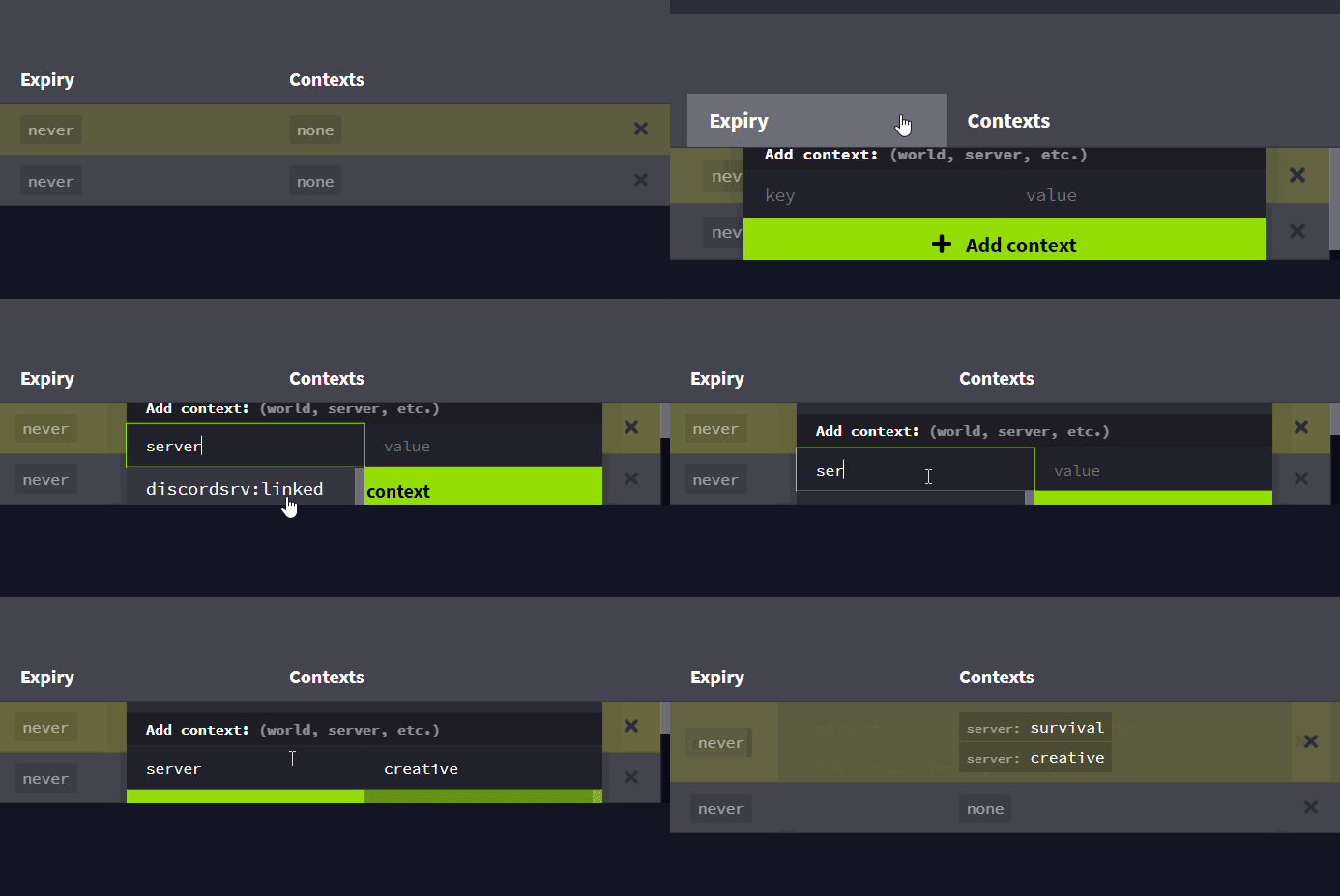
 high raven
Huh, that's a weird one. Mind uploading that gif along with an explanation at the LuckPermsWeb repo?

GitHub
Website & online apps for the LuckPerms plugin. Contribute to lucko/LuckPermsWeb development by creating an account on GitHub.
shy vapor
okok that gif is fine or should i cover anything else?
high raven
Basically say what you said in the message before that gif as well.
For now, you can manually type in the contexts in the box and it will work
shy vapor
yes yes i edited them fine and already uploaded the changes its just a report to take in mind of that bug :)
ill send on github the report thanks
high raven
Thank you! 😄
shy vapor
someone already talked something thats the same xd
i can comment that thread with the gif to give more details tho
high raven
Yes please
 daring oak
Can someone explain how to edit the text when scrolling over a player name
tidal blade
That's upto your chat plugin
prisma hinge
9 hours later
tidal blade
Better late than never
 fallow mortar
Anyone know how to allow non ops to do /warp commands for essentialsX? I've set all the various essentials.warp etc. to true. I've even tried creating a new group, giving them perms, and adding people to it and they still dont have permission. I'm using LuckyPerms. I Also tried turning on per warp and setting specifically that warps. Still does not work.
tidal blade
!verbose @fallow mortar This may help.
wintry cloudBOT
LuckPerms provides a verbose command to help you find out what permissions a command/plugin is checking.
LuckPerms wiki
fallow mortar
@tidal blade well I turned verbose on and /warps gave me a list of things I turned those all to true and it now allows anyone to do /sethome or /home so thats a start. When i do verbose for the /warp command nothing comes up at all though... :/
wintry cloudBOT
Hey Saac Nelly! Please don't tag helpful/staff members directly.
fallow mortar
okay clippy
what happens when i do /lp verbose command Saac_Nelly warps
What happens when i do the same for /warp
 prisma peak
Since I updated to the newest version I can't run F3 + N for Gamemodeswitch. Have * permissions Help
prisma hinge
That depends on being operator
prisma peak
ohh lol got it
new ops have only level 1 😄
but shouldn't the * permission work to?
prisma hinge
Nope
That's a vanilla thing that is also client bound
The client doesn't know about permissions, but it know about op
 white reef
Hello to all 🙂 ;
I am new too LuckePErms and wondered whether it si a drop in replacemanet for pex?
I still use Pex on my old server bu would like to keep it updated...
prisma hinge
Well I mean, in the dev bukkit pex page it says to use LP so you could consider it as a "replacement" lol
white reef
Thanks I also found the migration guide that I will try right now 😁
 grim pivot
Ok so i need help,
If i have a permissions with the context of a server it wont show up in %luckperms_expiry_time_essentials.fly%, is there some other way i can get it?
quick lagoon
!placeholders
wintry cloudBOT
Display data such as user prefixes and groups from LuckPerms in other plugins.
LuckPerms wiki
quick lagoon
Have you installed the LP papi extension?
grim pivot
Yes
quick lagoon
Screenshot /papi parse me luckperms_expiry_time_essentials.fly
grim pivot
Wait a sec ill have to setup a server as my friends server ran out
/lp user Vikbor5342 permission settemp essentials.fly true 3d accumulate
/papi parse me %luckperms_expiry_time_essentials.fly%
also shows up in my plugin
If i add server it wont show up
prisma hinge
Oh wow
grim pivot
Or cant i grab the time left from bungee?
prisma hinge
If the servers are synced properly, it should show too
Idk about placeholders + contexts honestly
grim pivot
Well i need to be able to grab them from bungee :/
prisma hinge
@grim pivot are you in the town server or somewhere else when checking the expiry time?
grim pivot
Im in the town
prisma hinge
Odd
quick lagoon
!sync do This
wintry cloudBOT
To sync data between servers, you need to connect each LuckPerms plugin to the same database (for example MySQL) and set up a messaging service.
LuckPerms wiki
grim pivot
Ill just ignore it and use a spigot style of the plugin
But it would be nice with something like %luckperms_expiry_time_essentials.fly_server%
prisma hinge
Spig... ????
quick lagoon
Huh?
grim pivot
That i cant grab it from bungee if it has contexts
quick lagoon
Bcu you need to sync the perms?
grim pivot
But if it has any contexts it wont show up
prisma hinge
Did you change the server setting in your LP config?
grim pivot
🤦
prisma hinge
Bruh
quick lagoon
Lol
grim pivot
You dont get what im saying
quick lagoon
You want teh context to show in the placeholder?
prisma hinge
Try the placeholder for the perm but with world context instead of server
And share a screenshot
While being in that world
quick lagoon
But essentials isn’t a bungee plugin
grim pivot
Me have the temp permission essentials.fly on server town, then i have a bungee plugin that try to grab the time from it by
%luckperms_expiry_time_essentials.fly% and it returns as nothing but i want it to return what the time is left
so im saying it would be nice if you could specify what server you want to grab from
prisma hinge
Try the placeholder for the perm but with world context instead of server
And share a screenshot
While being in that world
@prisma hinge
prisma hinge
Not necessary for syncing
grim pivot
WHEN I DONT HAVE ANY CONETXT ON IT IT SHOWS TIME
prisma hinge
WHY DON'T YOU TRY WHAT I ASK
grim pivot
Its all to a mysql database
prisma hinge
😭
grim pivot
i have lp on bungee and paper server
quick lagoon
You haven’t say want context are you setting
grim pivot
synced to the same database
You haven’t say want context are you setting
@quick lagoon SERVER
wintry cloudBOT
Hey "𒐫" Sign! Please don't tag helpful/staff members directly.
prisma hinge
Try the placeholder for the perm but with world context instead of server
And share a screenshot
While being in that world
quick lagoon
server=?????
prisma hinge
I'll keep pasting it until you do it
grim pivot
grim pivot
I want to GRAB the TIME of the PERMISSION from BUNGEECORD and the PERMISSION is on the PAPER server
high raven
Be nice to Fefo and stop being a pain, please
prisma hinge
Try the placeholder for the perm but with world context instead of server
And share a screenshot
While being in that world
grim pivot
Try the placeholder for the perm but with world context instead of server
And share a screenshot
While being in that world
@prisma hinge ?
wintry cloudBOT
Hey "𒐫" Sign! Please don't tag helpful/staff members directly.
prisma hinge
Give yourself the temp perm with world context
grim pivot
%luckperms_expiry_time_<permission>%
thats the placeholder
it cant
grav
from
other
server
grim pivot
Also, warning for pinging fefo a bunch. Listen to the bot and read #rules 1
@high raven so im not allowed to quote ok
wintry cloudBOT
Hey "𒐫" Sign! Please don't tag helpful/staff members directly.
quick lagoon
Mhmm
prisma hinge
- Give yourself the timed permission with world context
- Run the placeholder while being in that world
- Share a screenshot
quick lagoon
you may have just pissed him off
grim pivot
no im back
 karmic stone
hi back
prisma hinge
- Give yourself the timed permission with world context
- Run the placeholder while being in that world
- Share a screenshot
@prisma hinge
grim pivot
You dont listen to what im saying
high raven
You are the one not listening
karmic stone
lmao
prisma hinge
I don't care about server context
grim pivot
Larry how
karmic stone
you're the one who's not doing it
high raven
/papi parse me <the placeholder fefo asks for>
grim pivot
im saying i want to grab the permission time from bungee
grim pivot
larry i tried it before it works but i want to grab it from bungee
high raven
What kind of database do you use
prisma hinge
Try what I say because it might as well be an issue with the placeholder expansion
grim pivot
im on mysql
quick lagoon
Still not listening lol
high raven
send a screenshot of /papi parse me <the placeholder fefo asks for>
grim pivot
grim pivot
I dont care if i can get it from the server i want to get it from bungee
high raven
oh, do you mean you want to display it in the bungee console?
prisma hinge
- Give yourself the timed permission with world context
- Run the placeholder while being in that world
- Share a screenshot
grim pivot
WHAT PLACEHOLDER
prisma hinge
THE ONE FOR EXPIRY TIME
high raven
(with a world context and not a server one)
high raven
oh, do you mean you want to display it in the bungee console?
grim pivot
in a bungee plugin
high raven
Bungee itself, the server software, does not have PAPI afaik
grim pivot
i cant grab it from bungee if it has context of a server
grim pivot
Larry i can grab it if it does not have context
high raven
then try with world context
and not server context
on the node
and see if it works
quick lagoon
So world=town
grim pivot
if there is ANY context i cant grab it from bungee
as i have to be in that world/server
high raven
what do you mean "grab it from the bungee" (exactly)
grim pivot
ben i have sent that screenshot 3 times
high raven
what do you do to "grab it from the bungee"
quick lagoon
ben i have sent that screenshot 3 times
world context lol you don’t even read meh
grim pivot
me in bungee want to get the plugin time using %luckperms_expiry_time_<permission>% but i cant if it have ant context
grim pivot
from a bungee plugin
high raven
what exactly do you do?
grim pivot
proxy plugin
quick lagoon
We know lol
high raven
alright, bye
quick lagoon
Same lol
high raven
You're one of the first to get me to walk away lol
quick lagoon
I need to get my lunch
grim pivot
For bungee to be able to get the time i have to set it as server bungee but then i cant use the perm on town server
prisma hinge
Luck perms is so nice!!!!!!
proper pulsar
Glad you like it
 simple crest
So will it save the work on editor and come back to it later and not upload onto the server until I am ready?
prisma hinge
You cant save work on the editor
but if you dont close it, and dont refresh it then it should stay there
simple crest
Okay, thank you
prisma hinge
how can i change the primary group to not be deafult but some other group when a new player joins and gets assined into a group?
quick lagoon
!weights
wintry cloudBOT
LuckPerms allows you to set weights in order to determine the priority of certain nodes, like permissions and even prefixes. A higher weight number is a higher priority.
LuckPerms wiki
quick lagoon
by default primary group is the group of the highest weight
prisma hinge
okay
how can i now assign all the new players to get the new group
i set the weight of the group
pale pond
thats the default group
prisma hinge
okay
but still people are assigned to the old one
so how can i now fix this
A player had vip and when I did lp user <name> parent add mod they got mod and got the prefix for mod but they no longer have the prefix for vip
How do I fix this?
quick lagoon
!stacking
wintry cloudBOT
Display multiple prefixes/suffixes alongside a player's name.
LuckPerms wiki
prisma hinge
(Ping me please)
prisma hinge
Step by step what would I do to make it so the prefix of the groups your in always showup
If you're in 3 groups it will take the maximum two group prefixes with the highest priority
If you're in 4 groups it will take the maximum two group prefixes with the highest priority
If you're in 2 groups it will it will take the maximum two group prefixes with the highest priority
Do you understand what I'm getting at?
I would please would like to know how I can do that step by step?
I'm slow and it's difficult for me to read and understand things so I apologize if I'm not understanding it
proper pulsar
Well, sadly what you are asking for is not quite possible
You cannot get the second highest prefix
You'll need to find a work around
prisma hinge
Let's say someone has vip and default group
I give them the co owner group
How do I make it so that their new prefix will include co owner and vip
and leaveout the prefix for default group
 candid canopy
Can someone help me? So I got essentials and added a prefix and a suffix and I saved it in luckperms and then later my suffix and prefix went away. Except when I do commands it shows my suffix and prefix like: You gave {Owner}Moto_Sniper[Hi] 1000 dollars.
proper pulsar
!chat @candid canopy
wintry cloudBOT
LuckPerms does not display things in chat!
LuckPerms is only able to send information to formatting plugins so that they display them properly. LuckPerms does not put the prefix in front of your name, you need a chat formatting plugin to do it, and you need Vault. Same goes for the tablist! If the information appears correctly when you run /lp user <user> info, LuckPerms is doing its job!
Prefix isn't showing?
What plugins can I use to format chat?
proper pulsar
@prisma hinge well as mentioned not quite possible. You'll need to fiddle around with tracks
candid canopy
Didn't help but ok.
proper pulsar
In short it's up to your chat plugin, not LP
prisma hinge
Brainstone will this bug ever be resolved in the future
I think it would heavily improve this plugin
Luckyperms is already really nice
That would be the cherry ontop
I think you should (:
How can I give someone permission to whitelist/kick/ban without making them op?
proper pulsar
It's not a bug really. It's a missing feature if anything @prisma hinge
@prisma hinge by giving them the respective permissions...?
high raven
@prisma hinge you could set vip and co-owner and all groups a player could get on two tracks and show the highest prefix on each track twice, while preventing duplicates (set duplicates to none). This way the two highest groups they have will show
Two differently named but identical tracks
And use stacking
high raven
Oh... Yeah you're right 😂
candid canopy
BrainStone (not available) do you think you could help me?
pale pond
whats your problem?
proper pulsar
?
candid canopy
My prefix and suffix don't show unless I use a command like /tp Moto then it says Teleporting to {Owner}Moto_Sniper[HI]. Like I was wondering if you know how to fix it.
pale pond
what chat formatter are you using?
proper pulsar
!userinfo
wintry cloudBOT
Please take a screenshot!
Seeing a screenshot makes everything so much easier!
For prefixes not showing up in chat:
/lp user <user> info.
For database errors:
Server console: /lp info | Proxy console: /lpb info.
candid canopy
Essentials
pale pond
and if it shows the prefix in that command, then its not a luckperms related issue, and is a problem with essentialsx chat
candid canopy
I know
It is a problem with essentials that's why I was asking if anyone knew how to fix it
candid canopy
proper pulsar
!chat
wintry cloudBOT
LuckPerms does not display things in chat!
LuckPerms is only able to send information to formatting plugins so that they display them properly. LuckPerms does not put the prefix in front of your name, you need a chat formatting plugin to do it, and you need Vault. Same goes for the tablist! If the information appears correctly when you run /lp user <user> info, LuckPerms is doing its job!
Prefix isn't showing?
What plugins can I use to format chat?
candid canopy
ik
 crude oar
when bulk updating contexts in the editor, having the replace text grayed out should mean that you can add the contexts while it still keeps existing contexts right?
tidal blade
Keep finding them 😛
crude oar
welp that's 2 so far
found some more with his undo/redo demo but i'll wait till that's actually done to bother cuz he likely already knows about them 😛
proper pulsar
!chat @lavish scarab
wintry cloudBOT
LuckPerms does not display things in chat!
LuckPerms is only able to send information to formatting plugins so that they display them properly. LuckPerms does not put the prefix in front of your name, you need a chat formatting plugin to do it, and you need Vault. Same goes for the tablist! If the information appears correctly when you run /lp user <user> info, LuckPerms is doing its job!
Prefix isn't showing?
What plugins can I use to format chat?
proper pulsar
Also maybe describe your issue a little so I don’t have to go hunt for information in your screenshots
prisma hinge
I use web editor to give a group towny.chat.admin in the web editor but everytime I save it and link it to my server it says "No changes were made"
quick lagoon
@prisma hinge did you create a new session after every apply edits?
quick lagoon
did you press the + button the right
 lavish scarab
how to get spigot to ues the bungeecord for spigot Permissions
proper pulsar
Not possible
They are entirely separate systems
You can however sync LP instances
!bungee @lavish scarab
wintry cloudBOT
If you run a Bungeecord network, learn how to correctly setup LuckPerms on all server instances (including Bungee).
Also read:
Syncing data between servers
https://github.com/lucko/LuckPerms/wiki/Syncing-data-between-servers
LuckPerms wiki
 mighty yarrow
!help
wintry cloudBOT
Available commands:
!advanced
!api
!argumentbased
!ask
!bulkupdate
!bungee
!cauldron
!chat
!colours
!commandequivalents
!commands
!config
!context
!default
!downloads
!editor
!errors
!essentials
!extensions
!extracontexts
!faq
!helpchat
!inheritance
!install
!locale
!meta
!migration
!notworking
!nowildcard
!pasteit
!permissions
!placeholders
!selfhosting
!stacking
!storage
!suggestions
!switchstorage
!sync
!tracks
!upgrade
!usage
!userinfo
!verbose
!weight
!whyluckperms
!wiki
quick lagoon
are you using a server hosting site?
 tidal flare
Yes
quick lagoon
maybe contact them
high raven
!bungee
wintry cloudBOT
If you run a Bungeecord network, learn how to correctly setup LuckPerms on all server instances (including Bungee).
Also read:
Syncing data between servers
https://github.com/lucko/LuckPerms/wiki/Syncing-data-between-servers
LuckPerms wiki
 ripe violet
Ooh that might help
high raven
Yessir
ripe violet
I'm using velocity tho, doesn't change anything does it?
high raven
You'll need a database too, if you plan on doing it right
And not really
Just set up velocity correctly and you're good
ripe violet
I got a mySQL database set up currently, velocity secured on backends so no issue there
high raven
Perfect
ripe violet
Cool, thanks!
prisma hinge
run /lp group default info and share a screenshot
 tropic kite
I even tried creating a new group called miembro, and trying to use it as parent
but not working neither
wintry cloudBOT
LuckPerms does not display things in chat!
LuckPerms is only able to send information to formatting plugins so that they display them properly. LuckPerms does not put the prefix in front of your name, you need a chat formatting plugin to do it, and you need Vault. Same goes for the tablist! If the information appears correctly when you run /lp user <user> info, LuckPerms is doing its job!
Prefix isn't showing?
What plugins can I use to format chat?
tropic kite
I am assuming its not luckyperms fault, but I was hoping someone knows what is causing this
prisma hinge
Ask support in your tab plugin's discord
prisma hinge
Weight 0 works fine for LP, idk bout your tab plugin
If you're using TAB, check #general, I recently shared the discord invite on that discord
tropic kite
They fixed it ^^
I have weight setted up properly, miembro has 1, and builder 50
And they ar enot in order
pale pond
tab plugins dont use weight most of the time
quaint idol
At least, not LP weight
tropic kite
;-;
pale pond
you usually have to configure their order in the tab plugins config
quaint idol
they use their own weight system in their own config usually
maiden raptor
!info
wintry cloudBOT
Sorry! I do not understand the command !info
Type !help for a list of commands.
maiden raptor
!help
wintry cloudBOT
Available commands:
!advanced
!api
!argumentbased
!ask
!bulkupdate
!bungee
!cauldron
!chat
!colours
!commandequivalents
!commands
!config
!context
!default
!downloads
!editor
!errors
!essentials
!extensions
!extracontexts
!faq
!helpchat
!inheritance
!install
!locale
!meta
!migration
!notworking
!nowildcard
!pasteit
!permissions
!placeholders
!selfhosting
!stacking
!storage
!suggestions
!switchstorage
!sync
!tracks
!upgrade
!usage
!userinfo
!verbose
!weight
!whyluckperms
!wiki
prisma hinge
!Configuration
wintry cloudBOT
Sorry! I do not understand the command !configuration
Type !help for a list of commands.
prisma hinge
!config
wintry cloudBOT
Learn what each of the config options are for.
LuckPerms wiki
 spice yew
so I'm still getting the same issue
spice yew
/lp applyedits dx4UDANsij
prisma hinge
what happens if you run it on console?
spice yew
it gives me this
haven't tried that
let me do that
oh that worked
thank you
i'm just dumb
quaint idol
!default
wintry cloudBOT
LuckPerms provides a group that every player is added to upon joining the server, called default. You can use multiple methods to change the default group or change the name of it.
LuckPerms wiki
quaint idol
add the perm to default group
 barren fable
That depends on if whatever handles the whitelist command provides that
 tame hollow
i don't think there are permissions which let you control that in vanilla, probably need another plugin to handle that
 primal nexus
or compile the server jar u use urself and make a patch for it
 ancient hamlet
!tab
wintry cloudBOT
Sorry! I do not understand the command !tab
Type !help for a list of commands.
prisma hinge
!help
wintry cloudBOT
Available commands:
!advanced
!api
!argumentbased
!ask
!bulkupdate
!bungee
!cauldron
!chat
!colours
!commandequivalents
!commands
!config
!context
!default
!downloads
!editor
!errors
!essentials
!extensions
!extracontexts
!faq
!helpchat
!inheritance
!install
!locale
!meta
!migration
!notworking
!nowildcard
!pasteit
!permissions
!placeholders
!selfhosting
!stacking
!storage
!suggestions
!switchstorage
!sync
!tracks
!upgrade
!usage
!userinfo
!verbose
!weight
!whyluckperms
!wiki
prisma hinge
!colours
wintry cloudBOT
prisma hinge
Is #support-2 the new #bot-commands?
maiden raptor
Mfw I don’t have access to #bot-commands
proper pulsar
Because it doesn’t exist
maiden raptor
OwO
 alpine kraken
How do you get chat color?
mighty yarrow
that depends on your chat plugin tbh
tidal blade
That's upto your chat plugin
alpine kraken
how do you delete the world beside your name when you talk?
tidal blade
Probably to do with multiverse. They have a chat setting for that.
proper pulsar
Everything you see in chat depends on your chat plugin @alpine kraken
!chat as a reminder
wintry cloudBOT
LuckPerms does not display things in chat!
LuckPerms is only able to send information to formatting plugins so that they display them properly. LuckPerms does not put the prefix in front of your name, you need a chat formatting plugin to do it, and you need Vault. Same goes for the tablist! If the information appears correctly when you run /lp user <user> info, LuckPerms is doing its job!
Prefix isn't showing?
What plugins can I use to format chat?
 azure coyote
crash
wintry cloudBOT
Please use https://bytebin.lucko.me to send files in the future. I have automatically uploaded crash-2020-09-04_15.12.43-server.txt for you: https://bytebin.lucko.me/duJPQdwgwU
prisma hinge
@azure coyote send the log of the session corresponding to that crash
azure coyote
@azure coyote send the log of the session corresponding to that crash
@prisma hinge https://bytebin.lucko.me/T40xWOisX1
wintry cloudBOT
Hey Vixul! Please don't tag helpful/staff members directly.
azure coyote
log server
prisma hinge
What on earth is all that "unknown property" spam
I don't see a trace in there of LP causing the crash. It doesn't even crash, it just stops as soon as it loads
My bet is AuthMe, seeing it came connect to the database
Since it's a "security" plugin, it does tend to stop the server if something goes wrong
 keen zinc
update worldedit, should get rid of the unknown property spam
azure coyote
yes AuthMe Thank you for your help @prisma hinge
wintry cloudBOT
Hey Vixul! Please don't tag helpful/staff members directly.
 brave dew
Weird question again...
We want to Make a schedule each day that runs the following command:
papi cmdparse ltei lp user %VotingPlugin_Month_Top_1% g addtemp 3ster 1d
In console it says 'command not registered' probably because there's % in the username? Can we fix it by stting invalid usernames to true? Or is just not going to work?
prisma hinge
Try doing u instead of user 🤔
A bit of a hacky alias I use sometimes to bypass some things lol
brave dew
nope doesn't work
prisma hinge
F
Can we fix it by stting invalid usernames to true? Or is just not going to work?
I really don't think that'll work
brave dew
btw register command list data is still set to false
prisma hinge
Are you sure that placeholder is being parsed correctly?
Because PAPI docs do state it parses it before running the command
brave dew
Yes, when we try it with a simple commmand like eco give (name) ...it works
wait!!
i see something dumb
prisma hinge
I don't see anything
maiden raptor
Glad we could help
 fierce blaze
@prisma hinge @high raven - I figured the problem, my Router supports anti-spoofing which was enabled and disabling that resulted in be being able to access https://ci.lucko.me/ without any problems whatsoever.
wintry cloudBOT
Hey Ghost129er! Please don't tag helpful/staff members directly.
high raven
awesome!
fierce blaze
This isn't the exact thing but an example of what I had to go through the past hour.
fierce blaze
c'est la vie.
Yeah just came back to flex in regards to your response, I'm out, -p00f-
prisma hinge
lol
maiden raptor
!prefix
wintry cloudBOT
You can set prefixes, suffixes and other meta data in LuckPerms for players and groups. Note that LuckPerms does not manage chat. You need to use another plugin to show prefixes/suffixes in chat.
LuckPerms wiki
 low prawn
/luckperms editor global opens an editor session in the global context, correct?
tidal blade
You can't use contexts with the editor command
tidal blade
!sync
wintry cloudBOT
To sync data between servers, you need to connect each LuckPerms plugin to the same database (for example MySQL) and set up a messaging service.
LuckPerms wiki
low prawn
I only show tracks, groups and users
low prawn
ok hold on, I'm saying this wrong
my goal is to edit groups in a global context. Is this possible?
tame hollow
maybe you need to explain what you mean by that
low prawn
So a group is a context, yeah?
tame hollow
not in the slightest
a context is a context
you can apply contexts to the inheritance of a group
low prawn
oh ok I see
The wording of it in the wiki is strange but I completely ignored the visual for some reason
ok so let me start back at zero: can I define network-wide/global groups while also defining server groups?
tame hollow
Groups are global by default
Oh I see what you mean
No, groups are always global
Contexts are used to define where they should be applied
pale pond
groups with contexts when? /s
kind of useless with bulkediting
low prawn
so how do I edit global groups with the editor?
tame hollow
you just... edit them
low prawn
whenever I open it on any server, the groups/ranks and players are different
wintry cloudBOT
If you run a Bungeecord network, learn how to correctly setup LuckPerms on all server instances (including Bungee).
Also read:
Syncing data between servers
https://github.com/lucko/LuckPerms/wiki/Syncing-data-between-servers
LuckPerms wiki
tame hollow
sounds like maybe you haven't synced the servers
pale pond
read that
tame hollow
what does /lp info say on each server
low prawn
Bukkit, Paper, MariaDB (1ms, connected), messaging is SQL, instance static contexts server=hub, local data 2 users, 5 groups, 0 tracks
tidal blade
It's easier if you screenshot the message and show us.
low prawn
installed on Bungee, all servers have LuckPerms setup to connect to MariaDB. Each one has a different server name
sorry
tidal blade
What about the other servers
low prawn
tidal blade
H2 It's not connected to the same database
tame hollow
storage type is H2
tame hollow
check config, and console for errors during start up
LP will default to H2 if an error occurs while initialising the storage method
low prawn
yup my dumb ass forgot to change it in the config
tame hollow
heh, happens
low prawn
thats just waht I get for editing by hand
 paper chasm
is there a way to give someone a prefix automatically i was wanting to make something like hypixel stars so like if a player got a certain ammount of kills they would get like the prefix gold or diamond
i have to do this manually rn but i wanted to see if there was a way to auto mate this
pale pond
you would need another plugin that is compatible with luckperms for that
paper chasm
ight ill look into that
pale pond
heres some ones you could try out @paper chasm
paper chasm
ty
high raven
!context
wintry cloudBOT
You can set a permission or group on a per-world/per-server basis, through what we call "contexts".
LuckPerms wiki
 heady bane
Anyone got any idea why meta prefixes for a user does not work but group prefixes do?
heady bane
Yeah that's what I mean 🙂
prisma hinge
Do lp user <user> meta info and share a screenshot
heady bane
prisma hinge
And it doesn't show the [P]?
heady bane
Nope, just the Committee
wintry cloudBOT
Please use pastebin!
Seeing a paste of the problem makes everything so much easier! Use https://bytebin.lucko.me/ for easy pasting!
For console errors:
Pastebin any relevant segments of the console log. If it's a startup error, this includes the entire startup log!
Other errors:
Pastebin the entire LuckPerms config file (passwords removed) as well as any other relevant files!
heady bane
It used to work, when we used to have the server a year ago so I am not sure why
The config.yml is default currently
prisma hinge
Paste it
pale pond
update all your plugins if you havent already maybe
heady bane
Server is a complete fresh install with just the perms DB brought over
prisma hinge
Sigh... I can't help if you don't help me help you
heady bane
prisma hinge
Yeah it shows in there
That's The prefix that is sent when other plugins ask for it (when asked properly)
So it's not LP being faulty
Double check your chat plugin settings
heady bane
Must be chatEx doing something weird
primal nexus
chatex