#support-2
1 messages · Page 53 of 1
 strange river
 prisma hinge
It'll set the parent group to default for all the users that have that group as parent (unless they have several parent groups I think)
 jagged zinc
!help
 wintry cloudBOT
Available commands:
!advanced
!api
!argumentbased
!ask
!bulkupdate
!bungee
!cauldron
!chat
!colours
!commandequivalents
!commands
!config
!context
!default
!downloads
!editor
!errors
!essentials
!extensions
!extracontexts
!faq
!helpchat
!inheritance
!install
!locale
!meta
!migration
!notworking
!nowildcard
!pasteit
!permissions
!placeholders
!selfhosting
!stacking
!storage
!suggestions
!switchstorage
!sync
!tracks
!upgrade
!usage
!userinfo
!verbose
!weight
!whyluckperms
!wiki
 orchid dagger
My server just crashed doing the following steps. Doing it with a test server causes an insane amount of lag but didnt crash the server.
- Make yourself OP
- Start typing the command
/execute as DrBot run lp user @. Replace DrBot with your name - Continue to type
@by hiolding down the key so it eventually types something like/execute as DrBot run lp user @@@@@@@@@@@@@@@@@@@
It'll tell you an internal error ocurred multiple times and the server will crash or lag really badly.
I'm not sure if this is fixable by LP but I figured I'd put this here anyway
 high raven
Does it do anything if you don't have perms
!bugreport might actually be the place to copy/paste that report. Also include the crash/internal errors (the entire log would be best, pls)
wintry cloudBOT
Suggestions and Bug Reports
If you would like to request a feature for LuckPerms, or report a bug, feel free to open an issue on GitHub!
Issue Tracker:
high raven
@orchid dagger
orchid dagger
It didn't crash the server when I didn't have perms
high raven
Did it cause lag though?
 vital mist
If storage type is MySql does it will sync the group in every server?
prisma hinge
Yes
vital mist
Thanks, thats exactly what i need to Buycraft
 sweet canopy
How can I add prefixes to individual players
 barren fable
Same as to a group
sweet canopy
I wanted to add a player claiming to be PMC staff asking for staff a prefix that said [Not-Staff]
but when I typed /lp user user meta addprefix 100 [Not-Staff]
it didn't set his current prefix
that priority was the highest the serveer had btw
barren fable
You replaced the second user?
sweet canopy
of course!
barren fable
Also does it show in /lp user <user> info?
sweet canopy
nah it didn't show it
barren fable
Are you using meta-formatting?
There's also /lp user <user> meta info which gives more details
 dark grove
by all users on it you mean?
@strange river all players that have that rank
sweet canopy
I am not sure what meta-formatting is
and they left
but will check that next time
high raven
!stacking
wintry cloudBOT
Display multiple prefixes/suffixes alongside a player's name.
 LuckPerms wiki
high raven
LuckPerms wiki
high raven
this is meta formatting
high raven
that would be it
in your case maybe making it the highest group on staff track with no additional perms and no inheritance except their current group would be an acceptable solution
prisma hinge
Is there any way to remove prefix from messages from singleplayersleep?
high raven
That's up to the plugin that sends that message
high raven
The developer of the sleep plugin is responsible for inserting the prefix into the sleep message
It seems to be getting the prefix from vault or LP
and then using it
LP can't control another plugin to the point where only that plugin stops using a prefix you set in it
 frank thicket
anyone know what a good upgrade plugin is that will work for luck perms, trying to find a way for people to play a certain amount of time and it will upgrade them automatically, i cant seem to get "Autorank", "EXRanksPro" Or "Rankup" to work
high raven
PlaytimeRewards?
frank thicket
it only goes up to 1.12
high raven
Those plugins, at least a couple, have support
I'd ask their support how to get it to run an LP command from console
that's all you have to do
frank thicket
alright ill try that
 tame hollow
i cant seem to get "Autorank", "EXRanksPro" Or "Rankup" to work
maybe there is an underlying problem here, i've heard all of these plugins work with LP
it only goes up to 1.12
it's usually good to say which version you are running.
also just because a plugin hasn't been updated to x version, doesn't mean it won't work on your server.
 tidal blade
it only goes up to 1.12
My plugins only say 1.13 but I know people below that are using the plugins fine. Even if it doesn't say your version, still try it.
 prisma abyss
!sync
wintry cloudBOT
To sync data between servers, you need to connect each LuckPerms plugin to the same database (for example MySQL) and set up a messaging service.
LuckPerms wiki
prisma hinge
why when i set context world=SkyBlock and world=iridumskyblock it won't work.
commands i try use in skyblock and irridum
not working
but when in factions it works wtf?
strange river
idk much about bungee but see if its enabled in luckperms config even if there is one.
prisma hinge
why when i set context world=SkyBlock and world=iridumskyblock it won't work.
commands i try use in skyblock and irridum
not working
but when in factions it works wtf?
@prisma hinge server=skyblock you mean???
yes
set the context for the server then
not the world
dark grove
Hey! How do I wipe the member list of a rank?
prisma hinge
!bulk @dark grove you could use this. If you are using it, I HIGHLY suggest you make a backup (lp export filename) before messing with anything.
wintry cloudBOT
Quickly update a large amount of user and group permissions by using the bulkupdate command.
LuckPerms wiki
dark grove
/lp bulkupdate all delete "permission == group.vip"
That would be the command, right?
prisma hinge
That would get rid of it even for groups, not only users
If that's what you want, yes
 trail nebula
I have a problome with LuckPerms. its "you do not have permission to use" and Aternos dosnt have Verbose i could really use some help
trail nebula
thx
wintry cloudBOT
LuckPerms provides a verbose command to help you find out what permissions a command/plugin is checking.
LuckPerms wiki
trail nebula
So any idea how to use Verbose im so confused i've looked at the git hub page and have no idea how to solve my problem
 broken leaf
@trail nebula here is a simple guide :
- Have a test member ready to do the action which lacks permission, lets call them
teddy(obviously, you'll use their actual MC name later) - Run
\lp verbose record teddy - Have
teddymake the action for which they lacks permissions (They should receive the messageYou do not have permission to use thisor something like that) - Once that's done, do
/lp verbose uploadand send the link it provides.
trail nebula
thank you i will try
 unkempt elk
May I ask, why extracontext placeholderapi module gave me crashes?
 quaint idol
not enough info. Crash logs?
 errant turtle
prisma hinge
errant turtle
prisma hinge
ew craftbukkit
quaint idol
You need the legacy version for 1.7.10.
prisma hinge
I already used the new version and the legacy version
The latest* legacy version... you won't get any support for v4 lol
Yeah true, latest is 5.1.86
@errant turtle
quaint idol
oshit good catch fefo, didn't see he was on v4
yeah v4 is unsupported, please use the latest version (should be 5.1.x)
prisma hinge
!download I don't know where you got that jar from but get the latest legacy build form here lol
wintry cloudBOT
You can download LuckPerms for Bukkit/Spigot, BungeeCord, Sponge, Nukkit and Velocity.
Additional downloads
tame hollow

prisma hinge
Hello General 2
quaint idol
Oh right shoot sorry you got buried lol
quaint idol
What was your issue again?
prisma hinge
Luckperms isn't detecting a specific permission from a kitpvp plugin
prisma hinge
bet you the perms just arent in the plugin.yml of that plugin. But ifyou made the effort to type the permission in im sure it would work @prisma hinge
LP doesn't always detect the permission node unless the plugin has defined permissions in its Plugin.yml file.
Or asked for the node
Wait slow down
Xd
Just read?
lol
Yeah ik
I have to login to the file access
no
just find the permission node
and add it to a group
I did add the permission node
you need to provide more information on how you came to that conclusion
pɹɐɥ ʇɐɥʇ ʇou sʇᴉ
So then what's the issue
tame hollow
tim cool it lmao
prisma hinge
The permission node isn't working. The original permission node was kp.kit.pvp I added that but it's not detecting the permissions. I unistalled the plugins config folder and recreated one of the kits and put the node but it's not detecting it. Xd
tame hollow
i still don't understand what you mean by "not detecting it"
prisma hinge
I should refrain from talking honestly because I don't mean to be an asshole that's just how I am.
tame hollow
eh you're helpful, just try not to be toxic :P
prisma hinge
Stay frosty
Yeah bro allg
Like it doesn't give me perms when I am deoped to get the kit.
tame hollow
!verbose try this
wintry cloudBOT
LuckPerms provides a verbose command to help you find out what permissions a command/plugin is checking.
LuckPerms wiki
prisma hinge
Even tho the node is there
quaint idol
can you make a /lp editor link, send it here, and say what your user is and what the problematic node is
prisma hinge
Already did verbos and it detected nothing
Do you have the plugin installed LMAO
Yeah
dude
quaint idol
...
quaint idol

LuckPerms - A permissions plugin for Minecraft servers.
LuckPerms is a permissions plugin for Minecraft servers.
quaint idol
there are no perms in the default group
prisma hinge
I'm on mobile
quaint idol
have you hit save from the editor?
quaint idol
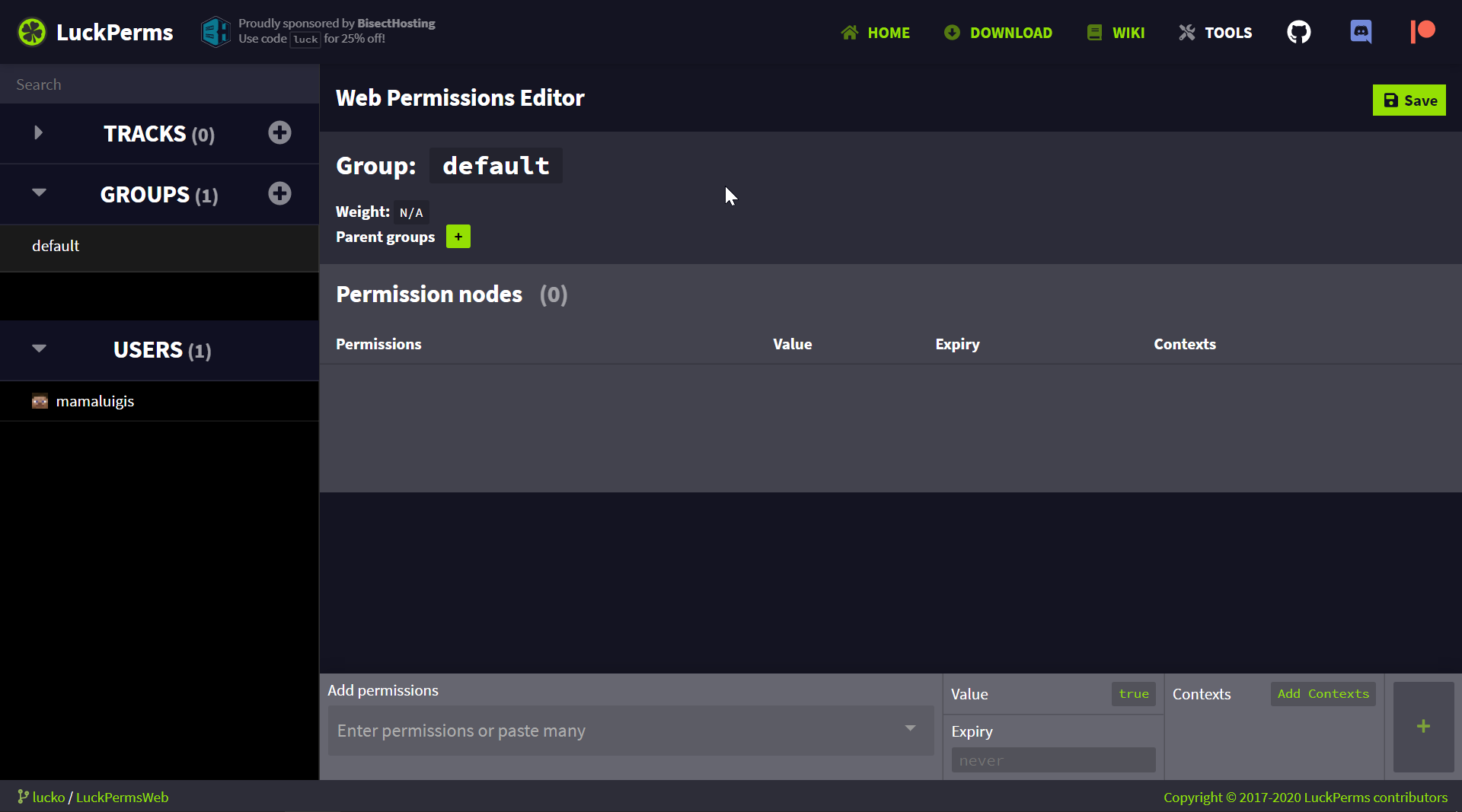 prisma hinge
yeah nvm
There are literally 0 perms
sick
Incredibly sorry
Forgot to restart server
quaint idol
currently this is a blank server as far as luckperms is concerned, leading me to believe you have not hit save
prisma hinge
Forgot to restart server
quaint idol
you shouldn't need to
quaint idol
🔥
prisma hinge
mmm
hehe
dude
its not luckyperms
Try now
LuckPerms - A permissions plugin for Minecraft servers.
LuckPerms is a permissions plugin for Minecraft servers.
quaint idol
https://luckperms.net/editor/GiVK4WUeNR proper link
LuckPerms - A permissions plugin for Minecraft servers.
LuckPerms is a permissions plugin for Minecraft servers.
quaint idol
have you actually tried verbose mode?
tame hollow
they said it said nothing, which leads me to believe it wasn't used properly
quaint idol
correct
prisma hinge
Oh god, no filters
What kitpvp plugin are you using?
@prisma hinge cervinakuy plugin
The spam
tame hollow
well depending what other plugins they use it may or may not spam :P
tame hollow
that's why i just said /lp verbose on
prisma hinge
/lp verbose on -> Do the command you want perms for -> /lp verbose off
... o -o
Alright
The node is there
I gotta see if it works
yeah the gurls
I
It worked
Tyvm for your help guys. I really appreciate it.
❤️ ❤️
👍
tame hollow
hopefully you learned how verbose works :D
prisma hinge
I did lol
prisma hinge
Oh god... I found the darkest deepest secret LuckPerms ever had...
This is disgusting

GitHub
A permissions plugin for Minecraft servers. Contribute to lucko/LuckPerms development by creating an account on GitHub.
high raven
@prisma hinge delete that shhhh
plsss
you found it congrats
leave it to scare other users for eternity muahahahha
tame hollow
lmao i forgot about that
 flat phoenix
anyone able to tell me the command to bulk edit a certain group to have context server=skyblock for every permission in that group
high raven
!bulk there's a couple examples here that, combined with their descriptions, fairly well spell it out
wintry cloudBOT
Quickly update a large amount of user and group permissions by using the bulkupdate command.
LuckPerms wiki
flat phoenix
@high raven i cant figure it out
wintry cloudBOT
Hey TikiMonster! Please don't tag helpful/staff members directly.
flat phoenix
if you could just tell me what command to run
that would be great
i cnat figure out the rifght command
to set a certain groups permissions to all be server = skyblock
high raven
i'd like it if you sent me what you think should work, so I can see what's up exactly
flat phoenix
im confused by your question
lp bulkupdate groups update server skyblock "group == oil"
thats the comand i tried but it says its not valid
high raven
/lp bulkupdate all update server skyblock "server == global" will change all perms everywhere to have skyblock context
add constraints on that in order to narrow it down to where you want it to apply
GitHub
A permissions plugin for Minecraft servers. Contribute to lucko/LuckPerms development by creating an account on GitHub.
flat phoenix
can yhou show me how to do that
i just want the constraint to be
the group
eg
group is named oil
so all permissions in group oil should have context skyblock
what command would hta tbe
high raven
I don't think that's how bulk works, and there is a much easier way to do that
flat phoenix
sure whats ur suggestion 😄
high raven
make a group, call it oil2. Add oil as a parent of oil2 with context of skyblock. give users oil2
high raven
i promise it will do the same thing
heck, even swap oil and oil2 names after, so you can gives users oil and the perms will only apply in skyblock
 pseudo elbow
[06:37:21 ERROR]: Error occurred while disabling LuckPerms v5.1.86 (Is it up to date?)
java.lang.NullPointerException
at me.lucko.luckperms.common.plugin.AbstractLuckPermsPlugin.disable(AbstractLuckPermsPlugin.java:223) ~[?:?]
at me.lucko.luckperms.bukkit.LPBukkitBootstrap.onDisable(LPBukkitBootstrap.java:177) ~[?:?]
at org.bukkit.plugin.java.JavaPlugin.setEnabled(JavaPlugin.java:318) ~[server.jar:1.0]
at org.bukkit.plugin.java.JavaPluginLoader.disablePlugin(JavaPluginLoader.java:356) [server.jar:1.0]
at org.bukkit.plugin.SimplePluginManager.disablePlugin(SimplePluginManager.java:430) [server.jar:1.0]
at org.bukkit.plugin.SimplePluginManager.disablePlugins(SimplePluginManager.java:423) [server.jar:1.0]
at org.bukkit.craftbukkit.v1_7_R4.CraftServer.disablePlugins(CraftServer.java:403) [server.jar:1.0]
at net.minecraft.server.v1_7_R4.MinecraftServer.stop(MinecraftServer.java:378) [server.jar:1.0]
at net.minecraft.server.v1_7_R4.MinecraftServer.run(MinecraftServer.java:572) [server.jar:1.0]
at net.minecraft.server.v1_7_R4.ThreadServerApplication.run(SourceFile:628) [server.jar:1.0]
 scarlet iris
Is there a way to have one group show the other group your in both show on chat?, for example like [Donor][A] damagingwazza:
wintry cloudBOT
You can download LuckPerms for Bukkit/Spigot, BungeeCord, Sponge, Nukkit and Velocity.
Additional downloads
 proper pulsar
!stacking @scarlet iris
wintry cloudBOT
Display multiple prefixes/suffixes alongside a player's name.
LuckPerms wiki
prisma hinge
https://bytebin.lucko.me/G2L8QeDnbp
from what is this caused spamming in bungee
and no one can join
if i restart the bunge it fixes for a bit
than again brakes
https://bytebin.lucko.me/xNziE2Tpy2
this is spamming on
spigot servers
@prisma hinge #welcome
-> If your question got lost and wasn't answered, feel free to ask politely again, but please do not spam messages until you get a reply.
If someone is able to help, they will help, but not everyone can
prisma hinge
ok
i will pay
please someone help me
its so annoying i need to restart the server every 1-2h so it fixes
 stuck coyote
- is your bungeecord running in offline mode?
- It looks like a database connection issue, you could try to follow this manual:
https://github.com/lucko/LuckPerms/wiki/Storage-system-errors
GitHub
A permissions plugin for Minecraft servers. Contribute to lucko/LuckPerms development by creating an account on GitHub.
prisma hinge
Its been working like this for months
i havent changed anything
now this errors started appearing
stuck coyote
The second log suggests that LuckPerms looses connection to your MySQL server, there may be several different reasons for that. Please follow the wiki guide I sent in
prisma hinge
Its possible the database i use mysql is broken
is it possible to transfer
to not mysql database
without losing anything?
anyway i dont need it on database like that beacuse its shit
stuck coyote
GitHub
A permissions plugin for Minecraft servers. Contribute to lucko/LuckPerms development by creating an account on GitHub.
prisma hinge
i put it sql?
stuck coyote
The database is the only way of having synchronized permissions
prisma hinge
from where synchronized perms?
i only have HUB bungee and survival
do i need database?
stuck coyote
And if you dont use a database, permissions you add on the hub server wont be added to the bungeecord or the survival server
stuck coyote
Then follow this guide to switch the storage method: https://github.com/lucko/LuckPerms/wiki/Switching-storage-types
GitHub
A permissions plugin for Minecraft servers. Contribute to lucko/LuckPerms development by creating an account on GitHub.
prisma hinge
My bungee is mariaDB
and survival is mariaDB
HUB is h2
i just change the survival to h2
or i need bungee too?
stuck coyote
All of them
prisma hinge
bungee to h2
and survival to h2
on bungee i just change in config to h2?
i dont need to export anything?
just on the surival server export
 celest cairn
is it possible to give a player a permissions for as long as they are online. So as soon as they leave the server the permission is revoked?
 lilac hazel
You would need a plugin that runs a command when someone leaves to do that.
LP has temporary perms but not once use perms etc.
 weary fossil
wintry cloudBOT
weary fossil
wintry cloudBOT
Please use https://bytebin.lucko.me to send files in the future. I have automatically uploaded message.txt for you: https://bytebin.lucko.me/A3KnIYAU3R
 fiery nymph
do the mysql credentials get updated with a reload
or does a restart have to take place
quaint idol
I would assume restart needed, not sure though. Couldn't hurt to try
prisma hinge
I need to make a sky block server and it won’t let anyone without op/* break or place or interact with permissions ex how do I fix
tame hollow
you probably have essentials anti build or something, just delete it
tame hollow
if you don't know what it does then you probably don't need it!
prisma hinge
great now my worldguard or worldedit wont work
I only deleted anti build
Turbo help?
prisma hinge
dang
 hushed stump
welp I'm still stuck with the prefix I might have essentials set up incorrectly but I think I'm close
still says default but that is better than nothing right?
high raven
That command did something weird
That context it added won't allow it to work
(also, use lp user (name) info to check if the prefix works)
hushed stump
so /lp group default meta addprefix 1 &7[Guest] &7 ?
Because I tried that and nothing changed
OH!
The prefix changed
Progress!
high raven
The same command without the extra, rather pointless &7 and just single quotes lp group default meta setprefix 10 'Guest '
hushed stump
ok so that is fixed but the group is still displaying a default in chat
wintry cloudBOT
LuckPerms does not display things in chat!
LuckPerms is only able to send information to formatting plugins so that they display them properly. LuckPerms does not put the prefix in front of your name, you need a chat formatting plugin to do it, and you need Vault. Same goes for the tablist! If the information appears correctly when you run /lp user <user> info, LuckPerms is doing its job!
Prefix isn't showing?
What plugins can I use to format chat?
high raven
First link on here might have some knowledge for ya
 hushed stump
And vault was not running...
hushed stump
user error on my part essentials had some setting enabled when it was supposed to be off so I backed up my configs and reloaded all plugins it started working
 fiery dagger
I have bungee network
and I got two server connected to it
how I make network wide permissio nsystem
which is syunced
I not know
I very new at this
please help
thank you
 soft magnet
@fiery dagger Make a MySql database and connect them to it
soft magnet
i used this for my bungee

Luckperms plugin is a permission plugin and allows you to create ranks and add permissions. Using this method, I show you how to make global ranks on your network and bungeecord servers. This allows you to have global ranks and groups using mysql setup.
How to make bungeecord...
prisma hinge
ADVERTISING!!!
fiery dagger
how is that advertising but k
 mighty yarrow
He's just trolling dw
prisma hinge
and not even my channel so why would i advertise it..
@soft magnet You are the owner of that channel under an alt
soft magnet
sure
 ripe echo
Does anyone have issue with luckperms and placeholderapi
I use LuckPerms-Bukkit-5.1.86 and placeholderapi 2.10.9 and for some reason the placeholderapi: %luckperms_group_expiry_time_vip% dosn't work properly, even if player have a vip for a month it shows like 3-4 days left of the group with is strange
 cedar belfry
Did you ecloud download lp
ripe echo
yes it did
cedar belfry
Put group.vip
cedar belfry
I mean in the placeholder
prisma hinge
It does work a bit oddly tho
cedar belfry
You can also try permission placeholder expiry with group.vip
ripe echo
where in placeholderapi I have to put group.vip?
Sorry but I don't understand that one 😭
ripe echo
%luckperms_group_expiry_time_vip%
you mean this
I already done that and that's where issue is xD
cedar belfry
%luckperms_expiry_time_group.vip%
prisma hinge
It's bugged
ripe echo
Yeah just like @prisma hinge is showing xD
prisma hinge
And this is 99.99% probable it is a fault in LP
cedar belfry
Where are you trying to show it
prisma hinge
Check if there isn't one already open
Where are you trying to show it
does it matter?
cedar belfry
Yes
prisma hinge
How so
cedar belfry
Sure it does
ripe echo
12 it's not even 2 weeks xD
prisma hinge
Barely
ripe echo
Not 2 months Xd
cedar belfry
You could set a reminder with another plugin or use a countdown plugin. Might be an issue with database and server or even client times being off?
ripe echo
Wait i was checking placeholderapi not luckperms github xD
mocfunky no there is two options
luckperms
not done properly after placeholderapi update
or placeholderapi did something wrong but don't think so
prisma hinge
It's 99.9% an issue with the extension
ripe echo
mystery solved xD
Wait extensions is open source is in it will check the code if that's the case
cedar belfry
Papi did break some placeholder with a recent update i think
prisma hinge
They deleted some code related to hooking but re-added it back as deprecated
Doesn't affect how placeholders are shown, if anything, they wouldn't exist at all
PlaceholderAPI just calls the placeholder provider
ripe echo
Ok issue was opened:
https://github.com/lucko/LuckPerms/issues/2535
GitHub
What's the issue The issue is the when doing %luckperms_group_expiry_time_vip% it dosn't show actual expire time, as it's wrong images of evidence: How you can see the actua...
prisma hinge
Might want to close it lmao
The provider uses a PAPI utility class to format the time into a string
Which is fundamentally flawed
They are doing the math wrong
ripe echo
So it's papi fault then?
prisma hinge
;~~; yes LMAO
 dim wave
It wouldn't hurt to leave it open as that placeholder can be rewritten to use a different time formatter
prisma hinge
wym?
dim wave
change from using Papi's TimeUtils to something like what Luckperms itself is using
prisma hinge
Mm that would be up to the extension I believe
dim wave
which is also on Luck's github

GitHub
Placeholders for LuckPerms. Contribute to LuckPerms/LuckPermsPlaceholders development by creating an account on GitHub.
prisma hinge
I'll probably make a PR to the PAPI repo to fix this flaw in particular anyhow, not without conducting tests beforehand lol
 iron torrent
!help
wintry cloudBOT
Available commands:
!advanced
!api
!argumentbased
!ask
!bulkupdate
!bungee
!cauldron
!chat
!colours
!commandequivalents
!commands
!config
!context
!default
!downloads
!editor
!errors
!essentials
!extensions
!extracontexts
!faq
!helpchat
!inheritance
!install
!locale
!meta
!migration
!notworking
!nowildcard
!pasteit
!permissions
!placeholders
!selfhosting
!stacking
!storage
!suggestions
!switchstorage
!sync
!tracks
!upgrade
!usage
!userinfo
!verbose
!weight
!whyluckperms
!wiki
iron torrent
!selfhosting
wintry cloudBOT
Learn how to self-host all the web interfaces.
LuckPerms wiki
prisma hinge
!locale
wintry cloudBOT
Learn how to change all the message from LuckPerms.
LuckPerms wiki
 zinc apex
What values should I set here, on EssentialsX config, in order to get LuckPerms prefixes to work?
 quick lagoon
you need vault and a chat plugin
if you want using essentialsX, you need essentialsXChat as well
zinc apex
I already have both of them. But, how should those settings be to make the prefixs work?
quick lagoon
!meta
wintry cloudBOT
You can set prefixes, suffixes and other meta data in LuckPerms for players and groups. Note that LuckPerms does not manage chat. You need to use another plugin to show prefixes/suffixes in chat.
LuckPerms wiki
 toxic fox
hello everyone, i am trying to connect lpb local to a database, what would you like to say to me with this message?
zinc apex
Fixed, I had a prefix: "" which had more weight than group's thanks for the support
high raven
did you change add-prefix-suffix? should be true, or commented out (with a # in front of it)
and you also need vault
toxic fox
i feel annoyed, in both chats my question is not answered
broken leaf
What do you mean by "trying to connect lpb local to a database" ?
I mean does "local" really have a place here?
prisma hinge
i feel annoyed, in both chats my question is not answered
@toxic fox you might want to take a look at #welcome, not everyone is able to help at all times, you'll have to wait sometimes
toxic fox
the connection did indeed take place, but with this serious error and i would like to know what that means for me
@broken leaf
yes i understand it and also understand, i just want to ignore things @prisma hinge
broken leaf
oh mm I don't really know but it says "INFO" after "SCHWERWIEGEND" so I wouldn't say it's an error, also it says start completed so..
maybe someone who knows more will answer but if it works, it works :P
 fierce ivy
if luckperms is trying to connect to a MYSQL DB and SSL isn't working, will it disable SSL and connect anyway?
high raven
not sure, do you need SSL but have it not working sometimes?
fierce ivy
im using SSL and my database with DMC fails with every plugin except luckperms it seems
high raven
So LP works if SSL is nonresponsive but the other ones hard fail?
do oyu not get any errors?
fierce ivy
well SSL is working on the DB, and shows up when i view the db status
but all my other plugins give me a Communications link failure error
so i was wondering if luckperms was suppressing that and disabling SSL, or if it was actually working
the guys at DMC won't help me because they said it's working since it works with LP
high raven
if you're not getting errors and have set useSSL to true and configured it, it's probably working
there is a SSL error you will be seeing if SSL isn't working and you don't have useSSL set to false
high raven
yes it is, have you contacted the other plugins' support?
maybe they have a specific way of using SSL
fierce ivy
no, i figured it was a problem with DMC since 7/8 plugins using it failed
fierce ivy
even my own plugins with the standard way of using jdbc that i found on stackoverflow
idk, it's painful - i'll have another look tomorrow
high raven
worth asking Luck about, maybe it does, though I don't see why it would do that at all, never mind silently
fierce ivy
yeah perhaps, i did try have a look at the code myself but couldn't find out
 worthy scroll
how do i add all perms at once to a group on the website
worthy scroll
ah ok
also, normal players that aren't op can't place or break blocks how do i fix that
it says they don't have permission but idk where to give the permission
fierce ivy
essentials.build
worthy scroll
they still don't have permission
fierce ivy
what does it say
worthy scroll
ah all i had to do was press save, thats what my issue was sorry for bothering you. thank you thpugh : )
tame hollow
if you are a server admin, please check the console for any errors
 mild elk
Pastebin
Pastebin.com is the number one paste tool since 2002. Pastebin is a website where you can store text online for a set period of time.
was getting the error
tame hollow
Database may be already in use: null. Possible solutions: close all other connection(s);
mild elk
its not in use
tame hollow
how is this server being hosted
mild elk
apex hosting
tame hollow
talk to them then
mild elk
how else would it be in use?
tame hollow
maybe the minecraft server was started twice
tame hollow
the classic turn it off and on again :P
iron torrent
🙂
 fallen narwhal
I want to give all perms to Owner rank.. how do I do it without entering all of each permissions nodes?
excluding /op
tame hollow
you can give the * permission
wintry cloudBOT
Wildcard issues
Some plugins are created in a way which results in odd behaviour when the root '*' wildcard is used.
More information:
fallen narwhal
oh okay.. thanks 😄
 cedar horizon
lp user {player} permission settemp essentials.fly true 15m is this correct perm to give players in cratereload plugin when they vote
and if we have more then 2 vote websites to they have 30m fly ?
and in votingplugin
 frigid steppe
Hello, is it possible to erase only user data?
I want to save the group data, and erase user data.
 grizzled nimbus
I gave the admin group tp permissions, but it can only do from one player to another, not in xyz}
@frigid steppe creo que el comando era ( lp user NICK clear)
strange river
you need to give them minecraft.command.teleport for that
maybe it's 'minecraft.command.tp' i dont remember
prisma hinge
Hey ich brauche Hilfe am besten jemand der deutsch kann D:
Ich gebe dem rang default (Spieler) eine permission aber sie haben es irgendwie nicht
broken leaf
What is the output of /lp group default permission checkinherits <permission_node> ? (Replace <permission_node> with a permission you gave them but which is not working)
wintry cloudBOT
Available commands:
!advanced
!api
!argumentbased
!ask
!bulkupdate
!bungee
!cauldron
!chat
!colours
!commandequivalents
!commands
!config
!context
!default
!downloads
!editor
!errors
!essentials
!extensions
!extracontexts
!faq
!helpchat
!inheritance
!install
!locale
!meta
!migration
!notworking
!nowildcard
!pasteit
!permissions
!placeholders
!selfhosting
!stacking
!storage
!suggestions
!switchstorage
!sync
!tracks
!upgrade
!usage
!userinfo
!verbose
!weight
!whyluckperms
!wiki
jagged zinc
!context
wintry cloudBOT
You can set a permission or group on a per-world/per-server basis, through what we call "contexts".
LuckPerms wiki
 nocturne fulcrum
Hello there, quick question.
I use LuckPerms in a bungeecord system, and I set up a shop where players can buy some fun gadgets for the lobby. When they buy them, they get the permission node for it assigned jost fine. But once they leave, it gets removed. Anyone an Idea why that is? I use BossShopPro for that store.
broken leaf
when they leave...the server?
nocturne fulcrum
yes
the server
it just vanishes when they leave, they get removed from the /lp editor too
It is in that editor when they buy it, and I look before they leave
high raven
What is your storage method
nocturne fulcrum
mysql
broken leaf
do you have specific logs in the console when they leave? Every permission change should be shown there
nocturne fulcrum
Sadly no
I dont see a thing in console from luckperms
Do I have to assign all players a group on join? I would think that if I add the permission directly to them, they would be a user in the system and not forgotten.
The permissions every player is supposed to have are set on the default group at the moment
just those shop thingys are set directly to the user
broken leaf
All players are placed in the default group on first join
high raven
is it a bungee network
nocturne fulcrum
Yes
high raven
non premium?
nocturne fulcrum
Apparently they get purged if they dont get a group other than default or a direct group manually assigned
Non Premium?
broken leaf
offline mode
nocturne fulcrum
The Bungee is online-mode true if you mean that
high raven
is the proxy online mode set to false
ah
yes they should get purged if they only have default group, but any other permission should prevent that
including the ones you're adding
what version of LP?
high raven
hm, perhaps, if you can get reliable steps to reproduce, make an issue on GH and let Luck know
nocturne fulcrum
I set all my sub-server to "server: global" in the config except the Bungee, that is correct?
(config.yml of lp)
on bungee it is set to "server: bungee", pretty sure I read it on setup instructions.
broken leaf
pretty sure if shouldn't cause your problem
setting the server name here is mostly used for contexts
nocturne fulcrum
Not proud, but I opted for the extension-default-assignments hotfix, now the permissions seem to stick
 mighty spear
;-;
nocturne fulcrum
On my setup, apparently only manually assigned groups stick. Permissions that it gets from BossShopPro wont. Even bought the perk, unloaded bossshop, still no luck
that extension works when installed on the bungee
(Permissions also correctly stick for users that have a group other than default)
prisma hinge
I'm having an issue. I never had this issue until now.
I have two groups that I want added to a player and I added them to the player it's just the prefix only shows up for one of the groups
I want both the groups prefixes to show up on the player
What do I have to do to make that happen?
(Ping me please)
high raven
!stacking @prisma hinge
wintry cloudBOT
Display multiple prefixes/suffixes alongside a player's name.
LuckPerms wiki
iron torrent
!ask
wintry cloudBOT
Please ask your question!
Please ask the question you have. Don't ask to ask, or ask to DM someone. There are people here to help you, but we need to know what to help you with, so please just ask the question you want to in as much detail as possible!
Or, try here first:
Why shouldn't I ask to ask?
 glad glacier
need some help please. I renamed a track in the lp editor back to default, now ingame after doing /lp user [name] parent set default - none of the prefixes now work in the dafault track - what have I missed?
I can promote and demote myself along the track
in the /lp user [name] meta info, it shows the correct prefix, but in /lp user [name] info shows no prefix
glad glacier
yup, fixed it - was being dumb
 sage wyvern
@brisk spindle plz tell me how can i do that [newbie] can sethome 3 [regular] can sethome 5 [VIP] can sethome 8 and [Admin]can sethome 10
 silk trellis
Hello, can permissions be managed manually? not through a web editor?
mighty yarrow
@sage wyvern You can't @ everyone. And what plugin are you using for homes? It'll likely be on their docs on how to do it
sage wyvern
ok @mighty yarrow
 brisk spindle
Pong
prisma hinge
how do i set someone to a group?
strange river
/lp user username parent add groupname
prisma hinge
oky
@strange river i'm not seeing the prefix i set for the group
any reason this could be happening?
is essentialschat compatable with luckperms ?
prisma hinge
spigot
prisma hinge
i have that
strange river
the x.
prisma hinge
yea
strange river
what game version
prisma hinge
1.8.8
 feral pebble
could somone help me out in off topic please
strange river
@prisma hinge
prisma hinge
i'm using. essentialsx.
strange river
cool
prisma hinge
ur retarded can anyone else help me??
prisma hinge

essentials chat config isn't working...
oh nvm it is
just luckperms prefixes aren't
!chat
wintry cloudBOT
LuckPerms does not display things in chat!
LuckPerms is only able to send information to formatting plugins so that they display them properly. LuckPerms does not put the prefix in front of your name, you need a chat formatting plugin to do it, and you need Vault. Same goes for the tablist! If the information appears correctly when you run /lp user <user> info, LuckPerms is doing its job!
Prefix isn't showing?
What plugins can I use to format chat?
prisma hinge
@prisma hinge 👆
ty
@strange river is that what you were using? you stinky bastard
strange river
?
you know you could've googled yourself
and i wasnt reading it to here lol
therefore, making you tonights stinky bastard.
prisma hinge
Keep it cool
tame hollow
@prisma hinge i will ban you if you keep up with the insults
prisma hinge
Acting childish will take you nowhere
you were! and my bad turb
@prisma hinge that didn't help
the !chat
figured it out ty a lot everyone for ignoring me telling me to shut up n thinking i was being childish!
strange river
ok
prisma hinge
LuckPerms does not put the prefix in front of your name.
right, i've already said i was using essentials chat
So? Does that imply I know how to use it?
no? why does it matter if u know how to use it?
prisma hinge
goos the fact you're still on that makes you childish
strange river
what 
prisma hinge
whatever thanks fefo
ik you tried to help
essentials chat config isn't working...
oh nvm it is
just luckperms prefixes aren't
@prisma hinge LP is most probably doing its job right
it was
it was essentials fucking up
sage wyvern
plz help me how i give permission to teleport a player with out request
broken leaf
@sage wyvern '/lp user <user> permission set <permission_node>' Find the permission node using verbose, or your plugin's documentation.
 spring gust
Already answered #support-1
broken leaf
People asking in multiple channels smh.
spring gust
Smh
prisma hinge
@high raven What is stacking?
wintry cloudBOT
Hey pilotshooshoo12! Please don't tag helpful/staff members directly.
quaint idol
!stacking
wintry cloudBOT
Display multiple prefixes/suffixes alongside a player's name.
LuckPerms wiki
prisma hinge
quick question since I'm not sure, does luckperms need essentials to run?
spring gust
No
prisma hinge
okay
 subtle blade
Hello, is there command to remove some permission from all players? Like: /lp user * permission unset my.custom.perm
broken leaf
@subtle blade If it's still an issue, you can do that with bulkupdate
subtle blade
What is bulkupdate?
broken leaf
!bulk
wintry cloudBOT
Quickly update a large amount of user and group permissions by using the bulkupdate command.
LuckPerms wiki
subtle blade
Thanks, I'll try
broken leaf
/lp bulkupdate users delete "permission == <thepermyouwantdelete>"
subtle blade
/lp bulkupdate users delete "permission == <thepermyouwantdelete>"
@broken leaf Hm, it doesn't work. I'm getting a message:[LP] Invalid constraint group.level-50. Constraints should be in the format '<field> <comparison operator> <value>'.
broken leaf
/lp bulkupdate users delete 'permission == <thepermyouwantdelete>'
Then :p
subtle blade
Oh. I used the command wrong, haha 😄
quaint idol
@left zealot: What prefix did you set?
quaint idol
Wait sorry, I need to go
Other support/helpful community members, end goal is for Yellow prefix and red name using EssentialsXChat
 left zealot
what, sorry that dosnt make sense
quaint idol
The second sentence is info for whoever else helps you
left zealot
just for my group
i basically want my entire name to be.
&e(yellow)[Owner]&c(red)Jackie_Prof
 night rock
Can someone help me here? 🧐
prisma hinge
Just ask your question
night rock
Everytime someone typs in game (not commands) , there is an error what pop ups in the console:
java.lang.NullPointerException: null
at com.pedrojm96.superlobby.listener.PlayerListener.onChat(PlayerListener.java:566) ~[?:?]
at com.destroystokyo.paper.event.executor.asm.generated.GeneratedEventExecutor314.execute(Unknown Source) ~[?:?]
at org.bukkit.plugin.EventExecutor.lambda$create$1(EventExecutor.java:69) ~[patched_1.15.2.jar:git-Paper-379]
at co.aikar.timings.TimedEventExecutor.execute(TimedEventExecutor.java:76) ~[patched_1.15.2.jar:git-Paper-379]
at org.bukkit.plugin.RegisteredListener.callEvent(RegisteredListener.java:70) ~[patched_1.15.2.jar:git-Paper-379]
at org.bukkit.plugin.SimplePluginManager.callEvent(SimplePluginManager.java:607) ~[patched_1.15.2.jar:git-Paper-379]
at net.minecraft.server.v1_15_R1.PlayerConnection.chat(PlayerConnection.java:1782) ~[patched_1.15.2.jar:git-Paper-379]
at net.minecraft.server.v1_15_R1.PlayerConnection.a(PlayerConnection.java:1697) ~[patched_1.15.2.jar:git-Paper-379]
at net.minecraft.server.v1_15_R1.PacketPlayInChat$1.run(PacketPlayInChat.java:41) ~[patched_1.15.2.jar:git-Paper-379]
at java.util.concurrent.Executors$RunnableAdapter.call(Executors.java:511) ~[?:1.8.0_242]
at java.util.concurrent.FutureTask.run(FutureTask.java:266) ~[?:1.8.0_242]
at java.util.concurrent.ThreadPoolExecutor.runWorker(ThreadPoolExecutor.java:1149) [?:1.8.0_242]
at java.util.concurrent.ThreadPoolExecutor$Worker.run(ThreadPoolExecutor.java:624) [?:1.8.0_242]
at java.lang.Thread.run(Thread.java:748) [?:1.8.0_242]
[18:39:17 INFO]: ***test [Founder] MayorFluffyy d```i've searched the entire internet, but can't find a solution
also running the newest version of the plugin, but i remember this error somehow, but i don't know how i fixed it earlier a few years back
prisma hinge
This isn't very LuckPerms related, I suggest you get in contact with the dev of that plugin
night rock
I know, but it is a very common issue. Worth a shot :p
 glacial willow
Users with groups on the donor track on my server have prefixes that I don't expect. For a user with the "great" and "default" groups, I expect only the prefix from the "great" group to be displayed. Same issue for a user with "ultra" and "default", etc. Pictured below is an example user with this issue, the info for the groups in question, the meta-formatting in luckperms.conf, and the members of all of the tracks listed under meta-formatting.
I would think that because "great" has a higher weight than "default", there should be nowhere for the default prefix to display, as it isn't the highest weighted group and isn't on any of the tracks being considered in the prefix stacking
prisma hinge
highest_not_on_track_team? Maybe it falls on that one category
Wait I'm stupid
Didn't see the last snippet
No wait it might be it
glacial willow
that must be where it's coming from because that's the only part that can accept the default prefix under any circumstances, but great still has a higher weight, so why would default be selected?
glacial willow
I know that isn't true because my prefix works as intended (also I had this setup working before, it broke when I added the "team" track and redid my weights):
group info for context:
so owner has weight 1000, great has weight 870, default has weight 560


 glacial willow
Also I'm pretty sure the highest_not_on_track_team is redundant anyway, it was just highest before I added the team groups and I'm pretty sure it can still be that because the team groups don't actually have any prefixes (I'm assuming the prefix stacker doesn't select groups without prefixes lol)
so I just tried changing it back to highest which didn't change anything
left zealot
need help end goal is for Yellow prefix and red name using EssentialsXChat
left zealot
please pm me if anyone knows how to help with my issue end goal is for Yellow prefix and red name using EssentialsXChat
fierce ivy
https://hastebin.com/vagopigohi.shell any idea what could be causing this?
Larry remember we talked about SSL being broken on all my other plugins except LP, and DMC said it was working but my plugins were broken instead
well perhaps it's not working?
high raven
Caused by: javax.net.ssl.SSLException: Socket closed
left zealot
hey larry i need your help, you helped me before so you kinda know what i need done
my brother is in my server and his prefix is gone, he just has the normal minecraft name not his (&b[VIP]DarcySpike202) anymore
prisma hinge
How can I do that if I give permission by default that every group has? (over it the role) Translator xd
 maiden raptor
@prisma hinge you want all players to have a certain permission?
prisma hinge
If I give players permission that every group has permission, but if I give VIP the player doesn't have it | Translator
maiden raptor
@prisma hinge alright, this is where you use "parent groups", you need to make the VIP group inherit the default group
maiden raptor
the other way around :), so in the VIP group, make the parent group default
prisma hinge
Thanks! :3
maiden raptor
No problem!
 karmic stone
can anyone help me?
broken leaf
there's no need to ask in multiple channels
 floral lance
what permission do I have to give a group so that only groups with that permission can connect to the specified sub-server?
something like serveraccess.Hub-01... or is there a Plugin for that?
broken leaf
https://www.spigotmc.org/wiki/bungeecord-configuration-guide/
On the servers part, it says this :
"Note: restricted prevents players from joining the server unless they have the bungeecord.server.[servername] permission"
The home of Spigot a high performance, no lag customized CraftBukkit Minecraft server API, and BungeeCord, the cloud server proxy.
Assuming you're using BungeeCord, of course.
 frank ember
did you set the server to restricted: true in your bungee config
floral lance
BS-01:
motd: ''
address: ---
restricted: true
any ideas?
oh wait
gets restricted ignoered if an admin use the send commend?
frank ember
probably
broken leaf
if they have something like a wildcard permission overriding it maybe
how did you add the permission tho
broken leaf
okay, nice
floral lance
works fine... 😄
 coral portal
Way to set multiple server contexts in one command? I tried /lp user <user> parent add <group> server=server1 server=server2
coral portal
Yes but I want to do it in a bulkupdate
I want to replace all context server=server1 with server=server1+server=server2
maiden raptor
!bulkupdate
wintry cloudBOT
Quickly update a large amount of user and group permissions by using the bulkupdate command.
LuckPerms wiki
coral portal
Yea I dont see anything relating to it there
coral portal
ik but I dont see how to replace with two values
prisma hinge
Heya! Is there an automated way to merge 3 luckperms bukkit servers into 1 luckperms bungee server?
Wanting to merge the databases because many years later we have decided to sync ranks and perms across all 3 servers and now use lpb instead of just lp, however some people have perms on all 3 bukkit servers. So we sont want just one to override all of them, but rather all 3 to add onto one another and merge
broken leaf
you can merge perms yeah
karmic stone
Anyone can help me?
in prefix and suffix stacking
I did everything it said in wiki but still not working
broken leaf
@prisma hinge https://luckperms.net/wiki/General-Commands#lp-import-filecode---upload---merge
Export the perms of server A and server B (for example). When you import them on server C, use the merge argument in the import command to merge the perms of your servers A and B with the perms of server C
LuckPerms - A permissions plugin for Minecraft servers.
LuckPerms is a permissions plugin for Minecraft servers.
Then server C will have the perms of all three servers A, B, and C
And use the perms of server C as the global perms of the bungee
prisma hinge
Ahh you are a saint i didnt think to look for a flag under the import command
Ty! Will play with it!
broken leaf
Always make backups btw
Don't want to screw things up, it's a mess to clean afterwards
prisma hinge
Oh yeah for sure, in case have to revert
We have a few 10's thousand in the users lines so i was really hoping there was an auotmated way and we wouldnt have to pay someone to write a script luuuuul
Cool beans will play on it with the test servers we got, thank!
karmic stone
Anyone can help me? in prefix and suffix stacking I did everything it said in wiki but still not working. Just tag me if you can help me
prisma hinge
You have been asking for hours upon hours, in both channels and even DMing people. No one likes that. Fix your issue yourself. @karmic stone
So many people have tried to help you but you don't respond
karmic stone
I dm them. Then obviously they helped me but still the same problem occurs
broken leaf
And it prevents anyone else from helping
prisma hinge
So many people have tried to help here in this discord server but you choose to ignore it
karmic stone
Lmao.
prisma hinge
As a result, neither Jojotes or myself are going to assist you. Cheers
karmic stone
I'm asking you to help me please
karmic stone
Just give me a chance
prisma hinge
No?
karmic stone
Why
prisma hinge
Can you readddddddddddd
karmic stone
Please anyone else can help me?
prisma hinge
maybe scroll up in one of the channels, you've asked about 50 different times and someone has replied every time
You might find you answer if you just have a look at the past 50 messages you've sent
maiden raptor
Anyone can help me? in prefix and suffix stacking I did everything it said in wiki but still not working. Just tag me if you can help me
someone?
no, i was just wondering if someone could help her
rude but ok
do you come here for support or to troll?
broken leaf
They're trolling, look #support-1 .
 frank pebble
why ping pong
glacial willow
Turns out this issue is happening for the groups on the league track too, but doesn't happen with the staff track. So if you have owner and default or admin and default, you only see the prefix from the staff rank. But if you have default plus a group from league or donor (groups in team don't have prefixes and work fine) you see both. Which doesn't make any sense to me because default is definitely the lowest weighted group on the server:
I'm also using nucleus chat templates which put some formatting codes before prefixes depending on what group the user has from the team track, but I don't think that should be affecting anything (nobody has a group from that track currently, but I've tested giving them a group from that track and it doesn't seem to affect anything)
quick pastebin to cover all bases, but all that should be relevant is the prefix section of each: https://pastebin.com/thHmmuE4
Pastebin
Pastebin.com is the number one paste tool since 2002. Pastebin is a website where you can store text online for a set period of time.
prisma hinge
Hello I have a question. What's the permission to switch servers, because it's always says that I don't have sufficient permissions.
broken leaf
assuming bungee, it should be bungeecord.command.server
prisma hinge
Yeah but it didn't work
I use a luckperms for the bungee and then the regular luckperms for the each server is that right or it's wrong?
broken leaf
uhm, not sure how bungee permission works, should probably set them with /lpb on the bungee console
prisma hinge
Yeah I put the permission bungeecord.command.server in that way but it didn't work but if a put the permission * it work, the question is what is the permission that cause it to work 🙂
broken leaf
You can use verbose mode
/lp verbose <username> /<command>
It should output the permission checks being made when the <command> is run by <username>
prisma hinge
Okey I will try
cedar horizon
can you make prefix for owner in hex/rgb colors ?
prisma hinge
Yes, but it's up to your chat plugin to format the color code, check your chat plugin RGB format
cedar horizon
Yes, but it's up to your chat plugin to format the color code, check your chat plugin RGB format
@prisma hinge chat plugin RGB format like essentialsx ?
prisma hinge
Yeah, I think essentials' config file has some examples for how you type in the RGB
@broken leaf Thanks for the help I found the problem 🙂
cedar horizon
@prisma hinge so in ess config for chat ? or you can make prefix in lp web editor ?
prisma hinge
No.. I mean.....
You set the prefix with LuckPerms
But the RGB format you type in depends on your chat plugin for it to read it properly
cedar horizon
new essentialsx support rgb colors
broken leaf
yes
prisma hinge
Yes it does
broken leaf
as long as you're on version 2.18+
cedar horizon
but how do you make this https://prnt.sc/twpvzj in lp web editor ?
 broken leaf
that's a gradient (not sure if that's called like this in english), each letter has a different RGB code
you'd have to find generators for this, I think MOSS found one, i'll check their discord
cedar horizon
k
broken leaf
@cedar horizon there you go :)
https://docs.google.com/spreadsheets/d/1cDz4fI5BJxy3Mlp0VKYdqAGqlOw842ZFgNpjm9Z9i8k/edit#gid=0

Google Docs
Gradient Creator
TEXT,Example: Pempkin (limit 1000 characters),Steps:,-1,Red Dec,Green Dec,Blue Dec,Red Hex,Blue Hex,Green Hex,Hex Code,Hex Code + Name letter
STARTING COLOR,Example: #00AACC,#,0,0,0
ENDING COLOR,Example: #00FFFF,#,0,0,0
NICKNAME SUFFIX?,Please type "yes" if y...
 remote scaffold
is there any reason why the web editor would lose all my group perms etc? they all seem to have dissapeared anyone else run into this issue? second time it has happened what should i be doing to avoid this happening ?
broken leaf
so if you run /lp editor rn and click the link it gives, there's nothing?
maiden raptor
Is LuckPerms on the latest version Pix?
 broken valve
What's the most recent
maiden raptor
!download
wintry cloudBOT
You can download LuckPerms for Bukkit/Spigot, BungeeCord, Sponge, Nukkit and Velocity.
Additional downloads
broken valve
I have 5.1.26
maiden raptor
Yea that’s not latest at all
Could you install latest and see if that fixes the update?
broken valve
Sure
maiden raptor
Wait it is lmaoo what
broken valve
?
broken leaf
spigot isn't updated on every build, would be too much work
broken valve
I'm still new to server stuff, when I update a plugin do I delete all the files and the jar for that plugin or just replace the jar?
broken valve
👍
broken valve
did meta clear for that group and tried the command to set prefix and still didn't work
maiden raptor
What server software are you using
broken valve
Paper 1.16
maiden raptor
/lp user/group <user|group> meta addprefix <priority> <prefix> [context...]
You’re following that exactly
I really don’t know why it doesn’t work
broken valve
Yea no luck
broken leaf
Should try to see if it works for another test group, for example.
wintry cloudBOT
You can set a permission or group on a per-world/per-server basis, through what we call "contexts".
LuckPerms wiki
broken valve
Yea no luck for another group
broken valve
Then turn to Luck
Is there a forum or something?
prisma hinge
@broken valve I suggest you open an issue on GitHub explaining everything
As much detail as possible
prisma hinge
GitHub
A permissions plugin for Minecraft servers. Contribute to lucko/LuckPerms development by creating an account on GitHub.
Register an account and create a new issue explaining as much as possible
broken valve
Thank you guys for the help 🙂
maiden raptor
No problem, sorry you’re having this problem
remote scaffold
@broken leaf hey sorry to ping but yea all the groups permission sets etc got cleared not sure what corrupted it but had to do a full restore to get them back
hmm seems i have version 5.1.17 guessing thats not the newest for sponge?
prisma hinge
!update 😛
wintry cloudBOT
You can download LuckPerms for Bukkit/Spigot, BungeeCord, Sponge, Nukkit and Velocity.
Additional downloads
remote scaffold
ty ❤️ lol
hopefully this solves my issue
so i can just replace the older version and it should keep all my groups and configs right?
prisma hinge
you have a backup, right?
prisma hinge
then yeah, update to latest, just replace the jar
worst case scenario, roll back the backup
remote scaffold
lol alright thank you for the help been pullin my hair out over this xD
updated no issues seems to be workin ❤️ ty again guys lol
prisma hinge
np
 shell yarrow
Hiya, I've got the default group and a group called 'EMH'. The default group has a weight of 1 and EMH has a weight of 2. I've added default as a parent group to EMH and it all works fine but it gives EMH the same prefix as default. Is there a way to let EMH have it's own separate prefix too?
prisma hinge
!prefix
wintry cloudBOT
You can set prefixes, suffixes and other meta data in LuckPerms for players and groups. Note that LuckPerms does not manage chat. You need to use another plugin to show prefixes/suffixes in chat.
LuckPerms wiki
shell yarrow
I know how to set a prefix lol
The EMH prefix is showing up and works fine until I set the parent to default
prisma hinge
!weights
wintry cloudBOT
LuckPerms allows you to set weights in order to determine the priority of certain nodes, like permissions and even prefixes. A higher weight number is a higher priority.
LuckPerms wiki
shell yarrow
default has a weight of 1 and EMH has a weight of 2
prisma hinge
prefixes/suffixes have their own weights separate from the groups' weights
shell yarrow
Yep, the default prefix permission is 'prefix.1.&3Visitor&7' and the EMH prefix permission is 'prefix.2.&d&oEMH&r&7'
prisma hinge
run lp group emh meta info and send screenshot
shell yarrow
prisma hinge
lp group emh info?
shell yarrow
shell yarrow
Hmmm I think I need to try another command rather than /lpb user {user} group set emh
lemm try that quick
Yeah, I set the parent manually and it seems to be working now :/
Thanks for your help anyways aha!
prisma hinge
np lol
prisma hinge
!advanced don't mind me
wintry cloudBOT
Discover some of the more advanced concepts of LuckPerms, such as permission calculation, shorthand permissions and more.
LuckPerms wiki
 robust ocean
im having issues getting luckperms to work on my bungeecord setup
installed it on both the bungeecord and the spigot server, set the spigot one to server: lobby
high raven
Did you connect them both to the same database
robust ocean
but it doesnt grab the correct perms (yes i added server: lobby to all perms)
ah they need a SQL database for that?
high raven
!sync yes
wintry cloudBOT
To sync data between servers, you need to connect each LuckPerms plugin to the same database (for example MySQL) and set up a messaging service.
LuckPerms wiki
robust ocean
linked them to the database but the perms are still not synced
also no errors on startup
wintry cloudBOT
If you wish to change your storage type (e.g. to YAML or MySQL) you may need to follow these instructions to ensure your groups and permissions are migrated to the new storage type.
Read more about the Storage types
LuckPerms wiki
high raven
And can you also send lp info
high raven
Is it like that in all servers?
robust ocean
it appears the bungee version didnt save my changes
prisma hinge
Why did I get this last message notification 5.30 hours later?
high raven
Someone spammed in several channels, I deleted it
prisma hinge
A
tame hollow
why does angelo's message appear as new 
prisma hinge
@broken valve I was looking at the GitHub issue about your prefix problem and I decided to take a look in the editor myself, the fact that there is a context applied in there might be the issue (the prefix will only apply in the server named "world"). Try removing that, it will most probably apply properly.
Sorry for the ping, but it's worth the shot.
broken leaf
💀
broken valve
I originally didn’t have a context. I tried that after
prisma hinge
Hi i need help i use this plugin: https://www.spigotmc.org/resources/boots-ger.17528/ i give default the permission and they dont Have the permission?!

SpigotMC - High Performance Minecraft
!verbose @prisma hinge this will help you out
wintry cloudBOT
LuckPerms provides a verbose command to help you find out what permissions a command/plugin is checking.
LuckPerms wiki
quick lagoon
read 👁️
 toxic path
any ideas on this https://pastebin.com/u6pnsWCD
which plugin, solutions, etc?
prisma hinge
Can you read
Not in a rude way
But it clearly says that your servers watchdog timer came into action and shut down your server
Something made the server unresponsive
Looks like chat control might be the cause
Try removing chat control and see if it crashes
toxic path
alright
but chc man
its just
so unexpected ngl
ima post this on their github once, see what they have to say about it
@prisma hinge whats a watchdog timer?
prisma hinge
Basically when the server is unresponsive for a certain amount of time it will try to restart itself
There might be another underlying cause
high raven
Sometimes it's just cause PC went to sleep
 twilit verge
i have problems with the signs(essentials)permmisions