#support-2
1 messages · Page 50 of 1
 quick lagoon
 wintry cloudBOT
LuckPerms does not display things in chat!
LuckPerms is only able to send information to formatting plugins so that they display them properly. LuckPerms does not put the prefix in front of your name, you need a chat formatting plugin to do it, and you need Vault. Same goes for the tablist! If the information appears correctly when you run /lp user <user> info, LuckPerms is doing its job!
Prefix isn't showing?
What plugins can I use to format chat?
 tulip tusk
hello, i have a bug that comes out of nowhere overnight: /
I can't find a solution on github and the internet
 languid barn
does any body have mongo db atlas? and know how to get the host name for luckperms? sry general-1 was too busy so im posting it here
 tidal blade
@languid barn If you can run commands in the mongo shell try getHostName()
That should return the host name
languid barn
on atlas shell?
tidal blade
Yeah
 mighty spear
They'll give you the hostname on the website
Other words they might use are Address or IP
 rocky sierra
Is there any way/command to export SQL permissions to MySql?
quick lagoon
Not sure what you mean lol
You mean like the actual sql permission configs or luckperm permissions?
 tribal burrow
Is there a tutorial on how to update to 1.16 while keep the old perm settings?
rocky sierra
Not sure what you mean lol
@quick lagoon I have my perms setted up locally, is there anyway to not lose my perms set by linking my luckperms to a MySql Database?
wintry cloudBOT
Hey 1kg! Please don't tag helpful/staff members directly.
 stuck coyote
!switch
wintry cloudBOT
If you wish to change your storage type (e.g. to YAML or MySQL) you may need to follow these instructions to ensure your groups and permissions are migrated to the new storage type.
Read more about the Storage types
 LuckPerms wiki
stuck coyote
LuckPerms wiki
stuck coyote
@rocky sierra ^
rocky sierra
Oket perfect thx
 tardy yoke
im having sql db importing problems @ me if you can help
 proper pulsar
@tardy yoke elaborate
tardy yoke
thanks, basically i moved from a mc server provider to a vps and i am using pterodactyl on it which uses mariadb for its databases
I when to the phpmyadmin and exported my sql table for luckperms and uploaded and imported it too my table via SSH
command: mysql -u root -p s2_luckperms < luckperms.sql
importing looks fine, and mariadb and mysql or a fork of eachother so there shouldnt be a problem there, but the problem is something with my ip stuff.
tardy yoke
yeah ik hold on
sorry lol, so when i start up my server with the correct luck perms credentials i get warnings mostly regarding my database port. i can get those, but heres the warning output i get when i join the server
looking at it i think i need to create another user that has permissions with the actual ip and not the local host one. thoughts?
yep i think im right
idk tho lol
proper pulsar
If you get a permission (or access) denied and the PW is right, the username needs to match
I'd recommend setting the host of the user to %, unless you really know what you're doing @tardy yoke
tardy yoke
kk got you
proper pulsar
👍🏼
proper pulsar
You're welcome @tardy yoke
 fiery smelt
Hi, I have this error, people cant join to the network
https://pastebin.com/twQPdWef

Pastebin
 high raven
!errors
wintry cloudBOT
Here's a page with some common storage system errors.
LuckPerms wiki
 acoustic charm
Since someone is being helped in #support-1 I'll ask here. I recently set up MariaDB on Arch and I exported data for LuckPerms from H2 to MariaDB. Now whenever someone votes on my server, they don't get the permissions they should. This is the error that appears in the console: ```
[20:09:15] [pool-13-thread-1/WARN]: java.util.concurrent.ExecutionException: java.sql.BatchUpdateException: (conn=688) Field 'ID' doesn't have a default value
I have a feeling this is because of the migration from one database to another
I just don't want to start working on my permissions from scratch again
Is there an official way to migrate from database to database or is this the best I can do?
 round oxide
i used an old config from Luck pems and now new players can not join the server
 oblique sleet
@acoustic charm to clarify, you exported data, turned off server, connected to mariaDB, started server and then imported data?
acoustic charm
@oblique sleet I shut the server down completely, opened the H2 database with dbeaver and exported to MariaDB. Then I changed LP's config to use MariaDB and started the server.
oblique sleet
you have to import and export through the actual plugin
acoustic charm
Figures
oblique sleet
i understand why u would do that
acoustic charm
I'm surprised it worked as well as it did
 tame hollow
that seems like an unnecessary thing to do, when you can just use LP to do that instead
oblique sleet
but you have to wait until its already running on a database
acoustic charm
I didn't realize LP had that functionality
The last permissions plugin I used was PEX
oblique sleet
once its exported via LP you can treat it like a traditional database again
acoustic charm
I haven't hosted for that long
tame hollow
!switch
wintry cloudBOT
If you wish to change your storage type (e.g. to YAML or MySQL) you may need to follow these instructions to ensure your groups and permissions are migrated to the new storage type.
Read more about the Storage types
LuckPerms wiki
tame hollow
pays to read the docs :P
oblique sleet
Im getting the hang of LP now lmao
i also used Pex as my last perm manager
Turbo, does it make any difference to LP if i connect my modded server to my database. Im not sure if LP works differently on sponge.
tame hollow
there are a few differences in behaviour when you install LP on Sponge, like wildcards can be written as nucleus instead of nucleus.*
plus the fact that Op is just straight up disabled when you install a permission plugin
the database is fine though, no problem if you want to connect bukkit and sponge to the same database
oblique sleet
would it be better keeping it isolated?
Its likely the only modded server ill have, and its gameplay wont really need perms from other servers
tame hollow
the storage implementation is exactly the same so there's no harm in that
oblique sleet
I was mainly thinking about UUID storage really
tame hollow
what about it?
oblique sleet
basically if someone purchases something, and later down the line we add the ability to use it on the modded server
It would already be available permission wise
whereas if i keep it isolated id have to give permissions for all the players manually.
tame hollow
just sync it
oblique sleet
Ooh, with the mention of UUID, I have server cache option enabled in config of all my servers, that option basically means players are stored by UUID right
tame hollow
UUID is always used, yes
so unless you have some plugin doing something funky with UUIDs then you should be fine
oblique sleet
I tried to read up on that but I still didnt quite understand its function.
Ah okay
tame hollow
leave it as default, should be fine
oblique sleet
That sounds great.
 bitter lintel
I need help, I don't know how to remove a prefix from a player, does anyone help me?
quick lagoon
!commands
wintry cloudBOT
Find all of the available LuckPerms commands on the wiki.
General commands
User commands
Group commands
Permission commands
Parent commands
Meta commands
Track commands
Log commands
LuckPerms wiki
quick lagoon

GitHub
A permissions plugin for Minecraft servers. Contribute to lucko/LuckPerms development by creating an account on GitHub.
 silver elm
Guten Abend :)
Ich wollte fragen, ob jemand die Zeit und Lust hat mir bei meinem Problem zu helfen.
Und zwar funktioniert das Synchronisieren zwischen Servern nicht. Alle Daten werden in der MySQL eingetragen
werden aber irgendwie nicht abgerufen, sodass man überall einen anderen Rang hat.
quick lagoon
!errors
wintry cloudBOT
Here's a page with some common storage system errors.
LuckPerms wiki
silver elm
soll man das bei MariaDB eintragen?
GRANT ALL PRIVILEGES ON [databasename].* TO '[username]'@'[ipaddress]';
och mann es geht einfach nicht :/
proper pulsar
@silver elm also gehen wir mal kurz die häufigsten Fehler durch:
- Stelle sicher, dass du in allen LP configs die gleichen Datenbankdaten hinterlegt hast. Also gleicher Server, gleicher Benutzer, gleiches Passwort, gleiche Datenbank, gleicher TablePrefix
- Stelle sicher, dass in allen LP configs du den Storage-Type MariaDB und den Messaging-Service sql ausgewählt hast
- Stelle sicher, dass IP-Forwarding im Bungee aktiv ist und alle Backend-Server im Bungee-Modus arbeiten
silver elm
wom finde ich das mit dem Message-Server Sql?
ich bin einfach nur durch uff
statt auto also sql?
silver elm
hast du evtl einen screen oder so? ich verzweifle.
proper pulsar
Von was? @silver elm
silver elm
- Stelle sicher, dass in allen LP configs du den Storage-Type MariaDB und den Messaging-Service sql ausgewählt hast
proper pulsar
Ich meine du hast die Einstellung ja bereits gefunden
Also verstehe ich dein Problem nicht
silver elm
währe es okay wenn man kurz das im talk macht und ich bildschirm anmache und nochmal genau mein problem erkläre? wäre das evtl hilfreich?
proper pulsar
Nein wäre nicht ok
silver elm
ok.
ja kp. ich weiß einfach nicht weiter. auf meinem alten server hat alles funktioniert und auf dem neuen server läuft gar nichts
proper pulsar
Ich meine ich hab dir ne Liste an Dingen gegeben, die du überprüfen sollst
silver elm
ja und ich bin zu dumm um diese punkte in einer config mit 631 Zeilen zu finden
silver elm
und da jeweils sql
proper pulsar
storage type sollte MariaDB sein
Wenn man schon beim Lesen Fehler macht kann ich auch nicht helfen
proper pulsar
...
silver elm
ich will einfach nur pennen gehen :/
proper pulsar
Wäre vielleicht keine schlechte Idee
silver elm
aber warum wieder mariadb. ich dachte immer ich muss mysql eintragen weil ich ja jeweils eine mysql auf meinen root installiert habe aber ja ok
proper pulsar
Hast du nicht gesagt, dass du einen MariaDB-Server hast?
So oder so, wenn du dir nicht sicher bist, verwende MySQL @silver elm
 polar walrus
storage type sollte MariaDB sein
@proper pulsar Er nutzt MySQL.
wintry cloudBOT
Hey flame! Please don't tag helpful/staff members directly.
silver elm
sagte ich ja
polar walrus
Kann hier gerade noch wer helfen?
proper pulsar
Und wie gesagt, dann MySQL verwenden @polar walrus @silver elm
@polar walrus frag einfach
polar walrus
Ja aber wenn das einfach nicht funktioniert?
Zum Verständnis, ich bin ein Kumpel von ihm und wir machen das Netzwerk zusammen.
proper pulsar
Ok
Ich hab ne Liste an Punkten zum Überprüfen gegeben und bisher kein Feedback dazu erhalten
Und das habe ich mir gedacht
polar walrus
- Stelle sicher, dass du in allen LP configs die gleichen Datenbankdaten hinterlegt hast. Also gleicher Server, gleicher Benutzer, gleiches Passwort, gleiche Datenbank, gleicher TablePrefix
HABEN WIR
- Stelle sicher, dass in allen LP configs du den Storage-Type MariaDB und den Messaging-Service sql ausgewählt hast
Wieso wenn wir eine MySQL haben?!?!?!?!?!?!?!?!?!
- Stelle sicher, dass IP-Forwarding im Bungee aktiv ist und alle Backend-Server im Bungee-Modus arbeiten
Ja ist es!
proper pulsar
Zum 2. Dann MySQL. Wie gesagt ich dachte ihr verwendet MariaDB
Gut dann würde ich gerne nen Screenshot von den Befehlen /lp info und /lpb info sehen @polar walrus
 austere ore
Hello. I have a network and I would like to use luckperms on my servers, I have a lobby and prelobby. I want to use luckperms in bungeecord to manage his permissions and use luckperms spigot to manage lobby and prelobby permissions. How can I deny permissions in the prelobby and in the lobby to accept the permissions? Prelobby and lobby luckperms are connected to the same database as bungeecord luckperms
 edgy lily
people are able to send packets using the owner's UUID and op themselves through luckperms
my server keeps getting attacked
I dont know wtf to do
 pallid lintel
I dont think so
edgy lily
we use 5.1.26
edgy lily
packets
edgy lily
yes, BUT i verify them through the proxy
edgy lily
PISS OFF
 tranquil oriole
SHUT UP!
 prisma hinge
@prisma hinge retard
polar walrus
That's enough.
prisma hinge
@proper pulsar ban this @prisma hinge retard
wintry cloudBOT
Hey Blank! Please don't tag helpful/staff members directly.
pallid lintel
Yep.
quick lagoon
@proper pulsar @mighty spear @soft cosmos ^^ spammer here
pallid lintel
Cant you call him? xD
quick lagoon
uhhh...
pallid lintel
Just an idea 🤷🏻
polar walrus
Gut dann würde ich gerne nen Screenshot von den Befehlen
/lp infound/lpb infosehen @polar walrus
@proper pulsar
wintry cloudBOT
Hey flame! Please don't tag helpful/staff members directly.
polar walrus
polar walrus
MySQL Bungeecord Sync
pallid lintel
Ohne informationen kommt man nicht weiter im leben
polar walrus
Lies einfach den Chatverlauf von etwas weiter oben.
 tropic jay
is there a command to check if a user has a certain permission?
silver elm
@tropic jay pls stay in #support-1
Lies einfach den Chatverlauf von etwas weiter oben.
@pallid lintel ich habe nähmlich das gleiche Problem oben mit BrainStone besprochen. Hat auch nicht weitergeholfen :3
pallid lintel
Uh okay
silver elm
pallid lintel
Danke
Überprüfe bitte ob du die Config für die Subserver entsprechend angepasst hast
polar walrus
Wie entsprechen angepasst.
Auf den unterservern muss doch überall das gleiche rein.
pallid lintel
Ja ich meine die verschiedenen Instanzen könnten sich gegenseitig überschreiben
Wenn nicht richtig eingstellt
polar walrus
Ja die überschreiben sich.
silver elm
Also
Als wir das Plugin in der Lobby hatten mit der MySQL war alles in der Datenbank richtig eingetragen worden und wir hatten die richtigen Ränge. Also wir jedoch das Plugin auf den Citybuild bei uns draufgetan haben wurden die Nutzergruppen auf default überschrieben. Komisch ist aber dass wir immernoch Inhaber bzw. Admin waren. Sehr komisch
polar walrus
Müssen wir noch das Bunggeplugin auf die Proxy laden?
silver elm
Müssen wir noch das Bunggeplugin auf die Proxy laden?
Ich dachte dass regelt nur die Bungeeperms. Also bungeecord.command.server oder so
proper pulsar
Es schadet nicht das zu tun @silver elm @polar walrus
Aber benötigt wird es nicht
Ich hätte gerne mal zwei Konfigs von euch. Passwörter und IPs entfernen
!context @austere ore
wintry cloudBOT
You can set a permission or group on a per-world/per-server basis, through what we call "contexts".
LuckPerms wiki
polar walrus
wintry cloudBOT
Please use https://bytebin.lucko.me to send files in the future. I have automatically uploaded message.txt for you: https://bytebin.lucko.me/xb94MDeGUy
polar walrus
und @silver elm sendet die 2te
silver elm
- Config
wintry cloudBOT
Please use https://bytebin.lucko.me to send files in the future. I have automatically uploaded message.txt for you: https://bytebin.lucko.me/yO4A58NaH7
silver elm
@polar walrus´s txt ist vom Citybuild und meine txt ist von der lobby
proper pulsar
messaging-service: auto
Sagte bereits, das muss sql sein
silver elm
ja ich habe ja auch gefragt und du hast wieder was geschrieben und dann habe ich auch aufgegeben weil ich es genau so gemacht habe
proper pulsar
Die Einstellung ändern und dann alle Server neustarten
silver elm
proper pulsar
Während mein nein falsch war, hatte ich gesagt sql.
Aber ja ich hatte das falsch rum gelesen
Mein Fehler
silver elm
moment ist starte die server schnell neu 😄
proper pulsar
Wichtig ist, dass du die Einstellung geändert hast. Sonst bringt das nicht viel
Und nur um sicher zu gehen. Die Server befinden sich alle auf der gleichen physikalischen Maschine, oder?
silver elm
Alle auf dem exakt gleichen hyper super duper rootserver
silver elm
wtf was ist das xD ein insekt?
proper pulsar
Wenn du nicht weißt was es ist, verwendest du es nicht
Und wird mit sicherheit in Insekt sein
silver elm
moment
proper pulsar
Ja genau das meinte ich
proper pulsar
Ist es
polar walrus
So wie ich es verstanden habe ist es dann sowas ähnliches wie MySQL nur erweitert.
silver elm
Geht es jetzt?
@proper pulsar nope. ich habe mich mal auf der lobby als mod gesetzt. bin aber aufm cb noch admin lol
wintry cloudBOT
Hey Leon! Please don't tag helpful/staff members directly.
proper pulsar
Auch nach ca. 5 Sekunden?
silver elm
jo
proper pulsar
Wenn du zwischen den Servern hin und her wechselst?
silver elm
jo
proper pulsar
/lp info und /lp user <du> info von beiden Servern bitte
polar walrus
Lobby
proper pulsar
Auf Lobby ist der Bungee-Modus nicht aktiv
proper pulsar
Hat seine Gründe warum ich gebeten habe das zu kontrollieren
silver elm
Hat seine Gründe warum ich gebeten habe das zu kontrollieren
@proper pulsar Danke. Danke. Danke. Ich mag dich eig. umarmen. Es hat wirklich dran gelegen
wintry cloudBOT
Hey Leon! Please don't tag helpful/staff members directly.
silver elm
uff :/
proper pulsar
Nächstes mal auch wirklich Dinge überprüfen, wenn man darum gebeten wird. Spart locker ne Stunde
silver elm
Nächstes mal auch wirklich Dinge überprüfen, wenn man darum gebeten wird. Spart locker ne Stunde
ja trotzdem danke ^^
proper pulsar
Bitte
polar walrus
Habt ihr eignetlich eine Placeholder "API"? Also ich meine dass ich die Gruppe mit ner Placeholder anzeigen kann.
proper pulsar
!placeholder @polar walrus
wintry cloudBOT
Sorry! I do not understand the command !placeholder
Type !help for a list of commands.
proper pulsar
!placeholders
wintry cloudBOT
Display data such as user prefixes and groups from LuckPerms in other plugins.
LuckPerms wiki
proper pulsar
!ask @radiant turret
wintry cloudBOT
Please ask your question!
Please ask the question you have. Don't ask to ask, or ask to DM someone. There are people here to help you, but we need to know what to help you with, so please just ask the question you want to in as much detail as possible!
Or, try here first:
Why shouldn't I ask to ask?
 radiant turret
how can I put permissions by servers in the bungeecord
proper pulsar
!context
wintry cloudBOT
You can set a permission or group on a per-world/per-server basis, through what we call "contexts".
LuckPerms wiki
radiant turret
Thanks
proper pulsar
To see the contexts use /lp user <user> info
@polar walrus Hast du die Schritte befolgt oder bist du direkt runter zu den Tabellen gesprungen?
*Platzhaltern
polar walrus
Ok ich habs
austere ore
!context @austere ore
@proper pulsar I already did that, I give it permission in the lobby but I don't have it on any bungeecord server, nor does it let me run it on the server I assign
wintry cloudBOT
Hey Lpx! Please don't tag helpful/staff members directly.
proper pulsar
My bad. I meant /lpb user <user> info
You'll notice the contexts look a bit different @austere ore
Sorry
tropic jay
in this placeholder %luckperms_prefix_element_<element>% what is 'element'?
proper pulsar
Where did you get that from?
tropic jay
PlaceHolderAPI Placeholder list
discord is trying to format it though
imagine there are _ there
proper pulsar
!placeholders @tropic jay check that one
wintry cloudBOT
Display data such as user prefixes and groups from LuckPerms in other plugins.
LuckPerms wiki
proper pulsar
I knew btw. I know how that works
polar walrus
yes.
tropic jay
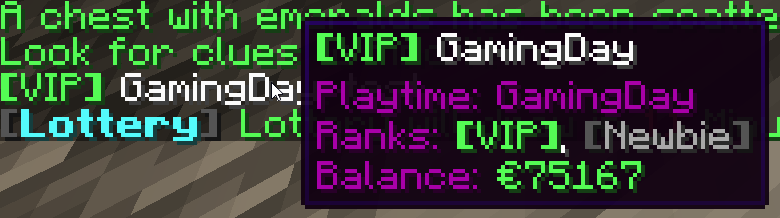
I have no idea what to do, basically I want a chat hover message to say what ranks the player has. I could do this with %luckperms_groups% but that doesn't look that good. What I want is the PREFIX of those groups from %luckperms_groups%. I have tried %luckperms_prefix_element_lowest_inherited% but because the default group is connected with my lowest rank it just shows the prefix of the lowest rank even if the player has a higher rank. https://i.imgur.com/Nozx0IC.png in the screenshot instead of Newbie it should say Expert. Can someone help?
 proper pulsar
Pretty sure you’d have to create your own custom JavaScript placeholder
tropic jay
Is there nothing else I can do?
proper pulsar
I don’t think so
proper pulsar
Or thar
Though that’s not how I understood your explanation of what you want to achieve
tropic jay
yeah, I have to use a loophole anyway to make it work if a player is newbie and vip
 chilly cave
how to make that new player will join and he will have group player
high raven
Give default a displayname of 'player'
And a prefix
New players always have group default
 cerulean island
!help
wintry cloudBOT
Available commands:
!advanced
!api
!argumentbased
!ask
!bulkupdate
!bungee
!cauldron
!chat
!colours
!commandequivalents
!commands
!config
!context
!default
!downloads
!editor
!errors
!essentials
!extensions
!extracontexts
!faq
!helpchat
!inheritance
!install
!locale
!meta
!migration
!notworking
!nowildcard
!pasteit
!permissions
!placeholders
!selfhosting
!stacking
!storage
!suggestions
!switchstorage
!sync
!tracks
!upgrade
!usage
!userinfo
!verbose
!weight
!whyluckperms
!wiki
cerulean island
!weight
wintry cloudBOT
LuckPerms allows you to set weights in order to determine the priority of certain nodes, like permissions and even prefixes. A higher weight number is a higher priority.
LuckPerms wiki
cerulean island
!selfhosting
wintry cloudBOT
Learn how to self-host all the web interfaces.
LuckPerms wiki
tropic jay
I've seen that a permission can be undefined and true, so how do I set a permission to false?
 fringe mist
high raven
fringe mist
high raven
No need to ask in several channels
proper pulsar
In the webeditor by clicking the green true to toggle and with a command just add false after the permission
 daring stirrup
!nwc
wintry cloudBOT
Wildcard issues
Some plugins are created in a way which results in odd behaviour when the root '*' wildcard is used.
More information:
daring stirrup
!wildcard
wintry cloudBOT
Sorry! I do not understand the command !wildcard
Type !help for a list of commands.
high raven
it's !nowildcard
tropic jay
@proper pulsar no way to do it in YAML?
wintry cloudBOT
Hey GamingDay! Please don't tag helpful/staff members directly.
proper pulsar
What did I say?
tropic jay
you said in webeditor or with a command
proper pulsar
I said more
I’m about to go to bed
So if you want my response you should respond soon
 left axle
Hey guys, I'm pretty new to the whole server thing
What's the vanilla way to op a player on a bukkit server?
(no plugins)
 barren fable
Use the op command
left axle
It adds the player to the ops.json but doesn't let the player use op commands
austere ore
Hello. Is there a way to stop the day counter of a time range?
left axle
I've installed LP as well, isn't detecting my player name as an entity
I'll move channels but I think it's relevant
 cold elm
How do I get prefix to show?
oblique sleet
Chat plugin handles prefixes
cold elm
What chat plugin called?
daring stirrup
!chat
wintry cloudBOT
LuckPerms does not display things in chat!
LuckPerms is only able to send information to formatting plugins so that they display them properly. LuckPerms does not put the prefix in front of your name, you need a chat formatting plugin to do it, and you need Vault. Same goes for the tablist! If the information appears correctly when you run /lp user <user> info, LuckPerms is doing its job!
Prefix isn't showing?
What plugins can I use to format chat?
 main fern
when i type /lpb editor all that comes up is, "Running Luckperms v5.1.29". How do i get the luckperms bungee editor? @ping me if you can help please
high raven
No need to ask in several channels.
main fern
my bad
 hoary minnow
We migrated our roles from permissionsex over to luck perms and something’s are weird, first of all the admin ranks had the * permission and now they can still do all the commands but the permission isn’t showing up in the editor, and also as an admin when I login it sets me back to spawn, says welcome like it’s my first tome joining, and sets my game mode to survival every time
Any help is greatly appreciated
proper pulsar
@hoary minnow when you mean it doesn't show up in the editor do you mean that the * node doesn't show up or that not all available nodes show up?
hoary minnow
that the * node doesnt show up
proper pulsar
Also did you remove PEX after migrating and restarted the server?
hoary minnow
all the other nodes show up
yes i installed luck, migrated, then deleted pex and restarted
proper pulsar
run /lp editor and send the link please
hoary minnow

LuckPerms - A permissions plugin for Minecraft servers.
LuckPerms is a permissions plugin for Minecraft servers.
"council" and "council2" should have *
it also removed -essentials.keepinv and -essentials.keepxp but those are easy to add back
proper pulsar
It's possible that the migration is not perfect
Just add the missing things back
Btw are you aware of inheritance?
it also removed -essentials.keepinv and -essentials.keepxp but those are easy to add back
@hoary minnow and be aware that to negate a permission in LuckPerms you don't prefix it with-but you set it to false. In the editor you can do that by clicking the green true to toggle
hoary minnow
Yes I was able to figure that out so far
Do you think it was simply a problem with the migration and I can just add the permission back?
proper pulsar
Yes
 formal pine
 void gust
i want to be able to create 3 ranks on my server: ADMIN (red) , BUILDER (blue), HELPER (green) what commands should i use to get that???
tidal blade
!usage
wintry cloudBOT
Here's a guide to help users understand and use LuckPerms for the first time.
LuckPerms wiki
prisma hinge
Hey I was wondering if there is a way to make a group meta override an individual meta? Each of the users has a unique meta, but I want to make all of them have the same meta in a specific world.
Is there any way to do this?
high raven
Try setting context on the meta, it may override
Past that, I'm not sure because LP kinda does that by design
!advanced
wintry cloudBOT
Discover some of the more advanced concepts of LuckPerms, such as permission calculation, shorthand permissions and more.
LuckPerms wiki
prisma hinge
How can i change the weight of my prefix i made for a group?
wintry cloudBOT
LuckPerms offers an easy to use, powerful Web Editor, with which you can add, delete and change permissions of groups and players.
LuckPerms wiki
 modern igloo
wintry cloudBOT
modern igloo
wintry cloudBOT
Hey fury_2! Please don't tag helpful/staff members directly.
daring stirrup
!tracks
wintry cloudBOT
Tracks provide a method for you to promote/demote players along a track (or ladder) of groups.
LuckPerms wiki
 unkempt elk
Hello guys! I don't know where to ask anymore I'm messing out with worldguard and don't know how to get it work and can anyone help me
Do anyone knew how to give and remove GROUPS when someone enter in a certain spot?
If a player step into a certain spot - GROUPS added
If they left the spot - GROUPS removed
Can anyone help me?
quick lagoon
i think you can set worldguard context
ask worldguard for what type of lp context they support
!context
wintry cloudBOT
You can set a permission or group on a per-world/per-server basis, through what we call "contexts".
LuckPerms wiki
quick lagoon
unkempt elk
Thanks! is that worldguard discord?
high raven
!extracontexts actually @unkempt elk
wintry cloudBOT
Add contexts not supported by stock LuckPerms.
LuckPerms wiki
unkempt elk
They said this = LP might have some context thing for that. not on our end though
wintry cloudBOT
Add contexts not supported by stock LuckPerms.
LuckPerms wiki
unkempt elk
So I need to install that, and add contex in group with key : wg-region value : pvpspot
is that correct?
quick lagoon
And you need to enable it in extra context config.yml as wel
unkempt elk
So should everyone be given this group, or it will automatically add itself?
high raven
You should add it as a parent group of default with worldguard region context
Then everyone with default/something that inherits default will get it when they enter
unkempt elk
I've done it but it ain't working
The player contex is listed but it not work why
hm
high raven
Try just one of the two
high raven
!verbose I'd try this next then
wintry cloudBOT
LuckPerms provides a verbose command to help you find out what permissions a command/plugin is checking.
LuckPerms wiki
unkempt elk
What do I need to check here?
high raven
@dense basin posting ads in several channels is a great way to get banned. Please stop
 silver laurel
Does anyone know the version of LuckPerms which works for 1.8?
I keep getting this message on startup:
WARN [Essentials] Permissions lag notice with (ModernVaultHandler).
Please advise 🙂
proper pulsar
@silver laurel you need to use 1.8.8 (which you should have been using in the first place)
silver laurel
Yes, but there are many versions of Luckperms, I am only discovering the plugin today 😂
There are tons of features in it btw
wintry cloudBOT
You can download LuckPerms for Bukkit/Spigot, BungeeCord, Sponge, Nukkit and Velocity.
Additional downloads
proper pulsar
!usage also this to get started
wintry cloudBOT
Here's a guide to help users understand and use LuckPerms for the first time.
LuckPerms wiki
silver laurel
I've tried the latest but that weird error message keeps popping up
Do you know what I can do?
silver laurel
Yes, but the warning says the L word in it.
L.A.G
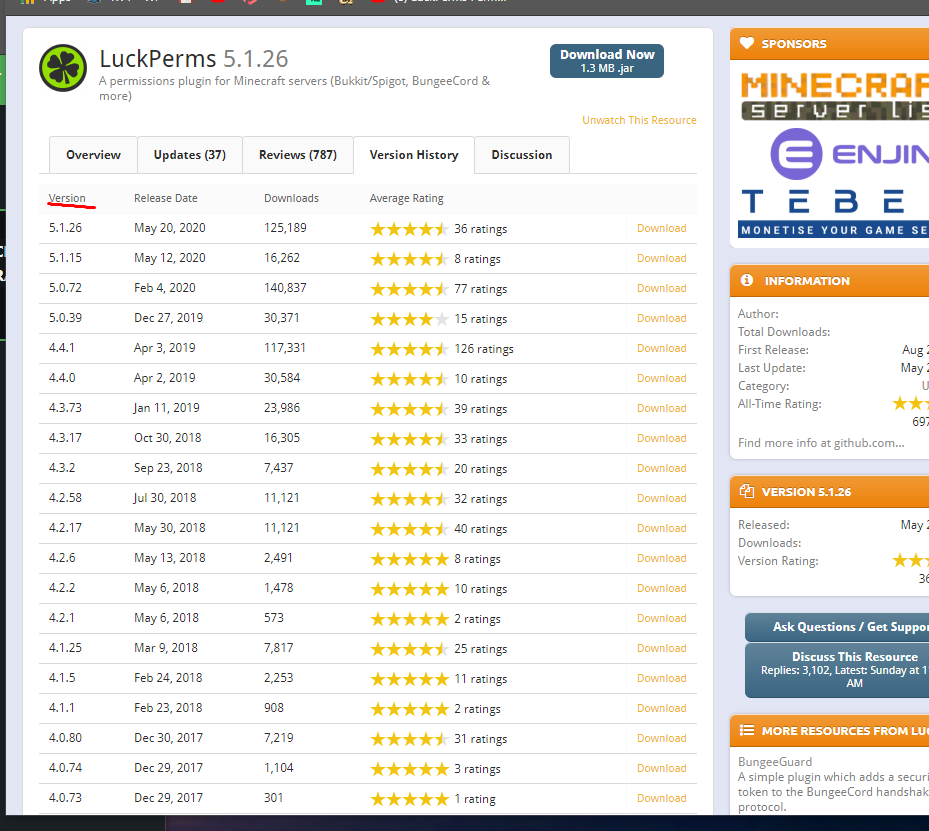
Is there just a way to download a 1.8.8 version of luckperms? Since my spigot server does in fact run on 1.8
I guess what I'm really asking is what version of these:http://prntscr.com/tj9q2e is compatible with 1.8?
 proper pulsar
@silver laurel ive explained that part
You need to use a 1.8.8 server (which you should be using anyways)
And the use latest LuckPerms
You’ll find the downloads here:
!dowloads
wintry cloudBOT
Sorry! I do not understand the command !dowloads
Type !help for a list of commands.
proper pulsar
!downloads
wintry cloudBOT
You can download LuckPerms for Bukkit/Spigot, BungeeCord, Sponge, Nukkit and Velocity.
Additional downloads
proper pulsar
Why do I have to repeat myself?
proper pulsar
It doesn’t mean you will have lag
You can savely ignore that
And that warning has nothing to do with any of what I said regarding what versions of LP and Spigot you should be using
It’s not like I’ve been using this plugin for years and know what I’m doing
@silver laurel
silver laurel
It just worried me.
proper pulsar
Nothing to worry about
tame hollow
it's what happens when you run software that's years old :P
silver laurel
Thank you so much!!!
proper pulsar
But it needs to be 1.8.8. Other 1.8 server versions are not compatible. And shouldn’t be used either for because there are major security issues with those versions.
silver laurel
💯 💯
proper pulsar
Still any 1.8 client can join
But even the clients should update
But that’s a different story
silver laurel
hey wanted to ask
are there any YT tutorials made by you guys on how to use the plugin?
or, by LuckPerms that is.
proper pulsar
No
proper pulsar
!usage
wintry cloudBOT
Here's a guide to help users understand and use LuckPerms for the first time.
LuckPerms wiki
proper pulsar
Great place to get started
tame hollow
there are a bunch of videos out there but can't recommend any as i've never really watched them
i've been considering doing my own series haha
tame hollow
well that's english and german covered 😆
proper pulsar
Who said I would make them in German 😜
tame hollow
lol i was only sorta joking
 oblique nymph
Hi
high raven
Hi!
oblique nymph
How are you Larry, I've missed you.
 )
tame hollow
)
tame hollow
ayy tony
oblique nymph
👋
 tired harness
So I'm trying to add a short hand permission via the web editor, but the web editor keeps splitting the permissions up. https://jay113355.net/share/2020-07/firefox_2020-07-16_20-11-12.png
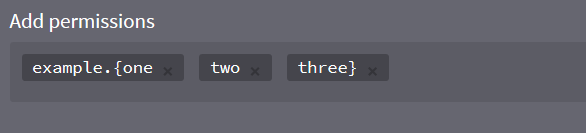
where I'm entering example.{one,two,three}

Is this a bug or am I doing something wrong?
I'm assuming its the commas splitting my entire.
But since shorthands are a feature shouldn't it account for that?
high raven
It is a bit of a bug, you need to add a 'regular' perm and then edit it to be shorthand
Because the editor is capable of taking perms lists and adding them all as individual perms, it's a bit tough to make it work tbh
tired harness
or do it via command, but good to know its not just me.
cant the editor detect the comma is within {}
high raven
I mean it can but then again that's not exactly the height of simplicity in action
Implementation is a bit tougher than imagining the solution
tired harness
Yeah, its just a pain migrating from Pex with this
high raven
If you wanted, you could take perms lists from within pex and paste them in, but if you have a bunch of shorthands in there I can see how that's annoying
!migration might work better
wintry cloudBOT
Learn about the process of migrating from another permission plugin.
LuckPerms wiki
tired harness
Thats the issue
And i couldn't get migration to work, as I have a custom version of PEX for forge.
tame hollow
hi there is already an open issue for this
https://github.com/lucko/LuckPermsWeb/issues/104
GitHub
When trying to add prefixes to already created ranks on the LuckPerms editor, it doesn't allow spaces. Not sure if there is anyway you can fix this, as it sets anything after a space as ano...
what larry suggested is the only way to this in the editor currently
high raven
If 'regex here' matches 'string'; then 'keep together'
tame hollow
i don't have an ETA for a fix
high raven
Ezpz turbo
oblique nymph
Larry's role as a mod: Tell Turbo how easy it is to fix all the bugs

 plain mantle
if I'm updating from, say, 4.4 to 5, what do I need to do other than export the permissions file?
high raven
dont export
quick lagoon
just change the .jar file
high raven
i mean, useful as a backup, but don't export/import it won't work
just leave perms and file as is and swap jarfile
mighty spear
Aye
 unkempt hare
How does tab sorting work? I set Owner rank to weight 0 but its still not sorted correctly
unkempt hare
F
quick lagoon
although unrelated to showing things to tabs, higher weight is higher priority
!weights
wintry cloudBOT
LuckPerms allows you to set weights in order to determine the priority of certain nodes, like permissions and even prefixes. A higher weight number is a higher priority.
LuckPerms wiki
unkempt hare
wait, it it the heavier the higher it stands?
quick lagoon
A higher weight number is a higher priority.
 quick lagoon
as i said its unrelated to tabs
 untold lynx

 high raven
Run papi ecloud download luckperms and papi reload and if still no, restart the server
quick lagoon
!placeholders
wintry cloudBOT
Display data such as user prefixes and groups from LuckPerms in other plugins.
LuckPerms wiki
 uneven trench
hello im trying to know how to make rank names like owner or vip showing at chat
daring stirrup
!chat
wintry cloudBOT
LuckPerms does not display things in chat!
LuckPerms is only able to send information to formatting plugins so that they display them properly. LuckPerms does not put the prefix in front of your name, you need a chat formatting plugin to do it, and you need Vault. Same goes for the tablist! If the information appears correctly when you run /lp user <user> info, LuckPerms is doing its job!
Prefix isn't showing?
What plugins can I use to format chat?
uneven trench
ok i have essentialsX and i have vault i checked lp user <user> info but its not working
daring stirrup
Screenshot the output of /lp user <user> info
uneven trench
it worked thx
prisma hinge
how do I enable online mode
high raven
server.properties
prisma hinge
could someone hop on my server and try to figure it out ill give u the ip
 marble lake
I’ve mentioned this problem in the past and im sorry for bringing it up again, but i’ve checked on the wiki page, downloaded every plugin that was said to work with luckperms but the prefixes for roles still dont show up ;-;
proper pulsar
!chat @marble lake
wintry cloudBOT
LuckPerms does not display things in chat!
LuckPerms is only able to send information to formatting plugins so that they display them properly. LuckPerms does not put the prefix in front of your name, you need a chat formatting plugin to do it, and you need Vault. Same goes for the tablist! If the information appears correctly when you run /lp user <user> info, LuckPerms is doing its job!
Prefix isn't showing?
What plugins can I use to format chat?
 pliant ridge
how can i have different default rank on my servers ?
 quartz maple
give the real default rank the permission of group.<your_new_default_group
that basically makes the your_new_default_group the default
but you really don't need to do that, just use the regular default group for your default rank needs
pliant ridge
Mmmh, for example, if I want the rank "new" to be default on my lobby and "player" to be default on my skyblock
How can I do that?
I put the permission group.new with context : server:lobby on luckperms?
 lilac hazel
Yep, use contexts to define where you want a permission/group to be used.
 clever granite
IMPORTANT NOTICE: You have a very old/outdated version of LuckPerms installed on your server. This 'legacy' version of the web editor is deprecated and due for removal at the end of this month. Please update to the new version of LuckPerms as soon as possible in order to continue using the online apps. If you need help updating, please get in touch with us via Discord and we'll be happy to help. ~Luck
How can I update the version of Luckperms when the later Luckperms versions shuts down my server after I start it up?
lilac hazel
!upgrade
wintry cloudBOT
Read about upgrading LuckPerms from v4 to v5.
LuckPerms wiki
lilac hazel
Have you had a look at this page and followed it's instructions?
clever granite
No, i'ma do this rn
high raven
Because thats how default group works
It's always default
Add novice as a higher weighted parent of default with 'sky' context
pliant ridge
weight.70 context : sky for examble ?
clever granite
Have you had a look at this page and followed it's instructions?
Now I followed, created the folder and restarted the server, but it still says that I'm using an old version
lilac hazel
Did you update the .jar?
high raven
@pliant ridge exactly, on the node group.novice added to default
lilac hazel
👍
pliant ridge
excuse me @high raven but i don't understand what i'm suppose to do :/
wintry cloudBOT
Hey Drayms! Please don't tag helpful/staff members directly.
high raven
Add the node group.novice in default group, with context for sky (if sky is a world, it's world for 'key' and sky for 'value'
In novice group on the editor, make sure the weight is higher than default
!usage
wintry cloudBOT
Here's a guide to help users understand and use LuckPerms for the first time.
LuckPerms wiki
high raven
This page explains making a group inherit another group
!weight this one explains weight
wintry cloudBOT
LuckPerms allows you to set weights in order to determine the priority of certain nodes, like permissions and even prefixes. A higher weight number is a higher priority.
LuckPerms wiki
pliant ridge
Thanks you so much !
 vale urchin
U r the best love u Larry
 weary steppe
I am trying to give people on my server access to warps, and for some reason it says they dont have access to them, I am using essentials warps, and warps gui, I have given them the essentials.warp, and essentials.warps, and warpgui, but for some reason it says they dont have access to them
tidal blade
Do /lp verbose command <user name> /warp and /lp verbose command <username> /warp <a random warp>
weary steppe
should i use my username or the other peoples username?
tidal blade
Whoever doesn't have access to the command
tidal blade
What LP version are you using
weary steppe
5.1.26
high raven
!update
wintry cloudBOT
You can download LuckPerms for Bukkit/Spigot, BungeeCord, Sponge, Nukkit and Velocity.
Additional downloads
tidal blade
Update then try the command again
weary steppe
ok
will it keep all of the things i have already done or will i have to do it all again?
high raven
just replace the jarfile and everything will be kept
quartz maple
yes
high raven
then add those permissions, seen as undefined (just the first one, in the last example)
to default group
weary steppe
how do i do that?
quartz maple
just add the permission o.O
just like how you added the other permissions you mentioned
if you wanted to let the default rank use any warp, you'd give them the essentials.warps.* permission
quartz maple
larry's on a hot streak
weary steppe
can i also get some help with worldedit?
i gave people the permisson worledit.*
but it isnt giving it to them
quartz maple
#general but worldedit will need to get more permissions than just worldedit.* for the players to use all the commands
the wiki should tell you all the permissions you'd need to apply
weary steppe
i dont want them to have all those permissions
weary steppe
how should i use it, just change it too worldedit instead of warp?
high raven
change it to the WE command you want to check
and the name of the person you want to check it on
weary steppe
can i use a group?
high raven
no, you can add the permissions you find to a group after but must use a person to test on
quartz maple
oh say larry
is there any feature to limit the output of lp verbose
kind of like grep or awk or whatever
quartz maple
ooh nice
wintry cloudBOT
LuckPerms provides a verbose command to help you find out what permissions a command/plugin is checking.
LuckPerms wiki
weary steppe
sorry if i am being stupid and should know this stuff
high raven
nah, just gotta try applying concepts you know to new things
see a <command> field? just use the command you need!
ezpz
high raven
because //set isn't a full command
weary steppe
what is?
quartz maple
//set minecraft:stone
weary steppe
ok
high raven
literally the exact example i was gonna go for lol
quartz maple
hehe
weary steppe
exact same thing
high raven
has sharles selected anything with the //wand
high raven
does it give Sharles a no permission message
weary steppe
ohhh i see it
i see the issue
I gave sharles the fawe.worldguard permission but still doesnt work
weary steppe
what command do i do to see if that is a permission?
high raven
run lp verbose record, have him do a bunch of FAWE stuff, and run lp verbose upload
you
will get a link with a list of all perms checked
weary steppe
LuckPerms - A permissions plugin for Minecraft servers.
LuckPerms is a permissions plugin for Minecraft servers.
quartz maple
all the worldedit permissions that are checked there won't be satisfied by your worledit.* permission
well i guess some of them will
but not most of them
weary steppe
ok, i have to go so, will prob continue this tomorrow 🙂
thanks for all the help though
weary steppe
ok
quartz maple
remember to look through the worledit wiki and find exactly what commands you want your players to be able to use
weary steppe
ok
quartz maple
they will tell you what permissions the players need to be able to use them
give the players those permissions
weary steppe
ok thank you
weary steppe
can someone help me understand what this permission means? fawe.limit.<limitgroup> (Grants the user the specific group of limits.)
 upbeat obsidian

GitHub
Blazingly fast world manipulation for artists, large networks and developers: https://www.spigotmc.org/resources/13932/ - boy0001/FastAsyncWorldedit
tidal blade
@weary steppe If you want to know what a specific permission means, check the documentation for the plugin that the permission belongs to.
weary steppe
is there a way you can have more then one prefix for one player
quartz maple
!stacking
wintry cloudBOT
Display multiple prefixes/suffixes alongside a player's name.
LuckPerms wiki
weary steppe
i read the github but still dont really inderstand it
tidal blade
What don't you understand? It gives you examples
prisma hinge
Its very simple
weary steppe
for every person would i have to code it differently?
weary steppe
how do i use tracks, so far i have only used groups
tidal blade
!tracks
wintry cloudBOT
Tracks provide a method for you to promote/demote players along a track (or ladder) of groups.
LuckPerms wiki
 rapid palm
!parent
wintry cloudBOT
Sorry! I do not understand the command !parent
Type !help for a list of commands.
rapid palm
!help
wintry cloudBOT
Available commands:
!advanced
!api
!argumentbased
!ask
!bulkupdate
!bungee
!cauldron
!chat
!colours
!commandequivalents
!commands
!config
!context
!default
!downloads
!editor
!errors
!essentials
!extensions
!extracontexts
!faq
!helpchat
!inheritance
!install
!locale
!meta
!migration
!notworking
!nowildcard
!pasteit
!permissions
!placeholders
!selfhosting
!stacking
!storage
!suggestions
!switchstorage
!sync
!tracks
!upgrade
!usage
!userinfo
!verbose
!weight
!whyluckperms
!wiki
weary steppe
!inheritance
wintry cloudBOT
Learn about inheritance.
LuckPerms wiki
 hollow mortar
So when I do the following series of commands...
lp creategroup builder
lp group builder permission set minecraft.command.gamemode true world=Creative
lp user ArrowAmnesia parent add builder
I can't use /gamemode in the world 'Creative' or any world for that matter.
Is there something I'm missing?
barren fable
Maybe it's case-sensitive? world=creative
hollow mortar
I tried both, and I just checked and it's called Creative
barren fable
Try the command /minecraft:gamemode
hollow mortar
cool, that worked. Is there anyway to bypass that? I also wanted to do wordedit commands and it would be a little annoying to have to type /worldedit:<command> each time
If not, thanks for your help
quartz maple
that's strange o.o
barren fable
You have a plugin taking over /gamemode. Minecraft has a /gamemode command, a plugin has a /gamemode command, the plugin will be used to handle the command.
Commands are always available in the format /<pluginname>:<command> (eg. /essentials:gamemode)
If you're using EssX ask them or lookup their docs or use LP's verbose function
 misty sage
How do i make it so it displays a players game rank then mod/owner if they are a mod/owner
Example
[A] Owner JustDoom: message
Or
[B] JustDoom: message
I just cant figure it out
and then how would i change only one of the ranks
Example [A] to [B] without changing the owner/mod?
prisma hinge
@misty sage u need essentials chat
misty sage
have it
prisma hinge
do u have vault?
prisma hinge
do u have multiverse-core
misty sage
I just dont know how to set it up
prisma hinge
do u have multiverse-core
@prisma hinge Wtf does this have to do with it?
quartz maple
!stacking
wintry cloudBOT
Display multiple prefixes/suffixes alongside a player's name.
LuckPerms wiki
quartz maple
you'll probably want to do that if you have permissions set up with pex
misty sage
i did not really have much stuff at all
quartz maple
in that case you should be okay just re-entering everything
prisma hinge
@prisma hinge Wtf does this have to do with it?
@prisma hinge
i had to do something with that to disable the world prefix or something
Oh yeah its in the mv config
prefixchat: 'false'
misty sage
also how do i make it so i can change only one of the prefixes? example, mod to admin
quartz maple
a combination of tracks and stacking, and actually changing a user's group
misty sage
any tutorials on this?
prisma hinge
wiki
quartz maple
hmmm there might be some examples on the wiki
misty sage
k
how do i make it so it shows [Owner] only if your the owner?
Sorry for all these questions
tame hollow
You need to add prefixes to each group, then the owner group will show it as needed
But remember to use weights
misty sage
wait nvm found it on the wiki
prisma hinge
It won't let me add essentials.pay to luckperms. Everytime I add it to the default group it shows up in green and when I apply it in my minecraft server it doesn't work it says "No changes were made" or something like that. Please ping me if you know how to resolve this
I just want people to be able to pay each other
tame hollow
You know you can just use a command right, don't need to complicate things with the editor for one simple permission :P
misty sage
wait last question hopefully, does it only show a prefix if your in the group?
tame hollow
But some people run into issues with the wrong prefix displaying, because they didn't set the weight correctly
misty sage
k
prisma hinge
Turbo what command would I use to allow people to do /pay or /money pay without it saying "You don't have access to that command"
tame hollow
Add whatever the permission is need to their group
/LP group (group) permission set (permission)
!commands
wintry cloudBOT
Find all of the available LuckPerms commands on the wiki.
General commands
User commands
Group commands
Permission commands
Parent commands
Meta commands
Track commands
Log commands
LuckPerms wiki
prisma hinge
Thanks
 near solar
How to ask for support for lp
prisma hinge
Idk maybe use the luckperms discord
quartz maple
!ask
wintry cloudBOT
Please ask your question!
Please ask the question you have. Don't ask to ask, or ask to DM someone. There are people here to help you, but we need to know what to help you with, so please just ask the question you want to in as much detail as possible!
Or, try here first:
Why shouldn't I ask to ask?
 lavish pond
Any girls wanna play minecraft with me and my boy on xbox
high raven
Not the place, not several channels
misty sage
how do you use a track in stacking so whatever group you have in the track it shows in the stacking?
high raven
!stacking
wintry cloudBOT
Display multiple prefixes/suffixes alongside a player's name.
LuckPerms wiki
high raven
Examples here for exactly that
misty sage
yes but which one does it?
high raven
what do you mean
misty sage
wait what does weight mean?
quick lagoon
!weights
wintry cloudBOT
LuckPerms allows you to set weights in order to determine the priority of certain nodes, like permissions and even prefixes. A higher weight number is a higher priority.
LuckPerms wiki
misty sage
thanks
misty sage
ok still dont know how to do it:/
quick lagoon
!bulkeditr
wintry cloudBOT
Sorry! I do not understand the command !bulkeditr
Type !help for a list of commands.
quick lagoon
!bulkedit
wintry cloudBOT
Quickly update a large amount of user and group permissions by using the bulkupdate command.
LuckPerms wiki
 wild barn
I tried to use this command but don't know how it works...
quick lagoon
/lp bulkupdate users update permission group.<groupname> "permission ~~ group.%"
wild barn
OK tysm
 modern bronze
Got it to work after putting it in the right folder XD .. but have checked the wiki, seems quite cxonfusing to get started, is there a "default" config file with 2 or 3 groups, just to see how it is managed?
high raven
!editor
wintry cloudBOT
LuckPerms offers an easy to use, powerful Web Editor, with which you can add, delete and change permissions of groups and players.
LuckPerms wiki
wintry cloudBOT
Here's a guide to help users understand and use LuckPerms for the first time.
LuckPerms wiki
high raven
LP isn't designed to use files to manage groups because they're unreliable and lead to big problems
modern bronze
oki
high raven
while it's still possible it's certainly not recommended
modern bronze
so another plugin is needed to suport the functions of LP? in order to manage ranks etc
high raven
no
did ya read the editor wiki i linked
you just run lp editor and click on the link
modern bronze
Going through it now
prisma hinge
How to install LuckPerms legacy? There is no tutorial in French, could someone help me?
quick lagoon
!downloads
wintry cloudBOT
You can download LuckPerms for Bukkit/Spigot, BungeeCord, Sponge, Nukkit and Velocity.
Additional downloads
quick lagoon
get bukkit-legacy version
quick lagoon
yes
prisma hinge
Thanks
 slow crown
Hey- when I make a group and add a prefix to it, the prefix doesnt show in chat.
1.15.2, essentials chat
barren fable
!chAt
wintry cloudBOT
LuckPerms does not display things in chat!
LuckPerms is only able to send information to formatting plugins so that they display them properly. LuckPerms does not put the prefix in front of your name, you need a chat formatting plugin to do it, and you need Vault. Same goes for the tablist! If the information appears correctly when you run /lp user <user> info, LuckPerms is doing its job!
Prefix isn't showing?
What plugins can I use to format chat?
 azure monolith
Is it possible for me to copy the ranks from one server editor to another without doing it manually
quick lagoon
!switch use this
wintry cloudBOT
If you wish to change your storage type (e.g. to YAML or MySQL) you may need to follow these instructions to ensure your groups and permissions are migrated to the new storage type.
Read more about the Storage types
LuckPerms wiki
tame hollow
are you moving to another server or are you trying to sync
if you are just moving to another server, try the web upload feature
 past ferry
I put /^lp user <user> promote <track> on the commandsign in it didn't work it said <user> is a valid username .
tame hollow
then you're probably using the wrong placeholder for user
tame hollow
<user> is a placeholder, you replace it with the actual player's name
you need to find what placeholder your sign plugin uses for usernames
past ferry
k
 elder perch
Hey i get this issue spammed sometimes > [03:49:25 WARN]: Caused by: java.lang.ClassNotFoundException: me.lucko.luckperms.lib.bytebuddy.dynamic.scaffold.subclass.ConstructorStrategy
high raven
Try deleting the libs folder and restarting
 white bough
Hey. I want to add prefix to my created groups but I don't have essentials on the server and without it, the prefix don't want to work.
wintry cloudBOT
LuckPerms does not display things in chat!
LuckPerms is only able to send information to formatting plugins so that they display them properly. LuckPerms does not put the prefix in front of your name, you need a chat formatting plugin to do it, and you need Vault. Same goes for the tablist! If the information appears correctly when you run /lp user <user> info, LuckPerms is doing its job!
Prefix isn't showing?
What plugins can I use to format chat?
high raven
you need a chat formatter, basically
white bough
Thank you. I will come back if I have any problem with it.
white bough
I don't want to use essentials for a lobby so a wanted to search for another chat formatting plugin so thanks for your help too.
prisma hinge
I mean its a dependency but
prisma hinge
Deluxechat isn't essentials
high raven
near the bottom
white bough
Larry I found it, thanks.
prisma hinge
<3
 analog swift
hi
prisma hinge
Hi
analog swift
im here now
prisma hinge
So whats the issue?
analog swift
i gave my default rank to /taccept and /tpa and /spawn and /warp and /sethome etc... for essential but it dpoesnt work
high raven
what perms did you set?
prisma hinge
What permission nodes did you use
high raven
specifically
analog swift
wdum nodes
prisma hinge
Did you give that to the group or did you set the permission /tpa
analog swift
idk
analog swift
im confused though im new
prisma hinge
/lp group default permission set essentials.tpa
/lp group default permission set essentials.tpaccept
/lp group default permission set essentials.warps.* (if you want them to access al warps)
If you need help with essentials permissions, www.google.com.au is a good place to search for them too
analog swift
its working now
prisma hinge
Sweet
analog swift
ok thx it just wasnt working on the online editor
prisma hinge
Did you save it?
With the editor you need to click save, and copy and paste the command in game
analog swift
can you give me the command for sethome and hoime and delhome pls
analog swift
i did the update command
prisma hinge
Essentials.home
analog swift
ok thx
analog swift
ok thx
analog swift
thank you
analog swift
@prisma hinge they still cant do the commands
prisma hinge
Then whyd u say it works
prisma hinge
Are they in the default group
analog swift
yes
prisma hinge
Do /lp user (username) info
analog swift
 broken pike
Hey anyone could help me setting up lp in Apex?
prisma hinge
Can you do /lp editor @analog swift and send the link?
Dont worry we cant change anything
analog swift
ok
prisma hinge
Cheers
analog swift
LuckPerms - A permissions plugin for Minecraft servers.
LuckPerms is a permissions plugin for Minecraft servers.
pliant ridge
Hello, I have an error with the connection between the db and lp :
[15:34:47] [luckperms-hikari connection adder/WARN]: Mon Jul 20 15:34:47 UTC 2020 WARN: Establishing SSL connection without server's identity verification is not recommended. According to MySQL 5.5.45+, 5.6.26+ and 5.7.6+ requirements SSL connection must be established by default if explicit option isn't set. For compliance with existing applications not using SSL the verifyServerCertificate property is set to 'false'. You need either to explicitly disable SSL by setting useSSL=false, or set useSSL=true and provide truststore for server certificate verification.
high raven
!errors
wintry cloudBOT
Here's a page with some common storage system errors.
LuckPerms wiki
prisma hinge
@analog swift run this command /lp applyedits vccR0vNszM
pliant ridge
@high raven I tried this solve
wintry cloudBOT
Hey Drayms! Please don't tag helpful/staff members directly.
high raven
why tab that setting?
high raven
formatting matters, that would invalidate it
analog swift
it still doesnt work tim
pliant ridge
I tired it in my config.yml :
properties:
useUnicode: true
characterEncoding: utf8
useSSL: false
verifyServerCertificate: false
analog swift
tpdeny tpaccept sethome delhome home
analog swift
i do
high raven
Pelectic, run lp editor and send the link it gives you
pliant ridge
But lp kick me for an error from the database
prisma hinge
?
Oh
But lp kick me for an error from the database
@pliant ridge check your credentials are correct
analog swift
LuckPerms - A permissions plugin for Minecraft servers.
LuckPerms is a permissions plugin for Minecraft servers.
prisma hinge
The perms are fine
analog swift
it doesnt work though
prisma hinge
!moss
wintry cloudBOT
Essentials
Make sure you are using EssentialsX and Vault for prefixes. For any other issues with Essentials, you should seek support in either #general or the official EssentialsX support Discord.
EssentialsX Discord
high raven
did you click save and run the applyedits command too?
prisma hinge
They mustve otherwise that link wouldn't show those permissions that I added before
high raven
fair enough
prisma hinge
I'm gonna go to sleep. Night all
analog swift
oof
high raven
Try running verbose
lp verbose command <name> <the command>
for a user in default group that is online
analog swift
it did nothing
analog swift
ok