#support-2
1 messages · Page 49 of 1
 ancient garnet
 high raven
it enables ip forwarding for that backend, meaning you keep your UUID (identification number) when you're on that server and LP knows who you are
ancient garnet
ah ok
high raven
otherwise it's like you're a default user according to that server, because you get an offline-mode UUID that changes
ancient garnet
ok
high raven
the bungee gets your online mode UUID, assigned to your IP on connection, and sends it to the backend
but that one backend wasnt getting it
so it thought you were someone else
ancient garnet
ah is that why it was sending errors
high raven
yep
high raven
np!
ancient garnet
ill just check if its working
high raven
if you get any other errors, copy the log into pastebin or bytebin and send them here
!paste
 wintry cloudBOT
Please use pastebin!
Seeing a paste of the problem makes everything so much easier! Use https://bytebin.lucko.me/ for easy pasting!
For console errors:
Pastebin any relevant segments of the console log. If it's a startup error, this includes the entire startup log!
Other errors:
Pastebin the entire LuckPerms config file (passwords removed) as well as any other relevant files!
high raven
that's... weird. Perhaps delete the whitelist datafile on lobby and restart it
(not /reload, /reload is really bad for servers)
ancient garnet
ok thanks
high raven
does it let you in if you turn the whitelist off for that server
 prisma hinge
Hey Larry! here I am again xD
Im getting luckperm crashes

Never had it before. It just popped up when I tried to join the server
high raven
Those aren't luckperms crashes, though it says LP because LP is running on other threads. I'd need to see the start of the crash log to know what caused it @prisma hinge
prisma hinge
I restarted the server and its gone. I don't know what happened but its gone xD
 sonic elk
on my prison server, i want it so that if a player has enough in game currency, they can use a command to rankup to the next group.
high raven
You need to use a rankup plugin to do that, combined with LP
sonic elk
how would i connect that plugin with luckperms?
high raven
Depends on the plugin
I really wouldn't be able to help tbh, it's all on the other plugin
Except like the making of the actual groups
sonic elk
ok
i know how to make the groups, now i need to connect the ranks from the other plugin to luckperms
 sharp raven
I think most rankup plugins just execute a command. That way you can just make the rankup plugin execute a command to promote them/change their group in that track, I don't really know.
But, it depends on what plugin you use 🤷♂️
sonic elk
i can send a link to the plugin i use
 opal spire
Hey there, does anyone know a good auto rankup plugin that workes with LuckPerms.. its for a 1.16.1 Java Server that I am working on
Please DM me if you have answers to this question, Thx
 lilac hazel
You don't need to ask in every single channel...
opal spire
sorry I just did not know were to ask
 tame hollow
once is enough 
 stuck osprey
I made some ranks for my server and none of them are showing the prefix, what am I doing wrong?
prisma hinge
nothing
do you have a chat plugin installed
like essentials chat
deluxechat, etc
stuck osprey
I don't, do I need that?
prisma hinge
yes because they handle chat formatting
stuck osprey
ok ty
prisma hinge
make sure you have essentials installed if youre using essentials chat
and vault I think
 dusky oar
yeah you need to have vault too
prisma hinge
cheers
 austere hazel
Any ideas on why the console would throw this error every 5 minutes? I am running LuckPerms v5.1.75 which is the latest. The only particular thing that comes to my mind is that I am using "storage-method: yaml" in the config - but this should be okay right?
dusky oar
Except it's not an error
prisma hinge
what type of server are you running?
austere hazel
Spigot 1.16.1
dusky oar
It uses file watcher to detect changes due to you using YAML
This file watcher updates the information on the server when the file is changed
austere hazel
the error in this case is that no one changed the file 😛
dusky oar
No, it's because YAML is used to edit permissions in the file itself
Just so you don't have to restart after you changed something in the file
austere hazel
so when using YAML as storage-method it is expected for the logs\console to be spammed? x)
 barren fable
Not more than using any other storage method (atleast as far as I know)
austere hazel
This just doesn't seem like normal behavior. Before I post a issue on this, any ideas on what I can try to troubleshoot?
prisma hinge
nothing to be worried about
dusky oar
If you think that the fact that plugin works is not normal behaviour, you can still make an issue on this😂
austere hazel
Is anyone using YAML as storage input and NOT getting a filewatcher message every 5 minutes?
dusky oar
People who have watch-files: false: Yep
prisma hinge
why did I just crack up 😆
austere hazel
it says it is detecting change in all these files, but no one has edited the actual file and no one is even logged into this test-server - this is what seems off
prisma hinge
watch-files: false
dusky oar
It can't really detect if the file is changed, so it's running the check every 5 minutes
You can trigger it manually by doing /lp sync
austere hazel
I see, I thought it would check the file size or something clever like that x) but gotcha, I'll disable it
thanks 😄
dusky oar
When you change something in the YAML directly, make sure to run /lp sync otherwise your changes will not be in effect
austere hazel
Alright
 soft gazelle
seems /commandspy isnt showing me commands people are putting in
dusky oar
!paste again
wintry cloudBOT
Please use pastebin!
Seeing a paste of the problem makes everything so much easier! Use https://bytebin.lucko.me/ for easy pasting!
For console errors:
Pastebin any relevant segments of the console log. If it's a startup error, this includes the entire startup log!
Other errors:
Pastebin the entire LuckPerms config file (passwords removed) as well as any other relevant files!
 winter sierra
THANK YOU
dusky oar
If you don't want to help us help you, then we can't help you
 sterile meteor
How to make a rank name show In front of the username? The prefix don't work... Also I have Essentials chat... I want to use bucket colors.
dusky oar
Do you have Vault?
sterile meteor
oh XD
Whops
Thanks LOL
should I Remove essentials chat? I have this server with minehut's limit of 12 pluggins.
dusky oar
No you can't remove EssentialsChat
Otherwise what plugin will handle the chat and add the prefixes?
dusky oar
However if you have EssentialsX you can uncomment and enable add-prefix-suffix in EssentialsX config
Then you don't need EssentialsChat
 drifting hound
!GitHub
wintry cloudBOT
Sorry! I do not understand the command !github
Type !help for a list of commands.
drifting hound
!help
wintry cloudBOT
Available commands:
!advanced
!api
!argumentbased
!ask
!bulkupdate
!bungee
!cauldron
!chat
!colours
!commandequivalents
!commands
!config
!context
!default
!downloads
!editor
!errors
!essentials
!extensions
!extracontexts
!faq
!helpchat
!inheritance
!install
!locale
!meta
!migration
!notworking
!nowildcard
!pasteit
!permissions
!placeholders
!selfhosting
!stacking
!storage
!suggestions
!switchstorage
!sync
!tracks
!upgrade
!usage
!userinfo
!verbose
!weight
!whyluckperms
!wiki
 barren creek
sorry can one staff help me?
lilac hazel
!ask
wintry cloudBOT
Please ask your question!
Please ask the question you have. Don't ask to ask, or ask to DM someone. There are people here to help you, but we need to know what to help you with, so please just ask the question you want to in as much detail as possible!
Or, try here first:
Why shouldn't I ask to ask?
prisma hinge
Can you run LP 5.0 and 5.1 on separate servers with the same database?
 mighty spear
@prisma hinge Yes, you can, it's not recommended but there's no difference in the database schema between the two versions so it'll work fine
There shouldn't be a reason to run an older version though
 keen shard
oh hi jay, cutie
didnt know you modded here
you would think it would be a conflict of interest, considering you work at pebble
meh, cool
Oh hi, Brianna is here thats cool
songoda smh
so many cool faces
anyway, Enjoy!
barren creek
Ubuntu 14 can run lucky perms?
 lost compass
Are github issues usually fiexed?
mighty spear
@barren creek Yes, it can run *LuckPerms
high raven
If they're actually problems yep @lost compass
mighty spear
@lost compass Depends on whether your issue is helpfully laid out
barren creek
@mighty spear can i send my issue?
wintry cloudBOT
Hey Jostal! Please don't tag helpful/staff members directly.
barren creek
Sorry but it's urgent
barren fable
Just tell us what it is
barren creek
ok yes i send a bin
mighty spear
!ask
wintry cloudBOT
Please ask your question!
Please ask the question you have. Don't ask to ask, or ask to DM someone. There are people here to help you, but we need to know what to help you with, so please just ask the question you want to in as much detail as possible!
Or, try here first:
Why shouldn't I ask to ask?
barren creek
I restarted the server (1 minute) before I explain what happens. I use lucky perms to set permissions on ubuntu 14, but when I put the command "/ lp user {your username} permission set luckperms. * True" both on console and on mc (on console solto / and true) it doesn't start me anything and it doesn't even give me a mistake
barren creek
that's is
Does it say anything? Nothing?
@barren fable nothing, and /ip too, no errors nothings
wintry cloudBOT
Hey Jostal! Please don't tag helpful/staff members directly.
barren creek
sorry for poke
austere hazel
Hi,
how does LuckPerms decide what permission overrides the other, for example which one will it "execute last" logicly (lack of better words) of these two:
worldguard.build.block.interact.* TRUE
worldguard.build.block.interact.tnt FALSE
I know by trial and error that the FALSE in this example will be "executed last", but what decides it?
barren fable
!advanced explains the order iirc
wintry cloudBOT
Discover some of the more advanced concepts of LuckPerms, such as permission calculation, shorthand permissions and more.
 LuckPerms wiki
barren creek
LuckPerms wiki
barren creek
https://bytebin.lucko.me/J1UEcefwXR here i just did /lp
but nothing happens and when i do it in windows10(offline in locahost), it works
austere hazel
!advanced explains the order iirc
thanks Tobi
 daring stirrup
@barren creek paste whole startup log
 mild sinew
I have a technical question
barren creek
@barren creek paste whole startup log
@daring stirrup all putty log?
mild sinew
Is it possible to move a player to a group based on the playedtime placeholder?
high raven
Yes
daring stirrup
Latest.log ^ jostal
high raven
There are several plugins that do thag
 hazy rapids
GrantX might
mild sinew
Can't LP pull that kind of stat from the player's info and promote him?
barren creek
from the world creation to my last command
mild sinew
Nvm, redundant question
hazy rapids
||https://www.spigotmc.org/resources/autorank.3239/|| You can try AutoRank
mild sinew
Is autorank the best plugin for it?
daring stirrup
from the world creation to my last command
Need the whole log, not just those 30 lines, from when the server starts to the end
mild sinew
@high raven
wintry cloudBOT
Hey Goossen! Please don't tag helpful/staff members directly.
high raven
Ye?
mild sinew
Could a feature like that be possible in the future?
high raven
It's out of scope for LP hinestly
You could make a gh issue
But I bet Luck would say the same
Autorank, many other plugins are good options
Number of plugins doesn't matter, btw. It's just what they do that affects things
Like performance etc
mild sinew
It just feels weird that LP couldn't do it
wintry cloudBOT
Suggestions and Bug Reports
If you would like to request a feature for LuckPerms, or report a bug, feel free to open an issue on GitHub!
Issue Tracker:
mild sinew
I believe you
wintry cloudBOT
Hey Jostal! Please don't tag helpful/staff members directly.
high raven
That's gonna be a warning @barren creek please listen to the bot and the #rules and don't ping staff
Also you're not sending enough log to be able to help
barren creek
if maybe you tell me where to find them. I copy the putty logs, I don't know anything else. thanks
high raven
The logs folder, latest.log file
barren creek
\
The
logsfolder,latest.logfil https://bytebin.lucko.me/e4c7SjOXy6 i put last log
wintry cloudBOT
Hey Jostal! Please don't tag helpful/staff members directly.
barren creek
sorry i shared the message, i didnt want to poke
barren fable

Stack Overflow
I'm trying to configure my e-mail on Jenkins/Hudson, and I constantly receive the error:
java.security.InvalidAlgorithmParameterException: the trustAnchors parameter must be
non-empty
I've se...
barren creek
i have to follow this?
 misty abyss
how do i add players to a group
high raven
!usage
wintry cloudBOT
Here's a guide to help users understand and use LuckPerms for the first time.
LuckPerms wiki
mild sinew
Does anyone have experience with Rankup?
mild sinew
Pardon
 jovial nimbus
so if my prefixes are not working with just essentialsx and vault I should also get vaultchat
jovial nimbus
for which bc, EssentialsX ver:2.17.2.0
LuckPerms ver: 5.1.26
Vault ver: 1.7.2-b107
^
 quick lagoon
You need essentialsxchat
jovial nimbus
got it now testing
thank you for fixing it in chat but, do I need something else/ or how do I make it do it when you hit TAB
quick lagoon
you need a tab plugin for that then
tame hollow
there is one called TAB
jovial nimbus
ok thks
hazy rapids
thank you for fixing it in chat but, do I need something else/ or how do I make it do it when you hit TAB
@jovial nimbus There's a portion in the config for essentialsx you need to edit
hazy rapids
ah okay. well the piece that needs to be changed is
# The value of change-displayname (above) has to be true.
Uncomment me ----- > #change-playerlist: true

# When this option is enabled, player prefixes will be shown in the playerlist.
# This feature only works for Minecraft version 1.8 and higher.
# This value of change-playerlist has to be true
Uncomment me ----- > #add-prefix-in-playerlist: true
can luckperms be enable on sp server?
wintry cloudBOT
Display data such as user prefixes and groups from LuckPerms in other plugins.
LuckPerms wiki
dusky oar
yes
barren creek
since yesterday I didn't see errors then I tried to do one thing, I downloaded the server on my pc and I put it in localhost, immediately afterwards I got an error that LP was in conflict with the settings "online-mode = true "of the server, then immediately after I set them to" true ", I restarted the server and LP worked. How can I correct on Ubuntu 14.01?
dusky oar
idk, ask your host to actually use up-to-date operating systems
support for 14.04 was dropped april 30 in 2019
barren creek
on LP settings, is there no SP or ONLINE check?
so you think it's the version of ubuntu?
which is the recommended version?
dusky oar
18.04
barren creek
ok grazie
 fierce ruin
can someone help me?
wintry cloudBOT
Please ask your question!
Please ask the question you have. Don't ask to ask, or ask to DM someone. There are people here to help you, but we need to know what to help you with, so please just ask the question you want to in as much detail as possible!
Or, try here first:
Why shouldn't I ask to ask?
 oblique sleet
Hey yall quick question, im moving all my permissions into a SQL database, if i import permissions from all the current servers will it cause any issues? As in ill be importing permissions exported from all the servers to make sure all the players and their perms are transfered.
 rocky kraken
Turbo that’s facts 😂
 sinful juniper
@oblique sleet you should be fine
oblique sleet
So they should just stack alright?
sinful juniper
umm, stack permissions? i assume so
as long as the groups are the same name
!import
wintry cloudBOT
Sorry! I do not understand the command !import
Type !help for a list of commands.
oblique sleet
Yeah, as in duplicate permissions should automatically just be skipped
sinful juniper
!switch
wintry cloudBOT
If you wish to change your storage type (e.g. to YAML or MySQL) you may need to follow these instructions to ensure your groups and permissions are migrated to the new storage type.
Read more about the Storage types
LuckPerms wiki
sinful juniper
this wiki should be super helpful
oblique sleet
@sinful juniper Cheers dude, your always coming to my aid lol.
sinful juniper
np
oblique sleet
Its me again, sorry guys! Ive tried to get one of my servers running on SQL. ive entered the details correctly. Already have the exported file ready to import. But i keep getting this error
Im not sure wether this is indicating an issue with SQL database i created or an error with luckperms config
sinful juniper
Hi @oblique sleet, it appears you are having a security problem. where are you running your sql database?
oblique sleet
I run everything on the same VPS at the moment
So its a local SQL server
(and local database)
sinful juniper
do you have a verified server certificate?
oblique sleet
Are you refering to SSL?
sinful juniper
no, a signed server certificate
if you haven't heard of it then prob not
go into the config and change verifyservercertificate to false
oblique sleet
Alrighty, I will try that now. Sorry i was slightly confused. The SQL database is using only password auth.
sinful juniper
ok, yeah, then that should be the issue
oblique sleet
Ive uncommented the SSL and certificate lines but the error still persists.
Im not sure what else i should be checking
high raven
!errors
wintry cloudBOT
Here's a page with some common storage system errors.
LuckPerms wiki
high raven
@oblique sleet I just added that error to the wiki, take a look
oblique sleet
Oh cheers, I shall take a look and see if i was heading down the correct road. I hope you see my thanks lol i dont want to ping you!
Also thanks alan helpful as always!
high raven
👍
sinful juniper
😀
 austere thistle
got a small problem. luckperms is loading from the MySQL on all backends, but new server will not put players in the group they are supposed to be in by default. How do I fix this?
sinful juniper
bungeecord = true?
@austere thistle
 marble lake
!chat
wintry cloudBOT
LuckPerms does not display things in chat!
LuckPerms is only able to send information to formatting plugins so that they display them properly. LuckPerms does not put the prefix in front of your name, you need a chat formatting plugin to do it, and you need Vault. Same goes for the tablist! If the information appears correctly when you run /lp user <user> info, LuckPerms is doing its job!
Prefix isn't showing?
What plugins can I use to format chat?
sinful juniper
@marble lake this is not a chat problem, it's a sync issue
marble lake
Sorry i just needed to know the plugins i had to use to format chat, i'm too inexperienced to try and solve problems with this ://
sinful juniper
it's okay
high raven
@austere thistle default group is always default, it technically has to be putting them in default
 whole vine
i need help pls
sinful juniper
sure, pls explain the issue
austere thistle
where is bungeecord=true?
sinful juniper
@austere thistle spigot.yml
austere thistle
yes its true
austere thistle
yes its showing all of the groups when i do /lp editor in the new servers
sinful juniper
i feel like this might be a problem with your bungee setup still
hold on, so the problem is the new backend server does not recognize the groups right
go into the new server and type in /lp user <username> info
and screenshot the output for me pls
sinful juniper
!install (pls ignore, just testing out the command)
wintry cloudBOT
You can install LuckPerms on Spigot/Paper, Sponge, BungeeCord/Waterfall, Velocity and others. Check the installation guide for more info on setting up LuckPerms.
LuckPerms wiki
oblique sleet
So I want my ranks to go across every server universally, but on my skyblock server i want the default rank to have some server specific permissions. Now ive set the config for the skyblock server to "skyblock" but ive found that its not syncing the groups from the other servers. Is this a mistake ive made in the config or should the skyblock server be syncing all the groups
lilac hazel
@oblique sleet Check you have bungeecord mode set to "true" in spigot.yml
sinful juniper
@oblique sleet i suggest using context for server specific permissions
!context also yeah, check that ^
wintry cloudBOT
You can set a permission or group on a per-world/per-server basis, through what we call "contexts".
LuckPerms wiki
oblique sleet
The bungeecord stuff is already setup properly the SQL stuff ive just started
lilac hazel
Ok, post your /lp info screen here
oblique sleet
Im pretty sure i made a mistake somewhere but heres what ive done, my "main server" which has all the groups and is connected to SQL is fine, ive added the permissions i want to be specifically on the skyblock server already using the context thing, and also changed the server name in the config file for the Skyblock server itself.
lilac hazel
if you type /lp netwtorksync and look at console at the same time, what does it do/say
oblique sleet
Oh quick note, i thought i may have been wrong to change its name in the config so this SS is from rebooting after changing skyblock back to global
lilac hazel
and could you send your LP config here, also make sure to remove the database passwords etc
oblique sleet
lilac hazel
Ok can you send the config file, via the paste link above and remember to blank out passwords or replace them with like aaaaaaaaa or something
lilac hazel
So you've named the server "global" (the default)
If you're trying to use contexts for the "skyblock" server
you need to change the server name to skyblock
 sinful juniper
Wait, I think context is a much easier way to acomplish this vs. advanced setup
just add a context to the specific permission that you only want on the skyblock server
oblique sleet
@lilac hazel So, i actually only changed that back after it didnt work initially to make sure i hadnt made a mistake
wintry cloudBOT
Hey yoshy112! Please don't tag helpful/staff members directly.
lilac hazel
If you're using contexts "server = skyblock" it needs to be named skyblock
Otherwise it's looking for a nonexistant server
oblique sleet
ye, so that is how i set it up.
But then when i actually restarted the skyblock server
lilac hazel
Also tags fine, i dont' mind
oblique sleet
I did check the capital and spellings beforehand, it just didnt seem to update
lilac hazel
any errors in console
oblique sleet
No errors, im going to check through the config one more time just be sure.
lilac hazel
messaging service should be SQL or none
might pay to double check all paper.yml and spigot.yml files have bungeecord modes enabled
oblique sleet
Yeah so checked through everything, no errors, just the Skyblock server doesnt seem to want to use the groups from the database
oblique sleet
Yup, everything except the fact that the server is called skyblock for some specific permissions
oblique sleet
Absolutely

LuckPerms - A permissions plugin for Minecraft servers.
LuckPerms is a permissions plugin for Minecraft servers.
So thats off the skyblock serber
This is what it should look like.
sinful juniper
how are you hosting the sql?
they all need to be the same database
also, dumb question but you are restarting after each time you change the sql info right?
oblique sleet
Yup, dont worry lol i restart. Its a local SQL server all connecting to the same database.
lilac hazel
Can you post a startup log from each server?
 trim rock
hello, how do i connect luck perms to MysQL
sinful juniper
!switch
wintry cloudBOT
If you wish to change your storage type (e.g. to YAML or MySQL) you may need to follow these instructions to ensure your groups and permissions are migrated to the new storage type.
Read more about the Storage types
LuckPerms wiki
lilac hazel
!switchstorage
wintry cloudBOT
If you wish to change your storage type (e.g. to YAML or MySQL) you may need to follow these instructions to ensure your groups and permissions are migrated to the new storage type.
Read more about the Storage types
LuckPerms wiki
trim rock
thx
oblique sleet
So after one final comb i figured out the problem.
I was correct in assuming i did something wrong. This may help anyone else who cannot get groups to sync across all servers. The main server i was using to setup the groups, I had assigned its on SQL prefix 'luckperms_suvival', which i thought i had changed back. Turns out I didnt,
oblique sleet
Thanks to USB and Alan as always, cheers guys! (sorry for bothering yall so much lol.)
sinful juniper
don't worry about it!
oblique sleet
Soon ill have had enough problems to start helping others with theirs lol.
sinful juniper
that's exactly what happened to me 😁
sinful juniper
but honestly, verbose is an amazing trouble shooting tool
tame hollow
didnt you post that yesterday?
sinful juniper
literally no other plugin has it
tame hollow
then why dont you ask for help
hazy rapids
Cause in my mind it's not imperative I use it? It's just a tool that's there if I need it.
sinful juniper
^ it's kinda important though
tame hollow
worth learning how it works though
hazy rapids
Probably true to both of those
sinful juniper
especially for helping other people
tame hollow
helps with debugging permission issues very well
sinful juniper
why don't all plugins have some kind of debugging? man i can't believe lp is free
hazy rapids
Okay so how would you go about finding perms for a plugin that doesn't list them?
sinful juniper
/lp verbose on <username>
then type in the command from that plugin
and see what happens in the logs
Bam
hazy rapids
but what about the uploading? That's where I'm having trouble. I do lp verbose upload and follow the link, but theres nothing ever there
sinful juniper
upload is a weird one, i dont recommend
hazy rapids
heh okay. Then I actually do know how to use verbose 😛 Just not the upload function
tame hollow
uploading is good for when you want help with the report here
but it's basically the same, you just don't see the results in real time
so you do /lp verbose record [filter] ... do the thing ... /lp verbose upload
hazy rapids
ah that makes more sense than what I was doing lol
austere thistle
hey sorry im late @sinful juniper busy day
sinful juniper
@austere thistle hi
 tidal blade
@austere thistle you need a chat plugin to have prefixes in chat.
Vault as well if you're on spigot.
austere thistle
wow i forgot vault im an idiot ty....
sinful juniper
oh, that was the problem, lol
austere thistle
LOL
 untold lynx
yo can anybody help me here
i have bungeeguard
and when i try to do /server [servername]
it tells me unable to authenticate
austere thistle
you using bungeeguard?
 violet field
could someone help me out. I'm running the plugin on spigot mc 1.15.2 but the prefixes and colors doens't seem to work
quick lagoon
!chat
wintry cloudBOT
LuckPerms does not display things in chat!
LuckPerms is only able to send information to formatting plugins so that they display them properly. LuckPerms does not put the prefix in front of your name, you need a chat formatting plugin to do it, and you need Vault. Same goes for the tablist! If the information appears correctly when you run /lp user <user> info, LuckPerms is doing its job!
Prefix isn't showing?
What plugins can I use to format chat?
violet field
still doens't work😕
wintry cloudBOT
Please tell us what's going on!
We really would absolutely love to help you out! However, telling us that it isn't working wastes everyone's time. Please, just describe the issue you're having clearly and with as much detail as possible, and send any relevant screenshots of whatever problems you're having.
For Console Errors:
quick lagoon
screenshot lp user USER info
violet field
its for default so it should be yes
wintry cloudBOT
LuckPerms does not display things in chat!
LuckPerms is only able to send information to formatting plugins so that they display them properly. LuckPerms does not put the prefix in front of your name, you need a chat formatting plugin to do it, and you need Vault. Same goes for the tablist! If the information appears correctly when you run /lp user <user> info, LuckPerms is doing its job!
Prefix isn't showing?
What plugins can I use to format chat?
violet field
i have vault and essentialsXchat working so it's really weird
quick lagoon
!moss then
wintry cloudBOT
Essentials
Make sure you are using EssentialsX and Vault for prefixes. For any other issues with Essentials, you should seek support in either #general or the official EssentialsX support Discord.
EssentialsX Discord
violet field
i could try uninstalling essentialsxchat and try it whit vault chatformatter or chatex
quick lagoon
id suggest asking essentials support
violet field
problem solved, thank you
btw. does luckperms support prefixes and colors when you press TAB?
and change the color of playernames above their heads?
tidal blade
You need a plugin that handles those things.
oblique sleet
@violet field I switched to ChatManager since it had some nice moderation features included. You may want to give it a try
 dense thorn
Am i able to assign a player to a group without that player being online?
quick lagoon
Am i able to assign a player to a group without that player being online?
@dense thorn use UUID
 dreamy rivet
Can anyone advise on the following?
In the web editor when I search for a permission it only searches Tracks, not Groups or the permissions for those Groups. Is it meant to work like this or is it meant to Search everything?
quick lagoon
you mean like in the input field or?
not sure with part of teh web editor you are refering to
quick lagoon
yea it doesnt search for perms
dreamy rivet
is it meant to function that way? couldn't see anything in the wiki on the web editor bit
would be useful if it could search for perms 🙂
would save going through every group on groups 😄
barren fable

GitHub
GitHub is where people build software. More than 50 million people use GitHub to discover, fork, and contribute to over 100 million projects.
dreamy rivet
thanks, will raise it there 🙂
didn't know if it was an issue
looks like the search functionality is requested in https://github.com/lucko/LuckPermsWeb/issues/106

GitHub
Hi, I am a recent user of LuckPerms, so I'm sorry if any of these are not appropriate or already implemented and I just don't know how to enable/use them. But here are some things t...
"LP V5 and the editor V2 are coming soon. And they will introduce some significant changes." - september 2019
*The Web editor is currently in a rewrite together with the v5 of the LuckPerms API.
You can view the current code and the open issues (suggestions) on Turbotailz/LuckPermsWeb
Please open an issue there and not here as this repository has nothing to do with the LuckPerms editor itself.*

GitHub
Add a filter for the currently viewed session (group/user) and another filter for a global search
will second this one
marble lake
Hi! so i tried using every plugin that was listed on the wiki that would work to make the prefixes show up, but none of them worked, it says im listed as staff, and it has the prefix i set, but it wont show up before my name. Is there anychance that there might be another pluggin that doesnt work with luckperms?
wintry cloudBOT
LuckPerms does not display things in chat!
LuckPerms is only able to send information to formatting plugins so that they display them properly. LuckPerms does not put the prefix in front of your name, you need a chat formatting plugin to do it, and you need Vault. Same goes for the tablist! If the information appears correctly when you run /lp user <user> info, LuckPerms is doing its job!
Prefix isn't showing?
What plugins can I use to format chat?
marble lake
yep, didnt work
hazy rapids
Hi! so i tried using every plugin that was listed on the wiki that would work to make the prefixes show up, but none of them worked, it says im listed as staff, and it has the prefix i set, but it wont show up before my name. Is there anychance that there might be another pluggin that doesnt work with luckperms?
@marble lake Are you talking about your TAB? Or in chat itself?
marble lake
Sorry for responding late! But Both lmao-
wintry cloudBOT
Essentials
Make sure you are using EssentialsX and Vault for prefixes. For any other issues with Essentials, you should seek support in either #general or the official EssentialsX support Discord.
EssentialsX Discord
marble lake
Yep! Got both!
marble lake
I dont think so- Thank you so much dude!
hazy rapids
Np! If you are still having issues after that feel free to tag me again and I'll try to work through it with you
marble lake
Epic!! Thank you!
 frigid turtle
any one can give me a minecraft account to play 🙂
hazy rapids
any one can give me a minecraft account to play 🙂
@frigid turtle No
frigid turtle
ok thnx
 finite anchor
how to check how much someone spent on the server
like from logs or somethogn?
something*
anyone
sinful juniper
@finite anchor you're gonna need another plugin for that
hazy rapids
how to check how much someone spent on the server
@finite anchor Playtimes plugin is really good for that

SpigotMC - High Performance Minecraft
 hearty pond
Are you talking how much time they spent on the server or how much money they spent on the server
@finite anchor
prisma hinge
Thats what I was wondering haha
 keen ginkgo
high raven
keen ginkgo
high raven
looks like your server does not have access to the internet
prisma hinge
😂😂😂
lilac hazel
Looks about right
wintry cloudBOT
Available commands:
!advanced
!api
!argumentbased
!ask
!bulkupdate
!bungee
!cauldron
!chat
!colours
!commandequivalents
!commands
!config
!context
!default
!downloads
!editor
!errors
!essentials
!extensions
!extracontexts
!faq
!helpchat
!inheritance
!install
!locale
!meta
!migration
!notworking
!nowildcard
!pasteit
!permissions
!placeholders
!selfhosting
!stacking
!storage
!suggestions
!switchstorage
!sync
!tracks
!upgrade
!usage
!userinfo
!verbose
!weight
!whyluckperms
!wiki
 red wedge
!commands
wintry cloudBOT
Find all of the available LuckPerms commands on the wiki.
General commands
User commands
Group commands
Permission commands
Parent commands
Meta commands
Track commands
Log commands
LuckPerms wiki
finite anchor

 timber pilot
Hey y'all
I need to restore my whole server from just a backup, and when I copy in my backed up luckperms folder , my groups and permissions aren't there on the new server.
Is there a way to restore permissions from just the database file?
Thanks in advance!
 untold hamlet
export it
 grizzled isle
@timber pilot backing up LP is done by /lp export - this will generate file in your /plugins/LuckPerms folder you need to download that file, then when you restore your server you just place the file that you've downloaded in the /plugins/LuckPerms folder
quick lagoon
!switch but ignore teh change in storage type part
wintry cloudBOT
If you wish to change your storage type (e.g. to YAML or MySQL) you may need to follow these instructions to ensure your groups and permissions are migrated to the new storage type.
Read more about the Storage types
LuckPerms wiki
timber pilot
Thanks guys, it worked!
(After a bit of server switching lol)
tame hollow
?
prisma hinge
you speak french ?
prisma hinge
luckperms plugin for bungeecord has a problem
the plugin does not detect my other minecraft servers, so I cannot connect them
why ?
@tame hollow
wintry cloudBOT
Hey Tovaron! Please don't tag helpful/staff members directly.
tame hollow
no idea, you need to provide more info on what you mean.
wintry cloudBOT
Hey Tovaron! Please don't tag helpful/staff members directly.
tame hollow
stop tagging me
prisma hinge
sorry
tame hollow
and it doesn't matter, just enter the server name
tame hollow
?
prisma hinge
I added the permission to the helper, I got myself helper there and I am not the permission
@here
quick lagoon
- ensure you have essentials install on that lobby server
- have you synced perms to a common sql database
- have you set
server: servernamein lp config.yml - ensure you have created a new edit session when editing, then save and run the apply edit commands
- run
lp user USER permission checkinherits essentials.fly server=lobby
@prisma hinge ^^
lol i see you delete "one eternal later"
prisma hinge
I AM USING luckperm bungeecord
quick lagoon
you need luckperm on all server and luckperm-bungee on proxy, then synced perms to a common sql database
!bungee
wintry cloudBOT
If you run a Bungeecord network, learn how to correctly setup LuckPerms on all server instances (including Bungee).
Also read:
Syncing data between servers
https://github.com/lucko/LuckPerms/wiki/Syncing-data-between-servers
LuckPerms wiki
quick lagoon
!sync
wintry cloudBOT
To sync data between servers, you need to connect each LuckPerms plugin to the same database (for example MySQL) and set up a messaging service.
LuckPerms wiki
prisma hinge
@quick lagoon
wintry cloudBOT
Hey Tovaron! Please don't tag helpful/staff members directly.
prisma hinge
as soon as I add another server it doesn't work anymore but the lobby alone it works
wintry cloudBOT
You can download LuckPerms for Bukkit/Spigot, BungeeCord, Sponge, Nukkit and Velocity.
Additional downloads
prisma hinge
bungee or not bungee
quick lagoon
everything
wintry cloudBOT
Hey Tovaron! Please don't tag helpful/staff members directly.
quick lagoon
- have you synced perms to a common sql database
- have you set server: servername in lp config.yml
@prisma hinge ^
wintry cloudBOT
Hey Tovaron! Please don't tag helpful/staff members directly.
prisma hinge
prisma hinge
[16:34:06 INFO]: [LP] - Platform: Bukkit
[16:34:06 INFO]: [LP] - Server Brand: CraftBukkit
[16:34:06 INFO]: [LP] - Server Version:
[16:34:06 INFO]: [LP] git-Spigot-db6de12-18fbb24 (MC: 1.8.8) - 1.8.8-R0.1-SNAPSHOT
[16:34:06 INFO]: [LP] - Storage:
[16:34:06 INFO]: [LP] Type: MySQL
[16:34:06 INFO]: [LP] Ping: 22ms
[16:34:06 INFO]: [LP] Connected: true
[16:34:06 INFO]: [LP] - Messaging: Sql
[16:34:06 INFO]: [LP] - Instance:
[16:34:06 INFO]: [LP] Static contexts: server=skyfarm
[16:34:06 INFO]: [LP] Online Players: 1 (1 unique)
[16:34:06 INFO]: [LP] Uptime: 9m 57s
[16:34:06 INFO]: [LP] Local Data: 1 users, 2 groups, 0 tracks```skyfarm
[16:35:59 INFO]: [LP] - Platform: Bukkit
[16:35:59 INFO]: [LP] - Server Brand: CraftBukkit
[16:35:59 INFO]: [LP] - Server Version:
[16:35:59 INFO]: [LP] git-Spigot-db6de12-18fbb24 (MC: 1.8.8) - 1.8.8-R0.1-SNAPSHOT
[16:35:59 INFO]: [LP] - Storage:
[16:35:59 INFO]: [LP] Type: MySQL
[16:35:59 INFO]: [LP] Ping: 35ms
[16:35:59 INFO]: [LP] Connected: true
[16:35:59 INFO]: [LP] - Messaging: Sql
[16:35:59 INFO]: [LP] - Instance:
[16:35:59 INFO]: [LP] Static contexts: server=lobby
[16:35:59 INFO]: [LP] Online Players: 0 (2 unique)
[16:35:59 INFO]: [LP] Uptime: 11m 56s
[16:35:59 INFO]: [LP] Local Data: 0 users, 2 groups, 0 tracks```lobby
quick lagoon
- run
lp user USER permission checkinherits essentials.flywhat does it say
prisma hinge
where
quick lagoon
run the command in console, screenshot output
prisma hinge
Hey! I just need to know how to fix permissions so people can teleport between world with multiverse without being op.
quick lagoon
!verbose
wintry cloudBOT
LuckPerms provides a verbose command to help you find out what permissions a command/plugin is checking.
LuckPerms wiki
prisma hinge
oh wait its lp user USER permission checkinherits essentials.fly server=skyfarm ince you set context to teh perms
prisma hinge
[16:42:20 INFO]: Tovaron issued server command: /fly
[16:42:20 INFO]: §cTovaron §4was denied access to command.```ah this is going to be hard to debug
screenshot lp user USER info in skyfarm server
prisma hinge
[16:45:57 INFO]: [LP] - UUID: 58cc4b71-8b0c-3d75-8896-1dc2a519c08c
[16:45:57 INFO]: [LP] (type: offline)
[16:45:57 INFO]: [LP] - Status: Online
[16:45:57 INFO]: [LP] - Parent Groups:
[16:45:57 INFO]: [LP] > default
[16:45:57 INFO]: [LP] - Contextual Data: (mode: active player)
[16:45:57 INFO]: [LP] Contexts: (server=skyfarm) (world=skyfarm2)
[16:45:57 INFO]: [LP] Prefix: None
[16:45:57 INFO]: [LP] Suffix: None
[16:45:57 INFO]: [LP] Primary Group: default
[16:45:57 INFO]: [LP] Meta: (primarygroup=default)```in skyfarm
prisma hinge
Yes
prisma hinge
[16:54:12 INFO]: [LP] > User Info: tovaron
[16:54:12 INFO]: [LP] - UUID: 58cc4b71-8b0c-3d75-8896-1dc2a519c08c
[16:54:12 INFO]: [LP] (type: offline)
[16:54:12 INFO]: [LP] - Status: Offline
[16:54:12 INFO]: [LP] - Parent Groups:
[16:54:12 INFO]: [LP] > default
[16:54:12 INFO]: [LP] - Contextual Data: (mode: server)
[16:54:12 INFO]: [LP] Contexts: (server=lobby)
[16:54:12 INFO]: [LP] Prefix: None
[16:54:12 INFO]: [LP] Suffix: None
[16:54:12 INFO]: [LP] Primary Group: default
[16:54:12 INFO]: [LP] Meta: (primarygroup=default)
!group
wintry cloudBOT
Sorry! I do not understand the command !group
Type !help for a list of commands.
prisma hinge
!help
wintry cloudBOT
Available commands:
!advanced
!api
!argumentbased
!ask
!bulkupdate
!bungee
!cauldron
!chat
!colours
!commandequivalents
!commands
!config
!context
!default
!downloads
!editor
!errors
!essentials
!extensions
!extracontexts
!faq
!helpchat
!inheritance
!install
!locale
!meta
!migration
!notworking
!nowildcard
!pasteit
!permissions
!placeholders
!selfhosting
!stacking
!storage
!suggestions
!switchstorage
!sync
!tracks
!upgrade
!usage
!userinfo
!verbose
!weight
!whyluckperms
!wiki
quick lagoon
need help with something?
wintry cloudBOT
Sorry! I do not understand the command !playerdata
Type !help for a list of commands.
wintry cloudBOT
Quickly update a large amount of user and group permissions by using the bulkupdate command.
LuckPerms wiki
sinful juniper
/lp bulkupdate users delete
 fresh marten
hi, I have a probleme with luckperm / mysql
sinful juniper
shoot
quick lagoon
please explain more @fresh marten
@red wedge please backup with lp export file first just incase
prisma hinge
I have a problem with the data base
@fresh marten what is it
quick lagoon
please explain more @fresh marten
fresh marten
i pu my data informations in config.yml and .. I tried everything, i don't understand
sinful juniper
!paste
wintry cloudBOT
Please use pastebin!
Seeing a paste of the problem makes everything so much easier! Use https://bytebin.lucko.me/ for easy pasting!
For console errors:
Pastebin any relevant segments of the console log. If it's a startup error, this includes the entire startup log!
Other errors:
Pastebin the entire LuckPerms config file (passwords removed) as well as any other relevant files!
prisma hinge
i pu my data informations in config.yml and .. I tried everything, i don't understand
@fresh marten probably put in the wrong credentials
Usually what that means for me atleast
quick lagoon
!errors have a good checklist
wintry cloudBOT
Here's a page with some common storage system errors.
LuckPerms wiki
fresh marten
everything is "good" i tried more times
prisma hinge
Did you restart the server
fresh marten
yeah
quick lagoon
everything is "good" i tried more times
@fresh marten clearly not
fresh marten
it's a bungge server
quick lagoon
!errors have a checklist
wintry cloudBOT
Here's a page with some common storage system errors.
LuckPerms wiki
prisma hinge
Can almost garuntee you put in tbe wrong details
fresh marten
like ?
daring stirrup
!paste
wintry cloudBOT
Please use pastebin!
Seeing a paste of the problem makes everything so much easier! Use https://bytebin.lucko.me/ for easy pasting!
For console errors:
Pastebin any relevant segments of the console log. If it's a startup error, this includes the entire startup log!
Other errors:
Pastebin the entire LuckPerms config file (passwords removed) as well as any other relevant files!
fresh marten
wintry cloudBOT
Please use pastebin!
Seeing a paste of the problem makes everything so much easier! Use https://bytebin.lucko.me/ for easy pasting!
For console errors:
Pastebin any relevant segments of the console log. If it's a startup error, this includes the entire startup log!
Other errors:
Pastebin the entire LuckPerms config file (passwords removed) as well as any other relevant files!
fresh marten
ok$
high raven
Absolutely, but it involves setting the server as restricted or something in bungee config as well
ancient garnet
ok cool
high raven
once you do that, give the permission bungeecord.command.server.<servername>
ancient garnet
ah nice thanks
 green geyser
is there anyway i can get some professional help starting up my server?
 vital sphinx
So i just transfered my luckperms to mysql and connected my server to a bungee system everything is connected to the database but when i transfer to the test server that im running on my pc my user doesnt have admin group as it does on the main server.
https://i.imgur.com/JFC3PPh.png

 quaint idol
!sync
wintry cloudBOT
To sync data between servers, you need to connect each LuckPerms plugin to the same database (for example MySQL) and set up a messaging service.
LuckPerms wiki
vital sphinx
had that guess i was missing the /lp sync command thanks
 shut arch
Locke if you just point the config to the same mysql it should work
prisma hinge
@soft cosmos how can i contact you? king regards
wintry cloudBOT
Hey gianduiotto! Please don't tag helpful/staff members directly.
 cedar belfry
Why would you do it twice lol
high raven
Why do you send this in several channels mate it's all one server
untold hamlet
is there anyway i can get some professional help starting up my server?
@green geyser network or sv
green geyser
??
oblique sleet
Hey yall, i got a quickie this time, so i was gonna use the editor to see which players i gave individual WE perms, but im only seeing 6 players, i know for certain theres many many more players that should be showing up. They should all be on the SQL database
 acoustic raptor
Pretty sure the web editor only shows online users at the time of opening the web editor session? Maybe you can /lp search instead?
@oblique sleet
oblique sleet
It should show all users, the users it shows arent actually online, they are the same 6 users and i have just noticed that it never changes
quick lagoon
@oblique sleet default players are not saved to database to for efficiency storage management. Also web editor is not live so you need to create a new session everytime
 rugged silo
Hello all, Im currently trying to setup luckperms for bungee specific servers. I have two groups, Citizen and SurvivalChild. Citizen is Default, Iv set the permission "group.survivalchild",True,Context(world: survival) I thought this would activate the group survival child when the citizen is in the survival bungee server but when I try the permissions iv set in the survival world, they do not work. I moved those same permissions to citizen and it works. Anyone have any idea why i cant set the context for another group to activate when in a different bungee server?
sinful juniper
@rugged silo you're gonna need to sync the data between your bungee backend servers
rugged silo
The Sql has already been connected, the data is synced
rugged silo
When i go into the survival world, it doesnt activate the SurvivalChild Group and only has the citizen group
wintry cloudBOT
LuckPerms allows you to set weights in order to determine the priority of certain nodes, like permissions and even prefixes. A higher weight number is a higher priority.
LuckPerms wiki
rugged silo
would i need weights? as there are no conflicting permission nodes
i set the survival child to have a weight of 100 while citizen to have 10, still nothing
 short tiger
ok so i am dumb, how do i set permissions for players?
sinful juniper
!usage
wintry cloudBOT
Here's a guide to help users understand and use LuckPerms for the first time.
LuckPerms wiki
rugged silo
rugged silo
Top one is for survival child, bottom is citizen
woops
hold on
citizen should be default, but it gives the same response anyway
high raven
also needs to be lowercase
high raven
!usage
wintry cloudBOT
Here's a guide to help users understand and use LuckPerms for the first time.
LuckPerms wiki
short tiger
i am jus thaving a hard time understanding
like i cant find where it says add permission
high raven
technically under this heading : https://github.com/lucko/LuckPerms/wiki/Usage#creating-the-first-group
rugged silo
so anyclue why the default group isnt inheriting group.survivalchild
permissions
it says "inheritied from self"
if that has anything to do with it
high raven
can you send the output?
rugged silo
output of what?
high raven
inherited from self means they have that node added to their user
lp user <name> info
rugged silo
high raven
you're in world world
rugged silo
yeah but on the context wiki for luckperms, it says with bungee to set the world to the bungee server name, aka survival
high raven
only for permissions that are checked on the proxy
try adding it as a world=worldname context
rugged silo
permissions checked on the proxy?
high raven
like /server
rugged silo
If i setup the context to the world name 'World" all the other servers on the bungee network with the server world name would inherit the commands though?
short tiger
the group is not getting access to the commands still even tho i added them
high raven
set it to server=survival and world=world then
rugged silo
pretty sure it is checked on the proxy
high raven
group inheritance is not checked on the proxy
rugged silo
Alright iv group.survivalchild to true with context world=world and server=survival, testing now
high raven
@short tiger you can't add commands, you need to add permissions to do commands. For example, with essentials, /flyhas the permission node essentials.fly. To find what node you need to add, you need to look at the documentation for the plugin that controls that command. LP does not set the nodes
rugged silo
yeah still doesnt work sadly
high raven
try just world context
rugged silo
alright will do, ill just be a sec
short tiger
i am still confused
short tiger
can you show me the full command as if youw ere to do it?
high raven
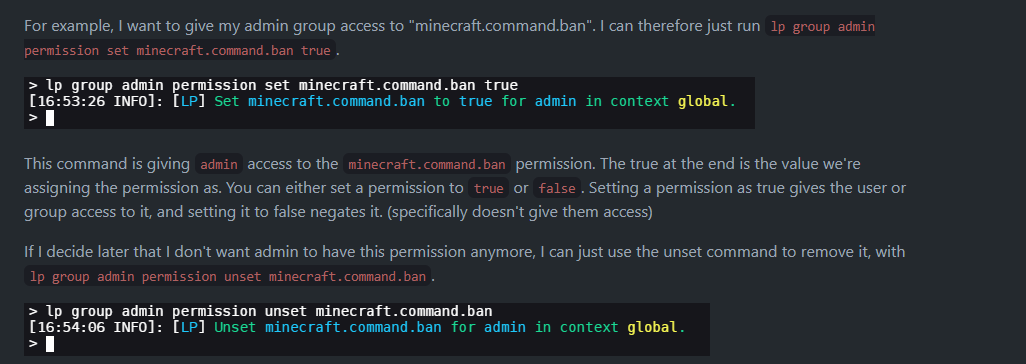
it's in the screenshot i sent. Just replace minecraft.command.ban with whatever perm you need to add
heyy @devout garnet time to show off that bot command hehe
short tiger
what screenshot?
short tiger
still not working for some reason
rugged silo
alright im back, trynig now
short tiger
larry could you join my server and see if it works with you?
rugged silo
Yeah still nothing larry
high raven
somethings wonly with your setup Turtle, run lp user <name> info again and send the output
@short tiger default group is always default
can't replace it
add your default perms to default
short tiger
i did /lp group player permission set essentials.command.home true
high raven
hm
rugged silo
short tiger
oh lol. but i still added them to the group tho
rugged silo
@short tiger https://www.youtube.com/watch?v=uYg_bOEQFIk ?

How do you setup LuckPerms on a Minecraft server to add ranks and permissions? Well, that is exactly what I go over in this video. This is an in-depth tutorial on how to use LuckPerms on your Minecraft server. LuckPerms is the best Minecraft permissions plugin out there, and i...
high raven
lp info turtle
rugged silo
rugged silo
I doubt it but its possible someone else may have. Do you want me to send it
high raven
no need, just a screenshot will do
there should be like 2 words in there
some {}
maybe a few commas and ""
rugged silo
  "static-contexts": {},
  "default-contexts": {}
}```yeah looks good
rugged silo
thats the one in the bungee
high raven
can you pls run lp editor and send the link
rugged silo
LuckPerms - A permissions plugin for Minecraft servers.
LuckPerms is a permissions plugin for Minecraft servers.
the contexts are still set to world=world
rather than world=survival
high raven
are you not opening a new editor?
every time you run applyedits command, you need to run lp editor again
and use the new link
rugged silo
LuckPerms - A permissions plugin for Minecraft servers.
LuckPerms is a permissions plugin for Minecraft servers.
all the perms are the same
 cerulean island
the contexts are still set to world=world
@rugged silo maybeworld=overworld?
rugged silo
i could try but the world name is world and its still on the bungee server is still surival
is the group set on a user?
high raven
which player has the group
rugged silo
Citizen (Default)
high raven
ohhh i see
does it work if you add survivalchild directly to the player with context of world
high raven
if they're all synced, just use world=world as a context and add them using /lp editor
rugged silo
are you sure? as wouldnt that just activate it on all the servers that have a world called "world" says on here https://github.com/lucko/LuckPerms/wiki/Context for world to be the server name?
GitHub
A permissions plugin for Minecraft servers. Contribute to lucko/LuckPerms development by creating an account on GitHub.
ill try though
high raven
Lol i'm pretty sure I added that to the wiki myself 😂
do you have LP/LPb on each server appropriately? If so, we need to check if the backend if registering server perms properly. If you've named that backend server survival in its LP config, you can set world=world and server=survival in order to limit it to that world on that backend
rugged silo
It works now with context=world, the permissiosn for survival child seme to be working, but they work on all worlds
high raven
yep so add server=survival as an additional context on the node to limit it
high raven
sure, if you want it to apply everywhere on that backend
rugged silo
I added server=survival and the permissions have been blocked again
high raven
send lp info on that backend again? looks like you may have not saved and restarted the server after naming the server: option in the config survival
rugged silo
the backend? so where should i run that command? within the bungee terminal?
high raven
backend = non-bungee so spigot/paper/game server
rugged silo
which config file would i find the server:survival in? as its set in the overall bungee config
high raven
this is the first option in the LP config for each server
it sets what that server name is
(as LP will see it)
so, only set it on that one backend to be survival
rugged silo
ahh ok, currently its server:survival in the survival server config
changing this wont break connecting with the others would it?
high raven
no
short tiger
so can someone join my server real quick just to see if a command works?
high raven
that's not really done here. Just deop/reset your user using console and test with yourself
high raven
no worries!
cerulean island
someone knows the perm to make a group default?
wintry cloudBOT
LuckPerms provides a group that every player is added to upon joining the server, called default. You can use multiple methods to change the default group or change the name of it.
LuckPerms wiki
hazy rapids
^ sup Larry
cerulean island
Default will always be default
@high raven where says
Rango: (Rank in spanish) it says default
wintry cloudBOT
Hey Atsuko Kagari! Please don't tag helpful/staff members directly.
cerulean island
i need to change default to Usuario
cerulean island
thanks 
 devout garnet
sorry larry i was out 🙂
high raven
haha no worries
 queen phoenix
Hello?
where can i get some assistance?
im having some console spams from luckperms
[10:14:19 INFO]: 10:14:19.672 [luckperms-hikari housekeeper] DEBUG me.lucko.luckperms.lib.hikari.pool.HikariPool - luckperms-hikari - Pool stats (total=10, active=0, idle=10, waiting=0)
im being spammed with this
tidal blade
You can turn the debug messages off in the config
prisma hinge
whats the perm node for placing and breaking blocks
barren fable
We can't know. LuckPerms doesn't restrict placing or breaking.
If it's another plugin, it may help to look at their docs. LP also has a verbose function you can use.
!verbose
wintry cloudBOT
LuckPerms provides a verbose command to help you find out what permissions a command/plugin is checking.
LuckPerms wiki
 languid condor
Can i change the group the new people are assigned to ?
like change it from default to something else
barren fable
!default explains that
wintry cloudBOT
LuckPerms provides a group that every player is added to upon joining the server, called default. You can use multiple methods to change the default group or change the name of it.
LuckPerms wiki
 dim dock
is there a way to view every command a role has access to?
barren fable
No. As you can't give commands, but only permissions. You can view all permissions of a grouo in /lp group <group> permission info and in the editor of course
 short sundial
Anyone around to help me diag an sql issue with luckperms
quick lagoon
!errors
wintry cloudBOT
Here's a page with some common storage system errors.
LuckPerms wiki
short sundial
Can we delete ips sorry about that guys
high raven
Gotchu
short sundial
Thanks man.
Ok so ive already upgraded the driver to the latest version
any idea where to access terminal for mysql on phpmyadmin?
 rocky sierra
I want to create a deluxecommand to display the expire time of a group
I tried using the luckperms expiry group name
Placeholder
I dpwnloaded the expansion in /papi
And is not working for me
high raven
What does /papi parse me <placeholder> return
 gusty ruin
hey @high raven
wintry cloudBOT
Hey ASMR ZaidX2_! Please don't tag helpful/staff members directly.
gusty ruin
but how name so ?
high raven
You're not speaking in full English sentences and I do not know what you want. Unless you begin to do so, I am unable to help
 tawny parcel
high raven
tawny parcel
high raven
Still very difficult to decipher the meaning
gusty ruin
im speak arabic
high raven
Perhaps send what shows when you run lp user <name> info @gusty ruin
high raven
Your prefix is Owner
gusty ruin
yes i know but white name ?
high raven
What about it
gusty ruin
gusty ruin
%player_name% ?
high raven
What are you asking
hazy rapids
I think he is asking why is it white and not red
high raven
Luckperms doesn't control whether it is red or white
gusty ruin
so ?
hazy rapids
yeah that would be handled in your deluxechat config most likely
high raven
&4%player_name% @gusty ruin
hazy rapids
What color do you want the playername to be?
gusty ruin
1 sec
high raven
Type out your full question into Google translate and make it English, then send that
hazy rapids
^
gusty ruin



 gusty ruin
xd
hazy rapids
copy your question into google translate. hit translate to English. I still don't understand exactly what you are trying to ask about the %playername%.
high raven
Luckperms does not control that!
prisma hinge
how do i turn off block selection like in the hypixle hub?
high raven
Do not ask in several channels
 dense leaf
hey anyone know wich premisson i should add to a rank when it says "you are not permited to use "item"
@here
high raven
Why are you trying to tag over 8000 people
 solemn dragon
question. im making prefixes and im following exactly what every website, tutorial, etc. says to do but when i put myself in that group, the prefix doesnt show up
high raven
!chat
wintry cloudBOT
LuckPerms does not display things in chat!
LuckPerms is only able to send information to formatting plugins so that they display them properly. LuckPerms does not put the prefix in front of your name, you need a chat formatting plugin to do it, and you need Vault. Same goes for the tablist! If the information appears correctly when you run /lp user <user> info, LuckPerms is doing its job!
Prefix isn't showing?
What plugins can I use to format chat?
high raven
Try the stuff in the first link (and read that message)
solemn dragon
thank you
solemn dragon
new problem. so the prefixes now work (thank you) but now i have the default prefix in front of the prefix that i assign myself to. how do i get rid of the default one
prisma hinge
I need help, how do i add a server to make a group be in survival mode in luckyperms editor?
prisma hinge
well i just want to make it so that ppl that get the rank/group can fly in survival
quick lagoon
ah then depending on the plugin controlling flying
look for their documentation of permission nodes
prisma hinge
ok
but the problem i have is that the format for the editor look different than the one i see in vids
so i do not know how to do that cause it looks different
quick lagoon
idk we dont make those videos
prisma hinge
ok
wintry cloudBOT
LuckPerms offers an easy to use, powerful Web Editor, with which you can add, delete and change permissions of groups and players.
LuckPerms wiki
quick lagoon
here will be the latest ^ of it
prisma hinge
ok
but can i take screenshots and show u?
this is the vid
and how the format looks there
but this is what i see
quick lagoon
old editor
prisma hinge
quick lagoon
yea this is the new one
prisma hinge
and he is changing the server right uptp
*up top
so how do i do that in the new version
?
wintry cloudBOT
LuckPerms offers an easy to use, powerful Web Editor, with which you can add, delete and change permissions of groups and players.
LuckPerms wiki
quick lagoon
i think the UI is quite self explanatory tbh
prisma hinge
okey thx
 spare sapphire
what do you mean 😄
tame hollow
!faq
wintry cloudBOT
Check out some of our frequently asked questions.
LuckPerms wiki
spare sapphire
befor i added cmi it worked good 😄