#support-2
1 messages · Page 46 of 1
 daring stirrup
 wintry cloudBOT
Check out some of our frequently asked questions.
 LuckPerms wiki
daring stirrup
LuckPerms wiki
daring stirrup
!bungee
wintry cloudBOT
If you run a Bungeecord network, learn how to correctly setup LuckPerms on all server instances (including Bungee).
Also read:
Syncing data between servers
https://github.com/lucko/LuckPerms/wiki/Syncing-data-between-servers
LuckPerms wiki
 scarlet tiger
I already saw faq
daring stirrup
bungeecord: true in spigot.yml and ip_forwarding to true in bungee's config.yml
also most people don't support piracy here
daring stirrup
the main directory of bungeecord your bungee server
Wait are you using bungeecord lol?
scarlet tiger
nop, i'm using paper ?
Isnt about support piracy, a lot people dont have money to buy
20Euros in Brazil is around 100R$ (10% of minimum salarium(
daring stirrup
Did you do what the FAQ says?
scarlet tiger
Your options are:
Use Spigot or Paper instead of plain CraftBukkit
Enable online mode
 high raven
That's the truth 😉
scarlet tiger
When u say craftbukkit, what u mean ?
daring stirrup
in AuthMe's config.yml change
forceVaultHookto true
do this first
scarlet tiger
I'm
daring stirrup
is CB even a thing still, like maintained?
scarlet tiger
i dont understood ?
 quick lagoon
craftbukkit is the your server software
you should use spigot/paper instead of craftbukkit
scarlet tiger
But i'm using paper
wintry cloudBOT
Please use pastebin!
Seeing a paste of the problem makes everything so much easier! Use https://bytebin.lucko.me/ for easy pasting!
For console errors:
Pastebin any relevant segments of the console log. If it's a startup error, this includes the entire startup log!
Other errors:
Pastebin the entire LuckPerms config file (passwords removed) as well as any other relevant files!
scarlet tiger
nop, i'm using paper ?
@scarlet tiger .
daring stirrup
Did you do the thing in AuthMe config?
scarlet tiger
yep
daring stirrup
Did you restart after that
quick lagoon
^^ startup log
scarlet tiger
yep
daring stirrup
Yeah if you're not using bungee set bungeecord to false
I thought you were using bungee bc that's what most people use
quick lagoon
nono they are totally differen things
quick lagoon
bungeecord is a proxy used to connect multiple servers together
paper is the server software for the server itself
scarlet tiger
Like the most servers, right ?
quick lagoon
yea
scarlet tiger
Like an lobby with Factions, Survival or Minigames
Ok ik what's
I dont use bungee because i'm making the server for my community
Maybe one day
Ben, the last one... i can find permissions.yml like the pex ? in the LP ?
If yes, where ?
quick lagoon
lp by default use an h2.db file to store perms as it a more efficient method
!editor
wintry cloudBOT
LuckPerms offers an easy to use, powerful Web Editor, with which you can add, delete and change permissions of groups and players.
LuckPerms wiki
quick lagoon
!command
wintry cloudBOT
Find all of the available LuckPerms commands on the wiki.
General commands
User commands
Group commands
Permission commands
Parent commands
Meta commands
Track commands
Log commands
LuckPerms wiki
quick lagoon
we usually use command or the powerful web editor to manage permissions
scarlet tiger
oohhhhhh
Its really better
omg
Blowing Mind
Really thx for help ❤️
and for ur time
quick lagoon
np!
quick lagoon
I’m going to sleep sry
high raven
braVO BEN
quick lagoon
😂
high raven
with?
 modern igloo
un what is the command to alowd player default to mine and use any armour mine any bloc and use any sword
daring stirrup
!verbose
wintry cloudBOT
LuckPerms provides a verbose command to help you find out what permissions a command/plugin is checking.
LuckPerms wiki
daring stirrup
If you have EssentialsANtiBuild or -Protect I think those disable it by default
modern igloo
ok ima try
modern igloo
ok i did it again but it do not work
larry or ben please
help me
@daring stirrup
 merry meteor
Anyone know how to make there a space in between the prefix and the name of a player?
merry meteor
Also how do I make it so when I do /list for essentials it shows the rank
daring stirrup
for s space between prefix and name puit the prefixes in " so like "&7[&fTest&7] &r"
modern igloo
power
daring stirrup
?
modern igloo
why wen i try to put colors it do not work
daring stirrup
What colors
modern igloo
prefix
daring stirrup
How are you putting the colors on them?
daring stirrup
put yurself in the gold group and do /lp user <your user> info
daring stirrup
Can you sent me your editor link
wintry cloudBOT
Hey fury_2! Please don't tag helpful/staff members directly.
modern igloo
but he is sleping
 quartz maple
 quaint idol
Yes, editor links are safe to share, they are built in a way specifically so no one can harm your server without having perms to do so
quaint idol
please stop tagging people randomly
Everyone here is volunteers
We will see your messages
just be patient
 proper pulsar
!ask
wintry cloudBOT
Please ask your question!
Please ask the question you have. Don't ask to ask, or ask to DM someone. There are people here to help you, but we need to know what to help you with, so please just ask the question you want to in as much detail as possible!
Or, try here first:
Why shouldn't I ask to ask?
modern igloo
umm tu parle francais >?
proper pulsar
No
modern igloo
ok nice
umm
so i did this command serval time and that hapend it work but as soon that i deco it do not keep the prefixes colors why since this monrnig and ben help me but it did work but it was gone
dont do !prefixe
]
i read it alredy
proper pulsar
Not sure if I can follow you
proper pulsar
Well you set the permission with a server context according to that screenshot
modern igloo
no not that
but i change it at what i whant and den wen i close my laptop it was not blue anymore
proper pulsar
Do you run your server on your laptop?
modern igloo
yes why
proper pulsar
Then make sure you turn the server off before you close your laptop
proper pulsar
Well, I think that you just didn't do it right
modern igloo
is there an other possible explenation
proper pulsar
Not that I can think off
proper pulsar
check the wiki
modern igloo
how do we close the day loop at the monrning
proper pulsar
What?
modern igloo
how do we save the prefixe
editor
???
look

brainstone
and give you lp and help me
please some helper or unlucky
proper pulsar
We are not here to do the stuff for you
modern igloo
yes no tell me what the prob please
 merry fjord
chill dude
proper pulsar
So you want to know how to add prefixes in the editor?
modern igloo
nn
were do i save
the prefixe
restart
or save were
1 min
what do i do i let it like that ?? or i save it some were
proper pulsar
Everything gets saved diretly
proper pulsar
Yes
modern igloo
ok
yay after 3days
last question for to day how to block the night
just keep the day not night
 coarse kraken
When I am not mistaken, I can only run commands for the bungee-proxy through the console. The console doesnt need a /. so why is there a /? (im just curious. This isnt critisism etc.)
high raven
You can run lpb commands in any backend connected to the proxy
However I'm not sure where you're seeing that tbh? Is that the webeditor?
Oh the wiki
On the .net maybe
coarse kraken
the screen is from the webeditor. And no when I type /lpb on some server, I just get the LP version
high raven
That's because you don't have perms
Not because you can't run it
Are your servers synced?
Oh no brain is gonna say something I probably accidentally lied
proper pulsar
And you can paste the command as is in the console. LP has special handling for the /
high raven
Oh thank goodness
proper pulsar
XD
high raven
😂
coarse kraken
ok. that is an god like feature
proper pulsar
Make sure to check for IP forwarding when you Troubleshoot him Larry 😉
That feature was mostly my idea ^^
proper pulsar
Yes. The classic ip forwarding/bungeemode issue
And yes. I’m not around too much longer
coarse kraken
oki thanks guys!
merry fjord
!help
wintry cloudBOT
Available commands:
!advanced
!api
!argumentbased
!ask
!bulkupdate
!bungee
!cauldron
!chat
!colours
!commandequivalents
!commands
!config
!context
!default
!downloads
!editor
!errors
!essentials
!extensions
!extracontexts
!faq
!helpchat
!inheritance
!install
!locale
!meta
!migration
!notworking
!nowildcard
!pasteit
!permissions
!placeholders
!selfhosting
!stacking
!storage
!suggestions
!switchstorage
!sync
!tracks
!upgrade
!usage
!userinfo
!verbose
!weight
!whyluckperms
!wiki
merry fjord
!permissions
wintry cloudBOT
A list of permissions used by LuckPerms commands.
LuckPerms wiki
high raven
!context @merry fjord
wintry cloudBOT
You can set a permission or group on a per-world/per-server basis, through what we call "contexts".
LuckPerms wiki
 lilac hazel
Yes
i.e if you have a survival server with a pvp world
server:survival world:pvp
it will work only in the survival server in the pvp world
merry fjord
THANKS a lot
and ...
my server is called where in bungeecord config ?
@lilac hazel
wintry cloudBOT
Hey Misick! Please don't tag helpful/staff members directly.
merry fjord
in what config file
lilac hazel
you usually apply the context to a backend server not the bungeecord proxy
lilac hazel
It's right at the top?
lol
I mean i'd assume you know it's the LP config file, because this is the LP discord lol
 viscid slate
If you add the permission for examplegroup.water to a group, will it inherit the perms from that group?
 undone palm
@viscid slate You can make an editor session I think, where you can just make groups inherit others automatically
You have to do a command in game, /lp editor
It will give you a link
For an online editor GUI
undone palm
wdym
quick lagoon
!usage
wintry cloudBOT
Here's a guide to help users understand and use LuckPerms for the first time.
LuckPerms wiki
quick lagoon

GitHub
A permissions plugin for Minecraft servers. Contribute to lucko/LuckPerms development by creating an account on GitHub.
 neat mica
!whyluckperms
wintry cloudBOT
Why should you choose LuckPerms? Read here to find out.
LuckPerms wiki
 prisma hinge
!help
wintry cloudBOT
Available commands:
!advanced
!api
!argumentbased
!ask
!bulkupdate
!bungee
!cauldron
!chat
!colours
!commandequivalents
!commands
!config
!context
!default
!downloads
!editor
!errors
!essentials
!extensions
!extracontexts
!faq
!helpchat
!inheritance
!install
!locale
!meta
!migration
!notworking
!nowildcard
!pasteit
!permissions
!placeholders
!selfhosting
!stacking
!storage
!suggestions
!switchstorage
!sync
!tracks
!upgrade
!usage
!userinfo
!verbose
!weight
!whyluckperms
!wiki
prisma hinge
!bungee
wintry cloudBOT
If you run a Bungeecord network, learn how to correctly setup LuckPerms on all server instances (including Bungee).
Also read:
Syncing data between servers
https://github.com/lucko/LuckPerms/wiki/Syncing-data-between-servers
LuckPerms wiki
modern igloo
so yesday evyting worked
the coulurs
but wen i save the editor it gose
all the coulurs
and i spend a day
working on it
modern igloo
yes it did i restared the servers and there was coulurs but wen i save on editor it did not
and how do we remoo ve luckperm perms
to somme boty
quick lagoon
what colours exactly are you talking about?
quick lagoon
screenshot lp user USER meta info
modern igloo
im fonder
quick lagoon
send screenshot here
quick lagoon
lp user USER parent remove GROUP to remove user from group or lp user USER permission unset <NODE> to remove a permission that was set to a user directly
quick lagoon
lp user USER parent add GROUPNAME
quick lagoon
lp user USER parent remove GROUPto remove user from group orlp user USER permission unset <NODE>to remove a permission that was set to a user directly
!command its read
wintry cloudBOT
Find all of the available LuckPerms commands on the wiki.
General commands
User commands
Group commands
Permission commands
Parent commands
Meta commands
Track commands
Log commands
LuckPerms wiki
quick lagoon
!editor you can use this as well
wintry cloudBOT
LuckPerms offers an easy to use, powerful Web Editor, with which you can add, delete and change permissions of groups and players.
LuckPerms wiki
modern igloo
well gone
quick lagoon
!colours
wintry cloudBOT
modern igloo
yes i no but how dose it help
quick lagoon
use the respective colour code for the respective colour to show
quick lagoon
send lp editor link
modern igloo

LuckPerms - A permissions plugin for Minecraft servers.
LuckPerms is a permissions plugin for Minecraft servers.
he told me it was fine
and good me too
but this morning i klick and boom
no coulurs
wintry cloudBOT
modern igloo
yes but gefore
quick lagoon
quick lagoon
well you changed it
quick lagoon
!colours to see which colour code is blu
wintry cloudBOT
quick lagoon
and set it
modern igloo
i 100% sure that i did not
quick lagoon
it doesnt randomly change
if you really didnt then is someone on your server that changed it
modern igloo
NO !!!!!!!!!!!!!!!!! i send i hole hour making perms and pouf gone
i did not change
i would not do it
why me
!!
i give up
quick lagoon
you literally just need to change the colour code lol
modern igloo
non the perms are gone
i send 2 days doing theme
like admin can do anyting fonder to
wintry cloudBOT
Hey fury_2! Please don't tag helpful/staff members directly.
 mighty spear
It didn't change itself
It was something you did that caused it to get wiped, if it did get wiped
modern igloo
nope i did not
i swere a=on all the ting i love not pepole but ting
i re do it
now do i save or not
i gone agin yay i just refreche
jay
why
 strong wagon
Is /lpb commands generally all the same as /lp ?
proper pulsar
Yes
strong wagon
Alright. So I'm trying to get the hang of bungee proxy and stuff.
So I basically sync all of the permissions setup or anything to MySQL. But what I don't understand is, why tracks and groups are sync together too. Will I need to set it up individually?
proper pulsar
Everything is synced so I don't understand your question @strong wagon
strong wagon
Just read thoroughly through the advanced setup, now I understand
wintry cloudBOT
You can set a permission or group on a per-world/per-server basis, through what we call "contexts".
LuckPerms wiki
strong wagon
What I was saying is that, in the proxy server, when I do /lpb editor and enter the link, the groups that I created are there. When I do /lp editor and enter the link from my hub server, the groups that are in the /lpb editor are not there
proper pulsar
Well did you save the changes made in the editor and applied them before you opened the new session?
strong wagon
Yes, I did save and apply them in the proxy server. The sync interval is given 1 minute, after 1 minute, I did /lp editor in the hub server.. groups aren't there
proper pulsar
Sync interval isn't relevant
It should be at -1 and you should instead set messaging-service to sql (not mysql)
Now in any case that sounds like it's not properly syncing
Make sure all servers use the same storage type and that it is a database storage type, that all servers use the same credentials, database and table prefix
strong wagon
Okay. That's including the proxy too right?
 plain marten
strong wagon
plain marten
strong wagon
So.. I have set up MySQL, did /lp sync sql and /lpb sync sql on both hub and proxy server. The groups that I set on the proxy server are still not sync to my hub server..
strong wagon
I did not read the messaging-service properly, doing it now. Sorry for that 😅
Works like a charm now. Thanks alot.
wintry cloudBOT
Here's a page with some common storage system errors.
LuckPerms wiki
undone palm
Any way to select all highest values from a player?
In a placeholder
or something
Most placeholders only select a single highest value
but is there any that selects all highest values?
wintry cloudBOT
Tracks provide a method for you to promote/demote players along a track (or ladder) of groups.
LuckPerms wiki
undone palm
great ty
So i create a track, assign the groups i want to it, then if i use for example the placeholder %luckperms_prefix_element_highest_on_track_<track>% it will give the highest group's prefixes?
high raven
it will give the highest prefix a user has from that track
wintry cloudBOT
Display multiple prefixes/suffixes alongside a player's name.
LuckPerms wiki
high raven
That will make %luckperms_prefix% show what you config, so basically the highest on each track you specify
or you can use several %luckperms_prefix_element_highest_on_track_<track>% in your chat formatting plugin
and just use different tracks
high raven
what do you mean? each chat should have its own format section
just make each chat what you want it to be
undone palm
Im not using a chat plugin, its a skript i have that will need the placeholder for a prefix, basically
high raven
you should then be able to list several placeholders
i have no idea how your skript works or how skript works at all
and honestly using it for something like a chat formatting plugin is not optimal
undone palm
I see
high raven
but you're gonna have to try and use several placeholders where the prefix should go
undone palm
alrighty
 languid condor
how do i set permission so that it can only be allow to use in only one world
high raven
!context
wintry cloudBOT
You can set a permission or group on a per-world/per-server basis, through what we call "contexts".
LuckPerms wiki
languid condor
its not working
lilac hazel
What about it isn't working?
languid condor
well i specified the world in the context
but its still working in the other worlds
 dusky oar
What's the command you are using?
languid condor
doing it in editor
high raven
run lp user name permission checkinherits <permission> ingame
and make sure that you've saved and applied the editor
and the person you use to test is not op
languid condor
yes
high raven
and that you start a new editor session everytime you applyedits
languid condor
still not work
quick lagoon
@languid condor send your lp editor link here
languid condor
ok
LuckPerms - A permissions plugin for Minecraft servers.
LuckPerms is a permissions plugin for Minecraft servers.
quick lagoon
@languid condor which exact perm node is not working?
also screenshot lp user USER info (for that world you want the context to work)
high raven
also screenshot
lp user USER info(for that world you want the context to work)
languid condor
high raven
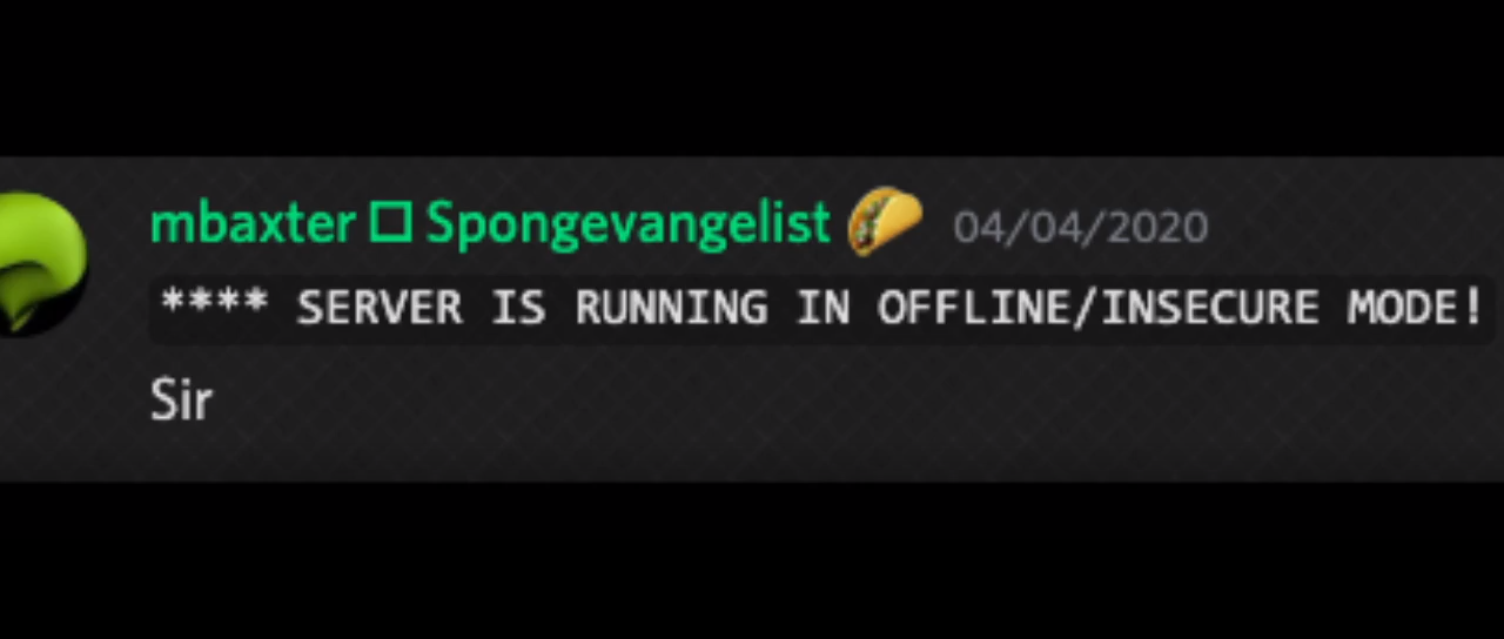
offline? https://admincraft.host/fbi
 quick lagoon
oh lol
languid condor
??
quick lagoon
its works in world=world and not world=spawn bcu you set context as so
quick lagoon
then add that context
high raven
ben
languid condor
hmm i did
high raven
you're misreading
quick lagoon
oh
high raven
the context simply isn't limiting
quick lagoon
ah yes
high raven
send lp info
languid condor
quick lagoon
idk, are you opped?
languid condor
and using consol
high raven
are testiing
quick lagoon
using console to test permission of commands?
high raven
whats your username
languid condor
Classified154
high raven
using console to test permission of commands?
high raven
you need to test ingame as user
languid condor
yes
high raven
console always has all permissions
high raven
if you wild wild <yourusername> from console it will work
languid condor
i tested it with my acc ingame
which was not opped and was like every other normal player
high raven
i dont see your account on this editor
high raven
send lp user <you> permission checkinherits wild.wild world=spawn
languid condor
high raven
run lp user <you> permission set wild.wild false world=spawn
and then test with your user in spawn world
high raven
looks like the wild.wild plugin allows you to use it by default
most plugins don't the wild.wild seems to be a poorly coded exception
high raven
undefined means not set
languid condor
i see
languid condor
:)
high raven
glad it works now
languid condor
thankx
 mellow basin
What is the best chat formatter for luckperms? I have been using LuckPermsChat which has worked fine, but doesn't work with EssenetialsNicknames
(ping if answered)
quick lagoon
I think you need essentialsX and essentialsXChat
judging by the name EssenetialsNicknames
quick lagoon
nothing meaning?
high raven
!stacking LPC does this automatically but you can do it manually
wintry cloudBOT
Display multiple prefixes/suffixes alongside a player's name.
LuckPerms wiki
mellow basin
It would show something like:
[world] [default] CommandGeek: message
quick lagoon
you can config it ofc
mellow basin
I did
high raven
yeah cause you used the wrong placeholder 😂
multiverse adds the [world]
and you used {GROUP}
you need to use {PREFIX}
high raven
there are several plugins that can do it
mellow basin
could Vault by any chance be doing something?
quick lagoon
idts
high raven
you just need it
quick lagoon
yea
high raven
and you can only have one chat formatter
mellow basin
oh ok, but why does it show the [default] before the name?
high raven
i have no idea
mellow basin
oooh
oh ok I got it to work
oh but now the group formatting isn't working in EssentialsChat
mellow basin
high raven
the format will likely have 2 prefixes
you can test that
just add yourself to a different group
mellow basin
ooh ok
also is it possiblet o show multiple lp prefixes/suffixes with EssentialsChat?
wintry cloudBOT
Display multiple prefixes/suffixes alongside a player's name.
LuckPerms wiki
high raven
again, here ^
mellow basin
I know, I do have that, and it did show multiple ones with LuckPermsChat, but now with EssentialsChat I think its only showing the top one
not all
There isn't like a {PREFIXES} only a {PREFIX}
high raven
that is because LPC does it differently
stacking when set up will show the prefixes in {PREFIX}
you simply have done it incorrectly
mellow basin
ok
quick lagoon
tbh the {PREFIXES} in LPC throws lp prefix formatting out of the window
like it disregard lp meta-format settings
mellow basin
I will read the article quickly 🙂
quick lagoon
and just show all the prefix you have
mellow basin
wait but I don't have tracks
high raven
then make some 🙂
quick lagoon
!tracks
wintry cloudBOT
Tracks provide a method for you to promote/demote players along a track (or ladder) of groups.
LuckPerms wiki
mellow basin
lol ok, so if I make different tracks it will show?
high raven
it'll show the highest prefix in each yeah
high raven
np!
mellow basin
oh btw do I have to type this somwhere or is it already there and I only need to make the tracks?
prefix:
  format:
    - "highest_on_track_prison"
    - "highest_on_track_donor"
    - "highest_on_track_staff"
  start-spacer: ""
  middle-spacer: " "
  end-spacer: ""
you need to make tracks
high raven
and type their names into there
high raven
its not premade
mellow basin
ok and in which file do I put that?
mellow basin
ok awesome tysm guys!
high raven
❤️
 final pasture
Hello,
I wanted to know if there was a placeholder like %luckperms_inherited_expiry_time_<permission>%
but to know the default expiry time of a permission, so if you set a permission of 2hr to a player, you'll have a placeholder to know the expiry time was 2hr
(Because I want to do a cooldown bar :
I wanted to use CooldownBar Expansion to make a cooldown bar about a Luckperms' temp permission.
I give to players the permission islandshop.buy.25 but I do not give always the same time, I sometimes give it for 2h, or 4h, or even 24h, so in my deluxemenus I can't display a cooldown bar as it's not a static expiry time :c
(I set : %cooldownbar_{luckperms_expiry_time_islandshop.buy.25}%) but do not work
Here is the expansion :
https://www.spigotmc.org/resources/cooldownbar-expansion.70542/

SpigotMC - High Performance Minecraft
final pasture
Or it would be possible to create this placeholder ? 
quick lagoon
!placeholders
wintry cloudBOT
Display data such as user prefixes and groups from LuckPerms in other plugins.
LuckPerms wiki
quick lagoon
https://github.com/lucko/LuckPerms/wiki/Placeholders#luckperms_inherited_expiry_time_permission this? @high raven
GitHub
A permissions plugin for Minecraft servers. Contribute to lucko/LuckPerms development by creating an account on GitHub.
@final pasture
sorry larry ^^
haha
final pasture
This placehodler only give the Gets the time until the given permission will expire for the player
And I want the "time given for the permission"
so if I set a temp permission for 2hr to a player, it will returns 2hr
quick lagoon
oh thats not sure of its really possible, as time will start to decrease and idk if the orginal time is still stored
!suggestions
wintry cloudBOT
Suggestions and Bug Reports
If you would like to request a feature for LuckPerms, or report a bug, feel free to open an issue on GitHub!
Issue Tracker:
final pasture
I opened a suggestion, hope it will be implemented, and hope it was clear and understandable *
 tiny bobcat
admins do you have any picture compare anothers plugins perms vs luck? I want show in my video
 full flume
I believe the spigot page has a comparison chart
tiny bobcat
i saw before 1 picture about what luckperms have compare anothers plugins
but i dont know where i saw
full flume
Oh it used to be on the spigot page, they mustve pulled it
 crude oar
oof that ping
dusky oar
It's not a QUESTION about LP
crude oar
doesnt have to be
 olive gorge
Okay so can someone assist me with something real quick?
I have a moderator who has permission to /socialspy but when he goes to access it he can't use it
I don't know what is up with my LP its either really slow with updating my perms or its doesn't work for somethings??
crude oar
do /ess debug and have them do the command then look in console
crude oar
you can also do /ess commands to see what commands essentials is relaying to other plugins
 dusk walrus
I set my storage to split, but it doesn't seem to make the mariadb or add anything to it?
yoo, nvm
I was big dum
prisma hinge
I gave a rank all the perms but the user with that rank is not oped, even though I gave the rank all perms it wasn't able to bypass worldguard
why?
dusky oar
!help
wintry cloudBOT
Available commands:
!advanced
!api
!argumentbased
!ask
!bulkupdate
!bungee
!cauldron
!chat
!colours
!commandequivalents
!commands
!config
!context
!default
!downloads
!editor
!errors
!essentials
!extensions
!extracontexts
!faq
!helpchat
!inheritance
!install
!locale
!meta
!migration
!notworking
!nowildcard
!pasteit
!permissions
!placeholders
!selfhosting
!stacking
!storage
!suggestions
!switchstorage
!sync
!tracks
!upgrade
!usage
!userinfo
!verbose
!weight
!whyluckperms
!wiki
prisma hinge
!permissions
wintry cloudBOT
A list of permissions used by LuckPerms commands.
LuckPerms wiki
prisma hinge
anyone pls help
I gave a rank all the perms but the user with that rank is not oped, even though I gave the rank all perms it wasn't able to bypass worldguard
why?
quaint idol
!verbose
wintry cloudBOT
LuckPerms provides a verbose command to help you find out what permissions a command/plugin is checking.
LuckPerms wiki
dusk walrus
Yo, when you turn off messaging channel but another server on your network still has sql messaging turned on it will still ping the other server
lilac hazel
Pretty sure that server won't either; check for updates or send out updates if you make changes on that server, it's best to have them all set with the same messaging channel.
Doesn't do any harm to keep things matching.
dusk walrus
I just happened to see it on accident seems it seems unintentional
I have it spliting and do not wish for any messages at all
I only store stome user data and stuff on the sql database
dusk walrus
Mhm, how would i use server specific context prefixes instead of th global ones?
Like i do not wish for the group.default prefix to overshadow others prefix even tho it's global
quaint idol
!weight
wintry cloudBOT
LuckPerms allows you to set weights in order to determine the priority of certain nodes, like permissions and even prefixes. A higher weight number is a higher priority.
LuckPerms wiki
 quaint idol
Well in that case it's an issue with your chat plugin
Yeah, check if you have a silly per-group format messing with it or something
dusk walrus
It worked completely fine before, but i moved over to contextual system and then it starts messing up
high raven
@dusk walrus if you want server specific perms you need a sync for perms and groups etc
dusk walrus
I can't set the server to novus, and sync userdata/userperms only?
high raven
If you don't sync then perms are limited to their own server anyways
dusk walrus
The only issue i have is the prefix choosing the wrong one
Somehow it seems essentials doesn't even see the group that isn't the global one
high raven
Make sure it's lowercase in the EssentialsX comfig
Or if you've set a displayname match case and use exactly the displayname
dusk walrus
I don't even want to use essentials chat system i just want it to pull from lp
high raven
Does the right prefix show in lp user <name> info
dusk walrus
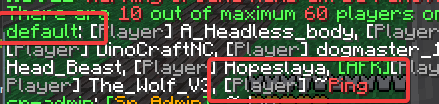
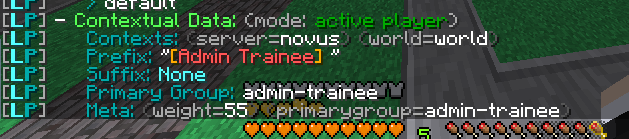
Yes, and the group shows too but it doesn't with /list or if he types anything in chat https://i.imgur.com/n9pIsli.png https://i.imgur.com/imJWaoM.png
 high raven
You probably have another chat formatting system adding that or something funky
Cause LP is working
!moss is the place to go for weird essentialsx things honestly idk enough
wintry cloudBOT
Essentials
Make sure you are using EssentialsX and Vault for prefixes. For any other issues with Essentials, you should seek support in either #general or the official EssentialsX support Discord.
EssentialsX Discord
dusk walrus
sigh
They are quite less active than you guys tho
I'm gonna shit on essentialschat and use this https://www.spigotmc.org/resources/luckpermschat-chat-formatter-for-luckperms-placeholderapi-support.68965/ think that will wokr?
That fixed it, no issues now
Essentials can go eat a dry sponge
I swear to god essentials is great but suck at most hings
 violet phoenix
@dusk walrus
dusk walrus
Oh wow, thx a lot.
violet phoenix
Essentials is og
high raven
@violet phoenix why can't we just be nice? I'm deleting that my dude
violet phoenix
Ok it was a joke larry
crude oar
essx is lovely
dusk walrus
@high raven the Essentials dudes are blaming you for supplying vault with incorrect info
wintry cloudBOT
Hey Jan Tuck! Please don't tag helpful/staff members directly.
dusk walrus
Woops
I didn't realy read the roles and just thought fancy names my bad.
Was too late to undo after tagging him
 olive lily
Hello, is there a way to show off all suffixes people have separately from having 1 suffix that will show in chat? (like i have 1 "highest on track" suffix in chat/tab, but i would like it if it was possible to also show all the separate ones in another setting.)
alternatively is there a way to show groups people are in but only if they are on 1 track and not the others? (we have hidden groups for some staff things that would give away my alt among other things)
We have minigames that stay for 2 weeks at a time and people want to show off that they beat them, now they only keep the last star, but i want a way so they can permanently show it off... (any out of the box solution would be appreciated too ❤️ )
high raven
@olive lily you'll need to make use of a combination of meta stacking and per-group chat formatting
Stacking is done in luckperms
However per-group formatting is done by a capable chat plugin
!stacking
wintry cloudBOT
Display multiple prefixes/suffixes alongside a player's name.
LuckPerms wiki
high raven
And you can take advantage of placehoderAPI to display single prefixes for highest on track and every other element listed on the stacking page
!placeholdera
wintry cloudBOT
Sorry! I do not understand the command !placeholdera
Type !help for a list of commands.
high raven
!placeholders
wintry cloudBOT
Display data such as user prefixes and groups from LuckPerms in other plugins.
LuckPerms wiki
prisma hinge
I would like to make all permission nodes within a specific rank server specific only but cant figure out the bulk update command:



I live in Bulkupdate
lol
high raven
lp bulkupdate groups update server NEWSERVER "permission == group.GROUPNAME" "server == global"
should work
make a backup first!
high raven
¯_(ツ)_/¯
prisma hinge
lol
prisma hinge
got it, ty.
Ye
Just did that.
❤️
Larry it's not working:
I tried
lp bulkupdate groups update server amethyst "permission == group.ostia" "server == global"
hm
high raven
try putting the "server == global" first
prisma hinge
aight.
lp bulkupdate groups update server amethyst "server == global" "permission == group.ostia"
ignore ^
Still not working
high raven
!bulkupdate hemmm
wintry cloudBOT
Quickly update a large amount of user and group permissions by using the bulkupdate command.
LuckPerms wiki
 tame hollow
I would like to make all permission nodes within a specific rank server specific only
hi, why not just add the group as a parent with the server context?
high raven
That is indeed the easy way
make a second group and add ostia as its parent with server context
then give users the second group
or rename both so the second group get called ostia
then people with it will only get it with context
prisma hinge
Problem with that tho is that we also want them to have a Queue Permission which they need to have global and if it's in the group then it'll become server specific
I think I c what ur saying now mybe idk
high raven
and then give players the other group
then rename them
so the other group gets called ostia
and the group with all the other perms gets called something else
prisma hinge
so like
OstiaGlobal
OstiaServer1
OstiaServer2
OstiaGlobal then inherits
from
OstiaServer1...X
prisma hinge
Right.
high raven
when added to ostiaglobal
prisma hinge
ok, +1
smart.
That would seem bad tho
to have 2 ranks
per rank
Could imagine having eventually tons of groups then
high raven
it's the cleanest way
prisma hinge
True.
Backend wise
ye
Does it matter the weight of the group u think for the throwaway ( OstiaServer1 ) group?
probs not since it's server specific?
prisma hinge
Alight.
sweet.
Larry I'ma go with that idea, but now I face a new problem lol. I'm going to fix my LuckPerms setup so it's much more clean, need a bulkupdate command for that:
Need Bulkupdate command to:
- Change GroupName for all users. So if a user has group: Ostia I need to update it so they have OstiaGlobal instead.
I think it would be like:
lp bulkupdate users update permissions group.NewName "server == global" "permission == group.OldGroupName"
Lmk if that's right.
or should I change everyone's group to another group - probably this?
I would change everyone's group from Ostia -> OstiaGlobal then can change Ostia to OstiaServer1 and make OstiaGlobal Inherit it.
prisma hinge
/lp bulkupdate all update permission group.mod "permission == group.moderator"
Well permissions are in Ostia
high raven
assume not adding servername to he end of the group means global like LP does
prisma hinge
Alright.
All permission nodes are in Ostia, so it's best if I move everyone from Ostia group to another group - Ostia then rename old Ostia group with OstiaServerName
At least I think
high raven
no need
once again
just rename ostia
people still inherit from Ostia, AKA nothing
then name the global one ostia
and bam, people inherit from ostia again
prisma hinge
ok
high raven
because renaming doesn't change user inheritances
prisma hinge
we're talking about lp group rename?
high raven
yeah
prisma hinge
ah ok.
 loud helm
How do I put a space between the rank and player name?
 barren fable
Multiple ways.
Simpliest one might be to just add one to the prefix, like meta setprefix 100 "&cPrefix "
 torn oriole
Can you add placeholder where it shows how much time is left until rank expire (on track) Example: %luckperms_group_expiry_time_track_<track name>%
high raven
!placeholders is a list of all of them
wintry cloudBOT
Display data such as user prefixes and groups from LuckPerms in other plugins.
LuckPerms wiki
high raven
if it's not on there, doesn't exist, but usually you can find one that works for what you need
barren fable
#2401 was made. (Wrong repo tho, but shouldn't matter)
high raven
can u link tobi i have no idea what you mean honestly 😂
barren fable
GitHub
I wanted a placeholder like %luckperms_inherited_expiry_time_% but to know the default expiry time of a permission, so if you set a permission of "2hr" to a player, you'll...
high raven
GitHub
A permissions plugin for Minecraft servers. Contribute to lucko/LuckPerms development by creating an account on GitHub.
is this not what they want
barren fable
Nope. They want the time for how long it was given
Like if you do /lp user Tobi permission settemp larry.permission true 12h they want to have 12h returning regardless the time left
Atleast that's my understanding
torn oriole
I have to set the permissions or group. And I want them to detect the player's group and show the time
high raven
the expiry time permission placeholder for the permission group.GROUpNAME should show that
torn oriole
yes but i have 5 groups and I want it to be just for this group what the player has
high raven
it will show the expiry of that group
olive lily
@olive lily you'll need to make use of a combination of meta stacking and per-group chat formatting
thank you Larry! i cant seem to wrap my head around getting all of the suffixes to show up, when they are on 1 track (so i can use "highest_on_track" for the chat suffix) or am i understanding you wrong?
high raven
if they're on one track, you'll be unable to show them all
that's the point of tracks, in this case, to be able to split them up in to categories that they're all on top of
olive lily
but how do i show the latest one in chat if they arent on a track?
high raven
what do you mean?
just make a track with their group in it, and on top, and it will show
olive lily
they get a star for every minigame.. i want the last one they beat to be the star you see in chat
high raven
then add the group star to luckperms, make a track called startrack and add star to it, and when they beat the minigame have the server run lp user <name> promote startrack
it will add them to startrack
into group star
and use the highest_on_track_startrack suffix stacking thing
olive lily
so i can do one or the other and not both
torn oriole
I must have expire time of group which I currently have
high raven
@torn oriole %luckperms_expiry_time_group.GROUPNAME%
@olive lily what do you mean? You're not giving really much info so i'm doing the best I can
just add the suffix of the star symbol to start group in my example
torn oriole
Yes but i have more than 1 group who player can buy.
high raven
so what exactly do you need?
torn oriole
If a player can buy VIP and Super Vip and diamond and other I want to have time to expire the rank he bought
If I add all ranks, the text on the scoreboard disappears because there are too many characters
high raven
that's the scoreboard, not LP though
%luckperms_group_expiry_time_<group name>% for each group
if they don't have the group it will return nothing
quick lagoon
thats not up to LP to format afaik
high raven
correct
torn oriole
Ok. thanks for help
 summer citrus
Hello, I run a server and I'm trying to let people use ClickEvents but I don't know how. Can LuckyPerms help with this? I've tried teh Wiki but couldn't find anything
high raven
do you have essentialsxantibuild
summer citrus
I have no idea what that is
I'm fairly new to the server-building/permissions scene
high raven
it's a plugin haha
oh
you may be within the default spawn-protection radius
run far away and see if you can click
(to break things i assume)
best to describe your problem, not what the solution is
summer citrus
Oh, I can use them since I'm an admin, but regular players can't
tame hollow
/deop and test yourself
summer citrus
I tried that and I couldn't use them, even when far from our spawn
tame hollow
show /plugins
summer citrus
tame hollow
I'm trying to let people use ClickEvents
can you explain more on what this means?
like we're not really sure what you're talking about here
summer citrus
I'll show an example
When I click on "Going Up!" as an admin, it teleports me ~ ~20 ~ blocks up
high raven
command block?
summer citrus
But if I'm not an admin with mod powers, it shows I don't have permission
tame hollow
!verbose may help you
wintry cloudBOT
LuckPerms provides a verbose command to help you find out what permissions a command/plugin is checking.
LuckPerms wiki
summer citrus
I could definitely do this as a button attached to a command block, but I want this to act as a conversation with a villager
Is it not possible to set permissions up for ClickEvents, as opposed to the command itself?
Like, do I need to give the player permission to use the /teleport command in order for them to use a ClickEvent that utilizes the /teleport command?
summer citrus
I activated Verbose and tried the commands out and it just acts as if I activated the command itself, rather than just clicking the text.
high raven
then give permission for the command itself
or if you're doing something with a custom plugin of some sorts, you need to register a specific permission to click the sign itself
You're giving too little information for us to be of much value 😛
tame hollow
yeah honestly we have no idea what your setup is, ClickEvents sounds like you're developing a custom plugin?
summer citrus
ClickEvents is a featuer of vanilla minecraft
tame hollow
do you mean in the chat?
summer citrus
Yes
tame hollow
should have led with that lol
idk if there is a way to control that without plugins
vanilla MC does not offer much in the way of permissions to finely control things
strong wagon
Hi, I don't know if anyone is able to help, because I may have tried every single possible way for this to work.
So recently asked about syncing the network data for bungeecord, which turn out good and the server is sync well enough.
I then added one of my other servers, which has lots of data on luckperms, and did the same thing in the config as the other servers who are well sync together with luckperms. The rank for this server, let's say "survival" server has 2 tracks, 9 groups. But after completing everything, and when I did, /lp networksync it did sync, and in console it does say that it has "ping the other server", which in responds the other server also said that it has successfully received the ping from my "survival" server. But, when I go into my other server that has said to receive the ping successfully, and do /lp editor the 2 tracks and 9 groups are not there.
Is there something I'm doing wrong? Or any steps that I have missed out? I have restarted all of nodes, and did /lp networksync countless of times. I can't seem to solve it.
high raven
you werent connected to a databse before so all your groups are still on the h2 file from the luckperms server you most recently connected
you need to update lp to the latest, change storage-method to h2, and restart. Run lp export <anyname> and then stop the server
then you change storage-method back to your database type, then run lp import <samename>.json.gz --merge
then you will have your groups added to the database
strong wagon
I will try that now.
Yeap, it is still the same. The 2 tracks and 9 groups in my survival server are not appearing in my creative server /lp editor website
high raven
did you follow all the steps in order
strong wagon
Yes I did. Including the restarts and stopping the server.
high raven
you need to find the file with your 2 tracks and 9 groups in your survival server, switch to that type of storage, and then export that/import+merge it into the new database format
quick lagoon
!switch
wintry cloudBOT
If you wish to change your storage type (e.g. to YAML or MySQL) you may need to follow these instructions to ensure your groups and permissions are migrated to the new storage type.
Read more about the Storage types
LuckPerms wiki
strong wagon
Not it says this, even when the messaging service is set to sql, and MySQL has already been config properly
quaint idol
response of /lp info?
strong wagon
I figured out why, after following the steps it worked for the import and export. The only reason is that one of my dev enabled split storage for my users and the uuid(s). I made it to false, restart my server and now everything is in sync
 keen dock
is it necessary to give luckperms permission to interact with buttons when using the worldguard? ?
quick lagoon
wolrdguard should have their own region settings
EngineHub (WorldGuard, WorldEdit, Craftbook): https://discord.gg/enginehub
@keen dock
keen dock
what happens is that i already gave all the flags of interaction, but i can't activate buttons in the world
not even in their own discord were they able to help me = (
quick lagoon
im not sure what perm nodes worldguard use to allow for interact with buttons.
i really suggest asking them
!verbose maybe this will help
wintry cloudBOT
LuckPerms provides a verbose command to help you find out what permissions a command/plugin is checking.
LuckPerms wiki
 proven bridge
Hello, how do I install LuckPerms on BungeeCord?
quick lagoon
!bungee
wintry cloudBOT
If you run a Bungeecord network, learn how to correctly setup LuckPerms on all server instances (including Bungee).
Also read:
Syncing data between servers
https://github.com/lucko/LuckPerms/wiki/Syncing-data-between-servers
LuckPerms wiki
proven bridge
But I have WaterFall
tame hollow
it's literally the same
proven bridge
what is this to be understood?
You must configure the config / sponge / global.conf background in the Sponge server file
sponge {
bungeecord {
ip-forwarding = true
}
}
proven bridge
haho
strong wagon
Context for servers seems to be not working for me
I have save and applied the edits, but when I go onto the other server, it isn't there
high raven
are all servers synced to the same database and tables?
and context does make things only apply in one place
quick lagoon
also if its server context you must define the servername in lp config.yml first
 light echo
When I downloaded LuckPerms to my server, the server suddenly didn't start, what should I do?
I have version 1.12.2
And every version of Luck Perms are crash my server.
lilac hazel
!paste some logs here so we can examine them.
wintry cloudBOT
Please use pastebin!
Seeing a paste of the problem makes everything so much easier! Use https://bytebin.lucko.me/ for easy pasting!
For console errors:
Pastebin any relevant segments of the console log. If it's a startup error, this includes the entire startup log!
Other errors:
Pastebin the entire LuckPerms config file (passwords removed) as well as any other relevant files!
light echo
This ?
lilac hazel
[21:05:21] [Server thread/INFO]: [LuckPerms] Enabling LuckPerms v5.1.26 [21:05:21] [Server thread/INFO]: __ [21:05:21] [Server thread/INFO]: | |__) LuckPerms v5.1.26 [21:05:21] [Server thread/INFO]: |___ | Running on Bukkit - CraftBukkit [21:05:21] [Server thread/INFO]: [LuckPerms] Loading configuration... [21:05:22] [Server thread/INFO]: [LuckPerms] Loading storage provider... [H2] [21:05:22] [Server thread/INFO]: [LuckPerms] Loading internal permission managers... [21:05:22] [Server thread/INFO]: [LuckPerms] Performing initial data load... [21:05:22] [Server thread/INFO]: [LuckPerms] Successfully enabled. (took 802ms)
What makes you think LP is causing it?
Also, i'd suggest setting your server to "online mode = True" and this problem will probably go away.
light echo
ok thank you
olive gorge
Okay so I have been having issues with LP and AdvancedBan. LP isn't recognizing the AdvancedBan Permissions I am putting in
This has been going on for a while now and I can't seem to fix it. I talked to AB and they checked everything off and we are pretty sure it has to do with LP
I have AB in BungeeCord format and so is LP
olive gorge
Okay so it fixed when he reloged
But the issue is that his chat and everything said like "admin" but when he died it said "guest"
So its almost like his rank didn't update until he relogged????
 barren heath
Could I have help setting up prefixes for my server. We have set them up but they are not showing can anybody help?
prisma hinge
they aree not showing where? TAB, chat?
This video might help:
https://youtu.be/FU_tK-zYYb4

Make sure you've watched THE BASICS before watching this video!
https://bit.ly/minehutBASICS
Custom Color Codes: https://minecraft.gamepedia.com/Formatting_codes
Minehut provides unlimited free server hosting for the Minecraft community!
#minecraft #minehut #freeminecraftser...
 cunning geyser
How do I get lp for featherboard?
merry meteor
Anyone know why essentialsx is n out recconizing my luck perms groups
tame hollow
make sure to use lowercase group names in the config
merry meteor
i know
cunning geyser
make sure to have essentials chat downloaded
merry meteor
i do
cunning geyser
/ess reload
cunning geyser
https://pastebin.com/9iRxhZ7X
someone help me pls