#support-2
1 messages · Page 44 of 1
 vale cairn
 quick lagoon
!update first
 wintry cloudBOT
You can download LuckPerms for Bukkit/Spigot, BungeeCord, Sponge, Nukkit and Velocity.
Additional downloads
quick lagoon
there is version missmatch
 prime linden
Trying to set a prefix for a group and running this: /lp group admin meta addprefix &7[&cADMIN&7] does't set anything. Can someone help?
 barren fable
You need to set a priority.
Syntax is /lp group <group> meta addprefix <priority> <prefix>
prime linden
Whats a priority? I'm super new to learning lp
barren fable
priority is a number that determines how important a priority is. As higher the number as higher is the importance of the prefix. If you do already have group weights set, it is generally a good idea to set prefix priorities to the same
prime linden
okay thanks
 prisma hinge
is there anyway to make a backup of luck perms to my desktop
 high raven
lp export <anyname>
high raven
just move it?
prisma hinge
i use minehut and you cant download those files i think
high raven
Oh, there is no way to download anything from a minehut server directly to your desktop because the minecraft server is on a different computer elsewhere in the world
prisma hinge
oof so is there anyway
cause every time are server plan runs out all the files get wiped
high raven
If you want that kind of functionality, I'd say use a better host 😛
And at a certain point, services do cost money unfortunately
 tame hollow
You can grab the data from bytebin when you run /lp editor
wintry cloudBOT
You can download LuckPerms for Bukkit/Spigot, BungeeCord, Sponge, Nukkit and Velocity.
Additional downloads
 cloud merlin
hello
high raven
latest works
cloud merlin
1.8.8 ?
cloud merlin
ok
cloud merlin
Falha ao conectar-se ao servidor LP) Permissions data for your user was not loaded during the pre-login stage - this is likely due to a conflict between CraftBukkit and the online-mode setting. Please check the server console for more information. Moltar ao enu principa
erro
help please
?
?
?
helpp
 past needle
why does the prefix not show up?
tame hollow
!faq
wintry cloudBOT
Check out some of our frequently asked questions.
 LuckPerms wiki
 proper pulsar
!chat
wintry cloudBOT
LuckPerms does not display things in chat!
LuckPerms is only able to send information to formatting plugins so that they display them properly. LuckPerms does not put the prefix in front of your name, you need a chat formatting plugin to do it, and you need Vault. Same goes for the tablist! If the information appears correctly when you run /lp user <user> info, LuckPerms is doing its job!
Prefix isn't showing?
What plugins can I use to format chat?
proper pulsar
@past needle ☝🏼
prisma hinge
hi panda
tame hollow
Essentials chat is mentioned several times in the pages linked, so yes it is fine lol
 devout garnet
tails you're assuming people read the documentation again 😛
high raven
geez turbooooo

 rapid saddle
hey i have a question im running luckperms on a spongeforge server and i got almost all permissions working except the /help command. And im kind of a noob at commands and not sure what i can do to get that one to work.
high raven
!verbose might be able to help
wintry cloudBOT
LuckPerms provides a verbose command to help you find out what permissions a command/plugin is checking.
LuckPerms wiki
rapid saddle
Sorry for being clueless but could you tell me how that will help me find how to turn on the /help command for default users
high raven
it tells you what permissions are being checked when they run the command
then you add those permissions to the users
rapid saddle
It keeps repeating the same group of permissions is that normal? there is nothing in there that is help related.
high raven
they need to run the help command and it should pop up
perhaps use lp verbose on help
rapid saddle

this is what i get on the console
nothing else popped up when he tried to use the /help
tame hollow
/lp verbose record
Get them to run /help
/Lp verbose paste
Share the URL
rapid saddle

LuckPerms - A permissions plugin for Minecraft servers.
LuckPerms is a permissions plugin for Minecraft servers.
tame hollow
It's there. Type "help" in the filter
tame hollow
You are also using an outdated version of LP just FYI
rapid saddle
its cause its on spongeforge
high raven
nooo
rapid saddle
so we used their link to run it but i didnt set it up someone else did then he kind of ditched and ive been trying to fix his shit
wintry cloudBOT
You can download LuckPerms for Bukkit/Spigot, BungeeCord, Sponge, Nukkit and Velocity.
Additional downloads
rapid saddle
oh ok ill update it then
all the perms will just copy right if i update the plugin?
cloud merlin
Permissions data for your user was not loaded during the pre-login stage - this is likely due to a conflict between CraftBukkit and the online-mode setting. Please check the server console for more information.
Permissions data for your user was not loaded during the pre-login stage - this is likely due to a conflict between CraftBukkit and the online-mode setting. Please check the server console for more information
 acoustic raptor
Did you check the sever console for more information?
tame hollow
I'm guessing not
You either need to:
Use online-mode: true
Or upgrade to spigot/paper
 jovial sandal
does this message in chat mean provokedeel made the edits?
also is there a file that logs edits, like who changed what
 quaint idol
@jovial sandal Yes, the first name is the one to make the edit.
Unless you are using a flatfile storage, such as json, yml (not recommended), there is no way to view logs via file. However, you can use the ingame /lp log commands, for more info on them, see here:
!commands See Logs section
wintry cloudBOT
Find all of the available LuckPerms commands on the wiki.
General commands
User commands
Group commands
Permission commands
Parent commands
Meta commands
Track commands
Log commands
LuckPerms wiki
jovial sandal
ok
 dawn anvil
Does griefdefender work with luckperms? cuz when i enable block break, it enables it for everyone and bypasses claims
wintry cloudBOT
LuckPerms provides a verbose command to help you find out what permissions a command/plugin is checking.
LuckPerms wiki
 restive hazel
Can someone help me?
 dusky oar
the only reason we exist is to help you newcomers to lp
dusky oar
whatever
dusky oar
ok
dusky oar
ok
restive hazel
and my prefixes arent showing up
dusky oar
do u have vault?
restive hazel
No
 low sierra
!chat
wintry cloudBOT
LuckPerms does not display things in chat!
LuckPerms is only able to send information to formatting plugins so that they display them properly. LuckPerms does not put the prefix in front of your name, you need a chat formatting plugin to do it, and you need Vault. Same goes for the tablist! If the information appears correctly when you run /lp user <user> info, LuckPerms is doing its job!
Prefix isn't showing?
What plugins can I use to format chat?
dusky oar
vault is a required dependency in order to add prefixes from luckperms
restive hazel
ive done it without vault before
dusky oar
it's a sort of a "translator"
low sierra
I mean there are ways just using vault is easier
low sierra
Do you have essentials as well
restive hazel
yes
dusky oar
restart the whole server
restive hazel
i did
 tidal blade
does the prefix show up with lp user <name> info
 dusky oar
can we get a /pl output?
dusky oar
kk
restive hazel
I resintalled essentials chat and it worked
prime linden
Created the new prefix through the editor and updated the server via the editor save reload. Restarted my server to see if would apply but nothing changed. I use Essentials/luckperms/vault - all the most recent versions but the tag wouldnt be added [ping me in response]
The group weight is 1000. Would I need to match the prefix weight to 1000 as well?
quick lagoon
so you want prefix to be added to player tags?
does correct prefix show in lp user USER info?
prime linden
It shows up in the User Info @quick lagoon
wintry cloudBOT
Hey Elliot(Elijah)! Please don't tag helpful/staff members directly.
prime linden
I was able to set it up yesterday without any extra plugins?
 devout peak
Does anyone have version 4.2.58 of luckperms bungeecord?
 mental trench
How many channels you going to ask in?
high raven
Idk man can't read that
 lusty shale
I have a problem, All luckperms commands dont work in the console
high raven
!paste your startup log
wintry cloudBOT
Please use pastebin!
Seeing a paste of the problem makes everything so much easier! Use https://bytebin.lucko.me/ for easy pasting!
For console errors:
Pastebin any relevant segments of the console log. If it's a startup error, this includes the entire startup log!
Other errors:
Pastebin the entire LuckPerms config file (passwords removed) as well as any other relevant files!
 plain harness
Wer braucht für Tab und chat einen prefix für luckperms der schreib mich privat an
 stuck coyote
Was?
 runic sedge
what do I do If I lose connection to MySQL
quick lagoon
!paste full error
wintry cloudBOT
Please use pastebin!
Seeing a paste of the problem makes everything so much easier! Use https://bytebin.lucko.me/ for easy pasting!
For console errors:
Pastebin any relevant segments of the console log. If it's a startup error, this includes the entire startup log!
Other errors:
Pastebin the entire LuckPerms config file (passwords removed) as well as any other relevant files!
wintry cloudBOT
Hey Mystik! Please don't tag helpful/staff members directly.
quick lagoon
do you mean LP lose connection to MySQL or?
runic sedge
Idk
the prefixes won't show up
nor do players on my whole network have permissions
quick lagoon
screenshot lpb info from proxy and lp info from backend @runic sedge
quick lagoon
lpb info from bungeecord proxy console @runic sedge
quick lagoon
looks ok, screenshot lp user USER meta info
runic sedge
quick lagoon
!chat
wintry cloudBOT
LuckPerms does not display things in chat!
LuckPerms is only able to send information to formatting plugins so that they display them properly. LuckPerms does not put the prefix in front of your name, you need a chat formatting plugin to do it, and you need Vault. Same goes for the tablist! If the information appears correctly when you run /lp user <user> info, LuckPerms is doing its job!
Prefix isn't showing?
What plugins can I use to format chat?
quick lagoon
You said prefix didn’t show
runic sedge
I checked
Also
the perms
people don't have perms
like admin doesn't
and
Builder
quick lagoon
Did you set context?
quick lagoon
Show lp user USER info
runic sedge
It was working five minutes ago man
 glacial tide
i neeed help how do i undo in the editor or delete a bunch of things at once
 fallen topaz
Benji whats the problem?
If you want to undo something then just dont safe the editor, and if its a lot you want to delete then you could just remove the group
 slate granite
Hey, is anyone aware of potential issues with using EssentialsChat? It doesn't seem to have the placeholder support for per-user prefixes, and just uses the group prefix
Unless I am missing something
Okay I think I'm missing something because I can't set user prefixes in-game either
acoustic raptor
If you're trying to use the PlaceholderAPI prefixes, then no, essentials doesn't support those.
{GROUP} should work if I'm not mistaken.
tame hollow
It's {PREFIX} for prefixes in Essentials
devout garnet
group would be the actual group name
tame hollow
or DISPLAYNAME if add-prefix-suffix is true
Prefix troubleshooting tips can be found here...
!faq
wintry cloudBOT
Check out some of our frequently asked questions.
LuckPerms wiki
 snow canopy
Hi, sorry for the silly question, but is there an easy way to apply a permission to everyone on the server?
high raven
Add it to default group
Everyone has default group unless you change that after they join
tame hollow
Or use a common group for every user, default is generally a good one for that
If you don't have that... Not really much else you can do
snow canopy
Thank you default group worked!
wintry cloudBOT
Hey EmptyMessage! Please don't tag helpful/staff members directly.
snow canopy
^ edited
tame hollow
Editing the ping out is even worse 😜
snow canopy
whoops sorry, now I think about it, that would be really confusing!
dusky oar
or DISPLAYNAME if add-prefix-suffix is true
Butadd-prefix-suffixonly works if you don't have EssentialsChat
dusky oar
Read the comments
high raven
which?
dusky oar
That are near add-prefix-suffix
high raven
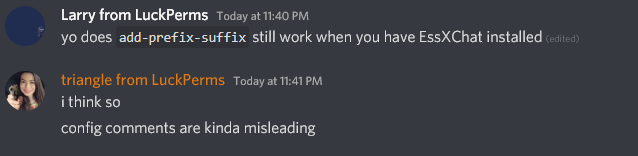
this is EssX support
besides I know from experience that they do because it's a super common problem for prefix duplication
dusky oar
Well they aren't sure about it
high raven
the setting is commented out and defaults to true with EssXChat but if you uncomment it, it takes precedence and works
dusky oar
When EssentialsChat.jar isn't used, force essentials to add the prefix and suffix from permission plugins to displayname.
This setting is ignored if EssentialsChat.jar is used, and defaults to 'true'.
The value of change-displayname (above) has to be true.
Do not edit this setting unless you know what you are doing!
#add-prefix-suffix: false
high raven
thanks for the emphasis 🙄
 slow osprey
hello
I use luckperms and mysql times out and closes how can I solve this

https://notes.io
11:38:28 [INFO] __ 11:38:28 [INFO] | |) LuckPerms v5.1.54 11:38:28 [INFO] |_ | Running on BungeeCord - Bun...
dusky oar
!errors
wintry cloudBOT
Here's a page with some common storage system errors.
LuckPerms wiki
 atomic horizon
Hello! I have a question.
I have some donator ranks and some time ranks, to give those i use the "add" command. The donator rank prefixes have larger weight than the time ranks. However, when the time rank is added it replaces the prefix with the time rank ones. How do i make it so these "time ranks" do not replace the prefix when added?
quick lagoon
!stacking
wintry cloudBOT
Display multiple prefixes/suffixes alongside a player's name.
LuckPerms wiki
atomic horizon
In lp info it says that i should have the memer rank (the paid one) but i have the master rank in chat
Ty ben
quick lagoon
wait, the issue is the prefix shown in lp user USER info no matching the chat @atomic horizon ?
atomic horizon
Yeap
quick lagoon
or do you want multiple prefix shown
Yeap
oh then that is an issue with your chat plugin
!chat
wintry cloudBOT
LuckPerms does not display things in chat!
LuckPerms is only able to send information to formatting plugins so that they display them properly. LuckPerms does not put the prefix in front of your name, you need a chat formatting plugin to do it, and you need Vault. Same goes for the tablist! If the information appears correctly when you run /lp user <user> info, LuckPerms is doing its job!
Prefix isn't showing?
What plugins can I use to format chat?
atomic horizon
yeap seems like its an issue with the chat plugin ty Ben ❤️
quick lagoon
np!
 crude oar
if i change the maxlifetime on one server having a connection issue do i need to change that for all servers too or can they be independent
 white heart
hey yall, im trying to get prefixes to work with essentialschat and the prefix wont work. Ive looked on the wiki but couldnt find anything.
it just says default
 regal cargo
the weight for default might be higher than from mod
whats default's weight?
also what chat formatting plugin are you using
white heart
im using essentialsx chat
unless thats not a chat formatting plugin
also defaults weight is 1
wintry cloudBOT
Please use pastebin!
Seeing a paste of the problem makes everything so much easier! Use https://bytebin.lucko.me/ for easy pasting!
For console errors:
Pastebin any relevant segments of the console log. If it's a startup error, this includes the entire startup log!
Other errors:
Pastebin the entire LuckPerms config file (passwords removed) as well as any other relevant files!
white heart
https://bytebin.lucko.me/KATUEZABQA like this?
regal cargo
ah i see the problem
white heart
whats the issue
regal cargo
format: '{PREFIX}{GROUP} {DISPLAYNAME}&l&7>>&f {MESSAGE}'
please change that and use luckperms placeholders
that'd be '%luckperms_prefix% {DISPLAYNAME}&7&l>>&f {MESSAGE}'
regal cargo
do you have PlaceholderApi?
white heart
no
regal cargo
there might be a different way idk of but i recommend you installing papi here: https://www.spigotmc.org/resources/placeholderapi.6245/

SpigotMC - High Performance Minecraft
white heart
what does papi do
regal cargo
it changes certain placeholders with their perspective value
for example, if %player_name% will be your name
and so will %luckperms_prefix% display your prefix
regal cargo
have you assigned the moderator rank to yourself?
white heart
yes
regal cargo
oh wow i even checked my own config
it looked like this
format: '{DISPLAYNAME} : {SUFFIX}{MESSAGE}'
do you have vault installed by the way
regal cargo
format: '{DISPLAYNAME} : {SUFFIX}{MESSAGE}' works for me
i think you should install vault as 99% of the plugins dont work without it
 fierce lynx
i do have it
white heart
alr its installed
restarting the server
if i were to go back and put it back to {PREFIX}{GROUP} {DISPLAYNAME}&l&7>>&f {MESSAGE} would it do the same thing
also its not bolded :/
regal cargo
its only not bolded because you did &l&7 instead of &7&l
 jade rock
im co owner with krqbs, i fixed it
white heart
oh &l goes after?
jade rock
we had to remove the pervious perfixes
regal cargo
&l always goes after yes
white heart
new issue
jade rock
what does display name mean
fierce lynx
/lp user The_ChairMan parent set default
jade rock
what do i do for display name
fierce lynx
then /lp user TheChairMan group add Mod
u did parent set mod
which made it show 2 times @white heart
you should always /lp user username group add rank
white heart
im still having the double issue
fierce lynx
then for default do /lp user username parent set default
would u be willing to call
and screenshare?
white heart
this?
high raven
Yeah
Ok so try removing the # in front of add-prefix-suffix in the essx config and restart
high raven
(it says false now right?)
white heart
yes
high raven
Good
white heart
uh
high raven
Now there's no prefix?
high raven
Add {PREFIX} before {DISPLAYNAME} in the chat format line
white heart
like this?
high raven
Yea
Do you have any other chat formatting plugins?
Actually we should probably move to #general since this is pretty much essentialsx at this point
white heart
alr
crude oar
if i change the maxlifetime on one server having a connection issue do i need to change that for all servers too or can they be independent
high raven
Think they can be independent but best bet is to try it and see ;)
crude oar
aight
do u know if the values will apply with the reloadconfig option or does it have to be a restart for that stuff
high raven
Restart almost definitely
crude oar
alright thanks larry :)
 mellow oracle
@high raven so what do i do?
wintry cloudBOT
Hey Abu The Dodo! Please don't tag helpful/staff members directly.
mellow oracle
welp :P
high raven
What do you want to do
mellow oracle
atm people can only break stuff and open doors when opped
but that means they can also do /gamemode and stuff which i dont want
i just want them to be able to do some basic survival
high raven
Do you have essentialsxantibuild
If you do, remove it
And as for plugin things, you Google the plugin documentation for the list of permissions and what they allow
mellow oracle
alright ill try but im pretty bad at this so sorry if i come back 😅
high raven
!wiki
wintry cloudBOT
Learn how to use LuckPerms and all of its features by reading the wiki on GitHub.
Read more
LuckPerms wiki
wintry cloudBOT
A list of permissions used by LuckPerms commands.
LuckPerms wiki
 sullen cosmos
so trying to do a bulk update. Wanting to change all permission values of "group.beta" from server vanillaswirl to skyfactoryaurora
was thinking /lp bulkupdate all update server skyfactoryaurora "server == vanillaswirl" "permission == group.beta"
?
or is that wrong
barren fable
Looks ok to me.
Be sure to make a backup using /lp export <file> first!
sullen cosmos
thank you
 paper vortex
just a quick question i am sure it might be in the wiki but couldnt find it, when creating a group it lets you put in the prefix,weight,and suffix. now it also says i can put in a "displayname" that the place holder for username?
tame hollow
No, its just another name for the group
The "display" name
Say you want the group name to have a capital, then you would write that in the displayname
paper vortex
oh alright thanks, i wasnt sure its been awhile sinced i used luckperms
alright how do i set it where they have access to everycommand without op?
tame hollow
Add *
paper vortex
alright thanks
slow osprey
high raven
is the server non premium
tame hollow
!paste console logs
wintry cloudBOT
Please use pastebin!
Seeing a paste of the problem makes everything so much easier! Use https://bytebin.lucko.me/ for easy pasting!
For console errors:
Pastebin any relevant segments of the console log. If it's a startup error, this includes the entire startup log!
Other errors:
Pastebin the entire LuckPerms config file (passwords removed) as well as any other relevant files!
high raven
^ better idea
slow osprey
crack
tame hollow

slow osprey
😄
high raven
that is probably why but seeing the console logs will tell us for sure
wintry cloudBOT
Please use https://bytebin.lucko.me to send files in the future. I have automatically uploaded message.txt for you: https://bytebin.lucko.me/KBy9y2Cfwf
slow osprey
slow osprey
2.2.4
wintry cloudBOT
You can download LuckPerms for Bukkit/Spigot, BungeeCord, Sponge, Nukkit and Velocity.
Additional downloads
high raven
we're 4 years past 2.2.4
slow osprey
I have been using for a long time, no problems have occurred
high raven
it has been 4 years since 2.2.4 has been released
we literally cannot help with problems that old cause they've been fixed already
slow osprey
okey 1 minute
tame hollow
yikes ma dude
slow osprey
sorry, version 5.0 i use 😄
high raven
!update
wintry cloudBOT
You can download LuckPerms for Bukkit/Spigot, BungeeCord, Sponge, Nukkit and Velocity.
Additional downloads
high raven
still, old
slow osprey
I'm blind
high raven
get the latest from ^
slow osprey
I'm updating
 dim wave
curious how any necessary data conversion will go from 2 to 5 
slow osprey
I started the server
tame hollow
tbh i am not sure about any schema changes between those versions
i don't think there is anything to worry about
Luck would have handled any migration issues
slow osprey
ranks reset 😦
dim wave
yeah yeah, just would imagine, for instance, 4 to 5, would no longer need 3 to 4
tame hollow
well i certainly hope you backed it up
slow osprey
my problem continues
dim wave
!paste
wintry cloudBOT
Please use pastebin!
Seeing a paste of the problem makes everything so much easier! Use https://bytebin.lucko.me/ for easy pasting!
For console errors:
Pastebin any relevant segments of the console log. If it's a startup error, this includes the entire startup log!
Other errors:
Pastebin the entire LuckPerms config file (passwords removed) as well as any other relevant files!
high raven
ranks are still there then -.-
slow osprey
I also have a big problem, ranks have been reset
tame hollow
the screenshots are useless to us, we need console logs.
slow osprey
I'm getting the same error
tame hollow
what does /lp info show
high raven
how have your ranks been reset if default still has its displayname lol
dim wave
shows you got 19 groups
tame hollow
ranks most definitely did not get reset
dim wave
!paste can you please post your console logs? Will make this process far faster
wintry cloudBOT
Please use pastebin!
Seeing a paste of the problem makes everything so much easier! Use https://bytebin.lucko.me/ for easy pasting!
For console errors:
Pastebin any relevant segments of the console log. If it's a startup error, this includes the entire startup log!
Other errors:
Pastebin the entire LuckPerms config file (passwords removed) as well as any other relevant files!
dim wave
Looks like there are some schema issues
high raven
looking at your log https://bytebin.lucko.me/ruX03LnVie,
did you manually edit the DB?
at any point
mental trench
Why you using cracked plugins?
slow osprey
did you manually edit the DB?
@high raven no
wintry cloudBOT
Hey BatuBskn0! Please don't tag helpful/staff members directly.
slow osprey
Why you using cracked plugins?
@mental trench where is it broken?
mental trench
I didn't say it was broken
high raven
stolen
mental trench
You're using leaked plugins
mental trench
No
slow osprey
I have no money, I have no status
high raven
I don't usually help people who allow people who have stolen Minecraft to play on their servers; people who have stolen software from others, I definitely dont
You've somehow screwed the db, if you have a backup id make a new set of tables and import to that
slow osprey
pay your money then i use it
high raven
that's not how that works
tame hollow
lol what
slow osprey
thank you
high raven
you're welcome!
 lilac hazel
Um
 inner urchin
Hello. Does anybody know why when I tempadd a group for players it gives them also permanent group? They have one which expire and a second one which is assigned forever. I use one database for 3 of my servers to share ranks.
quick lagoon
what exact command did you run?
inner urchin
/lp user nick parent addtemp group 30d
quick lagoon
screenshot lp user USER parent info
inner urchin
And it happens when the player changes the server
It is ok when I give it to him
but when he types as example /server skyblock
it gives him the group which never expires
Also I have lp installed for bungeecord
should I give them a rank by /lpb instead of /lp?
quick lagoon
it gives him the group which never expires
@inner urchin how are you deducting this?
also /server skyblock doesnt give permission nodes
unless another plugin is causing it
inner urchin
on the screenshot you can see group mvip which expires in 4 weeks and at the bottom the same group which is assigned forever
quick lagoon
screenshot lp info and lpb info
inner urchin
Today I will update lp to te latest version on every server and we will see if it helps
quick lagoon
yea you and try that too
wintry cloudBOT
You can download LuckPerms for Bukkit/Spigot, BungeeCord, Sponge, Nukkit and Velocity.
Additional downloads
inner urchin
I will update it later at night and I will let you know if it helped
So thank you for your help! 😄
 random terrace
Did it not post?
14.06 10:42:59 [Server] pool-15-thread-1/INFO Running LuckPerms v5.1.15 by Luck.
14.06 10:42:59 [Server] pool-15-thread-1/INFO - Platform: Bukkit
14.06 10:42:59 [Server] pool-15-thread-1/INFO - Server Brand: CraftBukkit
14.06 10:42:59 [Server] pool-15-thread-1/INFO - Server Version:
14.06 10:42:59 [Server] pool-15-thread-1/INFO git-Spigot-2040c4c-893ad93 (MC: 1.15.2) - 1.15.2-R0.1-SNAPSHOT
14.06 10:42:59 [Server] pool-15-thread-1/INFO - Storage:
14.06 10:42:59 [Server] pool-15-thread-1/INFO Type: Split Storage
14.06 10:42:59 [Server] pool-15-thread-1/INFO Types: {LOG=MARIADB, USER=MARIADB, GROUP=MARIADB, TRACK=MARIADB, UUID=MARIADB}
14.06 10:42:59 [Server] pool-15-thread-1/INFO Ping: 0ms
14.06 10:42:59 [Server] pool-15-thread-1/INFO Connected: true
14.06 10:42:59 [Server] pool-15-thread-1/INFO - Messaging: Sql
14.06 10:42:59 [Server] pool-15-thread-1/INFO - Instance:
14.06 10:42:59 [Server] pool-15-thread-1/INFO Static contexts: None
14.06 10:42:59 [Server] pool-15-thread-1/INFO Online Players: 0 (9 unique)
14.06 10:42:59 [Server] pool-15-thread-1/INFO Uptime: 10h 10m 3s
14.06 10:42:59 [Server] pool-15-thread-1/INFO Local Data: 0 users, 13 groups, 0 tracks
14.06 10:41:41 [Server] INFO [LP] Running LuckPerms v5.1.54 by Luck.
14.06 10:41:41 [Server] INFO [LP] - Platform: BungeeCord
14.06 10:41:41 [Server] INFO [LP] - Server Brand: BungeeCord
14.06 10:41:41 [Server] INFO [LP] - Server Version:
14.06 10:41:41 [Server] INFO [LP] git:BungeeCord-Bootstrap:1.15-SNAPSHOT:2f54c94:1500
14.06 10:41:41 [Server] INFO [LP] - Storage:
14.06 10:41:41 [Server] INFO [LP] Type: MariaDB
14.06 10:41:41 [Server] INFO [LP] Ping: 76ms
14.06 10:41:41 [Server] INFO [LP] Connected: true
14.06 10:41:41 [Server] INFO [LP] - Messaging: Sql
14.06 10:41:41 [Server] INFO [LP] - Instance:
14.06 10:41:41 [Server] INFO [LP] Static contexts: server=proxy
14.06 10:41:41 [Server] INFO [LP] Online Players: 0 (0 unique)
14.06 10:41:41 [Server] INFO [LP] Uptime: 2m 5s
14.06 10:41:41 [Server] INFO [LP] Local Data: 0 users, 13 groups, 0 tracks
quick lagoon
@random terrace why is bungeecord split storage
!update there is a version missmatch
wintry cloudBOT
You can download LuckPerms for Bukkit/Spigot, BungeeCord, Sponge, Nukkit and Velocity.
Additional downloads
random terrace
I don't know what that means..
quick lagoon
14.06 10:42:59 [Server] pool-15-thread-1/INFO Type: Split Storage
in lp config.yml set split-storage: false
!update to latest as well
wintry cloudBOT
You can download LuckPerms for Bukkit/Spigot, BungeeCord, Sponge, Nukkit and Velocity.
Additional downloads
random terrace
That's for regular luckperms though, and not bungee.
quick lagoon
yea you shouldnt spilt storage types unless you know what you are doing
and please update your lp- bungee
random terrace
my co-owner is the one who set this entire thing up, but I'm trying to fix it.
quick lagoon
ah
ok so:
- update lp-bukkit and lp-bungee to the latest
- in LP config.yml ensure
split-storage: false
random terrace
Am I able to PM you so that i don't:
- Clutter the chat
- Try this and if it doesn't work I can ask questions
If not it's okay. Just thought I'd ask 😫
quick lagoon
I will be sleeping soon, so i think its best to ask here
random terrace
Is it necessary to have bungee guard, just asking.
quick lagoon
no, its not necessary, i think its improve security? Hvaent use it before
random terrace
I updated the luckperms on all the servers and the bungee luck perms.
Changed from split-storage and messaging to sql
That worked 😄
quick lagoon
Awesome!
random terrace
Thank you ben. you're a true hero 😋
quick lagoon
np!
random terrace
So, I switched from my laptop to my desktop. One of the servers still works, but when I connect to the proxy it takes me to that server instead of the hub. with this error:
quick lagoon
show lp info for hub
random terrace
Someone else connected to the hub.
14.06 11:31:04 [Server] INFO [hub] (1): CallMeBrainy_
14.06 11:31:04 [Server] INFO [survival] (0):
14.06 11:31:04 [Server] INFO [skyblock] (1): StaceeAnn
But I cannot get to the console because they are in maintenance.
14.06 16:34:30 [Server] pool-12-thread-1/INFO Running LuckPerms v5.1.55 by Luck.
14.06 16:34:30 [Server] pool-12-thread-1/INFO - Platform: Bukkit
14.06 16:34:30 [Server] pool-12-thread-1/INFO - Server Brand: CraftBukkit
14.06 16:34:30 [Server] pool-12-thread-1/INFO - Server Version:
14.06 16:34:30 [Server] pool-12-thread-1/INFO git-Spigot-a99063f-c9d7c16 (MC: 1.15.2) - 1.15.2-R0.1-SNAPSHOT
14.06 16:34:30 [Server] pool-12-thread-1/INFO - Storage:
14.06 16:34:30 [Server] pool-12-thread-1/INFO Type: H2
14.06 16:34:30 [Server] pool-12-thread-1/INFO File Size: 0.04MB
14.06 16:34:30 [Server] pool-12-thread-1/INFO - Messaging: None
14.06 16:34:30 [Server] pool-12-thread-1/INFO - Instance:
14.06 16:34:30 [Server] pool-12-thread-1/INFO Static contexts: server=hub
14.06 16:34:30 [Server] pool-12-thread-1/INFO Online Players: 1 (2 unique)
14.06 16:34:30 [Server] pool-12-thread-1/INFO Uptime: 34m 23s
14.06 16:34:30 [Server] pool-12-thread-1/INFO Local Data: 1 users, 3 groups, 0 tracks
quick lagoon
Type: H2
you need to change storage-method: MariaDB and ensure the databse info is keyed in correctly in lp config.yml
you can copy the lp config.yml for the backend server that works
but note, dont do that for lp-bungee
random terrace
:c it didn't work.
random terrace
I have the same issue as before. I switched from my laptop to my desktop.
high raven
Can you send your server startup logs via pastebin, as well as the console error that happens when you join
!paste
wintry cloudBOT
Please use pastebin!
Seeing a paste of the problem makes everything so much easier! Use https://bytebin.lucko.me/ for easy pasting!
For console errors:
Pastebin any relevant segments of the console log. If it's a startup error, this includes the entire startup log!
Other errors:
Pastebin the entire LuckPerms config file (passwords removed) as well as any other relevant files!
random terrace
There is an error saying duplicate entry
 dense dove
having trouble with permission inheriting
I have everything setup and it worked for a bit, now it just kinda stopped working
wondering if anyone could help me with that
also for some reason users are getting duplicate permission groups in the editor
proper pulsar
Can you elaborate a bit?
And also an editor link would be helpful
@random terrace I see you are here
I think it makes more sense working this out here
random terrace
Yes, you're probably correct on that.
dense dove
https://luckperms.net/editor/LgXUmh3Vwm editor link
LuckPerms - A permissions plugin for Minecraft servers.
LuckPerms is a permissions plugin for Minecraft servers.
basically when a player ranks up they are supposed to keep their current permissions and gain some new commands/perms, that isnt happening for some reason
proper pulsar
@dense dove what version if LP are you using?
dense dove
5.1.7
proper pulsar
Update please. That should fix the issue with the duplicates in the editor
And for the second issue, you need to make sure a group inherits from the group below it. Not from itself
dense dove
huh?
proper pulsar
Like you have newbie_i inherit from newbie_i instead of default
proper pulsar
dense dove
yup I see that, fixing it rn
proper pulsar
👍🏼
dense dove
will the update remove my current config?
proper pulsar
@random terrace let me know when you got a chance to recreate the database
random terrace
I did
proper pulsar
And be aware that deleting it will wipe all your data
Ok. Does it work now?
@dense dove no. Why would it?
random terrace
No.
dense dove
idk just wanted to check, also how do I update it?
proper pulsar
Stop the server, replace the LuckPerms jar, start it again...?
dense dove
ty
proper pulsar
@random terrace what errors are you currently getting?
wintry cloudBOT
Please use https://bytebin.lucko.me to send files in the future. I have automatically uploaded message.txt for you: https://bytebin.lucko.me/i2PgT0mNYQ
proper pulsar
after you deleted the database and made a new one? (Restarted the servers after that too I hope)
random terrace
yes
random terrace
I am probably doing it wrong... but I don't understand how it could work temporarily and then, stop working D;
proper pulsar
Me neither at the point
And I'm not saying you're doing it wrong. But also not saying you're doing it right,
That's why I want to know how you're doing it
random terrace
i deleted it again, and not gonna use what i had last time, which is what was what i found online. Is there any place where I can find how to input the mysql
proper pulsar
I'm not sure I can follow you
If you have a phpMyAdmin page for your database use that
So much easier than everything else
random terrace
idk what that is xD my co-owner does most of the sql stuff, but i got it working earlier. and then, it stopped.
 junior furnace
Is it possible to have a backup database specified ? I replicate the mysql database, but if by chance my main master mysql goes down, I'd like to be able to have it auto switch to my other sql.
proper pulsar
No there is not
junior furnace
Okay, thanks for answering. I'll setup a proxy to take care of it.
mental trench
Couldn't you round-robin the mysql url you use? Idk if LP tries to reconnect if it loses connect. Idk if Hikari is set to auto reconnect on true.
But theoretically you could round-robin your mysql url and have it connect to the fallback if the original goes down?
proper pulsar
Yes it is
junior furnace
Hmm yes that would be ideal...
mental trench
So, from a plugin standpoint, no, but if you do a setup for the url you use, then, most likely.
junior furnace
Yeah at the moment it's an ip address but if I setup a dns or something then I could round robin it. Thanks for the idea!
mental trench
Yup!
proper pulsar
If the database is replicated to a fallback server I'd be careful
Because if the server connects to the fallback instead of the main one and starts writing data, that's gonna be an issue
junior furnace
It's master-master replication, so it should be fine
proper pulsar
Ok
mental trench
So that means that if the original comes back up, the replica will replicate to the original again automatically?
junior furnace
That's right
mental trench
Alrighty cool, that's what I thought, just wanted to confirm my knowledge on that.
 dreamy dome
Is luckperms compatiable with player vaults x?
 fair prairie
Hello!
high raven
@dreamy dome yep
fair prairie
Luckperms keep spamming the same thing:
[23:56:25 WARN]: Sun Jun 14 23:56:25 CEST 2020 WARN: Establishing SSL connection without server's identity verification is not recommended. According to MySQL 5.5.45+, 5.6.26+ and 5.7.6+ requirements SSL connection must be established by default if explicit option isn't set. For compliance with existing applications not using SSL the verifyServerCertificate property is set to 'false'. You need either to explicitly disable SSL by setting useSSL=false, or set useSSL=true and provide truststore for server certificate verification.
[23:56:48 WARN]: Sun Jun 14 23:56:48 CEST 2020 WARN: Establishing SSL connection without server's identity verification is not recommended. According to MySQL 5.5.45+, 5.6.26+ and 5.7.6+ requirements SSL connection must be established by default if explicit option isn't set. For compliance with existing applications not using SSL the verifyServerCertificate property is set to 'false'. You need either to explicitly disable SSL by setting useSSL=false, or set useSSL=true and provide truststore for server certificate verification.
I don't have a server certificate verification. How can I remove this?
high raven
!errors see the SSL error solution here
wintry cloudBOT
Here's a page with some common storage system errors.
LuckPerms wiki
fair prairie
Thank you!
 robust hull
I have a problem and I don't know why. I used the command /lp group default meta setprefix "&7[& aMember & 7] &f" but when later only "[]" appears. Help pls
wintry cloudBOT
Display data such as user prefixes and groups from LuckPerms in other plugins.
LuckPerms wiki
 tranquil yew
quick lagoon
tranquil yew
quick lagoon
!download use luckperm-legacy @tranquil yew
wintry cloudBOT
You can download LuckPerms for Bukkit/Spigot, BungeeCord, Sponge, Nukkit and Velocity.
Additional downloads
quick lagoon
also we dont do dms here
high raven
once again solved in g1, i wonder why people feel the need t send it in both channels...
quick lagoon
clippy needs AI to check for double posting haha
 dire grove
prefixes are not displayed tried to install Vault but does not help what to do
tidal blade
@dire grove Do not cross post. You asked in #support-1 already, so be patient and wait.
runic sedge
!prefixes
wintry cloudBOT
You can set prefixes, suffixes and other meta data in LuckPerms for players and groups. Note that LuckPerms does not manage chat. You need to use another plugin to show prefixes/suffixes in chat.
LuckPerms wiki
runic sedge
!placeholders
wintry cloudBOT
Display data such as user prefixes and groups from LuckPerms in other plugins.
LuckPerms wiki
 worthy snow
Hello how can i delete all player data please
quick lagoon
!bulkedit
wintry cloudBOT
Quickly update a large amount of user and group permissions by using the bulkupdate command.
LuckPerms wiki
quick lagoon
/lp bulkupdate users delete
worthy snow
it does not delete the grades that I created?
quick lagoon
only users permissions
worthy snow
ty
 obsidian fiber
what is the best free chat plugin for use with luckperms on a bungeecord network?
obsidian fiber
k
 neon lichen
Hi, I don't really enderstand how do work the metastacking with two prefixes, can I have help in dm to not to disturb this channel ?
quaint idol
This channel is for support such as that, it's fine here 😉
neon lichen
ok so I have two groups, default and level. My server is a skyblock, and I want my player for example to be like : [is_level] [Rank] [Name].
But I don't know how to make my group level, and how can I make it to work with every other Rank group :/
lilac hazel
!stacking
wintry cloudBOT
Display multiple prefixes/suffixes alongside a player's name.
LuckPerms wiki
lilac hazel
Sound like what you're after perhaps?
 amber raft
Hello! is it possible to make a temporary prefix for a user?
lp user <user> meta addprefix 1000 &4&l&kA&6&lMVP&4&l&kA settemp 1hr server=global
quaint idol
Could you just make a group that has the prefix and then assign that? (see /lp user <> parent addtemp)
amber raft
Oh, Thank you so much! but how do I set the prefix to over-ride all the other prefixes is it through weights?
wintry cloudBOT
LuckPerms allows you to set weights in order to determine the priority of certain nodes, like permissions and even prefixes. A higher weight number is a higher priority.
LuckPerms wiki
amber raft
Thank you so much! ❤️
quaint idol
👍
 toxic lintel
How does luck perms bungee work? Like I setup all groups on bungee and on each server every group has different permissions or same?
high raven
LP bungee handles bungee permission checks like for /server only
You still need Lp-bukkit on each backend
And they sync so all your perms are in one place and can be read/edited/checked anywhere
!bungee
wintry cloudBOT
If you run a Bungeecord network, learn how to correctly setup LuckPerms on all server instances (including Bungee).
Also read:
Syncing data between servers
https://github.com/lucko/LuckPerms/wiki/Syncing-data-between-servers
LuckPerms wiki
 wispy vault
This is my user account permissions.
The group I'm in permissions
But I'm still seeing all this in tab completion??
tame hollow
are you opped by any chance
tame hollow
also LP doesn't handle the autocomplete commands
wispy vault
Okay then that would seem like a poor assumption on my part then. My assumption is that LP would restrict the ability tab complete any commands unless they were explicitly given through me plugin
high raven
usually tab complete only works if you have permissions to do the thing, but it can be funky if you ever did have permissions to do it and removed them
wispy vault
is there a way to completely wipe my data from LP?
high raven
lp user <name> clear
wispy vault
okay thanks
high raven
may not wipe from the server tho
 jolly grail
So I made an error with my server and was running it with BungeeCord disabled, even though its a server on a bungee cord network. This was an accident. But basically messed up my entire luckperms system as it made everyone have different UUIDs than normal... so I turned to just giving people there ranks manually. I just figured out that this was the issue. But clearly now people have new in game ranks. I presume enabling bungeecord is going to revert everything back to normal, but people would likely lose in game ranks given during this time and then I’d have this different problem. What is my best way to approach this issue?
high raven
How many people are ya talking about here
less than or more than 50
that have non-default ranks
jolly grail
It is a server averaging 60-70, and there has been around 500 joins.
high raven
yeah ok so the easy way is to enable bungeecord and make sure the online mode setup is working properly and if players lose a rank manually give it to them
jolly grail
That will fix the issue right?
high raven
you've basically been running a non-premium server, so people's UUIDs are all over the place
if you make sure ip_forward and online-mode are true in the bungee config
and bungeecord is true in all spigot.ymls
and they're only joining through the proxy
you'll be good
jolly grail
Okay, thank you!
jolly grail
Larry, should I be expecting all my plugins to break that use UUID like LuckPerms?
high raven
Only if they rely on storing data based on UUID
it's kinda bad that you had bungeecord mis-setup this whole time cause it's deffo gonna cause problems
just gotta improvise, adapt, overcome at this point
prisma hinge
Hey
I need some help
Im trying to give someone the option to use gamemode creative and cant figure out how
I tried giving them cmi.command.gmc
prisma hinge
yes
 lone gull
essentials x?
tame hollow
cmi permission but using essentials? 🤔
tidal blade
You need to give them the permission for the gamemode command for the plugin that handles gamemode
lone gull
Joshua look up essentials x permissions
tidal blade
@prisma hinge Are you using EssentialsX or CMI
prisma hinge
CMI apologies
tidal blade
!verbose Then lookup their permissions and give the groups/players permission to use the commands you want and if it still isn't working check out this
wintry cloudBOT
LuckPerms provides a verbose command to help you find out what permissions a command/plugin is checking.
LuckPerms wiki
prisma hinge
well everything is working fine other then worldedit usage and gm c
tame hollow
use verbose
tidal blade
Use verbose
prisma hinge
I dont know how
high raven
!verbose it's described here
wintry cloudBOT
LuckPerms provides a verbose command to help you find out what permissions a command/plugin is checking.
LuckPerms wiki
prisma hinge
so its saying that this is false minecraft.command.defaultgamemode
high raven
Are you sure
prisma hinge
yes
high raven
That's weird I've never seen that node, try setting it to true and see what happens
Unless its meta in which case you may need a value
prisma hinge
do it like this? /lp user Commando_Panda56 permission set minecraft.command.defaultgamemode true
high raven
Yep
prisma hinge
didnt work
 high raven
!update Luckperms to the latest on this site- there's a new feature that will serve you well
wintry cloudBOT
You can download LuckPerms for Bukkit/Spigot, BungeeCord, Sponge, Nukkit and Velocity.
Additional downloads
prisma hinge
alright
prisma hinge
where do i find the .jar file i need to replace so i can update the plugin
tame hollow
!download
wintry cloudBOT
You can download LuckPerms for Bukkit/Spigot, BungeeCord, Sponge, Nukkit and Velocity.
Additional downloads
tame hollow
oh boy
prisma hinge
nvm
quick lagoon
@high raven @tidal blade
^^ ads
@prisma hinge pls delete it, not advertisement, #rules
quick lagoon
?

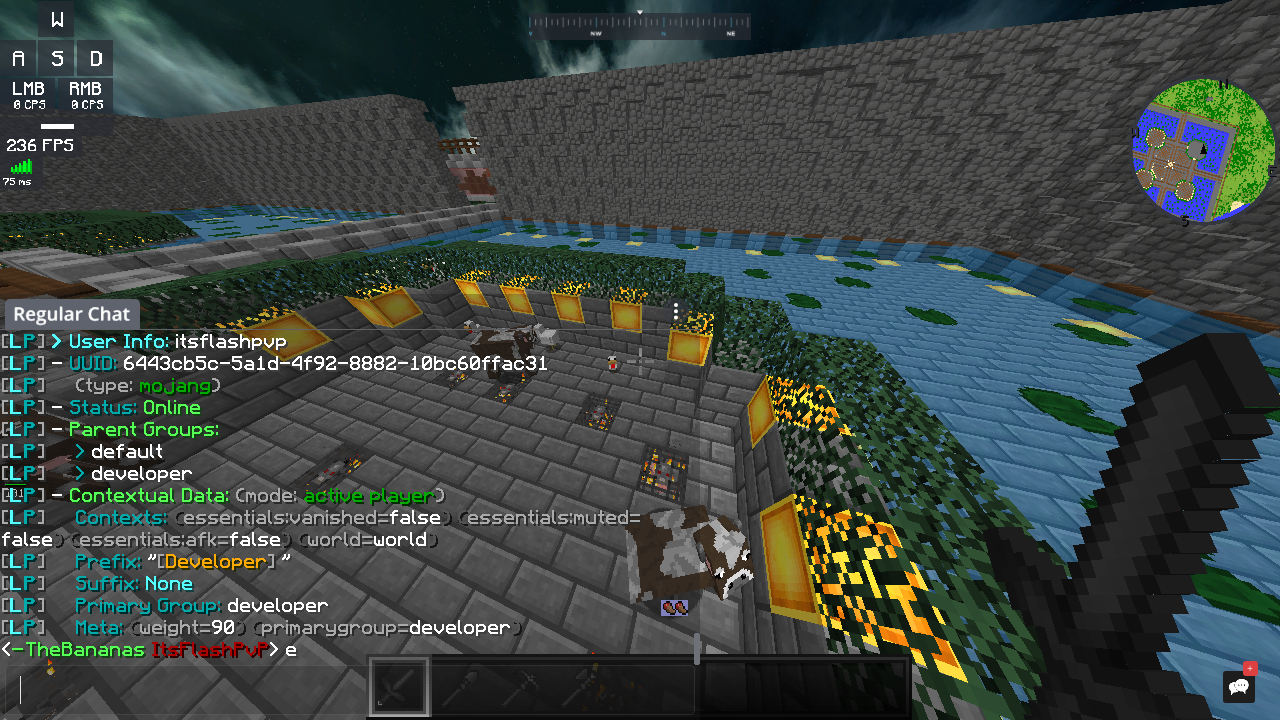
 lilac hazel
Next time Tobi, i'll remember to tag you 🙂
quick lagoon
well bcu i saw your status as "do not disturb"
 young girder
I need help
is there any way that even though the player is offline he can add it to a group
high raven
Yes use the uuid
tidal blade
If they have joined before, use the name, if they have never joined, use the uuid
young girder
ok thanks 😀
 primal pivot
Hi! I've installed luckperms on my bungee and setup a mysql connection, but it doesn't seem to sync with the database at all. It doesn't show any groups.
Is there something else I need to change?
quick lagoon
screenshot lp info and lpb info
quick lagoon
!update
wintry cloudBOT
You can download LuckPerms for Bukkit/Spigot, BungeeCord, Sponge, Nukkit and Velocity.
Additional downloads
quick lagoon
there is a version missmatch
quick lagoon
try run lp networksync
quick lagoon
run it and screenshot the output of it
quick lagoon
does it say receive ping from or similar in your backend servers console?
primal pivot
no
quick lagoon
hmm are they they connected to the same database?
quick lagoon
check table-prefix: 'luckperms_' is the same for all your lp config.yml
quick lagoon
hmm
primal pivot
So now I can use /lp or /lpb for perms since they are synced right?
quick lagoon
yes
primal pivot
and do they both sync automatically?
quick lagoon
yes, it should
primal pivot
Working! Thanks 😄
quick lagoon
np!
 urban aspen
what
dude just scru it i am deleting the plugin
no one knows how to help
tutorial
or something
why
quick lagoon

GitHub
A permissions plugin for Minecraft servers. Contribute to lucko/LuckPerms development by creating an account on GitHub.
 lavish cargo
Hi, when I talk in the chat it doesn't put me the messages because of the "§k" in front is it possible to fix this problem ?
 hearty pond
&string you what magic &rstring to reset
high raven
!colors
wintry cloudBOT
prisma hinge
Good evening, the permissions work but I see no prefix how can I do? Thank you for mentioning me when you answer me.
hearty pond
!chat
wintry cloudBOT
LuckPerms does not display things in chat!
LuckPerms is only able to send information to formatting plugins so that they display them properly. LuckPerms does not put the prefix in front of your name, you need a chat formatting plugin to do it, and you need Vault. Same goes for the tablist! If the information appears correctly when you run /lp user <user> info, LuckPerms is doing its job!
Prefix isn't showing?
What plugins can I use to format chat?
 balmy totem
I get an error when loading LuckPerms. Never gotten it before. (I removed all plugins and error still occurs)
wintry cloudBOT
Please use https://bytebin.lucko.me to send files in the future. I have automatically uploaded message.txt for you: https://bytebin.lucko.me/dIQuTaCKFQ
balmy totem
also it gives the java.net.UnknownHostException: repo1.maven.org exception when I removed libs for it to regenerate them
quaint idol
good clippy
balmy totem
yis
quaint idol
Sounds like your server is having troubles downloading the nessecary dependencies
balmy totem
clippy > all
quaint idol
are you using shared hosting, and if so which company, or running on a VPS/dedi?
quaint idol
Discord seems to be having issues, messages are being slow for me too
balmy totem
o
I'm using a VPS. The spigot server's being ran by Pterodactyl.
might be firewall
I'll try temp disabling it
rip nope
disabled the firewall. no change
well actually
let me try getting the libs on a diff server and then copying them to this one
stuck coyote
You could try restarting docker
balmy totem
omg it works thanks
stuck coyote
Did you copy the libs over from another server?
balmy totem
Did you copy the libs over from another server?
oh uhm yes but then I got sql error (couldn't connect after 5k ms) but that fixed it
quaint idol
!errors
wintry cloudBOT
Here's a page with some common storage system errors.
LuckPerms wiki
stuck coyote
You said you use pterodactyl, there are a few things special with that
For example that 127.0.0.1 doesnt work
fair prairie
Hello! There's an issue with Velocity
I don't know what to do. Full log: https://mcpaste.io/9b047da2ec970d5f
A easy to use Paste site for MC Server logs.
quick lagoon
@fair prairie are you using the luckperm-bungee version?
wintry cloudBOT
You can download LuckPerms for Bukkit/Spigot, BungeeCord, Sponge, Nukkit and Velocity.
Additional downloads
high raven
quick lagoon
oh damn i forgot that existed haha
 safe sparrow
Hey whats the user place holder for giving players perms
[2:40 PM]
I want to do /lp user {name} permission add xyx.* but it doenst allow me
quick lagoon
(double posted btw)
plain harness
wie lösche ich gruppen?
wintry cloudBOT
Please use https://bytebin.lucko.me to send files in the future. I have automatically uploaded message.txt for you: https://bytebin.lucko.me/5PkTEscwvt
wintry cloudBOT
Please use pastebin!
Seeing a paste of the problem makes everything so much easier! Use https://bytebin.lucko.me/ for easy pasting!
For console errors:
Pastebin any relevant segments of the console log. If it's a startup error, this includes the entire startup log!
Other errors:
Pastebin the entire LuckPerms config file (passwords removed) as well as any other relevant files!
 coarse kraken
I am currently creating a bungeecord network.
I just wanna know, If I got this right for the LP installation:
The Pre Setup found here https://luckperms.net/wiki/Network-Installation#the-bungeecord-version-of-luckperms is only for the bungee version of LP / for the Proxy Server.
And on all "normal" worlds and the hub, I just need to follow the "Installing LuckPerms across your network"
quick lagoon
yes, basically, you need lp-bungee on proxy and normal lp on all others server, then connect them to a common sql database
!bungee
wintry cloudBOT
If you run a Bungeecord network, learn how to correctly setup LuckPerms on all server instances (including Bungee).
Also read:
Syncing data between servers
https://github.com/lucko/LuckPerms/wiki/Syncing-data-between-servers
LuckPerms wiki
coarse kraken
oki but I use MySql cuz my hoster supports it
But I assume that doesnt change a thing
 shut nexus
hi
 glad plume
uh so im using shockbyte and ive downloaded lp but whenever i run a command from lp it says unknown command
help plz
high raven
Check the startup log for errors
neon lichen
Can someone teach me how the use the metastacking system with prefixes ? I'm french so I don't really understand the link explaining the metastacking principe. We can even do It in vocal, I mean I can speak easily, but there isn't tutorials effective for me :/
glad plume
@high raven theres no errror message
wintry cloudBOT
Hey rice! Please don't tag helpful/staff members directly.
glad plume
oh srry lol
wintry cloudBOT
Please use pastebin!
Seeing a paste of the problem makes everything so much easier! Use https://bytebin.lucko.me/ for easy pasting!
For console errors:
Pastebin any relevant segments of the console log. If it's a startup error, this includes the entire startup log!
Other errors:
Pastebin the entire LuckPerms config file (passwords removed) as well as any other relevant files!
high raven
!stacking @neon lichen have you tried this?
wintry cloudBOT
Display multiple prefixes/suffixes alongside a player's name.
LuckPerms wiki
neon lichen
Yes, but like I told you, haven't you a video to explain me better ? cause i'm pretty bad, that's why it's not working on my server.
coarse kraken
is there an official Bungeecord Discord?
high raven
that's a lot of things haha
prisma hinge
o no
high raven
!argumentbased did you follow the chart down here
wintry cloudBOT
Fine tune exactly what users with permission to use LuckPerms can do.
LuckPerms wiki
prisma hinge
i read that
high raven
Because when I made it I knew what I was talking about but I kinda forgot
¯_(ツ)_/¯
best way to see now is to test
if they can do what you want them to do, amazing
if they can't, run verbose and add the perms it requires
you're also going to need the permission to usecontext.global
high raven
for lp or for any plugin?
other plugins set their own permissions
plus, you'll need to enable argbased in the config if you havent already
high raven
nah it looks like its set up that way, but that's just convention
you'll need to actually check the plugin docs to see what is up
or, for Bukkit/vanilla perms the bukkit command permissions page
prisma hinge
so i need another plugin that manages gamemodes like essentails
high raven
!commands will tell ya cause i tbh forget
wintry cloudBOT
Find all of the available LuckPerms commands on the wiki.
General commands
User commands
Group commands
Permission commands
Parent commands
Meta commands
Track commands
Log commands
LuckPerms wiki
prisma hinge
yea it snips branches from the tree
basically
where's the verbose setting
ah ha nvm
high raven
!verbose 😉
wintry cloudBOT
LuckPerms provides a verbose command to help you find out what permissions a command/plugin is checking.
LuckPerms wiki
lavish cargo
Hey, I already asked the question yesterday but the suggested answers didn't work or I did it wrong.
Anyway, basically, I'd like to make the players' nicknames "hidden."
so I used the "§k", but when we talk about the chat, it hides the message too.
So I tried to reset afterwards with a "§r" but it still doesn't work? is it possible to hide the names of the players by keeping the messages in the chat?
high raven
what chat formatter do you use
lavish cargo
VaultChatFormatter
wintry cloudBOT
Please use pastebin!
Seeing a paste of the problem makes everything so much easier! Use https://bytebin.lucko.me/ for easy pasting!
For console errors:
Pastebin any relevant segments of the console log. If it's a startup error, this includes the entire startup log!
Other errors:
Pastebin the entire LuckPerms config file (passwords removed) as well as any other relevant files!
lavish cargo
high raven
try {prefix}{name}{suffix}: &r{message}
high raven
np!
lavish cargo
I guess I can just delete "{name}" and just keep the prefix?
high raven
u too!
 viscid slate
Hmm every time I open the lp editor, it says invalid session...
high raven
are you sure you copy the link correctly?
viscid slate
Does having two different server's lp webeditors open cause issues?
 lean lichen
hi
can someone help me
I need help
real quick
I have a prefix that I cannot remove any gamers know what up
 charred sparrow
its so weird
even with verbose I cant find what plugin is preventing from breaking blocks
charred sparrow
im not support
lean lichen
atleast thats my best guess
tame hollow
server.properties
charred sparrow
oh ok
 solar hedge
i didnt understand the bungeecord part
of plugin
if i give the player perm is that perm will be on every server?
tame hollow
depends if you specify contexts or not